
WPF中行为与触发器的概念及用法
完全来源于十月的寒流,感谢大佬讲解
一、行为 (Behaviors)
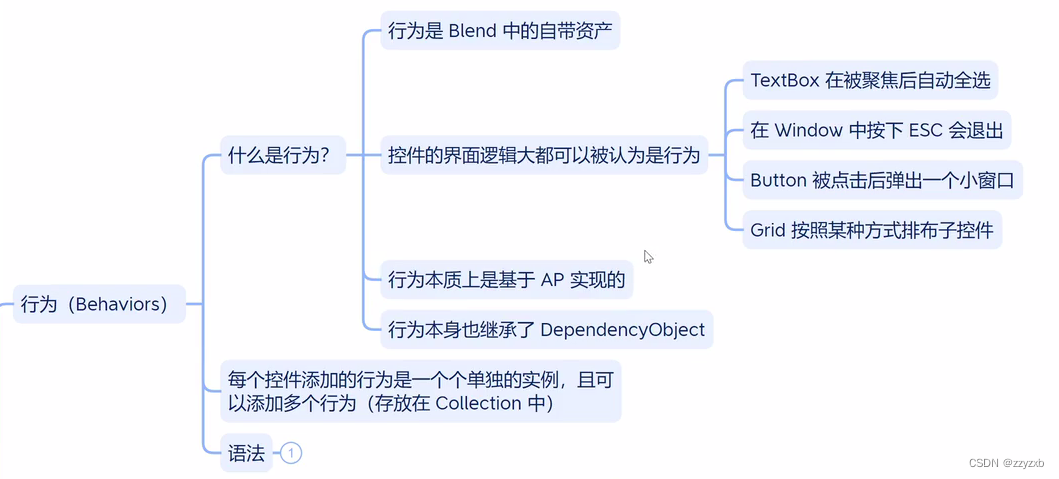
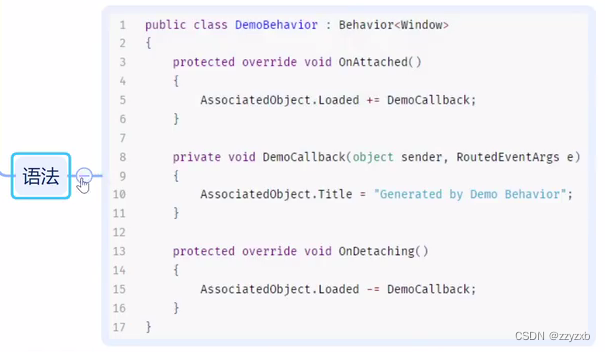
behaviors的简单测试
<Window x:Class="Test_05.MainWindow"xmlns="http://schemas.microsoft.com/winfx/2006/xaml/presentation"xmlns:x="http://schemas.microsoft.com/winfx/2006/xaml"xmlns:d="http://schemas.microsoft.com/expression/blend/2008"xmlns:mc="http://schemas.openxmlformats.org/markup-compatibility/2006"xmlns:local="clr-namespace:Test_05"mc:Ignorable="d"xmlns:b="http://schemas.microsoft.com/xaml/behaviors"Title="MainWindow" Height="450" Width="800"><Grid><Border x:Name="bord" Width="50" Height="50" Background="Blue"><b:Interaction.Behaviors><b:MouseDragElementBehavior></b:MouseDragElementBehavior></b:Interaction.Behaviors></Border></Grid>
</Window>
自定义behaviors测试
<Window x:Class="Test_05.MainWindow"xmlns="http://schemas.microsoft.com/winfx/2006/xaml/presentation"xmlns:x="http://schemas.microsoft.com/winfx/2006/xaml"xmlns:d="http://schemas.microsoft.com/expression/blend/2008"xmlns:mc="http://schemas.openxmlformats.org/markup-compatibility/2006"xmlns:local="clr-namespace:Test_05"mc:Ignorable="d"xmlns:b="http://schemas.microsoft.com/xaml/behaviors"Title="MainWindow" Height="450" Width="800"><Grid><Border x:Name="bord" Width="50" Height="50" Background="Blue" RenderTransformOrigin="1.47,0.858"><b:Interaction.Behaviors><b:MouseDragElementBehavior></b:MouseDragElementBehavior><local:MyBehaviors></local:MyBehaviors></b:Interaction.Behaviors></Border></Grid>
</Window>
using Microsoft.Xaml.Behaviors;
using System;
using System.Collections.Generic;
using System.Linq;
using System.Text;
using System.Threading.Tasks;
using System.Windows;
using System.Windows.Controls;
using System.Windows.Data;
using System.Windows.Documents;
using System.Windows.Input;
using System.Windows.Media;
using System.Windows.Media.Imaging;
using System.Windows.Navigation;
using System.Windows.Shapes;namespace Test_05
{/// <summary>/// MainWindow.xaml 的交互逻辑/// </summary>public partial class MainWindow : Window{public MainWindow(){InitializeComponent();}}public class MyBehaviors : Behavior<Border>{protected override void OnAttached(){//AssociatedObject.Background = Brushes.Green;AssociatedObject.MouseEnter += (sender,args) => {AssociatedObject.Background = Brushes.Green;};AssociatedObject.MouseLeave += (sender, args) =>{AssociatedObject.Background = Brushes.Blue;};}protected override void OnDetaching(){}}
}
点击按钮后清空某个文本框的内容
<Window x:Class="Test_05.MainWindow"xmlns="http://schemas.microsoft.com/winfx/2006/xaml/presentation"xmlns:x="http://schemas.microsoft.com/winfx/2006/xaml"xmlns:d="http://schemas.microsoft.com/expression/blend/2008"xmlns:mc="http://schemas.openxmlformats.org/markup-compatibility/2006"xmlns:local="clr-namespace:Test_05"mc:Ignorable="d"xmlns:b="http://schemas.microsoft.com/xaml/behaviors"Title="MainWindow" Height="450" Width="800"><StackPanel><TextBox x:Name="tbox"></TextBox><Button HorizontalAlignment="Left" Content="clear"><b:Interaction.Behaviors><local:ClearTextBox Target="{Binding ElementName=tbox}"></local:ClearTextBox></b:Interaction.Behaviors></Button></StackPanel>
</Window>
using Microsoft.Xaml.Behaviors;
using System;
using System.Collections.Generic;
using System.Linq;
using System.Text;
using System.Threading.Tasks;
using System.Windows;
using System.Windows.Controls;
using System.Windows.Data;
using System.Windows.Documents;
using System.Windows.Input;
using System.Windows.Media;
using System.Windows.Media.Imaging;
using System.Windows.Navigation;
using System.Windows.Shapes;namespace Test_05
{/// <summary>/// MainWindow.xaml 的交互逻辑/// </summary>public partial class MainWindow : Window{public MainWindow(){InitializeComponent();}}public class ClearTextBox : Behavior<Button>{public TextBox Target{get { return (TextBox)GetValue(TargetProperty); }set { SetValue(TargetProperty, value); }}public static readonly DependencyProperty TargetProperty =DependencyProperty.Register("Target", typeof(TextBox), typeof(ClearTextBox), new PropertyMetadata(null));protected override void OnAttached(){AssociatedObject.Click += EmptyText;}private void EmptyText(object sender, RoutedEventArgs e){Target?.Clear();}}
}
用鼠标滚轮调整文本框中的数字
<Window x:Class="Test_05.MainWindow"xmlns="http://schemas.microsoft.com/winfx/2006/xaml/presentation"xmlns:x="http://schemas.microsoft.com/winfx/2006/xaml"xmlns:d="http://schemas.microsoft.com/expression/blend/2008"xmlns:mc="http://schemas.openxmlformats.org/markup-compatibility/2006"xmlns:local="clr-namespace:Test_05"mc:Ignorable="d"xmlns:b="http://schemas.microsoft.com/xaml/behaviors"Title="MainWindow" Height="450" Width="800"><StackPanel><TextBox x:Name="tbox" FontSize="30" Text="0"><b:Interaction.Behaviors><local:MouseWheelBehavior MinValue="-100" MaxValue="100" Scale="3"></local:MouseWheelBehavior></b:Interaction.Behaviors></TextBox></StackPanel>
</Window>
using Microsoft.Xaml.Behaviors;
using System;
using System.Collections.Generic;
using System.Linq;
using System.Text;
using System.Threading.Tasks;
using System.Windows;
using System.Windows.Controls;
using System.Windows.Data;
using System.Windows.Documents;
using System.Windows.Input;
using System.Windows.Media;
using System.Windows.Media.Imaging;
using System.Windows.Navigation;
using System.Windows.Shapes;namespace Test_05
{/// <summary>/// MainWindow.xaml 的交互逻辑/// </summary>public partial class MainWindow : Window{public MainWindow(){InitializeComponent();}}public class MouseWheelBehavior : Behavior<TextBox>{public int MaxValue { get; set; } = 10;public int MinValue { get; set; } = -10;public int Scale { get; set; } = 1;protected override void OnAttached(){AssociatedObject.MouseWheel += Wheel;}private void Wheel(object sender, MouseWheelEventArgs e){int num = int.Parse(AssociatedObject.Text);if (e.Delta > 0){num += Scale;}else{num -= Scale;}if (num > MaxValue){num = MaxValue;}if (num < MinValue){num = MinValue;}AssociatedObject.Text = num.ToString();}}
}
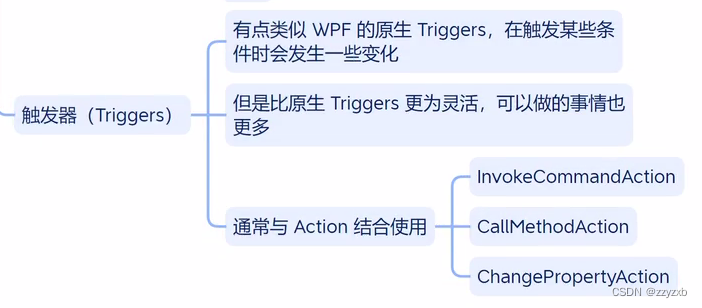
二、触发器 (Triggers)
相关文章:
WPF中行为与触发器的概念及用法
完全来源于十月的寒流,感谢大佬讲解 一、行为 (Behaviors) behaviors的简单测试 <Window x:Class"Test_05.MainWindow"xmlns"http://schemas.microsoft.com/winfx/2006/xaml/presentation"xmlns:x"http://schemas.microsoft.com/winf…...

2023-2024华为ICT大赛-计算赛道-广东省省赛初赛-高职组-部分赛题分析【2023.11.18】
2023-2024华为ICT大赛 计算赛道 广东省 省赛 初赛 高职组 部分赛题 分析【2023.11.18】 文章目录 单选题tpcds模式中存在表customer,不能成功删除tpcds模式是( )以下哪个函数将圆转换成矩形( )下列哪个选项表示依赖该D…...
『 MySQL数据库 』数据库之表的约束
文章目录 前言 💻空属性约束(非空约束) 🔖default约束(默认值约束,缺省) 🔖列描述comment 🔖数字类型长度zerofill 🔖主键primary key 🔖📍 追加主键 📍📍 删除主键 &…...
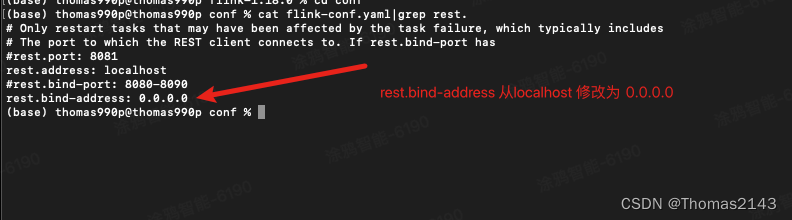
flink 8081 web页面无法被局域网内其他机器访问
实现 http://localhost:8081/#/overview 可以被局域网其他机器访问...
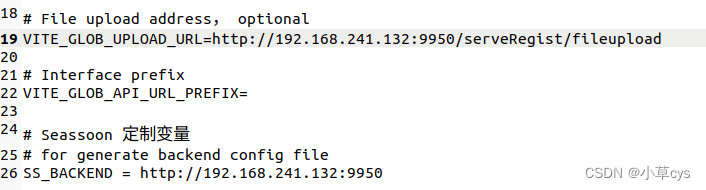
零基础安装分布式数据服务注册系统
一、先安装VM虚拟机,安装最新的ubuntu22系统, 先安装mysql, sudo apt install mysql-server sudo mysql_secure_installation 根据自己需求选择 密码安全级别时,选择n 删除匿名用户?(按y|Y表示是&…...

2023最新最全【OpenMV】 入门教程
1. 什么是OpenMV OpenMV 是一个开源,低成本,功能强大的 机器视觉模块。 OpenMV上的机器视觉算法包括 寻找色块、人脸检测、眼球跟踪、边缘检测、标志跟踪 等。 以STM32F427CPU为核心,集成了OV7725摄像头芯片,在小巧的硬件模块上&a…...

【Java并发编程三】线程的基本使用一
基本使用一 将类继承Runnable,创建Thread,然后调用Thread的start方法启动: package myTest;public class myTest implements Runnable {public static void main(String[] args) throws InterruptedException {myTest test new myTest();Th…...

企业邮箱认证指南:安全与高效的邮箱认证方法
企业邮箱是专门为企业提供的电子邮件服务,安全性和专业性更高。在开始使用企业邮箱之前,很多人会有一些问题,比如企业邮箱需要认证吗、如何开通企业邮箱,以及哪款企业邮箱好。 1、企业邮箱在使用前需要认证吗? 答案是肯…...
)
Django(八、如何开启事务、介绍长见的字段类型和参数)
文章目录 ORM事务操作开启事务 常见的字段类型和参数ORM还支持用户自定义字段类型ORM常用字段参数外键相关参数 ORM事务操作 引入事务 1.事务的四大特性原子性、一致性、隔离性、持久性 2.相关SQL关键字start transaction;rollback;commit;savapoint; 3.相关重要概念脏读、幻…...
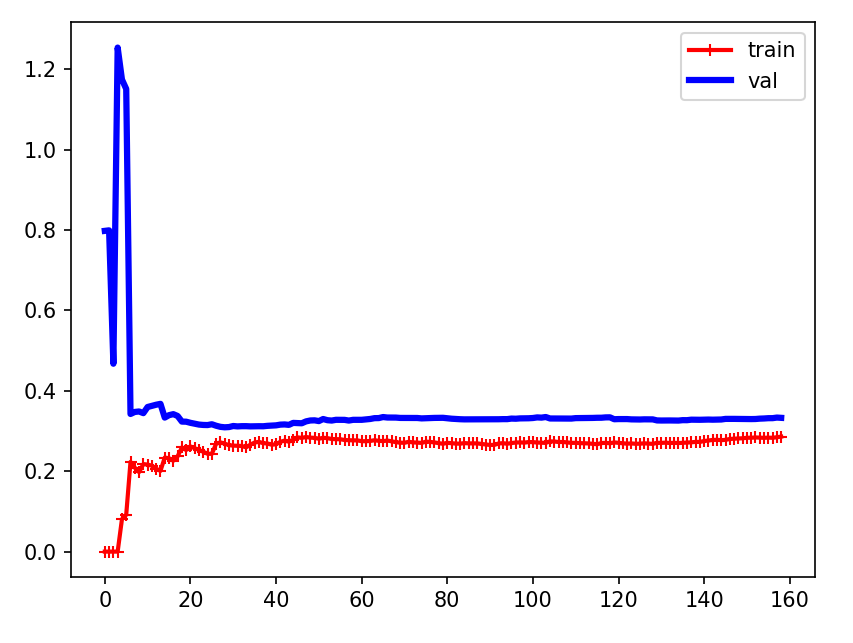
机器学习第5天:多项式回归与学习曲线
文章目录 多项式回归介绍 方法与代码 方法描述 分离多项式 学习曲线的作用 场景 学习曲线介绍 欠拟合曲线 示例 结论 过拟合曲线 示例 结论 多项式回归介绍 当数据不是线性时我们该如何处理呢,考虑如下数据 import matplotlib.pyplot as plt impo…...
MSYS2介绍及工具安装
0 Preface/Foreword 1 MSYS2 官网:MSYS2...

Swift开发中:非逃逸闭包、逃逸闭包、自动闭包的区别
1. 非逃逸闭包(Non-Escaping Closure) 定义:默认情况下,在 Swift 中闭包是非逃逸的。这意味着闭包在函数结束之前被调用并完成,它不会“逃逸”出函数的范围。内存管理:由于闭包在函数返回前被调用…...

栈结构应用-进制转换-辗转相除法
// 定义类class Stack{// #items [] 前边加#变为私有 外部不能随意修改 内部使用也要加#items []pop(){return this.items.pop()}push(data){this.items.push(data)}peek(){return this.items[this.items.length-1]}isEmpty(){return this.items.length 0}size(){return th…...
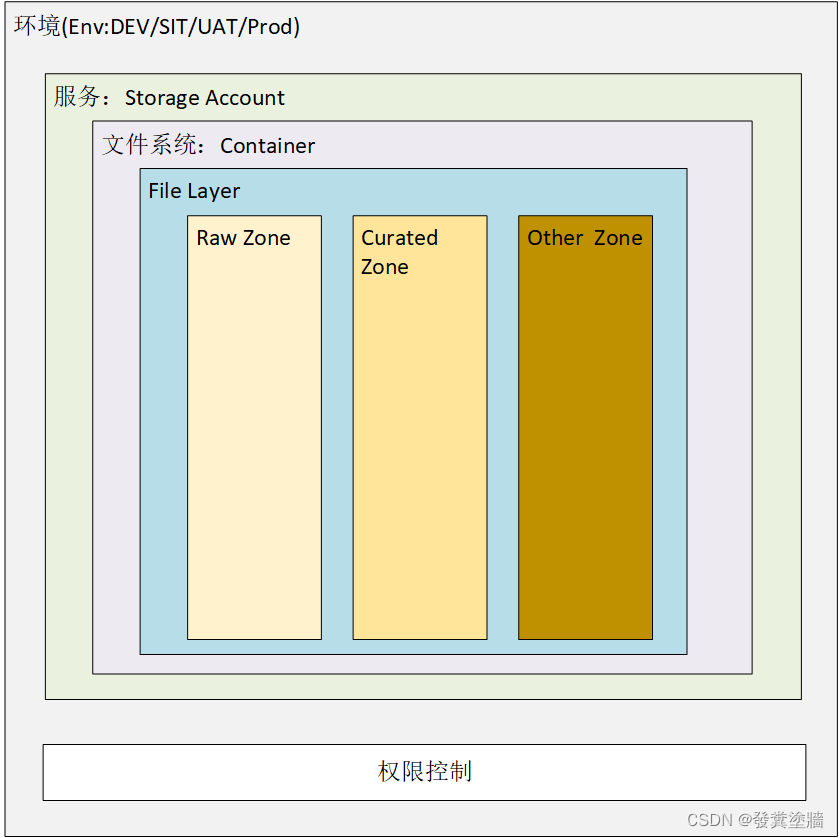
【Azure 架构师学习笔记】-Azure Storage Account(6)- File Layer
本文属于【Azure 架构师学习笔记】系列。 本文属于【Azure Storage Account】系列。 接上文 【Azure 架构师学习笔记】-Azure Storage Account(5)- Data Lake layers 前言 上一文介绍了存储帐户的概述,还有container的一些配置,在…...
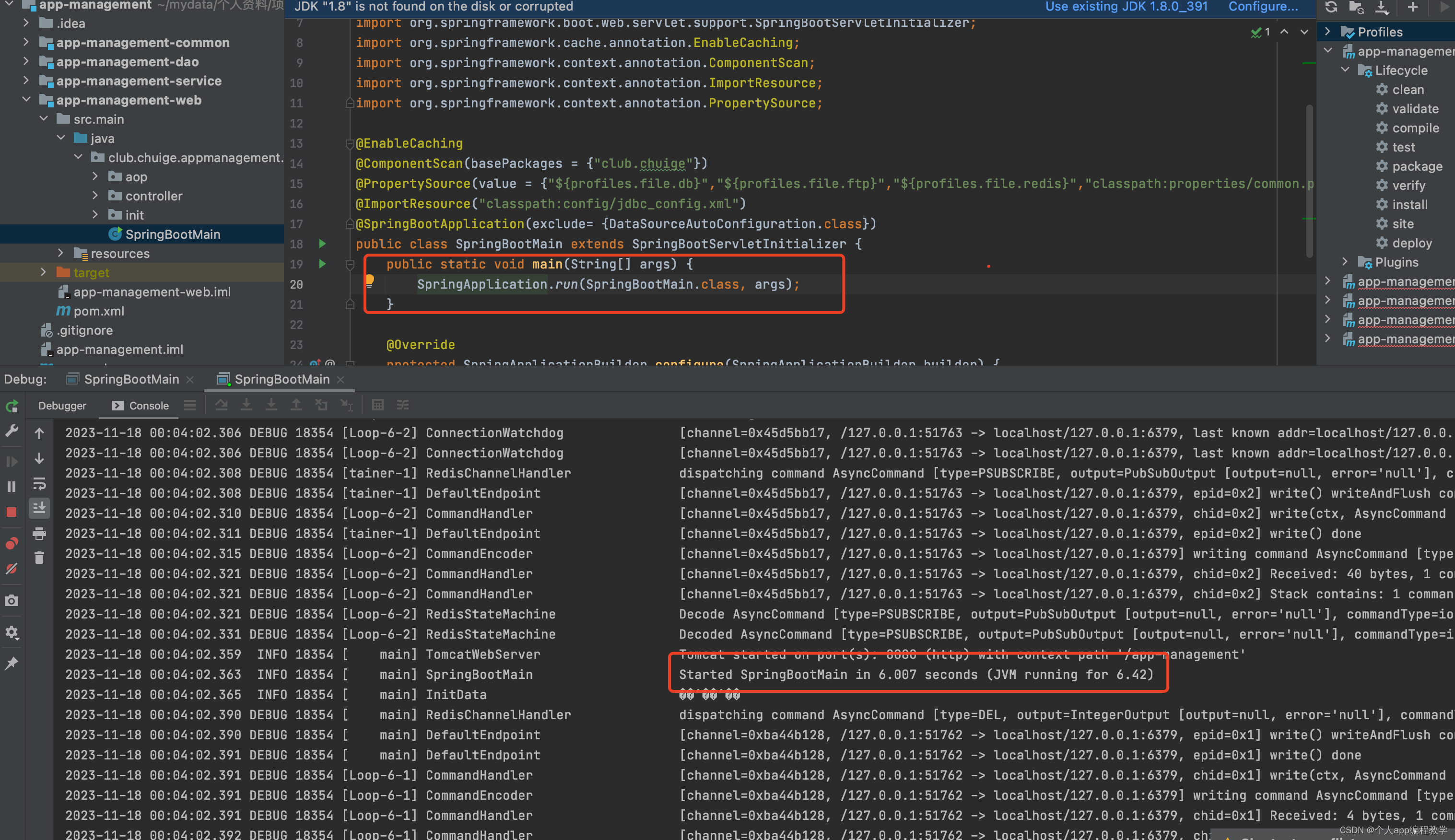
idea 环境搭建及运行java后端源码
1、 idea 历史版本下载及安装 建议下载和我一样的版本,2020.3 https://www.jetbrains.com/idea/download/other.html,idea分为专业版本(Ultimate)和社区版本(Community),前期可以下载专业版本…...
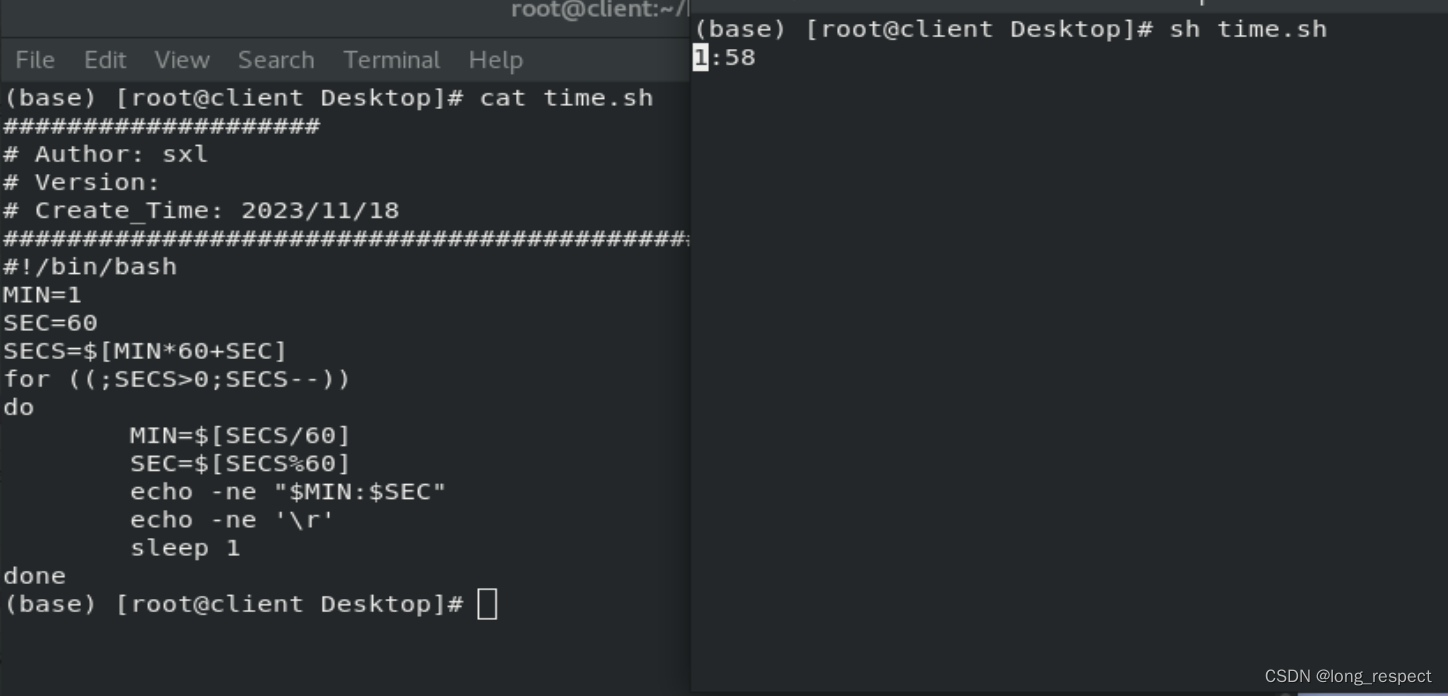
掌握Shell:从新手到编程大师的Linux之旅
1 shell介绍 1.1 shell脚本的意义 1.记录命令执行的过程和执行逻辑,以便以后重复执行 2.脚本可以批量处理主机 3.脚本可以定时处理主机 1.2 脚本的创建 #!/bin/bash # 运行脚本时候执行的环境1.3 自动添加脚本说明信息 /etc/vimrc # vim主配置文件 ~/.vimrc # 该…...

有重复元素的快速排序
当涉及到处理重复元素的快速排序时,可以使用荷兰国旗问题的方法,也就是三路划分。下面是使用 Java 实现的示例代码: import java.util.Arrays;public class QuickSort {public static void quickSort(int[] arr, int low, int high) {if (lo…...
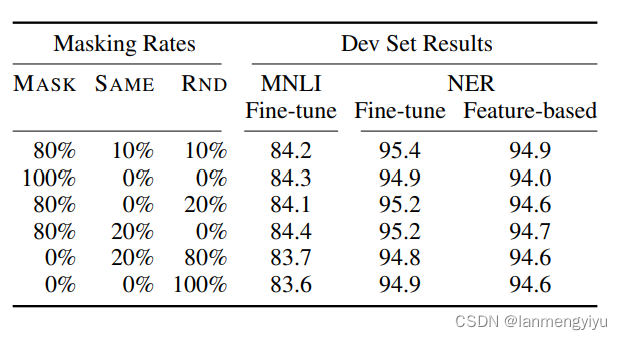
Bert浅谈
优点 首先,bert的创新点在于利用了双向transformer,这就跟openai的gpt有区别,gpt是采用单向的transformer,而作者认为双向transformer更能够融合上下文的信息。这里双向和单向的区别在于,单向只跟当前位置之前的tocke…...
产品运营的场景和运营策略
一、启动屏 1.概念 启动屏,特指 APP 产品启动时即显示的界面,这个界面一般会停留几秒钟时间,在这个时间内 APP 会在后台加载服务框架、启动各种服务 SDK 、获取用户地理位置、判断有无新版本、判断用户账户状态以及其他系统级别的…...

C#异常捕获try catch详细介绍
在C#中,异常处理是通过try、catch、finally和throw语句来实现的,它们提供了一种结构化和可预测的方法来处理运行时错误。 C#异常基本用法 try块 异常处理以try块开始,try块包含可能会引发异常的代码。如果在try块中的代码执行过程中发生了…...

雯雯的后宫-造相Z-Image-瑜伽女孩实战教程:结合ControlNet实现精准体式控制
雯雯的后宫-造相Z-Image-瑜伽女孩实战教程:结合ControlNet实现精准体式控制 1. 从零开始:环境准备与模型部署 想要生成专业的瑜伽女孩图片,首先需要搭建好环境。雯雯的后宫-造相Z-Image-瑜伽女孩是一个专门针对瑜伽场景优化的文生图模型&am…...

Llama-3.2V-11B-cot设计稿理解效果:从UI草图到前端代码描述
Llama-3.2V-11B-cot设计稿理解效果:从UI草图到前端代码描述 最近在尝试一些新的AI工具时,我偶然接触到了Llama-3.2V-11B-cot这个模型。它有一个听起来挺有意思的能力:能“看懂”设计稿。作为一个经常在设计和开发之间做“翻译”的人…...

开源OFA模型多场景落地:新闻图库自动配文、政府信息公开图片无障碍描述生成
开源OFA模型多场景落地:新闻图库自动配文、政府信息公开图片无障碍描述生成 1. 项目概述:让图片会说话的智能助手 你有没有遇到过这样的情况:看着一张图片,却不知道该怎么用文字描述它?或者需要为大量图片手动添加文…...
|高精度长时序LUCC产品)
1985–2024年武汉大学CLCD中国土地利用/覆被数据集(逐年30米栅格)|高精度长时序LUCC产品
🔍 数据简介 CLCD(China Land Cover Dataset) 是由武汉大学测绘遥感信息工程国家重点实验室李熙教授、李德仁院士团队基于Landsat系列卫星影像,结合深度学习与多源辅助数据(如夜间灯光、POI、道路网等)&…...

Android崩溃分析进阶:结合addr2line与IDA Pro精准定位SO文件崩溃点
1. 从崩溃日志到问题定位:为什么SO文件这么难缠? 每次看到Android应用崩溃日志里出现"signal 11 (SIGSEGV)"这种字样,我就知道今晚又要加班了。特别是当崩溃发生在SO文件中时,那种无力感就像在漆黑的房间里找一根掉落的…...
)
手把手教你搭建He-Ne激光空间滤波实验(附完整光路图)
从零搭建He-Ne激光空间滤波实验:光路设计与调试实战指南 在光学实验室里,空间滤波技术就像给图像装上"智能滤镜",能够选择性地增强或抑制特定空间频率成分。想象一下,当你透过不同形状的"光学窗口"观察世界时…...
)
STorM BGC V1.31硬件 + SimpleBGC源码:从零搭建三轴云台开发环境(含.Net框架避坑)
STorM BGC V1.31硬件 SimpleBGC源码:从零搭建三轴云台开发环境(含.Net框架避坑) 三轴云台作为稳定控制领域的经典应用,近年来在无人机、摄影设备、工业检测等领域展现出巨大潜力。STorM BGC V1.31硬件平台配合SimpleBGC开源架构&…...

Nunchaku-flux-1-dev技术解析:深入理解其背后的深度学习网络架构
Nunchaku-flux-1-dev技术解析:深入理解其背后的深度学习网络架构 最近在AI编程和图像生成圈子里,FLUX.1 [dev]这个名字被讨论得越来越多。作为其社区衍生版本,Nunchaku-flux-1-dev自然也吸引了大量技术爱好者的目光。大家可能已经体验过它生…...

AUTOSAR CANFM模块中,BusOff恢复的50ms和1000ms周期到底怎么来的?底层驱动配置详解
AUTOSAR CANFM模块中BusOff恢复时序的硬件级解析 在车载ECU开发中,CAN总线通信的可靠性直接关系到整车功能安全。当节点因连续错误进入BusOff状态时,AUTOSAR标准定义的50ms快恢复周期和1000ms慢恢复周期并非随意设定,而是源于CAN控制器硬件特…...

OpenClaw 网关重启指南:常用指令与故障修复
手把手教你一键部署OpenClaw,连接微信、QQ、飞书、钉钉等,1分钟全搞定! 一、几种快速重启的法子 看你当初是怎么部署的,挑下面最适合你的那条命令就行: 适用情况具体命令最省事的(系统托管模式ÿ…...