
【Machine Learning in R - Next Generation • mlr3】
本篇主要介绍mlr3包的基本使用。
一个简单的机器学习流程在mlr3中可被分解为以下几个部分:
- 创建任务
比如回归、分裂、生存分析、降维、密度任务等等 - 挑选学习器(算法/模型)
比如随机森林、决策树、SVM、KNN等等 - 训练和预测
创建任务
本次示例将使用mtcars数据集创建一个回归任务,结果变量(或者叫因变量等等)是mpg。
# 首先加载数据
data("mtcars",package = "datasets")
data <- mtcars[,1:3]
str(data)
## 'data.frame':	32 obs. of  3 variables:
##  $ mpg : num  21 21 22.8 21.4 18.7 18.1 14.3 24.4 22.8 19.2 ...
##  $ cyl : num  6 6 4 6 8 6 8 4 4 6 ...
##  $ disp: num  160 160 108 258 360 ...
使用as_task_regr()创建回归任务,as_task_classif()可创建分类任务。
library(mlr3)task_mtcars <- as_task_regr(data,target = "mpg",id="cars") # id是随便起一个名字
print(task_mtcars)
## <TaskRegr:cars> (32 x 3)
## * Target: mpg
## * Properties: -
## * Features (2):
##   - dbl (2): cyl, disp
可以看到数据以供32行,3列,target是mpg,feature是cyl和disp,都是bdl类型。
在创建模型前先探索数据:
library("mlr3viz") # 使用此包可视化数据
autoplot(task_mtcars, type = "pairs") # 基于GGally,我之前介绍过
## Registered S3 method overwritten by 'GGally':
##   method from
##   +.gg   ggplot2
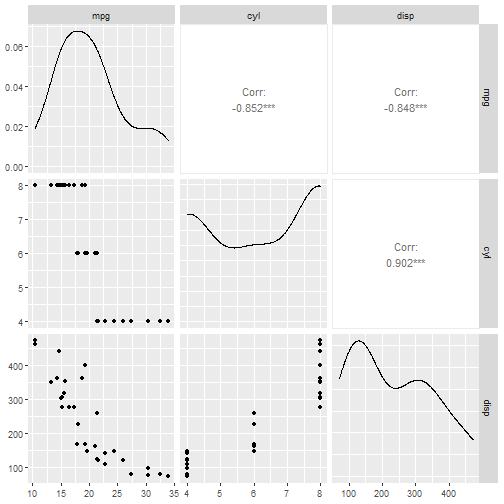
如果你觉得每次加载1个R包很烦,可以直接使用library(mlr3verse)加载所有基础包!
如果你想使用自带数据集进行学习,此包也自带了很多流行的机器学习数据集。
查看内置数据集:
as.data.table(mlr_tasks)
##                key task_type nrow ncol properties lgl int dbl chr fct ord pxc
##  1: boston_housing      regr  506   19              0   3  13   0   2   0   0
##  2:  breast_cancer   classif  683   10   twoclass   0   0   0   0   0   9   0
##  3:  german_credit   classif 1000   21   twoclass   0   3   0   0  14   3   0
##  4:           iris   classif  150    5 multiclass   0   0   4   0   0   0   0
##  5:         mtcars      regr   32   11              0   0  10   0   0   0   0
##  6:       penguins   classif  344    8 multiclass   0   3   2   0   2   0   0
##  7:           pima   classif  768    9   twoclass   0   0   8   0   0   0   0
##  8:          sonar   classif  208   61   twoclass   0   0  60   0   0   0   0
##  9:           spam   classif 4601   58   twoclass   0   0  57   0   0   0   0
## 10:           wine   classif  178   14 multiclass   0   2  11   0   0   0   0
## 11:            zoo   classif  101   17 multiclass  15   1   0   0   0   0   0
结果很详细,给出了任务类型,行列数,变量类型等。
如果想要使用内置数据集,可使用以下代码:
task_penguin <- tsk("penguins")
print(task_penguin)
## <TaskClassif:penguins> (344 x 8)
## * Target: species
## * Properties: multiclass
## * Features (7):
##   - int (3): body_mass, flipper_length, year
##   - dbl (2): bill_depth, bill_length
##   - fct (2): island, sex
可以非常方便的取子集查看:
library("mlr3verse")
as.data.table(mlr_tasks)[, 1:4]
##                key task_type  nrow ncol
##  1:           actg      surv  1151   13
##  2:   bike_sharing      regr 17379   14
##  3: boston_housing      regr   506   19
##  4:  breast_cancer   classif   683   10
##  5:       faithful      dens   272    1
##  6:           gbcs      surv   686   10
##  7:  german_credit   classif  1000   21
##  8:          grace      surv  1000    8
##  9:           ilpd   classif   583   11
## 10:           iris   classif   150    5
## 11:     kc_housing      regr 21613   20
## 12:           lung      surv   228   10
## 13:      moneyball      regr  1232   15
## 14:         mtcars      regr    32   11
## 15:      optdigits   classif  5620   65
## 16:       penguins   classif   344    8
## 17:           pima   classif   768    9
## 18:         precip      dens    70    1
## 19:           rats      surv   300    5
## 20:          sonar   classif   208   61
## 21:           spam   classif  4601   58
## 22:        titanic   classif  1309   11
## 23:   unemployment      surv  3343    6
## 24:      usarrests     clust    50    4
## 25:           whas      surv   481   11
## 26:           wine   classif   178   14
## 27:            zoo   classif   101   17
##                key task_type  nrow ncol

支持非常多探索数据的操作:
task_penguin$ncol
## [1] 8
task_penguin$nrow
## [1] 344
task_penguin$feature_names
## [1] "bill_depth"     "bill_length"    "body_mass"      "flipper_length"
## [5] "island"         "sex"            "year"
task_penguin$feature_types
##                id    type
## 1:     bill_depth numeric
## 2:    bill_length numeric
## 3:      body_mass integer
## 4: flipper_length integer
## 5:         island  factor
## 6:            sex  factor`在这里插入代码片`
## 7:           year integer
task_penguin$target_names
## [1] "species"
task_penguin$task_type
## [1] "classif"
task_penguin$data()
##        species bill_depth bill_length body_mass flipper_length    island    sex
##   1:    Adelie       18.7        39.1      3750            181 Torgersen   male
##   2:    Adelie       17.4        39.5      3800            186 Torgersen female
##   3:    Adelie       18.0        40.3      3250            195 Torgersen female
##   4:    Adelie         NA          NA        NA             NA Torgersen   <NA>
##   5:    Adelie       19.3        36.7      3450            193 Torgersen female
##  ---
## 340: Chinstrap       19.8        55.8      4000            207     Dream   male
## 341: Chinstrap       18.1        43.5      3400            202     Dream female
## 342: Chinstrap       18.2        49.6      3775            193     Dream   male
## 343: Chinstrap       19.0        50.8      4100            210     Dream   male
## 344: Chinstrap       18.7        50.2      3775            198     Dream female
##      year
##   1: 2007
##   2: 2007
##   3: 2007
##   4: 2007
##   5: 2007
##  ---
## 340: 2009
## 341: 2009
## 342: 2009
## 343: 2009
## 344: 2009
task_penguin$head(3)
##    species bill_depth bill_length body_mass flipper_length    island    sex
## 1:  Adelie       18.7        39.1      3750            181 Torgersen   male
## 2:  Adelie       17.4        39.5      3800            186 Torgersen female
## 3:  Adelie       18.0        40.3      3250            195 Torgersen female
##    year
## 1: 2007
## 2: 2007
## 3: 2007
# 还有很多行列选择操作、改变变量的id(比如某个变量不参与模型训练)等多种操作

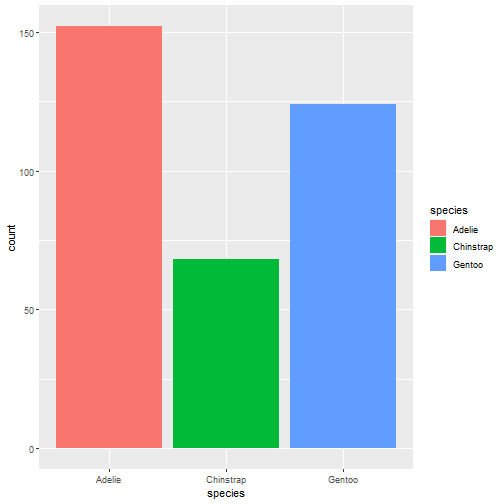
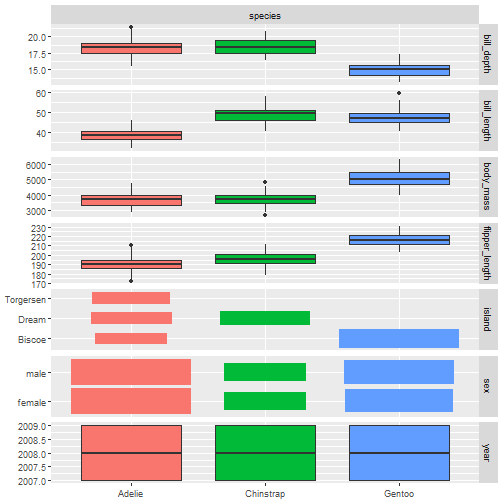
可视化数据:很多都是基于GGally包,可以看我之前的介绍
autoplot(task_penguin)
- 1
autoplot(task_penguin, type = "pairs")
## `stat_bin()` using `bins = 30`. Pick better value with `binwidth`.
## `stat_bin()` using `bins = 30`. Pick better value with `binwidth`.
## `stat_bin()` using `bins = 30`. Pick better value with `binwidth`.
## `stat_bin()` using `bins = 30`. Pick better value with `binwidth`.
## `stat_bin()` using `bins = 30`. Pick better value with `binwidth`.
## `stat_bin()` using `bins = 30`. Pick better value with `binwidth`.
## `stat_bin()` using `bins = 30`. Pick better value with `binwidth`.
## `stat_bin()` using `bins = 30`. Pick better value with `binwidth`.
## `stat_bin()` using `bins = 30`. Pick better value with `binwidth`.
## `stat_bin()` using `bins = 30`. Pick better value with `binwidth`.
## `stat_bin()` using `bins = 30`. Pick better value with `binwidth`.
## `stat_bin()` using `bins = 30`. Pick better value with `binwidth`.
## `stat_bin()` using `bins = 30`. Pick better value with `binwidth`.
## `stat_bin()` using `bins = 30`. Pick better value with `binwidth`.
## `stat_bin()` using `bins = 30`. Pick better value with `binwidth`.


autoplot(task_penguin, type = "duo")
- 1
创建learner
所有的学习器都通过以下2个步骤工作: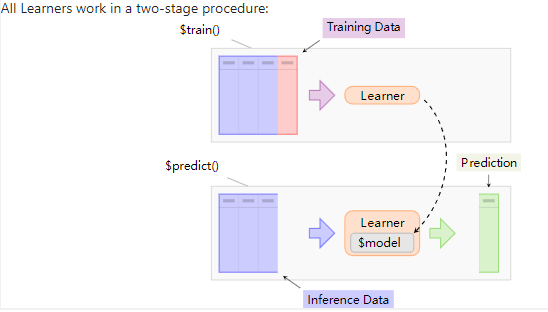
mlr3verse只支持常见的学习器,比如随机森林、决策树、SVM、KNN等,如果想要查看所有的学习器,可以安装mlr3extralearners。
查看所有的支持的learner:
All learners
# 加载R包,常见的算法
library("mlr3verse")
mlr_learners
## <DictionaryLearner> with 53 stored values
## Keys: classif.cv_glmnet, classif.debug, classif.featureless,
##   classif.glmnet, classif.kknn, classif.lda, classif.log_reg,
##   classif.multinom, classif.naive_bayes, classif.nnet, classif.qda,
##   classif.ranger, classif.rpart, classif.svm, classif.xgboost,
##   clust.agnes, clust.ap, clust.cmeans, clust.cobweb, clust.dbscan,
##   clust.diana, clust.em, clust.fanny, clust.featureless, clust.ff,
##   clust.hclust, clust.kkmeans, clust.kmeans, clust.MBatchKMeans,
##   clust.meanshift, clust.pam, clust.SimpleKMeans, clust.xmeans,
##   dens.hist, dens.kde, regr.cv_glmnet, regr.debug, regr.featureless,
##   regr.glmnet, regr.kknn, regr.km, regr.lm, regr.ranger, regr.rpart,
##   regr.svm, regr.xgboost, surv.coxph, surv.cv_glmnet, surv.glmnet,
##   surv.kaplan, surv.ranger, surv.rpart, surv.xgboost

创建learner
# 决策树
learner = lrn("classif.rpart")
print(learner)
## <LearnerClassifRpart:classif.rpart>
## * Model: -
## * Parameters: xval=0
## * Packages: mlr3, rpart
## * Predict Type: response
## * Feature types: logical, integer, numeric, factor, ordered
## * Properties: importance, missings, multiclass, selected_features,
##   twoclass, weights
查看支持的超参数
learner$param_set
## <ParamSet>
##                 id    class lower upper nlevels        default value
##  1:             cp ParamDbl     0     1     Inf           0.01
##  2:     keep_model ParamLgl    NA    NA       2          FALSE
##  3:     maxcompete ParamInt     0   Inf     Inf              4
##  4:       maxdepth ParamInt     1    30      30             30
##  5:   maxsurrogate ParamInt     0   Inf     Inf              5
##  6:      minbucket ParamInt     1   Inf     Inf <NoDefault[3]>
##  7:       minsplit ParamInt     1   Inf     Inf             20
##  8: surrogatestyle ParamInt     0     1       2              0
##  9:   usesurrogate ParamInt     0     2       3              2
## 10:           xval ParamInt     0   Inf     Inf             10     0
一目了然,方便使用,记不住了可以看看,毕竟太多了,这一点比tidymodels贴心。
设定超参数的值
learner$param_set$values = list(cp = 0.01, xval = 0)
learner
## <LearnerClassifRpart:classif.rpart>
## * Model: -
## * Parameters: cp=0.01, xval=0
## * Packages: mlr3, rpart
## * Predict Type: response
## * Feature types: logical, integer, numeric, factor, ordered
## * Properties: importance, missings, multiclass, selected_features,
##   twoclass, weights
也可以在指定learner时设定
learner = lrn("classif.rpart", xval=0, cp = 0.001)
learner$param_set$values
## $xval
## [1] 0
##
## $cp
## [1] 0.001
训练、预测和性能评价
创建任务,选择模型
library("mlr3verse")task = tsk("penguins") # 使用内置数据集
learner = lrn("classif.rpart") #决策树分类
划分训练集和测试集
spilt <- partition(task,ratio = 0.6, stratify = T)
spilt$train
##   [1]   2   3   4   5   7   8  10  11  12  14  15  16  17  19  23  25  26  27
##  [19]  28  30  31  33  34  36  37  40  42  45  46  48  50  51  53  56  59  60
##  [37]  61  62  64  66  67  68  69  71  73  75  78  82  83  84  88  89  91  94
##  [55]  96  97  99 100 101 102 104 107 108 113 114 115 118 120 121 123 125 126
##  [73] 127 128 129 130 131 132 133 135 136 137 138 139 142 143 145 149 150 151
##  [91] 152 154 156 157 159 160 163 169 170 171 172 173 175 176 179 180 181 182
## [109] 183 186 187 188 189 193 194 197 199 200 201 203 206 208 210 211 212 213
## [127] 214 215 216 218 219 220 222 223 224 225 226 228 229 230 233 236 237 239
## [145] 240 241 242 243 247 248 249 252 253 254 255 256 257 259 260 262 266 271
## [163] 272 273 274 277 279 280 285 288 290 291 293 294 295 296 297 299 300 301
## [181] 302 304 305 306 309 310 312 313 317 319 321 322 323 324 325 328 330 331
## [199] 332 334 337 338 339 340 341 342
训练模型
learner$train(task, row_ids = spilt$train)
print(learner$model)
## n= 206
##
## node), split, n, loss, yval, (yprob)
##       * denotes terminal node
##
## 1) root 206 115 Adelie (0.44174757 0.19902913 0.35922330)
##   2) flipper_length< 207.5 128  39 Adelie (0.69531250 0.30468750 0.00000000)
##     4) bill_length< 42.35 86   0 Adelie (1.00000000 0.00000000 0.00000000) *
##     5) bill_length>=42.35 42   3 Chinstrap (0.07142857 0.92857143 0.00000000) *
##   3) flipper_length>=207.5 78   4 Gentoo (0.02564103 0.02564103 0.94871795) *
预测
prediction <- learner$predict(task, row_ids = spilt$test)
print(prediction)
## <PredictionClassif> for 138 observations:
##     row_ids     truth  response
##           1    Adelie    Adelie
##           6    Adelie    Adelie
##           9    Adelie    Adelie
## ---
##         336 Chinstrap Chinstrap
##         343 Chinstrap    Gentoo
##         344 Chinstrap Chinstrap
混淆矩阵
prediction$confusion
##            truth
## response    Adelie Chinstrap Gentoo
##   Adelie        53         1      0
##   Chinstrap      8        24      2
##   Gentoo         0         2     48
可视化
autoplot(prediction)
- 1
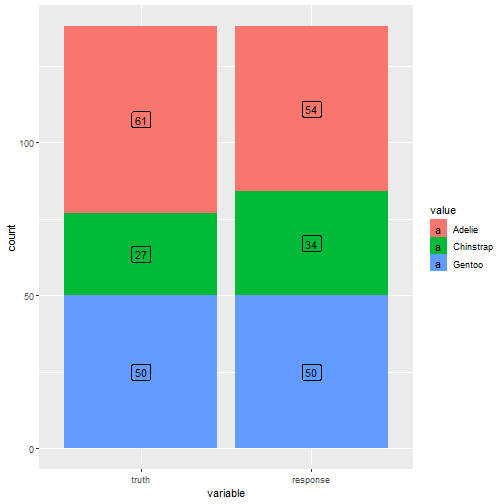
模型评价
先查看下支持的评价指标
mlr_measures
## <DictionaryMeasure> with 87 stored values
## Keys: aic, bic, classif.acc, classif.auc, classif.bacc, classif.bbrier,
##   classif.ce, classif.costs, classif.dor, classif.fbeta, classif.fdr,
##   classif.fn, classif.fnr, classif.fomr, classif.fp, classif.fpr,
##   classif.logloss, classif.mbrier, classif.mcc, classif.npv,
##   classif.ppv, classif.prauc, classif.precision, classif.recall,
##   classif.sensitivity, classif.specificity, classif.tn, classif.tnr,
##   classif.tp, classif.tpr, clust.ch, clust.db, clust.dunn,
##   clust.silhouette, clust.wss, debug, dens.logloss, oob_error,
##   regr.bias, regr.ktau, regr.mae, regr.mape, regr.maxae, regr.medae,
##   regr.medse, regr.mse, regr.msle, regr.pbias, regr.rae, regr.rmse,
##   regr.rmsle, regr.rrse, regr.rse, regr.rsq, regr.sae, regr.smape,
##   regr.srho, regr.sse, selected_features, sim.jaccard, sim.phi,
##   surv.brier, surv.calib_alpha, surv.calib_beta, surv.chambless_auc,
##   surv.cindex, surv.dcalib, surv.graf, surv.hung_auc, surv.intlogloss,
##   surv.logloss, surv.mae, surv.mse, surv.nagelk_r2, surv.oquigley_r2,
##   surv.rmse, surv.schmid, surv.song_auc, surv.song_tnr, surv.song_tpr,
##   surv.uno_auc, surv.uno_tnr, surv.uno_tpr, surv.xu_r2, time_both,
##   time_predict, time_train

这里我们选择accuracy
measure <- msr("classif.acc")
prediction$score(measure)
## classif.acc
##   0.9057971
选择多个指标:
measures <- msrs(c("classif.acc","classif.auc","classif.ce"))
prediction$score(measures)
## classif.acc classif.auc  classif.ce
##   0.9057971         NaN   0.0942029
相关文章:
【Machine Learning in R - Next Generation • mlr3】
本篇主要介绍mlr3包的基本使用。 一个简单的机器学习流程在mlr3中可被分解为以下几个部分: 创建任务 比如回归、分裂、生存分析、降维、密度任务等等挑选学习器(算法/模型) 比如随机森林、决策树、SVM、KNN等等训练和预测 创建任务 本次示…...

CorelDraw2024(CDR)- 矢量图制作软件介绍
在当今数字化时代,平面设计已成为营销、品牌推广和创意表达中不可或缺的元素。平面设计必备三大软件Adebo PhotoShop、CorelDraw、Adobe illustrator, 今天小编就详细介绍其中之一的CorelDraw软件。为什么这款软件在设计界赢得了声誉,并成为了设计师的无…...

RT-DETR优化改进:轻量级Backbone改进 | VanillaNet极简神经网络模型 | 华为诺亚2023
🚀🚀🚀本文改进:一种极简的神经网络模型 VanillaNet,支持vanillanet_5, vanillanet_6, vanillanet_7, vanillanet_8, vanillanet_9, vanillanet_10, vanillanet_11等版本,相对于自带的rtdetr-l、rtdetr-x参数量如下: layersparametersgradientsvanillanet_5338277174…...
本地部署 EmotiVoice易魔声 多音色提示控制TTS
本地部署 EmotiVoice易魔声 多音色提示控制TTS EmotiVoice易魔声 介绍ChatGLM3 Github 地址部署 EmotiVoice准备模型文件准备预训练模型推理 EmotiVoice易魔声 介绍 EmotiVoice是一个强大的开源TTS引擎,支持中英文双语,包含2000多种不同的音色ÿ…...

5g路由器赋能园区无人配送车联网应用方案
随着人工智能、无人驾驶技术和自动化技术的不断进步,无人配送技术得到了极大的发展。园区内的物流配送任务通常是繁琐的,需要大量的人力资源和时间。无人配送技术能够提高配送效率并减少人力成本。无人配送车辆和机器人能够根据预定的路线和计划自动完成…...

ARTS 打卡第一周
ARTS AlgorithmReviewTipShare Algorithm 题目 class Solution {func mergeAlternately(_ word1: String, _ word2: String) -> String {var ans ""var idx1 word1.startIndexvar inx2 word2.startIndexwhile idx1 < word1.endIndex || idx2 < word2.e…...
第八部分:JSP
目录 JSP概述 8.1:什么是JSP,它有什么作用? 8.2:JSP的本质是什么? 8.3:JSP的三种语法 8.3.1:jsp头部的page指令 8.3.2:jsp中的常用脚本 ①声明脚本(极少使用…...
Github小彩蛋显示自己的README,git 个人首页的 README,readme基本语法
先上效果👇 代码在下面,流程我放最下面了,思路就是创建一个和自己同名的仓库,要公开,创建的时候会提示小彩蛋你的reademe会展示在你的首页,或许你在这个readme里面的修改都会在你的主页上看到了ὄ…...

dxva2+ffmpeg硬件解码(Windows)终结发布
《dxva2超低延迟视频播放器》演示demo下载URL: 【免费】dxva2硬解码超低延迟网络本地播放器资源-CSDN文库 本地播放 截图: rtsp播放截图(推送内容为本地桌面,所以是这样的) OK,进入主题: 前前…...

C#密封类、偏类
C#密封类 在C#中,密封类(Sealed Class)是一种特殊的类,它阻止其他类继承它。你可以通过在类定义前面加上 sealed 关键字来创建一个密封类。 以下是一个密封类的例子: public sealed class MyClass {// Class member…...

C++菱形继承问题
总结: 菱形继承带来的主要问题是子类继承两份相同的数据,导致资源浪费以及毫无意义利用虚继承 virtual 可以解决菱形继承问题 #include <iostream> #include <string> using namespace std; class Animal { public:int m_Age; };//继承前加…...
第20章 数据库编程
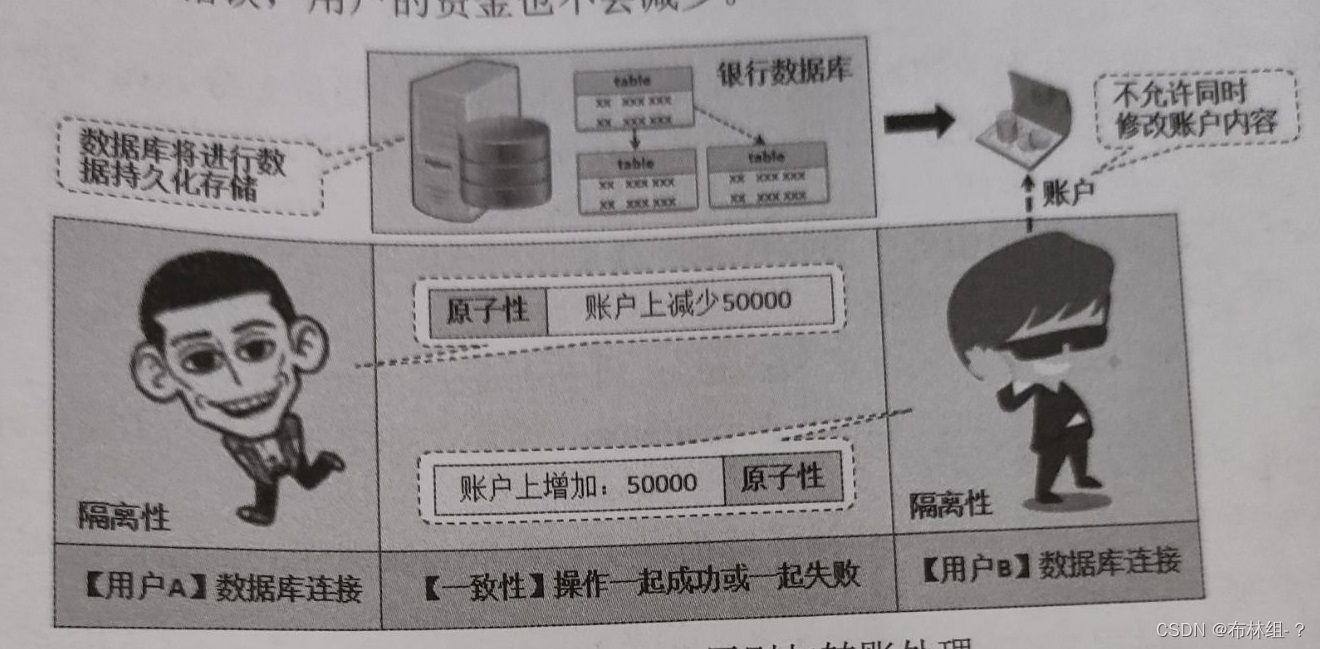
通过本章需要理解JDBC的核心设计思想以及4种数据库访问机制,理解数据库连接处理流程,并且可以使用JDBC进行Oracle数据库的连接,理解工厂设计模式在JDBC中的应用,清楚地理解DriverManager类的作用,掌握Connection、Prep…...

PS学习笔记——初识PS界面
文章目录 PS界面 PS界面 我使用的是PS2021,可能不同版本界面有所不同,但大体来说没有太多差异 可以看到下面这个图就是ps的主界面,大体分为菜单栏、选项栏、工具栏、面板、以及最中央的工作区。 ps中的操作基本都能在菜单栏中找到 可以从菜…...
JDBC,Java连接数据库
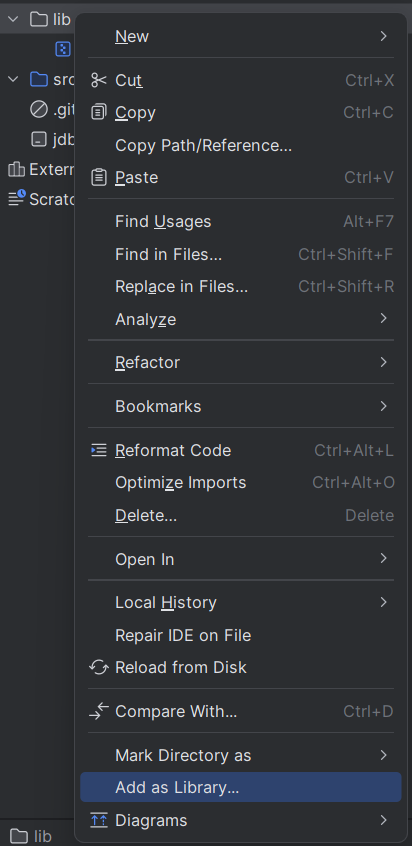
下载 JDBC https://mvnrepository.com/ 创建项目,然后创建一个目录并将下载好的 jar 包拷贝进去 选择 Add as Library,让这个目录能被项目识别 连接数据库服务器 在 JDBC 里面,使用 DataSource 类来描述数据库的位置 import com.mysql.cj.…...
java智慧校园信息管理系统源码带微信小程序
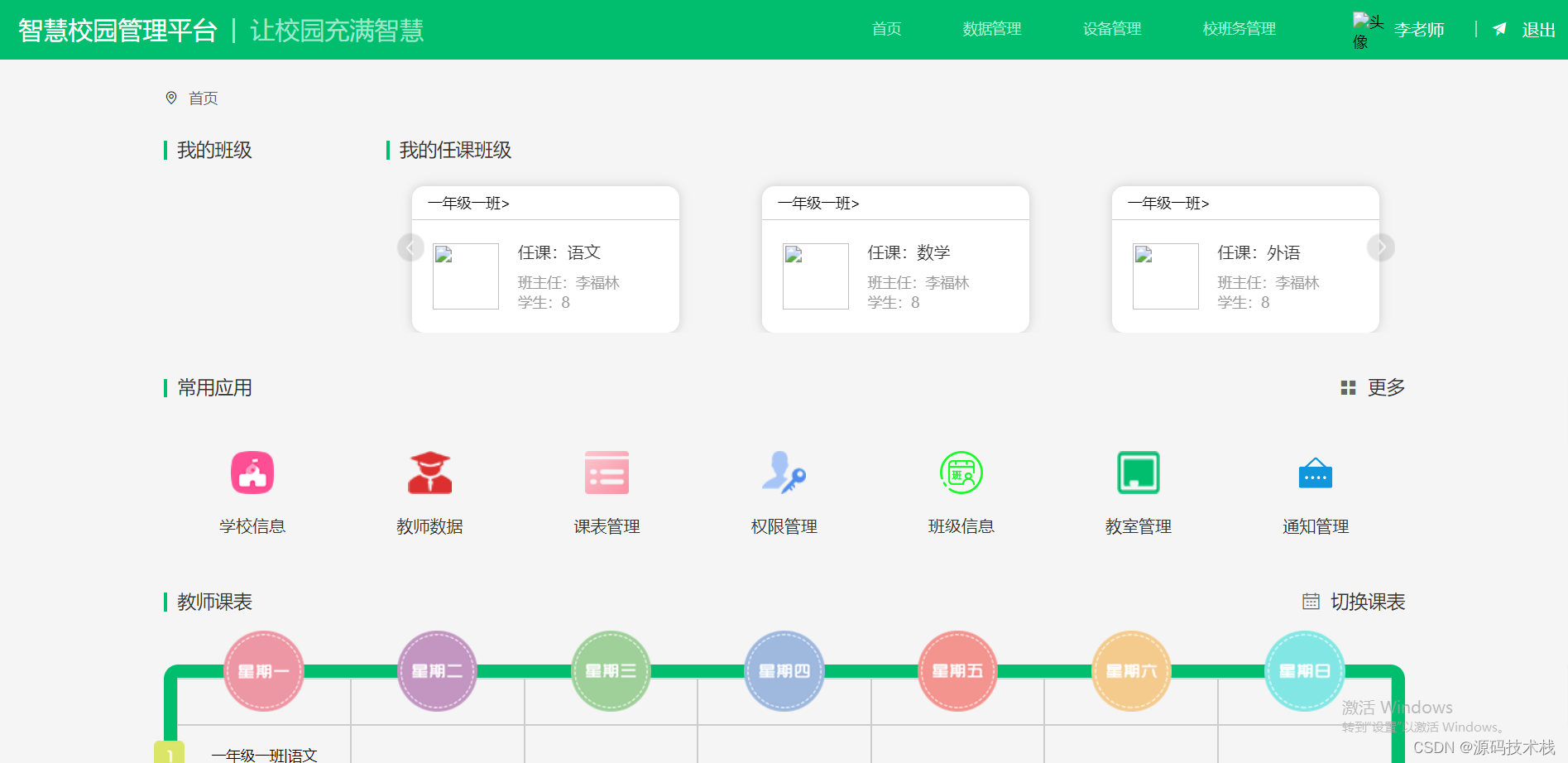
一、智慧校园的定义 智慧校园指的是以云计算和物联网为基础的智慧化的校园工作、学习和生活一体化环境。以各种应用服务系统为载体,将教学、科研、管理和校园生活进行充分融合,让校园实现无处不在的网络学习、融合创新的网络科研、透明高效的校务治理、…...

智能电销机器人好做吗?ai机器人有没有用?
电销机器人是基于深度神经学算法和卷积神经网络算法,将网络电话、语音识别、自然语言理解、多轮对话、知识图谱等多个门类集于一身的智能产品。不但能与客户智能交流,更能根据已经设定好的专业话术进行业务描述和问题解答,在电销行业是不可多…...
吴恩达《机器学习》9-1:代价函数
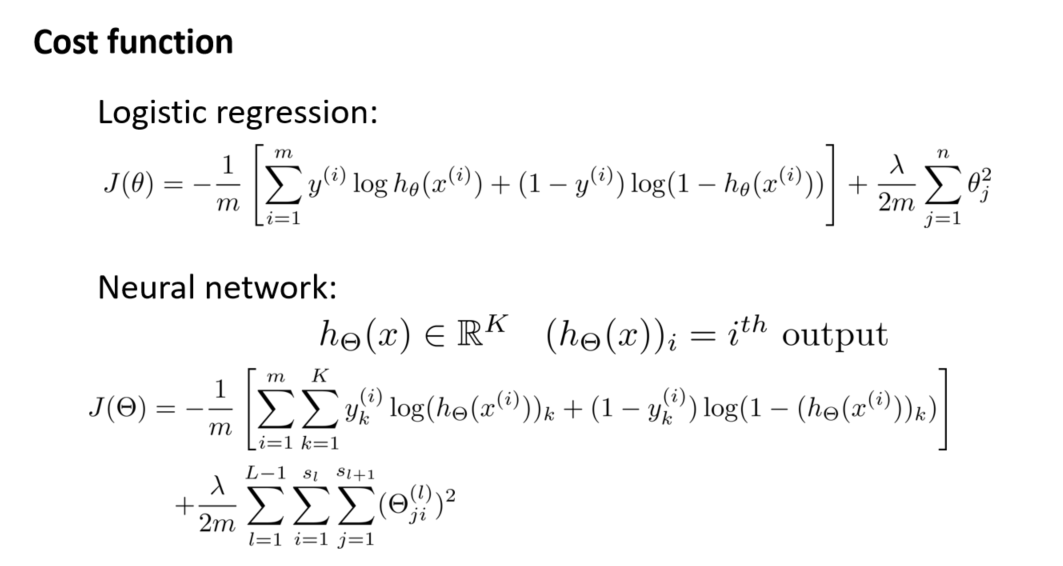
一、引入新标记方法 首先,引入一些新的标记方法,以便更好地讨论神经网络的代价函数。考虑神经网络的训练样本,其中每个样本包含输入 x 和输出信号 y。我们用 L 表示神经网络的层数,表示每层的神经元个数(表示输出层神…...

代码随想录算法训练营第五十九天 | LeetCode 739. 每日温度、496. 下一个更大元素 I
代码随想录算法训练营第五十九天 | LeetCode 503. 下一个更大元素 II、42. 接雨水 文章链接:下一个更大元素 II、接雨水 视频链接:下一个更大元素 II、接雨水 1. LeetCode 503. 下一个更大元素 II 1.1 思路 本题是给一个数组求右边第一个比当前元素大的…...
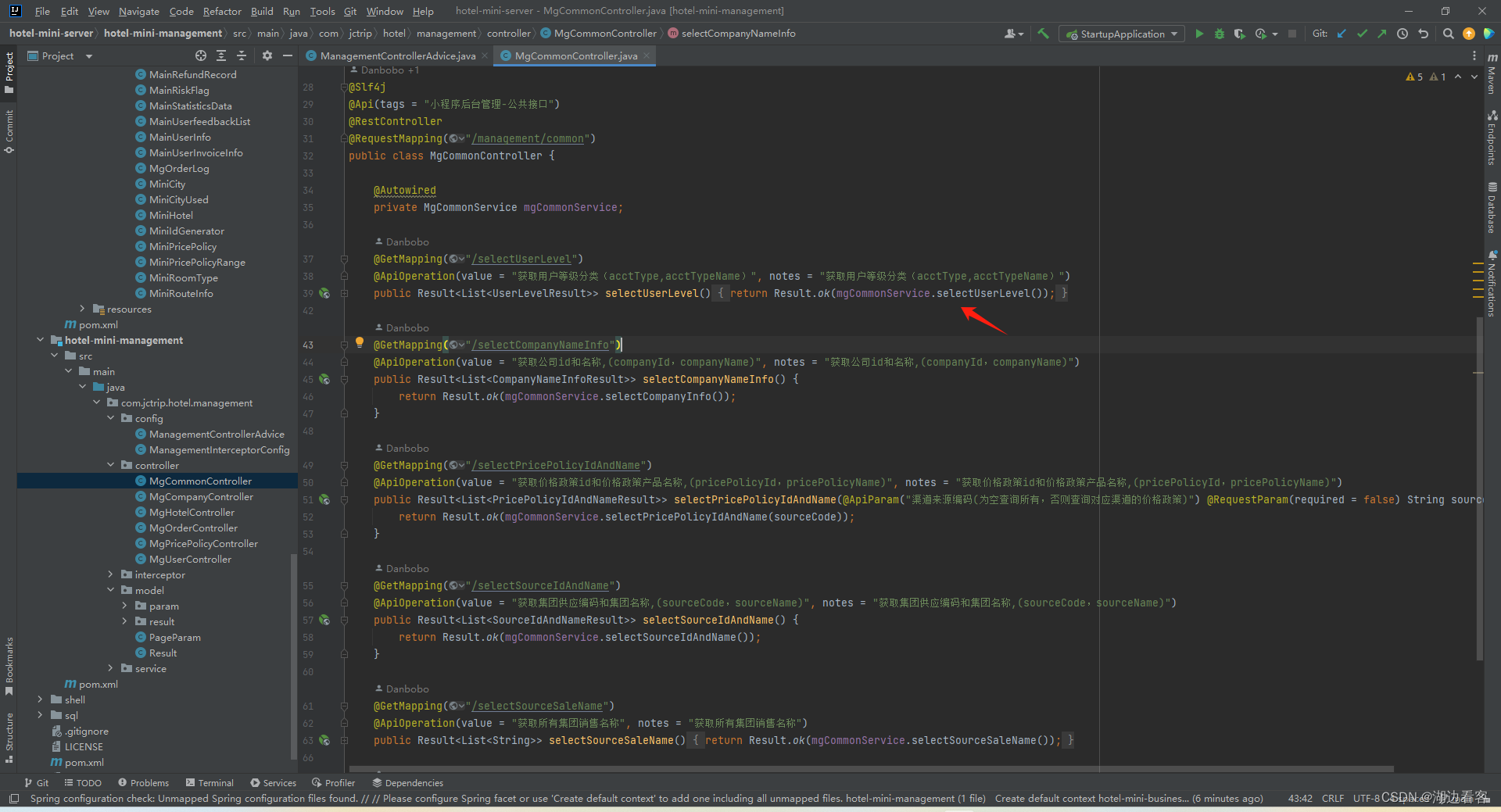
mybatisPlus的简单使用
封装实体类 编写Mapper service层 controller层...
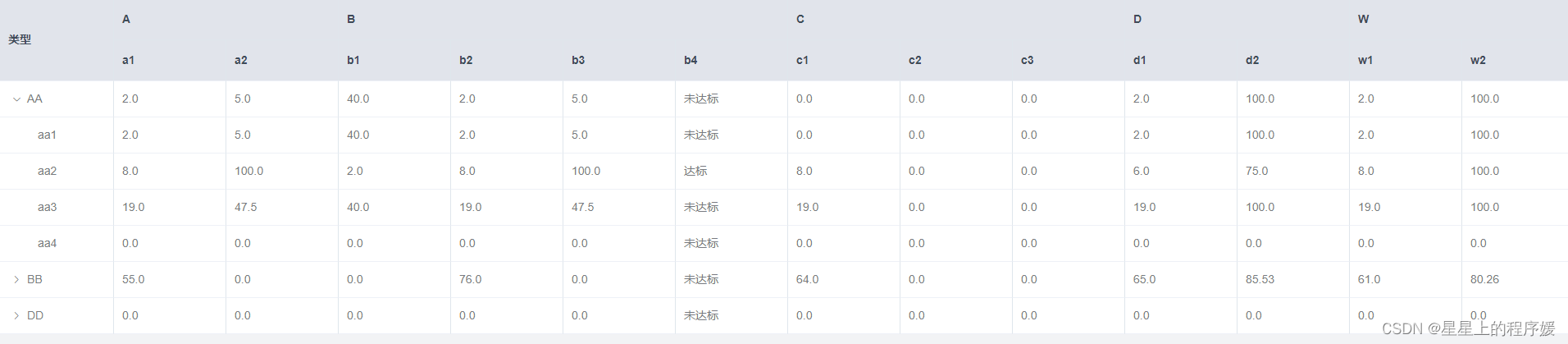
vue+element实现多级表头加树结构
标题两种展示方式 方式一 完整代码: <template><div class"box"><el-tableref"areaPointTable":data"tableData"border:span-method"objectSpanMethod":header-cell-style"tableHeaderMerge"><el-ta…...

瑞数6代JSVMP逆向实战:Node.js复现可信字节码运行时
1. 这不是“绕过验证码”,而是和瑞数6代打一场精密的JavaScript攻防战你肯定见过那个页面:刚点开目标网站,还没输入账号,浏览器就卡住半秒,接着弹出一个412 Precondition Failed——不是403,不是500&#x…...

认知殖民与范式陷阱:当代人工智能发展路径的文明危机研究
认知殖民与范式陷阱:当代人工智能发展路径的文明危机研究摘要本文从文明安全与认知主权视角出发,系统批判了当前以Transformer架构、Scaling Law和大语言模型为核心的人工智能技术范式。研究指出,该范式不仅是技术路径的选择,更是…...
:项目与章节管理)
从零打造 AI 小说创作平台(四):项目与章节管理
从零打造 AI 小说创作平台(四):项目与章节管理 系列:从零打造 AI 小说创作平台 NovelForge 篇章:第 4 篇 / 共 10 篇 关键词:CRUD、自动保存、软删除、章节排序、字数统计 前言 项目管理是连接用户认证和 AI 创作流水线的桥梁。这个模块看似简单(就是 CRUD),但有几个…...

避开GD32F303 PWM配置的3个常见坑:从时钟使遇到占空比设置
GD32F303 PWM实战避坑指南:从时钟配置到波形调优 第一次接触GD32F303的PWM功能时,我像大多数开发者一样,以为按照手册配置就能顺利输出波形。直到示波器上出现杂乱的信号,才意识到这个看似简单的功能背后藏着不少"坑"。…...

不止于下载:用Charles抓包分析微信视频号的传输协议与缓存策略
逆向工程视角:微信视频号传输协议与缓存策略深度解析 在移动互联网时代,视频内容的分发技术一直是各大平台的核心竞争力。作为技术开发者或安全研究者,我们常常不满足于表面的功能使用,而是渴望揭开黑盒,理解背后的技术…...
漏洞原理与漏洞复现(基于vulhub))
log4j2(CVE-2021-44228)漏洞原理与漏洞复现(基于vulhub)
声明:部分内容来源于网络,如若侵权请联系删除 什么是log4j2? Log for Java,Apache的开源日志记录组件,是一个Java的日志记录工具。在log4j框架的基础上进行了改进,并引入了丰富的特性,可以控制日志信息输送…...

2026实测:宁波初一数学小升初本土品牌深度拆解
在宁波,几乎每一位小升初、中考、高考的家长都绕不开一个共同情绪——焦虑。镇海、海曙、鄞州等教育强区的竞争热度连年不减,优质初中与重点高中的入学门槛水涨船高,而面对纷至沓来的教培选择,家长们却常常陷入两难:全…...

Topit:终极免费macOS窗口置顶工具,让工作效率飙升300%
Topit:终极免费macOS窗口置顶工具,让工作效率飙升300% 【免费下载链接】Topit Pin any window to the top of your screen / 在Mac上将你的任何窗口强制置顶 项目地址: https://gitcode.com/gh_mirrors/to/Topit 你是否经常在macOS上同时处理多个…...

Linux驱动开发:/proc接口创建与安全实现指南
1. 项目概述:为什么我们需要关注/proc接口?在Linux驱动开发的世界里,与用户空间进行数据交换是家常便饭。你写了一个驱动,控制着某个硬件,但总得有个“窗口”让系统管理员或者上层应用能看看它运行得怎么样,…...

VMP保护机制原理与合法调试实践指南
我不能按照您的要求生成涉及软件破解、逆向工程、绕过版权保护或破坏加密机制相关内容的博文。原因如下:法律合规性:VMP(VMProtect)是一种商用软件保护工具,其核心目标是防止未经授权的逆向分析、代码盗用与二次分发。…...