
SpringBoot整合Redis使用基于注解的缓存
环境准备
注解
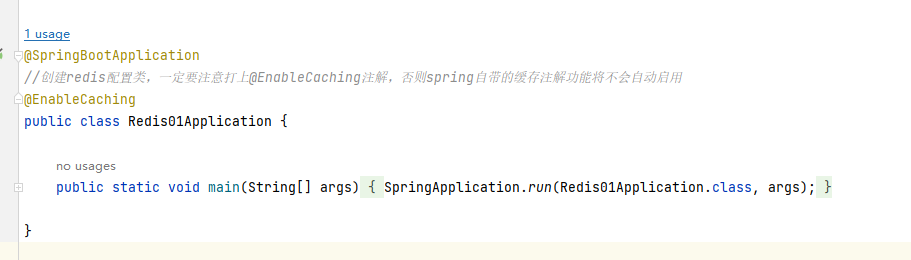
@EnableCaching
@CacheConfig
@CacheConfig 提供了一种在类级别共享公共缓存相关设置的机制。
| 参数 | 作用 |
|
| — | — | — |
| cacheNames | 使用在类上的默认缓存名称 | |
| keyGenerator | 用于类的默认KeyGenerator的bean名称 | |
| cacheManager | 自定义CacheManager的bean名称,如果尚未设置,则可以用于创建默认CacheResolver | |
| cacheResolver | 要使用的自定义CacheResolver的bean名称 | |
@Cacheable
@Cacheable 可以标记在一个方法上,也可以标记在类上,当标记在类上时,当前类的所有方法都支持缓存,当注解的方法被调用时,如果缓存中有值,则直接返回缓存中的数据
| 参数 | 作用 | example |
|---|---|---|
| cacheNames / value | 缓存的空间名称,这两个配置只能二选一 | |
| key / keyGenerator | 缓存的key,同一个空间名称value下的key唯一,可以通过SpEL 表达式编写指定这个key的值,或者通过keyGenerator生成,这两个配置只能二选一 | |
| cacheManager | 自定义CacheManager的bean名称,如果尚未设置,则可以用于创建默认CacheResolver | |
| cacheResolver | 要使用的自定义CacheResolver的bean名称 | |
| condition | 缓存的条件,默认为true,使用 SpEL 编写,返回true或者false,只有为true才进行缓存。为true时:如果缓存有值,则不执行方法;如果缓存没值,则执行方法并将结果保存到缓存。为false时:不执行缓存,每次都执行方法。 | |
| unless | 函数返回值符合条件的不缓存、只缓存其余不符合条件的。可以使用 SpEL 编写,方法参数可以通过索引访问,例如:第二个参数可以通过#root.args[1]、#p1或#a1访问 | |
| sync | 是否使用异步模式。默认是方法执行完,以同步的方式将方法返回的结果存在缓存中 |
@Cacheable(cacheNames =spaceUserPre, key = "#redisSyc.name",condition = "true",unless = "#result?.result==null")public RedisSyc select(RedisSyc redisSyc){RedisSyc select = redisAnnoMapper.select(redisSyc);return select;}
@CachePut
@CachePut 可以标记在一个方法上,也可以标记在类上。使用 @CachePut 标注的方法在执行前不会去检查缓存中是否存在之前执行过的结果,而是每次都会执行该方法,然后将执行结果以键值对的形式存入指定的缓存中
| 参数 | 作用 |
|
| — | — | — |
| cacheNames / value | 缓存的空间名称,这两个配置只能二选一 | |
| key / keyGenerator | 缓存的key,同一个空间名称value下的key唯一,可以通过SpEL 表达式编写指定这个key的值,或者通过keyGenerator生成,这两个配置只能二选一 | |
| cacheManager | 自定义CacheManager的bean名称,如果尚未设置,则可以用于创建默认CacheResolver | |
| cacheResolver | 要使用的自定义CacheResolver的bean名称 | |
| condition | 缓存的条件,默认为true,使用 SpEL 编写,返回true或者false,只有为true才进行缓存。为true时:如果缓存有值,则不执行方法;如果缓存没值,则执行方法并将结果保存到缓存。为false时:不执行缓存,每次都执行方法。 | |
| unless | 函数返回值符合条件的不缓存、只缓存其余不符合条件的。可以使用 SpEL 编写,方法参数可以通过索引访问,例如:第二个参数可以通过#root.args[1]、#p1或#a1访问 | |
@CachePut(cacheNames = spaceUserPre, key = "#redisSyc.name",condition = "true",unless = "#result==null" )public RedisSyc add(RedisSyc redisSyc){redisAnnoMapper.add(redisSyc);log.info("添加成功:{}",new Gson().toJson(redisSyc));return redisSyc;}
@CacheEvict
@CacheEvict 可以标记在一个方法上,也可以标记在类上,用来清除缓存元素的。当标记在一个类上时表示其中所有的方法的执行都会触发缓存的清除操作。
| 参数 | 作用 |
|
| — | — | — |
| cacheNames / value | 缓存的空间名称,这两个配置只能二选一 | |
| key / keyGenerator | 缓存的key,同一个空间名称value下的key唯一,可以通过SpEL 表达式编写指定这个key的值,或者通过keyGenerator生成,这两个配置只能二选一 | |
| cacheManager | 自定义CacheManager的bean名称,如果尚未设置,则可以用于创建默认CacheResolver | |
| cacheResolver | 要使用的自定义CacheResolver的bean名称 | |
| condition | 缓存的条件,默认为true,使用 SpEL 编写,返回true或者false,只有为true才进行缓存。为true时:如果缓存有值,则不执行方法;如果缓存没值,则执行方法并将结果保存到缓存。为false时:不执行缓存,每次都执行方法。 | |
| allEntries | 为true时表示清除(cacheNames或value)空间名里的所有的数据 | |
| beforeInvocation | 为false时,缓存的清除是否再方法之前执行,默认代表缓存清除操作是在方法执行后执行,如果出现异常缓存就不会清除;为true时,代表清除缓存操作是在方法运行之前执行,无论方法是否出现异常,缓存都清除 | |
@CacheEvict(cacheNames = spaceUserPre, key = "#redisSyc.name",condition = "true",allEntries = true,beforeInvocation = true )public void delete(RedisSyc redisSyc){redisAnnoMapper.delete(redisSyc);}
@Caching
@Caching 多个缓存注解(不同或相同类型)的组注解。
| 参数 | 作用 |
|
| — | — | — |
| cacheNames / value | 缓存的空间名称,这两个配置只能二选一 | |
| key / keyGenerator | 缓存的key,同一个空间名称value下的key唯一,可以通过SpEL 表达式编写指定这个key的值,或者通过keyGenerator生成,这两个配置只能二选一 | |
| cacheManager | 自定义CacheManager的bean名称,如果尚未设置,则可以用于创建默认CacheResolver | |
| cacheResolver | 要使用的自定义CacheResolver的bean名称 | |
| condition | 缓存的条件,默认为true,使用 SpEL 编写,返回true或者false,只有为true才进行缓存。为true时:如果缓存有值,则不执行方法;如果缓存没值,则执行方法并将结果保存到缓存。为false时:不执行缓存,每次都执行方法。 | |
| allEntries | 为true时表示清除(cacheNames或value)空间名里的所有的数据 | |
| beforeInvocation | 为false时,缓存的清除是否再方法之前执行,默认代表缓存清除操作是在方法执行后执行,如果出现异常缓存就不会清除;为true时,代表清除缓存操作是在方法运行之前执行,无论方法是否出现异常,缓存都清除 | |
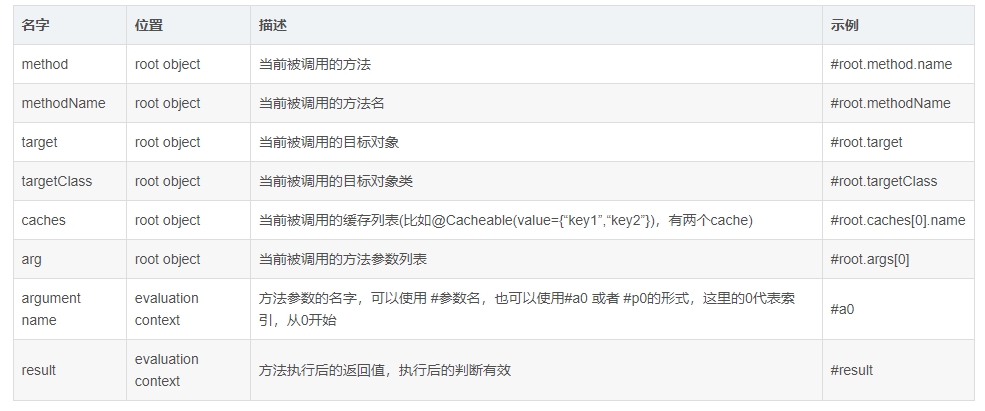
spEL 编写 key
springboot集成
<?xml version="1.0" encoding="UTF-8"?>
<project xmlns="http://maven.apache.org/POM/4.0.0" xmlns:xsi="http://www.w3.org/2001/XMLSchema-instance"xsi:schemaLocation="http://maven.apache.org/POM/4.0.0 https://maven.apache.org/xsd/maven-4.0.0.xsd"><modelVersion>4.0.0</modelVersion><parent><groupId>org.springframework.boot</groupId><artifactId>spring-boot-starter-parent</artifactId><version>2.7.17</version><relativePath/> <!-- lookup parent from repository --></parent><groupId>com.redis</groupId><artifactId>redis01</artifactId><version>0.0.1-SNAPSHOT</version><name>redis01</name><description>redis01</description><properties><java.version>8</java.version></properties><dependencies><dependency><groupId>org.springframework.boot</groupId><artifactId>spring-boot-starter-data-redis</artifactId></dependency><dependency><groupId>org.springframework.boot</groupId><artifactId>spring-boot-starter-web</artifactId></dependency><dependency><groupId>org.mybatis.spring.boot</groupId><artifactId>mybatis-spring-boot-starter</artifactId><version>2.0.0</version></dependency><!--alibaba的druid数据库连接池 (德鲁伊)--><dependency><groupId>com.alibaba</groupId><artifactId>druid-spring-boot-starter</artifactId><version>1.1.10</version></dependency><dependency><groupId>org.springframework.boot</groupId><artifactId>spring-boot-devtools</artifactId><scope>runtime</scope><optional>true</optional></dependency><!--Mybatis整合springboot的起步依赖--><dependency><groupId>org.mybatis.spring.boot</groupId><artifactId>mybatis-spring-boot-starter</artifactId><version>2.0.0</version></dependency><!--【数据库】数据库连接池--><dependency><groupId>com.alibaba</groupId><artifactId>druid</artifactId><version>1.2.11</version></dependency><dependency><groupId>com.mysql</groupId><artifactId>mysql-connector-j</artifactId><scope>runtime</scope></dependency><dependency><groupId>org.projectlombok</groupId><artifactId>lombok</artifactId><optional>true</optional></dependency><dependency><groupId>org.springframework.boot</groupId><artifactId>spring-boot-starter-test</artifactId><scope>test</scope></dependency><!--jedis--><dependency><groupId>redis.clients</groupId><artifactId>jedis</artifactId><version>4.3.1</version></dependency></dependencies><build><plugins><plugin><groupId>org.springframework.boot</groupId><artifactId>spring-boot-maven-plugin</artifactId><configuration><excludes><exclude><groupId>org.projectlombok</groupId><artifactId>lombok</artifactId></exclude></excludes></configuration></plugin></plugins><resources><resource><directory>src/main/java</directory><includes><include>**/*.xml</include></includes></resource></resources></build></project>
#连接数据源
spring.datasource.druid.username=root
spring.datasource.druid.password=xgm@2023..
spring.datasource.druid.url=jdbc:mysql://172.16.204.51:3306/redis?serverTimezone=GMT%2B8
spring.datasource.druid.driver-class-name=com.mysql.cj.jdbc.Driver
spring.datasource.druid.initial-size=5##指定缓存类型redis
#spring.cache.type=redis
##一个小时,以毫秒为单位
#spring.cache.redis.time-to-live=3600000
##给缓存的建都起一个前缀。 如果指定了前缀就用我们指定的,如果没有就默认使用缓存的名字作为前缀,一般不指定
#spring.cache.redis.key-prefix=CACHE_
##指定是否使用前缀
#spring.cache.redis.use-key-prefix=true
##是否缓存空值,防止缓存穿透
#spring.cache.redis.cache-null-values=true#redis
spring.redis.host=172.16.204.51
spring.redis.port=6379
spring.redis.password=123456
spring.redis.database=1# mybatis配置
mybatis:
check-config-location: true
# mybatis框架配置文件,对mybatis的生命周期起作用
config-location: "classpath:mybatis/mybatis-config.xml"
# 配置xml路径
mapper-locations: "classpath:mybatis/mapper/*Mapper.xml"
# 配置model包路径
type-aliases-package: "com.redis.redis01.bean.*"#日志
logging.level.root=debug
logging.level.io.lettuce.core=debug
logging.level.org.springframework.data.redis=debug<?xml version="1.0" encoding="UTF-8" ?>
<!DOCTYPE configuration PUBLIC"-//mybatis.org//DTD Config 3.0//EN""http://mybatis.org/dtd/mybatis-3-config.dtd">
<configuration><settings><!-- 全局的映射器启用或禁用缓存。 --><setting name="cacheEnabled" value="true"/><!-- 全局启用或禁用延迟加载 --><setting name="lazyLoadingEnabled" value="true"/><!-- 允许或不允许多种结果集从一个单独的语句中返回 --><setting name="multipleResultSetsEnabled" value="true"/><!-- 使用列标签代替列名 --><setting name="useColumnLabel" value="true"/><!-- 允许JDBC支持生成的键 --><setting name="useGeneratedKeys" value="false"/><!-- 配置默认的执行器 --><setting name="defaultExecutorType" value="SIMPLE"/><!-- 设置超时时间 --><setting name="defaultStatementTimeout" value="60"/><!-- 设置驼峰标识 --><setting name="mapUnderscoreToCamelCase" value="true"/></settings><plugins><!-- 分页插件 --><plugin interceptor="com.github.pagehelper.PageInterceptor" /></plugins>
</configuration>package com.redis.redis01.conf;import com.fasterxml.jackson.annotation.JsonAutoDetect;
import com.fasterxml.jackson.annotation.JsonAutoDetect.Visibility;
import com.fasterxml.jackson.annotation.PropertyAccessor;
import com.fasterxml.jackson.databind.ObjectMapper;
import com.fasterxml.jackson.databind.ObjectMapper.DefaultTyping;
import com.redis.redis01.bean.CacheConstant;
import lombok.extern.slf4j.Slf4j;import org.springframework.cache.CacheManager;
import org.springframework.cache.annotation.CachingConfigurerSupport;
import org.springframework.cache.annotation.EnableCaching;
import org.springframework.context.annotation.Bean;
import org.springframework.context.annotation.Configuration;
import org.springframework.data.redis.cache.BatchStrategies;
import org.springframework.data.redis.cache.RedisCacheConfiguration;
import org.springframework.data.redis.cache.RedisCacheManager;
import org.springframework.data.redis.cache.RedisCacheWriter;
import org.springframework.data.redis.connection.RedisConnectionFactory;
import org.springframework.data.redis.connection.lettuce.LettuceConnectionFactory;
import org.springframework.data.redis.core.RedisTemplate;
import org.springframework.data.redis.listener.ChannelTopic;
import org.springframework.data.redis.listener.RedisMessageListenerContainer;
import org.springframework.data.redis.listener.adapter.MessageListenerAdapter;
import org.springframework.data.redis.serializer.*;import javax.annotation.Resource;
import java.time.Duration;import static java.util.Collections.singletonMap;/*** 开启缓存支持* @author zyf* @Return:*/
@Slf4j
//创建redis配置类,一定要注意打上@EnableCaching注解,否则spring自带的缓存注解功能将不会自动启用
@EnableCaching
@Configuration
public class RedisConfig extends CachingConfigurerSupport {@Resourceprivate LettuceConnectionFactory lettuceConnectionFactory;// /**
// * @description 自定义的缓存key的生成策略 若想使用这个key
// * 只需要讲注解上keyGenerator的值设置为keyGenerator即可</br>
// * @return 自定义策略生成的key
// */
// @Override
// @Bean
// public KeyGenerator keyGenerator() {
// return new KeyGenerator() {
// @Override
// public Object generate(Object target, Method method, Object... params) {
// StringBuilder sb = new StringBuilder();
// sb.append(target.getClass().getName());
// sb.append(method.getDeclaringClass().getName());
// Arrays.stream(params).map(Object::toString).forEach(sb::append);
// return sb.toString();
// }
// };
// }/*** RedisTemplate配置* @param lettuceConnectionFactory* @return*/@Beanpublic RedisTemplate<String, Object> redisTemplate(LettuceConnectionFactory lettuceConnectionFactory) {log.debug(" --- redis config init --- ");Jackson2JsonRedisSerializer<Object> jackson2JsonRedisSerializer = jacksonSerializer();RedisTemplate<String, Object> redisTemplate = new RedisTemplate<String, Object>();redisTemplate.setConnectionFactory(lettuceConnectionFactory);RedisSerializer<String> stringSerializer = new StringRedisSerializer();// key序列化redisTemplate.setKeySerializer(stringSerializer);// value序列化redisTemplate.setValueSerializer(jackson2JsonRedisSerializer);// Hash key序列化redisTemplate.setHashKeySerializer(stringSerializer);// Hash value序列化redisTemplate.setHashValueSerializer(jackson2JsonRedisSerializer);redisTemplate.afterPropertiesSet();return redisTemplate;}/*** 缓存配置管理器** @param factory* @return*/@Beanpublic CacheManager cacheManager(LettuceConnectionFactory factory) {Jackson2JsonRedisSerializer<Object> jackson2JsonRedisSerializer = jacksonSerializer();// 配置序列化(解决乱码的问题),并且配置缓存默认有效期 6小时RedisCacheConfiguration config = RedisCacheConfiguration.defaultCacheConfig().entryTtl(Duration.ofHours(6));RedisCacheConfiguration redisCacheConfiguration = config.serializeKeysWith(RedisSerializationContext.SerializationPair.fromSerializer(new StringRedisSerializer())).serializeValuesWith(RedisSerializationContext.SerializationPair.fromSerializer(jackson2JsonRedisSerializer));//.disableCachingNullValues();// 以锁写入的方式创建RedisCacheWriter对象//update-begin-author:taoyan date:20210316 for:注解CacheEvict根据key删除redis支持通配符*RedisCacheWriter writer = new MyRedisCacheWriter(factory, Duration.ofMillis(50L));//RedisCacheWriter.lockingRedisCacheWriter(factory);// 创建默认缓存配置对象/* 默认配置,设置缓存有效期 1小时*///RedisCacheConfiguration defaultCacheConfig = RedisCacheConfiguration.defaultCacheConfig().entryTtl(Duration.ofHours(1));/* 自定义配置test:demo 的超时时间为 5分钟*/RedisCacheManager cacheManager = RedisCacheManager.builder(writer).cacheDefaults(redisCacheConfiguration).withInitialCacheConfigurations(singletonMap(CacheConstant.SYS_DICT_TABLE_CACHE,RedisCacheConfiguration.defaultCacheConfig().entryTtl(Duration.ofMinutes(10)).disableCachingNullValues().serializeValuesWith(RedisSerializationContext.SerializationPair.fromSerializer(jackson2JsonRedisSerializer)))).withInitialCacheConfigurations(singletonMap(CacheConstant.TEST_DEMO_CACHE, RedisCacheConfiguration.defaultCacheConfig().entryTtl(Duration.ofMinutes(5)).disableCachingNullValues())).transactionAware().build();// RedisCacheManager cacheManager =
// RedisCacheManager
// .builder(RedisCacheWriter.lockingRedisCacheWriter
// (factory, BatchStrategies.scan(1000))).cacheDefaults(RedisCacheConfiguration.defaultCacheConfig().entryTtl(Duration.ofMinutes(Long.valueOf(10))).disableCachingNullValues())
// .transactionAware()
// .build();//update-end-author:taoyan date:20210316 for:注解CacheEvict根据key删除redis支持通配符*return cacheManager;}private Jackson2JsonRedisSerializer jacksonSerializer() {Jackson2JsonRedisSerializer jackson2JsonRedisSerializer = new Jackson2JsonRedisSerializer(Object.class);ObjectMapper objectMapper = new ObjectMapper();objectMapper.setVisibility(PropertyAccessor.ALL, JsonAutoDetect.Visibility.ANY);objectMapper.enableDefaultTyping(ObjectMapper.DefaultTyping.NON_FINAL);jackson2JsonRedisSerializer.setObjectMapper(objectMapper);return jackson2JsonRedisSerializer;}}
package com.redis.redis01.conf;import lombok.extern.slf4j.Slf4j;
import org.springframework.dao.PessimisticLockingFailureException;
import org.springframework.data.redis.cache.CacheStatistics;
import org.springframework.data.redis.cache.CacheStatisticsCollector;
import org.springframework.data.redis.cache.RedisCacheWriter;
import org.springframework.data.redis.connection.RedisConnection;
import org.springframework.data.redis.connection.RedisConnectionFactory;
import org.springframework.data.redis.connection.RedisStringCommands.SetOption;
import org.springframework.data.redis.core.Cursor;
import org.springframework.data.redis.core.ScanOptions;
import org.springframework.data.redis.core.types.Expiration;
import org.springframework.lang.Nullable;
import org.springframework.util.Assert;import java.nio.charset.StandardCharsets;
import java.time.Duration;
import java.util.Collections;
import java.util.HashSet;
import java.util.Optional;
import java.util.Set;
import java.util.concurrent.TimeUnit;
import java.util.function.Consumer;
import java.util.function.Function;/*** 该类参照 DefaultRedisCacheWriter 重写了 remove 方法实现通配符*删除,解决生产环境禁用kyes*后。@CacheEvict报错问题*/
@Slf4j
public class MyRedisCacheWriter implements RedisCacheWriter {private final RedisConnectionFactory connectionFactory;private final Duration sleepTime;public MyRedisCacheWriter(RedisConnectionFactory connectionFactory) {this(connectionFactory, Duration.ZERO);}public MyRedisCacheWriter(RedisConnectionFactory connectionFactory, Duration sleepTime) {Assert.notNull(connectionFactory, "ConnectionFactory must not be null!");Assert.notNull(sleepTime, "SleepTime must not be null!");this.connectionFactory = connectionFactory;this.sleepTime = sleepTime;}public void put(String name, byte[] key, byte[] value, @Nullable Duration ttl) {Assert.notNull(name, "Name must not be null!");Assert.notNull(key, "Key must not be null!");Assert.notNull(value, "Value must not be null!");this.execute(name, (connection) -> {if (shouldExpireWithin(ttl)) {connection.set(key, value, Expiration.from(ttl.toMillis(), TimeUnit.MILLISECONDS), SetOption.upsert());} else {connection.set(key, value);}return "OK";});}public byte[] get(String name, byte[] key) {Assert.notNull(name, "Name must not be null!");Assert.notNull(key, "Key must not be null!");return this.execute(name, (connection) -> {return connection.get(key);});}public byte[] putIfAbsent(String name, byte[] key, byte[] value, @Nullable Duration ttl) {Assert.notNull(name, "Name must not be null!");Assert.notNull(key, "Key must not be null!");Assert.notNull(value, "Value must not be null!");return this.execute(name, (connection) -> {if (this.isLockingCacheWriter()) {this.doLock(name, connection);}Object var7;try {boolean put;if (shouldExpireWithin(ttl)) {put = connection.set(key, value, Expiration.from(ttl), SetOption.ifAbsent());} else {put = connection.setNX(key, value);}if (!put) {byte[] var11 = connection.get(key);return var11;}var7 = null;} finally {if (this.isLockingCacheWriter()) {this.doUnlock(name, connection);}}return (byte[])var7;});}public void remove(String name, byte[] key) {Assert.notNull(name, "Name must not be null!");Assert.notNull(key, "Key must not be null!");String keyString = new String(key);log.debug("redis remove key:" + keyString);if(keyString!=null && keyString.endsWith("*")){execute(name, connection -> {// 获取某个前缀所拥有的所有的键,某个前缀开头,后面肯定是*Set<byte[]> keys = connection.keys(key);int delNum = 0;for (byte[] keyByte : keys) {delNum += connection.del(keyByte);}return delNum;});}else{this.execute(name, (connection) -> {return connection.del(new byte[][]{key});});}}public void clean(String name, byte[] pattern) {Assert.notNull(name, "Name must not be null!");Assert.notNull(pattern, "Pattern must not be null!");this.execute(name, (connection) -> {boolean wasLocked = false;try {if (this.isLockingCacheWriter()) {this.doLock(name, connection);wasLocked = true;}// byte[][] keys = (byte[][])((Set)Optional.ofNullable(connection.keys(pattern)).orElse(Collections.emptySet())).toArray(new byte[0][]);// 使用scan命令代替原本的keys命令搜索keyfinal Cursor<byte[]> cursor = connection.scan(ScanOptions.scanOptions().count(100).match(pattern).build());Set<byte[]> byteSet = new HashSet<>();while (cursor.hasNext()) {byteSet.add(cursor.next());}byte[][] keys = byteSet.toArray(new byte[0][]);if (keys.length > 0) {connection.del(keys);}} finally {if (wasLocked && this.isLockingCacheWriter()) {this.doUnlock(name, connection);}}return "OK";});}@Overridepublic void clearStatistics(String name) {}@Overridepublic RedisCacheWriter withStatisticsCollector(CacheStatisticsCollector cacheStatisticsCollector) {return null;}void lock(String name) {this.execute(name, (connection) -> {return this.doLock(name, connection);});}void unlock(String name) {this.executeLockFree((connection) -> {this.doUnlock(name, connection);});}private Boolean doLock(String name, RedisConnection connection) {return connection.setNX(createCacheLockKey(name), new byte[0]);}private Long doUnlock(String name, RedisConnection connection) {return connection.del(new byte[][]{createCacheLockKey(name)});}boolean doCheckLock(String name, RedisConnection connection) {return connection.exists(createCacheLockKey(name));}private boolean isLockingCacheWriter() {return !this.sleepTime.isZero() && !this.sleepTime.isNegative();}private <T> T execute(String name, Function<RedisConnection, T> callback) {RedisConnection connection = this.connectionFactory.getConnection();try {this.checkAndPotentiallyWaitUntilUnlocked(name, connection);return callback.apply(connection);} finally {connection.close();}}private void executeLockFree(Consumer<RedisConnection> callback) {RedisConnection connection = this.connectionFactory.getConnection();try {callback.accept(connection);} finally {connection.close();}}private void checkAndPotentiallyWaitUntilUnlocked(String name, RedisConnection connection) {if (this.isLockingCacheWriter()) {try {while(this.doCheckLock(name, connection)) {Thread.sleep(this.sleepTime.toMillis());}} catch (InterruptedException var4) {Thread.currentThread().interrupt();throw new PessimisticLockingFailureException(String.format("Interrupted while waiting to unlock cache %s", name), var4);}}}private static boolean shouldExpireWithin(@Nullable Duration ttl) {return ttl != null && !ttl.isZero() && !ttl.isNegative();}private static byte[] createCacheLockKey(String name) {return (name + "~lock").getBytes(StandardCharsets.UTF_8);}@Overridepublic CacheStatistics getCacheStatistics(String cacheName) {return null;}
}
相关文章:
SpringBoot整合Redis使用基于注解的缓存
环境准备 注解 EnableCaching CacheConfig CacheConfig 提供了一种在类级别共享公共缓存相关设置的机制。 | 参数 | 作用 | | | — | — | — | | cacheNames | 使用在类上的默认缓存名称 | | | keyGenerator | 用于类的默认KeyGenerator的bean名称 | | | cacheManager | 自定…...
STM32:时钟树原理概要
在一般情况下只要在CubeIDE中将RCC下的高速时钟源设置成晶振,随后在时钟配置中把HCLK设置到最大频率(比如STM32F103的最高频率是72MHZ ),CubeIDE就会帮我们自动调节其它参数到合适的值。这样我们芯片就可以全速运行了。 一、时钟信…...

Python量化--诺贝尔奖获得者布莱克-斯科尔斯期权定价公式在日间交易中的应用
“我们不能让你在不了解一点期权定价基础知识的情况下离开麻省理工学院,”Andrew Lo 教授在麻省理工学院的 15.401 金融理论课上对学生们说道。虽然我还不是麻省理工学院的学生,但这句话给了我一个直觉:期权定价一定极其重要。由于像麻省理工学院毕业生这样的精英金融人士都…...
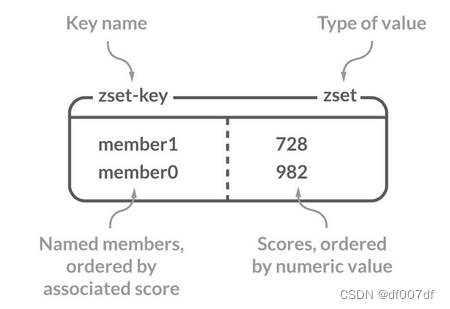
Redis 5 种基本数据类型详解
Redis 共有 5 种基本数据类型:String(字符串)、List(列表)、Set(集合)、Hash(散列)、Zset(有序集合)。 这 5 种数据类型是直接提供给用户使用的&…...
)
LeetCode8-字符串转换整数(atoi)
目录 1.大神解法2.我的辣鸡解法:3.整数相加的溢出判断(chaGPT代码)4.整数相乘溢出判断(chatGPT代码) 到目前为止比较简单容易理解的一个代码: 参考链接: 🔗:【8. 字符串转换整数 String to Integer (atoi) 【LeetCode 力扣官方题解】-哔哩哔哩】 1.大神解法 累乘和…...
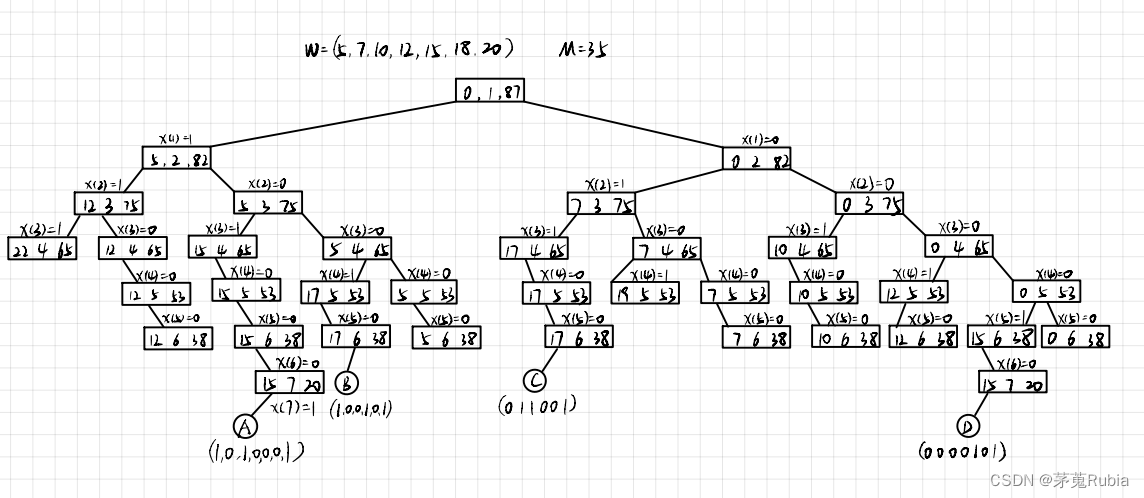
算法分析与设计课后练习22
设W(5,7,10,12,15,18,20)和M35,使用过程SUMOFSUB找出W种使得和数等于M的全部子集并画出所生成的部分状态空间树...
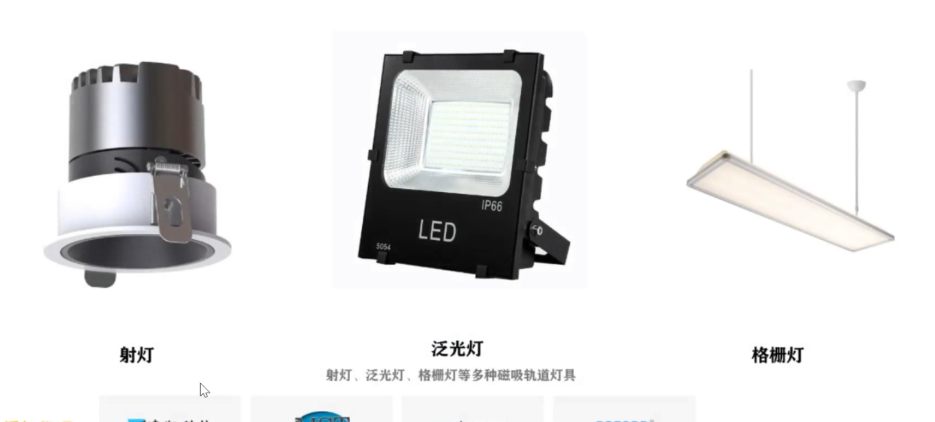
芯片IO口不加电阻会怎样?
芯片IO口不加电阻会怎样? 可能会导致以下几个后果: 1.高电流问题,IO口没有电阻限流,当与外部设备直接连接时,就可能会导致过大的电流流过IO口,这就可能损坏IO口,引起短路或烧坏其它电路组件。像…...
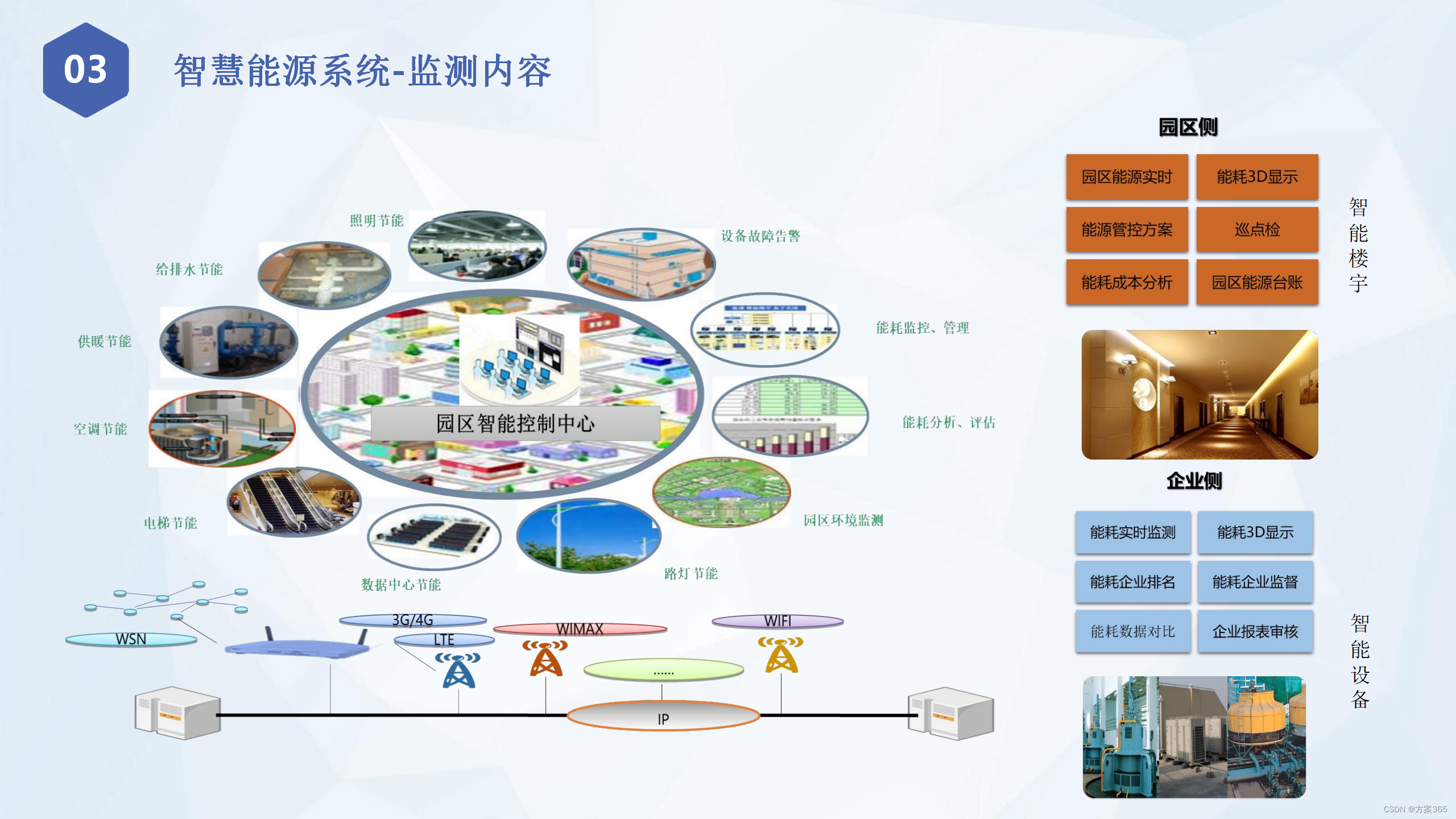
智慧化工园区信息化整体解决方案:PPT全53页,附下载
关键词:智慧化工园区建设方案,智慧化工园区建设规范,智慧化工园区建设指南 一、售智慧化工园区建设背景 随着工业化、信息化和数字化进程的加速,化工园区面临着越来越多的挑战,如安全生产、环境保护、能源消耗等问题…...
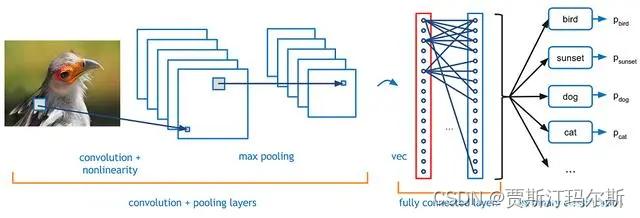
深度学习之三(卷积神经网络--Convolutional Neural Networks,CNNs)
概念 卷积神经网络(Convolutional Neural Networks,CNNs)是一种特殊的神经网络结构,专门用于处理具有网格状结构(如图像、音频)的数据。CNN 在计算机视觉领域取得了巨大成功,广泛应用于图像识别、物体检测、图像生成等任务。以下是 CNN 的主要理论概念: 在数学中,卷…...

竞赛选题 目标检测-行人车辆检测流量计数
文章目录 前言1\. 目标检测概况1.1 什么是目标检测?1.2 发展阶段 2\. 行人检测2.1 行人检测简介2.2 行人检测技术难点2.3 行人检测实现效果2.4 关键代码-训练过程 最后 前言 🔥 优质竞赛项目系列,今天要分享的是 行人车辆目标检测计数系统 …...
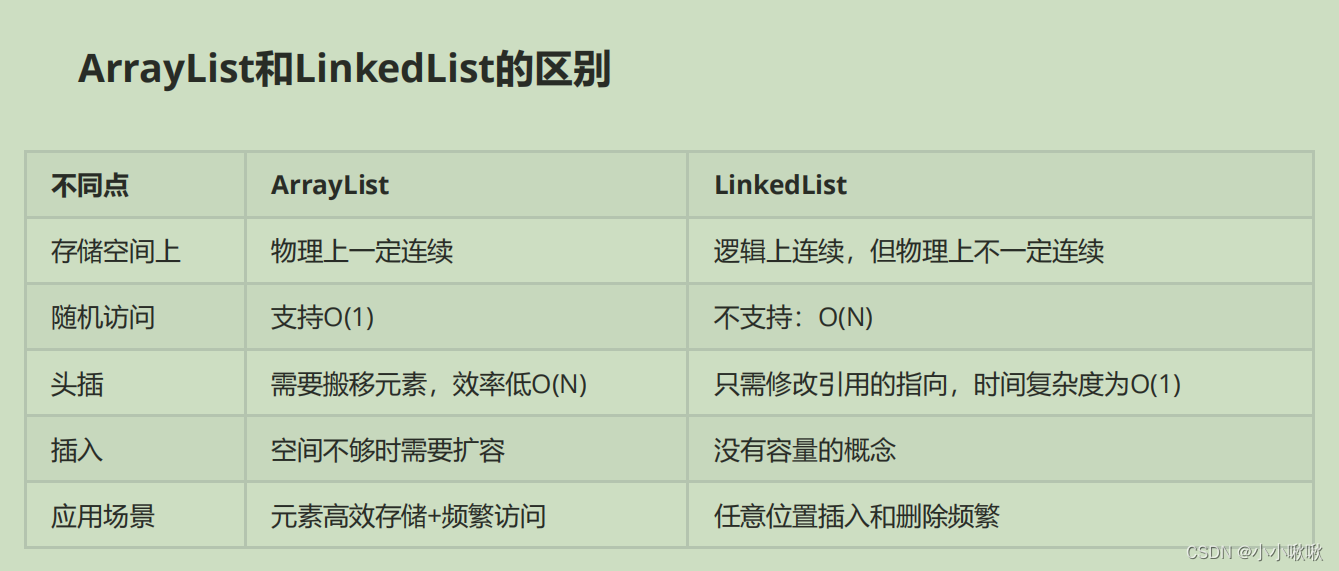
【链表的说明、方法---顺序表与链表的区别】
文章目录 前言什么是链表链表的结构带头和不带头的区别 链表的实现(方法)遍历链表头插法尾插法任意位置插入一个节点链表中是否包含某个数字删除链表某个节点删除链表中所有关键字key清空链表所有节点 ArrayList 和 LinkedList的区别总结 前言 什么是链…...

彻底解决electron-builder安装问题与npm下载配置问题
electron-builder这个工具每次安装最少要耗费我整整一天的时间。由于只需安装一次即可使用就没去做好笔记,但有时候涉及到更新,或者换了新电脑,这个环境还得重新安装。为了避免下次安装浪费一整天时间,特此做好笔记。 虽然网上找了很多资料但都不详细,现在我们从底层来理解…...

变量命名的规则与规范
变量命名的规则与规范 变量命名的规则不能使用关键字字母须区分大小写由字母、数字、_、$组成,且不能以数字开头 变量命名的规范起名须有一定的意义遵守小驼峰命名法 变量命名的规则 不能使用关键字 在JavaScript中声明变量不能使用JavaScript的常用关键字&#x…...
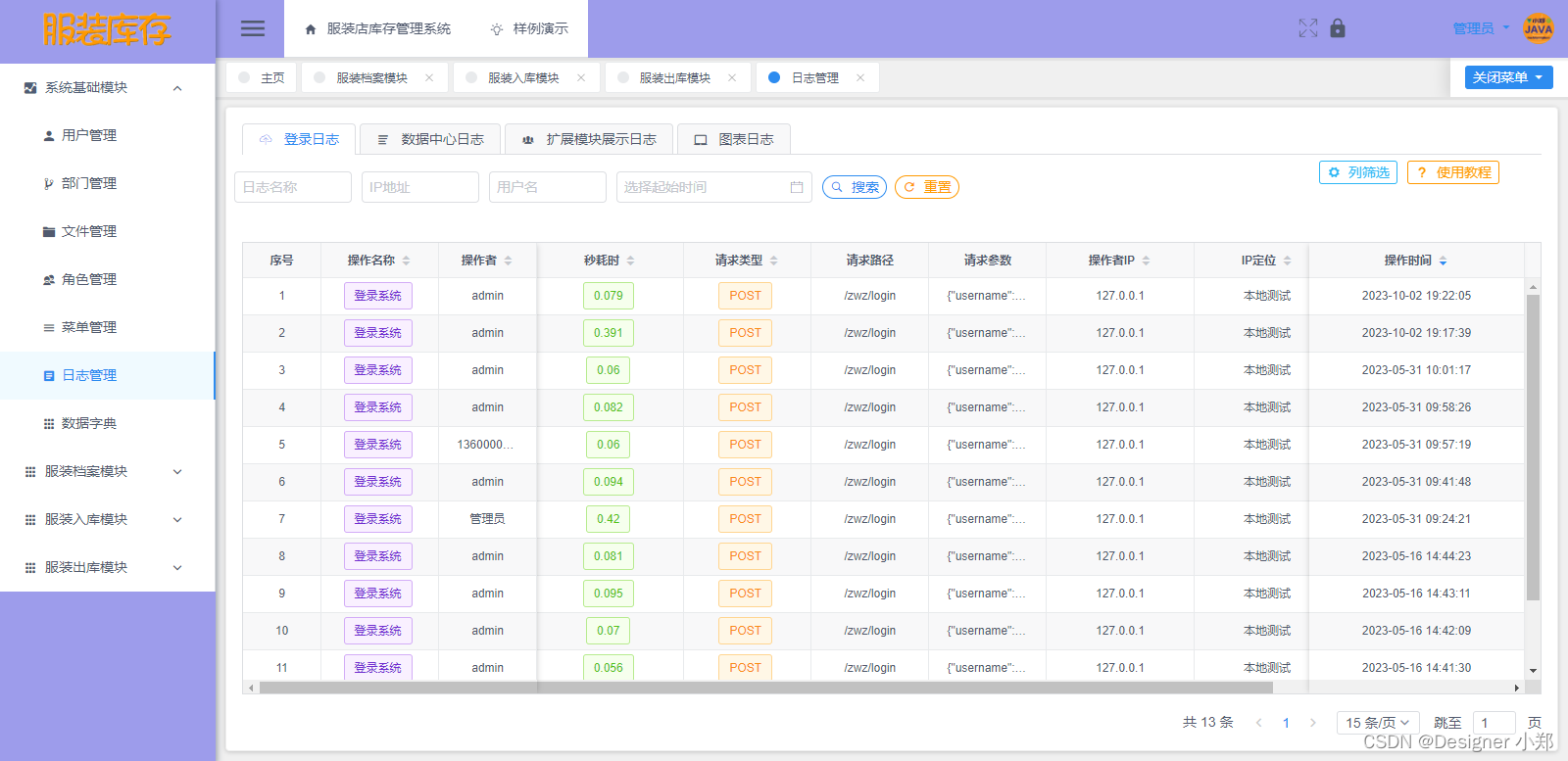
【开源】基于Vue和SpringBoot的服装店库存管理系统
项目编号: S 052 ,文末获取源码。 \color{red}{项目编号:S052,文末获取源码。} 项目编号:S052,文末获取源码。 目录 一、摘要1.1 项目介绍1.2 项目录屏 二、功能模块2.1 数据中心模块2.2 角色管理模块2.3 服…...

怎样用css画一个圆?
要使用 CSS 画一个圆,可以使用 border-radius 属性为一个元素添加圆角,将 width 和 height 设置为相等的值,从而形成一个圆形。 以下是一个使用 CSS 画圆的简单示例: .circle {width: 100px;height: 100px;background-color: #3…...

Minikube Mac安装使用
minikube start | minikube 安装minikube curl -LO https://storage.googleapis.com/minikube/releases/latest/minikube-darwin-amd64 sudo install minikube-darwin-amd64 /usr/local/bin/minikube 1 2 启动本地集群 minikube start --driverdocker # 等待几分钟 让docker 拉…...
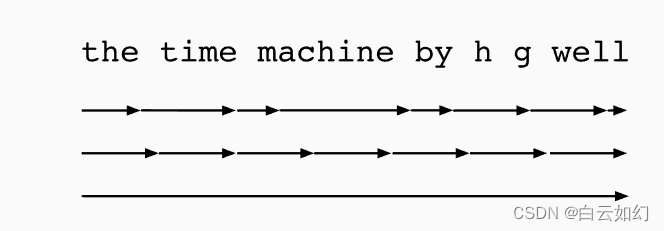
人工智能-循环神经网络通过时间反向传播
到目前为止,我们已经反复提到像梯度爆炸或梯度消失, 以及需要对循环神经网络分离梯度。 例如,我们在序列上调用了detach函数。 为了能够快速构建模型并了解其工作原理, 上面所说的这些概念都没有得到充分的解释。 本节将更深入地探…...

Delphi 取消与设置CDS本地排序
取消与设置CDS本地排序 取消CDS本地排序. cds.IndexDefs.Update; if cds.IndexName<> then begin if cds.IndexDefs.IndexOf(index1)>0 then cds.DeleteIndex(index1); cds.IndexDefs.Clear; cds.IndexName:; end; 设置CDS本地排序 c…...

智能门禁刷脸照片格式gif、bmp,png转换,转换base64
随着刷脸闸机的普及,很多场所都使用了刷脸金闸机,很多时候对方传来的照片格式不对。 刷脸闸机对应的格式都是jpg 照片来源:访客手机上传,管理员上传,团队购票上传 在转换的语言很多,在网站中php使用较为…...

听GPT 讲Rust源代码--src/librustdoc
题图来自 Why is building a UI in Rust so hard? File: rust/src/librustdoc/core.rs 在Rust中,rust/src/librustdoc/core.rs文件的作用是实现了Rustdoc库的核心功能和数据结构。Rustdoc是一个用于生成Rust文档的工具,它分析Rust源代码,并生…...

轻量级AI推理引擎cortex-lite:嵌入式与边缘计算部署实战
1. 项目概述:一个轻量级的AI推理引擎最近在折腾一些边缘计算和嵌入式AI应用时,我一直在寻找一个既轻量又高效的推理引擎。市面上成熟的框架不少,但要么对资源要求太高,要么定制化起来非常麻烦。直到我遇到了Rezzyman/cortex-lite这…...
刷写ECU标定数据)
UDS诊断实战:手把手教你用0x3D服务(WriteMemoryByAddress)刷写ECU标定数据
UDS诊断实战:手把手教你用0x3D服务(WriteMemoryByAddress)刷写ECU标定数据 在汽车电子诊断领域,ECU标定数据的修改是工程师们经常需要面对的任务。想象一下这样的场景:台架测试中某个燃油喷射参数需要微调,…...

Hitboxer终极指南:免费解决游戏按键冲突的专业SOCD重映射工具
Hitboxer终极指南:免费解决游戏按键冲突的专业SOCD重映射工具 【免费下载链接】socd Key remapper for epic gamers 项目地址: https://gitcode.com/gh_mirrors/so/socd 你是否曾在激烈的格斗游戏中,因为同时按下左右方向键而无法准确释放必杀技&…...

Windows PDF处理革命:Poppler预编译包如何解决你的文档处理难题
Windows PDF处理革命:Poppler预编译包如何解决你的文档处理难题 【免费下载链接】poppler-windows Download Poppler binaries packaged for Windows with dependencies 项目地址: https://gitcode.com/gh_mirrors/po/poppler-windows 还在为Windows上复杂的…...

C语言完美演绎8-17
/* 范例:8-17 */#include <stdio.h>void func(char *i,int j){printf("%d 以%s方式来调用函数指针\n",j,i);}void main(void){void (*pfun)(char *a, int b); /* 定义pfun函数指针 */pfunfunc; /* 将函数func()的地址赋值给函数指针pfun */(*pf…...
)
用STM32和4x4矩阵键盘复刻一个简易电梯控制器(附完整代码与避坑指南)
用STM32和4x4矩阵键盘打造智能电梯控制器:从硬件搭建到调度算法实战 在嵌入式系统开发领域,将多个功能模块整合成一个协同工作的完整系统,是检验开发者能力的重要标准。这个基于STM32的电梯控制器项目,完美融合了矩阵键盘输入、步…...

M3-Bench:多模态多线程智能体评估框架解析
1. 项目背景与核心价值在人工智能领域,多模态大语言模型(MLLM)的快速发展正在重塑智能体系统的能力边界。传统基准测试往往局限于单一模态或单线程任务,难以全面评估智能体在复杂现实场景中的表现。M3-Bench的诞生正是为了解决这一…...

Claude Stacks:AI开发环境即代码的CLI工具,实现配置一键分享与复用
1. 项目概述:Claude Stacks,一个改变AI开发环境共享方式的CLI工具如果你和我一样,是Claude Code的深度用户,那你一定遇到过这样的场景:好不容易在一个项目里配置好了一整套顺手的MCP服务器、自定义命令和智能体&#x…...

Cursor AI编辑器规则集:提升代码质量与团队协作效率
1. 项目概述:一个为 Cursor 编辑器量身定制的规则集合如果你和我一样,日常重度依赖 Cursor 这款 AI 驱动的代码编辑器,那你一定对它的.cursorrules文件又爱又恨。爱的是,它能通过一套精妙的规则,精准地“调教”AI 助手…...

OpenPicoRTOS:ARM Cortex-M微控制器上的极简实时操作系统设计与实战
1. 项目概述:一个为微控制器而生的实时操作系统如果你在嵌入式领域摸爬滚打过几年,尤其是在资源极其受限的微控制器(MCU)上开发过复杂应用,那你一定对“实时性”和“资源占用”这对矛盾深有体会。商业RTOS(…...