
微信小程序蓝牙连接 uniApp蓝牙连接设备
蓝牙列表期待效果
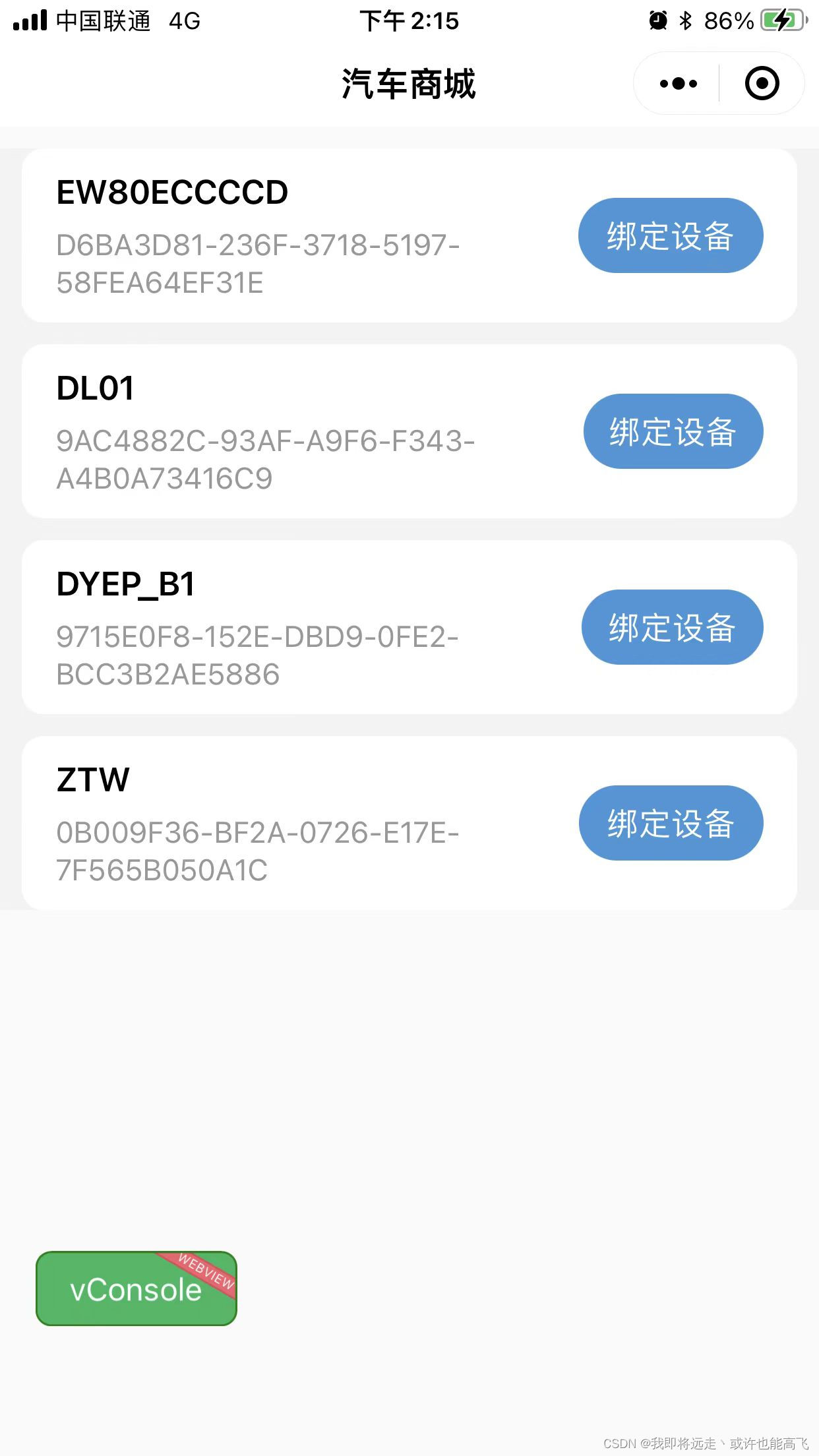
代码
<template><view class="bluetooth-list"><view class="align-items option" style="justify-content: space-between;" v-for="item in bluetoothList" :key="item.deviceId"><view class=""><view class="title">{{item.name || item.localName}}</view><view class="desc">{{item.deviceId}}</view></view><view class="bind-btn" @click="onBind(item)">绑定设备</view></view></view>
</template>
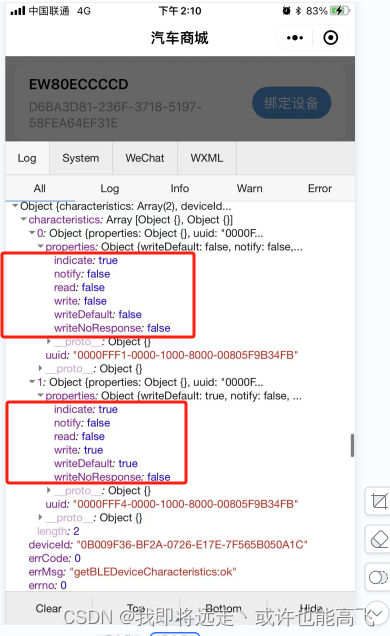
js里面注意getBLEDeviceCharacteristics获取特征值的时候,极个别设备参数write,read,notify是乱来的,需要自己打单独处理,通过对应write,read,notify 为true的时候拿到对应的uuid,
<script>export default {data() {return {bluetoothObj:{},bluetoothList:[],services: [],serviceId: 0,writeCharacter: false,readCharacter: false,notifyCharacter: false};},onLoad() {this.init()},onUnload() {//停止搜索蓝牙设备if (this.isSearching) {uni.stopBluetoothDevicesDiscovery();}},methods: {// 初始化init(){let that = this;uni.openBluetoothAdapter({success(res) {uni.getBluetoothAdapterState({success(res2) {if (res2.available) {if (res2.discovering) {uni.showToast({title: '正在搜索附近打印机设备',icon: "none"})return;}//获取蓝牙设备信息that.getBluetoothDevices()} else {uni.showModal({title: '提示',content: '本机蓝牙不可用',})}}});},fail() {uni.showModal({title: '提示',content: '蓝牙初始化失败,请打开蓝牙',})}})},//获取蓝牙设备信息getBluetoothDevices() {let that = thisthat.bluetoothList = [];uni.startBluetoothDevicesDiscovery({success(res) {//蓝牙设备监听 uni.onBluetoothDeviceFounduni.onBluetoothDeviceFound((result) => {let arr = that.bluetoothList;let devices = [];let list = result.devices;for (let i = 0; i < list.length; ++i) {if (list[i].name && list[i].name != "未知设备") {let arrNew = arr.filter((item) => {return item.deviceId == list[i].deviceId;});// console.log('arrNew:',arrNew.length)if (arrNew.length == 0) {devices.push(list[i]);}}}that.bluetoothList = arr.concat(devices);console.log("bluetoothList",that.bluetoothList)});that.time = setTimeout(() => {// uni.getBluetoothDevicesuni.getBluetoothDevices({success(res2) {let devices = [];let list = res2.devices;for (let i = 0; i < list.length; ++i) {if (list[i].name && list[i].name != "未知设备") {devices.push(list[i]);}}that.bluetoothList = devices;},})clearTimeout(that.time);}, 3000);}});},// 绑定蓝牙onBind(item){uni.stopBluetoothDevicesDiscovery();let that = this;let { deviceId } = item;console.log('item',item)that.bluetoothObj.deviceId = deviceId;that.serviceId = 0;that.writeCharacter = false;that.readCharacter = false;that.notifyCharacter = false;// uni.showLoading({// 	title: '正在连接',// })uni.openBluetoothAdapter({success: function () {uni.createBLEConnection({deviceId,success(res) {console.log('createBLEConnection success', res)uni.hideLoading()that.getSeviceId()},fail(e) {console.log('createBLEConnection fail', e)uni.hideLoading()}})},fail: function (error) {console.log("openBluetoothAdapter")}})},//获取蓝牙设备所有服务(service)。getSeviceId() {let that = this;let t=setTimeout(()=>{uni.getBLEDeviceServices({deviceId: that.bluetoothObj.deviceId,success(res) {console.log('getBLEDeviceServices success', res)that.services = res.services;that.getCharacteristics()},fail: function(e) {}})clearTimeout(t);},1500)},getCharacteristics() {var that = thislet {services: list,serviceId: num,writeCharacter: write,readCharacter: read,notifyCharacter: notify} = that;// uni.getBLEDeviceCharacteristicsuni.getBLEDeviceCharacteristics({deviceId: that.bluetoothObj.deviceId,serviceId: list[num].uuid,success(res) {console.log('getBLEDeviceCharacteristics success', res)// console.log(res)for (var i = 0; i < res.characteristics.length; ++i) {var properties = res.characteristics[i].propertiesvar item = res.characteristics[i].uuidif (!notify) {if (properties.notify) {that.bluetoothObj.notifyCharaterId = item;that.bluetoothObj.notifyServiceId = list[num].uuid;notify = true}}if (!write) {if (properties.write) {that.bluetoothObj.writeCharaterId = item;that.bluetoothObj.writeServiceId = list[num].uuid;write = true}}if (!read) {if (properties.read) {that.bluetoothObj.readCharaterId = item;that.bluetoothObj.readServiceId = list[num].uuid;read = true}}}if (!write || !notify || !read) {num++that.writeCharacter = write;that.readCharacter = read;that.notifyCharacter = notify;that.serviceId = num;if (num == list.length) {uni.showModal({title: '提示',content: '找不到该读写的特征值',})} else {that.getCharacteristics()}} else {// ok // wx.writeBLECharacteristicValueuni.notifyBLECharacteristicValueChange({state: true, // 启用 notify 功能// 这里的 deviceId 需要已经通过 createBLEConnection 与对应设备建立链接deviceId:that.bluetoothObj.deviceId,// 这里的 serviceId 需要在 getBLEDeviceServices 接口中获取serviceId:that.bluetoothObj.serviceId,// 这里的 characteristicId 需要在 getBLEDeviceCharacteristics 接口中获取characteristicId:that.bluetoothObj.notifyServiceId,success (res) {console.log('notifyBLECharacteristicValueChange success', res.errMsg)uni.onBLECharacteristicValueChange(function (e) {/**对设备发送过来的参数进行解密 */let str = that.ab2hex(e.value);console.log("解密str",str)})}})console.log("that.bluetoothObj",that.bluetoothObj)uni.setStorageSync("bluetoothObj", that.bluetoothObj)uni.showToast({icon:"none",title:"绑定成功"})setTimeout(()=>{uni.navigateBack({delta:1})},1000)}},fail: function(e) {console.log("getBLEDeviceCharacteristics fail:",e);}})},ab2hex: (buffer) => {const hexArr = Array.prototype.map.call(new Uint8Array(buffer),function (bit) {return ('00' + bit.toString(16)).slice(-2)})return hexArr.join('')},str2ab:(str) => {var buf = new ArrayBuffer(str.length / 2);var bufView = new Uint8Array(buf);for (var i = 0, strLen = str.length; i < strLen; i++) {bufView[i] = parseInt(str.slice(i * 2, i * 2 + 2), 16);}return buf;}}}
</script>
<style lang="less" scoped>.bluetooth-list{background-color: #F3F3F3;.option{margin: 20rpx;padding: 20rpx 32rpx;background-color: #fff;border-radius: 20rpx;.title{font-weight: 600;font-size: 32rpx;}.desc{font-size: 28rpx;color: #999;margin-top: 12rpx;}.bind-btn{background-color: #3F96DB;color: #fff;width: 200rpx;height: 70rpx;line-height: 70rpx;border-radius: 35rpx;text-align: center;font-size: 30rpx;}}}
</style>
相关文章:
微信小程序蓝牙连接 uniApp蓝牙连接设备
蓝牙列表期待效果 代码 <template><view class"bluetooth-list"><view class"align-items option" style"justify-content: space-between;" v-for"item in bluetoothList" :key"item.deviceId"><vie…...
启动Dubbo项目注册Zookeeper时提示zookeeper not connected异常原理解析
原创/朱季谦 遇到一个很诡异的问题,我在启动多个配置相同zookeeper的Dubbo项目时,其他项目都是正常启动,唯独有一个项目在启动过程中,Dubbo注册zookeeper协议时,竟然出现了这样的异常提示—— Caused by: java.lang.…...
我在Vscode学OpenCV 几何变换(缩放、翻转、仿射变换、透视、重映射)
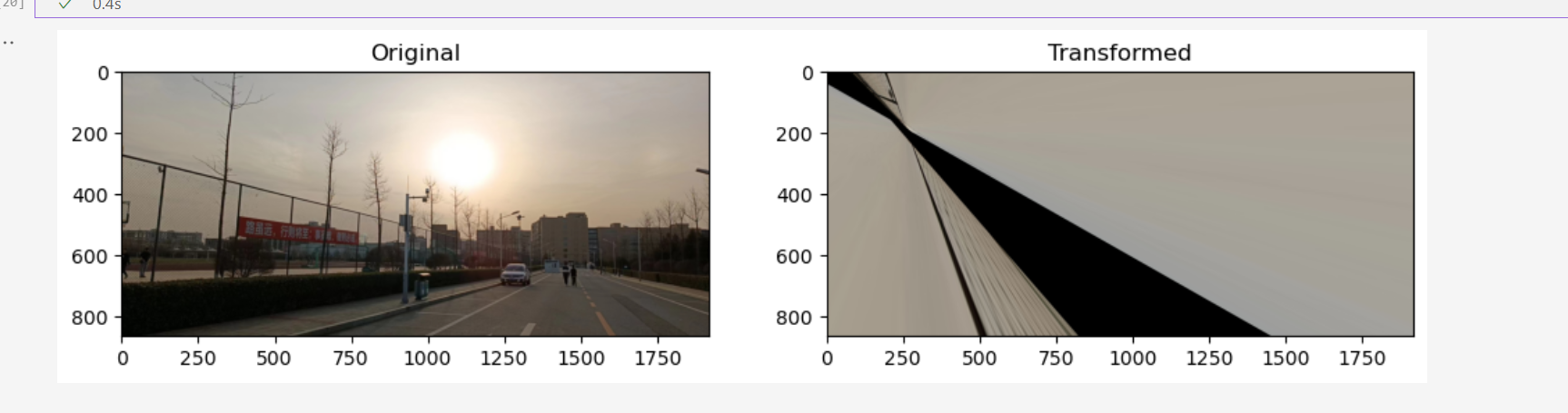
几何变换指的是将一幅图像映射到另一幅图像内的操作。 cv2.warpAffine:使用仿射变换矩阵对图像进行变换,可以实现平移、缩放和旋转等操作。cv2.warpPerspective:使用透视变换矩阵对图像进行透视变换,可以实现镜头校正、图像纠偏等…...

MATLAB算法实战应用案例精讲-【图像处理】图像缩放
目录 前言 知识储备 MATLAB图像处理函数 数字数字图像增强 数字数字图像的变换...
)
Doris的PROPERTIES与ENGINE(九)
接上篇----------Doris分区与分桶 在建表语句的最后 PROPERTIES 中,可以指定以下两个参数: replication_num 每个 Tablet 的副本数量。默认为 3,建议保持默认即可。在建表语句中,所有 Partition 中的 Tablet 副本数量统一指定。…...

华为云数据库 RDS 下载全量备份文件 wget
地址下载 wget -O FILE_NAME --no-check-certificate "DOWNLOAD_URL"FILE_NAME:重命名,例如mysql1121.qpDOWNLOAD_URL: 地址下载 参考 华为云数据库 RDS 下载全量备份文件...
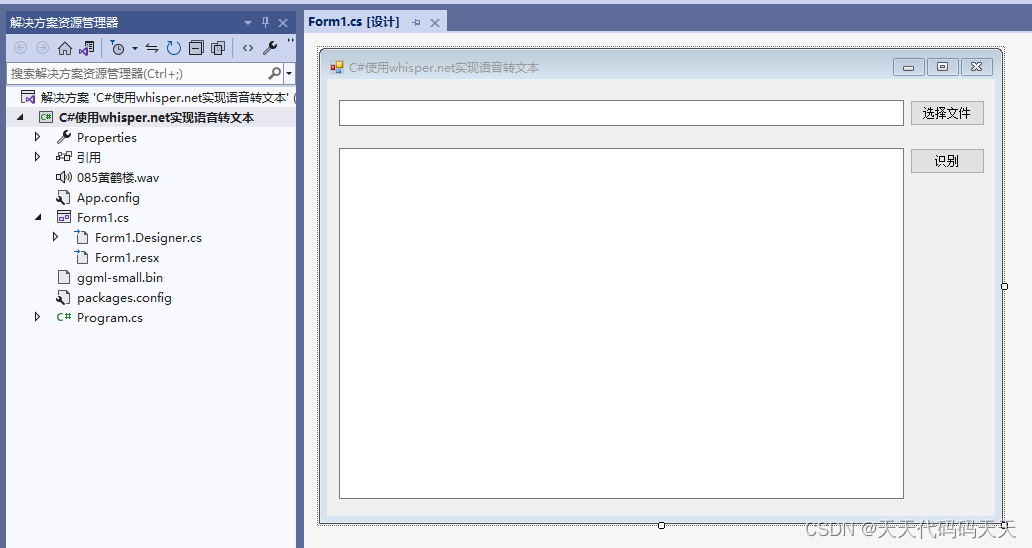
C#使用whisper.net实现语音识别(语音转文本)
目录 介绍 效果 输出信息 项目 代码 下载 介绍 github地址:https://github.com/sandrohanea/whisper.net Whisper.net. Speech to text made simple using Whisper Models 模型下载地址:https://huggingface.co/sandrohanea/whisper.net/tree…...
)
从零开始学习typescript——运算符(算术运算符、赋值运算符、比较运算符)
算术运算符 算术运算符主要是针对数值类型和长整型;包括有加法、减法、乘法、除法、自增、自减等运算 加法() let x:number1let y:number 2console.log(xy)减法(-) let x:number1let y:number 2console.log(y-x)乘法…...
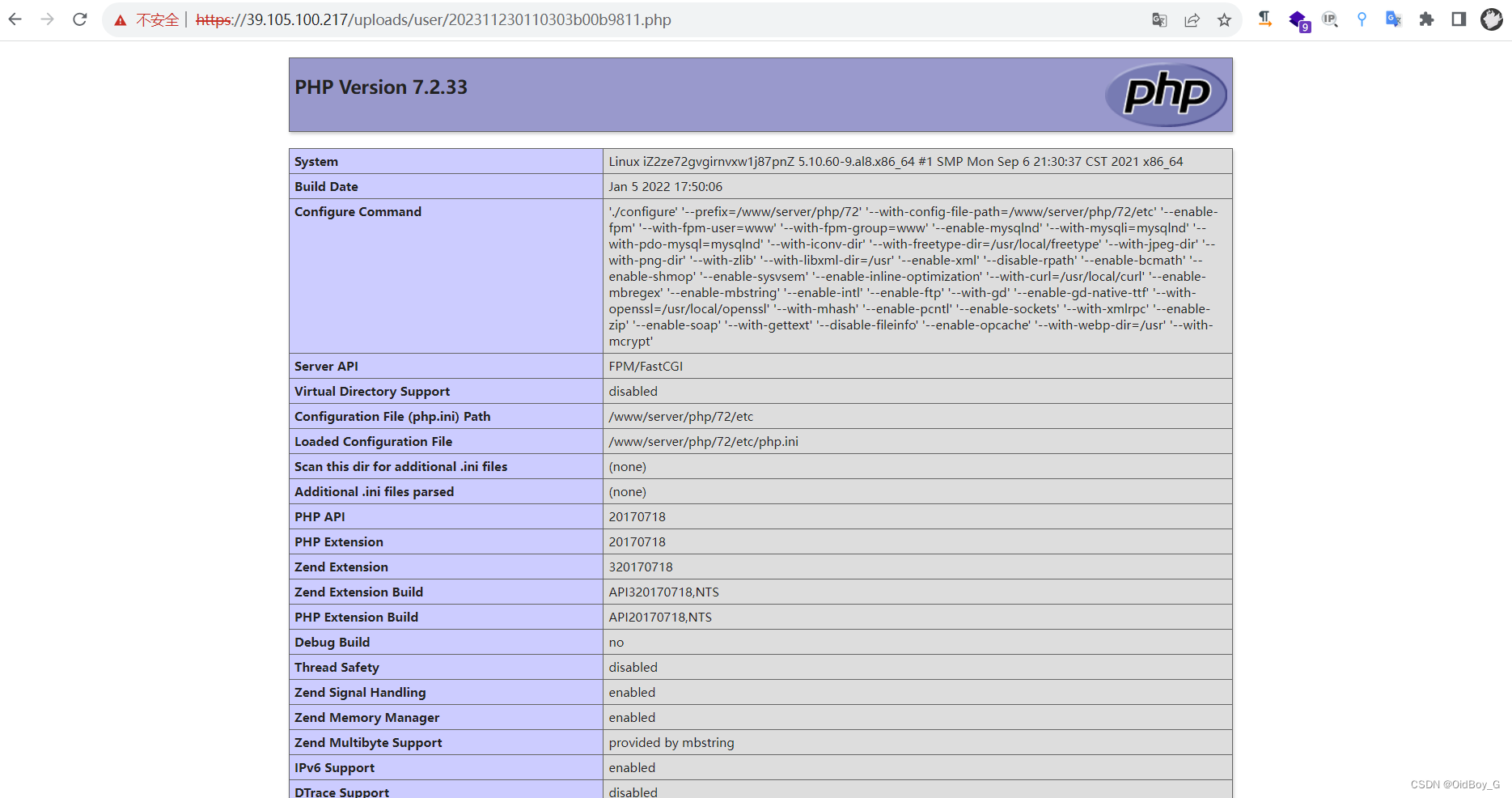
likeshop单商户商城系统 任意文件上传漏洞复现
0x01 产品简介 likeshop单商户标准商城系统适用于B2C、单商户、自营商城场景。完美契合私域流量变现闭环交易使用。 系统拥有丰富的营销玩法,强大的分销能力,支持电子面单和小程序直播等功能。无论运营还是二开都是性价比极高的100%开源商城系统。 0x02…...
CentOS 7 使用pugixml 库
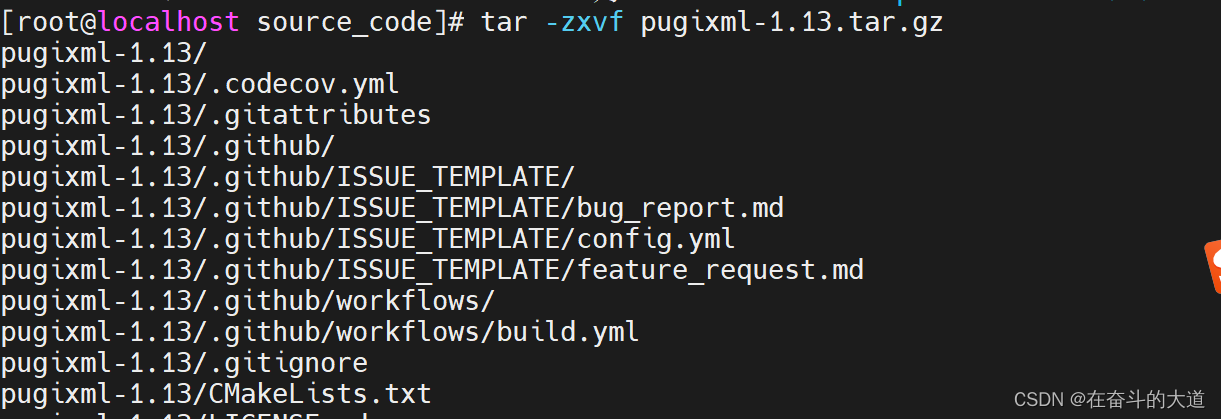
安装 pugixml Git下载地址:https://github.com/zeux/pugixml 步骤1:首先,你需要下载pugixml 的源代码。你可以从Github或者源代码官方网站下载。并上传至/usr/local/source_code/ 步骤2:下载完成后,需要将源代码解压…...

深度学习 loss 是nan的可能原因
1 loss 损失值非常大,超过了浮点数的范围,所以表示为overflow 状态下的男。 解决办法: 减小学习率,观察loss值是不是还是nan 在将数据输入模型前,进行恰当的归一化 缩放 2 loss 的计算中存在除以0, log(0…...
[ 云计算 | AWS 实践 ] 基于 Amazon S3 协议搭建个人云存储服务
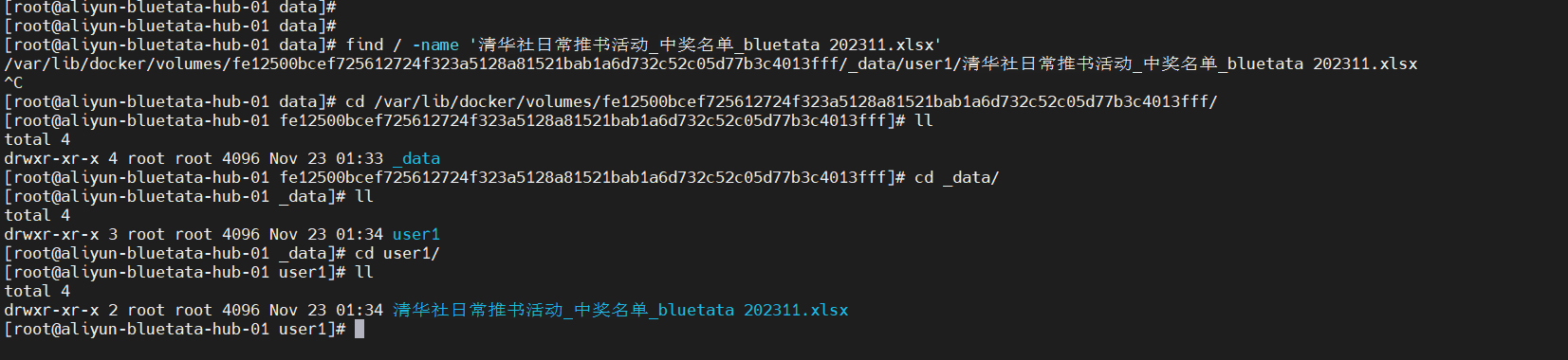
本文收录于【#云计算入门与实践 - AWS】专栏中,收录 AWS 入门与实践相关博文。 本文同步于个人公众号:【云计算洞察】 更多关于云计算技术内容敬请关注:CSDN【#云计算入门与实践 - AWS】专栏。 本系列已更新博文: [ 云计算 | …...
第二十章:多线程
进程 线程的特点 1.进程是资源分配的最小单位,线程是最小的执行单位 2.一个进程可以有多个线程 3.线程共享进程资源 package twentyth; public class ThreadTest extends Thread { public void run() { for (int i 1; i < 10; i) {//继承重…...
CentOS 7启动时报“Started Crash recovery kernel arming.....shutdown....”问题处理过程
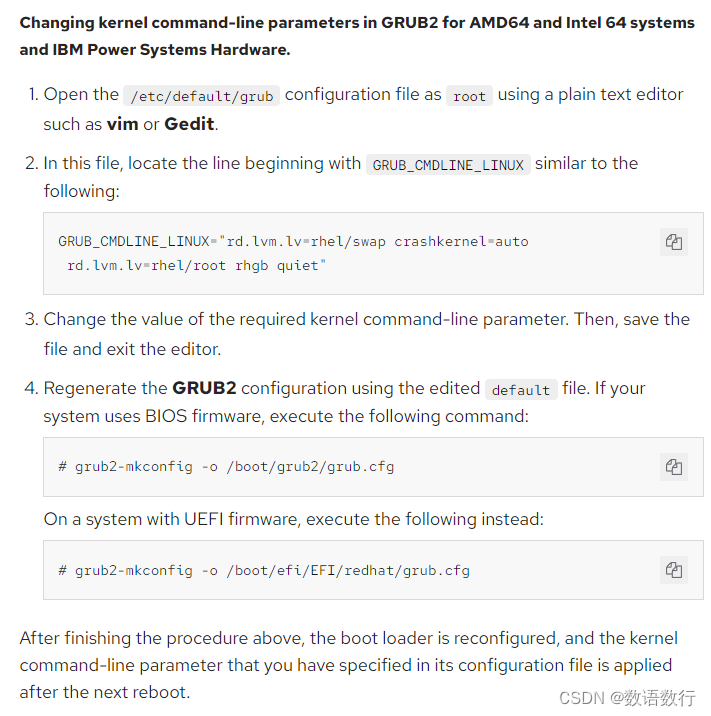
有台虚拟机由于CPU负载过高而宕机,宕机重启后停在“Started Crash recovery kernel arming…shutdown…”阶段,如下所示: 重置虚拟机,进入grub菜单,按e编辑启动选项,在linux16 行末,加上&…...
Android 13 - Media框架(14)- OpenMax(二)
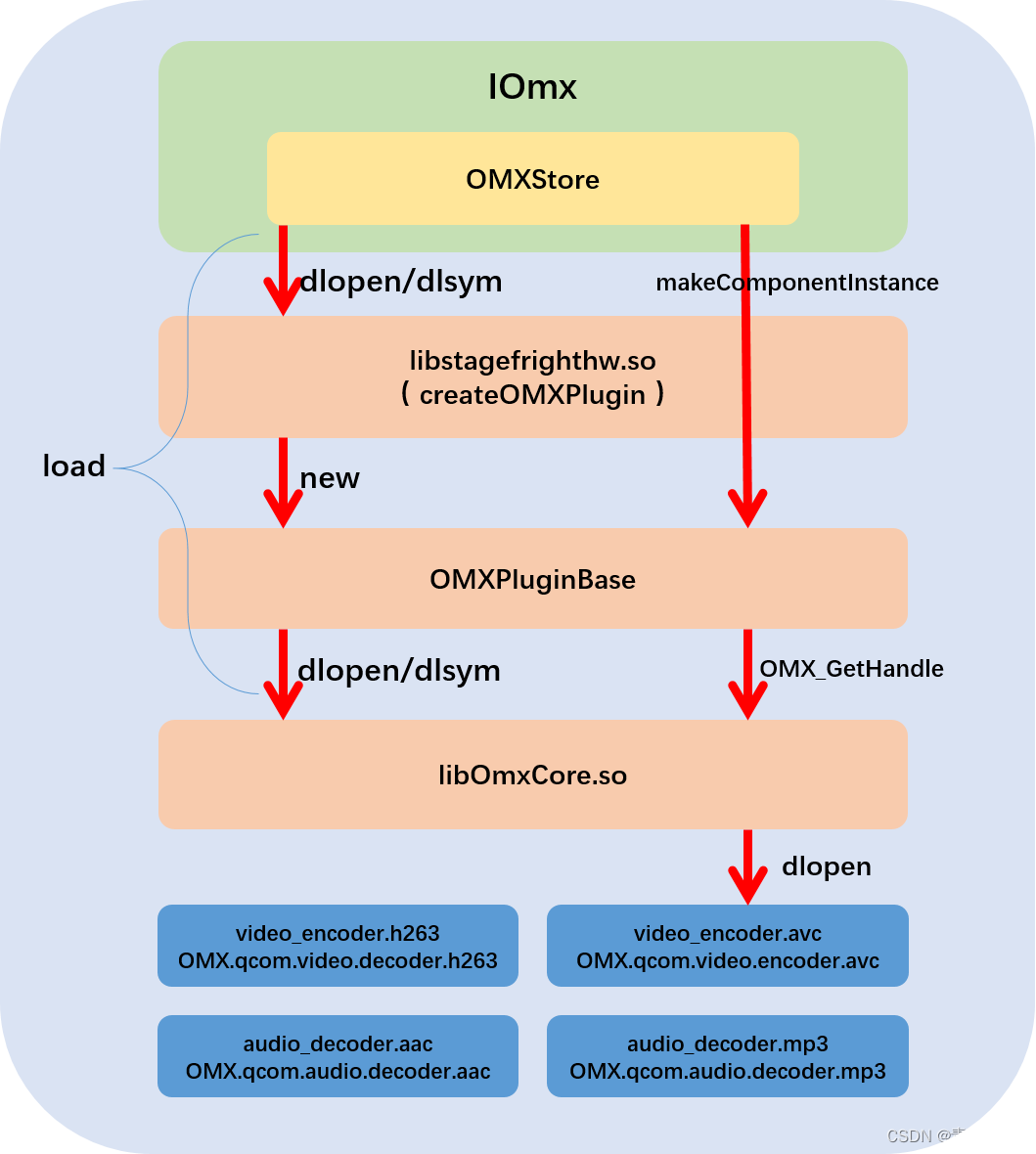
这一节我们将来解析 media.codec 这个 HIDL service 究竟提供了什么服务,服务是如何启动的。 1、main 函数 我们先来看 frameworks/av/services/mediacodec/main_codecservice.cpp: int main(int argc __unused, char** argv) {strcpy(argv[0], "…...
【Python大数据笔记_day11_Hadoop进阶之MR和YARNZooKeeper】
MR 单词统计流程 已知文件内容: hadoop hive hadoop spark hive flink hive linux hive mysql input结果: k1(行偏移量) v1(每行文本内容)0 hadoop hive hadoop spark hive 30 flink hive linux hive mysql map结果:k2(split切割后的单词) v2(拼接…...

飞桨——总结PPOCRLabel中遇到的坑
操作系统:win10 python环境:python3.9 paddleocr项目版本:2.7 1.报错:ModuleNotFoundError: No module named Polygon(已解决) 已解决所以没有复现报错内容 尝试方法一:直接使用pip命令安装&…...

LeetCode(30)长度最小的子数组【滑动窗口】【中等】
目录 1.题目2.答案3.提交结果截图 链接: 长度最小的子数组 1.题目 给定一个含有 n 个正整数的数组和一个正整数 target 。 找出该数组中满足其总和大于等于 target 的长度最小的 连续子数组 [numsl, numsl1, ..., numsr-1, numsr] ,并返回其长度。如果…...
Niushop 开源商城 v5.1.7:支持PC、手机、小程序和APP多端电商的源码
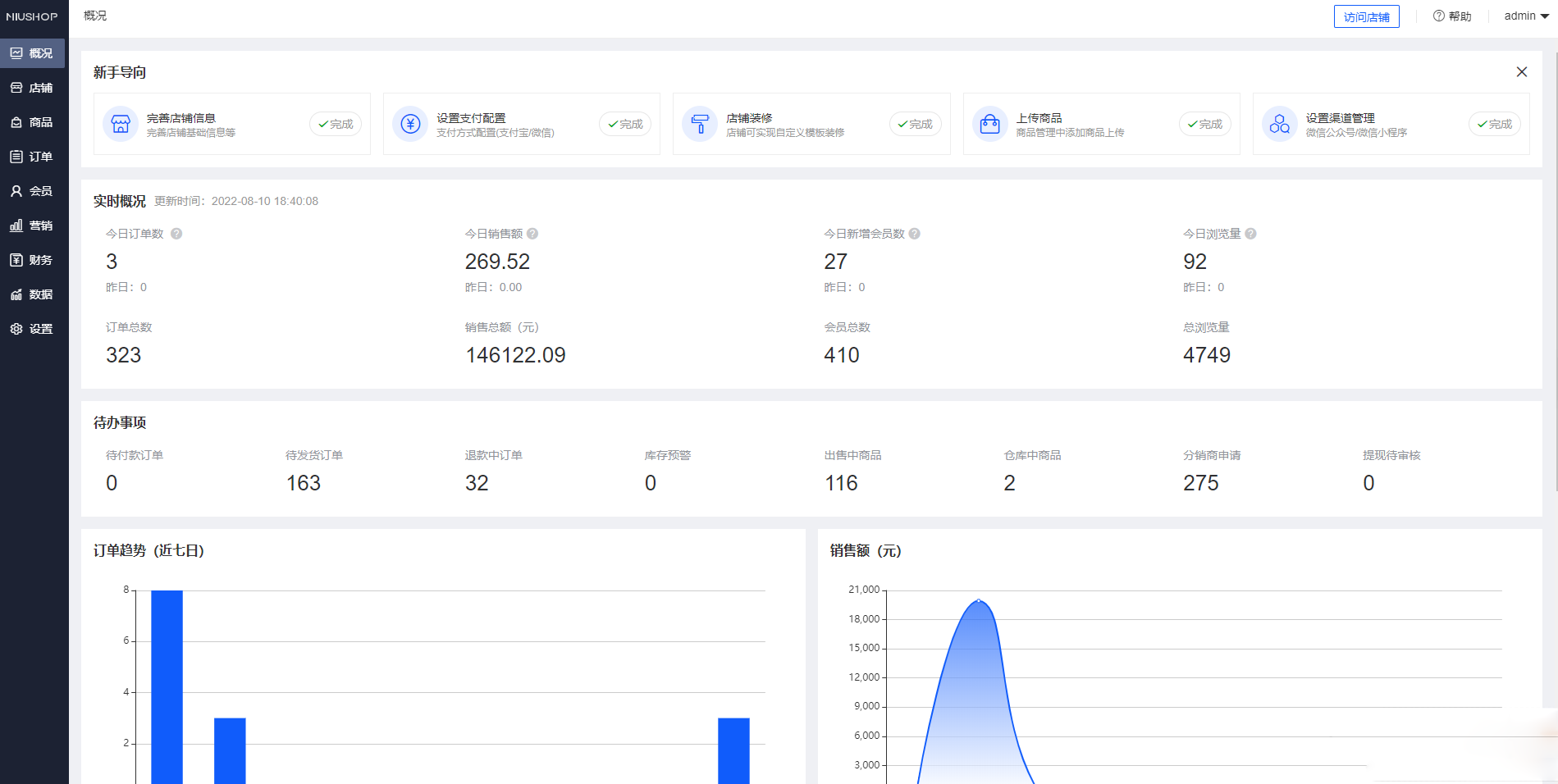
Niushop 系统是一款基于 ThinkPHP6 开发的电商系统,提供了丰富的功能和完善的商品机制。该系统支持普通商品和虚拟商品,并且针对虚拟商品还提供了完善的核销机制。同时,它也支持新时代的商业模式,如拼团、分销和多门店砍价等营销活…...
Navmesh 寻路
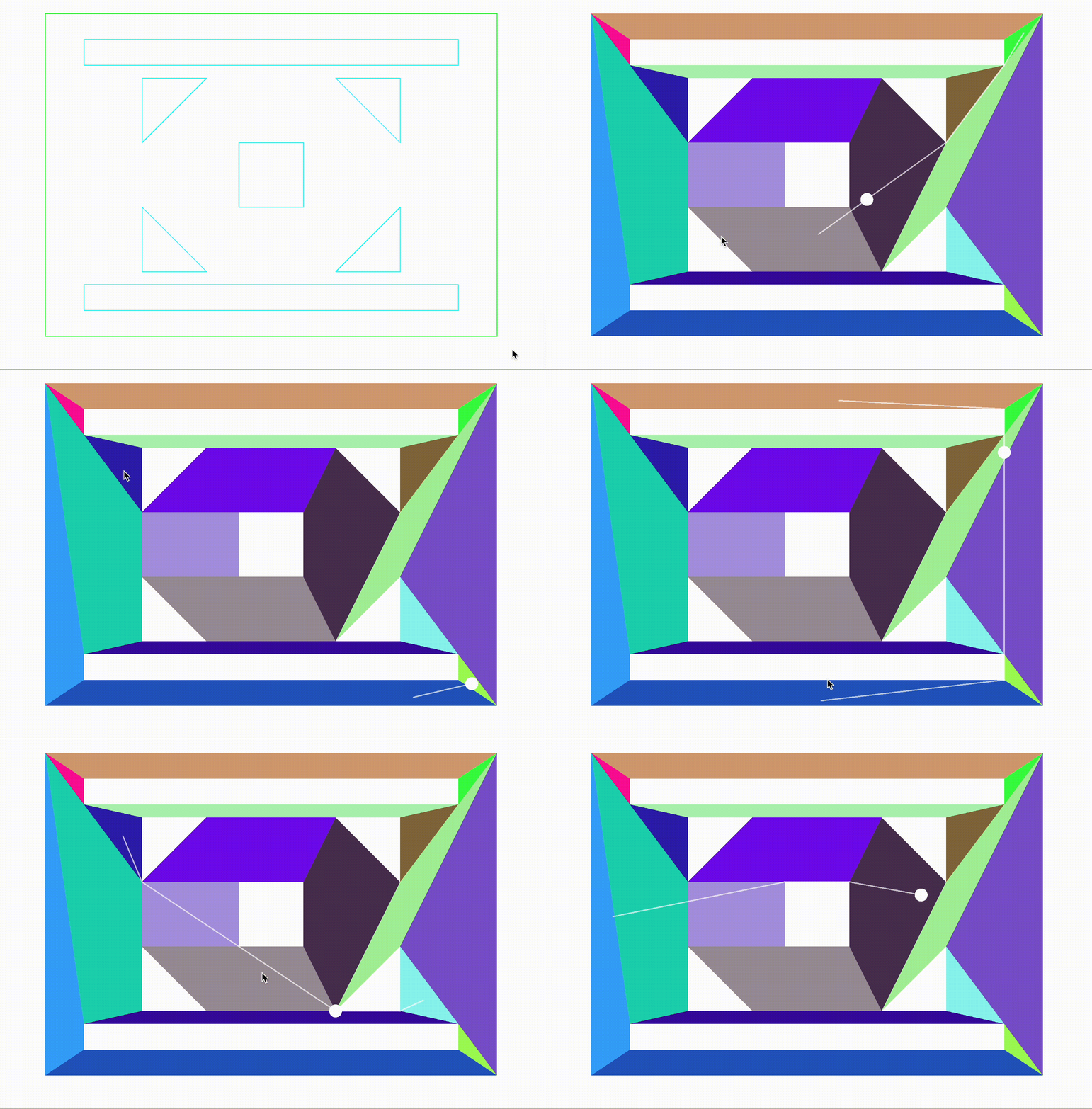
用cocos2dx引擎简单实现了一下navmesh的多边形划分,然后基于划分多边形的a*寻路。以及路径拐点优化算法 用cocos主要是方便使用一些渲染接口和定时器。重点是实现的原理。 首先画了一个带有孔洞的多边形 //多边形的顶点数据Vec2(100, 100),Vec2(300, 200),Vec2(50…...

STM32CubeIDE + FreeRTOS:如何高效定制你的FreeRTOSConfig.h文件?
STM32CubeIDE FreeRTOS:如何高效定制你的FreeRTOSConfig.h文件? 在嵌入式开发领域,FreeRTOS因其轻量级、开源和高度可配置的特性,成为许多STM32开发者的首选实时操作系统。而STM32CubeIDE作为ST官方推出的集成开发环境࿰…...

Python项目上线即崩?90%团队忽略的分布式配置元数据治理——配置版本血缘、变更审计、灰度发布链路全曝光
更多请点击: https://intelliparadigm.com 第一章:Python项目上线即崩?90%团队忽略的分布式配置元数据治理——配置版本血缘、变更审计、灰度发布链路全曝光 当 Flask 服务在生产环境突然返回 500 错误,而本地和测试环境一切正常…...

告别纸上谈兵:手把手教你用CANoe实战UDS诊断中的$31例程控制
告别纸上谈兵:手把手教你用CANoe实战UDS诊断中的$31例程控制 在汽车电子开发领域,UDS诊断协议是工程师必须掌握的技能之一。而0x31例程控制服务作为UDS诊断中的重要功能,广泛应用于ECU编程、功能测试、标定校准等场景。本文将带你从零开始&am…...
)
保姆级教程:用sys.argv[0]一劳永逸解决PyInstaller打包exe的路径问题(附完整代码对比)
彻底解决Python打包exe路径问题的工程实践指南 当我们将Python脚本打包成独立可执行文件时,最常遇到的"拦路虎"之一就是路径问题。许多开发者在IDE中调试时一切正常,但一旦用PyInstaller打包成exe后,程序就开始报No such file or …...
)
树莓派LXDE桌面菜单栏丢了别慌!手把手教你手动创建panel配置文件恢复(附完整配置参数详解)
树莓派LXDE桌面菜单栏终极恢复指南:从配置文件解析到深度定制 树莓派用户在使用LXDE桌面环境时,偶尔会遇到顶部菜单栏突然消失的尴尬情况。这种问题通常发生在远程桌面连接中断、系统资源紧张或误操作之后。网上常见的解决方案是删除配置文件并重启&…...

Mesen终极指南:3分钟掌握NES复古游戏模拟器完整教程
Mesen终极指南:3分钟掌握NES复古游戏模拟器完整教程 【免费下载链接】Mesen Mesen is a cross-platform (Windows & Linux) NES/Famicom emulator built in C and C# 项目地址: https://gitcode.com/gh_mirrors/me/Mesen Mesen是一款功能强大的跨平台NES…...

手把手教你配置TongWeb 8.0连接达梦数据库:驱动、方言与性能调优全流程
手把手教你配置TongWeb 8.0连接达梦数据库:驱动、方言与性能调优全流程 在信创项目推进过程中,国产中间件与数据库的适配一直是技术落地的关键环节。TongWeb作为国产应用服务器的代表,与达梦数据库的组合已成为许多金融、政务系统的标准配置。…...
让散点图瞬间高级)
拯救你的图表审美:用Matplotlib内置色彩映射(cmap)让散点图瞬间高级
拯救你的图表审美:用Matplotlib内置色彩映射(cmap)让散点图瞬间高级 在科研论文、商业报告或数据分析项目中,一张精心设计的图表往往比千言万语更能清晰传达信息。然而,许多人在使用Matplotlib绘制散点图时,…...

pocketClaw:轻量级Python网页抓取工具的设计哲学与实战应用
1. 项目概述与核心价值最近在折腾一个挺有意思的开源项目,叫abeazam/pocketClaw。乍一看这个名字,可能会有点摸不着头脑,但如果你对数据抓取、自动化工具或者Python生态有所了解,这个项目绝对值得你花时间研究。简单来说ÿ…...

别再乱用try-catch-finally了!Spring Boot项目里这样处理异常才优雅
Spring Boot异常处理的艺术:告别try-catch-finally的野蛮时代 在微服务架构盛行的今天,一个优雅的异常处理机制已经成为区分专业开发与业余编码的关键标志。想象这样的场景:当你的API被疯狂调用时,某个服务突然抛出异常ÿ…...