
npm ERR! node-sass@4.13.0 postinstall: `node scripts/build.js`
npm ERR! node-sass@4.13.0 postinstall: `node scripts/build.js`
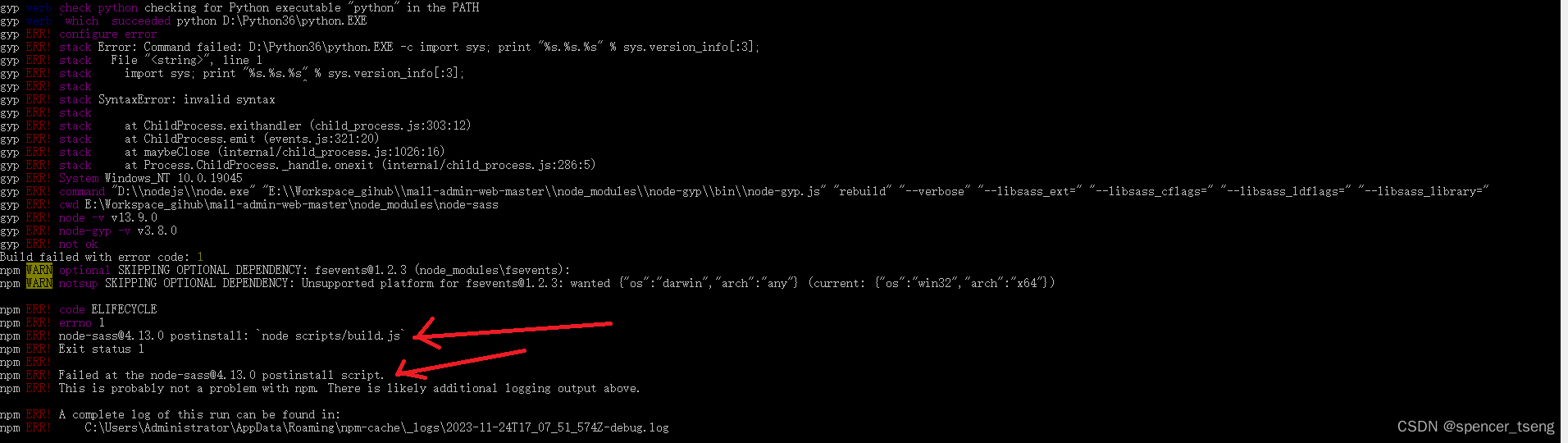
npm config set sass_binary_site=https://npm.taobao.org/mirrors/node-sass
npm install
npm run dev

Microsoft Windows [版本 10.0.19045.2965]
(c) Microsoft Corporation。保留所有权利。C:\Users\Administrator>e:E:\>
E:\>CD E:\Workspace_zwf\mallE:\Workspace_zwf\mall>npm install> node-sass@4.13.0 install E:\Workspace_zwf\mall\node_modules\node-sass
> node scripts/install.jsDownloading binary from https://github.com/sass/node-sass/releases/download/v4.13.0/win32-x64-79_binding.node
Cannot download "https://github.com/sass/node-sass/releases/download/v4.13.0/win32-x64-79_binding.node":connect ECONNREFUSED 185.199.108.133:443Hint: If github.com is not accessible in your locationtry setting a proxy via HTTP_PROXY, e.g.export HTTP_PROXY=http://example.com:1234or configure npm proxy vianpm config set proxy http://example.com:8080> uglifyjs-webpack-plugin@0.4.6 postinstall E:\Workspace_zwf\mall\node_modules\webpack\node_modules\uglifyjs-webpack-plugin
> node lib/post_install.js> node-sass@4.13.0 postinstall E:\Workspace_zwf\mall\node_modules\node-sass
> node scripts/build.jsBuilding: D:\nodejs\node.exe E:\Workspace_zwf\mall\node_modules\node-gyp\bin\node-gyp.js rebuild --verbose --libsass_ext= --libsass_cflags= --libsass_ldflags= --libsass_library=
gyp info it worked if it ends with ok
gyp verb cli [
gyp verb cli   'D:\\nodejs\\node.exe',
gyp verb cli   'E:\\Workspace_gihub\\mall-admin-web-master\\node_modules\\node-gyp\\bin\\node-gyp.js',
gyp verb cli   'rebuild',
gyp verb cli   '--verbose',
gyp verb cli   '--libsass_ext=',
gyp verb cli   '--libsass_cflags=',
gyp verb cli   '--libsass_ldflags=',
gyp verb cli   '--libsass_library='
gyp verb cli ]
gyp info using node-gyp@3.8.0
gyp info using node@13.9.0 | win32 | x64
gyp verb command rebuild []
gyp verb command clean []
gyp verb clean removing "build" directory
gyp verb command configure []
gyp verb check python checking for Python executable "python2" in the PATH
gyp verb `which` failed Error: not found: python2
gyp verb `which` failed     at getNotFoundError (E:\Workspace_zwf\mall\node_modules\which\which.js:13:12)
gyp verb `which` failed     at F (E:\Workspace_zwf\mall\node_modules\which\which.js:68:19)
gyp verb `which` failed     at E (E:\Workspace_zwf\mall\node_modules\which\which.js:80:29)
gyp verb `which` failed     at E:\Workspace_zwf\mall\node_modules\which\which.js:89:16
gyp verb `which` failed     at E:\Workspace_zwf\mall\node_modules\isexe\index.js:42:5
gyp verb `which` failed     at E:\Workspace_zwf\mall\node_modules\isexe\windows.js:36:5
gyp verb `which` failed     at FSReqCallback.oncomplete (fs.js:170:21)
gyp verb `which` failed  python2 Error: not found: python2
gyp verb `which` failed     at getNotFoundError (E:\Workspace_zwf\mall\node_modules\which\which.js:13:12)
gyp verb `which` failed     at F (E:\Workspace_zwf\mall\node_modules\which\which.js:68:19)
gyp verb `which` failed     at E (E:\Workspace_zwf\mall\node_modules\which\which.js:80:29)
gyp verb `which` failed     at E:\Workspace_zwf\mall\node_modules\which\which.js:89:16
gyp verb `which` failed     at E:\Workspace_zwf\mall\node_modules\isexe\index.js:42:5
gyp verb `which` failed     at E:\Workspace_zwf\mall\node_modules\isexe\windows.js:36:5
gyp verb `which` failed     at FSReqCallback.oncomplete (fs.js:170:21) {
gyp verb `which` failed   stack: 'Error: not found: python2\n' +
gyp verb `which` failed     '    at getNotFoundError (E:\\Workspace_gihub\\mall-admin-web-master\\node_modules\\which\\which.js:13:12)\n' +
gyp verb `which` failed     '    at F (E:\\Workspace_gihub\\mall-admin-web-master\\node_modules\\which\\which.js:68:19)\n' +
gyp verb `which` failed     '    at E (E:\\Workspace_gihub\\mall-admin-web-master\\node_modules\\which\\which.js:80:29)\n' +
gyp verb `which` failed     '    at E:\\Workspace_gihub\\mall-admin-web-master\\node_modules\\which\\which.js:89:16\n' +
gyp verb `which` failed     '    at E:\\Workspace_gihub\\mall-admin-web-master\\node_modules\\isexe\\index.js:42:5\n' +
gyp verb `which` failed     '    at E:\\Workspace_gihub\\mall-admin-web-master\\node_modules\\isexe\\windows.js:36:5\n' +
gyp verb `which` failed     '    at FSReqCallback.oncomplete (fs.js:170:21)',
gyp verb `which` failed   code: 'ENOENT'
gyp verb `which` failed }
gyp verb check python checking for Python executable "python" in the PATH
gyp verb `which` succeeded python D:\Python36\python.EXE
gyp ERR! configure error
gyp ERR! stack Error: Command failed: D:\Python36\python.EXE -c import sys; print "%s.%s.%s" % sys.version_info[:3];
gyp ERR! stack   File "<string>", line 1
gyp ERR! stack     import sys; print "%s.%s.%s" % sys.version_info[:3];
gyp ERR! stack                                ^
gyp ERR! stack SyntaxError: invalid syntax
gyp ERR! stack
gyp ERR! stack     at ChildProcess.exithandler (child_process.js:303:12)
gyp ERR! stack     at ChildProcess.emit (events.js:321:20)
gyp ERR! stack     at maybeClose (internal/child_process.js:1026:16)
gyp ERR! stack     at Process.ChildProcess._handle.onexit (internal/child_process.js:286:5)
gyp ERR! System Windows_NT 10.0.19045
gyp ERR! command "D:\\nodejs\\node.exe" "E:\\Workspace_zwf\\mall\\node_modules\\node-gyp\\bin\\node-gyp.js" "rebuild" "--verbose" "--libsass_ext=" "--libsass_cflags=" "--libsass_ldflags=" "--libsass_library="
gyp ERR! cwd E:\Workspace_zwf\mall\node_modules\node-sass
gyp ERR! node -v v13.9.0
gyp ERR! node-gyp -v v3.8.0
gyp ERR! not ok
Build failed with error code: 1
npm WARN optional SKIPPING OPTIONAL DEPENDENCY: fsevents@1.2.3 (node_modules\fsevents):
npm WARN notsup SKIPPING OPTIONAL DEPENDENCY: Unsupported platform for fsevents@1.2.3: wanted {"os":"darwin","arch":"any"} (current: {"os":"win32","arch":"x64"})npm ERR! code ELIFECYCLE
npm ERR! errno 1
npm ERR! node-sass@4.13.0 postinstall: `node scripts/build.js`
npm ERR! Exit status 1
npm ERR!
npm ERR! Failed at the node-sass@4.13.0 postinstall script.
npm ERR! This is probably not a problem with npm. There is likely additional logging output above.npm ERR! A complete log of this run can be found in:
npm ERR!     C:\Users\Administrator\AppData\Roaming\npm-cache\_logs\2023-11-24T17_07_51_574Z-debug.logE:\Workspace_zwf\mall>npm config set sass_binary_site=https://npm.taobao.org/mirrors/node-sassE:\Workspace_zwf\mall>npm install
E:\Workspace_zwf\mall>npm run dev
http://127.0.0.1:8090

相关文章:
npm ERR! node-sass@4.13.0 postinstall: `node scripts/build.js`
npm ERR! node-sass4.13.0 postinstall: node scripts/build.js npm config set sass_binary_sitehttps://npm.taobao.org/mirrors/node-sass npm install npm run dev Microsoft Windows [版本 10.0.19045.2965] (c) Microsoft Corporation。保留所有权利。C:\Users\Administr…...

Java定时任务 ScheduledThreadPoolExecutor
ScheduledThreadPoolExecutor 的创建 ScheduledThreadPoolExecutor executorService new ScheduledThreadPoolExecutor(1, // 核心线程数new BasicThreadFactory.Builder().namingPattern("example-schedule-pool-%d") // 线程命名规则.daemon(true) // 设置线程为…...
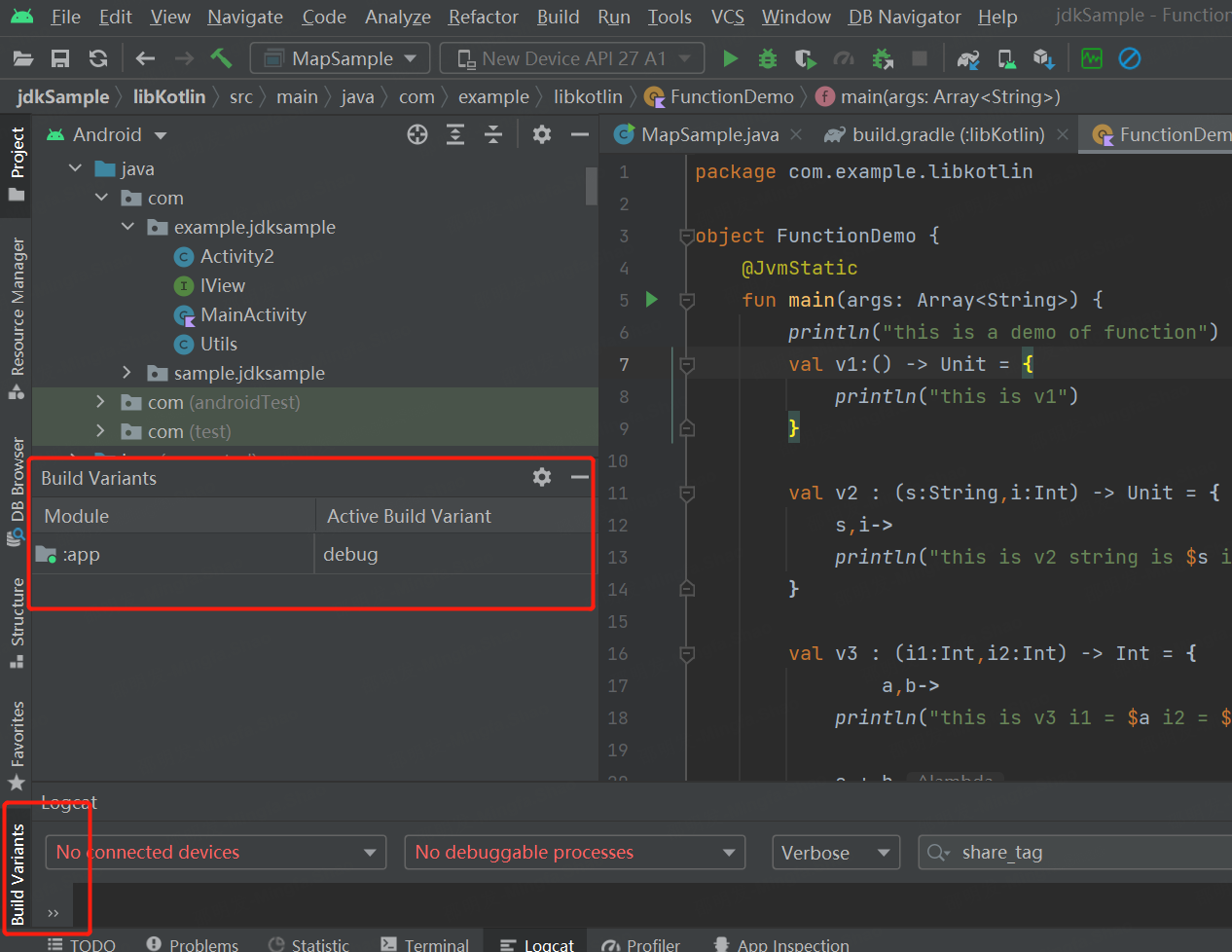
Android Studio 显示build variants工具栏
工具栏: 如下图所示 依次点击View-->ToolWindows-->Build Variants。 在此记个笔记...

c++八股文记录
八股文 1.类和结构体的区别 在 C 中,类(class)和结构体(struct)在语法上几乎是相同的,唯一的区别是默认的访问权限。在结构体中,默认的访问权限是公有的(public)&#x…...

C++ 指针进阶:动态分配内存
工作原理 malloc 是 stdlib.h 库中的函数,声明为 void *__cdecl malloc(size_t _Size); 原理: malloc 函数沿空闲链表(位于内存 堆空间 中)申请一块满足需求的内存块,将所需大小的内存块分配给用户剩下的返回到链表上; 并返回指向该内存区的首地址的指针,意该指针的类型…...
点大商城V2.5.3分包小程序端+小程序上传提示限制分包制作教程
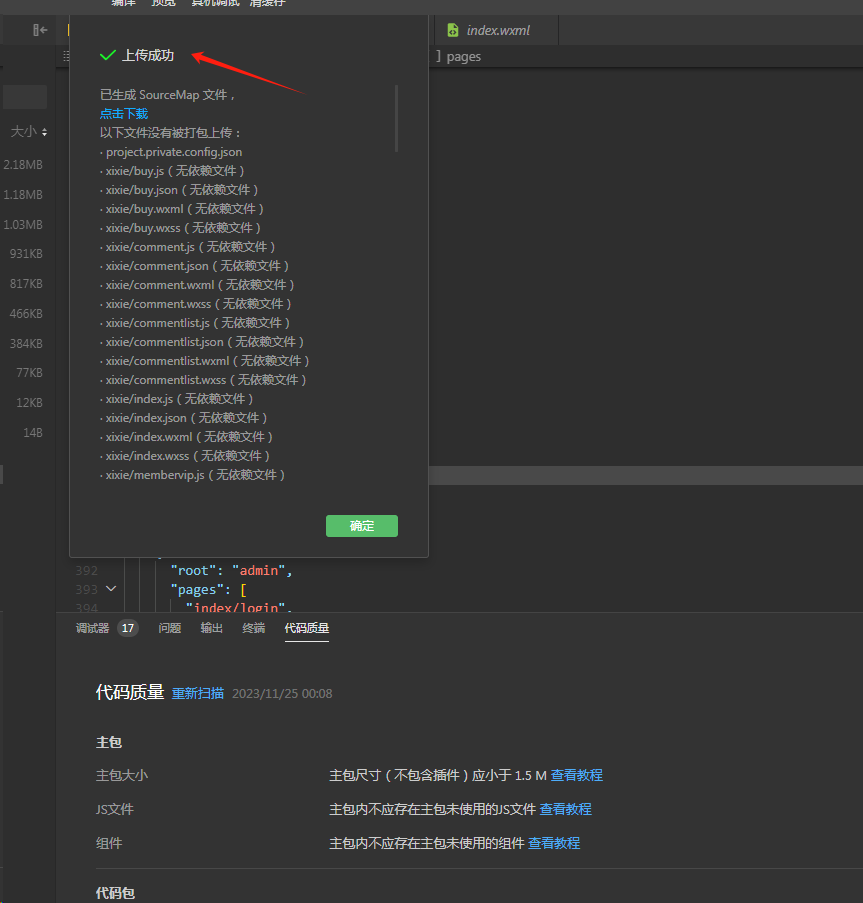
这几天很多播播资源会员反馈点大商城V2.5.3小程序端上传时提示大小超限,官方默认单个包都不能超过2M,总分包不能超20M。如下图提示超了93KB,如果出现超的不多情况下可采用手动删除一些images目录下不使用的图片,只要删除超过100KB…...

AUTOSAR汽车电子嵌入式编程精讲300篇-基于机器学习的车载 CAN 网络入侵检测
目录 前言 国内外研究现状 CAN 总线概述及其安全分析 2.1 CAN 总线相关概念 2.1.1...
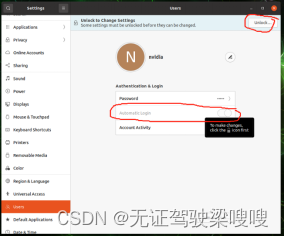
Jetson orin(Ubuntu20.04)不接显示器无法输出VNC图像解决办法以及vnc安装记录
sudo apt install vino 好像Jetpack 5.0中已经自带了。。 配置VNC server: gsettings set org.gnome.Vino prompt-enabled false gsettings set org.gnome.Vino require-encryption false 编辑org.gnome,增加一个“enabled key”的参数: cd /usr/share/glib-2…...

LeetCode Hot100 108.将有序数组转为二叉搜索树
题目: 给你一个整数数组 nums ,其中元素已经按 升序 排列,请你将其转换为一棵 高度平衡 二叉搜索树。 高度平衡 二叉树是一棵满足「每个节点的左右两个子树的高度差的绝对值不超过 1 」的二叉树。 方法: class Solution {public…...
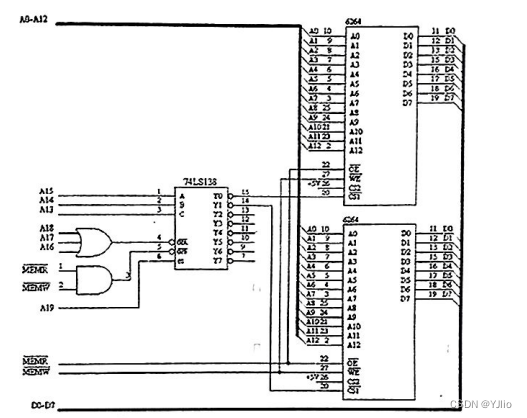
微机原理_3
一、单项选择题(本大题共15小题,每小题3分,共45分。在每小题给出的四个备选项中,选出一个正确的答案,请将选定的答案填涂在答题纸的相应位置上。) 在 8086 微机系统中,完成对指令译码操作功能的部件是()。 A. EU B. BIU C. SRAM D. DRAM 使计算机执行某…...
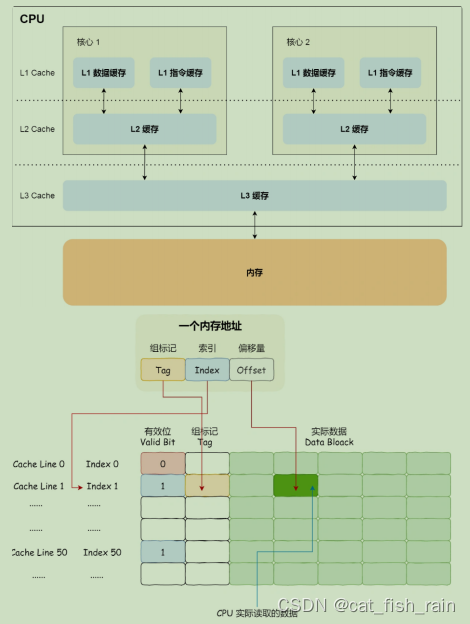
4.操作系统常见面试题(2)
3.4 虚拟内存 直接使⽤物理内存会产⽣⼀些问题 1. 内存空间利⽤率的问题:各个进程对内存的使⽤会导致内存碎⽚化,当要⽤ malloc 分配⼀块很⼤的内存空间时,可能会出现虽然有⾜够多的空闲物理内存,却没有⾜够⼤的连续空闲内存这种…...

springboot 开启和关闭kafka消费
关闭kafka自动消费 配置自定义容器工厂 import org.springframework.beans.factory.annotation.Autowired; import org.springframework.context.annotation.Bean; import org.springframework.context.annotation.Configuration; import org.springframework.kafka.config.C…...
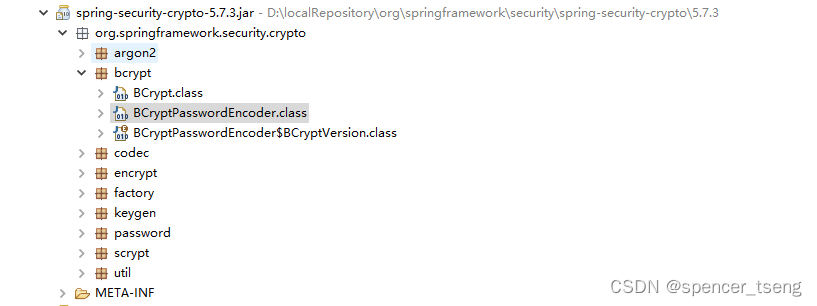
org.springframework.security.crypto.bcrypt.BCryptPasswordEncoder
密码,加密,解密 spring-security-crypto-5.7.3.jar /** Copyright 2002-2011 the original author or authors.** Licensed under the Apache License, Version 2.0 (the "License");* you may not use this file except in compliance with t…...

系统安全测试要怎么做?
进行系统安全测试时,可以按照以下详细的步骤进行: 1、信息收集和分析: 收集系统的相关信息,包括架构、部署环境、使用的框架和技术等。 分析系统的安全需求、威胁模型和安全策略等文档。 2、威胁建模和风险评估: …...
Golang并发模型:Goroutine 与 Channel 初探
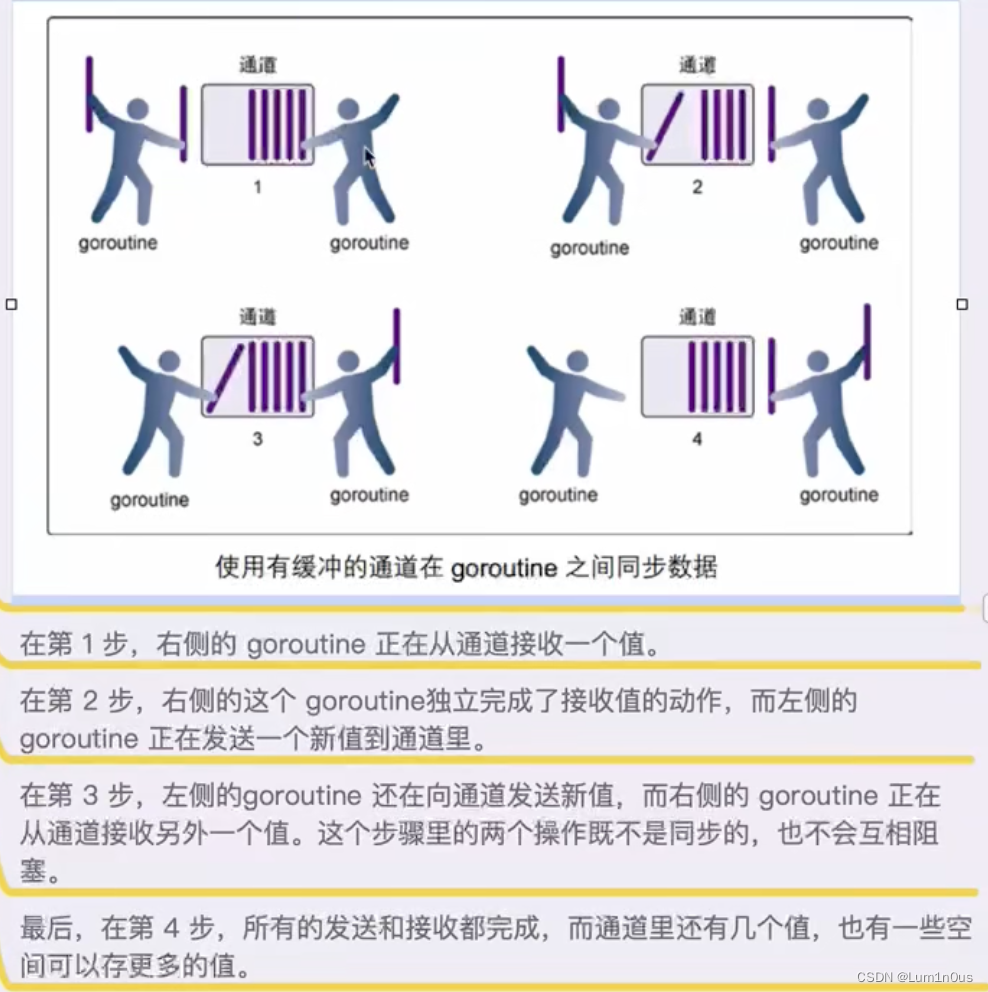
文章目录 goroutinegoexit() channel缓冲closerangeselect goroutine goroutine 是 Go 语言中的一种轻量级线程(lightweight thread),由 Go 运行时环境管理。与传统的线程相比,goroutine 的创建和销毁的开销很小,可以…...

批量添加PPT备注
我一直都觉得,用python高效办公,是件没必要的事。。。 但直到最近写课做PPT,做了80多页PPT,要把每一页PPT的备注粘贴进去时 我觉得,有什么关系呢,一页一页粘 但是粘到5页,我感觉ctlc\v频率有点儿…...
数据挖掘之PCA-主成分分析
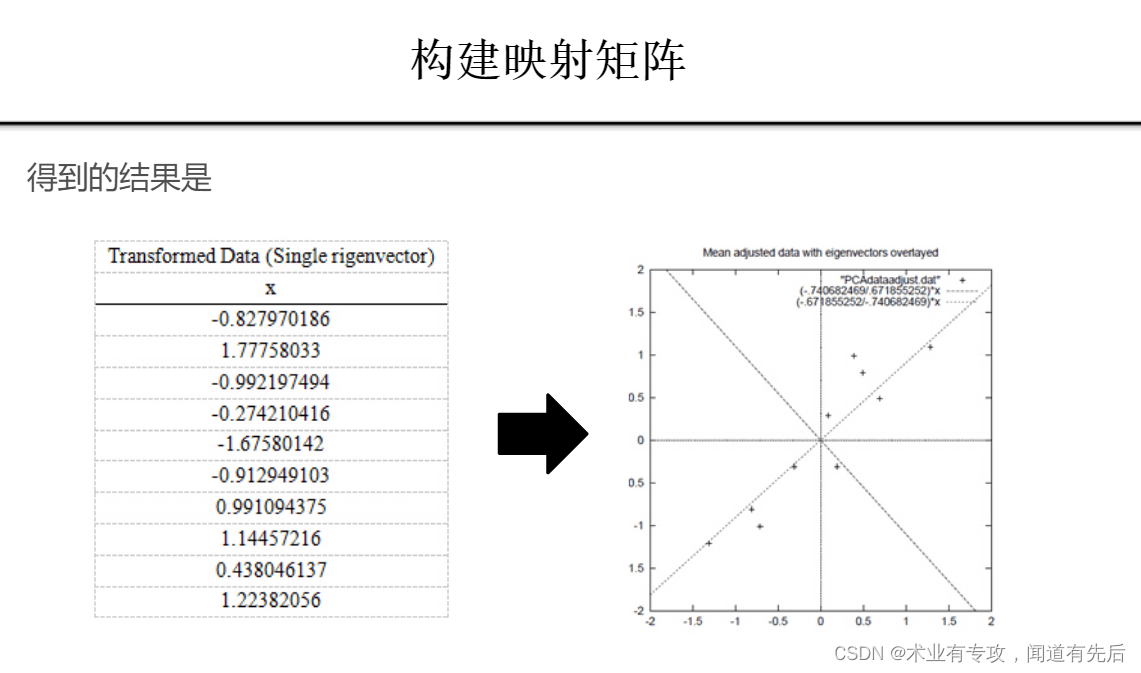
PCA的用处:找出反应数据中最大变差的投影(就是拉的最开)。 在减少需要分析的指标同时,尽量减少原指标包含信息的损失,以达到对所收集数据进行全面分析的目的 但是什么时候信息保留的最多呢?具体一点&#…...
人工智能-注意力机制之注意力汇聚:Nadaraya-Watson 核回归
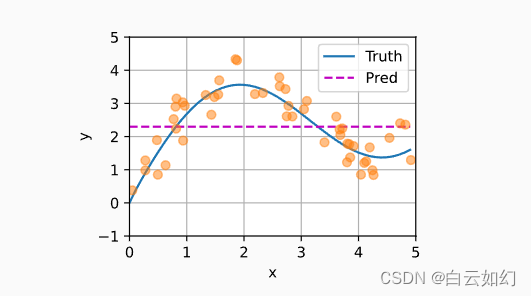
查询(自主提示)和键(非自主提示)之间的交互形成了注意力汇聚; 注意力汇聚有选择地聚合了值(感官输入)以生成最终的输出。 本节将介绍注意力汇聚的更多细节, 以便从宏观上了解注意力机…...

<HarmonyOS第一课>1·运行Hello World【课后考核】
【习题】运行Hello World工程 判断题 1.DevEco Studio是开发HarmonyOS应用的一站式集成开发环境。 正确(True) 2.main_pages.json存放页面page路径配置信息。 正确(True) 单选题 1.在stage模型中,下列配置文件属于AppScope文件夹的是?(…...
Ubuntu18.04安装A-Loam保姆级教程
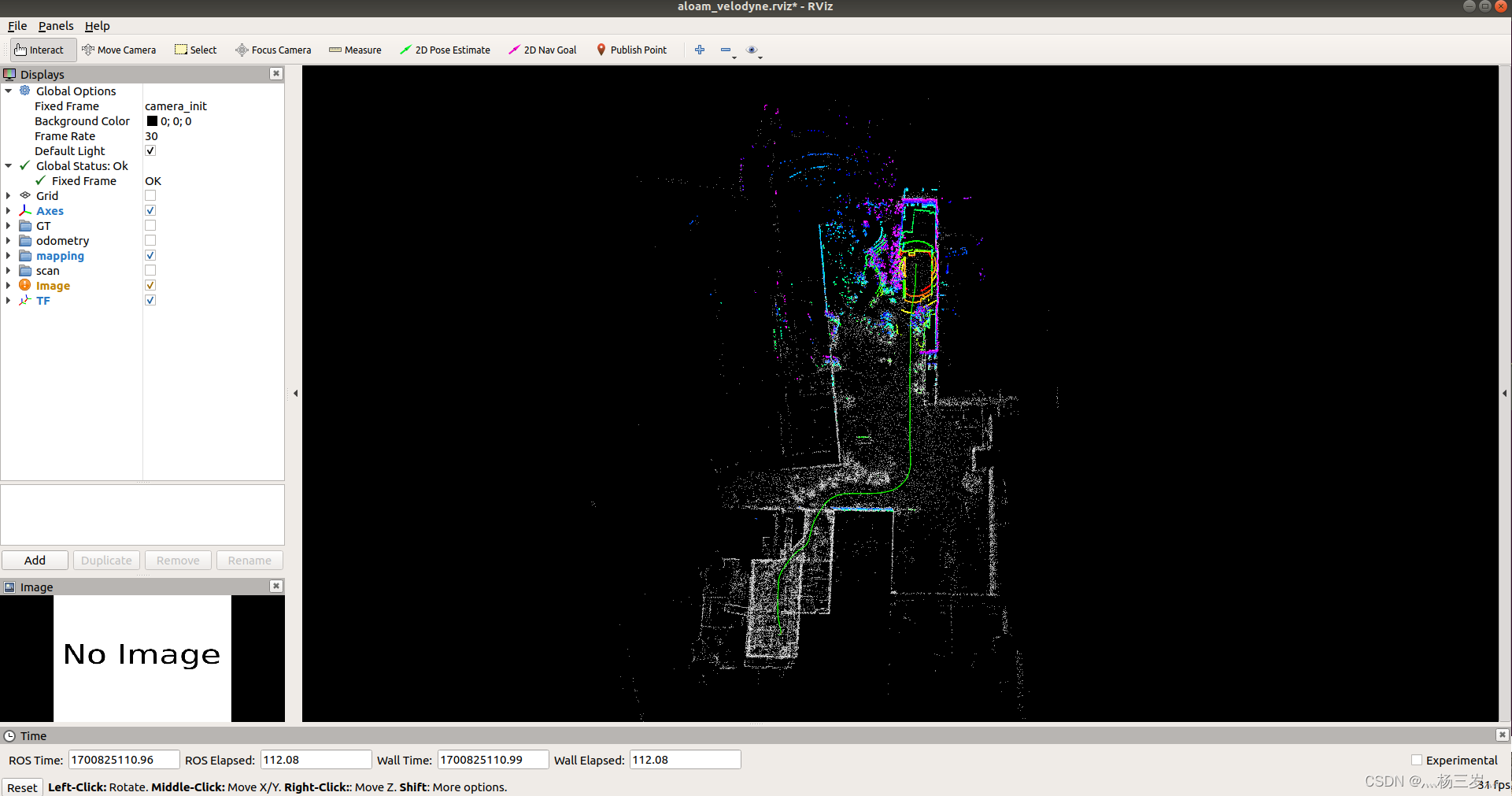
系统环境:Ubuntu18.04.6 LTS 1.A-Loam的安装前要求: 1.1 ROS安装:参考我的另一篇博客 Ubuntu18.04安装ROS-melodic保姆级教程_灬杨三岁灬的博客-CSDN博客还是那句话,有时候加了这行也不好使,我是疯狂试了20次&#…...

FreeMove:高效安全的Windows目录迁移完整指南
FreeMove:高效安全的Windows目录迁移完整指南 【免费下载链接】FreeMove Move directories without breaking shortcuts or installations 项目地址: https://gitcode.com/gh_mirrors/fr/FreeMove FreeMove是一款专为Windows用户设计的开源工具,通…...

AzurLaneAutoScript:三分钟解放双手的碧蓝航线智能伴侣
AzurLaneAutoScript:三分钟解放双手的碧蓝航线智能伴侣 【免费下载链接】AzurLaneAutoScript Azur Lane bot (CN/EN/JP/TW) 碧蓝航线脚本 | 无缝委托科研,全自动大世界 项目地址: https://gitcode.com/gh_mirrors/az/AzurLaneAutoScript 还在为每…...

如何防御SQL注入攻击_禁止应用账号执行DDL操作
根本原因是container响应式定宽而container-fluid需父容器无宽度限制;Bootstrap 5中其默认12px内边距导致不贴边,须用自定义CSS清除,且需排查viewport、全局样式及嵌套逻辑。为什么container在小屏上留白多,而container-fluid没效…...

多核CPU能否提升HTML函数工具效率_并行处理能力解答【解答】
HTML函数工具执行缓慢的优化方案包括:一、Web Workers实现后台并行计算;二、SharedArrayBuffer与Atomics共享内存协同调度;三、Service Worker拦截预处理HTML流;四、WebAssembly模块并行加载执行;五、跨渲染器进程调度…...

「码动四季·开源同行」python语言:合并表达
一、三元表达式在学习三元表达式之前,我们如需比较两个值的最大值。def max2(x, y):if x>Y :return xelse:return yres max2(10, 11) print(res)三元表达式的使用x 12 y 11# 三元分别指的是if左边,else右边和if条件语句 res x if x > y else y…...

2026终极指南:如何简单重置JetBrains IDE试用期,告别30天限制烦恼
2026终极指南:如何简单重置JetBrains IDE试用期,告别30天限制烦恼 【免费下载链接】ide-eval-resetter 项目地址: https://gitcode.com/gh_mirrors/id/ide-eval-resetter 你是否正在为JetBrains IDE的30天试用期到期而烦恼?想象一下&…...

UI Toolkit动态重绘卡爆了?别急着放弃,这份避坑指南和静态UI实战方案请收好
UI Toolkit动态重绘卡爆了?别急着放弃,这份避坑指南和静态UI实战方案请收好 在Unity项目开发中,UI系统的性能优化一直是开发者关注的焦点。UI Toolkit作为Unity新一代的UI系统,凭借其强大的合批能力和灵活的样式控制,逐…...
)
【2026年最新600套毕设项目分享】微信小程序的社区互助养老系统(30137)
有需要的同学,源代码和配套文档领取,加文章最下方的名片哦 一、项目演示 项目演示视频 项目演示视频2 二、资料介绍 完整源代码(前后端源代码SQL脚本)配套文档(LWPPT开题报告/任务书)远程调试控屏包运…...

614.4V锂电池完整设计方案:高压储能与动力系统工程级技术要求解析【浩博电池】
614.4V锂电池系统属于典型的高压直流动力平台,广泛应用于重型工程机械、电动矿卡、港口设备、军用特种车辆及高功率储能系统。该电压等级对电芯一致性、安全设计、BMS控制及高压绝缘提出了极高要求,必须采用系统级工程方案进行整体设计,而不是…...

摩托罗拉折叠屏手机:以价格、软件、时尚优势占据美国半壁市场!
摩托罗拉折叠屏手机市场成就回顾摩托罗拉即将推出新一轮折叠屏手机,此时回顾该品牌目前所取得的成就。据 9to5Google 报道的 IDC 研究显示,摩托罗拉目前在美国折叠屏手机市场约占 50%的份额,在海外折叠屏市场也占有很大份额。其主要竞争对手&…...