
YOLOv5 分类模型 预处理 OpenCV实现
YOLOv5 分类模型 预处理 OpenCV实现
flyfish
YOLOv5 分类模型 预处理 PIL 实现
YOLOv5 分类模型 OpenCV和PIL两者实现预处理的差异
YOLOv5 分类模型 数据集加载 1 样本处理
YOLOv5 分类模型 数据集加载 2 切片处理
YOLOv5 分类模型 数据集加载 3 自定义类别
YOLOv5 分类模型的预处理(1) Resize 和 CenterCrop
YOLOv5 分类模型的预处理(2)ToTensor 和 Normalize
YOLOv5 分类模型 Top 1和Top 5 指标说明
YOLOv5 分类模型 Top 1和Top 5 指标实现
判断图像是否是np.ndarray类型和维度
OpenCV读取一张图像时,类型类型就是<class 'numpy.ndarray'>,这里判断图像是否是np.ndarray类型
dim是dimension维度的缩写,shape属性的长度也是它的ndim
灰度图的shape为HW,二个维度
RGB图的shape为HWC,三个维度
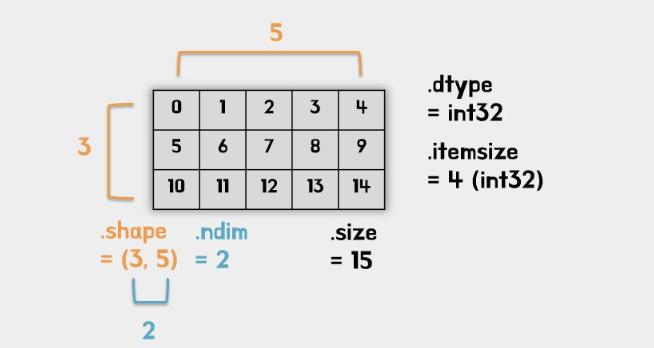
def _is_numpy_image(img):return isinstance(img, np.ndarray) and (img.ndim in {2, 3})
实现ToTensor和Normalize
def totensor_normalize(img):print("preprocess:",img.shape)images = (img/255-mean)/stdimages = images.transpose((2, 0, 1))# HWC to CHWimages = np.ascontiguousarray(images)return images
实现Resize
插值可以是以下参数
# 'nearest': cv2.INTER_NEAREST,
# 'bilinear': cv2.INTER_LINEAR,
# 'area': cv2.INTER_AREA,
# 'bicubic': cv2.INTER_CUBIC,
# 'lanczos': cv2.INTER_LANCZOS4
def resize(img, size, interpolation=cv2.INTER_LINEAR):r"""Resize the input numpy ndarray to the given size.Args:img (numpy ndarray): Image to be resized.size: like pytroch about size interpretation flyfish.interpolation (int, optional): Desired interpolation. Default is``cv2.INTER_LINEAR`` Returns:numpy Image: Resized image.like opencv"""if not _is_numpy_image(img):raise TypeError('img should be numpy image. Got {}'.format(type(img)))if not (isinstance(size, int) or (isinstance(size, collections.abc.Iterable) and len(size) == 2)):raise TypeError('Got inappropriate size arg: {}'.format(size))h, w = img.shape[0], img.shape[1]if isinstance(size, int):if (w <= h and w == size) or (h <= w and h == size):return imgif w < h:ow = sizeoh = int(size * h / w)else:oh = sizeow = int(size * w / h)else:ow, oh = size[1], size[0]output = cv2.resize(img, dsize=(ow, oh), interpolation=interpolation)if img.shape[2] == 1:return output[:, :, np.newaxis]else:return output
实现CenterCrop
def crop(img, i, j, h, w):"""Crop the given Image flyfish.Args:img (numpy ndarray): Image to be cropped.i: Upper pixel coordinate.j: Left pixel coordinate.h: Height of the cropped image.w: Width of the cropped image.Returns:numpy ndarray: Cropped image."""if not _is_numpy_image(img):raise TypeError('img should be numpy image. Got {}'.format(type(img)))return img[i:i + h, j:j + w, :]def center_crop(img, output_size):if isinstance(output_size, numbers.Number):output_size = (int(output_size), int(output_size))h, w = img.shape[0:2]th, tw = output_sizei = int(round((h - th) / 2.))j = int(round((w - tw) / 2.))return crop(img, i, j, th, tw)
完整
import time
from models.common import DetectMultiBackend
import os
import os.path
from typing import Any, Callable, cast, Dict, List, Optional, Tuple, Union
import cv2
import numpy as np
import collections
import torch
import numbersclasses_name=['n02086240', 'n02087394', 'n02088364', 'n02089973', 'n02093754', 'n02096294', 'n02099601', 'n02105641', 'n02111889', 'n02115641']mean=[0.485, 0.456, 0.406]
std=[0.229, 0.224, 0.225]def _is_numpy_image(img):return isinstance(img, np.ndarray) and (img.ndim in {2, 3})def totensor_normalize(img):print("preprocess:",img.shape)images = (img/255-mean)/stdimages = images.transpose((2, 0, 1))# HWC to CHWimages = np.ascontiguousarray(images)return imagesdef resize(img, size, interpolation=cv2.INTER_LINEAR):r"""Resize the input numpy ndarray to the given size.Args:img (numpy ndarray): Image to be resized.size: like pytroch about size interpretation flyfish.interpolation (int, optional): Desired interpolation. Default is``cv2.INTER_LINEAR``  Returns:numpy Image: Resized image.like opencv"""if not _is_numpy_image(img):raise TypeError('img should be numpy image. Got {}'.format(type(img)))if not (isinstance(size, int) or (isinstance(size, collections.abc.Iterable) and len(size) == 2)):raise TypeError('Got inappropriate size arg: {}'.format(size))h, w = img.shape[0], img.shape[1]if isinstance(size, int):if (w <= h and w == size) or (h <= w and h == size):return imgif w < h:ow = sizeoh = int(size * h / w)else:oh = sizeow = int(size * w / h)else:ow, oh = size[1], size[0]output = cv2.resize(img, dsize=(ow, oh), interpolation=interpolation)if img.shape[2] == 1:return output[:, :, np.newaxis]else:return outputdef crop(img, i, j, h, w):"""Crop the given Image flyfish.Args:img (numpy ndarray): Image to be cropped.i: Upper pixel coordinate.j: Left pixel coordinate.h: Height of the cropped image.w: Width of the cropped image.Returns:numpy ndarray: Cropped image."""if not _is_numpy_image(img):raise TypeError('img should be numpy image. Got {}'.format(type(img)))return img[i:i + h, j:j + w, :]def center_crop(img, output_size):if isinstance(output_size, numbers.Number):output_size = (int(output_size), int(output_size))h, w = img.shape[0:2]th, tw = output_sizei = int(round((h - th) / 2.))j = int(round((w - tw) / 2.))return crop(img, i, j, th, tw)class DatasetFolder:def __init__(self,root: str,) -> None:self.root = rootif classes_name is None or not classes_name:classes, class_to_idx = self.find_classes(self.root)print("not classes_name")else:classes = classes_nameclass_to_idx ={cls_name: i for i, cls_name in enumerate(classes)}print("is classes_name")print("classes:",classes)print("class_to_idx:",class_to_idx)samples = self.make_dataset(self.root, class_to_idx)self.classes = classesself.class_to_idx = class_to_idxself.samples = samplesself.targets = [s[1] for s in samples]@staticmethoddef make_dataset(directory: str,class_to_idx: Optional[Dict[str, int]] = None,) -> List[Tuple[str, int]]:directory = os.path.expanduser(directory)if class_to_idx is None:_, class_to_idx = self.find_classes(directory)elif not class_to_idx:raise ValueError("'class_to_index' must have at least one entry to collect any samples.")instances = []available_classes = set()for target_class in sorted(class_to_idx.keys()):class_index = class_to_idx[target_class]target_dir = os.path.join(directory, target_class)if not os.path.isdir(target_dir):continuefor root, _, fnames in sorted(os.walk(target_dir, followlinks=True)):for fname in sorted(fnames):path = os.path.join(root, fname)if 1:  # 验证:item = path, class_indexinstances.append(item)if target_class not in available_classes:available_classes.add(target_class)empty_classes = set(class_to_idx.keys()) - available_classesif empty_classes:msg = f"Found no valid file for the classes {', '.join(sorted(empty_classes))}. "return instancesdef find_classes(self, directory: str) -> Tuple[List[str], Dict[str, int]]:classes = sorted(entry.name for entry in os.scandir(directory) if entry.is_dir())if not classes:raise FileNotFoundError(f"Couldn't find any class folder in {directory}.")class_to_idx = {cls_name: i for i, cls_name in enumerate(classes)}return classes, class_to_idxdef __getitem__(self, index: int) -> Tuple[Any, Any]:path, target = self.samples[index]sample = self.loader(path)return sample, targetdef __len__(self) -> int:return len(self.samples)def loader(self, path):print("path:", path)img = cv2.imread(path)  # BGR HWCimg=cv2.cvtColor(img,cv2.COLOR_BGR2RGB)#RGBprint("type:",type(img))return imgdef time_sync():return time.time()dataset = DatasetFolder(root="/media/flyfish/datasets/imagewoof/val")
weights = "/home/classes.pt"
device = "cpu"
model = DetectMultiBackend(weights, device=device, dnn=False, fp16=False)
model.eval()def classify_transforms(img):img=resize(img,224)img=center_crop(img,224)img=totensor_normalize(img)return img;pred, targets, loss, dt = [], [], 0, [0.0, 0.0, 0.0]
# current batch size =1
for i, (images, labels) in enumerate(dataset):print("i:", i)print(images.shape, labels)im = classify_transforms(images)images=torch.from_numpy(im).to(torch.float32) # numpy to tensorimages = images.unsqueeze(0).to("cpu")print(images.shape)t1 = time_sync()images = images.to(device, non_blocking=True)t2 = time_sync()# dt[0] += t2 - t1y = model(images)y=y.numpy()print("y:", y)t3 = time_sync()# dt[1] += t3 - t2tmp1=y.argsort()[:,::-1][:, :5]print("tmp1:", tmp1)pred.append(tmp1)print("labels:", labels)targets.append(labels)print("for pred:", pred)  # listprint("for targets:", targets)  # list# dt[2] += time_sync() - t3pred, targets = np.concatenate(pred), np.array(targets)
print("pred:", pred)
print("pred:", pred.shape)
print("targets:", targets)
print("targets:", targets.shape)
correct = ((targets[:, None] == pred)).astype(np.float32)
print("correct:", correct.shape)
print("correct:", correct)
acc = np.stack((correct[:, 0], correct.max(1)), axis=1)  # (top1, top5) accuracy
print("acc:", acc.shape)
print("acc:", acc)
top = acc.mean(0)
print("top1:", top[0])
print("top5:", top[1])
结果
pred: [[0 3 6 2 1][0 7 2 9 3][0 5 6 2 9]...[9 8 7 6 1][9 3 6 7 0][9 5 0 2 7]]
pred: (3929, 5)
targets: [0 0 0 ... 9 9 9]
targets: (3929,)
correct: (3929, 5)
correct: [[          1           0           0           0           0][          1           0           0           0           0][          1           0           0           0           0]...[          1           0           0           0           0][          1           0           0           0           0][          1           0           0           0           0]]
acc: (3929, 2)
acc: [[          1           1][          1           1][          1           1]...[          1           1][          1           1][          1           1]]
top1: 0.86230594
top5: 0.98167473
相关文章:
YOLOv5 分类模型 预处理 OpenCV实现
YOLOv5 分类模型 预处理 OpenCV实现 flyfish YOLOv5 分类模型 预处理 PIL 实现 YOLOv5 分类模型 OpenCV和PIL两者实现预处理的差异 YOLOv5 分类模型 数据集加载 1 样本处理 YOLOv5 分类模型 数据集加载 2 切片处理 YOLOv5 分类模型 数据集加载 3 自定义类别 YOLOv5 分类模型…...

在arm 64 环境下使用halcon算法
背景: halcon,机器视觉领域神一样得存在,在windows上,应用得特别多, 但是arm环境下使用得很少。那如何在arm下使用halcon呢。按照官方说明,arm下只提供了运行时环境,并且需要使用价值一万多人民…...
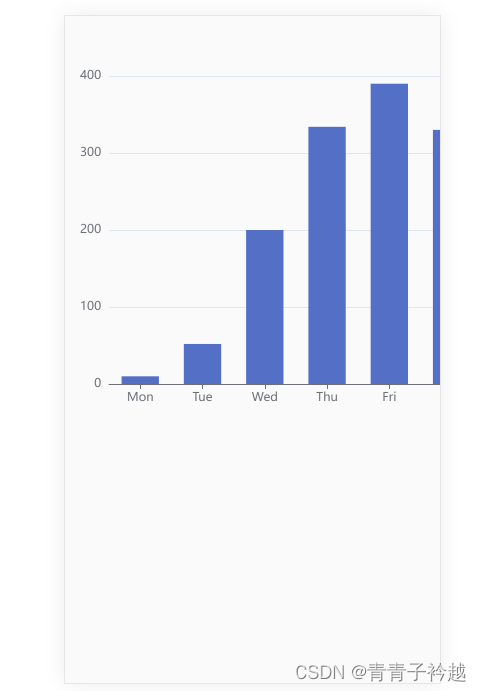
H5(uniapp)中使用echarts
1,安装echarts npm install echarts 2,具体页面 <template><view class"container notice-list"><view><view class"aa" id"main" style"width: 500px; height: 400px;"></view></v…...

QLineEdit设置掩码Ip
目的 有时,用单行编辑框想限制输入,但QLineEdit提供的setInputMask()方法用来限制输入字符或者数字还可以,但要做约束,得和验证器结合。 setInputMash()描述 此属性包含验证输入掩码 如果没有设置掩码,inputMask() …...
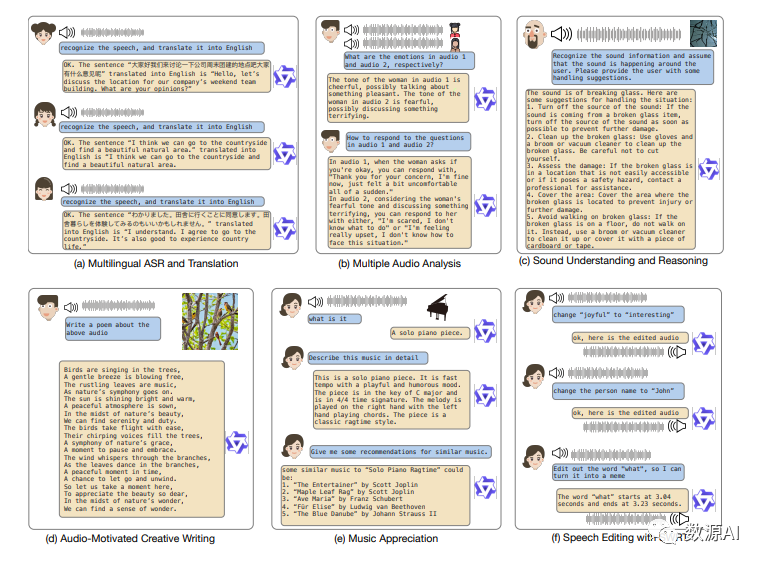
开源语音大语言模型来了!阿里基于Qwen-Chat提出Qwen-Audio!
论文链接:https://arxiv.org/pdf/2311.07919.pdf 开源代码:https://github.com/QwenLM/Qwen-Audio 引言 大型语言模型(LLMs)由于其良好的知识保留能力、复杂的推理和解决问题能力,在通用人工智能(AGI&am…...
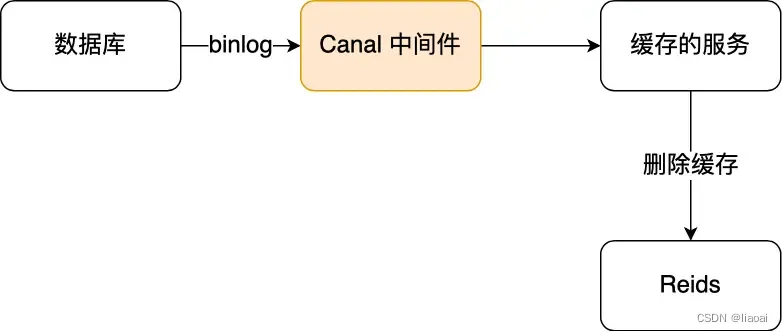
缓存雪崩、击穿、穿透及解决方案_保证缓存和数据库一致性
文章目录 缓存雪崩、击穿、穿透1.缓存雪崩造成缓存雪崩解决缓存雪崩 2. 缓存击穿造成缓存击穿解决缓存击穿 3.缓存穿透造成缓存穿透解决缓存穿透 更新数据时,如何保证数据库和缓存的一致性?1. 先更新数据库?先更新缓存?解决方案 2…...
仿 美图 / 饿了么,店铺详情页功能
前言 UI有所不同,但功能差不多,商品添加购物车功能 正在写,写完会提交仓库。 效果图一:左右RecyclerView 联动 效果图二:通过点击 向上偏移至最大值 效果图三:通过点击 或 拖动 展开收缩公告 效果图四&…...
Redis Cluster主从模式详解
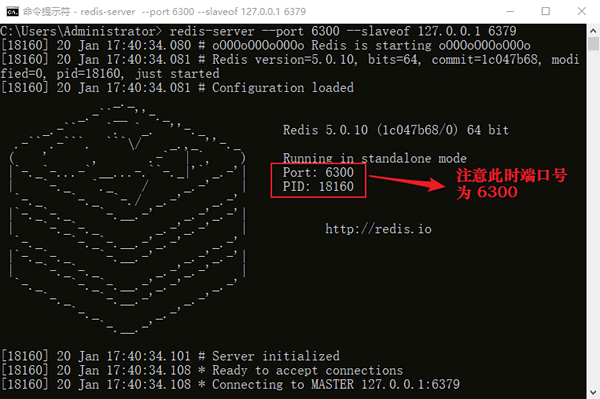
在软件的架构中,主从模式(Master-Slave)是使用较多的一种架构。主(Master)和从(Slave)分别部署在不同的服务器上,当主节点服务器写入数据时,同时也会将数据同步至从节点服…...

Linux技能篇-非交互式修改密码
今天的文章没有格式,简单分享一个小技能,就是标题所说–非交互式修改密码。 一、普通方式修改用户密码 最普通的修改密码的命令就是passwd命令 [rootlocalhost ~]# passwd root Changing password for user root. New password: Retype new password:…...

记一次docker服务启动失败解决过程
环境:centos 7.6 报错:start request repeated too quickly for docker.service 由于服务器修复了内核漏洞,需要重启,没想到重启后,docker启动失败了 查看状态 systemctl status docker如下图 里面有一行提示&…...
npm ERR! node-sass@4.13.0 postinstall: `node scripts/build.js`
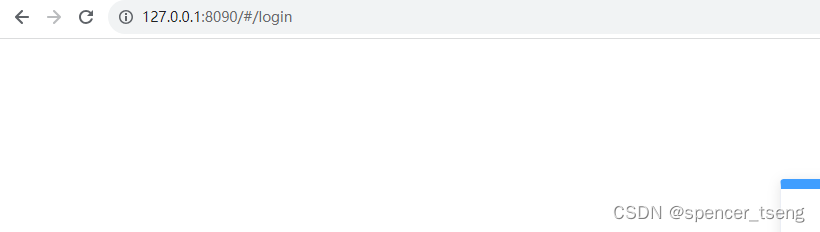
npm ERR! node-sass4.13.0 postinstall: node scripts/build.js npm config set sass_binary_sitehttps://npm.taobao.org/mirrors/node-sass npm install npm run dev Microsoft Windows [版本 10.0.19045.2965] (c) Microsoft Corporation。保留所有权利。C:\Users\Administr…...

Java定时任务 ScheduledThreadPoolExecutor
ScheduledThreadPoolExecutor 的创建 ScheduledThreadPoolExecutor executorService new ScheduledThreadPoolExecutor(1, // 核心线程数new BasicThreadFactory.Builder().namingPattern("example-schedule-pool-%d") // 线程命名规则.daemon(true) // 设置线程为…...
Android Studio 显示build variants工具栏
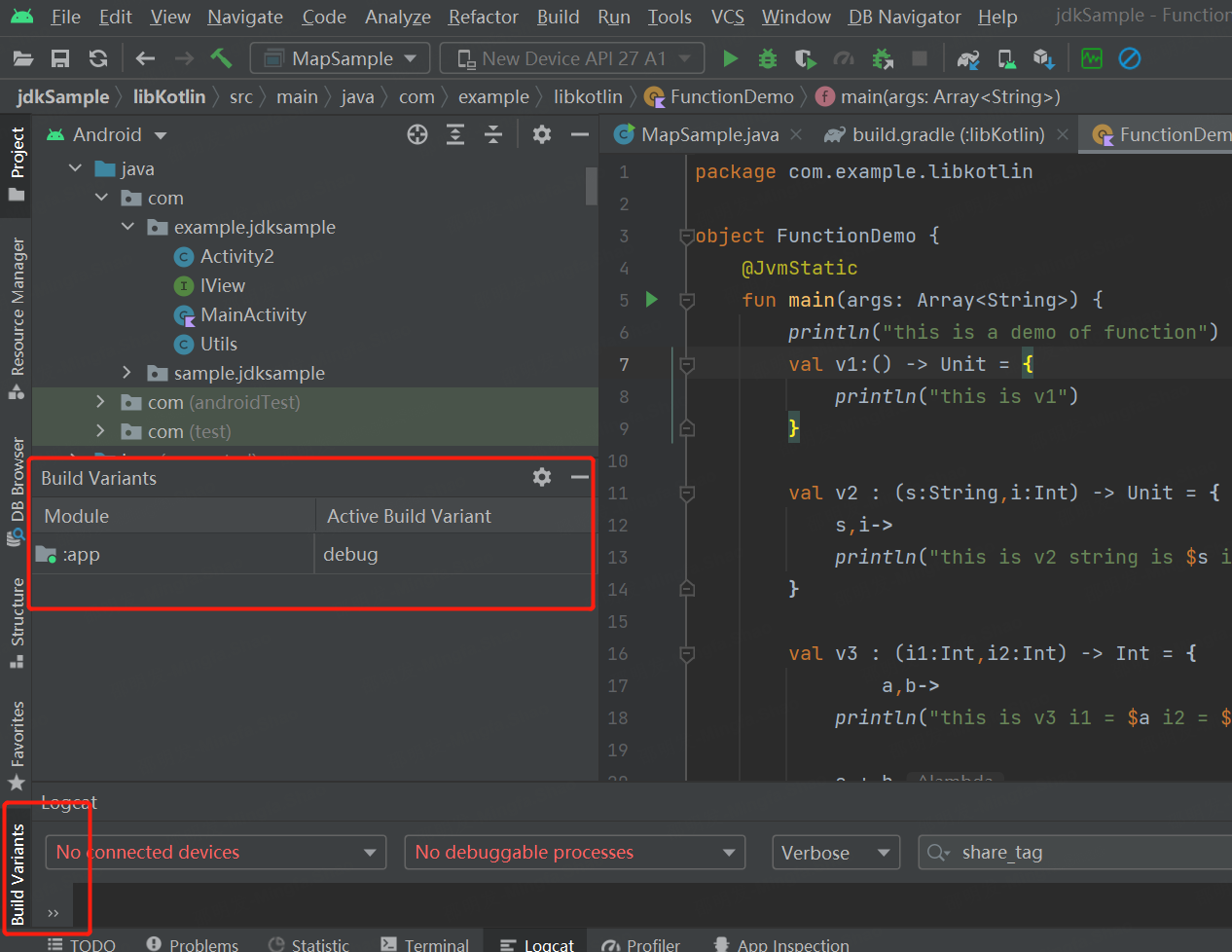
工具栏: 如下图所示 依次点击View-->ToolWindows-->Build Variants。 在此记个笔记...

c++八股文记录
八股文 1.类和结构体的区别 在 C 中,类(class)和结构体(struct)在语法上几乎是相同的,唯一的区别是默认的访问权限。在结构体中,默认的访问权限是公有的(public)&#x…...

C++ 指针进阶:动态分配内存
工作原理 malloc 是 stdlib.h 库中的函数,声明为 void *__cdecl malloc(size_t _Size); 原理: malloc 函数沿空闲链表(位于内存 堆空间 中)申请一块满足需求的内存块,将所需大小的内存块分配给用户剩下的返回到链表上; 并返回指向该内存区的首地址的指针,意该指针的类型…...
点大商城V2.5.3分包小程序端+小程序上传提示限制分包制作教程
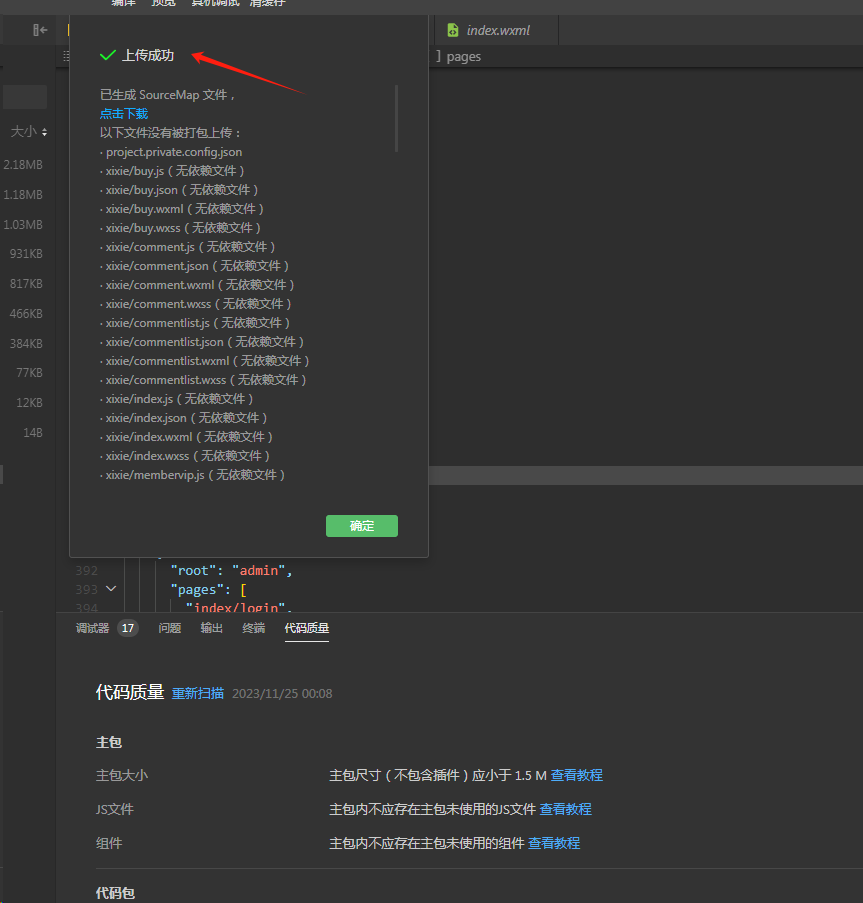
这几天很多播播资源会员反馈点大商城V2.5.3小程序端上传时提示大小超限,官方默认单个包都不能超过2M,总分包不能超20M。如下图提示超了93KB,如果出现超的不多情况下可采用手动删除一些images目录下不使用的图片,只要删除超过100KB…...

AUTOSAR汽车电子嵌入式编程精讲300篇-基于机器学习的车载 CAN 网络入侵检测
目录 前言 国内外研究现状 CAN 总线概述及其安全分析 2.1 CAN 总线相关概念 2.1.1...
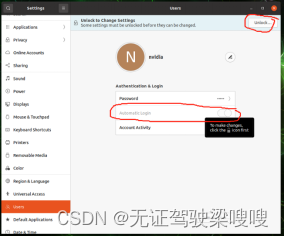
Jetson orin(Ubuntu20.04)不接显示器无法输出VNC图像解决办法以及vnc安装记录
sudo apt install vino 好像Jetpack 5.0中已经自带了。。 配置VNC server: gsettings set org.gnome.Vino prompt-enabled false gsettings set org.gnome.Vino require-encryption false 编辑org.gnome,增加一个“enabled key”的参数: cd /usr/share/glib-2…...
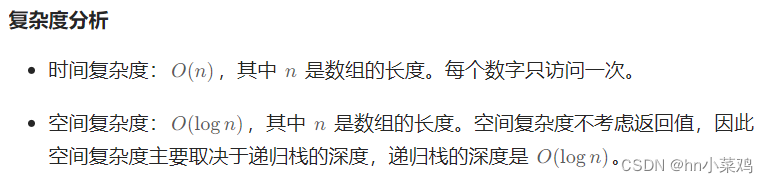
LeetCode Hot100 108.将有序数组转为二叉搜索树
题目: 给你一个整数数组 nums ,其中元素已经按 升序 排列,请你将其转换为一棵 高度平衡 二叉搜索树。 高度平衡 二叉树是一棵满足「每个节点的左右两个子树的高度差的绝对值不超过 1 」的二叉树。 方法: class Solution {public…...
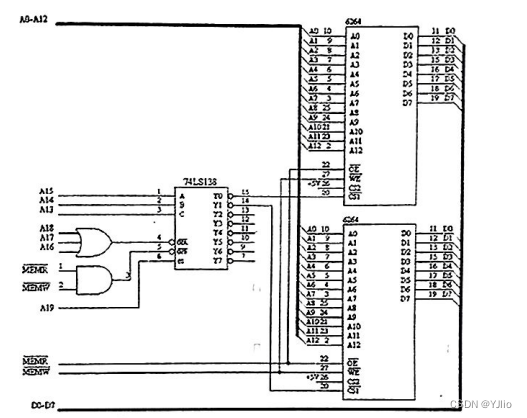
微机原理_3
一、单项选择题(本大题共15小题,每小题3分,共45分。在每小题给出的四个备选项中,选出一个正确的答案,请将选定的答案填涂在答题纸的相应位置上。) 在 8086 微机系统中,完成对指令译码操作功能的部件是()。 A. EU B. BIU C. SRAM D. DRAM 使计算机执行某…...

ERPNext自动化部署:企业数字化转型的5分钟技术解决方案
ERPNext自动化部署:企业数字化转型的5分钟技术解决方案 【免费下载链接】erpnext_quick_install Unattended install script for ERPNext Versions, 13, 14 and 15 项目地址: https://gitcode.com/gh_mirrors/er/erpnext_quick_install ERPNext自动化安装脚本…...
函数把年龄分成‘青年’‘中年’?)
数据离散化实战:如何用Pandas的cut()函数把年龄分成‘青年’‘中年’?
数据离散化实战:用Pandas的cut()函数实现业务驱动的年龄分层 在用户画像构建和业务分析中,我们经常需要将连续型数据转换为具有明确业务含义的类别标签。年龄这个看似简单的数值字段,经过合理的离散化处理,可以揭示出不同人生阶段…...

拯救者工具箱终极指南:5MB轻量工具如何提升30%性能并延长40%续航
拯救者工具箱终极指南:5MB轻量工具如何提升30%性能并延长40%续航 【免费下载链接】LenovoLegionToolkit Lightweight Lenovo Vantage and Hotkeys replacement for Lenovo Legion laptops. 项目地址: https://gitcode.com/gh_mirrors/le/LenovoLegionToolkit …...
)
保姆级图解:用Wireshark抓包实战分析PCIe链路训练全过程(LTSSM状态机)
从零开始:用Wireshark解码PCIe链路训练的每一个状态跳转 当两块PCIe设备首次相遇时,它们会经历一场精密的"握手仪式"——链路训练。这个过程就像两个陌生人初次见面时的试探与磨合,只不过发生在纳秒级的时间尺度上。本文将带你用Wi…...

HoRain云--WSDL端口详解:Web服务核心指南
🎬 HoRain 云小助手:个人主页 ⛺️生活的理想,就是为了理想的生活! ⛳️ 推荐 前些天发现了一个超棒的服务器购买网站,性价比超高,大内存超划算!忍不住分享一下给大家。点击跳转到网站。 目录 ⛳️ 推荐 …...

模型集成:将本地大模型接入Flask应用
005、模型集成:把本地大模型塞进Flask应用 昨天深夜调试时遇到个典型问题:同事在Flask路由里直接加载7B参数的模型,每次请求都重新读一遍权重文件。结果第一个请求等了三分半,服务器内存直接飙到32G——典型的“把实验代码当生产代码用”。今天咱们就聊聊怎么把本地大模型…...

从一次诡异的打包失败说起:深入Maven本地仓库的‘黑名单’机制与缓存更新策略
从一次诡异的打包失败说起:深入Maven本地仓库的‘黑名单’机制与缓存更新策略 那天下午,团队里的新成员小李突然在群里发了一张截图——Maven构建日志里赫然躺着一行刺眼的红色错误:"resolution will not be reattempted until the upda…...

Rust的匹配中的模式守卫与变量屏蔽在复杂条件分支中的逻辑清晰性
Rust的匹配机制以其强大的表达能力和安全性著称,其中模式守卫与变量屏蔽是处理复杂条件分支时的两大利器。它们不仅能让代码逻辑更清晰,还能减少嵌套层次,提升可维护性。对于开发者而言,掌握这两种特性意味着能以更优雅的方式处理…...

终极网盘直链解析指南:八大平台高速下载解决方案
终极网盘直链解析指南:八大平台高速下载解决方案 【免费下载链接】Online-disk-direct-link-download-assistant 一个基于 JavaScript 的网盘文件下载地址获取工具。基于【网盘直链下载助手】修改 ,支持 百度网盘 / 阿里云盘 / 中国移动云盘 / 天翼云盘 …...

CosyVoice模型微服务化部署:基于Docker容器的高效管理
CosyVoice模型微服务化部署:基于Docker容器的高效管理 最近和几个做AI语音项目的朋友聊天,发现大家普遍遇到一个头疼的问题:模型部署太折腾了。本地开发环境跑得好好的,一到服务器上就各种依赖冲突、版本不兼容,更别提…...