
OpenGL_Learn14(光照贴图)
1. 漫反射贴图
在光照场景中,它通常叫做一个漫反射贴图(Diffuse Map)(3D艺术家通常都这么叫它),它是一个表现了物体所有的漫反射颜色的纹理图像。
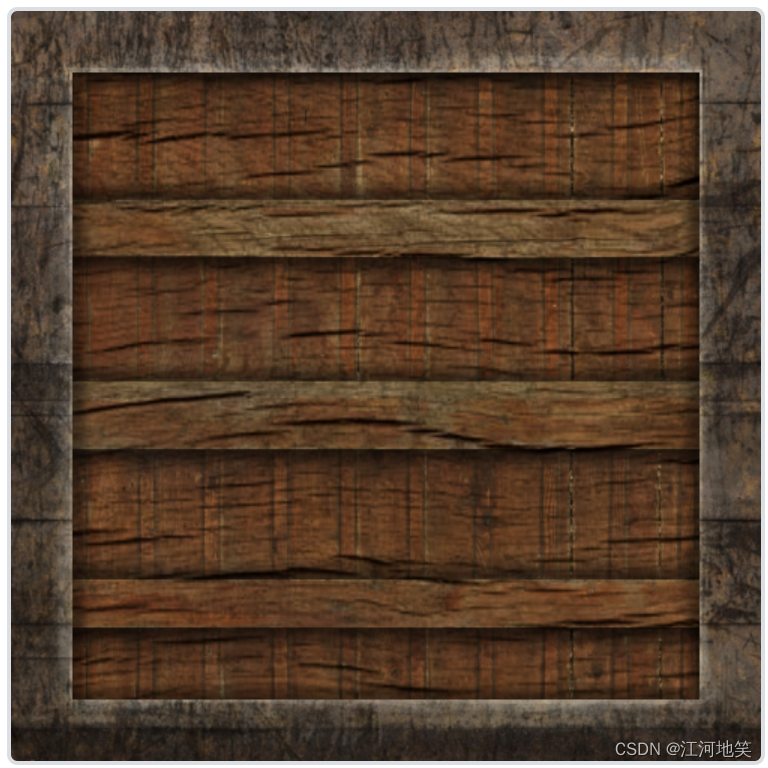
我们会将纹理储存为Material结构体中的一个
sampler2D。我们将之前定义的vec3漫反射颜色向量替换为漫反射贴图。注意
sampler2D是所谓的不透明类型(Opaque Type),也就是说我们不能将它实例化,只能通过uniform来定义它。如果我们使用除uniform以外的方法(比如函数的参数)实例化这个结构体,GLSL会抛出一些奇怪的错误。这同样也适用于任何封装了不透明类型的结构体。
struct Material {sampler2D diffuse;vec3      specular;float     shininess;
};
...
in vec2 TexCoords;
cube.vs**********************#version 330 core
layout (location = 0) in vec3 aPos;
layout (location =1 ) in vec3 aNormal;
layout (location=2) in vec2 aTexCoords;out vec3 FragPos;
out vec3 Normal;
out vec2 TexCoords;uniform mat4 model;
uniform mat4 view;
uniform mat4 projection;void main()
{FragPos=vec3(model*vec4(aPos,1.0));Normal=mat3(transpose(inverse(model)))*aNormal;TexCoords=aTexCoords;gl_Position = projection * view * vec4(FragPos, 1.0);
}cube.vs**********************#version 330 core
out vec4 FragColor;in vec3 Normal;
in vec3 FragPos;struct Material {sampler2D diffuse;vec3 specular;float shininess;
};
in vec2 TexCoords;
struct Light {vec3 position;vec3 ambient;vec3 diffuse;vec3 specular;
};
uniform Material material;
uniform Light light;
uniform vec3 objectColor;
uniform vec3 lightColor;
uniform vec3 lightPos;
uniform vec3 viewPos;void main()
{//ambientvec3 ambient=vec3(0.1)*light.ambient*vec3(texture(material.diffuse,TexCoords));//diffusevec3 norm=normalize(Normal);vec3 lightDir=normalize(light.position-FragPos);//光的方向向量是光源位置向量与片段位置向量之间的向量差。//对norm和lightDir向量进行点乘,计算光源对当前片段实际的漫反射影响//两个向量之间的角度越大,漫反射分量就会越小,点乘的几何意义也如此float diff=max(dot(norm,lightDir),0.0);vec3 diffuse=light.diffuse*diff*vec3(texture(material.diffuse,TexCoords));//specular//漫反射是光源指向片段位置。现在这个是摄像机指向片段位置vec3 viewDir=normalize(viewPos-FragPos);vec3 reflectDir=reflect(-lightDir,norm);//reflect第一个参数就是要片段指向摄像机位置float spec=pow(max(dot(viewDir,reflectDir),0.0),material.shininess);vec3 specular=light.specular*(spec*material.specular);vec3 result=ambient+diffuse+specular;FragColor = vec4(result, 1.0);
}light_cube.vs**********************#version 330 core
layout (location = 0) in vec3 aPos;uniform mat4 model;
uniform mat4 view;
uniform mat4 projection;void main()
{gl_Position = projection * view * model * vec4(aPos, 1.0);
}light_cube.fs**********************#version 330 core
out vec4 FragColor;
uniform vec4 CubeFragColor;
void main()
{ FragColor =vec4(1.0);
}main.cpp
#include <glad/glad.h>
#include <GLFW/glfw3.h>#include <iostream>
#include "stb_image.h"
#include <cmath>
#include "shader.h"
#include "camera.h"#include <glm/glm.hpp>
#include <glm/gtc/matrix_transform.hpp>
#include <glm/gtc/type_ptr.hpp>void framebuffer_size_callback(GLFWwindow* window, int width, int height);
void processInput(GLFWwindow* window);
void mouse_callback(GLFWwindow* window, double xpos, double ypos);
void scroll_callback(GLFWwindow* window, double xoffset, double yoffset);// settings
const unsigned int SCR_WIDTH = 900;
const unsigned int SCR_HEIGHT = 600;//camera
Camera camera(glm::vec3(0.0f, 0.0f, 3.0f));
float lastX = SCR_WIDTH / 2.0f;
float lastY = SCR_HEIGHT / 2.0f;
bool firstMouse = true;//timing
float deltaTime = 0.0f;//不同配置绘制速度不同,所以需要这个属性
float lastFrame = 0.0f;glm::vec3 lightPos(1.2f, 1.0f, 2.0f);// utility function for loading a 2D texture from file
// ---------------------------------------------------
unsigned int loadTexture(char const* path)
{unsigned int textureID;glGenTextures(1, &textureID);int width, height, nrComponents;unsigned char* data = stbi_load(path, &width, &height, &nrComponents, 0);if (data){GLenum format;if (nrComponents == 1)format = GL_RED;else if (nrComponents == 3)format = GL_RGB;else if (nrComponents == 4)format = GL_RGBA;glBindTexture(GL_TEXTURE_2D, textureID);glTexImage2D(GL_TEXTURE_2D, 0, format, width, height, 0, format, GL_UNSIGNED_BYTE, data);glGenerateMipmap(GL_TEXTURE_2D);glTexParameteri(GL_TEXTURE_2D, GL_TEXTURE_WRAP_S, GL_REPEAT);glTexParameteri(GL_TEXTURE_2D, GL_TEXTURE_WRAP_T, GL_REPEAT);glTexParameteri(GL_TEXTURE_2D, GL_TEXTURE_MIN_FILTER, GL_LINEAR_MIPMAP_LINEAR);glTexParameteri(GL_TEXTURE_2D, GL_TEXTURE_MAG_FILTER, GL_LINEAR);stbi_image_free(data);}else{std::cout << "Texture failed to load at path: " << path << std::endl;stbi_image_free(data);}return textureID;
}int main() {//glfw:initialize and configure//=============================glfwInit();glfwWindowHint(GLFW_CONTEXT_VERSION_MAJOR, 3);glfwWindowHint(GLFW_CONTEXT_VERSION_MINOR, 3);glfwWindowHint(GLFW_OPENGL_PROFILE, GLFW_OPENGL_CORE_PROFILE);#ifdef __APPLE__glfwWindowHint(GLFW_OPENGL_FORWARD_COMPAT, GL_TRUE);
#endif//glfw window creation//=============================GLFWwindow* window = glfwCreateWindow(SCR_WIDTH, SCR_HEIGHT, "Learn", NULL, NULL);if (window == NULL) {std::cout << "Failed to create GLFW window" << std::endl;glfwTerminate();return -1;}glfwMakeContextCurrent(window);glfwSetFramebufferSizeCallback(window, framebuffer_size_callback);glfwSetCursorPosCallback(window, mouse_callback);glfwSetScrollCallback(window, scroll_callback);//tell GLFW to capture our mouseglfwSetInputMode(window, GLFW_CURSOR, GLFW_CURSOR_DISABLED);//glad::load all OPenGL function pointers//=============================if (!gladLoadGLLoader((GLADloadproc)glfwGetProcAddress)) {std::cout << "Failed to initialize GLAD" << std::endl;return -1;}//configure gloabl opengl state//=============================glEnable(GL_DEPTH_TEST);//build and compile our shader zprogram//=============================Shader lightingShader("./cube.vs", "./cube.fs");Shader lightingCubeShader("./light_cube.vs", "./light_cube.fs");//set up vertex data float vertices[] = {// positions          // normals           // texture coords-0.5f, -0.5f, -0.5f,  0.0f,  0.0f, -1.0f,  0.0f,  0.0f,0.5f, -0.5f, -0.5f,  0.0f,  0.0f, -1.0f,  1.0f,  0.0f,0.5f,  0.5f, -0.5f,  0.0f,  0.0f, -1.0f,  1.0f,  1.0f,0.5f,  0.5f, -0.5f,  0.0f,  0.0f, -1.0f,  1.0f,  1.0f,-0.5f,  0.5f, -0.5f,  0.0f,  0.0f, -1.0f,  0.0f,  1.0f,-0.5f, -0.5f, -0.5f,  0.0f,  0.0f, -1.0f,  0.0f,  0.0f,-0.5f, -0.5f,  0.5f,  0.0f,  0.0f,  1.0f,  0.0f,  0.0f,0.5f, -0.5f,  0.5f,  0.0f,  0.0f,  1.0f,  1.0f,  0.0f,0.5f,  0.5f,  0.5f,  0.0f,  0.0f,  1.0f,  1.0f,  1.0f,0.5f,  0.5f,  0.5f,  0.0f,  0.0f,  1.0f,  1.0f,  1.0f,-0.5f,  0.5f,  0.5f,  0.0f,  0.0f,  1.0f,  0.0f,  1.0f,-0.5f, -0.5f,  0.5f,  0.0f,  0.0f,  1.0f,  0.0f,  0.0f,-0.5f,  0.5f,  0.5f, -1.0f,  0.0f,  0.0f,  1.0f,  0.0f,-0.5f,  0.5f, -0.5f, -1.0f,  0.0f,  0.0f,  1.0f,  1.0f,-0.5f, -0.5f, -0.5f, -1.0f,  0.0f,  0.0f,  0.0f,  1.0f,-0.5f, -0.5f, -0.5f, -1.0f,  0.0f,  0.0f,  0.0f,  1.0f,-0.5f, -0.5f,  0.5f, -1.0f,  0.0f,  0.0f,  0.0f,  0.0f,-0.5f,  0.5f,  0.5f, -1.0f,  0.0f,  0.0f,  1.0f,  0.0f,0.5f,  0.5f,  0.5f,  1.0f,  0.0f,  0.0f,  1.0f,  0.0f,0.5f,  0.5f, -0.5f,  1.0f,  0.0f,  0.0f,  1.0f,  1.0f,0.5f, -0.5f, -0.5f,  1.0f,  0.0f,  0.0f,  0.0f,  1.0f,0.5f, -0.5f, -0.5f,  1.0f,  0.0f,  0.0f,  0.0f,  1.0f,0.5f, -0.5f,  0.5f,  1.0f,  0.0f,  0.0f,  0.0f,  0.0f,0.5f,  0.5f,  0.5f,  1.0f,  0.0f,  0.0f,  1.0f,  0.0f,-0.5f, -0.5f, -0.5f,  0.0f, -1.0f,  0.0f,  0.0f,  1.0f,0.5f, -0.5f, -0.5f,  0.0f, -1.0f,  0.0f,  1.0f,  1.0f,0.5f, -0.5f,  0.5f,  0.0f, -1.0f,  0.0f,  1.0f,  0.0f,0.5f, -0.5f,  0.5f,  0.0f, -1.0f,  0.0f,  1.0f,  0.0f,-0.5f, -0.5f,  0.5f,  0.0f, -1.0f,  0.0f,  0.0f,  0.0f,-0.5f, -0.5f, -0.5f,  0.0f, -1.0f,  0.0f,  0.0f,  1.0f,-0.5f,  0.5f, -0.5f,  0.0f,  1.0f,  0.0f,  0.0f,  1.0f,0.5f,  0.5f, -0.5f,  0.0f,  1.0f,  0.0f,  1.0f,  1.0f,0.5f,  0.5f,  0.5f,  0.0f,  1.0f,  0.0f,  1.0f,  0.0f,0.5f,  0.5f,  0.5f,  0.0f,  1.0f,  0.0f,  1.0f,  0.0f,-0.5f,  0.5f,  0.5f,  0.0f,  1.0f,  0.0f,  0.0f,  0.0f,-0.5f,  0.5f, -0.5f,  0.0f,  1.0f,  0.0f,  0.0f,  1.0f};//第一个unsigned int VBO, cubeVAO;glGenVertexArrays(1, &cubeVAO);glGenBuffers(1, &VBO);glBindBuffer(GL_ARRAY_BUFFER, VBO);glBufferData(GL_ARRAY_BUFFER, sizeof(vertices), vertices, GL_STATIC_DRAW);glBindVertexArray(cubeVAO);//position attributeglVertexAttribPointer(0, 3, GL_FLOAT, GL_FALSE, 8 * sizeof(float), (void*)0);glEnableVertexAttribArray(0);//normal attributeglVertexAttribPointer(1, 3, GL_FLOAT, GL_FALSE, 8 * sizeof(float), (void*)(3 * sizeof(float)));glEnableVertexAttribArray(1);glVertexAttribPointer(2, 2, GL_FLOAT, GL_FALSE, 8 * sizeof(float), (void*)(6 * sizeof(float)));glEnableVertexAttribArray(2);//第二个unsigned int lightCubeVAO;glGenVertexArrays(1, &lightCubeVAO);glBindVertexArray(lightCubeVAO);glBindBuffer(GL_ARRAY_BUFFER, VBO);glVertexAttribPointer(0, 3, GL_FLOAT, GL_FALSE, 8 * sizeof(float), (void*)0);glEnableVertexAttribArray(0);std::string texturePath = "../../Data/container2.png";unsigned int diffuseMap = loadTexture(texturePath.c_str());lightingShader.use();lightingShader.setInt("material.diffuse", 0);// render loop// -----------while (!glfwWindowShouldClose(window)){// per-frame time logic// --------------------float currentFrame = static_cast<float>(glfwGetTime());deltaTime = currentFrame - lastFrame;lastFrame = currentFrame;// input// -----processInput(window);// render// ------glClearColor(0.1f, 0.1f, 0.1f, 1.0f);glClear(GL_COLOR_BUFFER_BIT | GL_DEPTH_BUFFER_BIT);// be sure to activate shader when setting uniforms/drawing objectslightingShader.use();lightingShader.setVec3("light.position", lightPos);lightingShader.setVec3("viewPos", camera.Position);//光照属性lightingShader.setVec3("light.ambient", 0.2f, 0.2f, 0.2f);lightingShader.setVec3("light.diffuse", 0.5f, 0.5f, 0.5f);lightingShader.setVec3("light.specular", 1.0f, 1.0f, 1.0f);//材质属性lightingShader.setVec3("material.specular", 0.5f,0.5f, 0.5f);lightingShader.setFloat("material.shininess", 64.0f);// view/projection transformationsglm::mat4 projection = glm::perspective(glm::radians(camera.Zoom), (float)SCR_WIDTH / (float)SCR_HEIGHT, 0.1f, 100.0f);glm::mat4 view = camera.GetViewMatrix();lightingShader.setMat4("projection", projection);lightingShader.setMat4("view", view);// world transformationglm::mat4 model = glm::mat4(1.0f);lightingShader.setMat4("model", model);//bind diffuse mapglActiveTexture(GL_TEXTURE0);glBindTexture(GL_TEXTURE_2D, diffuseMap);// render the cubeglBindVertexArray(cubeVAO);glDrawArrays(GL_TRIANGLES, 0, 36);// also draw the lamp objectlightingCubeShader.use();lightingCubeShader.setMat4("projection", projection);lightingCubeShader.setMat4("view", view);model = glm::mat4(1.0f);model = glm::translate(model, lightPos);model = glm::scale(model, glm::vec3(0.2f)); // a smaller cubelightingCubeShader.setMat4("model", model);glBindVertexArray(lightCubeVAO);glDrawArrays(GL_TRIANGLES, 0, 36);// glfw: swap buffers and poll IO events (keys pressed/released, mouse moved etc.)// -------------------------------------------------------------------------------glfwSwapBuffers(window);glfwPollEvents();}glDeleteVertexArrays(1, &cubeVAO);glDeleteVertexArrays(1, &lightCubeVAO);glDeleteBuffers(1, &VBO);glfwTerminate();return 0;}
void processInput(GLFWwindow* window)
{if (glfwGetKey(window, GLFW_KEY_ESCAPE) == GLFW_PRESS)glfwSetWindowShouldClose(window, true);if (glfwGetKey(window, GLFW_KEY_W) == GLFW_PRESS)camera.ProcessKeyboard(FORWARD, deltaTime);if (glfwGetKey(window, GLFW_KEY_S) == GLFW_PRESS)camera.ProcessKeyboard(BACKWARD, deltaTime);if (glfwGetKey(window, GLFW_KEY_A) == GLFW_PRESS)camera.ProcessKeyboard(LEFT, deltaTime);if (glfwGetKey(window, GLFW_KEY_D) == GLFW_PRESS)camera.ProcessKeyboard(RIGHT, deltaTime);
}void framebuffer_size_callback(GLFWwindow* window, int width, int height)
{// make sure the viewport matches the new window dimensions; note that width and // height will be significantly larger than specified on retina displays.glViewport(0, 0, width, height);
}
// glfw: whenever the mouse moves, this callback is called
// -------------------------------------------------------
void mouse_callback(GLFWwindow* window, double xposIn, double yposIn)
{float xpos = static_cast<float>(xposIn);float ypos = static_cast<float>(yposIn);if (firstMouse){lastX = xpos;lastY = ypos;firstMouse = false;}float xoffset = xpos - lastX;float yoffset = lastY - ypos; // reversed since y-coordinates go from bottom to toplastX = xpos;lastY = ypos;camera.ProcessMouseMovement(xoffset, yoffset);
}// glfw: whenever the mouse scroll wheel scrolls, this callback is called
// ----------------------------------------------------------------------
void scroll_callback(GLFWwindow* window, double xoffset, double yoffset)
{camera.ProcessMouseScroll(static_cast<float>(yoffset));
}
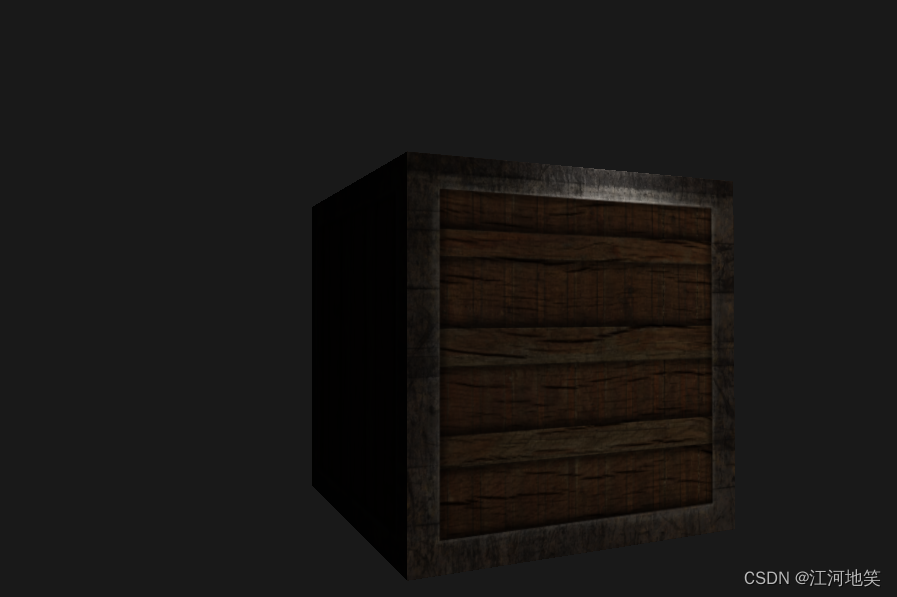
2. 镜面光照贴图
增加
cube.fs
#version 330 core
out vec4 FragColor;in vec3 Normal;
in vec3 FragPos;struct Material {sampler2D diffuse;sampler2D specular;float shininess;
};
in vec2 TexCoords;
struct Light {vec3 position;vec3 ambient;vec3 diffuse;vec3 specular;
};
uniform Material material;
uniform Light light;
uniform vec3 objectColor;
uniform vec3 lightColor;
uniform vec3 lightPos;
uniform vec3 viewPos;void main()
{//ambientvec3 ambient=vec3(0.1)*light.ambient*vec3(texture(material.diffuse,TexCoords));//diffusevec3 norm=normalize(Normal);vec3 lightDir=normalize(light.position-FragPos);//光的方向向量是光源位置向量与片段位置向量之间的向量差。//对norm和lightDir向量进行点乘,计算光源对当前片段实际的漫反射影响//两个向量之间的角度越大,漫反射分量就会越小,点乘的几何意义也如此float diff=max(dot(norm,lightDir),0.0);vec3 diffuse=light.diffuse*diff*vec3(texture(material.diffuse,TexCoords));//specular//漫反射是光源指向片段位置。现在这个是摄像机指向片段位置vec3 viewDir=normalize(viewPos-FragPos);vec3 reflectDir=reflect(-lightDir,norm);//reflect第一个参数就是要片段指向摄像机位置float spec=pow(max(dot(viewDir,reflectDir),0.0),material.shininess);vec3 specular=light.specular*spec*vec3(texture(material.specular,TexCoords));vec3 result=ambient+diffuse+specular;FragColor = vec4(result, 1.0);
}
main.cpp 其他文件一样
#include <glad/glad.h>
#include <GLFW/glfw3.h>#include <iostream>
#include "stb_image.h"
#include <cmath>
#include "shader.h"
#include "camera.h"#include <glm/glm.hpp>
#include <glm/gtc/matrix_transform.hpp>
#include <glm/gtc/type_ptr.hpp>void framebuffer_size_callback(GLFWwindow* window, int width, int height);
void processInput(GLFWwindow* window);
void mouse_callback(GLFWwindow* window, double xpos, double ypos);
void scroll_callback(GLFWwindow* window, double xoffset, double yoffset);// settings
const unsigned int SCR_WIDTH = 900;
const unsigned int SCR_HEIGHT = 600;//camera
Camera camera(glm::vec3(0.0f, 0.0f, 3.0f));
float lastX = SCR_WIDTH / 2.0f;
float lastY = SCR_HEIGHT / 2.0f;
bool firstMouse = true;//timing
float deltaTime = 0.0f;//不同配置绘制速度不同,所以需要这个属性
float lastFrame = 0.0f;glm::vec3 lightPos(1.2f, 1.0f, 2.0f);// utility function for loading a 2D texture from file
// ---------------------------------------------------
unsigned int loadTexture(char const* path)
{unsigned int textureID;glGenTextures(1, &textureID);int width, height, nrComponents;unsigned char* data = stbi_load(path, &width, &height, &nrComponents, 0);if (data){GLenum format;if (nrComponents == 1)format = GL_RED;else if (nrComponents == 3)format = GL_RGB;else if (nrComponents == 4)format = GL_RGBA;glBindTexture(GL_TEXTURE_2D, textureID);glTexImage2D(GL_TEXTURE_2D, 0, format, width, height, 0, format, GL_UNSIGNED_BYTE, data);glGenerateMipmap(GL_TEXTURE_2D);glTexParameteri(GL_TEXTURE_2D, GL_TEXTURE_WRAP_S, GL_REPEAT);glTexParameteri(GL_TEXTURE_2D, GL_TEXTURE_WRAP_T, GL_REPEAT);glTexParameteri(GL_TEXTURE_2D, GL_TEXTURE_MIN_FILTER, GL_LINEAR_MIPMAP_LINEAR);glTexParameteri(GL_TEXTURE_2D, GL_TEXTURE_MAG_FILTER, GL_LINEAR);stbi_image_free(data);}else{std::cout << "Texture failed to load at path: " << path << std::endl;stbi_image_free(data);}return textureID;
}int main() {//glfw:initialize and configure//=============================glfwInit();glfwWindowHint(GLFW_CONTEXT_VERSION_MAJOR, 3);glfwWindowHint(GLFW_CONTEXT_VERSION_MINOR, 3);glfwWindowHint(GLFW_OPENGL_PROFILE, GLFW_OPENGL_CORE_PROFILE);#ifdef __APPLE__glfwWindowHint(GLFW_OPENGL_FORWARD_COMPAT, GL_TRUE);
#endif//glfw window creation//=============================GLFWwindow* window = glfwCreateWindow(SCR_WIDTH, SCR_HEIGHT, "Learn", NULL, NULL);if (window == NULL) {std::cout << "Failed to create GLFW window" << std::endl;glfwTerminate();return -1;}glfwMakeContextCurrent(window);glfwSetFramebufferSizeCallback(window, framebuffer_size_callback);glfwSetCursorPosCallback(window, mouse_callback);glfwSetScrollCallback(window, scroll_callback);//tell GLFW to capture our mouseglfwSetInputMode(window, GLFW_CURSOR, GLFW_CURSOR_DISABLED);//glad::load all OPenGL function pointers//=============================if (!gladLoadGLLoader((GLADloadproc)glfwGetProcAddress)) {std::cout << "Failed to initialize GLAD" << std::endl;return -1;}//configure gloabl opengl state//=============================glEnable(GL_DEPTH_TEST);//build and compile our shader zprogram//=============================Shader lightingShader("./cube.vs", "./cube.fs");Shader lightingCubeShader("./light_cube.vs", "./light_cube.fs");//set up vertex data float vertices[] = {// positions          // normals           // texture coords-0.5f, -0.5f, -0.5f,  0.0f,  0.0f, -1.0f,  0.0f,  0.0f,0.5f, -0.5f, -0.5f,  0.0f,  0.0f, -1.0f,  1.0f,  0.0f,0.5f,  0.5f, -0.5f,  0.0f,  0.0f, -1.0f,  1.0f,  1.0f,0.5f,  0.5f, -0.5f,  0.0f,  0.0f, -1.0f,  1.0f,  1.0f,-0.5f,  0.5f, -0.5f,  0.0f,  0.0f, -1.0f,  0.0f,  1.0f,-0.5f, -0.5f, -0.5f,  0.0f,  0.0f, -1.0f,  0.0f,  0.0f,-0.5f, -0.5f,  0.5f,  0.0f,  0.0f,  1.0f,  0.0f,  0.0f,0.5f, -0.5f,  0.5f,  0.0f,  0.0f,  1.0f,  1.0f,  0.0f,0.5f,  0.5f,  0.5f,  0.0f,  0.0f,  1.0f,  1.0f,  1.0f,0.5f,  0.5f,  0.5f,  0.0f,  0.0f,  1.0f,  1.0f,  1.0f,-0.5f,  0.5f,  0.5f,  0.0f,  0.0f,  1.0f,  0.0f,  1.0f,-0.5f, -0.5f,  0.5f,  0.0f,  0.0f,  1.0f,  0.0f,  0.0f,-0.5f,  0.5f,  0.5f, -1.0f,  0.0f,  0.0f,  1.0f,  0.0f,-0.5f,  0.5f, -0.5f, -1.0f,  0.0f,  0.0f,  1.0f,  1.0f,-0.5f, -0.5f, -0.5f, -1.0f,  0.0f,  0.0f,  0.0f,  1.0f,-0.5f, -0.5f, -0.5f, -1.0f,  0.0f,  0.0f,  0.0f,  1.0f,-0.5f, -0.5f,  0.5f, -1.0f,  0.0f,  0.0f,  0.0f,  0.0f,-0.5f,  0.5f,  0.5f, -1.0f,  0.0f,  0.0f,  1.0f,  0.0f,0.5f,  0.5f,  0.5f,  1.0f,  0.0f,  0.0f,  1.0f,  0.0f,0.5f,  0.5f, -0.5f,  1.0f,  0.0f,  0.0f,  1.0f,  1.0f,0.5f, -0.5f, -0.5f,  1.0f,  0.0f,  0.0f,  0.0f,  1.0f,0.5f, -0.5f, -0.5f,  1.0f,  0.0f,  0.0f,  0.0f,  1.0f,0.5f, -0.5f,  0.5f,  1.0f,  0.0f,  0.0f,  0.0f,  0.0f,0.5f,  0.5f,  0.5f,  1.0f,  0.0f,  0.0f,  1.0f,  0.0f,-0.5f, -0.5f, -0.5f,  0.0f, -1.0f,  0.0f,  0.0f,  1.0f,0.5f, -0.5f, -0.5f,  0.0f, -1.0f,  0.0f,  1.0f,  1.0f,0.5f, -0.5f,  0.5f,  0.0f, -1.0f,  0.0f,  1.0f,  0.0f,0.5f, -0.5f,  0.5f,  0.0f, -1.0f,  0.0f,  1.0f,  0.0f,-0.5f, -0.5f,  0.5f,  0.0f, -1.0f,  0.0f,  0.0f,  0.0f,-0.5f, -0.5f, -0.5f,  0.0f, -1.0f,  0.0f,  0.0f,  1.0f,-0.5f,  0.5f, -0.5f,  0.0f,  1.0f,  0.0f,  0.0f,  1.0f,0.5f,  0.5f, -0.5f,  0.0f,  1.0f,  0.0f,  1.0f,  1.0f,0.5f,  0.5f,  0.5f,  0.0f,  1.0f,  0.0f,  1.0f,  0.0f,0.5f,  0.5f,  0.5f,  0.0f,  1.0f,  0.0f,  1.0f,  0.0f,-0.5f,  0.5f,  0.5f,  0.0f,  1.0f,  0.0f,  0.0f,  0.0f,-0.5f,  0.5f, -0.5f,  0.0f,  1.0f,  0.0f,  0.0f,  1.0f};//第一个unsigned int VBO, cubeVAO;glGenVertexArrays(1, &cubeVAO);glGenBuffers(1, &VBO);glBindBuffer(GL_ARRAY_BUFFER, VBO);glBufferData(GL_ARRAY_BUFFER, sizeof(vertices), vertices, GL_STATIC_DRAW);glBindVertexArray(cubeVAO);//position attributeglVertexAttribPointer(0, 3, GL_FLOAT, GL_FALSE, 8 * sizeof(float), (void*)0);glEnableVertexAttribArray(0);//normal attributeglVertexAttribPointer(1, 3, GL_FLOAT, GL_FALSE, 8 * sizeof(float), (void*)(3 * sizeof(float)));glEnableVertexAttribArray(1);glVertexAttribPointer(2, 2, GL_FLOAT, GL_FALSE, 8 * sizeof(float), (void*)(6 * sizeof(float)));glEnableVertexAttribArray(2);//第二个unsigned int lightCubeVAO;glGenVertexArrays(1, &lightCubeVAO);glBindVertexArray(lightCubeVAO);glBindBuffer(GL_ARRAY_BUFFER, VBO);glVertexAttribPointer(0, 3, GL_FLOAT, GL_FALSE, 8 * sizeof(float), (void*)0);glEnableVertexAttribArray(0);//----------std::string texturePath = "../../Data/container2.png";unsigned int diffuseMap = loadTexture(texturePath.c_str());std::string specularPath = "../../Data/container2_specular.png";unsigned int specularMap = loadTexture(specularPath.c_str());lightingShader.use();lightingShader.setInt("material.diffuse", 0);lightingShader.setInt("material.specular", 1);// render loop// -----------while (!glfwWindowShouldClose(window)){// per-frame time logic// --------------------float currentFrame = static_cast<float>(glfwGetTime());deltaTime = currentFrame - lastFrame;lastFrame = currentFrame;// input// -----processInput(window);// render// ------glClearColor(0.1f, 0.1f, 0.1f, 1.0f);glClear(GL_COLOR_BUFFER_BIT | GL_DEPTH_BUFFER_BIT);// be sure to activate shader when setting uniforms/drawing objectslightingShader.use();lightingShader.setVec3("light.position", lightPos);lightingShader.setVec3("viewPos", camera.Position);//光照属性lightingShader.setVec3("light.ambient", 0.2f, 0.2f, 0.2f);lightingShader.setVec3("light.diffuse", 0.5f, 0.5f, 0.5f);lightingShader.setVec3("light.specular", 1.0f, 1.0f, 1.0f);//材质属性lightingShader.setVec3("material.specular", 0.5f,0.5f, 0.5f);lightingShader.setFloat("material.shininess", 64.0f);// view/projection transformationsglm::mat4 projection = glm::perspective(glm::radians(camera.Zoom), (float)SCR_WIDTH / (float)SCR_HEIGHT, 0.1f, 100.0f);glm::mat4 view = camera.GetViewMatrix();lightingShader.setMat4("projection", projection);lightingShader.setMat4("view", view);// world transformationglm::mat4 model = glm::mat4(1.0f);lightingShader.setMat4("model", model);//bind diffuse mapglActiveTexture(GL_TEXTURE0);glBindTexture(GL_TEXTURE_2D, diffuseMap);glActiveTexture(GL_TEXTURE1);glBindTexture(GL_TEXTURE_2D, specularMap);// render the cubeglBindVertexArray(cubeVAO);glDrawArrays(GL_TRIANGLES, 0, 36);// also draw the lamp objectlightingCubeShader.use();lightingCubeShader.setMat4("projection", projection);lightingCubeShader.setMat4("view", view);model = glm::mat4(1.0f);model = glm::translate(model, lightPos);model = glm::scale(model, glm::vec3(0.2f)); // a smaller cubelightingCubeShader.setMat4("model", model);glBindVertexArray(lightCubeVAO);glDrawArrays(GL_TRIANGLES, 0, 36);// glfw: swap buffers and poll IO events (keys pressed/released, mouse moved etc.)// -------------------------------------------------------------------------------glfwSwapBuffers(window);glfwPollEvents();}glDeleteVertexArrays(1, &cubeVAO);glDeleteVertexArrays(1, &lightCubeVAO);glDeleteBuffers(1, &VBO);glfwTerminate();return 0;}
void processInput(GLFWwindow* window)
{if (glfwGetKey(window, GLFW_KEY_ESCAPE) == GLFW_PRESS)glfwSetWindowShouldClose(window, true);if (glfwGetKey(window, GLFW_KEY_W) == GLFW_PRESS)camera.ProcessKeyboard(FORWARD, deltaTime);if (glfwGetKey(window, GLFW_KEY_S) == GLFW_PRESS)camera.ProcessKeyboard(BACKWARD, deltaTime);if (glfwGetKey(window, GLFW_KEY_A) == GLFW_PRESS)camera.ProcessKeyboard(LEFT, deltaTime);if (glfwGetKey(window, GLFW_KEY_D) == GLFW_PRESS)camera.ProcessKeyboard(RIGHT, deltaTime);
}void framebuffer_size_callback(GLFWwindow* window, int width, int height)
{// make sure the viewport matches the new window dimensions; note that width and // height will be significantly larger than specified on retina displays.glViewport(0, 0, width, height);
}
// glfw: whenever the mouse moves, this callback is called
// -------------------------------------------------------
void mouse_callback(GLFWwindow* window, double xposIn, double yposIn)
{float xpos = static_cast<float>(xposIn);float ypos = static_cast<float>(yposIn);if (firstMouse){lastX = xpos;lastY = ypos;firstMouse = false;}float xoffset = xpos - lastX;float yoffset = lastY - ypos; // reversed since y-coordinates go from bottom to toplastX = xpos;lastY = ypos;camera.ProcessMouseMovement(xoffset, yoffset);
}// glfw: whenever the mouse scroll wheel scrolls, this callback is called
// ----------------------------------------------------------------------
void scroll_callback(GLFWwindow* window, double xoffset, double yoffset)
{camera.ProcessMouseScroll(static_cast<float>(yoffset));
}
光照贴图 - LearnOpenGL CN (learnopengl-cn.github.io)
相关文章:
OpenGL_Learn14(光照贴图)
1. 漫反射贴图 在光照场景中,它通常叫做一个漫反射贴图(Diffuse Map)(3D艺术家通常都这么叫它),它是一个表现了物体所有的漫反射颜色的纹理图像。 我们会将纹理储存为Material结构体中的一个sampler2D 。我们将之前定义的vec3漫反…...
【JVM精讲与GC调优教程(概述)】
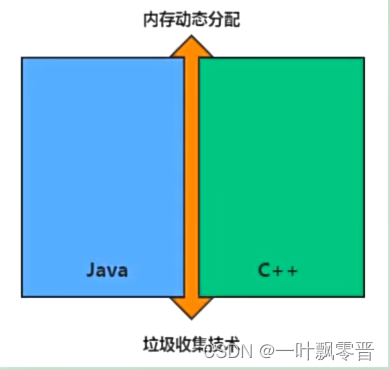
如何理解虚拟机(JVM)跨语言的平台 java虚拟机根本不关心运行在其内部的程序到底是使用何种编程语言编写的,他只关心“字节码”文件。 java不是最强大的语言,但是JVN是最强大的虚拟机。 不存在内存溢出? 内存泄露? JAVA = (C++)–; 垃圾回收机制为我们打理了很多繁琐的…...
蓝桥杯物联网竞赛_STM32L071_2_继电器控制
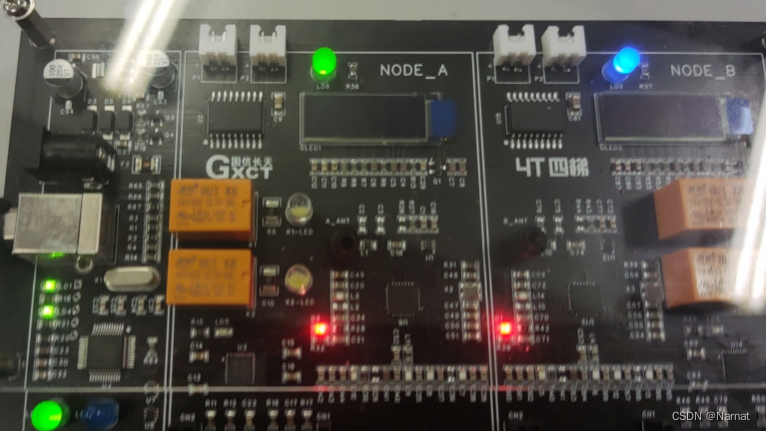
Stm32l071原理图: PA11与PA12连接着UNL2803 ULN2803是一种集成电路芯片,通常被用作高电压和高电流负载的驱动器。 ULN2803是一个达林顿阵列,当输入引脚(IN1至IN8)被连接到正电源时,相应的输出引脚ÿ…...
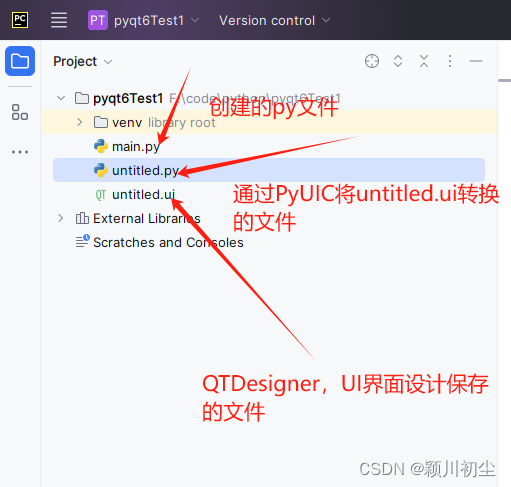
python之pyqt专栏2-项目文件解析
项目结构 在上一篇文章python之pyqt专栏1-环境搭建,创建新的pyqt项目,下面我们来看一下这个项目下的文件。 从下面的文件结构图可以看到,该项目下有3个文件,untitled.ui,untitled.py 以及main.py。 QtDesigner可以UI界面的方式&am…...
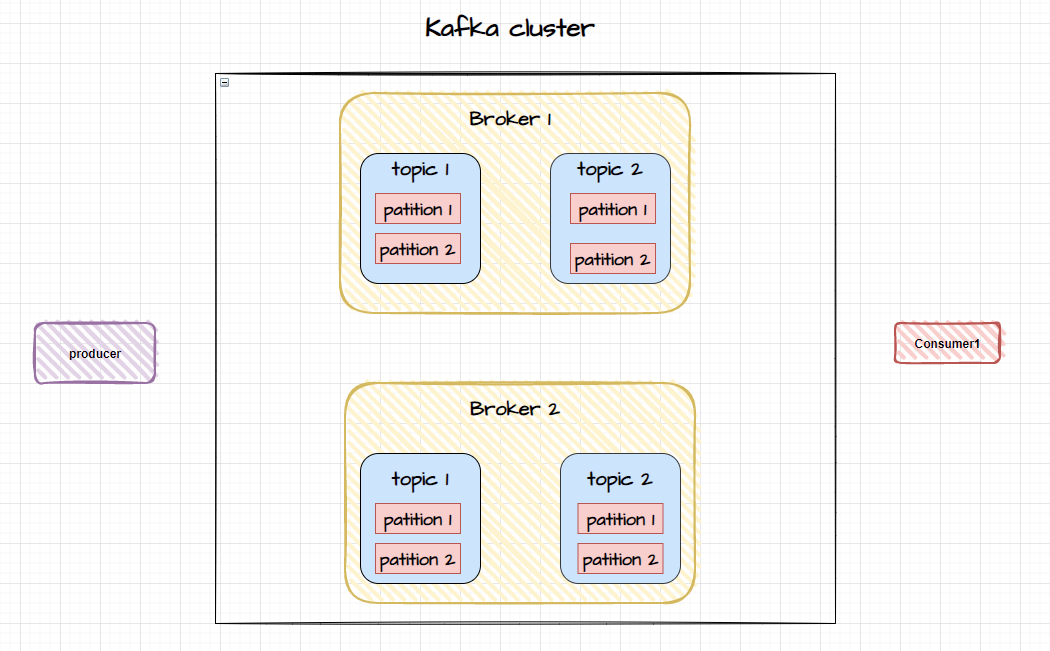
Kafka 集群如何实现数据同步
Kafka 介绍 Kafka 是一个高吞吐的分布式消息系统,不但像传统消息队列(RaabitMQ、RocketMQ等)那样能够【异步处理、流量消峰、服务解耦】 还能够把消息持久化到磁盘上,用于批量消费。除此之外由于 Kafka 被设计成分布式系统&…...
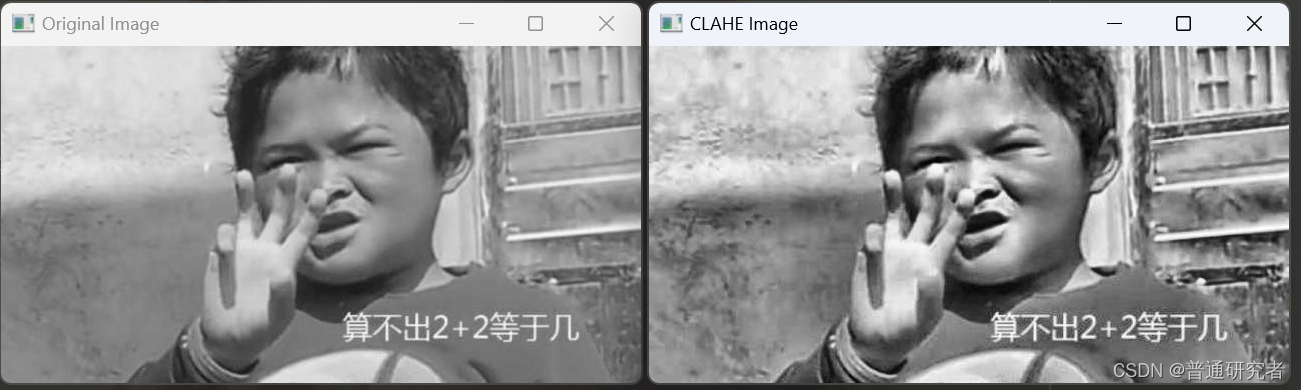
opencv- CLAHE 有限对比适应性直方图均衡化
CLAHE(Contrast Limited Adaptive Histogram Equalization)是一种对比度有限的自适应直方图均衡化技术,它能够提高图像的对比度而又避免过度增强噪声。 在OpenCV中,cv2.createCLAHE() 函数用于创建CLAHE对象,然后可以…...

IOS免签封装打包苹果APP的方法
IOS免签app封装打包苹果APP的方法如下: 准备一个未签名的IPA文件。获取一个企业证书或个人证书,用于签名IPA文件。将证书添加到Keychain Access中。安装iOS App Signer(可以在网上找到相关下载链接)。打开iOS App Signer…...

Springboot引入分布式搜索引擎Es RestAPI
文章目录 RestAPI初始化RestClient创建索引库删除索引库判断索引库是否存在总结 RestClient操作文档增加文档数据查询文档删除文档修改文档批量导入文档小结 RestAPI ES官方提供了各种不同语言的客户端,用来操作ES。这些客户端的本质就是组装DSL语句,通…...
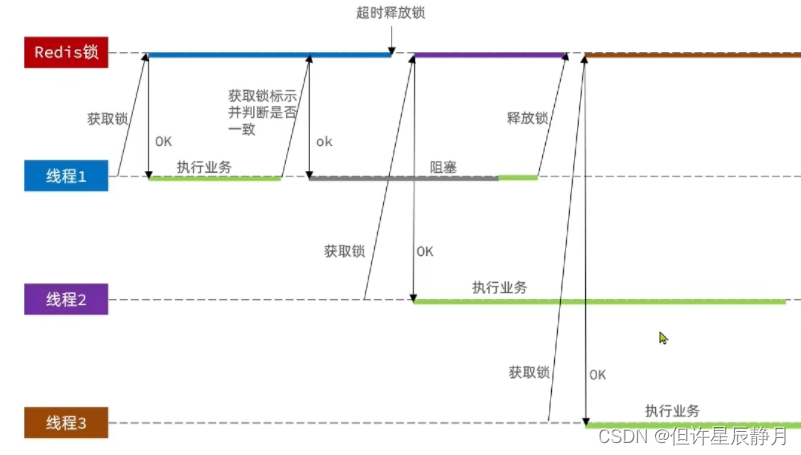
Lua脚本解决redis实现的分布式锁多条命令原子性问题
线程1现在持有锁之后,在执行业务逻辑过程中,他正准备删除锁,而且已经走到了条件判断的过程中,比如他已经拿到了当前这把锁确实是属于他自己的,正准备删除锁,但是此时他的锁到期了,那么此时线程2…...
Vatee万腾独特科技力量的前沿探索:Vatee的数字化奇点
在当今科技的浪潮中,Vatee万腾以其独特的科技力量成为前沿探索的引领者,正迎来数字化奇点的新时代。Vatee万腾不仅仅是一家科技公司,更是一支探索未知领域、开创数字时代新局面的先锋力量。 Vatee万腾的数字化奇点体现在其对前沿技术的深刻理…...

C++面试,const的使用
#include <iostream> #include <cstring>int main() {const int x 1;int b 10;int c 20;const int* a1 &b;int* const a2 &b;const int* const a3 &b;x 2;a1 &c;*a1 1;a2 &c;*a2 1;a3 &c;*a3 1;return 0; }错误1:…...

小总结----长度
看了上一篇文章,已经一年没发了。CSDN也越来越封闭了,查点东西,也很不友好。 来个小总结吧:完成团队建设,招聘11人。完成26项开发,内部9项,科创10项。2023发明专利申请两项,软著申请…...
【深度学习】如何选择神经网络的超参数
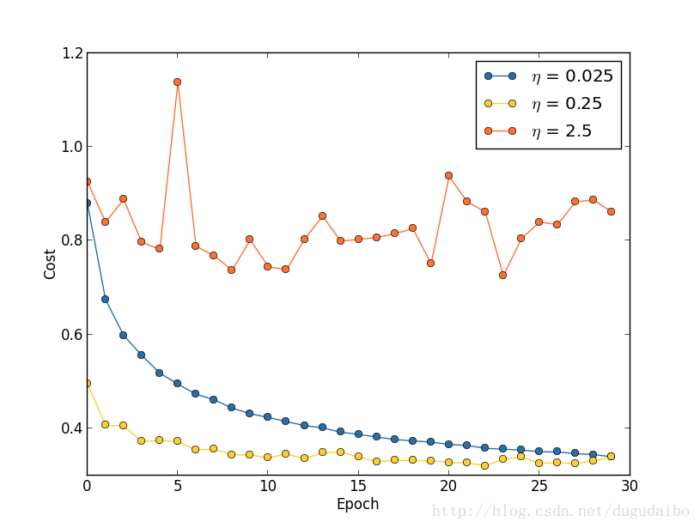
1. 神经网络的超参数分类 神经网路中的超参数主要包括: 1. 学习率 η 2. 正则化参数 λ 3. 神经网络的层数 L 4. 每一个隐层中神经元的个数 j 5. 学习的回合数Epoch 6. 小批量数据 minibatch 的大小 7. 输出神经元的编码方式 8. 代价函数的选择 9. 权重初始化的方法 …...
)
jQuery 3.0 新增了哪些特性?(jQuery 3 所引入的那些最重要的变化)
文章目录 前言简介新增特性Use of requestAnimationFrame() for Animationsunwrap() 方法 有变更的特性data() 方法Deferred 对象SVG 文档 已废弃、已移除的方法和属性废弃 bind()、unbind()、delegate() 和 undelegate() 方法移除 load()、unload() 和 error() 方法移除 conte…...

MindStudio学习一 整体介绍
一场景介绍 二 安装介绍 1.LINUX 采用无昇腾硬件采用linux 分部署 2.WINDOWS 3.linux下安装整体步骤 3.1安装依赖 3.2 安装步骤 1.gcc cmake 等依赖 2.python3.7.5 3.pip 安装依赖 4.安装JDK 5.安装 Ascend-cann-toolkit 6.解压安装Mindstudio 7.进入bin路径 ./…...
excel表中慎用合并单元格,多用跨列居中
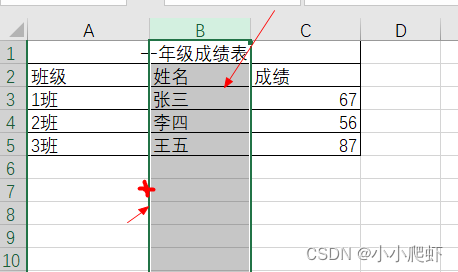
如下一个excel例表: 要将首行居中,最好的办法如下: 1、选中首行单元格 2、按下ctrl1,调出“设置单元格格式”,选中“对齐”,在“水平对齐”中选择“跨列居中” 3、完成任务 这样居中的好处是:可…...

linux网络编程之UDP编程
linux网络编程之UDP编程 UDP编程模型服务端客户端 tcp与udp的区别 UDP编程模型 服务端 1.创建socket 2.构建服务器协议地址簇 3.绑定 4. 通信 sendto(多了两个参数) send connect #include <stdio.h> #include <sys/types.h> /*…...
YB4556 28V、1A、单节、线性锂电池充电IC
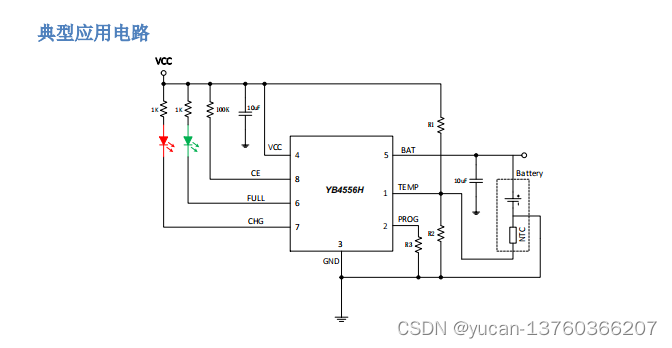
YB4556 28V 、 1A 、单节、线性锂电池充电 IC 概述: YB4556H 是一款完整的采用恒定电流 / 恒定电压的高压、大电流、单节锂离子电池线性充电 IC。最高耐压可达 28V,6.5V 自动过压保护,充电电流可达 1A。由于采用了内部 PMOSFET 架构,加上防倒…...
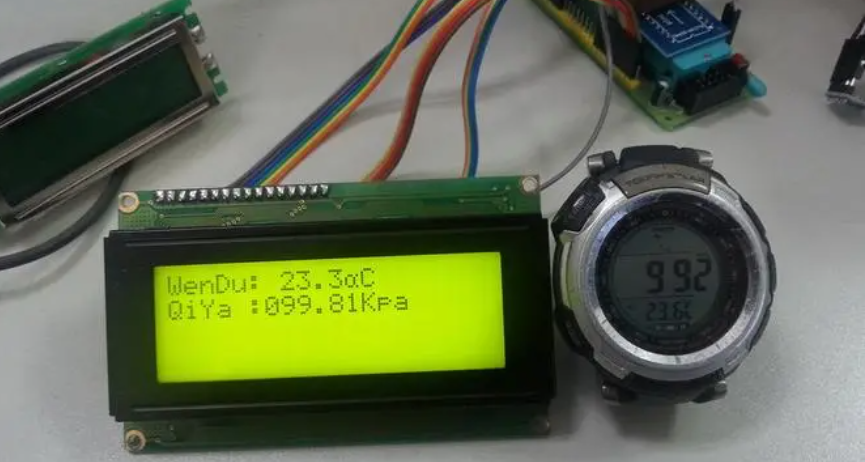
基于单片机设计的大气气压检测装置(STC89C52+BMP180实现)
一、前言 本项目设计一个大气气压检测装置,该装置以单片机为基础,采用STC89C52作为核心控制芯片,结合BMP180模块作为气压传感器。大气气压,也就是由气体重力在大气层中产生的压力,其变化与天气预报、气象观测以及高度…...
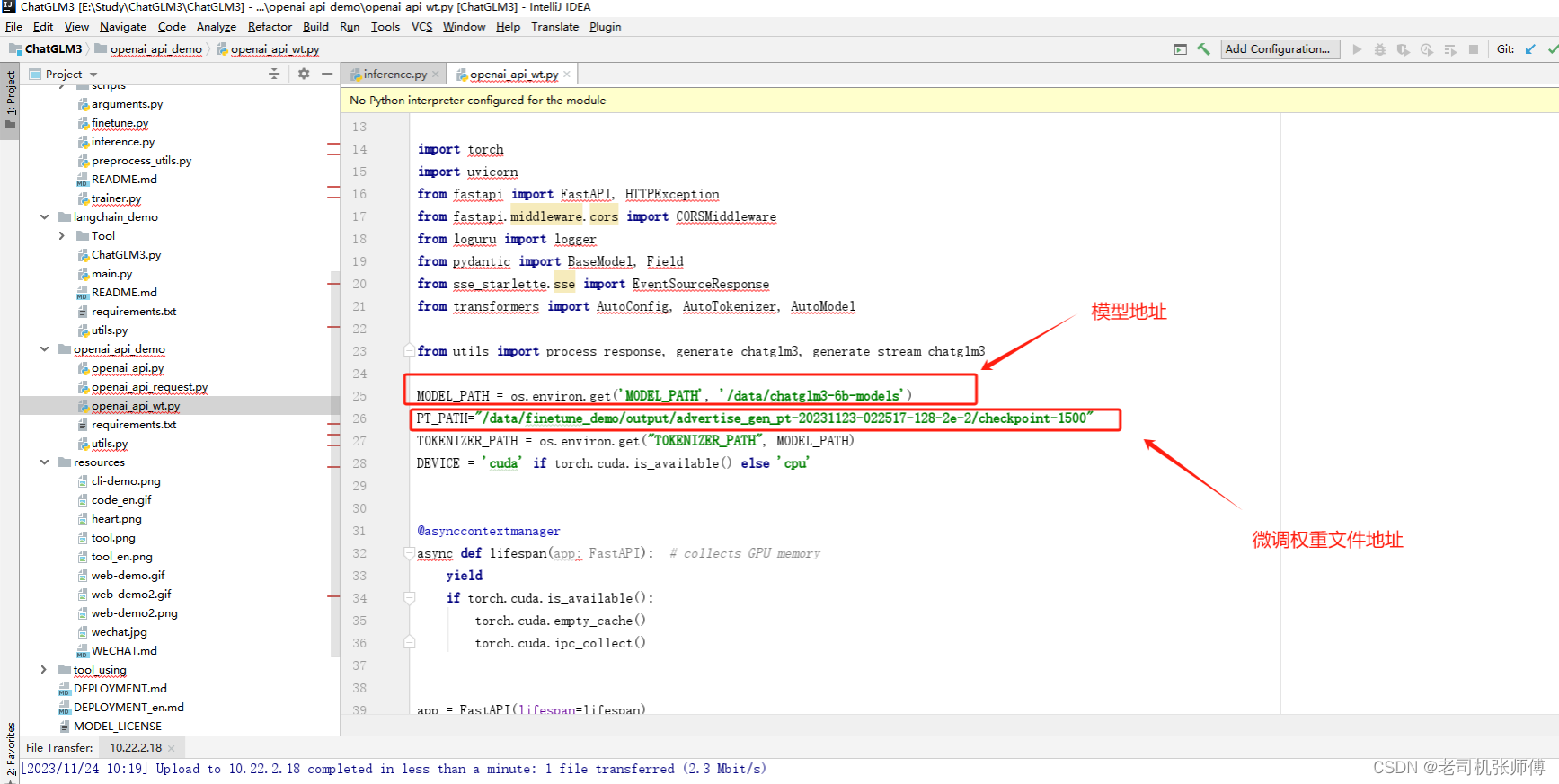
【ChatGLM3-6B】Docker下部署及微调
【ChatGLM2-6B】小白入门及Docker下部署 注意:Docker基于镜像中网盘上上传的有已经做好的镜像,想要便捷使用的可以直接从Docker基于镜像安装看Docker从0安装前提下载启动访问 Docker基于镜像安装容器打包操作(生成镜像时使用的命令࿰…...

Qianfan-OCR效果分享:培训教材PPT→知识点分级+案例引用+习题答案结构化
Qianfan-OCR效果分享:培训教材PPT→知识点分级案例引用习题答案结构化 1. 工具概览 Qianfan-OCR是基于百度千帆InternVL架构开发的单卡GPU专属文档解析工具,专为解决教育培训场景中的复杂文档解析需求而设计。与传统OCR工具不同,它不仅能识…...

推荐一些可以用于论文降重的软件:哪些平台能同时降低查重率和AIGC疑似率?2026年实测TOP5对比,AIGC率最低降至5%!
【博主按】 各位CSDN的极客和科研搬砖人们,五月答辩季的“代码”都跑通了吗?最近后台收到海量求助报Bug:自己的论文好不容易把字面查重率“Debug”到了8%,结果一提交教务处的系统,直接弹出了个致命错误——“AIGC疑似率…...

VoiceFixer:如何用AI一键修复任何受损语音文件?
VoiceFixer:如何用AI一键修复任何受损语音文件? 【免费下载链接】voicefixer General Speech Restoration 项目地址: https://gitcode.com/gh_mirrors/vo/voicefixer 你是否曾经因为录音质量太差而无法听清重要内容?老旧录音的噪音、会…...

给DSP新手:用TMS320F28335的PIE中断,从“肚子痛”到“手被割伤”都管起来
给DSP新手:用TMS320F28335的PIE中断,从“肚子痛”到“手被割伤”都管起来 想象一下,你正在医院急诊室值班。突然,一个病人捂着肚子冲进来喊"胃痛",紧接着又有人举着流血的手指说"被割伤了"。作为医…...
)
深度解读20240320 功能更新(附完整操作教程)
很多商家做小程序商城,最头疼的就是20240320 功能更新的设置。一、为什么需要这个功能?很多做得好的小程序商城,都把20240320 功能更新用到了极致。二、适用场景以下场景特别适合使用20240320 功能更新:• 日常商城运营࿱…...
)
开源数据集TN3K实测:手把手复现甲状腺结节分割SOTA模型(附避坑指南)
TN3K数据集实战:从零构建甲状腺结节分割多任务模型 医疗影像分析领域近年来迎来爆发式增长,其中甲状腺结节自动分割技术因其在癌症早期筛查中的关键作用备受关注。去年发布的TN3K开源数据集为研究者提供了宝贵资源,但实际应用时仍面临数据异构…...

OpenRAG: 企业级 RAG 平台的终极解决方案
引言: 当知识管理遇上 AI 革命 在这个信息爆炸的时代,企业和个人每天都在产生海量的文档、报告、邮件和知识资产。然而,一个残酷的现实是:90% 的企业知识被困在 PDF、Word 文档和各种云存储中,无法被有效检索和利用。 想象一下这样的场景:你急需找到三个月前某次会议的决策依…...

RocketMQ控制台查不到生产组?别慌,这可能是Producer的‘隐身术’
RocketMQ生产组"隐身"现象全解析:从生命周期到持久化配置 第一次使用RocketMQ控制台时,很多开发者都会遇到这样的困惑:明明用示例代码成功发送了消息,却在控制台的"生产者"列表里找不到对应的生产组信息。这就…...
)
FlinkCDC实战:从单表到多源合并,一键搞定MySQL实时同步(Flink 1.16.2)
1. 环境准备与基础配置 在开始FlinkCDC实战之前,我们需要先搭建好基础环境。我建议使用Linux系统进行操作,这里以CentOS 7为例。首先确保你已经安装了JDK 1.8,这是Flink运行的基本要求。 下载Flink 1.16.2安装包时,要注意选择与Sc…...

深入PyTorch源码:图解LayerNorm两种实现,弄懂weight/bias到底怎么来的
深入PyTorch源码:图解LayerNorm两种实现,弄懂weight/bias到底怎么来的 在深度学习模型的训练过程中,归一化技术扮演着至关重要的角色。不同于BatchNorm对批处理数据的标准化处理,LayerNorm(层归一化)因其在…...