
OpenVINS学习2——VIRAL数据集eee01.bag运行
前言
周末休息了两天,接着做上周五那个VIRAL数据集没有运行成功的工作。现在的最新OpenVINS需要重新写配置文件,不像之前那样都写在launch里,因此需要根据数据集情况配置好estimator_config.yaml还有两个标定参数文件。
VIRAL数据集
VIRAL数据集包含雷达、相机、IMU、UWB四种数据,是南洋理工大学在22年发布的。
官网地址:https://ntu-aris.github.io/ntu_viral_dataset/
适配VIRAL的OpenVINS(旧版):https://github.com/brytsknguyen/open_vins.git
VIRAL数据集本身作者对一些常用VIO开源代码做了适配修改,其中就包括OpenVINS,但是这个是更新之前的OpenVINS,现在的使用方式配置和之前有所不同。我刚开始从Euroc的数据集配置改动,只是改VIRAL以前OpenVINS配置的参数,初始化跑不通,如下图所示。
这是VIRAL适配的openvins的配置情况,是通过launch进行配置的。
<launch><param name="/use_sim_time" value="true" /><arg name="publish_clock" default="--clock"/><!-- NTU VIRAL dataset --><!-- EEE --><arg name="bag_file" default="/home/merlincs/workspace/dataset/VIRAL/eee_01/eee_01.bag"/><!-- MASTER NODE! --><node name="run_serial_msckf" pkg="ov_msckf" type="run_serial_msckf" output="screen" clear_params="true" required="true"><!-- bag topics --><param name="topic_imu" type="string" value="/imu/imu" /><param name="topic_camera0" type="string" value="/right/image_raw" /><param name="topic_camera1" type="string" value="/left/image_raw" /><rosparam param="stereo_pairs">[0,1]</rosparam><!-- bag parameters --><param name="path_bag" type="string" value="$(arg bag_file)" /><!-- <param name="path_gt" type="string" value="$(find ov_data)/euroc_mav/V1_01_easy.csv" /> --><!-- <param name="bag_start" type="double" value="0" /> --><!-- <param name="bag_durr" type="int" value="-1" /> --><!-- world/filter parameters --><param name="use_fej" type="bool" value="true" /><param name="use_imuavg" type="bool" value="true" /><param name="use_rk4int" type="bool" value="true" /><param name="use_stereo" type="bool" value="true" /><param name="calib_cam_extrinsics" type="bool" value="true" /><param name="calib_cam_intrinsics" type="bool" value="true" /><param name="calib_cam_timeoffset" type="bool" value="true" /><param name="calib_camimu_dt" type="double" value="0.0" /><param name="max_clones" type="int" value="11" /><param name="max_slam" type="int" value="75" /><param name="max_slam_in_update" type="int" value="25" /> <!-- 25 seems to work well --><param name="max_msckf_in_update" type="int" value="40" /><param name="max_cameras" type="int" value="2" /><param name="dt_slam_delay" type="double" value="3" /><param name="init_window_time" type="double" value="0.75" /><param name="init_imu_thresh" type="double" value="0.25" /><rosparam param="gravity">[0.0,0.0,9.81]</rosparam><param name="feat_rep_msckf" type="string" value="GLOBAL_3D" /><param name="feat_rep_slam" type="string" value="ANCHORED_FULL_INVERSE_DEPTH" /><param name="feat_rep_aruco" type="string" value="ANCHORED_FULL_INVERSE_DEPTH" /><!-- zero velocity update parameters --><param name="try_zupt" type="bool" value="false" /><param name="zupt_chi2_multipler" type="int" value="2" /><param name="zupt_max_velocity" type="double" value="0.3" /><param name="zupt_noise_multiplier" type="double" value="50" /><!-- timing statistics recording --><param name="record_timing_information" type="bool" value="false" /><param name="record_timing_filepath" type="string" value="/tmp/timing_stereo.txt" /><!-- tracker/extractor properties --><param name="use_klt" type="bool" value="true" /><param name="num_pts" type="int" value="250" /><param name="fast_threshold" type="int" value="15" /><param name="grid_x" type="int" value="5" /><param name="grid_y" type="int" value="3" /><param name="min_px_dist" type="int" value="5" /><param name="knn_ratio" type="double" value="0.70" /><param name="downsample_cameras" type="bool" value="false" /><param name="multi_threading" type="bool" value="true" /><!-- aruco tag/mapping properties --><param name="use_aruco" type="bool" value="false" /><param name="num_aruco" type="int" value="1024" /><param name="downsize_aruco" type="bool" value="true" /><!-- sensor noise values / update --><param name="up_msckf_sigma_px" type="double" value="1" /><param name="up_msckf_chi2_multipler" type="double" value="1" /><param name="up_slam_sigma_px" type="double" value="1" /><param name="up_slam_chi2_multipler" type="double" value="1" /><param name="up_aruco_sigma_px" type="double" value="1" /><param name="up_aruco_chi2_multipler" type="double" value="1" /><param name="gyroscope_noise_density" type="double" value="5.0e-3" /><param name="gyroscope_random_walk" type="double" value="3.0e-6" /><param name="accelerometer_noise_density" type="double" value="6.0e-2" /><param name="accelerometer_random_walk" type="double" value="8.0e-5" /><!-- camera intrinsics --><rosparam param="cam0_wh">[752, 480]</rosparam><rosparam param="cam1_wh">[752, 480]</rosparam><param name="cam0_is_fisheye" type="bool" value="false" /><param name="cam1_is_fisheye" type="bool" value="false" /><rosparam param="cam0_k">[4.313364265799752e+02, 4.327527965378035e+02, 3.548956286992647e+02, 2.325508916495161e+02]</rosparam><rosparam param="cam0_d">[-0.300267420221178, 0.090544063693053, 3.330220891093334e-05, 8.989607188457415e-05]</rosparam><rosparam param="cam1_k">[4.250258563372763e+02, 4.267976260903337e+02, 3.860151866550880e+02, 2.419130336743440e+02]</rosparam><rosparam param="cam1_d">[-0.288105327549552, 0.074578284234601, 7.784489598138802e-04, -2.277853975035461e-04]</rosparam><!-- camera extrinsics --><rosparam param="T_C0toI">[-0.01916508, -0.01496218, 0.99970437, 0.00519443,0.99974371, 0.01176483, 0.01934191, 0.1347802,-0.01205075, 0.99981884, 0.01473287, 0.01465067,0.00000000, 0.00000000, 0.00000000, 1.00000000]</rosparam><rosparam param="T_C1toI">[0.02183084, -0.01312053, 0.99967558, 0.00552943,0.99975965, 0.00230088, -0.02180248, -0.12431302,-0.00201407, 0.99991127, 0.01316761, 0.01614686, 0.00000000, 0.00000000, 0.00000000, 1.00000000]</rosparam></node><node pkg="rviz" type="rviz" name="ov_msckf_rviz" respawn="true" output="log"args="-d $(find ov_msckf)/launch/ntuviral.rviz" /><!-- <arg name="autorun" default="false"/><node required="$(arg autorun)" pkg="rosbag" type="play" name="rosbag_play"args="$(arg publish_clock) $(arg bag_file) -r 1"/> --></launch>
对应把上面参数写入新建的config/viral中三个配置文件后跑不通:
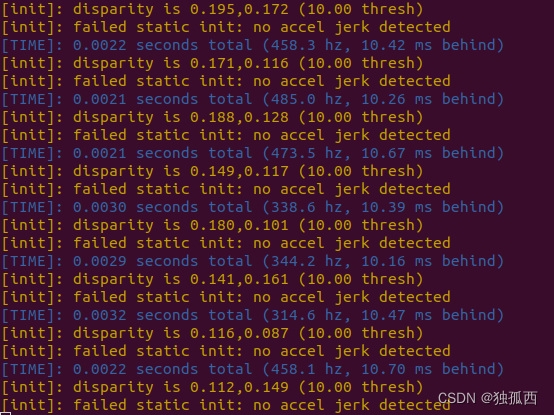
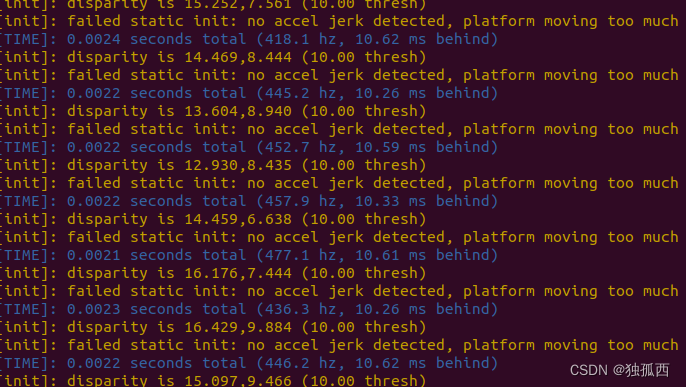
主要原因是因为静态初始化运动检测的原因,具体原理我也还不是很清楚,下一次博客对于初始化这块做详细的学习。因此除了抄viral适配openvins中的配置外,还需要对配置文件进行一些改动,下面介绍一下配置文件各个参数含义。
配置文件详解
config文件夹内有三个配置文件:
estimator_config.yaml,kalibr_imucam_chain.yaml,kalibr_imu_chain.yaml。
第一个是针对不同数据集对估计器的配置,第二个第三个是相机和IMU的标定参数。
下面是针对viral数据集进行修改过的配置文件。(目前还只是对eee01.bag这一个数据包初始化有效)
1、estimator_config.yaml
%YAML:1.0 # need to specify the file type at the top!verbosity: "INFO" # ALL, DEBUG, INFO, WARNING, ERROR, SILENTuse_fej: true # if first-estimate Jacobians should be used (enable for good consistency)
integration: "rk4" # discrete, rk4, analytical (if rk4 or analytical used then analytical covariance propagation is used)
use_stereo: true # if we have more than 1 camera, if we should try to track stereo constraints between pairs
max_cameras: 2 # how many cameras we have 1 = mono, 2 = stereo, >2 = binocular (all mono tracking)calib_cam_extrinsics: true # if the transform between camera and IMU should be optimized R_ItoC, p_CinI
calib_cam_intrinsics: true # if camera intrinsics should be optimized (focal, center, distortion)
calib_cam_timeoffset: true # if timeoffset between camera and IMU should be optimized
calib_imu_intrinsics: false # if imu intrinsics should be calibrated (rotation and skew-scale matrix)
calib_imu_g_sensitivity: false # if gyroscope gravity sensitivity (Tg) should be calibratedmax_clones: 11 # how many clones in the sliding window
max_slam: 75 # number of features in our state vector
max_slam_in_update: 25 # update can be split into sequential updates of batches, how many in a batch
max_msckf_in_update: 40 # how many MSCKF features to use in the update
dt_slam_delay: 3 # delay before initializing (helps with stability from bad initialization...)gravity_mag: 9.81 # magnitude of gravity in this locationfeat_rep_msckf: "GLOBAL_3D"
feat_rep_slam: "ANCHORED_FULL_INVERSE_DEPTH"
feat_rep_aruco: "ANCHORED_FULL_INVERSE_DEPTH"# zero velocity update parameters we can use
# we support either IMU-based or disparity detection.
try_zupt: false
zupt_chi2_multipler: 2 # set to 0 for only disp-based
zupt_max_velocity: 0.3
zupt_noise_multiplier: 50
zupt_max_disparity: 0.5 # set to 0 for only imu-based
zupt_only_at_beginning: false# ==================================================================
# ==================================================================init_window_time: 0.75 # how many seconds to collect initialization information
init_imu_thresh: 0.25 # threshold for variance of the accelerometer to detect a "jerk" in motion
init_max_disparity: 1.0 # max disparity to consider the platform stationary (dependent on resolution)
init_max_features: 20 # how many features to track during initialization (saves on computation)init_dyn_use: false # if dynamic initialization should be used
init_dyn_mle_opt_calib: false # if we should optimize calibration during intialization (not recommended)
init_dyn_mle_max_iter: 50 # how many iterations the MLE refinement should use (zero to skip the MLE)
init_dyn_mle_max_time: 0.05 # how many seconds the MLE should be completed in
init_dyn_mle_max_threads: 6 # how many threads the MLE should use
init_dyn_num_pose: 6 # number of poses to use within our window time (evenly spaced)
init_dyn_min_deg: 10.0 # orientation change needed to try to initinit_dyn_inflation_ori: 10 # what to inflate the recovered q_GtoI covariance by
init_dyn_inflation_vel: 100 # what to inflate the recovered v_IinG covariance by
init_dyn_inflation_bg: 10 # what to inflate the recovered bias_g covariance by
init_dyn_inflation_ba: 100 # what to inflate the recovered bias_a covariance by
init_dyn_min_rec_cond: 1e-12 # reciprocal condition number thresh for info inversioninit_dyn_bias_g: [ 0.0, 0.0, 0.0 ] # initial gyroscope bias guess
init_dyn_bias_a: [ 0.0, 0.0, 0.0 ] # initial accelerometer bias guess# ==================================================================
# ==================================================================record_timing_information: false # if we want to record timing information of the method
record_timing_filepath: "/tmp/traj_timing.txt" # https://docs.openvins.com/eval-timing.html#eval-ov-timing-flame# if we want to save the simulation state and its diagional covariance
# use this with rosrun ov_eval error_simulation
save_total_state: false
filepath_est: "/tmp/ov_estimate.txt"
filepath_std: "/tmp/ov_estimate_std.txt"
filepath_gt: "/tmp/ov_groundtruth.txt"# ==================================================================
# ==================================================================# our front-end feature tracking parameters
# we have a KLT and descriptor based (KLT is better implemented...)
use_klt: true # if true we will use KLT, otherwise use a ORB descriptor + robust matching
num_pts: 250 # number of points (per camera) we will extract and try to track
fast_threshold: 15 # threshold for fast extraction (warning: lower threshs can be expensive)
grid_x: 5 # extraction sub-grid count for horizontal direction (uniform tracking)
grid_y: 3 # extraction sub-grid count for vertical direction (uniform tracking)
min_px_dist: 5 # distance between features (features near each other provide less information)
knn_ratio: 0.70 # descriptor knn threshold for the top two descriptor matches
track_frequency: 11.0 # frequency we will perform feature tracking at (in frames per second / hertz)
downsample_cameras: false # will downsample image in half if true
num_opencv_threads: -1 # -1: auto, 0-1: serial, >1: number of threads
histogram_method: "HISTOGRAM" # NONE, HISTOGRAM, CLAHE# aruco tag tracker for the system
# DICT_6X6_1000 from https://chev.me/arucogen/
use_aruco: false
num_aruco: 1024
downsize_aruco: true# ==================================================================
# ==================================================================# camera noises and chi-squared threshold multipliers
up_msckf_sigma_px: 1
up_msckf_chi2_multipler: 1
up_slam_sigma_px: 1
up_slam_chi2_multipler: 1
up_aruco_sigma_px: 1
up_aruco_chi2_multipler: 1# masks for our images
use_mask: false# imu and camera spacial-temporal
# imu config should also have the correct noise values
relative_config_imu: "kalibr_imu_chain.yaml"
relative_config_imucam: "kalibr_imucam_chain.yaml"
2、kalibr_imucam_chain.yaml
%YAML:1.0cam0:T_imu_cam: #rotation from camera to IMU R_CtoI, position of camera in IMU p_CinI- [-0.01916508, -0.01496218,  0.99970437,  0.00519443]- [0.99974371,  0.01176483,  0.01934191,  0.1347802]- [-0.01205075,  0.99981884,  0.01473287,  0.01465067]- [0.0, 0.0, 0.0, 1.0]cam_overlaps: [1]camera_model: pinhole#相机模型distortion_coeffs: [-0.300267420221178, 0.090544063693053, 3.330220891093334e-05, 8.989607188457415e-05]#畸变参数distortion_model: radtan#畸变模型intrinsics: [4.313364265799752e+02, 4.327527965378035e+02, 3.548956286992647e+02, 2.325508916495161e+02] #fu, fv, cu, cvresolution: [752, 480]#分辨率rostopic: /right/image_raw
cam1:T_imu_cam: #rotation from camera to IMU R_CtoI, position of camera in IMU p_CinI- [0.02183084, -0.01312053,  0.99967558,  0.00552943]- [0.99975965,  0.00230088, -0.02180248, -0.12431302]- [-0.00201407,  0.99991127,  0.01316761,  0.01614686]- [0.0, 0.0, 0.0, 1.0]cam_overlaps: [0]camera_model: pinholedistortion_coeffs: [-0.288105327549552, 0.074578284234601, 7.784489598138802e-04, -2.277853975035461e-04]distortion_model: radtanintrinsics: [4.250258563372763e+02, 4.267976260903337e+02, 3.860151866550880e+02, 2.419130336743440e+02] #fu, fv, cu, cvresolution: [752, 480]rostopic: /left/image_raw
3、kalibr_imu_chain.yaml
%YAML:1.0imu0:T_i_b:- [1.0, 0.0, 0.0, 0.0]- [0.0, 1.0, 0.0, 0.0]- [0.0, 0.0, 1.0, 0.0]- [0.0, 0.0, 0.0, 1.0]accelerometer_noise_density: 6.0e-2 # [ m / s^2 / sqrt(Hz) ] ( accel "white noise" )accelerometer_random_walk: 8.0e-5 # [ m / s^3 / sqrt(Hz) ]. ( accel bias diffusion )gyroscope_noise_density: 5.0e-3 # [ rad / s / sqrt(Hz) ] ( gyro "white noise" )gyroscope_random_walk: 3.0e-6 # [ rad / s^2 / sqrt(Hz) ] ( gyro bias diffusion )rostopic: /imu/imutime_offset: 0.0update_rate: 385.0#IMU更新频率# three different modes supported:# "calibrated" (same as "kalibr"), "kalibr", "rpng"model: "kalibr"# how to get from Kalibr imu.yaml result file:# - Tw is imu0:gyroscopes:M:# - R_IMUtoGYRO: is imu0:gyroscopes:C_gyro_i:# - Ta is imu0:accelerometers:M:# - R_IMUtoACC not used by Kalibr# - Tg is imu0:gyroscopes:A:Tw:- [ 1.0, 0.0, 0.0 ]- [ 0.0, 1.0, 0.0 ]- [ 0.0, 0.0, 1.0 ]R_IMUtoGYRO:- [ 1.0, 0.0, 0.0 ]- [ 0.0, 1.0, 0.0 ]- [ 0.0, 0.0, 1.0 ]Ta:- [ 1.0, 0.0, 0.0 ]- [ 0.0, 1.0, 0.0 ]- [ 0.0, 0.0, 1.0 ]R_IMUtoACC:- [ 1.0, 0.0, 0.0 ]- [ 0.0, 1.0, 0.0 ]- [ 0.0, 0.0, 1.0 ]Tg:- [ 0.0, 0.0, 0.0 ]- [ 0.0, 0.0, 0.0 ]- [ 0.0, 0.0, 0.0 ]实验结果
按照上面进行配置文件修改,然后运行如下命令
#第一个终端
roscore#第二个终端
source devel/setup.bash
roslaunch ov_msckf subscribe.launch config:=viral#第三个终端
rviz
#然后导入配置ntuviral.rviz(从viral适配的openvins中下载,在ov_msckf/launch中)#数据文件夹下打开第四个终端
rosbag play eee_01.bag
运行结果如图所示
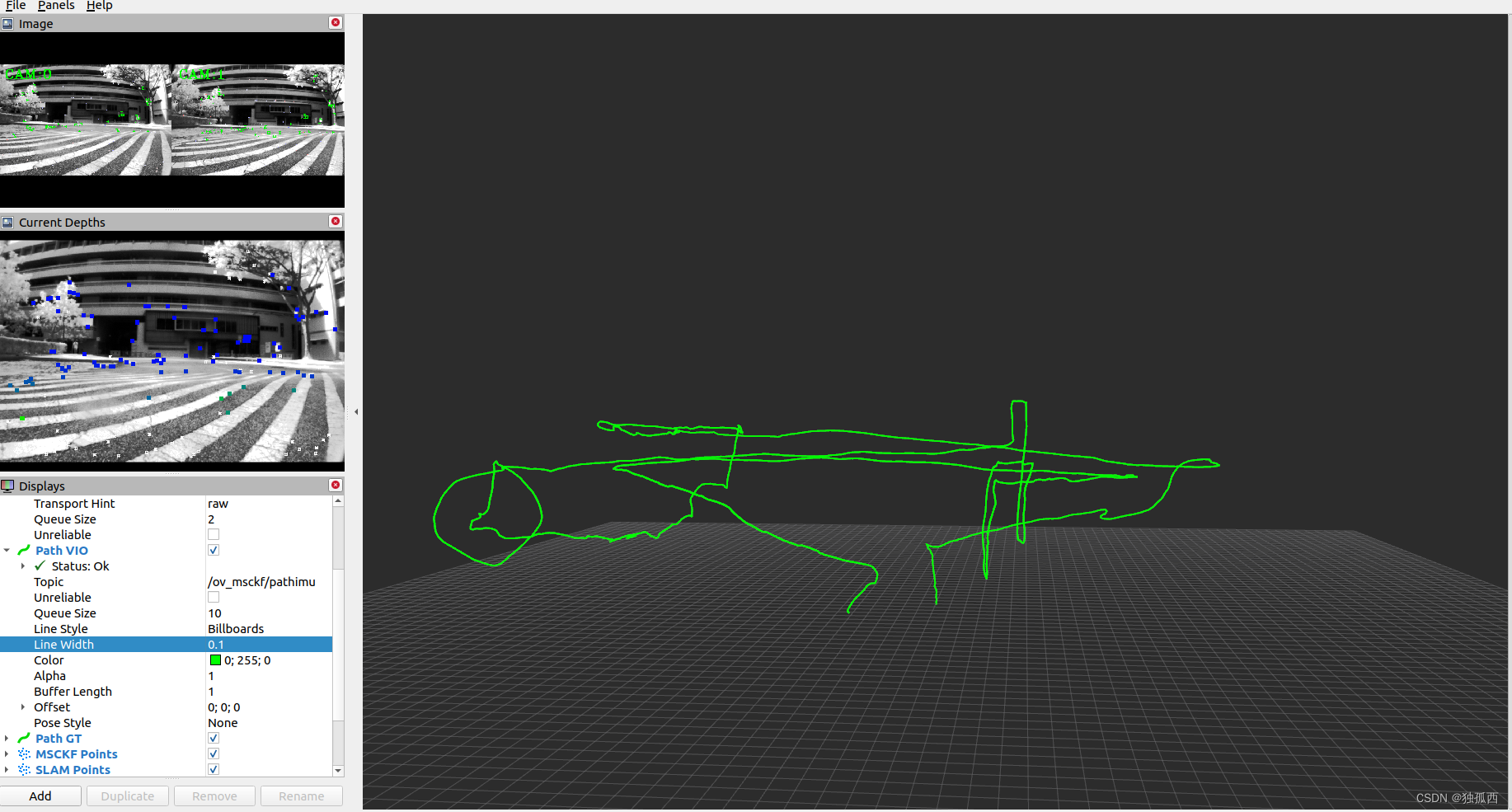 现在还只能在eee01.bag这一个数据包初始化能跑通,同样的配置跑eee02.bag就不行,初始化这块还是要明白原理,才能够更好地进行配置。接下来重点学习一下OpenVINS的初始化原理,看看怎么配置静态初始化和动态初始化(新版本开源的新功能应该很好用)。
相关文章:
OpenVINS学习2——VIRAL数据集eee01.bag运行
前言 周末休息了两天,接着做上周五那个VIRAL数据集没有运行成功的工作。现在的最新OpenVINS需要重新写配置文件,不像之前那样都写在launch里,因此需要根据数据集情况配置好estimator_config.yaml还有两个标定参数文件。 VIRAL数据集 VIRAL…...
jemeter,断言:响应断言、Json断言
一、响应断言 接口A请求正常返回值如下: {"status": 10013, "message": "user sign timeout"} 在该接口下创建【响应断言】元件,配置如下: 若断言成功,则查看结果树的接口显示绿色,若…...
【vue实战项目】通用管理系统:信息列表,信息的编辑和删除
本文为博主的vue实战小项目系列中的第七篇,很适合后端或者才入门的小伙伴看,一个前端项目从0到1的保姆级教学。前面的内容: 【vue实战项目】通用管理系统:登录页-CSDN博客 【vue实战项目】通用管理系统:封装token操作…...
基于FPGA的视频接口之高速IO(光纤)
简介 对于高速IO口配置光纤,现在目前大部分开发板都有配置,且也有说明,在此根据自己的工作经验以及对于各开发板的说明归纳 通过高速IO接口,以及硬件配置,可以实现对于光纤的收发功能,由于GTX的速率在500Mbs到10Gbps之间,但通道高速io可配置光纤10G硬件,物理通完成,则…...

HTML实现页面
<!DOCTYPE html> <html lang"en"> <head><meta charset"UTF-8"><meta name"viewport" content"widthdevice-width, initial-scale1.0"><title>工商银行电子汇款单</title> </head> &…...
回归预测 | MATLAB实现IWOA-LSTM改进鲸鱼算法算法优化长短期记忆神经网络的数据回归预测(多指标,多图)
回归预测 | MATLAB实现IWOA-LSTM改进鲸鱼算法算法优化长短期记忆神经网络的数据回归预测(多指标,多图) 目录 回归预测 | MATLAB实现IWOA-LSTM改进鲸鱼算法算法优化长短期记忆神经网络的数据回归预测(多指标,多图&#…...

鸿蒙开发之状态管理@State
1、视图数据双向绑定 鸿蒙开发采用的声明式UI,利用状态驱动UI的更新。其中State被称作装饰器,是一种状态管理的方式。 状态:指的是被装饰器装饰的驱动视图更新的数据。 视图:是指用户看到的UI渲染出来的界面。 之所以成为双向…...
)
redis基本用法学习(主要数据类型)
redis官网教程中介绍有三种方式连接redis:命令行、gui工具和编程连接: 命令行方式主要是在命令行中输入redis-cli后,通过命令方式与redis服务进行交互,支持两种模式:REPL模式(简单的交互式的编程环境&a…...

低代码:美味膳食或垃圾食品
低代码开发是近年来迅速崛起的软件开发方法,让编写应用程序变得更快、更简单。有人说它是美味的膳食,让开发过程高效而满足,但也有人质疑它是垃圾食品,缺乏定制性与深度。你认为低代码到底是美味的膳食还是垃圾食品呢,…...
设计模式—观察者模式
观察者模式(Observer Pattern)是一种行为型设计模式,它定义了一种一对多的依赖关系,使得当一个对象的状态发生变化时,所有依赖于它的对象都会得到通知并自动更新。 在观察者模式中,有两个核心角色…...

Java_EasyExcel_导入_导出Java-js
easyExcel导入 从easyexcel官网中拷贝过来,使用到的,这是使用监听器的方法。 EasyExcel.read(file.getInputStream(), BaseStoreDataExcelVo.class, new ReadListener<BaseStoreDataExcelVo>() {/*** 单次缓存的数据量*/public static final int…...
循环神经网络-RNN记忆能力实验 [HBU]
目录 一、循环神经网络 二、循环神经网络的记忆能力实验 三、数据集构建 数据集的构建函数 加载数据并进行数据划分 构造Dataset类 四、模型构建 嵌入层 SRN层 五、模型训练 训练指定长度的数字预测模型 多组训练 损失曲线展示 六、模型评价 参考《神经网络与深度…...
P1044 [NOIP2003 普及组] 栈——卡特兰数
传送门: P1044 [NOIP2003 普及组] 栈 - 洛谷 | 计算机科学教育新生态 (luogu.com.cn)https://www.luogu.com.cn/problem/P1044 公式一:递推式(注意开 long long ,然后 先乘完再除,防止下取整) typedef long long ll;…...

9:00面试,9:06就出来了,问的问题有点变态。。。
从小厂出来,没想到在另一家公司又寄了。 到这家公司开始上班,加班是每天必不可少的,看在钱给的比较多的份上,就不太计较了。没想到12月一纸通知,所有人不准加班,加班费不仅没有了,薪资还要降40…...

ets:tab2list的不足之处与替代方法,以及gen_server中使用ets的优缺点
ets:tab2list 是 Erlang/OTP 中的一个函数,用于将 ETS(Erlang Term Storage)表转换为列表。ETS 是 Erlang 中的一个内建数据库,允许开发者在内存中存储大量数据。 一、ets:tab2list 的不足之处: 性能问题:…...

软件测试之压力测试详解
一、什么是压力测试 软件测试中:压力测试(Stress Test),也称为强度测试、负载测试。压力测试是模拟实际应用的软硬件环境及用户使用过程的系统负荷,长时间或超大负荷地运行测试软件,来测试被测系统的性能、…...
SpringBoot之请求的详细解析
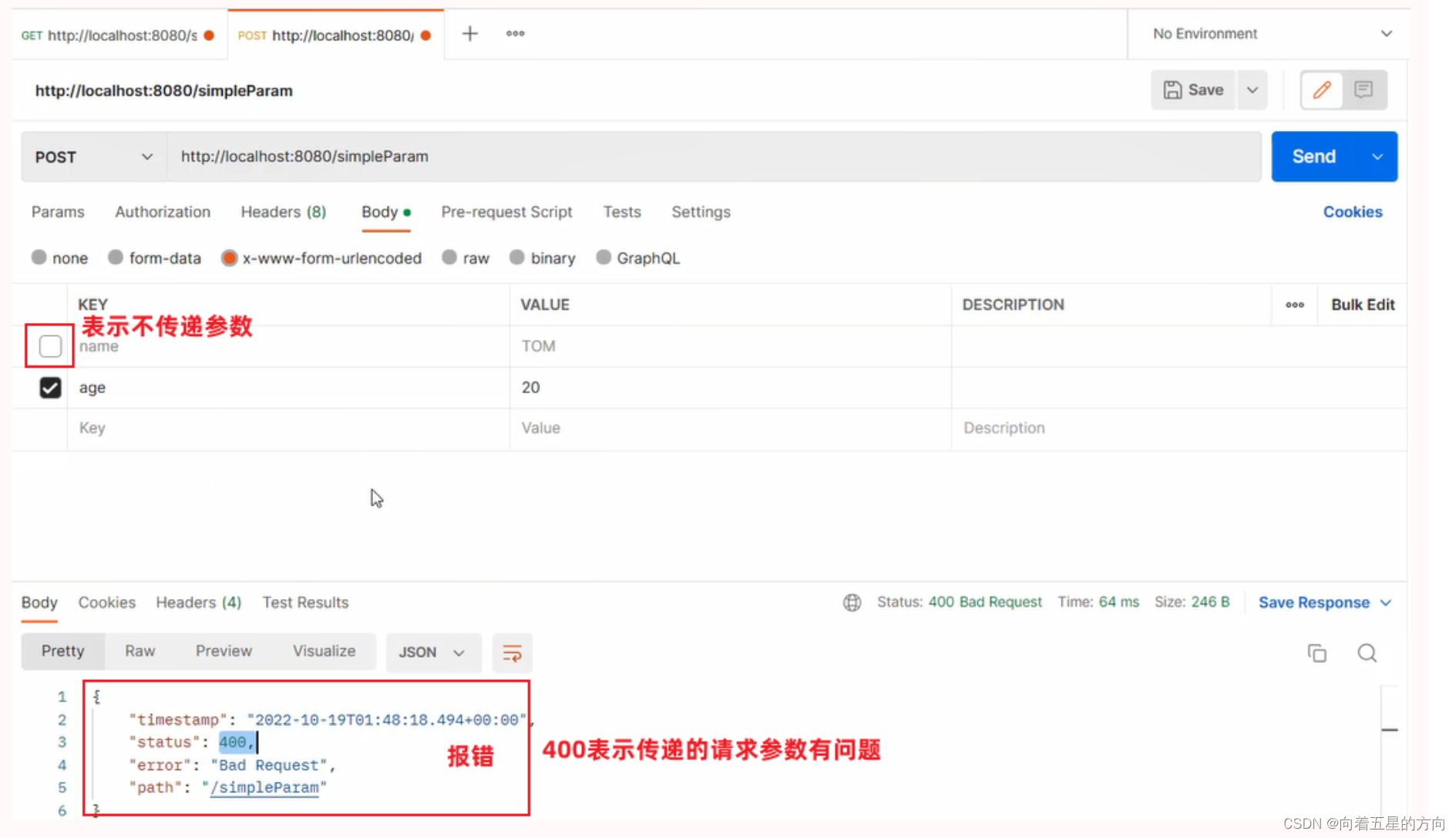
1. 请求 在本章节呢,我们主要讲解,如何接收页面传递过来的请求数据。 1.1 Postman 之前我们课程中有提到当前最为主流的开发模式:前后端分离 在这种模式下,前端技术人员基于"接口文档",开发前端程序&…...
mac 环境下 goframe安装GF开发工具 gf-cli(安装包方式安装)
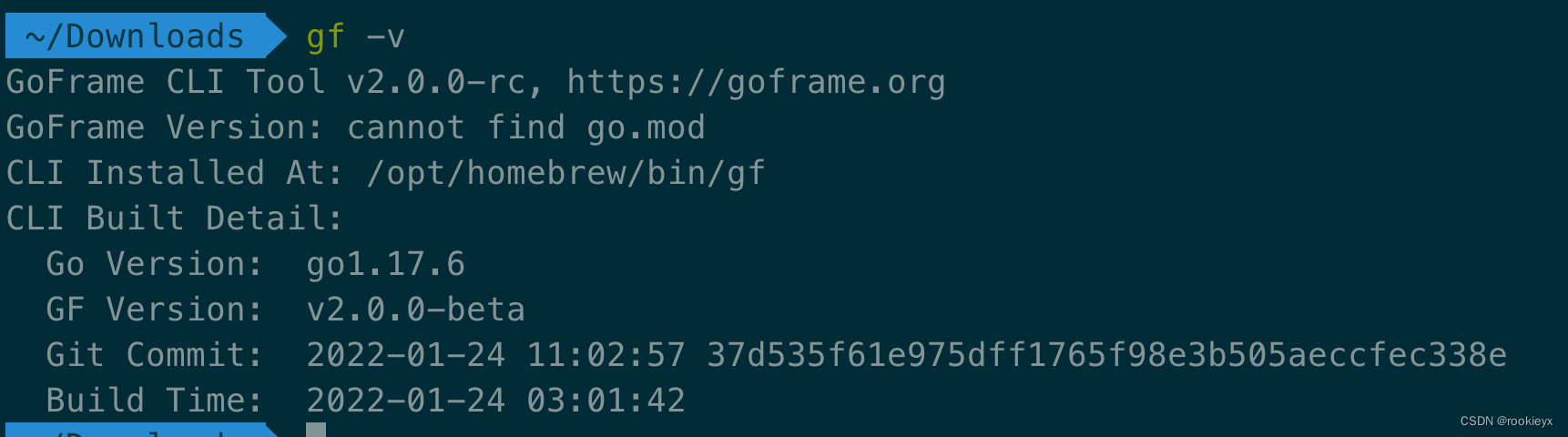
mac 环境下 goframe安装GF开发工具 gf-cli(安装包方式安装) 安装包网址 链接: link 终端输入命令进行安装 ./gf_darwin_amd64 但是产生如下报错,无法安装 使用一下命令给安装权限 chmod 0777 gf_darwin_amd64 && ./gf_darwin_a…...
Navicat 技术指引 | 适用于 GaussDB 分布式的数据迁移工具
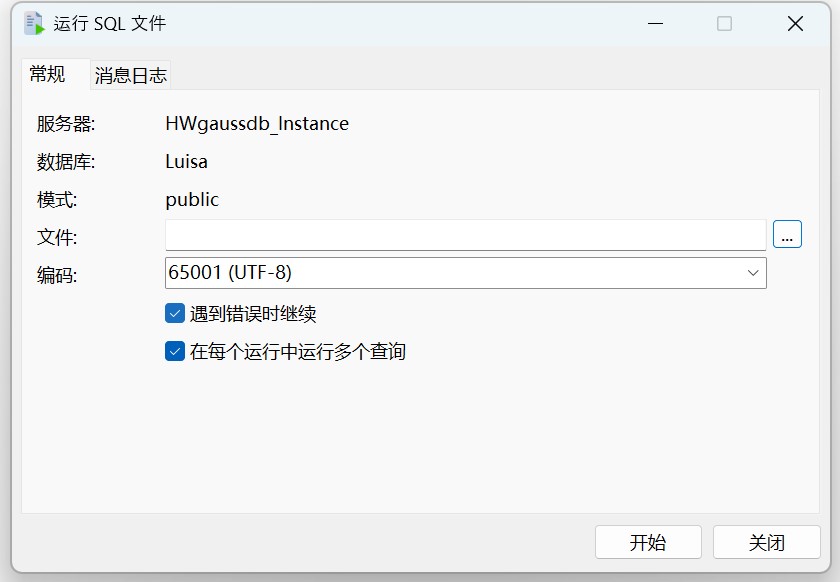
Navicat Premium(16.3.3 Windows 版或以上)正式支持 GaussDB 分布式数据库。GaussDB 分布式模式更适合对系统可用性和数据处理能力要求较高的场景。Navicat 工具不仅提供可视化数据查看和编辑功能,还提供强大的高阶功能(如模型、结…...
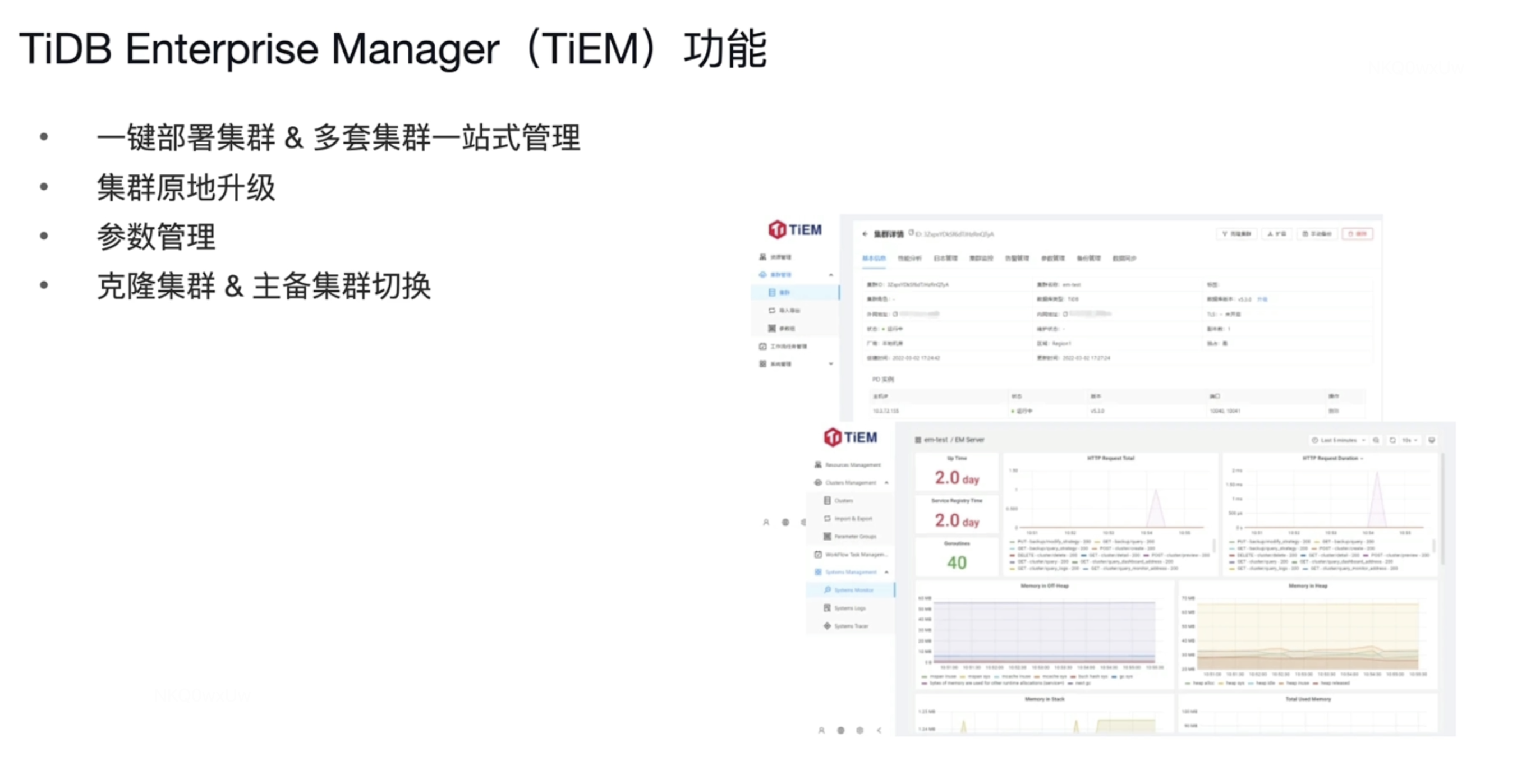
【TiDB理论知识10】TiDB6.0新特性
新特性 Placement Rules in SQL 小表缓存 内存悲观锁 Top SQL TiDB Enterprise Manager 一 Placement Rules in SQL Placement Rules in SQL 之前会遇到的问题 比如 北京的业务需要访问 T2 和 T3表 ,但是T3表的数据在纽约 纽约的业务需要问访T4 T5 T6表…...
)
文献综述怎么写?研一萌新用Scholaread三天搞定开题文献综述(附100+篇文献整合方法)
开题在即,你面对电脑屏幕上50个PDF发呆,复制粘贴了20页摘要却被导师批"毫无逻辑"。问题不在于你不努力,而在于缺少系统化的文献综述工具链。本文拆解用Scholaread完成高质量文献综述的完整流程,让你从"不知道怎么开…...
)
保姆级教程:用TensorFlow 2.x和EfficientNetB0搞定CASIA-HWDB手写汉字识别(附完整代码)
从零构建手写汉字识别系统:TensorFlow 2.x与EfficientNetB0实战指南 在数字化办公场景中,手写体识别技术正逐渐成为提升效率的隐形助手。无论是银行票据处理、教育作业批改还是历史档案数字化,准确识别手写汉字的能力都显得尤为重要。本文将带…...

Configor 自动重载功能深度解析:实现配置热更新的终极指南
Configor 自动重载功能深度解析:实现配置热更新的终极指南 【免费下载链接】configor Golang Configuration tool that support YAML, JSON, TOML, Shell Environment 项目地址: https://gitcode.com/gh_mirrors/co/configor Configor 是 Golang 生态系统中一…...

AI数据标注实战:如何高效、准确地标注训练数据
在AI模型的开发与迭代过程中,数据标注是连接原始数据与智能算法的关键桥梁,其质量与效率直接决定了模型的性能上限。对于软件测试从业者而言,掌握高效、准确的数据标注方法,不仅能为AI模型提供可靠的训练“食粮”,更能…...

LeetCode 找到最终的安全状态题解
LeetCode 找到最终的安全状态题解 题目描述 给定一个有向图,找到所有安全节点。安全节点是永远不会走向环的节点。 示例: 输入:graph [[1,2],[2,3],[5],[0],[5],[],[]]输出:[2,4,5,6] 解题思路 方法:拓扑排序 思路&am…...

Perplexity学校信息检索终极手册:覆盖K12/高职/高校的12类典型场景+27个可复用Prompt模板
更多请点击: https://codechina.net 第一章:Perplexity学校信息检索终极手册导论 在教育数字化加速演进的今天,高校师生亟需一种高效、可信且语义精准的信息获取方式。Perplexity 作为融合实时网络检索与大语言模型推理能力的智能问答平台&…...

介绍iG化学以及iG-Chemistry会学到哪些章节和知识点?
IGCSE化学是许多国际高中生接触化学知识体系的入门课程,它的内容范围广,旨在帮你建立起宏观物质、微观粒子与化学变化之间的基本联系。 IGCSE化学通常遵循两类主流大纲,以下是它们核心知识点的对比: ✍️ 对比详解章节/分类核心学…...

终极游戏加速指南:如何使用OpenSpeedy免费提升游戏体验
终极游戏加速指南:如何使用OpenSpeedy免费提升游戏体验 【免费下载链接】OpenSpeedy 🎮 An open-source game speed modifier. 项目地址: https://gitcode.com/gh_mirrors/op/OpenSpeedy 你是否厌倦了游戏中漫长的等待时间?是否想在单…...

HarmonyOS ArkWeb 系列之从框架层锁死复制权限:copyOptions 详解
文章目录copyOptions 是什么完整代码示例HTML 页面(用于测试)三种模式的实际表现和 H5 层 user-select 的区别实际业务场景踩坑记录写在最后上两篇讲的都是 H5 层面的剪贴板操作。但有些场景下,你需要的不是"监听"或"修改&quo…...

量子同态加密:理论与实践的突破
1. 量子同态加密:理论与实践的桥梁量子同态加密(Quantum Homomorphic Encryption, QHE)是密码学领域的一项突破性技术,它允许在加密的量子数据上直接执行任意量子计算,而无需事先解密。这项技术对于构建真正隐私保护的…...