
篇二:springboot2.7 OAuth2 server使用jdbc存储RegisteredClient
上一篇 <<springboot 2.7 oauth server配置源码走读一>>中简单描述了oauth2 server的配置,其中使用了内存保存 RegisteredClient,本篇改用mysql存储。
db存储需要创建表,表结构应该是什么样的呢,从spring给我们封装好的源码入手,
org.springframework.security.oauth2.server.authorization.client.JdbcRegisteredClientRepository类中:
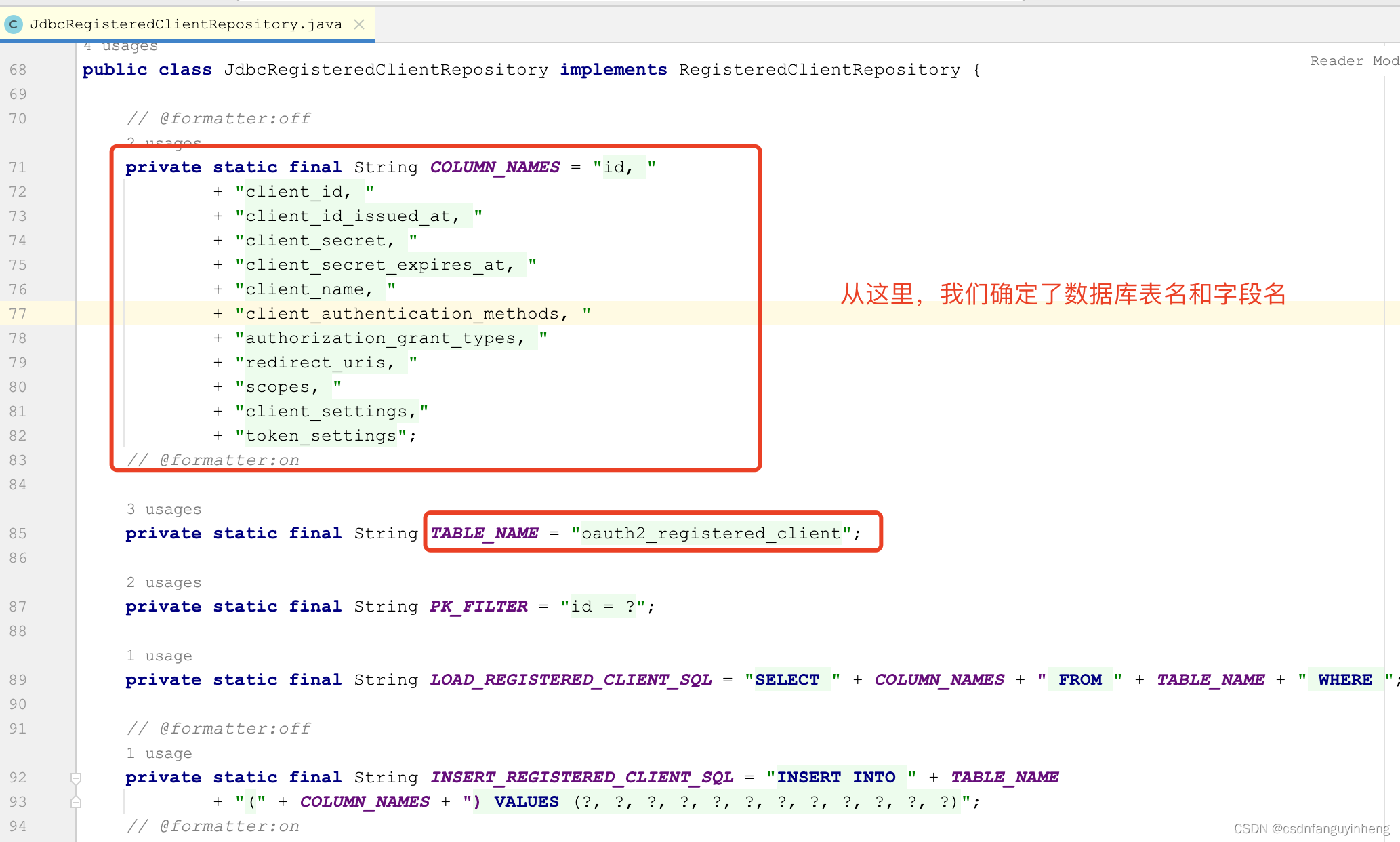
那么字段类型呢?我们看org.springframework.security.oauth2.server.authorization.client.RegisteredClient类:
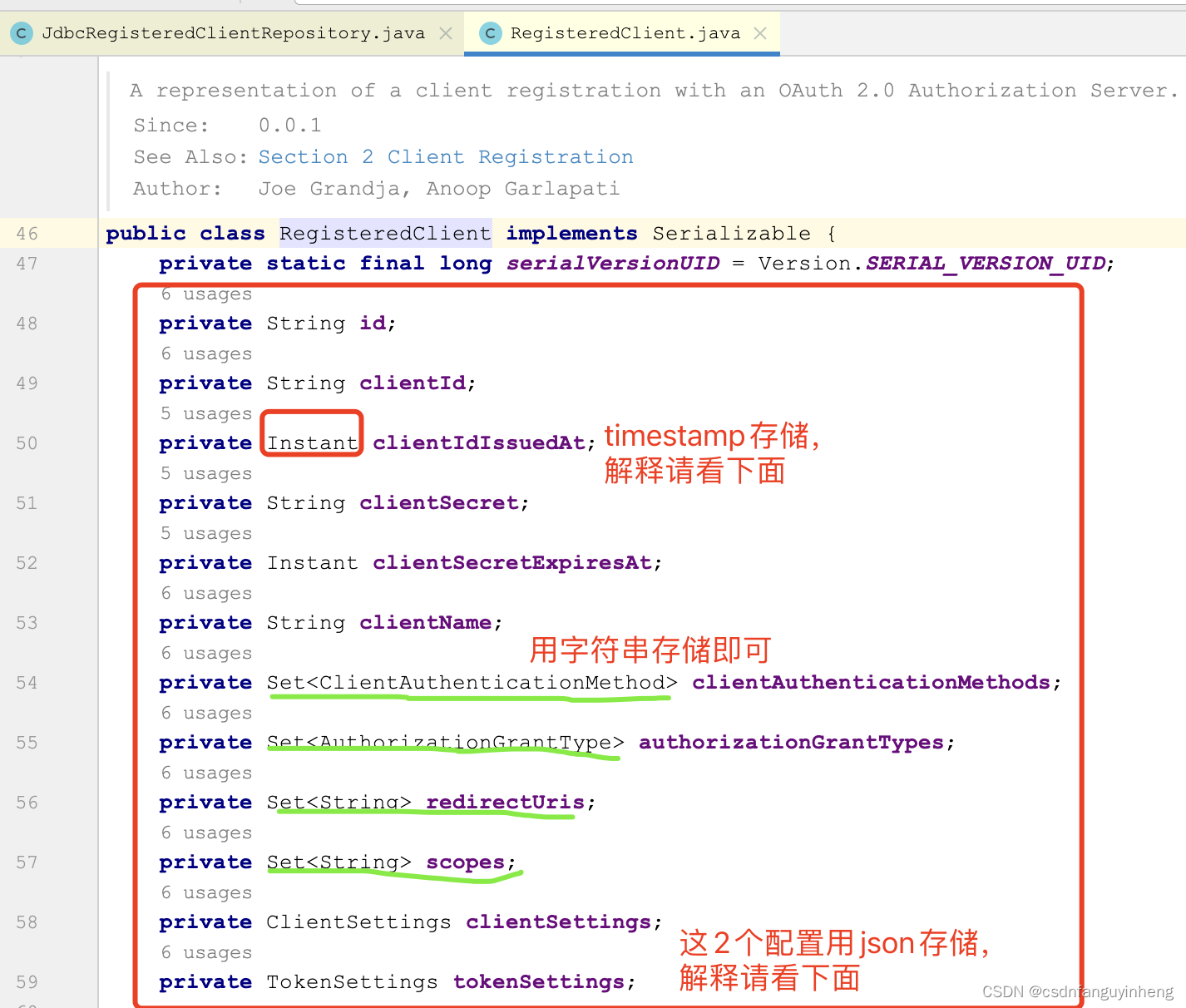
解释下为什么时间用timestamp存储以及Set数据模型用字符串存储:

解释下为什么ClientSettings和TokenSettings用json存储(当然varchar也行):就是一个map.


至此咱们确定了表结构,如下是一个示例:
CREATE TABLE `oauth2_registered_client` (`id` varchar(36) COLLATE utf8mb4_general_ci NOT NULL,`client_id` varchar(100) COLLATE utf8mb4_general_ci NOT NULL,`client_id_issued_at` timestamp NOT NULL DEFAULT CURRENT_TIMESTAMP,`client_secret` varchar(100) COLLATE utf8mb4_general_ci DEFAULT '',`client_secret_expires_at` timestamp NULL DEFAULT NULL,`client_name` varchar(50) COLLATE utf8mb4_general_ci NOT NULL,`client_authentication_methods` varchar(100) COLLATE utf8mb4_general_ci NOT NULL,`authorization_grant_types` varchar(100) COLLATE utf8mb4_general_ci NOT NULL,`redirect_uris` varchar(100) COLLATE utf8mb4_general_ci DEFAULT '',`scopes` varchar(200) COLLATE utf8mb4_general_ci NOT NULL,`client_settings` json NOT NULL,`token_settings` json NOT NULL,PRIMARY KEY (`id`)
) ENGINE=InnoDB DEFAULT CHARSET=utf8mb4 COLLATE=utf8mb4_general_ci;
创建好表后,咱们处理代码:
1.在pom中引入依赖:
<dependency><groupId>org.springframework.boot</groupId><artifactId>spring-boot-starter-jdbc</artifactId>
</dependency>
<dependency><groupId>mysql</groupId><artifactId>mysql-connector-java</artifactId><version>8.0.26</version>
</dependency>
2.yaml/properties配置文件中添加数据库信息,示例如下:
spring:datasource:url: jdbc:mysql://localhost:3306/db?useUnicode=true&characterEncoding=utf-8&serverTimezone=Asia/Shanghai&useSSL=falseusername: <username>password: <password>
3.使用JdbcRegisteredClientRepository,它和InMemoryRegisteredClientRepository只能二选一,所以需要注释掉后者。在咱们自己的配置类OAuth2AuthorizeSecurityConfig中:
@Beanpublic RegisteredClientRepository registeredClientRepository(JdbcTemplate jdbcTemplate) {return new JdbcRegisteredClientRepository(jdbcTemplate);}
4.初始化数据到db表中:写一个测试类方法插入数据:
package com.jel.tech.auth;import org.junit.jupiter.api.Test;
import org.springframework.boot.test.context.SpringBootTest;
import org.springframework.security.oauth2.core.AuthorizationGrantType;
import org.springframework.security.oauth2.core.ClientAuthenticationMethod;
import org.springframework.security.oauth2.core.oidc.OidcScopes;
import org.springframework.security.oauth2.server.authorization.client.RegisteredClient;
import org.springframework.security.oauth2.server.authorization.client.RegisteredClientRepository;
import org.springframework.security.oauth2.server.authorization.config.ClientSettings;
import org.springframework.security.oauth2.server.authorization.config.TokenSettings;import javax.annotation.Resource;
import java.time.Duration;
import java.util.UUID;@SpringBootTest
class AuthApplicationTests {@Resourceprivate RegisteredClientRepository registeredClientRepository;@Testvoid saveRegisteredClients() {RegisteredClient loginClient = RegisteredClient.withId(UUID.randomUUID().toString()).clientId("login-client").clientSecret("{noop}openid-connect").clientAuthenticationMethod(ClientAuthenticationMethod.CLIENT_SECRET_BASIC).authorizationGrantType(AuthorizationGrantType.AUTHORIZATION_CODE).authorizationGrantType(AuthorizationGrantType.REFRESH_TOKEN).redirectUri("http://127.0.0.1:8080/login/oauth2/code/login-client").redirectUri("http://127.0.0.1:8080/authorized").scope(OidcScopes.OPENID).scope(OidcScopes.PROFILE).clientSettings(ClientSettings.builder().requireAuthorizationConsent(true).build()).build();RegisteredClient registeredClient = RegisteredClient.withId(UUID.randomUUID().toString()).clientId("messaging-client").clientSecret("{noop}secret").clientAuthenticationMethod(ClientAuthenticationMethod.CLIENT_SECRET_BASIC).authorizationGrantType(AuthorizationGrantType.CLIENT_CREDENTIALS).scope("message:read").scope("message:write")// 指定token有效期:token:30分(默认5分钟),refresh_token:1天.tokenSettings(TokenSettings.builder().accessTokenTimeToLive(Duration.ofMinutes(30)).refreshTokenTimeToLive(Duration.ofDays(1)).build()).build();// 注意:没有设置clientName,则会把id值作为clientNameregisteredClientRepository.save(loginClient);registeredClientRepository.save(registeredClient);}
}
5.验证功能,在此我借花献佛,把官网提供的示例复制过来:
package com.jel.tech.auth;import com.fasterxml.jackson.core.type.TypeReference;
import com.fasterxml.jackson.databind.ObjectMapper;
import org.junit.jupiter.api.Test;
import org.springframework.beans.factory.annotation.Autowired;
import org.springframework.boot.test.autoconfigure.web.servlet.AutoConfigureMockMvc;
import org.springframework.boot.test.context.SpringBootTest;
import org.springframework.http.HttpHeaders;
import org.springframework.mock.web.MockHttpServletRequest;
import org.springframework.test.context.ActiveProfiles;
import org.springframework.test.web.servlet.MockMvc;
import org.springframework.test.web.servlet.MvcResult;
import org.springframework.test.web.servlet.request.RequestPostProcessor;
import org.springframework.test.web.servlet.result.MockMvcResultHandlers;import java.util.Map;import static org.springframework.test.web.servlet.request.MockMvcRequestBuilders.post;
import static org.springframework.test.web.servlet.result.MockMvcResultMatchers.jsonPath;
import static org.springframework.test.web.servlet.result.MockMvcResultMatchers.status;/*** Integration tests for {@link AuthApplication}.** @author Steve Riesenberg*/
@SpringBootTest
@AutoConfigureMockMvc
@ActiveProfiles("test")
public class OAuth2AuthorizationServerApplicationITests {private static final String CLIENT_ID = "messaging-client";private static final String CLIENT_SECRET = "secret";private final ObjectMapper objectMapper = new ObjectMapper();@Autowiredprivate MockMvc mockMvc;@Testvoid performTokenRequestWhenValidClientCredentialsThenOk() throws Exception {// @formatter:offthis.mockMvc.perform(post("/oauth2/token").param("grant_type", "client_credentials").param("scope", "message:read").with(basicAuth(CLIENT_ID, CLIENT_SECRET))).andExpect(status().isOk()).andExpect(jsonPath("$.access_token").isString()).andExpect(jsonPath("$.expires_in").isNumber()).andExpect(jsonPath("$.scope").value("message:read")).andExpect(jsonPath("$.token_type").value("Bearer"));// @formatter:on}@Testvoid performTokenRequestWhenMissingScopeThenOk() throws Exception {// @formatter:offthis.mockMvc.perform(post("/oauth2/token").param("grant_type", "client_credentials").with(basicAuth(CLIENT_ID, CLIENT_SECRET))).andExpect(status().isOk()).andExpect(jsonPath("$.access_token").isString()).andExpect(jsonPath("$.expires_in").isNumber()).andExpect(jsonPath("$.scope").value("message:read message:write")).andExpect(jsonPath("$.token_type").value("Bearer"));// @formatter:on}@Testvoid performTokenRequestWhenInvalidClientCredentialsThenUnauthorized() throws Exception {// @formatter:offthis.mockMvc.perform(post("/oauth2/token").param("grant_type", "client_credentials").param("scope", "message:read").with(basicAuth("bad", "password"))).andExpect(status().isUnauthorized()).andExpect(jsonPath("$.error").value("invalid_client"));// @formatter:on}@Testvoid performTokenRequestWhenMissingGrantTypeThenUnauthorized() throws Exception {// @formatter:offthis.mockMvc.perform(post("/oauth2/token").with(basicAuth("bad", "password"))).andExpect(status().isUnauthorized()).andExpect(jsonPath("$.error").value("invalid_client"));// @formatter:on}@Testvoid performTokenRequestWhenGrantTypeNotRegisteredThenBadRequest() throws Exception {// @formatter:offthis.mockMvc.perform(post("/oauth2/token").param("grant_type", "client_credentials").with(basicAuth("login-client", "openid-connect"))).andExpect(status().isBadRequest()).andExpect(jsonPath("$.error").value("unauthorized_client"));// @formatter:on}@Testvoid performIntrospectionRequestWhenValidTokenThenOk() throws Exception {// @formatter:offthis.mockMvc.perform(post("/oauth2/introspect").param("token", getAccessToken()).with(basicAuth(CLIENT_ID, CLIENT_SECRET))).andExpect(status().isOk()).andExpect(jsonPath("$.active").value("true")).andExpect(jsonPath("$.aud[0]").value(CLIENT_ID)).andExpect(jsonPath("$.client_id").value(CLIENT_ID)).andExpect(jsonPath("$.exp").isNumber()).andExpect(jsonPath("$.iat").isNumber()).andExpect(jsonPath("$.iss").value("http://127.0.0.1:9000")).andExpect(jsonPath("$.nbf").isNumber()).andExpect(jsonPath("$.scope").value("message:read")).andExpect(jsonPath("$.sub").value(CLIENT_ID)).andExpect(jsonPath("$.token_type").value("Bearer")).andDo(MockMvcResultHandlers.print());// @formatter:on}@Testvoid performIntrospectionRequestWhenInvalidCredentialsThenUnauthorized() throws Exception {// @formatter:offthis.mockMvc.perform(post("/oauth2/introspect").param("token", getAccessToken()).with(basicAuth("bad", "password"))).andExpect(status().isUnauthorized()).andExpect(jsonPath("$.error").value("invalid_client"));// @formatter:on}private String getAccessToken() throws Exception {// @formatter:offMvcResult mvcResult = this.mockMvc.perform(post("/oauth2/token").param("grant_type", "client_credentials").param("scope", "message:read").with(basicAuth(CLIENT_ID, CLIENT_SECRET))).andExpect(status().isOk()).andExpect(jsonPath("$.access_token").exists()).andReturn();// @formatter:onString tokenResponseJson = mvcResult.getResponse().getContentAsString();Map<String, Object> tokenResponse = this.objectMapper.readValue(tokenResponseJson, new TypeReference<Map<String, Object>>() {});String access_token = tokenResponse.get("access_token").toString();System.out.println(access_token);return access_token;}private static BasicAuthenticationRequestPostProcessor basicAuth(String username, String password) {return new BasicAuthenticationRequestPostProcessor(username, password);}private static final class BasicAuthenticationRequestPostProcessor implements RequestPostProcessor {private final String username;private final String password;private BasicAuthenticationRequestPostProcessor(String username, String password) {this.username = username;this.password = password;}@Overridepublic MockHttpServletRequest postProcessRequest(MockHttpServletRequest request) {HttpHeaders headers = new HttpHeaders();headers.setBasicAuth(this.username, this.password);request.addHeader("Authorization", headers.getFirst("Authorization"));return request;}}
}
相关文章:
篇二:springboot2.7 OAuth2 server使用jdbc存储RegisteredClient
上一篇 <<springboot 2.7 oauth server配置源码走读一>>中简单描述了oauth2 server的配置,其中使用了内存保存 RegisteredClient,本篇改用mysql存储。 db存储需要创建表,表结构应该是什么样的呢,从spring给我们封装好…...
卷积神经网络|导入图片
在学习卷积神经网络时,我们通常使用的就是公开的数据集,这里,我们不使用公开数据集,直接导入自己的图片数据,下面,就简单写个程序实现批量图片的导入。 import osfrom PIL import Imageimport numpy as np…...

关于unity的组件VerticalLayoutGroup刷新显示不正常的问题
先说明一下我是如何用到,有哪些处理的 用到这个组件基本上都是将列表进行排版操作的,竖着,或者横着,横着用HorizontalLayoutGroup 还有一个和这个组件搭配的组件叫ContentSizeFitter 先说我是怎么发现这个组件不好用的 //本地读取…...
wait 和 notify 这个为什么要在synchronized 代码块中?
一个工作七年的小伙伴,竟然不知道” wait”和“notify”为什么要在 Synchronized 代码块中 。 好吧,如果屏幕前的你也不知道,请在公屏上刷”不知道“。 对于这个问题,我们来看看普通人和高手的回答。 一、问题解析 1. wait 和 n…...
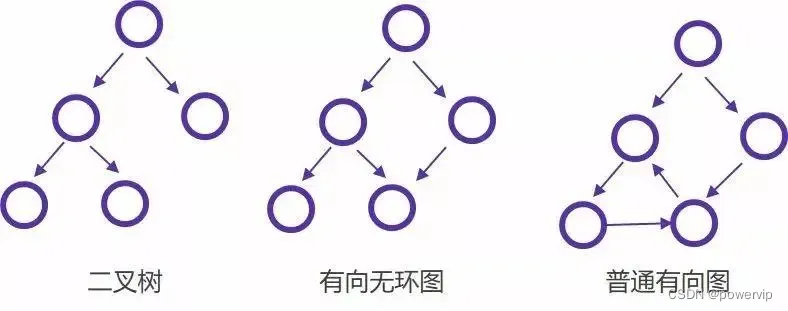
大白话说区块链和通证
1 区块链 简单地说,区块链其实就像是一个不可篡改的分布式数据库,该分布式数据库记录了一系列交易或事件。区块链运行在至少1个以上的节点上,每个节点都有自己的一个分布式数据库,也就是分布式账本。正常情况下,每个节…...
)
Jvm之垃圾收集器(个人见解仅供参考)
问:什么是垃圾收集算法中的分代收集理论? 答:分代收集理论是垃圾收集算法的一种思想,根据对象存活周期的不同将内存分为几块,一般将java堆分为新生代和老年代。这种理论使得我们可以根据各个年代的特点选择合适的垃圾收…...
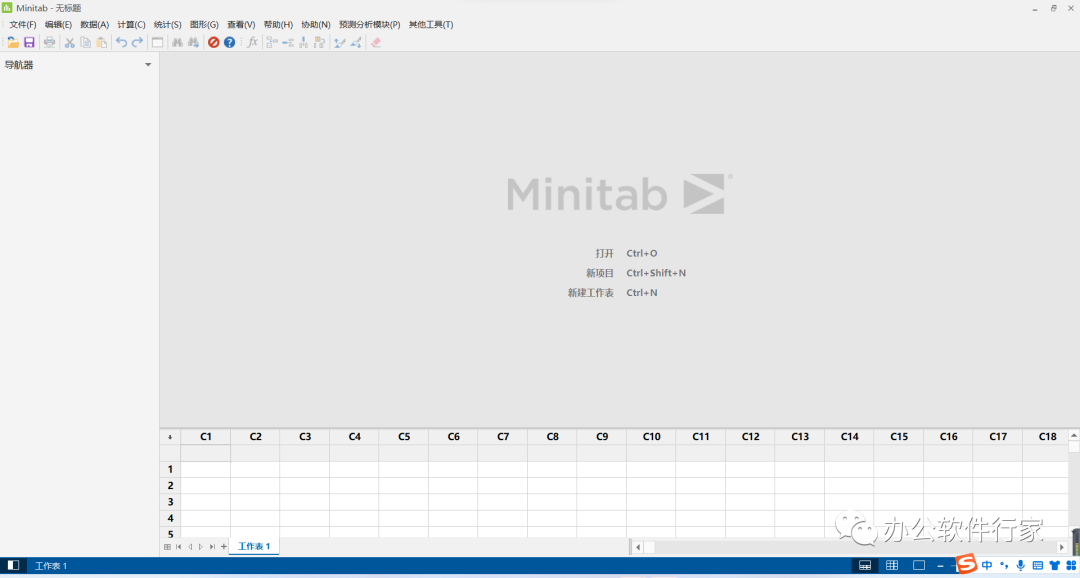
Minitab 21软件安装包下载及安装教程
Minitab 21下载链接:https://docs.qq.com/doc/DUkNHZVhwTXhtTFla 1.选中下载好的安装包,鼠标右键解压到”Minitab 21“文件夹 2.选中”Setup.exe“,鼠标右击选择“以管理员身份运行” 3.点击“下一步” 4.点击“是” 5.点击“下一步” 6.勾选…...
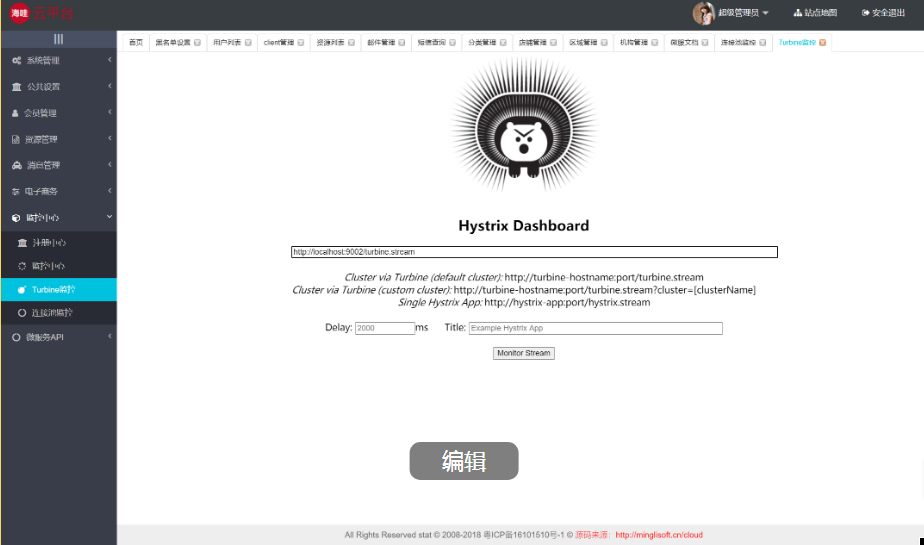
Java版商城:Spring Cloud+SpringBoot b2b2c电子商务平台,多商家入驻、直播带货及免 费 小程序商城搭建
随着互联网的快速发展,越来越多的企业开始注重数字化转型,以提升自身的竞争力和运营效率。在这个背景下,鸿鹄云商SAAS云产品应运而生,为企业提供了一种简单、高效、安全的数字化解决方案。 鸿鹄云商SAAS云产品是一种基于云计算的…...

阿里云被拉入黑洞模式怎么办?该怎么换ip-速盾网络
被拉入黑洞模式(BGP黑洞路由)意味着所有进入目标IP的流量都会被丢弃,从而导致目标IP对外完全不可访问。这种情况通常发生在面对大规模DDoS攻击时,为了防止攻击流量对其他网络造成影响。如果你使用的是阿里云服务并遭受到这种攻击&…...

Android 13.0 recovery竖屏界面旋转为横屏
1.概述 在13.0系统项目定制化开发中,由于平板固定横屏显示,而如果recovery界面竖屏显示就觉得怪怪的,所以需要recovery页面横屏显示的功能, 所以今天就来解决这个问题 2.实现功能相关分析 Android的Recovery中,利用 bootable\recovery下的minui库作为基础,采用的是直接…...
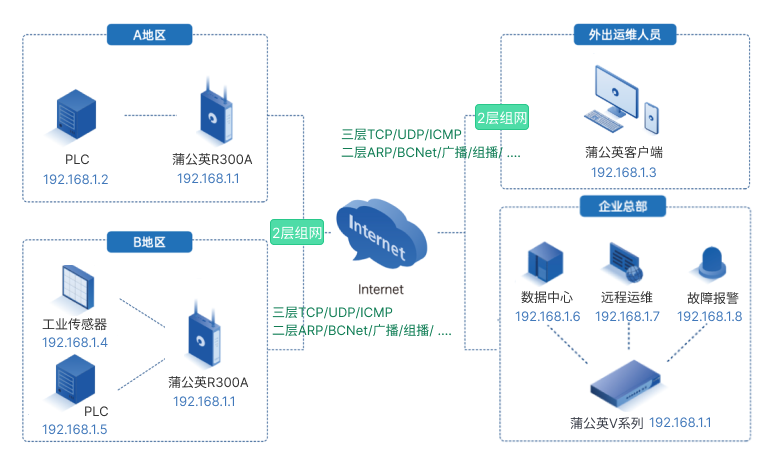
异地环控设备如何远程维护?贝锐蒲公英解决远程互联难题
青岛某企业致力于孵化设备、养禽设备和养猪设备的研发、生产和服务,历经三十多年发展,目前已成长为行业主要的养殖装备及工程服务提供商,产品覆盖养殖产业链中绝大多数环节,涉及自动化设备、环控设备、整体解决方案等。 在实际应用…...

flutter 判断是否是web环境
代码如下 import package:flutter/foundation.dart show kIsWeb;void main() {if (kIsWeb) {print(Running on the web!);} else {print(Not running on the web!);} } 如果是使用 Platform.isAndroid 会报错 所以使用上面的方式...
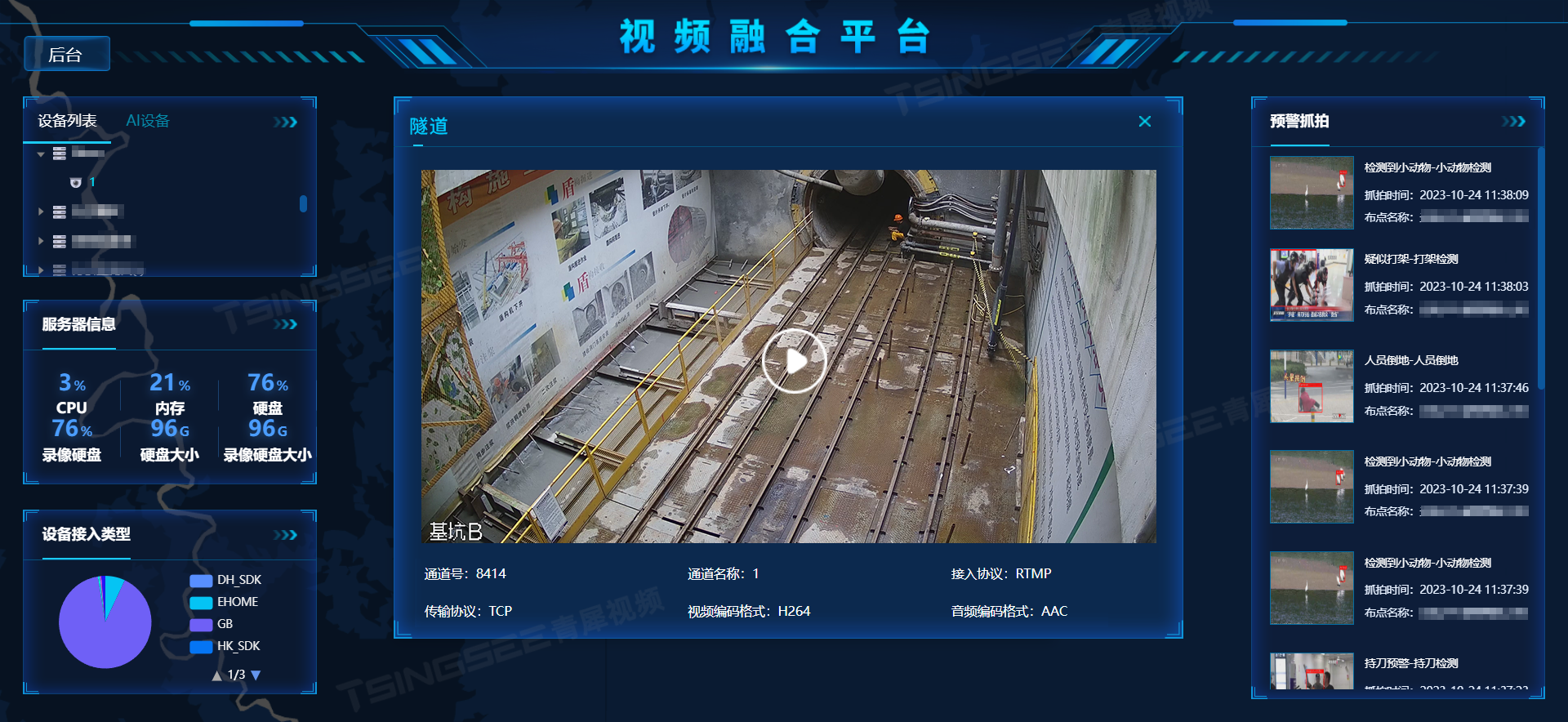
视频智能分析/云存储平台EasyCVR接入海康SDK,通道名称未自动更新该如何解决?
视频监控GB28181平台EasyCVR能在复杂的网络环境中,将分散的各类视频资源进行统一汇聚、整合、集中管理,在视频监控播放上,TSINGSEE青犀视频安防监控汇聚平台可支持1、4、9、16个画面窗口播放,可同时播放多路视频流,也能…...
后端开发——JDBC的学习(三)
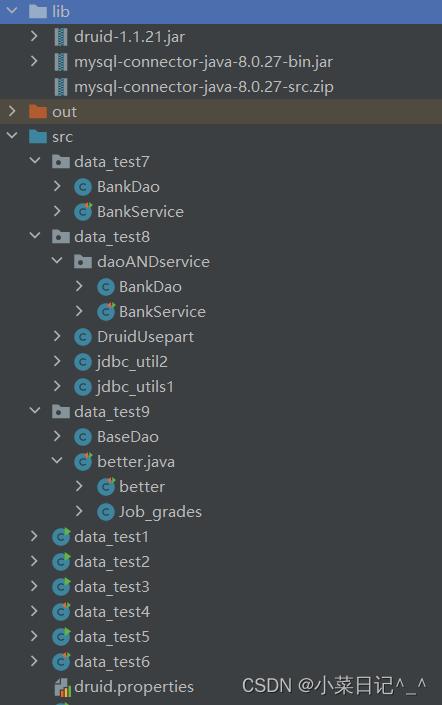
本篇继续对JDBC进行总结: ①通过Service层与Dao层实现转账的练习; ②重点:由于每次使用连接就手动创建连接,用完后就销毁,这样会导致资源浪费,因此引入连接池,练习连接池的使用; …...

Redis 生产环境查找无过期时间的 key
在项目中,Redis 不应该被当作传统数据库来使用;储存大量没有过期时间的数据。如果储存大量无过期时间,而且无效的key的话;再加上 Redis 本身的过期策略没有被正确设置,就会大量占用内存。这样就会导致再多的内存资源也不够用。 情况大致是这样,项目中采用 Redis 二级存储…...

Visual Studio 2017编译Python3.8.18源码
一直纠结Python的开发环境没有升级到最新版3.8.18。这是当前的最新版,正在用的版本3.8.10。他是官方制作出安装包的最新版。 1、准备Visual C 2017的开发环境包括但不限于使用C的桌面开发x64 2、在Python官网下载Python3.8.18的源码。 3、解压缩源码 4、进入控制…...
【mujoco】Ubuntu20.04中解决mujoco报错raise error.MujocoDependencyError
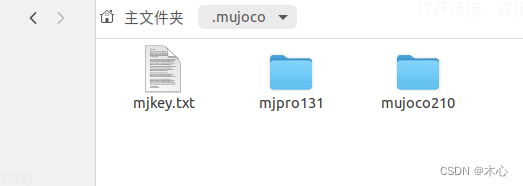
【mujoco】Ubuntu20.04中解决mujoco报错raise error.MujocoDependencyError 文章目录 【mujoco】Ubuntu20.04中解决mujoco报错raise error.MujocoDependencyError1. 报错的具体情况2. 解决过程3. 其他问题3.1 ModuleNotFoundError: No module named OpenGL3.2 ModuleNotFoundEr…...

机器学习的三个方面
1 机器学习的三个方面 1.1 数据 包括数据采集、增强和质量管理,相当于给人工智能模型学习什么样的知识 第一、什么专业的知识; 第二、知识是否有体系,也就是说样本之间是否存在某种关联、差异等,这个涉及到样本选择等问题&#x…...
关于一名资深Java程序员在移动端的进阶之路
今天呢,就借此机会,跟大家聊一聊我的个人职业经历吧! 那年刚毕业 刚毕业时候,入职的第一家公司,进去后,说实话,没有太大成长吧!基本就是让我做一些可有可无的边缘性的工作ÿ…...

clickonce excel 插件发布安装的原理
ClickOnce 是一种由 Microsoft 提供的部署技术,用于简化和加速Windows应用程序的部署。ClickOnce 可以用于部署各种类型的应用程序,包括 Excel 插件。 以下是 ClickOnce Excel 插件发布和安装的一般原理: 1. 发布应用程序: -…...
)
仅限前500名获取|Midjourney Blackberry印相专业级Prompt模板包(含EXIF元数据模拟指令)
更多请点击: https://intelliparadigm.com 第一章:Midjourney Blackberry印相的美学溯源与技术本质 Blackberry印相(Blackberry Photographic Process)并非真实存在的传统暗房工艺,而是Midjourney社区中对一类高对比、…...

计算机视觉与3D重建:模型加速与质量优化的全栈实践
1. 项目概述:当计算机视觉遇见效率与精度革命最近,微软研究院在计算机视觉领域的两项进展引起了我的注意。一项是关于如何让模型“看”得更快更准,另一项则是关于如何让3D扫描模型从“毛坯”变成“精装”。这听起来像是两个独立的方向&#x…...

不止于导航:用AI Habitat的语义分割数据,教你构建自己的室内物体识别与场景理解Pipeline
不止于导航:用AI Habitat的语义分割数据构建室内物体识别与场景理解Pipeline 在计算机视觉与机器人领域,室内场景理解一直是极具挑战性的研究方向。传统方法依赖于昂贵的传感器设备和人工标注数据,而仿真平台的出现为这一领域带来了革命性变…...

家用扫地机器人研发技术路线
第四部分:如何一步步做出来 | 18个月 4阶段 从原型到量产 摘要:本文详细介绍了扫地机器人从原型到量产的研发流程,分为4个关键阶段。首先聚焦四大技术难点:SLAM定位、AI视觉识别、仿生机械臂和静音风机系统。研发过程包括实验室原型验证、工程样机测试、小批量真实场景测…...

微服务架构:使用Docker+Kubernetes部署应用
微服务架构:使用DockerKubernetes部署应用 大家好,我是欧阳瑞(Rich Own)。今天想和大家聊聊微服务架构以及如何使用Docker和Kubernetes进行部署。作为一个全栈开发者,我经历过单体应用到微服务的转型,深刻体…...

告别龟速下载!用阿里云Maven仓库和离线驱动包,5分钟搞定DBeaver所有JDBC驱动配置
极速配置DBeaver JDBC驱动的双轨方案:阿里云Maven加速与离线整合包实战 每次打开DBeaver准备连接数据库时,看着进度条缓慢爬升的驱动下载界面,你是否也感到焦虑?特别是在紧急排查生产环境问题的关键时刻,这种等待简直让…...

用Godot 4.0复刻街霸3D名场面:从Blender绑定到动画状态机的完整实战
用Godot 4.0复刻街霸3D名场面:从Blender绑定到动画状态机的完整实战 街机厅里那些经典格斗游戏的3D重制总能勾起玩家的情怀,而今天我们将用Godot 4.0完整复刻《街霸》中隆的招牌必杀技——从Blender的骨骼绑定到Godot动画状态机的全流程实现。这不是简单…...

当三维基因组“打结”:从罕见病到癌症,那些被折叠改变的生命密码
当三维基因组“打结”:从罕见病到癌症,那些被折叠改变的生命密码 想象一下,如果把人类基因组比作一条长达两米的毛线,它需要被精巧地折叠进直径仅几微米的细胞核中。这种看似不可能的折叠并非随机——它遵循着严格的拓扑规则&…...

从SPICE到Q-SPICE:四阶累积量如何重塑阵列信号处理的超分辨能力
1. 从SPICE到Q-SPICE:为什么我们需要四阶累积量? 我第一次接触SPICE算法是在处理雷达信号的时候。当时团队遇到一个头疼的问题:在强噪声环境下,传统算法就像近视眼观察星空,明明知道那里有信号,却怎么也分辨…...

别再只用默认样式了!LVGL Chart图表控件的10个美化技巧与高级样式配置
LVGL Chart图表控件进阶:10个专业级视觉优化技巧 在嵌入式GUI开发中,数据可视化是提升用户体验的关键环节。LVGL作为轻量级图形库的佼佼者,其Chart组件虽然开箱即用,但默认样式往往难以满足专业产品的视觉要求。本文将深入解析10个…...