
Asp .Net Core 系列:集成 Ocelot+Consul实现网关、服务注册、服务发现
什么是Ocelot?
Ocelot是一个开源的ASP.NET Core微服务网关,它提供了API网关所需的所有功能,如路由、认证、限流、监控等。
Ocelot是一个简单、灵活且功能强大的API网关,它可以与现有的服务集成,并帮助您保护、监控和扩展您的微服务。
以下是Ocelot的一些主要功能:
- 路由管理:Ocelot允许您定义路由规则,将请求路由到正确的微服务。
- 认证和授权:Ocelot支持多种认证机制,如JWT、OAuth等,并允许您定义访问控制策略,确保只有授权的用户才能访问特定的API。
- 限流和速率限制:Ocelot提供了一些内置的限流和速率限制功能,以确保您的服务不会受到过度的请求压力。
- 监控和日志:Ocelot可以收集和显示各种度量指标,帮助您了解您的服务的性能和行为。此外,它还可以将日志记录到各种日志源,以便您进行分析和故障排除。
- 集成:Ocelot可以与现有的服务集成,包括Kubernetes、Consul等。
- 易于扩展:Ocelot的设计使其易于扩展,您可以编写自己的中间件来处理特定的逻辑,例如修改请求或响应、添加自定义的认证机制等。
- 可扩展的配置:Ocelot使用JSON配置文件进行配置,这意味着您可以轻松地根据需要进行配置更改,而无需重新编译代码。
总之,Ocelot是一个功能强大且易于使用的API网关,可以帮助您保护、监控和扩展您的微服务。
Asp .Net Core 集成 Ocelot
要在ASP.NET Core中集成Ocelot,您可以按照以下步骤进行操作:
- 安装Ocelot NuGet包:
在您的ASP.NET Core项目中,打开终端或NuGet包管理器控制台,并运行以下命令来安装Ocelot的NuGet包:
dotnet add package Ocelot
- 添加Ocelot配置文件:
{  "Routes": [ //这里注意一下版本(旧版本用ReRoutes){"DownstreamPathTemplate": "/api/{controller}", //下游路径模板"DownstreamScheme": "http", //下游方案//"DownstreamHostAndPorts": [//  {//    "Host": "localhost",//    "Port": "5014"//  }//], //下游主机和端口"UpstreamPathTemplate": "/api/product/{controller}", //上游路径模板"UpstreamHttpMethod": [], //上游请求方法,可以设置特定的 HTTP 方法列表或设置空列表以允许其中任何方法"ServiceName": "api-product-service", //请求服务名称"LoadBalancerOptions": {"Type": "LeastConnection" //负载均衡算法:目前 Ocelot 有RoundRobin 和LeastConnection算法}}],"GlobalConfiguration": {"BaseUrl": "http://localhost:5015", //进行标头查找和替换以及某些管理配置"ServiceDiscoveryProvider": {"Scheme": "http","Host": "127.0.0.1", //你的Consul的ip地址"Port": 8500, //你的Consul的端口"Type": "Consul" //类型//"ConfigurationKey": "Consul" //指定配置键,键入您的配置}}
}
- 配置Ocelot服务:
builder.Services.AddOcelot();
在Configure方法中配置请求管道并添加Ocelot中间件:
app.UseOcelot().Wait();
Ocelot 集成 Consul
要将Ocelot集成到Consul中,您可以按照以下步骤进行操作:
- 安装依赖项:
在您的ASP.NET Core项目中,安装Ocelot和Consul的NuGet包。您可以使用以下命令来安装这些包:
dotnet add package Ocelot.Provider.Consul
- 配置Ocelot:
在Ocelot的配置中,您需要指定Consul作为服务发现和配置的提供者。在Ocelot的配置文件(例如appsettings.json)中,添加以下内容:
{  "GlobalConfiguration": {"BaseUrl": "http://localhost:5015", //进行标头查找和替换以及某些管理配置"ServiceDiscoveryProvider": {"Scheme": "http","Host": "127.0.0.1", //你的Consul的ip地址"Port": 8500, //你的Consul的端口"Type": "Consul" //类型//"ConfigurationKey": "Consul" //指定配置键,键入您的配置}}
}
确保将ConsulHost和ConsulPort设置为Consul服务器的正确地址和端口。
- 启动Ocelot:
在您的ASP.NET Core应用程序中启动Ocelot。您可以在Startup.cs文件中添加以下代码:
builder.Services.AddOcelot().AddConsul();
全部代码
Consul相关代码
namespace MCode.Common.Extensions.Consul
{public class ConsulOptions{/// <summary>/// 当前应用IP/// </summary>public string IP { get; set; }/// <summary>/// 当前应用端口/// </summary>public int Port { get; set; }/// <summary>/// 当前服务名称/// </summary>public string ServiceName { get; set; }/// <summary>/// Consul集群IP/// </summary>public string ConsulIP { get; set; }/// <summary>/// Consul集群端口/// </summary>public int ConsulPort { get; set; }/// <summary>/// 权重/// </summary>public int? Weight { get; set; }}
}
using Consul.AspNetCore;
using Consul;
using Microsoft.Extensions.DependencyInjection;
using Microsoft.Extensions.Configuration;
using Microsoft.AspNetCore.Builder;namespace MCode.Common.Extensions.Consul
{public static class ConsulServiceExtensions{/// <summary>/// 向容器中添加Consul必要的依赖注入/// </summary>/// <param name="services"></param>/// <param name="configuration"></param>/// <returns></returns>public static IServiceCollection AddMCodeConsul(this IServiceCollection services){var configuration = services.BuildServiceProvider().GetRequiredService<IConfiguration>();// 配置consul服务注册信息var consulOptions = configuration.GetSection("Consul").Get<ConsulOptions>();// 通过consul提供的注入方式注册consulClientservices.AddConsul(options => options.Address = new Uri($"http://{consulOptions.ConsulIP}:{consulOptions.ConsulPort}"));// 通过consul提供的注入方式进行服务注册var httpCheck = new AgentServiceCheck(){DeregisterCriticalServiceAfter = TimeSpan.FromSeconds(5),//服务启动多久后注册Interval = TimeSpan.FromSeconds(10),//健康检查时间间隔,或者称为心跳间隔HTTP = $"http://{consulOptions.IP}:{consulOptions.Port}/health",//健康检查地址Timeout = TimeSpan.FromSeconds(10)};// Register service with consulservices.AddConsulServiceRegistration(options =>{options.Checks = new[] { httpCheck };options.ID = Guid.NewGuid().ToString();options.Name = consulOptions.ServiceName;options.Address = consulOptions.IP;options.Port = consulOptions.Port;options.Meta = new Dictionary<string, string>() { { "Weight", consulOptions.Weight.HasValue ? consulOptions.Weight.Value.ToString() : "1" } };options.Tags = new[] { $"urlprefix-/{consulOptions.ServiceName}" }; //添加});return services;}/// <summary>/// 配置Consul检查服务/// </summary>/// <param name="app"></param>/// <returns></returns>public static IApplicationBuilder UseConsulCheckService(this IApplicationBuilder app){app.Map("/health", app =>{app.Run(async context =>{await Task.Run(() => context.Response.StatusCode = 200);});});return app;}}
}
Cors
using Microsoft.AspNetCore.Builder;
using Microsoft.Extensions.DependencyInjection;
using System;
using System.Collections.Generic;
using System.Linq;
using System.Text;
using System.Threading.Tasks;namespace MCode.Common.Extensions.Cors
{public static class CorsServiceExtensions{private readonly static string PolicyName = "MCodeCors";/// <summary>/// 添加跨域/// </summary>/// <param name="services">服务集合</param>/// <returns></returns>public static IServiceCollection AddMCodeCors(this IServiceCollection services){if (services == null) throw new ArgumentNullException(nameof(services));//origin microsoft.aspnetcore.cors      return services.AddCors(options =>{options.AddPolicy(PolicyName, policy =>{policy.SetIsOriginAllowed(_ => true).AllowAnyMethod().AllowAnyHeader().AllowCredentials();});});}/// <summary>/// 使用跨域/// </summary>/// <param name="app">应用程序建造者</param>/// <returns></returns>public static IApplicationBuilder UseMCodeCors(this IApplicationBuilder app){return app.UseCors(PolicyName);}}
}
Swagger
using System;
using System.Collections.Generic;
using System.Linq;
using System.Text;
using System.Threading.Tasks;namespace MCode.Common.Extensions.Swagger
{/// <summary>/// 网关Swagger配置/// </summary>public class OcelotSwaggerOptions{public List<SwaggerEndPoint> SwaggerEndPoints { get; set; }}
}
using System;
using System.Collections.Generic;
using System.Linq;
using System.Text;
using System.Threading.Tasks;namespace MCode.Common.Extensions.Swagger
{/// <summary>/// 网关Swagger配置/// </summary>public class OcelotSwaggerOptions{public List<SwaggerEndPoint> SwaggerEndPoints { get; set; }}
}
using Microsoft.OpenApi.Models;
using System;
using System.Collections.Generic;
using System.Linq;
using System.Text;
using System.Threading.Tasks;namespace MCode.Common.Extensions.Swagger
{/// <summary>/// Swagger配置/// </summary>public class SwaggerOptions{/// <summary>/// 服务名称/// </summary>public string ServiceName { get; set; }/// <summary>/// API信息/// </summary>public OpenApiInfo ApiInfo { get; set; }/// <summary>/// Xml注释文件/// </summary>public string[] XmlCommentFiles { get; set; }/// <summary>/// 构造函数/// </summary>/// <param name="serviceName">服务名称</param>/// <param name="apiInfo">API信息</param>/// <param name="xmlCommentFiles">Xml注释文件</param>public SwaggerOptions(string serviceName, OpenApiInfo apiInfo, string[] xmlCommentFiles = null){ServiceName = !string.IsNullOrWhiteSpace(serviceName) ? serviceName : throw new ArgumentException("serviceName parameter not config.");ApiInfo = apiInfo;XmlCommentFiles = xmlCommentFiles;}}
}
using Microsoft.AspNetCore.Builder;
using Microsoft.Extensions.DependencyInjection;
using Microsoft.OpenApi.Models;namespace MCode.Common.Extensions.Swagger
{/// <summary>/// Swagger 服务扩展/// </summary>public static class SwaggerServiceExtensions{/// <summary>/// 添加 Swagger 服务/// </summary>/// <param name="services"></param>/// <param name="swaggerOptions"></param>/// <returns></returns>public static IServiceCollection AddMCodeSwagger(this IServiceCollection services, SwaggerOptions swaggerOptions){services.AddSingleton(swaggerOptions);SwaggerGenServiceCollectionExtensions.AddSwaggerGen(services, c =>{c.SwaggerDoc(swaggerOptions.ServiceName, swaggerOptions.ApiInfo);if (swaggerOptions.XmlCommentFiles != null){foreach (string xmlCommentFile in swaggerOptions.XmlCommentFiles){string str = Path.Combine(AppContext.BaseDirectory, xmlCommentFile);if (File.Exists(str)) c.IncludeXmlComments(str, true);}}SwaggerGenOptionsExtensions.CustomSchemaIds(c, x => x.FullName);c.AddSecurityDefinition("bearerAuth", new OpenApiSecurityScheme{Type = SecuritySchemeType.Http,Scheme = "bearer",BearerFormat = "JWT",Description = "请输入 bearer 认证"});c.AddSecurityRequirement(new OpenApiSecurityRequirement{{new OpenApiSecurityScheme{Reference = new OpenApiReference { Type = ReferenceType.SecurityScheme, Id = "bearerAuth" }},new string[] {}}});});return services;}/// <summary>/// 使用 Swagger UI/// </summary>/// <param name="app"></param>/// <returns></returns>public static IApplicationBuilder UseMCodeSwagger(this IApplicationBuilder app){string serviceName = app.ApplicationServices.GetRequiredService<SwaggerOptions>().ServiceName;SwaggerUIBuilderExtensions.UseSwaggerUI(SwaggerBuilderExtensions.UseSwagger(app), c =>{c.SwaggerEndpoint("/swagger/" + serviceName + "/swagger.json", serviceName);});return app;}public static IServiceCollection AddMCodeOcelotSwagger(this IServiceCollection services, OcelotSwaggerOptions ocelotSwaggerOptions){services.AddSingleton(ocelotSwaggerOptions);SwaggerGenServiceCollectionExtensions.AddSwaggerGen(services);return services;}public static IApplicationBuilder UseMCodeOcelotSwagger(this IApplicationBuilder app){OcelotSwaggerOptions ocelotSwaggerOptions = app.ApplicationServices.GetService<OcelotSwaggerOptions>();if (ocelotSwaggerOptions == null || ocelotSwaggerOptions.SwaggerEndPoints == null){return app;}SwaggerUIBuilderExtensions.UseSwaggerUI(SwaggerBuilderExtensions.UseSwagger(app), c =>{foreach (SwaggerEndPoint swaggerEndPoint in ocelotSwaggerOptions.SwaggerEndPoints){c.SwaggerEndpoint(swaggerEndPoint.Url, swaggerEndPoint.Name);}});return app;}}
}
MCode.ApiGateway.Program
using MCode.Common.Extensions.Swagger;
using MCode.Common.Extensions.Consul;
using MCode.Common.Extensions.Cors;
using Ocelot.DependencyInjection;
using Ocelot.Middleware;
using Ocelot.Provider.Consul;
using Microsoft.AspNetCore.Hosting;var builder = WebApplication.CreateBuilder(args);builder.WebHost.UseUrls(builder.Configuration.GetValue<string>("Url") ?? "");//builder.Configuration.SetBasePath(Directory.GetCurrentDirectory()).AddJsonFile("ocelot.json", false, true);// Add services to the container.
builder.Services.AddMCodeConsul();builder.Services.AddMCodeCors();builder.Services.AddMCodeOcelotSwagger(new OcelotSwaggerOptions { SwaggerEndPoints = new List<SwaggerEndPoint> { new SwaggerEndPoint { Name = "api-product-service", Url= "http://localhost:5014/swagger/api-product-service/swagger.json" } } });builder.Services.AddOcelot().AddConsul();builder.Services.AddControllers();var app = builder.Build();app.UseMCodeCors();app.UseMCodeOcelotSwagger();app.UseConsulCheckService();// Configure the HTTP request pipeline.app.UseAuthorization();app.UseOcelot().Wait();app.Run();
appsettings.json
{"Logging": {"LogLevel": {"Default": "Information","Microsoft.AspNetCore": "Warning"}},"Routes": [ //这里注意一下版本(旧版本用ReRoutes){"DownstreamPathTemplate": "/api/{controller}", //下游路径模板"DownstreamScheme": "http", //下游方案//"DownstreamHostAndPorts": [//  {//    "Host": "localhost",//    "Port": "5014"//  }//], //下游主机和端口"UpstreamPathTemplate": "/api/product/{controller}", //上游路径模板"UpstreamHttpMethod": [], //上游请求方法,可以设置特定的 HTTP 方法列表或设置空列表以允许其中任何方法"ServiceName": "api-product-service", //请求服务名称"LoadBalancerOptions": {"Type": "LeastConnection" //负载均衡算法:目前 Ocelot 有RoundRobin 和LeastConnection算法}}],"GlobalConfiguration": {"BaseUrl": "http://localhost:5015", //进行标头查找和替换以及某些管理配置"ServiceDiscoveryProvider": {"Scheme": "http","Host": "127.0.0.1", //你的Consul的ip地址"Port": 8500, //你的Consul的端口"Type": "Consul" //类型//"ConfigurationKey": "Consul" //指定配置键,键入您的配置}},"Url": "http://localhost:5015","Consul": {"ConsulIP": "127.0.0.1","ConsulPort": "8500","ServiceName": "api-gateway","Ip": "localhost","Port": "5015","Weight": 1},"AllowedHosts": "*"
}
MCode.Product.Api.Program
using MCode.Product.Api;
using MCode.Common.Extensions.Consul;
using MCode.Common.Extensions.Cors;
using MCode.Common.Extensions.Swagger;var builder = WebApplication.CreateBuilder(args);// Add services to the container.builder.WebHost.UseUrls(builder.Configuration.GetValue<string>("Url") ?? "");builder.Services.AddControllers();builder.Services.AddMCodeConsul();builder.Services.AddMCodeCors();builder.Services.AddMCodeSwagger(new SwaggerOptions("api-product-service", new Microsoft.OpenApi.Models.OpenApiInfo { Title = "产品服务" }, new string[] { "MCode.Product.Api.xml" }));var app = builder.Build();app.UseAuthorization();app.UseMCodeCors();app.UseMCodeSwagger();app.UseConsulCheckService();app.MapControllers();app.Run();
appsettings.json
{"Logging": {"LogLevel": {"Default": "Information","Microsoft.AspNetCore": "Warning"}},"AllowedHosts": "*","Url": "http://localhost:5014","Consul": {"ConsulIP": "127.0.0.1","ConsulPort": "8500","ServiceName": "api-product-service","Ip": "localhost","Port": "5014","Weight": 1}
}
效果
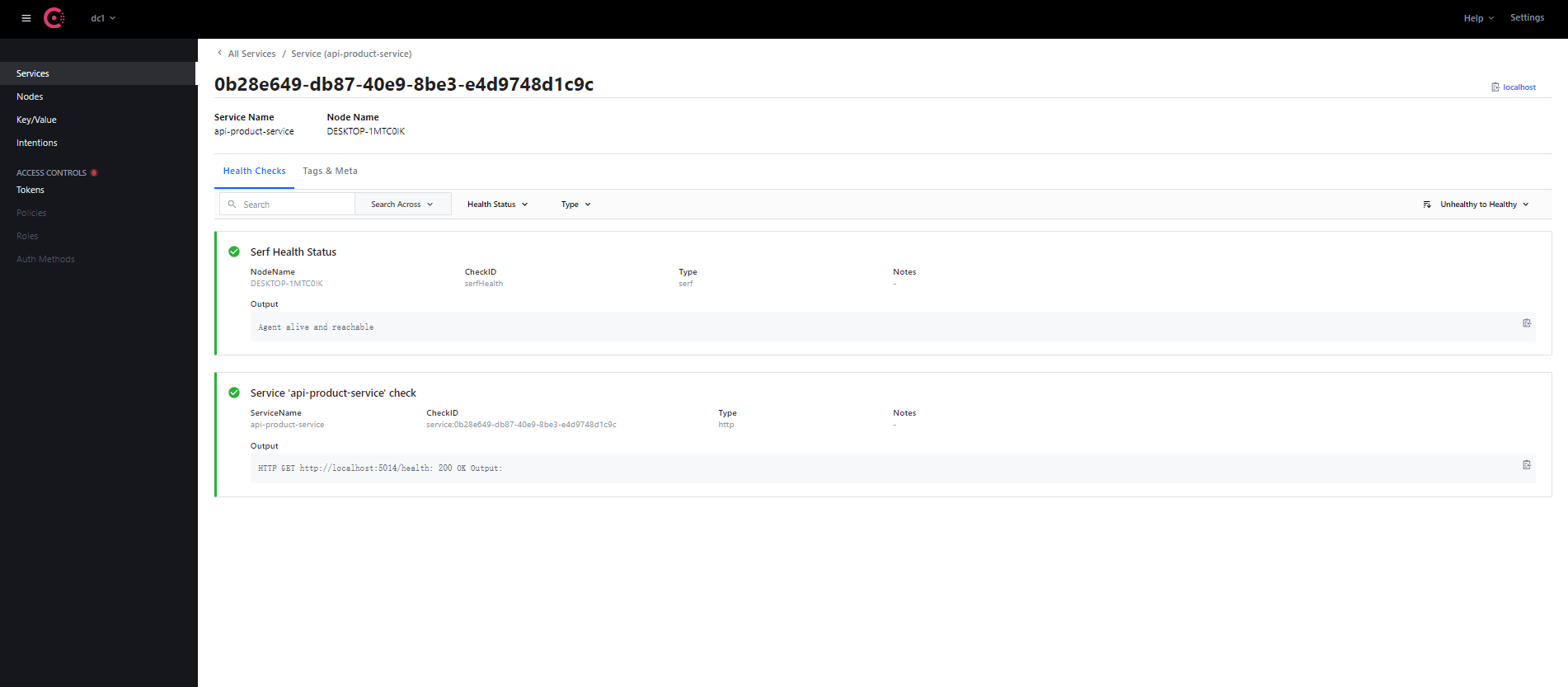
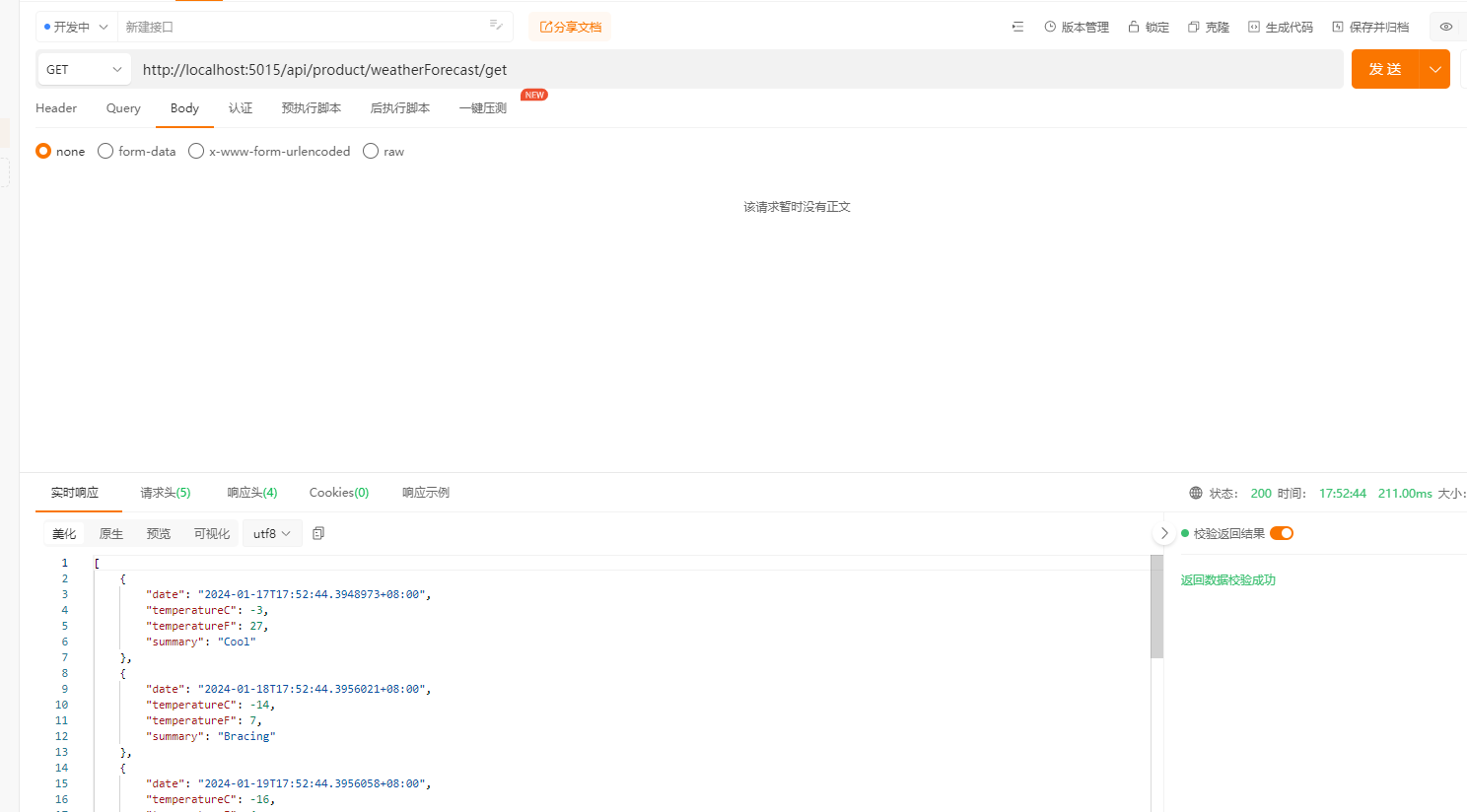
相关文章:
Asp .Net Core 系列:集成 Ocelot+Consul实现网关、服务注册、服务发现
什么是Ocelot? Ocelot是一个开源的ASP.NET Core微服务网关,它提供了API网关所需的所有功能,如路由、认证、限流、监控等。 Ocelot是一个简单、灵活且功能强大的API网关,它可以与现有的服务集成,并帮助您保护、监控和扩展您的微…...

MSSQL行转列、列转行
行转列 SELECT * FROM student PIVOT ( SUM(score) FOR subject IN (语文, 数学, 英语) ) AS PivotedData; 列转行 SELECT * FROM student1 UNPIVOT ( score FOR subject IN ("语文","数学","英语") )AS PivotedData;...

【MySQL】创建和管理表
文章目录 前置 标识符命名规则一、MySQL数据类型二、创建和管理数据库2.1 创建数据库2.2 使用数据库2.3 修改数据库2.4 删除数据库 三、创建表3.1 创建方式一3.2 创建方式二3.3 查看数据表结构 四、修改表4.1 增加一个列4.2 修改一个列4.3 重命名一个列4.4 删除一个列 五、重命…...
缓存和数据库一致性
前言: 项目的难点是如何保证缓存和数据库的一致性。无论我们是先更新数据库,后更新缓存还是先更新数据库,然后删除缓存,在并发场景之下,仍然会存在数据不一致的情况(也存在删除失败的情况,删除…...
iOS UI掉帧和卡顿优化解决方案记录
UI卡顿原理 在 VSync 信号到来后,系统图形服务会通过 CADisplayLink 等机制通知 App,App 主线程开始在 CPU 中计算显示内容,比如视图的创建、布局计算、图片解码、文本绘制等。随后 CPU 会将计算好的内容提交到 GPU 去,由 GPU 进行…...
transbigdata 笔记: 轨迹密集化/稀疏化 轨迹平滑
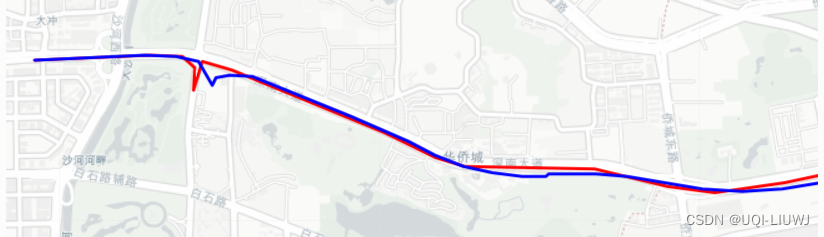
1 密集化 transbigdata.traj_densify(data, col[Vehicleid, Time, Lng, Lat], timegap15) 轨迹致密化,保证至多每隔timegap秒都有一个轨迹点 这边插补使用的是pandas的interpolate,method设置的是index 1.1 举例 transbigdata 笔记: 官方…...

反向代理的本质是什么?
反向代理是一种网络架构模式,通常用于提供静态内容、处理安全、负载均衡和缓存等任务。在这种架构中,客户端发送的请求首先到达反向代理服务器,然后由反向代理服务器将请求转发给后端的实际服务器。反向代理服务器可以处理和修改请求和响应&a…...

Kali Linux保姆级教程|零基础从入门到精通,看完这一篇就够了!(附工具包)
作为一名从事网络安全的技术人员,不懂Kali Linux的话,连脚本小子都算不上。 Kali Linux预装了数百种享誉盛名的渗透工具,使你可以更轻松地测试、破解以及进行与数字取证相关的任何其他工作。 今天给大家分享一套Kali Linux资料合集…...
UML-用例图
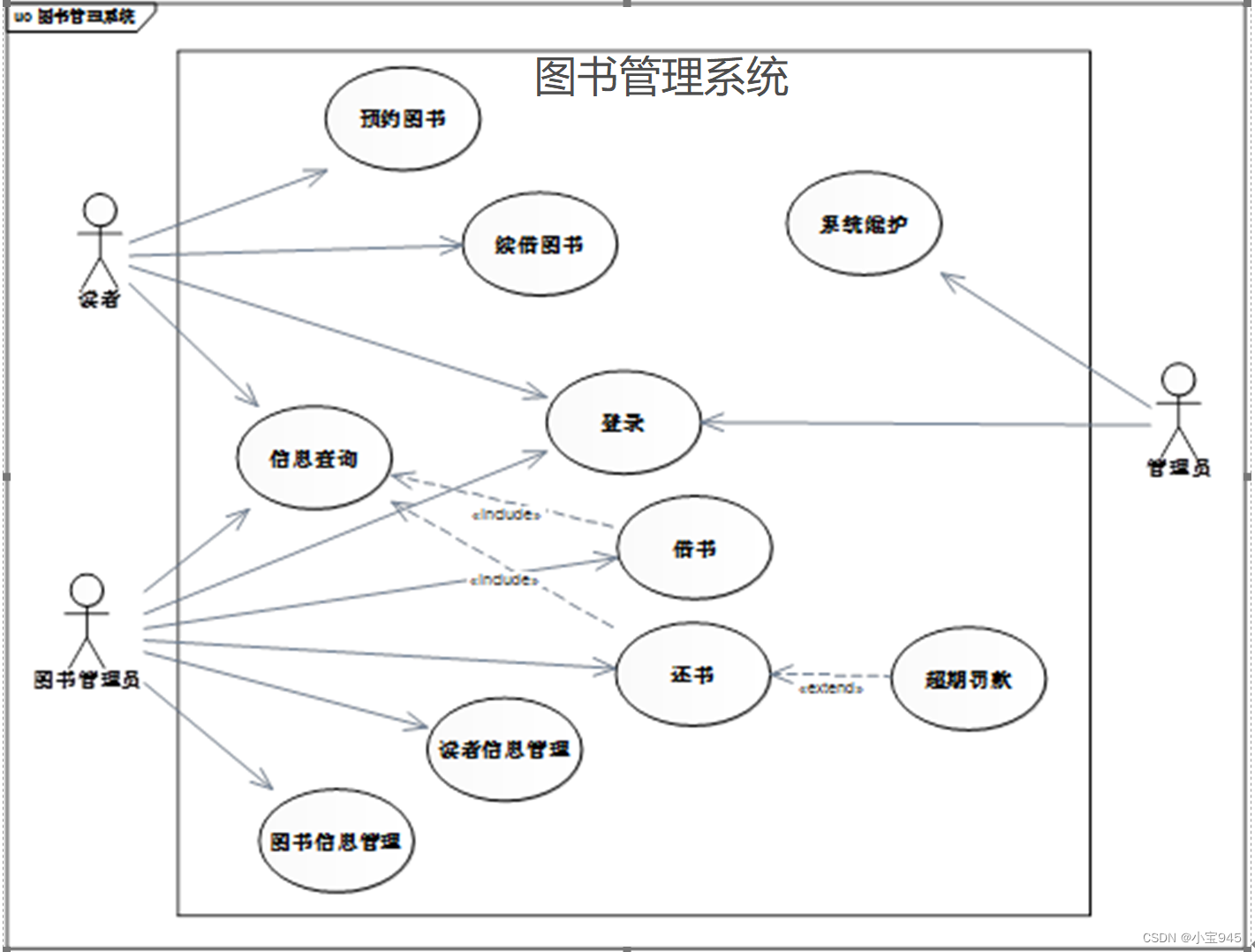
提示:用例图是软件建模的开始,软件建模中的其他图形都将以用例图为依据。用例图列举了系统所需要实现的所有功能,除了用于软件开发的需求分析阶段,也可用于软件的系统测试阶段。 UML-用例图 一、用例图的基础知识1.用例图的构成元…...
jmeter--8.加密传输
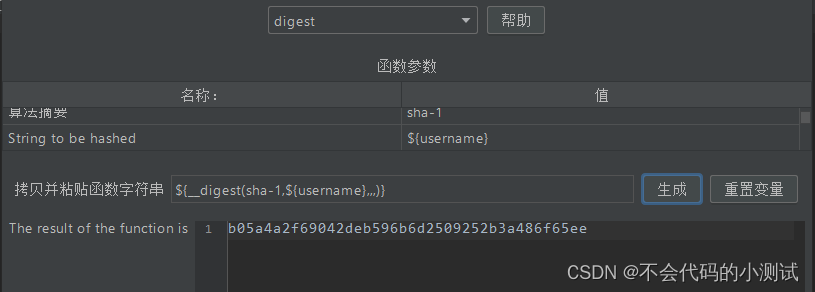
目录 1. Base64加密 2. MD5加密 3. SHA加密(sha1\sha\sha224\sha256\sha384\sha512) 4. RSA加密-公钥加密,私钥解密 1. Base64加密 1.1 在需要加密传输的接口下新增BeanShell 预处理程序,${username}可替换成value值ÿ…...

微信小程序canvas画布转图片转pdf文件
关键步骤介绍 步骤一:将canvas页面保存为图片 for(var a=0;a<this.data.page_canvas.length;++a){ var t_page_img = await this.canvas_to_image(this.data.page_canvas[a]) t_img.push(t_page_img) } this.data.page_canvas是保存的canvas界面,this.c…...
【Linux操作】国产Linux服务管理操作
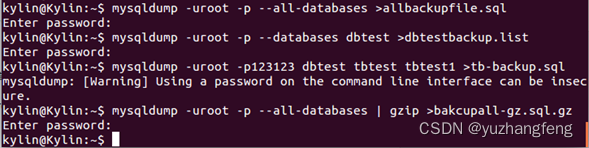
【Linux操作】国产Linux服务管理操作 前言SAMBA配置服务器端1. 安装相关包2. 配置/etc/samba/smb.conf,在此文件末尾添加如下内容,并保存退出。3. 创建/home/share并更改权限4. 启动samba服务 客户端• Windows客户端• 麒麟客户端 Telnet1、telnet语法2…...
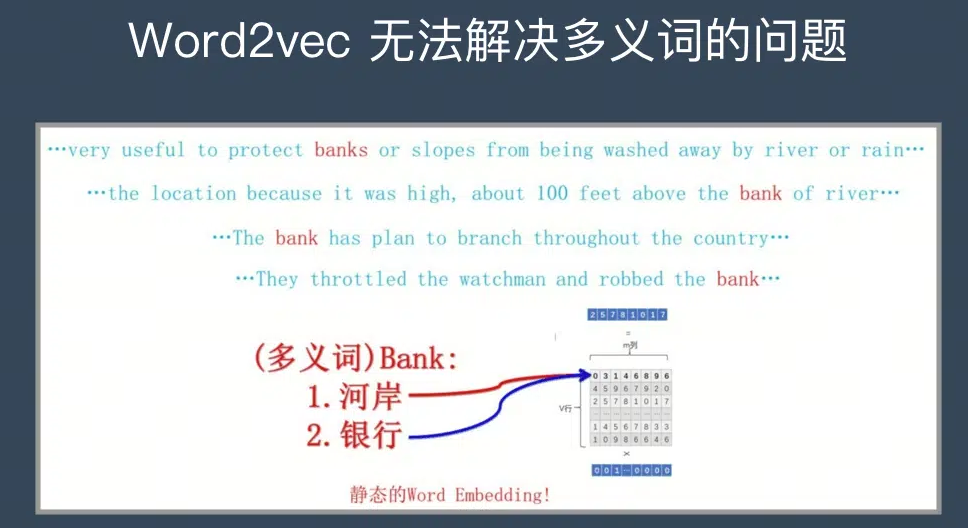
大语言模型系列-word2vec
文章目录 前言一、word2vec的网络结构和流程1.Skip-Gram模型2.CBOW模型 二、word2vec的训练机制1. Hierarchical softmax2. Negative Sampling 总结 前言 在前文大语言模型系列-总述已经提到传统NLP的一般流程: 创建语料库 > 数据预处理 > 分词向量化 > …...

vue项目运行报错this[kHandle] = new _Hash(algorithm, xofLen)
自从昨天分盘重装了最新版本的Node之后,项目是一启一个报错 出现这个报错时,需要在package.json文件中 dev命令行 增加:set NODE_OPTIONS–openssl-legacy-provider 出现该问题的原因: node.js V17开始版本中发布的是OpenSSL3.0,…...
APP兼容性测试,这几个面试硬技能,包教包会
兼容性测试主要通过人工或自动化的方式,在需要覆盖的终端设备上进行功能用例执行,查看软件性能、稳定性等是否正常。 对于需要覆盖的终端设备,大型互联网公司,像 BAT,基本都有自己的测试实验室,拥有大量终…...
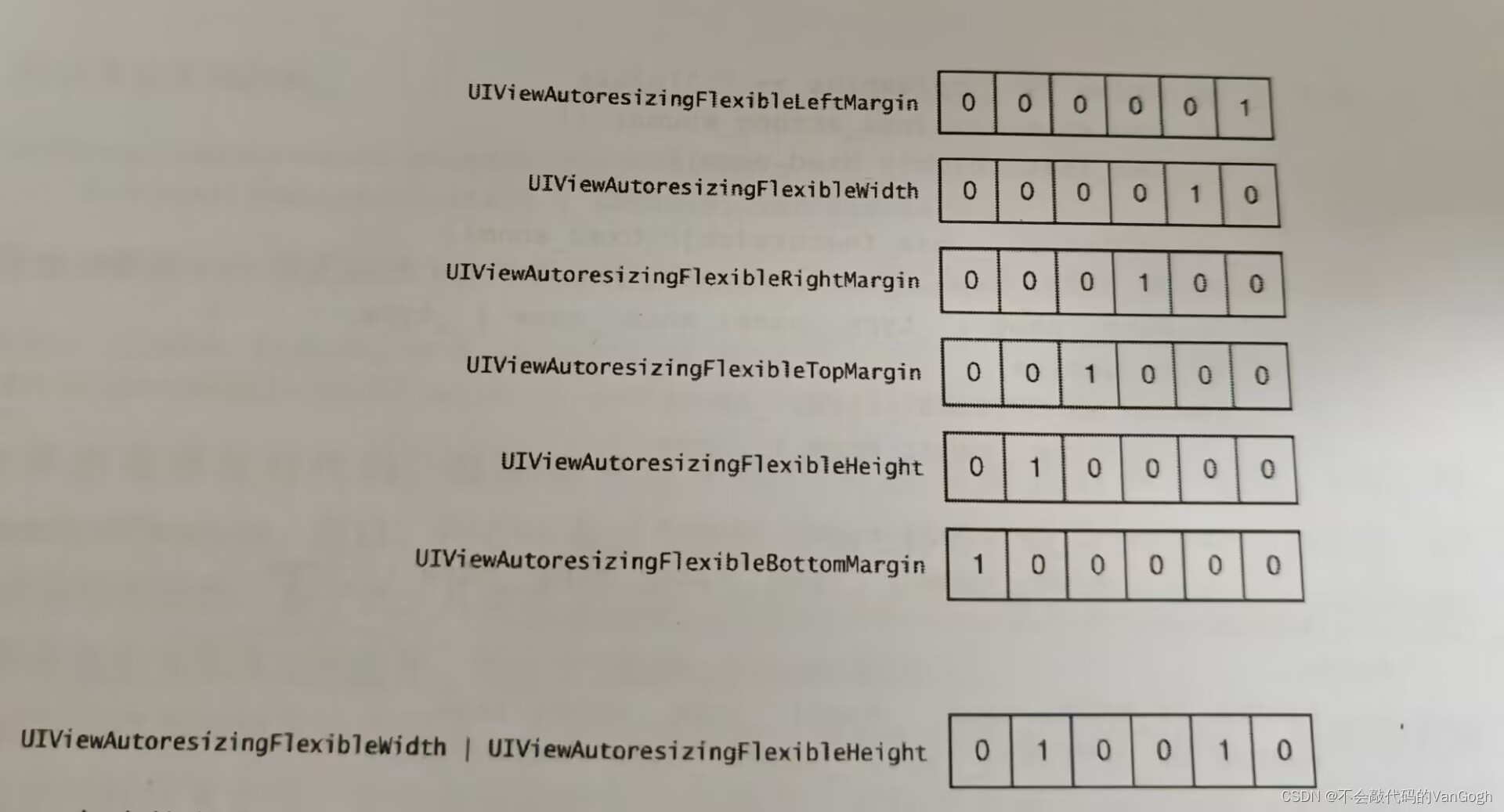
【学习iOS高质量开发】——熟悉Objective-C
文章目录 一、Objective-C的起源1.OC和其它面向对象语言2.OC和C语言3.要点 二、在类的头文件中尽量少引用其他头文件1.OC的文件2.向前声明的好处3.如何正确引入头文件4.要点 三、多用字面量语法,少用与之等价的方法1.何为字面量语法2.字面数值3.字面量数组4.字面量字…...
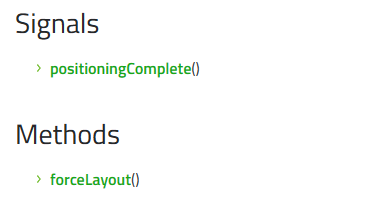
Qt/QML编程之路:Grid、GridLayout、GridView、Repeater(33)
GRID网格用处非常大,不仅在excel中,在GUI中,也是非常重要的一种控件。 Grid 网格是一种以网格形式定位其子项的类型。网格创建一个足够大的单元格网格,以容纳其所有子项,并将这些项从左到右、从上到下放置在单元格中。每个项目都位于其单元格的左上角,位置为(0,0)。…...
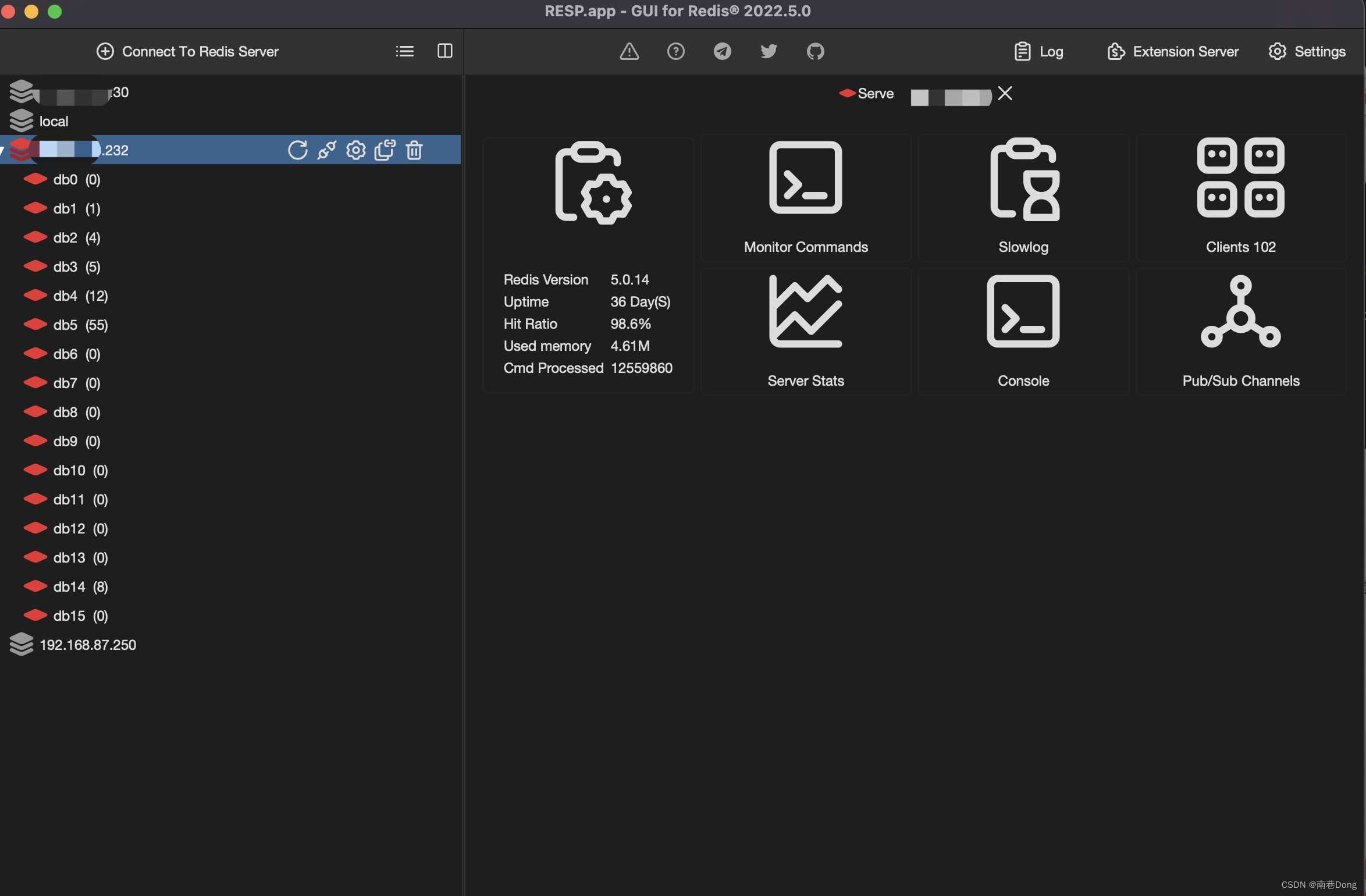
mac pro “RESP.app”意外退出 redis desktop manager
文章目录 redis desktop manager下载地址提示程序含有恶意代码“RESP.app”意外退出解决办法:下载python3.10.并安装重新打开RESP如果还是不行,那么需要替换错误路径(我的没用)外传 最近在研究redis的消息,看到了strea…...
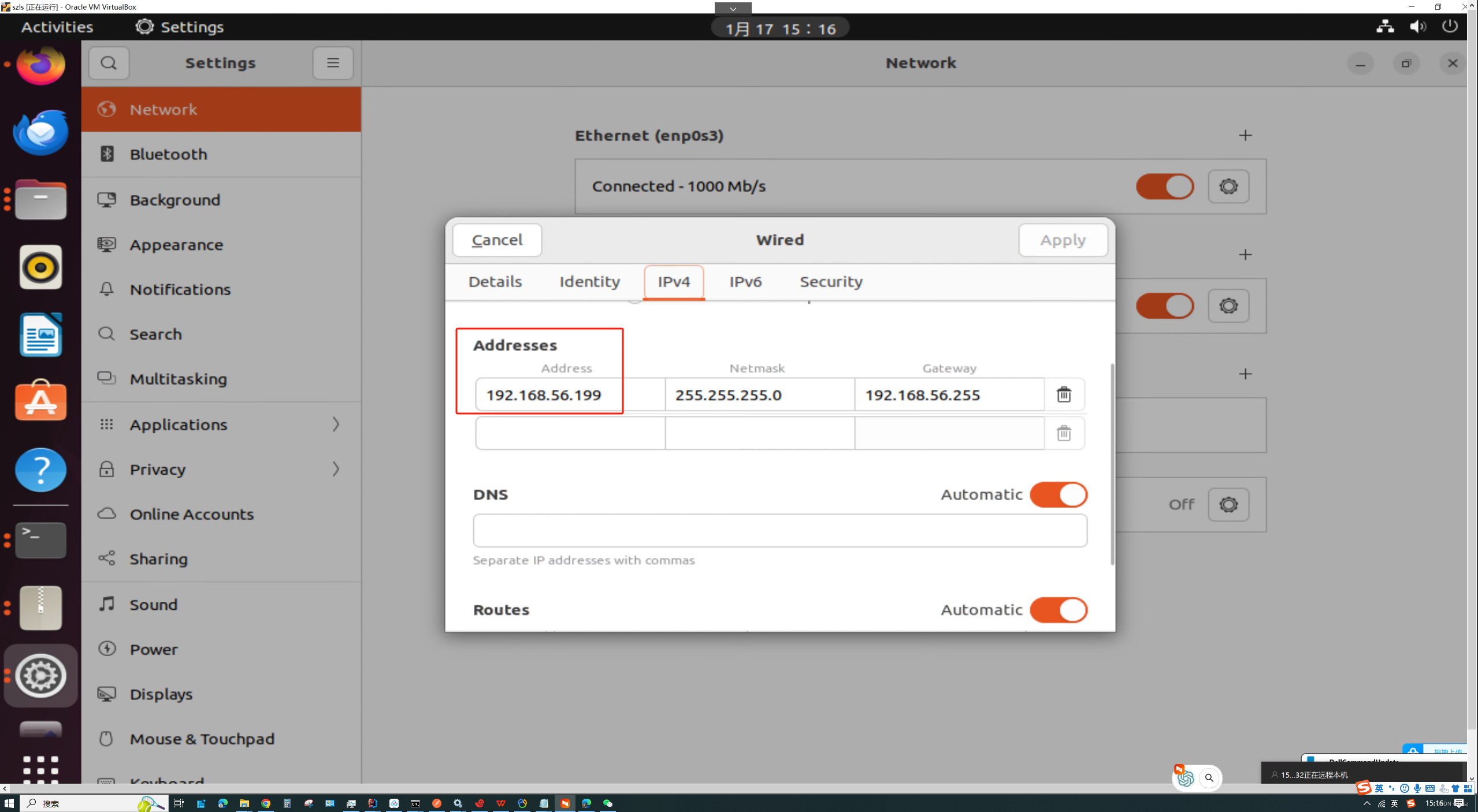
VirtualBox 如何让虚拟机和主机互相通信
首先建立一张虚拟网卡 在这里进行网络设置 设置成固定ip,这张网卡专门用来通信,上面的网卡用来上网的...
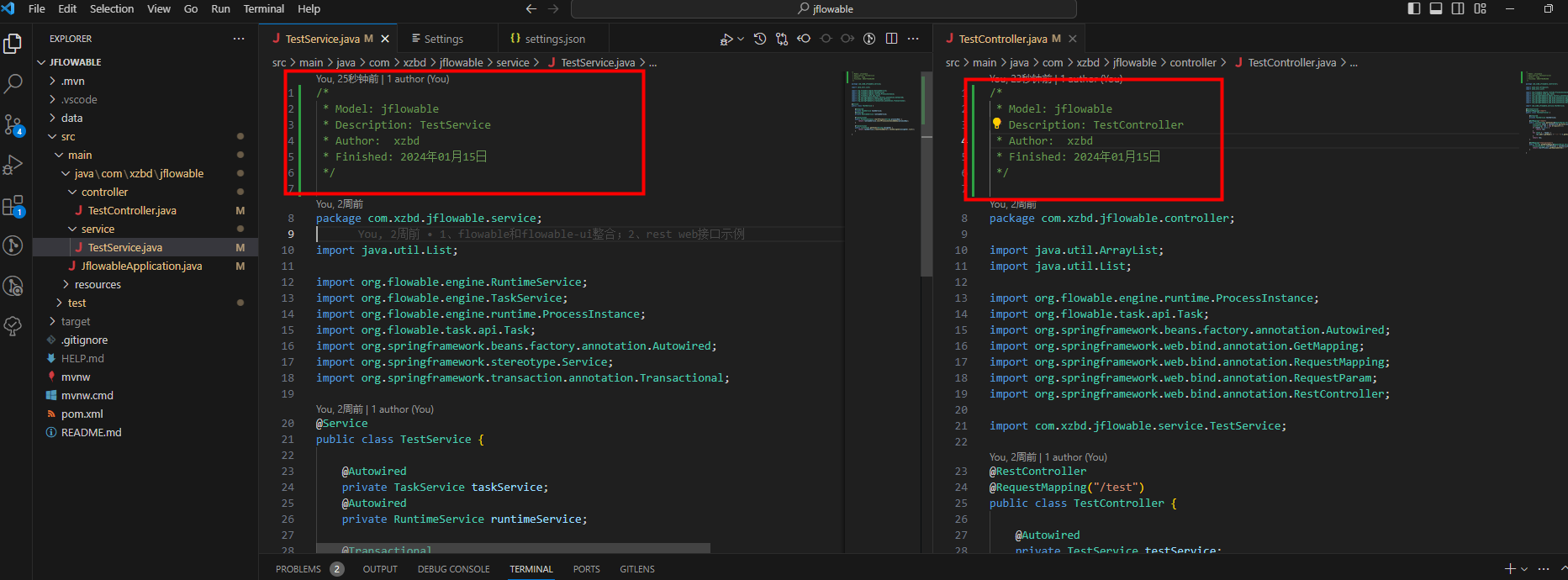
【Java】源码文件开头添加注释
需求 应公司质量部要求,需要对代码做静态检查。质量部要求,源码文件必须在起始行起设置一些注释,然而项目已经开发了一年之久,且没有维护这个注释。 此时,面对好几千个源码文件,我们如何快速添加相应的注…...

用 n8n 搭建自己的自动化工作流平台
用 n8n 搭建自己的自动化工作流平台分类:开源项目部署n8n 适合Webhook、邮件通知、表单处理和 API 自动化。这类主题真正跑起来并不难,难的是上线后稳定、可备份、能排错。本文按实操方式整理一套可以直接落地的流程,默认你已经会登录 Linux …...

量子PSO与机器学习在天线小型化设计中的应用
1. 量子PSO与机器学习在天线小型化设计中的革命性应用作为一名长期从事射频工程和天线设计的从业者,我见证了传统设计方法从纯手工计算到计算机辅助设计的演进。但直到接触量子粒子群优化(QDPSO)与机器学习的融合应用,才真正体会到智能化设计带来的效率飞…...

为什么你的Windows快捷键突然失效?Hotkey Detective一键定位占用程序终极指南
为什么你的Windows快捷键突然失效?Hotkey Detective一键定位占用程序终极指南 【免费下载链接】hotkey-detective A small program for investigating stolen key combinations under Windows 7 and later. 项目地址: https://gitcode.com/gh_mirrors/ho/hotkey-d…...

从开发者视角感受Taotoken官方价折扣带来的实际成本节省
🚀 告别海外账号与网络限制!稳定直连全球优质大模型,限时半价接入中。 👉 点击领取海量免费额度 从开发者视角感受Taotoken官方价折扣带来的实际成本节省 对于独立开发者和小型团队而言,在构建和迭代AI应用时…...

WireUI颜色选择器和日期选择器:提升用户体验的利器 [特殊字符][特殊字符]
WireUI颜色选择器和日期选择器:提升用户体验的利器 🎨📅 【免费下载链接】wireui TallStack UI components 项目地址: https://gitcode.com/gh_mirrors/wi/wireui WireUI颜色选择器和日期选择器是Laravel Livewire应用中提升用户体验的…...

免费图片去水印工具有哪些?2026 在线图片去水印软件推荐指南
日常刷到好看的图片想做壁纸或素材,角落那个突兀的水印总让人头疼。不管是自己拍摄时误触了时间水印,还是下载的参考图需要二次编辑,找到一个顺手且确实能用的去水印工具,是许多人在 2026 年依然高频遇到的需求。这篇文章就来整理…...

深度拆解:TypeScript 大神把 .claude 目录开源,18 个 Skill 是给 AI 编程踩刹车的工程纪律
2026 年 4 月底,Total TypeScript 创始人、TypeScript 社区教父级人物 Matt Pocock 干了一件挺简单的事——把他个人 .claude 目录下的全部 Agent Skills 开源了。仓库叫 mattpocock/skills,副标题只有一句话:Skills for Real Engineers。一个…...

AI驱动的模拟电路设计:MOBO优化与工程实践
1. AI如何重塑模拟电路设计范式模拟电路设计长期以来被视为电子工程领域最具挑战性的工作之一。传统设计流程中,工程师需要手动调整晶体管尺寸、偏置电压等数十个参数,通过反复仿真迭代来满足增益、带宽、噪声等相互制约的性能指标。这种"试错法&qu…...

Blender模型导入Unity材质丢失的根因与自动化修复方案
1. 这不是“导出再导入”那么简单:为什么Blender模型进Unity后总变灰、贴图全丢、材质不认 你刚在Blender里花三小时调好一个带PBR材质、多层UV、自发光贴图和顶点色的机械臂模型,导出FBX,拖进Unity——结果:模型是黑的࿰…...
)
C++ 左右值引用 完全详解(从入门到精通)
左右值引用是 C11 引入的最核心、影响最深远的特性,它直接催生了移动语义、完美转发、智能指针优化等现代 C 的基石。本文从最基础的定义开始,逐层深入到所有高级特性和常见陷阱,看完就能解决 99% 的面试和开发问题。一、先彻底搞懂ÿ…...