
Elasticsearch:构建自定义分析器指南

在本博客中,我们将介绍不同的内置字符过滤器、分词器和分词过滤器,以及如何创建适合我们需求的自定义分析器。更多关于分析器的知识,请详细阅读文章:
-
开始使用 Elasticsearch (3)
-
Elasticsearch: analyzer
为什么我们需要定制分析器?
你可以通过以所需的方式组合字符过滤器、分词器和分词过滤器来创建自定义分析器来满足您的特定需求。 这使得文本处理具有高度的灵活性和定制性。
正如我们所见,Elasticsearch 中的分析器由三部分组成,我们将看到不同的内置组件:

安装
为了方便今天的测试,我们将安装无安全配置的 Elasticsearch 及 Kibana。我们可以参考文章 “Elasticsearch:如何在 Docker 上运行 Elasticsearch 8.x 进行本地开发”。
我们还需要安装 Python 所需要的包:
pip3 install elasticsearch$ pip3 list | grep elasticsearch
elasticsearch 8.12.0
rag-elasticsearch 0.0.1 /Users/liuxg/python/rag-elasticsearch/my-app/packages/rag-elasticsearch测试
我们创建一个连接到 Elasticsearch 的客户端:
from elasticsearch import Elasticsearches = Elasticsearch("http://localhost:9200")
print(es.info())
更多关于如何连接到 Elasticsearch 的代码,请参考 “Elasticsearch:关于在 Python 中使用 Elasticsearch 你需要知道的一切 - 8.x”。
Char map filters
HTML Strip Char Filter (html_strip)
从文本中删除 HTML 元素并解码 HTML 实体。
response = es.indices.analyze(body={"char_filter": ["html_strip"],"tokenizer": "standard","text": "<p>Hello <b>World</b>! This is <a href='<http://example.com>'>Elasticsearch</a>.</p>"}
)# Extract tokens
[token['token'] for token in response['tokens']]
Pattern Replace Char Filter (pattern_replace)
使用正则表达式来匹配字符或字符序列并替换它们。 在下面的示例中,我们从用户名中提取名称:
response = es.indices.analyze(body={"char_filter": [{"type": "pattern_replace","pattern": "[-_@.]",  # Removes hyphens, underscores, apostrophes"replacement": " "}],"tokenizer": "standard","text": "liu_xiao_guo"}
)# Extract tokens
[token['token'] for token in response['tokens']]
Mapping Char Filter (mapping)
允许自定义定义的字符或字符序列映射。 示例:你可以定义一个映射,将 “&” 替换为 “and”,或将 “€” 替换为 “euro”。
response = es.indices.analyze(body={"tokenizer": "standard","char_filter": [{"type": "mapping","mappings": ["@gmail.com=>",    # Replace @gmail.com with nothing"$=>dollar",       # Replace $ with dollar]}],"text": "xiaoguo.liu@gmail.com gives me $"}
)# Extract tokens
[token['token'] for token in response['tokens']]
Tokenizers
Standard Tokenizer (standard)
Standard 分词器将文本按照单词边界划分为术语,如 Unicode 文本分段算法所定义。 它删除了大多数标点符号。 它是大多数语言的最佳选择。
response = es.indices.analyze(body={"tokenizer": "standard","text": "The 2 QUICK Brown-Foxes, jumps_over the lazy-dog's bone."}
)# Extract tokens
[token['token'] for token in response['tokens']]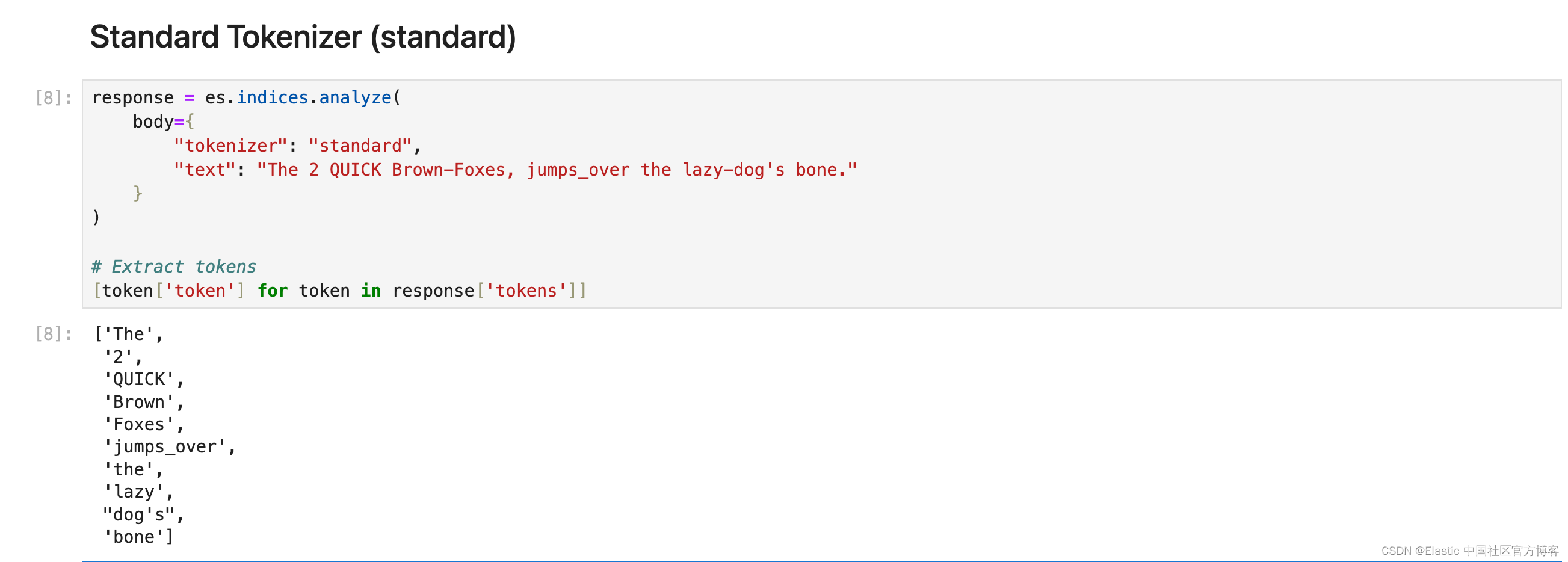
Letter Tokenizer (letter)
每当遇到非字母的字符时,letter 分词器就会将文本分成术语。
response = es.indices.analyze(body={"tokenizer": "letter","text": "The 2 QUICK Brown-Foxes, jumps_over the lazy-dog's bone."}
)# Extract tokens
[token['token'] for token in response['tokens']]
Lowercase Tokenizer (lowercase)
小写分词器类似于字母分词器,但它也将所有术语小写。
response = es.indices.analyze(body={"tokenizer": "lowercase","text": "The 2 QUICK Brown-Foxes, jumps_over the lazy-dog's bone."}
)# Extract tokens
[token['token'] for token in response['tokens']]
Whitespace Tokenizer (whitespace)
每当遇到任何空白字符时,whitespace 分词器都会将文本划分为术语。
response = es.indices.analyze(body={"tokenizer": "whitespace","text": "The 2 QUICK Brown-Foxes, jumps_over the lazy-dog's bone."}
)# Extract tokens
[token['token'] for token in response['tokens']]
Classic Tokenizer (classic)
classic 分词器是一种基于语法的英语分词器。
response = es.indices.analyze(body={"tokenizer": "classic","text": "The 2 QUICK Brown-Foxes, jumps_over the lazy-dog's bone."}
)# Extract tokens
[token['token'] for token in response['tokens']]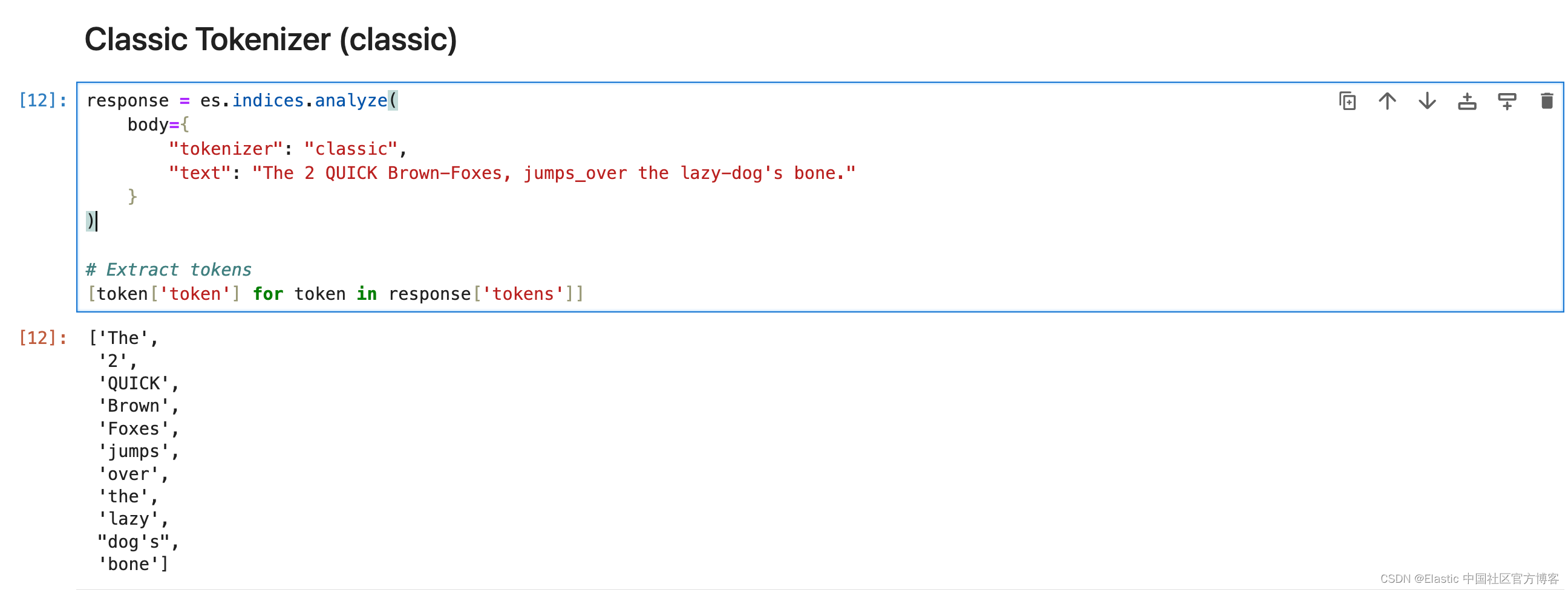
UAX URL Email Tokenizer (uax_url_email)
uax_url_email 标记生成器类似于标准标记生成器,只不过它将 URL 和电子邮件地址识别为单个标记。
response = es.indices.analyze(body={"tokenizer": "classic","text": "visit https://elasticstack.blog.csdn.net to get the best materials to learn Elastic Stack"}
)# Extract tokens
[token['token'] for token in response['tokens']]
N-Gram Tokenizer (ngram)
当 ngram 分词器遇到任何指定字符(例如空格或标点符号)列表时,它可以将文本分解为单词,然后返回每个单词的 n-grams:连续字母的滑动窗口,例如 Quick → [qu, ui, ic, ck]。Elasticsearch 中的 N-Gram 分词器在术语部分匹配很重要的场景中特别有用。 最适合自动完成和键入时搜索功能以及处理拼写错误或匹配单词中的子字符串。
response = es.indices.analyze(body={"tokenizer": {"type": "ngram","min_gram": 3,"max_gram": 4},"text": "Hello Xiaoguo"}
)# Extract tokens
[token['token'] for token in response['tokens']]
Edge N-Gram Tokenizer (edge_ngram)
Elasticsearch 中的 edge_ngram 分词器用于从单词的开头或 “边缘” 开始将单词分解为更小的块或 “n-gram”。 它生成指定长度范围的标记,提供单词从开头到给定大小的一部分。
response = es.indices.analyze(body={"tokenizer": {"type": "edge_ngram","min_gram": 4,"max_gram": 5,"token_chars": ["letter", "digit"]},"text": "The 2 QUICK Brown-Foxes, jumps_over the lazy-dog's bone."}
)# Extract tokens
[token['token'] for token in response['tokens']]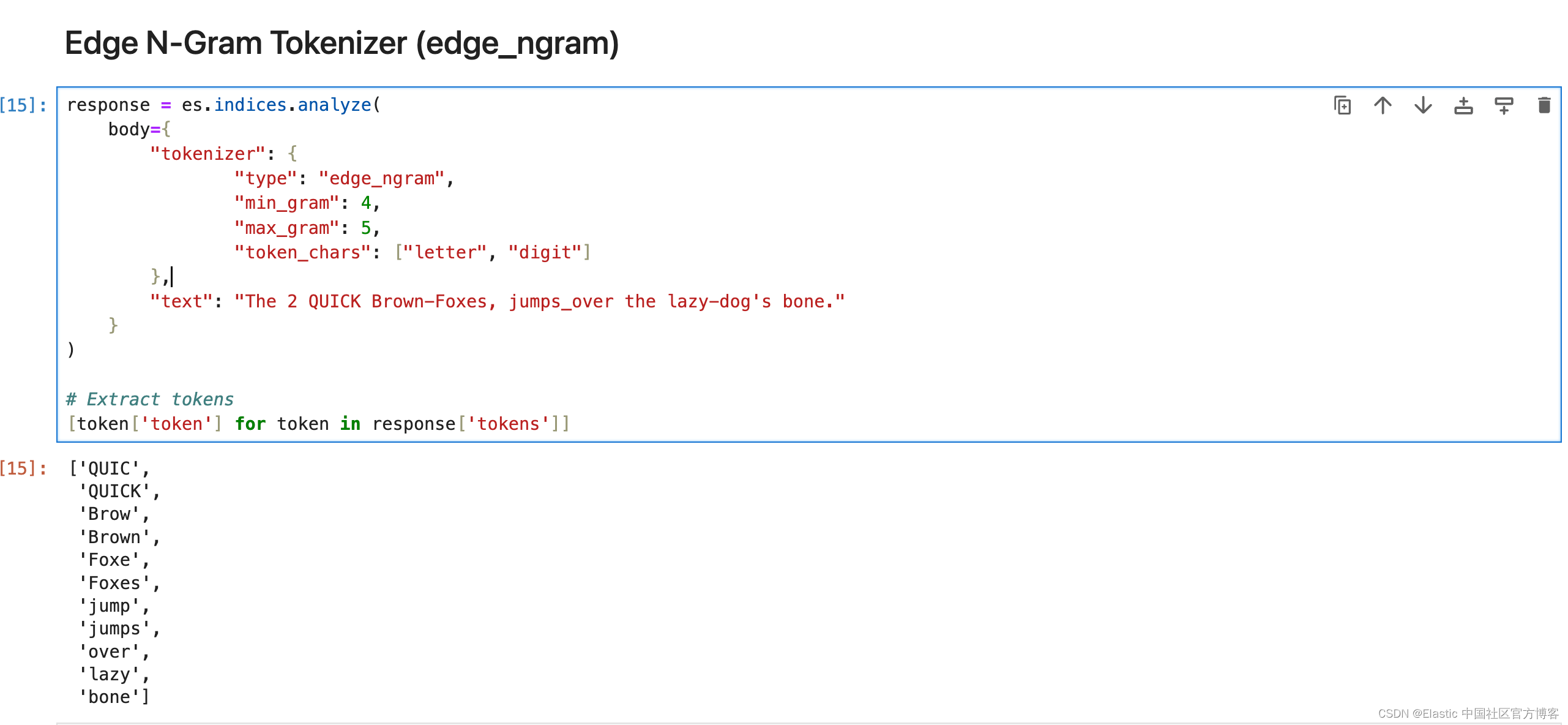
Keyword Tokenizer (keyword)
关键字分词器接受给定的任何文本,并将完全相同的文本输出为单个术语。
response = es.indices.analyze(body={"tokenizer": "keyword","text": "The 2 QUICK Brown-Foxes, jumps_over the lazy-dog's bone."}
)# Extract tokens
[token['token'] for token in response['tokens']]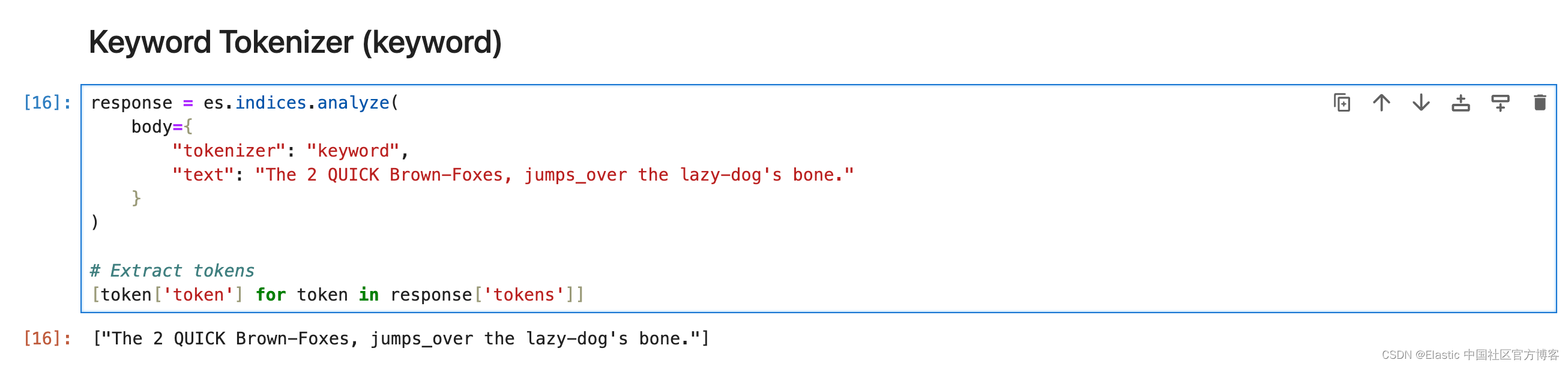
Pattern Tokenizer (pattern)
Pattern 分词器使用正则表达式,在文本与单词分隔符匹配时将其拆分为术语,或者将匹配的文本捕获为术语。
response = es.indices.analyze(body={"tokenizer": {"type": "pattern","pattern": "_+"},"text": "hello_world_from_elasticsearch"}
)# Extract tokens
[token['token'] for token in response['tokens']]
Path Tokenizer (path_hierarchy)
它将路径在每个路径分隔符处分解为分词。
response = es.indices.analyze(body={"tokenizer": "path_hierarchy","text": "/usr/local/bin/python"}
)# Extract tokens
[token['token'] for token in response['tokens']]
Token filters
确保你始终传递列表中的过滤器,即使它只有一个,并且你应用的过滤器的顺序非常重要。
Apostrophe
删除撇号后面的所有字符,包括撇号本身。
response = es.indices.analyze(body={"filter": ["apostrophe"],"tokenizer": "standard","text": "The 2 QUICK Brown-Foxes, jumps_over the lazy-dog's bone."}
)# Extract tokens
[token['token'] for token in response['tokens']]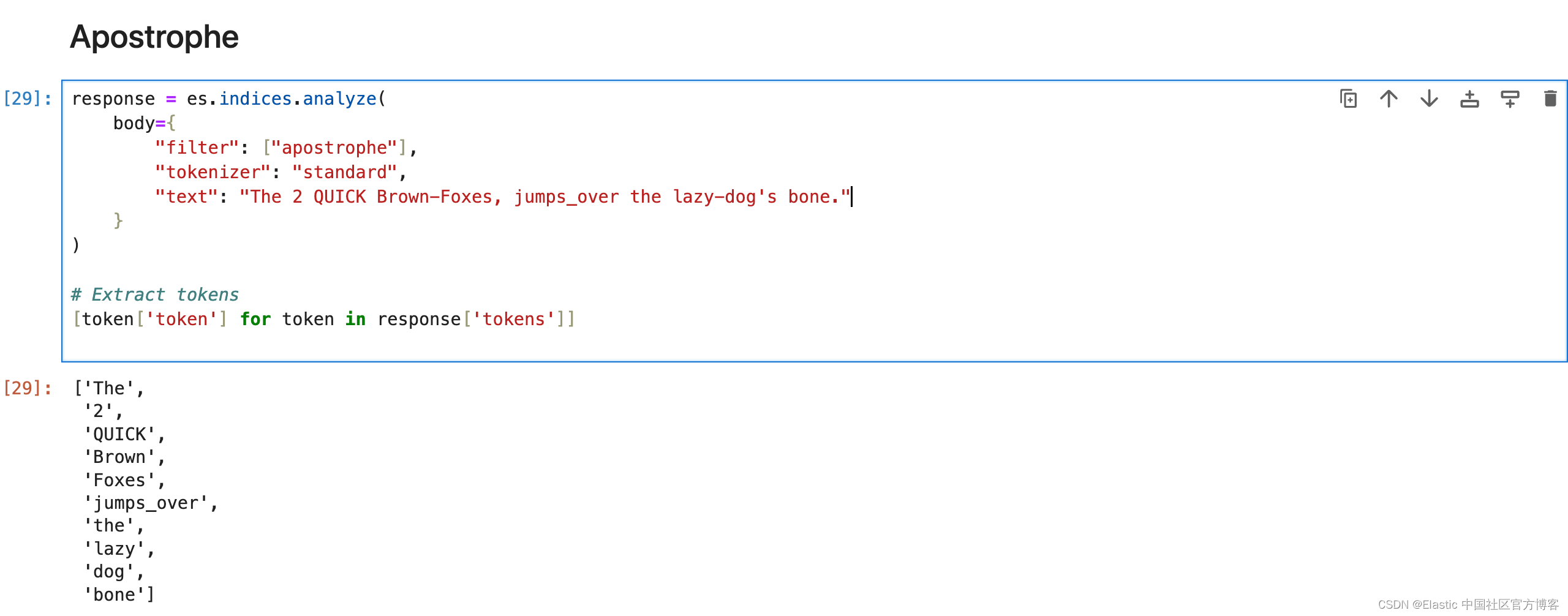
Lowercase Filter
将所有分词转换为小写。
response = es.indices.analyze(body={"filter": ["lowercase"],"text": "The 2 QUICK Brown-Foxes, jumps_over the lazy-dog's bone."}
)# Extract tokens
[token['token'] for token in response['tokens']]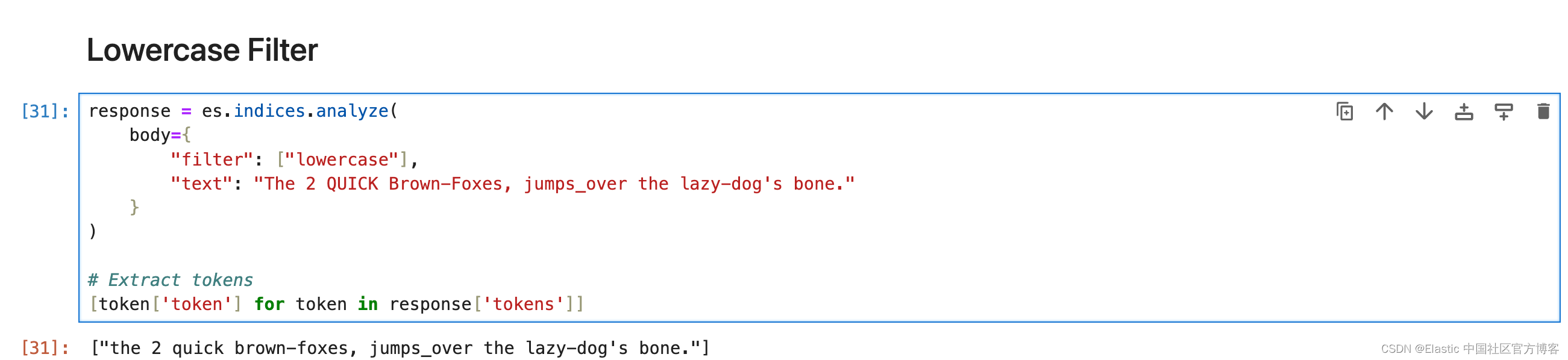
Uppercase Filter
将所有分词转换为大写。
response = es.indices.analyze(body={"filter": ["uppercase"],"text": "The 2 QUICK Brown-Foxes, jumps_over the lazy-dog's bone."}
)# Extract tokens
[token['token'] for token in response['tokens']]
Trim Filter
删除流中每个分词的前导和尾随空格。
# Analyze the text using the custom analyzer
response = es.indices.analyze(body={"tokenizer": "keyword","filter":["lowercase","trim"],"text": " The 2 QUICK Brown-Foxes, jumps_over the lazy-dog's bone. "}
)# Extract tokens
[token['token'] for token in response['tokens']]
ASCII Folding Filter (asciifolding)
asciifolding 过滤器会删除标记中的变音标记。比如,Türkiye 将成为 Turkiye。
# Analyze the text using the custom analyzer
response = es.indices.analyze(body={"filter": ["asciifolding"],"text": "Türkiye"}
)# Extract tokens
[token['token'] for token in response['tokens']]
Synonym Filter
synonym 分词过滤器允许在分析过程中轻松处理同义词。
# Analyze the text using the custom analyzer
response = es.indices.analyze(body={"tokenizer": "standard","filter":["lowercase",{"type": "synonym","synonyms": ["jumps_over => leap"]}],"text": "The 2 QUICK Brown-Foxes, jumps_over the lazy-dog's bone."}
)# Extract tokens
[token['token'] for token in response['tokens']]
Synonym Graph Filter
最适合多词同义词。
response = es.indices.analyze(body={"tokenizer": "standard","filter":["lowercase",{"type": "synonym_graph","synonyms": ["NYC, New York City", "LA, Los Angeles"]}],"text": "Flight from LA to NYC has been delayed by an hour"}
)# Extract tokens
[token['token'] for token in response['tokens']]
请记住,输出并不直观地表示内部图形结构,但 Elasticsearch 在搜索查询期间使用此结构。
与通常同义词不匹配的匹配短语查询将与同义词图完美配合。
Stemmer Filter
词干过滤器,支持多种语言的词干提取。
response = es.indices.analyze(body={"tokenizer": "standard","filter": [{"type": "stemmer","language": "English",},],"text": "candies, ladies, plays, playing, ran, running, dresses"}
)# Extract tokens
[token['token'] for token in response['tokens']]
KStem Filter
kstem 过滤器将算法词干提取与内置字典相结合。 与其他英语词干分析器(例如 porter_stem 过滤器)相比,kstem 过滤器的词干提取力度较小。
response = es.indices.analyze(body={"tokenizer": "standard","filter": ['kstem',],"text": "candies, ladies, plays, playing, ran, running"}
)# Extract tokens
[token['token'] for token in response['tokens']]
Porter Stem Filter
与其他英语词干过滤器(例如 kstem 过滤器)相比,倾向于更积极地进行词干提取。
response = es.indices.analyze(body={"tokenizer": "whitespace","filter": [{"type": "pattern_replace","pattern": "[-|.|,]"},{"type": "porter_stem","language": "English",},],"text": "candies, ladies, plays, playing, ran, running, dresses"}
)# Extract tokens
[token['token'] for token in response['tokens']]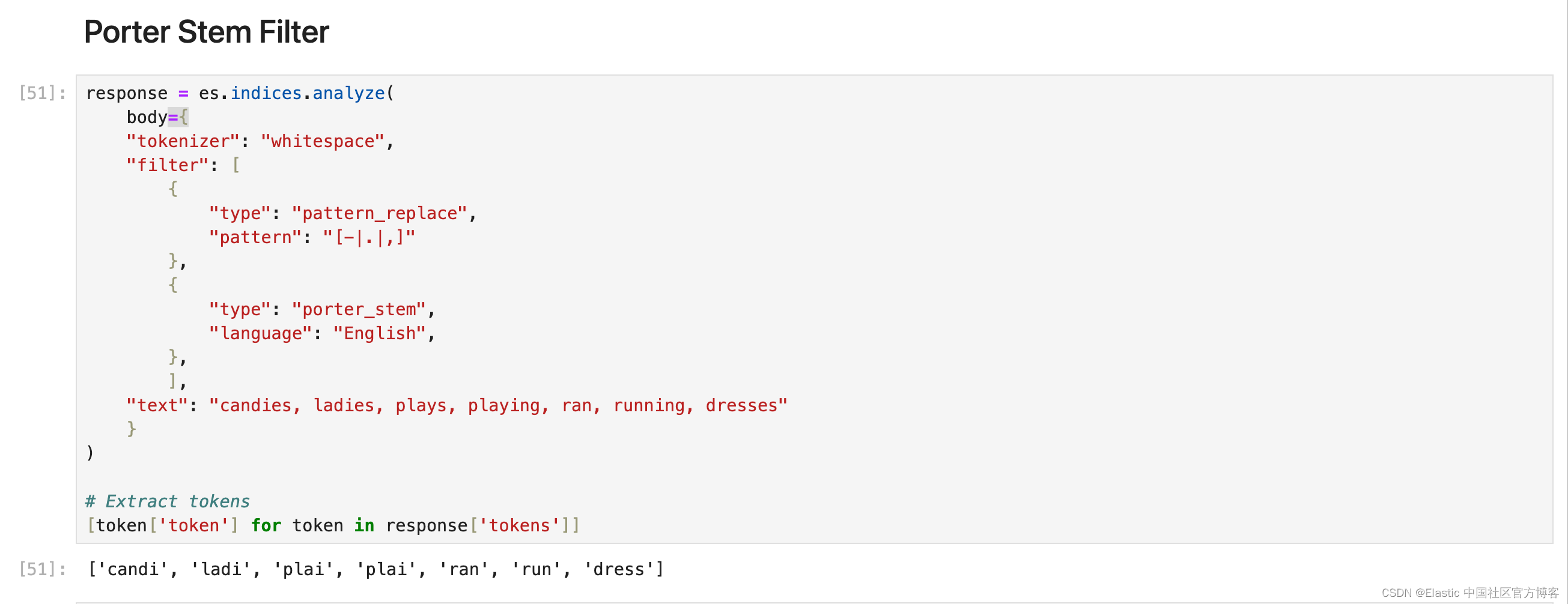
Snowball Filter
使用 Snowball 生成的词干分析器对单词进行词干分析的过滤器。 适用于法语、德语、俄语、西班牙语等不同语言。
response = es.indices.analyze(body={"tokenizer": "whitespace","filter": [{"type": "snowball","language": "English",},],"text": "candies, ladies, plays, playing, ran, running, dresses"}
)# Extract tokens
[token['token'] for token in response['tokens']]
Stemmer Override
通过应用自定义映射来覆盖词干算法,然后保护这些术语不被词干分析器修改。 必须放置在任何阻塞过滤器之前。
response = es.indices.analyze(body={"tokenizer": "standard","filter": [{"type": "stemmer_override","language": "English","rules": ["running, runs => run","stemmer => stemmer"]},],"text": "candies, ladies, plays, playing, ran, running, dresses"}
)# Extract tokens
[token['token'] for token in response['tokens']]
更多使用方法,请参考 Stemmer override token filter | Elasticsearch Guide [8.12] | Elastic
Keyword Marker Filter
将某些术语标记为关键字,防止它们被其他过滤器(如词干分析器)修改。
response = es.indices.analyze(body={"tokenizer": "whitespace","filter": [{"type": "keyword_marker","keywords": ["running"]  # Mark 'running' as a keyword},{"type": "pattern_replace","pattern": "[-|.|,]"},{"type": "porter_stem","language": "English",},],"text": "candies, ladies, plays, playing, runs, running"}
)# Extract tokens
[token['token'] for token in response['tokens']]
Stop Filter
从分词流中删除停用词(经常被忽略的常用词)。 示例 — if、of、is、am、are、the。可以使用默认或自定义的停用词列表。
# Analyze the text using the custom analyzer
response = es.indices.analyze(body={"tokenizer": "standard","filter":{"type":"stop","stopwords": ["is","am","are","of","if","a","the"],"ignore_case": True},"text": "i am sachin. I Am software engineer."}
)# Extract tokens
[token['token'] for token in response['tokens']]
Unique Filter
从流中删除重复的分词。
response = es.indices.analyze(body={"tokenizer": "whitespace","filter":["lowercase", "unique",],"text": "Happy happy joy joy"}
)# Extract tokens
[token['token'] for token in response['tokens']]
Length Filter
删除比指定字符长度更短或更长的分词。
response = es.indices.analyze(body={"tokenizer": "standard","filter":["lowercase",{"type": "length","min": 1,"max": 4}],"text": "The 2 QUICK Brown-Foxes, jumps_over the lazy-dog's bone."}
)# Extract tokens
[token['token'] for token in response['tokens']]
NGram Token Filter
从分词形成指定长度的 ngram。 最适合在键入时自动完成或搜索。 或者用于用户可能会犯错或拼写错误的搜索。
response = es.indices.analyze(body={"tokenizer": "whitespace","filter":[{"type": "ngram","min_gram": 3,"max_gram": 4}],"text": "Skinny blue jeans by levis"}
)# Extract tokens
[token['token'] for token in response['tokens']]
Edge NGram Token Filter
从分词的开头形成指定长度的 ngram。 最适合在键入时自动完成或搜索。 它对于搜索建议中常见的部分单词匹配非常有效。
response = es.indices.analyze(body={"tokenizer": "whitespace","filter":[{"type": "edge_ngram","min_gram": 3,"max_gram": 4}],"text": "Skinny blue jeans by levis"}
)# Extract tokens
[token['token'] for token in response['tokens']]

Shingle Filter
通过连接相邻的标记,将 shingles 或单词 ngram 添加到分词流中。 默认情况下,shingle 分词过滤器输出两个字的 shingles。 最适用于提高搜索短语查询性能。
response = es.indices.analyze(body={"tokenizer": "whitespace","filter":[{"type": "shingle","min_shingle_size": 2,"max_shingle_size": 3           }],"text": "Welcome to use Elastic Stack"}
)[token['token'] for token in response['tokens']]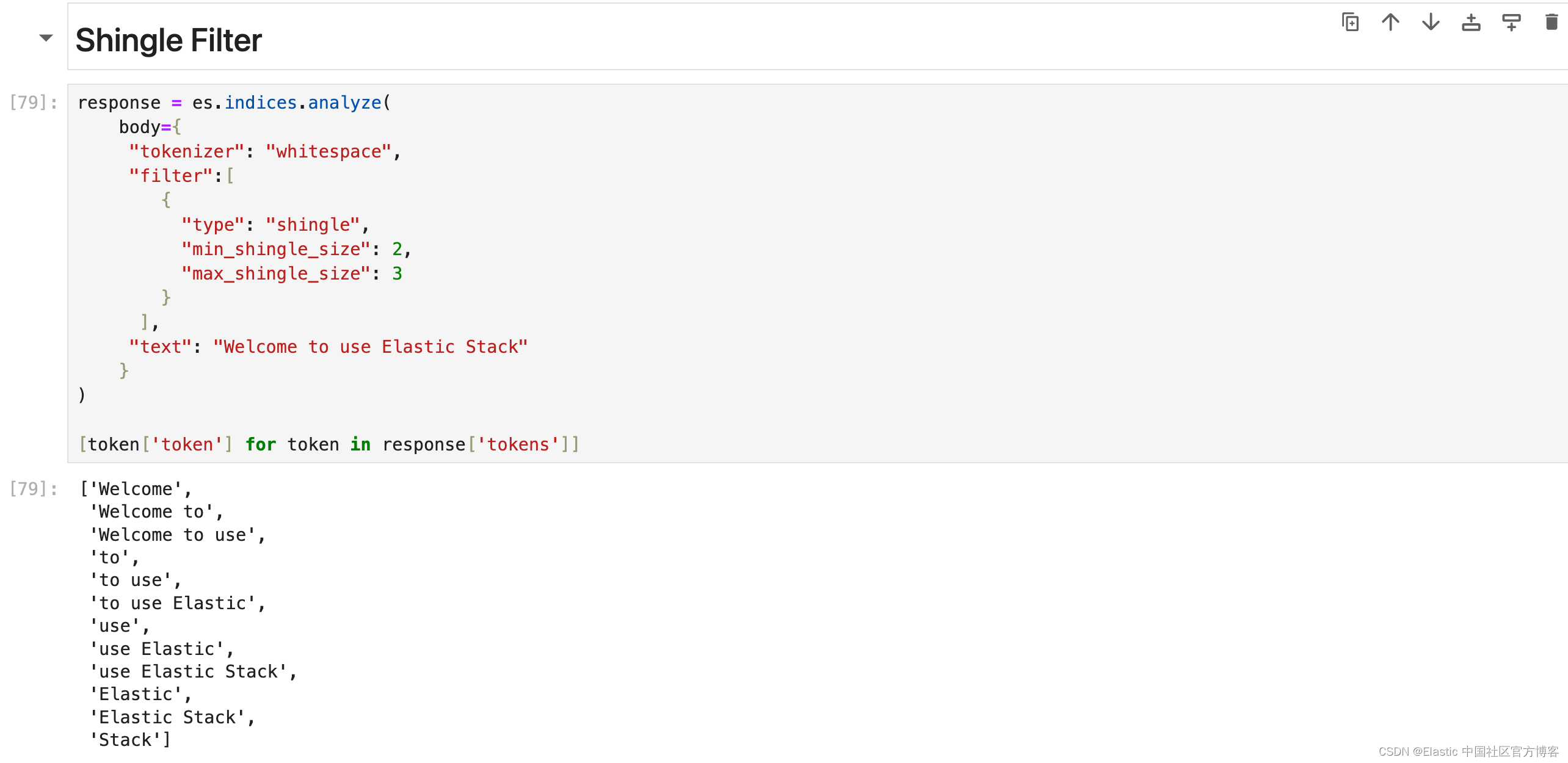
Creating a custom analyzer
以下是文本,下面是所需的输出:
text = "The 2 QUICK Brown-Foxes, jumps_over the lazy-dog's bone."# Desired output
['2', 'quick', 'brown', 'fox', 'jump', 'over', 'lazy', 'dog', 'bone']
分析器应完成的事情列表:
- 删除所有符号 - 连字符和下划线。
- 删除停用词。
- 将所有文本小写。
- 删除撇号。
- 词干。
response = es.indices.analyze(body={"char_filter": [{"type": "mapping","mappings": ["- => ' '", # replacing hyphens with blank space"_ => ' '", # replacing underscore with blank space]}],"tokenizer": "standard","filter": ["apostrophe", "lowercase", "stop", "porter_stem"],"text": "The 2 QUICK Brown-Foxes, jumps_over the lazy-dog's bone."}
)# Extract and print tokens
tokens = [token['token'] for token in response['tokens']]
tokens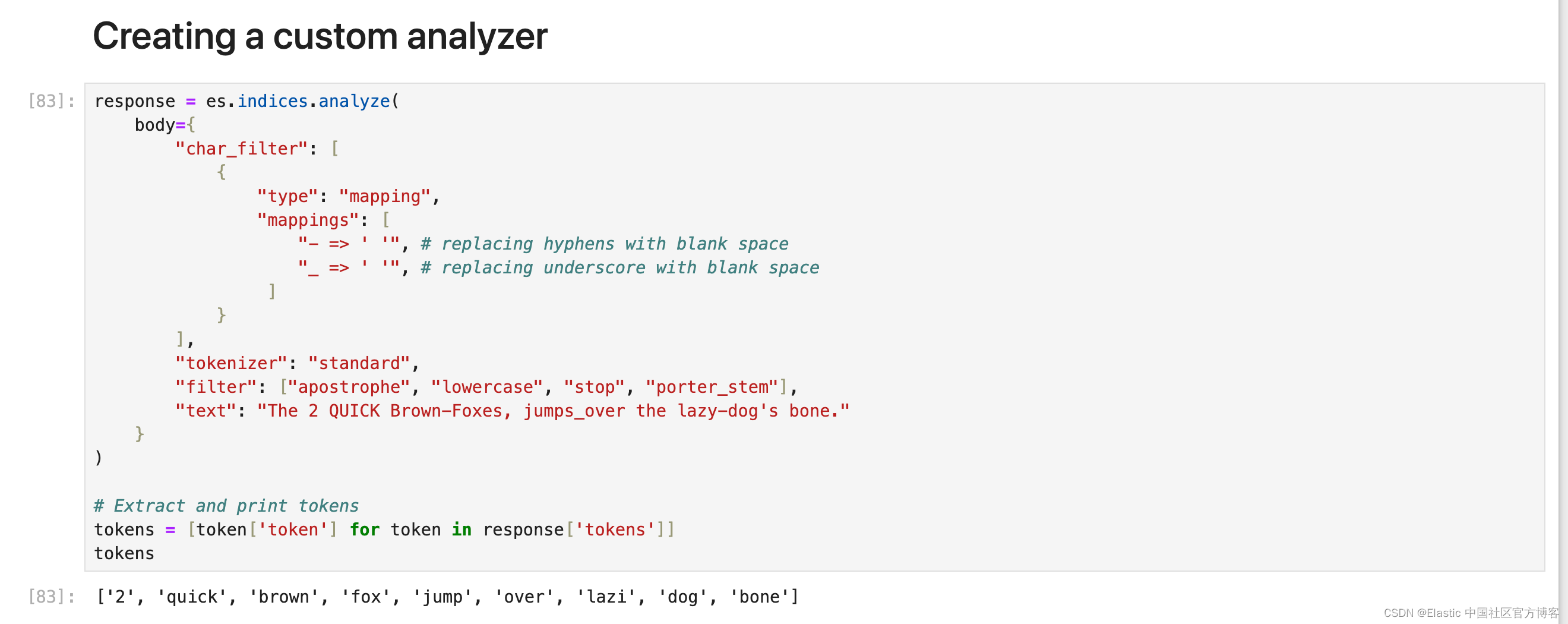
现在需要注意的一件事是顺序,无论你在内部处理时给 Elasticsearch 什么顺序,总是使用相同的顺序 char_filter > tokenizer > token_filter 但 char_filter 或 token filter 块内的顺序会有所不同。
将自定义分析器添加到索引
为了避免复杂化,最好创建一个新的索引并根据你的要求设置分析器。 以下是设置分析器的方法。
settings = {"settings": {"analysis": {"analyzer": {"my_custom_analyzer": {"type": "custom","char_filter": {"type": "mapping","mappings": ["- => ' '","_ => ' '",]},"tokenizer": "standard","filter": ["lowercase", "apostrophe", "stop", "porter_stem"],}}},"index": {"number_of_shards": 1,"number_of_replicas": 0,"routing.allocation.include._tier_preference": "data_hot"},},"mappings": {"properties": {"title": {"type":"text", "analyzer":"my_custom_analyzer"},"brand": {"type": "text", "analyzer":"my_custom_analyzer", "fields": {"raw": {"type": "keyword"}}},"updated_time": {"type": "date"}}`}
}response = es.indices.create(index="trial_index", body=index_settings)
你可以在地址找到所有的代码:https://github.com/liu-xiao-guo/analyzers-python
相关文章:
Elasticsearch:构建自定义分析器指南
在本博客中,我们将介绍不同的内置字符过滤器、分词器和分词过滤器,以及如何创建适合我们需求的自定义分析器。更多关于分析器的知识,请详细阅读文章: 开始使用 Elasticsearch (3) Elasticsearch: analyzer…...
Git系列---远程操作
📙 作者简介 :RO-BERRY 📗 学习方向:致力于C、C、数据结构、TCP/IP、数据库等等一系列知识 📒 日后方向 : 偏向于CPP开发以及大数据方向,欢迎各位关注,谢谢各位的支持 引用 1.理解分布式版本控制…...
kafka客户端生产者消费者kafka可视化工具(可生产和消费消息)
点击下载《kafka客户端生产者消费者kafka可视化工具(可生产和消费消息)》 1. 前言 因在工作中经常有用到kafka做消息的收发,每次调试过程中,经常需要查看接收的消息内容以及人为发送消息,从网上搜寻了一下࿰…...
【从0上手Cornerstone3D】如何使用CornerstoneTools中的工具之工具介绍
简单介绍一下在Cornerstone中什么是工具,工具是一个未实例化的类,它至少实现了BaseTool接口。 如果我们想要在我们的代码中使用一个工具,则必须实现以下两个步骤: 使用Cornerstone的顶层addTool函数添加未实例化的工具 将工具添…...
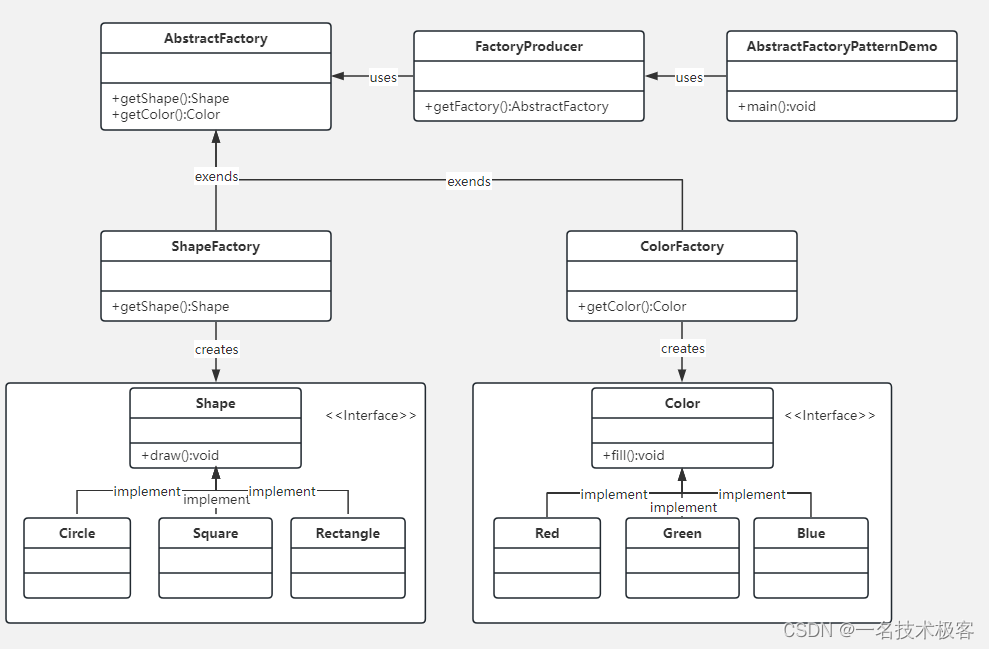
02-Java抽象工厂模式 ( Abstract Factory Pattern )
抽象工厂模式(Abstract Factory Pattern)是围绕一个超级工厂创建其他工厂 该超级工厂又称为其他工厂的工厂 在抽象工厂模式中,接口是负责创建一个相关对象的工厂,不需要显式指定它们的类 每个生成的工厂都能按照工厂模式提供对象 …...
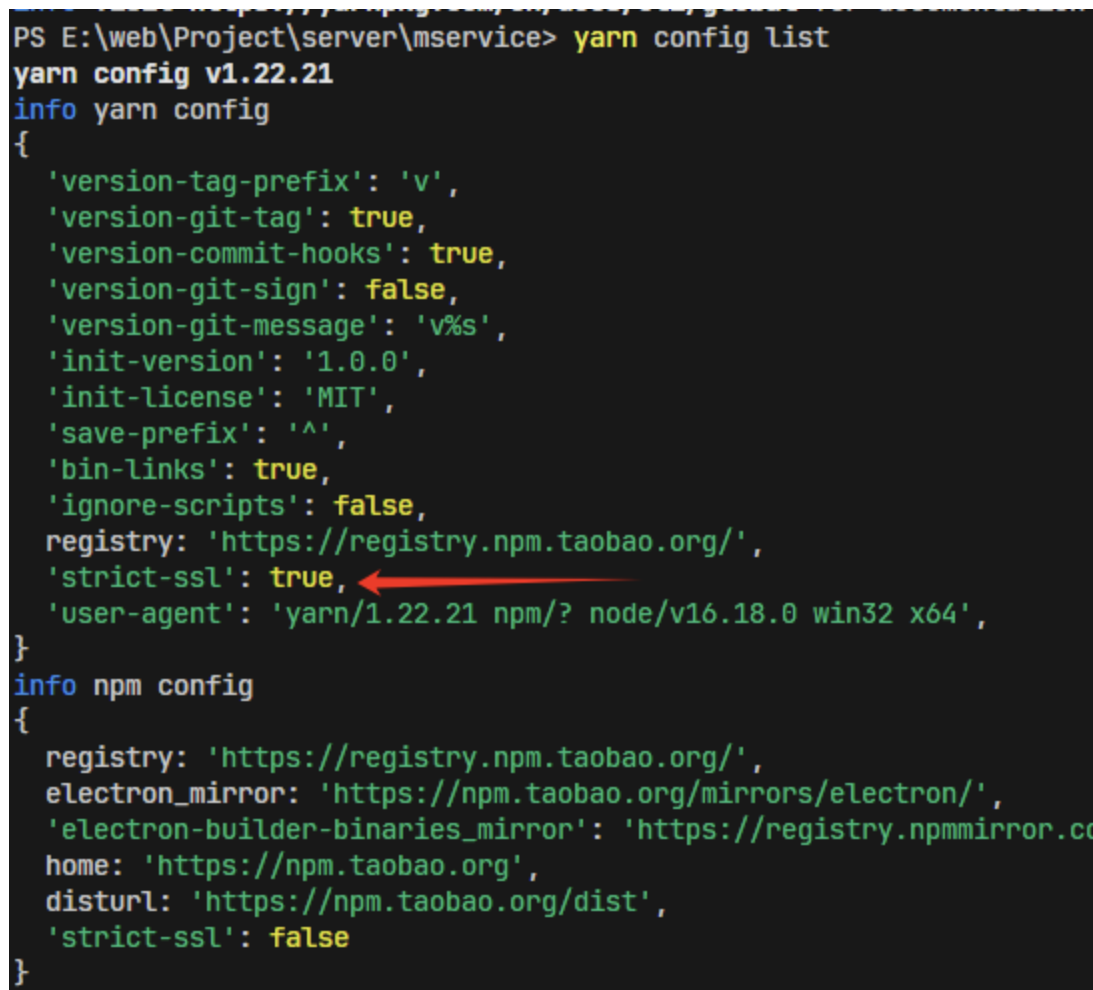
yarn/npm certificate has expired
目录 报错 原因:HTTPS 证书验证失败 方法 a.检查网络安全软件:可能会拦截或修改 HTTPS 流量 b.strict-ssl:false关闭验证【临时方法】 报错 info No lockfile found. [1/4] Resolving packages... error Error: certificate has expired at TLS…...

第十三篇【传奇开心果系列】Python的OpenCV库技术点案例示例:光流估计
传奇开心果短博文系列 系列短博文目录Python的OpenCV库技术点案例示例:光流估计短博文目录前言一、光流估计介绍二、Lucas-Kanade光流介绍和示例代码三、Horn-Schunck光流介绍和示例代码四、cv::calcOpticalFlowPyrLK()函数实现光流估计介绍和示例代码五、光流估计用于运动分析…...

iOS面试题
iOS面试题 1. 什么是iOS中的Autolayout? Autolayout是iOS开发中用于实现自适应界面布局的技术。它基于约束(Constraints)来描述视图之间的关系,以便在不同的设备和屏幕尺寸上正确地布局和调整视图。 Autolayout使用一组规则和优…...
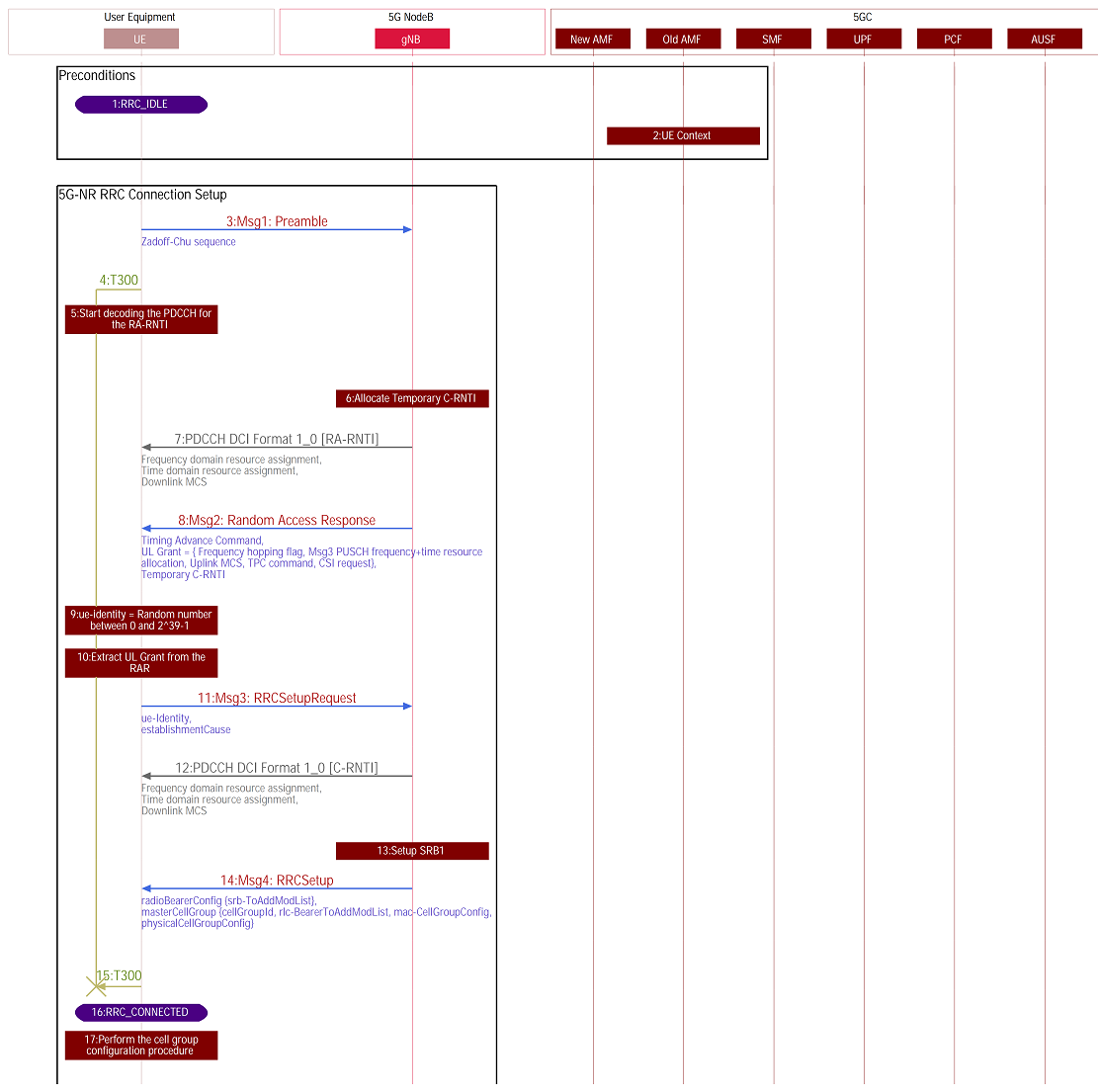
【5G SA流程】5G SA下终端完整注册流程介绍
博主未授权任何人或组织机构转载博主任何原创文章,感谢各位对原创的支持! 博主链接 本人就职于国际知名终端厂商,负责modem芯片研发。 在5G早期负责终端数据业务层、核心网相关的开发工作,目前牵头6G算力网络技术标准研究。 博客内容主要围绕: 5G/6G协议讲解 …...
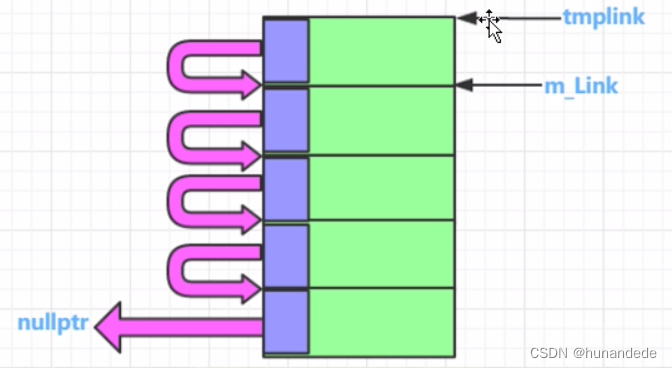
101 C++内存高级话题 内存池概念,代码实现和详细分析
零 为什么要用内存池? 从前面的知识我们知道,当new 或者 malloc 的时候,假设您想要malloc 10个字节, char * pchar new char[10]; char *pchar1 malloc(10); 实际上编译器为了 记录和管理这些数据,做了不少事情&…...

算计是一种混合了感性和理性的非纯粹逻辑系统
算计是人类带有动因的感性与理性混合超(计)算,是还未形成逻辑状态的非逻辑系统。算计是指人类在进行决策、推理、思考等活动时,融合了感性和理性的思维过程。它是一种超越纯粹逻辑思维的综合性思维方式。感性是指个体基于感觉、直…...

Python 处理小样本数据的文档分类问题
在处理小样本数据的文档分类问题时,可以尝试使用迁移学习或者基于预训练模型的方法,如BERT、GPT等。然而,直接在这里编写一个完整的深度学习文档分类代码超出了这个平台的限制,但我可以为你提供一个基本的思路和简单示例ÿ…...
centos7安装oracle
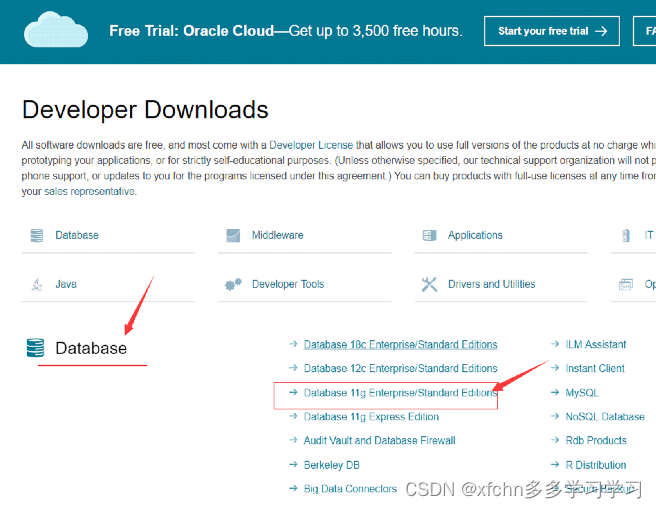
1 安装虚拟机 设置4G内存,硬盘40G 2 配置网络环境 2.1配置主机名 # vi /etc/hostname 修改为 oracle2.2 配置IP地址 # vi /etc/sysconfig/network-scripts/ifcfg-ens33 修改 BOOTPROTO"static" ONBOOT"yes" IPADDR192.168.109.110 NETMAS…...
Web html
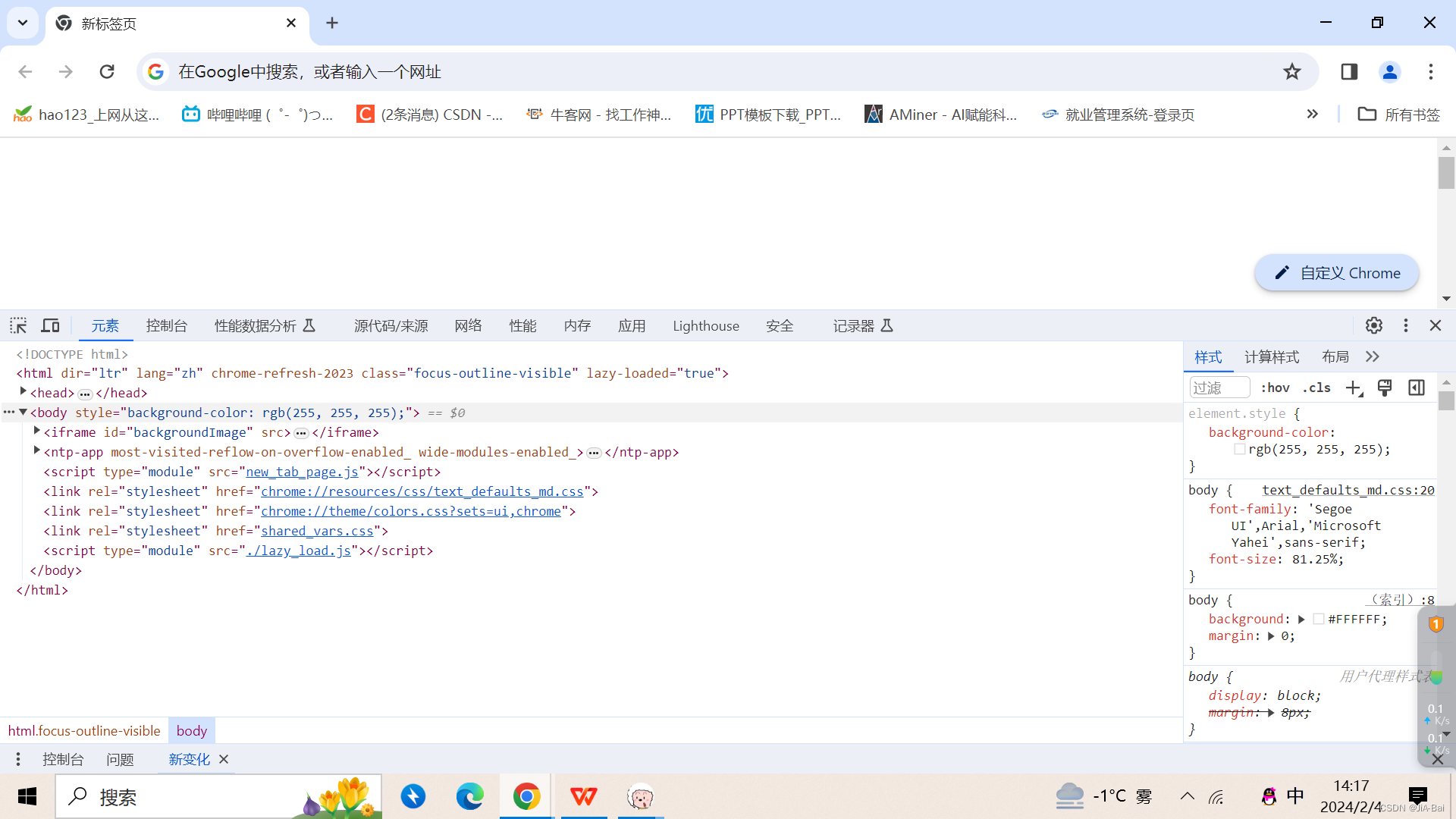
目录 1 前言2 HTML2.1 元素(Element)2.1.1 块级元素和内联(行级)元素2.1.2 空元素 2.2 html页面的文档结构2.3 常见标签使用2.3.1 注释2.3.2 标题2.3.3 段落2.3.4 列表2.3.5 超链接2.3.6 图片2.3.7 内联(行级)标签2.3.8 换行 2.4 属性2.4.1 布尔属性 2.5 实体引用2.6 空格2.7 D…...

Go语言学习踩坑记
go: go.mod file not found in current directory or any parent directory; see go help mod 解决 资源下载: 序号文件地址1 1、Go IDE liteidex38.3-win64-qt5.15.2.zip Release x38.3 visualfc/liteide GitHub2 2、Go语言的编译环境 go1.21.6.windows-amd64.m…...

Vue-easy-tree封装及使用
1.使用及安装 下载依赖 npm install wchbrad/vue-easy-tree引入俩种方案 1.在main.js中引入 import VueEasyTree from "wchbrad/vue-easy-tree"; import "wchbrad/vue-easy-tree/src/assets/index.scss" Vue.use(VueEasyTree)2.当前页面引入 import VueEa…...
opencv中使用cuda加速图像处理
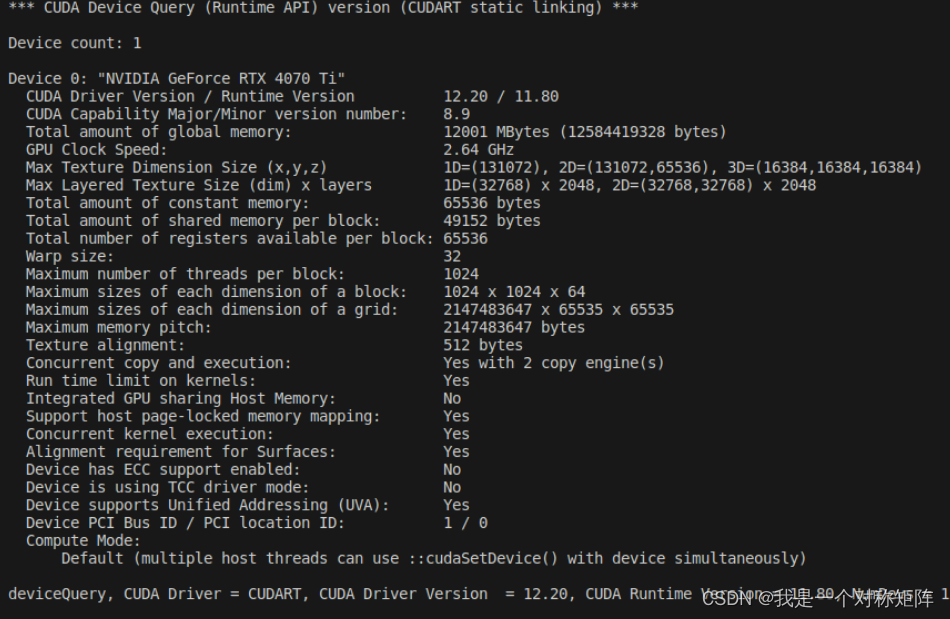
opencv大多数只使用到了cpu的版本,实际上对于复杂的图像处理过程用cuda(特别是高分辨率的图像)可能会有加速效果。是否需要使用cuda需要思考: 1、opencv的cuda库是否提供了想要的算子。在CUDA-accelerated Computer Vision你可以…...

FPGA高端项目:IMX327 MIPI 视频解码 USB3.0 UVC 输出,提供FPGA开发板+2套工程源码+技术支持
目录 1、前言免责声明 2、相关方案推荐我这里已有的 MIPI 编解码方案 3、本 MIPI CSI-RX IP 介绍4、个人 FPGA高端图像处理开发板简介5、详细设计方案设计原理框图IMX327 及其配置MIPI CSI RX图像 ISP 处理图像缓存UVC 时序USB3.0输出架构 6、vivado工程详解FPGA逻辑设计 7、工…...

深入探索 MySQL 8 中的 JSON 类型:功能与应用
随着 NoSQL 数据库的兴起,JSON 作为一种轻量级的数据交换格式受到了广泛的关注。为了满足现代应用程序的需求,MySQL 8引入了原生的 JSON 数据类型,提供了一系列强大的 JSON 函数来处理和查询 JSON 数据。本文将深入探讨 MySQL 8 中JSON 类型的…...
学习Spring的第十三天
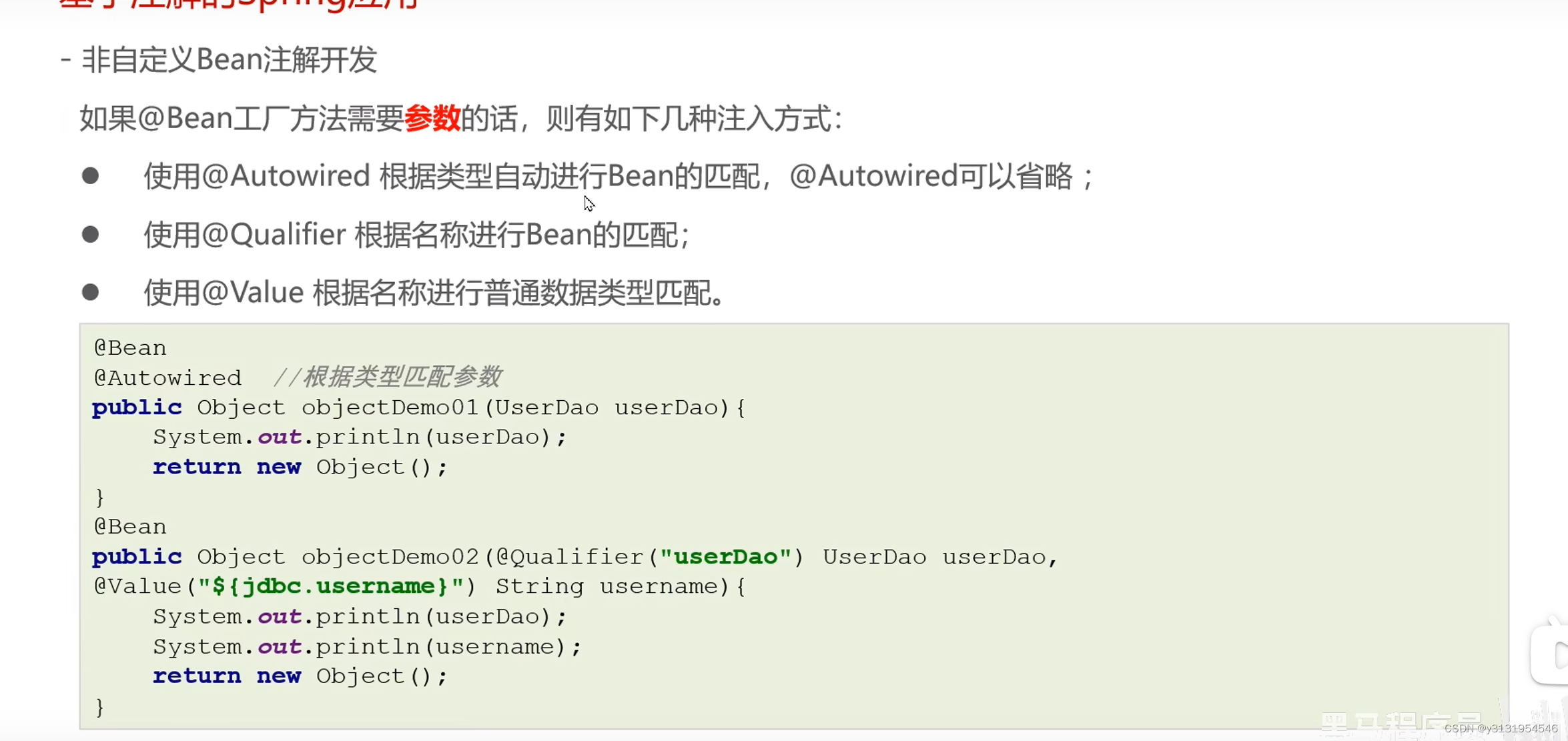
非自定义bean注解开发 设置非自定义bean : 用bean去修饰一个方法 , 最后去返回 , spring就把返回的这个对象,放到Spring容器 一 :名字 : 如果bean配置了参数 , 名字就是参数名 , 如果没有 , 就是方法名字 二 : 如果方法产生对象时 , 需要注入数据 , 在方法参数设置即可 , …...

OpenClaw学术研究助手:Qwen3-14b_int4_awq自动生成文献综述
OpenClaw学术研究助手:Qwen3-14b_int4_awq自动生成文献综述 1. 为什么需要AI辅助文献调研 作为一名计算机视觉方向的研究生,我每周需要阅读数十篇论文来跟踪领域进展。传统文献调研方式存在几个痛点:首先,手动下载和整理PDF文件…...

从 AI 助手到 ADT 自动化桥梁:全面解析 Vibing Steampunk 的定位、能力边界与典型使用场合
Vibing Steampunk 这个 GitHub Repository,如果只看名字,很容易让人误以为它只是一个面向 Steampunk,也就是 SAP BTP ABAP environment 的小工具。可一旦把 README、架构文档、CLI 指南和相关实现说明读完,你会发现它的真实定位要大得多:它并不是一个普通的 ABAP 示例项目…...

ToClaw全方位介绍:你的第一只“龙虾”AI助手,一分钟轻松领养!
ToClaw全方位介绍:你的第一只“龙虾”AI助手,一分钟轻松领养! 一、先来聊聊这只“龙虾”的故事 2026年开年,如果问中文互联网最火爆的技术热词是什么,那一定非「OpenClaw」莫属。这个被大家亲切称为“龙虾”的开源项目…...
推出磁感应交互方案)
乐鑫联合 Bosch Sensortec(博世传感器)推出磁感应交互方案
在 AI 玩具与智能硬件的设计中,如何在有限的空间与成本条件下,实现稳定且顺畅的配件交互,正成为产品创新的重要课题。 乐鑫信息科技 (688018.SH) 携手 Bosch Sensortec(博世传感器)推出了一种更轻量、更可靠的解决思路…...

程序员因简单自动化放弃Python转C,底层逻辑令人震撼
一、一个“简单自动化”,逼得程序员放弃Python转C 拥有一个共识的程序员是很多的,那就是Python、JavaScript上手速度快,还省力,进行写自动化工具完全就是“降维打击”,又有谁会花费力气去写晦涩到难以理解的C语言呢&am…...
)
干货 | SpringBoot 缓存实战:击穿、穿透、雪崩 通俗解决方案(附可落地代码)
一、前言做 Java 后端开发,只要用了 Redis 缓存,缓存击穿、缓存穿透、缓存雪崩这三个坑绕不开。面试必问、线上必踩。本文不讲晦涩底层源码,用大白话讲原理 SpringBoot 可直接复制的实战代码,新手能看懂,项目能直接上…...

STM32开发方式对比与HAL库深度解析
1. STM32开发方式概述对于刚接触STM32的开发者来说,选择合适的开发方式是首要问题。目前主要有三种开发方式:直接操作寄存器、使用标准库(Standard Peripheral Library)和使用HAL库(Hardware Abstraction Layer&#x…...

ESP8266原生HomeKit接入:零桥接HAP协议实现
1. 项目概述HomeKit-ESP8266 是一个面向 ESP8266 Arduino Core 的原生 Apple HomeKit 配件实现库。它不依赖任何桥接设备(如 HomePod、Apple TV 或 Mac),可直接作为独立的 HomeKit 配件接入 iOS/macOS 的“家庭”App。该库并非基于 Apple 官方…...

如何从视频中高效提取幻灯片:智能工具应用指南
如何从视频中高效提取幻灯片:智能工具应用指南 【免费下载链接】extract-video-ppt extract the ppt in the video 项目地址: https://gitcode.com/gh_mirrors/ex/extract-video-ppt 你是否曾遇到这样的困扰:参加线上会议后想整理演示文稿&#x…...

类型擦除与部分异步编程: 消除差别,统一使用
1. std::function:可调用对象的“统一调用接口”std::function 是针对可调用对象的类型擦除工具,其底层实现核心是「抽象基类 模板子类」的多态模式,也是运行时类型擦除的典型应用:抽象基类:定义了与“函数签名”完全…...