
Android 自定义BaseActivity
直接上代码:
BaseActivity代码:
package com.example.custom.activity;import android.annotation.SuppressLint;
import android.app.Activity;
import android.content.pm.ActivityInfo;
import android.os.Bundle;
import android.os.Looper;
import android.view.View;
import android.view.inputmethod.InputMethodManager;
import android.widget.Toast;
import androidx.annotation.Nullable;
import com.example.custom.tool.TopBar;
/*** 基本Activity* */
public abstract class BaseActivity extends AppCompatActivity{// 导航栏private TopBar topBar;//封装Toast对象private static Toast showToast;@Overrideprotected void onCreate(@Nullable Bundle savedInstanceState) {super.onCreate(savedInstanceState);// 数据setData(savedInstanceState);// 布局setContentView(setContentLayout());// 控件setControls();}/*** 设置数据* */public abstract void setData(Bundle savedInstanceState);/*** 绑定布局* */public abstract int setContentLayout();/*** 初始化组件* */public abstract void setControls();/*** 顶部导航栏初始化* */public void initTopBar(Activity activity,String title){topBar = new TopBar(activity,title);// 左侧点击事件topBar.setLeftClick(topLeftClick);// 右侧点击事件topBar.setRightClick(topRightClick);}/*** 导航栏左侧按钮点击事件* */View.OnClickListener topLeftClick = new View.OnClickListener() {@Overridepublic void onClick(View view) {showToast("导航栏左侧按钮被点击");}};/*** 导航栏右侧按钮点击事件* */View.OnClickListener topRightClick = new View.OnClickListener() {@Overridepublic void onClick(View view) {showToast("导航栏右侧按钮被点击");}};/*** 显示提示  toast** @param msg 提示信息*/@SuppressLint("ShowToast")public void showToast(String msg) {try {if (null == showToast) {showToast = Toast.makeText(this, msg, Toast.LENGTH_SHORT);} else {showToast.setText(msg);}runOnUiThread(new Runnable() {@Overridepublic void run() {showToast.show();}});} catch (Exception e) {e.printStackTrace();//解决在子线程中调用Toast的异常情况处理Looper.prepare();Toast.makeText(this, msg, Toast.LENGTH_SHORT).show();Looper.loop();}}/*** 隐藏软键盘*/public void hideSoftInput() {InputMethodManager imm = (InputMethodManager) getSystemService(INPUT_METHOD_SERVICE);if (getCurrentFocus() != null && null != imm) {imm.hideSoftInputFromWindow(getCurrentFocus().getWindowToken(), 0);}}/*** 显示软键盘*/public void showSoftInput() {InputMethodManager imm = (InputMethodManager) getSystemService(INPUT_METHOD_SERVICE);if (getCurrentFocus() != null && null != imm) {imm.showSoftInputFromInputMethod(getCurrentFocus().getWindowToken(), 0);}}/*** 设置屏幕横屏/竖屏* @param  isPortrait (true) 竖屏* @param  isPortrait (false) 横屏*/public void setScreenPortrait(boolean isPortrait) {//设置屏幕是否可旋转if (isPortrait) {// 强制竖屏setRequestedOrientation(ActivityInfo.SCREEN_ORIENTATION_PORTRAIT);} else {// 强制横屏setRequestedOrientation(ActivityInfo.SCREEN_ORIENTATION_LANDSCAPE);}}}
TopBar代码:
package com.chy.ydy.custom;import android.app.Activity;
import android.content.Context;
import android.text.TextWatcher;
import android.view.View;
import android.view.ViewGroup;
import android.view.inputmethod.InputMethodManager;
import android.widget.EditText;
import android.widget.ImageView;
import android.widget.LinearLayout;
import android.widget.TextView;import com.chy.ydy.R;public class TopBar {private Activity activity;private View topView;// topBarprivate LinearLayout tobBarContainer;// tapBar容器private ImageView topLeftImage;// 左侧图标private TextView topTitle;// 标题private ImageView topRightImage;// 右侧图标// searchprivate LinearLayout tobSearchContainer;// searchBar容器private ImageView searchBackImg;// 搜索返回private EditText searchET;// 搜索输入框private TextView searchTV;// 搜索按钮/*** 构造函数* */public TopBar(Activity activity){this.activity = activity;topView = activity.findViewById(R.id.topBarLL);// topBartobBarContainer = topView.findViewById(R.id.tobBarContainer);topLeftImage = topView.findViewById(R.id.topBackImg);// 返回按钮topTitle = topView.findViewById(R.id.topTitle);// 标题topRightImage = topView.findViewById(R.id.topSearchImg);// 搜索// searchBartobSearchContainer = topView.findViewById(R.id.tobSearchContainer);searchBackImg = topView.findViewById(R.id.searchBackImg);searchET = topView.findViewById(R.id.searchET);searchTV = topView.findViewById(R.id.searchTV);}public TopBar(Activity activity,String title){this.activity = activity;topView = activity.findViewById(R.id.topBarLL);// topBartobBarContainer = topView.findViewById(R.id.tobBarContainer);topLeftImage = topView.findViewById(R.id.topBackImg);// 左侧图标topTitle = topView.findViewById(R.id.topTitle);// 标题topTitle.setText(title);// 设置默认值topRightImage = topView.findViewById(R.id.topSearchImg);// 右侧图标// searchBartobSearchContainer = topView.findViewById(R.id.tobSearchContainer);searchBackImg = topView.findViewById(R.id.searchBackImg);searchET = topView.findViewById(R.id.searchET);searchTV = topView.findViewById(R.id.searchTV);}/*** 设置标题* */public TopBar setTitle(String title){if (title.length() > 0){topTitle.setText(title);}return this;}/*** 设置左侧图标* */public TopBar setLeftIco(int resId){topLeftImage.setVisibility(resId > 0 ? View.VISIBLE : View.GONE);topLeftImage.setImageResource(resId);return this;}/*** 左侧图标点击事件* */public TopBar setLeftClick(View.OnClickListener leftClick){if (topLeftImage.getVisibility() == View.VISIBLE){topLeftImage.setOnClickListener(leftClick);}return this;}/*** 设置右侧图标控件隐藏* */public TopBar setRightHidden(){if (topRightImage.getVisibility() == View.VISIBLE){topRightImage.setVisibility(View.INVISIBLE);}return this;}/*** 设置右侧图标* */public TopBar setRightIcon(int resId){topRightImage.setVisibility(resId > 0 ? View.VISIBLE : View.GONE);topRightImage.setImageResource(resId);return this;}/*** 右侧图标点击事件* */public TopBar setRightClick(View.OnClickListener rightClick){if (topRightImage.getVisibility() == View.VISIBLE){topRightImage.setOnClickListener(rightClick);}return this;}/*** 设置左侧搜索图标点击事件* */public TopBar setSearchLeftClick(View.OnClickListener leftSearchClick){if (searchBackImg.getVisibility() == View.VISIBLE){searchBackImg.setOnClickListener(leftSearchClick);}return this;}/*** 设置右侧侧搜索图标点击事件* */public TopBar setSearchRightClick(View.OnClickListener rightSearchClick){if (searchTV.getVisibility() == View.VISIBLE){searchTV.setOnClickListener(rightSearchClick);}return this;}/*** 隐藏顶部栏显示搜索栏* */public TopBar hiddenTopBar(){searchET.setText("");//清空内容// topBar隐藏tobBarContainer.setVisibility(View.GONE);// 搜索栏显示tobSearchContainer.setVisibility(View.VISIBLE);return this;}/*** 显示顶部栏隐藏搜索栏* */public TopBar hiddenSearch(){// topBar隐藏tobBarContainer.setVisibility(View.VISIBLE);// 搜索栏显示tobSearchContainer.setVisibility(View.GONE);// 内容清空searchET.setText("");//收起软键盘InputMethodManager imm = (InputMethodManager) activity.getSystemService(Context.INPUT_METHOD_SERVICE);imm.hideSoftInputFromWindow(searchET.getWindowToken(), 0);return this;}/*** 搜索框;软键盘监听事件* */public TopBar setEditorActionListener (TextView.OnEditorActionListener actionListener){if (searchET.getVisibility() == View.VISIBLE){searchET.setOnEditorActionListener(actionListener);}return this;}/*** 搜索框;内容监听* */public TopBar setTextChangedListener(TextWatcher textWatcher){if (searchET.getVisibility() == View.VISIBLE){searchET.addTextChangedListener(textWatcher);}return this;}}
tap_bar.xml(布局):
<?xml version="1.0" encoding="utf-8"?>
<LinearLayout xmlns:android="http://schemas.android.com/apk/res/android"android:layout_width="match_parent"android:layout_height="64dp"android:layout_alignParentTop="true"android:background="@color/teal_700"android:id="@+id/topBarLL"android:orientation="horizontal"><!--顶部bar--><LinearLayoutandroid:id="@+id/tobBarContainer"android:layout_width="match_parent"android:layout_height="match_parent"android:visibility="visible"android:orientation="horizontal"><ImageViewandroid:id="@+id/topLeftImg"android:layout_width="match_parent"android:layout_height="match_parent"android:gravity="center"android:layout_weight="5"android:src="@mipmap/ic_launcher"android:padding="10dp"/><TextViewandroid:id="@+id/topTitle"android:layout_width="match_parent"android:layout_height="match_parent"android:layout_weight="1"android:gravity="center"android:textStyle="bold"android:textSize="24sp"android:text="标题"android:textColor="@color/white"/><ImageViewandroid:id="@+id/topRightImg"android:layout_width="match_parent"android:layout_height="match_parent"android:gravity="center"android:layout_weight="5"android:src="@mipmap/ic_launcher"android:padding="10dp"/></LinearLayout></LinearLayout>
使用(MainActivity布局---继承BaseActivity):
<?xml version="1.0" encoding="utf-8"?>
<RelativeLayout xmlns:android="http://schemas.android.com/apk/res/android"android:layout_width="match_parent"android:layout_height="match_parent"><!--引入顶部标题栏--><includelayout="@layout/top_bar"/>**************</RelativeLayout>
相关文章:

Android 自定义BaseActivity
直接上代码: BaseActivity代码: package com.example.custom.activity;import android.annotation.SuppressLint; import android.app.Activity; import android.content.pm.ActivityInfo; import android.os.Bundle; import android.os.Looper; impor…...

基于鲲鹏服务器的LNMP配置
基于鲲鹏服务器的LNMP配置 系统 Centos8 # cat /etc/redhat-release CentOS Linux release 8.0.1905 (Core) 卸载已经存在的旧版本的安装包 # rpm -qa | grep php #查看已经安装的PHP旧版本# rpm -qa | grep php | xargs rpm -e #卸载已经安装的旧版,如果提示有…...
 练习题)
MIT-Missing Semester_Topic 6:Version Control (Git) 练习题
文章目录 练习一练习二练习三练习四练习五练习六练习七 练习一 若还没有 Git 的相关经验,阅读 Pro Git 的前几章或诸如 Learn Git Branching 的相关教程,并在学习的同时从 Git 的数据模型(data model)的角度思考各 Git 命令。 老师…...

OpenHarmony轻量级内核-LiteOS-M
OpenHarmony轻量级内核 思维导图 https://download.csdn.net/download/lanlingxueyu/88816723 概述 内核是一人操作系统的运算核心,决定着系统的性能和稳定性。它是基于硬件的第一层软件扩充,提供操作系统的基本功能,是操作系统工作的基础。它负责管理系统的进程、内存、…...

TCP 传输控制协议——详细
目录 1 TCP 1.1 TCP 最主要的特点 1.2 TCP 的连接 TCP 连接,IP 地址,套接字 1.3 可靠传输的工作原理 1.3.1 停止等待协议 (1)无差错情况 (2)出现差错 (3)确认丢失和确认迟到…...
ArcGIS学习(六)地理数据库
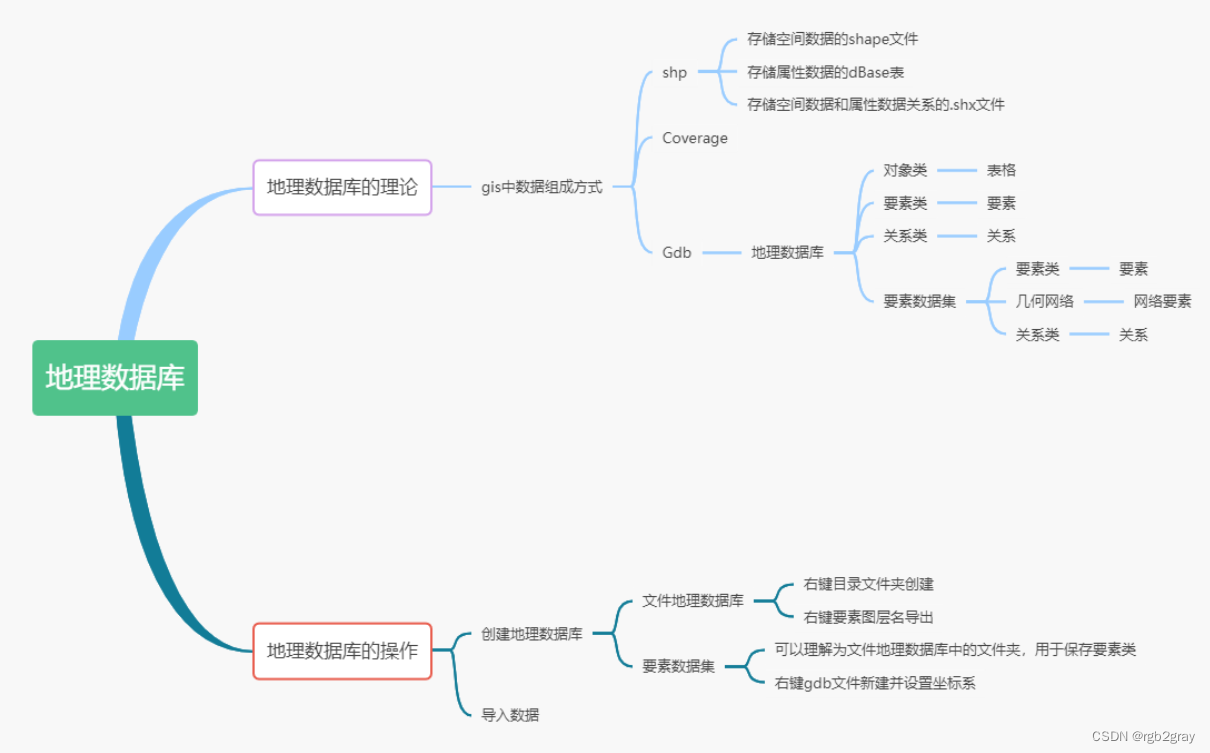
ArcGIS学习(六)地理数据库 上个任务我们讲了一个非常重要的知识点一一坐标系。这个任务我们带来另外一个很重要的知识点一一地理数据库。 地理数据库的内容相比于坐标系简单很多! 首先,先让我们来学习下地理数据库的理论。 ArcGIS 中的地理数据库(Geodatabase)是一个用…...
——哈希算法)
保研机试算法训练个人记录笔记(四)——哈希算法
目录 两数之和 字母异位词分组 最长连续序列 力扣热题100——哈希算法 两数之和 给定一个整数数组 nums 和一个整数目标值 target,请你在该数组中找出 和为目标值 target 的那 两个 整数,并返回它们的数组下标。 你可以假设每种输入只会对应一个答…...
 打造AI编程助手 Code Copilot)
ChatGPT实战100例 - (14) 打造AI编程助手 Code Copilot
文章目录 ChatGPT实战100例 - (14) 打造AI编程助手 Code Copilot一、Code Copilot AI编程助手二、制作代码生成器2.1 定义生成器框架2.2 从现有代码提取代码模板三、进行代码优化ChatGPT实战100例 - (14) 打造AI编程助手 Code Copilot 一、Code Copilot AI编程助手 Code Copi…...
表单标记(html)
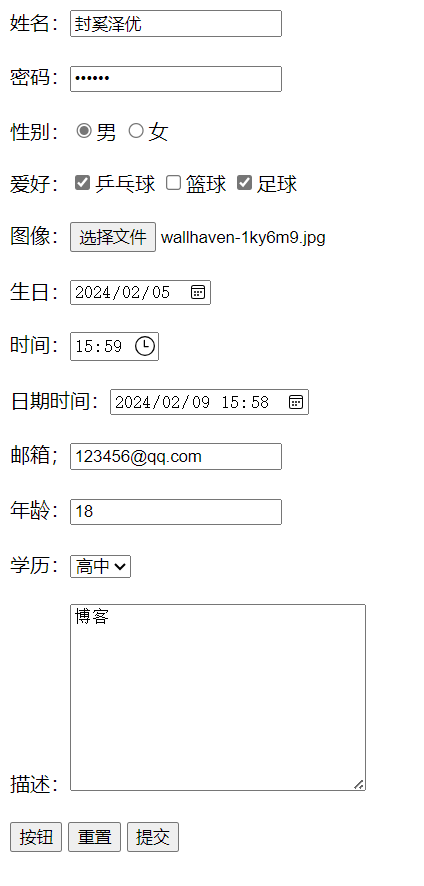
前言 发现input的type属性还是有挺多的,这里把一些常用的总结一下。 HTML 输入类型 (w3school.com.cn)https://www.w3school.com.cn/html/html_form_input_types.asp text-文本 文本输入,如果文字太长,超出的部分就不会显示。 定义供文本输入的单行…...
Linux文件和目录管理
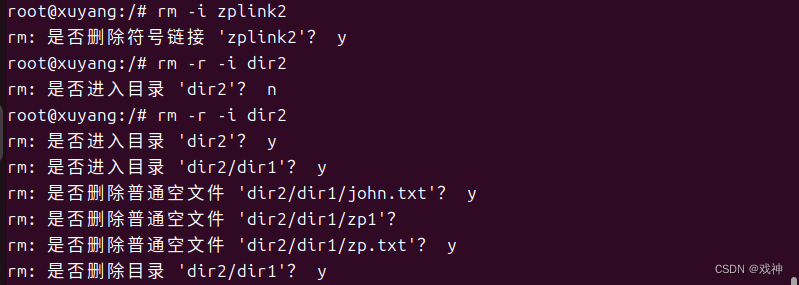
目录基础 Linux操作系统以目录的方式来组织和管理系统中的所有文件。所谓的目录,就是将所有文件的说明信息采用树状结构组织起来。每个目录节点之下会有文件和子目录。 所有一切都从 ‘根’ 开始,用 ‘/’ 代表, 并且延伸到子目录。 bin:B…...

【go】gorm\xorm\ent事务处理
文章目录 1 gorm1.1 开启事务1.2 执行操作1.3 提交或回滚 2 xorm2.1 开启事务2.2 执行操作2.3 提交或回滚 3 ent3.1 开启事务3.2 执行操作3.3 提交或回滚 前言:本文介绍golang三种orm框架对数据库事务的操作 1 gorm Begin开启事务 tx *gorm.DB 1.1 开启事务 tx :…...

【数据分享】1929-2023年全球站点的逐月平均风速(Shp\Excel\免费获取)
气象数据是在各项研究中都经常使用的数据,气象指标包括气温、风速、降水、能见度等指标,说到气象数据,最详细的气象数据是具体到气象监测站点的数据! 有关气象指标的监测站点数据,之前我们分享过1929-2023年全球气象站…...

IP地址详解
IP地址是互联网协议(Internet Protocol)用于标识并定位网络中主机(如计算机、服务器、路由器等)的一串数字。它是一个32位的二进制数,通常以四个数字(每个数字范围为0-255)的形式显示࿰…...
Python爬虫http基本原理#2
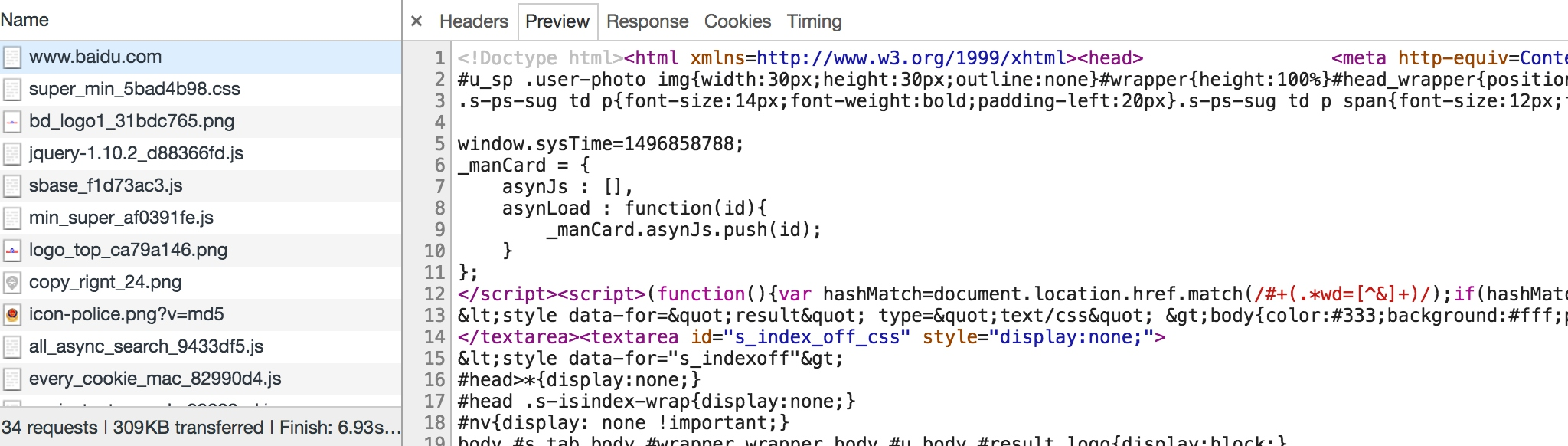
Python爬虫逆向系列(更新中):http://t.csdnimg.cn/5gvI3 HTTP 基本原理 在本节中,我们会详细了解 HTTP 的基本原理,了解在浏览器中敲入 URL 到获取网页内容之间发生了什么。了解了这些内容,有助于我们进一…...
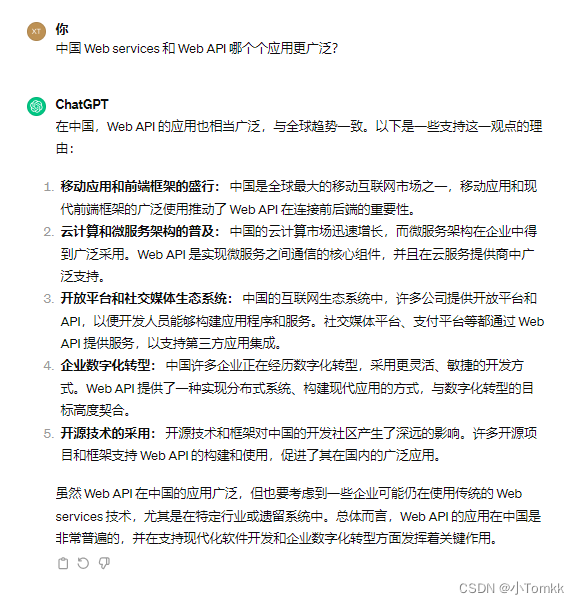
Web Services 服务 是不是过时了?创建 Web Services 服务实例
Web Services 是不是过时了? 今天是兔年最后一天,先给大家拜个早年 。 昨天上午视频面试一家公司需要开发Web Services 服务,这个也没有什么,但还需要用 VB.net 开发。这个是多古老的语言了,让我想起来了 10年 前 写 …...

redis单线程还快的原因
1. 内存存储和高效数据结构: 内存存储: Redis将数据存储在内存中,因此可以实现非常高的读写速度,而无需频繁的磁盘I/O操作。 高效数据结构: Redis内置了丰富且高效的数据结构,如字符串、哈希表、列表、集合…...
【flutter】报错 cmdline-tools component is missing
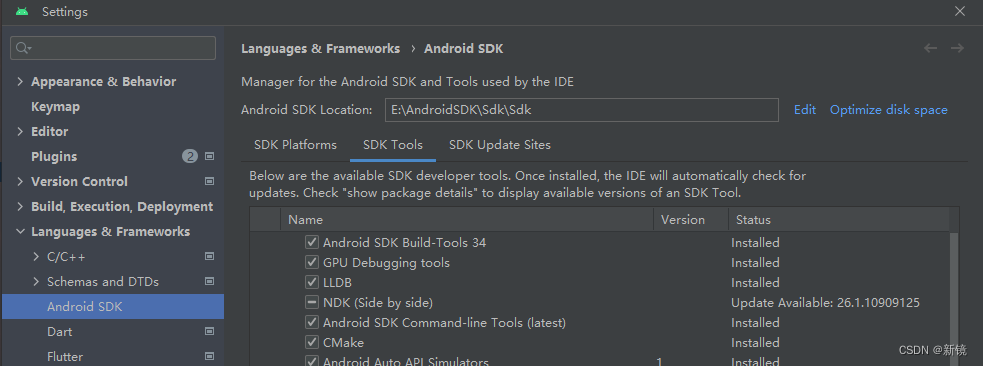
在flutterSDK目录下,双击flutter_console.bat,调出命令行。 输入flutter doctor,如果第三个诊断为[x],报cmdline-tools component is missing错(我这已经修改好了,所以是勾了),那就可…...

以用户为中心,酷开科技荣获“消费者服务之星”
在企业顺应消费升级的道路中,企业自身不仅要着力强化对于消费者服务意识的提升,并且要树立诚信自律的行业示范带头作用,助力消费环境稳中向好,不断满足人民群众对美好生活的期待。企业的发展需要消费者的认可,酷开科技…...
Days 27 ElfBoard 板 AltiumDesigner 相同电路快速布局布线
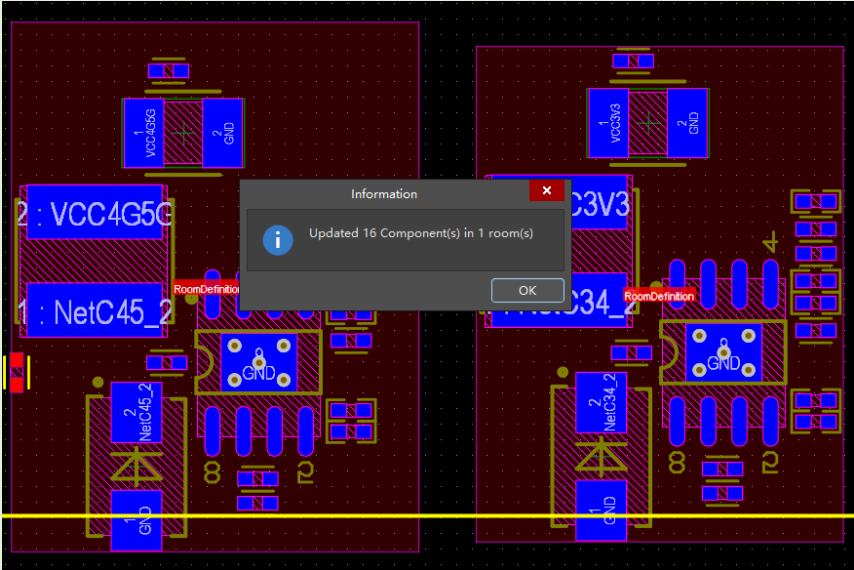
在进行设计开发的时候,总会遇到相同的电路,或者模块,这些电路可以使用相同的布局和走线,例如 DC-DC 电源、网口 PHY 电路部分。这类型的电路,我们可以采用AltiumDesigner 中的 Room 进行布局和布线的快速复制ÿ…...
除夕快乐(前端小烟花)
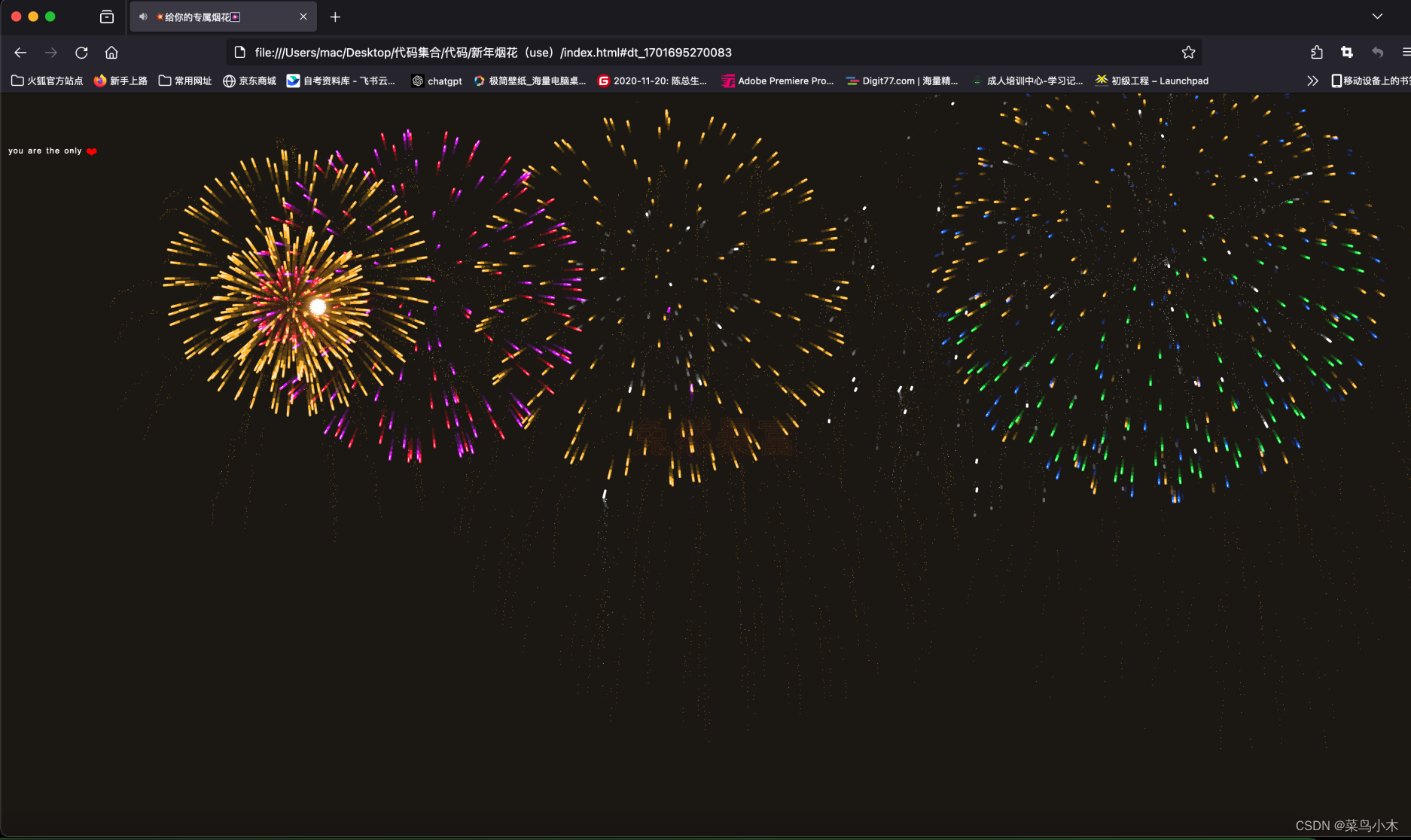
家人们,新的一年好运常在,愿大家在新的一年里得偿所愿,发财暴富,愿大家找到属于自己的那个公主,下面就给大家展示一下给公主的烟花 前端烟花 新的一年,新的挑战,愿我们不忘初心,砥砺…...

鸿蒙心理测评模块实战|PHQ-9/GAD7双量表答题、实时计分与结果本地化存储
一、前言 心晴驿站已正式稳定上架华为应用市场,所有专栏内容均基于线上真实版本复盘产出,所有逻辑、代码、优化方案均通过真机测试、性能校验、隐私合规审核,具备完整落地与参赛复用价值。 在前八篇专栏中,我们完成了项目整体架构…...

Petrel地质建模许可不够用?自动回收,油气勘探团队高效
你是不是也遇到这种情况?项目组突然来了个新成员,结果所有许可都满了,连老员工都得排队等。别慌,我搞懂了,Petrel许可不够用,最大的问题就是没回收,几十万的授权就浪费在没人用的角落。 闲置许…...

MIT Cheetah-Software编译手记:搞定Qt5.10.0路径、LCM依赖与那些诡异的C++报错
MIT Cheetah-Software编译实战:Qt路径配置、LCM依赖与C报错深度解析 1. 环境准备与依赖管理 在Ubuntu 20.04环境下编译MIT Cheetah-Software,首先需要确保系统基础环境配置正确。不同于普通开源项目,这个四足机器狗的控制系统对Qt版本、LCM消…...

git讲解,git vscode 对应,git pycharm 对应
文章目录安装git配置git什么是git 仓库创建版本库git addvscodegit statusgit addgit statuspycharm变更列表视图如果创建文件的时候选择了添加到git版本控制暂存区域视图时光穿梭机版本回退修改文件vscodepycharm变更列表暂存区域git logvscodepycharmgit reset 版本回退git r…...

04. 骨架:后端分层架构与 TypeScript 类型系统实战
写在前面: 很多 GIS 开发者在写后端时,容易陷入“脚本思维”:一个文件几千行,数据库查询、业务逻辑、接口响应全混在一起。刚开始跑得快,但随着功能增加,代码会变成一团难以维护的“意大利面”。 在 light-mvt-server 中,我们坚持采用企业级的分层架构。今天,我们将深入…...

Codex+Coze自动化工作流实战
Codex(特指OpenAI的编程特化AI Agent)与Coze(扣子)平台的结合,能够实现从自然语言描述到可运行自动化流程的端到端生成。其核心在于利用Codex强大的代码理解和生成能力,来编写、调试并封装符合Coze平台规范…...

深入MPSOC缓存一致性:从零配置HPC接口,让你的PL加速器告别Cache Flush
深入MPSOC缓存一致性:从零配置HPC接口,让你的PL加速器告别Cache Flush 在异构计算领域,MPSOC平台的缓存一致性配置一直是工程师面临的棘手问题。当PL端加速器通过HP接口与PS端交互时,频繁的手动缓存维护不仅增加了软件复杂度&…...

网络安全有哪些岗位?如何成为一名优秀的网络安全工程师?
网络安全有哪些岗位?如何成为一名优秀的网络安全工程师? 网络安全是什么? 首先说一下什么是网络安全?其中,网络安全工程师工作内容具体有哪些? 网络安全 确保网络系统的硬件、软件及其系统中的数据受到保护…...

避坑指南:用3dMax一键房屋插件时,为什么你的窗洞总创建失败?
3dMax一键房屋插件窗洞创建失败的深度排查手册 引言 在建筑可视化与室内设计领域,3dMax的一键房屋插件确实为设计师节省了大量重复劳动时间。然而,许多中级用户在尝试创建窗洞时,常常遭遇各种意料之外的失败——从简单的按钮灰色不可点击&…...

【开源首发】双脑 AI 工作流:强制模型隔离 + 省 60% Token,完美替代 CrewAI,支持本地 Ollama 免费跑
前言 大家好,我是一名大一的生物医药数据科学专业学生。最近半年一直在用 AI 做各种自动化工具,前前后后踩了 LangChain 和 CrewAI 的无数坑。 我发现所有主流 AI Agent 框架都有一个致命的设计盲区:它们默认相信 AI 能自己监督自己。但实际…...