
Spring Boot 笔记 027 添加文章分类
1.1.1 添加分类
<!-- 添加分类弹窗 -->
<el-dialog v-model="dialogVisible" title="添加弹层" width="30%"><el-form :model="categoryModel" :rules="rules" label-width="100px" style="padding-right: 30px"><el-form-item label="分类名称" prop="categoryName"><el-input v-model="categoryModel.categoryName" minlength="1" maxlength="10"></el-input></el-form-item><el-form-item label="分类别名" prop="categoryAlias"><el-input v-model="categoryModel.categoryAlias" minlength="1" maxlength="15"></el-input></el-form-item></el-form><template #footer><span class="dialog-footer"><el-button @click="dialogVisible = false">取消</el-button><el-button type="primary"> 确认 </el-button></span></template>
</el-dialog>
1.1.2 添加数据校验
//控制添加分类弹窗
const dialogVisible = ref(false)//添加分类数据模型
const categoryModel = ref({categoryName: '',categoryAlias: ''
})
//添加分类表单校验
const rules = {categoryName: [{ required: true, message: '请输入分类名称', trigger: 'blur' },],categoryAlias: [{ required: true, message: '请输入分类别名', trigger: 'blur' },]
}
1.1.3 添加单机时间调用
<el-button type="primary" @click="dialogVisible = true">添加分类</el-button>1.2.1 定义添加文章分类接口

import request from '@/utils/request.js'
import { useTokenStore } from '@/stores/token.js'
//文章分类列表查询
export const articleCategoryListService = ()=>{const tokenStore = useTokenStore();//在pinia中定义的响应式数据,都不需要.value// return request.get('/category',{headers:{'Authorization':tokenStore.token}})return request.get('/category')
}//文章分类添加
export const articleCategoryAddService = (categoryData)=>{return request.post('/category',categoryData)
}
1.2.2 在article.vue中调用
//调用接口,添加表单import { ElMessage } from 'element-plus'const addCategory = async () => {//调用接口let result = await articleCategoryAddService(categoryModel.value);ElMessage.success(result.msg ? result.msg : '添加成功')//调用获取所有文章分类的函数articleCategoryList();dialogVisible.value = false;}
2.1 编辑分类
2.1.1 复用弹框
//定义变量,控制标题的展示
const title = ref('')<el-dialog v-model="dialogVisible" :title="title" width="30%"><el-button :icon="Edit" circle plain type="primary" @click="dialogVisible=true, title='编辑分类'"></el-button>
2.1.2 回显数据
    //展示编辑弹窗const showDialog = (row) => {dialogVisible.value = true; title.value = '编辑分类'//数据拷贝categoryModel.value.categoryName = row.categoryName;categoryModel.value.categoryAlias = row.categoryAlias;//扩展id属性,将来需要传递给后台,完成分类的修改categoryModel.value.id = row.id}<template #default="{ row }"><el-button :icon="Edit" circle plain type="primary" @click="showDialog(row)"></el-button><el-button :icon="Delete" circle plain type="danger"></el-button>
</template>
2.2.1 更新分类
2.2.1.1 article.js中定义接口
import request from '@/utils/request.js'
import { useTokenStore } from '@/stores/token.js'
//文章分类列表查询
export const articleCategoryListService = ()=>{const tokenStore = useTokenStore();//在pinia中定义的响应式数据,都不需要.value// return request.get('/category',{headers:{'Authorization':tokenStore.token}})return request.get('/category')
}//文章分类添加
export const articleCategoryAddService = (categoryData)=>{return request.post('/category',categoryData)
}//文章分类修改
export const articleCategoryUpdateService = (categoryData)=>{return  request.put('/category',categoryData)
}
2.2.1.2 articleCategory.vue中调用接口并判断用了哪个按钮
<el-button type="primary" @click="title == '添加分类' ? addCategory() : updateCategory()"> 确认 </el-button> //编辑分类const updateCategory = async () => {//调用接口let result = await articleCategoryUpdateService(categoryModel.value);ElMessage.success(result.msg ? result.msg : '修改成功')//调用获取所有分类的函数articleCategoryList();//隐藏弹窗dialogVisible.value = false;
}2.2.2 清空数据
//清空模型的数据
const clearData = () => {categoryModel.value.categoryName = '';categoryModel.value.categoryAlias = '';
}<div class="extra"><el-button type="primary" @click="dialogVisible = true, title='添加分类';clearData()">添加分类</el-button>
</div>
3.1 删除分类
3.1.1 定义接口
import request from '@/utils/request.js'
import { useTokenStore } from '@/stores/token.js'
//文章分类列表查询
export const articleCategoryListService = ()=>{const tokenStore = useTokenStore();//在pinia中定义的响应式数据,都不需要.value// return request.get('/category',{headers:{'Authorization':tokenStore.token}})return request.get('/category')
}//文章分类添加
export const articleCategoryAddService = (categoryData)=>{return request.post('/category',categoryData)
}//文章分类修改
export const articleCategoryUpdateService = (categoryData)=>{return  request.put('/category',categoryData)
}//文章分类删除
export const articleCategoryDeleteService = (id)=>{return request.delete('/category?id='+id)
}
3.1.2 定义删除弹框

```html
<script setup>
import {Edit,Delete
} from '@element-plus/icons-vue'
import { ref } from 'vue'
const categorys = ref([{"id": 3,"categoryName": "美食","categoryAlias": "my","createTime": "2023-09-02 12:06:59","updateTime": "2023-09-02 12:06:59"},{"id": 4,"categoryName": "娱乐","categoryAlias": "yl","createTime": "2023-09-02 12:08:16","updateTime": "2023-09-02 12:08:16"},{"id": 5,"categoryName": "军事","categoryAlias": "js","createTime": "2023-09-02 12:08:33","updateTime": "2023-09-02 12:08:33"}
])//声明一个异步的函数import { articleCategoryListService,articleCategoryAddService,articleCategoryUpdateService,articleCategoryDeleteService} from '@/api/article.js'const articleCategoryList = async () => {let result = await articleCategoryListService();categorys.value = result.data;}articleCategoryList();//控制添加分类弹窗const dialogVisible = ref(false)//添加分类数据模型const categoryModel = ref({categoryName: '',categoryAlias: ''})//添加分类表单校验const rules = {categoryName: [{ required: true, message: '请输入分类名称', trigger: 'blur' },],categoryAlias: [{ required: true, message: '请输入分类别名', trigger: 'blur' },]}//调用接口,添加表单import { ElMessage } from 'element-plus'const addCategory = async () => {//调用接口let result = await articleCategoryAddService(categoryModel.value);ElMessage.success(result.msg ? result.msg : '添加成功')//调用获取所有文章分类的函数articleCategoryList();dialogVisible.value = false;}//定义变量,控制标题的展示const title = ref('')//展示编辑弹窗const showDialog = (row) => {dialogVisible.value = true; title.value = '编辑分类'//数据拷贝categoryModel.value.categoryName = row.categoryName;categoryModel.value.categoryAlias = row.categoryAlias;//扩展id属性,将来需要传递给后台,完成分类的修改categoryModel.value.id = row.id}//编辑分类const updateCategory = async () => {//调用接口let result = await articleCategoryUpdateService(categoryModel.value);ElMessage.success(result.msg ? result.msg : '修改成功')//调用获取所有分类的函数articleCategoryList();//隐藏弹窗dialogVisible.value = false;
}//清空模型的数据
const clearData = () => {categoryModel.value.categoryName = '';categoryModel.value.categoryAlias = '';
}//删除分类
import {ElMessageBox} from 'element-plus'
const deleteCategory = (row) => {//提示用户  确认框ElMessageBox.confirm('你确认要删除该分类信息吗?','温馨提示',{confirmButtonText: '确认',cancelButtonText: '取消',type: 'warning',}).then(async () => {//调用接口let result = await articleCategoryDeleteService(row.id);ElMessage({type: 'success',message: '删除成功',})//刷新列表articleCategoryList();}).catch(() => {ElMessage({type: 'info',message: '用户取消了删除',})})
}</script>
<template><el-card class="page-container"><template #header><div class="header"><span>文章分类</span><div class="extra"><el-button type="primary" @click="dialogVisible = true, title='添加分类';clearData()">添加分类</el-button></div></div></template><el-table :data="categorys" style="width: 100%"><el-table-column label="序号" width="100" type="index"> </el-table-column><el-table-column label="分类名称" prop="categoryName"></el-table-column><el-table-column label="分类别名" prop="categoryAlias"></el-table-column><el-table-column label="操作" width="100"><template #default="{ row }"><el-button :icon="Edit" circle plain type="primary" @click="showDialog(row)"></el-button><el-button :icon="Delete" circle plain type="danger" @click="deleteCategory(row)"></el-button></template></el-table-column><template #empty><el-empty description="没有数据" /></template></el-table><!-- 添加分类弹窗 --><el-dialog v-model="dialogVisible" :title="title" width="30%"><el-form :model="categoryModel" :rules="rules" label-width="100px" style="padding-right: 30px"><el-form-item label="分类名称" prop="categoryName"><el-input v-model="categoryModel.categoryName" minlength="1" maxlength="10"></el-input></el-form-item><el-form-item label="分类别名" prop="categoryAlias"><el-input v-model="categoryModel.categoryAlias" minlength="1" maxlength="15"></el-input></el-form-item></el-form><template #footer><span class="dialog-footer"><el-button @click="dialogVisible = false">取消</el-button><el-button type="primary" @click="title == '添加分类' ? addCategory() : updateCategory()"> 确认 </el-button></span></template></el-dialog></el-card>
</template><style lang="scss" scoped>
.page-container {min-height: 100%;box-sizing: border-box;.header {display: flex;align-items: center;justify-content: space-between;}
}
</style>
```
4.1 springboot+vue打包部署
springbot+vue项目的打包部署 - StarZhai - 博客园 (cnblogs.com)
相关文章:
Spring Boot 笔记 027 添加文章分类
1.1.1 添加分类 <!-- 添加分类弹窗 --> <el-dialog v-model"dialogVisible" title"添加弹层" width"30%"><el-form :model"categoryModel" :rules"rules" label-width"100px" style"padding…...

【SQL】sql记录
1、start with star with 是一种用于层次结构查询的语法,它允许我们从指定的起始节点开始,递归查询与该节点相关联的所有子节点。 SELECT id, name, parent_id from test001 START WITH id 1 CONNECT BY PRIOR id parent_id 2、row_number() over pa…...
-Linux ARM驱动编程第六天-ARM Linux编程之SMP系统 (物联技术666))
嵌入式培训机构四个月实训课程笔记(完整版)-Linux ARM驱动编程第六天-ARM Linux编程之SMP系统 (物联技术666)
链接:https://pan.baidu.com/s/1V0E9IHSoLbpiWJsncmFgdA?pwd1688 提取码:1688 SMP(Symmetric Multi-Processing),对称多处理结构的简称,是指在一个计算机上汇集了一组处理器(多CPU),各CPU之间共享内存子系…...

html5播放 m3u8
注意:m3u8地址要为网络地址,直接把代码复制为html直接在本地打开,可能不行,需要放在nginx或者apache或者其他的web服务器上运行。 <!DOCTYPE html> <html> <head><meta charsetutf-8 /><title>测试…...

微信小程序按需注入和用时注入
官网链接 按需注入 {"lazyCodeLoading": "requiredComponents" }注意事项 启用按需注入后,小程序仅注入当前访问页面所需的自定义组件和页面代码。未访问的页面、当前页面未声明的自定义组件不会被加载和初始化,对应代码文件将不…...
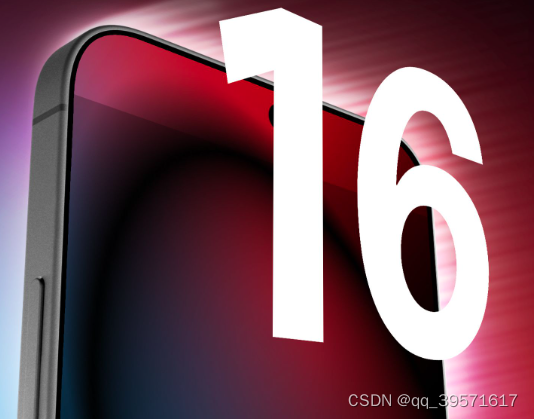
iPhone 16 组件泄露 揭示了新的相机设计
iPhone 16 的发布似乎已经等了很长一段时间,但下一个苹果旗舰系列可能会在短短 7 个月内与我们见面——而新的组件泄漏让我们对可能即将到来的重新设计有了一些了解。后置摄像头模块。 爆料者 Majin Bu(来自 MacRumors)获得的示意图显示&…...
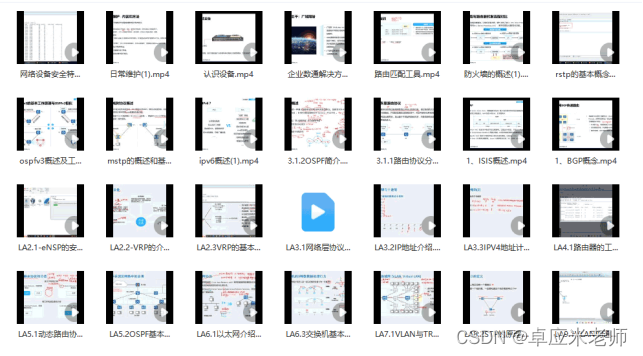
网络工程师学习笔记——IPV6
20世纪80年代,IETF(Internet Engineering Task Force,因特网工程任务组)发布RFC791,即IPv4协议,标志IPv4正式标准化。在此后的几十年间,IPv4协议成为最主流的协议之一。无数人在IPv4的基础上开发…...
)
【零基础学习CAPL】——CAN报文的发送(LiveCounter——生命信号)
🙋♂️【零基础学习CAPL】系列💁♂️点击跳转 文章目录 1.概述2.面板创建3.系统变量创建4.CAPL实现5.效果5.1.0~15循环发送5.2.固定值发送6.全量脚本1.概述 本章主要介绍带有生命信号LiveCounter的报文发送脚本 一般报文可使用CANoe的IG模块直接发送,但存在循环冗余…...

git提交代码冲突
用idea2023中的git提交代码,出现 error: Your local changes to the following files would be overwritten by merge: ****/****/****/init.lua Please commit your changes or stash them before you merge. Aborting 出现这个错误可能是因为你的本地修改与远…...

树莓派:使用mdadm为重要数据做RAID 1保护
树莓派作为个人服务器可玩性还是有点的。说到服务器,在企业的生成环境中为了保护数据,基本上都会用到RAID技术。比如,服务器两块小容量但高性能的盘做个RAID-1按装操作系统,余下的大容量中性能磁盘做个RAID-5或者RAID-6存放数据。…...

HTML板块左右排列布局——左侧 DIV 固定宽度,右侧 DIV 自适应宽度,填充满剩余页面
我们可以借助CSS中的 float 属性来实现。 实例: 布局需求: 左侧 DIV 固定宽度,右侧 DIV 自适应宽度,填充满剩余页面。 <!DOCTYPE html> <html><head><meta charset"UTF-8"><meta http-e…...

红旗linux安装32bit依赖库
红旗linux安装32bit依赖库 红旗linux安装32bit依赖库 lib下载 红旗-7.3-lib-32.tar.gz 解压压缩包,根据如下进行操作 1.回退glibc(1)查看当前glibc版本[root192 ~]# rpm -qa | grep glibcglibc-common-2.17-157.axs7.1.x86_64glibc-headers-2.17-260.axs7.5.x86_…...
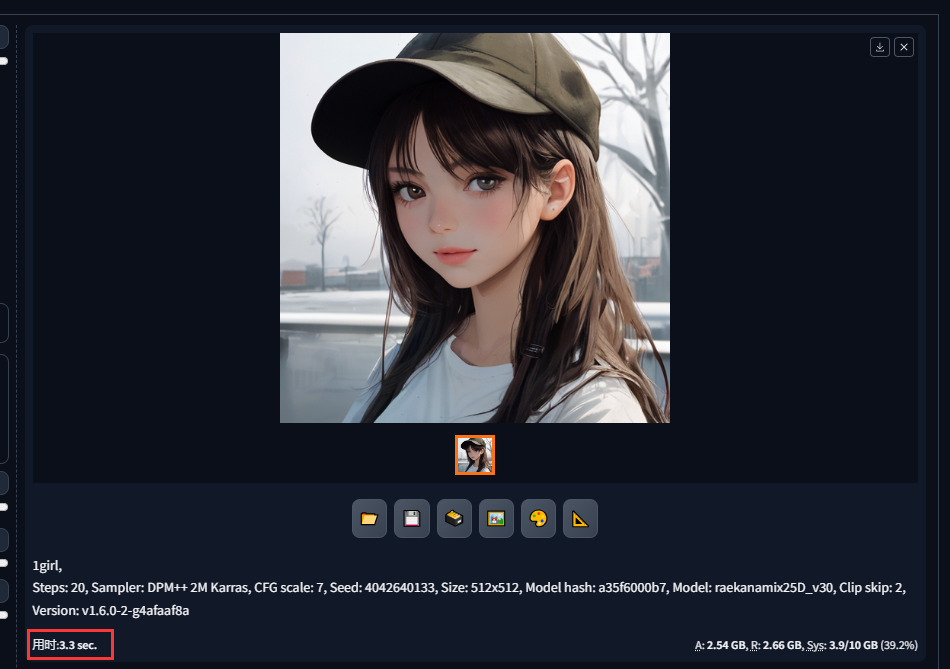
Stable Diffusion教程——使用TensorRT GPU加速提升Stable Diffusion出图速度
概述 Diffusion 模型在生成图像时最大的瓶颈是速度过慢的问题。为了解决这个问题,Stable Diffusion 采用了多种方式来加速图像生成,使得实时图像生成成为可能。最核心的加速是Stable Diffusion 使用了编码器将图像从原始的 3512512 大小转换为更小的 46…...
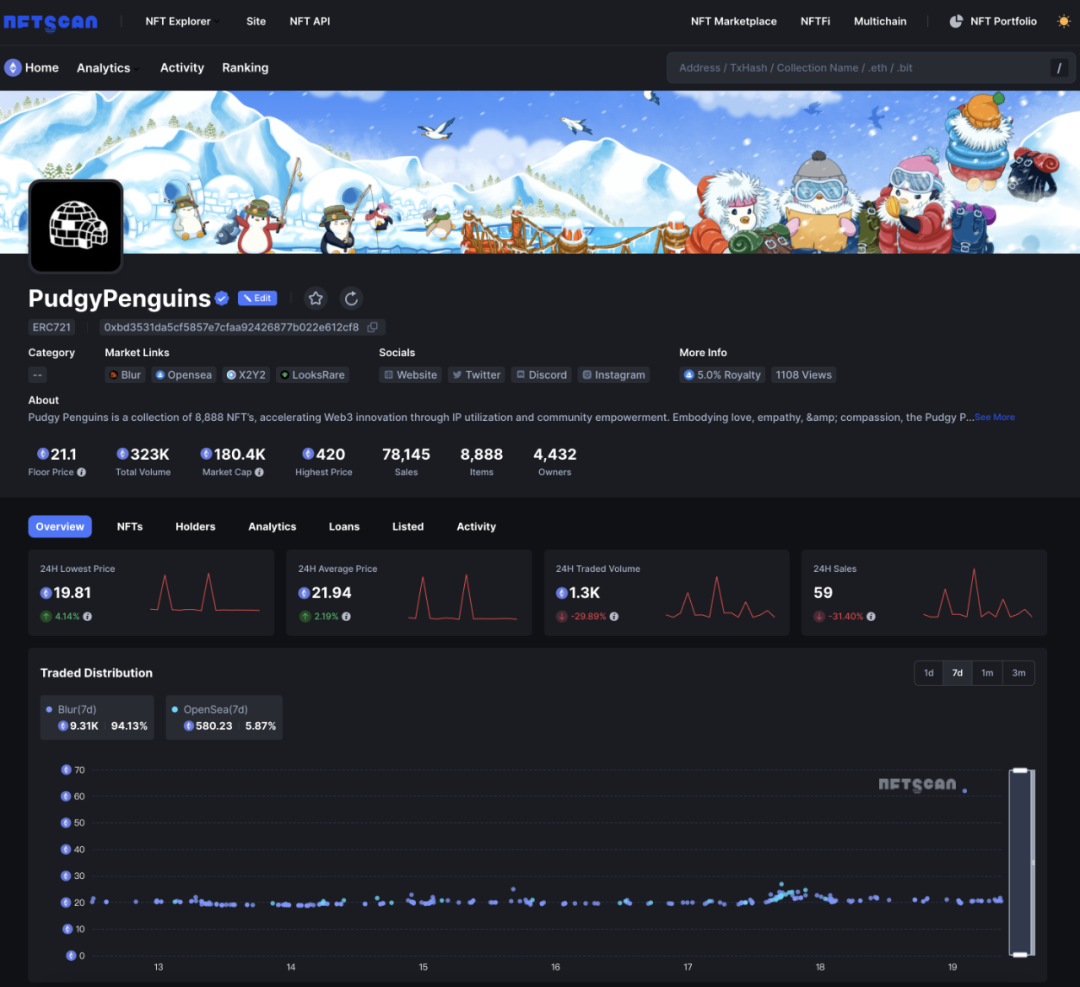
NFTScan | 02.12~02.18 NFT 市场热点汇总
欢迎来到由 NFT 基础设施 NFTScan 出品的 NFT 生态热点事件每周汇总。 周期:2024.02.12~ 2024.02.18 NFT Hot News 01/ CryptoPunks 推出「Punk in Residence」孵化器计划 2 月 12 日,NFT 项目 CryptoPunks 宣布推出「Punk in Residence」孵化器计划&a…...
使用 apt 源安装 ROCm 6.0.x 在Ubuntu 22.04.01
从源码编译 rocSolver 本人只操作过单个rocm版本的情景,20240218 ubuntu 22.04.01 1,卸载原先的rocm https://docs.amd.com/en/docs-5.1.3/deploy/linux/os-native/uninstall.html # Uninstall single-version ROCm packages sudo apt autoremove ro…...

python函数的定义和调用
1. 函数的基本概念 在编程中,函数就像是一台机器,接受一些输入(参数),进行一些操作,然后产生输出(结果)。这让我们的代码更加模块化和易于理解。 函数是一段封装了一系列语句的代码…...

【JVM篇】什么是类加载器,有哪些常见的类加载器
文章目录 🍔什么是类加载器🛸有哪些常见的类加载器 🍔什么是类加载器 负责在类加载过程中,将字节码信息以流的方式获取并加载到内存当中 🛸有哪些常见的类加载器 启动类加载器 启动类加载器是有Hotspot虚拟机通过的类…...
STM32—DHT11温湿度传感器
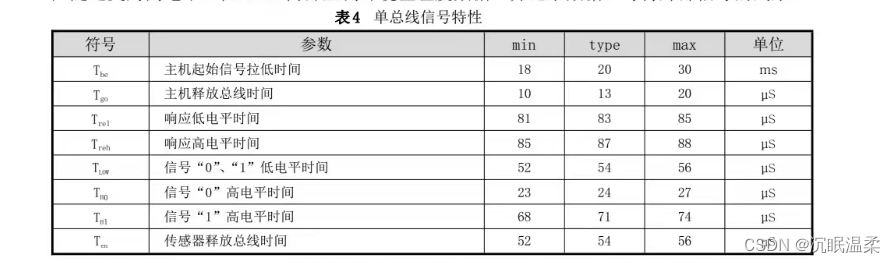
文章目录 一.温湿度原理1.1 时序图 二.代码 一.温湿度原理 1.1 时序图 (1).下图一是DHT11总的时序图。 (2).图二对应图一的左边黑色部分,图三对应图一的绿色部分,图四的左部分图对应图一的红色部分,图四的右部分对应图一的黄色部分。 (3)…...
相机图像质量研究(31)常见问题总结:图像处理对成像的影响--图像差
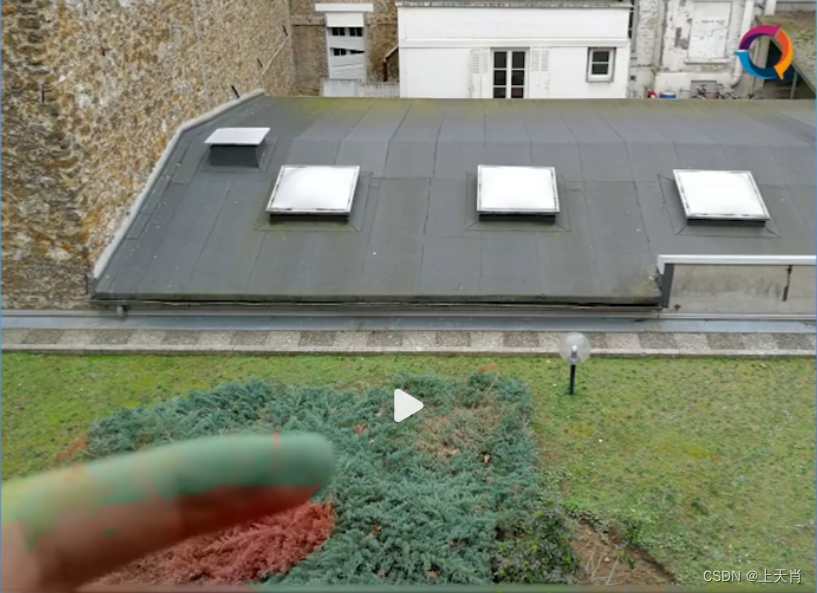
系列文章目录 相机图像质量研究(1)Camera成像流程介绍 相机图像质量研究(2)ISP专用平台调优介绍 相机图像质量研究(3)图像质量测试介绍 相机图像质量研究(4)常见问题总结:光学结构对成像的影响--焦距 相机图像质量研究(5)常见问题总结:光学结构对成…...
MySQL之select查询
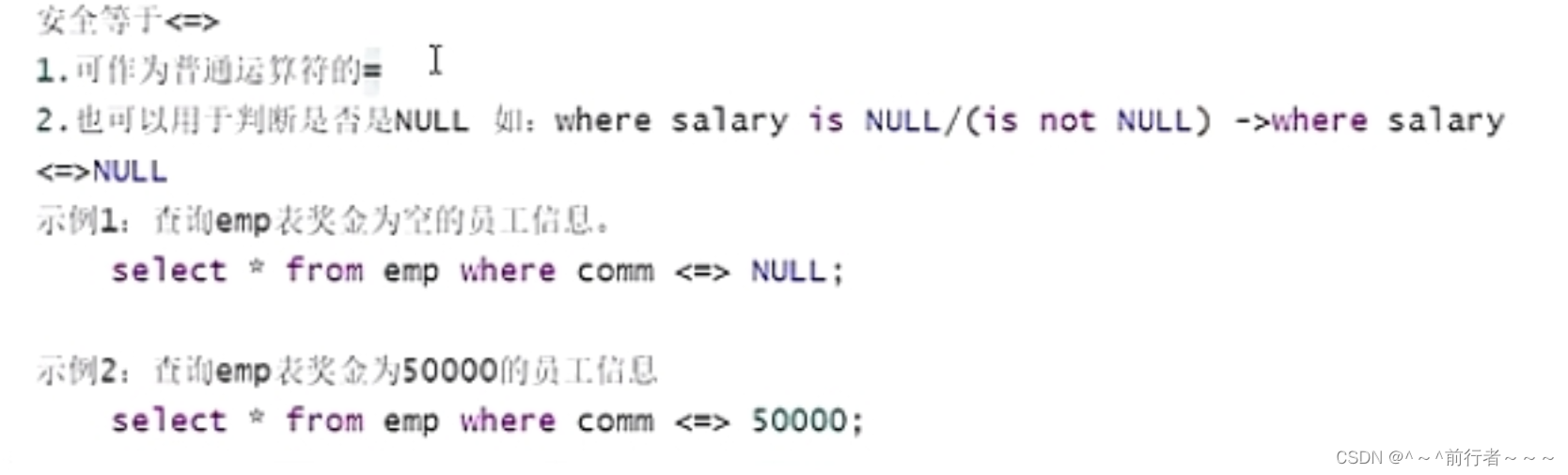
华子目录 SQL简介SQL语句分类SQL语句的书写规范SQL注释单行注释多行注释 select语句简单的select语句select的算数运算select 要查询的信息 from 表名;查询表字段查询常量查询表达式查询函数 查询定义别名as安全等于<>去重distinct连接字段concat 模糊查询运算符比较运算…...

别再死记硬背了!PADS Logic/Layout/Router这三个界面,到底该怎么分工协作?
PADS三剑客协作指南:从原理图到PCB的高效设计流 在电子设计自动化(EDA)领域,Mentor Graphics(现为Siemens EDA)的PADS系列工具以其专业性和高效性著称。然而,许多初学者常陷入一个误区——将PAD…...

Keyviz完全指南:为什么你的屏幕需要这个免费键盘可视化神器
Keyviz完全指南:为什么你的屏幕需要这个免费键盘可视化神器 【免费下载链接】keyviz Keyviz is a free and open-source tool to visualize your keystrokes ⌨️ and 🖱️ mouse actions in real-time. 项目地址: https://gitcode.com/gh_mirrors/ke/…...

Arm Compiler 6.16LTS功能安全认证语言扩展解析
1. Arm Compiler for Embedded FuSa 6.16LTS语言扩展支持现状解析在功能安全关键型嵌入式系统开发中,编译器工具链的认证状态直接关系到最终产品的合规性。Arm Compiler for Embedded FuSa 6.16LTS作为经过功能安全认证的工具链,其语言扩展支持情况需要开…...

Legado-Harmony:免费开源阅读器打造个性化电子书库终极指南
Legado-Harmony:免费开源阅读器打造个性化电子书库终极指南 【免费下载链接】legado-Harmony 开源阅读鸿蒙版仓库 项目地址: https://gitcode.com/gh_mirrors/le/legado-Harmony legado-Harmony是一款专为鸿蒙系统设计的免费开源阅读应用,为用户提…...

CTF学习规划————1、如何入门CTF
CTF学习规划————1、如何入门CTF 无意中发现了一个巨牛巨牛的人工智能教程,忍不住分享一下给大家。教程不仅是零基础,通俗易懂,小白也能学,而且非常风趣幽默,还时不时有内涵段子,像看小说一样࿰…...

简单认识显卡
学习视频来自B站(从零开始认识显卡):https://www.bilibili.com/video/BV1xE421j7Uv 这是你最近在玩的电脑游戏,形态各异的建筑、细节丰富的车辆,一切都很真实,它们的本质其实是一个个不同位置的点ÿ…...

通用 Agent 与领域 Agent 的架构差异
从GPT-4o到AI程序员助手:通用Agent与领域Agent的核心架构差异及选型指南 摘要/引言 你有没有试过同时用两款截然不同的AI工具帮你干活?比如前一秒用GPT-4o对着一张写满Python报错的截图问“为什么我的分布式爬虫在Kubernetes集群里总是崩溃”,后一秒打开Cursor编辑器的AI助…...

紫光同创PGL22G开发板DDR3读写实验:从IP核安装到上板验证的保姆级避坑指南
紫光同创PGL22G开发板DDR3读写实验全流程实战解析 第一次接触国产FPGA平台进行DDR3内存控制实验时,很多开发者都会遇到各种"坑"。本文将基于紫光同创PGL22G开发板,从IP核安装到最终上板验证,手把手带你避开那些容易出错的关键环节。…...

矩阵键盘原理与实战:从扫描算法到Arduino/CircuitPython驱动指南
1. 项目概述:为什么我们需要矩阵键盘? 在嵌入式项目里,给设备加几个按钮是再常见不过的需求。但如果你需要10个、12个甚至16个独立的按键呢?按照传统思路,一个按键对应一个微控制器的数字输入引脚,那你的Ar…...

STM32H7 SPI双机通信,为什么我强烈推荐你用硬件NSS引脚?一个上电时序问题引发的血案
STM32H7 SPI双机通信中硬件NSS引脚的工程实践价值 两块STM32H7开发板通过SPI进行通信时,你是否遇到过这样的场景:明明代码逻辑正确,但通信就是不稳定,时而正常时而失败?更令人困惑的是,这种问题往往与上电顺…...