
微信小程序自制动态导航栏
写在前面
关于微信小程序导航栏的问题以及解决办法我已经在先前的文章中有提到,点击下面的链接即可跳转~
🤏微信小程序自定义的导航栏🤏
在这篇文章中我们需要做一个这样的导航栏!先上效果图
👇👇👇👇👇👇👇👇👇👇👇👇👇👇👇👇👇👇👇👇👇👇👇👇

这个导航栏是codepen上的大神写的,但是它是用前端三件套(即html\css\js)来完成的,在微信小程序原生语法中有很多地方是不支持一些特性的,比如它里面的js核心用到了gsap动画库,而微信小程序是不支持的! 除此之外还有html与wxml、css与wxss转换的问题。总之假如直接复制粘贴是完全行不通的!
(https://codepen.io/v_Bauer/pen/WNroMOq)
最终效果展示
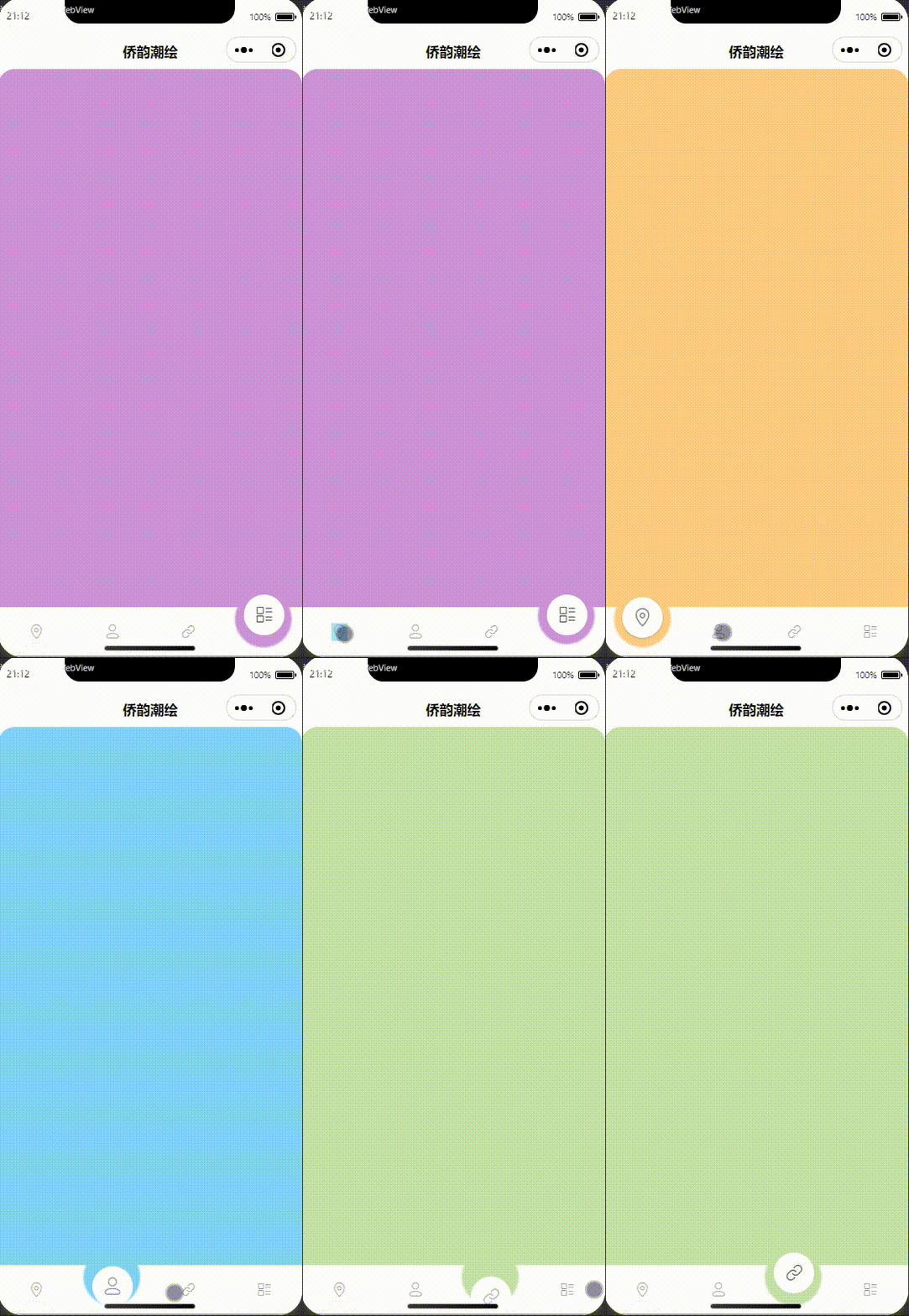
全部代码
在这里将会分为两个部分,即codepen上的原版和微信小程序版本
注:微信小程序的引用了外部组件库Vant中的ICON、以及自制的LOADING组件()
codepen
❤️HTML❤️
<html><head><meta charset="utf-8"><title></title><meta name="viewport" content="width=device-width, initial-scale=1">
</head>
<body>
<div id="navbarContainer"><div id="navbar"><div id="bubbleWrapper"><div id="bubble1" class="bubble"><span class="icon"><i class="fas fa-home"></i></span></div><div id="bubble2" class="bubble"><span class="icon"><i class="fab fa-twitter"></i></span></div><div id="bubble3" class="bubble"><span class="icon"><i class="fas fa-bell"></i></span></div><div id="bubble4" class="bubble"><span class="icon"><i class="fas fa-user"></i></span></div></div><div id="menuWrapper"><div id="menu1" class="menuElement" onclick="move('1', '50px', '#ffcc80')"><i class="fas fa-home"></i></div><div id="menu2" class="menuElement" onclick="move('2', '150px', '#81d4fa')"><i class="fab fa-twitter"></i></div><div id="menu3" class="menuElement" onclick="move('3', '250px', '#c5e1a5')"><i class="fas fa-bell"></i></div><div id="menu4" class="menuElement" onclick="move('4', '350px', '#ce93d8')"><i class="fas fa-user"></i></div></div></div><div id="bgWrapper"><div id="bg"></div><div id="bgBubble"></div></div>
</div><!--   <svg width="0" height="0" ><defs><filter id="goo"><feGaussianBlur in="SourceGraphic" stdDeviation="20" result="blur" id="blurFilter"/><feColorMatrix in="blur" mode="matrix" values="1 0 0 0 0  0 1 0 0 0  0 0 1 0 0  0 0 0 30 -15" result="goo" /><feComposite in="SourceGraphic" in2="goo" operator="atop"/></filter></defs></svg> --></body></html>
❤️CSS💕
body {background: #37474f;width: 100vw;height: 100vh;display: flex;justify-content: center;align-items: center;margin: 0;overflow: hidden;
}#navbarContainer{width: 400px;min-width: 400px;height: 70vh;background-color: #ffcc80;border-radius: 20px;display: flex;justify-content: flex-end;flex-direction: column;overflow: hidden;position: relative;box-shadow: 0 10px 20px rgba(0,0,0,0.19), 0 6px 6px rgba(0,0,0,0.23);
}#navbar{width: 100%;height: 60px;background-color: #fff;position: absolute;
}#bubbleWrapper{position: absolute;display: flex;justify-content: space-around;width: 100%;bottom: 25px;
}.bubble{background-color: #fff;width: 50px;height: 50px;bottom: 85px;border-radius: 50%;z-index: 1;transform: translateY(120%);display: flex;justify-content: center;align-items: center;
}
.icon{opacity: 0;
}#bubble1{transform: translateY(0%);box-shadow: 0 1px 3px rgba(0,0,0,0.12), 0 1px 2px rgba(0,0,0,0.24);> span{opacity: 0.7;}
}#bgWrapper{filter: url(#goo);width: 100%;height: 100px;position: absolute;bottom: 60px;
}
#bg{background-color: #ffcc80;width: 120%;height: 100%;margin-left: -10%;
}
#bgBubble{position: absolute;background-color: #ffcc80;width: 70px;height: 70px;border-radius: 50%;bottom: -50px;left: 50px;transform: translateX(-50%);
}#menuWrapper{position: absolute;width: 100%;display: flex;justify-content: space-around;
}.menuElement{opacity: 0.4;transform: translateY(100%);cursor: pointer;&:hover{opacity: 0.5;}
}#contentWrapper{position: absolute;top: 50%;width: 100%;transform: translateY(-50%);display: flex;justify-content: center;align-items: center;h2{color: #fff;font-family: sans-serif;font-weight: 400;}
}
.content{display: none;opacity: 0;
}
💕JS💕
function move(id, position, color) {var tl = gsap.timeline();tl.to("#bgBubble", {duration: 0.15, bottom: "-30px", ease: "ease-out"}, 0).to("#bubble1", {duration: 0.1, y: "120%", boxShadow: 'none', ease: "ease-out",}, 0).to("#bubble2", {duration: 0.1, y: "120%", boxShadow: 'none', ease: "ease-out",}, 0).to("#bubble3", {duration: 0.1, y: "120%", boxShadow: 'none', ease: "ease-out",}, 0).to("#bubble4", {duration: 0.1, y: "120%", boxShadow: 'none', ease: "ease-out",}, 0).to(".icon", {duration: 0.05, opacity: 0, ease: "ease-out",}, 0).to("#bgBubble", {duration: 0.2, left: position, ease: "ease-in-out"}, 0.1).to("#bgBubble", {duration: 0.15, bottom: "-50px", ease: "ease-out"}, '-=0.2').to(`#bubble${id}`, {duration: 0.15, y: "0%", opacity: 1, boxShadow: '0 1px 3px rgba(0,0,0,0.12), 0 1px 2px rgba(0,0,0,0.24)', ease: "ease-out"}, '-=0.1').to(`#bubble${id}> span`, {duration: 0.15, y: "0%", opacity: 0.7, ease: "ease-out"}, '-=0.1').to("#navbarContainer", {duration: 0.3, backgroundColor: color, ease: "ease-in-out"}, 0).to("#bg", {duration: 0.3, backgroundColor: color, ease: "ease-in-out"}, 0).to("#bgBubble", {duration: 0.3, backgroundColor: color, ease: "ease-in-out"}, 0)}
wx_miniprograme
❤️WXML❤️
<!-- index.wxml -->
<navigation-bar title="侨韵潮绘" back="{{false}}" color="black" background="#FFF" class="nav"></navigation-bar>
<my-loading showLoading="{{isLoading}}" class="loading"></my-loading>
<!-- 导航栏 -->
<view id="navbarContainer" animation="{{navbarContainerAnimation}}"><view id="navbar"><view id="bubbleWrapper"><view id="bubble1" class="bubble" animation="{{bubble1Animation}}"><span class="icon" animation="{{icon1Animation}}"><van-icon name="location-o" size="25px" /></span></view><view id="bubble2" class="bubble" animation="{{bubble2Animation}}"><span class="icon" animation="{{icon2Animation}}"><van-icon name="contact-o" size="25px" /></span></view><view id="bubble3" class="bubble" animation="{{bubble3Animation}}"><span class="icon" animation="{{icon3Animation}}"><van-icon name="link-o" size="25px" /></span></view><view id="bubble4" class="bubble" animation="{{bubble4Animation}}"><span class="icon" animation="{{icon4Animation}}"><van-icon name="list-switch" size="25px" /></span></view></view><view id="menuWrapper"><view id="menu1" class="menuElement" bindtap="move" data-id="1" data-position="95rpx" data-color="#ffcc80"><van-icon name="location-o" size="20px" animation="{smallIcon1Animation}" /></view><view id="menu2" class="menuElement" bindtap="move" data-id="2" data-position="280rpx" data-color="#81d4fa"><van-icon name="contact-o" size="20px" animation="{smallIcon2Animation}" /></view><view id="menu3" class="menuElement" bindtap="move" data-id="3" data-position="467rpx" data-color="#c5e1a5"><van-icon name="link-o" size="20px" animation="{smallIcon3Animation}" /></view><view id="menu4" class="menuElement" bindtap="move" data-id="4" data-position="655rpx" data-color="#ce93d8"><van-icon name="list-switch" size="20px" animation="{smallIcon4Animation}" /></view></view></view><view id="bgWrapper"><view id="bg" animation="{{bgAnimation}}"></view><view id="bgBubble" animation="{{bgBubbleAnimation}}"></view></view>
</view>
❤️WXSS💕
/**index.wxss**/
page {height: 100vh;display: flex;flex-direction: column;
}.loading {position: absolute;z-index: 999;
}/* NAV-BAR样式START */
.nav {z-index: 2;
}/* NAV-BAR样式END *//* 导航栏的样式  START*/
#navbarContainer {width: 100%;height: 90%;margin-bottom: 5rpx;background-color: #ffcc80;border-radius: 40rpx;display: flex;justify-content: flex-end;flex-direction: column;overflow: hidden;position: relative;box-shadow: 0 20rpx 20rpx rgba(0, 0, 0, 0.19), 0 12rpx 12rpx rgba(0, 0, 0, 0.23);
}#navbar {width: 100%;height: 120rpx;background-color: #fff;position: absolute;
}#bubbleWrapper {position: absolute;display: flex;justify-content: space-around;width: 100%;bottom: 50rpx;
}.bubble {background-color: #fff;width: 100rpx;height: 100rpx;border-radius: 50%;z-index: 1;transform: translateY(120%);display: flex;justify-content: center;align-items: center;
}.icon {opacity: 0;
}#bubble1 {transform: translateY(0%);box-shadow: 0 1px 3px rgba(0, 0, 0, 0.12), 0 1px 2px rgba(0, 0, 0, 0.24);
}#bubble1 span {opacity: 0.7;
}#bgWrapper {filter: blur(3rpx);width: 100%;height: 200rpx;position: absolute;bottom: 120rpx;
}#bg {background-color: #ffcc80;width: 120%;height: 100%;margin-left: -10%;
}#bgBubble {position: absolute;background-color: #ffcc80;width: 140rpx;height: 140rpx;border-radius: 50%;bottom: -100rpx;left: 95rpx;transform: translateX(-50%);
}#menuWrapper {position: absolute;width: 100%;display: flex;justify-content: space-around;
}.menuElement {opacity: 0.4;transform: translateY(100%);cursor: pointer;
}#contentWrapper {position: absolute;top: 50%;width: 100%;transform: translateY(-50%);display: flex;justify-content: center;align-items: center;
}/* 导航栏的样式END */
💕JS💕
// pages/index/index.js
Page({data: {checked: false,isLoading: false,bgBubbleAnimation: {},index: 1,},move: function (event) {// 接受点击事件的参数var id = event.currentTarget.dataset.id;var position = event.currentTarget.dataset.position;var color = event.currentTarget.dataset.color;let that = this;// 创建背景泡泡动画-第一步var bgBubbleAnimation = wx.createAnimation({duration: 150,timingFunction: 'ease-out'});bgBubbleAnimation.bottom('-60rpx').step();// 创建背景泡泡动画-第二步var bgBubbleAnimation_second_step = wx.createAnimation({duration: 400,timingFunction: 'ease-in-out'});bgBubbleAnimation_second_step.left(position).step();// 创建背景泡泡动画-第三步var bgBubbleAnimation_third_step = wx.createAnimation({duration: 450,timingFunction: 'ease-out'});bgBubbleAnimation_third_step.bottom('-100rpx').step();// 连续执行动画var promise = new Promise((resolve, reject) => {this.setData({bgBubbleAnimation: bgBubbleAnimation.export(),// isLoading: true});setTimeout(resolve, 50); // 等待第一步动画执行完毕});var bubbleAnimations = [];var iconAnimations = [];promise.then(() => {return new Promise((resolve, reject) => {// 创建气泡和图标动画for (var i = 1; i <= 4; i++) {var bubbleAnimation = wx.createAnimation({duration: 100,timingFunction: 'ease-out'});bubbleAnimation.translateY('120%').step();bubbleAnimations.push(`bubble${i}Animation`);that.setData({ [`bubble${i}Animation`]: bubbleAnimation.export() });var iconAnimation = wx.createAnimation({duration: 50,timingFunction: 'ease-out'});iconAnimation.opacity(0).step();iconAnimations.push(`icon${i}Animation`);that.setData({ [`icon${i}Animation`]: iconAnimation.export() });}this.setData({bgBubbleAnimation: bgBubbleAnimation_second_step.export(),});setTimeout(resolve, 100); // 等待第一步动画执行完毕});}).then(() => {this.setData({bgBubbleAnimation: bgBubbleAnimation_third_step.export()});var clickBubbleAnimation = wx.createAnimation({duration: 1000,timingFunction: 'ease-out'});clickBubbleAnimation.translateY('0%').opacity(1).step();var clickBubbleSpanAnimation = wx.createAnimation({duration: 1000,timingFunction: 'ease-out'});clickBubbleSpanAnimation.opacity(0.7).step();that.setData({[bubbleAnimations[id - 1]]: clickBubbleAnimation.export(),[iconAnimations[id - 1]]: clickBubbleSpanAnimation.export()});// 更新导航栏和背景颜色动画var navbarContainerAnimation = wx.createAnimation({duration: 300,timingFunction: 'ease-out'});navbarContainerAnimation.backgroundColor(color).step();var bgAnimation = wx.createAnimation({duration: 300,timingFunction: 'ease-out'});bgAnimation.backgroundColor(color).step();var bgBubbleAnimation_final = wx.createAnimation({duration: 300,timingFunction: 'ease-out'});bgBubbleAnimation_final.backgroundColor(color).step();this.setData({navbarContainerAnimation: navbarContainerAnimation.export(),bgAnimation: bgAnimation.export(),bgBubbleAnimation: bgBubbleAnimation_final.export(),});}).catch((err) => {console.log(err);});}})
结束语
如果有疑问欢迎大家留言讨论,你如果觉得这篇文章对你有帮助可以给我一个免费的赞吗?我们之间的交流是我最大的动力!
相关文章:
微信小程序自制动态导航栏
写在前面 关于微信小程序导航栏的问题以及解决办法我已经在先前的文章中有提到,点击下面的链接即可跳转~ 🤏微信小程序自定义的导航栏🤏 在这篇文章中我们需要做一个这样的导航栏!先上效果图 👇👇…...
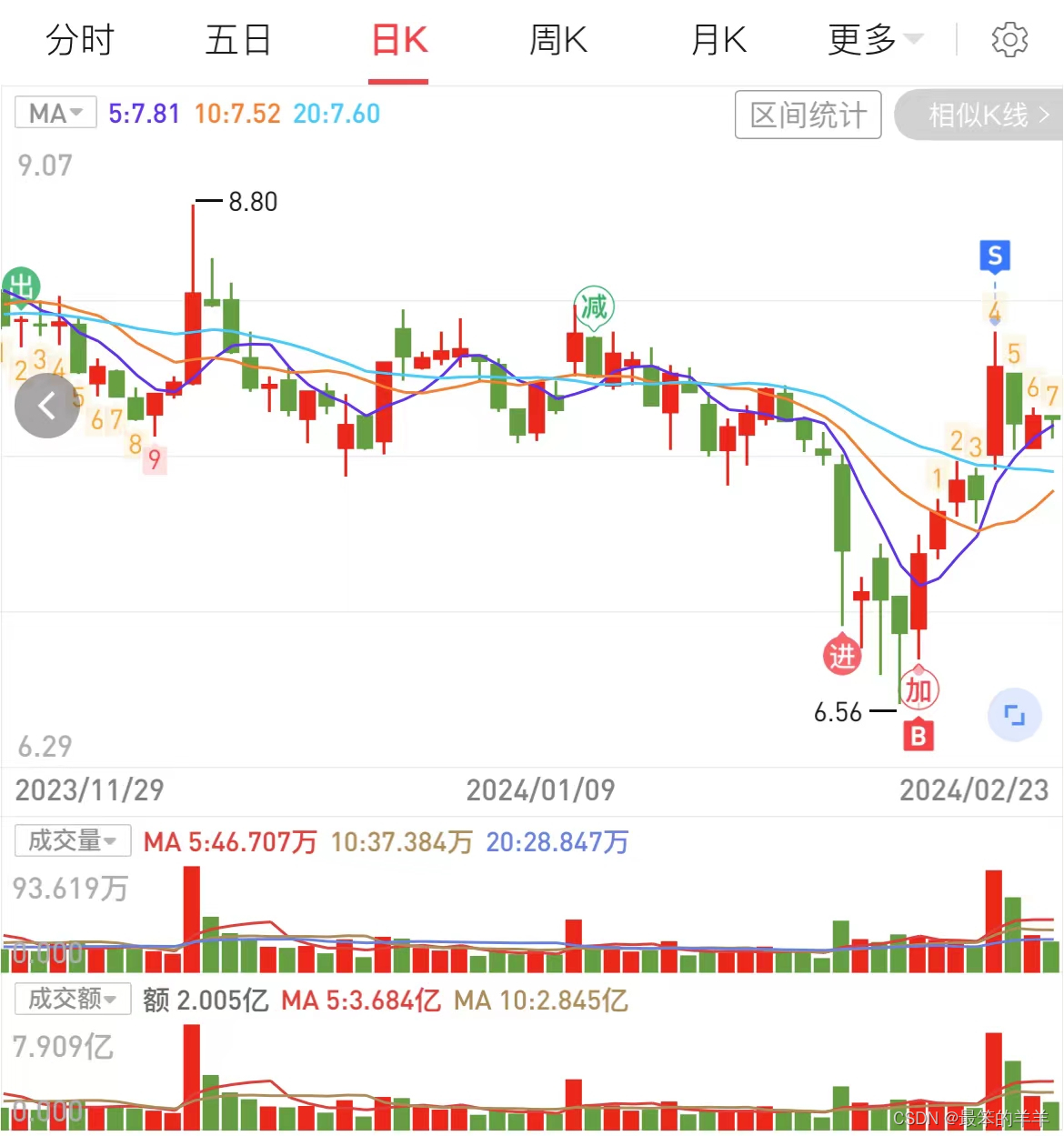
金融知识分享系列之:五日线
金融知识分享系列之:五日线 一、股票均线二、五日线三、五日线加量能三、五日线案例四、五日线案例五、五日线案例六、五日线案例七、五日线案例八、五日线案例 一、股票均线 股票均线是一种用于平滑股票价格的指标。它是根据一段时间内的股票价格计算得出的平均值…...
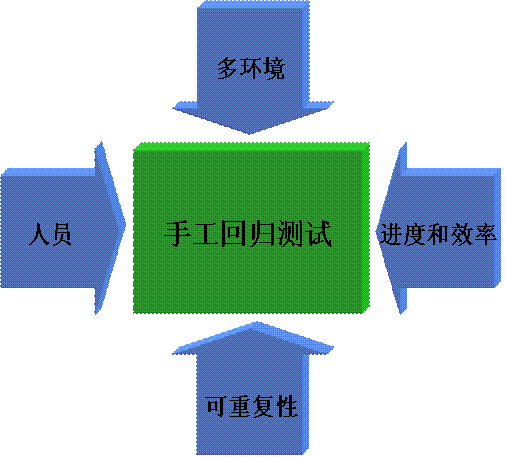
回归测试详解
🍅 视频学习:文末有免费的配套视频可观看 🍅 关注公众号:互联网杂货铺,回复1 ,免费获取软件测试全套资料,资料在手,涨薪更快 什么是回归测试 回归测试(Regression testi…...

渲染效果图有哪几种分类?效果图为什么用云渲染更快
云渲染利用了集群化的云端服务器资源,通过并行计算充分发挥了高性能硬件的优势,显著提升了渲染的速度。这一技术特别适用于处理规模庞大或细节丰富的渲染任务,在缩短项目完成时间方面表现卓越。无论是用于为建筑提供精确的可视化效果图&#…...
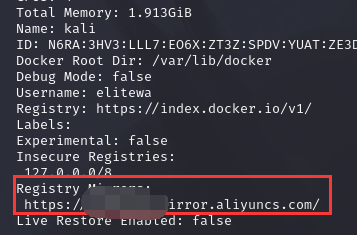
Docker镜像加速
前言 众所周知,我们常用的一些工具或系统的下载源都是国外的,这就会导致我们在下载一些东西时,会导致下载巨慢或者下载失败的情况,下面便是docker换下载源的教程 镜像加速 下面是几个常用的国内的镜像 科大镜像:ht…...
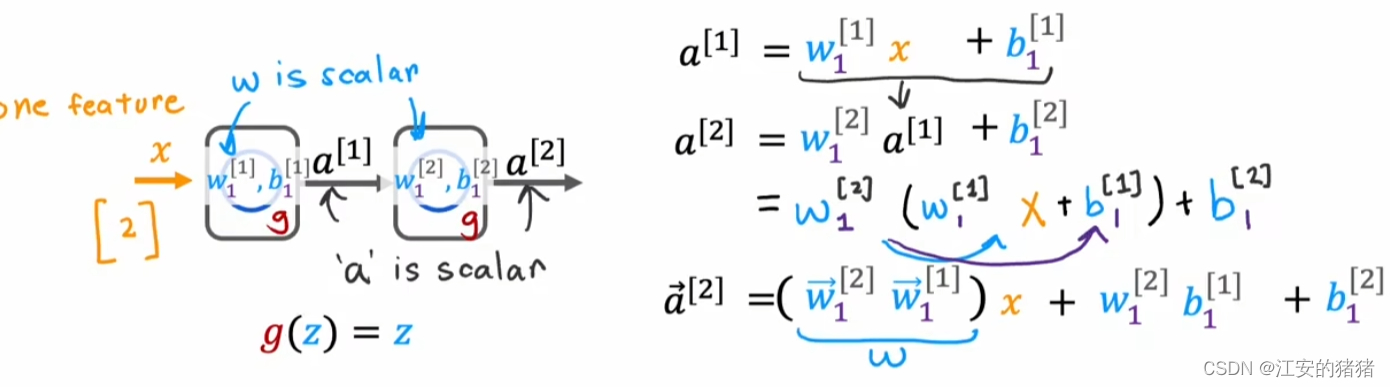
吴恩达deeplearning.ai:sigmoid函数的替代方案以及激活函数的选择
以下内容有任何不理解可以翻看我之前的博客哦:吴恩达deeplearning.ai专栏 文章目录 引入——改进下需求预测模型ReLU函数(整流线性单元 rectified linear unit)线性激活函数(linear activation function)激活函数的选择实现方式为什么需要激活函数 到现在…...

Alias许可分析中的数据可视化
Alias许可分析中的数据可视化:引领企业洞察合规之道的明灯 在信息化时代,数据可视化已成为各行各业的重要工具,能够帮助用户直观地理解和分析复杂的数据。在Alias许可分析中,数据可视化同样发挥着至关重要的作用,为企…...
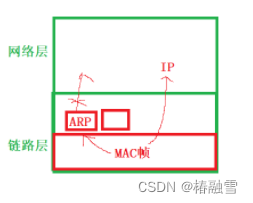
【计算机网络】数据链路层--以太网/MTU/ARP/RARP协议
文章目录 一、以太网1.以太网帧格式2.MAC地址3.局域网的转发原理 二、MTU1.什么是MTU2.MTU对IP协议的影响3.MTU对UDP影响4.MTU对于TCP协议的影响 三、ARP协议1.ARP协议的作用2.ARP数据报的格式3.ARP协议的工作流程 一、以太网 “以太网” 不是一种具体的网络, 而是一种技术标准…...
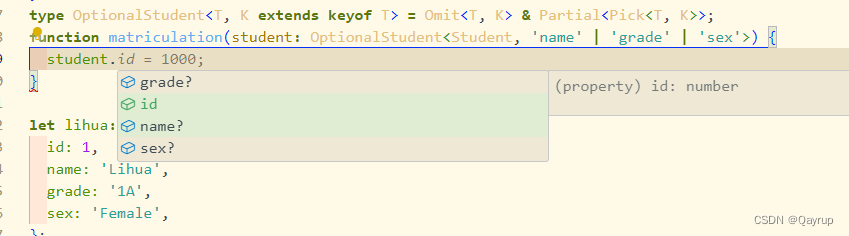
typescript使用解构传参
看下面这个函数 interface Student {id: number;name: string;class: string;sex: string;}function matriculation(student: Student) {//...}我们要调用它,就需要传递一个实现了Student约束的对象进去 interface Student {id: number;name: string;class: string;sex: string…...
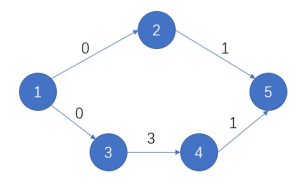
CSP-J 2023 复赛第4题:旅游巴士
【题目来源】https://www.luogu.com.cn/problem/P9751https://www.acwing.com/problem/content/description/5313/【题目描述】 小 Z 打算在国庆假期期间搭乘旅游巴士去一处他向往已久的景点旅游。 旅游景点的地图共有 n 处地点,在这些地点之间连有 m 条道路。 其中…...
JAVA算法和数据结构
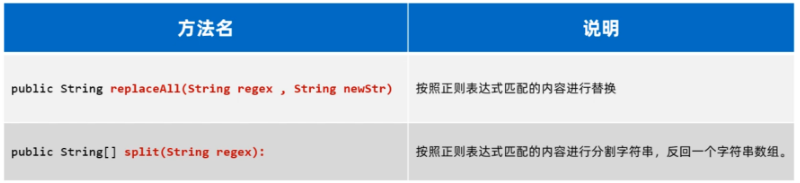
一、Arrays类 1.1 Arrays基本使用 我们先认识一下Arrays是干什么用的,Arrays是操作数组的工具类,它可以很方便的对数组中的元素进行遍历、拷贝、排序等操作。 下面我们用代码来演示一下:遍历、拷贝、排序等操作。需要用到的方法如下 public…...

每日五道java面试题之spring篇(七)
目录: 第一题. 什么是Spring beans?第二题. 一个 Spring Bean 定义 包含什么?第三题. 如何给Spring 容器提供配置元数据?Spring有几种配置方式?第四题. Spring基于xml注入bean的几种方式?第五题:你怎样定义类的作用域…...
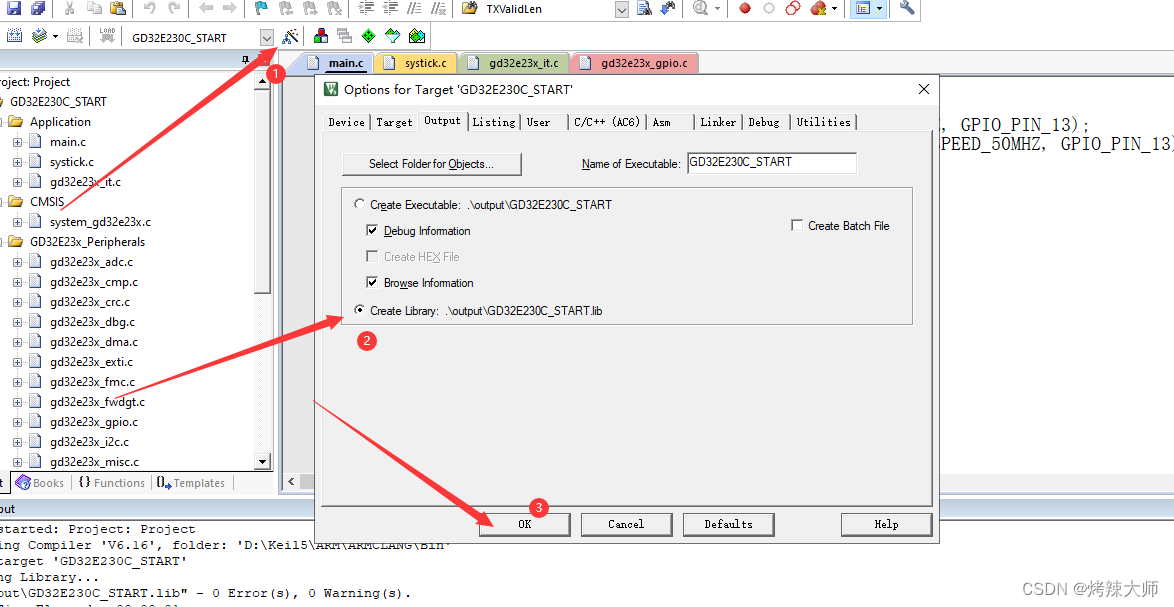
Keil编译GD32工程时找不到lib库文件
D:\Keil5\ARM\ARMCLANG\Bin\..\lib\armlib\mc_p.l:SELECTION_SCRIPT(2974): error: L6907E: Expected an expression. 问题 解决方法:因为编译器没有找到那个函数的代码,也就未解析了 其实问题很简单,把你的lib文件加进去,ok了…...
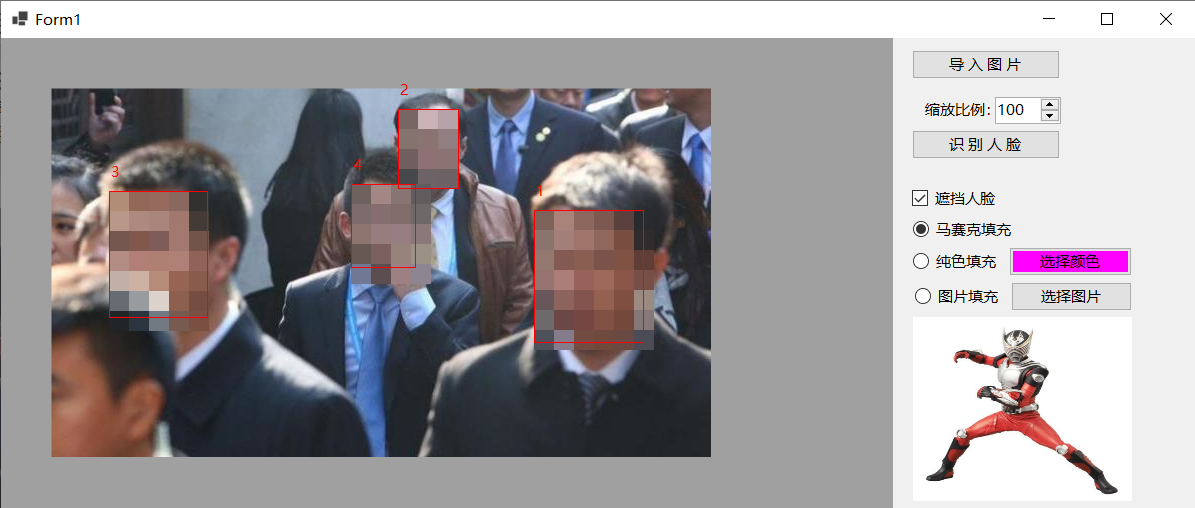
测试C#使用ViewFaceCore实现图片中的人脸遮挡
基于ViewFaceCore和DlibDotNet都能实现人脸识别,准备做个遮挡图片中人脸的程序,由于暂时不清楚DlibDotNet返回的人脸尺寸与像素的转换关系,最终决定使用ViewFaceCore实现图片中的人脸遮挡。 新建Winform项目,在Nuget包管理器中…...

2.21 Qt day2 菜单栏/工具栏/状态栏/浮动窗口、UI界面、信号与槽
思维导图 使用手动连接,将登录框中的取消按钮使用qt4版本的连接到自定义的槽函数中,在自定义的槽函数中调用关闭函数 将登录按钮使用qt5版本的连接到自定义的槽函数中,在槽函数中判断ui界面上输入的账号是否为"admin",…...
300分钟吃透分布式缓存-16讲:常用的缓存组件Redis是如何运行的?
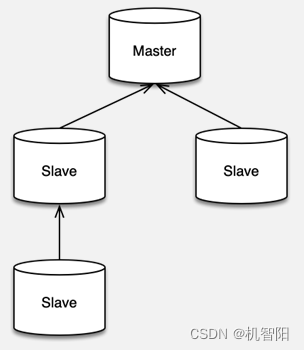
Redis 基本原理 Redis 简介 Redis 是一款基于 ANSI C 语言编写的,BSD 许可的,日志型 key-value 存储组件,它的所有数据结构都存在内存中,可以用作缓存、数据库和消息中间件。 Redis 是 Remote dictionary server 即远程字典服务…...

上一篇文章补充:已经存在的小文件合并
对于HDFS上已经存在的大量小文件问题,有多种策略可以进行处理和优化: 1. **合并小文件**: - **使用Spark作业合并**:通过编写Spark程序读取小文件并调用repartition()或coalesce()函数重新分区数据,然后将合并后的…...

代码随想录训练营第三十期|第四十三天|动态规划 part05|1049. 最后一块石头的重量 II ● 494. 目标和 ● 474.一和零
1049. 最后一块石头的重量 II - 力扣(LeetCode) class Solution {public int lastStoneWeightII(int[] stones) {int sum 0;for (int n : stones) {sum n;}int target sum / 2;int[] dp new int[target 1];for (int i 0; i < stones.length; i…...

c++学习记录 string容器—字符串插入和删除
函数原型: string& insert(int pos,const char* s); //插入字符串string& insert(int pos,const string& str); //插入字符串string& insert(int pos,int n,char c); //在指定位置插入n个字符cstring&…...

【IEEE会议征稿】2024年第九届智能计算与信号处理国际学术会议(ICSP 2024)
2024年第九届智能计算与信号处理国际学术会议(ICSP 2024) 2024年第八届智能计算与信号处理国际学术会议(ICSP 2024)将在西安举行, 会期是2024年4月19-21日, 为期三天, 会议由西安科技大学主办。 欢迎参会&…...

Vivado里FIFO IP核的Standard和FWFT模式到底怎么选?一个波形对比就懂了
Vivado中FIFO IP核模式选择:Standard与FWFT的深度解析与实战指南 在FPGA开发中,数据缓冲是几乎所有高速数据处理系统不可或缺的一环。作为Xilinx工具链中的核心IP之一,FIFO Generator提供了灵活的数据缓冲解决方案。但当面对Standard FIFO和F…...

iVentoy(增强版PXE服务器
链接:https://pan.quark.cn/s/d2ca56327274iVentoy是一个增强版的PXE服务器。你可以通过网络同时为多台机器启动和安装操作系统。软件的使用非常简单,无需复杂的配置。只需要直接将ISO文件放在指定的位置,然后在启动时,客户机可以…...

3步重构你的系统菜单:告别混乱的高效管理方案
3步重构你的系统菜单:告别混乱的高效管理方案 【免费下载链接】ContextMenuManager 🖱️ 纯粹的Windows右键菜单管理程序 项目地址: https://gitcode.com/gh_mirrors/co/ContextMenuManager 你是否曾经在右键点击文件时,面对满屏的无关…...

如何安全导出浏览器Cookie:本地化工具的完整使用教程
如何安全导出浏览器Cookie:本地化工具的完整使用教程 【免费下载链接】Get-cookies.txt-LOCALLY Get cookies.txt, NEVER send information outside. 项目地址: https://gitcode.com/gh_mirrors/ge/Get-cookies.txt-LOCALLY 你是否曾需要将浏览器Cookie导出到…...

如何用拯救者工具箱完全掌控联想笔记本:开源硬件管理终极指南
如何用拯救者工具箱完全掌控联想笔记本:开源硬件管理终极指南 【免费下载链接】LenovoLegionToolkit Lightweight Lenovo Vantage and Hotkeys replacement for Lenovo Legion laptops. 项目地址: https://gitcode.com/gh_mirrors/le/LenovoLegionToolkit 你…...

AI编程工具的内卷:Copilot、Cursor、通义灵码,谁能笑到最后?
当“内卷”的风吹到AI编程工具2026年,AI编程工具已不再是新鲜事物,而是开发者工具箱中的标配。从最初的代码补全,到如今的全栈智能体,这个赛道正经历着一场前所未有的“内卷”。GitHub Copilot、Cursor、通义灵码三足鼎立…...

维他动力获5亿Pre-A轮启动人形研发;优必选与日立达成合作人形机器人赋能制造; 前小米高管创业工业通用具身大脑小雨智造获B+轮融资
1. 维他动力获5亿Pre-A轮启动人形研发牛喀网获悉,Vbot维他动力正式完成近5亿元Pre-A轮融资,创下当前消费级具身智能领域的最大单笔融资纪录,本轮由东方嘉富、华泰紫金、复星锐正联合领投,上汽旗下尚颀资本等机构参投。技术层面&am…...

如何快速掌握LyricsX:macOS终极歌词同步工具完整指南
如何快速掌握LyricsX:macOS终极歌词同步工具完整指南 【免费下载链接】LyricsX 🎶 Ultimate lyrics app for macOS. 项目地址: https://gitcode.com/gh_mirrors/ly/LyricsX LyricsX是一款专为macOS设计的终极歌词应用,能够自动同步音乐…...

Drogon框架数据库连接监控终极指南:性能指标与智能告警机制
Drogon框架数据库连接监控终极指南:性能指标与智能告警机制 【免费下载链接】drogon Drogon: A C14/17/20 based HTTP web application framework running on Linux/macOS/Unix/Windows 项目地址: https://gitcode.com/gh_mirrors/dr/drogon Drogon是一个基于…...

Degrees of Lewdity中文本地化技术解析:从安装到优化的实践指南
Degrees of Lewdity中文本地化技术解析:从安装到优化的实践指南 Degrees of Lewdity作为一款备受欢迎的游戏,其英文界面一直是中文用户体验的主要障碍。本文提供的Degrees of Lewdity中文本地化技术解析,将系统指导您完成游戏汉化的全过程&a…...