
springboot自动装配原理
引言
springboot的自动装配是其重要特性之一,在使用中我们只需在maven中引入需要的starter,然后相应的Bean便会自动注册到容器中。例如:
<dependency><groupId>org.springframework.boot</groupId><artifactId>spring-boot-starter-amqp</artifactId>
</dependency>
@Resource
private RabbitTemplate rabbitTemplate;
此时我们便可以注入rabbitTemplate使用相应的功能了。本篇文章将探究springboot如何实现的自动装配(基于2.2.5.RELEASE)。
@EnableAutoConfiguration
在@SpringBootAppilication的注解上有一个@EnableAutoConfiguration注解,这个注解完成了自动装配的功能。
@Target(ElementType.TYPE)
@Retention(RetentionPolicy.RUNTIME)
@Documented
@Inherited
@AutoConfigurationPackage
@Import(AutoConfigurationImportSelector.class)
public @interface EnableAutoConfiguration {String ENABLED_OVERRIDE_PROPERTY = "spring.boot.enableautoconfiguration";/*** Exclude specific auto-configuration classes such that they will never be applied.* @return the classes to exclude*/Class<?>[] exclude() default {};/*** Exclude specific auto-configuration class names such that they will never be* applied.* @return the class names to exclude* @since 1.3.0*/String[] excludeName() default {};}
@EnableAutoConfiguration通过@Import注解将AutoConfigurationImportSelector中selectImports方法返回的类注册到容器中。@EnableAutoConfiguration 会尝试猜测并配置那些你需要的bean。通常根据classpath和你定义的bean来决定注册哪些类。例如,如果你的classpath有tomcat-embed相关的jar,那么你就可能想要TomcatServletWebServerFactory这个类的实例。
因为当使用@SpringBootApplication时自动装配就会自动生效,所以再使用这个注解将不会再起作用。
自动装配bean的过程将在用户自定义的bean被注册到容器之后进行
每个starter对应一个XXXAutoConfiguration类,其中定义了一些需要的bean
如何不让某些类自动装配
- 可以通过exclude属性将那些不想自动装配的类排除在外
- 如果你不能访问那些想排除的类可以使用exclueName属性指定类全名
- 也可以使用spring.autoconfigure.exclude.property属性
AutoConfigurationImportSelector
selectImports()
将selectImports方法重写为:
@Override
public String[] selectImports(AnnotationMetadata annotationMetadata) {if (!isEnabled(annotationMetadata)) {return NO_IMPORTS;}AutoConfigurationMetadata autoConfigurationMetadata = AutoConfigurationMetadataLoader.loadMetadata(this.beanClassLoader);AutoConfigurationEntry autoConfigurationEntry = getAutoConfigurationEntry(autoConfigurationMetadata,annotationMetadata);return StringUtils.toStringArray(autoConfigurationEntry.getConfigurations());
}
- 入参AnnotationMetadata里面记录着@Import注解的元数据,例如该注解所标记的类
- 判断自动装配是否关闭,如果关闭就返回空数组,自动装配可以通过spring.boot.enableautoconfiguration=false关闭,默认是开启,关闭后将无法自动装配
- 加载AutoConfigurationMetadata,其实就是将META-INF/spring-autoconfigure-metadata.properties文件下的属性加载进来,过滤时使用。
存储着待自动装配候选类的过滤计算规则,框架会根据文件中的规则逐个判断候选类是否需要自动装配进容器 作用TODO
- 调用getAutoConfigurationEntry获取需要加载入容器的类
getAutoConfigurationEntry()
protected AutoConfigurationEntry getAutoConfigurationEntry(AutoConfigurationMetadata autoConfigurationMetadata,AnnotationMetadata annotationMetadata) {if (!isEnabled(annotationMetadata)) {return EMPTY_ENTRY;}AnnotationAttributes attributes = getAttributes(annotationMetadata);List<String> configurations = getCandidateConfigurations(annotationMetadata, attributes);configurations = removeDuplicates(configurations);Set<String> exclusions = getExclusions(annotationMetadata, attributes);checkExcludedClasses(configurations, exclusions);configurations.removeAll(exclusions);configurations = filter(configurations, autoConfigurationMetadata);fireAutoConfigurationImportEvents(configurations, exclusions);return new AutoConfigurationEntry(configurations, exclusions);
}
- 获得@EnableAutoConfiguration注解的属性,即exclude和excludeName属性的值
- 获得那些可能会被考虑的XXXAutoConfiguration类的类名,从META-INF/spring.factory的org.springframework.boot.autoconfigure.EnableAutoConfiguration属性获得
- 将获得的XXXAutoConfiguration类名去重
- 去掉1中获得的exclude和excludeName属性中的类,另外将配置文件中的spring.autoconfigure.exclude属性配置的类也去掉
- 过滤
- 触发自动配置事件
filter()
过滤即是通过规则将待注入的AutoConfiguration类进行筛选,将符合条件的留下。过滤的过程如下:
private List<String> filter(List<String> configurations, AutoConfigurationMetadata autoConfigurationMetadata) {long startTime = System.nanoTime();String[] candidates = StringUtils.toStringArray(configurations);boolean[] skip = new boolean[candidates.length];boolean skipped = false;for (AutoConfigurationImportFilter filter : getAutoConfigurationImportFilters()) {invokeAwareMethods(filter);boolean[] match = filter.match(candidates, autoConfigurationMetadata);for (int i = 0; i < match.length; i++) {if (!match[i]) {skip[i] = true;candidates[i] = null;skipped = true;}}}if (!skipped) {return configurations;}List<String> result = new ArrayList<>(candidates.length);for (int i = 0; i < candidates.length; i++) {if (!skip[i]) {result.add(candidates[i]);}}if (logger.isTraceEnabled()) {int numberFiltered = configurations.size() - result.size();logger.trace("Filtered " + numberFiltered + " auto configuration class in "+ TimeUnit.NANOSECONDS.toMillis(System.nanoTime() - startTime) + " ms");}return new ArrayList<>(result);
}
- 入参configurations为待过滤的所有AutoConfigration类,autoConfigurationMetadata为过滤规则
- getAutoConfigurationImportFilters()找出spring.factory中org.springframework.boot.autoconfigure.AutoConfigurationImportFilter对用的属性值作为过滤器,包括以下三个:
# Auto Configuration Import Filters
org.springframework.boot.autoconfigure.AutoConfigurationImportFilter=\
org.springframework.boot.autoconfigure.condition.OnBeanCondition,\
org.springframework.boot.autoconfigure.condition.OnClassCondition,\
org.springframework.boot.autoconfigure.condition.OnWebApplicationCondition
如果有哪个XXAutoConfiguration类没有通过过滤,则剔除出去。
下面将介绍这3个过滤器的作用:
- OnClassCondition 指定的类在已经被加载到jvm中,通过classLoader.loadClass(className)或Class.forName(className)获取到类即可
- OnBeanCondition 指定的bean已经被加载到容器中
- OnWebApplicationCondition 当是某种web应用时才能通过条件,目前都是SERVLET类型的web应用
以OnClassCondition为例,其核心代码为:
private ConditionOutcome getOutcome(String candidates) {try {if (!candidates.contains(",")) {return getOutcome(candidates, this.beanClassLoader);}for (String candidate : StringUtils.commaDelimitedListToStringArray(candidates)) {ConditionOutcome outcome = getOutcome(candidate, this.beanClassLoader);if (outcome != null) {return outcome;}}
}
catch (Exception ex) {// We'll get another chance later
}
return null;
}
private ConditionOutcome getOutcome(String className, ClassLoader classLoader) {if (ClassNameFilter.MISSING.matches(className, classLoader)) {return ConditionOutcome.noMatch(ConditionMessage.forCondition(ConditionalOnClass.class).didNotFind("required class").items(Style.QUOTE, className));}return null;
}
getOutCome即是获取匹配结果的方法,最终通过ClassNameFilter.MISSING.matches(className, classLoader)使用反射获得是否有类加载到jvm中
protected static Class<?> resolve(String className, ClassLoader classLoader) throws ClassNotFoundException {if (classLoader != null) {return classLoader.loadClass(className);}return Class.forName(className);
}
总结
springboot的自动装配本质上是通过@Import(AutoConfigurationImportSelector.class)注解将spring.factories文件中的org.springframework.boot.autoconfigure.EnableAutoConfiguration属性下的XXXAutoConfig类加载到容器中,当然不是全部加载,要通过spring-autoconfigure-metadata.properties文件下
相关文章:

springboot自动装配原理
引言 springboot的自动装配是其重要特性之一,在使用中我们只需在maven中引入需要的starter,然后相应的Bean便会自动注册到容器中。例如: <dependency><groupId>org.springframework.boot</groupId><artifactId>spr…...
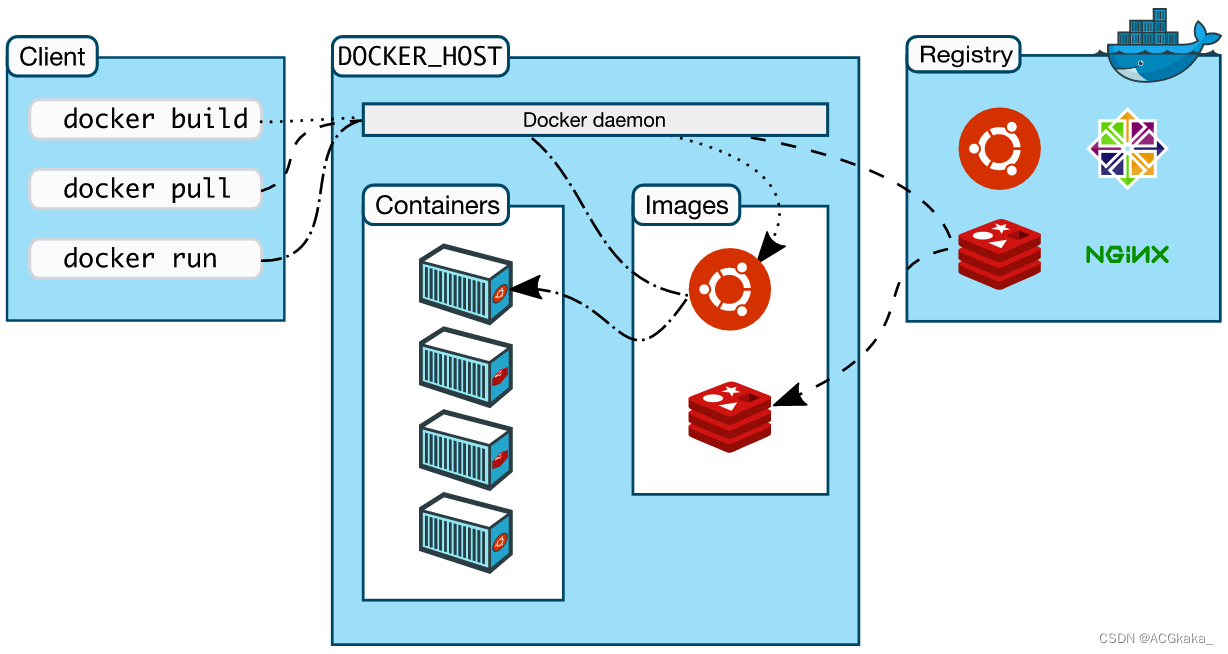
Docker学习(二十)什么是分层存储?
目录1.简介2.什么是 Union Mount?3.分层介绍1)lowerdir 层(镜像层)2)upperdir 层(容器层)3)merged 层4.工作原理1)读:2)写:3ÿ…...
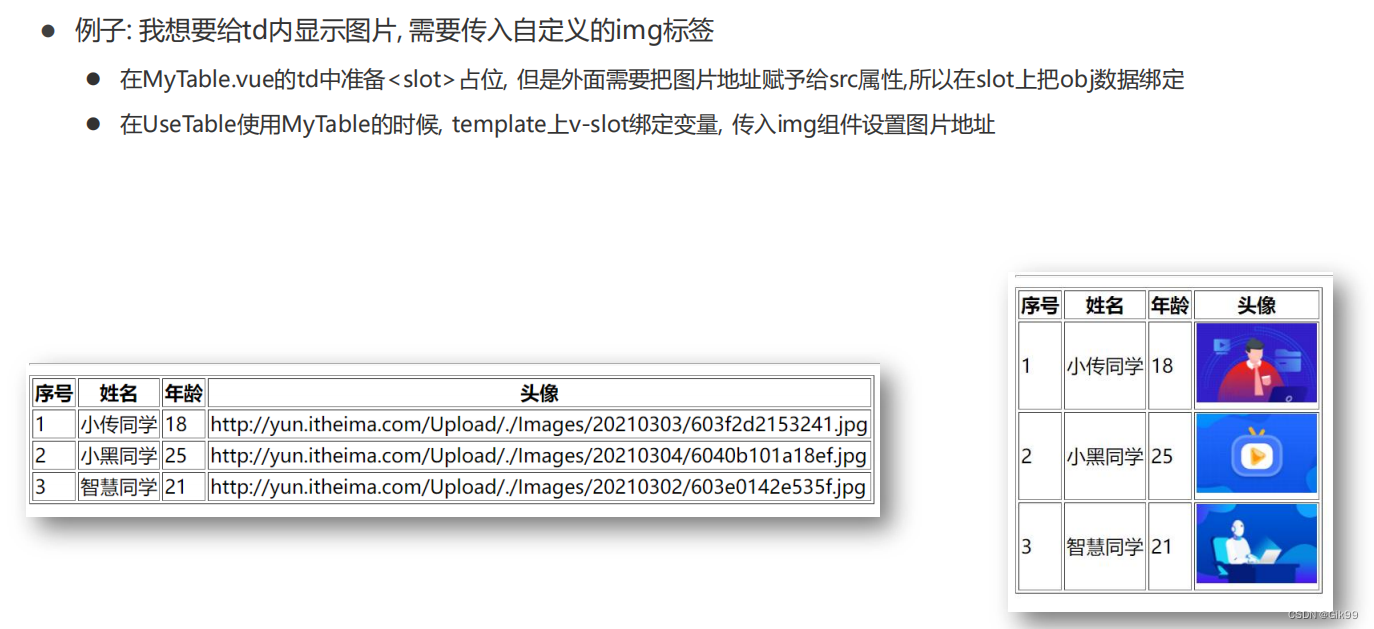
Vue组件进阶(动态组件,组件缓存,组件插槽,具名插槽,作用域插槽)与自定义指令
Vue组件进阶与自定义指令一、Vue组件进阶1.1 动态组件1.2 组件缓存1.3 组件激活和非激活1.4 组件插槽1.5 具名插槽1.6 作用域插槽1.7 作用域插槽使用场景二、自定义指令2.1 自定义指令--注册2.2 自定义指令-传参一、Vue组件进阶 1.1 动态组件 多个组件使用同一个挂载点&#x…...

僵尸进程与孤儿进程
概念 在 Unix/Linux 系统中,正常情况下,子进程是通过父进程创建的,且两者的运行是相互独立的,父进程永远无法预测子进程到底什么时候结束。当一个进程调用 exit 命令结束自己的生命时,其实它并没有真正的被销毁&#…...
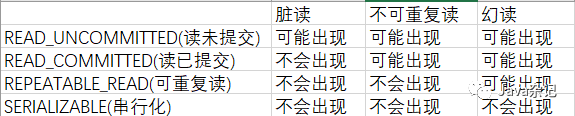
基于注解@Transactional事务基本用法
关于概念性的放在最下面,熟读几遍 在使用时候也没多关注,总是加个Transactional 初识下 一般查询 Transactional(propagation Propagation.SUPPORTS) 增删改 Transactional(propagation Propagation.REQUIRED) 当然不能这么马虎 Spring中关于事务的传播 一个个测试,事…...
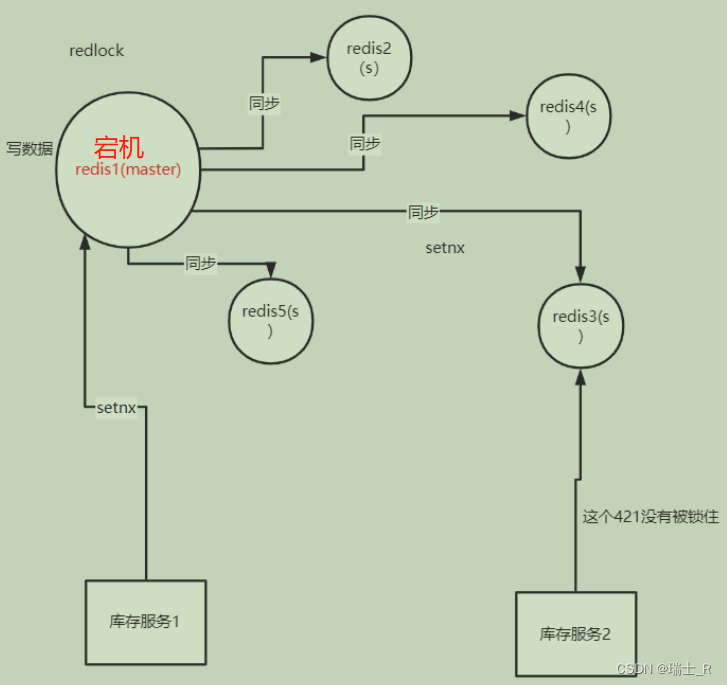
Go项目(商品微服务-2)
文章目录简介handler商品分类轮播图品牌和品牌与分类oss前端直传库存服务数据不一致redis 分布式锁小结简介 开发商品微服务 API 层类似的,将 user-web 目拷贝一份,全局替换掉 user-web修改 config 去掉不用的配置更新本地和远程 nacos 配置文件 把 pro…...
无头盔PICO-unity开发日记1(抓取、传送)
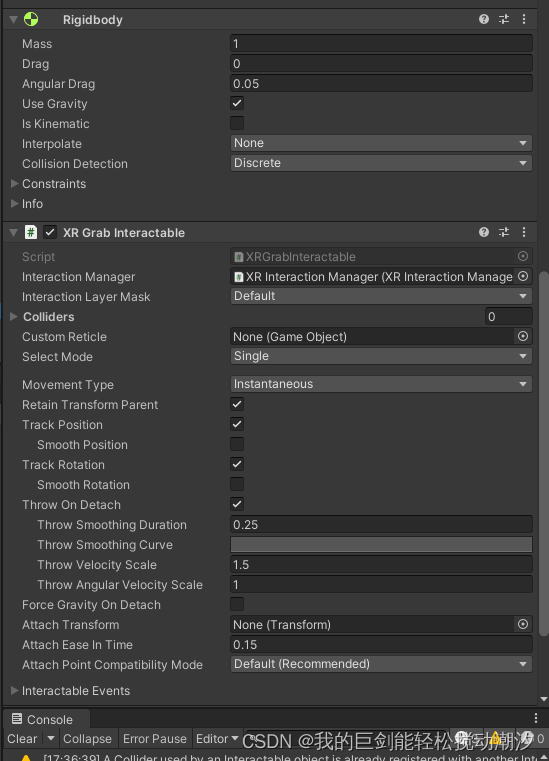
目录 可传送的地面 锚点传送 修改射线颜色(可交互/不可交互) 球、抓手组件 ||刚体(重力)组件 可传送的地面 1.地面添加组件 2.XR交互管理器添加传送提供者 3.地面设置传送提供者 4.XR交互管理器添加locomotion system 5.拖拽 完…...

Material3设计指南笔记
Material3设计指南笔记Table of Contents1. 颜色color1.1. 颜色分类1.2. 强调色accent color1.3. 中性色neutral color1.4. 辅助色additional color1.5. 调色盘tonal palettes1.6. 颜色规范2. z轴高度 elevation3. 图标 icon4. 动画 motion5. 形状 shape6. 字体1. 颜色color1.1…...

JavaWeb--会话技术
会话技术1 会话跟踪技术的概述2 Cookie2.1 Cookie的基本使用2.2 Cookie的原理分析2.3 Cookie的使用细节2.3.1 Cookie的存活时间2.3.2 Cookie存储中文3 Session3.1 Session的基本使用3.2 Session的原理分析3.3 Session的使用细节3.3.1 Session钝化与活化3.3.2 Session销毁目标 理…...
Git图解-为啥是Git?怎么装?
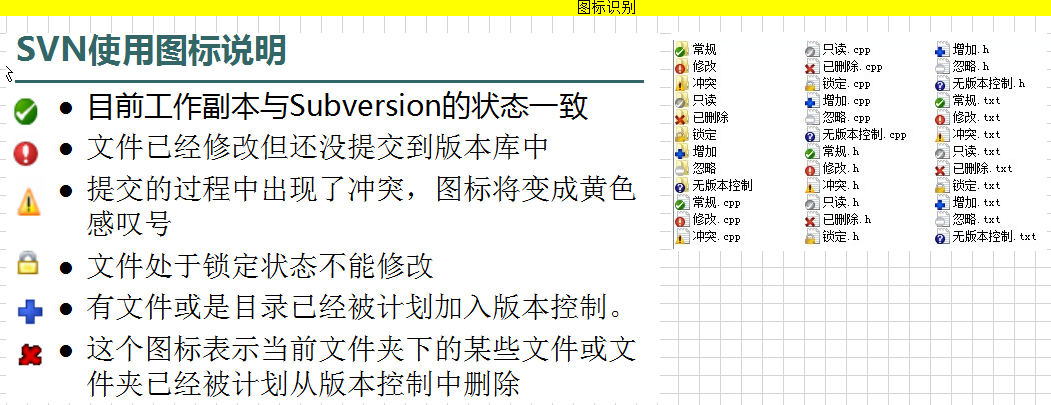
目录 零、学习目标 一、版本控制 1.1 团队开发问题 1.2 版本控制思想 1.2.1 版本工具 二、Git简介 2.1 简介 2.2 Git环境的搭建 三、转视频版 零、学习目标 掌握git的工作流程 熟悉git安装使用 掌握git的基本使用 掌握分支管理 掌握IDEA操作git 掌握使用git远程仓…...

HTML 框架
HTML 框架 <iframe>标签规定一个内联框架。 一个内联框架被用来在当前 HTML 文档中嵌入另一个文档。 通过使用框架,你可以在同一个浏览器窗口中显示不止一个页面。 iframe 语法: <iframe src"URL"></iframe> 该URL指向不同的…...
)
Rust特征(Trait)
特征(Trait) 特征(trait)是rust中的概念,类似于其他语言中的接口(interface)。在之前的代码中,我们也多次见过特征的使用,例如 #[derive(Debug)],它在我们定义的类型(struct)上自动…...
详解七大排序算法
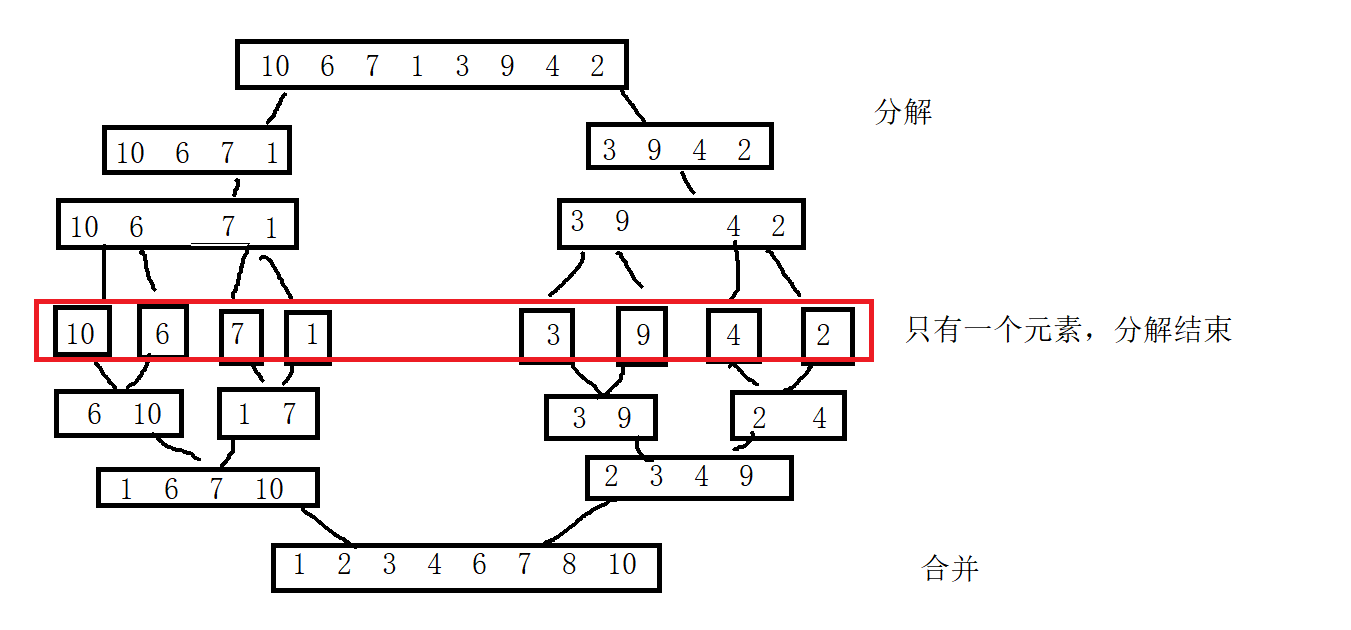
对于排序算法,是我们在数据结构阶段,必须要牢牢掌握的一门知识体系,但是,对于排序算法,里面涉及到的思路,代码……各种时间复杂度等,都需要我们,记在脑袋瓜里面!…...
Vue+ECharts实现可视化大屏
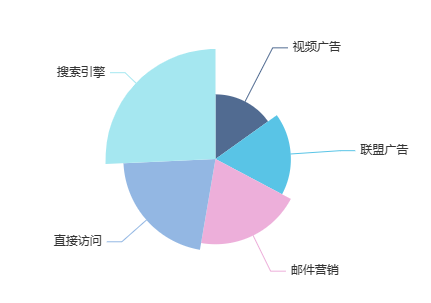
由于项目需要一个数据大屏页面,所以今天学习了vue结合echarts的图标绘制 首先需要安装ECharts npm install echarts --save因为只是在数据大屏页面绘制图表,所以我们无需把它设置为全局变量。 可以直接在该页面引入echarts,就可以在数据大…...
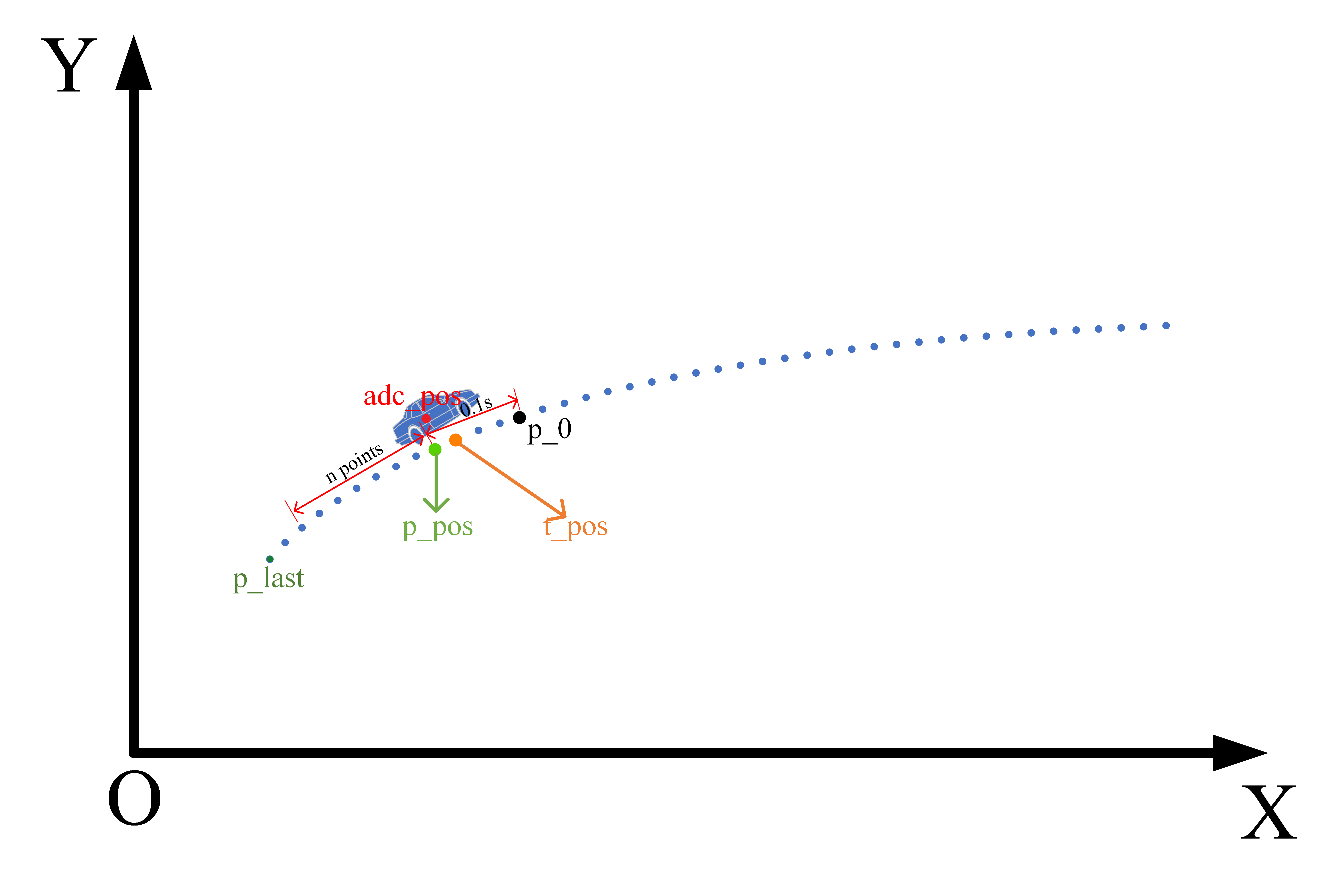
百度Apollo规划算法——轨迹拼接
百度Apollo规划算法——轨迹拼接引言轨迹拼接1、什么是轨迹拼接?2、为什么要进行轨迹拼接?3、结合Apollo代码为例理解轨迹拼接的细节。参考引言 在apollo的规划算法中,在每一帧规划开始时会调用一个轨迹拼接函数,返回一段拼接轨迹…...
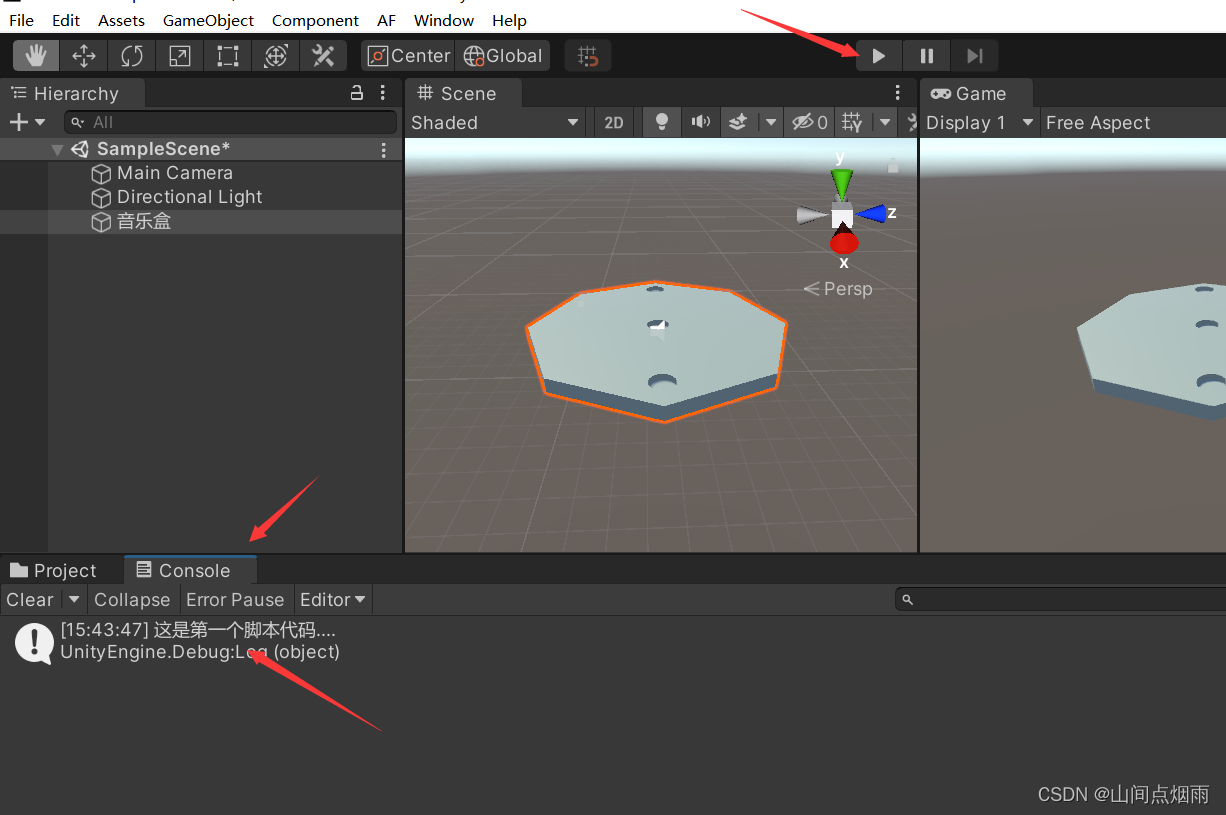
6. unity之脚本
1. 说明 当整个游戏运行起来之后,我们无法再借助鼠标来控制物体,此时可以使用脚本来更改物体的各种姿态,驱动游戏的整体运动逻辑。 2. 脚本添加 首先在Assets目录中,新创建一个Scripts文件夹,在该文件内右键鼠标选择…...
解析)
flink-note笔记:flink-state模块中broadcast state(广播状态)解析
github开源项目flink-note的笔记。本博客的实现代码都写在项目的flink-state/src/main/java/state/operator/BroadcastStateDemo.java文件中。 项目github地址: github 1. 广播状态是什么 网上关于flink广播变量、广播状态的讲解很杂。我翻了flink官网发现,实际上在1.15里面…...

vue——预览PDF
下载插件 npm install --save vue-pdf创建组件 <template><div class"ins-submit-docs-content ins-submit-docs-pdf"><div v-if"loading" style"position: absolute; top: 40%; width: 100%;text-align: center;"><el-l…...
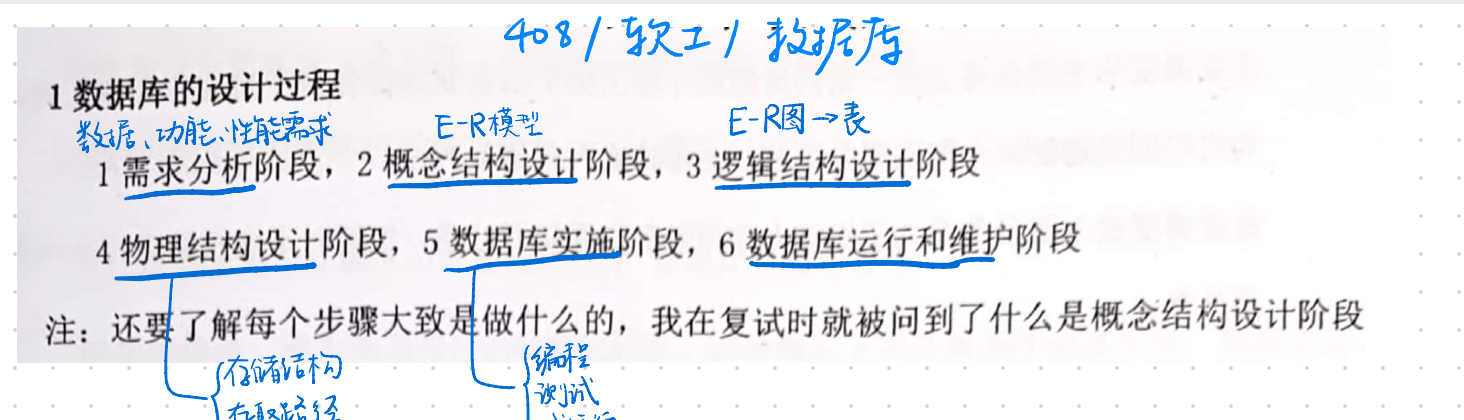
数据库复习
什么是数据库系统 数据库系统是指在计算机系统中引入数据库后构成的系统,一般由数据库、数据库管理系统(及其开发工具)、应用系统、数据库管理员和用户构成 数据库系统的特点是什么? 数据结构化数据的共享性高,冗余度低且易扩充数据独立性高数…...
vscode插件推荐
文章目录前言一、vscode插件推荐?1、 Chinese (Simplified) (简体中文) Language Pack for Visual Studio Code2、Auto Close Tag3、Auto Import3、Error Lens4、vscode-icons5、ES7 React/Redux/React-Native snippets6、GitLens — Git supercharged7、JavaScript…...

QWEN-AUDIO功能全解析:声波可视化、情感指令、四种人声,到底怎么用?
QWEN-AUDIO功能全解析:声波可视化、情感指令、四种人声,到底怎么用? 1. 认识QWEN-AUDIO语音合成系统 QWEN-AUDIO是一款基于Qwen3-Audio架构构建的智能语音合成系统,它能够将文字转换成带有情感和温度的自然语音。这个系统最特别…...

在github上部署个人的vitepress文档网站
我开发的BMapViewer组件正式上线了,文档使用了vitepress搭建编写,使用github Pages进行部署,现在可以正常访问了,接下来我会完整的写一遍网站部署过程。 我的文档网站:https://banyan666.github.io/BMapViewer-docs/ …...

Keil5开发环境为STM32移植水墨江南模型生成的精简字库
Keil5开发环境为STM32移植水墨江南模型生成的精简字库 最近在做一个有点意思的硬件项目,想在一块小小的OLED屏幕上,显示一些有中国风韵味的汉字,比如“风”、“雅”、“颂”这类字。直接用系统自带的宋体、黑体,总觉得差点意思&a…...

RTX4090D显卡性能释放:PyTorch 2.8镜像在文生视频任务中的实战表现
RTX4090D显卡性能释放:PyTorch 2.8镜像在文生视频任务中的实战表现 1. 硬件与镜像环境概览 1.1 RTX 4090D显卡的独特优势 RTX 4090D作为NVIDIA最新一代消费级旗舰显卡,在深度学习领域展现出非凡潜力。与标准版4090相比,4090D在保持相同24G…...

提升无线传输性能:手把手教你优化Si4463的Data Rate配置与SPI通信稳定性
突破Si4463无线传输瓶颈:从寄存器配置到SPI时序的全链路优化实战 当你的无线模块能够通信但性能不尽如人意时,就像驾驶一辆引擎未调校的跑车——它能跑,但永远达不到理想的极速。Si4463作为工业级无线收发芯片,其默认配置往往无法…...

TIPI内存管理揭秘:10个技巧优化PHP性能与防止内存泄漏
TIPI内存管理揭秘:10个技巧优化PHP性能与防止内存泄漏 【免费下载链接】tipi Thinking In PHP Internals, An open book on PHP Internals 项目地址: https://gitcode.com/gh_mirrors/ti/tipi PHP作为世界上最流行的服务器端脚本语言之一,其内存管…...

Zynq-7000 + RT-Thread + lwIP 实时网络性能调优实战
1. 为什么选择Zynq-7000 RT-Thread lwIP组合 在嵌入式网络应用中,实时性和确定性往往是首要考虑因素。我曾在多个工业控制项目中遇到这样的场景:系统需要同时处理高速UDP数据流和稳定的TCP控制指令,传统的嵌入式Linux方案虽然功能全面&…...

别再只看FLOPs了!从VoVNet的OSA模块看高效网络设计的实战误区
从VoVNet的OSA模块看高效网络设计的实战误区:为什么你的模型跑得比论文慢? 当我们在GitHub上复现一篇顶会论文时,最沮丧的瞬间莫过于:明明FLOPs和参数量完全匹配,实际推理速度却比论文报告值慢了30%。这个问题在部署De…...

Airtest+Poco自动化测试避坑指南:从环境搭建到报告生成的10个常见问题
AirtestPoco自动化测试实战避坑指南:10个高频问题深度解析与解决方案 在移动应用和游戏自动化测试领域,AirtestPoco的组合已经成为技术团队的首选工具链。这套开源框架凭借其图像识别与UI控件定位的双重能力,能够覆盖90%以上的自动化测试场景…...

OpenClaw+千问3.5-9B:自动化周报生成与数据分析
OpenClaw千问3.5-9B:自动化周报生成与数据分析 1. 为什么需要自动化周报 每周五下午三点,我的日历总会准时弹出提醒:"该写周报了"。这个重复了三年多的机械动作,消耗了我大量本该用于创造性工作的时间。直到上个月&am…...