
Android 14 AAOS audio
文章目录
- 乘客音频投放到主音频区
- 动态路由配置
- controlhal实现的具体流程
- control hal AudioGain的callback
- AudioModuleChange变化的通知
乘客音频投放到主音频区
-
场景:
是将乘客区的Media 属性的数据通过主屏区的设备进行播放。具体而言 在副屏user11播放的音乐是输出到主屏user10的设备上,当前只针对usage是media的情况。 -
测试用例:
有相关的测试用例
packages/services/Car/tests/EmbeddedKitchenSinkApp/src/com/google/android/car/kitchensink/audio/AudioUserAssignmentFragment.java -
测试流程:
首先主屏中选择ask user 11 To Accept,选择确认后。 在user 11 中播放音乐, 这个是时候这个音乐是从10种输出。 -
修改
默认支持这种的使用方式。 但是建议media的context 独立使用一个bus address。否则跟media context处于同一个bus address的context都会被路由到主音频区的Media设备中。 -
基本原理:
依赖于audioPolicy的setUserIDDeviceAffinity来实现的。这个接口是更新 之前注册audioPolicyMix的情况。是判断注册的policy中
mAudioPolicy.setUserIdDeviceAffinity(userId, devices);
动态路由配置
- 场景:
在同一个区域中 同一个context可以有两个可以播放的device。可以在播放过程中进行切换。 - 测试用例packages/services/Car/tests/EmbeddedKitchenSinkApp/src/com/google/android/car/kitchensink/audio/AudioTestFragment.java
中的switchToZoneConfigSelected。
只有在副屏中才有这样的测试,能够进行zoneConfig的切换。
在选项中选择了另外一个配置之后,进行音乐播放。这个是对应播放数据的地址变成新的配置。
Button zoneConfigSwitchButton = view.findViewById(R.id.switch_zone_configuration_key_event_button);zoneConfigSwitchButton.setOnClickListener((v) -> switchToZoneConfigSelected());
-
需要添加的配置:
car_audio_configuration: 添加两个zoneconfig。这两个zoneConfig的地址不一样, 只能添加到非primary zone的区域。
比如地址为bus101_audio_zone_1 和bus100_audio_zone_1
audio_policy_configuration: 添加同样的device,mixport等等。 -
实现的原理:
有提供给外部切换的接口。当调用该接口的时候,传递的是要切换的zoneconfig。
这个zoneconfig 中包含的是要切换的zone的信息 包括address 等等。
切换就是建立起userid 和 address的关系, 通过audiopolicy的setUserIdDeviceAffinity来实现。
这个时候在audiopolicyManager 中存储的是userid 和 新的address 的mix。
播放的时候会获取关系就获取的是新的address。
### AudioControl hal需要实现的功能
- registerFocusListener: carAudioService 注册回调到control AudioControl hal 向CarAudioService 请求焦点。
- onAudioFocusChange:CarAudioServie通知control 服务层焦点的变化,在control中请求焦点也会在这里告知。
- requestAudioFocus: hal层向CarAudioService 请求焦点
- abandonAudioFocus:hal层放弃某个焦点的请求。
上述 API 可分别用于从 HAL 请求和放弃音频焦点。作为响应,车载音频服务会考虑音频焦点请求,并将结果异步转发给 IAudioControl#onAudioFocusChange 方法。
- 增益变化的通知
将hal层(可能外部接入设备的音量变化的信息)音量信息通知给服务层,服务层获取这个信息 进行ui的改变等等操作。
这个事实上是提供了一个外部的设备(比如dsp 放大器)等等音频设备和android CarAudioService交互的路径。
interface IAudioControl {/***   Registers callback to be used by HAL for reporting unexpected gain(s)*    changed and the reason(s) why.**   @param callback The {@link IAudioGainCallback}.*/oneway void registerGainCallback(in IAudioGainCallback callback);
}
interface IAudioGainCallback {/***   Used to indicate that one or more audio device port gains have changed,*   i.e. initiated by HAL, not by CarAudioService.*   This is the counter part of the*   {@link onDevicesToDuckChange}, {@link onDevicesToMuteChange} and,*   {@link setAudioDeviceGainsChanged} APIs.**   @param reasons List of reasons that triggered the given gains changed.*   @param gains List of gains affected by the change.*/void onAudioDeviceGainsChanged(in Reasons[] reasons,in AudioGainConfigInfo[] gains);
}
- carVolumeGroupInfo
CarVolumeGroup 更改的事件类型
CarVolumeGroupEvent。每个事件都包含三种关键类型的信息:
CarVolumeGroupInfo列表
EventTypes (位图)
ExtraInfos列表
controlhal实现的具体流程
carAudioService init的时候会注册上层服务的回调到audioControlHal中。
public void init() {setupHalAudioFocusListenerLocked();setupHalAudioGainCallbackLocked();setupHalAudioModuleChangeCallbackLocked();
}- 首先是AudioFocus的注册
实现在HalAudioFocus中,是将HalAudioFocus的实现注册到AudioControl当中。在默认的AudioControl.cpp的
实现中。通过这个Listener 向CarAudioSerice请求焦点。
    public void registerFocusListener() {mAudioControlWrapper.registerFocusListener(this);}ndk::ScopedAStatus AudioControl::registerFocusListener(const shared_ptr<IFocusListener>& in_listener) {if (in_listener) {std::atomic_store(&mFocusListener, in_listener);} else {LOG(ERROR) << "Unexpected nullptr for listener resulting in no-op.";}}binder_status_t AudioControl::cmdRequestFocus(int fd, const char** args, uint32_t numArgs) {AudioFocusChange focusGain = AudioFocusChange(focusGainValue);if (mFocusListener == nullptr) {dprintf(fd, "Unable to request focus - no focus listener registered\n");return STATUS_BAD_VALUE;}mFocusListener->requestAudioFocus(usage, zoneId, focusGain);dprintf(fd, "Requested focus for usage %s, zoneId %d, and focusGain %d\n", usage.c_str(),zoneId, focusGain);return STATUS_OK;
}
回调到carAudioService中 makeAudioFocusRequestLocked进行焦点的请求。
其调用audioManager的requestAudioFocus请求焦点(这个实际也是回调到CarAudioService进行处理)
同时调用onAuioFocusChange通知到audioControl中。
public void requestAudioFocus(@AttributeUsage int usage, int zoneId, int focusGain) {synchronized (mLock) {AudioAttributesWrapper audioAttributesWrapper =CarAudioContext.getAudioAttributeWrapperFromUsage(usage);HalAudioFocusRequest currentRequest =mHalFocusRequestsByZoneAndUsage.get(zoneId).get(audioAttributesWrapper);if (currentRequest != null) {if (Slogf.isLoggable(TAG, Log.DEBUG)) {Slogf.d(TAG, "A request already exists for zoneId " + zoneId + " and usage "+ usage);}mAudioControlWrapper.onAudioFocusChange(usage, zoneId, currentRequest.mFocusStatus);} else {makeAudioFocusRequestLocked(audioAttributesWrapper, zoneId, focusGain);}}}private void makeAudioFocusRequestLocked(AudioAttributesWrapper audioAttributesWrapper,int zoneId, int focusGain) {AudioFocusRequest audioFocusRequest =generateFocusRequestLocked(audioAttributesWrapper, zoneId, focusGain);int requestResult = mAudioManager.requestAudioFocus(audioFocusRequest);int resultingFocusGain = focusGain;if (requestResult == AUDIOFOCUS_REQUEST_GRANTED) {HalAudioFocusRequest halAudioFocusRequest =new HalAudioFocusRequest(audioFocusRequest, focusGain);mHalFocusRequestsByZoneAndUsage.get(zoneId).put(audioAttributesWrapper, halAudioFocusRequest);} else if (requestResult == AUDIOFOCUS_REQUEST_FAILED) {resultingFocusGain = AUDIOFOCUS_LOSS;} else if (requestResult == AUDIOFOCUS_REQUEST_DELAYED) {Slogf.w(TAG, "Delayed result for request with audio attributes "+ audioAttributesWrapper + ", zoneId " + zoneId+ ", and focusGain " + focusGain);resultingFocusGain = AUDIOFOCUS_LOSS;}mAudioControlWrapper.onAudioFocusChange(audioAttributesWrapper.getAudioAttributes().getSystemUsage(),zoneId, resultingFocusGain);}总结: CarAudioService 和 control hal之间的交互,CarAudioService注册
HalFocusListener到control。 control 通过listener提供的requestAudioFocus传递usage、zoneID和focus请求的类型
请求焦点,carAudioService响应焦点请求 之后通过onAudioFocusChange通知control hal焦点请求的情况。
control hal AudioGain的callback
有关的实现在CarAudioGainMonitor中, 跟audioFocus的流程是一样的,都是先注册callback到control。 然后control利用这个callback 将
增益变化的信息传递出来。传递的信息包括两个部分:
- Reason 增益变化的原因
- AudioGainConfigInfo 包含zoneID、device address、index。
其中reason的定义见如下。
消息回调到CarAudioGainMonitor中 首先调用如下的函数将hal的reason转换为CarVolumeGroupEvent。
carAudioZone.onAudioGainChanged(reasons, gainsByZones.valueAt(i))
最后是调用的CarVolumeGroup的onAudioGainChanged来实现的。
这个过程会根据当前系统的状态结合gain index信息来 转换最后的EVENT_TYPE。
转换后的event通过下面的回调 回调到carAudioService的onVolumeGroupEvent中、
mCarVolumeInfoWrapper.onVolumeGroupEvent(events);
这里面会回调onGroupVolumeChanged给所有调用registerCarVolumeCallback注册callback的应用
比如VolumeSettingsPreferenceController,收到回调后会调整音量和mute的状态。
    private void setupHalAudioGainCallbackLocked() {AudioControlWrapper audioControlWrapper = getAudioControlWrapperLocked();if (!audioControlWrapper.supportsFeature(AUDIOCONTROL_FEATURE_AUDIO_GAIN_CALLBACK)) {Slogf.e(CarLog.TAG_AUDIO, "HalAudioGainCallback is not supported on this device");return;}mCarAudioGainMonitor = new CarAudioGainMonitor(mAudioControlWrapper,new CarVolumeInfoWrapper(this), mCarAudioZones);mCarAudioGainMonitor.registerAudioGainListener(mHalAudioGainCallback);}public void registerAudioGainListener(HalAudioGainCallback callback) {Objects.requireNonNull(callback, "Hal Audio Gain callback can not be null");mAudioControlWrapper.registerAudioGainCallback(callback);}ndk::ScopedAStatus AudioControl::registerGainCallback(const std::shared_ptr<IAudioGainCallback>& in_callback) {LOG(DEBUG) << ": " << __func__;if (in_callback) {std::atomic_store(&mAudioGainCallback, in_callback);} else {LOG(ERROR) << "Unexpected nullptr for audio gain callback resulting in no-op.";}return ndk::ScopedAStatus::ok();
}binder_status_t AudioControl::cmdOnAudioDeviceGainsChanged(int fd, const char** args,uint32_t numArgs) std::vector<AudioGainConfigInfo> agcis{};for (uint32_t i = 3; i < numArgs; i += 2) {std::string deviceAddress = std::string(args[i]);int32_t index;if (!safelyParseInt(std::string(args[i + 1]), &index)) {dprintf(fd, "Non-integer index provided with request: %s\n",std::string(args[i + 1]).c_str());return STATUS_BAD_VALUE;}AudioGainConfigInfo agci{zoneId, deviceAddress, index};agcis.push_back(agci);}mAudioGainCallback->onAudioDeviceGainsChanged(reasons, agcis);dprintf(fd, "Fired audio gain callback for reasons=%s and gains=%s\n",toEnumString(reasons).c_str(), toString(agcis).c_str());return STATUS_OK;
}
public @interface Reasons {
public static final int FORCED_MASTER_MUTE = 1;
public static final int REMOTE_MUTE = 2;
public static final int TCU_MUTE = 4;
public static final int ADAS_DUCKING = 8;
public static final int NAV_DUCKING = 16;
public static final int PROJECTION_DUCKING = 32;
public static final int THERMAL_LIMITATION = 64;
public static final int SUSPEND_EXIT_VOL_LIMITATION = 128;
public static final int EXTERNAL_AMP_VOL_FEEDBACK = 256;
public static final int OTHER = -2147483648;
}parcelable AudioGainConfigInfo {/*** The identifier for the audio zone the audio device port associated to this gain belongs to.**/int zoneId;/*** The Audio Output Device Port Address.** This is the address that can be retrieved at JAVA layer using the introspection* {@link android.media.AudioManager#listAudioDevicePorts} API then* {@link audio.media.AudioDeviceInfo#getAddress} API.** At HAL layer, it corresponds to audio_port_v7.audio_port_device_ext.address.** Devices that does not have an address will indicate an empty string "".*/String devicePortAddress;/*** UI Index of the corresponding AudioGain in AudioPort.gains.*/int volumeIndex;
}
总结:CarAudioService通过注册HalAudioGainCallback到control、然后control 在有Gain变化的时候。通过调调用listener的onAudioDeviceGainsChanged
将Gain变化的信息传递出来。CarAudioService将event转换为group的event。在传递给应用等等。
AudioModuleChange变化的通知
处理在CarAudioModuleChangeMonitor,通过将HalAudioModuleChangeCallback注册到control中。之后在control中创建一个或多个AudioPort。将这个Port通过callback的onAudioPortsChanged回调回carAudioService。最后通过
CarVolume的onVolumeGroupEvent通知到各个应用。
    void setModuleChangeCallback(HalAudioModuleChangeCallback callback) {Objects.requireNonNull(callback, "Hal audio module change callback can not be null");mAudioControlWrapper.setModuleChangeCallback(callback);}ndk::ScopedAStatus AudioControl::setModuleChangeCallback(const std::shared_ptr<IModuleChangeCallback>& in_callback) {std::atomic_store(&mModuleChangeCallback, in_callback);return ndk::ScopedAStatus::ok();
}binder_status_t AudioControl::cmdOnAudioPortsChanged(int fd, const char** args, uint32_t numArgs) {if (!checkCallerHasWritePermissions(fd)) {return STATUS_PERMISSION_DENIED;} mModuleChangeCallback->onAudioPortsChanged(ports);
}
相关文章:

Android 14 AAOS audio
文章目录 乘客音频投放到主音频区动态路由配置controlhal实现的具体流程control hal AudioGain的callbackAudioModuleChange变化的通知 乘客音频投放到主音频区 场景: 是将乘客区的Media 属性的数据通过主屏区的设备进行播放。具体而言 在副屏user11播放的音乐是输出…...

文心一言 VS 讯飞星火 VS chatgpt (207)-- 算法导论15.4 4题
四、说明如何只使用表 c 中 2*min(m,n) 个表项及O(1)的额外空间来计算LCS的长度。然后说明如何只用 min(m,n) 个表项及O(1)的额外空间完成相同的工作。要写代码的时候,请用go语言。 文心一言: 在只使用 2 * min(m, n) 个表项和 …...
【论文笔记】Attention Is All You Need
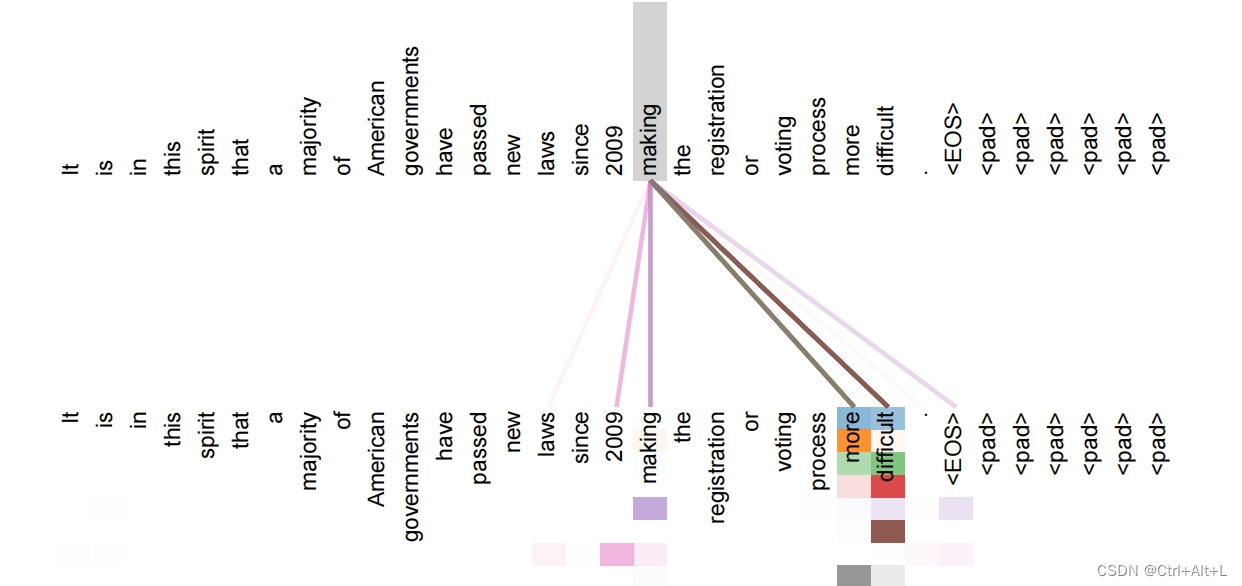
【论文笔记】Attention Is All You Need 文章目录 【论文笔记】Attention Is All You NeedAbstract1 Introduction2 Background补充知识:软注意力 soft attention 和硬注意力 hard attention?补充知识:加法注意力机制和点乘注意力机制Extende…...
(亲测可用)Adobe Photoshop 2024下载与安装
背景介绍:Adobe Photoshop 2024 是全球最受欢迎的图像编辑软件之一,2024年的版本带来了一系列令人印象深刻的功能: AI增强的自动选择和蒙版工具:现在,用户可以更轻松地选择和处理复杂的图像元素。更多的3D渲染功能&…...
uniapp聊天记录本地存储(详细易懂)
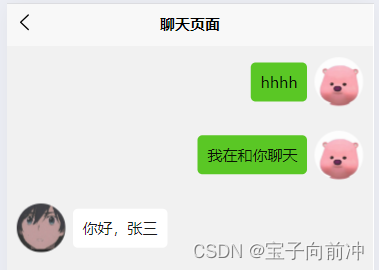
目录 目录 1、通过websocket拿取数据 2、获取聊天数据 3、聊天信息存储 、更新 4、读取聊天记录 5、发送信息,信息获取 6、最终效果 1.聊天信息的存储格式 2、样式效果 写聊天项目,使用到了本地存储。需要把聊天信息保存在本地,实时获…...

Vue.js中的$nextTick
其实目前在我现有的开发经历中,我还没有实际运用过$nextTick,今天在看书时,学习到了这个东西,所以做个笔记记录一下。 一、$nextTick是什么? $nextTick 是 Vue提供的一个方法,用于在 DOM 更新之后执行回调…...
python+mysql咖啡店推荐系统django+vue
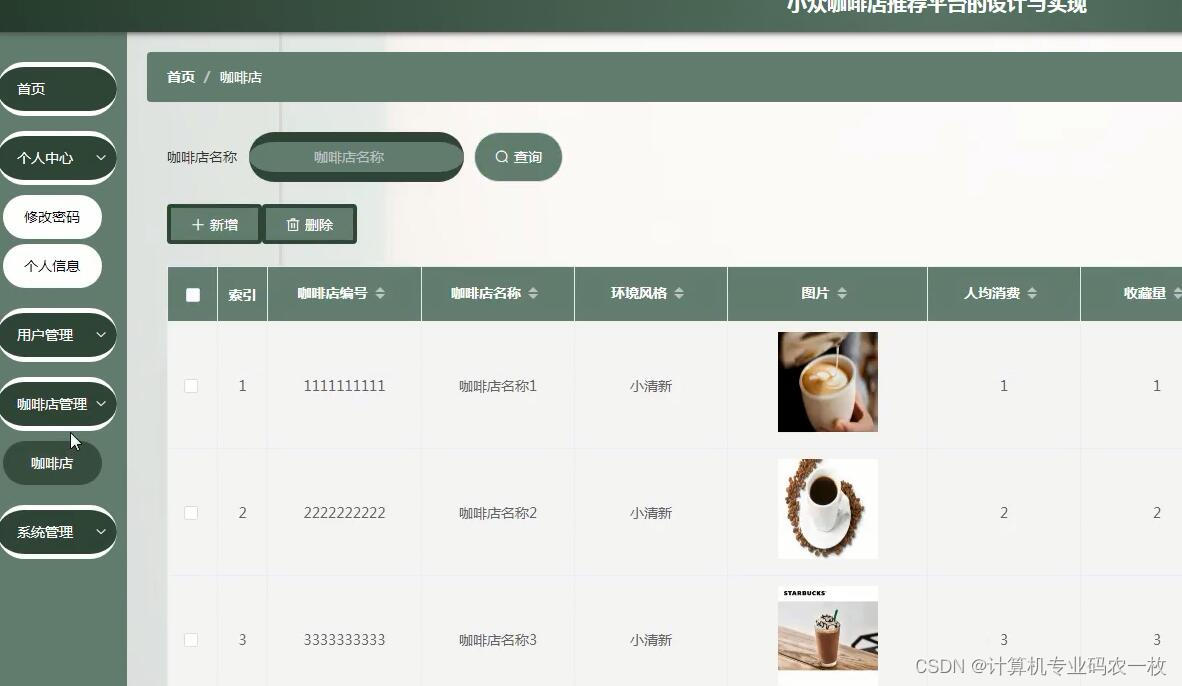
(1).研究的基本内容 系统的角色分为: 1.管理员 2.会员 3.非会员 角色不同,权限也不相同 技术栈 后端:python 前端:vue.jselementui 框架:django/flask Python版本:python3.7 数据库:mysql5.7…...
综合实验nginx+nfs+kpa
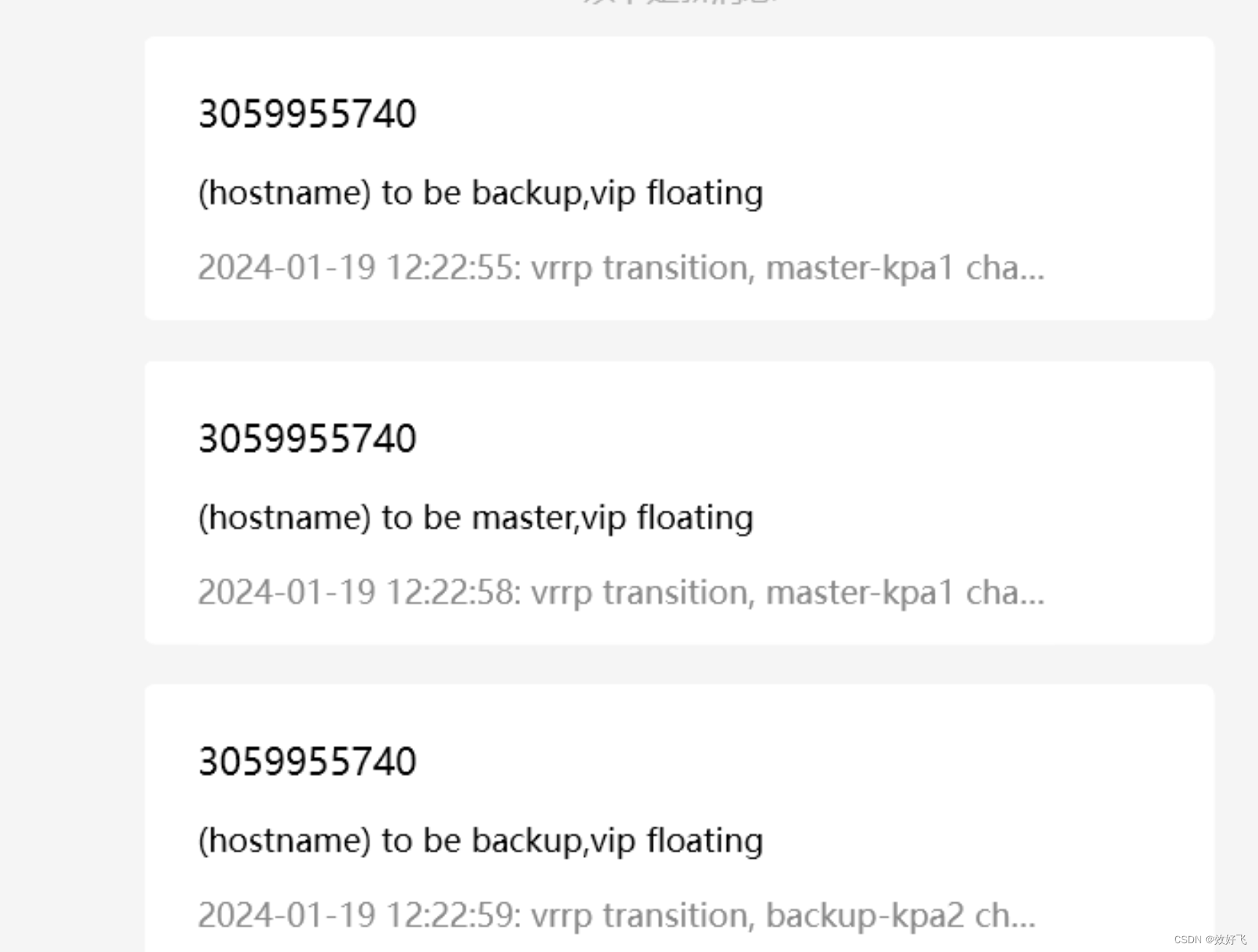
综合实验 实验目的: 静态资源和动态资源分别存放在远端存储NFS上,NFS上数据实现实时备份,用户通过负载访问后端的web服务。实现ngixn负载高可用,当keepalived master宕机,vip能自动跳转到备用节点 实验环境ÿ…...
springboot197基于springboot的毕业设计系统的开发
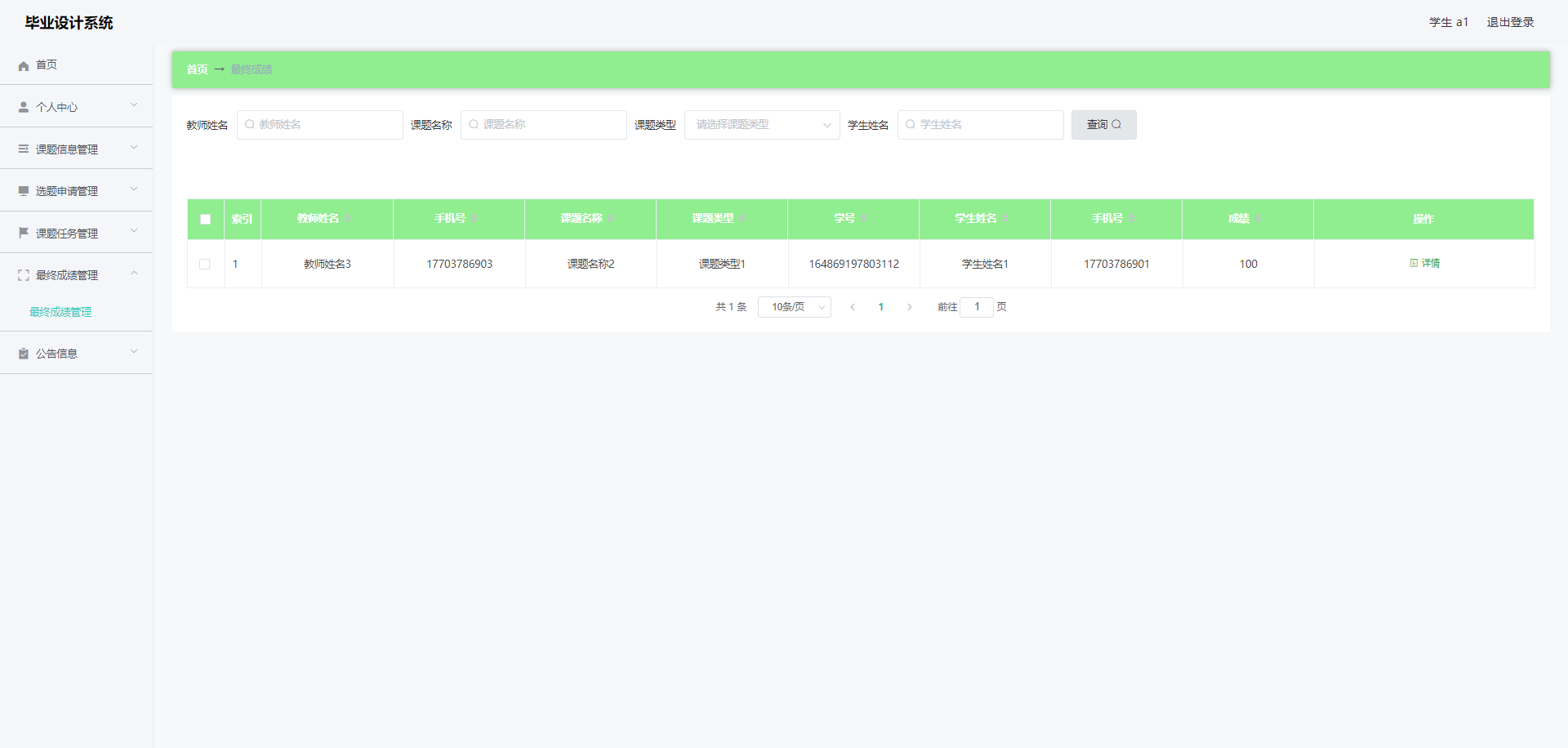
简介 【毕设源码推荐 javaweb 项目】基于springbootvue 的毕业设计系统的开发 适用于计算机类毕业设计,课程设计参考与学习用途。仅供学习参考, 不得用于商业或者非法用途,否则,一切后果请用户自负。 看运行截图看 第五章 第四章 …...

group by报错
# 报错:[42000][1055] Expression #1 of SELECT list is not in GROUP BY clause and contains nonaggregated column base.biz_org_rep.ID which is not functionally dependent on columns in GROUP BY clause; this is incompatible with sql_modeonly_full_grou…...

3、云原生安全之falco的部署
文章目录 1、helm安装2、拉去镜像失败与解决3、安装faclo4、安装nfs服务器,配置k8s的持久卷4.1、创建nfs服务器,4.2、部署master节点(nsf服务的客户端)4.3、pv与pvc4.4、假设pv和pvc的配置文件出错了5、安装falcosidekick可视化(建议跳过,直接使用6)6、安装faclo与falco…...
Docker架构概述
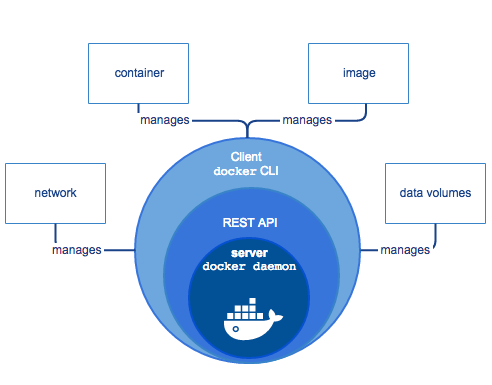
Docker是基于Go语言实现的开源容器项目,能够把开发的应用程序自动部署到容器的开源的应用容器引擎。Docker的构想是要实现"Build, Ship and Run Any App, Anywhere",即通过对应用的封装(Packaging)、分发(Distribution)、部署(Deployment)、运…...
安装 node 错误的配置环境变量之后使用 npm 报错
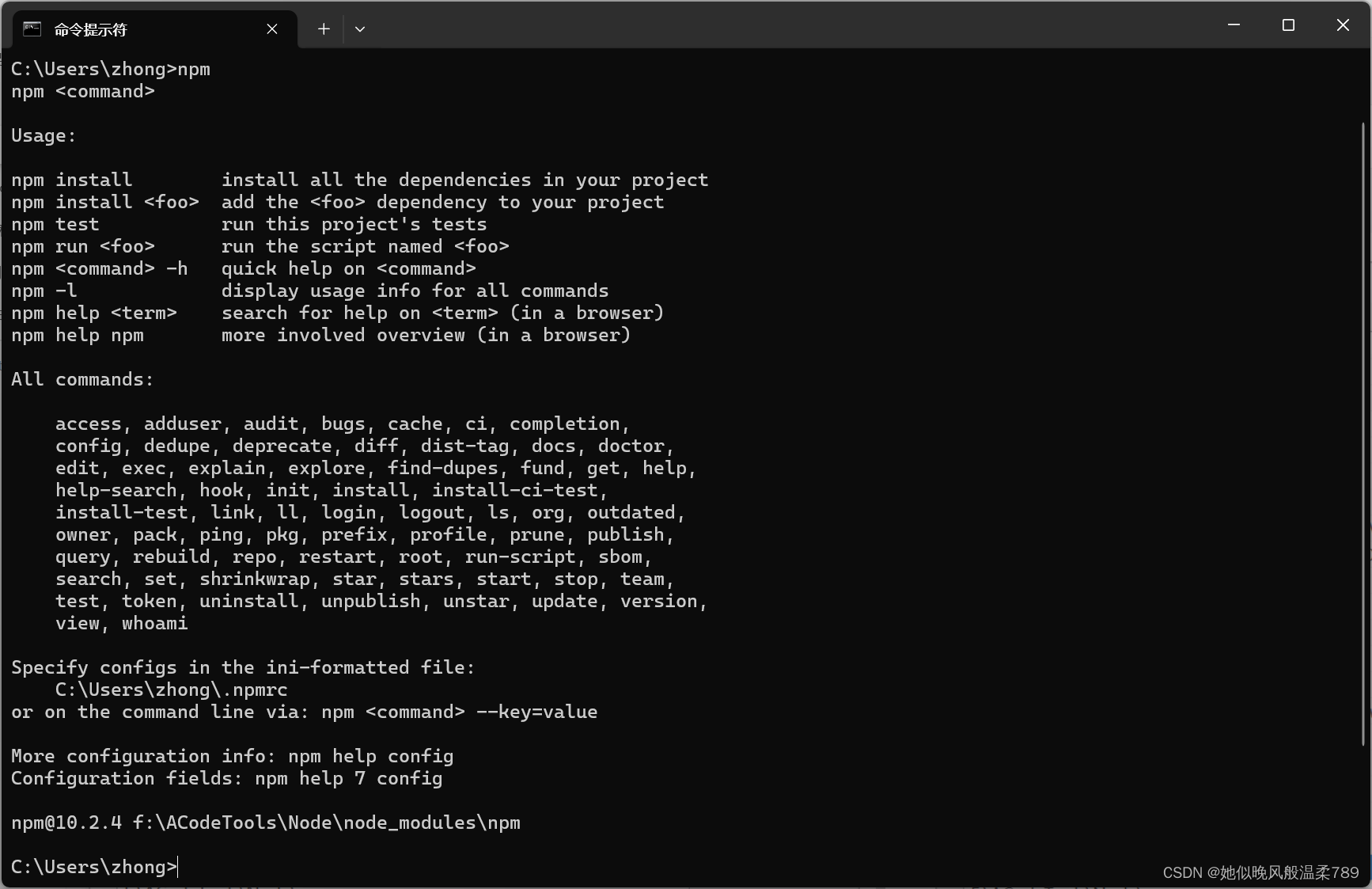
安装 node 错误的配置环境变量之后使用 npm 报错 node:internal/modules/cjs/loader:1147 throw err; ^ Error: Cannot find module ‘F:\ACodeTools\Node\node_modules\npm\bin\node_modules\npm\bin\npm-cli.js’ at Module._resolveFilename (node:internal/modules/cjs/loa…...
Matlab 最小二乘插值(曲线拟合)
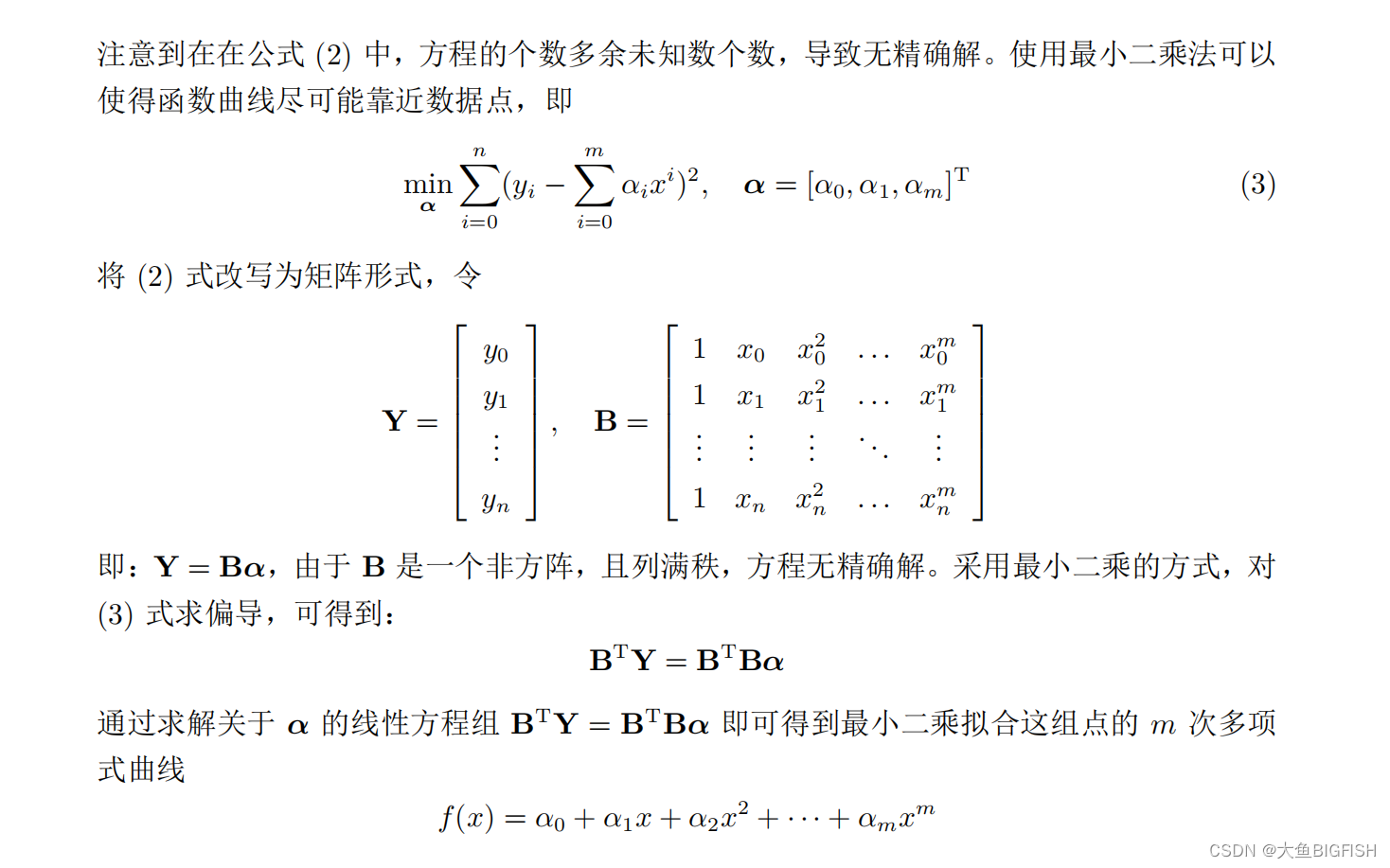
文章目录 一、简介二、实现代码三、实现效果参考资料一、简介 在多项式插值时,当数据点个数较多时,插值会导致多项式曲线阶数过高,带来不稳定因素。因此我们可以通过固定幂基函数的最高次数 m(m < n),来对我们要拟合的曲线进行降阶。之前的函数形式就可以变为: 二、实现…...

AWTK-MVVM 配置文件模型
配置文件模型 AWTK-MVVM 内置了一些配置文件模型,用于读写各种配置文件,比如,JSON/XML/INI/CSV/UBJSON 等。 文件名中可以引用下面的变量。 ${app_dir} 应用程序目录${user_dir} 用户目录${temp_dir} 临时目录 json(url${app_dir}/demos/de…...

【活动】金三银四,前端工程师如何把握求职黄金期
随着春意盎然的气息弥漫大地,程序员群体中也迎来了一年一度的“金三银四”求职热潮。这个时间段对于广大前端工程师而言,不仅象征着生机勃发的新起点,更是他们职业生涯中至关重要的转折点。众多知名公司在这一时期大规模开启招聘通道…...
萌新学习RSA第二天(离线分解整数N)
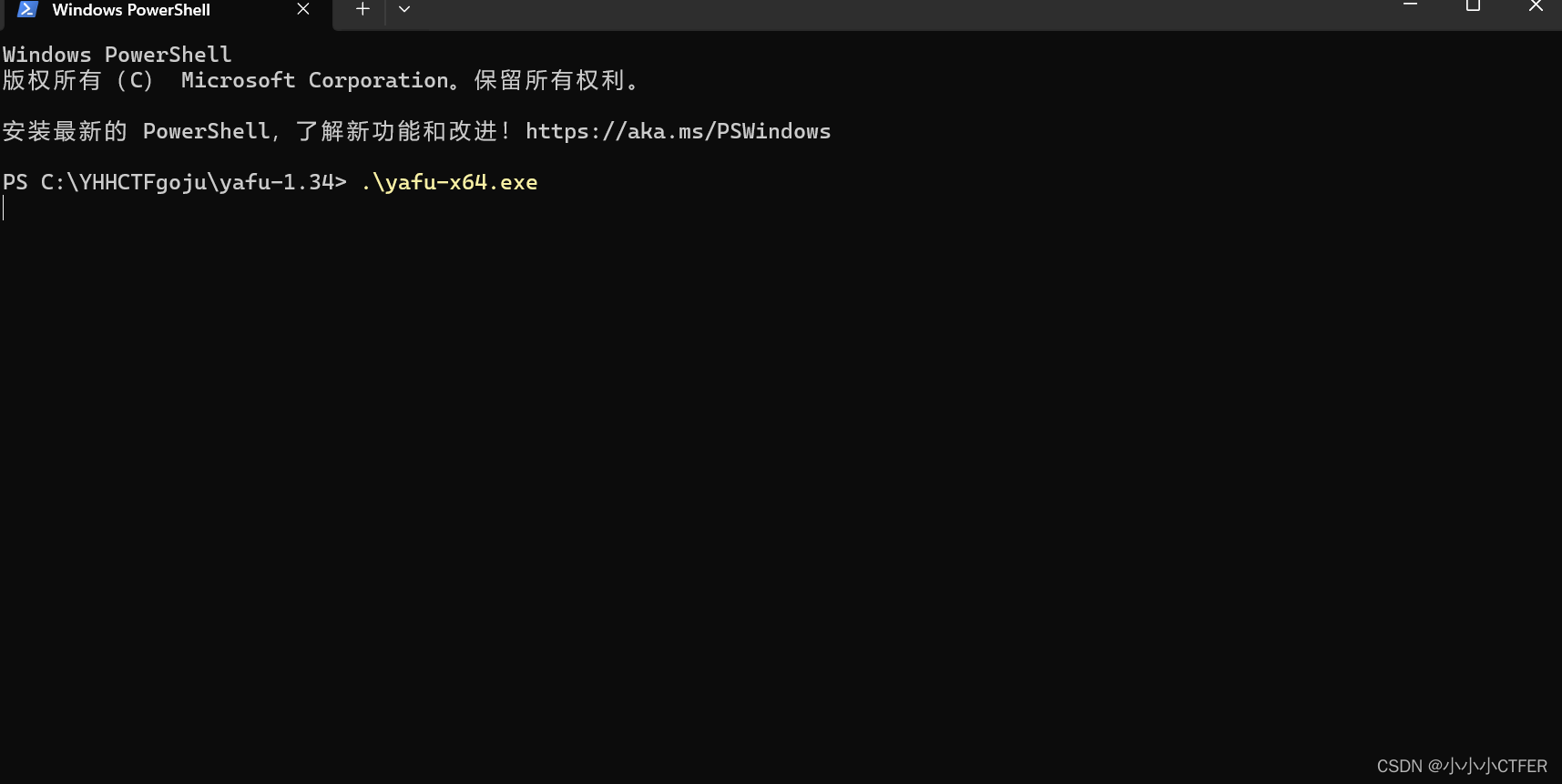
1.yafu的使用(离线环境分解N)、 下载 打开 及使用 下载地址:https://sourceforge.net/projects/yafu/ 在下载好的并解压好的文件夹上鼠标右键打开终端 然后输入.\yafu-x64.exe并回车运行 .\yafu-x64.exe 来到这个页面就OK了 然后输入 fa…...
STM32学习和实践笔记(1): 装好了的keil μVision 5
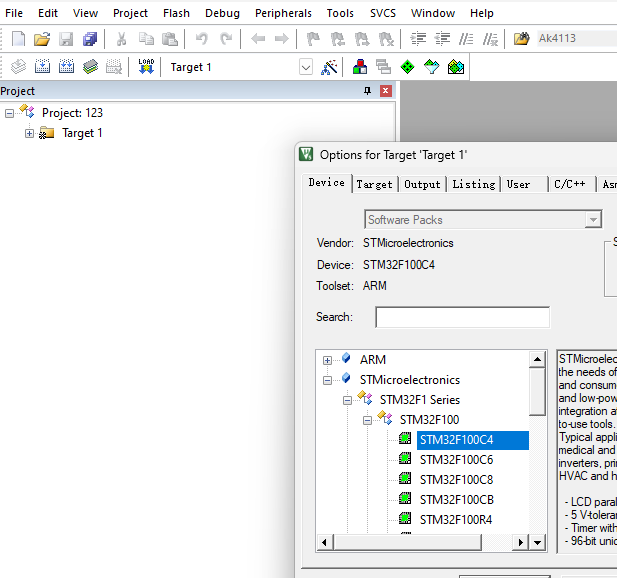
2019年3月在淘宝上买了这块STM32的开发板,学了一段时间后就丢下了,今天重新捡起来,决定好好学习、天天向上。 对照教程,今天先把keil5装上了。 装的过程有以下几点值得记录下: 1)用注册机时,…...

企业计算机服务器中了360勒索病毒如何解密,360后缀勒索病毒处理流程
对于众多的企业来说,企业的数据是企业发展的核心,越来越多的企业开始注重企业的数据安全问题,但随着网络技术的不断发展与应用,网络黑客的攻击加密手段也在不断升级。近期,云天数据恢复中心接到多家企业的求助…...

【图像拼接/视频拼接】论文精读:Efficient Video Stitching Based on Fast Structure Deformation
第一次来请先看这篇文章:【图像拼接(Image Stitching)】关于【图像拼接论文精读】专栏的相关说明,包含专栏使用说明、创新思路分享等(不定期更新) 图像拼接系列相关论文精读 Seam Carving for Content-Aware Image ResizingAs-Rigid-As-Possible Shape ManipulationAdap…...

Calibre-Web豆瓣插件终极配置指南:恢复元数据获取的完整解决方案
Calibre-Web豆瓣插件终极配置指南:恢复元数据获取的完整解决方案 【免费下载链接】calibre-web-douban-api 新版calibre-web已经移除douban-api了,添加一个豆瓣api实现 项目地址: https://gitcode.com/gh_mirrors/ca/calibre-web-douban-api 新版…...

3分钟掌握QMC音频解密:qmc-decoder实战指南与算法深度解析
3分钟掌握QMC音频解密:qmc-decoder实战指南与算法深度解析 【免费下载链接】qmc-decoder Fastest & best convert qmc 2 mp3 | flac tools 项目地址: https://gitcode.com/gh_mirrors/qm/qmc-decoder 在数字音乐时代,你是否曾因QQ音乐加密格式…...

JMeter四层断言体系:从HTTP协议到业务语义的全链路校验
1. 为什么JMeter的断言不是“加个检查框”就完事了?很多人第一次在JMeter里点开“添加 → 断言 → 响应断言”,填上一个期望值,跑完线程组一看“绿色对勾”,就以为接口测试闭环完成了。我带过三届测试新人,90%都在这个…...

JMeter性能测试实战:从接口验证到分布式压测全链路
1. 这不是“点点点就能跑通”的工具,而是你接口质量的守门人很多人第一次打开 JMeter,以为它就是个“高级版 Postman”——填 URL、选方法、点执行,看到绿色小对勾就以为测试完成了。我带过三届测试团队,每届都有至少两个新人在压…...

告别格式修改熬夜战!okbiye 一键搞定毕业论文格式规范
okbiye-免费查重复率aigc检测/开题报告/毕业论文/智能排版/文献综述/AI PPT智能排版 - Okbiye智能写作https://www.okbiye.com/typesetting 一、毕业季的格式噩梦:多少论文栽在 “排版” 这一步 临近毕业,不少同学的论文修改稿都卡在了格式环节…...
)
Claude医学文献分析准确率实测:对比GPT-4o、Gemini 2.0与专业文献数据库(n=1,847篇RCT,Kappa=0.91)
更多请点击: https://codechina.net 第一章:Claude医学文献分析案例 在临床研究与循证医学实践中,研究人员常需从海量PubMed、NEJM或Lancet等来源的PDF或HTML格式文献中快速提取关键信息。Claude系列大模型凭借其长上下文(最高20…...

如何三分钟搭建免费音乐聚合平台:MusicFree插件终极配置指南
如何三分钟搭建免费音乐聚合平台:MusicFree插件终极配置指南 【免费下载链接】MusicFreePlugins MusicFree播放插件 项目地址: https://gitcode.com/gh_mirrors/mu/MusicFreePlugins 还在为音乐会员费烦恼吗?想要一个真正免费、无广告的音乐播放体…...

卡尔曼滤波调参实战:手把手教你调整Q和R,让Python小车轨迹预测更精准
卡尔曼滤波调参实战:手把手教你调整Q和R,让Python小车轨迹预测更精准在机器人定位和自动驾驶领域,卡尔曼滤波就像一位隐形的导航员,默默修正着传感器传来的嘈杂数据。但这位导航员的工作质量,很大程度上取决于我们为它…...

行列式点过程:从统计独立到负依赖的机器学习范式跃迁
1. 项目概述:从统计独立到负依赖的范式跃迁在机器学习和统计学的工具箱里,统计独立性长期以来扮演着基石的角色。从朴素贝叶斯分类器的特征条件独立假设,到蒙特卡洛方法中独立同分布的采样点,再到随机梯度下降中独立的小批量数据&…...

C51启动代码解析:复位向量与硬件初始化关键
1. C51启动代码解析:为什么复位向量不直接跳转到C代码?在Keil C51开发环境中,很多开发者第一次单步调试时会发现一个奇怪现象:明明项目全部用C语言编写,但芯片复位后PC指针并没有直接跳转到main函数,而是先…...