
Hudi入门
一、Hudi编译安装
1.下载
https://archive.apache.org/dist/hudi/0.9.0/hudi-0.9.0.src.tgz
2.maven编译
mvn clean install -DskipTests -Dscala2.12 -Dspark3
3.配置spark与hudi依赖包
[root@master hudi-spark-jars]# ll
total 37876
-rw-r--r-- 1 root root 38615211 Oct 27 16:13 hudi-spark3-bundle_2.12-0.9.0.jar
-rw-r--r-- 1 root root   161826 Oct 27 16:13 spark-avro_2.12-3.0.1.jar
-rw-r--r-- 1 root root     2777 Oct 27 16:13 spark_unused-1.0.0.jar
二、Hudi基础使用
1.启动cli
[root@master hudi-cli]# hudi-cli.sh
2.启动spark-shell添加hudi-jars
spark-shell \
--master local[2] \
--jars /usr/local/src/hudi/hudi-spark-jars/hudi-spark3-bundle_2.12-0.9.0.jar,/usr/local/src/hudi/hudi-spark-jars/spark-avro_2.12-3.0.1.jar,/usr/local/src/hudi/hudi-spark-jars/spark_unused-1.0.0.jar \
--conf "spark.serializer=org.apache.spark.serializer.KryoSerializer"
3.模拟产生数据
import org.apache.hudi.QuickstartUtils._
import scala.collection.JavaConversions._
import org.apache.spark.sql.SaveMode._
import org.apache.hudi.DataSourceReadOptions._
import org.apache.hudi.DataSourceWriteOptions._
import org.apache.hudi.config.HoodieWriteConfig._val tableName="hudi_trips_cow"
val basePath="hdfs://master:9000/hudi-warehouse/hudi_trips_cow"val dataGen=new DataGeneratorval inserts=convertToStringList(dataGen.generateInserts(10))val df=spark.read.json(spark.sparkContext.parallelize(inserts,2))df.printSchema()
-----------------------------------------------------------------------------------------
root|-- begin_lat: double (nullable = true)|-- begin_lon: double (nullable = true)|-- driver: string (nullable = true)|-- end_lat: double (nullable = true)|-- end_lon: double (nullable = true)|-- fare: double (nullable = true)|-- partitionpath: string (nullable = true)|-- rider: string (nullable = true)|-- ts: long (nullable = true)|-- uuid: string (nullable = true)
-----------------------------------------------------------------------------------------df.select("rider","begin_lat","begin_lon","driver","fare","uuid","ts").show(10,truncate=false)
4.保存到hudi表
df.write.mode(Overwrite).format("hudi").options(getQuickstartWriteConfigs).option(PRECOMBINE_FIELD_OPT_KEY, "ts").option(RECORDKEY_FIELD_OPT_KEY, "uuid").option(PARTITIONPATH_FIELD_OPT_KEY, "partitionpath").option(TABLE_NAME, tableName).save(basePath)
5.查询hudi数据
val tripsSnapshotDF = spark.read.format("hudi").load("hdfs://master:9000/hudi-warehouse/hudi_trips_cow" + "/*/*/*/*")tripsSnapshotDF.printSchema()
-----------------------------------------------------------------------------------------
root|-- _hoodie_commit_time: string (nullable = true)    --提交数据的提交时间 |-- _hoodie_commit_seqno: string (nullable = true)   --提交数据的编号 |-- _hoodie_record_key: string (nullable = true)     --提交数据的key |-- _hoodie_partition_path: string (nullable = true) --提交数据的存储路径|-- _hoodie_file_name: string (nullable = true)      --提交数据的所在文件名称|-- begin_lat: double (nullable = true)|-- begin_lon: double (nullable = true)|-- driver: string (nullable = true)|-- end_lat: double (nullable = true)|-- end_lon: double (nullable = true)|-- fare: double (nullable = true)|-- partitionpath: string (nullable = true)|-- rider: string (nullable = true)|-- ts: long (nullable = true)|-- uuid: string (nullable = true)
-----------------------------------------------------------------------------------------
6.注册为临时视图
tripsSnapshotDF.createOrReplaceTempView("hudi_trips_snapshot")
7.查询任务
乘车费用 大于 20 信息数据
scala> spark.sql("select fare, begin_lon, begin_lat, ts from  hudi_trips_snapshot where fare > 20.0").show()
+------------------+-------------------+-------------------+-------------+
|              fare|          begin_lon|          begin_lat|           ts|
+------------------+-------------------+-------------------+-------------+
| 33.92216483948643| 0.9694586417848392| 0.1856488085068272|1698046206939|
| 93.56018115236618|0.14285051259466197|0.21624150367601136|1698296387405|
| 64.27696295884016| 0.4923479652912024| 0.5731835407930634|1697991665477|
| 27.79478688582596| 0.6273212202489661|0.11488393157088261|1697865605719|
|  43.4923811219014| 0.8779402295427752| 0.6100070562136587|1698233221527|
| 66.62084366450246|0.03844104444445928| 0.0750588760043035|1697912700216|
|34.158284716382845|0.46157858450465483| 0.4726905879569653|1697805433844|
| 41.06290929046368| 0.8192868687714224|  0.651058505660742|1698234304674|
+------------------+-------------------+-------------------+-------------+
选取字段查询数据
spark.sql("select _hoodie_commit_time, _hoodie_record_key, _hoodie_partition_path, rider, driver, fare from hudi_trips_snapshot").show()
8.表数据结构
.hoodie文件
.hoodie 文件:由于CRUD的零散性,每一次的操作都会生成一个文件,这些小文件越来越多后,会严重影响HDFS的性能,Hudi设计了一套文件合并机制。 .hoodie文件夹中存放了对应的文件合并操作相关的日志文件。Hudi把随着时间流逝,对表的一系列CRUD操作叫做Timeline。Timeline中某一次的操作,叫做Instant。Instant包含以下信息:Instant Action,记录本次操作是一次数据提交(COMMITS),还是文件合并(COMPACTION),或者是文件清理(CLEANS);Instant Time,本次操作发生的时间;State,操作的状态,发起(REQUESTED),进行中(INFLIGHT),还是已完成(COMPLETED);
amricas和asia文件
amricas和asia相关的路径是实际的数据文件,按分区存储,分区的路径key是可以指定的。
三、基于IDEA使用Hudi
maven项目xml
主语scala版本相对应,否则会报错Exception in thread "main" java.lang.NoSuchMethodError: scala.Product.$init$
<?xml version="1.0" encoding="UTF-8"?>
<project xmlns="http://maven.apache.org/POM/4.0.0"xmlns:xsi="http://www.w3.org/2001/XMLSchema-instance"xsi:schemaLocation="http://maven.apache.org/POM/4.0.0 http://maven.apache.org/xsd/maven-4.0.0.xsd"><modelVersion>4.0.0</modelVersion><groupId>cn.saddam.hudi</groupId><artifactId>Hudi-Learning</artifactId><version>1.0.0</version><repositories><repository><id>aliyun</id><url>http://maven.aliyun.com/nexus/content/groups/public/</url></repository><repository><id>cloudera</id><url>https://repository.cloudera.com/artifactory/cloudera-repos/</url></repository><repository><id>jboss</id><url>http://repository.jboss.com/nexus/content/groups/public</url></repository>
</repositories><properties>
<scala.version>2.12.1</scala.version>
<scala.binary.version>2.12</scala.binary.version>
<spark.version>3.1.1</spark.version>
<hadoop.version>3.2.1</hadoop.version>
<hudi.version>0.9.0</hudi.version>
</properties><dependencies>
<!-- 依赖Scala语言 -->
<dependency><groupId>org.scala-lang</groupId><artifactId>scala-library</artifactId><version>2.12.1</version>
</dependency>
<!-- Spark Core 依赖 -->
<dependency><groupId>org.apache.spark</groupId><artifactId>spark-core_2.12</artifactId><version>3.1.1</version>
</dependency>
<!-- Spark SQL 依赖 -->
<dependency><groupId>org.apache.spark</groupId><artifactId>spark-sql_2.12</artifactId><version>3.1.1</version>
</dependency><!-- Hadoop Client 依赖 -->
<dependency><groupId>org.apache.hadoop</groupId><artifactId>hadoop-client</artifactId><version>${hadoop.version}</version>
</dependency><!-- hudi-spark3 -->
<dependency><groupId>org.apache.hudi</groupId><artifactId>hudi-spark3-bundle_2.12</artifactId><version>${hudi.version}</version>
</dependency>
<dependency><groupId>org.apache.spark</groupId><artifactId>spark-avro_2.12</artifactId><version>3.1.1</version>
</dependency></dependencies><build>
<outputDirectory>target/classes</outputDirectory>
<testOutputDirectory>target/test-classes</testOutputDirectory>
<resources><resource><directory>${project.basedir}/src/main/resources</directory></resource>
</resources>
<!-- Maven 编译的插件 -->
<plugins><plugin><groupId>org.apache.maven.plugins</groupId><artifactId>maven-compiler-plugin</artifactId><version>3.0</version><configuration><source>1.8</source><target>1.8</target><encoding>UTF-8</encoding></configuration></plugin><plugin><groupId>net.alchim31.maven</groupId><artifactId>scala-maven-plugin</artifactId><version>3.2.0</version><executions><execution><goals><goal>compile</goal><goal>testCompile</goal></goals></execution></executions></plugin>
</plugins></build>
</project>
1.main方法
object HudiSparkDemo {def main(args: Array[String]): Unit = {System.setProperty("HADOOP_USER_NAME", "root")val spark=SparkSession.builder().appName(this.getClass.getSimpleName.stripSuffix("$")).master("local[2]")// 设置序列化方式:Kryo.config("spark.serializer", "org.apache.spark.serializer.KryoSerializer").getOrCreate()import spark.implicits._//表名称val tableName: String = "tbl_trips_cow"//表存储路径val tablePath: String = "hdfs://192.168.184.135:9000/hudi-warehouse/hudi_trips_cow"// 构建数据生成器,为例模拟产生插入和更新数据import org.apache.hudi.QuickstartUtils._//TODO 任务一:模拟数据,插入Hudi表,采用COW模式//insertData(spark, tableName, tablePath)//TODO 任务二:快照方式查询(Snapshot Query)数据,采用DSL方式//queryData(spark, tablePath)queryDataByTime(spark, tablePath)//Thread.sleep(10000)//TODO 任务三:更新(Update)数据//val dataGen: DataGenerator = new DataGenerator()//insertData(spark, tableName, tablePath, dataGen)//updateData(spark, tableName, tablePath, dataGen)//TODO 任务四:增量查询(Incremental Query)数据,采用SQL方式//incrementalQueryData(spark, tablePath)//TODO 任务五:删除(Delete)数据//deleteData(spark, tableName, tablePath)// 应用结束,关闭资源spark.stop()}
2.模拟数据
在编写代码过程中,指定数据写入到HDFS路径时***直接写“/xxdir”***不要写“hdfs://mycluster/xxdir”,后期会报错“java.lang.IllegalArgumentException: Not in marker dir. Marker Path=hdfs://mycluster/hudi_data/.hoodie.temp/2022xxxxxxxxxx/default/c4b854e7-51d3-4a14-9b7e-54e2e88a9701-0_0-22-22_20220509164730.parquet.marker.CREATE, Expected Marker Root=/hudi_data/.hoodie/.temp/2022xxxxxxxxxx”,可以将对应的hdfs-site.xml、core-site.xml放在resources目录下,直接会找HDFS路径。
/*** 官方案例:模拟产生数据,插入Hudi表,表的类型COW*/def insertData(spark: SparkSession, table: String, path: String): Unit = {import spark.implicits._// TODO: a. 模拟乘车数据import org.apache.hudi.QuickstartUtils._val dataGen: DataGenerator = new DataGenerator()val inserts: util.List[String] = convertToStringList(dataGen.generateInserts(100))import scala.collection.JavaConverters._val insertDF: DataFrame = spark.read.json(spark.sparkContext.parallelize(inserts.asScala, 2).toDS())//insertDF.printSchema()//insertDF.show(10, truncate = false)// TODO: b. 插入数据至Hudi表import org.apache.hudi.DataSourceWriteOptions._import org.apache.hudi.config.HoodieWriteConfig._insertDF.write.mode(SaveMode.Append).format("hudi") // 指定数据源为Hudi.option("hoodie.insert.shuffle.parallelism", "2").option("hoodie.upsert.shuffle.parallelism", "2")// Hudi 表的属性设置.option(PRECOMBINE_FIELD.key(), "ts").option(RECORDKEY_FIELD.key(), "uuid").option(PARTITIONPATH_FIELD.key(), "partitionpath").option(TBL_NAME.key(), table).save(path)}
2.查询数据
def queryData(spark: SparkSession, path: String): Unit = {import spark.implicits._val tripsDF: DataFrame = spark.read.format("hudi").load(path)//tripsDF.printSchema()//tripsDF.show(10, truncate = false)// 查询费用大于20,小于50的乘车数据tripsDF.filter($"fare" >= 20 && $"fare" <= 50).select($"driver", $"rider", $"fare", $"begin_lat", $"begin_lon", $"partitionpath", $"_hoodie_commit_time").orderBy($"fare".desc, $"_hoodie_commit_time".desc).show(20, truncate = false)}
通过时间查询数据
def queryDataByTime(spark: SparkSession, path: String):Unit ={import org.apache.spark.sql.functions._// 方式一:指定字符串,格式 yyyyMMddHHmmssval df1 = spark.read.format("hudi").option("as.of.instant", "20231027172433").load(path).sort(col("_hoodie_commit_time").desc)df1.printSchema()df1.show(5,false)// 方式二:指定字符串,格式yyyy-MM-dd HH:mm:ssval df2 = spark.read.format("hudi").option("as.of.instant", "2023-10-27 17:24:33").load(path).sort(col("_hoodie_commit_time").desc)df2.printSchema()df2.show(5,false)}
3.更新数据
/*** 重新覆盖插入数据,然后更新*/def insertData2(spark: SparkSession, table: String, path: String, dataGen: DataGenerator): Unit = {import spark.implicits._// TODO: a. 模拟乘车数据import org.apache.hudi.QuickstartUtils._val inserts = convertToStringList(dataGen.generateInserts(100))import scala.collection.JavaConverters._val insertDF: DataFrame = spark.read.json(spark.sparkContext.parallelize(inserts.asScala, 2).toDS())//insertDF.printSchema()//insertDF.show(10, truncate = false)// TODO: b. 插入数据至Hudi表import org.apache.hudi.DataSourceWriteOptions._import org.apache.hudi.config.HoodieWriteConfig._insertDF.write.mode(SaveMode.Ignore).format("hudi") // 指定数据源为Hudi.option("hoodie.insert.shuffle.parallelism", "2").option("hoodie.upsert.shuffle.parallelism", "2")// Hudi 表的属性设置.option(PRECOMBINE_FIELD.key(), "ts").option(RECORDKEY_FIELD.key(), "uuid").option(PARTITIONPATH_FIELD.key(), "partitionpath").option(TBL_NAME.key(), table).save(path)}/*** 官方案例:更新Hudi数据,运行程序时,必须要求与插入数据使用同一个DataGenerator对象,更新数据Key是存在的*/def updateData(spark: SparkSession, table: String, path: String, dataGen: DataGenerator): Unit = {import spark.implicits._// TODO: a、模拟产生更新数据import org.apache.hudi.QuickstartUtils._import scala.collection.JavaConverters._val updates = convertToStringList(dataGen.generateUpdates(100))//更新val updateDF = spark.read.json(spark.sparkContext.parallelize(updates.asScala, 2).toDS())// TODO: b、更新数据至Hudi表import org.apache.hudi.DataSourceWriteOptions._import org.apache.hudi.config.HoodieWriteConfig._updateDF.write.mode(SaveMode.Append).format("hudi").option("hoodie.insert.shuffle.parallelism", "2").option("hoodie.upsert.shuffle.parallelism", "2").option(PRECOMBINE_FIELD.key(), "ts").option(RECORDKEY_FIELD.key(), "uuid").option(PARTITIONPATH_FIELD.key(), "partitionpath").option(TBL_NAME.key(), table).save(path)}
4.删除数据
/*** 官方案例:删除Hudi表数据,依据主键UUID进行删除,如果是分区表,指定分区路径*/
def deleteData(spark: SparkSession, table: String, path: String): Unit = {import spark.implicits._// TODO: a. 加载Hudi表数据,获取条目数val tripsDF: DataFrame = spark.read.format("hudi").load(path)println(s"Count = ${tripsDF.count()}")// TODO: b. 模拟要删除的数据val dataframe: DataFrame = tripsDF.select($"uuid", $"partitionpath").limit(2)import org.apache.hudi.QuickstartUtils._val dataGen: DataGenerator = new DataGenerator()val deletes = dataGen.generateDeletes(dataframe.collectAsList())import scala.collection.JavaConverters._val deleteDF = spark.read.json(spark.sparkContext.parallelize(deletes.asScala, 2))// TODO: c. 保存数据至Hudi表,设置操作类型为:DELETEimport org.apache.hudi.DataSourceWriteOptions._import org.apache.hudi.config.HoodieWriteConfig._deleteDF.write.mode(SaveMode.Append).format("hudi").option("hoodie.insert.shuffle.parallelism", "2").option("hoodie.upsert.shuffle.parallelism", "2")// 设置数据操作类型为delete,默认值为upsert.option(OPERATION.key(), "delete").option(PRECOMBINE_FIELD.key(), "ts").option(RECORDKEY_FIELD.key(), "uuid").option(PARTITIONPATH_FIELD.key(), "partitionpath").option(TBL_NAME.key(), table).save(path)// TODO: d. 再次加载Hudi表数据,统计条目数,查看是否减少2条val hudiDF: DataFrame = spark.read.format("hudi").load(path)println(s"Delete After Count = ${hudiDF.count()}")
}
知乎案例
https://www.zhihu.com/question/479484283/answer/2519394483
四、Spark滴滴运营数据分析
hive
配置文件
<?xml version="1.0" encoding="UTF-8" standalone="no"?>
<?xml-stylesheet type="text/xsl" href="configuration.xsl"?><configuration>
<property><name>hive.metastore.warehouse.dir</name><value>/user/hive/warehouse</value></property><property><name>javax.jdo.option.ConnectionDriverName</name><value>com.mysql.jdbc.Driver</value></property><property><name>javax.jdo.option.ConnectionURL</name><value>jdbc:mysql://master:3306/hive?createDatabaseIfNotExist=true&useSSL=false</value></property><property><name>javax.jdo.option.ConnectionUserName</name><value>root</value></property><property><name>javax.jdo.option.ConnectionPassword</name><value>xxxxxx</value></property>
<property><name>hive.metastore.schema.verification</name><value>false</value>
</property>
<property><name>hive.server2.thrift.bind.host</name><value>master</value>
</property>
<property><name>hive.metastore.uris</name><value>thrift://master:9083</value>
</property>
<property><name>hive.mapred.mode</name><value>strict</value></property><property><name>hive.exec.mode.local.auto</name><value>true</value></property><property><name>hive.fetch.task.conversion</name><value>more</value></property><property><name>hive.server2.thrift.client.user</name><value>root</value></property><property><name>hive.server2.thrift.client.password</name><value>32419</value></property><property><name>hive.metastore.event.db.notification.api.auth</name><value>false</value>
</property>
</configuration>脚本
start-beeline.sh
#!/bin/bash/usr/local/src/hive/bin/beeline -u jdbc:hive2://master:10000 -n root -p xxxxxx
start-hiveserver2.sh
#!/bin/sh HIVE_HOME=/usr/local/src/hiveEXEC_CMD=hiveserver2## 启动服务的时间
DATE_STR=`/bin/date '+%Y%m%d%H%M%S'`
# 日志文件名称(包含存储路径)
# HIVE_LOG=${HIVE_HOME}/logs/${EXEC_CMD}-${DATE_STR}.log
HIVE_LOG=${HIVE_HOME}/logs/${EXEC_CMD}.log# 创建日志目录
/usr/bin/mkdir -p ${HIVE_HOME}/logs
## 启动服务
/usr/bin/nohup ${HIVE_HOME}/bin/hive --service ${EXEC_CMD} > ${HIVE_LOG} 2>&1 &
start-metastore.sh
#!/bin/sh HIVE_HOME=/usr/local/src/hiveEXEC_CMD=metastore## 启动服务的时间
DATE_STR=`/bin/date '+%Y%m%d%H%M%S'`
# 日志文件名称(包含存储路径)
HIVE_LOG=${HIVE_HOME}/logs/${EXEC_CMD}-${DATE_STR}.log# 创建日志目录
/usr/bin/mkdir -p ${HIVE_HOME}/logs
## 启动服务
/usr/bin/nohup ${HIVE_HOME}/bin/hive --service ${EXEC_CMD} > ${HIVE_LOG} 2>&1 &
数据字段介绍
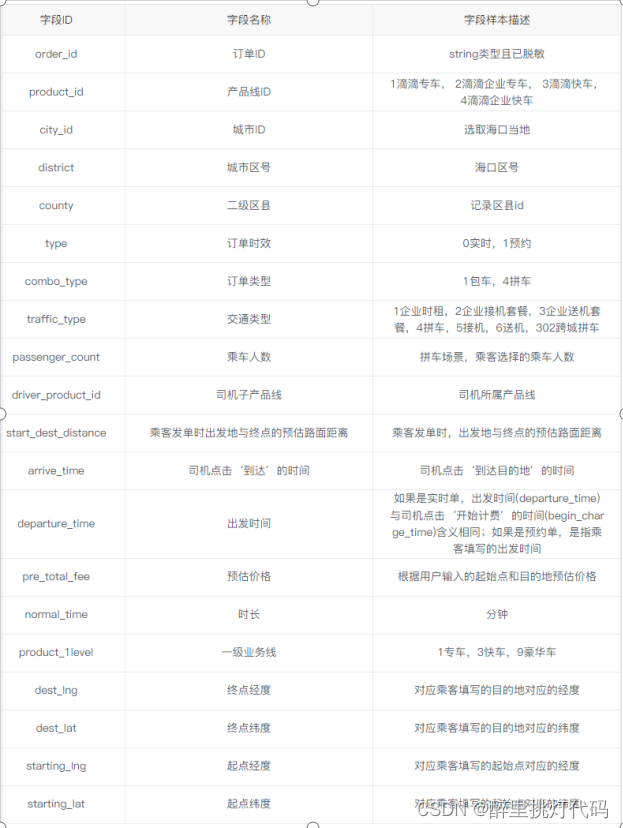
Spark读取数据并加载至Hudi
SparkUtils
package cn.saddam.hudi.spark.didiimport org.apache.spark.sql.SparkSession/*** SparkSQL操作数据(加载读取和保存写入)时工具类,比如获取SparkSession实例对象等*/
object SparkUtils {/*** 构建SparkSession实例对象,默认情况下本地模式运行*/def createSparkSession(clazz: Class[_], master: String = "local[4]", partitions: Int = 4): SparkSession ={SparkSession.builder().appName(clazz.getSimpleName.stripSuffix("$")).master(master).config("spark.serializer", "org.apache.spark.serializer.KryoSerializer").config("spark.sql.shuffle.partitions", partitions).getOrCreate()}def main(args: Array[String]): Unit = {val spark=createSparkSession(this.getClass)print(spark)Thread.sleep(1000000)spark.stop()}
}
readCsvFile
/*** 读取CSV格式文本文件数据,封装到DataFrame数据集*/def readCsvFile(spark: SparkSession, path: String): DataFrame = {spark.read// 设置分隔符为逗号.option("sep", "\\t")// 文件首行为列名称.option("header", "true")// 依据数值自动推断数据类型.option("inferSchema", "true")// 指定文件路径.csv(path)}
process
/*** 对滴滴出行海口数据进行ETL转换操作:指定ts和partitionpath 列*/def process(dataframe: DataFrame): DataFrame = {dataframe// 添加分区列:三级分区 -> yyyy/MM/dd.withColumn("partitionpath", // 列名称concat_ws("-", col("year"), col("month"), col("day")))// 删除列:year, month, day.drop("year", "month", "day")// 添加timestamp列,作为Hudi表记录数据与合并时字段,使用发车时间.withColumn("ts",unix_timestamp(col("departure_time"), "yyyy-MM-dd HH:mm:ss"))}
saveToHudi
/*** 将数据集DataFrame保存值Hudi表中,表的类型:COW*/def saveToHudi(dataframe: DataFrame, table: String, path: String): Unit = {// 导入包import org.apache.hudi.DataSourceWriteOptions._import org.apache.hudi.config.HoodieWriteConfig._// 保存数据dataframe.write.mode(SaveMode.Overwrite).format("hudi") // 指定数据源为Hudi.option("hoodie.insert.shuffle.parallelism", "2").option("hoodie.upsert.shuffle.parallelism", "2")// Hudi 表的属性设置.option(PRECOMBINE_FIELD.key(), "ts").option(RECORDKEY_FIELD.key(), "order_id").option(PARTITIONPATH_FIELD.key(), "partitionpath")// 表的名称和路径.option(TBL_NAME.key(), table).save(path)}
main方法
System.setProperty("HADOOP_USER_NAME", "root")// 滴滴数据路径(file意思为本读文件系统)val datasPath: String = "file:/F:\\A-大数据学习\\Hudi\\Hudi-Learning\\datas\\DiDi\\dwv_order_make_haikou_1.txt"// Hudi中表的属性val hudiTableName: String = "tbl_didi_haikou"val hudiTablePath: String = "/hudi-warehouse/tbl_didi_haikou"def main(args: Array[String]): Unit = {//TODO step1. 构建SparkSession实例对象(集成Hudi和HDFS)val spark: SparkSession = SparkUtils.createSparkSession(this.getClass)import spark.implicits._//TODO step2. 加载本地CSV文件格式滴滴出行数据val didiDF: DataFrame = readCsvFile(spark, datasPath)//didiDF.printSchema()//didiDF.show(10, truncate = false)//TODO step3. 滴滴出行数据ETL处理并保存至Hudi表val etlDF: DataFrame = process(didiDF)//etlDF.printSchema()//etlDF.show(10, truncate = false)//TODO stpe4. 保存转换后数据至Hudi表saveToHudi(etlDF, hudiTableName, hudiTablePath)// stpe5. 应用结束,关闭资源spark.stop()}
Spark加载Hudi数据并需求统计
从Hudi表加载数据
/*** 从Hudi表加载数据,指定数据存在路径*/def readFromHudi(spark: SparkSession, hudiTablePath: String): DataFrame ={// a. 指定路径,加载数据,封装至DataFrameval didiDF = spark.read.format("hudi").load(hudiTablePath)// b. 选择字段didiDF.select("order_id", "product_id","type", "traffic_type", "pre_total_fee","start_dest_distance", "departure_time")}
订单类型统计
/***  订单类型统计,字段:product_id*  对海口市滴滴出行数据,按照订单类型统计,*  使用字段:product_id,其中值【1滴滴专车, 2滴滴企业专车, 3滴滴快车, 4滴滴企业快车】*/def reportProduct(dataframe: DataFrame) = {// a. 按照产品线ID分组统计val reportDF: DataFrame = dataframe.groupBy("product_id").count()// b. 自定义UDF函数,转换名称val to_name =udf(// 1滴滴专车, 2滴滴企业专车, 3滴滴快车, 4滴滴企业快车(productId: Int) => {productId match {case 1 =>  "滴滴专车"case 2 =>  "滴滴企业专车"case 3 =>  "滴滴快车"case 4 =>  "滴滴企业快车"}})// c. 转换名称,应用函数val resultDF: DataFrame = reportDF.select(to_name(col("product_id")).as("order_type"),col("count").as("total"))
//    resultDF.printSchema()
//    resultDF.show(10, truncate = false)resultDF.write.format("jdbc").option("driver","com.mysql.jdbc.Driver").option("url", "jdbc:mysql://192.168.184.135:3306/Hudi_DiDi?createDatabaseIfNotExist=true&characterEncoding=utf8&useSSL=false").option("dbtable", "reportProduct").option("user", "root").option("password", "xxxxxx").save()}
订单时效性统计
/***  订单时效性统计,字段:type*/def reportType(dataframe: DataFrame): DataFrame = {// a. 按照产品线ID分组统计val reportDF: DataFrame = dataframe.groupBy("type").count()// b. 自定义UDF函数,转换名称val to_name = udf(// 0实时,1预约(realtimeType: Int) => {realtimeType match {case 0 =>  "实时"case 1 =>  "预约"}})// c. 转换名称,应用函数val resultDF: DataFrame = reportDF.select(to_name(col("type")).as("order_realtime"),col("count").as("total"))
//    resultDF.printSchema()
//    resultDF.show(10, truncate = false)resultDF}
交通类型统计
/***  交通类型统计,字段:traffic_type*/def reportTraffic(dataframe: DataFrame): DataFrame = {// a. 按照产品线ID分组统计val reportDF: DataFrame = dataframe.groupBy("traffic_type").count()// b. 自定义UDF函数,转换名称val to_name = udf(// 1企业时租,2企业接机套餐,3企业送机套餐,4拼车,5接机,6送机,302跨城拼车(trafficType: Int) => {trafficType match {case 0 =>  "普通散客"case 1 =>  "企业时租"case 2 =>  "企业接机套餐"case 3 =>  "企业送机套餐"case 4 =>  "拼车"case 5 =>  "接机"case 6 =>  "送机"case 302 =>  "跨城拼车"case _ => "未知"}})// c. 转换名称,应用函数val resultDF: DataFrame = reportDF.select(to_name(col("traffic_type")).as("traffic_type"), //col("count").as("total") //)
//    resultDF.printSchema()
//    resultDF.show(10, truncate = false)resultDF}
订单价格统计
/*** 订单价格统计,将价格分阶段统计,字段:pre_total_fee*/def reportPrice(dataframe: DataFrame): DataFrame = {val resultDF: DataFrame = dataframe.agg(// 价格:0 ~ 15sum(when(col("pre_total_fee").between(0, 15), 1).otherwise(0)).as("0~15"),// 价格:16 ~ 30sum(when(col("pre_total_fee").between(16, 30), 1).otherwise(0)).as("16~30"),// 价格:31 ~ 50sum(when(col("pre_total_fee").between(31, 50), 1).otherwise(0)).as("31~50"),// 价格:50 ~ 100sum(when(col("pre_total_fee").between(51, 100), 1).otherwise(0)).as("51~100"),// 价格:100+sum(when(col("pre_total_fee").gt(100), 1).otherwise(0)).as("100+"))//    resultDF.printSchema()
//    resultDF.show(10, truncate = false)resultDF}
订单距离统计
/*** 订单距离统计,将价格分阶段统计,字段:start_dest_distance*/def reportDistance(dataframe: DataFrame): DataFrame = {val resultDF: DataFrame = dataframe.agg(// 价格:0 ~ 15sum(when(col("start_dest_distance").between(0, 10000), 1).otherwise(0)).as("0~10km"),// 价格:16 ~ 30sum(when(col("start_dest_distance").between(10001, 20000), 1).otherwise(0)).as("10~20km"),// 价格:31 ~ 50sum(when(col("start_dest_distance").between(200001, 30000), 1).otherwise(0)).as("20~30km"),// 价格:50 ~ 100sum(when(col("start_dest_distance").between(30001, 5000), 1).otherwise(0)).as("30~50km"),// 价格:100+sum(when(col("start_dest_distance").gt(50000), 1).otherwise(0)).as("50+km"))//    resultDF.printSchema()
//    resultDF.show(10, truncate = false)resultDF}
订单星期分组统计
/***  订单星期分组统计,字段:departure_time*/def reportWeek(dataframe: DataFrame): DataFrame = {// a. 自定义UDF函数,转换日期为星期val to_week: UserDefinedFunction = udf(// 0实时,1预约(dateStr: String) => {val format: FastDateFormat = FastDateFormat.getInstance("yyyy-MM-dd")val calendar: Calendar = Calendar.getInstance()val date: Date = format.parse(dateStr)calendar.setTime(date)val dayWeek: String = calendar.get(Calendar.DAY_OF_WEEK) match {case 1 => "星期日"case 2 => "星期一"case 3 => "星期二"case 4 => "星期三"case 5 => "星期四"case 6 => "星期五"case 7 => "星期六"}// 返回星期dayWeek})// b. 转换日期为星期,并分组和统计val resultDF: DataFrame = dataframe.select(to_week(col("departure_time")).as("week")).groupBy(col("week")).count().select(col("week"), col("count").as("total") //)
//    resultDF.printSchema()
//    resultDF.show(10, truncate = false)resultDF}
main方法
// Hudi中表的属性
val hudiTablePath: String = "/hudi-warehouse/tbl_didi_haikou"def main(args: Array[String]): Unit = {//TODO step1. 构建SparkSession实例对象(集成Hudi和HDFS)val spark: SparkSession = SparkUtils.createSparkSession(this.getClass, partitions = 8)import spark.implicits._//TODO step2. 依据指定字段从Hudi表中加载数据val hudiDF: DataFrame = readFromHudi(spark, hudiTablePath)//hudiDF.printSchema()//hudiDF.show(false)//TODO  step3. 按照业务指标进行数据统计分析// 指标1:订单类型统计
//    reportProduct(hudiDF)
//    SparkUtils.saveToMysql(spark,reportType(hudiDF),"reportProduct")// 指标2:订单时效统计
//    reportType(hudiDF).show(false)
//    SparkUtils.saveToMysql(spark,reportType(hudiDF),"reportType")// 指标3:交通类型统计
//    reportTraffic(hudiDF)SparkUtils.saveToMysql(spark,reportTraffic(hudiDF),"reportTraffic")// 指标4:订单价格统计
//    reportPrice(hudiDF)SparkUtils.saveToMysql(spark,reportPrice(hudiDF),"reportPrice")// 指标5:订单距离统计
//    reportDistance(hudiDF)SparkUtils.saveToMysql(spark,reportDistance(hudiDF),"reportDistance")// 指标6:日期类型:星期,进行统计
//    reportWeek(hudiDF)SparkUtils.saveToMysql(spark,reportWeek(hudiDF),"reportWeek")//TODO step4. 应用结束关闭资源spark.stop()}
五、Hive滴滴运营数据分析
Idea连接hive
启动metastore和hiveserver2和beeline2-master-hiverootxxxxxxjdbc:hive2://192.168.184.135:10000
hive加载数据
# 1. 创建数据库
create database db_hudi# 2. 使用数据库
use db_hudi# 3. 创建外部表
CREATE EXTERNAL TABLE db_hudi.tbl_hudi_didi(
order_id bigint          ,
product_id int           ,
city_id int              ,
district int             ,
county int               ,
type int                 ,
combo_type int           ,
traffic_type int         ,
passenger_count int      ,
driver_product_id int    ,
start_dest_distance int  ,
arrive_time string       ,
departure_time string    ,
pre_total_fee double     ,
normal_time string       ,
bubble_trace_id string   ,
product_1level int       ,
dest_lng double          ,
dest_lat double          ,
starting_lng double      ,
starting_lat double      ,
partitionpath string     ,
ts bigint
)
PARTITIONED BY (date_str string)
ROW FORMAT SERDE
'org.apache.hadoop.hive.ql.io.parquet.serde.ParquetHiveSerDe'
STORED AS INPUTFORMAT
'org.apache.hudi.hadoop.HoodieParquetInputFormat'
OUTPUTFORMAT
'org.apache.hadoop.hive.ql.io.parquet.MapredParquetOutputFormat'
LOCATION
'/hudi-warehouse/tbl_didi_haikou'# 5. 添加分区
alter table db_hudi.tbl_hudi_didi add if not exists partition(date_str='2017-5-22') location '/hudi-warehouse/tbl_didi_haikou/2017-5-22' ;
alter table db_hudi.tbl_hudi_didi add if not exists partition(date_str='2017-5-23') location '/hudi-warehouse/tbl_didi_haikou/2017-5-23' ;
alter table db_hudi.tbl_hudi_didi add if not exists partition(date_str='2017-5-24') location '/hudi-warehouse/tbl_didi_haikou/2017-5-24' ;
alter table db_hudi.tbl_hudi_didi add if not exists partition(date_str='2017-5-25') location '/hudi-warehouse/tbl_didi_haikou/2017-5-25' ;
alter table db_hudi.tbl_hudi_didi add if not exists partition(date_str='2017-5-26') location '/hudi-warehouse/tbl_didi_haikou/2017-5-26' ;
alter table db_hudi.tbl_hudi_didi add if not exists partition(date_str='2017-5-27') location '/hudi-warehouse/tbl_didi_haikou/2017-5-27' ;
alter table db_hudi.tbl_hudi_didi add if not exists partition(date_str='2017-5-28') location '/hudi-warehouse/tbl_didi_haikou/2017-5-28' ;
alter table db_hudi.tbl_hudi_didi add if not exists partition(date_str='2017-5-29') location '/hudi-warehouse/tbl_didi_haikou/2017-5-29' ;
alter table db_hudi.tbl_hudi_didi add if not exists partition(date_str='2017-5-30') location '/hudi-warehouse/tbl_didi_haikou/2017-5-30' ;
alter table db_hudi.tbl_hudi_didi add if not exists partition(date_str='2017-5-31') location '/hudi-warehouse/tbl_didi_haikou/2017-5-31' ;
alter table db_hudi.tbl_hudi_didi add if not exists partition(date_str='2017-6-1') location '/hudi-warehouse/tbl_didi_haikou/2017-6-1' ;
alter table db_hudi.tbl_hudi_didi add if not exists partition(date_str='2017-6-2') location '/hudi-warehouse/tbl_didi_haikou/2017-6-2' ;
alter table db_hudi.tbl_hudi_didi add if not exists partition(date_str='2017-6-3') location '/hudi-warehouse/tbl_didi_haikou/2017-6-3' ;
alter table db_hudi.tbl_hudi_didi add if not exists partition(date_str='2017-6-4') location '/hudi-warehouse/tbl_didi_haikou/2017-6-4' ;
alter table db_hudi.tbl_hudi_didi add if not exists partition(date_str='2017-6-5') location '/hudi-warehouse/tbl_didi_haikou/2017-6-5' ;
alter table db_hudi.tbl_hudi_didi add if not exists partition(date_str='2017-6-6') location '/hudi-warehouse/tbl_didi_haikou/2017-6-6' ;
alter table db_hudi.tbl_hudi_didi add if not exists partition(date_str='2017-6-7') location '/hudi-warehouse/tbl_didi_haikou/2017-6-7' ;
alter table db_hudi.tbl_hudi_didi add if not exists partition(date_str='2017-6-8') location '/hudi-warehouse/tbl_didi_haikou/2017-6-8' ;
alter table db_hudi.tbl_hudi_didi add if not exists partition(date_str='2017-6-9') location '/hudi-warehouse/tbl_didi_haikou/2017-6-9' ;
alter table db_hudi.tbl_hudi_didi add if not exists partition(date_str='2017-6-10') location '/hudi-warehouse/tbl_didi_haikou/2017-6-10' ;# 设置非严格模式
set hive.mapred.mode = nonstrict ;# SQL查询前10条数据
select order_id, product_id, type, traffic_type, pre_total_fee, start_dest_distance, departure_time from db_hudi.tbl_hudi_didi limit 10 ;
HiveQL 分析
SparkSQL连接Hudi 把hudi-spark3-bundle_2.12-0.9.0.jar拷贝到spark/jars
spark-sql  \
--conf 'spark.serializer=org.apache.spark.serializer.KryoSerializer' \
--conf 'spark.sql.extensions=org.apache.spark.sql.hudi.HoodieSparkSessionExtension' \
--conf 'spark.sql.catalog.spark_catalog=org.apache.spark.sql.hudi.catalog.HoodieCatalog'
指标一:订单类型统计
WITH tmp AS (SELECT product_id, COUNT(1) AS total FROM db_hudi.tbl_hudi_didi GROUP BY product_id
)
SELECT CASE product_idWHEN 1 THEN "滴滴专车"WHEN 2 THEN "滴滴企业专车"WHEN 3 THEN "滴滴快车"WHEN 4 THEN "滴滴企业快车"END AS order_type,total
FROM tmp ;滴滴专车        15615
滴滴快车        1298383
Time taken: 2.721 seconds, Fetched 2 row(s)
指标二:订单时效性统计
WITH tmp AS (SELECT type AS order_realtime, COUNT(1) AS total FROM db_hudi.tbl_hudi_didi GROUP BY type
)
SELECT CASE order_realtimeWHEN 0 THEN "实时"WHEN 1 THEN "预约"END AS order_realtime,total
FROM tmp ;预约    28488
实时    1285510
Time taken: 1.001 seconds, Fetched 2 row(s)
指标三:订单交通类型统计
WITH tmp AS (SELECT traffic_type, COUNT(1) AS total FROM db_hudi.tbl_hudi_didi GROUP BY traffic_type
)
SELECT CASE traffic_typeWHEN 0 THEN  "普通散客" WHEN 1 THEN  "企业时租"WHEN 2 THEN  "企业接机套餐"WHEN 3 THEN  "企业送机套餐"WHEN 4 THEN  "拼车"WHEN 5 THEN  "接机"WHEN 6 THEN  "送机"WHEN 302 THEN  "跨城拼车"ELSE "未知"END AS traffic_type,total
FROM tmp ;送机    37469
接机    19694
普通散客        1256835
Time taken: 1.115 seconds, Fetched 3 row(s)
指标四:订单价格统计
SELECT SUM(CASE WHEN pre_total_fee BETWEEN 1 AND 15 THEN 1 ELSE 0 END) AS 0_15,SUM(CASE WHEN pre_total_fee BETWEEN 16 AND 30 THEN 1 ELSE 0 END) AS 16_30,SUM(CASE WHEN pre_total_fee BETWEEN 31 AND 50 THEN 1 ELSE 0 END) AS 31_150,SUM(CASE WHEN pre_total_fee BETWEEN 51 AND 100 THEN 1 ELSE 0 END) AS 51_100,SUM(CASE WHEN pre_total_fee > 100 THEN 1 ELSE 0 END)  AS 100_
FROM db_hudi.tbl_hudi_didi;
六、Spark结构化流写入Hudi
启动zookeeper
--单机版本(此用)--
[root@node1 conf]# mv zoo_sample.cfg zoo.cfg
[root@node1 conf]# vim zoo.cfg修改内容:dataDir=/export/server/zookeeper/datas
[root@node1 conf]# mkdir -p /export/server/zookeeper/datas#启动zookeeper
[root@master ~]# zkServer.sh start
JMX enabled by default
Using config: /usr/local/src/zookeeper/bin/../conf/zoo.cfg
Starting zookeeper ... STARTED#查看zookeeper状态信息
[root@master kafka]# zkServer.sh status
JMX enabled by default
Using config: /usr/local/src/zookeeper/bin/../conf/zoo.cfg
Mode: standalone--分布式版本--
[root@node1 conf]# vim zoo.cfg修改内容:dataDir=/export/server/zookeeper/datasserver.0=master:2888:3888server.1=slave1:2888:3888server.2=slave2:2888:3888
启动kafka
zookeeper.connect=192.168.184.135:2181/kafka
创建topic要加上/kafka --zookeeper master:2181/kafka
#server.properties修改
listeners=PLAINTEXT://192.168.184.135:9092
log.dirs=/usr/local/src/kafka/kafka-logs
zookeeper.connect=192.168.184.135:2181/kafka#启动kafka
kafka-server-start.sh /usr/local/src/kafka/config/server.properties#查看所有topic
kafka-topics.sh --list --zookeeper master:2181/kafka#创建topic
kafka-topics.sh --create --zookeeper master:2181/kafka --replication-factor 1 --partitions 1 --topic order_topic#删除topic
kafka-topics.sh --delete --zookeeper master:2181/kafka --topic order_topic
kafka tool工具
chroot path /kafka对应zookeeper连接地址后2181/kafka

订单数据模拟生成器
package cn.saddam.hudi.spark_streamingimport java.util.Propertiesimport org.apache.commons.lang3.time.FastDateFormat
import org.apache.kafka.clients.producer.{KafkaProducer, ProducerRecord}
import org.apache.kafka.common.serialization.StringSerializer
import org.json4s.jackson.Jsonimport scala.util.Random/*** 订单实体类(Case Class)** @param orderId     订单ID* @param userId      用户ID* @param orderTime   订单日期时间* @param ip          下单IP地址* @param orderMoney  订单金额* @param orderStatus 订单状态*/
case class OrderRecord(orderId: String,userId: String,orderTime: String,ip: String,orderMoney: Double,orderStatus: Int)/*** 模拟生产订单数据,发送到Kafka Topic中*      Topic中每条数据Message类型为String,以JSON格式数据发送* 数据转换:*      将Order类实例对象转换为JSON格式字符串数据(可以使用json4s类库)*/
object MockOrderProducer {def main(args: Array[String]): Unit = {var producer: KafkaProducer[String, String] = nulltry {// 1. Kafka Client Producer 配置信息val props = new Properties()props.put("bootstrap.servers", "192.168.184.135:9092")props.put("acks", "1")props.put("retries", "3")props.put("key.serializer", classOf[StringSerializer].getName)props.put("value.serializer", classOf[StringSerializer].getName)// 2. 创建KafkaProducer对象,传入配置信息producer = new KafkaProducer[String, String](props)// 随机数实例对象val random: Random = new Random()// 订单状态:订单打开 0,订单取消 1,订单关闭 2,订单完成 3val allStatus = Array(0, 1, 2, 0, 0, 0, 0, 0, 0, 0, 0, 0, 0, 0, 0, 0, 0, 0, 0)while (true) {// 每次循环 模拟产生的订单数目
//        val batchNumber: Int = random.nextInt(1) + 1val batchNumber: Int = random.nextInt(1) + 20(1 to batchNumber).foreach { number =>val currentTime: Long = System.currentTimeMillis()val orderId: String = s"${getDate(currentTime)}%06d".format(number)val userId: String = s"${1 + random.nextInt(5)}%08d".format(random.nextInt(1000))val orderTime: String = getDate(currentTime, format = "yyyy-MM-dd HH:mm:ss.SSS")val orderMoney: String = s"${5 + random.nextInt(500)}.%02d".format(random.nextInt(100))val orderStatus: Int = allStatus(random.nextInt(allStatus.length))// 3. 订单记录数据val orderRecord: OrderRecord = OrderRecord(orderId, userId, orderTime, getRandomIp, orderMoney.toDouble, orderStatus)// 转换为JSON格式数据val orderJson = new Json(org.json4s.DefaultFormats).write(orderRecord)println(orderJson)// 4. 构建ProducerRecord对象val record = new ProducerRecord[String, String]("order-topic", orderId, orderJson)// 5. 发送数据:def send(messages: KeyedMessage[K,V]*), 将数据发送到Topicproducer.send(record)}
//        Thread.sleep(random.nextInt(500) + 5000)Thread.sleep(random.nextInt(500))}} catch {case e: Exception => e.printStackTrace()} finally {if (null != producer) producer.close()}}/** =================获取当前时间================= */def getDate(time: Long, format: String = "yyyyMMddHHmmssSSS"): String = {val fastFormat: FastDateFormat = FastDateFormat.getInstance(format)val formatDate: String = fastFormat.format(time) // 格式化日期formatDate}/** ================= 获取随机IP地址 ================= */def getRandomIp: String = {// ip范围val range: Array[(Int, Int)] = Array((607649792, 608174079), //36.56.0.0-36.63.255.255(1038614528, 1039007743), //61.232.0.0-61.237.255.255(1783627776, 1784676351), //106.80.0.0-106.95.255.255(2035023872, 2035154943), //121.76.0.0-121.77.255.255(2078801920, 2079064063), //123.232.0.0-123.235.255.255(-1950089216, -1948778497), //139.196.0.0-139.215.255.255(-1425539072, -1425014785), //171.8.0.0-171.15.255.255(-1236271104, -1235419137), //182.80.0.0-182.92.255.255(-770113536, -768606209), //210.25.0.0-210.47.255.255(-569376768, -564133889) //222.16.0.0-222.95.255.255)// 随机数:IP地址范围下标val random = new Random()val index = random.nextInt(10)val ipNumber: Int = range(index)._1 + random.nextInt(range(index)._2 - range(index)._1)// 转换Int类型IP地址为IPv4格式number2IpString(ipNumber)}/** =================将Int类型IPv4地址转换为字符串类型================= */def number2IpString(ip: Int): String = {val buffer: Array[Int] = new Array[Int](4)buffer(0) = (ip >> 24) & 0xffbuffer(1) = (ip >> 16) & 0xffbuffer(2) = (ip >> 8) & 0xffbuffer(3) = ip & 0xff// 返回IPv4地址buffer.mkString(".")}
}
结构化流实时从Kafka消费数据
package cn.saddam.hudi.spark_streamingimport cn.saddam.hudi.spark.didi.SparkUtils
import org.apache.spark.sql._
import org.apache.spark.sql.functions._
import org.apache.spark.sql.streaming.OutputMode/*
基于StructuredStreaming结构化流实时从Kafka消费数据,经过ETL转换后,存储至Hudi表
*/
object HudiStructuredDemo {def main(args: Array[String]): Unit = {System.setProperty("HADOOP_USER_NAME", "root")//TODO step1、构建SparkSession实例对象val spark=SparkUtils.createSparkSession(this.getClass)//TODO step2、从Kafka实时消费数据val kafkaStreamDF: DataFrame =readFromKafka(spark,"order-topic")//TODO step3、提取数据,转换数据类型val streamDF: DataFrame = process(kafkaStreamDF)//TODO step4、保存数据至Hudi表中:COW(写入时拷贝)和MOR(读取时保存)saveToHudi(streamDF)//TODO step5、流式应用启动以后,等待终止spark.streams.active.foreach(query => println(s"Query: ${query.name} is Running ............."))spark.streams.awaitAnyTermination()}/*** 指定Kafka Topic名称,实时消费数据*/def readFromKafka(spark: SparkSession, topicName: String) = {spark.readStream.format("kafka").option("kafka.bootstrap.servers", "192.168.184.135:9092").option("subscribe", topicName).option("startingOffsets", "latest").option("maxOffsetsPerTrigger", 100000).option("failOnDataLoss", "false").load()}/*** 对Kafka获取数据,进行转换操作,获取所有字段的值,转换为String,以便保存Hudi表*/def process(streamDF: DataFrame) = {/* 从Kafka消费数据后,字段信息如key -> binary,value -> binarytopic -> string, partition -> int, offset -> longtimestamp -> long, timestampType -> int*/streamDF// 选择字段,转换类型为String.selectExpr("CAST(key AS STRING) order_id", //"CAST(value AS STRING) message", //"topic", "partition", "offset", "timestamp"//)// 解析Message,提取字段内置.withColumn("user_id", get_json_object(col("message"), "$.userId")).withColumn("order_time", get_json_object(col("message"), "$.orderTime")).withColumn("ip", get_json_object(col("message"), "$.ip")).withColumn("order_money", get_json_object(col("message"), "$.orderMoney")).withColumn("order_status", get_json_object(col("message"), "$.orderStatus"))// 删除Message列.drop(col("message"))// 转换订单日期时间格式为Long类型,作为Hudi表中合并数据字段.withColumn("ts", to_timestamp(col("order_time"), "yyyy-MM-dd HH:mm:ss.SSSS"))// 订单日期时间提取分区日期:yyyyMMdd.withColumn("day", substring(col("order_time"), 0, 10))}/*** 将流式数据集DataFrame保存至Hudi表,分别表类型:COW和MOR*/def saveToHudi(streamDF: DataFrame): Unit = {streamDF.writeStream.outputMode(OutputMode.Append()).queryName("query-hudi-streaming")// 针对每微批次数据保存.foreachBatch((batchDF: Dataset[Row], batchId: Long) => {println(s"============== BatchId: ${batchId} start ==============")writeHudiMor(batchDF) // TODO:表的类型MOR}).option("checkpointLocation", "/datas/hudi-spark/struct-ckpt-100").start()}/*** 将数据集DataFrame保存到Hudi表中,表的类型:MOR(读取时合并)*/def writeHudiMor(dataframe: DataFrame): Unit = {import org.apache.hudi.DataSourceWriteOptions._import org.apache.hudi.config.HoodieWriteConfig._import org.apache.hudi.keygen.constant.KeyGeneratorOptions._dataframe.write.format("hudi").mode(SaveMode.Append)// 表的名称.option(TBL_NAME.key, "tbl_kafka_mor")// 设置表的类型.option(TABLE_TYPE.key(), "MERGE_ON_READ")// 每条数据主键字段名称.option(RECORDKEY_FIELD_NAME.key(), "order_id")// 数据合并时,依据时间字段.option(PRECOMBINE_FIELD_NAME.key(), "ts")// 分区字段名称.option(PARTITIONPATH_FIELD_NAME.key(), "day")// 分区值对应目录格式,是否与Hive分区策略一致.option(HIVE_STYLE_PARTITIONING_ENABLE.key(), "true")// 插入数据,产生shuffle时,分区数目.option("hoodie.insert.shuffle.parallelism", "2").option("hoodie.upsert.shuffle.parallelism", "2")// 表数据存储路径.save("/hudi-warehouse/tbl_order_mor")}
}
订单数据查询分析(spark-shell)
//启动spark-shell
spark-shell \
--master local[2] \
--jars /usr/local/src/hudi/hudi-spark-jars/hudi-spark3-bundle_2.12-0.9.0.jar,/usr/local/src/hudi/hudi-spark-jars/spark-avro_2.12-3.0.1.jar,/usr/local/src/hudi/hudi-spark-jars/spark_unused-1.0.0.jar \
--conf "spark.serializer=org.apache.spark.serializer.KryoSerializer"//指定Hudi表数据存储目录,加载数据
val ordersDF = spark.read.format("hudi").load("/hudi-warehouse/tbl_order_mor/day=2023-11-02")//查看Schema信息
ordersDF.printSchema()//查看订单表前10条数据,选择订单相关字段
ordersDF.select("order_id", "user_id", "order_time", "ip", "order_money", "order_status", "day").show(false)//查看数据总条目数
ordersDF.count()//注册临时视图
ordersDF.createOrReplaceTempView("view_tmp_orders")//交易订单数据基本聚合统计:最大金额max、最小金额min、平均金额avg
spark.sql("""with tmp AS (SELECT CAST(order_money AS DOUBLE) FROM view_tmp_orders WHERE order_status = '0')select max(order_money) as max_money, min(order_money) as min_money, round(avg(order_money), 2) as avg_money from tmp
""").show()
+---------+---------+---------+
|max_money|min_money|avg_money|
+---------+---------+---------+
|   504.97|     5.05|   255.95|
+---------+---------+---------+
DeltaStreamer 工具类
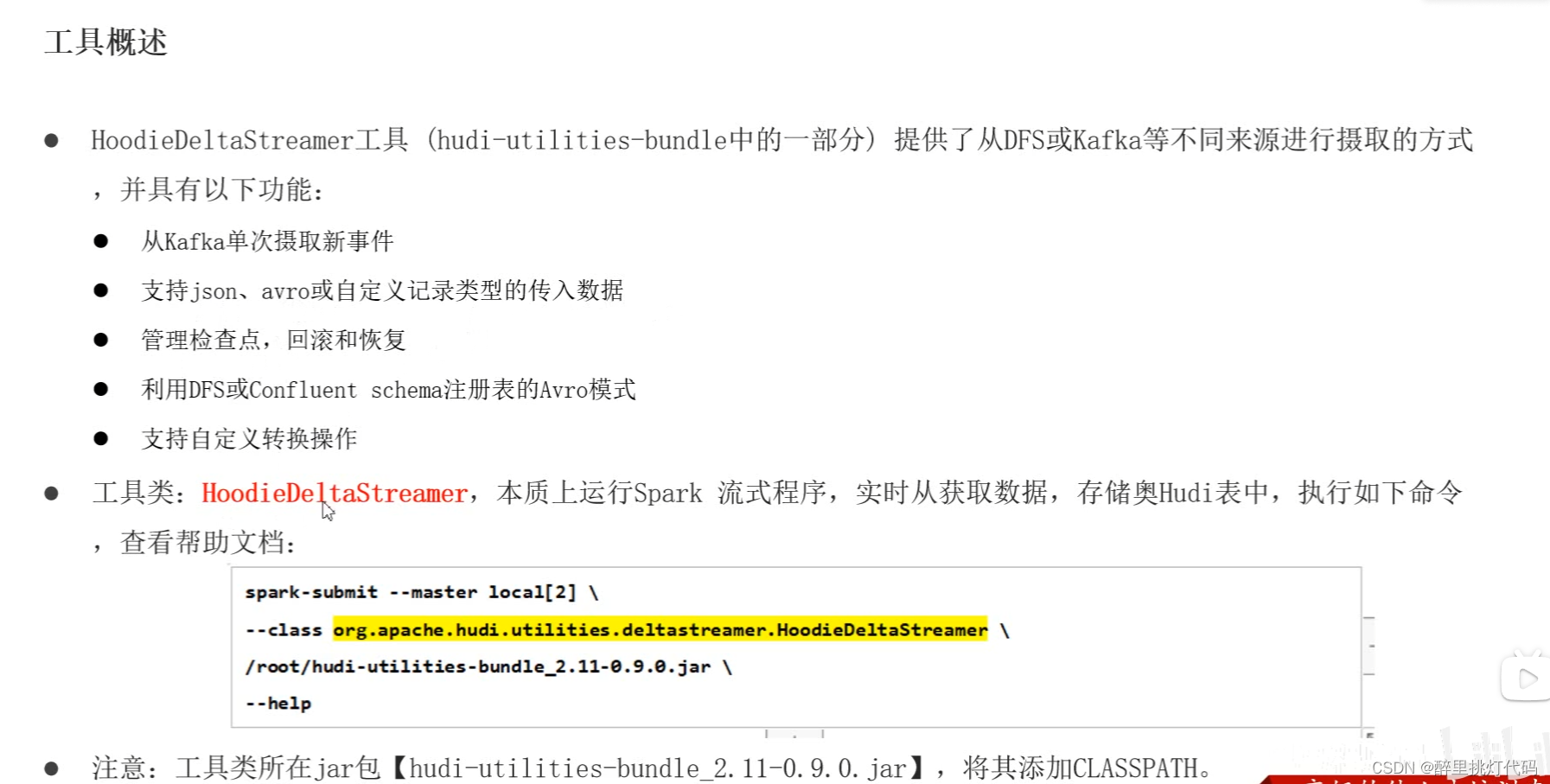
七、Hudi集成SparkSQL
启动spark-sql
spark-sql \
--master local[2] \
--jars /usr/local/src/hudi/hudi-spark-jars/hudi-spark3-bundle_2.12-0.9.0.jar,/usr/local/src/hudi/hudi-spark-jars/spark-avro_2.12-3.0.1.jar,/usr/local/src/hudi/hudi-spark-jars/spark_unused-1.0.0.jar \
--conf 'spark.serializer=org.apache.spark.serializer.KryoSerializer' \
--conf 'spark.sql.extensions=org.apache.spark.sql.hudi.HoodieSparkSessionExtension'#Hudi默认upsert/insert/delete的并发度是1500,对于演示小规模数据集设置更小的并发度。
set hoodie.upsert.shuffle.parallelism = 1;
set hoodie.insert.shuffle.parallelism = 1;
set hoodie.delete.shuffle.parallelism = 1;#设置不同步Hudi表元数据
set hoodie.datasource.meta.sync.enable=false;
创建表
--编写DDL语句,创建Hudi表,表的类型:MOR和分区表,主键为id,分区字段为dt,合并字段默认为ts。
create table test_hudi_table (id int,name string,price double,ts long,dt string
) using hudipartitioned by (dt)options (primaryKey = 'id',type = 'mor')
location 'hdfs://192.168.184.135:9000/hudi-warehouse/test2_hudi_table' ;--创建Hudi表后查看创建的Hudi表
show create table test_hudi_table; CREATE TABLE `default`.`test_hudi_table` (`_hoodie_commit_time` STRING,`_hoodie_commit_seqno` STRING,`_hoodie_record_key` STRING,`_hoodie_partition_path` STRING,`_hoodie_file_name` STRING,`id` INT,`name` STRING,`price` DOUBLE,`ts` BIGINT,`dt` STRING)
USING hudi
OPTIONS (`type` 'mor',`primaryKey` 'id')
PARTITIONED BY (dt)
LOCATION 'hdfs://192.168.184.135:9000/hudi-warehouse/test_hudi_table'Time taken: 0.217 seconds, Fetched 1 row(s)
插入数据
java.lang.NoSuchMethodError: org.apache.spark.sql.catalyst.expressions.Alias.<init>(Lorg/apache/spark/sql/catalyst/expressions/Expression;Ljava/lang/String;Lorg/apache/spark/sql/catalyst/expressions/ExprId;Lscala/collection/Seq;Lscala/Option;)V
insert into test_hudi_table select 1 as id, 'hudi' as name, 10 as price, 1000 as ts, '2021-11-01' as dt;insert into test_hudi_table select 2 as id, 'spark' as name, 20 as price, 1100 as ts, '2021-11-01' as dt;insert into test_hudi_table select 3 as id, 'flink' as name, 30 as price, 1200 as ts, '2021-11-01' as dt;insert into test_hudi_table select 4 as id, 'sql' as name, 40 as price, 1400 as ts, '2021-11-01' as dt;
查询数据
--使用SQL查询Hudi表数据,全表扫描查询
select * from test_hudi_table ;--查看表中字段结构,使用DESC语句
desc test_hudi_table ;--指定查询字段,查询表中前几天数据
SELECT _hoodie_record_key,_hoodie_partition_path, id, name, price, ts, dt FROM test_hudi_table ;
更新数据
--使用DELETE语句,将id=1的记录删除,命令如下
delete from test_hudi_table where id = 1 ;--再次查询Hudi表数据,查看数据是否更新
SELECT COUNT(1) AS total from test_hudi_table WHERE id = 1;
DDL创建表
在spark-sql中编写DDL语句,创建Hudi表数据,核心三个属性参数
核心参数
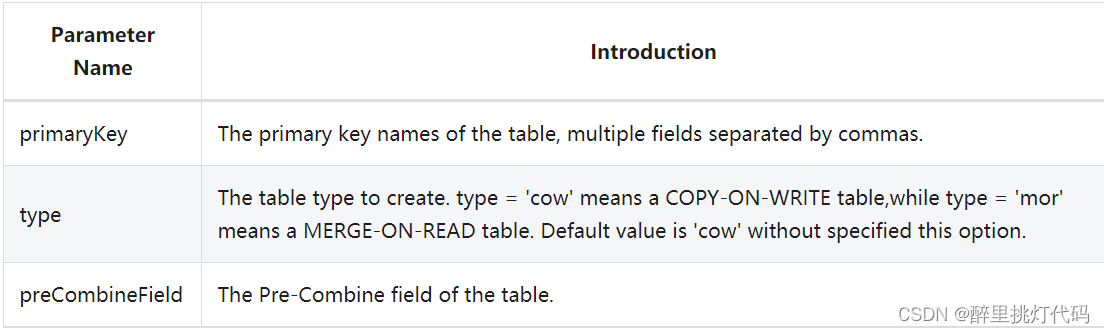
Hudi表类型
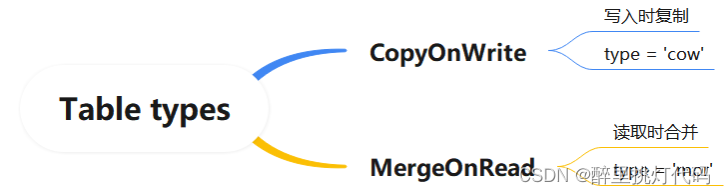
创建COW类型Hudi表
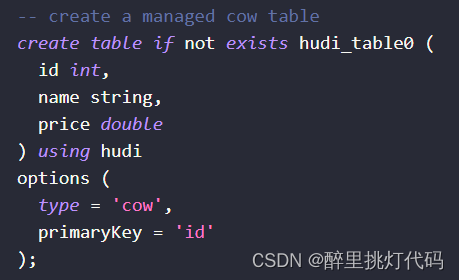
创建MOR类型Hudi表
options (primaryKey = 'id',type = 'mor')
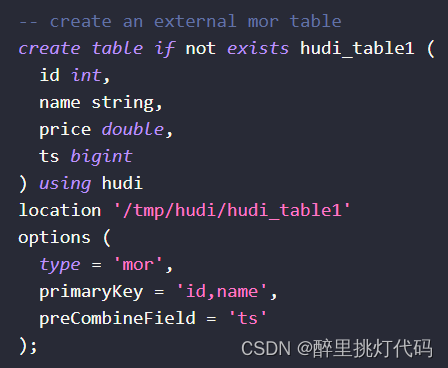
管理表与外部表
创建表时,指定location存储路径,表就是外部表
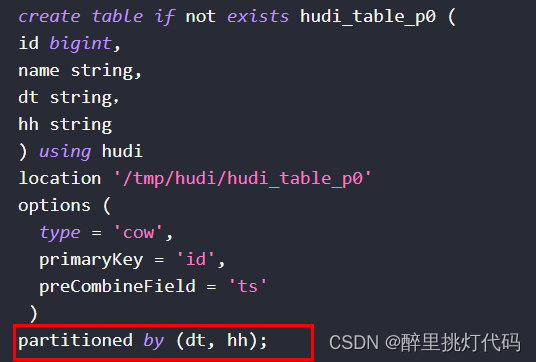
创建表时设置为分区表
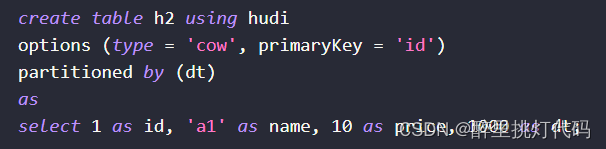
支持使用CTAS
在实际应用使用时,合理选择创建表的方式,建议创建外部及分区表,便于数据管理和安全。
DDL-DML-DQL-DCL区别
一、DQL
DQL(data Query Language) 数据查询语言
就是我们最经常用到的 SELECT(查)语句 。主要用来对数据库中的数据进行查询操作。
二、DML
DML(data manipulation language)数据操纵语言:
就是我们最经常用到的 INSERT(增)、DELETE(删)、UPDATE(改)。主要用来对数据库重表的数据进行一些增删改操作。三、DDL
DDL(data definition language)数据库定义语言:
就是我们在创建表的时候用到的一些sql,比如说:CREATE、ALTER、DROP等。主要是用在定义或改变表的结构,数据类型,表之间的链接和约束等初始化工作上。四、DCL
DCL(Data Control Language)数据库控制语言:
是用来设置或更改数据库用户或角色权限的语句,包括(grant(授予权限),deny(拒绝权限),revoke(收回权限)等)语句。这个比较少用到。
MergeInto 语句
Merge Into Insert
--当不满足条件时(关联条件不匹配),插入数据到Hudi表中
merge into test_hudi_table as t0
using (select 1 as id, 'hadoop' as name, 1 as price, 9000 as ts, '2021-11-02' as dt
) as s0
on t0.id = s0.id
when not matched then insert * ;
Merge Into Update
--当满足条件时(关联条件匹配),对数据进行更新操作
merge into test_hudi_table as t0
using (select 1 as id, 'hadoop3' as name, 1000 as price, 9999 as ts, '2021-11-02' as dt
) as s0
on t0.id = s0.id
when matched then update set *
Merge Into Delete
--当满足条件时(关联条件匹配),对数据进行删除操作
merge into test_hudi_table t0
using (select 1 as s_id, 'hadoop3' as s_name, 8888 as s_price, 9999 as s_ts, '2021-11-02' as dt
) s0
on t0.id = s0.s_id
when matched and s_ts = 9999 then delete
八、Hudi集成Flink
[flink学习之sql-client之踩坑记录_flink sql-client_cclovezbf的博客-CSDN博客](https://blog.csdn.net/cclovezbf/article/details/127887149)
安装Flink 1.12
使用Flink 1.12版本,部署Flink Standalone集群模式,启动服务,步骤如下
step1、下载安装包https://archive.apache.org/dist/flink/flink-1.12.2/step2、上传软件包step3、解压step5、添加hadoop依赖jar包
往Flink中的lib目录里添加两个jar包:
flink-shaded-hadoop-3-uber-3.1.1.7.2.1.0-327-9.0.jar
commons-cli-1.4.jar集群--添加完后,将lib目录分发给其他虚拟机。虚拟机上也需要添加上面两个jar包下载仓库分别是:
https://mvnrepository.com/artifact/org.apache.flink/flink-shaded-hadoop-3-uber/3.1.1.7.2.1.0-327-9.0
https://mvnrepository.com/artifact/commons-cli/commons-cli/1.4cd flink/libflink-shaded-hadoop-2-uber-2.7.5-10.0.jar
启动Flink
start-cluster.sh[root@master lib]# jps
53121 StandaloneSessionClusterEntrypoint
3218 DataNode
2979 NameNode
53622 Jps
53401 TaskManagerRunner
28107 QuorumPeerMain
5918 RunJarstop-cluster.sh
词频统计WordCount
flink run /usr/local/src/flink/examples/batch/WordCount.jar
java.lang.NoSuchMethodError: org.apache.commons.cli.Option.builder(Ljava/lang/String;)Lorg/apache/commons/cli/Option$Builder; 解决:flink/lib 下添加commons-cli-1.4.jar
Flink快速入门
环境准备
Jar包和配置文件
hudi-flink-bundle_2.12-0.9.0.jar
[root@master target]# cp hudi-flink-bundle_2.12-0.9.0.jar /usr/local/src/flink/lib
[root@master target]# pwd
/usr/local/src/hudi/packaging/hudi-flink-bundle/target
flink-conf.yaml
接下来使用Flink SQL Client提供SQL命令行与Hudi集成,需要启动Flink Standalone集群,其中需要修改配置文件【$FLINK_HOME/conf/flink-conf.yaml】,TaskManager分配Slots数目为4。taskmanager.numberOfTaskSlots: 4修改后重启flink
第一步、启动HDFS集群
[root@master ~]# hadoop-daemon.sh start namenode
[root@master ~]# hadoop-daemon.sh start datanode
第二步、启动Flink 集群
由于Flink需要连接HDFS文件系统,所以先设置HADOOP_CLASSPATH变量,再启动Standalone集群服务。
export HADOOP_CLASSPATH=`$HADOOP_HOME/bin/hadoop classpath`#启动flink
start-cluster.sh
第三步、启动Flink SQL Cli
embedded:嵌入式方式
#启动flink-sql客户端
sql-client.sh embedded shell#在SQL Cli设置分析结果展示模式为tableau:
set execution.result-mode=tableau;Flink SQL> set execution.result-mode=tableau;
[INFO] Session property has been set.-------------------------------------exit报错---------------------------------------------
Flink SQL> exit;
[INFO] Exiting Flink SQL CLI Client...Shutting down the session...
done.
Exception in thread "Thread-6" java.lang.IllegalStateException: Trying to access closed classloader. Please check if you store classloaders directly or indirectly in static fields.解决办法: 在 flink 配置文件里 flink-conf.yaml设置
classloader.check-leaked-classloader: false
SQL Cli-tableau模式
set execution.result-mode=tableau;
创建表并插入数据
创建表
创建表:t1,数据存储到Hudi表中,底层HDFS存储,表的类型:MOR
CREATE TABLE t1(uuid VARCHAR(20), name VARCHAR(10),age INT,ts TIMESTAMP(3),`partition` VARCHAR(20)
)
PARTITIONED BY (`partition`)
WITH ('connector' = 'hudi','path' = 'hdfs://192.168.184.135:9000/hudi-warehouse/hudi-t1','write.tasks' = '1','compaction.tasks' = '1', 'table.type' = 'MERGE_ON_READ','hive-conf-dir' = '/usr/hdp/3.1.5.0-152/hive/conf'
);show tables;--查看表及结构
desc t1;Flink SQL> desc t1;
+-----------+--------------+------+-----+--------+-----------+
|      name |         type | null | key | extras | watermark |
+-----------+--------------+------+-----+--------+-----------+
|      uuid |  VARCHAR(20) | true |     |        |           |
|      name |  VARCHAR(10) | true |     |        |           |
|       age |          INT | true |     |        |           |
|        ts | TIMESTAMP(3) | true |     |        |           |
| partition |  VARCHAR(20) | true |     |        |           |
+-----------+--------------+------+-----+--------+-----------+
5 rows in set
插入数据
t1中插入数据,其中t1表为分区表,字段名称:**partition**,插入数据时字段值有:【**part1、part2、part3和part4**】
INSERT INTO t1 VALUES('id1','Danny',23,TIMESTAMP '1970-01-01 00:00:01','par1'),
('id2','Stephen',33,TIMESTAMP '1970-01-01 00:00:02','par1'),
('id3','Julian',53,TIMESTAMP '1970-01-01 00:00:03','par2'),
('id4','Fabian',31,TIMESTAMP '1970-01-01 00:00:04','par2'),
('id5','Sophia',18,TIMESTAMP '1970-01-01 00:00:05','par3'),
('id6','Emma',20,TIMESTAMP '1970-01-01 00:00:06','par3'),
('id7','Bob',44,TIMESTAMP '1970-01-01 00:00:07','par4'),
('id8','Han',56,TIMESTAMP '1970-01-01 00:00:08','par4');
批量插入报错:org.apache.flink.runtime.JobException: Recovery is suppressed by NoRestartBackoffTimeStrategy 'dfs.client.block.write.replace-datanode-on-failure.policy' in its configuration.
hdfs-site.xml插入<property><name>dfs.client.block.write.replace-datanode-on-failure.enable</name>
<value>true</value>
</property><property>
<name>dfs.client.block.write.replace-datanode-on-failure.policy</name>
<value>NEVER</value>
</property>
查询数据
select * from t1;select * from t1 where `partition` = 'par1' ;
更新数据
更新数据用insert--将id1的年龄更新为30岁
Flink SQL> select uuid,name,age from t1 where uuid='id1';
+-----+----------------------+----------------------+-------------+
| +/- |                 uuid |                 name |         age |
+-----+----------------------+----------------------+-------------+
|   + |                  id1 |                Danny |          27 |
+-----+----------------------+----------------------+-------------+Flink SQL> insert into t1 values ('id1','Danny',30,TIMESTAMP '1970-01-01 00:00:01','par1');Flink SQL> select uuid,name,age from t1 where uuid='id1';
+-----+----------------------+----------------------+-------------+
| +/- |                 uuid |                 name |         age |
+-----+----------------------+----------------------+-------------+
|   + |                  id1 |                Danny |          30 |
+-----+----------------------+----------------------+-------------+
Received a total of 1 rows
流式查询SteamingQuery
Flink插入Hudi表数据时,支持以流的方式加载数据,增量查询分析
创建表
流式表
CREATE TABLE t2(uuid VARCHAR(20), name VARCHAR(10),age INT,ts TIMESTAMP(3),`partition` VARCHAR(20)
)
PARTITIONED BY (`partition`)
WITH ('connector' = 'hudi','path' = 'hdfs://192.168.184.135:9000/hudi-warehouse/hudi-t1','table.type' = 'MERGE_ON_READ','read.tasks' = '1', 'read.streaming.enabled' = 'true','read.streaming.start-commit' = '20210316134557','read.streaming.check-interval' = '4' );--核心参数选项说明:
read.streaming.enabled 设置为 true,表明通过 streaming 的方式读取表数据;
read.streaming.check-interval 指定了 source 监控新的 commits 的间隔为 4s;
table.type 设置表类型为 MERGE_ON_READ;
插入数据
重新打开一个终端,然后创建一个表非流式表,path与之前的地址一样,然后新的终端中插入新的数据id9,之前创建的t2表会流式插入新的数据
CREATE TABLE t1(uuid VARCHAR(20), name VARCHAR(10),age INT,ts TIMESTAMP(3),`partition` VARCHAR(20)
)
PARTITIONED BY (`partition`)
WITH ('connector' = 'hudi','path' = 'hdfs://192.168.184.135:9000/hudi-warehouse/hudi-t1','write.tasks' = '1','compaction.tasks' = '1', 'table.type' = 'MERGE_ON_READ'
);insert into t1 values ('id9','test',27,TIMESTAMP '1970-01-01 00:00:01','par5');insert into t1 values ('id10','saddam',23,TIMESTAMP '2023-11-05 23:07:01','par5');
Flink SQL Writer
Flink SQL集成Kafka
第一步、创建Topic
#启动zookeeper
[root@master ~]# zkServer.sh start#启动kafka
kafka-server-start.sh /usr/local/src/kafka/config/server.properties#创建topic:flink-topic
kafka-topics.sh --create --zookeeper master:2181/kafka --replication-factor 1 --partitions 1 --topic flink-topic#工具创建
.....
第二步、启动HDFS集群
start-dfs.sh
第三步、启动Flink 集群
export HADOOP_CLASSPATH=`$HADOOP_HOME/bin/hadoop classpath`start-cluster.sh
第四步、启动Flink SQL Cli
采用指定参数【-j xx.jar】方式加载hudi-flink集成包
sql-client.sh embedded -j /usr/local/src/flink/flink-Jars/flink-sql-connector-kafka_2.12-1.12.2.jar shellset execution.result-mode=tableau;
第五步、创建表,映射到Kafka Topic
其中Kafka Topic中数据是CSV文件格式,有三个字段:user_id、item_id、behavior,从Kafka消费数据时,设置从最新偏移量开始
CREATE TABLE tbl_kafka (`user_id` BIGINT,`item_id` BIGINT,`behavior` STRING
) WITH ('connector' = 'kafka','topic' = 'flink-topic','properties.bootstrap.servers' = '192.168.184.135:9092','properties.group.id' = 'test-group-10001','scan.startup.mode' = 'latest-offset','format' = 'csv'
);
第六步、实时向Topic发送数据,并在FlinkSQL查询
首先,在FlinkSQL页面,执行SELECT查询语句
Flink SQL> select * from tbl_kafka;
其次,通过Kafka Console Producer向Topic发送数据
-- 生产者发送数据
kafka-console-producer.sh --broker-list 192.168.184.135:9092 --topic flink-topic
/*
1001,90001,click
1001,90001,browser
1001,90001,click
1002,90002,click
1002,90003,click
1003,90001,order
1004,90001,order
*/
Flink SQL写入Hudi-IDEAJava开发
Maven开发pom文件
<!-- Flink Client --><dependency><groupId>org.apache.flink</groupId><artifactId>flink-clients_${scala.binary.version}</artifactId><version>${flink.version}</version></dependency><dependency><groupId>org.apache.flink</groupId><artifactId>flink-java</artifactId><version>${flink.version}</version></dependency><dependency><groupId>org.apache.flink</groupId><artifactId>flink-streaming-java_${scala.binary.version}</artifactId><version>${flink.version}</version></dependency><dependency><groupId>org.apache.flink</groupId><artifactId>flink-runtime-web_${scala.binary.version}</artifactId><version>${flink.version}</version></dependency><!-- Flink Table API & SQL --><dependency><groupId>org.apache.flink</groupId><artifactId>flink-table-common</artifactId><version>${flink.version}</version></dependency><dependency><groupId>org.apache.flink</groupId><artifactId>flink-table-planner-blink_${scala.binary.version}</artifactId><version>${flink.version}</version></dependency><dependency><groupId>org.apache.flink</groupId><artifactId>flink-table-api-java-bridge_${scala.binary.version}</artifactId><version>${flink.version}</version></dependency><dependency><groupId>org.apache.flink</groupId><artifactId>flink-connector-kafka_${scala.binary.version}</artifactId><version>${flink.version}</version></dependency><dependency><groupId>org.apache.flink</groupId><artifactId>flink-json</artifactId><version>${flink.version}</version></dependency><dependency><groupId>org.apache.hudi</groupId><artifactId>hudi-flink-bundle_${scala.binary.version}</artifactId><version>0.9.0</version></dependency><dependency><groupId>org.apache.flink</groupId><artifactId>flink-shaded-hadoop-2-uber</artifactId><version>2.7.5-10.0</version></dependency><!-- MySQL/FastJson/lombok --><dependency><groupId>mysql</groupId><artifactId>mysql-connector-java</artifactId><version>5.1.32</version></dependency><dependency><groupId>com.alibaba</groupId><artifactId>fastjson</artifactId><version>1.2.68</version></dependency><dependency><groupId>org.projectlombok</groupId><artifactId>lombok</artifactId><version>1.18.12</version></dependency><!-- slf4j及log4j --><dependency><groupId>org.slf4j</groupId><artifactId>slf4j-log4j12</artifactId><version>1.7.7</version><scope>runtime</scope></dependency><dependency><groupId>log4j</groupId><artifactId>log4j</artifactId><version>1.2.17</version><scope>runtime</scope></dependency>
消费Kafka数据
启动zookeeper,kafka,然后启动数据模拟生成器,再运行FlinkSQLKafakDemo
package flink_kafka_hudi;import org.apache.flink.table.api.EnvironmentSettings;
import org.apache.flink.table.api.Table;
import org.apache.flink.table.api.TableEnvironment;
import static org.apache.flink.table.api.Expressions.*;/*** 基于Flink SQL Connector实现:实时消费Topic中数据,转换处理后,实时存储Hudi表中*/
public class FlinkSQLKafakDemo {public static void main(String[] args) {//TODO 1-获取表执行环境EnvironmentSettings settings = EnvironmentSettings.newInstance().inStreamingMode().build();TableEnvironment tableEnv = TableEnvironment.create(settings) ;//TODO 2-创建输入表, 从Kafka消费数据tableEnv.executeSql("CREATE TABLE order_kafka_source (\n" +"  orderId STRING,\n" +"  userId STRING,\n" +"  orderTime STRING,\n" +"  ip STRING,\n" +"  orderMoney DOUBLE,\n" +"  orderStatus INT\n" +") WITH (\n" +"  'connector' = 'kafka',\n" +"  'topic' = 'order-topic',\n" +"  'properties.bootstrap.servers' = '192.168.184.135:9092',\n" +"  'properties.group.id' = 'gid-1001',\n" +"  'scan.startup.mode' = 'latest-offset',\n" +"  'format' = 'json',\n" +"  'json.fail-on-missing-field' = 'false',\n" +"  'json.ignore-parse-errors' = 'true'\n" +")");//TODO 3-数据转换:提取订单时间中订单日期,作为Hudi表分区字段值Table etlTable = tableEnv.from("order_kafka_source").addColumns($("orderTime").substring(0, 10).as("partition_day")).addColumns($("orderId").substring(0, 17).as("ts"));tableEnv.createTemporaryView("view_order", etlTable);//TODO 4-查询数据tableEnv.executeSql("SELECT * FROM view_order").print();}
}
Flink写入hudi并读取
启动数据生成器用kafka消费
存入hudi
package flink_kafka_hudi;import org.apache.flink.streaming.api.environment.StreamExecutionEnvironment;
import org.apache.flink.table.api.EnvironmentSettings;
import org.apache.flink.table.api.Table;
import org.apache.flink.table.api.TableEnvironment;
import org.apache.flink.table.api.bridge.java.StreamTableEnvironment;import static org.apache.flink.table.api.Expressions.$;/*** 基于Flink SQL Connector实现:实时消费Topic中数据,转换处理后,实时存储到Hudi表中*/
public class FlinkSQLHudiDemo {public static void main(String[] args) {// 1-获取表执行环境StreamExecutionEnvironment env = StreamExecutionEnvironment.getExecutionEnvironment();// TODO: 由于增量将数据写入到Hudi表,所以需要启动Flink Checkpoint检查点env.setParallelism(1);env.enableCheckpointing(5000) ;EnvironmentSettings settings = EnvironmentSettings.newInstance().inStreamingMode() // 设置流式模式.build();StreamTableEnvironment tableEnv = StreamTableEnvironment.create(env, settings);// 2-创建输入表,TODO:从Kafka消费数据tableEnv.executeSql("CREATE TABLE order_kafka_source (\n" +"  orderId STRING,\n" +"  userId STRING,\n" +"  orderTime STRING,\n" +"  ip STRING,\n" +"  orderMoney DOUBLE,\n" +"  orderStatus INT\n" +") WITH (\n" +"  'connector' = 'kafka',\n" +"  'topic' = 'order-topic',\n" +"  'properties.bootstrap.servers' = '192.168.184.135:9092',\n" +"  'properties.group.id' = 'gid-1002',\n" +"  'scan.startup.mode' = 'latest-offset',\n" +"  'format' = 'json',\n" +"  'json.fail-on-missing-field' = 'false',\n" +"  'json.ignore-parse-errors' = 'true'\n" +")");// 3-转换数据:可以使用SQL,也可以时Table APITable etlTable = tableEnv.from("order_kafka_source")// 添加字段:Hudi表数据合并字段,时间戳, "orderId": "20211122103434136000001" ->  20211122103434136.addColumns($("orderId").substring(0, 17).as("ts"))// 添加字段:Hudi表分区字段, "orderTime": "2021-11-22 10:34:34.136" -> 021-11-22.addColumns($("orderTime").substring(0, 10).as("partition_day"));tableEnv.createTemporaryView("view_order", etlTable);// 4-创建输出表,TODO: 关联到Hudi表,指定Hudi表名称,存储路径,字段名称等等信息tableEnv.executeSql("CREATE TABLE order_hudi_sink (\n" +"  orderId STRING PRIMARY KEY NOT ENFORCED,\n" +"  userId STRING,\n" +"  orderTime STRING,\n" +"  ip STRING,\n" +"  orderMoney DOUBLE,\n" +"  orderStatus INT,\n" +"  ts STRING,\n" +"  partition_day STRING\n" +")\n" +"PARTITIONED BY (partition_day)\n" +"WITH (\n" +"    'connector' = 'hudi',\n" +"    'path' = 'hdfs://192.168.184.135:9000/hudi-warehouse/flink_hudi_order',\n" +"    'table.type' = 'MERGE_ON_READ',\n" +"    'write.operation' = 'upsert',\n" +"    'hoodie.datasource.write.recordkey.field'= 'orderId',\n" +"    'write.precombine.field' = 'ts',\n" +"    'write.tasks'= '1'\n" +")");// 5-通过子查询方式,将数据写入输出表tableEnv.executeSql("INSERT INTO order_hudi_sink\n" +"SELECT\n" +"  orderId, userId, orderTime, ip, orderMoney, orderStatus, ts, partition_day\n" +"FROM view_order");}}
读取hudi
package flink_kafka_hudi;import org.apache.flink.table.api.EnvironmentSettings;
import org.apache.flink.table.api.TableEnvironment;/*** 基于Flink SQL Connector实现:从Hudi表中加载数据,编写SQL查询*/
public class FlinkSQLReadDemo {public static void main(String[] args) {// 1-获取表执行环境EnvironmentSettings settings = EnvironmentSettings.newInstance().inStreamingMode().build();TableEnvironment tableEnv = TableEnvironment.create(settings) ;// 2-创建输入表,TODO:加载Hudi表数据tableEnv.executeSql("CREATE TABLE order_hudi(\n" +"  orderId STRING PRIMARY KEY NOT ENFORCED,\n" +"  userId STRING,\n" +"  orderTime STRING,\n" +"  ip STRING,\n" +"  orderMoney DOUBLE,\n" +"  orderStatus INT,\n" +"  ts STRING,\n" +"  partition_day STRING\n" +")\n" +"PARTITIONED BY (partition_day)\n" +"WITH (\n" +"    'connector' = 'hudi',\n" +"    'path' = 'hdfs://192.168.184.135:9000/hudi-warehouse/flink_hudi_order',\n" +"    'table.type' = 'MERGE_ON_READ',\n" +"    'read.streaming.enabled' = 'true',\n" +"    'read.streaming.check-interval' = '4'\n" +")");// 3-执行查询语句,读取流式读取Hudi表数据tableEnv.executeSql("SELECT orderId, userId, orderTime, ip, orderMoney, orderStatus, ts, partition_day FROM order_hudi").print() ;}}
基于Flink实时增量入湖流程图
Flink SQL写入Hudi-FlinkSQL开发
集成环境
#修改$FLINK_HOME/conf/flink-conf.yaml文件
jobmanager.rpc.address: node1.itcast.cn
jobmanager.memory.process.size: 1024m
taskmanager.memory.process.size: 2048m
taskmanager.numberOfTaskSlots: 4classloader.check-leaked-classloader: false
classloader.resolve-order: parent-firstexecution.checkpointing.interval: 3000
state.backend: rocksdb
state.checkpoints.dir: hdfs://master:9000/flink/flink-checkpoints
state.savepoints.dir: hdfs://master:9000/flink/flink-savepoints
state.backend.incremental: true#jar包
将Hudi与Flink集成jar包及其他相关jar包,放置到$FLINK_HOME/lib目录
hudi-flink-bundle_2.12-0.9.0.jar
flink-sql-connector-kafka_2.12-1.12.2.jar
flink-shaded-hadoop-3-uber-3.1.1.7.2.9.0-173-9.0.jar#启动Standalone集群
export HADOOP_CLASSPATH=`/usr/local/src/hadoop/bin/hadoop classpath`
start-cluster.sh#启动SQL Client,最好再次指定Hudi集成jar包
sql-client.sh embedded -j /usr/local/src/flink/lib/hudi-flink-bundle_2.12-0.9.0.jar shell#设置属性
set execution.result-mode=tableau;
set execution.checkpointing.interval=3sec;
执行SQL
首先创建输入表:从Kafka消费数据,其次编写SQL提取字段值,再创建输出表:将数据保存值Hudi表中,最后编写SQL查询Hudi表数据。
第1步、创建输入表,关联Kafka Topic
-- 输入表:Kafka Source
CREATE TABLE order_kafka_source (orderId STRING,userId STRING,orderTime STRING,ip STRING,orderMoney DOUBLE,orderStatus INT
) WITH ('connector' = 'kafka','topic' = 'order-topic','properties.bootstrap.servers' = '192.168.184.135:9092','properties.group.id' = 'gid-1001','scan.startup.mode' = 'latest-offset','format' = 'json','json.fail-on-missing-field' = 'false','json.ignore-parse-errors' = 'true'
);SELECT orderId, userId, orderTime, ip, orderMoney, orderStatus FROM order_kafka_source ;
第2步、处理获取Kafka消息数据,提取字段值
SELECT orderId, userId, orderTime, ip, orderMoney, orderStatus, substring(orderId, 0, 17) AS ts, substring(orderTime, 0, 10) AS partition_day
FROM order_kafka_source ;
第3步、创建输出表,保存数据至Hudi表,设置相关属性
-- 输出表:Hudi Sink
CREATE TABLE order_hudi_sink (orderId STRING PRIMARY KEY NOT ENFORCED,userId STRING,orderTime STRING,ip STRING,orderMoney DOUBLE,orderStatus INT,ts STRING,partition_day STRING
)
PARTITIONED BY (partition_day)
WITH ('connector' = 'hudi','path' = 'hdfs://192.168.184.135:9000/hudi-warehouse/order_hudi_sink','table.type' = 'MERGE_ON_READ','write.operation' = 'upsert','hoodie.datasource.write.recordkey.field'= 'orderId','write.precombine.field' = 'ts','write.tasks'= '1','compaction.tasks' = '1', 'compaction.async.enabled' = 'true', 'compaction.trigger.strategy' = 'num_commits', 'compaction.delta_commits' = '1'
);
第4步、使用INSERT INTO语句,将数据保存Hudi表
-- 子查询插入INSERT ... SELECT ...
INSERT INTO order_hudi_sink
SELECTorderId, userId, orderTime, ip, orderMoney, orderStatus,substring(orderId, 0, 17) AS ts, substring(orderTime, 0, 10) AS partition_day
FROM order_kafka_source ;
Flink CDC Hudi
CDC的全称是Change data Capture,即变更数据捕获,主要面向数据库的变更,是是数据库领域非常常见的技术,主要用于捕获数据库的一些变更,然后可以把变更数据发送到下游。
流程图
环境准备
#修改Hudi集成flink和Hive编译依赖版本配置
原因:现在版本Hudi,在编译的时候本身默认已经集成的flink-SQL-connector-hive的包,会和Flink lib包下的flink-SQL-connector-hive冲突。所以,编译的过程中只修改hive编译版本。文件:hudi-0.9.0/packaging/hudi-flink-bundle/pom.xml<hive.version>3.1.2</hive.version> #hive版本修改为自己的版本然后进入hudi-0.9.0/packaging/hudi-flink-bundle/ 再编译Hudi源码:
mvn clean install -DskipTests -Drat.skip=true -Dscala-2.12 -Dspark3 -Pflink-bundle-shade-hive3#将Flink CDC MySQL对应jar包,放到$FLINK_HOME/lib目录中
flink-sql-connector-mysql-cdc-1.3.0.jar#hive 需要用来读hudi数据,放到$HIVE_HOME/lib目录中
hudi-hadoop-mr-bundle-0.9.0.jar#flink 用来写入和读取数据,将其拷贝至$FLINK_HOME/lib目录中,如果以前有同名jar包,先删除再拷贝。
hudi-flink-bundle_2.12-0.9.0.jar#启动
dfs
zk
kafka
flink
metastore
hiveserver2
创建 MySQL 表
首先开启MySQL数据库binlog日志,再重启MySQL数据库服务,最后创建表。
第一步、开启MySQL binlog日志
[root@node1 ~]# vim /etc/my.cnf
在[mysqld]下面添加内容:server-id=2
log-bin=mysql-bin
binlog_format=row
expire_logs_days=15
binlog_row_image=full
第二步、重启MySQL Server
service mysqld restart
第三步、在MySQL数据库,创建表
-- MySQL 数据库创建表
create database test;
create table test.tbl_users(id bigint auto_increment primary key,name varchar(20) null,birthday timestamp default CURRENT_TIMESTAMP not null,ts timestamp default CURRENT_TIMESTAMP not null
);
创建 CDC 表
先启动HDFS服务、Hive MetaStore和HiveServer2服务和Flink Standalone集群,再运行SQL Client,最后创建表关联MySQL表,采用MySQL CDC方式。
启动相关服务
#启动HDFS服务,分别启动NameNode和DataNode
hadoop-daemon.sh start namenode
hadoop-daemon.sh start datanode#启动Hive服务:元数据MetaStore和HiveServer2
hive/bin/start-metastore.sh
hive/bin/start-hiveserver2.sh#启动Flink Standalone集群
export HADOOP_CLASSPATH=`/usr/local/src/hadoop/bin/hadoop classpath`
start-cluster.sh#启动SQL Client客户端
sql-client.sh embedded -j /usr/local/src/flink/lib/hudi-flink-bundle_2.12-0.9.0.jar shell
设置属性:
set execution.result-mode=tableau;
set execution.checkpointing.interval=3sec;
创建输入表,关联MySQL表,采用MySQL CDC 关联
-- Flink SQL Client创建表
CREATE TABLE users_source_mysql (id BIGINT PRIMARY KEY NOT ENFORCED,name STRING,birthday TIMESTAMP(3),ts TIMESTAMP(3)
) WITH (
'connector' = 'mysql-cdc',
'hostname' = '192.168.184.135',
'port' = '3306',
'username' = 'root',
'password' = 'xxxxxx',
'server-time-zone' = 'Asia/Shanghai',
'debezium.snapshot.mode' = 'initial',
'database-name' = 'test',
'table-name' = 'tbl_users'
);
开启MySQL Client客户端,执行DML语句,插入数据
insert into test.tbl_users (name) values ('zhangsan')
insert into test.tbl_users (name) values ('lisi');
insert into test.tbl_users (name) values ('wangwu');
insert into test.tbl_users (name) values ('laoda');
insert into test.tbl_users (name) values ('laoer');
查询CDC表数据
-- 查询数据
select * from users_source_mysql;
创建视图
创建一个临时视图,增加分区列part,方便后续同步hive分区表。
-- 创建一个临时视图,增加分区列 方便后续同步hive分区表
create view view_users_cdc
AS
SELECT *, DATE_FORMAT(birthday, 'yyyyMMdd') as part FROM users_source_mysql;select * from view_users_cdc;
创建 Hudi 表
创建 CDC Hudi Sink表,并自动同步hive分区表
CREATE TABLE users_sink_hudi_hive(
id bigint ,
name string,
birthday TIMESTAMP(3),
ts TIMESTAMP(3),
part VARCHAR(20),
primary key(id) not enforced
)
PARTITIONED BY (part)
with(
'connector'='hudi',
'path'= 'hdfs://192.168.184.135:9000/hudi-warehouse/users_sink_hudi_hive',
'table.type'= 'MERGE_ON_READ',
'hoodie.datasource.write.recordkey.field'= 'id',
'write.precombine.field'= 'ts',
'write.tasks'= '1',
'write.rate.limit'= '2000',
'compaction.tasks'= '1',
'compaction.async.enabled'= 'true',
'compaction.trigger.strategy'= 'num_commits',
'compaction.delta_commits'= '1',
'changelog.enabled'= 'true',
'read.streaming.enabled'= 'true',
'read.streaming.check-interval'= '3',
'hive_sync.enable'= 'true',
'hive_sync.mode'= 'hms',
'hive_sync.metastore.uris'= 'thrift://192.168.184.135:9083',
'hive_sync.jdbc_url'= 'jdbc:hive2://192.168.184.135:10000',
'hive_sync.table'= 'users_sink_hudi_hive',
'hive_sync.db'= 'default',
'hive_sync.username'= 'root',
'hive_sync.password'= 'xxxxxx',
'hive_sync.support_timestamp'= 'true'
);此处Hudi表类型:MOR,Merge on Read (读时合并),快照查询+增量查询+读取优化查询(近实时)。使用列式存储(parquet)+行式文件(arvo)组合存储数据。更新记录到增量文件中,然后进行同步或异步压缩来生成新版本的列式文件。
数据写入Hudi表
编写INSERT语句,从视图中查询数据,再写入Hudi表中
insert into users_sink_hudi_hive select id, name, birthday, ts, part from view_users_cdc;
Hive 表查询
需要引入hudi-hadoop-mr-bundle-0.9.0.jar包,放到$HIVE_HOME/lib下
--启动Hive中beeline客户端,连接HiveServer2服务 已自动生产hudi MOR模式的2张表:users_sink_hudi_hive_ro,ro 表全称 read oprimized table,对于 MOR 表同步的 xxx_ro 表,只暴露压缩后的 parquet。其查询方式和COW表类似。设置完 hiveInputFormat 之后 和普通的 Hive 表一样查询即可;users_sink_hudi_hive_rt,rt表示增量视图,主要针对增量查询的rt表;ro表只能查parquet文件数据, rt表 parquet文件数据和log文件数据都可查;
查看自动生成表users_sink_hudi_hive_ro结构
show create table users_sink_hudi_hive_ro;
查看自动生成表的分区信息
show partitions users_sink_hudi_hive_ro ;
show partitions users_sink_hudi_hive_rt ;
查询Hive 分区表数据
set hive.exec.mode.local.auto=true;
set hive.input.format = org.apache.hudi.hadoop.hive.HoodieCombineHiveInputFormat;
set hive.mapred.mode=nonstrict ;select id, name, birthday, ts, `part` from users_sink_hudi_hive_ro;
指定分区字段过滤,查询数据
select name, ts from users_sink_hudi_hive_ro where part ='20231110';
select name, ts from users_sink_hudi_hive_rt where part ='20231110';
Hudi Client操作Hudi表
进入Hudi客户端命令行:hudi/hudi-cli/hudi-cli.sh
连接Hudi表,查看表信息
connect --path hdfs://192.168.184.135:9000/hudi-warehouse/users_sink_hudi_hive
查看Hudi compactions 计划
compactions show all
查看Hudi commit信息
commits show --sortBy "CommitTime"
help
hudi:users_sink_hudi_hive->help
2023-11-10 21:13:57,140 INFO core.SimpleParser: * ! - Allows execution of operating sy
* // - Inline comment markers (start of line only)
* ; - Inline comment markers (start of line only)
* bootstrap index showmapping - Show bootstrap index mapping
* bootstrap index showpartitions - Show bootstrap indexed partitions
* bootstrap run - Run a bootstrap action for current Hudi table
* clean showpartitions - Show partition level details of a clean
* cleans refresh - Refresh table metadata
* cleans run - run clean
* cleans show - Show the cleans
* clear - Clears the console
* cls - Clears the console
* clustering run - Run Clustering
* clustering schedule - Schedule Clustering
* commit rollback - Rollback a commit
* commits compare - Compare commits with another Hoodie table
* commit show_write_stats - Show write stats of a commit
* commit showfiles - Show file level details of a commit
* commit showpartitions - Show partition level details of a commit
* commits refresh - Refresh table metadata
* commits show - Show the commits
* commits showarchived - Show the archived commits
* commits sync - Compare commits with another Hoodie table
* compaction repair - Renames the files to make them consistent with the timeline as d when compaction unschedule fails partially.
* compaction run - Run Compaction for given instant time
* compaction schedule - Schedule Compaction
* compaction show - Shows compaction details for a specific compaction instant
* compaction showarchived - Shows compaction details for a specific compaction instant
* compactions show all - Shows all compactions that are in active timeline
* compactions showarchived - Shows compaction details for specified time window
* compaction unschedule - Unschedule Compaction
* compaction unscheduleFileId - UnSchedule Compaction for a fileId
* compaction validate - Validate Compaction
* connect - Connect to a hoodie table
* create - Create a hoodie table if not present
* date - Displays the local date and time
* desc - Describe Hoodie Table properties
* downgrade table - Downgrades a table
* exit - Exits the shell
* export instants - Export Instants and their metadata from the Timeline
* fetch table schema - Fetches latest table schema
* hdfsparquetimport - Imports Parquet table to a hoodie table
* help - List all commands usage
* metadata create - Create the Metadata Table if it does not exist
* metadata delete - Remove the Metadata Table
* metadata init - Update the metadata table from commits since the creation
* metadata list-files - Print a list of all files in a partition from the metadata
* metadata list-partitions - Print a list of all partitions from the metadata
* metadata refresh - Refresh table metadata
* metadata set - Set options for Metadata Table
* metadata stats - Print stats about the metadata
* quit - Exits the shell
* refresh - Refresh table metadata
* repair addpartitionmeta - Add partition metadata to a table, if not present
* repair corrupted clean files - repair corrupted clean files
* repair deduplicate - De-duplicate a partition path contains duplicates & produce rep
* repair overwrite-hoodie-props - Overwrite hoodie.properties with provided file. Riskon!
* savepoint create - Savepoint a commit
* savepoint delete - Delete the savepoint
* savepoint rollback - Savepoint a commit
* savepoints refresh - Refresh table metadata
* savepoints show - Show the savepoints
* script - Parses the specified resource file and executes its commands
* set - Set spark launcher env to cli
* show archived commits - Read commits from archived files and show details
* show archived commit stats - Read commits from archived files and show details
* show env - Show spark launcher env by key
* show envs all - Show spark launcher envs
* show fsview all - Show entire file-system view
* show fsview latest - Show latest file-system view
* show logfile metadata - Read commit metadata from log files
* show logfile records - Read records from log files
* show rollback - Show details of a rollback instant
* show rollbacks - List all rollback instants
* stats filesizes - File Sizes. Display summary stats on sizes of files
* stats wa - Write Amplification. Ratio of how many records were upserted to how many
* sync validate - Validate the sync by counting the number of records
* system properties - Shows the shell's properties
* temp_delete - Delete view name
* temp_query - query against created temp view
* temp delete - Delete view name
* temp query - query against created temp view
* temps_show - Show all views name
* temps show - Show all views name
* upgrade table - Upgrades a table
* utils loadClass - Load a class
* version - Displays shell version
九、Hudi案例实战一
七陌社交是一家专门做客服系统的公司, 传智教育是基于七陌社交构建客服系统,每天都有非常多的的用户进行聊天, 传智教育目前想要对这些聊天记录进行存储, 同时还需要对每天的消息量进行实时统计分析, 请您来设计如何实现数据的存储以及实时的数据统计分析工作。
需求如下:
1)  选择合理的存储容器进行数据存储, 并让其支持基本数据查询工作
2)  进行实时统计消息总量
3)  进行实时统计各个地区收 发 消息的总量
4)  进行实时统计每一位客户发送和接收消息数量
1、案例架构
实时采集七陌用户聊天信息数据,存储消息队列Kafka,再实时将数据处理转换,将其消息存储Hudi表中,最终使用Hive和Spark业务指标统计,基于FanBI可视化报表展示。
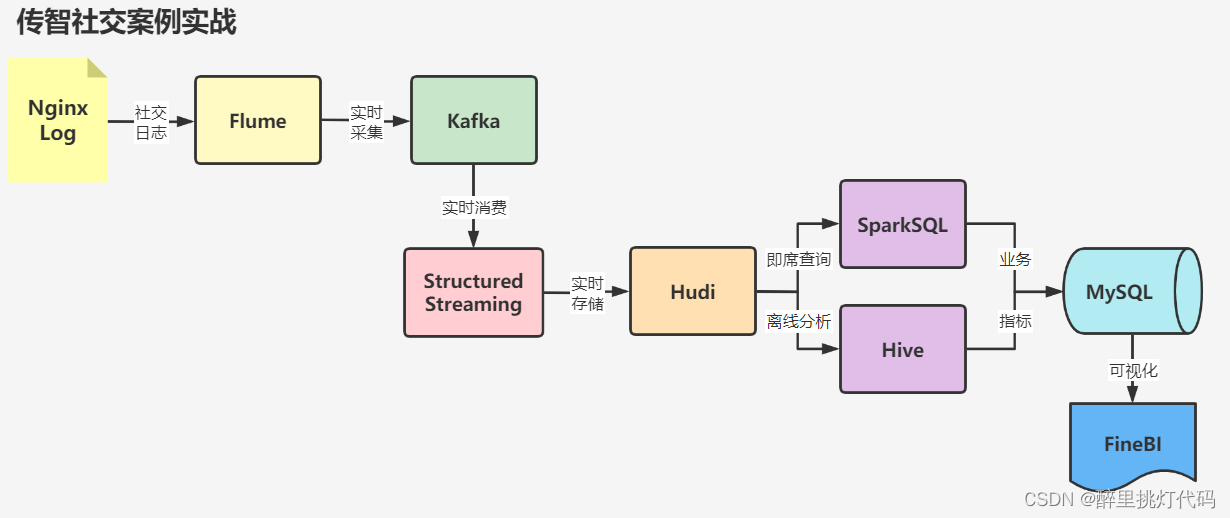
1、Apache Flume:分布式实时日志数据采集框架
由于业务端数据在不断的在往一个目录下进行生产, 我们需要实时的进行数据采集, 而flume就是一个专门用于数据采集工具,比如就可以监控某个目录下文件, 一旦有新的文件产生即可立即采集。2、Apache Kafka:分布式消息队列
Flume 采集过程中, 如果消息非常的快, Flume也会高效的将数据进行采集, 那么就需要一个能够快速承载数据容器, 而且后续还要对数据进行相关处理转换操作, 此时可以将flume采集过来的数据写入到Kafka中,进行消息数据传输,而Kafka也是整个集团中心所有业务线统一使用的消息系统, 用来对接后续的业务(离线或者实时)。3、Apache Spark:分布式内存计算引擎,离线和流式数据分析处理
整个七陌社交案例, 需要进行实时采集,那么此时也就意味着数据来一条就需要处理一条, 来一条处理一条, 此时就需要一些流式处理的框架,Structured Streaming或者Flink均可。
此外,七陌案例中,对每日用户消息数据按照业务指标分析,最终存储MySQL数据库中,选择SparkSQL。4、Apache Hudi:数据湖框架
七陌用户聊天消息数据,最终存储到Hudi表(底层存储:HDFS分布式文件系统),统一管理数据文件,后期与Spark和Hive集成,进行业务指标分析。5、Apache Hive:大数据数仓框架
与Hudi表集成,对七陌聊天数据进行分析,直接编写SQL即可。6、MySQL:关系型数据库
将业务指标分析结果存储在MySQL数据库中,后期便于指标报表展示。7、FineBI:报表工具
帆软公司的一款商业图表工具, 让图表制作更加简单
2、业务数据
用户聊天数据以文本格式存储日志文件中,包含20个字段,下图所示 各个字段之间分割符号为:**\001**
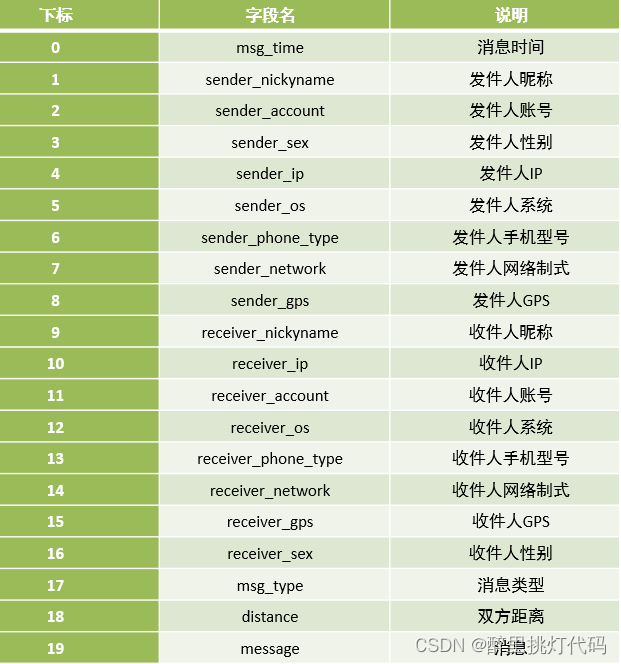
3、数据生成
运行jar包:7Mo_DataGen.jar,指定参数信息,模拟生成用户聊天信息数据,写入日志文件
第一步、创建原始文件目录
mkdir -p /usr/local/src/datas/7mo_init
第二步、上传模拟数据程序
#7mo_init目录下
7Mo_DataGen.jar
7Mo_Data.xlsx
第三步、创建模拟数据目录
mkdir -p /usr/local/src/datas/7mo_data
touch MOMO_DATA.dat #注意权限 需要写入这个文件
第四步、运行程序生成数据
# 1. 语法
java -jar /usr/local/src/datas/7mo_init/7Mo_DataGen.jar 原始数据路径 模拟数据路径 随机产生数据间隔ms时间# 2. 测试:每500ms生成一条数据
java -jar /usr/local/src/datas/7mo_init/7Mo_DataGen.jar \
/usr/local/src/datas/7mo_init/7Mo_Data.xlsx \
/usr/local/src/datas/7mo_data \
500
第五步、查看产生数据
[root@master 7mo_data]# pwd
/usr/local/src/datas/7mo_data
[root@master 7mo_data]# head -3 MOMO_DATA.dat
4、七陌数据采集
Apache Flume 是什么
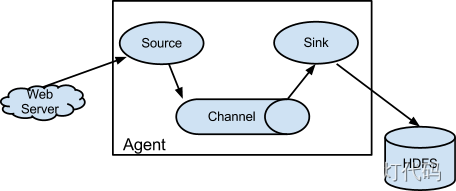
 Aapche Flume是由Cloudera提供的一个高可用的,高可靠的,分布式的海量日志采集、聚合和传输的软件,网址:http://flume.apache.org/Flume的核心是把数据从数据源(source)收集过来,再将收集到的数据送到指定的目的地(sink)。为了保证输送的过程一定成功,在送到目的地(sink)之前,会先缓存数据(channel),待数据真正到达目的地(sink)后,flume在删除自己缓存的数据。当前Flume有两个版本:
Flume 0.9X版本的统称Flume OG(original generation)
Flume1.X版本的统称Flume NG(next generation)
由于Flume NG经过核心组件、核心配置以及代码架构重构,与Flume OG有很大不同。改动的另一原因是将Flume纳入 apache 旗下,Cloudera Flume 改名为 Apache Flume。
Apache Flume 运行机制
Flume系统中核心的角色是agent,agent本身是一个Java进程,一般运行在日志收集节点。每一个agent相当于一个数据传递员,内部有三个组件:
Source:采集源,用于跟数据源对接,以获取数据;
Sink:下沉地,采集数据的传送目的,用于往下一级agent或者往最终存储系统传递数据;
Channel:agent内部的数据传输通道,用于从source将数据传递到sink;
在整个数据的传输的过程中,流动的是event,它是Flume内部数据传输的最基本单元。
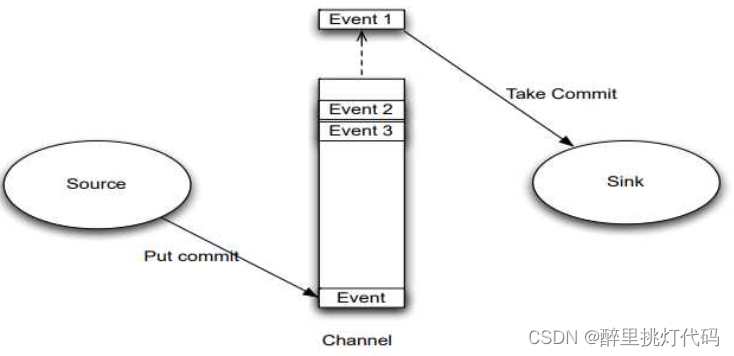
event将传输的数据进行封装,如果是文本文件,通常是一行记录,event也是事务的基本单位。event从source,流向channel,再到sink,本身为一个字节数组,并可携带headers(头信息)信息。event代表着一个数据的最小完整单元,从外部数据源来,向外部的目的地去。
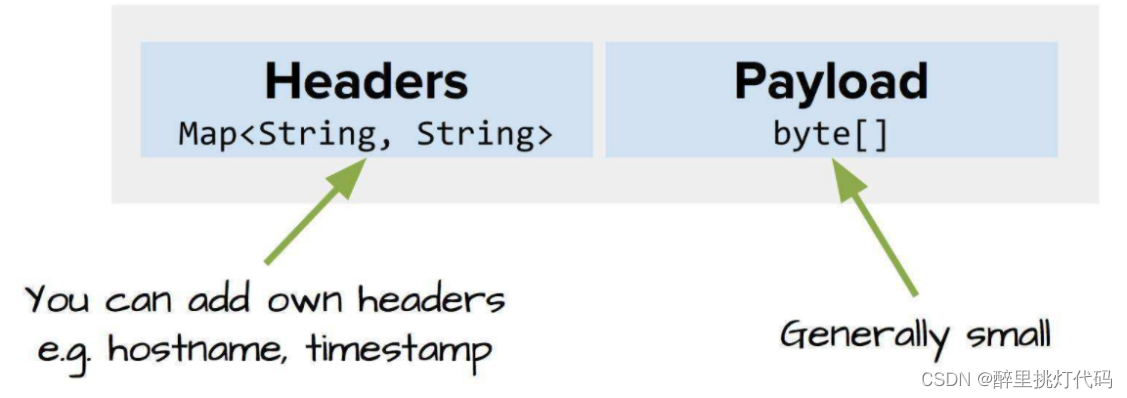
一个完整的event包括:event headers、event body,其中event body是flume收集到的日记记录。
Apache Flume 安装部署
#第一步、上传解压
# 上传
cd /export/software
rz apache-flume-1.9.0-bin.tar.gz# 解压,重命名及创建软链接
tar -zxf apache-flume-1.9.0-bin.tar.gz -C /export/servercd /export/server
mv apache-flume-1.9.0-bin flume-1.9.0-bin
ln -s flume-1.9.0-bin flume #第二步、修改flume-env.sh
cd /export/server/flume/conf
mv flume-env.sh.template  flume-env.shvim flume-env.sh
# 22行:修改JDK路径
export JAVA_HOME=/export/server/jdk下载软件包:http://www.apache.org/dyn/closer.lua/flume/1.9.0/apache-flume-1.9.0-bin.tar.gz
官方文档:https://flume.apache.org/releases/content/1.9.0/FlumeUserGuide.html
数据源source:https://flume.apache.org/releases/content/1.9.0/FlumeUserGuide.html
数据缓冲Channel:https://flume.apache.org/releases/content/1.9.0/FlumeUserGuide.html内存Memory文件File
数据终端sink:https://flume.apache.org/releases/content/1.9.0/FlumeUserGuide.htmlHDFS文件Kafka消息队列
Apache Flume 入门程序
需求说明: 监听服务器上某一个端口号(例如: 44444), 采集发向此端口的数据。

第1步、确定三大组件
source组件: 需要一个能够监听端口号的组件(网络组件)
使用Apache Flume提供的 : NetCat TCP Sourcechannel组件: 需要一个传输速度更快的管道(内存组件)
使用Apache Flume提供的 : Memory Channelsink组件 : 此处我们只需要打印出来即可(日志组件)
使用Apache Flume提供的 : Logger Sink
第2步、编写采集配置文件
netcat_source_logger_sink.properties
# 第一部分: 定义这个agent中各组件的名字
a1.sources = r1
a1.sinks = k1
a1.channels = c1#第二部分:  描述和配置source组件:r1
a1.sources.r1.type = netcat
a1.sources.r1.bind = master
a1.sources.r1.port = 44444# 第三部分: 描述和配置sink组件:k1
a1.sinks.k1.type = logger# 第四部分: 描述和配置channel组件,此处使用是内存缓存的方式
a1.channels.c1.type = memory
a1.channels.c1.capacity = 1000
a1.channels.c1.transactionCapacity = 100# 第五部分: 描述和配置source  channel   sink之间的连接关系
a1.sources.r1.channels = c1
a1.sinks.k1.channel = c1
第3步、启动flume: 指定采集配置文件
flume-ng agent -n a1  \
-c /usr/local/src/flume/conf \
-f /usr/local/src/flume/conf/netcat_source_logger_sink.properties \
-Dflume.root.logger=INFO,console参数说明: 	-c conf   指定flume自身的配置文件所在目录	-f conf/netcat-logger.con  指定我们所描述的采集方案	-n a1  指定我们这个agent的名字
第4步、agent启动之后, 连接测试
#安装telnet
yum -y install telnet#随便在一个能跟agent节点通信的机器上,执行如下命令
telnet master  44444
5、七陌社交数据采集
七陌社交数据源特点:持续不断的向某一个目录下得一个文件输出消息。功能要求:实时监控某一个目录下的文件, 一旦发现有新的文件,立即将其进行采集到Kafka中。

第1步、确定三大组件
source组件: 能够监控某个目录的文件source组件
使用Apache Flume提供的 : taildirchannel组件: 一般都是选择 内存组件 (更高效)
使用Apache Flume提供 : Memory Channelsink组件: 输出到 Kafka的sink组件
使用Apache Flume提供:Kafka Sink
第2步、编写采集配置文件
7mo_mem_kafka.properties
# define a1
a1.sources = s1
a1.channels = c1
a1.sinks = k1#define s1
a1.sources.s1.type = TAILDIR
#指定一个元数据记录文件
a1.sources.s1.positionFile = /usr/local/src/flume/position/taildir_7mo_kafka.json
#将所有需要监控的数据源变成一个组
a1.sources.s1.filegroups = f1
#指定了f1是谁:监控目录下所有文件
a1.sources.s1.filegroups.f1 = /usr/local/src/datas/7mo_data/.*
#指定f1采集到的数据的header中包含一个KV对
a1.sources.s1.headers.f1.type = 7mo
a1.sources.s1.fileHeader = true#define c1
a1.channels.c1.type = memory
a1.channels.c1.capacity = 10000
a1.channels.c1.transactionCapacity = 1000#define k1
a1.sinks.k1.type = org.apache.flume.sink.kafka.KafkaSink
a1.sinks.k1.kafka.topic = 7MO-MSG
a1.sinks.k1.kafka.bootstrap.servers = master:9092
a1.sinks.k1.kafka.flumeBatchSize = 10
a1.sinks.k1.kafka.producer.acks = 1
a1.sinks.k1.kafka.producer.linger.ms = 100#bind
a1.sources.s1.channels = c1
a1.sinks.k1.channel = c1
第3步、启动ZK服务和Kafka服务
zkServer.sh start
kafka-server-start.sh -daemon /usr/local/src/kafka/config/server.properties
第4步、创建topic
kafka-topics.sh --create \
--zookeeper master:2181/kafka \
--partitions 3 --replication-factor 1 \
--topic 7MO-MSG
第5步、启动flume: 指定采集配置文件
flume-ng agent \
-n a1 \
-c /usr/local/src/flume/conf/ \
-f /usr/local/src/flume/conf/7mo_mem_kafka.properties \
-Dflume.root.logger=INFO,console
第6步、启动模拟数据
java -jar /usr/local/src/datas/7mo_init/7Mo_DataGen.jar \
/usr/local/src/datas/7mo_init/7Mo_Data.xlsx \
/usr/local/src/datas/7mo_data \
5000
6、实时存储七陌数据
编写Spark中流式程序:StructuredStreaming,实时从Kafka消费获取社交数据,经过转换(数据字段提取等)处理,最终保存到Hudi表中,表的格式:**ROM**。

在IDEA中创建一个模块
6.1-封装实体类
封装Momo聊天记录实体样例类CaseClass
package cn.saddam.hudi.momo/*** 封装Momo聊天记录实体样例类CaseClass*/
case class MomoMessage(msg_time: String,sender_nickyname: String,sender_account: String,sender_sex: String,sender_ip: String,sender_os: String,sender_phone_type: String,sender_network: String,sender_gps: String,receiver_nickyname: String,receiver_ip: String,receiver_account: String,receiver_os: String,receiver_phone_type: String,receiver_network: String,receiver_gps: String,receiver_sex: String,msg_type: String,distance: String,message: String)
6.2-编写流式程序
创建SparkSession
/*** 创建SparkSession会话实例对象,基本属性设置*/def createSparkSession(clazz: Class[_], master: String = "local[4]", partitions: Int = 4): SparkSession ={SparkSession.builder().appName(clazz.getSimpleName.stripSuffix("$")).master(master).config("spark.serializer", "org.apache.spark.serializer.KryoSerializer").config("spark.sql.shuffle.partitions", partitions).getOrCreate()}
kafka消费数据
/*** 指定Kafka Topic名称,实时消费数据*/def readFromKafka(spark: SparkSession, topicName: String): DataFrame = {spark.readStream.format("kafka").option("kafka.bootstrap.servers", "192.168.184.135:9092").option("subscribe", topicName).option("startingOffsets", "latest").option("maxOffsetsPerTrigger", 100000).option("failOnDataLoss", "false").load()}
Kafka获取数据,进行转换操作
/*** 对Kafka获取数据,进行转换操作,获取所有字段的值,转换为String,以便保存Hudi表*/def process(streamDF: DataFrame): DataFrame = {import streamDF.sparkSession.implicits._/*2021-11-25 20:52:58牛星海17870843110女156.35.36.204IOS 9.0华为 荣耀Play4T4G91.319474,29.033363成紫57.54.100.313946849234Android 6.0OPPO A11X4G84.696447,30.573691 女TEXT78.22KM有一种想见不敢见的伤痛,这一种爱还埋藏在我心中,让我对你的思念越来越浓,我却只能把你你放在我心中。*/// 1-提取Message消息数据val messageStreamDF: DataFrame = streamDF.selectExpr("CAST(value AS STRING) message")// 2-解析数据,封装实体类val momoStreamDS: Dataset[MomoMessage] = messageStreamDF.as[String] // 转换为Dataset.map(message => {val array = message.split("\001")val momoMessage = MomoMessage(array(0), array(1), array(2), array(3), array(4), array(5), array(6), array(7),array(8), array(9), array(10), array(11), array(12), array(13), array(14),array(15), array(16), array(17), array(18), array(19))// 返回实体类momoMessage})// 3-为Hudi表添加字段:主键id、数据聚合字段ts、分区字段dayval hudiStreamDF = momoStreamDS.toDF().withColumn("ts", unix_timestamp($"msg_time").cast(StringType)).withColumn("message_id",concat($"sender_account", lit("_"), $"ts", lit("_"), $"receiver_account")).withColumn("day", substring($"msg_time", 0, 10))hudiStreamDF}
测试方式,将数据打印到控制台
/*** 测试方式,将数据打印到控制台** @param streamDF*/def printToConsole(streamDF: DataFrame): Unit = {streamDF.writeStream.outputMode(OutputMode.Append()).queryName("query-hudi-momo").format("console").option("numRows", "10").option("truncate", "false").option("checkpointLocation", "/datas/hudi-struct-ckpt-0").start()}
保存至Hudi表
/*** 将流式数据集DataFrame保存至Hudi表,分别表类型:COW和MOR*/def saveToHudi(streamDF: DataFrame): Unit = {streamDF.writeStream.outputMode(OutputMode.Append()).queryName("query-hudi-7mo")// 针对每微批次数据保存.foreachBatch((batchDF: Dataset[Row], batchId: Long) => {println(s"============== BatchId: ${batchId} start ==============")writeHudiMor(batchDF) // TODO:表的类型MOR}).option("checkpointLocation", "/datas/hudi-spark/struct-ckpt-100").start()}/*** 将数据集DataFrame保存到Hudi表中,表的类型:MOR(读取时合并)*/def writeHudiMor(dataframe: DataFrame): Unit = {import org.apache.hudi.DataSourceWriteOptions._import org.apache.hudi.config.HoodieWriteConfig._import org.apache.hudi.keygen.constant.KeyGeneratorOptions._dataframe.write.format("hudi").mode(SaveMode.Append)// 表的名称.option(TBL_NAME.key, "7mo_msg_hudi")// 设置表的类型.option(TABLE_TYPE.key(), "MERGE_ON_READ")// 每条数据主键字段名称.option(RECORDKEY_FIELD_NAME.key(), "message_id")// 数据合并时,依据时间字段.option(PRECOMBINE_FIELD_NAME.key(), "ts")// 分区字段名称.option(PARTITIONPATH_FIELD_NAME.key(), "day")// 分区值对应目录格式,是否与Hive分区策略一致.option(HIVE_STYLE_PARTITIONING_ENABLE.key(), "true")// 插入数据,产生shuffle时,分区数目.option("hoodie.insert.shuffle.parallelism", "2").option("hoodie.upsert.shuffle.parallelism", "2")// 表数据存储路径.save("file:///F:\\momo\\7mo_msg_hudi")}
main方法
package cn.saddam.hudi.momoimport org.apache.spark.sql._
import org.apache.spark.sql.functions._
import org.apache.spark.sql.streaming.OutputMode
import org.apache.spark.sql.types.StringType
import org.apache.hudi.DataSourceWriteOptions._
import org.apache.hudi.config.HoodieWriteConfig._
import org.apache.hudi.keygen.constant.KeyGeneratorOptions._def main(args: Array[String]): Unit = {System.setProperty("HADOOP_USER_NAME", "root")//TODO step1、构建SparkSession实例对象val spark: SparkSession = createSparkSession(this.getClass)spark.sparkContext.setLogLevel("WARN")//TODO step2、从Kafka实时消费数据val kafkaStreamDF: DataFrame = readFromKafka(spark, "7MO-MSG")// step3、提取数据,转换数据类型val streamDF: DataFrame = process(kafkaStreamDF)// step4、保存数据至Hudi表中:MOR(读取时保存)//printToConsole(streamDF)saveToHudi(streamDF)// step5、流式应用启动以后,等待终止spark.streams.active.foreach(query => println(s"Query: ${query.name} is Running ............."))spark.streams.awaitAnyTermination()}
7、集成Hive指标分析
将Hudi表数据,与Hive表进行关联,使用beeline等客户端,编写SQL分析Hudi表数据。
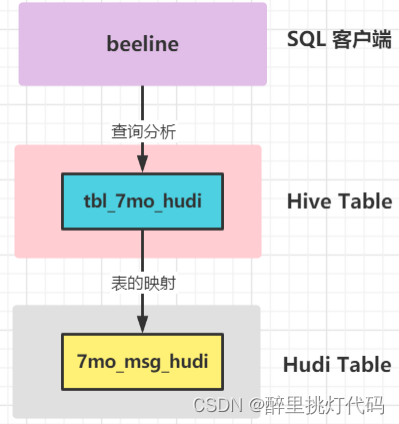
7.1-创建Hive表
启动Hive MetaStore服务和HiveServer2服务,再启动beeline客户端
start-metastore.sh
start-hiveserver2.sh
start-beeline.sh
编写DDL语句,创建Hive表,关联Hudi表,其中设置InputFormat实现类。
--创建Hive表,映射到Hudi表
CREATE EXTERNAL TABLE db_hudi.tbl_7mo_hudi(msg_time             String,sender_nickyname     String,sender_account       String,sender_sex           String,sender_ip            String,sender_os            String,sender_phone_type    String,sender_network       String,sender_gps           String,receiver_nickyname   String,receiver_ip          String,receiver_account     String,receiver_os          String,receiver_phone_type  String,receiver_network     String,receiver_gps         String,receiver_sex         String,msg_type             String,distance             String,message              String,message_id           String,ts                   String
)
PARTITIONED BY (day string)
ROW FORMAT SERDE 'org.apache.hadoop.hive.ql.io.parquet.serde.ParquetHiveSerDe'
STORED AS INPUTFORMAT 'org.apache.hudi.hadoop.HoodieParquetInputFormat'
OUTPUTFORMAT 'org.apache.hadoop.hive.ql.io.parquet.MapredParquetOutputFormat'
LOCATION '/hudi-warehouse/7mo_msg_hudi' ;--由于Hudi是分区表,需要手动添加分区信息
alter table db_hudi.tbl_7mo_hudi
add if not exists partition(day = '2023-11-12') location '/hudi-warehouse/7mo_msg_hudi/day=2023-11-11' ;alter table db_hudi.tbl_7mo_hudi
add if not exists partition(day = '2023-11-12') location '/hudi-warehouse/7mo_msg_hudi/day=2023-11-12' ;--查询数据
SELECTmsg_time, sender_nickyname, receiver_nickyname, ts
FROM db_hudi.tbl_7mo_hudi
WHERE day = '2023-11-12'
limit 10 ;load data inpath '/home/ec2-user/total/cn.txt' into table stu partition(cuntry='cn');
7.2-业务指标分析
hive优化
编写SQL,对七陌社交数据进行简易指标统计分析,由于数据流较小,设置本地模式执
set hive.exec.mode.local.auto=true;
set hive.mapred.mode=nonstrict;
set hive.exec.mode.local.auto.input.files.max=15;
指标1:统计总消息量
WITH tmp AS (SELECT COUNT(1) AS momo_total  FROM db_hudi.tbl_7mo_hudi
)
SELECT "全国" AS momo_name, momo_total FROM tmp;
指标2:统计各个用户, 发送消息量
WITH tmp AS (SELECT sender_nickyname, COUNT(1) momo_total FROM db_hudi.tbl_7mo_hudi GROUP BY sender_nickyname
)
SELECT sender_nickyname AS momo_name, momo_total
FROM tmp
ORDER BY momo_total DESC LIMIT 10;
指标3:统计各个用户, 接收消息量
WITH tmp AS (SELECT receiver_nickyname, COUNT(1) momo_total FROM db_hudi.tbl_7mo_hudi GROUP BY receiver_nickyname
)
SELECT receiver_nickyname AS momo_name, momo_total
FROM tmp
ORDER BY momo_total DESC LIMIT 10;
指标4:统计男女发送信息量
SELECT sender_sex, receiver_sex, COUNT(1) momo_total
FROM db_hudi.tbl_7mo_hudi
GROUP BY sender_sex, receiver_sex;
8、Spark 离线指标分析
编写SparkSQL程序,加载Hudi表数据封装到DataFrame中,按照业务指标需要,编写SQL分析数据,最终保存到MySQL数据库表中,流程示意图如下
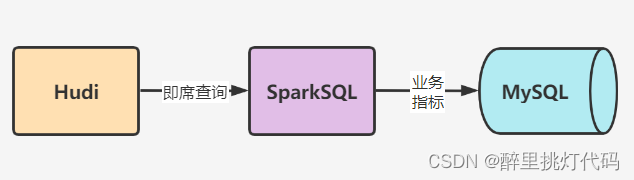
8.1-需求说明
对七陌社交消息数据的实时统计操作, 如下统计需求:
1)、统计消息的总条数
2)、根据IP地址统计各个地区(省) 发送的消息数和接收的消息数
3)、统计七陌社交消息中各个用户发送多少条和接收多少条
8.2-创建数据库表
其中字段:7mo_category 表示指标类型:
1:表示全国信息量统计
2:表示各省份发送信息量统计
3:表示各省份接收信息量统计
4:表示用户发送信息量统计
5:表示用户接收信息量统计
将上述业务需求,最终结果存储到MySQL数据库1张表中:7mo.7mo_report
-- 创建数据库
CREATE DATABASE IF NOT EXISTS 7mo ;
-- 创建表
CREATE TABLE IF NOT EXISTS `7mo`.`7mo_report` (`7mo_name` varchar(100) NOT NULL,`7mo_total` bigint(20) NOT NULL,`7mo_category` varchar(100) NOT NULL,PRIMARY KEY (`7mo_name`, `7mo_category`)
) ENGINE=InnoDB DEFAULT CHARSET=utf8mb4 ;
8.3-编写指标分析程序
创建对象object:MomoSQLHudi,编写MAIN方法,按照编写流式程序5个步骤,写出代码结构
解析IP地址及选择字段
解析IP地址为【省份】,推荐使用【**ip2region**】第三方工具库,官网网址:<https://gitee.com/lionsoul/ip2region/>,引入使用IP2Region第三方库
第一步、复制IP数据集【ip2region.db】到工程下的【dataset】目录
第二步、在Maven中添加依赖
 <dependency><groupId>org.lionsoul</groupId><artifactId>ip2region</artifactId><version>1.7.2</version>
</dependency>------------------------------------------
<dependency><groupId>com.ggstar</groupId><artifactId>ipdatabase</artifactId><version>1.0</version></dependency><dependency><groupId>org.apache.poi</groupId><artifactId>poi-ooxml</artifactId><version>3.14</version></dependency><dependency><groupId>org.apache.poi</groupId><artifactId>poi</artifactId><version>3.14</version></dependency>
加载Hudi表数据
package cn.saddam.hudi.momoimport org.apache.spark.sql.SparkSessionobject MoMoReadHudi {def main(args: Array[String]): Unit = {val spark=SparkSession.builder().master("local[2]").config("spark.serializer", "org.apache.spark.serializer.KryoSerializer").config("spark.sql.shuffle.partitions", 2).config("spark.default.parallelism", 2).getOrCreate()val hudiDF=spark.read.format("hudi").load("hdfs://192.168.184.135:9000/hudi-warehouse/7mo_msg_hudi")hudiDF.write.save("file:home/saddam/Hudi-Study/datas/7mo_msg_hudi")spark.stop()}
}
清洗数据
解析ip地址,选择需要字段
package cn.saddam.hudi.momoimport com.ggstar.util.ip.IpHelper
import org.apache.spark.sql.SparkSessionobject MoMoIpParse {def main(args: Array[String]): Unit = {val spark=SparkSession.builder().master("local[2]").config("spark.serializer", "org.apache.spark.serializer.KryoSerializer").config("spark.sql.shuffle.partitions", 2).config("spark.default.parallelism", 2).getOrCreate()// 1-读取hudi数据val HUdiDF = spark.read.parquet("file:home/saddam/Hudi-Study/datas/7mo_msg_hudi")import org.apache.spark.sql.functions._import spark.implicits._// 2-注册udfval ip_to_province = udf(getCity _)// 3-解析IPval ipParseDF = HUdiDF.withColumn("sender_province", ip_to_province('sender_ip)).withColumn("receiver_province", ip_to_province('receiver_ip)).select("day", "sender_nickyname", "receiver_nickyname", "sender_province", "receiver_province")// 4-保存数据ipParseDF.write.save("file:home/saddam/Hudi-Study/datas/7mo_msg_hudi_IpParse")spark.stop()}/*** IP解析* @param ip* @return*/def getCity(ip:String): String ={IpHelper.findRegionByIp(ip)}}
指标分析
package cn.saddam.hudi.momoimport org.apache.spark.sql.{DataFrame, Dataset, Row, SaveMode, SparkSession}object MoMoCalculation {def main(args: Array[String]): Unit = {val spark=SparkSession.builder().master("local[2]").config("spark.serializer", "org.apache.spark.serializer.KryoSerializer").config("spark.sql.shuffle.partitions", 2).config("spark.default.parallelism", 2).getOrCreate()// TODO 读取hudi数据val HudiCleanDF = spark.read.parquet("file:home/saddam/Hudi-Study/datas/7mo_msg_hudi_IpParse")// TODO 指标分析//指标1:统计总消息量
//    reportAllTotalDF(HudiCleanDF).show()//指标2:统计各省份发送消息量
//    reportSenderProvinceTotalDF(HudiCleanDF).show()//指标3:统计各省份接收消息量
//    reportReceiverProvinceTotalDF(HudiCleanDF).show()//指标4:统计各个用户, 发送消息量
//    reportSenderNickyNameTotalDF(HudiCleanDF).show()//指标5:统计各个用户, 接收消息量
//    reportReceiverNickyNameTotalDF(HudiCleanDF).show()import org.apache.spark.sql.functions._// TODO 五个业务需求整合为一张表val reportTotalDF= reportAllTotalDF(HudiCleanDF).union(reportSenderProvinceTotalDF(HudiCleanDF)).union(reportReceiverProvinceTotalDF(HudiCleanDF)).union(reportSenderNickyNameTotalDF(HudiCleanDF)).union(reportReceiverNickyNameTotalDF(HudiCleanDF))// TODO 保存报表至MySQL数据库reportTotalDF.coalesce(1).write.mode(SaveMode.Append).format("jdbc").option("driver", "com.mysql.jdbc.Driver").option("url","jdbc:mysql://192.168.184.135:3306/?useUnicode=true&characterEncoding=utf-8&useSSL=false").option("dbtable", "7mo.7mo_report").option("user", "root").option("password", "xxxxxx").save()spark.stop()}//指标1:统计总消息量def reportAllTotalDF(dataframe: DataFrame): DataFrame = {val spark: SparkSession = dataframe.sparkSessiondataframe.createOrReplaceTempView("view_tmp_etl")val reportAllTotalDF: DataFrame = spark.sql("""|WITH tmp AS (|  SELECT COUNT(1) AS 7mo_total  FROM view_tmp_etl|)|SELECT "全国" AS 7mo_name, 7mo_total, "1" AS 7mo_category FROM tmp;|""".stripMargin)reportAllTotalDF}//指标2:统计各省份发送消息量def reportSenderProvinceTotalDF(dataframe: DataFrame): DataFrame = {val spark: SparkSession = dataframe.sparkSessiondataframe.createOrReplaceTempView("view_tmp_etl")val reportSenderProvinceTotalDF: DataFrame = spark.sql("""|WITH tmp AS (|  SELECT sender_province, COUNT(1) AS 7mo_total FROM view_tmp_etl GROUP BY sender_province|)|SELECT sender_province AS 7mo_name, 7mo_total, "2" AS 7mo_category FROM tmp;|""".stripMargin)reportSenderProvinceTotalDF}//指标3:统计各省份接收消息量def reportReceiverProvinceTotalDF(dataframe: DataFrame): DataFrame = {val spark: SparkSession = dataframe.sparkSessiondataframe.createOrReplaceTempView("view_tmp_etl")val reportReceiverProvinceTotalDF: DataFrame = spark.sql("""|WITH tmp AS (|  SELECT receiver_province, COUNT(1) AS 7mo_total FROM view_tmp_etl GROUP BY receiver_province|)|SELECT receiver_province AS 7mo_name, 7mo_total, "3" AS 7mo_category FROM tmp;|""".stripMargin)reportReceiverProvinceTotalDF}//指标4:统计各个用户, 发送消息量def reportSenderNickyNameTotalDF(dataframe: DataFrame): DataFrame = {val spark: SparkSession = dataframe.sparkSessiondataframe.createOrReplaceTempView("view_tmp_etl")val reportSenderNickyNameTotalDF: DataFrame = spark.sql("""|WITH tmp AS (|  SELECT sender_nickyname, COUNT(1) AS 7mo_total FROM view_tmp_etl GROUP BY sender_nickyname|)|SELECT sender_nickyname AS 7mo_name, 7mo_total, "4" AS 7mo_category FROM tmp;|""".stripMargin)reportSenderNickyNameTotalDF}//指标5:统计各个用户, 接收消息量def reportReceiverNickyNameTotalDF(dataframe: DataFrame): DataFrame= {val spark: SparkSession = dataframe.sparkSessiondataframe.createOrReplaceTempView("view_tmp_etl")val reportReceiverNickyNameTotalDF: DataFrame = spark.sql("""|WITH tmp AS (|  SELECT receiver_nickyname, COUNT(1) AS 7mo_total FROM view_tmp_etl GROUP BY receiver_nickyname|)|SELECT receiver_nickyname AS 7mo_name, 7mo_total, "5" AS 7mo_category FROM tmp;|""".stripMargin)reportReceiverNickyNameTotalDF}
}
MYSQL数据统计
查询各个指标前5条数据
(SELECT 7mo_name, 7mo_total, "全国总信息量" AS "7mo.category"
FROM 7mo.7mo_report WHERE 7mo_category = 1)
UNION
(SELECT 7mo_name, 7mo_total, "省份发送信息量" AS "7mo.category"
FROM 7mo.7mo_report WHERE 7mo_category = 2 ORDER BY 7mo_total DESC LIMIT 5)
UNION
(SELECT 7mo_name, 7mo_total, "省份接收信息量" AS "7mo.category"FROM 7mo.7mo_report WHERE 7mo_category = 3 ORDER BY 7mo_total DESC LIMIT 5)
UNION
(SELECT 7mo_name, 7mo_total, "用户发送信息量" AS "7mo.category"FROM 7mo.7mo_report WHERE 7mo_category = 4 ORDER BY 7mo_total DESC LIMIT 5)
UNION
(SELECT 7mo_name, 7mo_total, "用户接收信息量" AS "7mo.category"FROM 7mo.7mo_report WHERE 7mo_category = 5 ORDER BY 7mo_total DESC LIMIT 5);
9、FineBI 报表可视化
使用FineBI,连接数据MySQL数据库,加载业务指标报表数据,以不同图表展示。
安装FineBI
报表
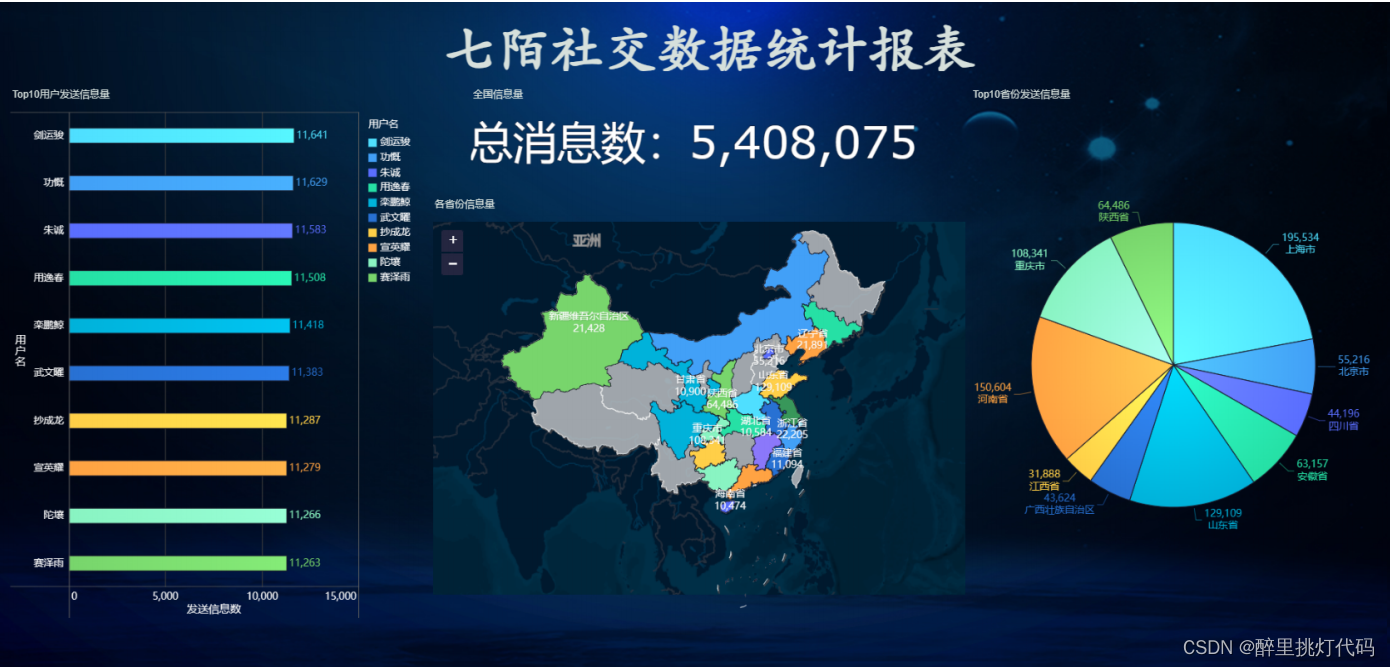
十、Hudi实战案例二
传智教育大数据分析平台,突出的是“真”,此项目是传智教育联合三方K12教育机构共同研发,并在上线发布后转换为课程,过程真实细致,采用主流的大数据技术和工具,主要针对客户(主要是学生)访问、咨询、线索、意向、报名、考勤等各类业务数据分析,根据分析结果优化平台的服务质量,最终满足用户的需求。教育大数据分析平台项目就是将大数据技术应用于教育培训领域,为企业经营提供数据支撑。
1、案例架构
本案例基于Flink SQL 与Hudi整合,将MySQL数据库业务数据,实时采集存储到Hudi表中,使用Presto和Flink SQL分别进行离线查询分析和流式查询数据,最后报表存储到MySQL数据库,使用FineBI整合进行可视化展示。
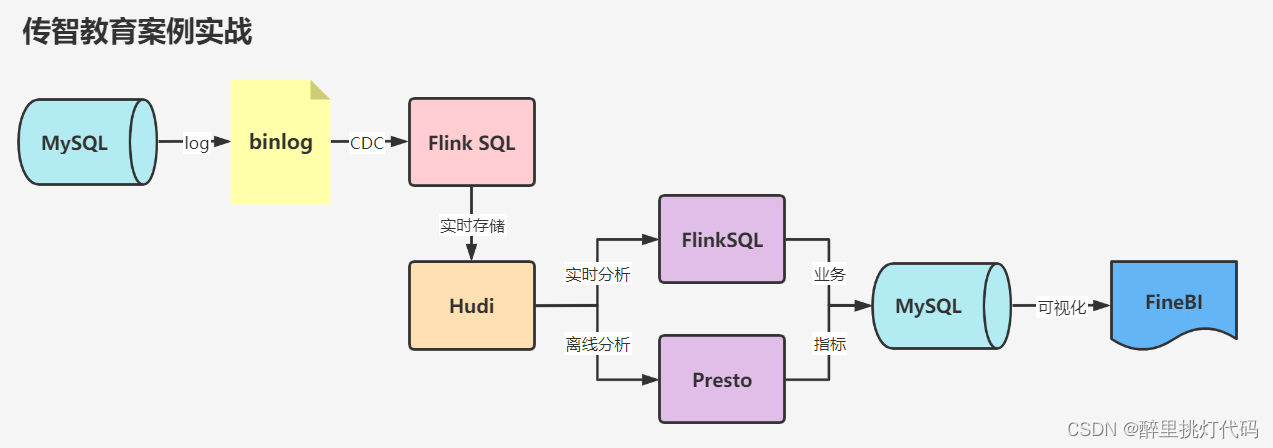
1、MySQL数据库:
传智教育客户业务数据存储及离线实时分析报表结果存储,对接可视化FineBI工具展示。2、Flink SQL 引擎
使用Flink SQL中CDC实时采集MySQL数据库表数据到Hudi表,此外基于Flink SQL Connector整合Hudi与MySQL,数据存储和查询。3、Apache Hudi:数据湖框架
传智教育业务数据,最终存储到Hudi表(底层存储:HDFS分布式文件系统),统一管理数据文件,后期与Spark和Hive集成,进行业务指标分析。4、Presto 分析引擎
一个Facebook开源的分布式SQL查询引擎,适用于交互式分析查询,数据量支持GB到PB字节。
本案例中直接从Hudi表加载数据,其中依赖Hive MetaStore管理元数据。其中Presto可以集成多数据源,方便数据交互处理。5、FineBI:报表工具
帆软公司的一款商业图表工具, 让图表制作更加简单
2、业务数据
2.1-客户信息表
CREATE TABLE IF NOT EXISTS itcast_nev.customer (`id` int(11) NOT NULL AUTO_INCREMENT,`customer_relationship_id` int(11) DEFAULT NULL COMMENT '当前意向id',`create_date_time` datetime NOT NULL DEFAULT CURRENT_TIMESTAMP COMMENT '创建时间',`update_date_time` timestamp NOT NULL DEFAULT CURRENT_TIMESTAMP ON UPDATE CURRENT_TIMESTAMP COMMENT '最后更新时间',`deleted` bit(1) NOT NULL DEFAULT b'0' COMMENT '是否被删除(禁用)',`name` varchar(128) CHARACTER SET utf8 COLLATE utf8_bin NOT NULL DEFAULT '' COMMENT '姓名',`idcard` varchar(24) CHARACTER SET utf8 COLLATE utf8_bin DEFAULT '' COMMENT '身份证号',`birth_year` int(5) DEFAULT NULL COMMENT '出生年份',`gender` varchar(8) CHARACTER SET utf8 COLLATE utf8_bin DEFAULT 'MAN' COMMENT '性别',`phone` varchar(24) CHARACTER SET utf8 COLLATE utf8_bin NOT NULL DEFAULT '' COMMENT '手机号',`wechat` varchar(32) CHARACTER SET utf8 COLLATE utf8_bin DEFAULT '' COMMENT '微信',`qq` varchar(32) CHARACTER SET utf8 COLLATE utf8_bin DEFAULT '' COMMENT 'qq号',`email` varchar(56) CHARACTER SET utf8 COLLATE utf8_bin DEFAULT '' COMMENT '邮箱',`area` varchar(128) COLLATE utf8mb4_unicode_ci DEFAULT '' COMMENT '所在区域',`leave_school_date` date DEFAULT NULL COMMENT '离校时间',`graduation_date` date DEFAULT NULL COMMENT '毕业时间',`bxg_student_id` varchar(64) COLLATE utf8mb4_unicode_ci DEFAULT NULL COMMENT '博学谷学员ID,可能未关联到,不存在',`creator` int(11) DEFAULT NULL COMMENT '创建人ID',`origin_type` varchar(32) CHARACTER SET utf8 COLLATE utf8_bin DEFAULT NULL COMMENT '数据来源',`origin_channel` varchar(32) CHARACTER SET utf8 COLLATE utf8_bin DEFAULT NULL COMMENT '来源渠道',`tenant` int(11) NOT NULL DEFAULT '0',`md_id` int(11) DEFAULT '0' COMMENT '中台id',PRIMARY KEY (`id`)
) ENGINE=InnoDB DEFAULT CHARSET=utf8mb4 COLLATE=utf8mb4_unicode_ci;
预先导入客户信息数据至表中,使用命令:**source**
source /usr/local/src/mysql_sql/1-customer.sql ;
2.2-客户意向表
CREATE TABLE IF NOT EXISTS itcast_nev.customer_relationship(`id` int(11) NOT NULL AUTO_INCREMENT,`create_date_time` datetime NOT NULL DEFAULT CURRENT_TIMESTAMP,`update_date_time` timestamp NOT NULL DEFAULT CURRENT_TIMESTAMP ON UPDATE CURRENT_TIMESTAMP COMMENT '最后更新时间',`deleted` bit(1) NOT NULL DEFAULT b'0' COMMENT '是否被删除(禁用)',`customer_id` int(11) NOT NULL DEFAULT '0' COMMENT '所属客户id',`first_id` int(11) DEFAULT NULL COMMENT '第一条客户关系id',`belonger` int(11) DEFAULT NULL COMMENT '归属人',`belonger_name` varchar(10) DEFAULT NULL COMMENT '归属人姓名',`initial_belonger` int(11) DEFAULT NULL COMMENT '初始归属人',`distribution_handler` int(11) DEFAULT NULL COMMENT '分配处理人',`business_scrm_department_id` int(11) DEFAULT '0' COMMENT '归属部门',`last_visit_time` datetime DEFAULT NULL COMMENT '最后回访时间',`next_visit_time` datetime DEFAULT NULL COMMENT '下次回访时间',`origin_type` varchar(32) CHARACTER SET utf8 COLLATE utf8_bin DEFAULT NULL COMMENT '数据来源',`itcast_school_id` int(11) DEFAULT NULL COMMENT '校区Id',`itcast_subject_id` int(11) DEFAULT NULL COMMENT '学科Id',`intention_study_type` varchar(32) CHARACTER SET utf8 COLLATE utf8_bin DEFAULT NULL COMMENT '意向学习方式',`anticipat_signup_date` date DEFAULT NULL COMMENT '预计报名时间',`level` varchar(8) DEFAULT NULL COMMENT '客户级别',`creator` int(11) DEFAULT NULL COMMENT '创建人',`current_creator` int(11) DEFAULT NULL COMMENT '当前创建人:初始==创建人,当在公海拉回时为 拉回人',`creator_name` varchar(32) DEFAULT '' COMMENT '创建者姓名',`origin_channel` varchar(32) CHARACTER SET utf8 COLLATE utf8_bin DEFAULT NULL COMMENT '来源渠道',`comment` varchar(255) CHARACTER SET utf8 COLLATE utf8_bin DEFAULT '' COMMENT '备注',`first_customer_clue_id` int(11) DEFAULT '0' COMMENT '第一条线索id',`last_customer_clue_id` int(11) DEFAULT '0' COMMENT '最后一条线索id',`process_state` varchar(32) DEFAULT NULL COMMENT '处理状态',`process_time` datetime DEFAULT NULL COMMENT '处理状态变动时间',`payment_state` varchar(32) DEFAULT NULL COMMENT '支付状态',`payment_time` datetime DEFAULT NULL COMMENT '支付状态变动时间',`signup_state` varchar(32) CHARACTER SET utf8 COLLATE utf8_bin DEFAULT NULL COMMENT '报名状态',`signup_time` datetime DEFAULT NULL COMMENT '报名时间',`notice_state` varchar(32) DEFAULT NULL COMMENT '通知状态',`notice_time` datetime DEFAULT NULL COMMENT '通知状态变动时间',`lock_state` bit(1) DEFAULT b'0' COMMENT '锁定状态',`lock_time` datetime DEFAULT NULL COMMENT '锁定状态修改时间',`itcast_clazz_id` int(11) DEFAULT NULL COMMENT '所属ems班级id',`itcast_clazz_time` datetime DEFAULT NULL COMMENT '报班时间',`payment_url` varchar(1024) DEFAULT '' COMMENT '付款链接',`payment_url_time` datetime DEFAULT NULL COMMENT '支付链接生成时间',`ems_student_id` int(11) DEFAULT NULL COMMENT 'ems的学生id',`delete_reason` varchar(64) DEFAULT NULL COMMENT '删除原因',`deleter` int(11) DEFAULT NULL COMMENT '删除人',`deleter_name` varchar(32) DEFAULT NULL COMMENT '删除人姓名',`delete_time` datetime DEFAULT NULL COMMENT '删除时间',`course_id` int(11) DEFAULT NULL COMMENT '课程ID',`course_name` varchar(64) DEFAULT NULL COMMENT '课程名称',`delete_comment` varchar(255) DEFAULT '' COMMENT '删除原因说明',`close_state` varchar(32) DEFAULT NULL COMMENT '关闭装填',`close_time` datetime DEFAULT NULL COMMENT '关闭状态变动时间',`appeal_id` int(11) DEFAULT NULL COMMENT '申诉id',`tenant` int(11) NOT NULL DEFAULT '0' COMMENT '租户',`total_fee` decimal(19,0) DEFAULT NULL COMMENT '报名费总金额',`belonged` int(11) DEFAULT NULL COMMENT '小周期归属人',`belonged_time` datetime DEFAULT NULL COMMENT '归属时间',`belonger_time` datetime DEFAULT NULL COMMENT '归属时间',`transfer` int(11) DEFAULT NULL COMMENT '转移人',`transfer_time` datetime DEFAULT NULL COMMENT '转移时间',`follow_type` int(4) DEFAULT '0' COMMENT '分配类型,0-自动分配,1-手动分配,2-自动转移,3-手动单个转移,4-手动批量转移,5-公海领取',`transfer_bxg_oa_account` varchar(64) DEFAULT NULL COMMENT '转移到博学谷归属人OA账号',`transfer_bxg_belonger_name` varchar(64) DEFAULT NULL COMMENT '转移到博学谷归属人OA姓名',PRIMARY KEY (`id`)
) ENGINE=InnoDB  DEFAULT CHARSET=utf8;
预先导入客户意向数据至表中,使用命令:**source**
source /usr/local/src/mysql_sql/2-customer_relationship.sql ;
2.3-客户线索表
CREATE TABLE IF NOT EXISTS itcast_nev.customer_clue(`id` int(11) NOT NULL AUTO_INCREMENT,`create_date_time` datetime NOT NULL DEFAULT CURRENT_TIMESTAMP COMMENT '创建时间',`update_date_time` timestamp NOT NULL DEFAULT CURRENT_TIMESTAMP ON UPDATE CURRENT_TIMESTAMP COMMENT '最后更新时间',`deleted` bit(1) NOT NULL DEFAULT b'0' COMMENT '是否被删除(禁用)',`customer_id` int(11) DEFAULT NULL COMMENT '客户id',`customer_relationship_id` int(11) DEFAULT NULL COMMENT '客户关系id',`session_id` varchar(48) COLLATE utf8_bin DEFAULT '' COMMENT '七陌会话id',`sid` varchar(48) COLLATE utf8_bin DEFAULT '' COMMENT '访客id',`status` varchar(16) COLLATE utf8_bin DEFAULT '' COMMENT '状态(undeal待领取 deal 已领取 finish 已关闭 changePeer 已流转)',`user` varchar(16) COLLATE utf8_bin DEFAULT '' COMMENT '所属坐席',`create_time` datetime DEFAULT NULL COMMENT '七陌创建时间',`platform` varchar(16) COLLATE utf8_bin DEFAULT '' COMMENT '平台来源 (pc-网站咨询|wap-wap咨询|sdk-app咨询|weixin-微信咨询)',`s_name` varchar(32) COLLATE utf8_bin DEFAULT '' COMMENT '用户名称',`seo_source` varchar(255) COLLATE utf8_bin DEFAULT '' COMMENT '搜索来源',`seo_keywords` varchar(255) COLLATE utf8_bin DEFAULT '' COMMENT '关键字',`ip` varchar(48) COLLATE utf8_bin DEFAULT '' COMMENT 'IP地址',`referrer` text COLLATE utf8_bin COMMENT '上级来源页面',`from_url` text COLLATE utf8_bin COMMENT '会话来源页面',`landing_page_url` text COLLATE utf8_bin COMMENT '访客着陆页面',`url_title` varchar(1024) COLLATE utf8_bin DEFAULT '' COMMENT '咨询页面title',`to_peer` varchar(255) COLLATE utf8_bin DEFAULT '' COMMENT '所属技能组',`manual_time` datetime DEFAULT NULL COMMENT '人工开始时间',`begin_time` datetime DEFAULT NULL COMMENT '坐席领取时间 ',`reply_msg_count` int(11) DEFAULT '0' COMMENT '客服回复消息数',`total_msg_count` int(11) DEFAULT '0' COMMENT '消息总数',`msg_count` int(11) DEFAULT '0' COMMENT '客户发送消息数',`comment` varchar(1024) COLLATE utf8_bin DEFAULT '' COMMENT '备注',`finish_reason` varchar(255) COLLATE utf8_bin DEFAULT '' COMMENT '结束类型',`finish_user` varchar(32) COLLATE utf8_bin DEFAULT '' COMMENT '结束坐席',`end_time` datetime DEFAULT NULL COMMENT '会话结束时间',`platform_description` varchar(255) COLLATE utf8_bin DEFAULT '' COMMENT '客户平台信息',`browser_name` varchar(255) COLLATE utf8_bin DEFAULT '' COMMENT '浏览器名称',`os_info` varchar(255) COLLATE utf8_bin DEFAULT '' COMMENT '系统名称',`area` varchar(255) COLLATE utf8_bin DEFAULT NULL COMMENT '区域',`country` varchar(16) COLLATE utf8_bin DEFAULT '' COMMENT '所在国家',`province` varchar(16) COLLATE utf8_bin DEFAULT '' COMMENT '省',`city` varchar(255) COLLATE utf8_bin DEFAULT '' COMMENT '城市',`creator` int(11) DEFAULT '0' COMMENT '创建人',`name` varchar(64) COLLATE utf8_bin DEFAULT '' COMMENT '客户姓名',`idcard` varchar(24) COLLATE utf8_bin DEFAULT '' COMMENT '身份证号',`phone` varchar(24) COLLATE utf8_bin DEFAULT '' COMMENT '手机号',`itcast_school_id` int(11) DEFAULT NULL COMMENT '校区Id',`itcast_school` varchar(128) COLLATE utf8_bin DEFAULT '' COMMENT '校区',`itcast_subject_id` int(11) DEFAULT NULL COMMENT '学科Id',`itcast_subject` varchar(128) COLLATE utf8_bin DEFAULT '' COMMENT '学科',`wechat` varchar(32) COLLATE utf8_bin DEFAULT '' COMMENT '微信',`qq` varchar(32) COLLATE utf8_bin DEFAULT '' COMMENT 'qq号',`email` varchar(56) COLLATE utf8_bin DEFAULT '' COMMENT '邮箱',`gender` varchar(8) COLLATE utf8_bin DEFAULT 'MAN' COMMENT '性别',`level` varchar(8) COLLATE utf8_bin DEFAULT NULL COMMENT '客户级别',`origin_type` varchar(32) COLLATE utf8_bin DEFAULT '' COMMENT '数据来源渠道',`information_way` varchar(32) COLLATE utf8_bin DEFAULT NULL COMMENT '资讯方式',`working_years` date DEFAULT NULL COMMENT '开始工作时间',`technical_directions` varchar(255) COLLATE utf8_bin DEFAULT '' COMMENT '技术方向',`customer_state` varchar(32) COLLATE utf8_bin DEFAULT '' COMMENT '当前客户状态',`valid` bit(1) DEFAULT b'0' COMMENT '该线索是否是网资有效线索',`anticipat_signup_date` date DEFAULT NULL COMMENT '预计报名时间',`clue_state` varchar(32) COLLATE utf8_bin DEFAULT 'NOT_SUBMIT' COMMENT '线索状态',`scrm_department_id` int(11) DEFAULT NULL COMMENT 'SCRM内部部门id',`superior_url` text COLLATE utf8_bin COMMENT '诸葛获取上级页面URL',`superior_source` varchar(1024) COLLATE utf8_bin DEFAULT NULL COMMENT '诸葛获取上级页面URL标题',`landing_url` text COLLATE utf8_bin COMMENT '诸葛获取着陆页面URL',`landing_source` varchar(1024) COLLATE utf8_bin DEFAULT NULL COMMENT '诸葛获取着陆页面URL来源',`info_url` text COLLATE utf8_bin COMMENT '诸葛获取留咨页URL',`info_source` varchar(255) COLLATE utf8_bin DEFAULT NULL COMMENT '诸葛获取留咨页URL标题',`origin_channel` varchar(32) COLLATE utf8_bin DEFAULT '' COMMENT '投放渠道',`course_id` int(32) DEFAULT NULL,`course_name` varchar(255) COLLATE utf8_bin DEFAULT NULL,`zhuge_session_id` varchar(500) COLLATE utf8_bin DEFAULT NULL,`is_repeat` int(4) NOT NULL DEFAULT '0' COMMENT '是否重复线索(手机号维度) 0:正常 1:重复',`tenant` int(11) NOT NULL DEFAULT '0' COMMENT '租户id',`activity_id` varchar(16) COLLATE utf8_bin DEFAULT NULL COMMENT '活动id',`activity_name` varchar(64) COLLATE utf8_bin DEFAULT NULL COMMENT '活动名称',`follow_type` int(4) DEFAULT '0' COMMENT '分配类型,0-自动分配,1-手动分配,2-自动转移,3-手动单个转移,4-手动批量转移,5-公海领取',`shunt_mode_id` int(11) DEFAULT NULL COMMENT '匹配到的技能组id',`shunt_employee_group_id` int(11) DEFAULT NULL COMMENT '所属分流员工组',PRIMARY KEY (`id`)
) ENGINE=InnoDB  DEFAULT CHARSET=utf8 COLLATE=utf8_bin;
预先导入客户意向数据至表中,使用命令:**source**
source /usr/local/src/mysql_sql/3-customer_clue.sql ;
2.4-线索申诉表
CREATE TABLE IF NOT EXISTS itcast_nev.customer_appeal
(id int auto_increment primary key COMMENT '主键',customer_relationship_first_id int not NULL COMMENT '第一条客户关系id',employee_id int NULL COMMENT '申诉人',employee_name varchar(64) NULL COMMENT '申诉人姓名',employee_department_id int NULL COMMENT '申诉人部门',employee_tdepart_id int NULL COMMENT '申诉人所属部门',appeal_status int(1) not NULL COMMENT '申诉状态,0:待稽核 1:无效 2:有效',audit_id int NULL COMMENT '稽核人id',audit_name varchar(255) NULL COMMENT '稽核人姓名',audit_department_id int NULL COMMENT '稽核人所在部门',audit_department_name varchar(255) NULL COMMENT '稽核人部门名称',audit_date_time datetime NULL COMMENT '稽核时间',create_date_time datetime DEFAULT CURRENT_TIMESTAMP NULL COMMENT '创建时间(申诉时间)',update_date_time timestamp DEFAULT CURRENT_TIMESTAMP NULL ON UPDATE CURRENT_TIMESTAMP COMMENT '更新时间',deleted bit DEFAULT b'0'  not NULL COMMENT '删除标志位',tenant int DEFAULT 0 not NULL
)ENGINE=InnoDB DEFAULT CHARSET=utf8mb4 COLLATE=utf8mb4_unicode_ci;
预先导入客户意向数据至表中,使用命令:**source**
source /usr/local/src/mysql_sql/4-customer_appeal.sql ;
2.5-客户访问咨询记录表
create table IF NOT EXISTS itcast_nev.web_chat_ems(id int auto_increment primary key comment '主键' ,create_date_time timestamp null comment '数据创建时间',session_id varchar(48) default '' not null comment '七陌sessionId',sid varchar(48) collate utf8_bin  default '' not null comment '访客id',create_time datetime null comment '会话创建时间',seo_source varchar(255) collate utf8_bin default '' null comment '搜索来源',seo_keywords varchar(512) collate utf8_bin default '' null comment '关键字',ip varchar(48) collate utf8_bin  default '' null comment 'IP地址',area varchar(255) collate utf8_bin default '' null comment '地域',country varchar(16) collate utf8_bin  default '' null comment '所在国家',province varchar(16) collate utf8_bin  default '' null comment '省',city varchar(255) collate utf8_bin default '' null comment '城市',origin_channel varchar(32) collate utf8_bin  default '' null comment '投放渠道',user varchar(255) collate utf8_bin default '' null comment '所属坐席',manual_time datetime null comment '人工开始时间',begin_time datetime null comment '坐席领取时间 ',end_time datetime null comment '会话结束时间',last_customer_msg_time_stamp datetime null comment '客户最后一条消息的时间',last_agent_msg_time_stamp datetime null comment '坐席最后一下回复的时间',reply_msg_count int(12) default 0  null comment '客服回复消息数',msg_count int(12) default 0  null comment '客户发送消息数',browser_name varchar(255) collate utf8_bin default '' null comment '浏览器名称',os_info varchar(255) collate utf8_bin default '' null comment '系统名称'
);
预先导入客户意向数据至表中,使用命令:source
source /usr/local/src/mysql_sql/5-web_chat_ems.sql ;
3、Flink CDC 实时数据采集
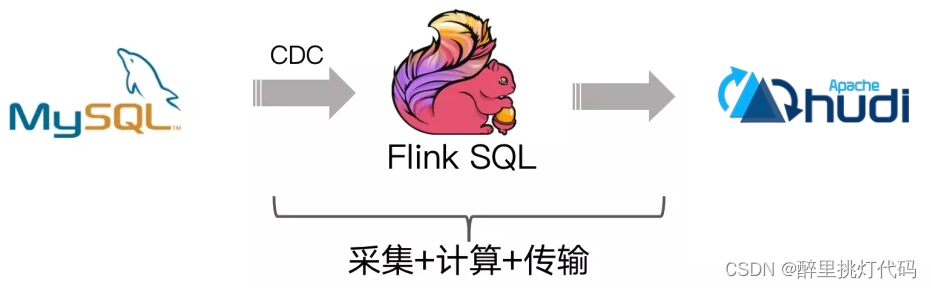
3.1-开启MySQL binlog
[root@node1 ~]# vim /etc/my.cnf
在[mysqld]下面添加内容:server-id=2
log-bin=mysql-bin
binlog_format=row
expire_logs_days=15
binlog_row_image=full
重启MySQL Server
service mysqld restart
下载Flink CDC MySQL Jar包
由于使用Flink 1.12.2版本,目前支持Flink CDC 版本:1.3.0,添加maven 依赖
<!-- https://mvnrepository.com/artifact/com.alibaba.ververica/flink-connector-mysql-cdc -->
<dependency><groupId>com.alibaba.ververica</groupId><artifactId>flink-connector-mysql-cdc</artifactId><version>1.3.0</version>
</dependency>如果使用Flink SQL Client,需要将jar包放到 $FLINK_HOME/lib 目录中
flink-sql-connector-mysql-cdc-1.3.0.jar
3.2-环境准备
实时数据采集,既可以编写Java程序,又可以直接运行DDL语句。
方式一:启动Flink SQL Client
-- 启动HDFS服务
hadoop-daemon.sh start namenode
hadoop-daemon.sh start datanode-- 启动Flink Standalone集群
export HADOOP_CLASSPATH=`/usr/local/src/hadoop/bin/hadoop classpath`
/usr/loacl/src/flink/bin/start-cluster.sh-- 启动SQL Client
/usr/local/src/flink/bin/sql-client.sh embedded \
-j /usr/local/src/flink/lib/hudi-flink-bundle_2.12-0.9.0.jar shell-- 设置属性
set execution.result-mode=tableau;
set execution.checkpointing.interval=3sec;
SET execution.runtime-mode = streaming;
方式二:使用IDEA创建Maven工程
<dependency><groupId>com.alibaba.ververica</groupId><artifactId>flink-connector-mysql-cdc</artifactId><version>1.3.0</version>
</dependency>
编写程序,实现数据实时采集同步,主要三个步骤:**输入表InputTable、输出表outputTable,查询插入INSERT...SELECT语句**
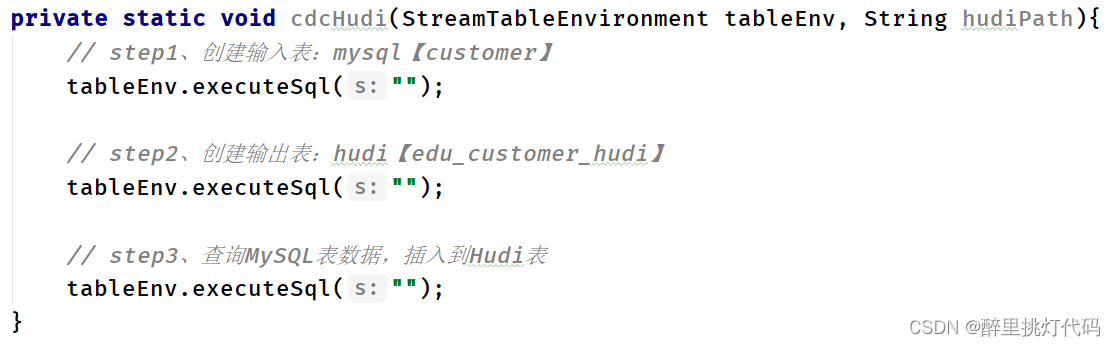
3.3-实时采集数据
基于Flink CDC 实时采集数据,需要创建输入Input和输出Output两张表,再编写INSERT...SELECT 插入查询语句
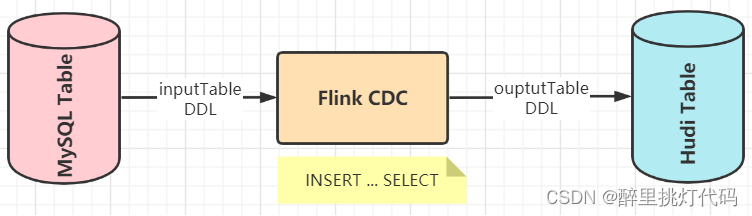
接下来将MySQL数据库5张业务数据表数据,实时采集同步到Hudi表中(存储HDFS文件系统)
3.3.1-客户信息表
第一步、输入表InputTable
create table tbl_customer_mysql (id STRING PRIMARY KEY NOT ENFORCED,customer_relationship_id STRING,create_date_time STRING,update_date_time STRING,deleted STRING,name STRING,idcard STRING,birth_year STRING,gender STRING,phone STRING,wechat STRING,qq STRING,email STRING,area STRING,leave_school_date STRING,graduation_date STRING,bxg_student_id STRING,creator STRING,origin_type STRING,origin_channel STRING,tenant STRING,md_id STRING
)WITH ('connector' = 'mysql-cdc','hostname' = '192.168.184.135','port' = '3306','username' = 'root','password' = 'xxxxxx','server-time-zone' = 'Asia/Shanghai','debezium.snapshot.mode' = 'initial','database-name' = 'itcast_nev','table-name' = 'customer'
);
第二步、输出表OutputTable
CREATE TABLE edu_customer_hudi(id STRING PRIMARY KEY NOT ENFORCED,customer_relationship_id STRING,create_date_time STRING,update_date_time STRING,deleted STRING,name STRING,idcard STRING,birth_year STRING,gender STRING,phone STRING,wechat STRING,qq STRING,email STRING,area STRING,leave_school_date STRING,graduation_date STRING,bxg_student_id STRING,creator STRING,origin_type STRING,origin_channel STRING,tenant STRING,md_id STRING,part STRING
)
PARTITIONED BY (part)
WITH('connector'='hudi','path'= 'hdfs://192.168.184.135:9000/hudi-warehouse/edu_customer_hudi', 'table.type'= 'MERGE_ON_READ','hoodie.datasource.write.recordkey.field'= 'id', 'write.precombine.field'= 'create_date_time','write.tasks'= '1','write.rate.limit'= '2000', 'compaction.tasks'= '1', 'compaction.async.enabled'= 'true','compaction.trigger.strategy'= 'num_commits','compaction.delta_commits'= '1','changelog.enabled'= 'true'
);
第三步、插入查询语句
insert into edu_customer_hudi
select *, CAST(CURRENT_DATE AS STRING) AS part from tbl_customer_mysql;
3.3.2-客户意向表
第一步、输入表InputTable
create table tbl_customer_relationship_mysql (id string PRIMARY KEY NOT ENFORCED,create_date_time string,update_date_time string,deleted string,customer_id string,first_id string,belonger string,belonger_name string,initial_belonger string,distribution_handler string,business_scrm_department_id string,last_visit_time string,next_visit_time string,origin_type string,itcast_school_id string,itcast_subject_id string,intention_study_type string,anticipat_signup_date string,`level` string,creator string,current_creator string,creator_name string,origin_channel string,`comment` string,first_customer_clue_id string,last_customer_clue_id string,process_state string,process_time string,payment_state string,payment_time string,signup_state string,signup_time string,notice_state string,notice_time string,lock_state string,lock_time string,itcast_clazz_id string,itcast_clazz_time string,payment_url string,payment_url_time string,ems_student_id string,delete_reason string,deleter string,deleter_name string,delete_time string,course_id string,course_name string,delete_comment string,close_state string,close_time string,appeal_id string,tenant string,total_fee string,belonged string,belonged_time string,belonger_time string,transfer string,transfer_time string,follow_type string,transfer_bxg_oa_account string,transfer_bxg_belonger_name string
)WITH('connector' = 'mysql-cdc','hostname' = '192.168.184.135','port' = '3306','username' = 'root','password' = 'xxxxxx','server-time-zone' = 'Asia/Shanghai','debezium.snapshot.mode' = 'initial','database-name' = 'itcast_nev','table-name' = 'customer_relationship'
);
第二步、输出表OutputTable
create table edu_customer_relationship_hudi(id string PRIMARY KEY NOT ENFORCED,create_date_time string,update_date_time string,deleted string,customer_id string,first_id string,belonger string,belonger_name string,initial_belonger string,distribution_handler string,business_scrm_department_id string,last_visit_time string,next_visit_time string,origin_type string,itcast_school_id string,itcast_subject_id string,intention_study_type string,anticipat_signup_date string,`level` string,creator string,current_creator string,creator_name string,origin_channel string,`comment` string,first_customer_clue_id string,last_customer_clue_id string,process_state string,process_time string,payment_state string,payment_time string,signup_state string,signup_time string,notice_state string,notice_time string,lock_state string,lock_time string,itcast_clazz_id string,itcast_clazz_time string,payment_url string,payment_url_time string,ems_student_id string,delete_reason string,deleter string,deleter_name string,delete_time string,course_id string,course_name string,delete_comment string,close_state string,close_time string,appeal_id string,tenant string,total_fee string,belonged string,belonged_time string,belonger_time string,transfer string,transfer_time string,follow_type string,transfer_bxg_oa_account string,transfer_bxg_belonger_name string,part STRING
)
PARTITIONED BY (part)
WITH('connector'='hudi','path'= 'hdfs://192.168.184.135:9000/hudi-warehouse/edu_customer_relationship_hudi', 'table.type'= 'MERGE_ON_READ','hoodie.datasource.write.recordkey.field'= 'id', 'write.precombine.field'= 'create_date_time','write.tasks'= '1','write.rate.limit'= '2000', 'compaction.tasks'= '1', 'compaction.async.enabled'= 'true','compaction.trigger.strategy'= 'num_commits','compaction.delta_commits'= '1','changelog.enabled'= 'true'
);
第三步、插入查询语句
insert into edu_customer_relationship_hudi
select *, CAST(CURRENT_DATE AS STRING) AS part from tbl_customer_relationship_mysql;
3.3.3-客户线索表
第一步、输入表InputTable
create table tbl_customer_clue_mysql (id string PRIMARY KEY NOT ENFORCED,create_date_time string,update_date_time string,deleted string,customer_id string,customer_relationship_id string,session_id string,sid string,status string,`user` string,create_time string,platform string,s_name string,seo_source string,seo_keywords string,ip string,referrer string,from_url string,landing_page_url string,url_title string,to_peer string,manual_time string,begin_time string,reply_msg_count string,total_msg_count string,msg_count string,`comment` string,finish_reason string,finish_user string,end_time string,platform_description string,browser_name string,os_info string,area string,country string,province string,city string,creator string,name string,idcard string,phone string,itcast_school_id string,itcast_school string,itcast_subject_id string,itcast_subject string,wechat string,qq string,email string,gender string,`level` string,origin_type string,information_way string,working_years string,technical_directions string,customer_state string,valid string,anticipat_signup_date string,clue_state string,scrm_department_id string,superior_url string,superior_source string,landing_url string,landing_source string,info_url string,info_source string,origin_channel string,course_id string,course_name string,zhuge_session_id string,is_repeat string,tenant string,activity_id string,activity_name string,follow_type string,shunt_mode_id string,shunt_employee_group_id string
)WITH('connector' = 'mysql-cdc','hostname' = '192.168.184.135','port' = '3306','username' = 'root','password' = 'xxxxxx','server-time-zone' = 'Asia/Shanghai','debezium.snapshot.mode' = 'initial','database-name' = 'itcast_nev','table-name' = 'customer_clue'
);
第二步、输出表OutputTable
create table edu_customer_clue_hudi (id string PRIMARY KEY NOT ENFORCED,create_date_time string,update_date_time string,deleted string,customer_id string,customer_relationship_id string,session_id string,sid string,status string,`user` string,create_time string,platform string,s_name string,seo_source string,seo_keywords string,ip string,referrer string,from_url string,landing_page_url string,url_title string,to_peer string,manual_time string,begin_time string,reply_msg_count string,total_msg_count string,msg_count string,`comment` string,finish_reason string,finish_user string,end_time string,platform_description string,browser_name string,os_info string,area string,country string,province string,city string,creator string,name string,idcard string,phone string,itcast_school_id string,itcast_school string,itcast_subject_id string,itcast_subject string,wechat string,qq string,email string,gender string,`level` string,origin_type string,information_way string,working_years string,technical_directions string,customer_state string,valid string,anticipat_signup_date string,clue_state string,scrm_department_id string,superior_url string,superior_source string,landing_url string,landing_source string,info_url string,info_source string,origin_channel string,course_id string,course_name string,zhuge_session_id string,is_repeat string,tenant string,activity_id string,activity_name string,follow_type string,shunt_mode_id string,shunt_employee_group_id string,part STRING
)
PARTITIONED BY (part)
WITH('connector'='hudi','path'= 'hdfs://192.168.184.135:9000/hudi-warehouse/edu_customer_clue_hudi', 'table.type'= 'MERGE_ON_READ','hoodie.datasource.write.recordkey.field'= 'id', 'write.precombine.field'= 'create_date_time','write.tasks'= '1','write.rate.limit'= '2000', 'compaction.tasks'= '1', 'compaction.async.enabled'= 'true','compaction.trigger.strategy'= 'num_commits','compaction.delta_commits'= '1','changelog.enabled'= 'true'
);
第三步、插入查询语句客户意向表
insert into edu_customer_clue_hudi
select *, CAST(CURRENT_DATE AS STRING) AS part from tbl_customer_clue_mysql;
3.3.4-客户申诉表
第一步、输入表InputTable
create table tbl_customer_appeal_mysql (id string PRIMARY KEY NOT ENFORCED,customer_relationship_first_id string,employee_id string,employee_name string,employee_department_id string,employee_tdepart_id string,appeal_status string,audit_id string,audit_name string,audit_department_id string,audit_department_name string,audit_date_time string,create_date_time string,update_date_time string,deleted string,tenant string
)WITH ('connector' = 'mysql-cdc','hostname' = '192.168.184.135','port' = '3306','username' = 'root','password' = 'xxxxxx','server-time-zone' = 'Asia/Shanghai','debezium.snapshot.mode' = 'initial','database-name' = 'itcast_nev','table-name' = 'customer_appeal'
);
第二步、输出表OutputTable
create table edu_customer_appeal_hudi (id string PRIMARY KEY NOT ENFORCED,customer_relationship_first_id STRING,employee_id STRING,employee_name STRING,employee_department_id STRING,employee_tdepart_id STRING,appeal_status STRING,audit_id STRING,audit_name STRING,audit_department_id STRING,audit_department_name STRING,audit_date_time STRING,create_date_time STRING,update_date_time STRING,deleted STRING,tenant STRING,part STRING
)
PARTITIONED BY (part)
WITH('connector'='hudi','path'= 'hdfs://192.168.184.135:9000/hudi-warehouse/edu_customer_appeal_hudi', 'table.type'= 'MERGE_ON_READ','hoodie.datasource.write.recordkey.field'= 'id', 'write.precombine.field'= 'create_date_time','write.tasks'= '1','write.rate.limit'= '2000', 'compaction.tasks'= '1', 'compaction.async.enabled'= 'true','compaction.trigger.strategy'= 'num_commits','compaction.delta_commits'= '1','changelog.enabled'= 'true'
);
第三步、插入查询语句客户意向表
insert into edu_customer_appeal_hudi
select *, CAST(CURRENT_DATE AS STRING) AS part from tbl_customer_appeal_mysql;
3.3.5-客户访问咨询记录表
第一步、输入表InputTable
create table tbl_web_chat_ems_mysql (id string PRIMARY KEY NOT ENFORCED,create_date_time string,session_id string,sid string,create_time string,seo_source string,seo_keywords string,ip string,area string,country string,province string,city string,origin_channel string,`user` string,manual_time string,begin_time string,end_time string,last_customer_msg_time_stamp string,last_agent_msg_time_stamp string,reply_msg_count string,msg_count string,browser_name string,os_info string
)WITH('connector' = 'mysql-cdc','hostname' = '192.168.184.135','port' = '3306','username' = 'root','password' = 'xxxxx','server-time-zone' = 'Asia/Shanghai','debezium.snapshot.mode' = 'initial','database-name' = 'itcast_nev','table-name' = 'web_chat_ems'
);
第二步、输出表OutputTable
create table edu_web_chat_ems_hudi (id string PRIMARY KEY NOT ENFORCED,create_date_time string,session_id string,sid string,create_time string,seo_source string,seo_keywords string,ip string,area string,country string,province string,city string,origin_channel string,`user` string,manual_time string,begin_time string,end_time string,last_customer_msg_time_stamp string,last_agent_msg_time_stamp string,reply_msg_count string,msg_count string,browser_name string,os_info string,part STRING
)
PARTITIONED BY (part)
WITH('connector'='hudi','path'= 'hdfs://192.168.184.135:9000/hudi-warehouse/edu_web_chat_ems_hudi', 'table.type'= 'MERGE_ON_READ','hoodie.datasource.write.recordkey.field'= 'id', 'write.precombine.field'= 'create_date_time','write.tasks'= '1','write.rate.limit'= '2000', 'compaction.tasks'= '1', 'compaction.async.enabled'= 'true','compaction.trigger.strategy'= 'num_commits','compaction.delta_commits'= '1','changelog.enabled'= 'true'
);
第三步、插入查询语句
insert into edu_web_chat_ems_hudi
select *, CAST(CURRENT_DATE AS STRING) AS part from tbl_web_chat_ems_mysql;
3.3.6-测试Hudi数据
-- 启动HDFS服务
hadoop-daemon.sh start namenode
hadoop-daemon.sh start datanode-- 启动Flink Standalone集群
export HADOOP_CLASSPATH=`/usr/local/src/hadoop/bin/hadoop classpath`
/usr/loacl/src/flink/bin/start-cluster.sh-- 启动SQL Client
/usr/local/src/flink/bin/sql-client.sh embedded \
-j /usr/local/src/flink/lib/hudi-flink-bundle_2.12-0.9.0.jar shell-- 设置属性
set execution.result-mode=tableau;
set execution.checkpointing.interval=3sec;
SET execution.runtime-mode = batch;   --此处不是steaming 是批处理-- 1. 客户信息表【customer】
CREATE TABLE edu_customer(id STRING PRIMARY KEY NOT ENFORCED,customer_relationship_id STRING,create_date_time STRING,update_date_time STRING,deleted STRING,name STRING,idcard STRING,birth_year STRING,gender STRING,phone STRING,wechat STRING,qq STRING,email STRING,area STRING,leave_school_date STRING,graduation_date STRING,bxg_student_id STRING,creator STRING,origin_type STRING,origin_channel STRING,tenant STRING,md_id STRING,part STRING
)
PARTITIONED BY (part)
WITH('connector'='hudi','path'= 'hdfs://192.168.184.135:9000/hudi-warehouse/edu_customer_hudi', 'table.type'= 'MERGE_ON_READ','hoodie.datasource.write.recordkey.field'= 'id', 'write.precombine.field'= 'create_date_time','write.tasks'= '1','write.rate.limit'= '2000', 'compaction.tasks'= '1', 'compaction.async.enabled'= 'true','compaction.trigger.strategy'= 'num_commits','compaction.delta_commits'= '1','changelog.enabled'= 'true'
);SELECT count(1) AS total FROM edu_customer ;
SELECT id, name, gender, create_date_time FROM edu_customer LIMIT 10;-- 2. 客户意向表【customer_relationship】
create table edu_customer_relationship(id string PRIMARY KEY NOT ENFORCED,create_date_time string,update_date_time string,deleted string,customer_id string,first_id string,belonger string,belonger_name string,initial_belonger string,distribution_handler string,business_scrm_department_id string,last_visit_time string,next_visit_time string,origin_type string,itcast_school_id string,itcast_subject_id string,intention_study_type string,anticipat_signup_date string,`level` string,creator string,current_creator string,creator_name string,origin_channel string,`comment` string,first_customer_clue_id string,last_customer_clue_id string,process_state string,process_time string,payment_state string,payment_time string,signup_state string,signup_time string,notice_state string,notice_time string,lock_state string,lock_time string,itcast_clazz_id string,itcast_clazz_time string,payment_url string,payment_url_time string,ems_student_id string,delete_reason string,deleter string,deleter_name string,delete_time string,course_id string,course_name string,delete_comment string,close_state string,close_time string,appeal_id string,tenant string,total_fee string,belonged string,belonged_time string,belonger_time string,transfer string,transfer_time string,follow_type string,transfer_bxg_oa_account string,transfer_bxg_belonger_name string,part STRING
)
PARTITIONED BY (part)
WITH('connector'='hudi','path'= 'hdfs://192.168.184.135:9000/hudi-warehouse/edu_customer_relationship_hudi', 'table.type'= 'MERGE_ON_READ','hoodie.datasource.write.recordkey.field'= 'id', 'write.precombine.field'= 'create_date_time','write.tasks'= '1','write.rate.limit'= '2000', 'compaction.tasks'= '1', 'compaction.async.enabled'= 'true','compaction.trigger.strategy'= 'num_commits','compaction.delta_commits'= '1','changelog.enabled'= 'true'
);SELECT count(1) AS total FROM edu_customer_relationship ;
SELECT id, course_name, origin_type, create_date_time FROM edu_customer_relationship LIMIT 10;-- 3. 客户线索表【customer_clue】
create table edu_customer_clue(id string PRIMARY KEY NOT ENFORCED,create_date_time string,update_date_time string,deleted string,customer_id string,customer_relationship_id string,session_id string,sid string,status string,`user` string,create_time string,platform string,s_name string,seo_source string,seo_keywords string,ip string,referrer string,from_url string,landing_page_url string,url_title string,to_peer string,manual_time string,begin_time string,reply_msg_count string,total_msg_count string,msg_count string,`comment` string,finish_reason string,finish_user string,end_time string,platform_description string,browser_name string,os_info string,area string,country string,province string,city string,creator string,name string,idcard string,phone string,itcast_school_id string,itcast_school string,itcast_subject_id string,itcast_subject string,wechat string,qq string,email string,gender string,`level` string,origin_type string,information_way string,working_years string,technical_directions string,customer_state string,valid string,anticipat_signup_date string,clue_state string,scrm_department_id string,superior_url string,superior_source string,landing_url string,landing_source string,info_url string,info_source string,origin_channel string,course_id string,course_name string,zhuge_session_id string,is_repeat string,tenant string,activity_id string,activity_name string,follow_type string,shunt_mode_id string,shunt_employee_group_id string,part STRING
)
PARTITIONED BY (part)
WITH('connector'='hudi','path'= 'hdfs://192.168.184.135:9000/hudi-warehouse/edu_customer_clue_hudi', 'table.type'= 'MERGE_ON_READ','hoodie.datasource.write.recordkey.field'= 'id', 'write.precombine.field'= 'create_date_time','write.tasks'= '1','write.rate.limit'= '2000', 'compaction.tasks'= '1', 'compaction.async.enabled'= 'true','compaction.trigger.strategy'= 'num_commits','compaction.delta_commits'= '1','changelog.enabled'= 'true'
);SELECT count(1) AS total FROM edu_customer_clue ;
SELECT id, customer_id, s_name, create_date_time FROM edu_customer_clue LIMIT 10;-- 4.客户申诉表【customer_appeal】
create table edu_customer_appeal(id string PRIMARY KEY NOT ENFORCED,customer_relationship_first_id STRING,employee_id STRING,employee_name STRING,employee_department_id STRING,employee_tdepart_id STRING,appeal_status STRING,audit_id STRING,audit_name STRING,audit_department_id STRING,audit_department_name STRING,audit_date_time STRING,create_date_time STRING,update_date_time STRING,deleted STRING,tenant STRING,part STRING
)
PARTITIONED BY (part)
WITH('connector'='hudi','path'= 'hdfs://192.168.184.135:9000/hudi-warehouse/edu_customer_appeal_hudi', 'table.type'= 'MERGE_ON_READ','hoodie.datasource.write.recordkey.field'= 'id', 'write.precombine.field'= 'create_date_time','write.tasks'= '1','write.rate.limit'= '2000', 'compaction.tasks'= '1', 'compaction.async.enabled'= 'true','compaction.trigger.strategy'= 'num_commits','compaction.delta_commits'= '1','changelog.enabled'= 'true'
);SELECT count(1) AS total FROM edu_customer_appeal ;
SELECT id, employee_id, employee_name, create_date_time FROM edu_customer_appeal LIMIT 10;-- 5. 客服访问咨询记录表【web_chat_ems】
create table edu_web_chat_ems (id string PRIMARY KEY NOT ENFORCED,create_date_time string,session_id string,sid string,create_time string,seo_source string,seo_keywords string,ip string,area string,country string,province string,city string,origin_channel string,`user` string,manual_time string,begin_time string,end_time string,last_customer_msg_time_stamp string,last_agent_msg_time_stamp string,reply_msg_count string,msg_count string,browser_name string,os_info string,part STRING
)
PARTITIONED BY (part)
WITH('connector'='hudi','path'= 'hdfs://192.168.184.135:9000/hudi-warehouse/edu_web_chat_ems_hudi', 'table.type'= 'MERGE_ON_READ','hoodie.datasource.write.recordkey.field'= 'id', 'write.precombine.field'= 'create_date_time','compaction.tasks'= '1', 'compaction.async.enabled'= 'true','compaction.trigger.strategy'= 'num_commits','compaction.delta_commits'= '1','changelog.enabled'= 'true'
);SELECT count(1) AS total FROM edu_web_chat_ems ;
SELECT id, session_id, ip, province FROM edu_web_chat_ems LIMIT 10;
4、Presto 即席分析
使用Presto 分析Hudi表数据,最终将结果直接存储到MySQL数据库表中,示意图如下

第一、Hive 中创建表,关联Hudi表
第二、Presto集成Hive,加载Hive表数据
第三、Presto集成MySQL,读取或者保存数据
4.1-Presto 是什么
Presto是一款Facebook开源的MPP架构的OLAP查询引擎,可针对不同数据源执行大容量数据集的一款分布式SQL执行引擎。适用于交互式分析查询,数据量支持GB到PB字节。
1、清晰的架构,是一个能够独立运行的系统,不依赖于任何其他外部系统。例如调度,presto自身提供了对集群的监控,可以根据监控信息完成调度。
2、简单的数据结构,列式存储,逻辑行,大部分数据都可以轻易的转化成presto所需要的这种数据结构。
3、丰富的插件接口,完美对接外部存储系统,或者添加自定义的函数。官网:https://prestodb.io/
Presto采用典型的master-slave模型,由一个Coordinator节点,一个Discovery Server节点,多个Worker节点组成,Discovery Server通常内嵌于Coordinator节点中。
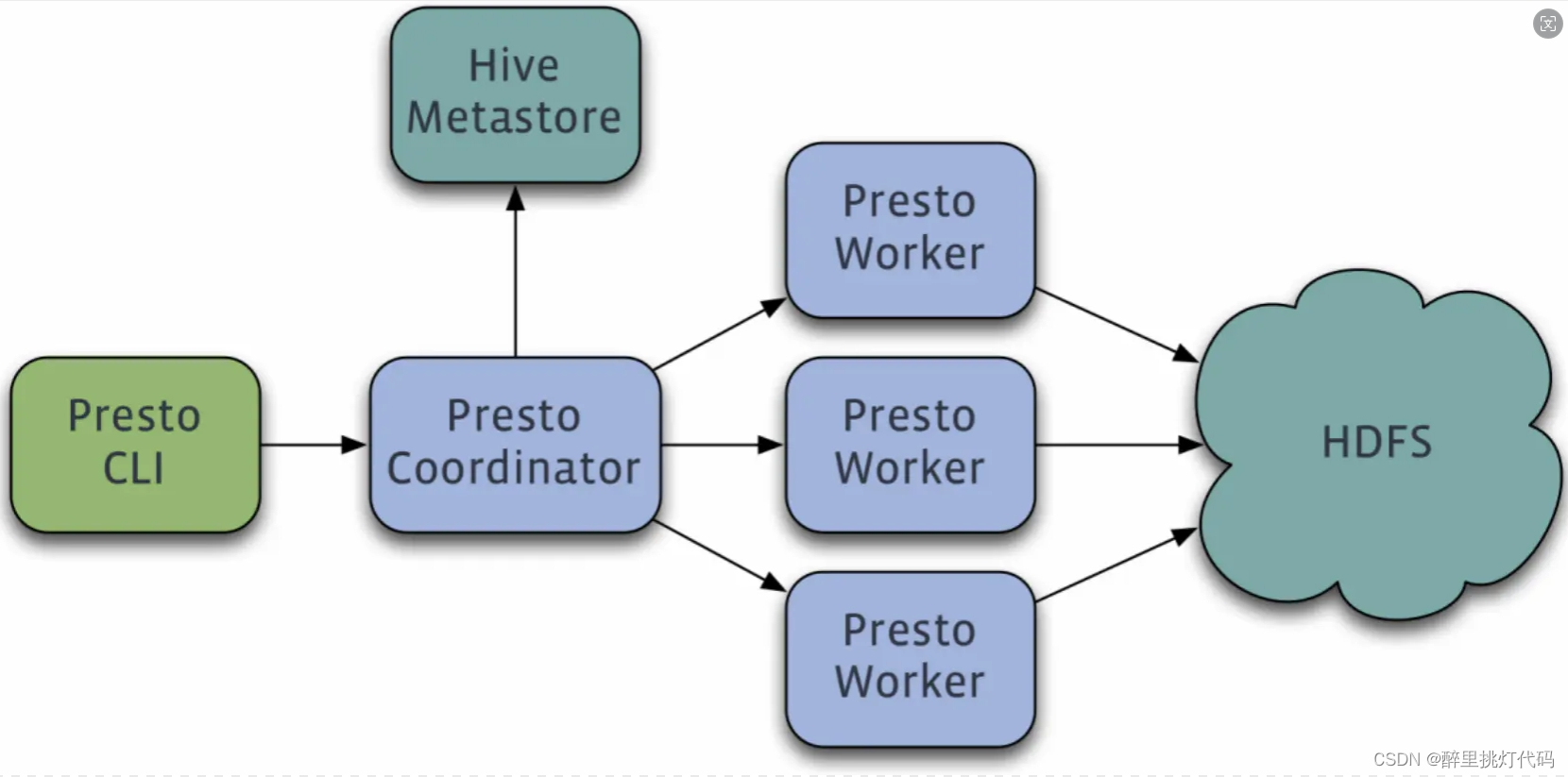
1、coordinator(master)负责meta管理,worker管理,query的解析和调度
2、worker则负责计算和读写
3、discovery server, 通常内嵌于coordinator节点中,也可以单独部署,用于节点心跳。在下文中,默认discovery和coordinator共享一台机器。
Presto 数据模型:采取三层表结构
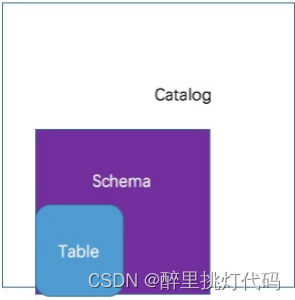
1、catalog 对应某一类数据源,例如hive的数据,或mysql的数据
2、schema 对应mysql中的数据库
3、table 对应mysql中的表
4.2-Presto 安装部署
采用单节点部署安装Presto,服务器名称:master,IP地址:192.168.184.135
1. Presto 分析引擎官方网站:https://prestodb.io/下载地址:https://prestodb.io/download.htmlSERVER:服务Master(Coordinator)协调节点Workers工作节点https://repo1.maven.org/maven2/com/facebook/presto/presto-server/0.266.1/presto-server-0.266.1.tar.gz(服务包)命令行客户端https://repo1.maven.org/maven2/com/facebook/presto/presto-cli/0.266.1/presto-cli-0.266.1-executable.jar(客户端包)JDBC DRIVER通过JDBC连接服务,编写DDL、DML及DQL语句,发送执行https://repo1.maven.org/maven2/com/facebook/presto/presto-jdbc/0.266.1/presto-jdbc-0.266.1.jar (jdbc包)
4.2.1-上传解压Presto安装包
# yum安装上传文件插件lrzsz
yum install -y lrzsz# 上传安装包到master的/usr/local/src/software-jar目录
presto-server-0.245.1.tar.gz# 解压、重命名
tar -xzvf presto-server-0.245.1.tar.gz
ln -s presto-server-0.245.1 presto
mv presto-server-0.245.1/ presto#创建配置文件存储目录
mkdir -p /usr/local/src/presto/etc
4.2.2-配置presto
config.properties
vim /usr/local/src/presto/etc/config.properties
coordinator=true
node-scheduler.include-coordinator=true
http-server.http.port=8090
query.max-memory=6GB
query.max-memory-per-node=2GB
query.max-total-memory-per-node=2GB
discovery-server.enabled=true
discovery.uri=http://192.168.184.135:8090
jvm.config
vim /usr/local/src/presto/etc/jvm.config
-server
-Xmx3G
-XX:+UseG1GC
-XX:G1HeapRegionSize=32M
-XX:+UseGCOverheadLimit
-XX:+ExplicitGCInvokesConcurrent
-XX:+HeapDumpOnOutOfMemoryError
-XX:+ExitOnOutOfMemoryError
node.properties
vim /usr/local/src/presto/etc/node.properties
node.environment=hudipresto
node.id=presto-master
node.data-dir=/usr/local/src/presto/data
hive.properties
mkdir -p /usr/local/src/presto/etc/catalog
vim /usr/local/src/presto/etc/catalog/hive.properties
connector.name=hive-hadoop2
hive.metastore.uri=thrift://192.168.184.135:9083
hive.parquet.use-column-names=true
hive.config.resources=/usr/local/src/presto/etc/catalog/core-site.xml,/export/server/presto/etc/catalog/hdfs-site.xml
mysql.properties
vim /usr/local/src/presto/etc/catalog/mysql.properties
connector.name=mysql
connection-url=jdbc:mysql://192.168.184.135:3306
connection-user=root
connection-password=xxxxxx
4.2.3-启动服务
launcher start使用jps查看进程是否存在,进程名称:PrestoServer此外WEB UI界面:
http://192.168.184.135:8090/ui/
4.2.4-Presto CLI命令行客户端
#客户端Jarpresto-cli-0.241-executable.jar#上传presto-cli-0.245.1-executable.jar到/usr/local/src/presto/binmv presto-cli-0.245.1-executable.jar presto
chmod u+x presto#CLI客户端启动/usr/local/src/presto/bin/presto --server 192.168.184.135:8090#展示catalogs
presto> show catalogs;Catalog
---------hivemysqlsystem
(3 rows)Query 20231124_163247_00000_gz4bb, FINISHED, 1 node
Splits: 19 total, 19 done (100.00%)
0:01 [0 rows, 0B] [0 rows/s, 0B/s]#查询hive schema,需提前启动hive metastorepresto> show schemas from hive;Schema
--------------------db_hudidefaultinformation_schemasaddam
(4 rows)
4.3-Hive 创建表
为了让Presto分析Hudi表中数据,需要将Hudi表映射关联到Hive表中。接下来,再Hive中创建5张传智教育客户业务数据表,映射关联到Hudi表
启动HDFS服务、HiveMetaStore和HiveServer服务,运行Beeline命令行
-- 启动HDFS服务
start-dfs.sh-- Hive服务
start-metastore.sh
start-hiveserver2.sh-- 启动Beeline客户端
start-beeline.sh-- 设置Hive本地模式
set hive.exec.mode.local.auto=true;
set hive.mapred.mode=nonstrict;
set hive.exec.mode.local.auto.inputbytes.max=50000000;
4.3.1-创建数据库
-- 创建数据库
CREATE DATABASE IF NOT EXISTS edu_hudi ;
-- 使用数据库
USE edu_hudi ;
4.3.2-客户信息表
编写DDL语句创建表
CREATE EXTERNAL TABLE edu_hudi.tbl_customer(id string,customer_relationship_id string,create_date_time string,update_date_time string,deleted string,name string,idcard string,birth_year string,gender string,phone string,wechat string,qq string,email string,area string,leave_school_date string,graduation_date string,bxg_student_id string,creator string,origin_type string,origin_channel string,tenant string,md_id string
)PARTITIONED BY (day_str string)
ROW FORMAT SERDE 'org.apache.hadoop.hive.ql.io.parquet.serde.ParquetHiveSerDe'
STORED AS INPUTFORMAT 'org.apache.hudi.hadoop.HoodieParquetInputFormat'
OUTPUTFORMAT 'org.apache.hadoop.hive.ql.io.parquet.MapredParquetOutputFormat'
LOCATION '/hudi-warehouse/edu_customer_hudi' ;
由于是分区表,所以添加分区
ALTER TABLE edu_hudi.tbl_customer ADD IF NOT EXISTS PARTITION(day_str='2023-11-24')
location '/hudi-warehouse/edu_customer_hudi/2023-11-24' ;
4.3.3-客户意向表
编写DDL语句创建表
CREATE EXTERNAL TABLE edu_hudi.tbl_customer_relationship(id string,create_date_time string,update_date_time string,deleted string,customer_id string,first_id string,belonger string,belonger_name string,initial_belonger string,distribution_handler string,business_scrm_department_id string,last_visit_time string,next_visit_time string,origin_type string,itcast_school_id string,itcast_subject_id string,intention_study_type string,anticipat_signup_date string,`level` string,creator string,current_creator string,creator_name string,origin_channel string,`comment` string,first_customer_clue_id string,last_customer_clue_id string,process_state string,process_time string,payment_state string,payment_time string,signup_state string,signup_time string,notice_state string,notice_time string,lock_state string,lock_time string,itcast_clazz_id string,itcast_clazz_time string,payment_url string,payment_url_time string,ems_student_id string,delete_reason string,deleter string,deleter_name string,delete_time string,course_id string,course_name string,delete_comment string,close_state string,close_time string,appeal_id string,tenant string,total_fee string,belonged string,belonged_time string,belonger_time string,transfer string,transfer_time string,follow_type string,transfer_bxg_oa_account string,transfer_bxg_belonger_name string
)PARTITIONED BY (day_str string)
ROW FORMAT SERDE 'org.apache.hadoop.hive.ql.io.parquet.serde.ParquetHiveSerDe'
STORED AS INPUTFORMAT 'org.apache.hudi.hadoop.HoodieParquetInputFormat'
OUTPUTFORMAT 'org.apache.hadoop.hive.ql.io.parquet.MapredParquetOutputFormat'
LOCATION '/hudi-warehouse/edu_customer_relationship_hudi' ;
由于是分区表,所以添加分区
ALTER TABLE edu_hudi.tbl_customer_relationship ADD IF NOT EXISTS PARTITION(day_str='2023-11-24')
location '/hudi-warehouse/edu_customer_relationship_hudi/2023-11-24' ;
4.3.4-客户线索表
编写DDL语句创建表
CREATE EXTERNAL TABLE edu_hudi.tbl_customer_clue(id string,create_date_time string,update_date_time string,deleted string,customer_id string,customer_relationship_id string,session_id string,sid string,status string,`user` string,create_time string,platform string,s_name string,seo_source string,seo_keywords string,ip string,referrer string,from_url string,landing_page_url string,url_title string,to_peer string,manual_time string,begin_time string,reply_msg_count string,total_msg_count string,msg_count string,`comment` string,finish_reason string,finish_user string,end_time string,platform_description string,browser_name string,os_info string,area string,country string,province string,city string,creator string,name string,idcard string,phone string,itcast_school_id string,itcast_school string,itcast_subject_id string,itcast_subject string,wechat string,qq string,email string,gender string,`level` string,origin_type string,information_way string,working_years string,technical_directions string,customer_state string,valid string,anticipat_signup_date string,clue_state string,scrm_department_id string,superior_url string,superior_source string,landing_url string,landing_source string,info_url string,info_source string,origin_channel string,course_id string,course_name string,zhuge_session_id string,is_repeat string,tenant string,activity_id string,activity_name string,follow_type string,shunt_mode_id string,shunt_employee_group_id string
)
PARTITIONED BY (day_str string)
ROW FORMAT SERDE 'org.apache.hadoop.hive.ql.io.parquet.serde.ParquetHiveSerDe'
STORED AS INPUTFORMAT 'org.apache.hudi.hadoop.HoodieParquetInputFormat'
OUTPUTFORMAT 'org.apache.hadoop.hive.ql.io.parquet.MapredParquetOutputFormat'
LOCATION '/hudi-warehouse/edu_customer_clue_hudi' ;
由于是分区表,所以添加分区
ALTER TABLE edu_hudi.tbl_customer_clue ADD IF NOT EXISTS PARTITION(day_str='2023-11-24')
location '/hudi-warehouse/edu_customer_clue_hudi/2023-11-24' ;
4.3.5-客户申诉表
编写DDL语句创建表
CREATE EXTERNAL TABLE edu_hudi.tbl_customer_appeal(id string,customer_relationship_first_id STRING,employee_id STRING,employee_name STRING,employee_department_id STRING,employee_tdepart_id STRING,appeal_status STRING,audit_id STRING,audit_name STRING,audit_department_id STRING,audit_department_name STRING,audit_date_time STRING,create_date_time STRING,update_date_time STRING,deleted STRING,tenant STRING
)
PARTITIONED BY (day_str string)
ROW FORMAT SERDE 'org.apache.hadoop.hive.ql.io.parquet.serde.ParquetHiveSerDe'
STORED AS INPUTFORMAT 'org.apache.hudi.hadoop.HoodieParquetInputFormat'
OUTPUTFORMAT 'org.apache.hadoop.hive.ql.io.parquet.MapredParquetOutputFormat'
LOCATION '/hudi-warehouse/edu_customer_appeal_hudi' ;
由于是分区表,所以添加分区
ALTER TABLE edu_hudi.tbl_customer_appeal ADD IF NOT EXISTS PARTITION(day_str='2023-11-24')
location '/hudi-warehouse/edu_customer_appeal_hudi/2023-11-24' ;
4.3.6-客户访问咨询记录表
编写DDL语句创建表
CREATE EXTERNAL TABLE edu_hudi.tbl_web_chat_ems (id string,create_date_time string,session_id string,sid string,create_time string,seo_source string,seo_keywords string,ip string,area string,country string,province string,city string,origin_channel string,`user` string,manual_time string,begin_time string,end_time string,last_customer_msg_time_stamp string,last_agent_msg_time_stamp string,reply_msg_count string,msg_count string,browser_name string,os_info string
)
PARTITIONED BY (day_str string)
ROW FORMAT SERDE 'org.apache.hadoop.hive.ql.io.parquet.serde.ParquetHiveSerDe'
STORED AS INPUTFORMAT 'org.apache.hudi.hadoop.HoodieParquetInputFormat'
OUTPUTFORMAT 'org.apache.hadoop.hive.ql.io.parquet.MapredParquetOutputFormat'
LOCATION '/hudi-warehouse/edu_web_chat_ems_hudi' ;
由于是分区表,所以添加分区
ALTER TABLE edu_hudi.tbl_web_chat_ems ADD IF NOT EXISTS PARTITION(day_str='2023-11-24')
location '/hudi-warehouse/edu_web_chat_ems_hudi/2023-11-24' ;
4.4-离线指标分析
使用Presto分析Hudi表数据,需要将集成jar包:hudi-presto-bundle-0.9.0.jar,放入到Presto插件目录:presto/plugin/hive-hadoop2中
#启动Presto Client 客户端命令行,查看Hive中创建数据库
launcher startpresto --server 192.168.184.135:8090#展示catalogs
presto> show catalogs;#查询hive的schemas
presto> show schemas from hive;Schema
--------------------db_hudidefaultedu_hudiinformation_schemasaddam
(5 rows)#使用数据库:edu_hudi,查看有哪些表
presto> use hive.edu_hudi;
USE
presto:edu_hudi> show tables;Table
---------------------------tbl_customertbl_customer_appealtbl_customer_cluetbl_customer_relationshiptbl_web_chat_ems
(5 rows)
接下来,按照业务指标需求,使用Presto,分析Hudi表数据,将指标直接保存MySQL数据库

首先在MySQL数据库中,创建database,专门存储分析指标表
-- 创建数据库
CREATE DATABASE `itcast_rpt` /*!40100 DEFAULT CHARACTER SET utf8 */;
4.4.1-每日报名量
对客户意向表数据统计分析:每日客户报名量,先创建MySQL表,再编写SQL,最后保存数据
MySQL-创建表:itcast_rpt.stu_apply
CREATE TABLE  IF NOT EXISTS `itcast_rpt`.`stu_apply` (`report_date` longtext,`report_total` bigint(20) NOT NULL
) ENGINE=InnoDB DEFAULT CHARSET=utf8;
presto-指标SQL语句
WITH tmp AS (SELECT format_datetime(from_unixtime(cast(payment_time as bigint) / 1000),'yyyy-MM-dd')AS day_value, customer_id FROM hive.edu_hudi.tbl_customer_relationship WHERE day_str = '2023-11-24' AND payment_time IS NOT NULL AND payment_state = 'PAID' AND deleted = 'false'
)
SELECT day_value, COUNT(customer_id) AS total FROM tmp GROUP BY day_value ;
presto-分析结果保存MySQL表
INSERT INTO mysql.itcast_rpt.stu_apply (report_date, report_total)
SELECT day_value, total FROM (SELECT day_value, COUNT(customer_id) AS total FROM (SELECT format_datetime(from_unixtime(cast(payment_time as bigint) / 1000), 'yyyy-MM-dd')AS day_value, customer_id FROM hive.edu_hudi.tbl_customer_relationship WHERE day_str = '2023-11-24' AND payment_time IS NOT NULL AND payment_state = 'PAID' AND deleted = 'false') GROUP BY day_value
) ;
4.4.2-每日访问量
MySQL-创建表:itcast_rpt.web_pv
CREATE TABLE  IF NOT EXISTS `itcast_rpt`.`web_pv` (`report_date` longtext,`report_total` bigint(20) NOT NULL
) ENGINE=InnoDB DEFAULT CHARSET=utf8;
presto-指标SQL语句
WITH tmp AS (SELECT id, format_datetime(from_unixtime(cast(create_time as bigint) / 1000), 'yyyy-MM-dd')AS day_valueFROM hive.edu_hudi.tbl_web_chat_ems WHERE day_str = '2023-11-24'
)
SELECT day_value, COUNT(id) AS total FROM tmp GROUP BY day_value ;
presto-分析结果保存MySQL表
INSERT INTO mysql.itcast_rpt.web_pv (report_date, report_total)
SELECT day_value, COUNT(id) AS total FROM (SELECT id, format_datetime(from_unixtime(cast(create_time as bigint) / 1000), 'yyyy-MM-dd') AS day_valueFROM hive.edu_hudi.tbl_web_chat_ems WHERE day_str = '2023-11-24'
) GROUP BY day_value ;
4.4.3-每日意向数
MySQL-创建表:itcast_rpt.stu_intention
CREATE TABLE  IF NOT EXISTS `itcast_rpt`.`stu_intention` (`report_date` longtext,`report_total` bigint(20) NOT NULL
) ENGINE=InnoDB DEFAULT CHARSET=utf8;
presto-指标SQL语句
WITH tmp AS (SELECT id, format_datetime(from_unixtime(cast(create_date_time as bigint) / 1000), 'yyyy-MM-dd')AS day_valueFROM hive.edu_hudi.tbl_customer_relationship WHERE day_str = '2023-11-24' AND create_date_time IS NOT NULL AND deleted = 'false'
)
SELECT day_value, COUNT(id) AS total FROM tmp GROUP BY day_value ;
presto-分析结果保存MySQL表
INSERT INTO mysql.itcast_rpt.stu_intention (report_date, report_total)
SELECT day_value, COUNT(id) AS total FROM (SELECT id, format_datetime(from_unixtime(cast(create_date_time as bigint) / 1000), 'yyyy-MM-dd')AS day_valueFROM hive.edu_hudi.tbl_customer_relationship WHERE day_str = '2023-11-24' AND create_date_time IS NOT NULL AND deleted = 'false'
) GROUP BY day_value ;
4.4.4-每日线索量
MySQL-创建表:itcast_rpt.stu_clue
CREATE TABLE IF NOT EXISTS `itcast_rpt`.`stu_clue` (`report_date` longtext,`report_total` bigint(20) NOT NULL
) ENGINE=InnoDB DEFAULT CHARSET=utf8;
presto-指标SQL语句
WITH tmp AS (SELECT id, format_datetime(from_unixtime(cast(create_date_time as bigint) / 1000), 'yyyy-MM-dd')AS day_valueFROM hive.edu_hudi.tbl_customer_clue WHERE day_str = '2023-11-24' AND clue_state IS NOT NULL AND deleted = 'false'
)
SELECT day_value, COUNT(id) AS total FROM tmp GROUP BY day_value ;
presto-分析结果保存MySQL表
INSERT INTO mysql.itcast_rpt.stu_clue (report_date, report_total)
SELECT day_value, COUNT(id) AS total FROM (SELECT id, format_datetime(from_unixtime(cast(create_date_time as bigint) / 1000), 'yyyy-MM-dd')AS day_valueFROM hive.edu_hudi.tbl_customer_clue WHERE day_str = '2023-11-24' AND clue_state IS NOT NULL AND deleted = 'false'
) GROUP BY day_value ;
5、Flink SQL 流式分析
使用Flink SQL流式查询Hudi表今日实时数据,统计离线指标对应今日实时指标,最后使用FineBI实时大屏展示
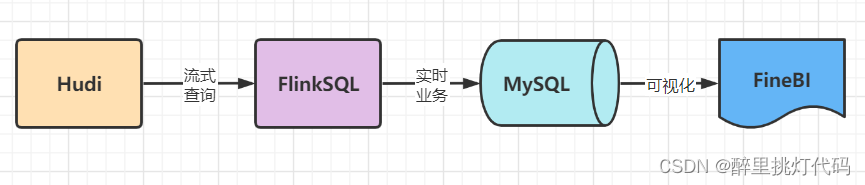
基于Flink SQL Connector与Hudi和MySQL集成,编写SQL流式查询分析,在SQL Clientk客户端命令行执行DDL语句和SELECT语句。
5.1-业务需求
实时对传智教育客户每日业务数据进行基本指标统计,如下所示
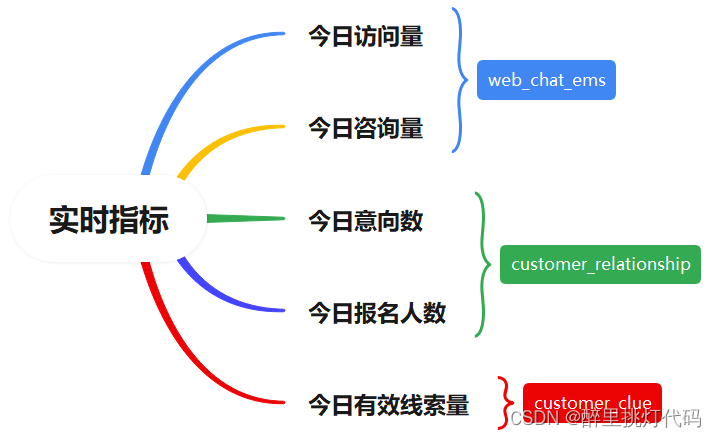
总共有5个指标,涉及到3张业务表:客户访问记录表、客户线索表和客户意向表,其中每个指标实时数据存储到MySQL数据库中一张表。
每个实时指标统计,分为三个步骤:第1步、创建输入表,流式加载Hudi表数据;
第2步、创建输出表,实时保存数据至MySQL表;
第3步、依据业务,编写SQL语句,查询输入表数据,并将结果插入输出表;
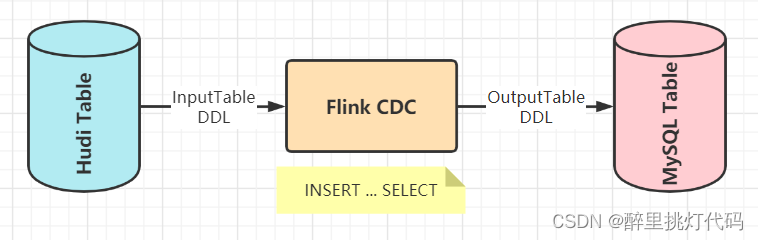
5.2-创建MySQL表
每个实时指标存储到MySQL数据库一张表,首先创建5个指标对应的5张表,名称不一样,字段一样,DDL语句如下
--指标1:今日访问量
CREATE TABLE `itcast_rpt`.`realtime_web_pv` (`report_date` varchar(255) NOT NULL,`report_total` bigint(20) NOT NULL,PRIMARY KEY (`report_date`)
) ENGINE=InnoDB DEFAULT CHARSET=utf8;--指标2:今日咨询量
CREATE TABLE `itcast_rpt`.`realtime_stu_consult` (`report_date` varchar(255) NOT NULL,`report_total` bigint(20) NOT NULL,PRIMARY KEY (`report_date`)
) ENGINE=InnoDB DEFAULT CHARSET=utf8;--指标3:今日意向数
CREATE TABLE `itcast_rpt`.`realtime_stu_intention` (`report_date` varchar(255) NOT NULL,`report_total` bigint(20) NOT NULL,PRIMARY KEY (`report_date`)
) ENGINE=InnoDB DEFAULT CHARSET=utf8;--指标4:今日报名人数
CREATE TABLE `itcast_rpt`.`realtime_stu_apply` (`report_date` varchar(255) NOT NULL,`report_total` bigint(20) NOT NULL,PRIMARY KEY (`report_date`)
) ENGINE=InnoDB DEFAULT CHARSET=utf8;--指标5:今日有效线索量
CREATE TABLE `itcast_rpt`.`realtime_stu_clue` (`report_date` varchar(255) NOT NULL,`report_total` bigint(20) NOT NULL,PRIMARY KEY (`report_date`)
) ENGINE=InnoDB DEFAULT CHARSET=utf8;
5.3-实时指标分析
具体演示,采用离线加载hudi表数据进行统计分析存储到mysql
实时统计5个指标,加载3个Hudi表数据,如下所示
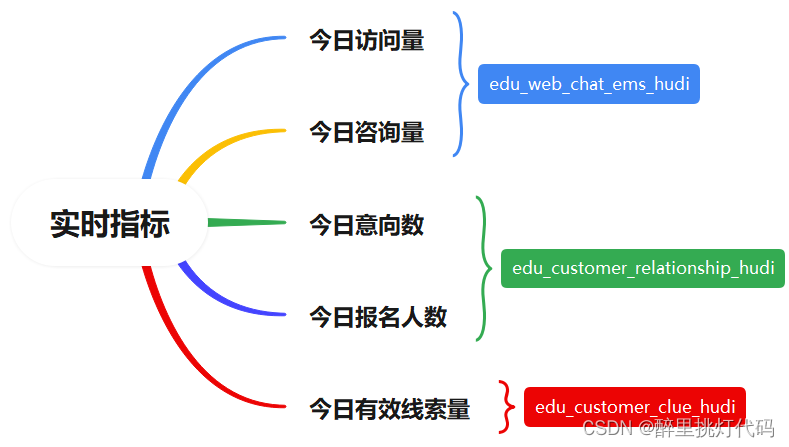
1.今日访问量和今日咨询量,流式加载表:edu_web_chat_ems_hudi 数据
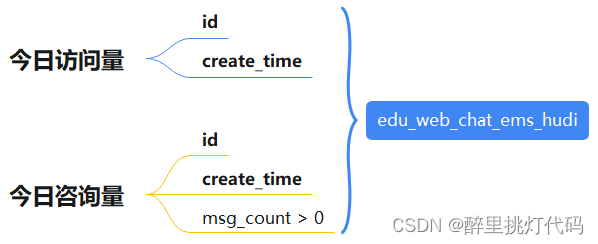
2.今日意向数和今日报名人数,流式加载表:edu_customer_relationship_hudi 数据
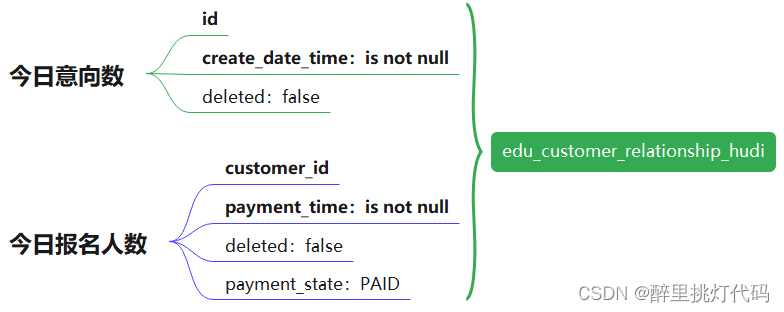
3.今日有效线索量,流式加载表:edu_customer_clue_hudi 数据
启动服务
启动HDFS服务和Standalone集群,运行SQL Client客户端,设置属性
-- 启动HDFS服务
hadoop-daemon.sh start namenode
hadoop-daemon.sh start datanode-- 启动Flink Standalone集群
export HADOOP_CLASSPATH=`/usr/local/src/hadoop/bin/hadoop classpath`
/usr/loacl/src/flink/bin/start-cluster.sh-- 启动SQL Client
/usr/local/src/flink/bin/sql-client.sh embedded \
-j /usr/local/src/flink/lib/hudi-flink-bundle_2.12-0.9.0.jar shell-- 设置属性
set execution.result-mode=tableau;
set execution.checkpointing.interval=3sec;
-- 流处理模式
SET execution.runtime-mode = streaming;
5.3.1-今日访问量
首先创建输入表:流式加载,Hudi表数据
CREATE TABLE edu_web_chat_ems_hudi (id string PRIMARY KEY NOT ENFORCED,create_date_time string,session_id string,sid string,create_time string,seo_source string,seo_keywords string,ip string,area string,country string,province string,city string,origin_channel string,`user` string,manual_time string,begin_time string,end_time string,last_customer_msg_time_stamp string,last_agent_msg_time_stamp string,reply_msg_count string,msg_count string,browser_name string,os_info string,part STRING
)
PARTITIONED BY (part)
WITH('connector'='hudi','path'= 'hdfs://192.168.184.135:9000/hudi-warehouse/edu_web_chat_ems_hudi', 'table.type'= 'MERGE_ON_READ','hoodie.datasource.write.recordkey.field'= 'id', 'write.precombine.field'= 'create_date_time','read.tasks' = '1'
);--流式才使用,此案例无法流式写入hudi数据,所以此处不添加流式'read.streaming.enabled' = 'true','read.streaming.check-interval' = '5',
统计结果,存储至视图View
CREATE VIEW IF NOT EXISTS view_tmp_web_pv AS
SELECT day_value, COUNT(id) AS total FROM (SELECTFROM_UNIXTIME(CAST(create_time AS BIGINT) / 1000, 'yyyy-MM-dd') AS day_value, idFROM edu_web_chat_ems_hudiWHERE part ='2023-11-24'
) GROUP BY  day_value;--若是流式写数据,WHERE part = CAST(CURRENT_DATE AS STRING)
保存MySQL数据库
-- SQL Connector MySQL
CREATE TABLE realtime_web_pv_mysql (report_date STRING,report_total BIGINT, PRIMARY KEY (report_date) NOT ENFORCED
) WITH ('connector' = 'jdbc','url' = 'jdbc:mysql://192.168.184.135:3306/itcast_rpt','driver' = 'com.mysql.cj.jdbc.Driver','username' = 'root','password' = 'xxxxxx','table-name' = 'realtime_web_pv'
);-- INSERT INTO 插入
INSERT INTO  realtime_web_pv_mysql SELECT day_value, total FROM view_tmp_web_pv;--插入报错Could not find any factory for identifier 'jdbc' that implements
flink-connector-jdbc_2.11-1.12.2.jar放入flink/lib下,然后重启服务
5.3.2-今日咨询量
统计结果,存储至视图View
CREATE VIEW IF NOT EXISTS view_tmp_stu_consult AS
SELECT day_value, COUNT(id) AS total FROM (SELECTFROM_UNIXTIME(CAST(create_time AS BIGINT) / 1000, 'yyyy-MM-dd') AS day_value, idFROM edu_web_chat_ems_hudiWHERE part ='2023-11-24' AND msg_count > 0
) GROUP BY  day_value;
保存MySQL数据库
-- SQL Connector MySQL
CREATE TABLE realtime_stu_consult_mysql (report_date STRING,report_total BIGINT, PRIMARY KEY (report_date) NOT ENFORCED
) WITH ('connector' = 'jdbc','url' = 'jdbc:mysql://192.168.184.135:3306/itcast_rpt','driver' = 'com.mysql.cj.jdbc.Driver','username' = 'root','password' = 'xxxxxx','table-name' = 'realtime_stu_consult'
);-- INSERT INTO 插入
INSERT INTO  realtime_stu_consult_mysql SELECT day_value, total FROM view_tmp_stu_consult;
5.3.3-今日意向数
首先创建输入表:流式加载,Hudi表数据
create table edu_customer_relationship_hudi(id string PRIMARY KEY NOT ENFORCED,create_date_time string,update_date_time string,deleted string,customer_id string,first_id string,belonger string,belonger_name string,initial_belonger string,distribution_handler string,business_scrm_department_id string,last_visit_time string,next_visit_time string,origin_type string,itcast_school_id string,itcast_subject_id string,intention_study_type string,anticipat_signup_date string,`level` string,creator string,current_creator string,creator_name string,origin_channel string,`comment` string,first_customer_clue_id string,last_customer_clue_id string,process_state string,process_time string,payment_state string,payment_time string,signup_state string,signup_time string,notice_state string,notice_time string,lock_state string,lock_time string,itcast_clazz_id string,itcast_clazz_time string,payment_url string,payment_url_time string,ems_student_id string,delete_reason string,deleter string,deleter_name string,delete_time string,course_id string,course_name string,delete_comment string,close_state string,close_time string,appeal_id string,tenant string,total_fee string,belonged string,belonged_time string,belonger_time string,transfer string,transfer_time string,follow_type string,transfer_bxg_oa_account string,transfer_bxg_belonger_name string,part STRING
)
PARTITIONED BY (part)
WITH('connector'='hudi','path'= 'hdfs://192.168.184.135:9000/hudi-warehouse/edu_customer_relationship_hudi', 'table.type'= 'MERGE_ON_READ','hoodie.datasource.write.recordkey.field'= 'id', 'write.precombine.field'= 'create_date_time', 'read.tasks' = '1'
);
统计结果,存储至视图View
CREATE VIEW IF NOT EXISTS view_tmp_stu_intention AS
SELECT day_value, COUNT(id) AS total FROM (SELECTFROM_UNIXTIME(CAST(create_date_time AS BIGINT) / 1000, 'yyyy-MM-dd') AS day_value, idFROM edu_customer_relationship_hudiWHERE part ='2023-11-24' AND create_date_time IS NOT NULL AND deleted = 'false'
) GROUP BY  day_value;
保存MySQL数据库
-- SQL Connector MySQL
CREATE TABLE realtime_stu_intention_mysql (report_date STRING,report_total BIGINT, PRIMARY KEY (report_date) NOT ENFORCED
) WITH ('connector' = 'jdbc','url' = 'jdbc:mysql://192.168.184.135:3306/itcast_rpt','driver' = 'com.mysql.cj.jdbc.Driver','username' = 'root','password' = 'xxxxxx','table-name' = 'realtime_stu_intention'
);-- INSERT INTO 插入
INSERT INTO  realtime_stu_intention_mysql SELECT day_value, total
FROM view_tmp_stu_intention;
5.3.4-今日报名人数
统计结果,存储至视图View
CREATE VIEW IF NOT EXISTS view_tmp_stu_apply AS
SELECT day_value, COUNT(id) AS total FROM (SELECTFROM_UNIXTIME(CAST(payment_time AS BIGINT) / 1000, 'yyyy-MM-dd') AS day_value, idFROM edu_customer_relationship_hudiWHERE part ='2023-11-24' AND payment_time IS NOT NULL
AND payment_state = 'PAID' AND deleted = 'false'
) GROUP BY  day_value;
保存MySQL数据库
-- SQL Connector MySQL
CREATE TABLE realtime_stu_apply_mysql (report_date STRING,report_total BIGINT, PRIMARY KEY (report_date) NOT ENFORCED
) WITH ('connector' = 'jdbc','url' = 'jdbc:mysql://192.168.184.135:3306/itcast_rpt','driver' = 'com.mysql.cj.jdbc.Driver','username' = 'root','password' = 'xxxxxx','table-name' = 'realtime_stu_apply'
);-- INSERT INTO 插入
INSERT INTO  realtime_stu_apply_mysql SELECT day_value, total FROM view_tmp_stu_apply;
5.3.5-今日有效线索量
首先创建输入表:流式加载,Hudi表数据
create table edu_customer_clue_hudi(id string PRIMARY KEY NOT ENFORCED,create_date_time string,update_date_time string,deleted string,customer_id string,customer_relationship_id string,session_id string,sid string,status string,`user` string,create_time string,platform string,s_name string,seo_source string,seo_keywords string,ip string,referrer string,from_url string,landing_page_url string,url_title string,to_peer string,manual_time string,begin_time string,reply_msg_count string,total_msg_count string,msg_count string,`comment` string,finish_reason string,finish_user string,end_time string,platform_description string,browser_name string,os_info string,area string,country string,province string,city string,creator string,name string,idcard string,phone string,itcast_school_id string,itcast_school string,itcast_subject_id string,itcast_subject string,wechat string,qq string,email string,gender string,`level` string,origin_type string,information_way string,working_years string,technical_directions string,customer_state string,valid string,anticipat_signup_date string,clue_state string,scrm_department_id string,superior_url string,superior_source string,landing_url string,landing_source string,info_url string,info_source string,origin_channel string,course_id string,course_name string,zhuge_session_id string,is_repeat string,tenant string,activity_id string,activity_name string,follow_type string,shunt_mode_id string,shunt_employee_group_id string,part STRING
)
PARTITIONED BY (part)
WITH('connector'='hudi','path'= 'hdfs://192.168.184.135:9000/hudi-warehouse/edu_customer_clue_hudi', 'table.type'= 'MERGE_ON_READ','hoodie.datasource.write.recordkey.field'= 'id', 'write.precombine.field'= 'create_date_time',  'read.tasks' = '1'
);
统计结果,存储至视图View
CREATE VIEW IF NOT EXISTS view_tmp_stu_clue AS
SELECT day_value, COUNT(id) AS total FROM (SELECTFROM_UNIXTIME(CAST(create_date_time AS BIGINT) / 1000, 'yyyy-MM-dd') AS day_value, idFROM edu_customer_clue_hudiWHERE part ='2023-11-24' AND clue_state IS NOT NULL AND deleted = 'false'
) GROUP BY  day_value;
保存MySQL数据库
-- SQL Connector MySQL
CREATE TABLE realtime_stu_clue_mysql (report_date STRING,report_total BIGINT, PRIMARY KEY (report_date) NOT ENFORCED
) WITH ('connector' = 'jdbc','url' = 'jdbc:mysql://192.168.184.135:3306/itcast_rpt','driver' = 'com.mysql.cj.jdbc.Driver','username' = 'root','password' = 'xxxxxx','table-name' = 'realtime_stu_clue'
);-- INSERT INTO 插入
INSERT INTO  realtime_stu_clue_mysql SELECT day_value, total FROM view_tmp_stu_clue;
6、FineBI 报表可视化
create_date_time string,
update_date_time string,
deleted string,
customer_id string,
first_id string,
belonger string,
belonger_name string,
initial_belonger string,
distribution_handler string,
business_scrm_department_id string,
last_visit_time string,
next_visit_time string,
origin_type string,
itcast_school_id string,
itcast_subject_id string,
intention_study_type string,
anticipat_signup_date string,
level string,
creator string,
current_creator string,
creator_name string,
origin_channel string,
comment string,
first_customer_clue_id string,
last_customer_clue_id string,
process_state string,
process_time string,
payment_state string,
payment_time string,
signup_state string,
signup_time string,
notice_state string,
notice_time string,
lock_state string,
lock_time string,
itcast_clazz_id string,
itcast_clazz_time string,
payment_url string,
payment_url_time string,
ems_student_id string,
delete_reason string,
deleter string,
deleter_name string,
delete_time string,
course_id string,
course_name string,
delete_comment string,
close_state string,
close_time string,
appeal_id string,
tenant string,
total_fee string,
belonged string,
belonged_time string,
belonger_time string,
transfer string,
transfer_time string,
follow_type string,
transfer_bxg_oa_account string,
transfer_bxg_belonger_name string,
part STRING
)
PARTITIONED BY (part)
WITH(
‘connector’=‘hudi’,
‘path’= ‘hdfs://192.168.184.135:9000/hudi-warehouse/edu_customer_relationship_hudi’,
‘table.type’= ‘MERGE_ON_READ’,
‘hoodie.datasource.write.recordkey.field’= ‘id’,
‘write.precombine.field’= ‘create_date_time’,
‘read.tasks’ = ‘1’
);
**统计结果,存储至视图View**~~~sql
CREATE VIEW IF NOT EXISTS view_tmp_stu_intention AS
SELECT day_value, COUNT(id) AS total FROM (SELECTFROM_UNIXTIME(CAST(create_date_time AS BIGINT) / 1000, 'yyyy-MM-dd') AS day_value, idFROM edu_customer_relationship_hudiWHERE part ='2023-11-24' AND create_date_time IS NOT NULL AND deleted = 'false'
) GROUP BY  day_value;
保存MySQL数据库
-- SQL Connector MySQL
CREATE TABLE realtime_stu_intention_mysql (report_date STRING,report_total BIGINT, PRIMARY KEY (report_date) NOT ENFORCED
) WITH ('connector' = 'jdbc','url' = 'jdbc:mysql://192.168.184.135:3306/itcast_rpt','driver' = 'com.mysql.cj.jdbc.Driver','username' = 'root','password' = 'xxxxxx','table-name' = 'realtime_stu_intention'
);-- INSERT INTO 插入
INSERT INTO  realtime_stu_intention_mysql SELECT day_value, total
FROM view_tmp_stu_intention;
5.3.4-今日报名人数
统计结果,存储至视图View
CREATE VIEW IF NOT EXISTS view_tmp_stu_apply AS
SELECT day_value, COUNT(id) AS total FROM (SELECTFROM_UNIXTIME(CAST(payment_time AS BIGINT) / 1000, 'yyyy-MM-dd') AS day_value, idFROM edu_customer_relationship_hudiWHERE part ='2023-11-24' AND payment_time IS NOT NULL
AND payment_state = 'PAID' AND deleted = 'false'
) GROUP BY  day_value;
保存MySQL数据库
-- SQL Connector MySQL
CREATE TABLE realtime_stu_apply_mysql (report_date STRING,report_total BIGINT, PRIMARY KEY (report_date) NOT ENFORCED
) WITH ('connector' = 'jdbc','url' = 'jdbc:mysql://192.168.184.135:3306/itcast_rpt','driver' = 'com.mysql.cj.jdbc.Driver','username' = 'root','password' = 'xxxxxx','table-name' = 'realtime_stu_apply'
);-- INSERT INTO 插入
INSERT INTO  realtime_stu_apply_mysql SELECT day_value, total FROM view_tmp_stu_apply;
5.3.5-今日有效线索量
首先创建输入表:流式加载,Hudi表数据
create table edu_customer_clue_hudi(id string PRIMARY KEY NOT ENFORCED,create_date_time string,update_date_time string,deleted string,customer_id string,customer_relationship_id string,session_id string,sid string,status string,`user` string,create_time string,platform string,s_name string,seo_source string,seo_keywords string,ip string,referrer string,from_url string,landing_page_url string,url_title string,to_peer string,manual_time string,begin_time string,reply_msg_count string,total_msg_count string,msg_count string,`comment` string,finish_reason string,finish_user string,end_time string,platform_description string,browser_name string,os_info string,area string,country string,province string,city string,creator string,name string,idcard string,phone string,itcast_school_id string,itcast_school string,itcast_subject_id string,itcast_subject string,wechat string,qq string,email string,gender string,`level` string,origin_type string,information_way string,working_years string,technical_directions string,customer_state string,valid string,anticipat_signup_date string,clue_state string,scrm_department_id string,superior_url string,superior_source string,landing_url string,landing_source string,info_url string,info_source string,origin_channel string,course_id string,course_name string,zhuge_session_id string,is_repeat string,tenant string,activity_id string,activity_name string,follow_type string,shunt_mode_id string,shunt_employee_group_id string,part STRING
)
PARTITIONED BY (part)
WITH('connector'='hudi','path'= 'hdfs://192.168.184.135:9000/hudi-warehouse/edu_customer_clue_hudi', 'table.type'= 'MERGE_ON_READ','hoodie.datasource.write.recordkey.field'= 'id', 'write.precombine.field'= 'create_date_time',  'read.tasks' = '1'
);
统计结果,存储至视图View
CREATE VIEW IF NOT EXISTS view_tmp_stu_clue AS
SELECT day_value, COUNT(id) AS total FROM (SELECTFROM_UNIXTIME(CAST(create_date_time AS BIGINT) / 1000, 'yyyy-MM-dd') AS day_value, idFROM edu_customer_clue_hudiWHERE part ='2023-11-24' AND clue_state IS NOT NULL AND deleted = 'false'
) GROUP BY  day_value;
保存MySQL数据库
-- SQL Connector MySQL
CREATE TABLE realtime_stu_clue_mysql (report_date STRING,report_total BIGINT, PRIMARY KEY (report_date) NOT ENFORCED
) WITH ('connector' = 'jdbc','url' = 'jdbc:mysql://192.168.184.135:3306/itcast_rpt','driver' = 'com.mysql.cj.jdbc.Driver','username' = 'root','password' = 'xxxxxx','table-name' = 'realtime_stu_clue'
);-- INSERT INTO 插入
INSERT INTO  realtime_stu_clue_mysql SELECT day_value, total FROM view_tmp_stu_clue;
6、FineBI 报表可视化

相关文章:
Hudi入门
一、Hudi编译安装 1.下载 https://archive.apache.org/dist/hudi/0.9.0/hudi-0.9.0.src.tgz2.maven编译 mvn clean install -DskipTests -Dscala2.12 -Dspark33.配置spark与hudi依赖包 [rootmaster hudi-spark-jars]# ll total 37876 -rw-r--r-- 1 root root 38615211 Oct …...
LORA: LOW-RANK ADAPTATION OF LARGE LAN-GUAGE MODELS
TOC 1 前言2 方法2.1 LOW-RANK-PARAMETRIZED UPDATE MATRICES 1 前言 1) 提出背景 大模型时代,通常参数都是上亿级别的,若对于每个具体任务都要去对大模型进行全局微调,那么算力和资源的浪费是巨大的。 根据流形学习思想,对于数…...
使用Pytorch导出自定义ONNX算子
在实际部署模型时有时可能会遇到想用的算子无法导出onnx,但实际部署的框架是支持该算子的。此时可以通过自定义onnx算子的方式导出onnx模型(注:自定义onnx算子导出onnx模型后是无法使用onnxruntime推理的)。下面给出个具体应用中的…...

unity-urp:视野雾
问题背景 恐怖游戏在黑夜或者某些场景下,需要用雾或者黑暗遮盖视野,搭建游戏氛围 效果 场景中,雾会遮挡场景和怪物,但是在玩家视野内雾会消散,距离玩家越近雾越薄。 当前是第三人称视角,但是可以轻松的…...

Spring Cloud Gateway介绍及入门配置
Spring Cloud Gateway介绍及入门配置 概述: Gateway是在Spring生态系统之上构建的API网关服务,基于Spring6,Spring Boot 3和Project Reactor等技术。它旨在为微服务架构提供一种简单有效的统一的 API 路由管理方式,并为它们提供…...
Thingsboard本地源码部署教程
本章将介绍ThingsBoard的本地环境搭建,以及源码的编译安装。本机环境:jdk11、maven 3.6.2、node v12.18.2、idea 2023.1、redis 6.2 环境安装 开发环境要求: Jdk 11 版本 ;Postgresql 9 以上;Maven 3.6 以上…...
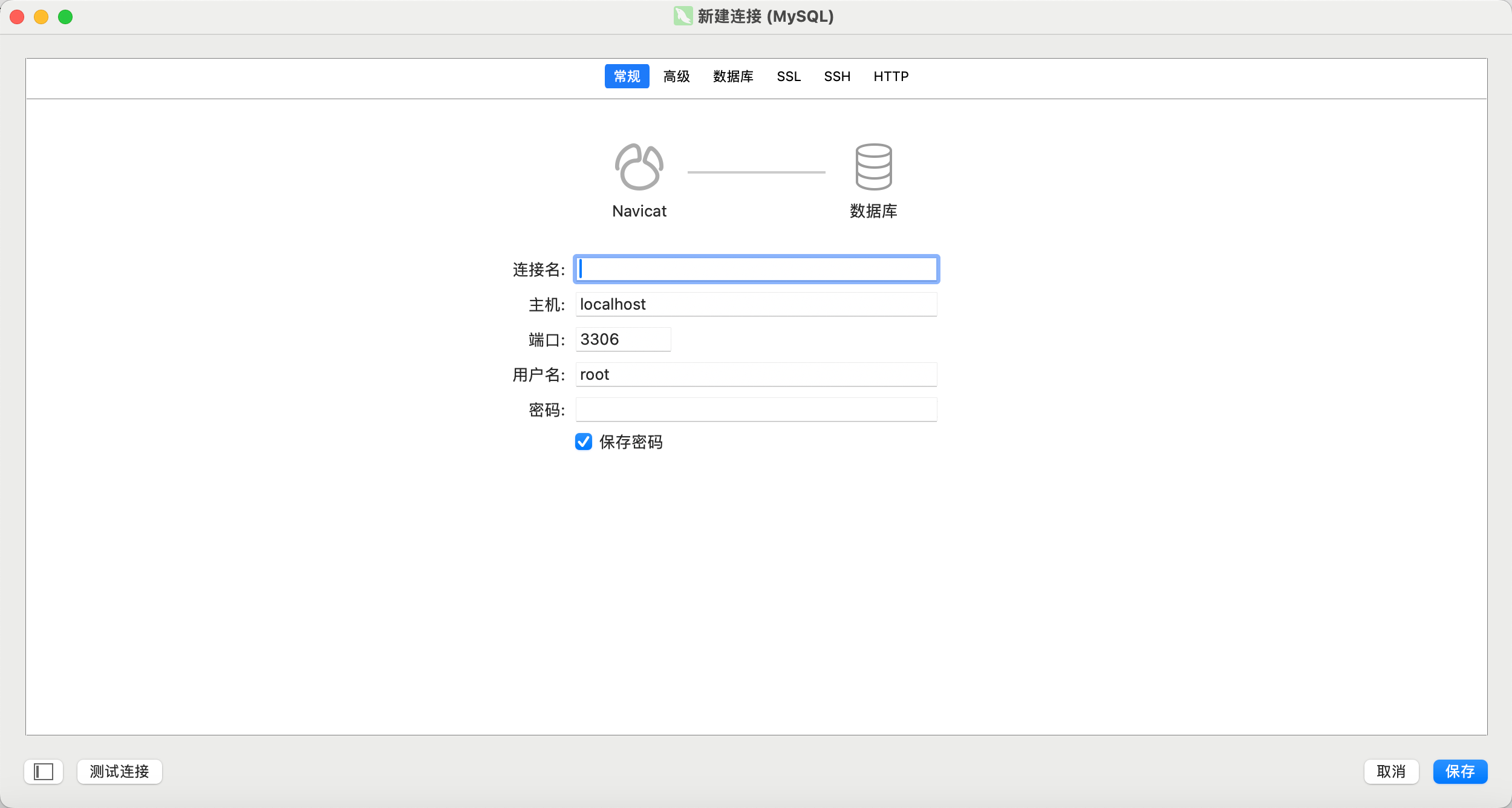
【MySQL 系列】MySQL 起步篇
MySQL 是一个开放源代码的、免费的关系型数据库管理系统。在 Web 开发领域,MySQL 是最流行、使用最广泛的关系数据库。MySql 分为社区版和商业版,社区版完全免费,并且几乎能满足全部的使用场景。由于 MySQL 是开源的,我们还可以根…...

C++的成员初始化列表
C的成员构造函数初始化列表:构造函数中初始化类成员的一种方式,当我们编写一个类并向该类添加成员时,通常需要某种方式对这些成员变量进行初始化。 建议应该在所有地方使用成员初始化列表进行初始化 成员初始化的方法 方法一: …...
为什么TikTok视频0播放?账号权重提高要重视
许多TikTok账号运营者都会遇到一个难题,那就是视频要么播放量很低,要么0播放!不管内容做的多好,最好都是竹篮打水一场空!其实你可能忽略了一个问题,那就是账号权重。下面好好跟大家讲讲这个东西!…...
element---tree树形结构(返回的数据与官方的不一样)
项目中要用到属性结构数据,后端返回的数据不是官方默认的数据结构: <el-tree:data"treeData":filter-node-method"filterNode":props"defaultProps"node-click"handleNodeClick"></el-tree>这是文档…...

Spring Boot工程集成验证码生成与验证功能教程
🌟 前言 欢迎来到我的技术小宇宙!🌌 这里不仅是我记录技术点滴的后花园,也是我分享学习心得和项目经验的乐园。📚 无论你是技术小白还是资深大牛,这里总有一些内容能触动你的好奇心。🔍 &#x…...
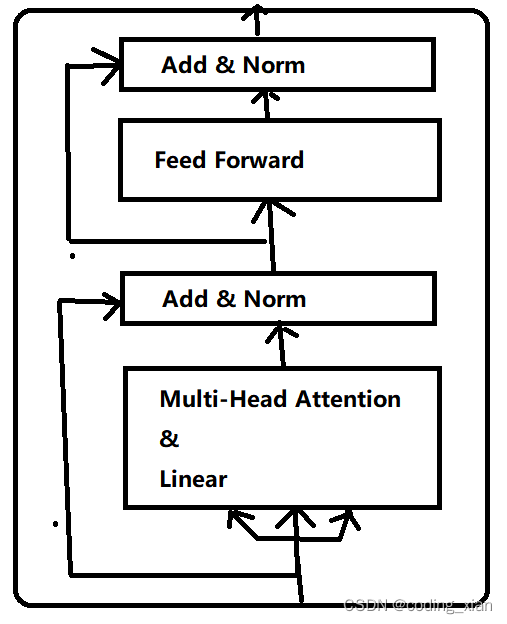
Bert Encoder和Transformer Encoder有什么不同
前言:本篇文章主要从代码实现角度研究 Bert Encoder和Transformer Encoder 有什么不同?应该可以帮助你: 深入了解Bert Encoder 的结构实现深入了解Transformer Encoder的结构实现 本篇文章不涉及对注意力机制实现的代码研究。 注:…...
外汇天眼:频繁交钱却无法出金,只因误入假冒HFM惨成冤大头!
在外汇市场上这么久了,天眼君总结出了一个不争的事实,但凡是不给出金或者以各种理由拒绝出金的平台一定有问题!想必不管是在外汇天眼还是其他地方,大家总是能看到一些外汇交易者投诉自己向平台申请出金需要缴纳各种费用࿰…...

Linux-信号3_sigaction、volatile与SIGCHLD
文章目录 前言一、sigaction__sighandler_t sa_handler;__sigset_t sa_mask; 二、volatile关键字三、SIGCHLD方法一方法二 前言 本章内容主要对之前的内容做一些补充。 一、sigaction #include <signal.h> int sigaction(int signum, const struct sigaction *act,struc…...
STM32 | STM32时钟分析、GPIO分析、寄存器地址查找、LED灯开发(第二天)
STM32 第二天 一、 STM32时钟分析 寄存器:寄存器的功能是存储二进制代码,它是由具有存储功能的触发器组合起来构成的。一个触发器可以存储1位二进制代码,故存放n位二进制代码的寄存器,需用n个触发器来构成 在计算机领域&#x…...
:字符串、列表、字典操作)
Python常用语法汇总(一):字符串、列表、字典操作
1. 字符串处理 print(message.title()) #首字母大写print(message.uper()) #全部大写print(message.lower()) #全部小写full_name "lin" "hai" #合并字符串print("Hello, " full_name.title() "!")print("John Q. %s10s&qu…...

Token的奥秘--一起学习吧之token
Token,在计算机科学中,是一个用于表示数据或一段数据的单位。它通常用于加密、身份验证、令牌化等场景,以确保数据的安全性和完整性。在编程语言中,Token通常是指代一段代码或数据的最小单元,例如一个变量、一个操作符…...

FlinkCDC快速搭建实现数据监控
引入依赖 <project xmlns"http://maven.apache.org/POM/4.0.0" xmlns:xsi"http://www.w3.org/2001/XMLSchema-instance"xsi:schemaLocation"http://maven.apache.org/POM/4.0.0 http://maven.apache.org/xsd/maven-4.0.0.xsd"><modelV…...

应急布控球远程视频监控方案:视频监控平台EasyCVR+4G/5G应急布控球
随着科技的不断发展,应急布控球远程视频监控方案在公共安全、交通管理、城市管理等领域的应用越来越广泛。这种方案通过在现场部署应急布控球,实现对特定区域的实时监控,有助于及时发现问题、快速响应,提高管理效率。 智慧安防视…...

3.6 C语言和汇编语言混合编程 “每日读书”
在一些嵌入式场合,我们经常看到C程序和汇编程序相互调用,混合编程,如在ARM启动代码中,系统上电首先运行的是汇编代码,等初始化好内存堆栈环境之后,才会跳到C程序中执行,对嵌入式软件进行优化时&…...

G-Helper终极指南:如何用免费开源工具完美控制你的华硕游戏本
G-Helper终极指南:如何用免费开源工具完美控制你的华硕游戏本 【免费下载链接】g-helper Lightweight, open-source control tool for ASUS laptops and ROG Ally. Manage performance modes, fans, GPU, battery, and RGB lighting across Zephyrus, Flow, TUF, St…...

解密AI艺术二维码:5步掌握control_v1p_sd15_qrcode_monster实战进阶
解密AI艺术二维码:5步掌握control_v1p_sd15_qrcode_monster实战进阶 【免费下载链接】control_v1p_sd15_qrcode_monster 项目地址: https://ai.gitcode.com/hf_mirrors/monster-labs/control_v1p_sd15_qrcode_monster 你是否曾为传统二维码的单调外观感到遗…...

解锁创意自由:Adobe-GenP工具的7大突破性功能解析
解锁创意自由:Adobe-GenP工具的7大突破性功能解析 【免费下载链接】Adobe-GenP Adobe CC 2019/2020/2021/2022/2023 GenP Universal Patch 3.0 项目地址: https://gitcode.com/gh_mirrors/ad/Adobe-GenP Adobe-GenP作为一款基于AutoIt脚本开发的Adobe CC通用…...

WINDOWS11 + VS2022 下.NET 4.0兼容性问题的终极解决方案
1. 为什么Windows11VS2022需要特殊处理.NET 4.0? 最近在帮团队迁移老项目时,发现一个让人头疼的问题:用VS2022打开十年前基于.NET 4.0的项目时,编译器疯狂报错。明明系统已经装了.NET 4.0运行时,为什么还会出现这种情…...

低配显卡也能玩转Flux.1!实测schnell版文生图效果与性能优化技巧
低配显卡也能玩转Flux.1!实测schnell版文生图效果与性能优化技巧 在AI图像生成领域,硬件门槛一直是许多创意工作者的痛点。当主流模型动辄要求RTX 3090级别的显卡时,那些使用GTX 1660甚至更低配置的用户往往只能望而却步。但Flux.1 schnell版…...

技术奇点移民局:人类文明延续证书申领指南
当测试思维遇见文明延续在软件测试领域,我们日复一日地构建测试用例、执行回归测试、提交缺陷报告,核心目标是为确保软件系统的稳定性、安全性与可持续性。如果将这一专业视角放大至人类文明的尺度,我们所面临的,正是一场空前规模…...

NSSM保姆级教程:除了FRP,你的这些Windows命令行工具也能开机自启
NSSM终极指南:让任意Windows命令行工具化身系统服务 每次重启电脑后手动启动爬虫脚本、数据同步工具或是游戏服务器,是不是已经让你精疲力尽?作为Windows高级用户,我们需要的不仅是简单的开机自启,而是像系统服务一样可…...

PT站一键转载脚本:100+站点支持,彻底告别手动转载烦恼
PT站一键转载脚本:100站点支持,彻底告别手动转载烦恼 【免费下载链接】auto_feed_js PT站一键转载脚本 项目地址: https://gitcode.com/gh_mirrors/au/auto_feed_js PT(Private Tracker)社区的资源分享一直是核心文化&…...

RK3588 Ethernet网络配置与调试实战指南
1. RK3588以太网配置基础入门 第一次拿到RK3588开发板时,很多开发者都会迫不及待地想测试网络功能。作为一款高性能处理器,RK3588通常配备双千兆以太网接口(GMAC0和GMAC1),但在实际使用前需要正确配置才能正常工作。我…...

GHelper:如何用轻量级工具解决华硕笔记本性能控制的三大难题?
GHelper:如何用轻量级工具解决华硕笔记本性能控制的三大难题? 【免费下载链接】g-helper Lightweight, open-source control tool for ASUS laptops and ROG Ally. Manage performance modes, fans, GPU, battery, and RGB lighting across Zephyrus, Fl…...