
C# 登录界面代码
背景
MVVM 是一种软件架构模式,用于创建用户界面。它将用户界面(View)、业务逻辑(ViewModel)和数据模型(Model)分离开来,以提高代码的可维护性和可测试性。
MainWindow 类是 View(视图),负责用户界面的呈现和交互,它是用户直接看到和操作的部分。
LoginVM 类是 ViewModel(视图模型),它充当了 View 和 Model 之间的中介,处理了视图与数据模型之间的交互逻辑,以及用户操作的响应逻辑。
LoginModel 类是 Model(模型),它包含了应用程序的数据和业务逻辑,用于存储和处理用户的身份验证信息。
展示
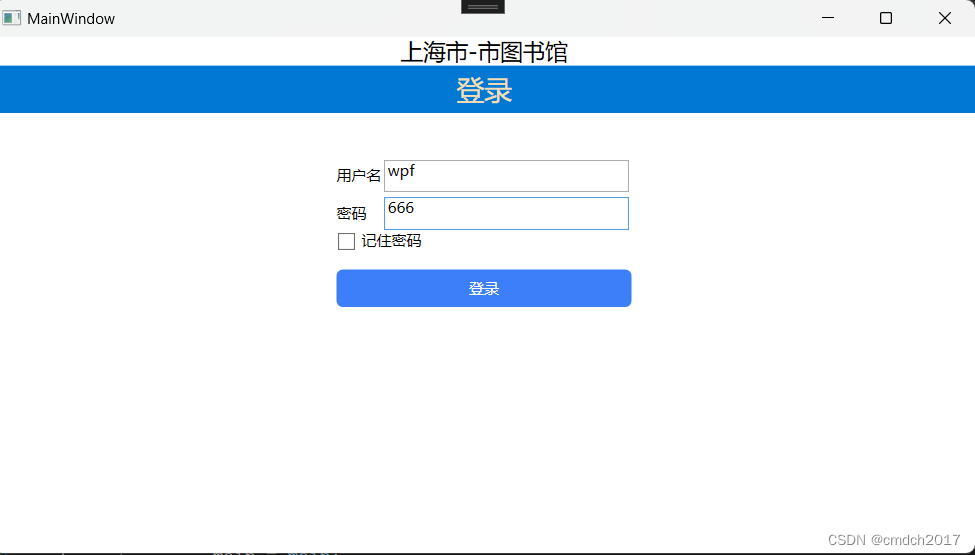
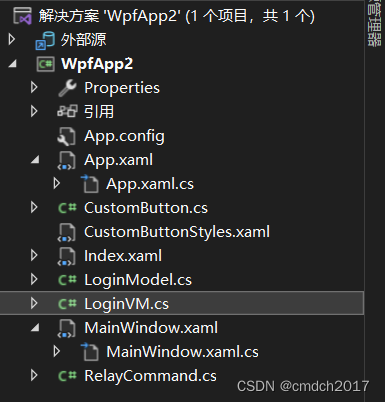
代码
LoginModel.cs
using System;
using System.Collections.Generic;
using System.Linq;
using System.Text;
using System.Threading.Tasks;namespace WpfApp2
{public class LoginModel{private string _UserName;public string UserName{get { return _UserName; }set{_UserName = value;}}private string _Password;public string Password{get { return _Password; }set{_Password = value;}}}
}
LoginVM.cs
using Sys	tem;
using System.Collections.Generic;
using System.ComponentModel;
using System.Linq;
using System.Text;
using System.Threading.Tasks;
using System.Windows;
using System.Windows.Input;namespace WpfApp2
{public class LoginVM : INotifyPropertyChanged{private MainWindow _main;public LoginVM(MainWindow main){_main = main;}public event PropertyChangedEventHandler PropertyChanged;private void RaisePropetyChanged(string propertyName){PropertyChangedEventHandler handler = PropertyChanged;if (handler != null){handler(this, new PropertyChangedEventArgs(propertyName));}}private LoginModel _LoginM = new LoginModel();public string UserName{get { return _LoginM.UserName; }set{_LoginM.UserName = value;RaisePropetyChanged("UserName");}}public string Password{get { return _LoginM.Password; }set{_LoginM.Password = value;RaisePropetyChanged("Password");}}/// <summary>/// 登录方法/// </summary>void Loginfunc(){if (UserName == "wpf" && Password == "666"){MessageBox.Show("OK");Index index = new Index();index.Show();//想办法拿到mainwindow_main.Hide();}else{MessageBox.Show("输入的用户名或密码不正确");UserName = "";Password = "";}}bool CanLoginExecute(){return true;}public ICommand LoginAction{get{return new RelayCommand(Loginfunc,CanLoginExecute);}}}
}
MainWindow.xaml
<Window x:Class="WpfApp2.MainWindow"xmlns="http://schemas.microsoft.com/winfx/2006/xaml/presentation"xmlns:x="http://schemas.microsoft.com/winfx/2006/xaml"xmlns:d="http://schemas.microsoft.com/expression/blend/2008"xmlns:mc="http://schemas.openxmlformats.org/markup-compatibility/2006"xmlns:local="clr-namespace:WpfApp2"mc:Ignorable="d"Title="MainWindow" Height="450" Width="800"><Grid><Grid.RowDefinitions><RowDefinition Height="auto"></RowDefinition><RowDefinition Height="auto"></RowDefinition><RowDefinition Height="1*"></RowDefinition><RowDefinition Height="9*"></RowDefinition></Grid.RowDefinitions><TextBlock Grid.Row="0" Grid.Column="0" Text="上海市-市图书馆" FontSize="18" HorizontalAlignment="Center"></TextBlock><StackPanel Grid.Row="1" Grid.Column="0" Background="#0078d4"><TextBlock Text="登录" FontSize="22" HorizontalAlignment="Center" Foreground="Wheat" Margin="5"></TextBlock>    </StackPanel><Grid Grid.Row="3" ShowGridLines="False" HorizontalAlignment="Center"><Grid.RowDefinitions><RowDefinition Height="30"></RowDefinition><RowDefinition Height="30"></RowDefinition><RowDefinition Height="30"></RowDefinition><RowDefinition Height="30"></RowDefinition></Grid.RowDefinitions><Grid.ColumnDefinitions ><ColumnDefinition Width="auto"></ColumnDefinition><ColumnDefinition Width="200"></ColumnDefinition></Grid.ColumnDefinitions><TextBlock Text="用户名" Grid.Row="0" Grid.Column="0" VerticalAlignment="Center"></TextBlock><TextBox Text="{Binding UserName}"  Grid.Row="0" Grid.Column="1" Margin="2" ></TextBox><TextBlock Text="密码" Grid.Row="1" Grid.Column="0" VerticalAlignment="Center"></TextBlock><TextBox Text="{Binding Password}"  Grid.Row="1" Grid.Column="1" Margin="2"></TextBox><CheckBox Grid.ColumnSpan="2" Content="记住密码" Grid.Row="2"></CheckBox><local:CustomButton ButtonCornerRadius="5" BackgroundHover="Red" BackgroundPressed="Green"  Foreground="#FFFFFF"  Background="#3C7FF8" Grid.Row="3" Grid.Column="0" Grid.ColumnSpan="2" Command="{Binding LoginAction}" Height="30" VerticalAlignment="Top">登录</local:CustomButton></Grid></Grid>
</Window>
MainWindow.xaml.cs
using System;
using System.Collections.Generic;
using System.ComponentModel;
using System.Linq;
using System.Text;
using System.Threading.Tasks;
using System.Windows;
using System.Windows.Controls;
using System.Windows.Data;
using System.Windows.Documents;
using System.Windows.Input;
using System.Windows.Media;
using System.Windows.Media.Imaging;
using System.Windows.Navigation;
using System.Windows.Shapes;namespace WpfApp2
{/// <summary>/// MainWindow.xaml 的交互逻辑/// </summary>public partial class MainWindow : Window{LoginVM loginVM;public MainWindow(){InitializeComponent();loginVM = new LoginVM(this);this.DataContext = loginVM;}}
}
RelayCommand.cs
using System;
using System.Collections.Generic;
using System.Linq;
using System.Text;
using System.Threading.Tasks;
using System.Windows.Input;namespace WpfApp2
{public class RelayCommand : ICommand{/// <summary>/// 命令是否能够执行/// </summary>readonly Func<bool> _canExecute;/// <summary>/// 命令需要执行的方法/// </summary>readonly Action _exexute;public RelayCommand(Action exexute,Func<bool> canExecute){_canExecute = canExecute;_exexute = exexute;}public bool CanExecute(object parameter){if (_canExecute == null){return true;}return _canExecute();}public void Execute(object parameter){_exexute();}public event EventHandler CanExecuteChanged{add {if (_canExecute != null){CommandManager.RequerySuggested += value;}}remove{if (_canExecute != null){CommandManager.RequerySuggested -= value;}}}}
}
自定义按钮CustomButton
App.xaml.cs
<Application x:Class="WpfApp2.App"xmlns="http://schemas.microsoft.com/winfx/2006/xaml/presentation"xmlns:x="http://schemas.microsoft.com/winfx/2006/xaml"xmlns:local="clr-namespace:WpfApp2"StartupUri="MainWindow.xaml"><Application.Resources><ResourceDictionary><ResourceDictionary.MergedDictionaries><ResourceDictionary Source="CustomButtonStyles.xaml"></ResourceDictionary></ResourceDictionary.MergedDictionaries></ResourceDictionary></Application.Resources>
</Application>
CustomButton.cs
using System;
using System.Collections.Generic;
using System.Linq;
using System.Text;
using System.Threading.Tasks;
using System.Windows;
using System.Windows.Controls;
using System.Windows.Media;namespace WpfApp2
{public class CustomButton:Button{//依赖属性public CornerRadius ButtonCornerRadius{get { return (CornerRadius)GetValue(ButtonCornerRadiusProperty); }set { SetValue(ButtonCornerRadiusProperty, value); }}// Using a DependencyProperty as the backing store for ButtonCornerRadius.  This enables animation, styling, binding, etc...public static readonly DependencyProperty ButtonCornerRadiusProperty =DependencyProperty.Register("ButtonCornerRadius", typeof(CornerRadius), typeof(CustomButton));public Brush BackgroundHover{get { return (Brush)GetValue(BackgroundHoverProperty); }set { SetValue(BackgroundHoverProperty, value); }}// Using a DependencyProperty as the backing store for BackgroundHover.  This enables animation, styling, binding, etc...public static readonly DependencyProperty BackgroundHoverProperty =DependencyProperty.Register("BackgroundHover", typeof(Brush), typeof(CustomButton));public Brush BackgroundPressed{get { return (Brush)GetValue(BackgroundPressedProperty); }set { SetValue(BackgroundPressedProperty, value); }}// Using a DependencyProperty as the backing store for BackgroundPressed.  This enables animation, styling, binding, etc...public static readonly DependencyProperty BackgroundPressedProperty =DependencyProperty.Register("BackgroundPressed", typeof(Brush), typeof(CustomButton));}
}
数据字典
CustombuttonStyles.xaml
<ResourceDictionary xmlns="http://schemas.microsoft.com/winfx/2006/xaml/presentation"xmlns:x="http://schemas.microsoft.com/winfx/2006/xaml"xmlns:bb="clr-namespace:WpfApp2"><Style TargetType="{x:Type bb:CustomButton}"><Setter Property="Template"><Setter.Value><ControlTemplate TargetType="{x:Type bb:CustomButton}"><Border x:Name="buttonBorder" Background="{TemplateBinding Background}" CornerRadius="{TemplateBinding ButtonCornerRadius}"><TextBlock Text="{TemplateBinding Content}" HorizontalAlignment="{TemplateBinding HorizontalContentAlignment}" VerticalAlignment="{TemplateBinding VerticalContentAlignment}"></TextBlock></Border><!--触发器--><ControlTemplate.Triggers><Trigger Property="IsMouseOver" Value="True"><Setter TargetName="buttonBorder" Property="Background" Value="{Binding BackgroundHover,RelativeSource={RelativeSource TemplatedParent}}"></Setter></Trigger><Trigger Property="IsPressed" Value="True"><Setter TargetName="buttonBorder" Property="Background" Value="{Binding BackgroundPressed,RelativeSource={RelativeSource TemplatedParent}}"></Setter></Trigger></ControlTemplate.Triggers></ControlTemplate></Setter.Value></Setter></Style>
</ResourceDictionary>
相关文章:
C# 登录界面代码
背景 MVVM 是一种软件架构模式,用于创建用户界面。它将用户界面(View)、业务逻辑(ViewModel)和数据模型(Model)分离开来,以提高代码的可维护性和可测试性。 MainWindow 类是 View&a…...

点云的Python均值采样
一、代码 Python import numpy as np import open3d as o3ddef mean_sampling(point_cloud, num_samples=None, depth=None, method=knn, k=10):"""对点云进行均值下采样。:param point_cloud: Open3D PointCloud对象:param num_samples: (仅当method=knn时使…...

xss-labs 11-13通关记录
前言 最近复习xss知识,整理一下xss的绕过思路。 level11 观察测试: 1.四个隐藏参数标签 2.全部get传参一遍发现t_sort可赋值,使用的是get传参 3.针对t_sort测试过滤的字符 t_sort< > & ; " 检测到他除了<>,别的全部过滤。 因为…...
Unity类银河恶魔城学习记录12-2 p124 Character Stats UI源代码
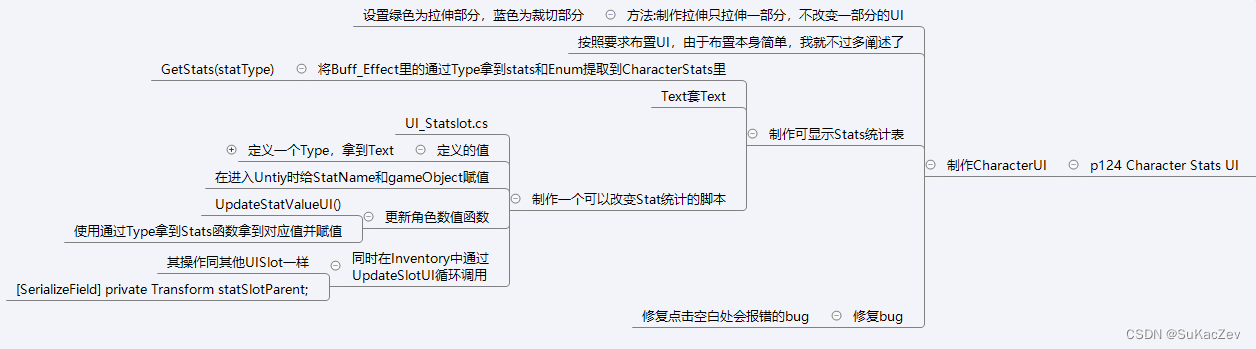
Alex教程每一P的教程原代码加上我自己的理解初步理解写的注释,可供学习Alex教程的人参考 此代码仅为较上一P有所改变的代码 【Unity教程】从0编程制作类银河恶魔城游戏_哔哩哔哩_bilibili UI_Statslot.cs using System.Collections; using System.Collections.Gen…...
技术揭秘:如何打造完美互动的充电桩硬件与服务平台?
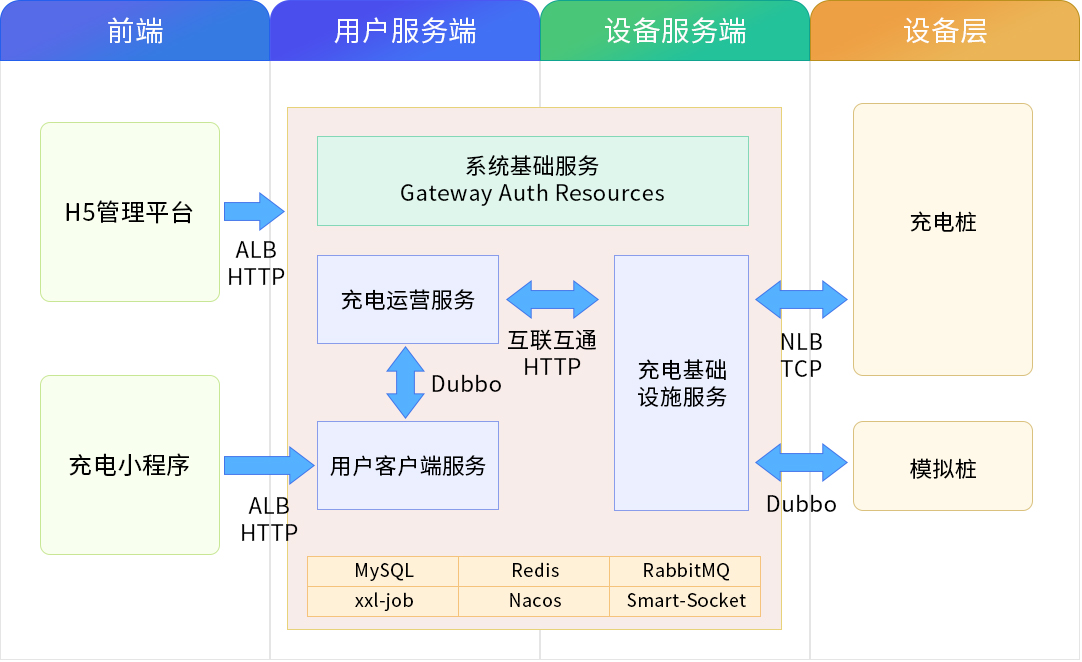
充电桩平台全套源码地址 https://gitee.com/chouleng/cdzkjjh.git 这张图像是一个系统或服务的架构图。以下是对图中各个部分的描述: 前端: 位于图像的顶部,颜色为浅绿色。用户服务端: 紧邻前端,颜色为淡黄色。设备服…...

【Django学习笔记(四)】JavaScript 语言介绍
JavaScript 语言介绍 前言正文1、JavaScript 小案例2、代码位置2.1 在当前 HTML 文件中2.2 在其他 js 文件中 3、代码注释3.1 HTML的注释3.2 CSS的注释3.3 Javascript的注释 4、变量 & 输出4.1 字符串4.2 数组4.3 对象(python里的字典) 5、条件语句6、函数7、DOM7.1 根据 I…...

IO和NIO的主要区别在哪里?
Java 中的 IO(输入/输出)和 NIO(新输入/输出)都是处理输入和输出操作的方式,它们的主要区别在于如何处理数据的读写。 阻塞与非阻塞: IO是阻塞的,这意味着当一个线程调用read()或write()时,该线…...

爬虫部署平台crawlab使用说明
Crawlab 是一个基于 Go 语言的分布式网络爬虫管理平台,它支持 Python、Node.js、Jar、EXE 等多种类型的爬虫。 Crawlab 提供了一个可视化的界面,并且可以通过简单的配置来管理和监控爬虫程序。 以下是 Crawlab 的一些主要优点: 集中管理&am…...
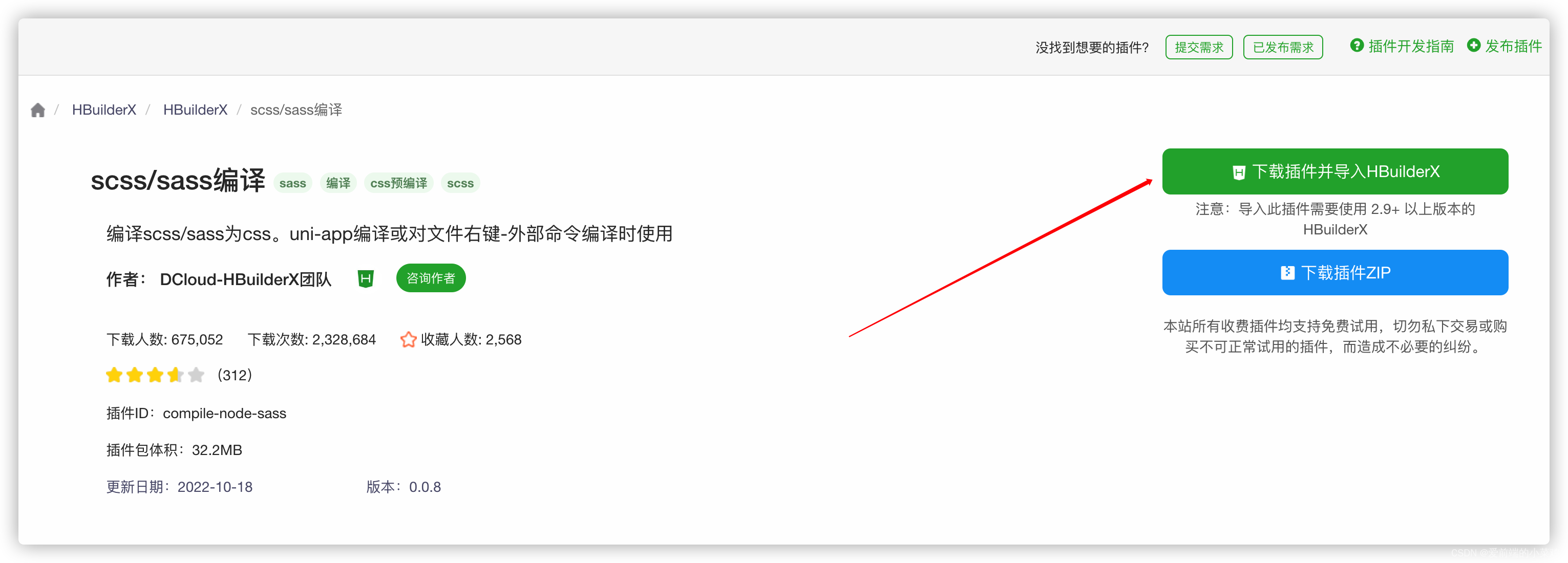
uniapp uni.scss中使用@mixin混入,在文件引入@include 样式不生效 Error: Undefined mixin.(踩坑记录一)
问题: 在uni.scss文件定义mixin 2. 在vue文件引入: 3. 出现报错信息: 4. 问题思考: 是不是需要引入uni.scss ? 答案不需要 uni.scss是一个特殊文件,在代码中无需 import 这个文件即可在scss代码中使用这里的样式变量。uni-app的…...

Redis的5大常见数据类型的用法
上一篇文章我们讲了Redis的10大应用场景,这一篇文章就针对Redis的常用数据结构进行一个说明,通过示例的形式演示每一种数据结构如何使用。 当涉及Redis的数据操作时,不同数据类型对应的不同数据结构,如下就对5大常用的数据类型进行…...
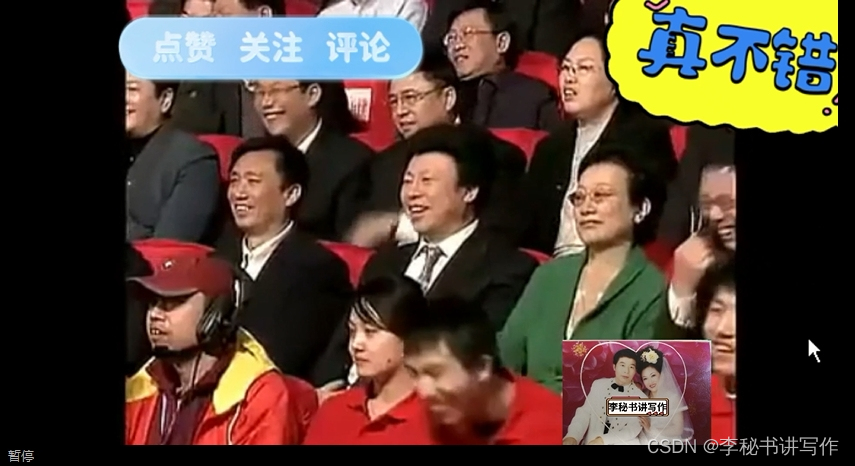
刘小光本就疑心赵本山与他媳妇李琳有染,赵本山为证实清白便想起蛋糕上的字,结果呢?
刘小光本就疑心赵本山与他媳妇李琳有染,赵本山为证实清白便想起蛋糕上的字,结果呢? ——小品《生日快乐》(中5)的台词 (接上) 赵本山:噢!对对!那谁,老四,是…...
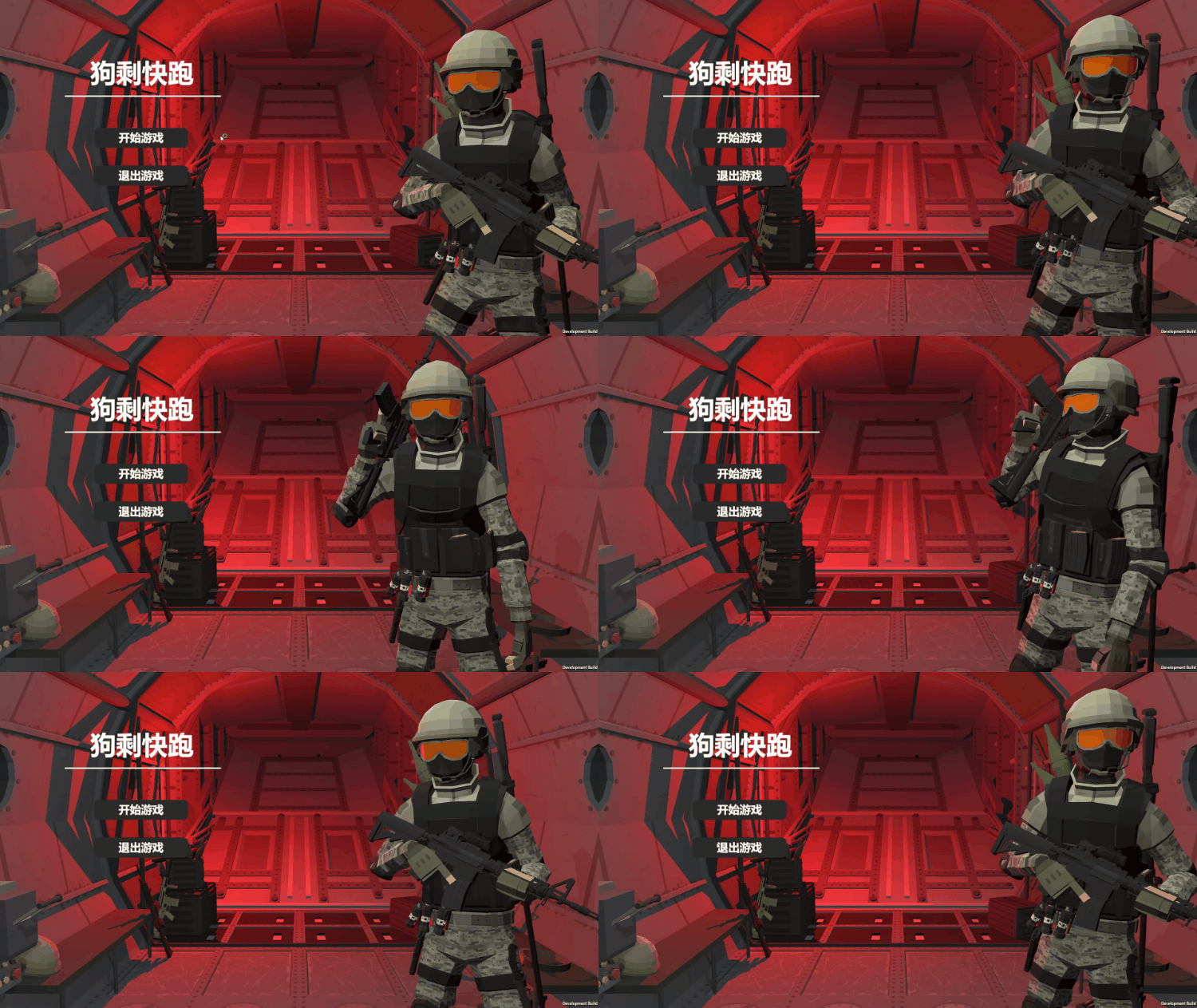
Unity之PUN实现多人联机射击游戏的优化(Section 2)
目录 🎮一、准备工作 🎮二、实现手雷投掷动作 🎮三、手雷投掷同步 💤3.1 photonView.RPC 🎮四、同步手雷伤害 这几周都给我布置任务了,最近可忙。现在终于有机会更新了,也谢谢大家的阅读&a…...
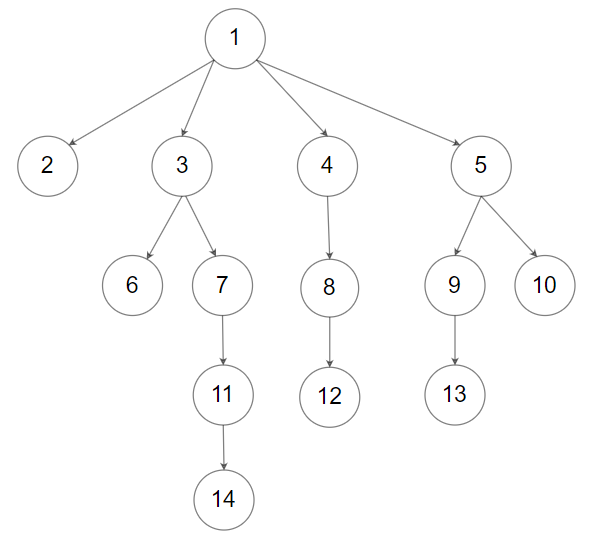
多叉树题目:N 叉树的层序遍历
文章目录 题目标题和出处难度题目描述要求示例数据范围 解法思路和算法代码复杂度分析 题目 标题和出处 标题:N 叉树的层序遍历 出处:429. N 叉树的层序遍历 难度 4 级 题目描述 要求 给定一个 N 叉树的根结点 root \texttt{root} root…...

时序数据库IoTDB:功能详解与行业应用
一文读懂时序数据库 IoTDB。 01 为什么需要时序数据库 解释时序数据库前,先了解一下何谓时序数据。 时序数据,也称为时间序列数据,是指按时间顺序记录的同一统计指标的数据集合。这类数据的来源主要是能源、工程、交通等工业物联网强关联行业…...
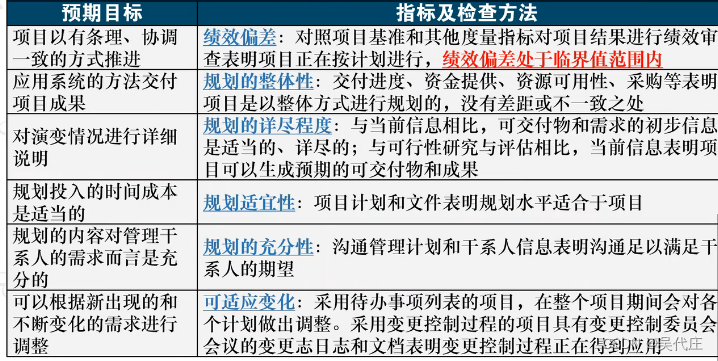
信息系统项目管理师——第18章项目绩效域管理(一)
本章节内容属于第四版新增知识,为PMBOK第七版专有,选择、案例、论文都会考,属于比较重要的章节。 选择题,稳定考3分左右,新教材基本考课本原话,需要多读课本,多刷题。 案例题,考的概…...
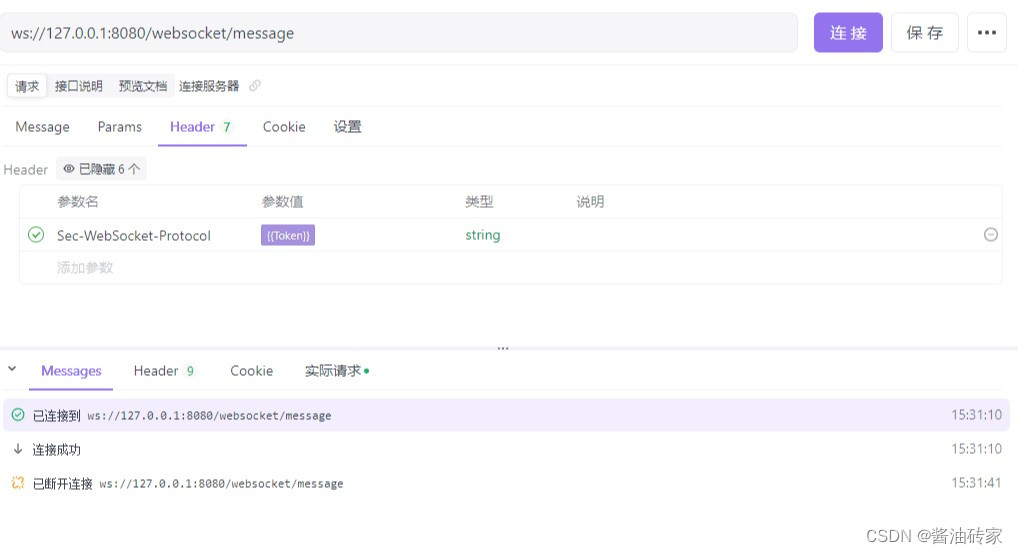
WebSocket用户验证
在WebSocket中,如何携带用户的验证信息 一、在OnMessage中进行验证 客户端在连接到服务器后,客户端通过发送消息,服务器端在OnMessage方法中,进行信息验证,这种方式需要将用户身份验证及接收用户消息进行混合处理&am…...
的优缺点有哪些?)
NOSQL(非关系型数据库)的优缺点有哪些?
优点: 高度灵活且可扩展:NoSQL数据库不受固定数据模型的限制,可以根据应用需求灵活设计数据结构,轻松应对大规模数据集。此外,它支持分布式架构,具有出色的水平扩展能力,能够高效地处理大量数据…...

个人推荐Redis比较好的一种使用规范
随着对个人项目的不断开发、迭代和重构,博主在这个过程中总结出了一套使用redis的较好的规范。主要包含Redis的key命名规范和Redis代码规范。 主要内容 主要包含以下几个内容: 同一应用的key在最前面添加统一的前缀,如应用名; 案…...
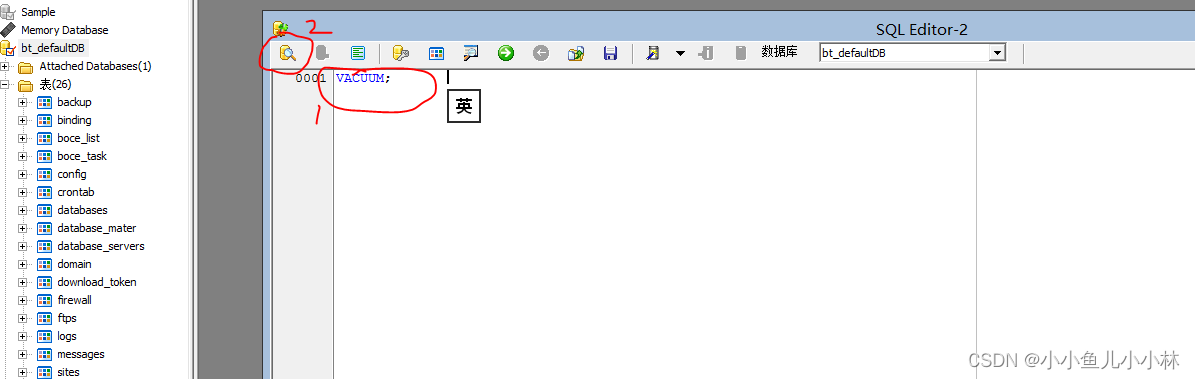
【教程】宝塔default.db占用空间几十g解决方法|宝塔占用磁盘空间特别大解决方法|宝塔磁盘被占满怎么清理
目录 一、前言二、排查问题三、解决方法 一、前言 用过宝塔创建网站,大家应该都非常熟悉,但是用随着用的时间越来越多,宝塔所占用的空间也越来越多,不停的加大数据盘都没有用,我原先买了30G够用了,随着时间…...

Unity类银河恶魔城学习记录11-15 p117 Ice and Fire item Effect源代码
Alex教程每一P的教程原代码加上我自己的理解初步理解写的注释,可供学习Alex教程的人参考 此代码仅为较上一P有所改变的代码 【Unity教程】从0编程制作类银河恶魔城游戏_哔哩哔哩_bilibili IceAndFire_Controller.cs using System.Collections; using System.Coll…...

Fuzzz靶场学习笔记
前言正文1、端口扫描2、安卓端口反向代理3、目录遍历获取RSA密钥4、用户提权前言 本文介绍了Kali Linux的基本使用技巧和nmap常见命令,重点演示了端口扫描、安卓设备反向代理和权限提升过程。通过nmap扫描发现安卓设备5555端口开放,使用adb工具连接后&a…...

K8s网络插件Flannel与Calico:从原理到实战的选型与部署指南
1. Kubernetes网络插件基础认知 刚接触Kubernetes时,最让我头疼的就是容器网络问题。为什么Pod之间需要通信?为什么有的服务跨节点就访问不了?这些问题的答案都藏在CNI(Container Network Interface)插件里。Flannel和…...

CANN/ops-nn二元交叉熵损失算子
aclnnBinaryCrossEntropyWithLogits 【免费下载链接】ops-nn 本项目是CANN提供的神经网络类计算算子库,实现网络在NPU上加速计算。 项目地址: https://gitcode.com/cann/ops-nn 📄 查看源码 产品支持情况 产品是否支持Ascend 950PR/Ascend 950D…...

AI助手状态可视化:像素风办公室看板的设计、部署与集成指南
1. 项目概述:一个像素风的AI办公室看板如果你和我一样,日常工作中重度依赖AI助手,比如OpenClaw,那你可能也遇到过这样的困惑:当AI在后台默默执行一个长任务时,你完全不知道它进行到哪一步了。是卡住了&…...

构建可信AI系统:从黑箱到透明决策的工程实践
1. 项目概述:当AI开始“思考”自己是谁最近和几个做AI安全的朋友聊天,大家不约而同地提到了一个越来越棘手的问题:我们怎么知道一个AI系统在“想”什么?或者说,我们怎么判断它给出的答案、做出的决策,是“可…...

SITS2026正式生效倒计时47天:你的AIAgent容错设计还停留在“try-catch”阶段?
更多请点击: https://intelliparadigm.com 第一章:SITS2026标准核心要义与AIAgent容错设计范式跃迁 SITS2026(Software Intelligence Trust & Safety Standard 2026)首次将“可验证容错边界”(Verifiable Fault T…...

CSS 渐变高级技巧完全指南
CSS 渐变高级技巧完全指南 引言 CSS 渐变是现代 Web 设计中不可或缺的视觉效果,它可以创建平滑的颜色过渡,为网页增添丰富的视觉层次。本文将深入探讨 CSS 渐变的各种类型和高级技巧。 基础语法回顾 线性渐变 .linear-gradient {background: linear-grad…...

基于储能系统参与电网一次调频的下垂控制仿真示例
目录 手把手教你学Simulink——基于储能系统参与电网一次调频的下垂控制仿真示例 一、 引言:当“新能源浪潮”遇见“频率崩塌”——储能如何化身电网的“速效救心丸”? 二、 问题本质:一次调频的“核心挑战”与“协同逻辑” 1. 核心挑战 …...

网盘直链下载助手:一键获取九大网盘真实下载链接的终极指南
网盘直链下载助手:一键获取九大网盘真实下载链接的终极指南 【免费下载链接】Online-disk-direct-link-download-assistant 一个基于 JavaScript 的网盘文件下载地址获取工具。基于【网盘直链下载助手】修改 ,支持 百度网盘 / 阿里云盘 / 中国移动云盘 /…...

利用Taotoken的OpenAI兼容协议快速迁移现有Node点js应用
🚀 告别海外账号与网络限制!稳定直连全球优质大模型,限时半价接入中。 👉 点击领取海量免费额度 利用Taotoken的OpenAI兼容协议快速迁移现有Node.js应用 对于已经基于OpenAI官方Node.js SDK构建了应用或服务的团队,当…...