
ansible组件介绍和简单playbook测试
一、ansible inventory
在大规模的配置管理工作中,管理不同业务的机器,机器的信息都存放在ansible的inventory组件里面。在工作中,配置部署针对的主机必须先存放在Inventory里面,然后ansible才能对它进行操作。默认的Ansible的inventory是一个静态的INI格式的文件/etc/ansible/hosts。可以通过ANSIBLE_HOSTS环境变量指定或运行ansible和ansible-playbook的时候用-i参数临时设置。
1.定义主机和主机组
2.多个Inventory列表
修改配置文件:/etc/ansible/ansible.cfg
[root@hadoop1010 inventory]# ll
total 12
-rw-r--r-- 1 root root 93 Mar  7 18:46 docker
-rw-r--r-- 1 root root 93 Mar  7 19:36 hadoop
-rw-r--r-- 1 root root 67 Mar  7 19:29 hosts
[root@hadoop1010 inventory]# vim /etc/ansible/ansible.cfg # config file for ansible -- https://ansible.com/
# ===============================================# nearly all parameters can be overridden in ansible-playbook
# or with command line flags. ansible will read ANSIBLE_CONFIG,
# ansible.cfg in the current working directory, .ansible.cfg in
# the home directory or /etc/ansible/ansible.cfg, whichever it
# finds first[defaults]# some basic default values...inventory      = /etc/ansible/hosts,/root/ansible/inventory/hosts,/root/ansible/inventory/docker,/root/ansible/inventory/hadoop[root@hadoop1010 inventory]# cat hadoop
[hadoop]
192.168.10.1[0:2]
[hadoop_vars]
ansible_ssh_pass='123456'
[ansible:children]
hadoop
[root@hadoop1010 inventory]# cat docker
[docker]
192.168.10.1[1:2]
[docker_vars]
ansible_ssh_pass='123456'
[ansible:children]
docker
[root@hadoop1010 inventory]# ansible hadoop -m ping -o
192.168.10.11 | SUCCESS => {"changed": false, "ping": "pong"}
192.168.10.10 | SUCCESS => {"changed": false, "ping": "pong"}
192.168.10.12 | SUCCESS => {"changed": false, "ping": "pong"}
[root@hadoop1010 inventory]# ansible docker -m ping -o
192.168.10.12 | SUCCESS => {"changed": false, "ping": "pong"}
192.168.10.11 | SUCCESS => {"changed": false, "ping": "pong"}
其实ansible中的多个inventory跟单个文件的区别不是很大,采用多个inventory的好处是可以吧不同环境的主机或不同业务的主机放在不同的Inventory文件里面,方便日常维护。
3. 动态Inventory
在生产工作中会有大量的主机列表。若手动维护这些列表是一件麻烦的事情。ansible还支持动态的Inventory,动态Inventory就是ansible所有的Inventory文件里面的主机列表信息和变量信息都支持从外部拉取。比如,从zabbix监控系统或是cmdb系统拉取所有的主机信息,然后用ansible进行管理。这样更方便地将Ansible与其他运维系统结合起来。
#!/usr/bin/env python3
# -*- coding:utf-8 -*-
import argparse
import sys
import jsondef lists():r = {}host = ['192.168.10.1' + str(i) for i in range(0, 2)]hosts = {'hosts': host}r['docker'] = hostsreturn json.dumps(r, indent=3)def hosts(name):r = {'ansible_ssh_pass': '123456'}cpis = dict(r.items())return json.dumps(cpis)if __name__ == '__main__':parser = argparse.ArgumentParser()parser.add_argument('-l', '--list', help='hosts list', action='store_true')parser.add_argument('-H', '--host', help='hosts vars')args = vars(parser.parse_args())if args['list']:print(lists())elif args['host']:print(hosts(args['host']))else:parser.print_help()
动态inventory测试:
root@hadoop1010 inventory]# ll
total 16
-rw-r--r-- 1 root root  93 Mar  7 18:46 docker
-rw-r--r-- 1 root root  93 Mar  7  2023 hadoop
-rw-r--r-- 1 root root  81 Mar  7  2023 hosts
-rwxr-xr-x 1 root root 749 Mar  7  2023 hosts.py
[root@hadoop1010 inventory]# ansible -i hosts.py docker -m ping -o
192.168.10.11 | SUCCESS => {"changed": false, "ping": "pong"}
192.168.10.10 | SUCCESS => {"changed": false, "ping": "pong"}
[root@hadoop1010 inventory]#
Inventory 常用内置参数
ansible_ssh_host: 定义host ssh地址 ansible_ssh_host=192.168.10.10
ansible_ssh_port: 定义hots ssh端口 snsible_ssh_port=5000
ansible_ssh_user: 定义hosts ssh 认证用户 ansible_ssh_user=machine
ansible_ssh_pass: 定义hosts ssh认证密码 ansible_ssh_pass=‘123456’
ansible_duso: 定义hosts sudo的用户 ansible_sudo=machine
ansible_sdo_pass: 定义hosts sudo密码 ansible_sudo_pass=‘123456’
ansible_sudo_exe: 定义hosts duso 路径 ansible_sudo_exe=/usr/bin/sudo密码
ansible_ssh_private_key_file: 定义hosts私钥 ansible_ssh_private_key_file=/root/key
ansible_shell_type: 定义hosts shell类型 ansible_shell_type=bash
ansible_python_interpreter: 定义hosts任务执行python的路径 ansible_python_interpreter=/usr/bin/python2.6
ansible_interpreter: 定义hosts其他语言解析器路径 ansible_interpreter=/usr/bin/ruby
二、ansible Ad-Hoc命令
我们通常会用命令行地形式使用ansible模块,ansible自带很多模块,可以直接使用这些模块,目前Ansible已经自带了259多个模块,使用: ansible-doc -l 查看这些模块。
- 执行命令
ansible命令都是并发执行地,我们可以针对目标主机执行任何命令。默认地并发数目由ansible.cfg中地forks值来控制。也可以在运行ansible命令时通过-f指定并发数。若碰到执行任务时间很长地时间,也可以使用ansible地异步执行功能来执行。
简单测试命令:
[root@hadoop1010 inventory]# echo `date`;ansible docker  -m shell -a "sleep 3s;hostname" -f 1;echo `date`
Tue Mar 7 23:54:37 CST 2023
192.168.10.10 | SUCCESS | rc=0 >>
hadoop1010192.168.10.11 | SUCCESS | rc=0 >>
hadoop1011192.168.10.12 | SUCCESS | rc=0 >>
hadoop1012Tue Mar 7 23:54:48 CST 2023
[root@hadoop1010 inventory]# echo `date`;ansible docker  -m shell -a "sleep 3s;hostname" -f 10;echo `date`
Tue Mar 7 23:54:53 CST 2023
192.168.10.12 | SUCCESS | rc=0 >>
hadoop1012192.168.10.10 | SUCCESS | rc=0 >>
hadoop1010192.168.10.11 | SUCCESS | rc=0 >>
hadoop1011Tue Mar 7 23:54:57 CST 2023
[root@hadoop1010 inventory]# echo `date`;ansible docker  -m shell -a "sleep 3s;hostname" -f 100;echo `date`
Tue Mar 7 23:55:10 CST 2023
192.168.10.12 | SUCCESS | rc=0 >>
hadoop1012192.168.10.11 | SUCCESS | rc=0 >>
hadoop1011192.168.10.10 | SUCCESS | rc=0 >>
hadoop1010Tue Mar 7 23:55:15 CST 2023
测试发现加了并行度-f,执行效率提高了很多。
- 复制文件:
[root@hadoop1010 inventory]# ansible hadoop -m copy -a "src=/etc/crontab dest=/etc/crontab"
192.168.10.12 | SUCCESS => {"changed": false, "checksum": "0759951e48189cfb96720fe249675fb44ace16be", "gid": 0, "group": "root", "mode": "0644", "owner": "root", "path": "/etc/crontab", "size": 480, "state": "file", "uid": 0
}
192.168.10.10 | SUCCESS => {"changed": false, "checksum": "0759951e48189cfb96720fe249675fb44ace16be", "gid": 0, "group": "root", "mode": "0644", "owner": "root", "path": "/etc/crontab", "size": 480, "state": "file", "uid": 0
}- 包和服务管理
简单测试用例:
[root@hadoop1010 inventory]# ansible hadoop -m yum -a 'name=httpd state=latest' -f 100 -o192.168.10.10 | SUCCESS => {"changed": true, "msg": "", "rc": 0, "results": ["Loaded plugins: fastestmirror, langpacks\nLoading mirror speeds from cached hostfile\nResolving Dependencies\n--> R
unning transaction check\n---> Package httpd.x86_64 0:2.4.6-67.el7.centos will be updated\n--> Processing Dependency: httpd = 2.4.6-67.el7.centos for package: mod_session-2.4.6-67.el7.centos.x86_64\n---> Package httpd.x86_64 0:2.4.6-98.el7.centos.6 will be an update\n--> Processing Dependency: httpd-tools = 2.4.6-98.el7.centos.6 for package: httpd-2.4.6-98.el7.centos.6.x86_64\n--> Running transaction check\n---> Package httpd-tools.x86_64 0:2.4.6-67.el7.centos will be updated\n---> Package httpd-tools.x86_64 0:2.4.6-98.el7.centos.6 will be an update\n---> Package mod_session.x86_64 0:2.4.6-67.el7.centos will be updated\n---> Package mod_session.x86_64 0:2.4.6-98.el7.centos.6 will be an update\n--> Processing Dependency: apr-util-openssl for package: mod_session-2.4.6-98.el7.centos.6.x86_64\n--> Running transaction check\n---> Package apr-util-openssl.x86_64 0:1.5.2-6.el7 will be installed\n--> Finished Dependency Resolution\n\nDependencies Resolved\n\n================================================================================\n Package              Arch       Version                      Repository   Size\n================================================================================\nUpdating:\n httpd                x86_64     2.4.6-98.el7.centos.6        updates     2.7 M\nInstalling for dependencies:\n apr-util-openssl     x86_64     1.5.2-6.el7                  os           20 k\nUpdating for dependencies:\n httpd-tools          x86_64     2.4.6-98.el7.centos.6        updates      94 k\n mod_session          x86_64     2.4.6-98.el7.centos.6        updates      64 k\n\nTransaction Summary\n================================================================================\nInstall             ( 1 Dependent package)\nUpgrade  1 Package  (+2 Dependent packages)\n\nTotal download size: 2.9 M\nDownloading packages:\nDelta RPMs disabled because /usr/bin/applydeltarpm not installed.\n--------------------------------------------------------------------------------\nTotal                                              1.5 MB/s | 2.9 MB  00:01     \nRunning transaction check\nRunning transaction test\nTransaction test succeeded\nRunning transaction\n  Updating   : httpd-tools-2.4.6-98.el7.centos.6.x86_64                     1/7 \n  Updating   : httpd-2.4.6-98.el7.centos.6.x86_64                           2/7 \n  Installing : apr-util-openssl-1.5.2-6.el7.x86_64                          3/7 \n  Updating   : mod_session-2.4.6-98.el7.centos.6.x86_64                     4/7 \n  Cleanup    : mod_session-2.4.6-67.el7.centos.x86_64                       5/7 \n  Cleanup    : httpd-2.4.6-67.el7.centos.x86_64                             6/7 \n  Cleanup    : httpd-tools-2.4.6-67.el7.centos.x86_64                       7/7 \n  Verifying  : httpd-2.4.6-98.el7.centos.6.x86_64                           1/7 \n  Verifying  : mod_session-2.4.6-98.el7.centos.6.x86_64                     2/7 \n  Verifying  : apr-util-openssl-1.5.2-6.el7.x86_64                          3/7 \n  Verifying  : httpd-tools-2.4.6-98.el7.centos.6.x86_64                     4/7 \n  Verifying  : mod_session-2.4.6-67.el7.centos.x86_64                       5/7 \n  Verifying  : httpd-2.4.6-67.el7.centos.x86_64                             6/7 \n  Verifying  : httpd-tools-2.4.6-67.el7.centos.x86_64                       7/7 \n\nDependency Installed:\n  apr-util-openssl.x86_64 0:1.5.2-6.el7                                         \n\nUpdated:\n  httpd.x86_64 0:2.4.6-98.el7.centos.6                                          \n\nDependency Updated:\n  httpd-tools.x86_64 0:2.4.6-98.el7.centos.6                                    \n  mod_session.x86_64 0:2.4.6-98.el7.centos.6                                    \n\nComplete!\n"]}
192.168.10.11 | SUCCESS => {"changed": true, "msg": "", "rc": 0, "results": ["Loaded plugins: fastestmirror, langpacks\nLoading mirror speeds from cached hostfile\nResolving Dependencies\n--> R
unning transaction check\n---> Package httpd.x86_64 0:2.4.6-67.el7.centos will be updated\n--> Processing Dependency: httpd = 2.4.6-67.el7.centos for package: mod_session-2.4.6-67.el7.centos.x86_64\n---> Package httpd.x86_64 0:2.4.6-98.el7.centos.6 will be an update\n--> Processing Dependency: httpd-tools = 2.4.6-98.el7.centos.6 for package: httpd-2.4.6-98.el7.centos.6.x86_64\n--> Running transaction check\n---> Package httpd-tools.x86_64 0:2.4.6-67.el7.centos will be updated\n---> Package httpd-tools.x86_64 0:2.4.6-98.el7.centos.6 will be an update\n---> Package mod_session.x86_64 0:2.4.6-67.el7.centos will be updated\n---> Package mod_session.x86_64 0:2.4.6-98.el7.centos.6 will be an update\n--> Processing Dependency: apr-util-openssl for package: mod_session-2.4.6-98.el7.centos.6.x86_64\n--> Running transaction check\n---> Package apr-util-openssl.x86_64 0:1.5.2-6.el7 will be installed\n--> Finished Dependency Resolution\n\nDependencies Resolved\n\n================================================================================\n Package              Arch       Version                      Repository   Size\n================================================================================\nUpdating:\n httpd                x86_64     2.4.6-98.el7.centos.6        updates     2.7 M\nInstalling for dependencies:\n apr-util-openssl     x86_64     1.5.2-6.el7                  os           20 k\nUpdating for dependencies:\n httpd-tools          x86_64     2.4.6-98.el7.centos.6        updates      94 k\n mod_session          x86_64     2.4.6-98.el7.centos.6        updates      64 k\n\nTransaction Summary\n================================================================================\nInstall             ( 1 Dependent package)\nUpgrade  1 Package  (+2 Dependent packages)\n\nTotal download size: 2.9 M\nDownloading packages:\nDelta RPMs disabled because /usr/bin/applydeltarpm not installed.\n--------------------------------------------------------------------------------\nTotal                                              4.1 MB/s | 2.9 MB  00:00     \nRunning transaction check\nRunning transaction test\nTransaction test succeeded\nRunning transaction\n  Updating   : httpd-tools-2.4.6-98.el7.centos.6.x86_64                     1/7 \n  Updating   : httpd-2.4.6-98.el7.centos.6.x86_64                           2/7 \n  Installing : apr-util-openssl-1.5.2-6.el7.x86_64                          3/7 \n  Updating   : mod_session-2.4.6-98.el7.centos.6.x86_64                     4/7 \n  Cleanup    : mod_session-2.4.6-67.el7.centos.x86_64                       5/7 \n  Cleanup    : httpd-2.4.6-67.el7.centos.x86_64                             6/7 \n  Cleanup    : httpd-tools-2.4.6-67.el7.centos.x86_64                       7/7 \n  Verifying  : httpd-2.4.6-98.el7.centos.6.x86_64                           1/7 \n  Verifying  : mod_session-2.4.6-98.el7.centos.6.x86_64                     2/7 \n  Verifying  : apr-util-openssl-1.5.2-6.el7.x86_64                          3/7 \n  Verifying  : httpd-tools-2.4.6-98.el7.centos.6.x86_64                     4/7 \n  Verifying  : mod_session-2.4.6-67.el7.centos.x86_64                       5/7 \n  Verifying  : httpd-2.4.6-67.el7.centos.x86_64                             6/7 \n  Verifying  : httpd-tools-2.4.6-67.el7.centos.x86_64                       7/7 \n\nDependency Installed:\n  apr-util-openssl.x86_64 0:1.5.2-6.el7                                         \n\nUpdated:\n  httpd.x86_64 0:2.4.6-98.el7.centos.6                                          \n\nDependency Updated:\n  httpd-tools.x86_64 0:2.4.6-98.el7.centos.6                                    \n  mod_session.x86_64 0:2.4.6-98.el7.centos.6                                    \n\nComplete!\n"]}[root@hadoop1010 inventory]# ansible hadoop -m shell -a "netstat -tpln|grep httpd"
192.168.10.11 | SUCCESS | rc=0 >>
tcp        0      0 0.0.0.0:80              0.0.0.0:*               LISTEN      18242/httpd
tcp        0      0 0.0.0.0:8443            0.0.0.0:*               LISTEN      18242/httpd         192.168.10.12 | SUCCESS | rc=0 >>
tcp        0      0 0.0.0.0:80              0.0.0.0:*               LISTEN      18183/httpd
tcp        0      0 0.0.0.0:8443            0.0.0.0:*               LISTEN      18183/httpd         192.168.10.10 | SUCCESS | rc=0 >>
tcp        0      0 0.0.0.0:80              0.0.0.0:*               LISTEN      11663/httpd
tcp        0      0 0.0.0.0:8443            0.0.0.0:*               LISTEN      11663/httpd         [root@hadoop1010 inventory]# ansible hadoop -m service -a 'name=httpd state=stopped' -f 100 -o
192.168.10.10 | SUCCESS => {"changed": true, "name": "httpd", "state": "stopped", "status": {"ActiveEnterTimestamp": "Tue 2023-03-07 16:04:45 CST", "ActiveEnterTimestampMonotonic": "2526690314"
, "ActiveExitTimestampMonotonic": "0", "ActiveState": "active", "After": "-.mount systemd-journald.socket remote-fs.target network.target nss-lookup.target tmp.mount system.slice basic.target", "AllowIsolate": "no", "AmbientCapabilities": "0", "AssertResult": "yes", "AssertTimestamp": "Tue 2023-03-07 16:04:44 CST", "AssertTimestampMonotonic": "2526408337", "Before": "shutdown.target", "BlockIOAccounting": "no", "BlockIOWeight": "18446744073709551615", "CPUAccounting": "no", "CPUQuotaPerSecUSec": "infinity", "CPUSchedulingPolicy": "0", "CPUSchedulingPriority": "0", "CPUSchedulingResetOnFork": "no", "CPUShares": "18446744073709551615", "CanIsolate": "no", "CanReload": "yes", "CanStart": "yes", "CanStop": "yes", "CapabilityBoundingSet": "18446744073709551615", "ConditionResult": "yes", "ConditionTimestamp": "Tue 2023-03-07 16:04:44 CST", "ConditionTimestampMonotonic": "2526408337", "Conflicts": "shutdown.target", "ControlGroup": "/system.slice/httpd.service", "ControlPID": "0", "DefaultDependencies": "yes", "Delegate": "no", "Description": "The Apache HTTP Server", "DevicePolicy": "auto", "Documentation": "man:httpd(8) man:apachectl(8)", "EnvironmentFile": "/etc/sysconfig/httpd (ignore_errors=no)", "ExecMainCode": "0", "ExecMainExitTimestampMonotonic": "0", "ExecMainPID": "11663", "ExecMainStartTimestamp": "Tue 2023-03-07 16:04:44 CST", "ExecMainStartTimestampMonotonic": "2526409566", "ExecMainStatus": "0", "ExecReload": "{ path=/usr/sbin/httpd ; argv[]=/usr/sbin/httpd $OPTIONS -k graceful ; ignore_errors=no ; start_time=[n/a] ; stop_time=[n/a] ; pid=0 ; code=(null) ; status=0/0 }", "ExecStart": "{ path=/usr/sbin/httpd ; argv[]=/usr/sbin/httpd $OPTIONS -DFOREGROUND ; ignore_errors=no ; start_time=[Tue 2023-03-07 16:04:44 CST] ; stop_time=[n/a] ; pid=11663 ; code=(null) ; status=0/0 }", "ExecStop": "{ path=/bin/kill ; argv[]=/bin/kill -WINCH ${MAINPID} ; ignore_errors=no ; start_time=[n/a] ; stop_time=[n/a] ; pid=0 ; code=(null) ; status=0/0 }", "FailureAction": "none", "FileDescriptorStoreMax": "0", "FragmentPath": "/usr/lib/systemd/system/httpd.service", "GuessMainPID": "yes", "IOScheduling": "0", "Id": "httpd.service", "IgnoreOnIsolate": "no", "IgnoreOnSnapshot": "no", "IgnoreSIGPIPE": "yes", "InactiveEnterTimestampMonotonic": "0", "InactiveExitTimestamp": "Tue 2023-03-07 16:04:44 CST", "InactiveExitTimestampMonotonic": "2526409602", "JobTimeoutAction": "none", "JobTimeoutUSec": "0", "KillMode": "control-group", "KillSignal": "18", "LimitAS": "18446744073709551615", "LimitCORE": "18446744073709551615", "LimitCPU": "18446744073709551615", "LimitDATA": "18446744073709551615", "LimitFSIZE": "18446744073709551615", "LimitLOCKS": "18446744073709551615", "LimitMEMLOCK": "65536", "LimitMSGQUEUE": "819200", "LimitNICE": "0", "LimitNOFILE": "4096", "LimitNPROC": "15582", "LimitRSS": "18446744073709551615", "LimitRTPRIO": "0", "LimitRTTIME": "18446744073709551615", "LimitSIGPENDING": "15582", "LimitSTACK": "18446744073709551615", "LoadState": "loaded", "MainPID": "11663", "MemoryAccounting": "no", "MemoryCurrent": "84697088", "MemoryLimit": "18446744073709551615", "MountFlags": "0", "Names": "httpd.service", "NeedDaemonReload": "no", "Nice": "0", "NoNewPrivileges": "no", "NonBlocking": "no", "NotifyAccess": "main", "OOMScoreAdjust": "0", "OnFailureJobMode": "replace", "PermissionsStartOnly": "no", "PrivateDevices": "no", "PrivateNetwork": "no", "PrivateTmp": "yes", "ProtectHome": "no", "ProtectSystem": "no", "RefuseManualStart": "no", "RefuseManualStop": "no", "RemainAfterExit": "no", "Requires": "system.slice -.mount basic.target", "RequiresMountsFor": "/var/tmp", "Restart": "no", "RestartUSec": "100ms", "Result": "success", "RootDirectoryStartOnly": "no", "RuntimeDirectoryMode": "0755", "SameProcessGroup": "no", "SecureBits": "0", "SendSIGHUP": "no", "SendSIGKILL": "yes", "Slice": "system.slice", "StandardError": "inherit", "StandardInput": "null", "StandardOutput": "journal", "StartLimitAction": "none", "StartLimitBurst": "5", "StartLimitInterval": "10000000", "StartupBlockIOWeight": "18446744073709551615", "StartupCPUShares": "18446744073709551615", "StatusErrno": "0", "StatusText": "Total requests: 0; Current requests/sec: 0; Current traffic:   0 B/sec", "StopWhenUnneeded": "no", "SubState": "running", "SyslogLevelPrefix": "yes", "SyslogPriority": "30", "SystemCallErrorNumber": "0", "TTYReset": "no", "TTYVHangup": "no", "TTYVTDisallocate": "no", "TasksAccounting": "no", "TasksCurrent": "7", "TasksMax": "18446744073709551615", "TimeoutStartUSec": "1min 30s", "TimeoutStopUSec": "1min 30s", "TimerSlackNSec": "50000", "Transient": "no", "Type": "notify", "UMask": "0022", "UnitFilePreset": "disabled", "UnitFileState": "disabled", "WatchdogTimestamp": "Tue 2023-03-07 16:04:45 CST", "WatchdogTimestampMonotonic": "2526690275", "WatchdogUSec": "0"}}192.168.10.12 | SUCCESS => {"changed": true, "name": "httpd", "state": "stopped", "status": {"ActiveEnterTimestamp": "Tue 2023-03-07 16:04:45 CST", "ActiveEnterTimestampMonotonic": "2518831853"
, "ActiveExitTimestampMonotonic": "0", "ActiveState": "active", "After": "network.target system.slice remote-fs.target systemd-journald.socket nss-lookup.target tmp.mount -.mount basic.target", "AllowIsolate": "no", "AmbientCapabilities": "0", "AssertResult": "yes", "AssertTimestamp": "Tue 2023-03-07 16:04:44 CST", "AssertTimestampMonotonic": "2518561304", "Before": "shutdown.target", "BlockIOAccounting": "no", "BlockIOWeight": "18446744073709551615", "CPUAccounting": "no", "CPUQuotaPerSecUSec": "infinity", "CPUSchedulingPolicy": "0", "CPUSchedulingPriority": "0", "CPUSchedulingResetOnFork": "no", "CPUShares": "18446744073709551615", "CanIsolate": "no", "CanReload": "yes", "CanStart": "yes", "CanStop": "yes", "CapabilityBoundingSet": "18446744073709551615", "ConditionResult": "yes", "ConditionTimestamp": "Tue 2023-03-07 16:04:44 CST", "ConditionTimestampMonotonic": "2518561304", "Conflicts": "shutdown.target", "ControlGroup": "/system.slice/httpd.service", "ControlPID": "0", "DefaultDependencies": "yes", "Delegate": "no", "Description": "The Apache HTTP Server", "DevicePolicy": "auto", "Documentation": "man:httpd(8) man:apachectl(8)", "EnvironmentFile": "/etc/sysconfig/httpd (ignore_errors=no)", "ExecMainCode": "0", "ExecMainExitTimestampMonotonic": "0", "ExecMainPID": "18183", "ExecMainStartTimestamp": "Tue 2023-03-07 16:04:44 CST", "ExecMainStartTimestampMonotonic": "2518563358", "ExecMainStatus": "0", "ExecReload": "{ path=/usr/sbin/httpd ; argv[]=/usr/sbin/httpd $OPTIONS -k graceful ; ignore_errors=no ; start_time=[n/a] ; stop_time=[n/a] ; pid=0 ; code=(null) ; status=0/0 }", "ExecStart": "{ path=/usr/sbin/httpd ; argv[]=/usr/sbin/httpd $OPTIONS -DFOREGROUND ; ignore_errors=no ; start_time=[Tue 2023-03-07 16:04:44 CST] ; stop_time=[n/a] ; pid=18183 ; code=(null) ; status=0/0 }", "ExecStop": "{ path=/bin/kill ; argv[]=/bin/kill -WINCH ${MAINPID} ; ignore_errors=no ; start_time=[n/a] ; stop_time=[n/a] ; pid=0 ; code=(null) ; status=0/0 }", "FailureAction": "none", "FileDescriptorStoreMax": "0", "FragmentPath": "/usr/lib/systemd/system/httpd.service", "GuessMainPID": "yes", "IOScheduling": "0", "Id": "httpd.service", "IgnoreOnIsolate": "no", "IgnoreOnSnapshot": "no", "IgnoreSIGPIPE": "yes", "InactiveEnterTimestampMonotonic": "0", "InactiveExitTimestamp": "Tue 2023-03-07 16:04:44 CST", "InactiveExitTimestampMonotonic": "2518563428", "JobTimeoutAction": "none", "JobTimeoutUSec": "0", "KillMode": "control-group", "KillSignal": "18", "LimitAS": "18446744073709551615", "LimitCORE": "18446744073709551615", "LimitCPU": "18446744073709551615", "LimitDATA": "18446744073709551615", "LimitFSIZE": "18446744073709551615", "LimitLOCKS": "18446744073709551615", "LimitMEMLOCK": "65536", "LimitMSGQUEUE": "819200", "LimitNICE": "0", "LimitNOFILE": "4096", "LimitNPROC": "15584", "LimitRSS": "18446744073709551615", "LimitRTPRIO": "0", "LimitRTTIME": "18446744073709551615", "LimitSIGPENDING": "15584", "LimitSTACK": "18446744073709551615", "LoadState": "loaded", "MainPID": "18183", "MemoryAccounting": "no", "MemoryCurrent": "94916608", "MemoryLimit": "18446744073709551615", "MountFlags": "0", "Names": "httpd.service", "NeedDaemonReload": "no", "Nice": "0", "NoNewPrivileges": "no", "NonBlocking": "no", "NotifyAccess": "main", "OOMScoreAdjust": "0", "OnFailureJobMode": "replace", "PermissionsStartOnly": "no", "PrivateDevices": "no", "PrivateNetwork": "no", "PrivateTmp": "yes", "ProtectHome": "no", "ProtectSystem": "no", "RefuseManualStart": "no", "RefuseManualStop": "no", "RemainAfterExit": "no", "Requires": "system.slice -.mount basic.target", "RequiresMountsFor": "/var/tmp", "Restart": "no", "RestartUSec": "100ms", "Result": "success", "RootDirectoryStartOnly": "no", "RuntimeDirectoryMode": "0755", "SameProcessGroup": "no", "SecureBits": "0", "SendSIGHUP": "no", "SendSIGKILL": "yes", "Slice": "system.slice", "StandardError": "inherit", "StandardInput": "null", "StandardOutput": "journal", "StartLimitAction": "none", "StartLimitBurst": "5", "StartLimitInterval": "10000000", "StartupBlockIOWeight": "18446744073709551615", "StartupCPUShares": "18446744073709551615", "StatusErrno": "0", "StatusText": "Total requests: 0; Current requests/sec: 0; Current traffic:   0 B/sec", "StopWhenUnneeded": "no", "SubState": "running", "SyslogLevelPrefix": "yes", "SyslogPriority": "30", "SystemCallErrorNumber": "0", "TTYReset": "no", "TTYVHangup": "no", "TTYVTDisallocate": "no", "TasksAccounting": "no", "TasksCurrent": "7", "TasksMax": "18446744073709551615", "TimeoutStartUSec": "1min 30s", "TimeoutStopUSec": "1min 30s", "TimerSlackNSec": "50000", "Transient": "no", "Type": "notify", "UMask": "0022", "UnitFilePreset": "disabled", "UnitFileState": "disabled", "WatchdogTimestamp": "Tue 2023-03-07 16:04:45 CST", "WatchdogTimestampMonotonic": "2518831813", "WatchdogUSec": "0"}}192.168.10.11 | SUCCESS => {"changed": true, "name": "httpd", "state": "stopped", "status": {"ActiveEnterTimestamp": "Tue 2023-03-07 16:04:45 CST", "ActiveEnterTimestampMonotonic": "2521760220"
, "ActiveExitTimestampMonotonic": "0", "ActiveState": "active", "After": "tmp.mount system.slice nss-lookup.target systemd-journald.socket basic.target -.mount remote-fs.target network.target", "AllowIsolate": "no", "AmbientCapabilities": "0", "AssertResult": "yes", "AssertTimestamp": "Tue 2023-03-07 16:04:44 CST", "AssertTimestampMonotonic": "2521497141", "Before": "shutdown.target", "BlockIOAccounting": "no", "BlockIOWeight": "18446744073709551615", "CPUAccounting": "no", "CPUQuotaPerSecUSec": "infinity", "CPUSchedulingPolicy": "0", "CPUSchedulingPriority": "0", "CPUSchedulingResetOnFork": "no", "CPUShares": "18446744073709551615", "CanIsolate": "no", "CanReload": "yes", "CanStart": "yes", "CanStop": "yes", "CapabilityBoundingSet": "18446744073709551615", "ConditionResult": "yes", "ConditionTimestamp": "Tue 2023-03-07 16:04:44 CST", "ConditionTimestampMonotonic": "2521497140", "Conflicts": "shutdown.target", "ControlGroup": "/system.slice/httpd.service", "ControlPID": "0", "DefaultDependencies": "yes", "Delegate": "no", "Description": "The Apache HTTP Server", "DevicePolicy": "auto", "Documentation": "man:httpd(8) man:apachectl(8)", "EnvironmentFile": "/etc/sysconfig/httpd (ignore_errors=no)", "ExecMainCode": "0", "ExecMainExitTimestampMonotonic": "0", "ExecMainPID": "18242", "ExecMainStartTimestamp": "Tue 2023-03-07 16:04:44 CST", "ExecMainStartTimestampMonotonic": "2521498748", "ExecMainStatus": "0", "ExecReload": "{ path=/usr/sbin/httpd ; argv[]=/usr/sbin/httpd $OPTIONS -k graceful ; ignore_errors=no ; start_time=[n/a] ; stop_time=[n/a] ; pid=0 ; code=(null) ; status=0/0 }", "ExecStart": "{ path=/usr/sbin/httpd ; argv[]=/usr/sbin/httpd $OPTIONS -DFOREGROUND ; ignore_errors=no ; start_time=[Tue 2023-03-07 16:04:44 CST] ; stop_time=[n/a] ; pid=18242 ; code=(null) ; status=0/0 }", "ExecStop": "{ path=/bin/kill ; argv[]=/bin/kill -WINCH ${MAINPID} ; ignore_errors=no ; start_time=[n/a] ; stop_time=[n/a] ; pid=0 ; code=(null) ; status=0/0 }", "FailureAction": "none", "FileDescriptorStoreMax": "0", "FragmentPath": "/usr/lib/systemd/system/httpd.service", "GuessMainPID": "yes", "IOScheduling": "0", "Id": "httpd.service", "IgnoreOnIsolate": "no", "IgnoreOnSnapshot": "no", "IgnoreSIGPIPE": "yes", "InactiveEnterTimestampMonotonic": "0", "InactiveExitTimestamp": "Tue 2023-03-07 16:04:44 CST", "InactiveExitTimestampMonotonic": "2521498797", "JobTimeoutAction": "none", "JobTimeoutUSec": "0", "KillMode": "control-group", "KillSignal": "18", "LimitAS": "18446744073709551615", "LimitCORE": "18446744073709551615", "LimitCPU": "18446744073709551615", "LimitDATA": "18446744073709551615", "LimitFSIZE": "18446744073709551615", "LimitLOCKS": "18446744073709551615", "LimitMEMLOCK": "65536", "LimitMSGQUEUE": "819200", "LimitNICE": "0", "LimitNOFILE": "4096", "LimitNPROC": "15584", "LimitRSS": "18446744073709551615", "LimitRTPRIO": "0", "LimitRTTIME": "18446744073709551615", "LimitSIGPENDING": "15584", "LimitSTACK": "18446744073709551615", "LoadState": "loaded", "MainPID": "18242", "MemoryAccounting": "no", "MemoryCurrent": "84500480", "MemoryLimit": "18446744073709551615", "MountFlags": "0", "Names": "httpd.service", "NeedDaemonReload": "no", "Nice": "0", "NoNewPrivileges": "no", "NonBlocking": "no", "NotifyAccess": "main", "OOMScoreAdjust": "0", "OnFailureJobMode": "replace", "PermissionsStartOnly": "no", "PrivateDevices": "no", "PrivateNetwork": "no", "PrivateTmp": "yes", "ProtectHome": "no", "ProtectSystem": "no", "RefuseManualStart": "no", "RefuseManualStop": "no", "RemainAfterExit": "no", "Requires": "system.slice -.mount basic.target", "RequiresMountsFor": "/var/tmp", "Restart": "no", "RestartUSec": "100ms", "Result": "success", "RootDirectoryStartOnly": "no", "RuntimeDirectoryMode": "0755", "SameProcessGroup": "no", "SecureBits": "0", "SendSIGHUP": "no", "SendSIGKILL": "yes", "Slice": "system.slice", "StandardError": "inherit", "StandardInput": "null", "StandardOutput": "journal", "StartLimitAction": "none", "StartLimitBurst": "5", "StartLimitInterval": "10000000", "StartupBlockIOWeight": "18446744073709551615", "StartupCPUShares": "18446744073709551615", "StatusErrno": "0", "StatusText": "Total requests: 0; Current requests/sec: 0; Current traffic:   0 B/sec", "StopWhenUnneeded": "no", "SubState": "running", "SyslogLevelPrefix": "yes", "SyslogPriority": "30", "SystemCallErrorNumber": "0", "TTYReset": "no", "TTYVHangup": "no", "TTYVTDisallocate": "no", "TasksAccounting": "no", "TasksCurrent": "7", "TasksMax": "18446744073709551615", "TimeoutStartUSec": "1min 30s", "TimeoutStopUSec": "1min 30s", "TimerSlackNSec": "50000", "Transient": "no", "Type": "notify", "UMask": "0022", "UnitFilePreset": "disabled", "UnitFileState": "disabled", "WatchdogTimestamp": "Tue 2023-03-07 16:04:45 CST", "WatchdogTimestampMonotonic": "2521760187", "WatchdogUSec": "0"}}[root@hadoop1010 inventory]# ansible hadoop -m shell -a "netstat -tpln|grep httpd"
192.168.10.12 | FAILED | rc=1 >>
non-zero return code192.168.10.10 | FAILED | rc=1 >>
non-zero return code192.168.10.11 | FAILED | rc=1 >>
non-zero return code
- 用户管理
测试样例:
#普通加密:
[root@hadoop1010 inventory]# python3 -c 'import crypt; print (crypt.crypt("123456","machine110"))'
maBYdC7TaW1Vk
[root@hadoop1010 inventory]# ansible hadoop -m user -a 'name=machine10  password="maBYdC7TaW1Vk"' -f 5 -o
192.168.10.12 | SUCCESS => {"append": false, "changed": true, "comment": "", "group": 1007, "home": "/home/machine10", "move_home": false, "name": "machine10", "password": "NOT_LOGGING_PASSWORD
", "shell": "/bin/bash", "state": "present", "uid": 1007}192.168.10.10 | SUCCESS => {"append": false, "changed": true, "comment": "", "group": 1007, "home": "/home/machine10", "move_home": false, "name": "machine10", "password": "NOT_LOGGING_PASSWORD
", "shell": "/bin/bash", "state": "present", "uid": 1007}192.168.10.11 | SUCCESS => {"append": false, "changed": true, "comment": "", "group": 1007, "home": "/home/machine10", "move_home": false, "name": "machine10", "password": "NOT_LOGGING_PASSWORD
", "shell": "/bin/bash", "state": "present", "uid": 1007}[root@hadoop1010 inventory]# ansible hadoop -m user -a 'name=machine110  password="maBYdC7TaW1Vk"' -f 5 -o
192.168.10.12 | SUCCESS => {"changed": true, "comment": "", "createhome": true, "group": 1008, "home": "/home/machine110", "name": "machine110", "password": "NOT_LOGGING_PASSWORD", "shell": "/b
in/bash", "state": "present", "system": false, "uid": 1008}192.168.10.10 | SUCCESS => {"changed": true, "comment": "", "createhome": true, "group": 1008, "home": "/home/machine110", "name": "machine110", "password": "NOT_LOGGING_PASSWORD", "shell": "/b
in/bash", "state": "present", "system": false, "uid": 1008}192.168.10.11 | SUCCESS => {"changed": true, "comment": "", "createhome": true, "group": 1008, "home": "/home/machine110", "name": "machine110", "password": "NOT_LOGGING_PASSWORD", "shell": "/b
in/bash", "state": "present", "system": false, "uid": 1008}[root@hadoop1010 inventory]# ssh 192.168.10.11 -l machine110
machine110@192.168.10.11's password:
[machine110@hadoop1011 ~]$ logout
Connection to 192.168.10.11 closed.
[root@hadoop1010 inventory]# ssh 192.168.10.12 -l machine110
machine110@192.168.10.12's password:
[machine110@hadoop1012 ~]$ logout
Connection to 192.168.10.12 closed.
[root@hadoop1010 inventory]# #python 3.x 版本(sha512 加密算法):
[root@hadoop1010 inventory]# pip3 install passlib
WARNING: Running pip install with root privileges is generally not a good idea. Try `pip3 install --user` instead.
Collecting passlibDownloading https://files.pythonhosted.org/packages/3b/a4/ab6b7589382ca3df236e03faa71deac88cae040af60c071a78d254a62172/passlib-1.7.4-py2.py3-none-any.whl (525kB)100% |████████████████████████████████| 532kB 226kB/s
Installing collected packages: passlib
Successfully installed passlib-1.7.4
[root@hadoop1010 inventory]# python3.6
Python 3.6.8 (default, Nov 16 2020, 16:55:22)
[GCC 4.8.5 20150623 (Red Hat 4.8.5-44)] on linux
Type "help", "copyright", "credits" or "license" for more information.
>>> from  passlib.hash import sha512_crypt#设置密码为:machine
[root@hadoop1010 inventory]# python3 -c 'from  passlib.hash  import sha512_crypt;  import  getpass;  print (sha512_crypt.encrypt(getpass.getpass()))'
Password:
$6$rounds=656000$BJMIzZasbvoswqQH$qMmlcpWbFAyD5o/8VrnW9RM1twr0gTz/QG/N4Fp6D6idGRONVtIyisqtsBla/Q0LD034AIIhdRQgbRbawkAC81
[root@hadoop1010 inventory]# ansible hadoop -m user -a 'name=machine111  password="$6$rounds=656000$BJMIzZasbvoswqQH$qMmlcpWbFAyD5o/8VrnW9RM1twr0gTz/QG/N4Fp6D6idGRONVtIyisqtsBla/Q0LD034AIIhdRQg
bRbawkAC81"' -f 5 -o192.168.10.10 | SUCCESS => {"changed": true, "comment": "", "createhome": true, "group": 1009, "home": "/home/machine111", "name": "machine111", "password": "NOT_LOGGING_PASSWORD", "shell": "/b
in/bash", "state": "present", "system": false, "uid": 1009}192.168.10.12 | SUCCESS => {"changed": true, "comment": "", "createhome": true, "group": 1009, "home": "/home/machine111", "name": "machine111", "password": "NOT_LOGGING_PASSWORD", "shell": "/b
in/bash", "state": "present", "system": false, "uid": 1009}192.168.10.11 | SUCCESS => {"changed": true, "comment": "", "createhome": true, "group": 1009, "home": "/home/machine111", "name": "machine111", "password": "NOT_LOGGING_PASSWORD", "shell": "/b
in/bash", "state": "present", "system": false, "uid": 1009}[root@hadoop1010 inventory]# ssh 192.168.10.11 -l machine111
#测试登录成功
machine111@192.168.10.11's password:
[machine111@hadoop1011 ~]$
三、 Ansible playbook
playbook是ansible进行配置管理的组件,实际生产工作中,编写playbook进行自动化运维
四、 ansible facts
facts组件时ansible用于采集被管机器设备信息的一个功能,可以使用setup模块查机器的所有facts信息,可用filter来查看指定的信息。
root@hadoop1010 inventory]# ansible hadoop -m yum -a 'name=facter state=latest'
192.168.10.12 | SUCCESS => {"changed": true, "msg": "warning: /var/cache/yum/x86_64/7/epel/packages/facter-2.4.1-1.el7.x86_64.rpm: Header V3 RSA/SHA256 Signature, key ID 352c64e5: NOKEY\nImporting GPG key 0x352C64E5:\n Userid     : \"
Fedora EPEL (7) <epel@fedoraproject.org>\"\n Fingerprint: 91e9 7d7c 4a5e 96f1 7f3e 888f 6a2f aea2 352c 64e5\n From       : http://mirrors.cloud.tencent.com/epel/RPM-GPG-KEY-EPEL-7\n",     "rc": 0, "results": ["Loaded plugins: fastestmirror, langpacks\nLoading mirror speeds from cached hostfile\nResolving Dependencies\n--> Running transaction check\n---> Package facter.x86_64 0:2.4.1-1.el7 wi
ll be installed\n--> Finished Dependency Resolution\n\nDependencies Resolved\n\n================================================================================\n Package          Arch             Version                 Repository      Size\n================================================================================\nInstalling:\n facter           x86_64           2.4.1-1.el7             epel           101 k\n\nTransaction Summary\n================================================================================\nInstall  1 Package\n\nTotal download size: 101 k\nInstalled size: 271 k\nDownloading packages:\nPublic key for facter-2.4.1-1.el7.x86_64.rpm is not installed\nRetrieving key from http://mirrors.cloud.tencent.com/epel/RPM-GPG-KEY-EPEL-7\nRunning transaction check\nRunning transaction test\nTransaction test succeeded\nRunning transaction\n  Installing : facter-2.4.1-1.el7.x86_64                                    1/1 \n  Verifying  : facter-2.4.1-1.el7.x86_64                                    1/1 \n\nInstalled:\n  facter.x86_64 0:2.4.1-1.el7                                                   \n\nComplete!\n"    ]
}
192.168.10.11 | SUCCESS => {"changed": true, "msg": "warning: /var/cache/yum/x86_64/7/epel/packages/facter-2.4.1-1.el7.x86_64.rpm: Header V3 RSA/SHA256 Signature, key ID 352c64e5: NOKEY\nImporting GPG key 0x352C64E5:\n Userid     : \"
Fedora EPEL (7) <epel@fedoraproject.org>\"\n Fingerprint: 91e9 7d7c 4a5e 96f1 7f3e 888f 6a2f aea2 352c 64e5\n From       : http://mirrors.cloud.tencent.com/epel/RPM-GPG-KEY-EPEL-7\n",     "rc": 0, "results": ["Loaded plugins: fastestmirror, langpacks\nLoading mirror speeds from cached hostfile\nResolving Dependencies\n--> Running transaction check\n---> Package facter.x86_64 0:2.4.1-1.el7 wi
ll be installed\n--> Finished Dependency Resolution\n\nDependencies Resolved\n\n================================================================================\n Package          Arch             Version                 Repository      Size\n================================================================================\nInstalling:\n facter           x86_64           2.4.1-1.el7             epel           101 k\n\nTransaction Summary\n================================================================================\nInstall  1 Package\n\nTotal download size: 101 k\nInstalled size: 271 k\nDownloading packages:\nPublic key for facter-2.4.1-1.el7.x86_64.rpm is not installed\nRetrieving key from http://mirrors.cloud.tencent.com/epel/RPM-GPG-KEY-EPEL-7\nRunning transaction check\nRunning transaction test\nTransaction test succeeded\nRunning transaction\n  Installing : facter-2.4.1-1.el7.x86_64                                    1/1 \n  Verifying  : facter-2.4.1-1.el7.x86_64                                    1/1 \n\nInstalled:\n  facter.x86_64 0:2.4.1-1.el7                                                   \n\nComplete!\n"    ]
}
192.168.10.10 | SUCCESS => {"changed": true, "msg": "", "rc": 0, "results": ["Loaded plugins: fastestmirror, langpacks\nLoading mirror speeds from cached hostfile\nResolving Dependencies\n--> Running transaction check\n---> Package facter.x86_64 0:2.4.1-1.el7 wi
ll be installed\n--> Finished Dependency Resolution\n\nDependencies Resolved\n\n================================================================================\n Package          Arch             Version                 Repository      Size\n================================================================================\nInstalling:\n facter           x86_64           2.4.1-1.el7             epel           101 k\n\nTransaction Summary\n================================================================================\nInstall  1 Package\n\nTotal download size: 101 k\nInstalled size: 271 k\nDownloading packages:\nRunning transaction check\nRunning transaction test\nTransaction test succeeded\nRunning transaction\n  Installing : facter-2.4.1-1.el7.x86_64                                    1/1 \n  Verifying  : facter-2.4.1-1.el7.x86_64                                    1/1 \n\nInstalled:\n  facter.x86_64 0:2.4.1-1.el7                                                   \n\nComplete!\n"    ]
}
[root@hadoop1010 inventory]# ansible hadoop -m shell -a 'rpm -qa httpd facter'[WARNING]: Consider using yum, dnf or zypper module rather than running rpm192.168.10.11 | SUCCESS | rc=0 >>
httpd-2.4.6-98.el7.centos.6.x86_64
facter-2.4.1-1.el7.x86_64192.168.10.12 | SUCCESS | rc=0 >>
httpd-2.4.6-98.el7.centos.6.x86_64
facter-2.4.1-1.el7.x86_64192.168.10.10 | SUCCESS | rc=0 >>
facter-2.4.1-1.el7.x86_64
httpd-2.4.6-98.el7.centos.6.x86_64[root@hadoop1010 inventory]# ansible hadoop -m facter
192.168.10.10 | SUCCESS => {"architecture": "x86_64", "bios_release_date": "11/12/2020", "bios_vendor": "Phoenix Technologies LTD", "bios_version": "6.00", "blockdevice_sda_model": "VMware Virtual S", "blockdevice_sda_size": 53687091200, "blockdevice_sda_vendor": "VMware,", "blockdevice_sr0_model": "VMware SATA CD00", "blockdevice_sr0_size": 8694792192, "blockdevice_sr0_vendor": "NECVMWar", "blockdevices": "sda,sr0", "boardmanufacturer": "Intel Corporation", "boardproductname": "440BX Desktop Reference Platform", "boardserialnumber": "None", "changed": false, "domain": "localdomain", "facterversion": "2.4.1", "filesystems": "xfs", "fqdn": "hadoop1010.localdomain", "gid": "root", "hardwareisa": "x86_64", "hardwaremodel": "x86_64", "hostname": "hadoop1010", "id": "root", "interfaces": "docker0,ens33,flannel_1,lo", "ipaddress": "172.30.24.1", "ipaddress_docker0": "172.30.24.1", "ipaddress_ens33": "192.168.10.10", "ipaddress_flannel_1": "172.30.24.0", "ipaddress_lo": "127.0.0.1", "is_virtual": true, "kernel": "Linux", "kernelmajversion": "4.19", "kernelrelease": "4.19.12-1.el7.elrepo.x86_64", "kernelversion": "4.19.12", "macaddress": "02:42:0f:5b:a7:51", "macaddress_docker0": "02:42:0f:5b:a7:51", "macaddress_ens33": "00:0c:29:66:35:7d", "macaddress_flannel_1": "5e:9c:ed:8d:bf:c2", "manufacturer": "VMware, Inc.", "memoryfree": "2.91 GB", "memoryfree_mb": "2979.63", "memorysize": "3.83 GB", "memorysize_mb": "3921.13", "mtu_docker0": 1500, "mtu_ens33": 1500, "mtu_flannel_1": 1450, "mtu_lo": 65536, "netmask": "255.255.255.0", "netmask_docker0": "255.255.255.0", "netmask_ens33": "255.255.255.0", "netmask_flannel_1": "255.255.255.255", "netmask_lo": "255.0.0.0", "network_docker0": "172.30.24.0", "network_ens33": "192.168.10.0", "network_flannel_1": "172.30.24.0", "network_lo": "127.0.0.0", "operatingsystem": "CentOS", "operatingsystemmajrelease": "7", "operatingsystemrelease": "7.4.1708", "os": {"family": "RedHat", "name": "CentOS", "release": {"full": "7.4.1708", "major": "7", "minor": "4"}}, "osfamily": "RedHat", "partitions": {"sda1": {"filesystem": "xfs", "mount": "/boot", "size": "2097152", "uuid": "984f99bd-0b89-4270-8ec0-296e8765f63c"}, "sda2": {"filesystem": "LVM2_member", "size": "102758400"}}, "path": "/usr/local/sbin:/usr/local/bin:/usr/sbin:/usr/bin:/home/hadoop-2.6.5/bin:/home/hadoop-2.6.5/sbin:/home/java/bin:/home/zookeeper/bin", "physicalprocessorcount": 2, "processor0": "11th Gen Intel(R) Core(TM) i5-11320H @ 3.20GHz", "processor1": "11th Gen Intel(R) Core(TM) i5-11320H @ 3.20GHz", "processorcount": 2, "processors": {"count": 2, "models": ["11th Gen Intel(R) Core(TM) i5-11320H @ 3.20GHz", "11th Gen Intel(R) Core(TM) i5-11320H @ 3.20GHz"], "physicalcount": 2}, "productname": "VMware Virtual Platform", "ps": "ps -ef", "rubyplatform": "x86_64-linux", "rubysitedir": "/usr/local/share/ruby/site_ruby/", "rubyversion": "2.0.0", "selinux": false, "serialnumber": "VMware-56 4d e1 7d 04 4b e5 79-c3 b1 65 80 f6 66 35 7d", "sshecdsakey": "AAAAE2VjZHNhLXNoYTItbmlzdHAyNTYAAAAIbmlzdHAyNTYAAABBBFBgzEnfN0Qxw0Zabi7p06kE2u+zmWRUB0JpxTQBdgRpS5KLHzPfAydR7/egNSjfuzlvzqU0CeToiyWqtanxXmo=", "sshed25519key": "AAAAC3NzaC1lZDI1NTE5AAAAIHUQZVeOEA/4YoGe8T9ZHQR3pg253QD9BWnt7KRQDCH2", "sshfp_ecdsa": "SSHFP 3 1 83f193529c42860b08b2973e43e8d9210172dacd\nSSHFP 3 2 0c6571c721d71600538a5bdb6998f45904d732e6c9d69fc5cfc73ae47da24f4b", "sshfp_ed25519": "SSHFP 4 1 6a4a1b8eeb6b9d0f16620a0d5c3d3c01b540be93\nSSHFP 4 2 cb4b230ae9f8e5f645d0b4c122d6fa84b230f20b47f1a4b6b1f98177affd927b", "sshfp_rsa": "SSHFP 1 1 20b5c4fbfeafb859fb644fe7ea887982aa37c552\nSSHFP 1 2 39f2e18e727e04d034ca6dce45603d9a0eeed8201841f293c680cee8651260e3", "sshrsakey": "AAAAB3NzaC1yc2EAAAADAQABAAABAQDrus8AgKdZ6lsPqCfaIuUMPbc8XRMiw0BrMTK92bk24HKc9ABQ3mowDjZXfj1s9OpVIAX4bSHSqxzLpvdZEEv911pvz2Zllxvu0xbwnjbhJJBiywMk/GDuq+oTYeEY3viGoOmGA4q8ZbPkgzV
FxRmg3OLUc8vFasrnXQ60iS20gFhuZVMxrBM58TUOubZaqiUDaOxkMPIY+TzP7+Vox24N1YTIwfh6vEsA/jPICDvZo3QecAwMnEg7yKAs0q3sDiDZozCou3o7qJZUM3QOTVKhLqYnWh97zruWErWo6fdkGHzTkOCMV5VnYYtPpiuxUCBHt4gLVBvd1tkCwSJtOap7",     "state": "absent", "swapfree": "0.00 MB", "swapfree_mb": "0.00", "swapsize": "0.00 MB", "swapsize_mb": "0.00", "system_uptime": {"days": 0, "hours": 1, "seconds": 5574, "uptime": "1:32 hours"}, "timezone": "CST", "type": "Other", "uniqueid": "a8c00a0a", "uptime": "1:32 hours", "uptime_days": 0, "uptime_hours": 1, "uptime_seconds": 5574, "uuid": "7DE14D56-4B04-79E5-C3B1-6580F666357D", "virtual": "vmware"
}
五、 Ansible role
实际生产工作过程中,很多不同业务需要编写很多playbook文件,如果时间久了,维护playbook是一件艰难的事情,这个时候我们就可以采用role的方式管理playbook。
role只是对我们日常使用的playbook的目录结构进行一些规范,与日常的playbook没什么区别。
部署nginx的playbook目录:
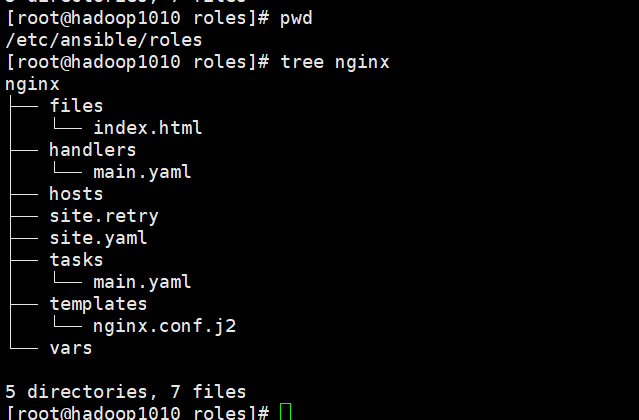
role的所有文件内容都是在nginx目录下。
- site.yaml文件是role引用的入口文件,文件的名字可以随意定义
- files目录里面存放一些静态文件;
- handler目录里面存放一些task的handler;
- tasks目录里面就是平时写的playbook中的task;
- templates目录里面存放着jinja2模板文件;
- vars目录下存放着变量文件。
playbook调测过程实例:
[root@hadoop1010 roles]# cd /etc/ansible/roles
[root@hadoop1010 roles]# mkdir nginx
[root@hadoop1010 roles]# cd nginx/
[root@hadoop1010 nginx]# mkdir {files,handlers,tasks,templates,vars}
[root@hadoop1010 nginx]# ansible-playbook -i hosts site.yaml
ERROR! Syntax Error while loading YAML.The error appears to have been in '/etc/ansible/roles/nginx/site.yaml': line 3, column 10, but may
be elsewhere in the file depending on the exact syntax problem.The offending line appears to be:- hosts: 192.168.10.12roles:^ hereexception type: <class 'yaml.scanner.ScannerError'>
exception: mapping values are not allowed in this contextin "<unicode string>", line 3, column 10
[root@hadoop1010 nginx]# ansible-playbook --syntax-check site.yaml
ERROR! Syntax Error while loading YAML.The error appears to have been in '/etc/ansible/roles/nginx/site.yaml': line 3, column 10, but may
be elsewhere in the file depending on the exact syntax problem.The offending line appears to be:- hosts: 192.168.10.12roles:^ hereexception type: <class 'yaml.scanner.ScannerError'>
exception: mapping values are not allowed in this contextin "<unicode string>", line 3, column 1
[root@hadoop1010 nginx]# ansible-playbook --syntax-check site.yaml
ERROR! Syntax Error while loading YAML.The error appears to have been in '/etc/ansible/roles/nginx/tasks/main.yaml': line 3, column 9, but may
be elsewhere in the file depending on the exact syntax problem.The offending line appears to be:- name: Install nginx packageyum: name=nginx-{{version}} state=present^ here
We could be wrong, but this one looks like it might be an issue with
missing quotes.  Always quote template expression brackets when they
start a value. For instance:with_items:- {{ foo }}Should be written as:with_items:- "{{ foo }}"exception type: <class 'yaml.scanner.ScannerError'>
exception: mapping values are not allowed in this contextin "<unicode string>", line 3, column 9
[root@hadoop1010 nginx]# vim site.yaml
[root@hadoop1010 nginx]# vim tasks/main.yaml
[root@hadoop1010 nginx]# ansible-playbook --syntax-check site.yaml
ERROR! Syntax Error while loading YAML.The error appears to have been in '/etc/ansible/roles/nginx/handlers/main.yaml': line 3, column 13, but may
be elsewhere in the file depending on the exact syntax problem.The offending line appears to be:- name: restart nginxservice: name=nginx state=restarted^ hereexception type: <class 'yaml.scanner.ScannerError'>
exception: mapping values are not allowed in this contextin "<unicode string>"
[root@hadoop1010 nginx]# vim handlers/main.yaml
[root@hadoop1010 nginx]# ansible-playbook --syntax-check site.yaml playbook: site.yaml
[root@hadoop1010 nginx]# ansible-playbook --syntax-check site.yaml playbook: site.yaml[root@hadoop1010 nginx]# ansible-playbook -i hosts site.yamlPLAY [192.168.10.12] ****************************************************************************************************************************************************************************TASK [Gathering Facts] **************************************************************************************************************************************************************************
ok: [192.168.10.12]TASK [nginx : Install nginx package] ************************************************************************************************************************************************************
changed: [192.168.10.12]TASK [nginx : Copy nginx.conf Template] *********************************************************************************************************************************************************
changed: [192.168.10.12]TASK [nginx : Copy index html] ******************************************************************************************************************************************************************
changed: [192.168.10.12]TASK [nginx : make sure nginx service running] **************************************************************************************************************************************************
fatal: [192.168.10.12]: FAILED! => {"changed": false, "msg": "Unable to start service nginx: Job for nginx.service failed because the control process exited with error code. See \"systemctl sta
tus nginx.service\" and \"journalctl -xe\" for details.\n"}	to retry, use: --limit @/etc/ansible/roles/nginx/site.retryPLAY RECAP **************************************************************************************************************************************************************************************
192.168.10.12              : ok=4    changed=3    unreachable=0    failed=1   [root@hadoop1010 nginx]# vim templates/nginx.conf.j2
[root@hadoop1010 nginx]# ansible-playbook -i hosts site.yamlPLAY [192.168.10.12] ****************************************************************************************************************************************************************************TASK [Gathering Facts] **************************************************************************************************************************************************************************
ok: [192.168.10.12]TASK [nginx : Install nginx package] ************************************************************************************************************************************************************
ok: [192.168.10.12]TASK [nginx : Copy nginx.conf Template] *********************************************************************************************************************************************************
ok: [192.168.10.12]TASK [nginx : Copy index html] ******************************************************************************************************************************************************************
ok: [192.168.10.12]TASK [nginx : make sure nginx service running] **************************************************************************************************************************************************
fatal: [192.168.10.12]: FAILED! => {"changed": false, "msg": "Unable to start service nginx: Job for nginx.service failed because the control process exited with error code. See \"systemctl sta
tus nginx.service\" and \"journalctl -xe\" for details.\n"}	to retry, use: --limit @/etc/ansible/roles/nginx/site.retryPLAY RECAP **************************************************************************************************************************************************************************************
192.168.10.12              : ok=4    changed=0    unreachable=0    failed=1   [root@hadoop1010 nginx]# vim templates/nginx.conf.j2
[root@hadoop1010 nginx]# vim templates/nginx.conf.j2
[root@hadoop1010 nginx]# grep ansible_processor_cores * -R
templates/nginx.conf.j2:woker_processes {{ansible_processor_cores}};
[root@hadoop1010 nginx]# vim templates/nginx.conf.j2
[root@hadoop1010 nginx]# ansible-playbook -i hosts site.yamlPLAY [192.168.10.12] ****************************************************************************************************************************************************************************TASK [Gathering Facts] **************************************************************************************************************************************************************************
ok: [192.168.10.12]TASK [nginx : Install nginx package] ************************************************************************************************************************************************************
ok: [192.168.10.12]TASK [nginx : Copy nginx.conf Template] *********************************************************************************************************************************************************
ok: [192.168.10.12]TASK [nginx : Copy index html] ******************************************************************************************************************************************************************
ok: [192.168.10.12]TASK [nginx : make sure nginx service running] **************************************************************************************************************************************************
ok: [192.168.10.12]PLAY RECAP **************************************************************************************************************************************************************************************
192.168.10.12              : ok=5    changed=0    unreachable=0    failed=0   [root@hadoop1010 nginx]# tree .
.
├── files
│   └── index.html
├── handlers
│   └── main.yaml
├── hosts
├── site.retry
├── site.yaml
├── tasks
│   └── main.yaml
├── templates
│   └── nginx.conf.j2
└── vars5 directories, 7 files
相关文章:
ansible组件介绍和简单playbook测试
一、ansible inventory 在大规模的配置管理工作中,管理不同业务的机器,机器的信息都存放在ansible的inventory组件里面。在工作中,配置部署针对的主机必须先存放在Inventory里面,然后ansible才能对它进行操作。默认的Ansible的in…...
[数据结构]:13-插入排序(顺序表指针实现形式)(C语言实现)
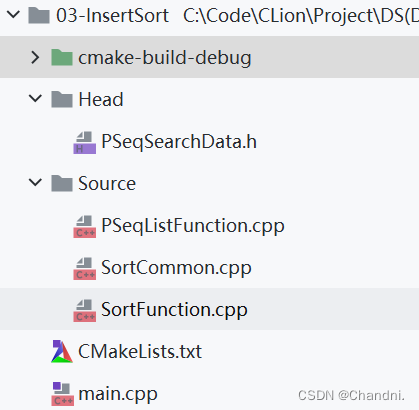
目录 前言 已完成内容 插入排序实现 01-开发环境 02-文件布局 03-代码 01-主函数 02-头文件 03-PSeqListFunction.cpp 04-SortCommon.cpp 05-SortFunction.cpp 结语 前言 此专栏包含408考研数据结构全部内容,除其中使用到C引用外,全为C语言代…...
es6 new Promise
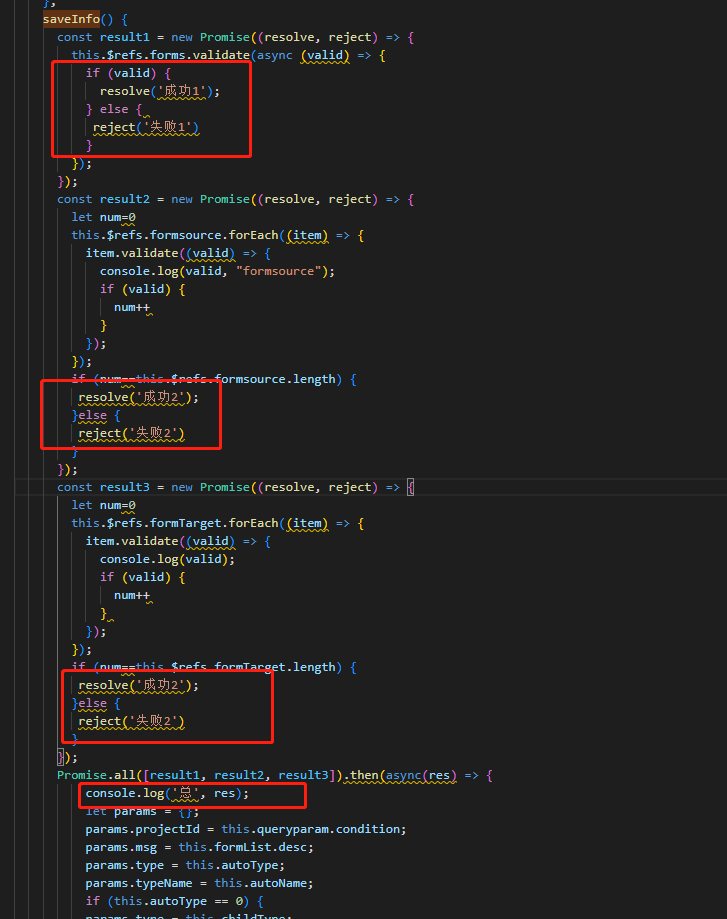
Promise 是一个构造函数,本身身上有 all、reject、resolve 这几个方法,原型上有 then、catch 等方法。所以 Promise new 出来的对象确定就有 then、catch 方法。Promise 的构造函数接收一个参数,是函数,而且传入两个参数ÿ…...

Python爬虫实战:使用Requests和BeautifulSoup爬取网页内容
标题:Python爬虫实战:使用Requests和BeautifulSoup爬取网页内容 Python爬虫技术是网络爬虫中的一种,它可以从互联网上抓取各种网页信息,如文本、图片、视频等,并将它们存储在本地数据库中。Python语言具有简单易学、语…...

质量指标——什么是增量覆盖率?它有啥用途?
目录 引言 什么是增量覆盖率 增量覆盖率有啥用途 1、对不同角色同学的用途 2、对不同规模的业务需求的用途 增量覆盖率的适用人员 增量覆盖率不太适用的情况 引言 有些质量团队,有时会拿「增量覆盖率」做出测试的准出卡点。 但在实际的使用过程中,…...
Hive---拉链表
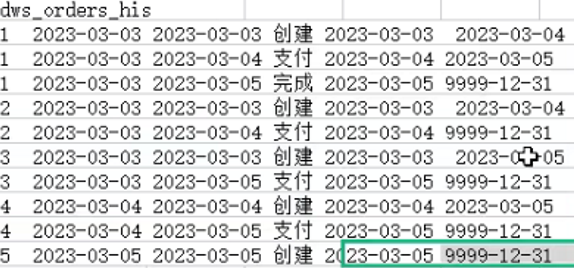
拉链表 文章目录拉链表定义用途案例全量流程增量流程合并过程第一步第二步第三步案例二(含分区)创建外部表orders增量分区表历史记录表定义 拉链表是一种数据模型,主要是针对数据仓库设计中表存储数据的方式而定义的,顾名思义&am…...
日常文档标题级别规范
这里写自定义目录标题欢迎使用Markdown编辑器新的改变功能快捷键合理的创建标题,有助于目录的生成如何改变文本的样式插入链接与图片如何插入一段漂亮的代码片生成一个适合你的列表创建一个表格设定内容居中、居左、居右SmartyPants创建一个自定义列表如何创建一个注…...

C++学习记录——십이 vector
文章目录1、vector介绍和使用2、vector模拟实现insert和erase和迭代器失效补齐其他函数深浅拷贝难点思考1、vector介绍和使用 vector可以管理任意类型的数组,是一个表示可变大小数组的序列容器。 通过vector文档来看它的使用。 #include <iostream> #inclu…...
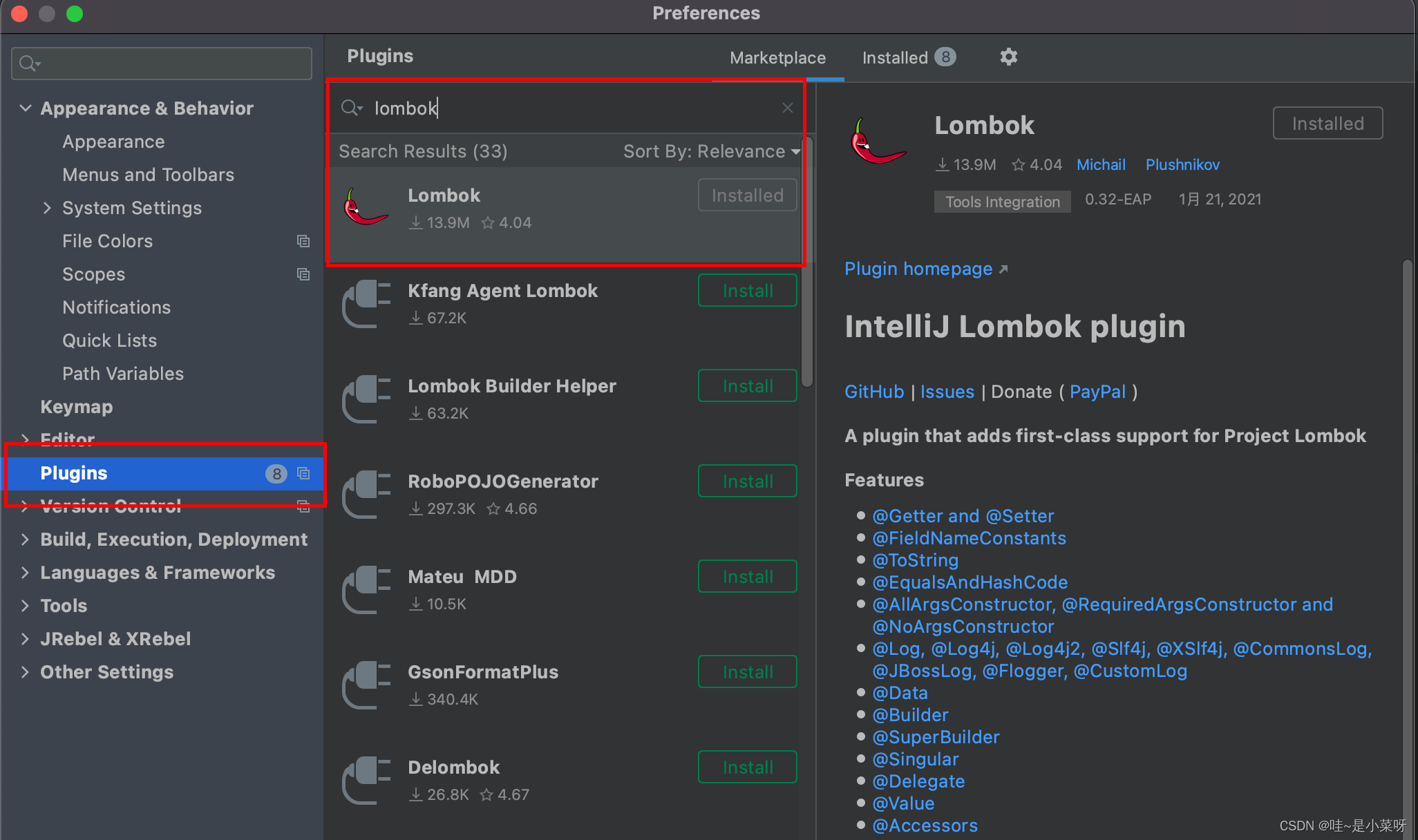
Lombok常见用法总结
目录一、下载和安装二、常见注释(一)Data(二)Getter和Setter(三)NonNull和NotNull(不常用)(四)ToString(不常用)(五&#…...
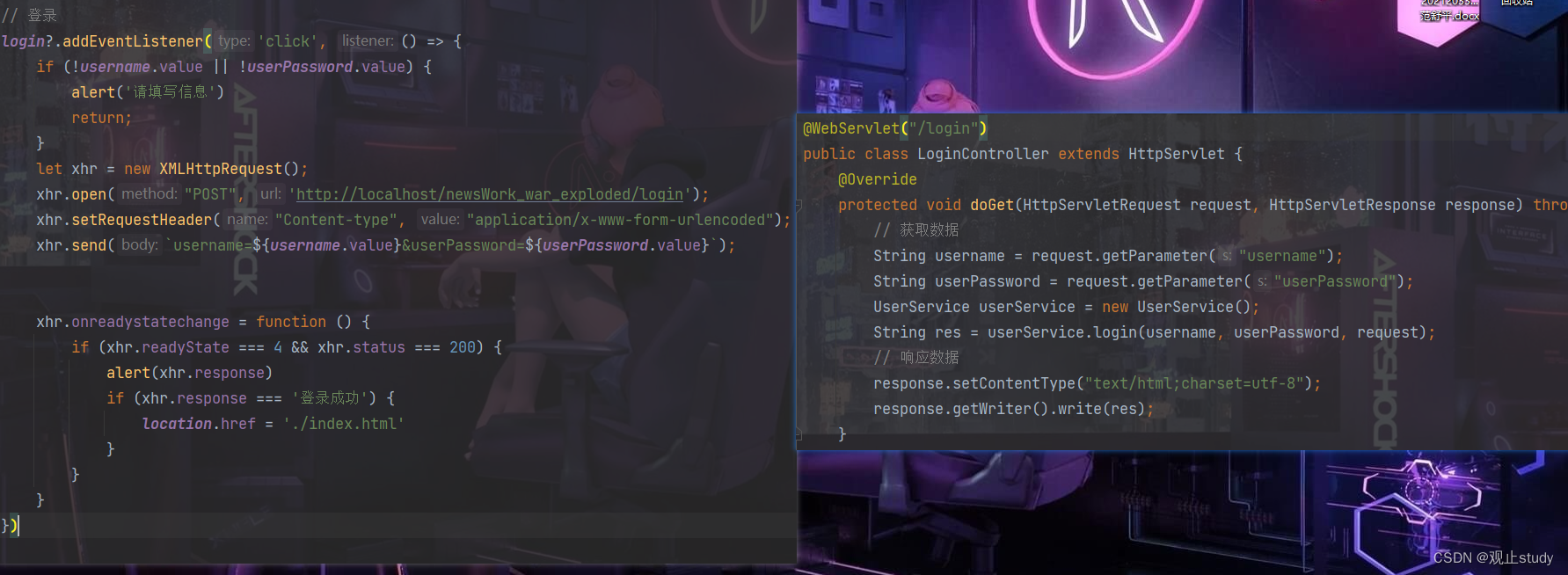
【Ajax】异步通信
一.概述 概念:AJAX(Asynchronous JavaScript And XML):异步的 JavaScript 和 XML 作用: 与服务器进行数据交换:通过AJAX可以给服务器发送请求,并获取服务器响应的数据 使用了AJAX和服务器进行通信,就可以使…...
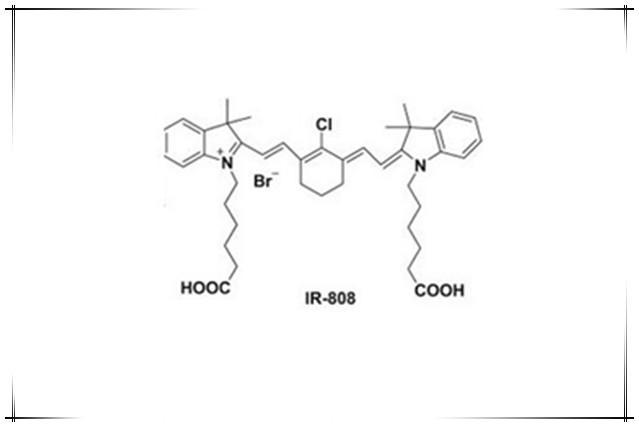
近红外吸收荧光染料IR-808,IR-808 NH2,IR-808 amine,发射808nm 性质分享
中文名称:IR-808 氨基英文名称:IR-808 NH2,IR-808 amine,IR-808-NH2规格标准:10mg,25mg,50mgCAS:N/A产品描述:IR-808,发射808nm,酯溶性染料修饰氨…...
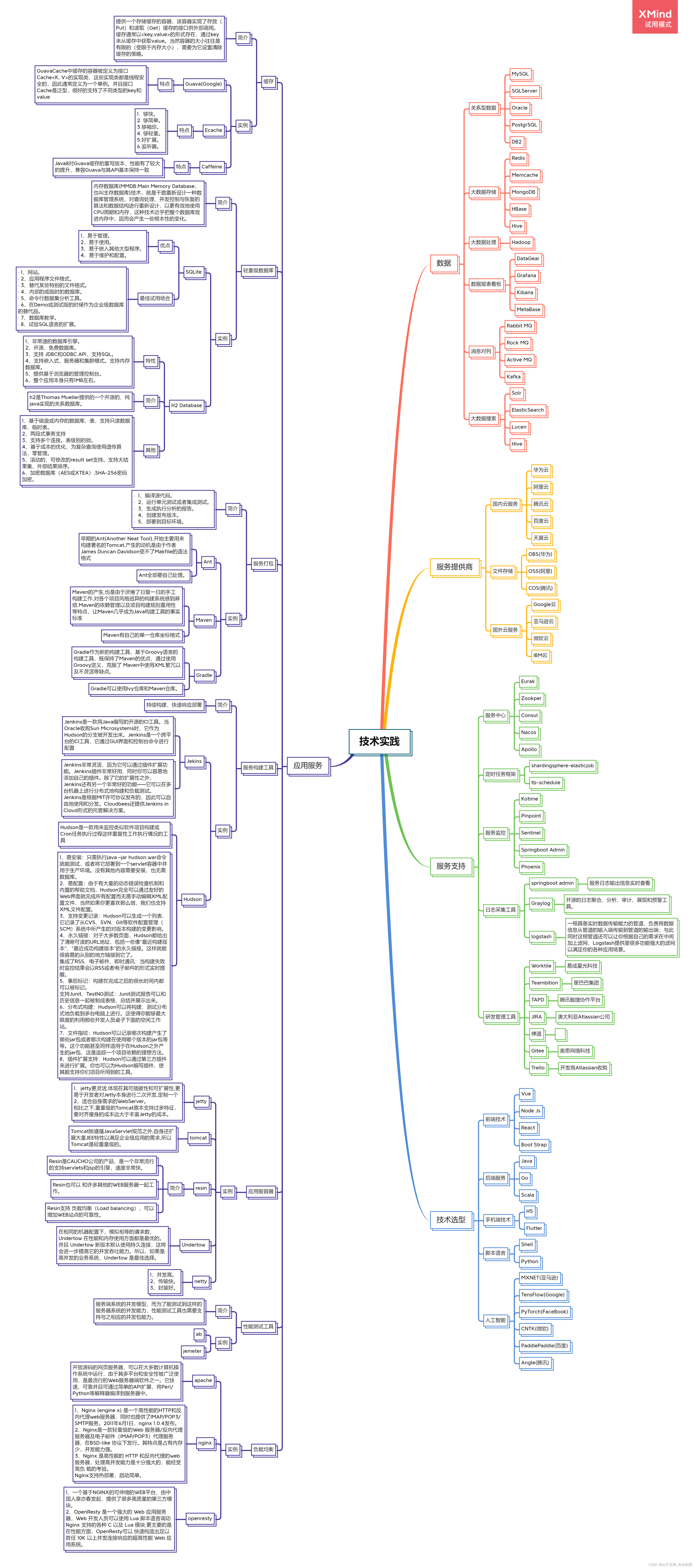
一图来看你需要拥有那些知识储备
技术实践 数据 关系型数据 MySQLSQLServerOraclePostgrSQLDB2 大数据存储 RedisMemcacheMongoDBHBaseHive 大数据处理 Hadoop 数据报表看板 DataGearGrafanaKibanaMetaBase 消息对列 Rabbit MQRock MQActive MQKafka 大数据搜索 SolrElasticSearchLucenHive 服务提…...
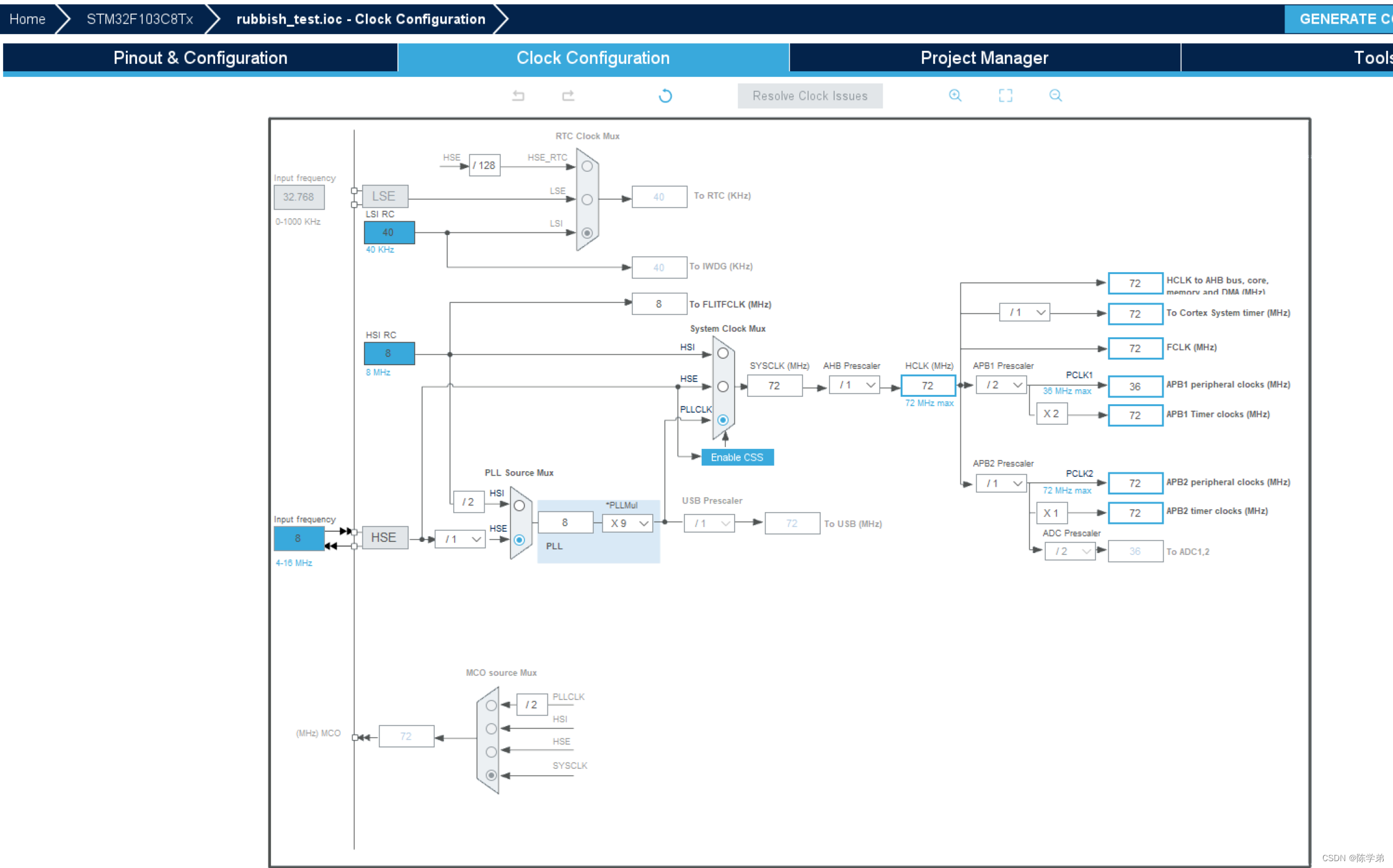
复位和时钟控制(RCC)
目录 复位 系统复位 电源复位 备份区复位 时钟控制 什么是时钟? 时钟来源 二级时钟源: 如何使用CubeMX配置时钟 复位 系统复位 当发生以下任一事件时,产生一个系统复位:1. NRST引脚上的低电平(外部复位) 2. 窗口看门狗计数终止(WWD…...

OpenWrt 专栏介绍00
文章目录OpenWrt 专栏介绍00专栏章节介绍关于联系方式OpenWrt 专栏介绍00 专栏章节介绍 本专栏主要从开发者角度,一步步深入理解OpenWrt开发流程,本专栏包含以下章节,内如如下: 01.OperWrt 环境搭建02.OperWrt 包管理系统03.Op…...

udk开发-稀里糊涂
一、EDK2简介 1.EDK2工作流 二、EDK2 Packages 1.Packages介绍 EDK2 Packages是一个容器,其中包含一组模块及模块的相关定义。每个Package是一个EDK2单元。 整个Project的源代码可以被分割成不同的Pkg。这样的设计不仅可以降低耦合性,还有利于分…...
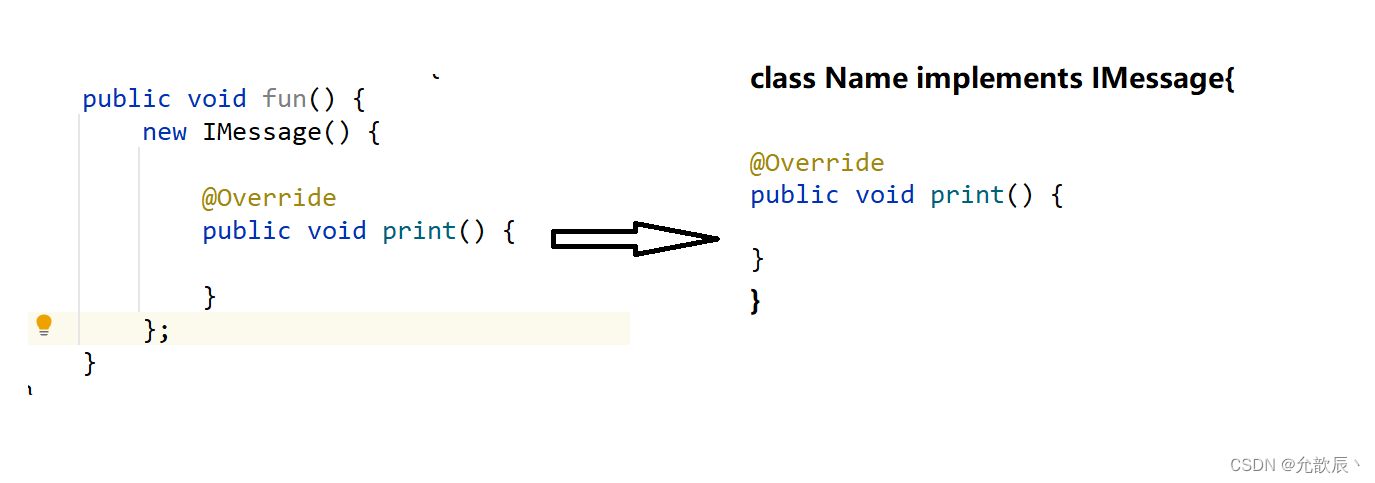
Java之内部类
目录 一.内部类 1.什么是内部类 2.内部类存在的原因 3. 内部类的分类 4.内部类的作用 二.成员内部类 1.基本概念 2.成员内部类的注意点 1.成员内部类可以用private方法进行修饰 2.成员内部类可以直接访问外部类的私有属性 3.外部类可以通过对象访问内部类的私有属性 …...
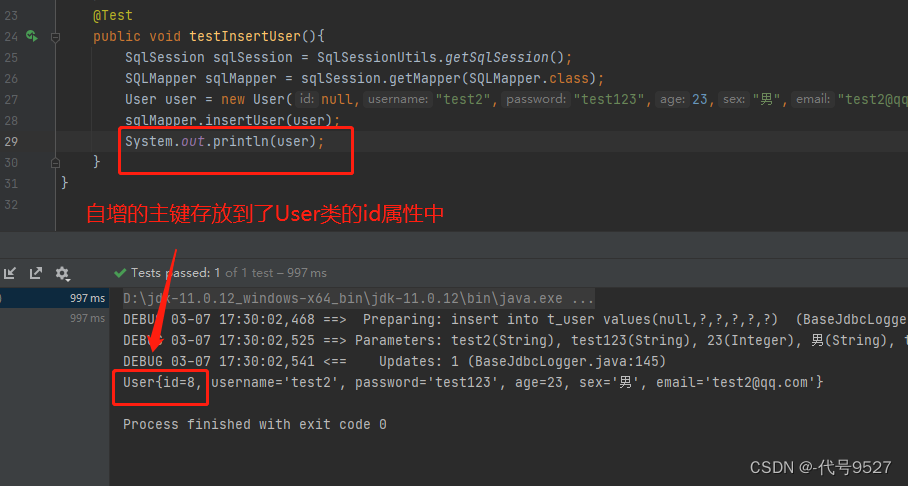
【MyBatis】篇二.MyBatis查询与特殊SQL
文章目录1、MyBatis获取参数值case1-单个字面量类型的参数case2-多个字面量类型的参数case3-map集合类型的参数case4-实体类类型的参数case5-使用Param注解命名参数总结2、MyBatis的各种查询功能case1-查询结果是一个实体类对象case2-查询结果是一个List集合case3-查询单个数据…...

CE认证机构和CE证书的分类
目前,CE认证已普遍被应用在很多行业的商品中,也是企业商品进入欧洲市场的必备安全合格认证。在船舶海工行业中,也同样普遍应用,很多时候,对于规范中没有明确认证要求的设备或材料,而船舶将来还会去欧洲水域…...
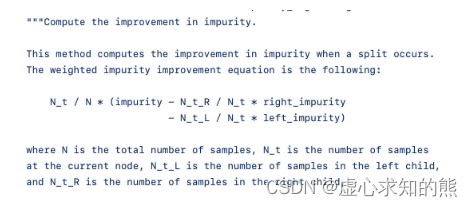
Lesson 8.2 CART 分类树的建模流程与 sklearn 评估器参数详解
文章目录一、CART 决策树的分类流程1. CART 树的基本生长过程1.1 规则评估指标选取与设置1.2 决策树备选规则创建方法1.3 挑选最佳分类规则划分数据集1.4 决策树的生长过程2. CART 树的剪枝二、CART 分类树的 Scikit-Learn 快速实现方法与评估器参数详解1. CART 分类树的 sklea…...

【Unity】程序集Assembly模块化开发
笔者按:使用Unity版本为2021.3LTS,与其他版本或有异同。请仅做参考 一、简述。 本文是笔者在学习使用Unity引擎的过程中,产学研的一个笔记。由笔者根据官方文档Unity User Manual 2021.3 (LTS)/脚本/Unity 架构/脚本编译/程序集定义相关部分结…...

超高清电视普及困境解析:从技术参数到生态系统的完整思考
1. 超高清电视的“非主流”开局:一场始于2013年的行业迷思 如果你在2013年初的拉斯维加斯CES展上,听到关于“Ultra HDTV”(超高清电视,后文简称UHDTV)的喧嚣,感觉就像身处一场盛大的交响乐彩排现场——乐手…...

模拟电路缩放迷思破解:从挑战到协同优化的设计范式转变
1. 模拟电路缩放:一个被误解的“物理定律”在半导体行业里,尤其是数字电路设计工程师和项目经理之间,流传着一个近乎“常识”的观点:模拟电路不能像数字电路那样随着工艺节点进步而有效缩放。这个说法听起来很有道理,毕…...

如何快速集成Prometheus和Jaeger:Echo框架第三方中间件终极指南
如何快速集成Prometheus和Jaeger:Echo框架第三方中间件终极指南 【免费下载链接】echo High performance, minimalist Go web framework 项目地址: https://gitcode.com/gh_mirrors/ec/echo Echo是一个高性能、极简的Go Web框架,为开发者提供了轻…...

WaveTools终极指南:免费解锁鸣潮120FPS帧率限制的完整方案
WaveTools终极指南:免费解锁鸣潮120FPS帧率限制的完整方案 【免费下载链接】WaveTools 🧰鸣潮工具箱 项目地址: https://gitcode.com/gh_mirrors/wa/WaveTools WaveTools是一款专为《鸣潮》PC版设计的开源工具箱,通过创新技术方案帮助…...

B站视频转文字终极指南:3分钟学会用开源工具提取视频内容
B站视频转文字终极指南:3分钟学会用开源工具提取视频内容 【免费下载链接】bili2text Bilibili视频转文字,一步到位,输入链接即可使用 项目地址: https://gitcode.com/gh_mirrors/bi/bili2text 还在为手动记录B站视频内容而烦恼吗&…...

技术创始人如何选择CEO:谦逊、互补与权力交接的艺术
1. 从技术专家到掌舵者:CEO角色转变的深层逻辑 在EDA(电子设计自动化)和半导体设计这个高度技术驱动的领域里,创业公司的故事每天都在上演。你可能会在DAC(设计自动化大会)上看到上百家初创公司,…...

MCA Selector终极指南:Minecraft世界区块管理的核心技术解析与实战应用
MCA Selector终极指南:Minecraft世界区块管理的核心技术解析与实战应用 【免费下载链接】mcaselector A tool to select chunks from Minecraft worlds for deletion or export. 项目地址: https://gitcode.com/gh_mirrors/mc/mcaselector MCA Selector是一款…...

从恒流源到差动放大:铂电阻测温电路的优化路径与实践
1. 铂电阻测温基础与设计挑战 铂电阻作为工业测温的中坚力量,其核心优势在于稳定的物理特性。PT100在0℃时标称电阻为100Ω,温度系数为0.385Ω/℃。这个看似简单的参数背后,却隐藏着电路设计的三大矛盾:灵敏度与噪声的博弈、线性度…...

Bonsai工具库:函数式编程与代码设计模式实战解析
1. 项目概述:当代码遇见禅意最近在GitHub上闲逛,发现一个挺有意思的项目,叫sauravpanda/bonsai。光看名字,你可能以为这是个园艺或者艺术相关的仓库,但实际上,它是一个非常精巧的编程工具库。这个项目名“B…...

10x-bench-eval:量化开发效率的基准测试框架设计与实践
1. 项目概述:当“10倍速”遇上“基准测试”在软件工程领域,“10倍速工程师”是一个充满争议又令人神往的概念。它描述的是一种理想状态:一位工程师凭借其卓越的工具链、深刻的问题洞察力以及高效的自动化能力,其产出效率能达到普通…...