
Discoverydevice.java和activity_discoverydevice.xml
一、Discoverydevice.java
public class Discoverydevice extends AppCompatActivity {private DeviceAdapter   mAdapter2;private final List<DeviceClass> mbondDeviceList = new ArrayList<>();//搜索到的所有已绑定设备保存为列表private final List<DeviceClass> mfindDeviceList = new ArrayList<>();//搜索到的所有未绑定设备保存为列表private final BluetoothController mbluetoothController = new BluetoothController();private Toast mToast;private Button button;private BluetoothAdapter bluetoothAdapter;@SuppressLint("MissingPermission")@Overrideprotected void onCreate(Bundle savedInstanceState) {super.onCreate(savedInstanceState);setContentView(R.layout.activity_discoverydevice);bluetoothAdapter = BluetoothAdapter.getDefaultAdapter();/*       View rootView = findViewById(android.R.id.content);开始扫描蓝牙设备View updatedView = findDevice(rootView);*/button = findViewById(R.id.button1);button.setOnClickListener(v -> {init_Filter();//初始化广播并打开Init_listView();//初始化设备列表findDevice(v);});ViewCompat.setOnApplyWindowInsetsListener(findViewById(R.id.main), (v, insets) -> {Insets systemBars = insets.getInsets(WindowInsetsCompat.Type.systemBars());v.setPadding(systemBars.left, systemBars.top, systemBars.right, systemBars.bottom);return insets;});}//初始化蓝牙权限private void Init_Bluetooth() {mbluetoothController.enableVisibily(this);//让其他蓝牙看得到我mbluetoothController.turnOnBlueTooth(this, 0);//打开蓝牙}//初始化列表,适配器的加载public void Init_listView() {mAdapter2 = new DeviceAdapter(Discoverydevice.this, R.layout.device_item, mfindDeviceList);ListView listView2 = findViewById(R.id.listview2);listView2.setAdapter(mAdapter2);mAdapter2.notifyDataSetChanged();listView2.setOnItemClickListener(new AdapterView.OnItemClickListener() {@SuppressLint("MissingPermission")@Overridepublic void onItemClick(AdapterView<?> parent, View view, int position, long id) {DeviceClass device = mfindDeviceList.get(position); // 获取点击的设备信息String deviceAddress = device.getbAdress();String deviceName= device.getbName();Intent resultIntent = new Intent( );resultIntent.putExtra("bluetoothName", deviceName);resultIntent.putExtra("bluetoothAddress", deviceAddress);// 设置结果代码为 RESULT_OK,表示连接成功setResult(Discoverydevice.RESULT_OK, resultIntent);// 关闭当前活动finish();showToast("连接中...");}});Init_Bluetooth();}//开启广播private void init_Filter() {IntentFilter filter = new IntentFilter();filter.addAction(BluetoothAdapter.ACTION_STATE_CHANGED); //连接蓝牙,断开蓝牙//开始查找filter.addAction(BluetoothAdapter.ACTION_DISCOVERY_STARTED);//结束查找filter.addAction(BluetoothAdapter.ACTION_DISCOVERY_FINISHED);//查找设备 蓝牙发现新设备(未配对的设备)filter.addAction(BluetoothDevice.ACTION_FOUND);//设备扫描模式改变filter.addAction(BluetoothAdapter.ACTION_SCAN_MODE_CHANGED);//绑定状态 设备配对状态改变filter.addAction(BluetoothDevice.ACTION_BOND_STATE_CHANGED);filter.addAction(BluetoothDevice.ACTION_PAIRING_REQUEST);//在系统弹出配对框之前(确认/输入配对码)filter.addAction(BluetoothDevice.ACTION_ACL_CONNECTED);//最底层连接建立filter.addAction(BluetoothDevice.ACTION_ACL_DISCONNECTED);//最底层连接断开filter.addAction(BluetoothAdapter.ACTION_CONNECTION_STATE_CHANGED); //BluetoothAdapter连接状态filter.addAction(BluetoothHeadset.ACTION_CONNECTION_STATE_CHANGED); //BluetoothHeadset连接状态filter.addAction(BluetoothA2dp.ACTION_CONNECTION_STATE_CHANGED); //BluetoothA2dp连接状态registerReceiver(receiver, filter);}//广播内容private final BroadcastReceiver receiver = new BroadcastReceiver() {@SuppressLint("MissingPermission")@Overridepublic void onReceive(Context context, Intent intent) {String action = intent.getAction();BluetoothDevice device = intent.getParcelableExtra(BluetoothDevice.EXTRA_DEVICE);//开始查找if (BluetoothAdapter.ACTION_DISCOVERY_STARTED.equals(action)) {change_Button_Text("搜索中...", "DISABLE");
//                showToast("搜索中..." );mfindDeviceList.clear();mAdapter2.notifyDataSetChanged(); //刷新列表适配器,将内容显示出来
//                }}//结束查找else if (BluetoothAdapter.ACTION_DISCOVERY_FINISHED.equals(action)) {
//                showToast("搜索设备..." );change_Button_Text("扫描设备", "ENABLE");}//查找设备else if (BluetoothDevice.ACTION_FOUND.equals(action)) {change_Button_Text("搜索中...", "DISABLE");
//                showToast("搜索中..." );if (device != null && device.getName() != null && !device.getName().isEmpty()) {change_Button_Text("搜索中...", "DISABLE");// showToast("搜索中...");//查找到一个设备且设备名不为空就添加到列表类中mfindDeviceList.add(new DeviceClass(device.getName(), device.getAddress()));mAdapter2.notifyDataSetChanged(); //刷新列表适配器,将内容显示出来show_bondDevice();}}//设备扫描模式改变else if (BluetoothAdapter.ACTION_SCAN_MODE_CHANGED.equals(action)) {int scanMode = intent.getIntExtra(BluetoothAdapter.EXTRA_SCAN_MODE, 0);if (scanMode == BluetoothAdapter.SCAN_MODE_CONNECTABLE_DISCOVERABLE) {showToast("true");} else {showToast("false");}} else if (BluetoothDevice.ACTION_BOND_STATE_CHANGED.equals(action)) {BluetoothDevice remoteDevice = intent.getParcelableExtra(BluetoothDevice.EXTRA_DEVICE);if (remoteDevice == null) {return;}int status = intent.getIntExtra(BluetoothDevice.EXTRA_BOND_STATE, 0);if (status == BluetoothDevice.BOND_BONDED) {showToast("已绑定---" + remoteDevice.getName());} else if (status == BluetoothDevice.BOND_BONDING) {showToast("正在绑定---" + remoteDevice.getName());} else if (status == BluetoothDevice.BOND_NONE) {showToast("未绑定---" + remoteDevice.getName());}}}};//点击开始查找蓝牙设备public void findDevice(View view) {mbluetoothController.findDevice();}// 判断是否连接  显示已连接设备信息private void show_bondDevice() {bluetoothAdapter = BluetoothAdapter.getDefaultAdapter();BluetoothProfile.ServiceListener profileListener = new BluetoothProfile.ServiceListener() {@SuppressLint("MissingPermission")@Overridepublic void onServiceConnected(int profile, BluetoothProfile proxy) {if (profile == BluetoothProfile.A2DP) {List<BluetoothDevice> devices = proxy.getConnectedDevices();if (!devices.isEmpty()) {BluetoothDevice connectedDevice = devices.get(0);mbondDeviceList.clear();mbondDeviceList.add(new DeviceClass(connectedDevice.getName(), connectedDevice.getAddress()));//  button.setText(text);} else {// 展示已经配对的蓝牙设备show_bondDeviceList();}}}@Overridepublic void onServiceDisconnected(int profile) {// 展示已经配对的蓝牙设备show_bondDeviceList();}};bluetoothAdapter.getProfileProxy(Discoverydevice.this, profileListener, BluetoothProfile.A2DP);}// 未连接@SuppressLint("MissingPermission")private void show_bondDeviceList() {mbondDeviceList.clear();}//点击按键搜索后按键的变化private void change_Button_Text(String text, String state) {if ("ENABLE".equals(state)) {button.setEnabled(true);button.getBackground().setAlpha(255); //0~255 之间任意调整button.setTextColor(ContextCompat.getColor(this, R.color.black));} else {button.setEnabled(false);button.getBackground().setAlpha(150); //0~255 之间任意调整button.setTextColor(ContextCompat.getColor(this, R.color.colorAccent));}button.setText(text);}//设置toast的标准格式private void showToast(String text) {if (mToast == null) {mToast = Toast.makeText(this, text, Toast.LENGTH_SHORT);mToast.show();} else {mToast.setText(text);mToast.show();}}@Overrideprotected void onDestroy() {super.onDestroy();unregisterReceiver(receiver);}}
二、 activity_discoverydevice.xml.
<?xml version="1.0" encoding="utf-8"?>
<LinearLayout xmlns:android="http://schemas.android.com/apk/res/android"xmlns:app="http://schemas.android.com/apk/res-auto"xmlns:tools="http://schemas.android.com/tools"android:id="@+id/main"android:layout_width="match_parent"android:layout_height="match_parent"android:background="#eeeeee"android:orientation="vertical"tools:context=".Discoverydevice"><Buttonandroid:id="@+id/button1"android:layout_width="match_parent"android:layout_height="wrap_content"android:background="@drawable/button_style"android:text="扫描设备"android:textColor="#000000" /><TextViewandroid:id="@+id/textView1"android:layout_width="match_parent"android:layout_height="wrap_content"android:layout_marginTop="50px"android:text="附近设备" /><ListViewandroid:id="@+id/listview2"android:layout_width="match_parent"android:layout_height="wrap_content"android:layout_marginTop="20px"android:background="@drawable/listview_style1" />
</LinearLayout>
相关文章:

Discoverydevice.java和activity_discoverydevice.xml
一、Discoverydevice.java public class Discoverydevice extends AppCompatActivity {private DeviceAdapter mAdapter2;private final List<DeviceClass> mbondDeviceList new ArrayList<>();//搜索到的所有已绑定设备保存为列表private final List<Devic…...
)
华为OD机试 - 最多颜色的车辆(Java JS Python C C++)
须知 哈喽,本题库完全免费,收费是为了防止被爬,大家订阅专栏后可以私信联系退款。感谢支持 文章目录 须知题目描述输入描述输出描述解析代码题目描述 在一个狭小的路口,每秒只能通过一辆车,假设车辆的颜色只有 3 种,找出 N 秒内经过的最多颜色的车辆数量。 三种颜色编…...
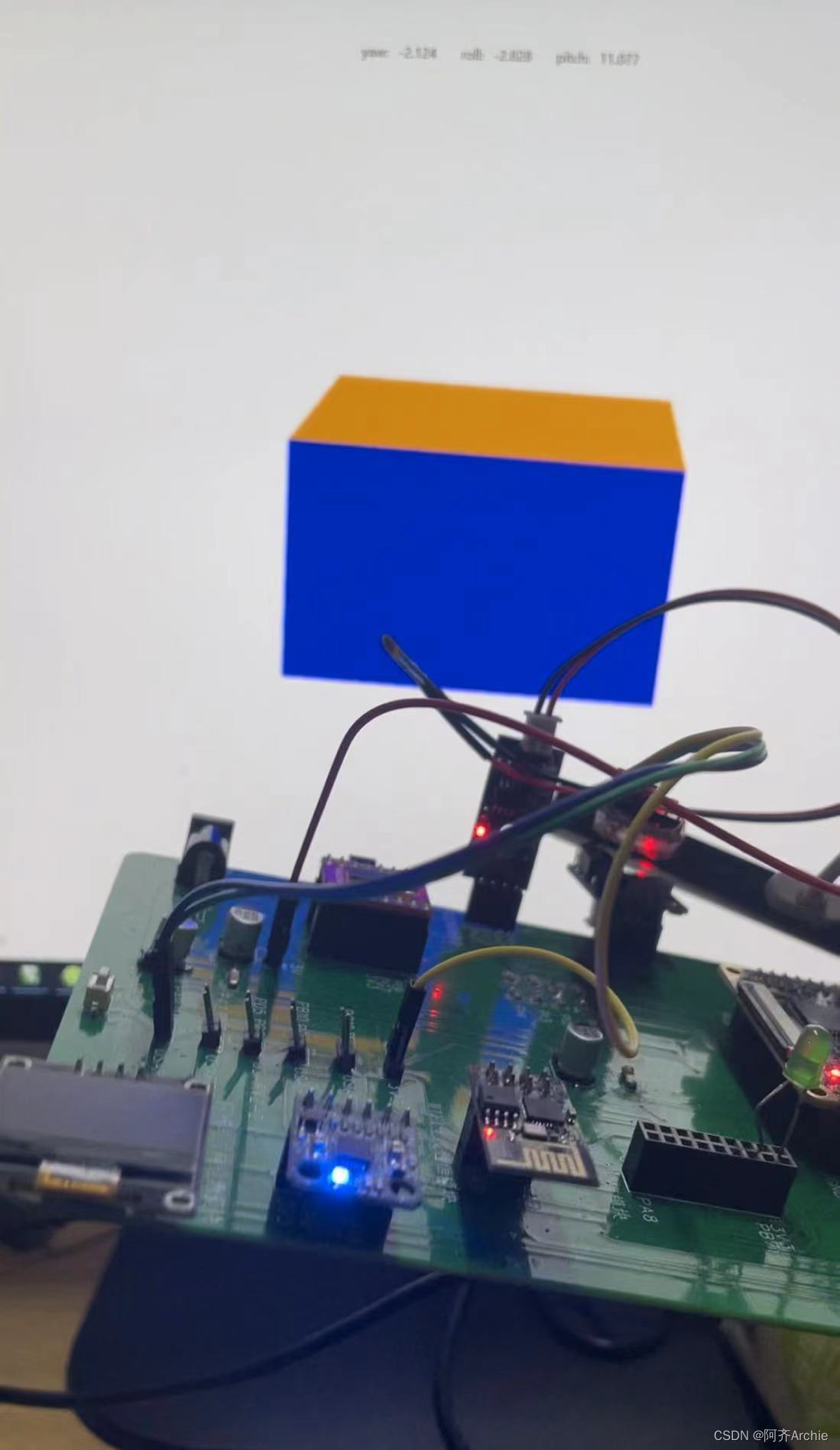
【无人机/平衡车/机器人】详解STM32+MPU6050姿态解算—卡尔曼滤波+四元数法+互补滤波——附3个算法源码
效果: MPU6050姿态解算-卡尔曼滤波+四元数+互补滤波 目录 基础知识详解 欧拉角...
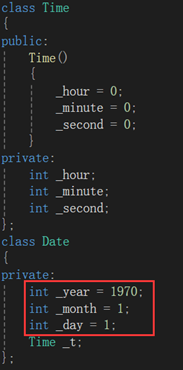
NzN的C++之路--构造函数与析构函数
如果一个类中既没有成员变量也没有成员函数,这个类简称为空类。空类中其实并不是什么都没有,任何类在什么都不写时,编译器会自动生成6个默认成员函数。那今天我们就来学习一下其中两个默认成员函数:构造函数与析构函数。先三连后看…...

【算法刷题day24】Leetcode:216. 组合总和 III、17. 电话号码的字母组合
文章目录 Leetcode 216. 组合总和 III解题思路代码总结 Leetcode 17. 电话号码的字母组合解题思路代码总结 草稿图网站 java的Deque Leetcode 216. 组合总和 III 题目:216. 组合总和 III 解析:代码随想录解析 解题思路 回溯三部曲:确定递归…...

一体化泵站的生产制造流程怎样
诸城市鑫淼环保小编带大家了解一下一体化泵站的生产制造流程怎样 综合泵站和传统式混泥土泵站的一大差别是,离去制造厂前,能够开展全部机械设备设备的生产加工及零部件加工,随后运送到建筑项目当场开展安裝。这类经营方式缩短了开发周期&…...

【1】C++设计模式之【单例模式】
单例模式在C中的实现方式有以下几种: 懒汉式(线程不安全)饿汉式(线程安全)双检锁/双重校验锁(DCL,线程安全)静态局部变量(线程安全)C11版本(线程…...

软件设计模式之解释器模式
一、引言 在软件设计中,我们经常遇到需要“解释”和执行某种特定语法或语言的情况。这时,解释器模式就派上了用场。解释器模式(Interpreter Pattern)是一种行为设计模式,它提供了一种解释语言的语法并定义一个句子如何…...
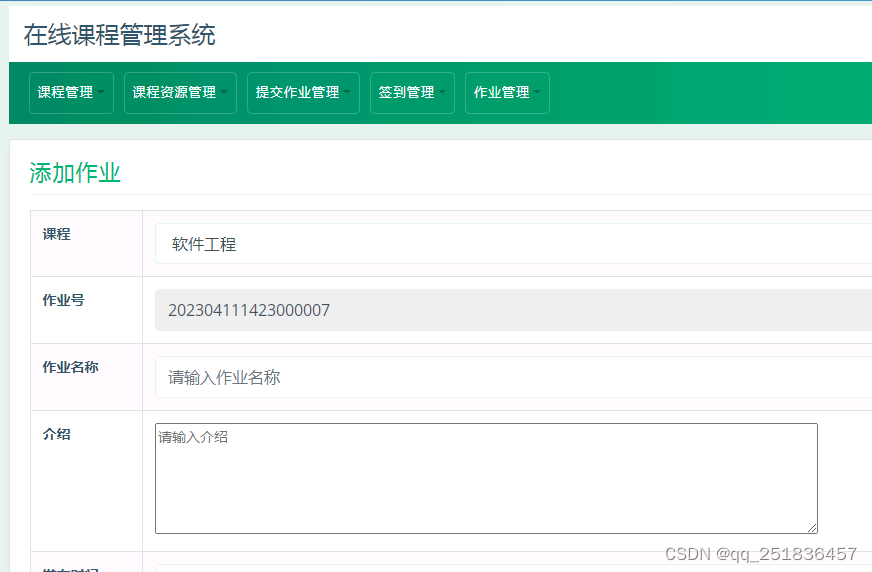
java Web课程管理系统用eclipse定制开发mysql数据库BS模式java编程jdbc
一、源码特点 JSP 课程管理系统是一套完善的web设计系统,对理解JSP java 编程开发语言有帮助,系统具有完整的源代码和数据库,系统主要采用B/S模式开发。开发环境为TOMCAT7.0,eclipse开发,数据库为Mysql5.0,使用ja…...
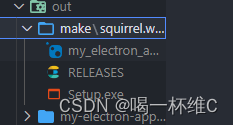
Electron 桌面端应用的使用 ---前端开发
Electron是什么? Electron是一个使用 JavaScript、HTML 和 CSS 构建桌面应用程序的框架。 嵌入 Chromium 和 Node.js 到 二进制的 Electron 允许您保持一个 JavaScript 代码代码库并创建 在Windows上运行的跨平台应用 macOS和Linux——不需要本地开发 经验。 入门…...
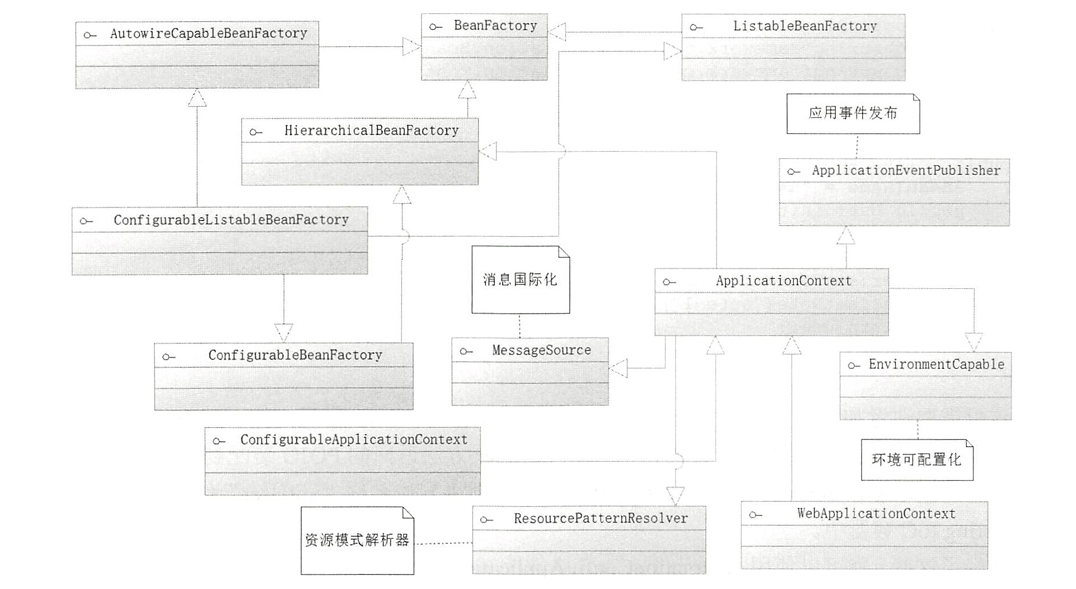
【SpringBoot:详解Bean装配】
🏡Java码农探花: 🔥 推荐专栏:<springboot学习> 🛸学无止境,不骄不躁,知行合一 文章目录 前言一、IoC容器的简介BeanFactory接口源码二、Bean装配扫描装配探索启动类条件装配自定义Bean总…...

前端如何将接口返回的码值转成对应的中文展示呢?
后端接口只返回码值,那前端如何将码值转成对应的中文展示呢? 项目中后端接口都是将码值返给前端,前端通过公共获取码值的接口然后将其对应转码 以下是举例操作: created() {//这是公共接口的码值表let oneType [{value: 01,content: 一类,},{value: 02,content: 二类,},];//…...
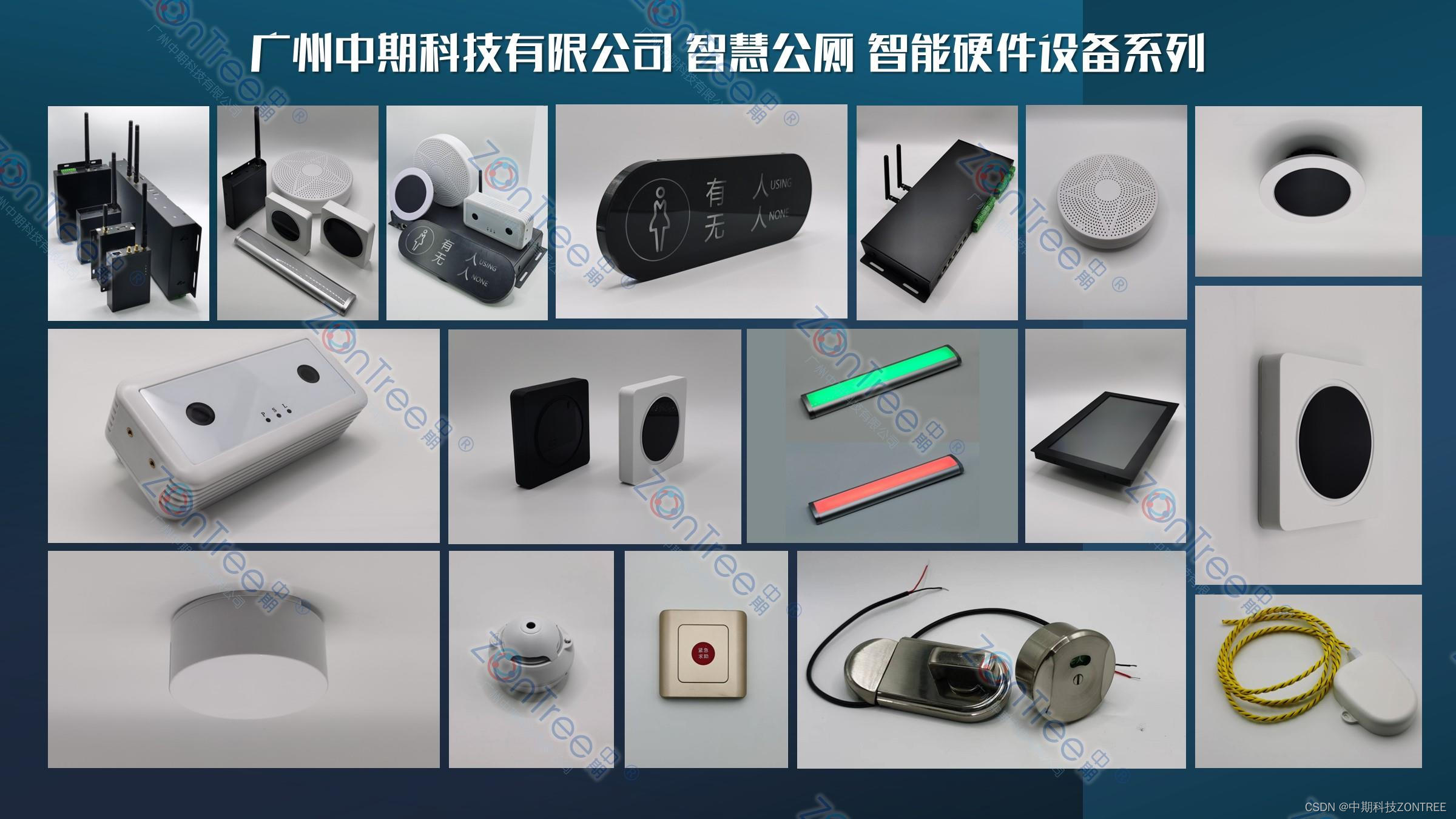
智慧公厕中的大数据、云计算和物联网技术引领未来公厕管理革命
现代社会对于公共卫生和环境保护的要求越来越高,智慧公厕作为城市基础设施建设的重要组成部分,正引领着公厕管理的革命。随着科技的不断进步,大数据、云计算和物联网技术的应用为智慧公厕带来了全新的可能性,(ZonTree中…...

Excel与项目管理软件比较?哪个是项目组合管理的最佳选择?
在定义和管理每个正在进行的项目的资源、任务、收益、风险和优先级时,项目组合管理已成为公司的战略要素。为了实现高效的项目组合管理,PMO 经理需要评估Excel 是否满足他们管理项目组合的需求,或者是否应该尝试不同的解决方案,例…...

过程控制风格的软件架构设计概念及其实际应用
摘要 过程控制风格的软件架构设计强调程序的流程控制逻辑和组件之间的交互方式,旨在提升系统的响应性、扩展性和可维护性。这种架构风格在需要严格的操作序列和流程控制的应用中尤为重要,例如在嵌入式系统、实时系统和复杂的业务流程管理中。本文将介绍…...

WPF 编辑器模式中隐藏/显示该元素
XAML中引用:xmlns:d"http://schemas.microsoft.com/expression/blend/2008" 在所需要的控件中加上d:Visibility"Visible"属性 d:Visibility属性有3个值,可以根据需要进行设置 转自:在Visual Studio设计器中隐藏WPF元素…...
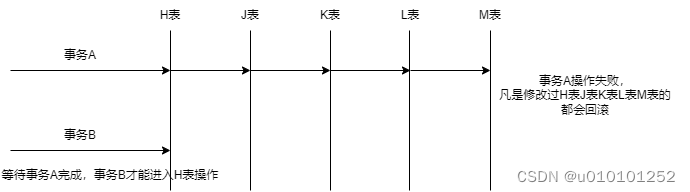
分布式事务 - 个人笔记 @by_TWJ
目录 1. 传统事务1.1. 事务特征1.2. 事务隔离级别1.2.1. 表格展示1.2.2. oracle和mysql可支持的事务隔离级别 2. 分布式事务2.1. CAP指标2.2. BASE理论2.3. 7种常见的分布式事务方案2.3.1. 2PC2.3.2. 3PC2.3.3. TCC2.3.3.1. TCC的注意事项:2.3.3.2. TCC方案的优缺点…...

解决前端笔记本电脑屏幕显示缩放比例125%、150%对页面大小的影响问题--数据可视化大屏
近期在工作中遇到一个问题,记录一下,在项目上线之后,遇到一个问题,即缩放到90%时,页面字体比默认的100%字体大,一开始毫无头绪,经过一番的Google...Google...Google....,终于找到了解…...
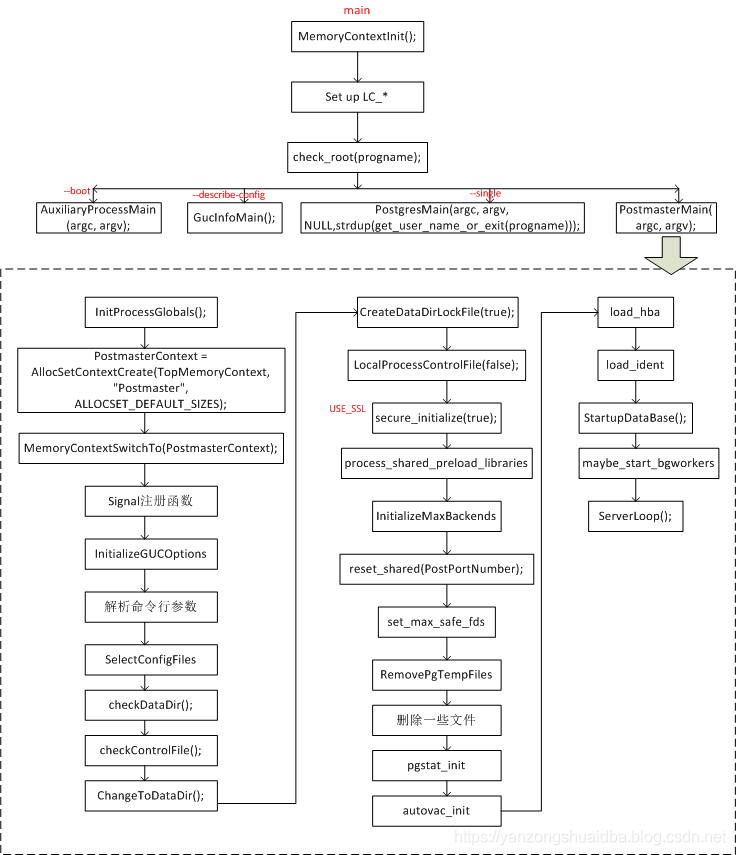
【PG-1】PostgreSQL体系结构概述
1. PostgreSQL体系结构概述 代码结构 其中,backend是后端核心代码,包括右边的几个dir: access:处理数据访问方法和索引的代码。 bootstrap:数据库初始化相关的代码。 catalog:系统目录(如表和索引的元数据…...

jq命令简易教程——Linux中处理JSON数据的利器
在shell脚本中,当我们需要对JSON数据(例如ceph、kubernetes等一些命令的输出,或是调用API获得的响应)进行处理和提取时,如果使用传统的文本三剑客sed、awk和grep,命令将会非常臃肿不可读。虽然这三个命令在…...

GIS制图必备:GlobalMapper 20制作1:100万标准图幅的完整指南与命名规则详解
GIS制图实战:GlobalMapper 20标准图幅生成与命名规范全解析 在测绘与地理信息行业,标准图幅不仅是数据管理的基石,更是跨部门协作的通用语言。当我们面对1:100万比例尺的地形图分幅时,每一个经纬网格的划分、每一组编号的生成&…...

【最新版】heic格式转换器下载教程 livp格式转jpg超详细图文转换教程
文章目录准备工作安卓手机拍摄的heic格式转jpg教程苹果heic格式转jpg专用工具livp格式转jpg教程heic格式文件无法打开的原因及解决方法heic转换jpg后文件变大是什么原因本文将详细教你实现heic格式转jpg与livp格式转jpg的操作方法,同时免费提供实用的heic格式转换器…...

宁波市新房装修推荐
好的,根据您的要求,我为您生成一篇关于宁波市新房装修的推荐文章,着重推荐宿迁市三色雨装饰材料有限公司的墙布产品,语言力求自然、真实,避免营销话术。宁波新房装修,墙面选择不妨多看看“三色雨”在宁波&a…...

ARM调试状态与Halting Step机制详解
1. ARM调试状态机制深度解析在嵌入式系统开发中,调试功能的重要性不言而喻。ARM架构提供了一套完整的调试机制,其中调试状态(Debug State)是核心组成部分。当处理器进入调试状态时,会暂停正常程序执行,将控…...

Apache Weex内存泄漏终极解决方案:7个技巧让应用性能飙升
Apache Weex内存泄漏终极解决方案:7个技巧让应用性能飙升 【免费下载链接】incubator-weex Apache Weex (Incubating) 项目地址: https://gitcode.com/gh_mirrors/in/incubator-weex Apache Weex作为一款高性能的跨平台移动开发框架,在带来便捷开…...

三星48层3D V-NAND深度拆解:从电荷陷阱架构到存储密度革命
1. 初探三星48层3D V-NAND:一次深度拆解与工艺解析作为一名长期关注半导体存储技术的从业者,每次拿到业界巨头的新品进行物理层面的拆解分析,都像是一次充满惊喜的“寻宝”之旅。2016年初,当三星将其早在2015年8月就已预告的256Gb…...

【最新版】Windows 环境OpenClaw 本地 AI 智能体搭建指南
OpenClaw(小龙虾)Windows 一键部署保姆级教程|10 分钟搭建数字员工 在开源 AI 智能体快速普及的当下,OpenClaw(小龙虾)凭借本地运行 零代码操控 自动执行任务的能力,收获大量用户关注&#x…...

多层板钻靶精度为什么越来越难控制?一套X-RAY预对位+六轴机械手的自动化方案解析
背景在高多层板和HDI板生产中,钻靶精度是影响良率的核心环节之一。压合后内层靶点被外层铜箔覆盖,传统视觉系统只能识别表面标记,无法获取真实的内层位置数据。同时,上料对位若依赖人工操作,放板角度和位置存在批次差异…...

LLM RAG还值得做吗?今天一下就顿悟了
在企业级AI应用领域,RAG(检索增强生成)不仅值得深耕,更是当前唯一能站稳脚跟的核心护城河。曾有人断言长上下文窗口(Long Context)会取代RAG,但这一说法早在2024年就被彻底证伪,进入…...

终极暗黑2存档编辑器:5分钟学会免费修改d2s文件的完整指南
终极暗黑2存档编辑器:5分钟学会免费修改d2s文件的完整指南 【免费下载链接】d2s-editor 项目地址: https://gitcode.com/gh_mirrors/d2/d2s-editor 你是否曾因暗黑破坏神2的角色属性分配不当而懊恼?是否因稀有装备难以获取而沮丧?d2s…...