
安卓LayoutParams浅析
目录
- 前言
- 一、使用 LayoutParams 设置宽高
- 二、不设置 LayoutParams
- 2.1 TextView 的 LayoutParams
- 2.2 LinearLayout 的 LayoutParams
- 三、getLayoutParams 的使用
- 四、setLayoutParams 的作用
- 五、使用 setWidth/setHeight 设置宽高
前言
先来看一个简单的布局,先用 xml 写
<?xml version="1.0" encoding="utf-8"?>
<LinearLayout xmlns:android="http://schemas.android.com/apk/res/android"xmlns:app="http://schemas.android.com/apk/res-auto"xmlns:tools="http://schemas.android.com/tools"android:layout_width="match_parent"android:layout_height="match_parent"android:background="#00F5FF"android:gravity="center"android:orientation="vertical"><TextViewandroid:layout_width="160dp"android:layout_height="160dp"android:background="#FFFACD"android:text="12345678" /></LinearLayout>
效果也很简单:
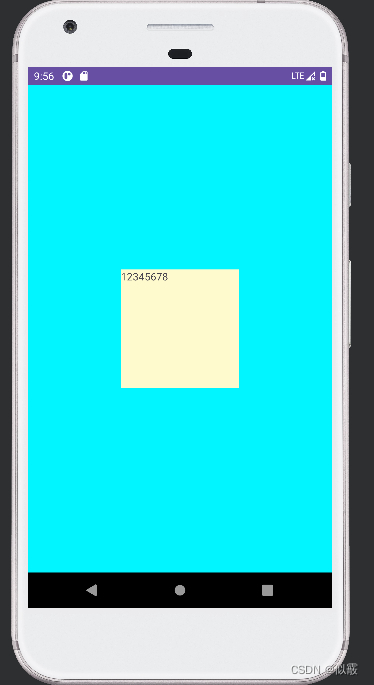
如果想要代码动态写出上面的布局,就需要使用 LayoutParams 这个关键类了,
LayoutParams 是 ViewGroup 的一个内部类,这是一个基类,例如 FrameLayout、LinearLayout 等等,内部都有自己的 LayoutParams。
一、使用 LayoutParams 设置宽高
LayoutParams 的作用是: 子控件告诉父控件,自己要如何布局。
代码实现:
public class LayoutFragment extends Fragment {@Nullable@Overridepublic View onCreateView(@NonNull LayoutInflater inflater, @Nullable ViewGroup container, @Nullable Bundle savedInstanceState) {LinearLayout ll = new LinearLayout(getContext());
//11的父容器是MainActivity中的FrameLayoutll.setLayoutParams(new FrameLayout.LayoutParams(ViewGroup.LayoutParams.MATCH_PARENT, ViewGroup.LayoutParams.MATCH_PARENT));ll.setGravity(Gravity.CENTER);ll.setBackgroundColor(Color.BLUE);TextView tv = new TextView(getContext());
//tv的父容器是LinearLayoutLinearLayout.LayoutParams layoutParams = new LinearLayout.LayoutParams(160, 160);tv.setLayoutParams(layoutParams);//tv.setBackgroundColor(Color.RED);tv.setText("123145678");ll.addView(tv);// creturn ll;}
}
我们对 LinearLayout 和 TextView 的 LayoutParams 都进行了设置,效果图和上面 xml的是一模一样的。
ll.setLayoutParams 设置的是其父布局 FrameLayout 的 LayoutParams,并且告诉父布局,宽高设置为 MATCH_PARENT。
tv.setLayoutParams 设置的也是其父布局 LinearLayout 的 LayoutParams,并且告诉父布局,宽高设置为 160dp。
上面 ①、 ② 两行代码可以简化为一行,替换为 addView(View child, LayoutParamsparams) 这个重载方法,在添加到父布局时,设置 LayoutParams,通知父布局如何摆放自己。
ll.addView(tv, layoutParams);// 子布局添加到父布局
二、不设置 LayoutParams
public class LayoutFragment extends Fragment {@Nullable@Overridepublic View onCreateView(@NonNull LayoutInflater inflater, @Nullable ViewGroup container, @Nullable Bundle savedInstanceState) {LinearLayout ll = new LinearLayout(getContext());ll.setGravity(Gravity.CENTER);ll.setBackgroundColor(Color.BLUE);TextView tv = new TextView(getContext());
//tv的父容器是LinearLayouttv.setBackgroundColor(Color.RED);tv.setText("123145678");ll.addView(tv);// creturn ll;}
}
public class MainActivity extends AppCompatActivity {private static final String TAG = "henry-----";@Overrideprotected void onCreate(Bundle savedInstanceState) {super.onCreate(savedInstanceState);setContentView(R.layout.activity_main);FragmentManager fragmentManager = getSupportFragmentManager();FragmentTransaction transaction = fragmentManager.beginTransaction();LayoutFragment fragment = new LayoutFragment();transaction.add(R.id.test, fragment);transaction.commit();}}
效果如下:
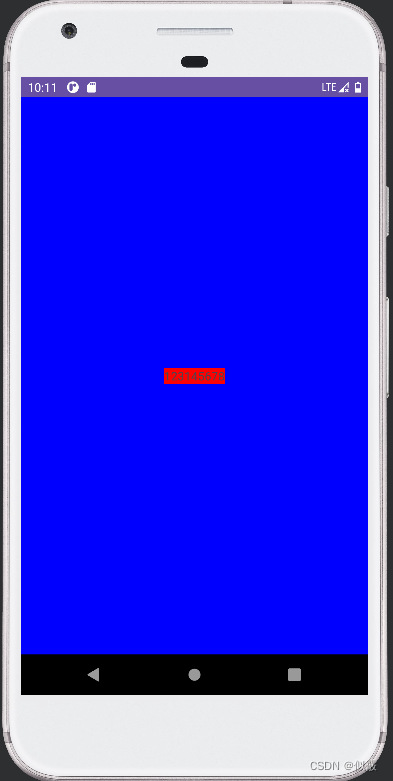
发现在对 LinearLayout 和 TextView 的 都不设置 LayoutParams 的情况下,LinearLayout 使用 MATCH_PARENT,而 TextView 使用 WRAP_CONTENT,至于为什么,要分析一下源码
2.1 TextView 的 LayoutParams
进入 addView 看一下,不存在 LayoutParams 时,会调用generateDefaultLayoutParams() 进行创建。
public void addView(View child, int index) {if (child == null) {throw new IllegalArgumentException("Cannot add a null child view to a ViewGroup");}LayoutParams params = child.getLayoutParams();if (params == null) {params = generateDefaultLayoutParams();if (params == null) {throw new IllegalArgumentException("generateDefaultLayoutParams() cannot return null ");}}addView(child, index, params);}
找到 LinearLayout 中 generateDefaultLayoutParams(),注意不是 ViewGroup 中的
protected LayoutParams generateDefaultLayoutParams() {if (mOrientation == HORIZONTAL) {return new LayoutParams(LayoutParams.WRAP_CONTENT, LayoutParams.WRAP_CONTENT);} else if (mOrientation == VERTICAL) {return new LayoutParams(LayoutParams.MATCH_PARENT, LayoutParams.WRAP_CONTENT);}return null;}
显而易见,由于我们没有指定方向, mOrientation 默认为 0,也就是 HORIZONTAL,所以 TextView 设置为
WRAP_CONTENT,为了证实猜想,我们设置 LinearLayout 的方向为 VERTICAL。
ll.setOrientation(LinearLayout.VERTICAL);
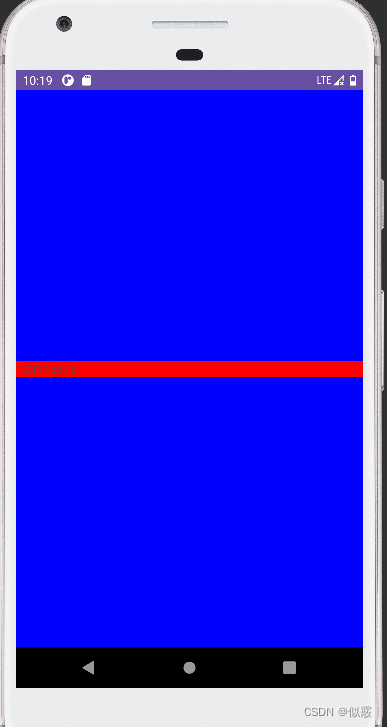
效果跟代码看到的一样,宽度为 MATCH_PARENT,高度为WRAP_CONTENT:
2.2 LinearLayout 的 LayoutParams
和上面 TextView 一样,这个要进入 FrameLayout 中查看 generateDefaultLayoutParams()。
protected LayoutParams generateDefaultLayoutParams() {return new LayoutParams(LayoutParams.MATCH_PARENT, LayoutParams.MATCH_PARENT);}
所以,在 FrameLayout 中的 LinearLayout 的宽高就是 MATCH_PARENT。
三、getLayoutParams 的使用
在不使用代码动态布局的情况下,大都是先通过 getLayoutParams() 获取LayoutParams ,然后进行赋值,最后通过 setLayoutParams()设回控件,值得注意的是,获取 LayoutParams 务必要强转为父控件的类型,才会有该父控件特有的方法。
public class LayoutFragment extends Fragment {@Nullable@Overridepublic View onCreateView(@NonNull LayoutInflater inflater, @Nullable ViewGroup container, @Nullable Bundle savedInstanceState) {LinearLayout ll = new LinearLayout(getContext());
// ll 的父容器是 MainActivity 中的 FrameLayoutFrameLayout.LayoutParams fl_params = (FrameLayout.LayoutParams)ll.getLayoutParams();// ①fl_params.width = ViewGroup.LayoutParams.MATCH_PARENT;fl_params.height = ViewGroup.LayoutParams.MATCH_PARENT;ll.setLayoutParams(fl_params);ll.setGravity(Gravity.CENTER);ll.setBackgroundResource(android.R.color.holo_blue_bright);TextView tv = new TextView(getContext());
// tv 的父容器是 LinearLayoutLinearLayout.LayoutParams ll_params = (LinearLayout.LayoutParams)tv.getLayoutParams();// ②ll_params.width = 160;ll_params.height = 160;tv.setLayoutParams(ll_params);tv.setBackgroundResource(android.R.color.holo_red_dark);tv.setText("12345678");ll.addView(tv);return ll;}
}
运行报错:
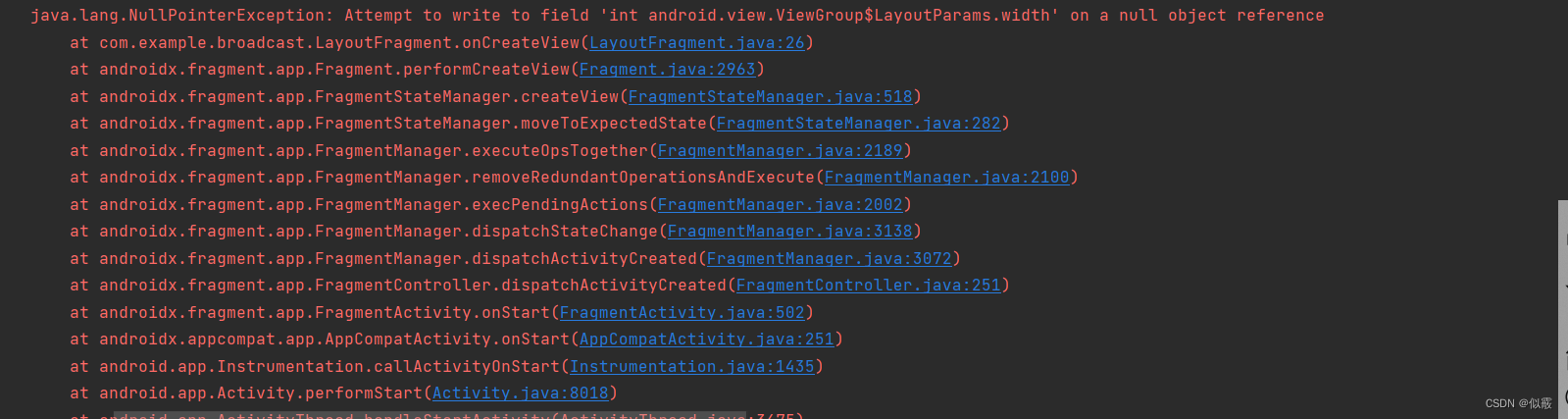
上面代码是有问题的, ①、 ②处都会返回 null,导致空指针。
①处:此时还没有将 LinearLayout 作为返回值返回,也就没有添加到布局中,自然不存
在 LayoutParams。
②处:此时还没有将 TextView 添加到 LinearLayout 中,也不存在 LayoutParams。
下面才是正确的示例:
public class LayoutFragment extends Fragment {@Nullable@Overridepublic View onCreateView(@NonNull LayoutInflater inflater, @Nullable ViewGroup container, @Nullable Bundle savedInstanceState) {LinearLayout ll = new LinearLayout(getContext());
// ll 的父容器是 MainActivity 中的 FrameLayoutll.setLayoutParams(new FrameLayout.LayoutParams(ViewGroup.LayoutParams.MATCH_PARENT, ViewGroup.LayoutParams.MATCH_PARENT));ll.setGravity(Gravity.CENTER);// 子控件居中ll.setBackgroundResource(android.R.color.holo_blue_bright);TextView tv = new TextView(getContext());ll.addView(tv);// 添加到父控件,此时会构造一个 LayoutParams 出来。LinearLayout.LayoutParams ll_params = (LinearLayout.LayoutParams)tv.getLayoutParams();ll_params.width = 160;ll_params.height = 160;tv.setLayoutParams(ll_params);tv.setBackgroundResource(android.R.color.holo_red_dark);tv.setText("12345678");return ll;}
}
四、setLayoutParams 的作用
这里抛出一个问题:
上面代码中 getLayoutParams() 得到了 LayoutParams 的引用 ll_params,直接对width 和 height 属性赋值,那么 setLayoutParams() 是不是不需要调用了?
这就需要看看 setLayoutParams() 里面干了什么
public void setLayoutParams(ViewGroup.LayoutParams params) {if (params == null) {throw new NullPointerException("Layout parameters cannot be null");}mLayoutParams = params;resolveLayoutParams();if (mParent instanceof ViewGroup) {((ViewGroup) mParent).onSetLayoutParams(this, params);}requestLayout();}
关键的最后一行 requestLayout() ,这个方法简单来说,就是重新执行 onMeasure() 和onLayout(),而 onDraw() 需要适情况而定,这里就不具体展开说了。
现在就可以回答上面的问题了,在上面 onCreateView() 中的 setLayoutParams() 确实是多余的,因为在 onCreateView() 之后才会进行 View 的绘制。
当然这并不是说 setLayoutParams() 没有用,在自定义控件中,往往需要在 View 绘制后修改 LayoutParams 的值,那么这种场景下,如果不调用 setLayoutParams() 就会出现设置不生效的问题。
总结:
- 在 LayoutParams 赋值后,如果确定还没有完成 View 的绘制,可以省略setLayoutParams() ,在后面绘制期间,会取到前面的赋值,并使之生效。
- 如果已经完成了 View 的绘制,那么必须要调用setLayoutParams() ,重新进行绘制。
- 不确定的情况下就setLayoutParams() ,反正不会出问题。
五、使用 setWidth/setHeight 设置宽高
在设置控件宽高时,有些人为了方便,没有使用 LayoutParams ,直接通过 set 方法设置,
但这种方式并不靠谱!
对 TextView 和 Button 分别设置宽高为 160px
public class LayoutFragment extends Fragment {@Nullable@Overridepublic View onCreateView(@NonNull LayoutInflater inflater, @Nullable ViewGroup container, @Nullable Bundle savedInstanceState) {LinearLayout ll = new LinearLayout(getContext());
// ll 的父容器是 MainActivity 中的 FrameLayoutll.setLayoutParams(new FrameLayout.LayoutParams(ViewGroup.LayoutParams.MATCH_PARENT, ViewGroup.LayoutParams.MATCH_PARENT));ll.setGravity(Gravity.CENTER);// 子控件居中ll.setBackgroundResource(android.R.color.holo_blue_bright);TextView tv = new TextView(getContext());tv.setWidth(160);tv.setHeight(160);tv.setBackgroundResource(android.R.color.holo_red_dark);tv.setText("12345678");ll.addView(tv);Button bt = new Button(getContext());bt.setWidth(160);bt.setHeight(160);bt.setBackgroundResource(android.R.color.holo_green_dark);bt.setText("12345678");ll.addView(bt);return ll;}
}
TextView 设置宽高成功, Button 只在高度上生效,效果如下:
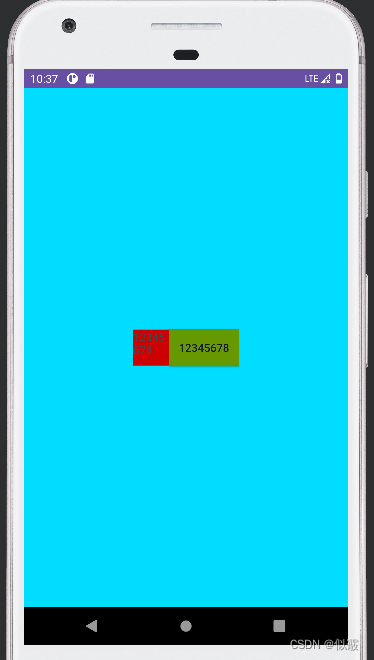
可以打印下控件宽高看下结果:

Button 也是继承 TextView,为什么会出现设置失效?进入 setWidth 方法,看到在这里只是设置了控件的最大值和最小值:
public void setWidth(int pixels) {mMaxWidth = mMinWidth = pixels;mMaxWidthMode = mMinWidthMode = PIXELS;requestLayout();invalidate();}
LayoutParams 设置的宽高才是真正的宽高:

再看下 onMeasure 中,这里面设置 width 时,有很多类似下面判断:
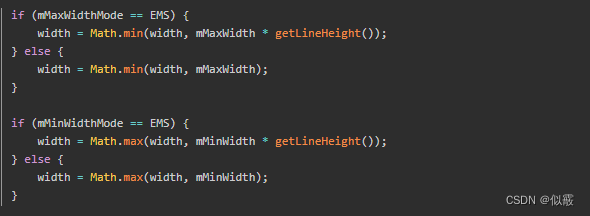
所以 setWidth()/setHeight 只代表想设置的宽高,并不是实际设定值。这就很好理解,
当 set 的值大于 Button 最小宽度/高度时生效,在小于 Button 最小宽度/高度时,不能起到作用。
相关文章:
安卓LayoutParams浅析
目录 前言一、使用 LayoutParams 设置宽高二、不设置 LayoutParams2.1 TextView 的 LayoutParams2.2 LinearLayout 的 LayoutParams 三、getLayoutParams 的使用四、setLayoutParams 的作用五、使用 setWidth/setHeight 设置宽高 前言 先来看一个简单的布局,先用 x…...

UltralSO制作启动盘时报错:磁盘/映像容量太小解决办法
UltralSO制作启动盘时报错:磁盘/映像容量太小解决办法 发现网上随便下载的UltralSO制作启动盘时报错:磁盘/映像容量太小,导致制作启动盘出错 解决方案: 去这个地址下载:https://cn.ultraiso.net/xiazai.html 下载正版…...

2024-05-09四月初二周四
2024-05-09四月初二周四 06:40-23:00 深兰Ai第五期 Part1:课时258:00:00:00 12:30-13:00 午饭烧水: 13:30-23:00 机器学习 19:00-20:00 晚饭: 20:00-23:00 coding 2.5 特征降维 unending 23:00-06:30 烧水资料下载...

【微服务】springcloud整合dubbo3使用nacos作为注册中心
目录 一、前言 二、springboot版本升级带来的问题 2.1 springboot为什么需要升级版本...

php中常用的数据类型汇总
在 PHP 中,常用的数据类型主要有以下几种: 标量类型(Scalar Types) integer(整型):用于存储整数,可以是正数或负数。float(浮点型/双精度型):用于…...
【源码阅读】Golang中的go-sql-driver库源码探究
文章目录 前言一、go-sql-driver/mysql1、驱动注册:sql.Register2、驱动实现:MysqlDriver3、RegisterDialContext 二、总结 前言 在上篇文章中我们知道,database/sql只是提供了驱动相关的接口,并没有相关的具体实现,具…...

2024-05-08 postgres-火山模型-执行-记录
摘要: 2024-05-08 postgres-火山模型-执行-记录 上下文: 2024-05-08 postgres-调试及分析-记录-CSDN博客 火山模型: 数据流是在查询树上,自上而下进行拉取,由上而下的调用。树本身就表明了数据的流动。每次执行一个元组,也就类似于迭代器的…...
QT5带UI的常用控件
目录 新建工程,Qmainwindow带UI UI设计器 常用控件区 Buttons 按钮 containers 容器 控件属性区域 对象监视区 布局工具区 信号与槽区 简单例子1 放置一个按钮控件,改文本为发送,该按键为Button1; 按钮关联信号和…...

识货小程序逆向
声明 本文章中所有内容仅供学习交流使用,不用于其他任何目的,抓包内容、敏感网址、数据接口等均已做脱敏处理,严禁用于商业用途和非法用途,否则由此产生的一切后果均与作者无关!wx a15018601872,x30184483x…...
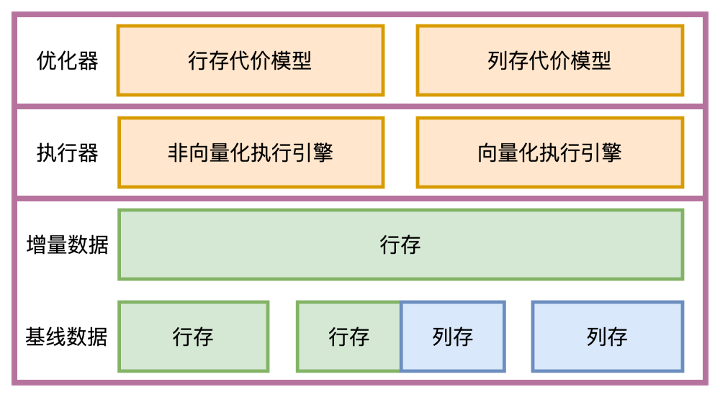
【OceanBase 系列】—— OceanBase v4.3 特性解读:查询性能提升之利器列存储引擎
原文链接:OceanBase 社区 对于分析类查询,列存可以极大地提升查询性能,也是 OceanBase 做好 HTAP 和 OLAP 的一项不可缺少的特性。本文介绍 OceanBase 列存的实现特色。 OceanBase从诞生起就一直坚持LSM-Tree架构,不断打磨功能支…...
【Java开发的我出书啦,各位同仁快过来围观】!!!
文章目录 🔊博主介绍🥤本文内容出书的目的出书的过程书籍的内容 📥博主的话 🔊博主介绍 文章目录 🔊博主介绍🥤本文内容出书的目的出书的过程书籍的内容 📥博主的话 🌾阅读前&#x…...
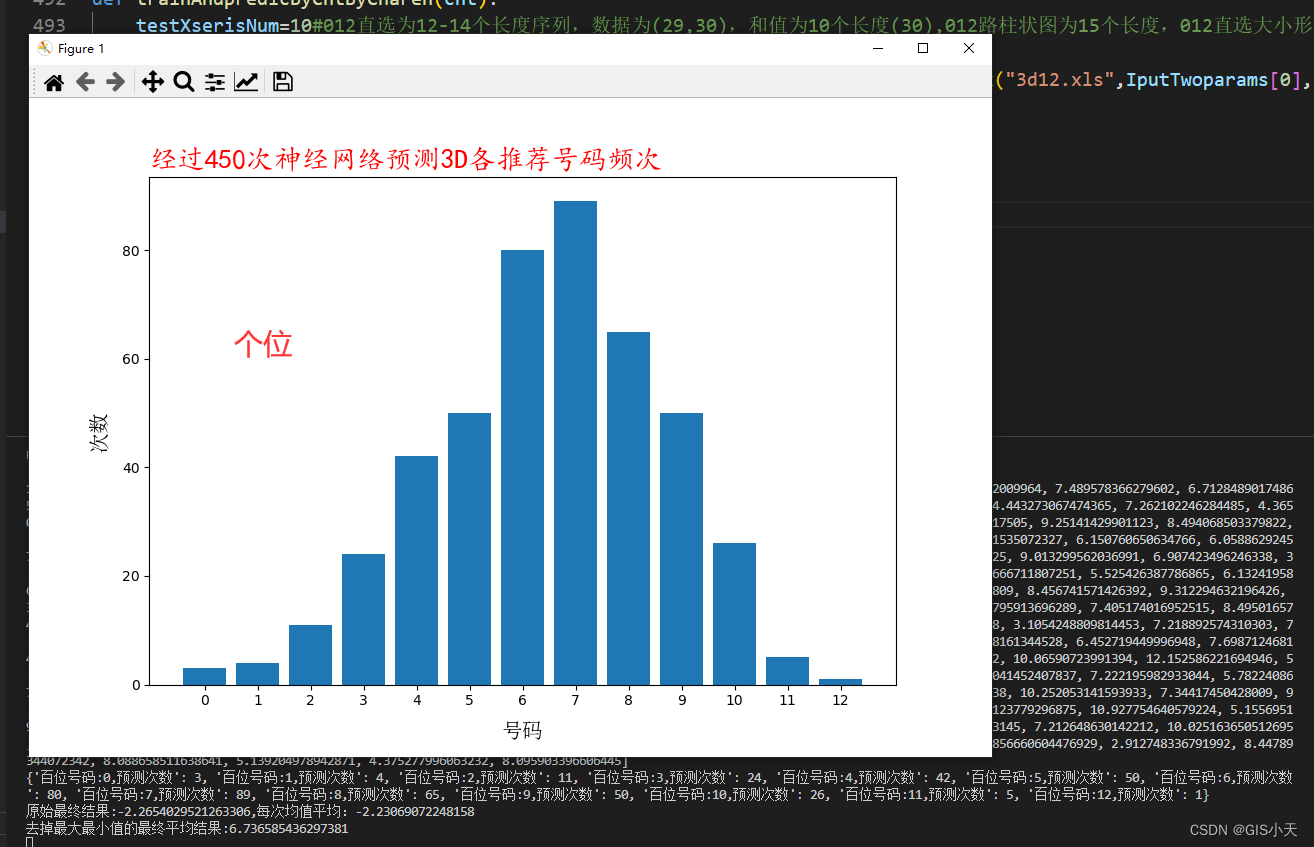
AI预测福彩3D第10套算法实战化赚米验证第1弹2024年5月5日第1次测试
从今天开始,准备启用第10套算法,来验证下本算法的可行性。因为本算法通过近三十期的内测(内测版没有公开预测结果),发现本算法的预测结果优于其他所有算法的效果。彩票预测只有实战才能检验是否有效,只有真…...

leetcode 2944.购买水果需要的最小金币
思路:dp 这道题一开始想的时候并不会,但是看到了有些水果可以买也可以不买,所以就想到了选择与不选择的思路。 对于每一个水果,我们都有买和不买的选择,但是我们的第一个水果是一定要买的。然后再往后推导。 用dp[]…...
:从“探索平衡策略”看“生活工作的平衡之道”)
算法人生(14):从“探索平衡策略”看“生活工作的平衡之道”
在强化学习中,有一种策略叫“探索平衡策略Exploration-Exploitation Trade-off)”,这种策略的核心是在探索未知领域(以获取更多信息)和利用已知信息(来最大化即时回报)之间寻求平衡,…...
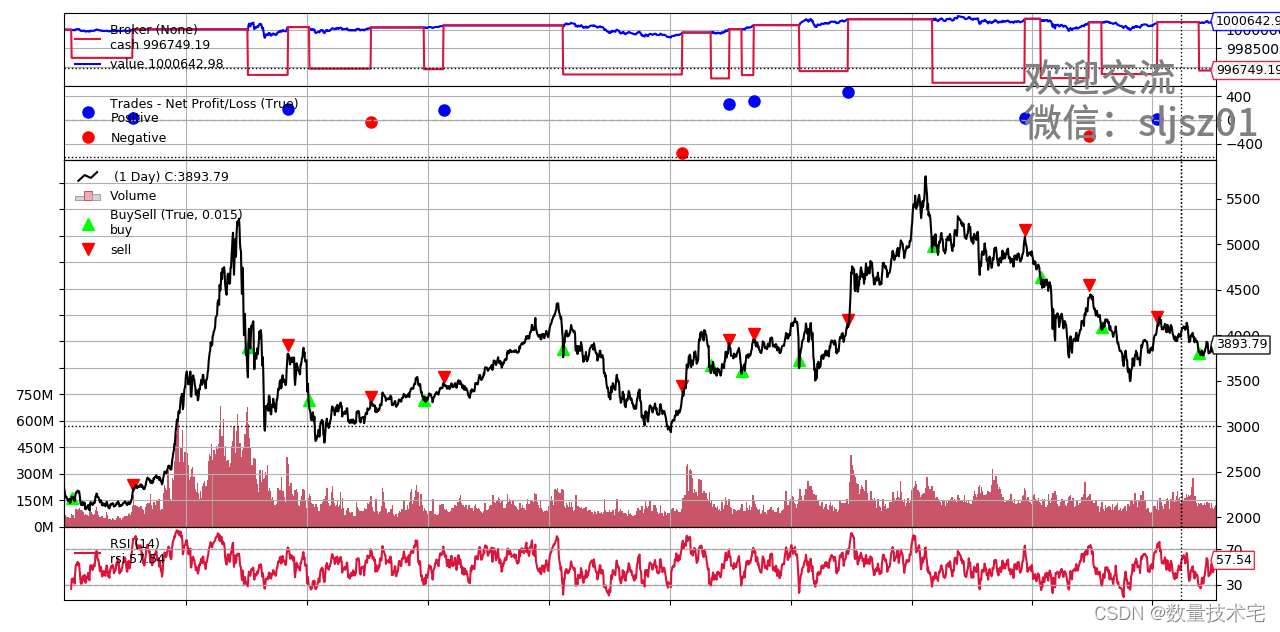
如何使用Tushare+ Backtrader进行股票量化策略回测
数量技术宅团队在CSDN学院推出了量化投资系列课程 欢迎有兴趣系统学习量化投资的同学,点击下方链接报名: 量化投资速成营(入门课程) Python股票量化投资 Python期货量化投资 Python数字货币量化投资 C语言CTP期货交易系统开…...

Guid转换为字符串
在理想情况下,任何计算机和计算机集群都不会生成两个相同的GUID。GUID 的总数达到了2128(3.41038)个,所以随机生成两个相同GUID的可能性非常小,但并不为0。GUID一词有时也专指微软对UUID标准的实现。 (1). GUID&#…...

OpenAI的搜索引擎要来了!
最近的报道和业界泄露信息显示,OpenAI正秘密研发一款新的搜索引擎,可能叫SearchGPT或Sonic,目标是挑战Google的搜索霸权。预计这款搜索引擎可能在5月9日即将到来的活动中正式亮相。 SearchGPT的蛛丝马迹 尽管OpenAI对SearchGPT尚未表态&…...

PaddlePaddle与OpenMMLab
产品全景_飞桨产品-飞桨PaddlePaddle OpenMMLab算法应用平台...

HBuilderX uniapp+vue3+vite axios封装
uniapp 封装axios 注:axios必须低于0.26.0,重中之重 重点:封装axios的适配器adapter 1.安装axios npm install axios0.26.0创建api文件夹 2.新建adapter.js文件 import settle from "axios/lib/core/settle" import buildURL…...

【网络安全产品】---应用防火墙(WAF)
what Web应用防火墙(Web Application Firewall) WAF可对网站或者App的业务流量进行恶意特征识别及防护,在对流量清洗和过滤后,将正常、安全的流量返回给服务器,避免网站服务器被恶意入侵导致性能异常等问题,从而保障…...

NTN 长距离通信领域亮相
核心蜂窝解决方案亮相并带来Nordic NTN 核心解决方案深度分享。环节将全面解析 nRF9151 模组的核心特性与技术优势,详解卫星星座生态布局及 nRFCloud 平台的应用价值,为参会者勾勒 NTN 技术的整体框架与商业落地前景,为后续内容奠定专业基础。…...

数据分析师简历封神指南:数据可视化 + 业务洞察双重点
引言:别让你的简历,死在6秒筛选期 “熟练使用Python、SQL、Tableau,擅长数据分析与可视化”——当HR第101次看到这句千篇一律的技能描述时,手指已经悬在“删除”键上。2026年数据分析师岗位竞争有多卷?某招聘平台数据显示,平均每个岗位收到250份简历,HR平均花6秒扫描一…...

遗传算法调参避坑指南:交叉率、变异率怎么设?种群大小多少合适?
遗传算法参数调优实战手册:从理论到工程落地的关键策略 当你在深夜盯着屏幕上迟迟不收敛的遗传算法结果时,是否曾怀疑过那些默认参数值是否真的适合你的问题?遗传算法作为经典的优化工具,其参数设置往往决定了算法是高效找到全局最…...

事件相机技术原理与应用全解析
1. 事件相机技术概述事件相机(Event Camera)是一种革命性的视觉传感器,它彻底改变了传统相机的图像采集方式。与普通相机不同,事件相机不会以固定帧率捕获完整的图像帧,而是异步检测每个像素的亮度变化。当某个像素位置…...
)
避坑指南:Tina Linux下MIPI DSI与LVDS屏调试的那些‘坑’(以V853/D1s为例)
Tina Linux下MIPI DSI与LVDS屏调试实战避坑指南(V853/D1s开发板为例) 1. 高速差分接口调试的"死亡陷阱" 当V853开发板首次连接那块7英寸MIPI屏时,我遭遇了职业生涯最诡异的显示故障——屏幕上半部正常显示,下半部却呈现…...
)
JavaFX程序打包exe的两种实战方案对比:exe4j vs jlink+launch4j(含体积优化技巧)
JavaFX程序打包exe的两种实战方案对比:exe4j vs jlinklaunch4j(含体积优化技巧) 对于JavaFX开发者而言,将精心开发的程序打包成可执行的exe文件是产品交付的关键一步。面对市面上多种打包工具和方案,如何选择最适合自己…...

【国家级社科基金申报利器】:NotebookLM自动生成理论框架图+文献缺口分析,附可验证API调用日志
更多请点击: https://codechina.net 第一章:NotebookLM社会科学研究的范式变革 传统社会科学研究长期依赖人工编码、文献综述与小样本质性分析,知识整合周期长、主观性强、可复现性低。NotebookLM 的引入正系统性重构这一范式——它并非简单…...

发动机悬架系统场景下的多目标优化算法与最优控制算法【附程序】
✨ 长期致力于深度神经网络、深度学习、多目标优化算法、最优控制、主动悬置系统研究工作,擅长数据搜集与处理、建模仿真、程序编写、仿真设计。 ✅ 专业定制毕设、代码 ✅ 如需沟通交流,点击《获取方式》 (1)基于深度神经网络与N…...

Seraphine英雄联盟战绩查询工具终极指南:智能排位助手完全教程
Seraphine英雄联盟战绩查询工具终极指南:智能排位助手完全教程 【免费下载链接】Seraphine 英雄联盟战绩查询工具 项目地址: https://gitcode.com/gh_mirrors/se/Seraphine 你是否在英雄联盟排位赛中经常因为BP阶段手忙脚乱而错失先机?是否希望快…...

COLMAP实战:跳过特征提取,直接用已知位姿完成三角测量与稠密重建
COLMAP高效重建实战:基于已知位姿的三角测量与稠密重建加速方案 三维重建技术正在机器人导航、AR/VR内容生成等领域快速普及,但传统流程中特征提取与匹配环节往往消耗超过70%的计算时间。当相机位姿已通过SLAM或其他传感器获取时,如何跳过这些…...