
物联网实战--平台篇之(五)账户界面
目录
一、界面框架
二、首页(未登录)
三、验证码登录
四、密码登录
五、帐号注册
六、忘记密码
本项目的交流QQ群:701889554
物联网实战--入门篇https://blog.csdn.net/ypp240124016/category_12609773.html
物联网实战--驱动篇https://blog.csdn.net/ypp240124016/category_12631333.html
本项目资源文件https://download.csdn.net/download/ypp240124016/89280540
一、界面框架
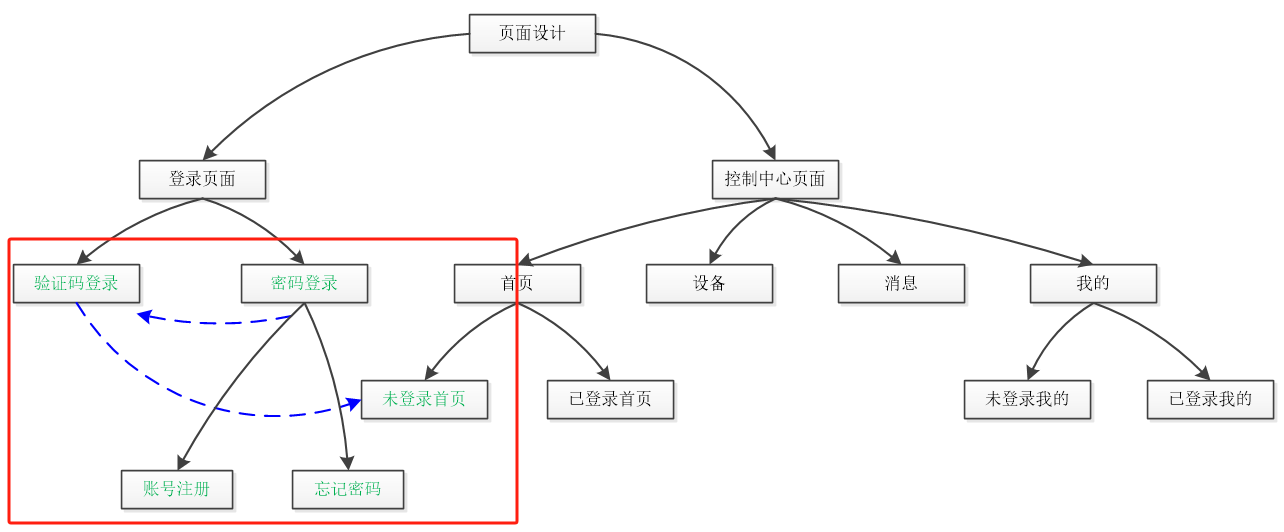
从结构上看,页面内容会比较多,整体上分为两部分,一是登录页面,二是控制中心页面。现阶段是设计帐号登录相关的页面,如上图所示的绿色字体部分;控制中心页面分为首页、设备、消息和我的四部分,APP打开后首先进入首页,首页有两种状态,未登录状态和已登录状态,如果之前没登录过或者退出了,那么就进入未登录状态,需要引导用户登录;控制中心具体的放在后面来讲,现在分析下登录页面的流程。
打开后,首先展示的是未登录首页,页面中间有“前往登录”按钮,点击后会跳转到验证码登录页面,该页面有“密码登录”按钮,点击后会跳转到密码登录页面,此页面有两个文字按钮,分别是“账号注册”和“忘记密码”按钮。至此,登录相关界面就全了,在返回过程中如上图蓝色指示线所示,密码登录返回验证码登录,最后返回首页。以下是具体软件的录屏视频。
APP界面设计
下图是工程项目的界面目录结构,其中大部分是以SwipeView切换界面为主,实现不同页面之间的跳转。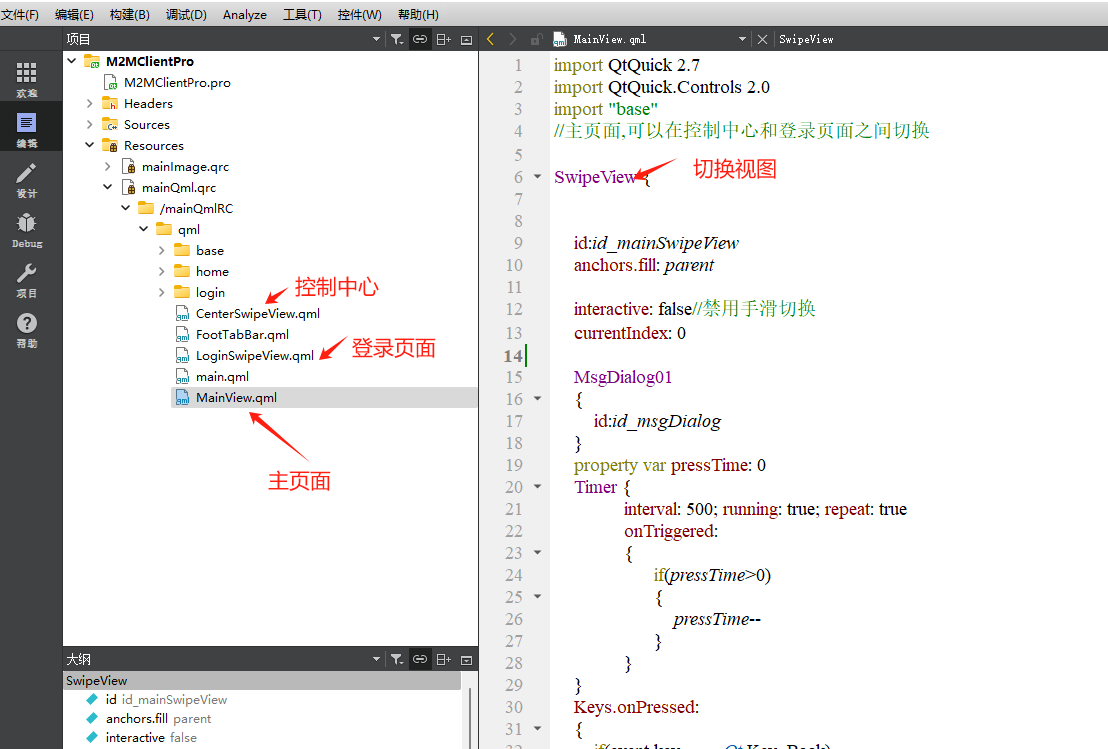
以下是主页面的QML前端代码,核心是放着CenterSwipeView控制中心和LoginSwipeView登录页面,这里面有部分是捕捉安卓手机返回键的代码Keys.onPressed,逻辑是快速点击返回键几下就可以退出APP了。
import QtQuick 2.7
import QtQuick.Controls 2.0
import "base"
//主页面,可以在控制中心和登录页面之间切换SwipeView {id:id_mainSwipeViewanchors.fill: parentinteractive: false//禁用手滑切换currentIndex: 0MsgDialog01 {id:id_msgDialog}property var pressTime: 0Timer {interval: 500; running: true; repeat: trueonTriggered: {if(pressTime>0){pressTime--}}}Keys.onPressed: {if(event.key === Qt.Key_Back){console.log("login Key_Back!")if(pressTime>0){console.log("app quit!")Qt.quit()}else{pressTime=2event.accepted = true;id_msgDialog.funOpen("再按一次退出!")                }}}CenterSwipeView //控制中心界面{id:id_centerSwipeView}LoginSwipeView  //登录界面{id:id_loginSwipeViewonSiqLoginBackLevel1://登录界面返回按钮{id_mainSwipeView.currentIndex=0}}Component.onCompleted: {}Connections{target: theAccountManonSiqSetLoginState:{console.log("set login state=", state)if(state>0)//登录成功{id_mainSwipeView.currentIndex=0}else//去登录{id_mainSwipeView.currentIndex=1}}onSiqShowMsg:{id_msgDialog.funOpen(msg)}}function funSetFocus(){focus=true}}
二、首页(未登录)
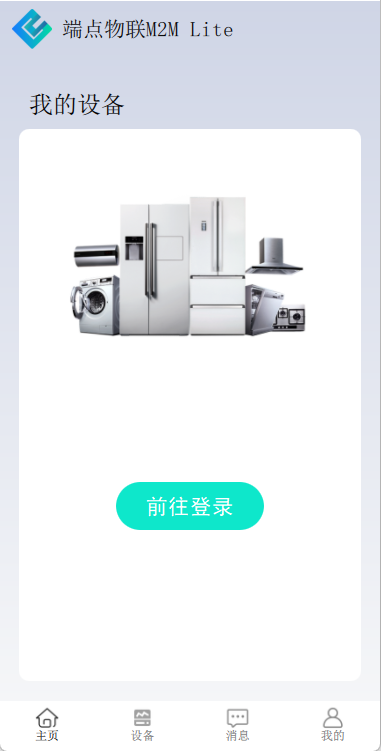
这是未登录的首页页面,第一次打开APP便是这个页面,目的是引导用户注册和登录,布局也相对简洁,LOGO+设备背景图+按钮,点击前往登录 按钮就能进入下一个页面,下面是具体代码。两者结合起来看,其实QML代码也是非常简单的,核心作用还是布局。代码里有三个注意点,一个是使用Gradient产生渐变色,这样背景比较不会单调;二是开头import "../base"引入了base文件夹,里面放着一些常用的、定制化的基础模块,比如这里的BaseButton02,就是圆角按钮;三是在BaseButton02内部的前后端交互接口theAccountMan,这个是在C++主程序里定义的。
import QtQuick 2.7
import QtQuick.Controls 2.0
import "../base"//未登录home画面Rectangle {anchors.fill: parentgradient: Gradient {GradientStop { position: 0.0; color: "#CFD5E6" }GradientStop { position: 1.0; color: "#F5F6F8" }}//LOGOImage{id: id_logoImgwidth: heightheight: 40mipmap: trueanchors{left:parent.leftleftMargin:width*0.3top:parent.toptopMargin:height*0.2}source: "qrc:/mainImgRC/images/logo.png"}Label{id:id_headLabelheight: id_logoImg.heightwidth: height*4anchors{verticalCenter:id_logoImg.verticalCenterleft:id_logoImg.rightleftMargin:10}verticalAlignment: Text.AlignVCenterhorizontalAlignment: Text.AlignLeftfont.pointSize: height*0.40font.family:"宋体"color: "black"text:"端点物联M2M Lite"}Label{id:id_myDevLabelheight: id_logoImg.heightwidth: height*4anchors{bottom:id_centerRect.topbottomMargin:5left:id_centerRect.leftleftMargin:10}verticalAlignment: Text.AlignVCenterhorizontalAlignment: Text.AlignLeftfont.pointSize: height*0.45font.family:"宋体"color: "black"text:"我的设备"}Rectangle //中心登录空白矩形{id:id_centerRectwidth:parent.width*0.9radius:10anchors{top:id_logoImg.bottomtopMargin:id_logoImg.height*2horizontalCenter:parent.horizontalCenterbottom:parent.bottombottomMargin:20}Image //冰箱等智能家居设备图片{id: id_devicesImgwidth: parent.width*0.8height: width/1.6mipmap: trueanchors{horizontalCenter:parent.horizontalCentertop:parent.toptopMargin:parent.height*0.08}source: "qrc:/mainImgRC/images/home/home_devices.png"}BaseButton02{height: 50width: 150buttonText: "前往登录"anchors{horizontalCenter:parent.horizontalCenterbottom:parent.bottombottomMargin:height*3}onSiqClickedLeft: {theAccountMan.setLoginState(0)}}}}

三、验证码登录

import QtQuick 2.7
import QtQuick.Controls 2.0
import "../base"//验证码登录界面Rectangle {signal siqLoginBackLevel0()signal siqGotoPasswdLogin()MsgDialog01{id:id_msgDialog}Keys.onPressed: {if(event.key === Qt.Key_Back){console.log("phone Key_Back!")event.accepted = true;siqLoginBackLevel0()}}ImageButton01//返回按钮{source: "qrc:/mainImgRC/images/login/back.png"anchors{left:parent.leftleftMargin:20top:parent.toptopMargin:20            }onSiqClickedLeft: {siqLoginBackLevel0()}}HeadView{id:id_headViewtextValue: "手机验证码登录"anchors{horizontalCenter:parent.horizontalCentertop:parent.toptopMargin:80}}BaseText01{id:id_phoneTextheight: 50width: parent.width*0.8anchors{horizontalCenter:parent.horizontalCentertop:id_headView.bottomtopMargin:30}placeholderText: "请输入手机号"maximumLength: 11}VerCodeView//验证码模块{id:id_verCodeViewheight: id_phoneText.heightagreeCheckState: id_userAgreement.checkStatephoneNumber: id_phoneText.textanchors{horizontalCenter:parent.horizontalCentertop:id_phoneText.bottomtopMargin:10}}BaseButton02{id:id_loginButtonheight: id_phoneText.heightwidth: id_phoneText.widthanchors{horizontalCenter:parent.horizontalCentertop:id_verCodeView.bottomtopMargin:10}buttonText: "登录"onSiqClickedLeft: {if(id_userAgreement.checkState==0){id_msgDialog.funOpen("请先同意用户协议!")return}var ok=theAccountMan.isPhoneNumber(id_phoneText.text)if(!ok){id_msgDialog.funOpen("请输入正确的手机号!")return}ok=theAccountMan.isNumber(id_verCodeView.verCode)if(ok!==4){id_msgDialog.funOpen("请输入正确的验证码!")return}theAccountMan.requestLoginByVerCode(id_phoneText.text, id_verCodeView.verCode)}}UserAgreement//隐私政策{id:id_userAgreementanchors{left:id_phoneText.lefttop:id_loginButton.bottomtopMargin:10}}BaseButton02{id:id_switchButtonheight: id_phoneText.heightwidth: id_phoneText.widthreleaseColor: "#F0F0F0"pressedColor: "#E0E0E0"buttonColor:"#505050"anchors{horizontalCenter:parent.horizontalCentertop:id_userAgreement.bottomtopMargin:30}buttonText: "密码登录>>"onSiqClickedLeft: {siqGotoPasswdLogin()}}}
这个页面几乎是用的base里的页面模块,HeadView是LOGO+标题模块,内容可以更改;BaseText01是文字输入模块,用户名、密码什么的都是用的这个模块;VerCodeView是验证码模块,包含了文字输入模块和按钮模块;还有个隐私政策模块UserAgreement,这在跟账户操作上都需要用到的模块,包括注册、登录、改密码等等;最后,还有个返回按钮ImageButton01,点击后返回到首页,与捕捉返回键的功能一样。在页面底部,有个按钮模块,是切换到账户密码登录方式用的,从这里也可以看出,现在主流的APP都是默认提倡直接手机登录的,对C端用户比较友好便捷。
四、密码登录

import QtQuick 2.7
import QtQuick.Controls 2.0
import "../base"
//账号密码登录页面
//还有注册和忘记密码两个切换页面SwipeView {signal siqPasswdBackLevel0()id:id_passwdSwipeViewinteractive: false//禁用手滑切换MsgDialog01{id:id_msgDialog}Keys.onPressed: {if(event.key === Qt.Key_Back){console.log("passwd Key_Back!")event.accepted = true;siqPasswdBackLevel0()}}Rectangle{ //账号密码登录页面ImageButton01//返回到验证码登录页面{id:id_backButtonsource: "qrc:/mainImgRC/images/login/back.png"anchors{left:parent.leftleftMargin:20top:parent.toptopMargin:20}onSiqClickedLeft: {siqPasswdBackLevel0()}}HeadView{id:id_headViewtextValue: "密码登录"anchors{horizontalCenter:parent.horizontalCentertop:parent.toptopMargin:60}}BaseText01//账户{id:id_accountTextheight: 50width: parent.width*0.8anchors{horizontalCenter:parent.horizontalCentertop:id_headView.bottomtopMargin:30}placeholderText: "用户名/手机号"maximumLength: 30}BaseText01//密码{ id:id_passwdTextheight: id_accountText.heightwidth: id_accountText.widthanchors{horizontalCenter:parent.horizontalCentertop:id_accountText.bottomtopMargin:10}placeholderText: "密码"maximumLength: 30echoMode: TextInput.Password//密码模式}UserAgreement//隐私政策{id:id_userAgreementanchors{left:id_passwdText.lefttop:id_passwdText.bottomtopMargin:10}}BaseButton02//登录按钮{id:id_loginButtonheight: id_passwdText.heightwidth: id_passwdText.widthanchors{horizontalCenter:parent.horizontalCentertop:id_userAgreement.bottomtopMargin:10}buttonText: "登录"onSiqClickedLeft: {if(id_userAgreement.checkState==0){id_msgDialog.funOpen("请先同意用户协议!")return}theAccountMan.requestLogin(id_accountText.text, id_passwdText.text, 1)}}Rectangle{  //注册+忘记密码  行width: parent.width*0.55height: 40anchors{horizontalCenter:parent.horizontalCentertop:id_loginButton.bottomtopMargin:30}TextButton01{id:id_regTexttextValue: "注册"textColor: "#303030"anchors{verticalCenter:parent.verticalCenterleft:parent.left}onSiqClickedLeft: {id_passwdSwipeView.currentIndex=1//跳转页面}}TextButton01{id:id_forgetTexttextValue: "忘记密码"textColor: "#303030"anchors{verticalCenter:parent.verticalCenterright:parent.right}onSiqClickedLeft: {id_passwdSwipeView.currentIndex=2//跳转页面}}}}RegView //账号注册{onSiqGoBackLevel0:{ id_passwdSwipeView.currentIndex=0}}ForgetView  //忘记密码{onSiqGoBackLevel0:{ id_passwdSwipeView.currentIndex=0}}}
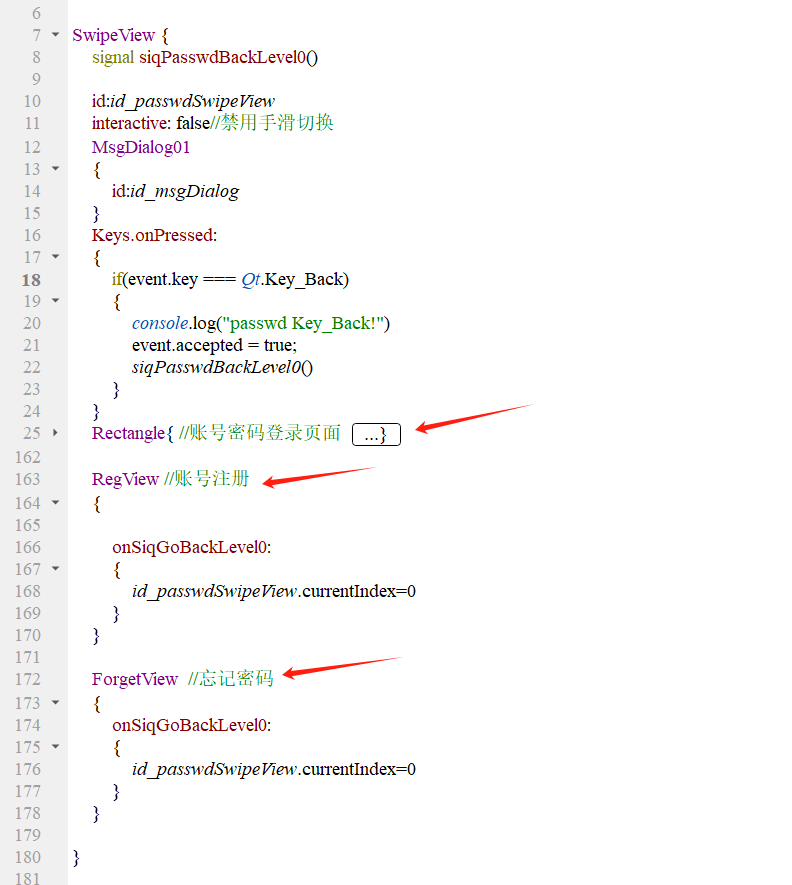
因为有注册和忘记密码两个页面需要切换,所以开头需要使用SwipeView,把密码登录页面收缩起来就是下图的样子,本质上就是3个页面进行切换。密码登录页面跟验证码登录类似,就是内容上有些差异,其中的TextButton01是文字按钮,注册和忘记密码靠这个按钮进行切换的。
五、帐号注册
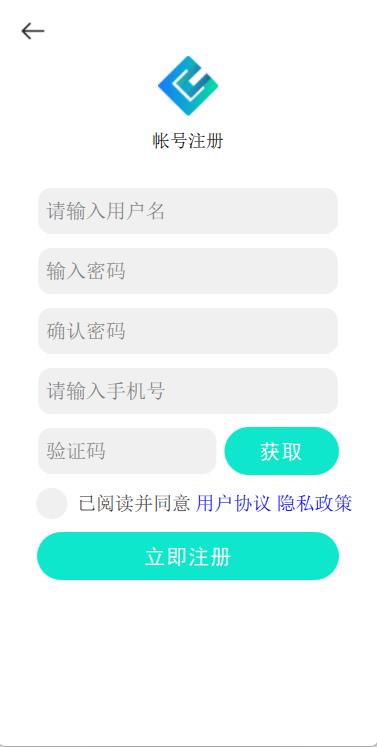
import QtQuick 2.7
import QtQuick.Controls 2.0
import "../base"//注册帐号页面Rectangle {signal siqGoBackLevel0() MsgDialog01 {id:id_msgDialog}Keys.onPressed: {if(event.key === Qt.Key_Back){console.log("reg Key_Back!")event.accepted = true;siqGoBackLevel0()}}ImageButton01{source: "qrc:/mainImgRC/images/login/back.png"anchors{left:parent.leftleftMargin:20top:parent.toptopMargin:20            }onSiqClickedLeft: {siqGoBackLevel0()}}HeadView {id:id_headViewtextValue: "帐号注册"anchors{horizontalCenter:parent.horizontalCentertop:parent.toptopMargin:60}}BaseText01{ id:id_accountTextheight: 50width: parent.width*0.8anchors{horizontalCenter:parent.horizontalCentertop:id_headView.bottomtopMargin:30}placeholderText: "请输入用户名"maximumLength: 30}BaseText01//密码{id:id_passwdTextheight: id_accountText.heightwidth: id_accountText.widthanchors{horizontalCenter:parent.horizontalCentertop:id_accountText.bottomtopMargin:10}placeholderText: "输入密码"maximumLength: 30echoMode: TextInput.Password//密码模式}BaseText01//确认密码{id:id_confirmTextheight: id_accountText.heightwidth: id_accountText.widthanchors{horizontalCenter:parent.horizontalCentertop:id_passwdText.bottomtopMargin:10}placeholderText: "确认密码"maximumLength: 30echoMode: TextInput.Password//密码模式}BaseText01{id:id_phoneTextheight: 50width: parent.width*0.8anchors{horizontalCenter:parent.horizontalCentertop:id_confirmText.bottomtopMargin:10}placeholderText: "请输入手机号"maximumLength: 11}VerCodeView//验证码模块{id:id_verCodeViewheight: id_phoneText.heightagreeCheckState: id_userAgreement.checkStatephoneNumber: id_phoneText.textanchors{horizontalCenter:parent.horizontalCentertop:id_phoneText.bottomtopMargin:10}}UserAgreement//隐私政策{id:id_userAgreementanchors{left:id_verCodeView.lefttop:id_verCodeView.bottomtopMargin:10}}BaseButton02//注册按钮{id:id_loginButtonheight: id_passwdText.heightwidth: id_passwdText.widthanchors{horizontalCenter:parent.horizontalCentertop:id_userAgreement.bottomtopMargin:10}buttonText: "立即注册"onSiqClickedLeft: {if(id_userAgreement.checkState==0){id_msgDialog.funOpen("请先同意用户协议!")return}var result=theAccountMan.checkAccount(id_accountText.text)if(result===1){id_msgDialog.funOpen("账户名长度不能小于5!")return}else if(result===2){id_msgDialog.funOpen("不能以admin作为账户名!")return}else if(result===3){id_msgDialog.funOpen("不能纯数字作为账户名!")return}result=theAccountMan.checkPasswd(id_passwdText.text)if(result===1){id_msgDialog.funOpen("密码长度要大于8!")return }if(id_passwdText.text!==id_confirmText.text){id_msgDialog.funOpen("两次密码不一致!")return}   var ok=theAccountMan.isPhoneNumber(id_phoneText.text)if(!ok){id_msgDialog.funOpen("请输入正确的手机号!")return}ok=theAccountMan.isNumber(id_verCodeView.verCode)if(ok!==4){id_msgDialog.funOpen("请输入正确的验证码!")return}theAccountMan.requestReg(id_accountText.text, id_passwdText.text, id_phoneText.text, id_verCodeView.verCode, )}}}
帐号注册内容比较多,但是基本就是那几个基础模块的组合了,没什么特殊的东西。基本逻辑是用手机验证码的形式注册新账户。
六、忘记密码
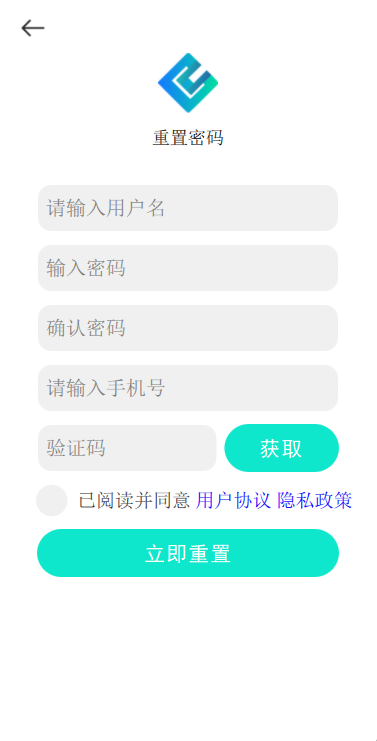
import QtQuick 2.7
import QtQuick.Controls 2.0
import "../base"//忘记密码页面Rectangle {signal siqGoBackLevel0() MsgDialog01 {id:id_msgDialog}Keys.onPressed: {if(event.key === Qt.Key_Back){console.log("forget Key_Back!")event.accepted = true;siqGoBackLevel0()}}ImageButton01{source: "qrc:/mainImgRC/images/login/back.png"anchors{left:parent.leftleftMargin:20top:parent.toptopMargin:20            }onSiqClickedLeft: {siqGoBackLevel0()}}HeadView {id:id_headViewtextValue: "重置密码"anchors{horizontalCenter:parent.horizontalCentertop:parent.toptopMargin:60}}BaseText01{ id:id_accountTextheight: 50width: parent.width*0.8anchors{horizontalCenter:parent.horizontalCentertop:id_headView.bottomtopMargin:30}placeholderText: "请输入用户名"maximumLength: 30}BaseText01//密码{id:id_passwdTextheight: id_accountText.heightwidth: id_accountText.widthanchors{horizontalCenter:parent.horizontalCentertop:id_accountText.bottomtopMargin:10}placeholderText: "输入密码"maximumLength: 30echoMode: TextInput.Password//密码模式}BaseText01//确认密码{id:id_confirmTextheight: id_accountText.heightwidth: id_accountText.widthanchors{horizontalCenter:parent.horizontalCentertop:id_passwdText.bottomtopMargin:10}placeholderText: "确认密码"maximumLength: 30echoMode: TextInput.Password//密码模式}BaseText01{id:id_phoneTextheight: 50width: parent.width*0.8anchors{horizontalCenter:parent.horizontalCentertop:id_confirmText.bottomtopMargin:10}placeholderText: "请输入手机号"maximumLength: 11}VerCodeView//验证码模块{id:id_verCodeViewheight: id_phoneText.heightagreeCheckState: id_userAgreement.checkStatephoneNumber: id_phoneText.textanchors{horizontalCenter:parent.horizontalCentertop:id_phoneText.bottomtopMargin:10}}UserAgreement//隐私政策{id:id_userAgreementanchors{left:id_verCodeView.lefttop:id_verCodeView.bottomtopMargin:10}}BaseButton02//重置按钮{id:id_loginButtonheight: id_passwdText.heightwidth: id_passwdText.widthanchors{horizontalCenter:parent.horizontalCentertop:id_userAgreement.bottomtopMargin:10}buttonText: "立即重置"onSiqClickedLeft: {if(id_userAgreement.checkState==0){id_msgDialog.funOpen("请先同意用户协议!")return}var result=theAccountMan.checkAccount(id_accountText.text)if(result===1){id_msgDialog.funOpen("账户名长度不能小于5!")return}else if(result===2){id_msgDialog.funOpen("不能以admin作为账户名!")return}result=theAccountMan.checkPasswd(id_passwdText.text)if(result===1){id_msgDialog.funOpen("密码长度要大于8!")return }if(id_passwdText.text!==id_confirmText.text){id_msgDialog.funOpen("两次密码不一致!")return}   var ok=theAccountMan.isPhoneNumber(id_phoneText.text)if(!ok){id_msgDialog.funOpen("请输入正确的手机号!")return}ok=theAccountMan.isNumber(id_verCodeView.verCode)if(ok!==4){id_msgDialog.funOpen("请输入正确的验证码!")return}theAccountMan.requestResetPasswd(id_accountText.text, id_passwdText.text, id_phoneText.text, id_verCodeView.verCode)}}}
与账户注册类似,也需要手机验证码进行身份确认。
相关文章:
物联网实战--平台篇之(五)账户界面
目录 一、界面框架 二、首页(未登录) 三、验证码登录 四、密码登录 五、帐号注册 六、忘记密码 本项目的交流QQ群:701889554 物联网实战--入门篇https://blog.csdn.net/ypp240124016/category_12609773.html 物联网实战--驱动篇https://blog.csdn.net/ypp240124016/cat…...
9. Django Admin后台系统
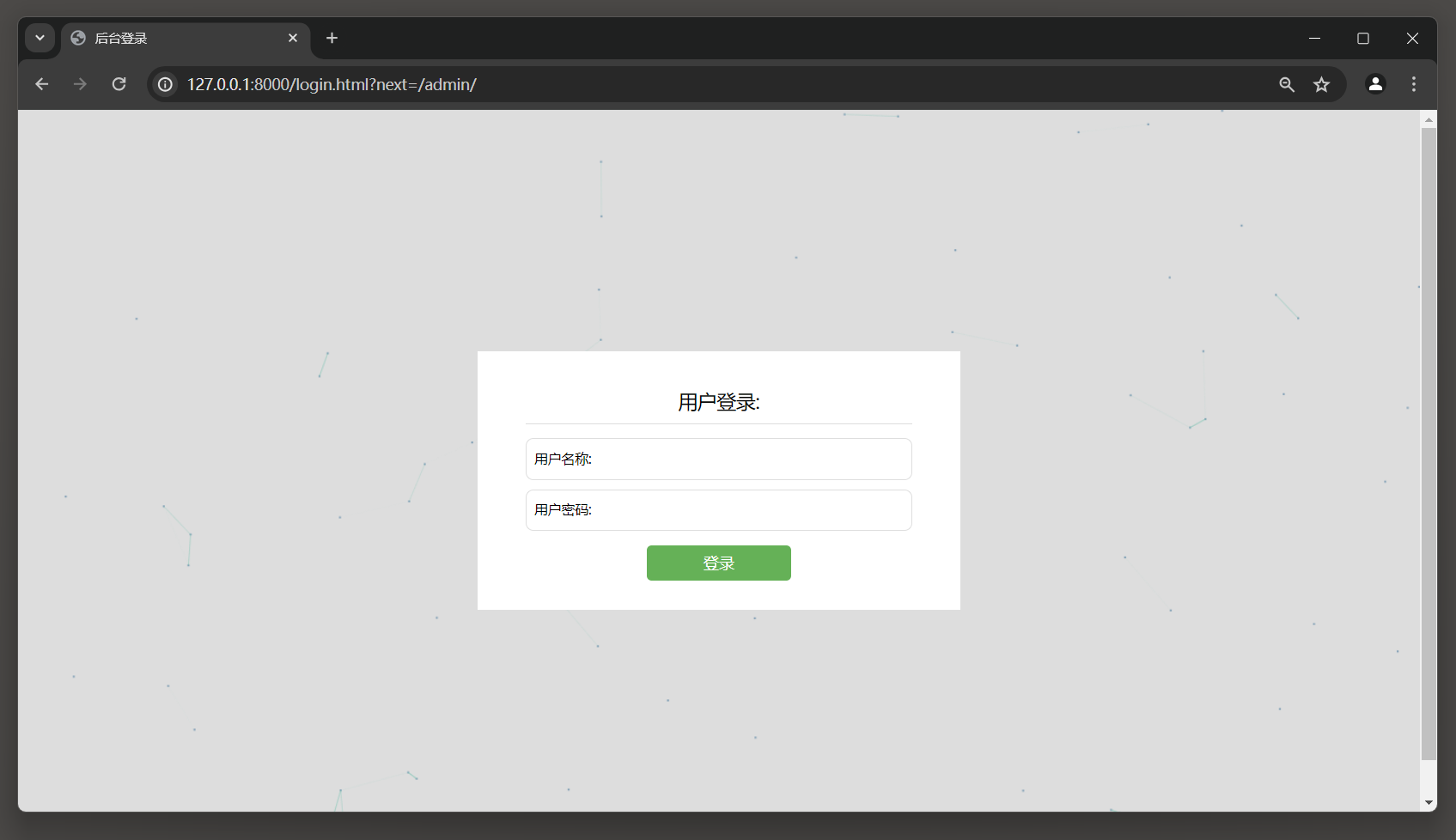
9. Admin后台系统 Admin后台系统也称为网站后台管理系统, 主要对网站的信息进行管理, 如文字, 图片, 影音和其他日常使用的文件的发布, 更新, 删除等操作, 也包括功能信息的统计和管理, 如用户信息, 订单信息和访客信息等. 简单来说, 它是对网站数据库和文件进行快速操作和管…...

ELK+kafka日志采集
ElasticSeach(存储日志信息) Logstash(搬运工) Kibana 连接ElasticSeach图形化界面查询日志 ELK采集日志的原理: 在每个服务器上安装LogstashLogstash需要配置固定读取某个日志文件Logstash将日志文件格式化为json的…...

【C++ list所有函数举例如何使用】
C 中的 std::list 是一个双向链表,提供了在列表中添加、删除、访问元素等操作的方法。以下是一些常用的 std::list 函数以及如何使用它们的示例: push_back(const T& value): 在列表的末尾添加一个值为 value 的元素。 std::list<int> mylis…...

HTML5(1)
目录 一.HTML5(超文本(链接)标记(标签<>)语言) 1.开发环境(写代码,看效果) 2.vscode 使用 3.谷歌浏览器使用 4.标签语法 5.HTML基本骨架(网页模板) 6.标签的…...

【LAMMPS学习】八、基础知识(6.2)LAMMPS GitHub 教程
8. 基础知识 此部分描述了如何使用 LAMMPS 为用户和开发人员执行各种任务。术语表页面还列出了 MD 术语,以及相应 LAMMPS 手册页的链接。 LAMMPS 源代码分发的 examples 目录中包含的示例输入脚本以及示例脚本页面上突出显示的示例输入脚本还展示了如何设置和运行各…...

专业习惯:避开本地语言,使用通用语言
如果你的目标是走一步看一步,那躺平就得了,学习什么的都没有必要。如果你的目标是远方,那么就需要未雨绸缪。 在工作之中,本地语言及习惯固然可用,但非常局限,随便换一个地方和场景,别人就难以理…...
【Leetcode每日一题】 综合练习 - 逆波兰表达式求值(难度⭐⭐)(73)
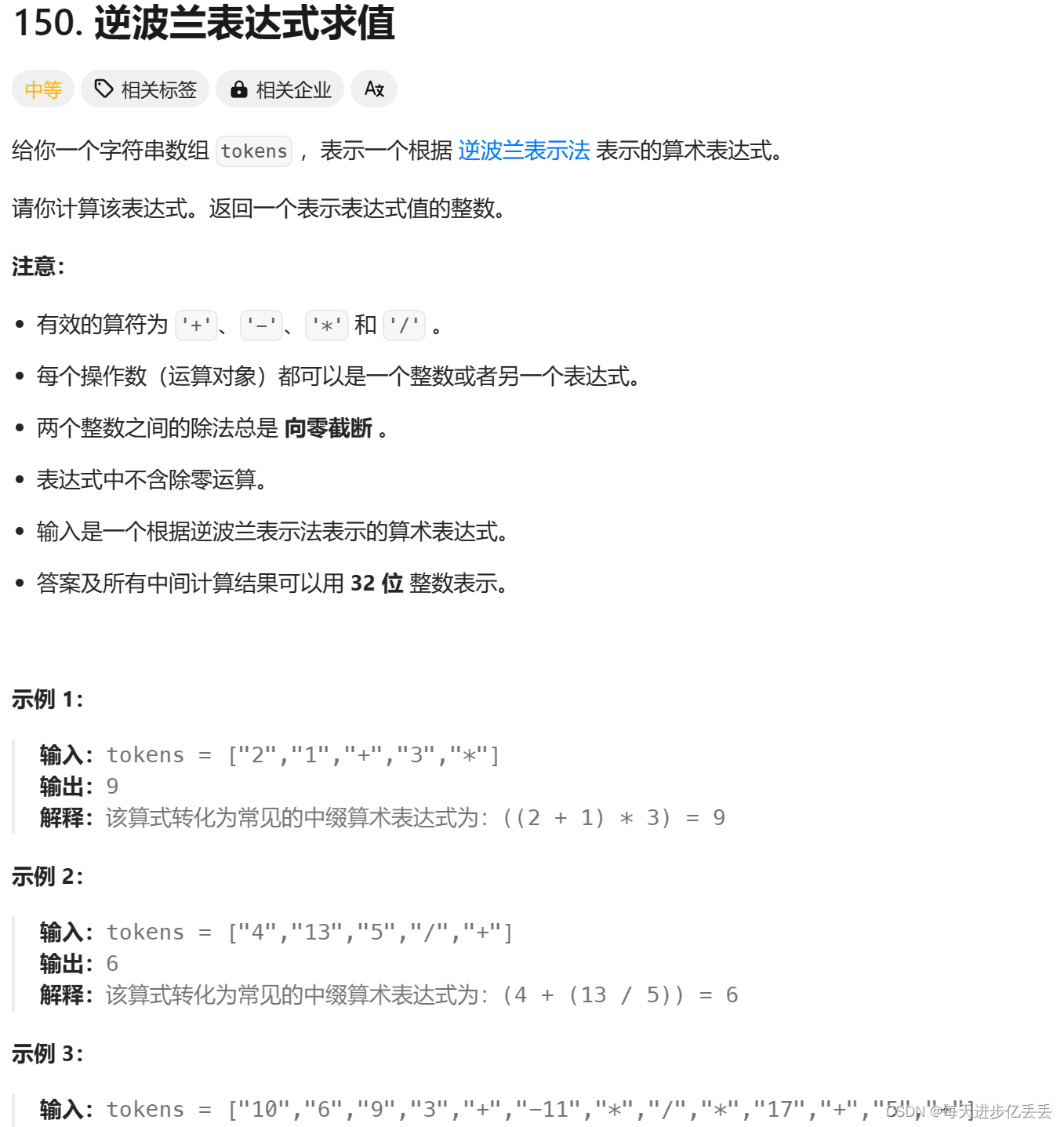
1. 题目解析 题目链接:150. 逆波兰表达式求值 这个问题的理解其实相当简单,只需看一下示例,基本就能明白其含义了。 2.算法原理 数据结构选择: 使用栈(stack<int>)来存储操作数,以便进…...

2G 3G LTE 5G的区别
2G、3G、LTE和5G是不同代的移动通信技术,每一代技术都在其前一代的基础上提供了改进的性能、更高的数据速率和新的功能。以下是这些技术的主要区别: ### 2G (第二代移动通信技术): - **数据速率**:较低的数据速率,通常在几百kbps…...

《21天学通C++》(第二十章)STL映射类(map和multimap)
为什么需要map和multimap: 1.查找高效: 映射类允许通过键快速查找对应的值,这对于需要频繁查找特定元素的场景非常适合。 2.自动排序: 会自动根据键的顺序对元素进行排序 3.多级映射: 映射类可以嵌套使用,创…...
5月游戏市场迎来新的体验,网易两款游戏重磅出炉
易采游戏网5月9日消息,随着科技的飞速发展,手机游戏已经成为人们休闲娱乐的重要方式。在这个领域,网易作为国内领先的游戏开发商,一直致力于为玩家带来高品质的游戏体验。近日,网易携手国际大厂Square Enix,…...
15_Scala面向对象编程_访问权限
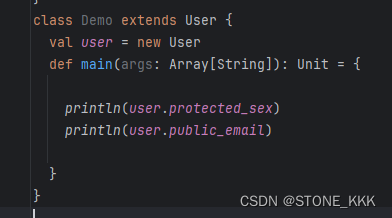
文章目录 Scala访问权限1.同类中访问2.同包不同类访问3.不同包访问4.子类权限小结 Scala访问权限 知识点概念 private --同类访问private[包名] --包私有; 同类同包下访问protected --同类,或子类 //同包不能访问(default)(public)默认public --公…...

LeetCode|700. Search in Binary Search Tree
题目 You are given the root of a binary search tree (BST) and an integer val. Find the node in the BST that the node’s value equals val and return the subtree rooted with that node. If such a node does not exist, return null. Example 1: Input: root […...
MacOS下载安装JDK8
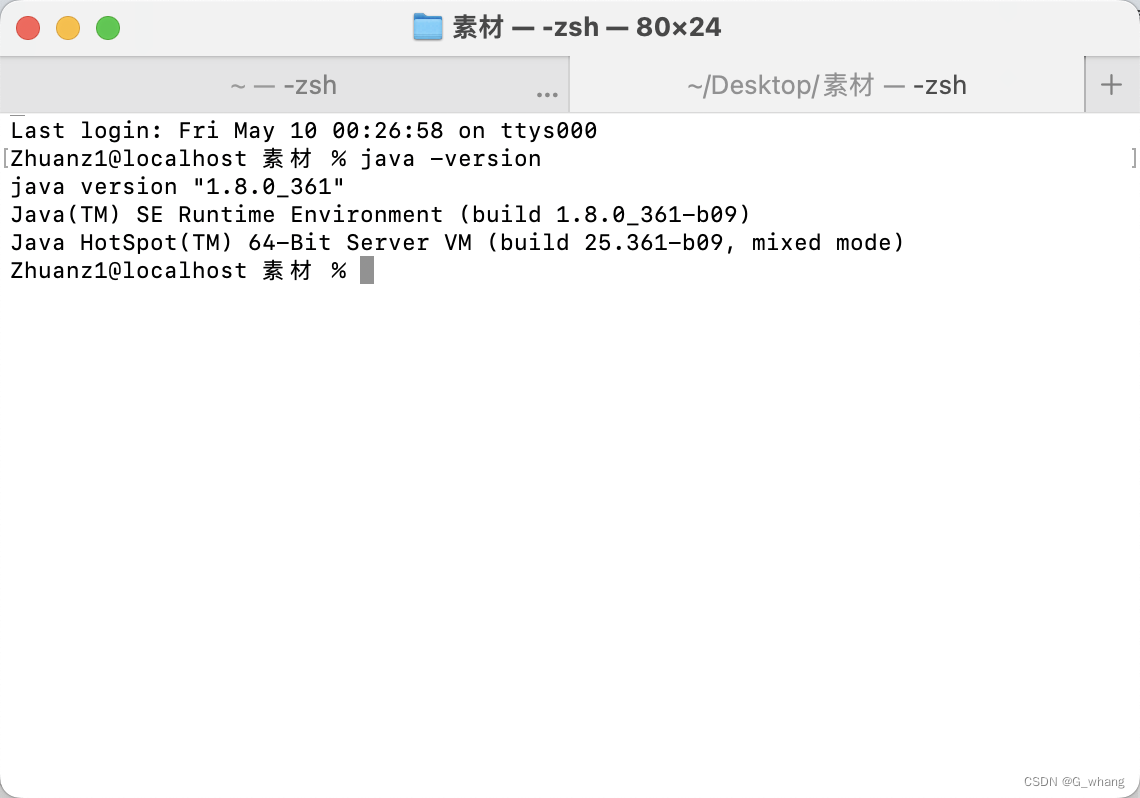
一、前言 今天给苹果电脑安装JDK环境,后续打算把Mac系统也用起来,也体验一把用苹果系统开发。 JDK就不过多介绍了,大家都是JAVA开发,JDK就是JAVA开发的必要环境。目前已经更新到JDK20了,不过我是不会更新的࿰…...

macOS 如何使用Visual Studio Code 编译C++
在 macOS,则默认系统 C++ 编译器是 Clang。 要使用 Visual Studio Code 在 macOS 上的 Clang 中指定 C++ 版本,可以按如下所示修改tasks.json 文件: 在 Visual Studio Code 中打开您的 C++ 项目。按 Ctrl+Shift+P(或 macOS 上的 Cmd+Shift+P)打开命令面板。在命令面板中键…...

SQLite3简单操作
SQLite命令 文章目录 SQLite命令一、创建数据库二、表的操作1、创建表2、删除表 一、创建数据库 注:使用Ubuntu服务器操作,安装sqlite3 sudo apt update sudo apt install sqlite3 sqlite3 --version1、SQLite主要使用命令sqlite3来创建新的数据库 sq…...
从“制造”到“智造”:“灯塔”经验助力中国制造业转型升级-转载
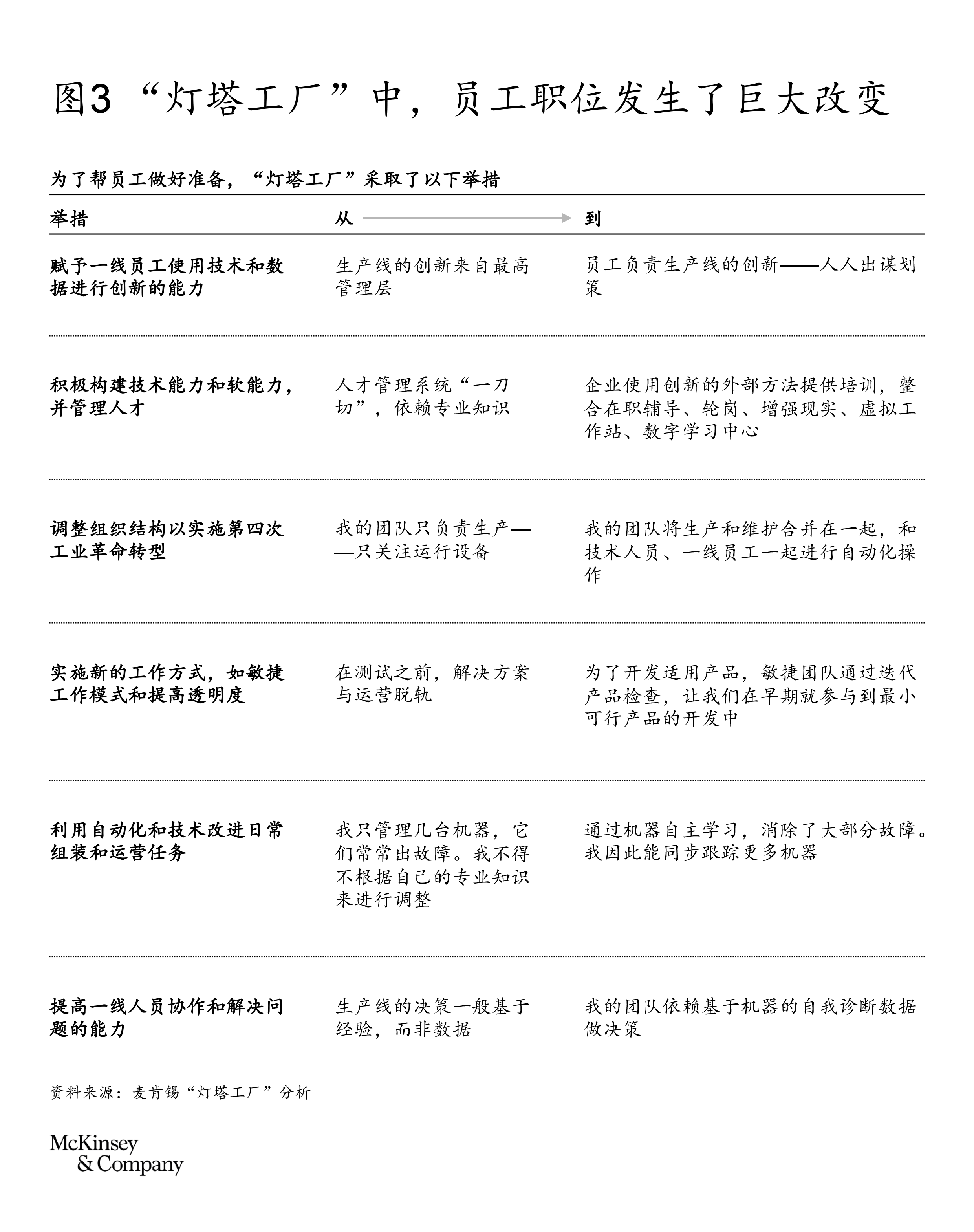
作者:Karel Eloot,侯文皓,Francisco Betti,Enno de Boer和Yves Giraud 作为中国实体经济的主体,制造业是推动中国经济发展乃至全球制造业持续增长的重要引擎。站在历史与未来交汇的新起点上,中国制造业将背…...
——容器操作)
C++ 容器(二)——容器操作
一、容器的修改 容器修改函数 insert():在指定位置插入一个或多个元素erase():删除指定位置或指定范围的元素push_back():将元素添加到容器的末尾pop_back():删除容器的最后一个元素 push_front():将元素添加到容器的开…...

操作系统——进程控制
创建进程 fork fork是一个系统调用函数,用来创建子进程,通过多个执行流完成任务。子进程和父进程共用一份代码,子进程数据使用写时拷贝,即子进程数据在创建的时候和父进程相同,但是当要修改数据的时候,子进…...
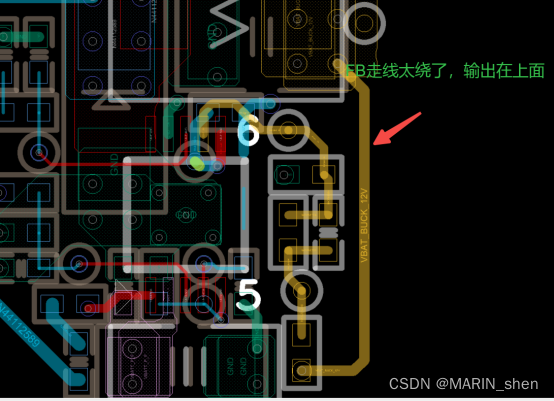
Marin说PCB之国产电源芯片方案 ---STC2620Q
随着小米加入的造车大家庭,让这个本来就卷的要死的造车大家庭更加卷了。随之带来的蝴蝶效应就是江湖上各个造成门派都开始了降本方案的浪潮啊,开始打响价格战了。各家的新能源车企也是不得不开始启动了降本方案的计划了,为了应对降价的浪潮。…...

3PEAK思瑞浦 TPA1882Q-SO1R-S SOP8 运算放大器
特性 供电电压:4.5伏至36伏或2.25伏至18伏 偏移电压:最大50V 差分输入电压范围至电源轨,可作为比较器工作 输入轨至-Vs,轨到轨输出 带宽:12MHz,斜率:10V/us 优异的EMI抑制性能:1GHz时85dB 过温保护 低噪声:1kHz时为10nV/vHz 符合AEC-Q100认证…...

从DataOperation接口到QuickSort实现:探究适配器模式在算法整合中的应用
1. 适配器模式:解决接口不兼容的桥梁 想象一下你从国外带回来一个三脚插头的电器,但家里的插座都是两孔的。这时候你会怎么做?大多数人会选择买一个转换插头。在编程世界里,适配器模式就是这个万能的"转换插头"。 最近我…...
)
MATLAB图像处理实战:用imfindcircles函数搞定工业零件瑕疵检测(附完整代码)
MATLAB图像处理实战:工业零件瑕疵检测的精准圆识别技术 在工业自动化质检领域,圆形特征的精准检测直接关系到产品质量控制的可靠性。轴承、垫片、齿轮等标准件上的孔洞缺失或尺寸偏差,往往预示着潜在的产品缺陷。传统人工检测不仅效率低下&am…...

从“鸡尾酒会”到手机通话:用生活场景图解CDMA码分多址到底是怎么“听清”你的
鸡尾酒会里的通信密码:用生活场景拆解CDMA如何从噪音中识别你的声音 1. 当鸡尾酒会遇见通信技术 想象你站在一个嘈杂的鸡尾酒会现场,四周充斥着数十人同时进行的对话。神奇的是,尽管声波在空气中混杂叠加,你的大脑却能自动过滤无关…...

应急通信无人机中继部署与覆盖率优化【附仿真】
✨ 长期致力于应急通信、无人机、中继部署、通信覆盖率、无人机部署数目研究工作,擅长数据搜集与处理、建模仿真、程序编写、仿真设计。 ✅ 专业定制毕设、代码 ✅如需沟通交流,点击《获取方式》 (1)视距概率信道建模与高度部署&a…...
)
【AI原生架构黄金法则】:SITS 2026现场实录的7条反直觉设计铁律(仅限首批参会专家内部流出)
AI原生应用架构设计:SITS 2026技术专家实战经验分享 更多请点击: https://intelliparadigm.com 第一章:SITS 2026现场共识与AI原生架构范式跃迁 在SITS 2026全球智能系统技术峰会上,来自37个国家的架构师、AI平台工程师与标准化组…...

40_《智能体微服务架构企业级实战教程》智能助手主应用服务之工具类封装
前言 配套视频教程: 在 Bilibili课堂、CSDN课程、51CTO学堂 同步发售,提供:源码+部署脚本+文档。 bilibili课堂视频教程:智能体微服务架构企业级实战教程_哔哩哔哩_bilibili CSDN课程视频教程:智能体微服务架构企业级实战教程_在线视频教程-CSDN程序员研修院 51CTO学堂…...
)
DIY焊台实战:用STM32F070F6P6的Encoder模式搞定EC11编码器(附完整CubeMX配置)
DIY焊台实战:用STM32F070F6P6的Encoder模式搞定EC11编码器(附完整CubeMX配置) 在电子DIY的世界里,焊台是每个硬件爱好者的必备工具。而一个精准可控的T12焊台,不仅能提升焊接效率,更能让整个DIY过程充满乐趣…...

如何在没有iCloud 备份的情况下从iPhone恢复联系人
不小心删除了 iPhone 上的重要联系人或短信,却发现没有 iCloud 备份可以依靠?别担心;没有 iCloud 备份的数据丢失并不意味着它永远消失了。无论您是误删了短信,还是在iOS更新后丢失了联系人,仍然有办法找回数据。在本指…...

别再死记硬背了!Vivado伪双口RAM的wea/ena信号,这次用仿真波形给你讲透
深入解析Vivado伪双口RAM控制信号:从波形图看wea/ena关键设计 在FPGA开发中,存储器设计一直是性能优化的关键环节。Xilinx Vivado工具链提供的伪双口RAM IP核因其灵活性和高效性,成为许多高速数据处理系统的首选方案。然而,不少开…...