
Keepalived实现LVS高可用
6.1 Keepalived+LVS集群介绍
-
Keepalived和LVS共同构建了一个高效的负载均衡和高可用性解决方案:LVS作为负载均衡器,负责在集群中的多个服务器间分配流量,以其高性能和可扩展性确保应用程序能够处理大量的并发请求;而Keepalived则作为高可用性保证,通过VRRP协议监控LVS服务的状态并在主服务器发生故障时自动进行故障转移,确保服务的持续可用性和无感知切换。这种结合利用了两者的优势,为关键的网络服务提供了一个稳定、可靠且高效的运行环境。
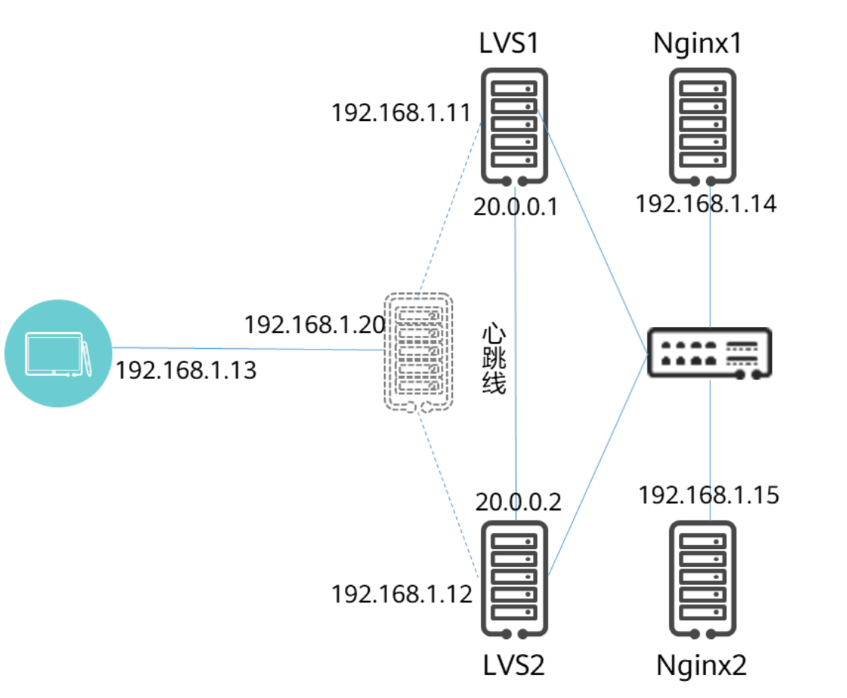
| 机器名称 | IP地址 | 子网掩码 | 说明 |
|---|---|---|---|
| Keepalived-01 | 192.168.110.31 | 255.255.255.0 | 负载均衡+高可用 |
| Keepalived-02 | 192.168.110.32 | 255.255.255.0 | 负载均衡+高可用 |
| RS1 | 192.168.110.33 | 255.255.255.0 | 真实服务器1 |
| RS2 | 192.168.110.34 | 255.255.255.0 | 真实服务器2 |
| Client | 192.168.110.35 | 255.255.255.0 | 客户端 |
6.2 后端RS配置
-
配置系统服务脚本
[root@LVS-RS1 ~]# vim /etc/init.d/LVS_RS #!/bin/bash # Startup script to handle the initialisation of LVS # chkconfig: - 28 72 # description: Initialise the Linux Virtual Server for DR # Provides: ipvsadm # Required-Start: $local_fs $network $named # Required-Stop: $local_fs $remote_fs $network # Short-Description: Initialise the Linux Virtual Server # Description: The Linux Virtual Server is a highly scalable and highly # available server built on a cluster of real servers, with the load # balancer running on Linux. LOCK=/var/lock/ipvsadm.lock VIP=192.168.110.10 . /etc/rc.d/init.d/functions start() {PID=`ifconfig | grep lo:20 | wc -l`if [ $PID -ne 0 ]; thenecho "The LVS-DR-RIP Server is already running !"else/sbin/ifconfig lo:20 $VIP netmask 255.255.255.255 broadcast $VIP up/sbin/route add -host $VIP dev lo:20echo "1" >/proc/sys/net/ipv4/conf/lo/arp_ignoreecho "2" >/proc/sys/net/ipv4/conf/lo/arp_announceecho "1" >/proc/sys/net/ipv4/conf/all/arp_ignoreecho "2" >/proc/sys/net/ipv4/conf/all/arp_announce/bin/touch $LOCKecho "starting LVS-DR-RIP server is ok !"fi } stop() {/sbin/route del -host $VIP dev lo:20/sbin/ifconfig lo:20 down >/dev/nullecho "0" >/proc/sys/net/ipv4/conf/lo/arp_ignoreecho "0" >/proc/sys/net/ipv4/conf/lo/arp_announceecho "0" >/proc/sys/net/ipv4/conf/all/arp_ignoreecho "0" >/proc/sys/net/ipv4/conf/all/arp_announcerm -rf $LOCKecho "stopping LVS-DR-RIP server is ok !" } status() {if [ -e $LOCK ]; thenecho "The LVS-DR-RIP Server is already running !"elseecho "The LVS-DR-RIP Server is not running !"fi } case "$1" instart)start;;stop)stop;;restart)stopstart;;status)status;;*)echo "Usage: $1 {start|stop|restart|status}"exit 1 esac exit 0 [root@LVS-RS1 ~]# chmod +x /etc/init.d/LVS_RS [root@LVS-RS1 ~]# chkconfig --add LVS_RS [root@LVS-RS1 ~]# systemctl start LVS_RS.service [root@LVS-RS1 ~]# scp /etc/init.d/LVS_RS 192.168.110.34:/etc/init.d/ #发给另一台RS [root@LVS-RS2 ~]# chmod +x /etc/init.d/LVS_RS [root@LVS-RS2 ~]# chkconfig --add LVS_RS [root@LVS-RS2 ~]# systemctl start LVS_RS.service
6.3 Keepalived配置
6.3.1 基于TCP的健康检测
6.3.1.1 Keepalived-01配置
[root@Keepalived-01 ~]# cp /etc/keepalived/keepalived.conf{,.bak} [root@Keepalived-01 ~]# vim /etc/keepalived/keepalived.conf ! Configuration File for keepalived global_defs {router_id LVS_node1 } vrrp_instance LVS {state MASTERinterface ens160virtual_router_id 51priority 100advert_int 1authentication {auth_type PASSauth_pass 1111}virtual_ipaddress {192.168.110.10} } virtual_server 192.168.110.10 80 {delay_loop 6 lb_algo rrlb_kind DRprotocol TCP real_server 192.168.110.33 80 {weight 1TCP_CHECK {connect_timeout 3retry 3delay_before_retry 3connect_port 80}}real_server 192.168.110.34 80 {weight 1TCP_CHECK {connect_timeout 3retry 3delay_before_retry 3connect_port 80}} } [root@Keepalived-01 ~]# systemctl start keepalived.service [root@Keepalived-01 ~]# ipvsadm -Ln IP Virtual Server version 1.2.1 (size=4096) Prot LocalAddress:Port Scheduler Flags-> RemoteAddress:Port Forward Weight ActiveConn InActConn TCP 192.168.110.10:80 rr-> 192.168.110.33:80 Route 1 0 0 -> 192.168.110.34:80 Route 1 0 0
6.3.1.2 Keepalived-02配置
[root@Keepalived-02 ~]# cp /etc/keepalived/keepalived.conf{,.bak} [root@Keepalived-02 ~]# vim /etc/keepalived/keepalived.conf ! Configuration File for keepalived global_defs {router_id LVS_node2 } vrrp_instance LVS {state MASTERinterface ens160virtual_router_id 51priority 80advert_int 1authentication {auth_type PASSauth_pass 1111}virtual_ipaddress {192.168.110.10} } virtual_server 192.168.110.10 80 {delay_loop 6 lb_algo rrlb_kind DRprotocol TCP real_server 192.168.110.33 80 {weight 1TCP_CHECK {connect_timeout 3retry 3delay_before_retry 3connect_port 80}}real_server 192.168.110.34 80 {weight 1TCP_CHECK {connect_timeout 3retry 3delay_before_retry 3connect_port 80}} } [root@Keepalived-02 ~]# systemctl start keepalived.service [root@Keepalived-02 ~]# ipvsadm -Ln IP Virtual Server version 1.2.1 (size=4096) Prot LocalAddress:Port Scheduler Flags-> RemoteAddress:Port Forward Weight ActiveConn InActConn TCP 192.168.110.10:80 rr-> 192.168.110.33:80 Route 1 0 0 -> 192.168.110.34:80 Route 1 0 0
6.3.1.3 访问测试
[root@Client ~]# for ((i=1;i<=6;i++)); do curl http://192.168.110.10; done
This is LVS test IP=192.168.110.34  Host=LVS-RS2
This is LVS test IP=192.168.110.33  Host=LVS-RS1
This is LVS test IP=192.168.110.34  Host=LVS-RS2
This is LVS test IP=192.168.110.33  Host=LVS-RS1
This is LVS test IP=192.168.110.34  Host=LVS-RS2
This is LVS test IP=192.168.110.33  Host=LVS-RS1
6.3.1.4 模拟故障转移
[root@Keepalived-01 ~]# systemctl stop keepalived.service [root@Keepalived-02 ~]# ip address show ens160 #VIP漂移到Keepalived-02 2: ens160: <BROADCAST,MULTICAST,UP,LOWER_UP> mtu 1500 qdisc mq state UP group default qlen 1000link/ether 00:0c:29:b0:0d:30 brd ff:ff:ff:ff:ff:ffaltname enp3s0inet 192.168.110.32/24 brd 192.168.110.255 scope global noprefixroute ens160valid_lft forever preferred_lft foreverinet 192.168.110.10/32 scope global ens160valid_lft forever preferred_lft foreverinet6 fe80::20c:29ff:feb0:d30/64 scope link noprefixroute valid_lft forever preferred_lft forever [root@Client ~]# for ((i=1;i<=6;i++)); do curl http://192.168.110.10; done #访问正常 This is LVS test IP=192.168.110.33 Host=LVS-RS1 This is LVS test IP=192.168.110.34 Host=LVS-RS2 This is LVS test IP=192.168.110.33 Host=LVS-RS1 This is LVS test IP=192.168.110.34 Host=LVS-RS2 This is LVS test IP=192.168.110.33 Host=LVS-RS1 This is LVS test IP=192.168.110.34 Host=LVS-RS2 [root@Keepalived-01 ~]# systemctl start keepalived.service [root@Keepalived-01 ~]# ip address show ens160 #恢复后回来 2: ens160: <BROADCAST,MULTICAST,UP,LOWER_UP> mtu 1500 qdisc mq state UP group default qlen 1000link/ether 00:0c:29:d1:a9:eb brd ff:ff:ff:ff:ff:ffaltname enp3s0inet 192.168.110.31/24 brd 192.168.110.255 scope global noprefixroute ens160valid_lft forever preferred_lft foreverinet 192.168.110.10/32 scope global ens160valid_lft forever preferred_lft foreverinet6 fe80::20c:29ff:fed1:a9eb/64 scope link noprefixroute valid_lft forever preferred_lft forever
6.3.1.5 后端服务器故障
[root@LVS-RS1 ~]# systemctl stop nginx.service [root@Keepalived-02 ~]# ipvsadm -Ln IP Virtual Server version 1.2.1 (size=4096) Prot LocalAddress:Port Scheduler Flags-> RemoteAddress:Port Forward Weight ActiveConn InActConn TCP 192.168.110.10:80 rr-> 192.168.110.34:80 Route 1 0 9 [root@Client ~]# for ((i=1;i<=6;i++)); do curl http://192.168.110.10; done #访问正常 This is LVS test IP=192.168.110.34 Host=LVS-RS2 This is LVS test IP=192.168.110.34 Host=LVS-RS2 This is LVS test IP=192.168.110.34 Host=LVS-RS2 This is LVS test IP=192.168.110.34 Host=LVS-RS2 This is LVS test IP=192.168.110.34 Host=LVS-RS2 This is LVS test IP=192.168.110.34 Host=LVS-RS2
6.3.2 基于HTTP的健康检测
6.3.2.1 生成远程网页的MD5哈希值
-
genhash 是一个命令行工具,用于生成远程网页的MD5哈希值。它可以用于监控HTTP和HTTPS服务,特别是在Keepalived配置中,用于健康检查。genhash 可以通过HTTP或HTTPS连接到网页,并生成页面数据的MD5哈希值,该哈希值可以在Keepalived配置文件中使用。
[root@Keepalived-01 ~]# genhash -s 192.168.110.33 -p 80 -u /index.html MD5SUM = fd0508d1ccc6c66c14977e54ffc7faef [root@Keepalived-01 ~]# genhash -s 192.168.110.34 -p 80 -u /index.html MD5SUM = 0632aaa5fb77608b1a4736d47aacb62c [root@Keepalived-02 ~]# genhash -s 192.168.110.33 -p 80 -u /index.html MD5SUM = fd0508d1ccc6c66c14977e54ffc7faef [root@Keepalived-02 ~]# genhash -s 192.168.110.34 -p 80 -u /index.html MD5SUM = 0632aaa5fb77608b1a4736d47aacb62c
6.3.2.2 Keepalived-01配置
[root@Keepalived-01 ~]# vim /etc/keepalived/keepalived.conf ! Configuration File for keepalived global_defs {router_id LVS_node1 } vrrp_instance LVS {state MASTERinterface ens160virtual_router_id 51priority 100advert_int 1authentication {auth_type PASSauth_pass 1111}virtual_ipaddress {192.168.110.10} } virtual_server 192.168.110.10 80 {delay_loop 6 lb_algo rrlb_kind DRprotocol TCP real_server 192.168.110.33 80 {weight 1 HTTP_GET {url {path /index.htmldigest fd0508d1ccc6c66c14977e54ffc7faef}connect_timeout 3nb_get_retry 3delay_before_retry 3}}real_server 192.168.110.34 80 {weight 1HTTP_GET {url {path /index.htmldigest 0632aaa5fb77608b1a4736d47aacb62c }connect_timeout 3nb_get_retry 3delay_before_retry 3}} } [root@Keepalived-01 ~]# systemctl start keepalived.service [root@Keepalived-01 ~]# ipvsadm -Ln IP Virtual Server version 1.2.1 (size=4096) Prot LocalAddress:Port Scheduler Flags-> RemoteAddress:Port Forward Weight ActiveConn InActConn TCP 192.168.110.10:80 rr-> 192.168.110.33:80 Route 1 0 0 -> 192.168.110.34:80 Route 1 0 0
6.3.2.3 Keepalived-02配置
[root@Keepalived-02 ~]# vim /etc/keepalived/keepalived.conf ! Configuration File for keepalived global_defs {router_id LVS_node2 } vrrp_instance LVS {state MASTERinterface ens160virtual_router_id 51priority 80advert_int 1authentication {auth_type PASSauth_pass 1111}virtual_ipaddress {192.168.110.10} } virtual_server 192.168.110.10 80 {delay_loop 6 lb_algo rrlb_kind DRprotocol TCP real_server 192.168.110.34 80 {weight 1 HTTP_GET {url {path /index.htmldigest fd0508d1ccc6c66c14977e54ffc7faef}connect_timeout 3nb_get_retry 3delay_before_retry 3}}real_server 192.168.110.34 80 {weight 1HTTP_GET {url {path /index.htmldigest 0632aaa5fb77608b1a4736d47aacb62c }connect_timeout 3nb_get_retry 3delay_before_retry 3}} } [root@Keepalived-02 ~]# systemctl start keepalived.service [root@Keepalived-02 ~]# ipvsadm -Ln IP Virtual Server version 1.2.1 (size=4096) Prot LocalAddress:Port Scheduler Flags-> RemoteAddress:Port Forward Weight ActiveConn InActConn TCP 192.168.110.10:80 rr-> 192.168.110.33:80 Route 1 0 0 -> 192.168.110.34:80 Route 1 0 0
6.3.2.4 访问测试
[root@Client ~]# for ((i=1;i<=6;i++)); do curl http://192.168.110.10; done
This is LVS test IP=192.168.110.33  Host=LVS-RS1
This is LVS test IP=192.168.110.34  Host=LVS-RS2
This is LVS test IP=192.168.110.33  Host=LVS-RS1
This is LVS test IP=192.168.110.34  Host=LVS-RS2
This is LVS test IP=192.168.110.33  Host=LVS-RS1
This is LVS test IP=192.168.110.34  Host=LVS-RS2
6.3.2.5 模拟故障转移
[root@Keepalived-01 ~]# systemctl stop keepalived.service [root@Keepalived-02 ~]# ip address show ens160 #VIP漂移到Keepalived-02 2: ens160: <BROADCAST,MULTICAST,UP,LOWER_UP> mtu 1500 qdisc mq state UP group default qlen 1000link/ether 00:0c:29:b0:0d:30 brd ff:ff:ff:ff:ff:ffaltname enp3s0inet 192.168.110.32/24 brd 192.168.110.255 scope global noprefixroute ens160valid_lft forever preferred_lft foreverinet 192.168.110.10/32 scope global ens160valid_lft forever preferred_lft foreverinet6 fe80::20c:29ff:feb0:d30/64 scope link noprefixroute valid_lft forever preferred_lft forever [root@Client ~]# for ((i=1;i<=6;i++)); do curl http://192.168.110.10; done #访问正常 This is LVS test IP=192.168.110.33 Host=LVS-RS1 This is LVS test IP=192.168.110.34 Host=LVS-RS2 This is LVS test IP=192.168.110.33 Host=LVS-RS1 This is LVS test IP=192.168.110.34 Host=LVS-RS2 This is LVS test IP=192.168.110.33 Host=LVS-RS1 This is LVS test IP=192.168.110.34 Host=LVS-RS2 [root@Keepalived-01 ~]# systemctl start keepalived.service [root@Keepalived-01 ~]# ip address show ens160 #恢复后回来 2: ens160: <BROADCAST,MULTICAST,UP,LOWER_UP> mtu 1500 qdisc mq state UP group default qlen 1000link/ether 00:0c:29:d1:a9:eb brd ff:ff:ff:ff:ff:ffaltname enp3s0inet 192.168.110.31/24 brd 192.168.110.255 scope global noprefixroute ens160valid_lft forever preferred_lft foreverinet 192.168.110.10/32 scope global ens160valid_lft forever preferred_lft foreverinet6 fe80::20c:29ff:fed1:a9eb/64 scope link noprefixroute valid_lft forever preferred_lft forever
6.3.2.6 后端服务器故障
[root@LVS-RS1 ~]# systemctl stop nginx.service [root@Keepalived-01 ~]# ipvsadm -Ln IP Virtual Server version 1.2.1 (size=4096) Prot LocalAddress:Port Scheduler Flags-> RemoteAddress:Port Forward Weight ActiveConn InActConn TCP 192.168.110.10:80 rr-> 192.168.110.34:80 Route 1 0 6 [root@Client ~]# for ((i=1;i<=6;i++)); do curl http://192.168.110.10; done This is LVS test IP=192.168.110.34 Host=LVS-RS2 This is LVS test IP=192.168.110.34 Host=LVS-RS2 This is LVS test IP=192.168.110.34 Host=LVS-RS2 This is LVS test IP=192.168.110.34 Host=LVS-RS2 This is LVS test IP=192.168.110.34 Host=LVS-RS2 This is LVS test IP=192.168.110.34 Host=LVS-RS2
6.3.3 Keepalived健康检查(MISC方式)
6.3.3.1 编写健康脚本
[root@Keepalived-01 ~]# vim /etc/keepalived/chk_web.sh #!/bin/bash# 检查传入的参数数量是否正确 if [ $# -ne 2 ]; thenecho "Error, Parameter error"exit 1 else# 使用 nmap 进行端口扫描,获取端口状态n=$(nmap -Pn -p$2 -sS -vv $1 | grep "^$2" | awk '{print $2}') # 判断端口是否开放if [ "$n" = "open" ]; thenexit 0elseexit 1fi fi [root@Keepalived-01 ~]# chmod +x /etc/keepalived/chk_web.sh [root@Keepalived-01 ~]# scp /etc/keepalived/chk_web.sh 192.168.110.32:/etc/keepalived/
6.3.3.2 keepalived-01配置
[root@Keepalived-01 ~]# vim /etc/keepalived/keepalived.conf ! Configuration File for keepalived global_defs {router_id LVS_node1 } vrrp_instance LVS {state MASTERinterface ens160virtual_router_id 51priority 100advert_int 1authentication {auth_type PASSauth_pass 1111}virtual_ipaddress {192.168.110.10} } virtual_server 192.168.110.10 80 {delay_loop 6lb_algo rrlb_kind DRprotocol TCP real_server 192.168.110.33 80 {weight 1MISC_CHECK {misc_path "/etc/keepalived/chk_web.sh 192.168.110.33 80"misc_timeout 3}} real_server 192.168.110.34 80 {weight 1MISC_CHECK {misc_path "/etc/keepalived/chk_web.sh 192.168.110.34 80"misc_timeout 3}} } [root@Keepalived-01 ~]# systemctl start keepalived.service [root@Keepalived-01 ~]# ipvsadm -Ln IP Virtual Server version 1.2.1 (size=4096) Prot LocalAddress:Port Scheduler Flags-> RemoteAddress:Port Forward Weight ActiveConn InActConn TCP 192.168.110.10:80 rr-> 192.168.110.33:80 Route 1 0 0 -> 192.168.110.34:80 Route 1 0 0
6.3.3.3 keepalived-02配置
[root@Keepalived-02 ~]# vim /etc/keepalived/keepalived.conf ! Configuration File for keepalived global_defs {router_id LVS_node2 } vrrp_instance LVS {state MASTERinterface ens160virtual_router_id 51priority 80advert_int 1authentication {auth_type PASSauth_pass 1111}virtual_ipaddress {192.168.110.10} } virtual_server 192.168.110.10 80 {delay_loop 6lb_algo rrlb_kind DRprotocol TCP real_server 192.168.110.33 80 {weight 1MISC_CHECK {misc_path "/etc/keepalived/chk_web.sh 192.168.110.33 80"misc_timeout 3}} real_server 192.168.110.34 80 {weight 1MISC_CHECK {misc_path "/etc/keepalived/chk_web.sh 192.168.110.34 80"misc_timeout 3}} } [root@Keepalived-02 ~]# systemctl start keepalived.service
6.3.3.4 访问测试
[root@Client ~]# for ((i=1;i<=6;i++)); do curl http://192.168.110.10; done
This is LVS test IP=192.168.110.33  Host=LVS-RS1
This is LVS test IP=192.168.110.34  Host=LVS-RS2
This is LVS test IP=192.168.110.33  Host=LVS-RS1
This is LVS test IP=192.168.110.34  Host=LVS-RS2
This is LVS test IP=192.168.110.33  Host=LVS-RS1
This is LVS test IP=192.168.110.34  Host=LVS-RS2
6.3.3.5 模拟故障转移
[root@Keepalived-01 ~]# systemctl stop keepalived.service [root@Keepalived-02 ~]# ip address show ens160 #VIP漂移到Keepalived-02 2: ens160: <BROADCAST,MULTICAST,UP,LOWER_UP> mtu 1500 qdisc mq state UP group default qlen 1000link/ether 00:0c:29:b0:0d:30 brd ff:ff:ff:ff:ff:ffaltname enp3s0inet 192.168.110.32/24 brd 192.168.110.255 scope global noprefixroute ens160valid_lft forever preferred_lft foreverinet 192.168.110.10/32 scope global ens160valid_lft forever preferred_lft foreverinet6 fe80::20c:29ff:feb0:d30/64 scope link noprefixroute valid_lft forever preferred_lft forever [root@Client ~]# for ((i=1;i<=6;i++)); do curl http://192.168.110.10; done #访问正常 This is LVS test IP=192.168.110.33 Host=LVS-RS1 This is LVS test IP=192.168.110.34 Host=LVS-RS2 This is LVS test IP=192.168.110.33 Host=LVS-RS1 This is LVS test IP=192.168.110.34 Host=LVS-RS2 This is LVS test IP=192.168.110.33 Host=LVS-RS1 This is LVS test IP=192.168.110.34 Host=LVS-RS2 [root@Keepalived-01 ~]# systemctl start keepalived.service [root@Keepalived-01 ~]# ip address show ens160 #恢复后回来 2: ens160: <BROADCAST,MULTICAST,UP,LOWER_UP> mtu 1500 qdisc mq state UP group default qlen 1000link/ether 00:0c:29:d1:a9:eb brd ff:ff:ff:ff:ff:ffaltname enp3s0inet 192.168.110.31/24 brd 192.168.110.255 scope global noprefixroute ens160valid_lft forever preferred_lft foreverinet 192.168.110.10/32 scope global ens160valid_lft forever preferred_lft foreverinet6 fe80::20c:29ff:fed1:a9eb/64 scope link noprefixroute valid_lft forever preferred_lft forever
6.3.3.6 后端服务器故障
[root@LVS-RS1 ~]# systemctl stop nginx.service [root@Keepalived-01 ~]# ipvsadm -Ln IP Virtual Server version 1.2.1 (size=4096) Prot LocalAddress:Port Scheduler Flags-> RemoteAddress:Port Forward Weight ActiveConn InActConn TCP 192.168.110.10:80 rr-> 192.168.110.34:80 Route 1 0 6 [root@Client ~]# for ((i=1;i<=6;i++)); do curl http://192.168.110.10; done This is LVS test IP=192.168.110.34 Host=LVS-RS2 This is LVS test IP=192.168.110.34 Host=LVS-RS2 This is LVS test IP=192.168.110.34 Host=LVS-RS2 This is LVS test IP=192.168.110.34 Host=LVS-RS2 This is LVS test IP=192.168.110.34 Host=LVS-RS2 This is LVS test IP=192.168.110.34 Host=LVS-RS2
相关文章:
Keepalived实现LVS高可用
6.1 KeepalivedLVS集群介绍 Keepalived和LVS共同构建了一个高效的负载均衡和高可用性解决方案:LVS作为负载均衡器,负责在集群中的多个服务器间分配流量,以其高性能和可扩展性确保应用程序能够处理大量的并发请求;而Keepalived则作…...

【力扣】1089.复写零
原题链接:. - 力扣(LeetCode) 目录 1. 题目描述 2. 思路分析 3. 代码实现 1. 题目描述 给你一个长度固定的整数数组 arr ,请你将该数组中出现的每个零都复写一遍,并将其余的元素向右平移。 注意:请不…...

Golang实践录:gin框架使用自定义日志模块
本文介绍在 Golang 的 gin 框架中使用自定义日志模块的一些方法。 背景 很早之前就实现并使用了自己封装的日志模块,但一直没有将gin框架内部的日志和日志模块结合。gin的日志都是在终端上打印的,排查问题不方便。趁五一假期,集中研究把此事…...

Django之配置数据库
一,创建项目 二,将项目的setting.py中的 DATABASES {default: {ENGINE: django.db.backends.sqlite3,NAME: BASE_DIR / db.sqlite3,} }替换成如下(以mysql为例) DATABASES {default: {ENGINE: django.db.backends.mysql,NAME: …...

Ajax 笔记02
01 jq中的ajax方法中的dataType属性 dataType属性的属性值有以下几种: xml 返回数据按照xml解析 json 返回的数据按照json代码解析 script 返回的数据按照js代码解析 text 把返回的数据按照普通文本解析 jsonp 跨域 json: javascript object notation(js对象简谱) json整体…...

【隧道篇 / WAN优化】(7.4) ❀ 03. WAN优化的原理 ❀ FortiGate 防火墙
【简介】相信对WAN优化感兴趣的人都会有疑问,WAN优化真的有作用吗?如果真的有作用,那是根据什么原理呢?让我们来更深入的了解一下。 客户端和服务器端 其实很多人在一开始看到WAN优化这个词,就自然的以为上网速度太慢&…...
网络爬虫概述与原理
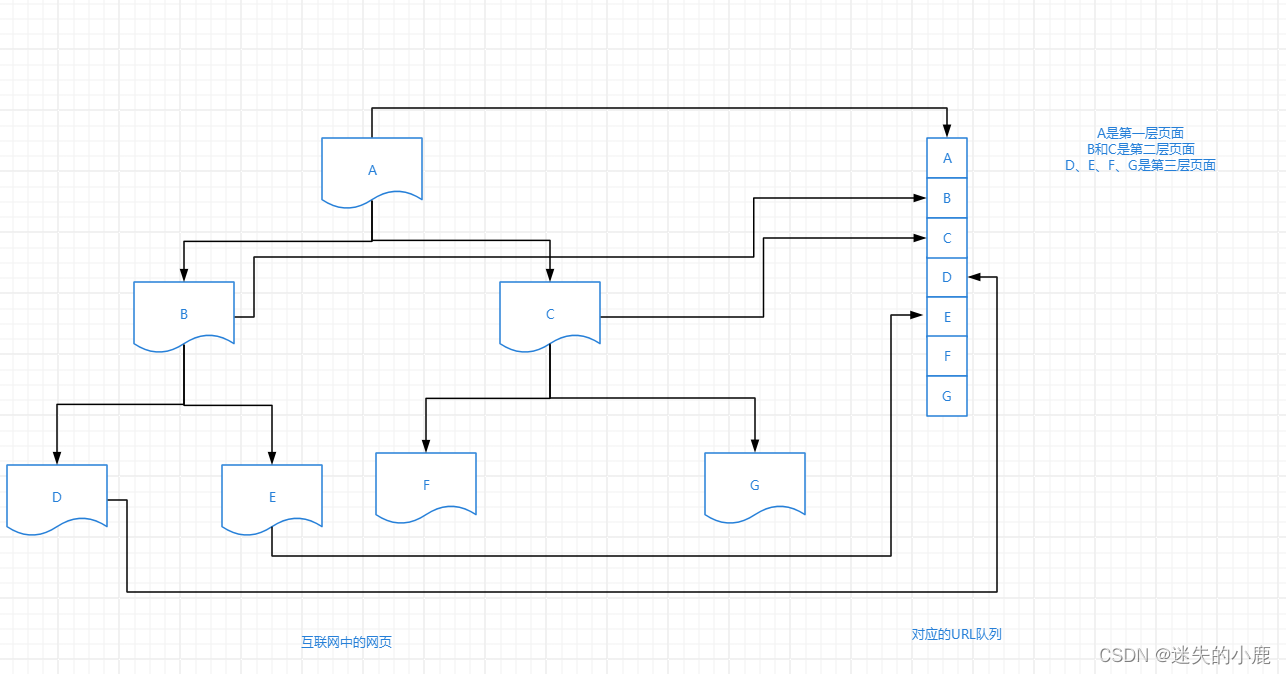
网络爬虫概述与原理 网络爬虫简介狭义上理解功能上理解常见用途总结 网络爬虫分类通用网络爬虫聚焦网络爬虫增量网络爬虫深度网络爬虫 网络爬虫流程网络爬虫采集策略深度有限搜索策略广度优先搜索策略 网络爬虫简介 通过有效地获取网络资源的方式,便是网络爬虫。网…...
可视化实验三 Matplotlib库绘图及时变数据可视化
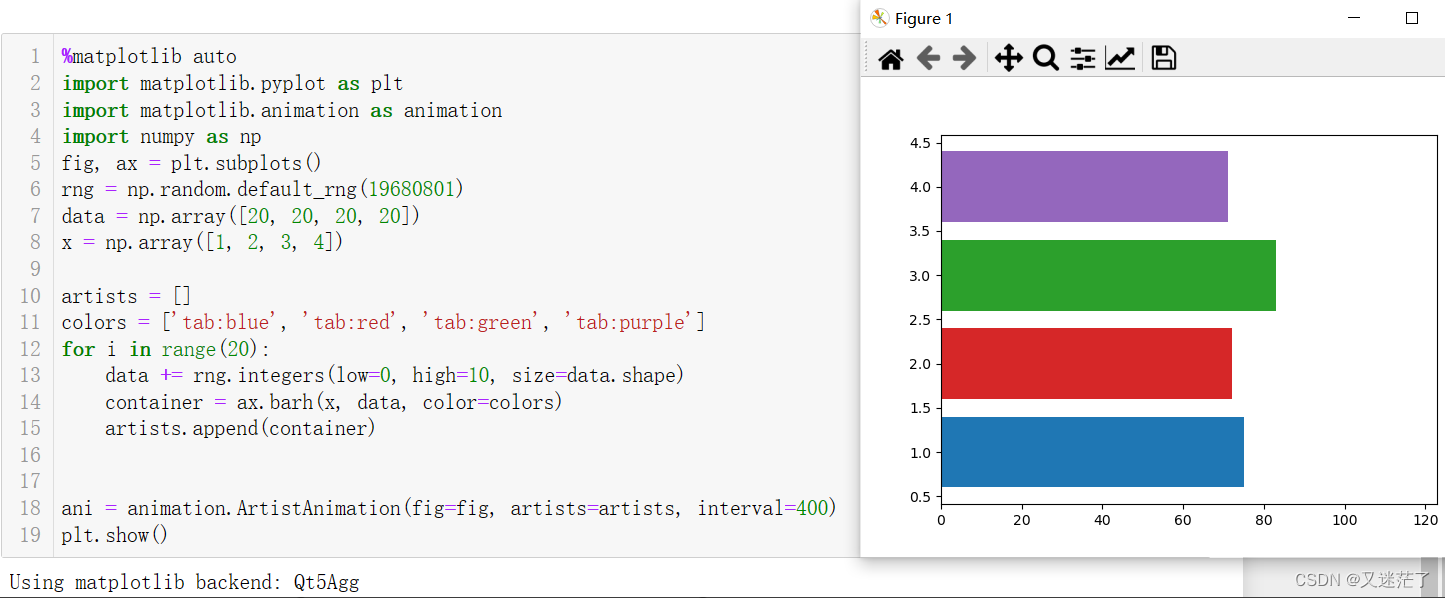
1.1 任务一 1.1.1 恢复默认配置 #绘图风格,恢复默认配置 plt.rcParams.update(plt.rcParamsDefault)#恢复默认配置 或者 plt.rcdefaults() 1.1.2 汉字和负号的设置 import matplotlib.pyplot as plt plt.rcParams["font.sans-serif"]"SimH…...

开启多线程下变量共享与私有问题
开启多线程下变量共享与私有问题 🌵ThreadLocal和Atomic是Java中用于多线程编程的两个重要工具。 ThreadLocal是一个线程局部变量,它为每个线程提供了独立的变量副本,确保每个线程都可以访问自己的变量副本而不会影响其他线程的变量。在多线…...
Qt模型视图代理之QTableView应用的简单介绍
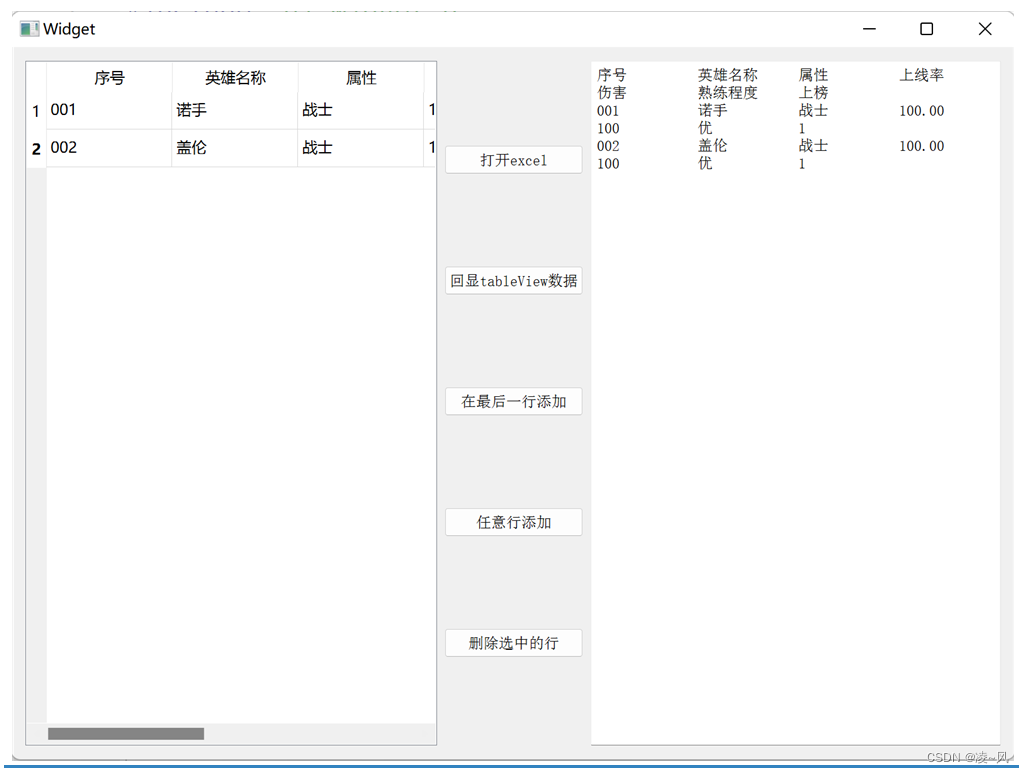
往期回顾 Qt绘图与图形视图之绘制带三角形箭头的窗口的简单介绍-CSDN博客 Qt绘图与图形视图之Graphics View坐标系的简单介绍-CSDN博客 Qt模型视图代理之MVD(模型-视图-代理)概念的简单介绍-CSDN博客 Qt模型视图代理之QTableView应用的简单介绍 一、最终效果 二、设计思路 这里…...

第七届精武杯部分wp
第一部分:计算机和手机取证 1.请综合分析计算机和手机检材,计算机最近一次登录的账户名是 答案:admin 创建虚拟机时直接给出了用户名 2. 请综合分析计算机和手机检材,计算机最近一次插入的USB存储设备串号是 答案:…...
3.2Java全栈开发前端+后端(全栈工程师进阶之路)-前端框架VUE3框架-企业级应用- Vuex
Vuex简介 Vuex概述 Vuex是一个专门为Vue.js应用程序开发的状态管理模式, 它采用集中式存储管理所有组件的公共状态, 并以相应的规 则保证状态以一种可预测的方式发生变化. 试想这样的场景, 比如一个Vue的根实例下面有一个根组件名为App.vue, 它下面有两个子组件A.vue和B.vu…...

整合 Java, Python 和 Scrapy 爬虫以传递和使用参数
这篇博客将详细说明如何从 Java 应用程序调用一个 Python 脚本,并在此过程中传递参数给一个 Scrapy 爬虫。最终目标是让 Java 控制爬虫的行为,如爬取数量和特定的运行参数。 一、Scrapy 爬虫的修改 首先,我们需要确保 Scrapy 爬虫能接收从命…...
)
Android 蓝牙实战——蓝牙音乐播放进度(二十)
对于蓝牙音乐的开发来说,播放进度是一个比较重要的数据参数,这里我们就来分析一下蓝牙音乐播放进度的相关回调。 一、回调流程 1、AvrcpControllerService 源码位置:/packages/apps/Bluetooth/src/com/android/bluetooth/avrcpcontroller/AvrcpControllerService.java /…...

SQL注入实例(sqli-labs/less-1)
初始网页 从网页可知传递的参数名为 id,并且为数字类型 1、得知数据表有多少列 1.1 使用联合查询查找列数(效率低) http://localhost/sqli-labs-master/Less-1/?id1 union select 1,2 -- 1.2 使用order by查找列数(效率高&…...

Python中tkinter编程入门3
在使用tkinter创建了窗口之后,可以将一些控件“放置”到窗口中。这些控件包括标签、按键以及输入框等。 1 在窗口中“放置”标签 在窗口中“放置”标签主要有两个步骤,一是创建标签控件,二是将创建好的标签“放置”到窗口上。 1.1 创建标签…...

XMind 2023 v23.05.2660软件安装教程(附软件下载地址)
软件简介: 软件【下载地址】获取方式见文末。注:推荐使用,更贴合此安装方法! XMind 2023 v23.05.2660被视为顶尖思维导图软件,其界面简洁清爽,功能布局直观简单,摒弃繁复不实。尽管体积小巧&a…...
docker compose kafka集群部署
kafka集群部署 目录 部署zookeeper准备工作2、部署kafka准备工作3、编辑docker-compose.yml文件4、启动服务5、测试kafka6、web监控管理 部署zookeeper准备工作 mkdir data/zookeeper-{1,2,3}/{data,datalog,logs,conf} -p cat >data/zookeeper-1/conf/zoo.cfg<<EOF…...

最新版在线客服系统源码
源码介绍 首发最新在线客服系统源码,优化更好并且重构源码布局UI 性能不吃cpu并发快,普通1H2G都能带动最新版只要是服务器都能带动 搭建即可使用,操作简单,易懂 修复了老版本bug 内附有搭建教程 gofly.v1kf.com 运行环境 Nginx 1.20 MySQL 5.7 演示截图...

【比邻智选】MR880A模组
🚀高性价比,5G/4G双模,稳定可靠 🌐功能丰富,5G特性一应俱全 🧩多封装兼容,适配性强,灵活升级智能设备...

Discord集成Claude智能体:极简Docker容器化部署与安全实践
1. 项目概述:一个为Discord量身定制的Claude智能体运行栈 如果你和我一样,既想在日常工作的Discord频道里无缝调用Claude这样的强大AI助手,又对复杂、臃肿的Bot框架感到头疼,那么 nanoclaw-discord 这个项目可能就是你在找的答…...

Neovim涂抹光标插件:提升编码体验的动态轨迹设计
1. 项目概述:一个为Neovim设计的“涂抹光标”插件 如果你和我一样,是个重度Neovim用户,每天有超过8小时的时间泡在终端和代码编辑器里,那你肯定对光标的“存在感”有要求。默认的方块或下划线光标,在长时间编码后&…...

Agent设计模式全景图——从ReAct到Multi-Agent的完整知识体系
Agent概念在2023年就已出现,2024年是框架快速迭代的一年。到了2026年,Agent设计模式逐渐成熟,成为工程实践的关键。 GitHub上关于Agent的开源项目突破10万个,LangChain、LangGraph、AutoGen、CrewAI……框架层出不穷。但翻遍这些文…...

从ADI收购LTC看电源管理趋势:软件定义电源与能量收集技术解析
1. 从一笔天价收购案,看电源管理技术的未来十年2016年,模拟芯片行业发生了一场地震级的并购:模拟巨头亚德诺半导体(Analog Devices Inc., ADI)以148亿美元的天价,收购了以高性能模拟芯片闻名的凌力尔特&…...

别再让专利证书变废纸!手把手教你用6步法写出能维权的权利要求书
从技术到法律:6步打造高价值专利权利要求的实战指南 刚拿到专利证书的工程师小王,在展会上发现竞争对手的产品几乎照搬了自己的发明。他信心满满地提起诉讼,却因权利要求书中"数据传输模块"的表述过于宽泛而败诉——法院认为该描述…...

别再只怪芯片了!拆解一个智能家居产品,看它的EMC静电防护设计到底哪里出了问题
智能家居静电防护失效分析:从产品拆解看EMC设计盲区 最近一位做智能门锁的创业者朋友向我吐槽:他们的旗舰产品在北方冬季频繁出现用户触摸时死机的情况,售后返修率飙升到15%。拆机检测却显示主板芯片完好,问题究竟出在哪里&#…...

从噪声中捕捉节拍:基于PLL的CDR电路如何重塑光通信数据流
1. 当光信号遇上噪声:CDR电路为何成为关键救星 想象一下你正在嘈杂的菜市场里试图听清朋友说话——周围此起彼伏的叫卖声就像光通信中的噪声,而朋友说话的节奏就是需要提取的时钟信号。这就是光接收机面临的真实困境:传输过来的NRZ信号往往带…...

Zotero Duplicates Merger:5分钟搞定文献库重复问题
Zotero Duplicates Merger:5分钟搞定文献库重复问题 【免费下载链接】ZoteroDuplicatesMerger A zotero plugin to automatically merge duplicate items 项目地址: https://gitcode.com/gh_mirrors/zo/ZoteroDuplicatesMerger 还在为Zotero文献库中堆积如山…...

CANN/asc-devkit bfloat16转half API
__bfloat162half_ru 【免费下载链接】asc-devkit 本项目是CANN 推出的昇腾AI处理器专用的算子程序开发语言,原生支持C和C标准规范,主要由类库和语言扩展层构成,提供多层级API,满足多维场景算子开发诉求。 项目地址: https://git…...

Betaflight飞控固件:2025年如何让你的穿越机飞行更稳定更智能?
Betaflight飞控固件:2025年如何让你的穿越机飞行更稳定更智能? 【免费下载链接】betaflight Open Source Flight Controller Firmware 项目地址: https://gitcode.com/gh_mirrors/be/betaflight 还在为穿越机飞行抖动、信号不稳定而苦恼吗&#x…...