
基于Netty实现WebSocket服务端
本文基于Netty实现WebSocket服务端,实现和客户端的交互通信,客户端基于JavaScript实现。
在【WebSocket简介-CSDN博客】中,我们知道WebSocket是基于Http协议的升级,而Netty提供了Http和WebSocket Frame的编解码器和Handler,我们可以基于Netty快速实现WebSocket服务端。
一、基于Netty快速实现WebSocket服务端
我们可以直接利用Netty提供了Http和WebSocket Frame的编解码器和Handler,快速启动一个WebSocket服务端。服务端收到Client消息后,转发给其他客户端。
服务端代码:
ChannelSupervise:用户存储客户端信息
import io.netty.channel.Channel;
import io.netty.channel.ChannelId;
import io.netty.channel.group.ChannelGroup;
import io.netty.channel.group.DefaultChannelGroup;
import io.netty.handler.codec.http.websocketx.TextWebSocketFrame;
import io.netty.util.concurrent.GlobalEventExecutor;import java.util.concurrent.ConcurrentHashMap;
import java.util.concurrent.ConcurrentMap;/*** 用户存储客户端信息*/
public class ChannelSupervise {private static ChannelGroup GlobalGroup = new DefaultChannelGroup(GlobalEventExecutor.INSTANCE);private static ConcurrentMap<String, ChannelId> ChannelMap = new ConcurrentHashMap();public static void addChannel(Channel channel) {GlobalGroup.add(channel);ChannelMap.put(channel.id().asShortText(), channel.id());}public static void removeChannel(Channel channel) {GlobalGroup.remove(channel);ChannelMap.remove(channel.id().asShortText());}public static Channel findChannel(String id) {return GlobalGroup.find(ChannelMap.get(id));}public static void send2All(TextWebSocketFrame tws) {GlobalGroup.writeAndFlush(tws);}
}
服务端Netty配置:
import io.netty.bootstrap.ServerBootstrap;
import io.netty.channel.ChannelFuture;
import io.netty.channel.ChannelInitializer;
import io.netty.channel.ChannelPipeline;
import io.netty.channel.EventLoopGroup;
import io.netty.channel.nio.NioEventLoopGroup;
import io.netty.channel.socket.SocketChannel;
import io.netty.channel.socket.nio.NioServerSocketChannel;
import io.netty.handler.codec.http.HttpObjectAggregator;
import io.netty.handler.codec.http.HttpServerCodec;
import io.netty.handler.codec.http.websocketx.WebSocketServerProtocolHandler;
import io.netty.handler.logging.LogLevel;
import io.netty.handler.logging.LoggingHandler;
import io.netty.handler.stream.ChunkedWriteHandler;/*** * 实现长链接 客户端与服务端;*/
public class SimpleWsChatServer {public static void main(String[] args) throws InterruptedException {EventLoopGroup bossGroup = new NioEventLoopGroup(1);EventLoopGroup workGroup = new NioEventLoopGroup();try {ServerBootstrap serverBootstrap = new ServerBootstrap();serverBootstrap.group(bossGroup, workGroup).channel(NioServerSocketChannel.class).// 在 bossGroup 增加一个日志处理器handler(new LoggingHandler(LogLevel.INFO)).childHandler(new ChannelInitializer<SocketChannel>() {@Overrideprotected void initChannel(SocketChannel socketChannel) throws Exception {ChannelPipeline pipeline = socketChannel.pipeline();// 基于http协议的长连接 需要使用http协议的解码 编码器pipeline.addLast(new HttpServerCodec());// 以块的方式处理pipeline.addLast(new ChunkedWriteHandler());/*** http数据传输过程中是分段, HttpObjectAggregator 将多个段聚合起来* 当浏览器发起大量数据的时候,会发起多次http请求*/pipeline.addLast(new HttpObjectAggregator(8192));/*** 对于websocket是以frame的形式传递* WebSocketFrame*  浏览器 ws://localhost:7070/ 不在是http协议*  WebSocketServerProtocolHandler 将http协议升级为ws协议 即保持长链接*/pipeline.addLast(new WebSocketServerProtocolHandler("/helloWs"));// 自定义handler专门处理浏览器请求pipeline.addLast(new MyTextWebSocketFrameHandler());}});ChannelFuture channelFuture = serverBootstrap.bind(7070).sync();channelFuture.channel().closeFuture().sync();} finally {bossGroup.shutdownGracefully();workGroup.shutdownGracefully();}}
}
消息转发逻辑:
import com.huawei.websocket.nio2.global.ChannelSupervise;import io.netty.channel.ChannelHandlerContext;
import io.netty.channel.SimpleChannelInboundHandler;
import io.netty.handler.codec.http.websocketx.TextWebSocketFrame;import java.text.SimpleDateFormat;
import java.util.Date;/*** TextWebSocketFrame  表示一个文本贞* 浏览器和服务端以TextWebSocketFrame 格式交互*/
public class MyTextWebSocketFrameHandler extends SimpleChannelInboundHandler<TextWebSocketFrame> {private SimpleDateFormat sdf = new SimpleDateFormat("yyyy-mm-dd hh:MM:ss");@Overrideprotected void channelRead0(ChannelHandlerContext channelHandlerContext, TextWebSocketFrame textWebSocketFrame)throws Exception {System.out.println("服务端收到消息:" + textWebSocketFrame.text());// 回复浏览器String resp = sdf.format(new Date()) + ": " + textWebSocketFrame.text();// 转发给所有的客户端ChannelSupervise.send2All(new TextWebSocketFrame(resp));// 发送给当前客户单// channelHandlerContext.channel().writeAndFlush(new TextWebSocketFrame(resp));}@Overridepublic void channelActive(ChannelHandlerContext ctx) throws Exception {// 添加连接System.out.println("客户端加入连接:" + ctx.channel());ChannelSupervise.addChannel(ctx.channel());}@Overridepublic void channelInactive(ChannelHandlerContext ctx) throws Exception {// 断开连接System.out.println("客户端断开连接:" + ctx.channel());ChannelSupervise.removeChannel(ctx.channel());}@Overridepublic void exceptionCaught(ChannelHandlerContext ctx, Throwable cause) throws Exception {System.out.println("异常发生:" + cause.getMessage());ctx.channel().close();}
}
参考:NIO框架Netty+WebSocket实现网页聊天_nio实现websocket-CSDN博客
一、基于Netty,手动处理WebSocket握手信息:
参考:GitCode - 开发者的代码家园 https://gitcode.com/Siwash/websocketWithNetty/blob/master/README.md
基于netty搭建websocket,实现消息的主动推送_websocket_rpf_siwash-GitCode 开源社区
服务端代码:
import io.netty.bootstrap.ServerBootstrap;
import io.netty.channel.Channel;
import io.netty.channel.ChannelInitializer;
import io.netty.channel.nio.NioEventLoopGroup;
import io.netty.channel.socket.SocketChannel;
import io.netty.channel.socket.nio.NioServerSocketChannel;
import io.netty.handler.codec.http.HttpObjectAggregator;
import io.netty.handler.codec.http.HttpServerCodec;
import io.netty.handler.logging.LoggingHandler;
import io.netty.handler.stream.ChunkedWriteHandler;import org.apache.log4j.Logger;/*** https://gitcode.com/Siwash/websocketWithNetty/blob/master/README.md*/
public class NioWebSocketServer {private final Logger logger = Logger.getLogger(getClass());private void init() {logger.info("正在启动websocket服务器");NioEventLoopGroup boss = new NioEventLoopGroup();NioEventLoopGroup work = new NioEventLoopGroup();try {ServerBootstrap bootstrap = new ServerBootstrap();bootstrap.group(boss, work);bootstrap.channel(NioServerSocketChannel.class);bootstrap.childHandler(new ChannelInitializer<SocketChannel>() {@Overrideprotected void initChannel(SocketChannel ch) throws Exception {ch.pipeline().addLast("logging", new LoggingHandler("DEBUG"));// 设置log监听器,并且日志级别为debug,方便观察运行流程ch.pipeline().addLast("http-codec", new HttpServerCodec());// 设置解码器ch.pipeline().addLast("aggregator", new HttpObjectAggregator(65536));// 聚合器,使用websocket会用到ch.pipeline().addLast("http-chunked", new ChunkedWriteHandler());// 用于大数据的分区传输ch.pipeline().addLast("handler", new NioWebSocketHandler());// 自定义的业务handler,这里处理WebSocket建链请求和消息发送请求}});Channel channel = bootstrap.bind(7070).sync().channel();logger.info("webSocket服务器启动成功:" + channel);channel.closeFuture().sync();} catch (InterruptedException e) {e.printStackTrace();logger.info("运行出错:" + e);} finally {boss.shutdownGracefully();work.shutdownGracefully();logger.info("websocket服务器已关闭");}}public static void main(String[] args) {new NioWebSocketServer().init();}
}
import static io.netty.handler.codec.http.HttpUtil.isKeepAlive;import com.huawei.websocket.nio2.global.ChannelSupervise;import io.netty.buffer.ByteBuf;
import io.netty.buffer.Unpooled;
import io.netty.channel.ChannelFuture;
import io.netty.channel.ChannelFutureListener;
import io.netty.channel.ChannelHandlerContext;
import io.netty.channel.SimpleChannelInboundHandler;
import io.netty.handler.codec.http.DefaultFullHttpResponse;
import io.netty.handler.codec.http.FullHttpRequest;
import io.netty.handler.codec.http.HttpResponseStatus;
import io.netty.handler.codec.http.HttpVersion;
import io.netty.handler.codec.http.websocketx.CloseWebSocketFrame;
import io.netty.handler.codec.http.websocketx.PingWebSocketFrame;
import io.netty.handler.codec.http.websocketx.PongWebSocketFrame;
import io.netty.handler.codec.http.websocketx.TextWebSocketFrame;
import io.netty.handler.codec.http.websocketx.WebSocketFrame;
import io.netty.handler.codec.http.websocketx.WebSocketServerHandshaker;
import io.netty.handler.codec.http.websocketx.WebSocketServerHandshakerFactory;
import io.netty.util.CharsetUtil;import org.apache.log4j.Logger;import java.util.Date;/*** 这里处理WebSocket建链请求和消息发送请求*/
public class NioWebSocketHandler extends SimpleChannelInboundHandler<Object> {private final Logger logger = Logger.getLogger(getClass());private WebSocketServerHandshaker handshaker;@Overrideprotected void channelRead0(ChannelHandlerContext ctx, Object msg) throws Exception {logger.debug("收到消息:" + msg);if (msg instanceof FullHttpRequest) {// 以http请求形式接入,但是走的是websockethandleHttpRequest(ctx, (FullHttpRequest) msg);} else if (msg instanceof WebSocketFrame) {// 处理websocket客户端的消息handlerWebSocketFrame(ctx, (WebSocketFrame) msg);}}@Overridepublic void channelActive(ChannelHandlerContext ctx) throws Exception {// 添加连接logger.debug("客户端加入连接:" + ctx.channel());ChannelSupervise.addChannel(ctx.channel());}@Overridepublic void channelInactive(ChannelHandlerContext ctx) throws Exception {// 断开连接logger.debug("客户端断开连接:" + ctx.channel());ChannelSupervise.removeChannel(ctx.channel());}@Overridepublic void channelReadComplete(ChannelHandlerContext ctx) throws Exception {ctx.flush();}private void handlerWebSocketFrame(ChannelHandlerContext ctx, WebSocketFrame frame) {// 判断是否关闭链路的指令if (frame instanceof CloseWebSocketFrame) {handshaker.close(ctx.channel(), (CloseWebSocketFrame) frame.retain());return;}// 判断是否ping消息if (frame instanceof PingWebSocketFrame) {logger.debug("服务端收到ping消息");ctx.channel().write(new PongWebSocketFrame(frame.content().retain()));return;}// 本例程仅支持文本消息,不支持二进制消息if (!(frame instanceof TextWebSocketFrame)) {logger.debug("本例程仅支持文本消息,不支持二进制消息");throw new UnsupportedOperationException(String.format("%s frame types not supported", frame.getClass().getName()));}// 返回应答消息String request = ((TextWebSocketFrame) frame).text();logger.debug("服务端收到:" + request);TextWebSocketFrame tws = new TextWebSocketFrame(new Date().toString() + ctx.channel().id() + ":" + request);// 群发ChannelSupervise.send2All(tws);// 返回【谁发的发给谁】// ctx.channel().writeAndFlush(tws);}/*** 唯一的一次http请求,用于创建websocket* */private void handleHttpRequest(ChannelHandlerContext ctx, FullHttpRequest req) {// 要求Upgrade为websocket,过滤掉get/Postif (!req.decoderResult().isSuccess() || (!"websocket".equals(req.headers().get("Upgrade")))) {// 若不是websocket方式,则创建BAD_REQUEST的req,返回给客户端sendHttpResponse(ctx, req,new DefaultFullHttpResponse(HttpVersion.HTTP_1_1, HttpResponseStatus.BAD_REQUEST));return;}logger.debug("服务端收到WebSocket建链消息");WebSocketServerHandshakerFactory wsFactory =new WebSocketServerHandshakerFactory("ws://localhost:7070/helloWs", null, false);handshaker = wsFactory.newHandshaker(req);if (handshaker == null) {WebSocketServerHandshakerFactory.sendUnsupportedVersionResponse(ctx.channel());} else {handshaker.handshake(ctx.channel(), req);}}/*** 拒绝不合法的请求,并返回错误信息* */private static void sendHttpResponse(ChannelHandlerContext ctx, FullHttpRequest req, DefaultFullHttpResponse res) {// 返回应答给客户端if (res.status().code() != 200) {ByteBuf buf = Unpooled.copiedBuffer(res.status().toString(), CharsetUtil.UTF_8);res.content().writeBytes(buf);buf.release();}ChannelFuture f = ctx.channel().writeAndFlush(res);// 如果是非Keep-Alive,关闭连接if (!isKeepAlive(req) || res.status().code() != 200) {f.addListener(ChannelFutureListener.CLOSE);}}
}这里我们手动处理了握手信息:
可以看到服务端handler日志:
2024-05-24 09:43:51 DEBUG [NioWebSocketHandler] 收到消息:HttpObjectAggregator$AggregatedFullHttpRequest(decodeResult: success, version: HTTP/1.1, content: CompositeByteBuf(ridx: 0, widx: 0, cap: 0, components=0))
GET /helloWs HTTP/1.1
Host: localhost:7070
Connection: Upgrade
Pragma: no-cache
Cache-Control: no-cache
User-Agent: Mozilla/5.0 (Windows NT 10.0; Win64; x64) AppleWebKit/537.36 (KHTML, like Gecko) Chrome/124.0.0.0 Safari/537.36 Edg/124.0.0.0
Upgrade: websocket
Origin: null
Sec-WebSocket-Version: 13
Accept-Encoding: gzip, deflate, br, zstd
Accept-Language: zh-CN,zh;q=0.9,en;q=0.8,en-GB;q=0.7,en-US;q=0.6
Sec-WebSocket-Key: KYh4//SBKLi+nSu6v1kYqw==
Sec-WebSocket-Extensions: permessage-deflate; client_max_window_bits
content-length: 0
2024-05-24 09:43:51 DEBUG [NioWebSocketHandler] 服务端收到WebSocket建链消息
Client1的发送和接收消息,在F12小可以看到:
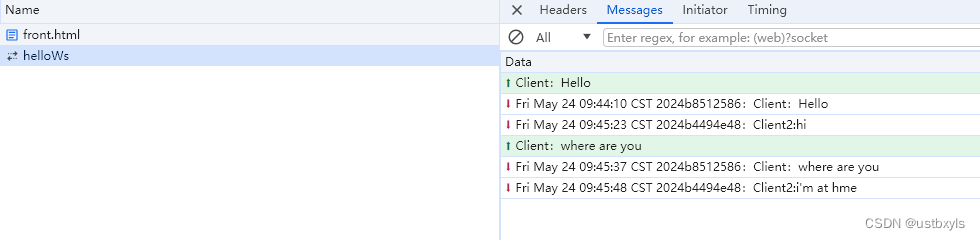
测试用的Client代码如下:
<!DOCTYPE html>
<html lang="en"><head><meta charset="UTF-8"><title>WebSocket Client</title></head><body><script>var socket;//check current explorer wether support WebSockekif (window.WebSocket) {socket = new WebSocket("ws://localhost:7070/helloWs");//event : msg from serversocket.onmessage = function(event) {console.log("receive msg:" + event.data);var rt = document.getElementById("responseText");rt.value = rt.value + "\n" + event.data;}//eq open WebSocketsocket.onopen = function(event) {var rt = document.getElementById("responseText");rt.value = "open WebSocket";}socket.onclose = function(event) {var rt = document.getElementById("responseText");rt.value = rt.value + "\n" + "close WebSocket";}} else {alert("current exploer not support websocket")}//send msg to WebSocket Serverfunction send(message) {if (socket.readyState == WebSocket.OPEN) {//send msg to WebSocket by socketsocket.send(message);} else {alert("WebSocket is not open")}}</script><form onsubmit="return false"><textarea name="message" style="height: 300px; width: 300px;"></textarea><input type="button" value="发送消息" onclick="send(this.form.message.value)"><textarea id="responseText" style="height: 300px; width: 300px;"></textarea><input type="button" value="清空内容" onclick="document.getElementById('responseText').value=''"></form></body>
</html>
直接保存为html文件,使用浏览器打开即可运行测试;
相关文章:
基于Netty实现WebSocket服务端
本文基于Netty实现WebSocket服务端,实现和客户端的交互通信,客户端基于JavaScript实现。 在【WebSocket简介-CSDN博客】中,我们知道WebSocket是基于Http协议的升级,而Netty提供了Http和WebSocket Frame的编解码器和Handler&#…...

27【Aseprite 作图】盆栽——拆解
1 橘子画法拆解 (1)浅色3 1 0;深色0 2 3 就可以构成一个橘子 (2)浅色 2 1;深色1 0 (小个橘子) (3)浅色 2 1 0;深色1 2 3 2 树根部分 (1)底部画一条横线 (2)上一行 左空2 右空1 【代表底部重心先在右】 (3)再上一行,左空1,右空1 (4)再上一行,左突出1,…...
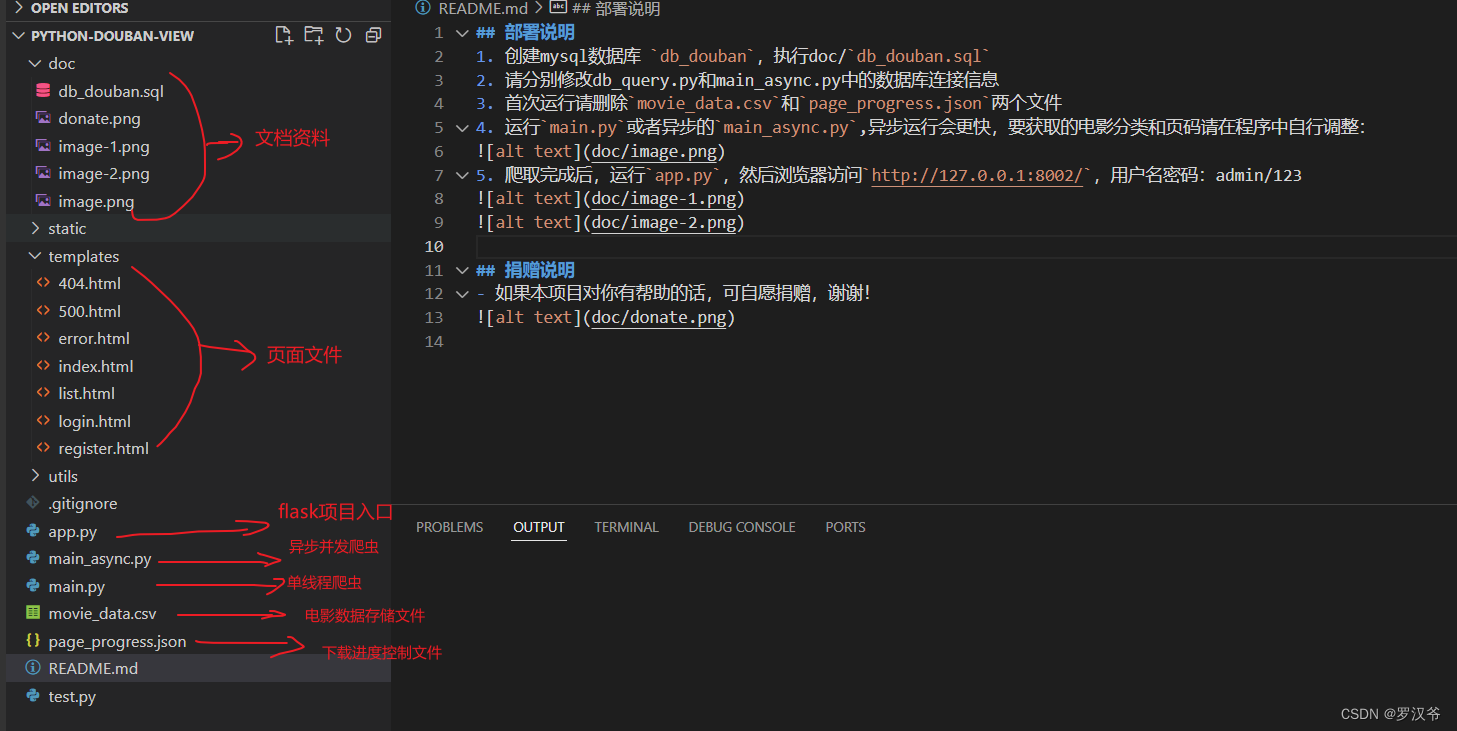
【开源】2024最新python豆瓣电影数据爬虫+可视化分析项目
项目介绍 【开源】项目基于pythonpandasflaskmysql等技术实现豆瓣电影数据获取及可视化分析展示,觉得有用的朋友可以来个一键三连,感谢!!! 项目演示 【开源】2024最新python豆瓣电影数据爬虫可视化分析项目 项目截图…...
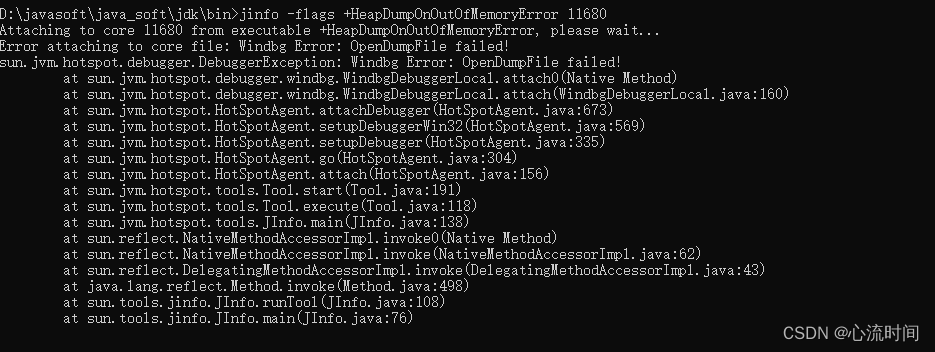
[JDK工具-5] jinfo jvm配置信息工具
文章目录 1. 介绍2. 打印所有的jvm标志信息 jinfo -flags pid3. 打印指定的jvm参数信息 jinfo -flag InitialHeapSize pid4. 启用或者禁用指定的jvm参数 jinfo -flags [|-]HeapDumpOnOutOfMemoryError pid5. 打印系统参数信息 jinfo -sysprops pid6. 打印以上所有配置信息 jinf…...
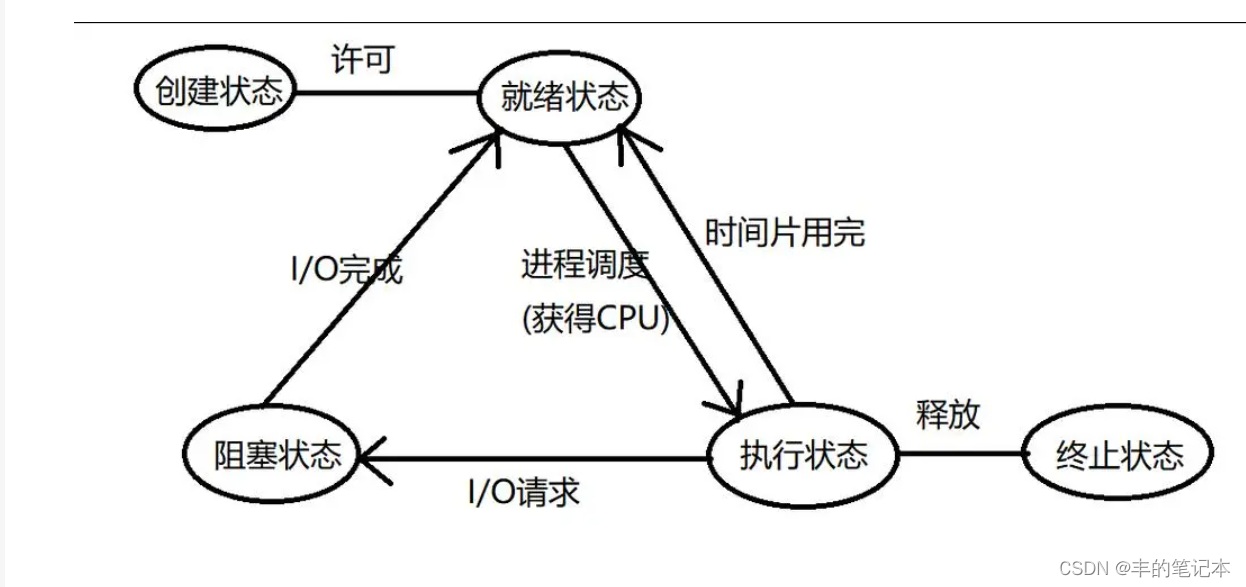
【Linux系统编程】进程概念、进程排队、进程标识符、进程状态
目录 什么是进程? 浅谈进程排队 简述进程属性 进程属性之进程标识符 进程操作之进程创建 初识fork fork返回值 原理角度理解fork fork的应用 进程属性之进程状态 再谈进程排队 进程状态 运行状态 阻塞状态 挂起状态 Linux下的进程状态 “R”(运行状…...
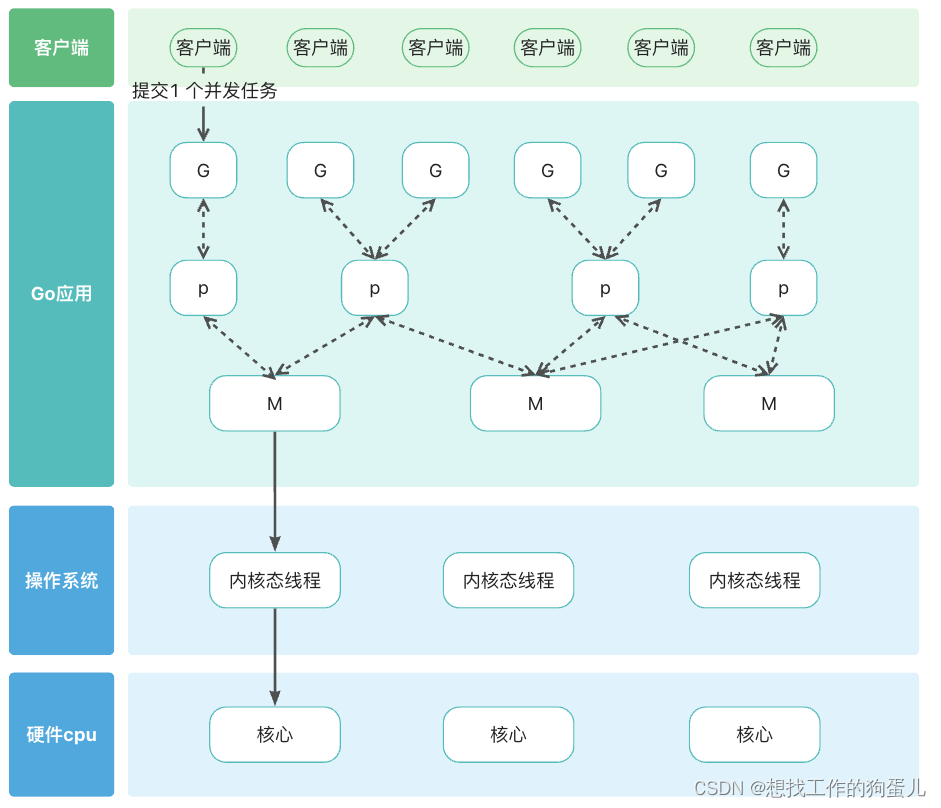
Java与GO语言对比分析
你是不是总听到go与java种种对比,其中在高并发的服务器端应用场景会有人推荐你使用go而不是 java。 那我们就从两者运行原理和基本并发设计来对比分析,看看到底怎么回事。 运行原理对比 java java 中 jdk 已经帮我们屏蔽操作系统区别。 只要我们下载并…...
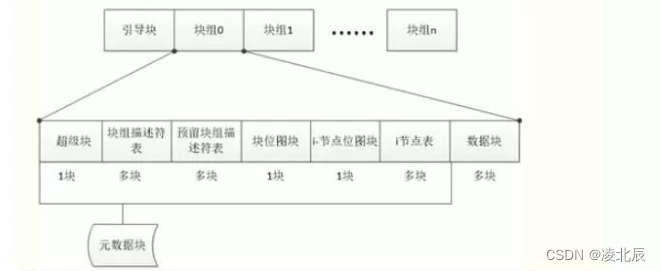
Linux文件系统原理
Linux文件系统 冯诺依曼在1945年提出计算机的五大组成部分 运算器:CPU 控制器:CPU 存储器:内存和硬盘 输入设备:鼠标、硬盘 输出设备:显示器一、硬盘结构 机械硬盘结构 扇区:硬盘的最小存储单位ÿ…...

初识Spring Cache:如何简化你的缓存处理?
文章目录 1、Spring Cache介绍2、 常用注解3、 使用案例 1、Spring Cache介绍 Spring Cache 是一个框架,实现了基于注解的缓存功能,只需要简单地加一个注解,就能实现缓存功能。 Spring Cache 提供了一层抽象,底层可以切换不同的…...

攻防世界[GoodRe]
攻防世界[GoodRe] 学到知识: 逆向的精髓:三分懂,七分蒙。TEA 算法快速识别(蒙): 数据处理的形式:进入加密时的数据和加密结束后的数据,处理时数据的分组等等,都能用来…...
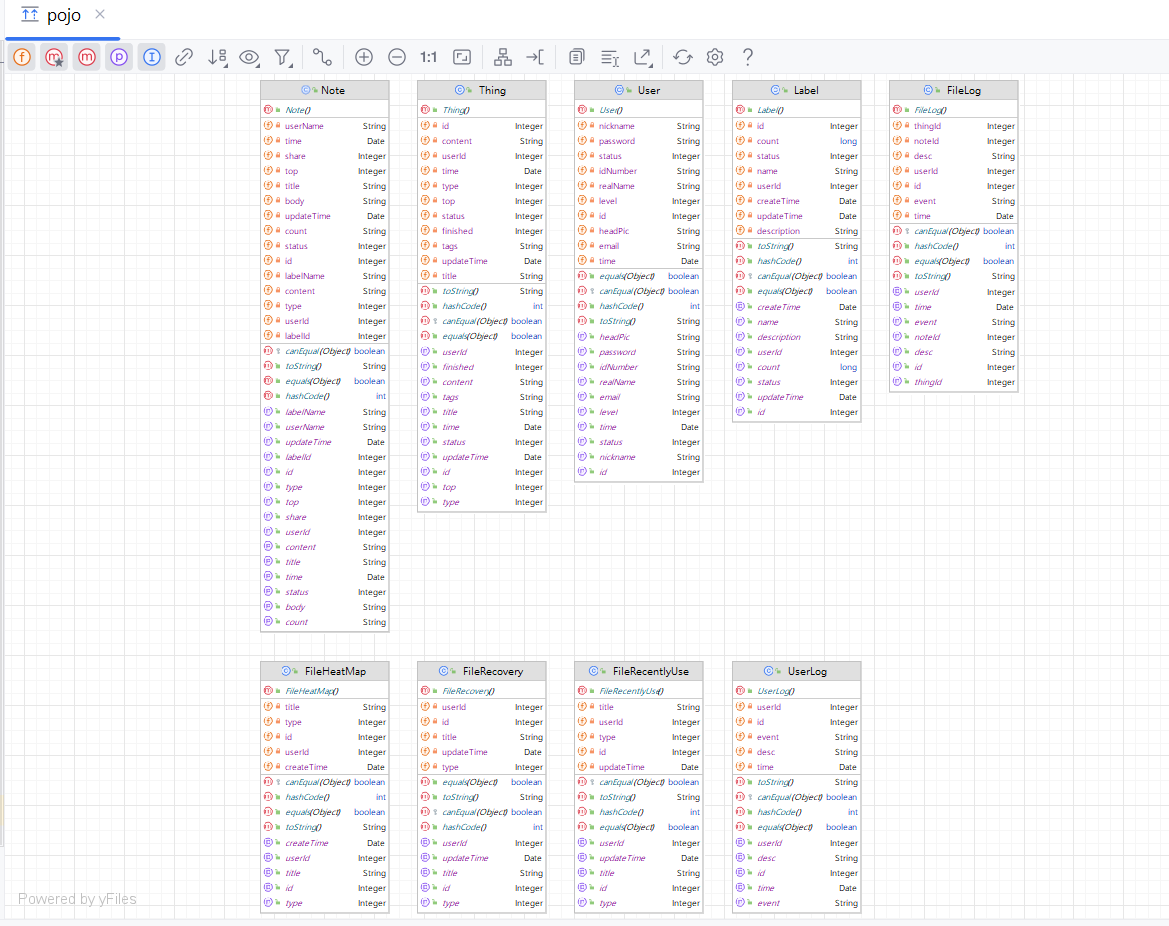
IntelliJ IDEA实用插件:轻松生成时序图和类图
IntelliJ IDEA生成时序图、类图 一、SequenceDiagram1.1 插件安装1.2 插件设置1.3 生成时序图 二、PlantUML Integration2.1 插件安装2.2 插件设置2.3 生成类图 在软件建模课程的学习中,大家学习过多种图形表示方法,这些图形主要用于软件产品设计。在传统…...

SpringBoot + Mybatis-Plus中乐观锁实现
悲观锁 悲观锁是一种悲观思想,它认为数据很可能会被别人所修改 所以总会对数据进行上锁,读操作和写操作都会上锁,性能较低,使用较少! 乐观锁 乐观锁是一种乐观思想,它认为数据并不一定会被别人所修改 所以…...

设计模式深度解析:分布式与中心化,IT界两大巨头“华山论剑”
🌈 个人主页:danci_ 🔥 系列专栏:《设计模式》《MYSQL应用》 💪🏻 制定明确可量化的目标,坚持默默的做事。 ✨IT界的两大巨头交锋✨ 👋 在IT界的广阔天地中,有两座…...

转行一年了
关注、星标公众号,直达精彩内容 ID:技术让梦想更伟大 整理:李肖遥 来公司一年了。 说是转行其实还是在半导体行业,熟悉我的朋友知道 ,我在18年开始进入半导体行业,那个时候想着行业很重要,站对了…...

【LeetCode 151】反转字符串中的单词
1. 题目 2. 分析 这题要是用Python写,就非常简单了。 3. 代码 class Solution:def reverseWords(self, s: str) -> str:s " ".join(reversed(s.strip().split()))return s...

Behind the Code:Polkadot 如何重塑 Web3 未来
2024 年 5 月 17 日 Polkadot 生态 Behind the Code 第二季第一集 《创造 Web3 的未来》正式上线。第一集深入探讨了 Polkadot 和 Web3 技术在解决数字身份、数据所有权和去中心化治理方面的巨大潜力。 🔍 查看完整视频: https://youtu.be/_gP-M5nUidc?…...

for循环里如果std::pair的类型写不对,可能会造成性能损失
第一版 std::map<int, int> t;t.emplace(1, 1);for (const std::pair<int,int>& data : t){int i 0;std::ignore i;}中间留一些空格,是因为ms在调试的时候,尤其是模板比较多的时候,经常断点的行号有问题。比如第5行的断点&…...

【Linux】Linux的基本指令_2
文章目录 二、基本指令8. man9. nano 和 cat10. cp11. mv12. echo 和 > 和 >> 和 <13. more 和 less14. head 和 tail 和 | 未完待续 二、基本指令 8. man Linux的命令有很多参数,我们不可能全记住,我们可以通过查看联机手册获取帮助。访问…...
)
Effective C++(3)
3.资源管理 条款13:以对象管理资源 以对象管理资源对于传统的堆资源管理,我们需要使用成对的new和delete,这样若忘记delete就会造成内存泄露。因此,我们应尽可能以对象管理资源,并采用RAII(Resource Acqu…...
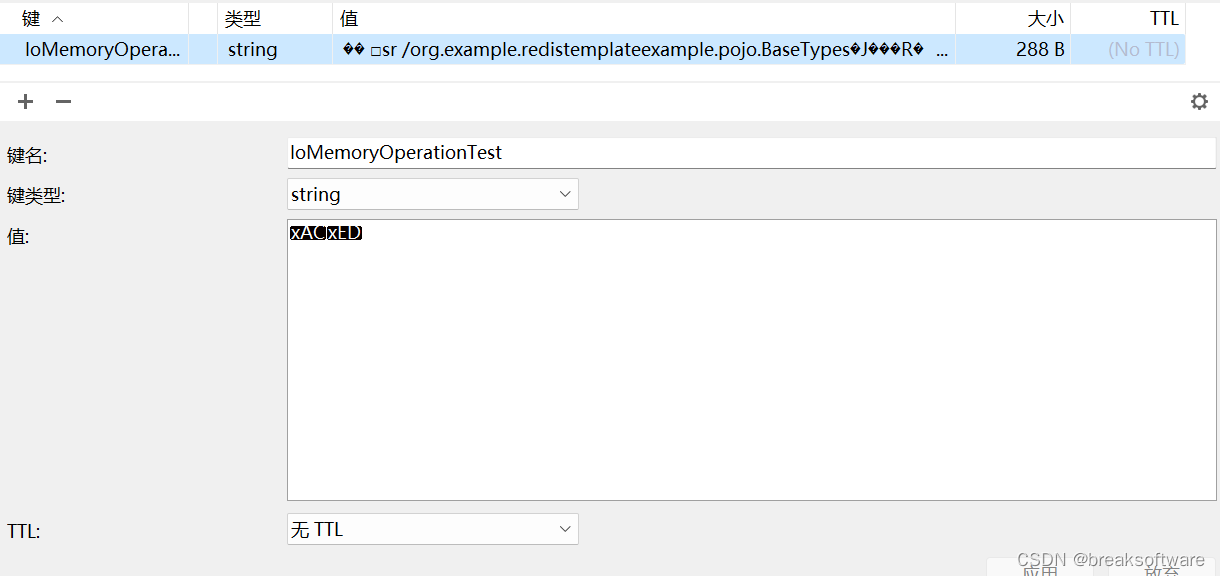
自定义RedisTemplate序列化器
大纲 RedisSerializerFastJsonRedisSerializer自定义二进制序列化器总结代码 在《RedisTemplate保存二进制数据的方法》一文中,我们将Java对象通过《使用java.io库序列化Java对象》中介绍的方法转换为二进制数组,然后保存到Redis中。实际可以通过定制Red…...

Flutter 中的 CupertinoContextMenuAction 小部件:全面指南
Flutter 中的 CupertinoContextMenuAction 小部件:全面指南 在 Flutter 中,CupertinoContextMenuAction 是一个专门用于构建 iOS 风格的上下文菜单选项的组件。它为用户提供了一种便捷的方式来执行与特定项目相关的操作,例如在列表项上长按可…...

[特殊字符] 旋转排序数组中的高效搜索:从线性到二分查找的进阶之路
给定一个由不同元素构成的旋转排序数组(原本是升序排列,但在某个未知点进行了旋转),要求快速找到目标元素的索引。如果不存在,则返回 -1。 示例 1: 输入:arr [5, 6, 7, 8, 9, 10, 1, 2, 3], …...

AssetRipper深度解析:Unity资源静态解析原理与工程化实践
1. 这不是“破解工具”,而是Unity开发者自己的资源归档方案AssetRipper这个名字,对很多刚接触Unity反编译的开发者来说,第一反应是“哦,那个能扒出美术资源的软件”。但如果你真这么用它,大概率会在三天内遇到贴图全黑…...

openpilot终极指南:如何为你的爱车免费升级自动驾驶辅助系统
openpilot终极指南:如何为你的爱车免费升级自动驾驶辅助系统 【免费下载链接】openpilot openpilot is an operating system for robotics. Currently, it upgrades the driver assistance system on 300 supported cars. 项目地址: https://gitcode.com/GitHub_T…...

Houdini刚体破碎VAT导出到UE5:从静态碎片到动态 Niagara 粒子群的实战转换
Houdini刚体破碎VAT导出到UE5:从静态碎片到动态 Niagara 粒子群的实战转换在影视级实时特效制作中,大规模刚体破碎效果一直是个技术难点。传统方法需要消耗大量计算资源来处理每个碎片的物理模拟,而Vertex Animation Texture(VAT&…...
)
如何在本地部署大模型-ollama_(保姆级教程)
一、部署方式选择 部署方式上手难度核心特点适用场景Ollama⭐命令极简,自动适配环境,自带 API 接口新手日常本地调用、快速测试LM Studio⭐图形化操作,无需敲代码,兼容 OpenAI 接口不想使用命令行、纯可视化使用Text Generation …...

AssetStudio深度原理与Unity资源逆向实战指南
1. 这不是“又一个Unity资源提取教程”,而是我三年里反复重装AssetStudio的总结AssetStudio、Unity资源提取、Unity游戏逆向、Unity AssetBundle解析——这几个词,几乎是我过去三年在独立游戏开发、MOD社区支持和老游戏存档修复工作中出现频率最高的关键…...

AArch64断点异常机制与调试实践详解
1. AArch64断点异常机制概述断点异常是处理器调试功能的核心机制,它允许开发者在特定条件下暂停程序执行,进入调试状态。在AArch64架构中,断点异常通过DBGBCR_EL1(调试断点控制寄存器)和DBGBVR_EL1(调试断点…...

李白的思乡诗 / 山水诗 / 豪放诗有哪些?诗词在线app手工整理
"酒入豪肠,七分酿成了月光,余下的三分啸成剑气,绣口一吐就半个盛唐。" 李白的诗,是盛唐最耀眼的星,既有 "天生我材必有用" 的豪放,也有 "低头思故乡" 的柔情,更有…...

深度解析美国RTP全系列导热工程塑料,革新电子散热新选择
在工程塑料行业高速发展的今天,电子设备散热需求日益成为制约产品性能与可靠性的关键瓶颈。传统散热材料面临导热效率低、机械性能弱、加工适应性差等多重挑战,行业亟待寻找既能满足严苛散热要求,又具备优异综合性能的新一代解决方案。美国RT…...

深度学习篇---torch 和 torchvision
torch 和 torchvision 是 PyTorch 生态中最核心的两个库。简单来说,torch 是基础框架,负责张量计算和自动微分;而 torchvision 是专注于视觉任务的工具集,让你能方便地加载数据、使用预训练模型和进行图像处理。🔥 tor…...