
官方文档 搬运 MAXMIND IP定位 mysql导入 简单使用
官方文档地址:
官方文档
文件下载
1. 导入mysql可能报错
Error Code: 1290. The MySQL server is running with the --secure-file-priv option so it cannot execute this statement查看配置
SHOW GLOBAL VARIABLES LIKE '%secure%';
secure_file_priv 原来是NULL 依旧报错
 mysql --help | grep my.cnf                                                            /etc/my.cnf /etc/mysql/my.cnf /opt/homebrew/etc/my.cnf ~/.my.cnf#修改配置
vim /opt/homebrew/etc/my.cnf#追加或修改
secure-file-priv = "/"#重启mysql
mysql.server restart
将 GeoIP2 和 GeoLite2 数据库导入 MySQL
在本页
- 下载并提取数据库
- 保持数据库更新
- 提取 CSV 文件
- 为网络数据创建表
- 转换网络字段
- 架构
- 将数据加载到网络表中
- 通过查询来测试我们的表
- 对表格进行排序以便更快地进行搜索
- 分解查询以加快搜索速度
- 可选:创建位置数据表
- 位置表架构
- 将数据加载到位置表中
- 查询我们的表格
本指南将向您展示如何将 GeoIP2 或 GeoLite2 数据库导入 MySQL,以便在您的服务器上轻松查询和操作它们。
导入 CSV 数据库包括下载数据库、提取数据库、创建表来保存数据以及为加快查询速度而对这些表进行索引。
下载并提取数据库
首先,请确保您已下载要导入的 GeoIP2 或 GeoLite2 数据库的最新版本。您可以 通过您的帐户门户下载数据库。CSV 格式的数据库以单个 zip 文件的形式提供。有关存档的 zip 结构和内容的详细信息,请参阅我们的 CSV 数据库文档。在本教程中,我们将使用 GeoIP2 City CSV 文件,但您可以获取有关 我们的任何 CSV 格式数据库的信息并相应地调整以下说明。
保持数据库更新
如果您要导入数据库以供持续使用,您将需要 自动下载和提取 CSV 文件的过程 ,以确保您的数据库始终是最新的。
提取 CSV 文件
下载数据库后,将 zip 文件解压到所需目录中。如果要导入 GeoIP2 City 数据库,您将获得许多文件。在本教程中,我们将使用以下文件:
GeoIP2-City-Blocks-IPv4.csvGeoIP2-City-Blocks-IPv6.csvGeoIP2-City-Locations-en.csv
如果您使用英语以外的语言,则可以Locations从 zip 存档中选择适当的文件。例如,如果您想将中文位置名称加载到 MySQL,则可以使用 GeoIP2-City-Locations-zh-CN.csv而不是GeoIP2-City-Locations-en.csv。我们关于 CSV 格式数据库的文档包括 GeoIP2 和 GeoLite2 数据库中当前包含的所有位置文件的列表。
为网络数据创建表
GeoIP2-City-Blocks-IPv4.csv首先我们创建一个表来保存和中包含的网络信息 GeoIP2-City-Blocks-IPv6.csv。
转换网络字段
您可以在GeoIP2 和 GeoLite2 CSV 数据库文件部分Blocks中找到这些文件架构的完整描述 。如果您使用的是其他数据库,则可以找到相应数据库的Blocks文件架构,并调整表格以满足该结构。
数据库的字段network使用 CIDR 表示法。遗憾的是,MySQL 不提供处理该格式数据的任何功能,因此我们必须先将网络转换为其他格式,以便以后轻松查询。我们选择将网络表示为一对 IP 地址,它们分别是网络中的第一个和最后一个地址。我们将转换此字段,以便这两个 IP 地址都表示为十六进制数。
我们可以使用 数据库转换工具 将此字段转换为十六进制数。下载程序并将其安装到提取 CSV 文件的同一目录中后,即可运行它:
$ ./geoip2-csv-converter -block-file GeoIP2-City-Blocks-IPv4.csv -include-hex-range -output-file GeoIP2-City-Blocks-IPv4-Hex.csv
$ ./geoip2-csv-converter -block-file GeoIP2-City-Blocks-IPv6.csv -include-hex-range -output-file GeoIP2-City-Blocks-IPv6-Hex.csv
架构
现在我们可以创建一个名为的表geoip2_network来保存我们刚刚转换的数据。我们将使用类型来表示 IP 地址varbinary(16),该类型足够大,可以表示 128 位(16 字节)IPv6 地址。
create table geoip2_network (network_start varbinary(16) not null,network_end varbinary(16) not null,geoname_id int,registered_country_geoname_id int,represented_country_geoname_id int,is_anonymous_proxy bool,is_satellite_provider bool,postal_code text,latitude float,longitude float,accuracy_radius int,is_anycast bool,index(network_start),index(network_end)
);network_start请注意,我们为和 添加了两个单独的索引network_end。如果我们在这两列上都使用复合索引,我们将无法加快稍后使用的查询速度。
将数据加载到网络表中
GeoIP2-City-Blocks-IPv4.csv我们现在可以将和 的内容导入GeoIP2-City-Blocks-IPv6.csv到我们刚刚创建的表中。
我们首先加载转换后的 IPv6 数据:
load data infile '/var/maxmind/GeoIP2-City-Blocks-IPv6-Hex.csv'
into table geoip2_network
fields terminated by ',' enclosed by '"' lines terminated by '\n' ignore 1 rows
(@network_start, @network_end, @geoname_id, @registered_country_geoname_id, @represented_country_geoname_id,@is_anonymous_proxy, @is_satellite_provider, @postal_code, @latitude, @longitude, @accuracy_radius)
set network_start = unhex(@network_start),network_end = unhex(@network_end),geoname_id = nullif(@geoname_id, ''),registered_country_geoname_id = nullif(@registered_country_geoname_id, ''),represented_country_geoname_id = nullif(@represented_country_geoname_id, ''),is_anonymous_proxy = nullif(@is_anonymous_proxy, ''),is_satellite_provider = nullif(@is_satellite_provider, ''),postal_code = nullif(@postal_code, ''),latitude = nullif(@latitude, ''),longitude = nullif(@longitude, ''),accuracy_radius = nullif(@accuracy_radius, '');
我们可以用同样的方式加载转换后的IPv4数据:
load data infile '/var/maxmind/GeoIP2-City-Blocks-IPv4-Hex.csv'
into table geoip2_network
fields terminated by ',' enclosed by '"' lines terminated by '\n' ignore 1 rows
(@network_start, @network_end, @geoname_id, @registered_country_geoname_id, @represented_country_geoname_id,@is_anonymous_proxy, @is_satellite_provider, @postal_code, @latitude, @longitude, @accuracy_radius)
set network_start = unhex(@network_start),network_end = unhex(@network_end),geoname_id = nullif(@geoname_id, ''),registered_country_geoname_id = nullif(@registered_country_geoname_id, ''),represented_country_geoname_id = nullif(@represented_country_geoname_id, ''),is_anonymous_proxy = nullif(@is_anonymous_proxy, ''),is_satellite_provider = nullif(@is_satellite_provider, ''),postal_code = nullif(@postal_code, ''),latitude = nullif(@latitude, ''),longitude = nullif(@longitude, ''),accuracy_radius = nullif(@accuracy_radius, '');
请注意,即使 CSV 文件中有表中缺少的额外列,数据也会被导入。
通过查询来测试我们的表
所有内容加载完毕后,我们现在可以在数据库中查找 IP 地址。由于我们将 IP 地址表示为varbinary(16),因此我们首先必须使用 MySQL 的内置inet6_aton函数将我们感兴趣的 IP 地址的文本表示转换为相同类型。
select geoname_id, registered_country_geoname_id, represented_country_geoname_id,postal_code, latitude, longitude, accuracy_radius
from geoip2_network
where inet6_aton('214.0.0.0') between network_start and network_end
limit 1;
+------------+-------------------------------+--------------------------------+-------------+----------+-----------+-----------------+
| geoname_id | registered_country_geoname_id | represented_country_geoname_id | postal_code | latitude | longitude | accuracy_radius |
+------------+-------------------------------+--------------------------------+-------------+----------+-----------+-----------------+
|    6252001 |                       6252001 |                           NULL | NULL        |   37.751 |   -97.822 |            1000 |
+------------+-------------------------------+--------------------------------+-------------+----------+-----------+-----------------+
1 row in set (0.03 sec)
虽然这会产生正确的结果,但我们注意到查询性能可以更好。让我们改进它。
对表格进行排序以便更快地进行搜索
加快查询速度的一种方法是添加order by network_end如下内容:
select geoname_id, registered_country_geoname_id, represented_country_geoname_id,postal_code, latitude, longitude, accuracy_radius
from geoip2_network
where inet6_aton('214.0.0.0') between network_start and network_end
order by network_end
limit 1;
+------------+-------------------------------+--------------------------------+-------------+----------+-----------+-----------------+
| geoname_id | registered_country_geoname_id | represented_country_geoname_id | postal_code | latitude | longitude | accuracy_radius |
+------------+-------------------------------+--------------------------------+-------------+----------+-----------+-----------------+
| 6252001 | 6252001 | NULL | NULL | 37.751 | -97.822 | 1000 |
+------------+-------------------------------+--------------------------------+-------------+----------+-----------+-----------------+
1 row in set (0.00 sec)虽然这解决了我们对上一个查询的性能担忧,但对于 GeoIP2 数据库中不包含的地址,此查询的性能仍然很差:
elect geoname_id, registered_country_geoname_id, represented_country_geoname_id,postal_code, latitude, longitude, accuracy_radius
from geoip2_network
where inet6_aton('127.0.0.1') between network_start and network_end
order by network_end
limit 1;
Empty set (4.45 sec)
分解查询以加快搜索速度
我们可以解决这个问题,将查询分成两部分,这样 MySQL 就能更有效地使用我们创建的索引:
select geoname_id, registered_country_geoname_id, represented_country_geoname_id,postal_code, latitude, longitude, accuracy_radius
from (select *from geoip2_networkwhere inet6_aton('214.0.0.0') >= network_startorder by network_start desclimit 1
) net
where inet6_aton('214.0.0.0') <= network_end;
+------------+-------------------------------+--------------------------------+-------------+----------+-----------+-----------------+
| geoname_id | registered_country_geoname_id | represented_country_geoname_id | postal_code | latitude | longitude | accuracy_radius |
+------------+-------------------------------+--------------------------------+-------------+----------+-----------+-----------------+
| 6252001 | 6252001 | NULL | NULL | 37.751 | -97.822 | 1000 |
+------------+-------------------------------+--------------------------------+-------------+----------+-----------+-----------------+
1 row in set (0.00 sec)select geoname_id, registered_country_geoname_id, represented_country_geoname_id,postal_code, latitude, longitude, accuracy_radius
from (select *from geoip2_networkwhere inet6_aton('127.0.0.1') >= network_startorder by network_start desclimit 1
) net
where inet6_aton('127.0.0.1') <= network_end;Empty set (0.00 sec)
使用该构造可以为所有地址提供良好的查询性能,无论 GeoIP2 数据库是否包含有关这些地址的任何信息。根据您的应用程序,您可能需要考虑将这种复杂性/冗长性封装在一个函数中。或者,MySQL 还提供可用于实现类似性能的空间数据类型,同时允许更自然地表达查询。
可选:创建位置数据表
如果postal_code、latitude、longitude和accuracy_radius是我们感兴趣的所有内容,那么到此为止,我们的应用程序将能够轻松查询所需的内容。但是,GeoIP2 数据库提供了额外的位置信息。请注意geoname_id我们网络表中的字段。此字段可用于从我们之前下载的文件中查找有关地理位置的其他信息Locations。接下来我们将这些数据加载到 MySQL 中。
位置表架构
我们首先像以前一样创建一个表。与文件一样Blocks,GeoIP2 和 GeoLite2 城市位置文件的架构可以在 数据库文档的 CSV 部分中找到。
我们将此表命名为geoip2_location:
create table geoip2_location (geoname_id int not null,locale_code text not null,continent_code text,continent_name text,country_iso_code text,country_name text,subdivision_1_iso_code text,subdivision_1_name text,subdivision_2_iso_code text,subdivision_2_name text,city_name text,metro_code int,time_zone text,is_in_european_union bool,primary key (geoname_id, locale_code(5))
);
将数据加载到位置表中
然后,我们geoip2_location从LocationsCSV 文件填充表格。在本例中,我们将从 填充表格GeoIP2-City-Locations-en.csv。使用带有后缀的文件-en将为我们提供英文的地理位置名称:
load data infile '/var/lib/mysql-files/GeoIP2-City-Locations-en.csv'
into table geoip2_location
fields terminated by ',' enclosed by '"' lines terminated by '\n' ignore 1 rows (geoname_id, locale_code, continent_code, continent_name,@country_iso_code, @country_name, @subdivision_1_iso_code, @subdivision_1_name,@subdivision_2_iso_code, @subdivision_2_name, @city_name, @metro_code, @time_zone,is_in_european_union
)
set country_iso_code = nullif(@country_iso_code, ''),country_name = nullif(@country_name, ''),subdivision_1_iso_code = nullif(@subdivision_1_iso_code, ''),subdivision_1_name = nullif(@subdivision_1_name, ''),subdivision_2_iso_code = nullif(@subdivision_2_iso_code, ''),subdivision_2_name = nullif(@subdivision_2_name, ''),city_name = nullif(@city_name, ''),metro_code = nullif(@metro_code, ''),time_zone = nullif(@time_zone, '');
导入国家
load data infile '/var/maxMind/GeoLite2-Country-CSV_20240614/GeoLite2-Country-Locations-en.csv'
into table geoip2_locationfields terminated by ',' enclosed by '"' lines terminated by '\n' ignore 1 rows (geoname_id, locale_code, continent_code, continent_name,@country_iso_code, @country_name,is_in_european_union
)
set country_iso_code = nullif(@country_iso_code, ''),country_name = nullif(@country_name, '');请注意,有许多不同的Locations文件可用。其他具有不同语言后缀的文件包含-en 某些geoname_ids 的不同语言的本地化版本数据。根据应用程序的需求,您可以决定将其他Locations文件导入本地化表。例如,您可以加载GeoIP2-City-Locations-en.csv 到名为 的表中geoip2_location-en,并加载 GeoIP2-City-Locations-zh-CN.csv到名为 的表中geoip2_location-zh。然后,您可以分别查询您需要的英语或中文位置表。
查询我们的表格
我们现在可以使用我们的geoip2_location表来解析表geoname_id提供的内容geoip2_network。例如:
select latitude, longitude, accuracy_radius, continent_name, country_name, subdivision_1_name, city_name
from (select *from geoip2_networkwhere inet6_aton('214.0.0.0') >= network_startorder by network_start desclimit 1
) net
left join geoip2_location location on (net.geoname_id = location.geoname_id and location.locale_code = 'en'
)
where inet6_aton('214.0.0.0') <= network_end;
+----------+-----------+-----------------+----------------+---------------+--------------------+-----------+
| latitude | longitude | accuracy_radius | continent_name | country_name | subdivision_1_name | city_name |
+----------+-----------+-----------------+----------------+---------------+--------------------+-----------+
| 37.751 | -97.822 | 1000 | North America | United States | NULL | NULL |
+----------+-----------+-----------------+----------------+---------------+--------------------+-----------+
1 row in set (0.00 sec)这里我们只对英语结果感兴趣,但如果我们对不同或其他语言感兴趣,我们可以调整我们的连接条件。
请注意左外连接是如何使用的。这是因为我们的geoip2_network 表的任何给定行可能都没有可用的附加位置信息。例如,某些 IP 地址无法解析为城市或分区。如果可用,使用左连接我们仍会收到latitude、longitude和 accuracy_radius作为查询结果,而如果没有可用的附加位置信息,则内连接将导致零行。
除了geoname_id提供网络位置信息的列之外,还有 和registered_country_geoname_id, represented_country_geoname_id分别提供有关 ISP 注册网络的国家/地区和 IP 地址用户所代表的国家/地区的位置信息。 两者的位置数据都可以通过其他连接来包含:
select latitude, longitude, accuracy_radius,location.continent_name as location_continent_name,location.country_name as location_country_name,location.subdivision_1_name as location_subdivision_1_name,location.city_name as location_city_name,registered_country.continent_name as registered_country_continent_name,registered_country.country_name as registered_country_country_name,represented_country.continent_name as represented_country_continent_name,represented_country.country_name as represented_country_country_name
from (select *from geoip2_networkwhere inet6_aton('214.0.0.0') >= network_startorder by network_start desclimit 1
) net
left join geoip2_location location on (net.geoname_id = location.geoname_id and location.locale_code = 'en'
)
left join geoip2_location registered_country on (net.registered_country_geoname_id = registered_country.geoname_idand registered_country.locale_code = 'en'
)
left join geoip2_location represented_country on (net.represented_country_geoname_id = represented_country.geoname_idand represented_country.locale_code = 'en'
)
where inet6_aton('214.0.0.0') <= network_end;
+----------+-----------+-----------------+-------------------------+-----------------------+-----------------------------+--------------------+-----------------------------------+---------------------------------+------------------------------------+----------------------------------+
| latitude | longitude | accuracy_radius | location_continent_name | location_country_name | location_subdivision_1_name | location_city_name | registered_country_continent_name | registered_country_country_name | represented_country_continent_name | represented_country_country_name |
+----------+-----------+-----------------+-------------------------+-----------------------+-----------------------------+--------------------+-----------------------------------+---------------------------------+------------------------------------+----------------------------------+
| 37.751 | -97.822 | 1000 | North America | United States | NULL | NULL | North America | United States | NULL | NULL |
+----------+-----------+-----------------+-------------------------+-----------------------+-----------------------------+--------------------+-----------------------------------+---------------------------------+------------------------------------+----------------------------------+
1 row in set (0.00 sec)node 使用
github 文档地址 https://github.com/maxmind/GeoIP2-node#city-example
1. 导入模块
npm install @maxmind/geoip2-node
2. node使用
import { Reader } from "@maxmind/geoip2-node";const path = require("path");
const databasePath = path.resolve(__dirname, "../../../GeoLite2-Country.mmdb");export default class IpCenterV2 {//获取国家code
public async getIP(ip: any) {const result = Reader.open(databasePath).then((reader) => {return reader.country(ip)?.country?.isoCode;}).catch((error) => {console.error("Error opening MMDB:", error);return undefined;});return result || undefined;}}#调用const bIpDb = new IpCenterV2();et res = await bIpDb.getCountryISOCode(ip);
相关文章:
官方文档 搬运 MAXMIND IP定位 mysql导入 简单使用
官方文档地址: 官方文档 文件下载 1. 导入mysql可能报错 Error Code: 1290. The MySQL server is running with the --secure-file-priv option so it cannot execute this statement 查看配置 SHOW GLOBAL VARIABLES LIKE %secure%;secure_file_priv 原来…...

PHP入门教程1:PHP的基础概念和基本语法
本文将从基础开始,介绍PHP的基础概念和基本语法。 PHP简介环境搭建基本语法变量和常量数据类型操作符常见错误和调试方法 1. PHP简介 PHP,全称是 “PHP: Hypertext Preprocessor”,是一种开源的通用脚本语言,尤其适用于Web开发…...

头歌资源库(5)求阶乘问题
一、 问题描述 请输入一个50至100之间的整数n,求解n! 二、算法思想 输入一个50至100之间的整数n。声明一个变量result,并将其初始化为1,用于保存n的阶乘。使用一个循环,从1到n,循环变量为i。在循环中,将…...

09:整型与布尔型的转换
OpenJudge - 09:整型与布尔型的转换 描述 将一个整型变量的值赋给一个布尔型变量,再将这个布尔型变量的值赋给一个整型变量,得到的值是多少? 输入 一个整型范围内的整数,即初始时整型变量的值。 输出 一个整数,经过上述…...

51单片机STC89C52RC——2.1 独立按键控制LED亮灭
目录 目的 一,STC单片机模块 二,独立按键 2.1 独立按键位置 2.2 独立按键电路图 三,创建Keil项目 四,代码 五,代码编译、下载到51单片机 六,效果 目的 当独立K1按键按下时LED D1 点亮&#x…...

系统架构师考点--计算机硬件
大家好。今天我总结一下计算机硬件的一些考点。 一、中央处理单元(CPU) 我们知道,计算机的基本硬件系统由运算器、控制器、存储器、输入设备和输出设备5大部件组成。其中运算器、控制器等部件被集成在一起统称为中央处理单元(Central Proce…...
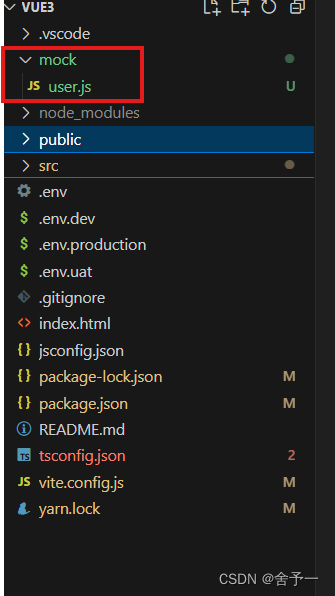
vite-plugin-mock前端自行模拟接口返回数据的插件
vite-plugin-mock前端自行模拟接口返回数据的插件 安装导入、配置(vite.config.js)使用目录结构/mock/user.js具体在页面请求中的使用 注意事项 中文文档:[https://gitcode.com/vbenjs/vite-plugin-mock/blob/main/README.zh_CN.md) 参考其他…...

网络安全知识全景地图V1.0 - 20240616更新
网络安全领域的知识全景涵盖了从基础概念到高级技术的广泛内容。博主基于自身十年多的工作经验结合CISSP认证官方教材按照不同的主题和层次梳理出如下高层次的概览地图,可以帮助个人和组织理解网络安全领域的主题。 1.1. 基础理论 1.1.1. 网络安全概述 网络安全的…...
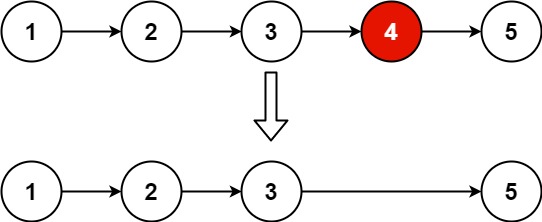
力扣19. 删除链表的倒数第N个节点
给你一个链表,删除链表的倒数第 n 个结点,并且返回链表的头结点。 示例 1: 输入:head [1,2,3,4,5], n 2 输出:[1,2,3,5] 示例 2: 输入:head [1], n 1 输出:[] 示例…...
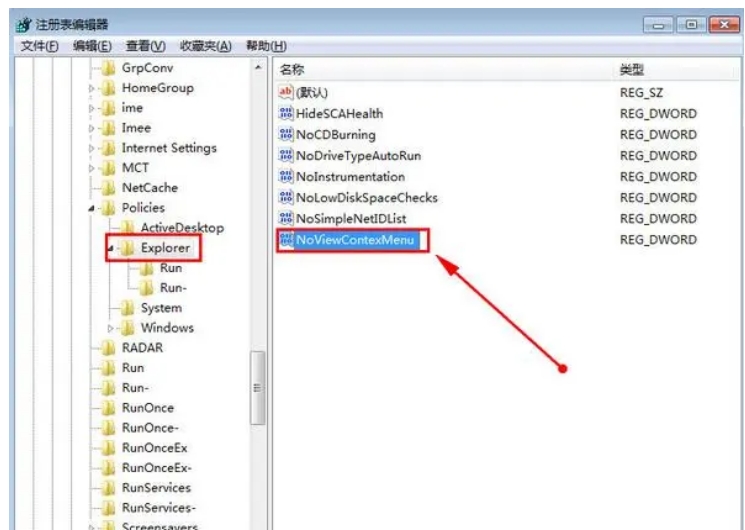
电脑找不到vcruntime140_1.dll的原因分析及5种解决方法分享
电脑已经成为我们生活和工作中不可或缺的工具。然而,在使用电脑的过程中,我们常常会遇到一些常见的问题,其中之一就是电脑显示vcruntime140_1.dll丢失。那么,这个问题是怎么回事呢?又有哪些解决方法呢?如何…...

洗地机哪个牌子质量好,性价比高?一文盘点市场热门选择
近年来,洗地机因为其能快速的解决我们耗时、费力又繁琐的地板清洁工作,备受人们的喜爱。但面对多款设备不同功能和特点相近的洗地机,你可能会疑惑:“洗地机哪个牌子质量好?”,如果你正在寻找一款高效、便捷…...
—— JSON 函数)
MySQL 之 JSON 支持(三)—— JSON 函数
目录 一、JSON 函数参考 二、创建 JSON 值的函数 1. JSON_ARRAY([val[, val] ...]) 2. JSON_OBJECT([key, val[, key, val] ...]) 3. JSON_QUOTE(string) 三、搜索 JSON 值的函数 1. JSON_CONTAINS(target, candidate[, path]) 2. JSON_CONTAINS_PATH(json_doc, one_or…...
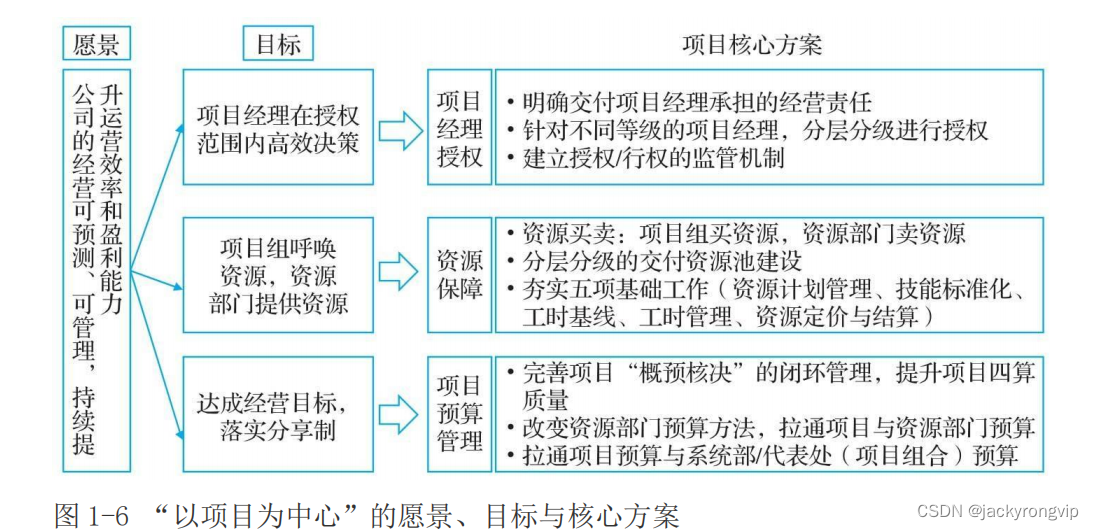
《华为项目管理之道》第1章笔记
《华为项目管理之道》,是新出的华为官方的项目管理书,整个书不错。第1章的精华: 1.2.2 以项目为中心的机制 伴随着项目型组织的建立,华为逐步形成了完备的项目管理流程和制度,从而将业务运 作构建在项目经营管理之…...

C# —— 算数运算符
算术运算符: 用于数值类型进行变量计算的运算符 他的返回结果是数值 赋值运算符 : 先看右侧 再看 左侧 将右侧的数据赋值给左侧的变量 int num 5; string name "老王"; float myHeight 187.5f; 加 先计算 再赋值 // 进行数据的加法…...
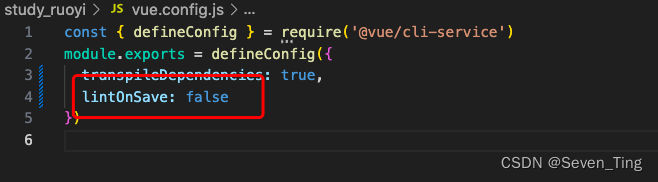
去掉eslint
1、在vue.config.js文件里加上下面的代码,然后重启就可以了! 2、vue.config.js文件代码: const { defineConfig } require(vue/cli-service) module.exports defineConfig({transpileDependencies: true,lintOnSave: false })...

【代码随想录算法训练Day38】LeetCode 509.斐波纳契数、LeetCode 76.爬楼梯、LeetCode 746. 使用最小花费爬楼梯
Day38 动态规划 又开始了新的章节,有了点难度的感觉。。 动态规划五部曲: 确定dp数组(dp table)以及下标的含义 确定递推公式 dp数组如何初始化 确定遍历顺序 举例推导dp数组 这些以后慢慢参透 LeetCode 509.斐波纳契数 最简单…...

Rust 的编译时间过长
Rust 代码的编译时间可能会比某些其他编程语言长,原因有以下几点: Rust 使用了静态类型,这意味着编译器需要更多的时间来验证类型安全性。与动态类型的语言相比,这可能会导致编译时间变长。Rust 的编译器在进行许多优化时需要大量…...

19C之前恢复drop 掉的PDB 创建另一个实例
--------恢复PDB------------------ create pluggable database testpdb admin user test identified by test; backup database plus archivelog tag full db backup; RMAN> backup database plus archivelog tag full db backup; ORA-15012: ASM file DATA1/CDB/ARC…...
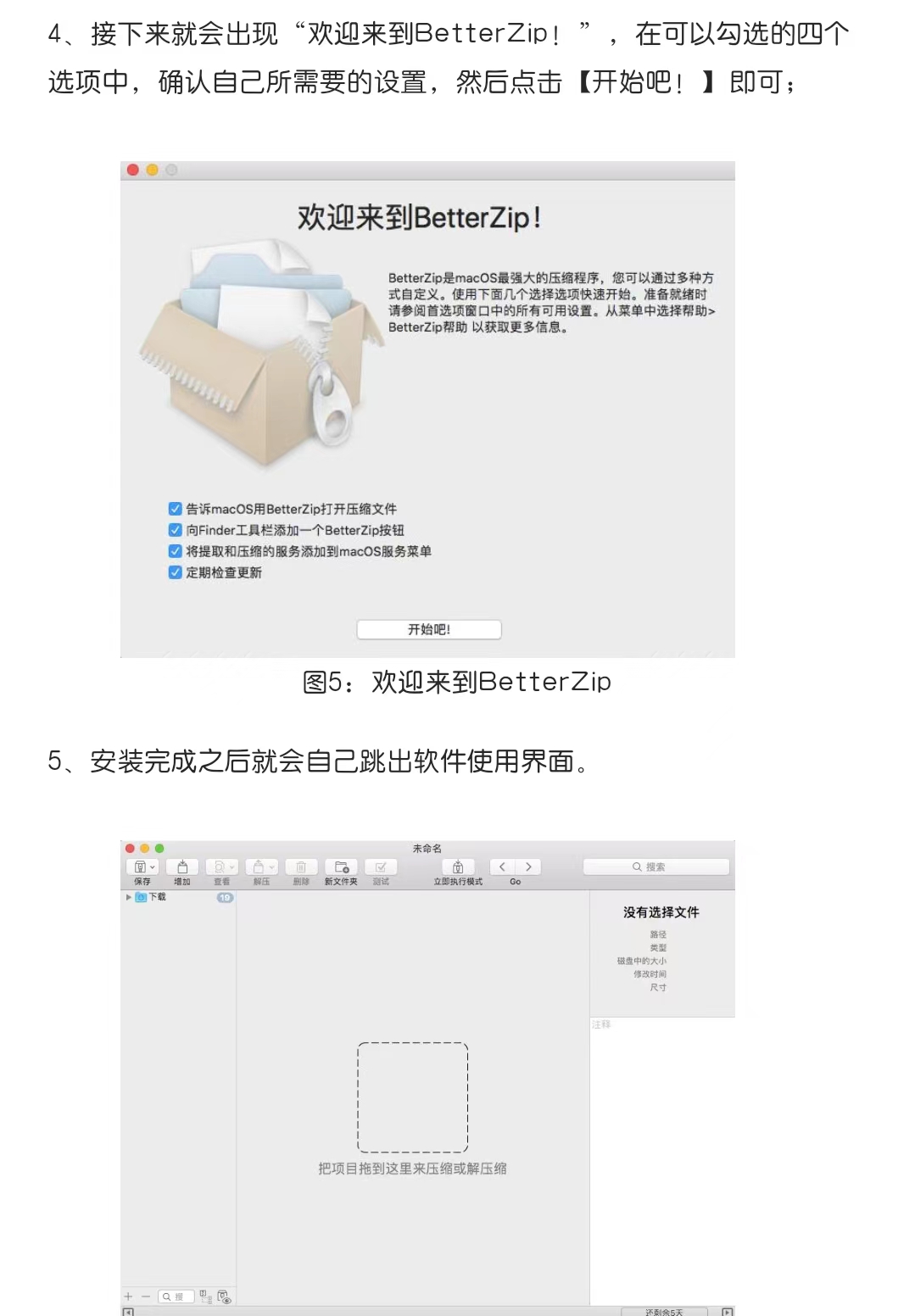
实用软件下载:BetterZip 5最新安装包及详细安装教程
BetterZip是一款功能强大的Mac解/压缩软件,可以满足用户对文件压缩、解压、加密和保护等方面的需求。以下是关于BetterZip软件的主要功能、特点和使用方法的详细介绍,以及对其用户友好度、稳定性和安全性的评价。 安 装 包 获 取 地 址: BetterZip 5-安…...
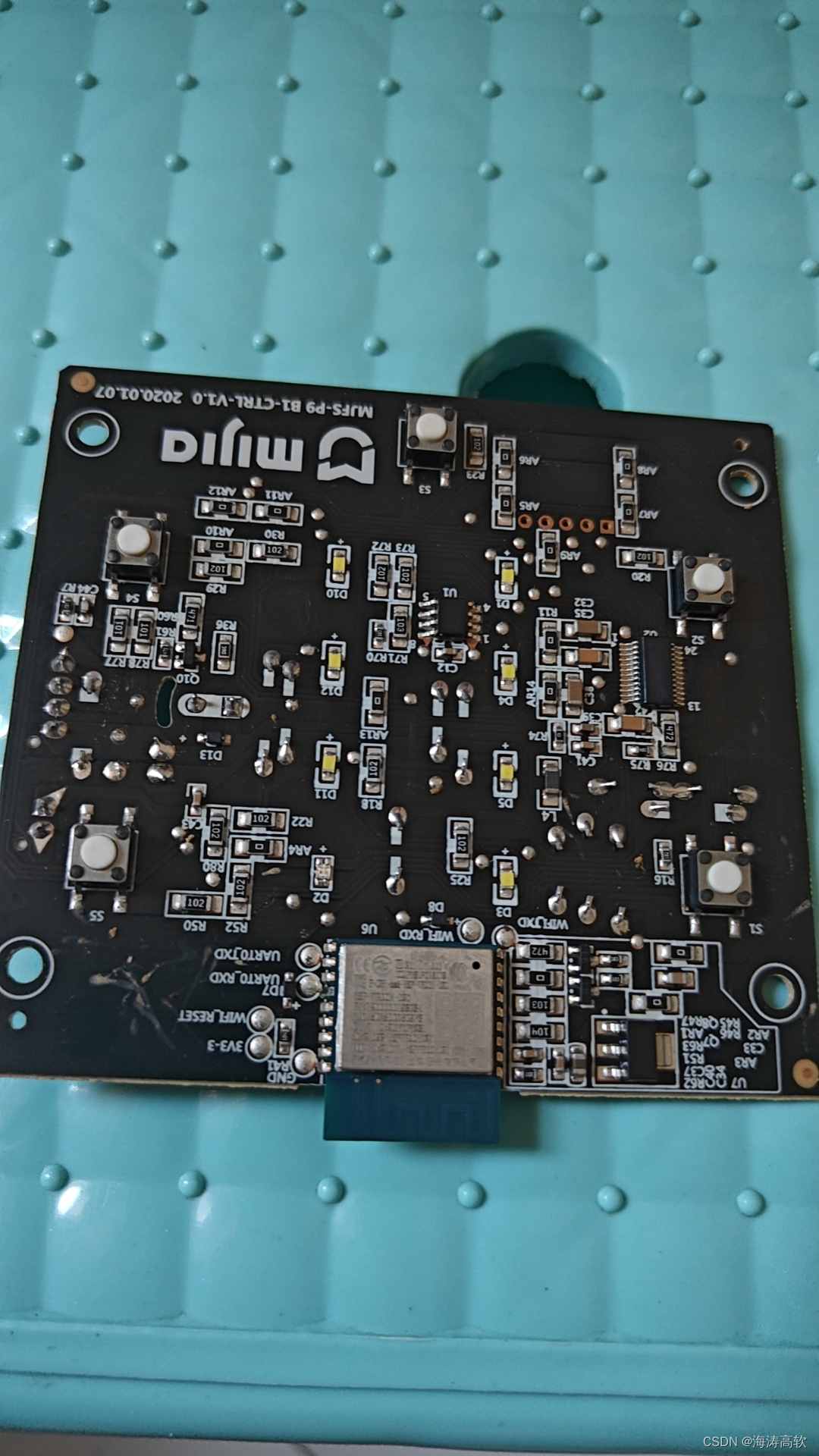
实拆一个风扇
fr:徐海涛(hunkxu)...

如何快速将Figma设计文件转换为结构化JSON数据:完整指南
如何快速将Figma设计文件转换为结构化JSON数据:完整指南 【免费下载链接】figma-to-json 💾 Read/Write Figma Files as JSON 项目地址: https://gitcode.com/gh_mirrors/fi/figma-to-json 在当今的设计开发工作流中,Figma已成为UI/UX…...

Illustrator脚本革命:7个必备工具彻底改变你的设计工作流
Illustrator脚本革命:7个必备工具彻底改变你的设计工作流 【免费下载链接】illustrator-scripts Adobe Illustrator scripts 项目地址: https://gitcode.com/gh_mirrors/il/illustrator-scripts 你是否还在Adobe Illustrator中重复着枯燥的手工操作ÿ…...

基于LLM的MBTI人格模拟对话实验:从系统设计到工程实践
1. 项目概述:当MBTI遇上AI,一次关于人格的深度对话实验最近在GitHub上看到一个挺有意思的项目,叫“Kali-Hac/ChatGPT-MBTI”。光看名字,你可能觉得这又是一个用ChatGPT玩MBTI性格测试的简单脚本。但当我真正clone下来,…...

终极网盘直链下载助手完整指南:快速免费获取8大网盘真实下载地址
终极网盘直链下载助手完整指南:快速免费获取8大网盘真实下载地址 【免费下载链接】Online-disk-direct-link-download-assistant 一个基于 JavaScript 的网盘文件下载地址获取工具。基于【网盘直链下载助手】修改 ,支持 百度网盘 / 阿里云盘 / 中国移动云…...

收藏必备!小白程序员轻松入门大模型:RAG架构详解与实践
本文详细介绍了检索增强生成(RAG)架构,旨在帮助初学者理解大模型如何结合外部知识库提升回答的准确性和时效性。文章涵盖了RAG的四种架构类型、黑盒与白盒增强策略、知识库构建、查询与检索增强方法,以及系统评估和优化增强过程。…...

STM32H7网络通信避坑指南:CubeMX配置LWIP 2.1.2时,这几个DCache和ETH的坑你别踩
STM32H7网络通信深度优化:LWIP 2.1.2配置与Cache一致性实战解析 当你在CubeMX中勾选了ETH和LWIP组件,生成代码后却发现设备无法稳定响应ping请求,或者传输大文件时出现数据错乱——这很可能与STM32H7独特的Cache架构有关。本文将带你深入理解…...

Gemini3.1Pro解决新媒体小编选题难痛点
做新媒体的小编,最怕的不是写,而是“今天写什么”。 选题总是来得很急,热点总是变化很快,账号又要求持续更新,结果就是:内容压力大、时间不够用、框架搭不出来。如果你每天都在追热点、找角度、写标题、搭结…...

如何快速掌握WarcraftHelper:魔兽争霸III终极辅助工具完整指南
如何快速掌握WarcraftHelper:魔兽争霸III终极辅助工具完整指南 【免费下载链接】WarcraftHelper Warcraft III Helper , support 1.20e, 1.24e, 1.26a, 1.27a, 1.27b 项目地址: https://gitcode.com/gh_mirrors/wa/WarcraftHelper 还在为魔兽争霸III的画面拉…...

oneClaw:现代化命令行工具集的设计哲学与工程实践
1. 项目概述与核心价值最近在折腾一些自动化脚本和轻量级工具链时,发现了一个挺有意思的项目,叫myersguo/oneClaw。乍一看这个名字,可能会联想到“一只爪子”,感觉有点神秘。实际上,这是一个专注于单点、高效、可复用的…...

ComfyUI-WanVideoWrapper:AI视频生成的全新创作革命
ComfyUI-WanVideoWrapper:AI视频生成的全新创作革命 【免费下载链接】ComfyUI-WanVideoWrapper 项目地址: https://gitcode.com/GitHub_Trending/co/ComfyUI-WanVideoWrapper 在AI技术飞速发展的今天,ComfyUI-WanVideoWrapper作为一款强大的AI视…...