
c# 二维图形绘制实践
1.等边三角形
1.1 概述
1.2 代码
using System;
using System.Drawing;
using System.Windows.Forms;public partial class TriangleForm : Form
{public TriangleForm(){//InitializeComponent();// 确保窗体大小足够大,以容纳三角形  this.ClientSize = new Size(300, 300);this.DoubleBuffered = true; // 启用双缓冲,以减少绘图时的闪烁  }protected override void OnPaint(PaintEventArgs e){base.OnPaint(e);// 定义三角形的大小和位置  int sideLength = 100; // 等边三角形外接圆的半径int centerX = this.ClientSize.Width / 2; // 三角形中心点的X坐标  int centerY = this.ClientSize.Height / 2; // 三角形中心点的Y坐标  // 将30度转换为弧度  double degrees = 30;double radians = Math.PI * degrees / 180;double sinValue = Math.Sin(radians);double cosValue = Math.Cos(radians);float sinLen = (float)sinValue * sideLength;float cosLen = (float)cosValue * sideLength;// 计算三角形顶点的位置  PointF topVertex = new PointF(centerX, centerY - sideLength );PointF leftVertex = new PointF(centerX - cosLen, centerY + sinLen);PointF rightVertex = new PointF(centerX + cosLen, centerY + sinLen);// 创建一个Brush对象来填充三角形  using (SolidBrush brush = new SolidBrush(Color.LightBlue)){// 绘制等边三角形  e.Graphics.FillPolygon(brush, new PointF[] { topVertex, leftVertex, rightVertex });// 如果你还想绘制三角形的边框,可以使用Pen对象  using (Pen pen = new Pen(Color.Black, 2)){e.Graphics.DrawPolygon(pen, new PointF[] { topVertex, leftVertex, rightVertex });}}}[STAThread]static void Main(){Application.EnableVisualStyles();Application.SetCompatibleTextRenderingDefault(false);Application.Run(new TriangleForm());}
}
1.3 运行结果

2 立方体
2.1 概要
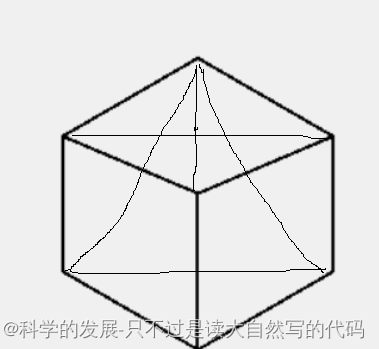
立方体是用等边三角型的图转换过来的
2.2 代码
using System;
using System.Drawing;
using System.Windows.Forms;public partial class TriangleForm : Form
{public TriangleForm(){//InitializeComponent();// 确保窗体大小足够大,以容纳三角形  this.ClientSize = new Size(300, 300);this.DoubleBuffered = true; // 启用双缓冲,以减少绘图时的闪烁  }protected override void OnPaint(PaintEventArgs e){base.OnPaint(e);// 定义三角形的大小和位置  int sideLength = 100; // 等边三角形的边长  int centerX = this.ClientSize.Width / 2; // 三角形中心点的X坐标  int centerY = this.ClientSize.Height / 2; // 三角形中心点的Y坐标  // 将30度转换为弧度  double degrees = 30;double radians = Math.PI * degrees / 180;double sinValue = Math.Sin(radians);double cosValue = Math.Cos(radians);float sinLen = (float)sinValue * sideLength;float cosLen = (float)cosValue * sideLength;//中心点PointF topVertex_center = new PointF(centerX, centerY);// 计算三角形顶点的位置  PointF topVertex = new PointF(centerX, centerY - cosLen);PointF topVertex_left = new PointF(centerX - cosLen, centerY - cosLen + sinLen);PointF leftVertex = new PointF(centerX - cosLen, centerY + sinLen);PointF topVertex_buttom = new PointF(centerX, centerY + sinLen*2);PointF rightVertex = new PointF(centerX + cosLen, centerY + sinLen);PointF topVertex_right = new PointF(centerX + cosLen, centerY - cosLen + sinLen);// 创建一个Brush对象来填充三角形  using (SolidBrush brush = new SolidBrush(Color.LightBlue)){// 绘制等边三角形  //e.Graphics.FillPolygon(brush, new PointF[] { topVertex, leftVertex, rightVertex });// 如果你还想绘制三角形的边框,可以使用Pen对象  using (Pen pen = new Pen(Color.Black, 2)){e.Graphics.DrawPolygon(pen, new PointF[] { topVertex, topVertex_left, leftVertex, topVertex_buttom, rightVertex, topVertex_right });e.Graphics.DrawPolygon(pen, new PointF[] { topVertex_center, topVertex_left });e.Graphics.DrawPolygon(pen, new PointF[] { topVertex_center, topVertex_right });e.Graphics.DrawPolygon(pen, new PointF[] { topVertex_center, topVertex_buttom });}}}[STAThread]static void Main(){Application.EnableVisualStyles();Application.SetCompatibleTextRenderingDefault(false);Application.Run(new TriangleForm());}
}
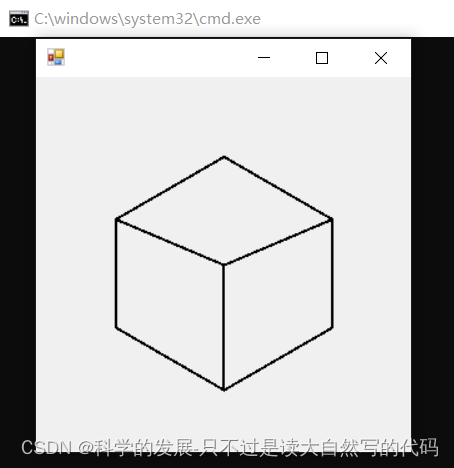
2.3 运行结果
3 立方体透视图
3.1 概要
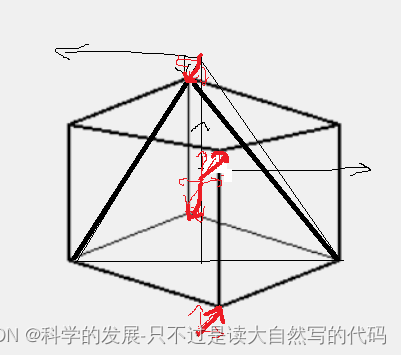
透视图是用前面的立方体,去移动顶点演化出来的
3.2 代码
using System;
using System.Drawing;
using System.Net;
using System.Windows.Forms;public partial class TriangleForm : Form
{public TriangleForm(){//InitializeComponent();// 确保窗体大小足够大,以容纳三角形  this.ClientSize = new Size(300, 300);this.DoubleBuffered = true; // 启用双缓冲,以减少绘图时的闪烁  }protected override void OnPaint(PaintEventArgs e){base.OnPaint(e);// 定义三角形的大小和位置  int sideLength = 100; // 等边三角形的边长  int centerX = this.ClientSize.Width / 2; // 三角形中心点的X坐标  int centerY = this.ClientSize.Height / 2; // 三角形中心点的Y坐标  // 将30度转换为弧度  double degrees = 30;double radians = Math.PI * degrees / 180;double sinValue = Math.Sin(radians);double cosValue = Math.Cos(radians);float sinLen = (float)sinValue * sideLength;float cosLen = (float)cosValue * sideLength;float y_yi = 20;float x_yi = 10;//中心点PointF topVertex_center = new PointF(centerX+ x_yi, centerY- y_yi);PointF topVertex_center_hou = new PointF(centerX - x_yi, centerY + y_yi);// 计算三角形顶点的位置  PointF topVertex = new PointF(centerX- x_yi, centerY - cosLen+ y_yi);PointF topVertex_left = new PointF(centerX - cosLen, centerY - cosLen + sinLen);PointF leftVertex = new PointF(centerX - cosLen, centerY + sinLen);PointF topVertex_buttom = new PointF(centerX+ x_yi, centerY + sinLen*2- y_yi);PointF rightVertex = new PointF(centerX + cosLen, centerY + sinLen);PointF topVertex_right = new PointF(centerX + cosLen, centerY - cosLen + sinLen);// 创建一个Brush对象来填充三角形  using (SolidBrush brush = new SolidBrush(Color.LightBlue)){// 绘制等边三角形  //e.Graphics.FillPolygon(brush, new PointF[] { topVertex, leftVertex, rightVertex });// 如果你还想绘制三角形的边框,可以使用Pen对象  using (Pen pen = new Pen(Color.Black, 2)){e.Graphics.DrawPolygon(pen, new PointF[] { topVertex, topVertex_left, leftVertex, topVertex_buttom, rightVertex, topVertex_right });e.Graphics.DrawPolygon(pen, new PointF[] { topVertex_center, topVertex_left });e.Graphics.DrawPolygon(pen, new PointF[] { topVertex_center, topVertex_right });e.Graphics.DrawPolygon(pen, new PointF[] { topVertex_center, topVertex_buttom });}float[] dashValues = { 50, 5 }; // 虚线由5个像素的实线和5个像素的空白组成  Pen dashedPen = new Pen(Color.Black, 1);e.Graphics.DrawLine(dashedPen, topVertex_center_hou, leftVertex);e.Graphics.DrawLine(dashedPen, topVertex_center_hou, rightVertex);e.Graphics.DrawLine(dashedPen, topVertex_center_hou, topVertex);}}[STAThread]static void Main(){Application.EnableVisualStyles();Application.SetCompatibleTextRenderingDefault(false);Application.Run(new TriangleForm());}
}
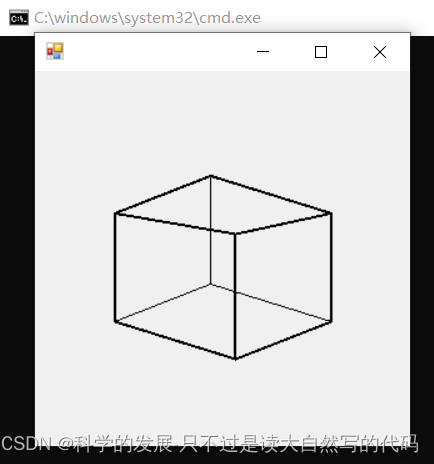
3.3 运行结果
4.等边三角形的内切圆和外接圆
4.1 概要
4.2 代码
using System;
using System.Drawing;
using System.Net;
using System.Windows.Forms;public partial class TriangleForm : Form
{public TriangleForm(){//InitializeComponent();// 确保窗体大小足够大,以容纳三角形  this.ClientSize = new Size(300, 300);this.DoubleBuffered = true; // 启用双缓冲,以减少绘图时的闪烁  }protected override void OnPaint(PaintEventArgs e){base.OnPaint(e);// 定义三角形的大小和位置  int sideLength = 100; // 内接圆半径int centerX = this.ClientSize.Width / 2; // 三角形中心点的X坐标  int centerY = this.ClientSize.Height / 2; // 三角形中心点的Y坐标  // 将30度转换为弧度  double degrees = 30;double radians = Math.PI * degrees / 180;double sinValue = Math.Sin(radians);double cosValue = Math.Cos(radians);float sinLen = (float)sinValue * sideLength;float cosLen = (float)cosValue * sideLength;// 计算三角形顶点的位置  PointF topVertex = new PointF(centerX, centerY - sideLength);PointF leftVertex = new PointF(centerX - cosLen, centerY + sinLen);PointF rightVertex = new PointF(centerX + cosLen, centerY + sinLen);// 设置圆形的边界矩形(位置和大小)  Rectangle rect = new Rectangle(centerX- (int)sinLen, centerY- (int)sinLen, (int)(sinLen*2), (int)(sinLen*2)); // x=50, y=50, 宽度=100, 高度=100Rectangle rect2 = new Rectangle(centerX - (int)sideLength, centerY - (int)sideLength, sideLength*2, sideLength*2); // x=50, y=50, 宽度=100, 高度=100// 创建一个Brush对象来填充三角形  using (SolidBrush brush = new SolidBrush(Color.LightBlue)){// 绘制等边三角形  //e.Graphics.FillPolygon(brush, new PointF[] { topVertex, leftVertex, rightVertex });// 如果你还想绘制三角形的边框,可以使用Pen对象  using (Pen pen = new Pen(Color.Black, 2)){e.Graphics.DrawPolygon(pen, new PointF[] { topVertex,  leftVertex, rightVertex, });e.Graphics.DrawEllipse(pen, rect2);e.Graphics.DrawEllipse(pen, rect);}}}[STAThread]static void Main(){Application.EnableVisualStyles();Application.SetCompatibleTextRenderingDefault(false);Application.Run(new TriangleForm());}
}
4.3 运行结果
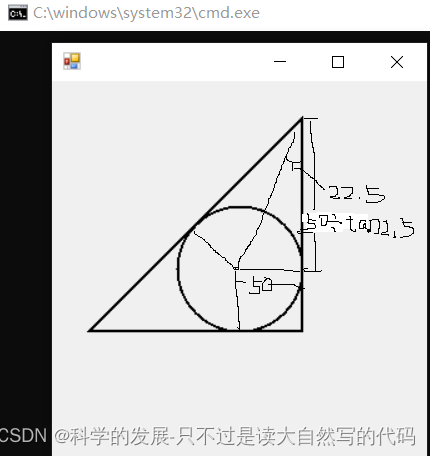
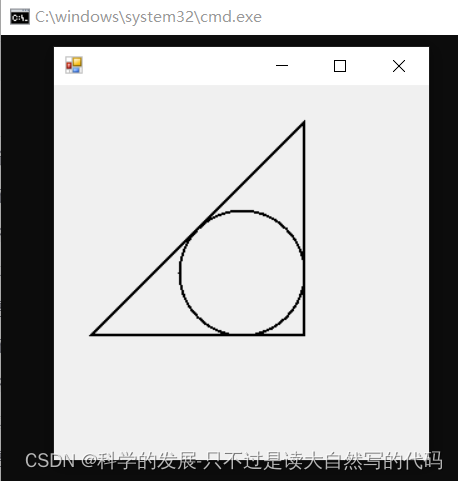
5.直角三角形的内接圆
5.1 概要
5.2 代码
using System;
using System.Drawing;
using System.Net;
using System.Windows.Forms;public partial class TriangleForm : Form
{public TriangleForm(){//InitializeComponent();// 确保窗体大小足够大,以容纳三角形  this.ClientSize = new Size(300, 300);this.DoubleBuffered = true; // 启用双缓冲,以减少绘图时的闪烁  }protected override void OnPaint(PaintEventArgs e){base.OnPaint(e);// 定义三角形的大小和位置  int sideLength = 50; // 内接圆半径int centerX = this.ClientSize.Width / 2; // 三角形中心点的X坐标  int centerY = this.ClientSize.Height / 2; // 三角形中心点的Y坐标  // 将30度转换为弧度  double degrees = 22.5;double radians = Math.PI * degrees / 180;double sinValue = Math.Sin(radians);double cosValue = Math.Cos(radians);double tanValue = Math.Tan(radians);float sinLen = (float)sinValue * sideLength;float cosLen = (float)cosValue * sideLength;float tanLen = (float)(sideLength/ tanValue);// 计算三角形顶点的位置  PointF topVertex = new PointF(centerX+ sideLength, centerY - tanLen);PointF leftVertex = new PointF(centerX - tanLen, centerY + sideLength);PointF rightVertex = new PointF(centerX + sideLength, centerY + sideLength);// 设置圆形的边界矩形(位置和大小)  //Rectangle rect = new Rectangle(centerX - (int)sinLen, centerY - (int)sinLen, (int)(sinLen * 2), (int)(sinLen * 2)); // x=50, y=50, 宽度=100, 高度=100Rectangle rect2 = new Rectangle(centerX - (int)sideLength, centerY - (int)sideLength, sideLength * 2, sideLength * 2); // x=50, y=50, 宽度=100, 高度=100// 创建一个Brush对象来填充三角形  using (SolidBrush brush = new SolidBrush(Color.LightBlue)){// 绘制等边三角形  //e.Graphics.FillPolygon(brush, new PointF[] { topVertex, leftVertex, rightVertex });// 如果你还想绘制三角形的边框,可以使用Pen对象  using (Pen pen = new Pen(Color.Black, 2)){e.Graphics.DrawPolygon(pen, new PointF[] { topVertex, leftVertex, rightVertex, });e.Graphics.DrawEllipse(pen, rect2);//e.Graphics.DrawEllipse(pen, rect);}}}[STAThread]static void Main(){Application.EnableVisualStyles();Application.SetCompatibleTextRenderingDefault(false);Application.Run(new TriangleForm());}
}
5.3 运行结果
相关文章:
c# 二维图形绘制实践
1.等边三角形 1.1 概述 1.2 代码 using System; using System.Drawing; using System.Windows.Forms;public partial class TriangleForm : Form {public TriangleForm(){//InitializeComponent();// 确保窗体大小足够大,以容纳三角形 this.ClientSize new Siz…...

Nvidia TensorRT系列01-TensorRT的功能1
Nvidia TensorRT系列01-TensorRT的功能1 B站:肆十二-的个人空间-肆十二-个人主页-哔哩哔哩视频 (bilibili.com) 博客:肆十二-CSDN博客 问答:(10 封私信 / 72 条消息) 肆十二 - 知乎 (zhihu.com) C和Python API TensorRT的API同时支持C和Pyth…...

Vatee万腾平台:创新科技,助力企业腾飞
在全球化竞争日益激烈的今天,企业如何借助科技力量实现转型升级,已成为摆在众多企业家面前的重大课题。Vatee万腾平台凭借其卓越的创新科技和专业的服务能力,成为众多企业实现腾飞的得力助手。 一、创新科技,引领企业前行 Vatee万…...
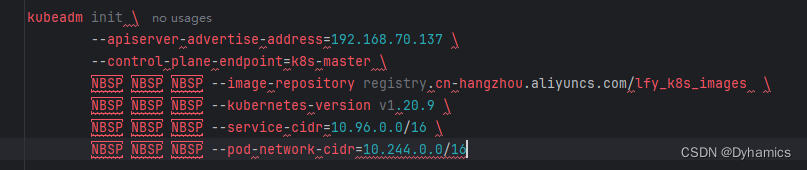
搭建k8s集群报错unknown command “\u00a0“ for “kubeadm init“
搭建k8s报错unknown command “\u00a0” for “kubeadm init” 网上搜了一下,是因为复制过来的命令前面包含了空格,将复制的命令放到idea可以清楚看到几个命令前面有空格,删除掉就好了,记录一下...

【数据结构】三路快速排序
1. 简介 传统快速排序用的是双路快速排序,即将大于基准值的部分放到基准值右侧,小于基准值的部分放到基准值左侧,但是这种算法面对过多的重复数据的数组,时间复杂度会增多,于是就有了三路快速排序的思想,其…...

中国菜刀,蚁剑,哥斯拉,冰蝎的流量特征区别
中国菜刀、蚁剑、哥斯拉、冰蝎这四种Webshell连接工具的流量特征各有区别,以下是它们之间的主要差异: 中国菜刀(CaiDao) 流量特征: 请求包: UA头可能伪装为百度、火狐等浏览器的User-Agent。请求体中存在…...
)
华为OD刷题C卷 - 每日刷题32(执行任务赚积分,计算三叉搜索树的高度)
1、(执行任务赚积分): 这段代码是解决“执行任务赚积分”的问题。它提供了一个Java类Main,其中包含main方法和getResult方法,用于计算在有限的时间内,处理任务可以获得的最多积分。 main方法首先读取任务…...
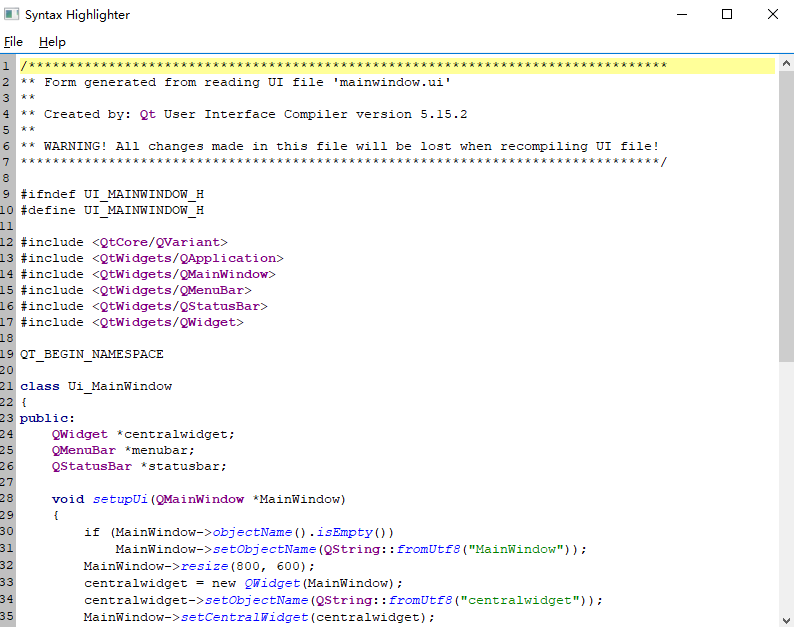
QT系列教程(11) TextEdit实现Qt 文本高亮
文本高亮 对于textedit里录入的部分单词我们可以实现高亮,实现高亮主要依赖于QSyntaxHighlighter。 我们先创建一个Qt Application类,类名MainWindow, 然后新增一个C类,类名为MySyntaxHighlighter。 #ifndef MYSYNTAXHIGHLIGHTER_H #define …...
蓝队-溯源技巧
溯源技巧 大致思想 通常情况下,接到溯源任务时,获得的信息如下 攻击时间 攻击 IP 预警平台 攻击类型 恶意文件 受攻击域名/IP其中攻击 IP、攻击类型、恶意文件、攻击详情是溯源入手的点。 通过攻击类型分析攻击详情的请求包,看有没有攻击者…...

【5】JDK、JRE和JVM的区别与联系
JDK、JRE和JVM的区别与联系 Java是一种广泛使用的编程语言,它的跨平台特性得益于Java虚拟机(JVM)。然而,在Java的世界里,JDK、JRE和JVM这三个术语常常让人感到困惑。本文将阐述它们各自的功能,以及它们是如…...

【DevOps】Logstash详解:高效日志管理与分析工具
在现代软件开发和运维过程中,日志管理与分析是至关重要的环节。日志可以帮助我们追踪系统行为、诊断问题、优化性能以及确保安全合规。Logstash,作为ELK Stack(Elasticsearch、Logstash、Kibana)的核心组件之一,是一个…...
)
Vue3 之 Pinia 核心概念(八)
核心概念 State:这是你的应用程序的状态,是一个响应式的对象。 Getters:类似于 Vuex 中的 getters,它们是基于 state 的计算属性。 Actions:类似于 Vuex 中的 mutations 和 actions,它们用于改变 state。但…...
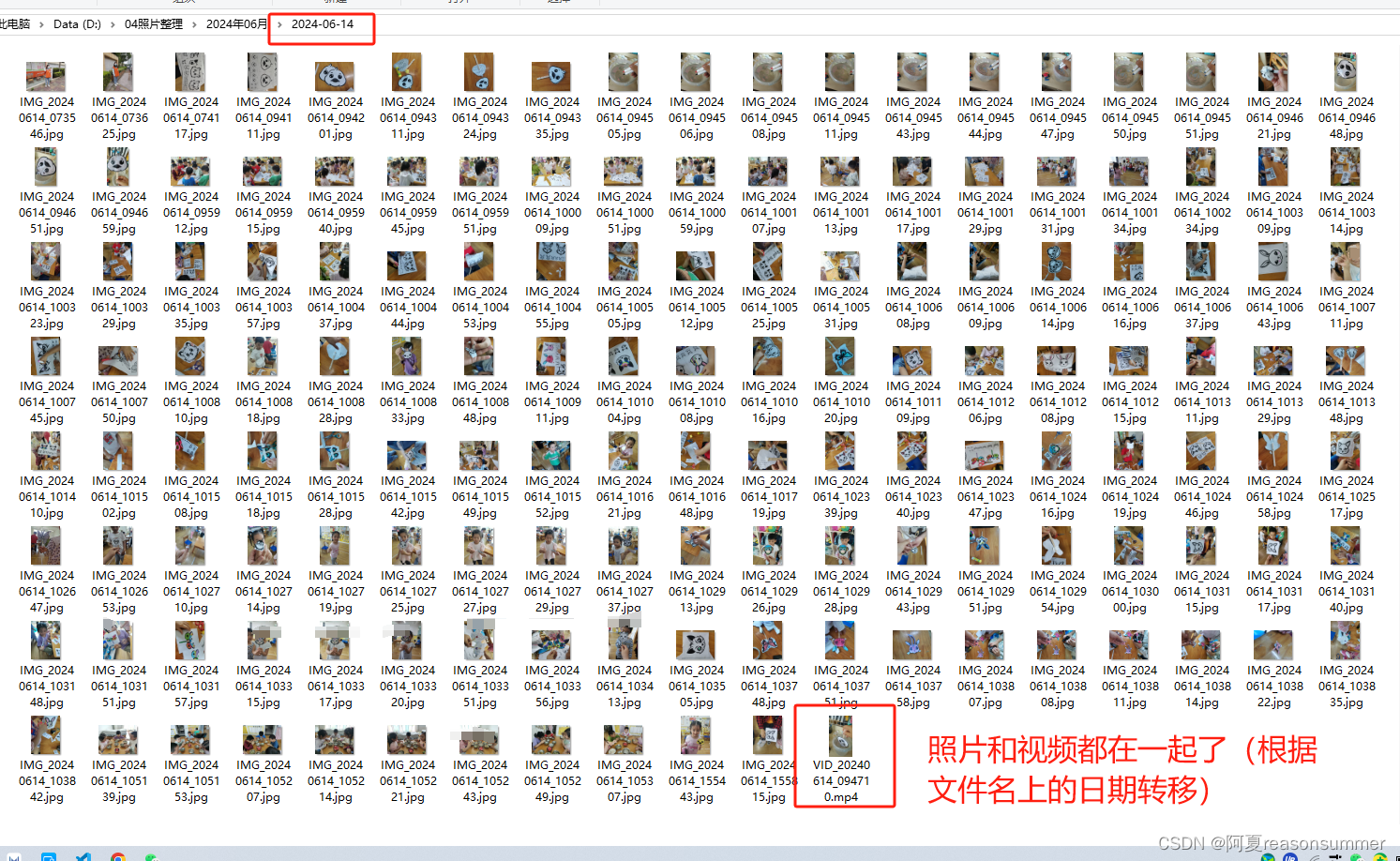
【办公类-04-03】华为助手导出照片视频分类(根据图片、视频的文件名日期分类导出)
背景需求: 用华为手机助手导出的照片视频,只能将jpg照片(exifread读取图片的exif拍摄日期,Png、JPEG、mp4都无法识别到exif信息) 【办公类-04-02】华为助手导出照片(jpg)读取拍摄时间分类导出…...

TVBOX 最新版下载+视频源教程
下载链接 wx 搜索 Geek 前端 发送电视资源进行获取 操作教程...

2024年了,苹果可以通话录音了
人不走空 🌈个人主页:人不走空 💖系列专栏:算法专题 ⏰诗词歌赋:斯是陋室,惟吾德馨 6月11日凌晨,苹果在WWDC24大会上,密集输出了酝酿多时的AI应用更新。苹果对通话、对话、图…...
书生·浦语大模型实战营第二期作业五
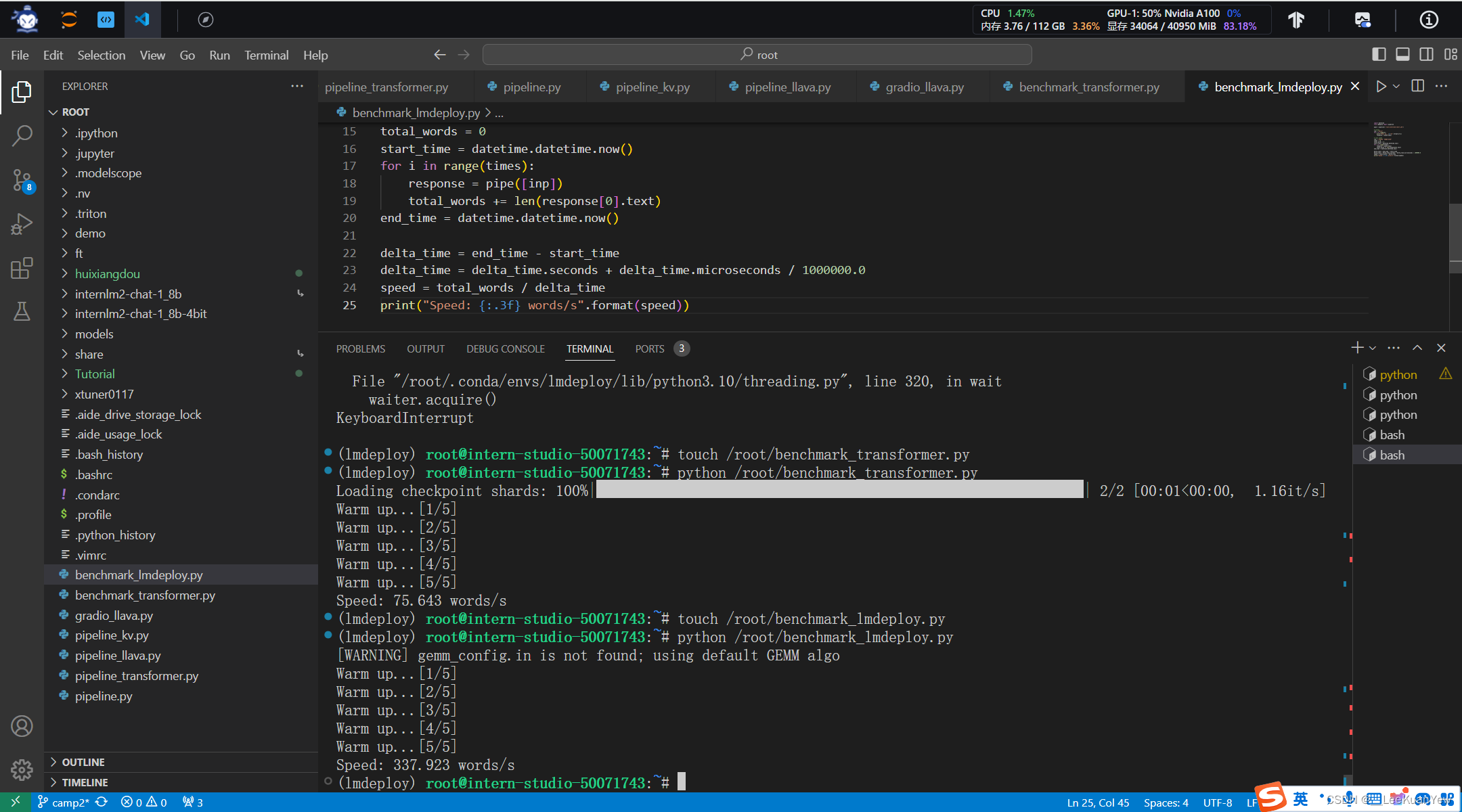
1、开发机创建conda环境: 2、安装第三方库: 3、新建pipeline_transformer.py文件,并运行: 4、运行结果: 5、执行模型: 6、与大模型进行对话: 7、默认占有的显存: 8、--cache-max-en…...
树莓派4B_OpenCv学习笔记9:图片的腐蚀与膨胀
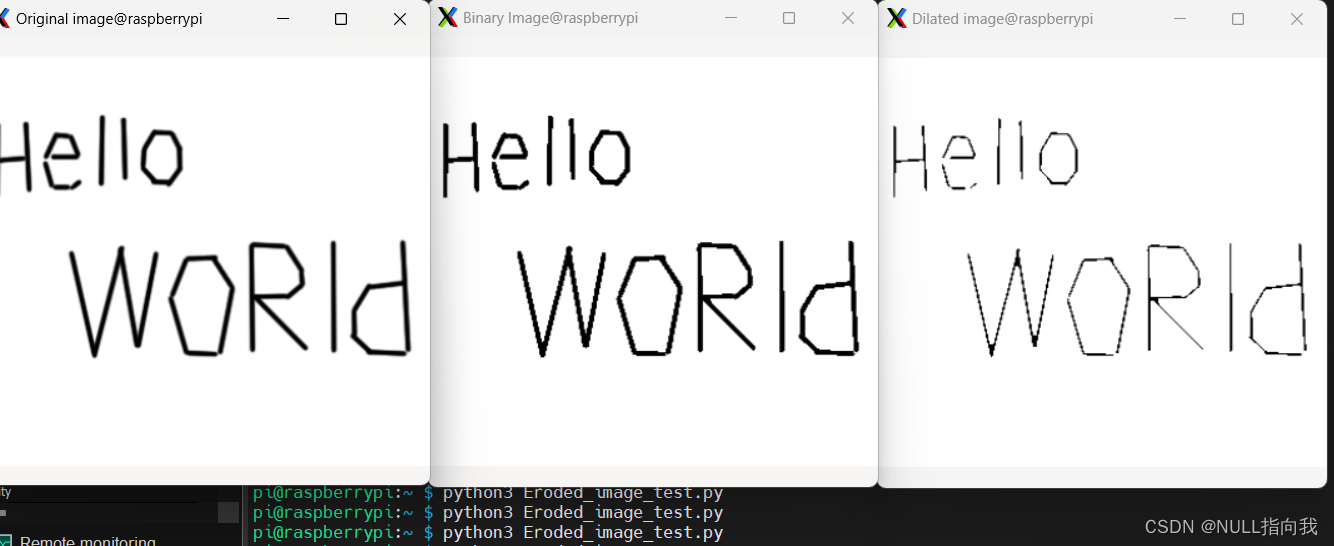
今日继续学习树莓派4B 4G:(Raspberry Pi,简称RPi或RasPi) 本人所用树莓派4B 装载的系统与版本如下: 版本可用命令 (lsb_release -a) 查询: Opencv 版本是4.5.1: 图像的膨胀与腐蚀一般用于灰度图或者二值图,今日便来学习…...
Perplexity AI — 探索网络,发掘知识,沟通思想
体验地址:Perplexity AI (国外网站访问需要梯子) Perplexity AI是一款功能强大的人工智能搜索引擎,其特点和优势主要体现在以下几个方面: 功能: 自然语言搜索:Perplexity AI可以理解用户的自然…...
RPC知识
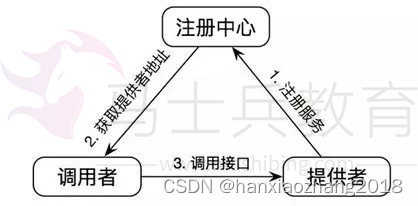
一、为什么要有RPC: HTTP协议的接口,在接口不多、系统与系统交互较少的情况下,解决信息孤岛初期常使用的一种通信手段;优点就是简单、直接、开发方便,利用现成的HTTP协议进行传输。 但是,如果是一个大型的网…...
【爬虫】requests 结合 BeautifulSoup抓取网页数据
一、BeautifulSoup使用步骤 BeautifulSoup 是一个用于从 HTML 或 XML 文件中提取数据的 Python 库。以下是如何使用 BeautifulSoup 来解析 HTML 并提取信息的基本步骤: 1、安装: 如果你还没有安装 BeautifulSoup,你可以使用 pip 来安装它。…...

构建个人技能库:高效沉淀与复用代码片段的工程实践
1. 项目概述:一个技能库的诞生与价值最近在整理自己的技术工具箱时,我意识到一个问题:很多实用的代码片段、脚本和解决方案,都散落在不同的项目、笔记甚至聊天记录里。当需要快速解决一个特定问题时,要么得花时间回忆&…...

Cursor编辑器AI操作完成音效插件:原理、实现与效能提升
1. 项目概述:一个提升编码体验的“听觉反馈”工具如果你和我一样,每天有大量时间与代码编辑器为伴,那么你一定对那种“沉浸式”的编码状态又爱又恨。爱的是心流状态下的高效产出,恨的是一旦被打断,重新进入状态需要耗费…...

管 Vibe Coding 项目,就像管公共厕所
本文整理自"AI炼金术"播客对徐文浩的访谈,探讨 AI 辅助编程(Vibe Coding)在组织落地后面临的治理挑战和应对策略。从"屎山三年一遇"到"屎山月月有"传统软件开发中,一个系统的"屎山化"通常…...

基于Rust与智能体范式构建生产级AI工作流:从Dust平台实践到避坑指南
1. 从零到一:理解Dust平台的核心价值与设计哲学如果你和我一样,每天都在和代码、文档、数据打交道,那你肯定也经历过这样的时刻:为了一个简单的数据查询,需要在不同工具间反复切换;为了写一份周报ÿ…...

为什么92%的AI团队误用DeepSeek Serverless?——基于37家客户架构审计报告的5大认知断层与重构路径
更多请点击: https://intelliparadigm.com 第一章:为什么92%的AI团队误用DeepSeek Serverless? DeepSeek Serverless 本为轻量推理与函数即服务(FaaS)场景设计,但大量团队将其当作通用模型托管平台使用&am…...

Rails控制台集成AI助手:ask_chatgpt Gem的实践指南
1. 项目概述:在Rails控制台里装一个AI助手 如果你是一个Ruby on Rails开发者,并且每天都在跟Rails控制台( rails console )打交道,那你肯定有过这样的时刻:盯着一段复杂的ActiveRecord查询,或…...

Happy Island Designer完整指南:免费在线岛屿设计工具终极教程
Happy Island Designer完整指南:免费在线岛屿设计工具终极教程 【免费下载链接】HappyIslandDesigner "Happy Island Designer (Alpha)",是一个在线工具,它允许用户设计和定制自己的岛屿。这个工具是受游戏《动物森友会》(Animal C…...

对比使用Taotoken前后,个人开发者的月度AI调用成本变化
🚀 告别海外账号与网络限制!稳定直连全球优质大模型,限时半价接入中。 👉 点击领取海量免费额度 对比使用Taotoken前后,个人开发者的月度AI调用成本变化 在原型开发与日常编码辅助中,频繁调用大模型API已成…...

构建AI助手持久记忆系统:Rekall项目实践与MCP协议应用
1. 项目概述:为你的AI助手构建一个“第二大脑”如果你和我一样,日常重度依赖 Claude Code、Cursor 这类AI编程助手,那你一定遇到过这个痛点:每次开启一个新的会话,AI助手就像得了“健忘症”,对之前讨论过的…...

GPT-Image-2提示词工程实战:从原理到应用,解锁高质量AI图像生成
1. 项目概述:一份高质量的GPT-Image-2提示词工程指南如果你正在使用OpenAI的GPT-Image-2模型,并且厌倦了反复尝试却只能得到平庸、不符合预期的图片,那么你找对地方了。我最近深度研究并实践了Anil-matcha维护的“Awesome GPT-Image-2 API Pr…...