
java分别使用 iText 7 库和iText 5 库 将excel转成PDF导出,以及如何对excel转PDF合并单元格
第一种
package com.junfun.pms.report.util;import com.itextpdf.kernel.font.PdfFontFactory;
import com.itextpdf.layout.Document;
import com.itextpdf.layout.element.Paragraph;
import com.itextpdf.layout.property.TextAlignment;
import com.itextpdf.layout.property.UnitValue;
import com.itextpdf.text.*;
import com.itextpdf.text.Font;
import com.itextpdf.text.pdf.*;
import org.apache.commons.io.IOUtils;
import org.apache.poi.ss.usermodel.*;
import org.apache.poi.xssf.usermodel.XSSFWorkbook;
import org.springframework.core.io.ClassPathResource;
import org.springframework.core.io.Resource;import javax.servlet.ServletOutputStream;
import java.io.*;
import java.math.BigDecimal;
import java.math.RoundingMode;
import java.text.DecimalFormat;
import java.util.List;/*** @description: 	PDF文件添加水印工具类* @author: liux* @date: 2024/5/23* @param: null* @return:*/public class PDFWatermarkExample {private static final String FONT_SIMFANG_PATH = "/font/simfang.ttf";private static final String ENCODING = "Identity-H";public static void addWatermark(String inputFile, String outputFile, String watermarkText) {try {PdfReader reader = new PdfReader(inputFile);PdfStamper stamper = new PdfStamper(reader, new FileOutputStream(outputFile));int numberOfPages = reader.getNumberOfPages();for (int i = 1; i <= numberOfPages; i++) {PdfContentByte content = stamper.getUnderContent(i);PdfGState gs = new PdfGState();gs.setFillOpacity(0.5f); // 设置水印透明度content.setGState(gs);ColumnText.showTextAligned(content,Element.ALIGN_CENTER,new Phrase(watermarkText, new Font(Font.FontFamily.HELVETICA, 40)),reader.getPageSizeWithRotation(i).getWidth() / 2,reader.getPageSizeWithRotation(i).getHeight() / 2,45);}stamper.close();reader.close();} catch (Exception e) {e.printStackTrace();}}public static void addWatermarkMulti(String inputFile, String outputFile, String watermarkText) {try {PdfReader reader = new PdfReader(inputFile);PdfStamper stamper = new PdfStamper(reader, new FileOutputStream(outputFile));int numberOfPages = reader.getNumberOfPages();for (int i = 1; i <= numberOfPages; i++) {PdfContentByte content = stamper.getOverContent(i);PdfGState gs = new PdfGState();gs.setFillOpacity(0.5f); // 设置水印透明度content.setGState(gs);Rectangle pageSize = reader.getPageSizeWithRotation(i);float pageWidth = pageSize.getWidth();float pageHeight = pageSize.getHeight();// 设置水印间隔float xInterval = 200; // X轴间隔float yInterval = 50; // Y轴间隔// 计算水印个数int xCount = (int) Math.ceil(pageWidth / xInterval);int yCount = (int) Math.ceil(pageHeight / yInterval);// 平铺水印for (int x = 0; x < xCount; x++) {for (int y = 0; y < yCount; y++) {float xPosition = x * xInterval;float yPosition = y * yInterval;ColumnText.showTextAligned(content,Element.ALIGN_CENTER,new Phrase(watermarkText, new Font(Font.FontFamily.HELVETICA, 40)),xPosition,yPosition,45);}}}stamper.close();reader.close();} catch (Exception e) {e.printStackTrace();}}public static void addWatermarkMultiCN(String inputFile, String outputFile, String watermarkText) {try {PdfReader reader = new PdfReader(inputFile);PdfStamper stamper = new PdfStamper(reader, new FileOutputStream(outputFile));int numberOfPages = reader.getNumberOfPages();Resource resource = new ClassPathResource("simhei.ttf"); // 加载位于resources目录下的字体文件InputStream inputStream = resource.getInputStream();byte[] fontBytes = IOUtils.toByteArray(inputStream);BaseFont baseFont = BaseFont.createFont("simhei.ttf", BaseFont.IDENTITY_H, BaseFont.EMBEDDED, true, fontBytes, null); // 创建BaseFont对象for (int i = 1; i <= numberOfPages; i++) {PdfContentByte content = stamper.getOverContent(i);PdfGState gs = new PdfGState();gs.setFillOpacity(0.5f); // 设置水印透明度content.setGState(gs);Rectangle pageSize = reader.getPageSizeWithRotation(i);float pageWidth = pageSize.getWidth();float pageHeight = pageSize.getHeight();// 设置水印间隔float xInterval = 200; // X轴间隔float yInterval = 50; // Y轴间隔// 计算水印个数int xCount = (int) Math.ceil(pageWidth / xInterval);int yCount = (int) Math.ceil(pageHeight / yInterval);// 平铺水印for (int x = 0; x < xCount; x++) {for (int y = 0; y < yCount; y++) {float xPosition = x * xInterval;float yPosition = y * yInterval;ColumnText.showTextAligned(content,Element.ALIGN_CENTER,new Phrase(watermarkText, new Font(baseFont, 40)), // 使用创建的中文字体xPosition,yPosition,45);}}}stamper.close();reader.close();} catch (Exception e) {e.printStackTrace();}}public static void addWatermarkToPdfStream(InputStream inputStream, String watermarkText, ServletOutputStream outputStream) throws Exception {
//		ByteArrayOutputStream outputStream = new ByteArrayOutputStream();try {PdfReader reader = new PdfReader(inputStream);PdfStamper stamper = new PdfStamper(reader, outputStream);int numberOfPages = reader.getNumberOfPages();// ...(原有的水印添加逻辑)Resource resource = new ClassPathResource("/font/simhei.ttf"); // 加载位于resources目录下的字体文件InputStream inputStreamTTF = resource.getInputStream();byte[] fontBytes = IOUtils.toByteArray(inputStreamTTF);BaseFont baseFont = BaseFont.createFont("/font/simhei.ttf", BaseFont.IDENTITY_H, BaseFont.EMBEDDED, true, fontBytes, null); // 创建BaseFont对象for (int i = 1; i <= numberOfPages; i++) {PdfContentByte content = stamper.getOverContent(i);PdfGState gs = new PdfGState();gs.setFillOpacity(0.35f); // 设置水印透明度content.setGState(gs);Rectangle pageSize = reader.getPageSizeWithRotation(i);float pageWidth = pageSize.getWidth();float pageHeight = pageSize.getHeight();// 设置水印间隔float xInterval = 250; // X轴间隔float yInterval = 100; // Y轴间隔// 计算水印个数int xCount = (int) Math.ceil(pageWidth / xInterval);int yCount = (int) Math.ceil(pageHeight / yInterval);// 平铺水印for (int x = 0; x < xCount; x++) {for (int y = 0; y < yCount; y++) {float xPosition = x * xInterval;float yPosition = y * yInterval;ColumnText.showTextAligned(content,Element.ALIGN_CENTER,new Phrase(watermarkText, new Font(baseFont, 21)), // 使用创建的中文字体xPosition,yPosition,45);}}}stamper.close();reader.close();} catch (Exception e) {e.printStackTrace();throw e;}
//		return outputStream;}public static void excelToPdf(InputStream inputStream, FileOutputStream stream) throws Exception {com.itextpdf.kernel.geom.Rectangle rec = new com.itextpdf.kernel.geom.Rectangle(842, 595);Workbook workbook = new XSSFWorkbook(inputStream);Sheet sheet = workbook.getSheetAt(0);com.itextpdf.kernel.pdf.PdfWriter writer = new com.itextpdf.kernel.pdf.PdfWriter(stream);com.itextpdf.kernel.pdf.PdfDocument pdfDoc = new com.itextpdf.kernel.pdf.PdfDocument(writer);com.itextpdf.layout.Document document = new Document(pdfDoc, new com.itextpdf.kernel.geom.PageSize(rec));com.itextpdf.layout.element.Table table =new com.itextpdf.layout.element.Table(UnitValue.createPercentArray(sheet.getRow(0).getPhysicalNumberOfCells()));DecimalFormat df = new DecimalFormat("#");for (int i = 0; i < sheet.getPhysicalNumberOfRows(); i++) {Row row = sheet.getRow(i);if (row == null) {continue;}if(i == 0) {table.addCell(new com.itextpdf.layout.element.Cell(1, 11).add(new com.itextpdf.layout.element.Paragraph(row.getCell(0).toString()).setTextAlignment(TextAlignment.CENTER).setFont(PdfFontFactory.createFont(FONT_SIMFANG_PATH, ENCODING)).setFontSize(10f)));} else {for (int j = 0; j < row.getPhysicalNumberOfCells(); j++) {Cell cell = row.getCell(j);if (cell == null) {table.addCell(new com.itextpdf.layout.element.Paragraph(""));} else {
//						cell.setCellType(CellType.STRING);String val = cell.toString();if(j == 0 || j == 8){//todo 2024-05-24 liux 第一列序号单独处理一下,要不然是1.0之类的带小数位(暂时先这么处理)try{val = df.format(cell.getNumericCellValue());}catch(Exception e){}}else if(j == 10){try{BigDecimal d = new BigDecimal(val);val = String.valueOf(d.setScale(2, RoundingMode.HALF_UP));}catch(Exception e){}}Paragraph paragraph = new Paragraph(val).setFont(PdfFontFactory.createFont(FONT_SIMFANG_PATH, ENCODING)).setFontSize(9f);if(j == 10){//todo 2024-05-24 liux  临时做法paragraph.setWidth(100);}table.addCell(paragraph);}}}}document.add(table);document.close();
//        setWaterMark(pdfDoc, document, table, stream);}/** 第二行单元格做部分合并,左对齐,第三行以下做居中** @param inputStream* @param stream* @throws Exception*/public static void excelToPdfForMergeSpecificCells(InputStream inputStream, FileOutputStream stream) throws Exception {com.itextpdf.kernel.geom.Rectangle rec = new com.itextpdf.kernel.geom.Rectangle(842, 595);Workbook workbook = new XSSFWorkbook(inputStream);Sheet sheet = workbook.getSheetAt(0);com.itextpdf.kernel.pdf.PdfWriter writer = new com.itextpdf.kernel.pdf.PdfWriter(stream);com.itextpdf.kernel.pdf.PdfDocument pdfDoc = new com.itextpdf.kernel.pdf.PdfDocument(writer);com.itextpdf.layout.Document document = new Document(pdfDoc, new com.itextpdf.kernel.geom.PageSize(rec));com.itextpdf.layout.element.Table table =new com.itextpdf.layout.element.Table(UnitValue.createPercentArray(sheet.getRow(0).getPhysicalNumberOfCells()));DecimalFormat df = new DecimalFormat("#");for (int i = 0; i < sheet.getPhysicalNumberOfRows(); i++) {Row row = sheet.getRow(i);if (row == null) {continue;}if(i == 0) {table.addCell(new com.itextpdf.layout.element.Cell(1, 12).add(new com.itextpdf.layout.element.Paragraph(row.getCell(0).toString()).setTextAlignment(TextAlignment.CENTER).setFont(PdfFontFactory.createFont(FONT_SIMFANG_PATH, ENCODING)).setFontSize(10f)));} else if (i == 1) {// 合并前四列单元格table.addCell(new com.itextpdf.layout.element.Cell(1, 4).add(new com.itextpdf.layout.element.Paragraph(row.getCell(0).toString()).setTextAlignment(TextAlignment.LEFT).setFont(PdfFontFactory.createFont(FONT_SIMFANG_PATH, ENCODING)).setFontSize(10f)));// 合并第五列单元格table.addCell(new com.itextpdf.layout.element.Cell(1, 1).add(new com.itextpdf.layout.element.Paragraph(row.getCell(4).toString()).setTextAlignment(TextAlignment.LEFT).setFont(PdfFontFactory.createFont(FONT_SIMFANG_PATH, ENCODING)).setFontSize(10f)));// 合并第六列到第十列单元格table.addCell(new com.itextpdf.layout.element.Cell(1, 5).add(new com.itextpdf.layout.element.Paragraph(row.getCell(5).toString()).setTextAlignment(TextAlignment.LEFT).setFont(PdfFontFactory.createFont(FONT_SIMFANG_PATH, ENCODING)).setFontSize(10f)));// 合并剩下单元格table.addCell(new com.itextpdf.layout.element.Cell(1, 2).add(new com.itextpdf.layout.element.Paragraph(row.getCell(10).toString()).setTextAlignment(TextAlignment.LEFT).setFont(PdfFontFactory.createFont(FONT_SIMFANG_PATH, ENCODING)).setFontSize(10f)));} else {for (int j = 0; j < row.getPhysicalNumberOfCells(); j++) {Cell cell = row.getCell(j);if (cell == null) {table.addCell(new com.itextpdf.layout.element.Paragraph("").setTextAlignment(TextAlignment.CENTER));} else {
//						cell.setCellType(CellType.STRING);String val = cell.toString();if(j == 0 || j ==6 || j == 9){//todo 2024-05-24 liux 第一列序号单独处理一下,要不然是1.0之类的带小数位(暂时先这么处理)try{val = df.format(cell.getNumericCellValue());}catch(Exception e){}}else if(j == 7 || j == 8 || j == 10 ||  j == 11){try{BigDecimal d = new BigDecimal(val);val = String.valueOf(d.setScale(2, RoundingMode.HALF_UP));}catch(Exception e){}}Paragraph paragraph = new Paragraph(val).setFont(PdfFontFactory.createFont(FONT_SIMFANG_PATH, ENCODING)).setFontSize(9f);if(j == 4){//todo 2024-05-24 liux  临时做法paragraph.setWidth(150);}table.addCell(paragraph).setTextAlignment(TextAlignment.CENTER);}}}}document.add(table);document.close();
//        setWaterMark(pdfDoc, document, table, stream);}public static void addWatermarkExample(List<File> files) {// 在这里编写添加水印的代码逻辑,使用上面提到的添加水印的示例代码for (File file : files) {addWatermark(file.getPath(), file.getPath(), "Watermark Text");}}//	public static void main(String[] args) {
//		String inputFile = "D:\\Downloads\\123.pdf";
//		String outputFile = "D:\\Downloads\\456.pdf";
//		String watermarkText = "这是中文水印";
//
//		addWatermarkMultiCN(inputFile, outputFile, watermarkText);
//
//
//		String outputFileStream = "D:\\Downloads\\789.pdf";
//		String watermarkText02 = "这是读取流返回流";
//
//		try (InputStream input = new FileInputStream(inputFile)) {
//			ByteArrayOutputStream output = addWatermarkToPdfStream(input, watermarkText02);
//			try (OutputStream fileOutput = new FileOutputStream(outputFileStream)) {
//				output.writeTo(fileOutput);
//			}
//		} catch (IOException e) {
//			e.printStackTrace();
//		}
//	}
}
第二种
package org.springblade.common.tool;import cn.hutool.core.collection.CollUtil;
import com.itextpdf.text.*;
import com.itextpdf.text.pdf.BaseFont;
import com.itextpdf.text.pdf.PdfPCell;
import com.itextpdf.text.pdf.PdfPTable;
import com.itextpdf.text.pdf.PdfWriter;
import lombok.experimental.UtilityClass;
import org.apache.poi.hssf.usermodel.*;
import org.apache.poi.ooxml.POIXMLDocumentPart;
import org.apache.poi.ss.usermodel.Font;
import org.apache.poi.ss.usermodel.*;
import org.apache.poi.ss.util.CellRangeAddress;
import org.apache.poi.xssf.usermodel.*;import java.io.*;
import java.nio.file.Files;
import java.nio.file.Paths;
import java.text.SimpleDateFormat;
import java.util.ArrayList;
import java.util.Date;
import java.util.List;
import java.util.Objects;@UtilityClass
public class ExcelToPdfUtil {public static void main(String[] args) throws FileNotFoundException {String excelPath = "D:\\无用\\test.xlsx";String pdfPath = "D:\\无用\\test02.pdf";try {ExcelToPdfUtil.excelToPdf(excelPath, pdfPath, ".xlsx");System.out.println("Excel转换为PDF成功!PDF文件路径:" + pdfPath);} catch (Exception e) {System.err.println("Excel转换为PDF失败:" + e.getMessage());e.printStackTrace();}}public static void excelToPdf(String excelPath, String pdfPath, String excelSuffix) {try (InputStream in = Files.newInputStream(Paths.get(excelPath));OutputStream out = Files.newOutputStream(Paths.get(pdfPath))) {ExcelToPdfUtil.excelToPdf(in, out, excelSuffix);} catch (Exception e) {e.printStackTrace();}}/*** Excel转PDF并写入输出流** @param inStream    Excel输入流* @param outStream   PDF输出流* @param excelSuffix Excel类型 .xls 和 .xlsx* @throws Exception 异常信息*/public static void excelToPdf(InputStream inStream, OutputStream outStream, String excelSuffix) throws Exception {// 输入流转workbook,获取sheetSheet sheet = getPoiSheetByFileStream(inStream, 0, excelSuffix);// 获取列宽度占比float[] widths = getColWidth(sheet);PdfPTable table = new PdfPTable(widths);table.setWidthPercentage(100);int colCount = widths.length;//设置基本字体BaseFont baseFont = BaseFont.createFont("C:\\Windows\\Fonts\\simsun.ttc,0", BaseFont.IDENTITY_H, BaseFont.EMBEDDED);// 遍历行for (int rowIndex = sheet.getFirstRowNum(); rowIndex <= sheet.getLastRowNum(); rowIndex++) {Row row = sheet.getRow(rowIndex);if (Objects.isNull(row)) {// 插入空对象for (int i = 0; i < colCount; i++) {table.addCell(createPdfPCell(null, 0, 13f, null));}} else {// 遍历单元格for (int columnIndex = 0; (columnIndex < row.getLastCellNum() || columnIndex < colCount) && columnIndex > -1; columnIndex++) {PdfPCell pCell = excelCellToPdfCell(sheet, row.getCell(columnIndex), baseFont);// 是否合并单元格if (isMergedRegion(sheet, rowIndex, columnIndex)) {int[] span = getMergedSpan(sheet, rowIndex, columnIndex);//忽略合并过的单元格boolean mergedCell = span[0] == 1 && span[1] == 1;if (mergedCell) {continue;}pCell.setRowspan(span[0]);pCell.setColspan(span[1]);}table.addCell(pCell);}}}// 初始化PDF文档对象createPdfTableAndWriteDocument(outStream, table);}/*** 单元格转换,poi cell 转换为 itext cell** @param sheet     poi sheet页* @param excelCell poi 单元格* @param baseFont  基础字体* @return com.itextpdf.text.pdf.PdfPCell*/private static PdfPCell excelCellToPdfCell(Sheet sheet, Cell excelCell, BaseFont baseFont) throws Exception {if (Objects.isNull(excelCell)) {return createPdfPCell(null, 0, 13f, null);}int rowIndex = excelCell.getRowIndex();int columnIndex = excelCell.getColumnIndex();// 图片信息List<PicturesInfo> infos = getAllPictureInfos(sheet, rowIndex, rowIndex, columnIndex, columnIndex, false);PdfPCell pCell;if (CollUtil.isNotEmpty(infos)) {pCell = new PdfPCell(Image.getInstance(infos.get(0).getPictureData()));} else {Font excelFont = getExcelFont(sheet, excelCell);//设置单元格字体com.itextpdf.text.Font pdFont = new com.itextpdf.text.Font(baseFont, excelFont.getFontHeightInPoints(), excelFont.getBold() ? 1 : 0, BaseColor.BLACK);Integer border = hasBorder(excelCell) ? null : 0;String excelCellValue = getExcelCellValue(excelCell);pCell = createPdfPCell(excelCellValue, border, excelCell.getRow().getHeightInPoints(), pdFont);}// 水平居中pCell.setHorizontalAlignment(getHorAlign(excelCell.getCellStyle().getAlignment().getCode()));// 垂直对齐pCell.setVerticalAlignment(getVerAlign(excelCell.getCellStyle().getVerticalAlignment().getCode()));return pCell;}/*** 创建pdf文档,并添加表格** @param outStream 输出流,目标文档* @param table     表格* @throws DocumentException 异常信息*/private static void createPdfTableAndWriteDocument(OutputStream outStream, PdfPTable table) throws DocumentException {//设置pdf纸张大小 PageSize.A4 A4横向Document document = new Document(new RectangleReadOnly(842.0F, 595.0F));PdfWriter.getInstance(document, outStream);//设置页边距 宽document.setMargins(10, 10, 10, 10);document.open();document.add(table);document.close();}/*** Excel文档输入流转换为对应的workbook及获取对应的sheet** @param inputStream Excel文档输入流* @param sheetNo     sheet编号,默认0 第一个sheet* @param excelSuffix 文件类型 .xls和.xlsx* @return poi sheet* @throws IOException 异常*/public static Sheet getPoiSheetByFileStream(InputStream inputStream, int sheetNo, String excelSuffix) throws IOException {Workbook workbook;if (excelSuffix.endsWith(".xls")) {workbook = new HSSFWorkbook(inputStream);} else {workbook = new XSSFWorkbook(inputStream);}return workbook.getSheetAt(sheetNo);}/*** 创建itext pdf 单元格** @param content       单元格内容* @param border        边框* @param minimumHeight 高度* @param pdFont        字体* @return pdf cell*/private static PdfPCell createPdfPCell(String content, Integer border, Float minimumHeight, com.itextpdf.text.Font pdFont) {String contentValue = content == null ? "" : content;com.itextpdf.text.Font pdFontNew = pdFont == null ? new com.itextpdf.text.Font() : pdFont;PdfPCell pCell = new PdfPCell(new Phrase(contentValue, pdFontNew));if (Objects.nonNull(border)) {pCell.setBorder(border);}if (Objects.nonNull(minimumHeight)) {pCell.setMinimumHeight(minimumHeight);}return pCell;}/*** excel垂直对齐方式映射到pdf对齐方式*/private static int getVerAlign(int align) {switch (align) {case 2:return com.itextpdf.text.Element.ALIGN_BOTTOM;case 3:return com.itextpdf.text.Element.ALIGN_TOP;default:return com.itextpdf.text.Element.ALIGN_MIDDLE;}}/*** excel水平对齐方式映射到pdf水平对齐方式*/private static int getHorAlign(int align) {switch (align) {case 1:return com.itextpdf.text.Element.ALIGN_LEFT;case 3:return com.itextpdf.text.Element.ALIGN_RIGHT;default:return com.itextpdf.text.Element.ALIGN_CENTER;}}/*============================================== POI获取图片及文本内容工具方法 ==============================================*//*** 获取字体** @param sheet excel 转换的sheet页* @param cell  单元格* @return 字体*/private static Font getExcelFont(Sheet sheet, Cell cell) {// xlsif (sheet instanceof HSSFSheet) {Workbook workbook = sheet.getWorkbook();return ((HSSFCell) cell).getCellStyle().getFont(workbook);}// xlsxreturn ((XSSFCell) cell).getCellStyle().getFont();}/*** 判断excel单元格是否有边框*/private static boolean hasBorder(Cell excelCell) {short top = excelCell.getCellStyle().getBorderTop().getCode();short bottom = excelCell.getCellStyle().getBorderBottom().getCode();short left = excelCell.getCellStyle().getBorderLeft().getCode();short right = excelCell.getCellStyle().getBorderRight().getCode();return top + bottom + left + right > 2;}/*** 判断单元格是否是合并单元格*/private static boolean isMergedRegion(Sheet sheet, int row, int column) {int sheetMergeCount = sheet.getNumMergedRegions();for (int i = 0; i < sheetMergeCount; i++) {CellRangeAddress range = sheet.getMergedRegion(i);int firstColumn = range.getFirstColumn();int lastColumn = range.getLastColumn();int firstRow = range.getFirstRow();int lastRow = range.getLastRow();if (row >= firstRow && row <= lastRow) {if (column >= firstColumn && column <= lastColumn) {return true;}}}return false;}/*** 计算合并单元格合并的跨行跨列数*/private static int[] getMergedSpan(Sheet sheet, int row, int column) {int sheetMergeCount = sheet.getNumMergedRegions();int[] span = {1, 1};for (int i = 0; i < sheetMergeCount; i++) {CellRangeAddress range = sheet.getMergedRegion(i);int firstColumn = range.getFirstColumn();int lastColumn = range.getLastColumn();int firstRow = range.getFirstRow();int lastRow = range.getLastRow();if (firstColumn == column && firstRow == row) {span[0] = lastRow - firstRow + 1;span[1] = lastColumn - firstColumn + 1;break;}}return span;}/*** 获取excel中每列宽度的占比*/private static float[] getColWidth(Sheet sheet) {int rowNum = getMaxColRowNum(sheet);Row row = sheet.getRow(rowNum);int cellCount = row.getPhysicalNumberOfCells();int[] colWidths = new int[cellCount];int sum = 0;for (int i = row.getFirstCellNum(); i < cellCount; i++) {Cell cell = row.getCell(i);if (cell != null) {colWidths[i] = sheet.getColumnWidth(i);sum += sheet.getColumnWidth(i);}}float[] colWidthPer = new float[cellCount];for (int i = row.getFirstCellNum(); i < cellCount; i++) {colWidthPer[i] = (float) colWidths[i] / sum * 100;}return colWidthPer;}/*** 获取excel中列数最多的行号*/private static int getMaxColRowNum(Sheet sheet) {int rowNum = 0;int maxCol = 0;for (int r = sheet.getFirstRowNum(); r < sheet.getPhysicalNumberOfRows(); r++) {Row row = sheet.getRow(r);if (row != null && maxCol < row.getPhysicalNumberOfCells()) {maxCol = row.getPhysicalNumberOfCells();rowNum = r;}}return rowNum;}/*** poi 根据单元格类型获取单元格内容** @param excelCell poi单元格* @return 单元格内容文本*/public static String getExcelCellValue(Cell excelCell) {if (excelCell == null) {return "";}// 判断数据的类型CellType cellType = excelCell.getCellType();if (cellType == CellType.STRING) {return excelCell.getStringCellValue();}if (cellType == CellType.BOOLEAN) {return String.valueOf(excelCell.getBooleanCellValue());}if (cellType == CellType.FORMULA) {return excelCell.getCellFormula();}if (cellType == CellType.NUMERIC) {//short s = excelCell.getCellStyle().getDataFormat();if (DateUtil.isCellDateFormatted(excelCell)) {// 处理日期格式、时间格式SimpleDateFormat sdf;// 验证short值if (excelCell.getCellStyle().getDataFormat() == 14) {sdf = new SimpleDateFormat("yyyy/MM/dd");} else if (excelCell.getCellStyle().getDataFormat() == 21) {sdf = new SimpleDateFormat("HH:mm:ss");} else if (excelCell.getCellStyle().getDataFormat() == 22) {sdf = new SimpleDateFormat("yyyy/MM/dd HH:mm:ss");} else {throw new RuntimeException("日期格式错误!!!");}Date date = excelCell.getDateCellValue();return sdf.format(date);} else if (excelCell.getCellStyle().getDataFormat() == 0) {//处理数值格式DataFormatter formatter = new DataFormatter();return formatter.formatCellValue(excelCell);}}if (cellType == CellType.ERROR) {return "非法字符";}return "";}/*** 获取sheet内的所有图片信息** @param sheet        sheet表* @param onlyInternal 单元格内部* @return 照片集合* @throws Exception 异常*/public static List<PicturesInfo> getAllPictureInfos(Sheet sheet, boolean onlyInternal) throws Exception {return getAllPictureInfos(sheet, null, null, null, null, onlyInternal);}/*** 根据sheet和单元格信息获取图片** @param sheet        sheet表* @param minRow       最小行* @param maxRow       最大行* @param minCol       最小列* @param maxCol       最大列* @param onlyInternal 是否内部* @return 图片集合* @throws Exception 异常*/public static List<PicturesInfo> getAllPictureInfos(Sheet sheet, Integer minRow, Integer maxRow, Integer minCol,Integer maxCol, boolean onlyInternal) throws Exception {if (sheet instanceof HSSFSheet) {return getXLSAllPictureInfos((HSSFSheet) sheet, minRow, maxRow, minCol, maxCol, onlyInternal);} else if (sheet instanceof XSSFSheet) {return getXLSXAllPictureInfos((XSSFSheet) sheet, minRow, maxRow, minCol, maxCol, onlyInternal);} else {throw new Exception("未处理类型,没有为该类型添加:GetAllPicturesInfos()扩展方法!");}}private static List<PicturesInfo> getXLSAllPictureInfos(HSSFSheet sheet, Integer minRow, Integer maxRow,Integer minCol, Integer maxCol, Boolean onlyInternal) {List<PicturesInfo> picturesInfoList = new ArrayList<>();HSSFShapeContainer shapeContainer = sheet.getDrawingPatriarch();if (shapeContainer == null) {return picturesInfoList;}List<HSSFShape> shapeList = shapeContainer.getChildren();for (HSSFShape shape : shapeList) {if (shape instanceof HSSFPicture && shape.getAnchor() instanceof HSSFClientAnchor) {HSSFPicture picture = (HSSFPicture) shape;HSSFClientAnchor anchor = (HSSFClientAnchor) shape.getAnchor();if (isInternalOrIntersect(minRow, maxRow, minCol, maxCol, anchor.getRow1(), anchor.getRow2(),anchor.getCol1(), anchor.getCol2(), onlyInternal)) {HSSFPictureData pictureData = picture.getPictureData();picturesInfoList.add(new PicturesInfo().setMinRow(anchor.getRow1()).setMaxRow(anchor.getRow2()).setMinCol(anchor.getCol1()).setMaxCol(anchor.getCol2()).setPictureData(pictureData.getData()).setExt(pictureData.getMimeType()));}}}return picturesInfoList;}private static List<PicturesInfo> getXLSXAllPictureInfos(XSSFSheet sheet, Integer minRow, Integer maxRow,Integer minCol, Integer maxCol, Boolean onlyInternal) {List<PicturesInfo> picturesInfoList = new ArrayList<>();List<POIXMLDocumentPart> documentPartList = sheet.getRelations();for (POIXMLDocumentPart documentPart : documentPartList) {if (documentPart instanceof XSSFDrawing) {XSSFDrawing drawing = (XSSFDrawing) documentPart;List<XSSFShape> shapes = drawing.getShapes();for (XSSFShape shape : shapes) {if (shape instanceof XSSFPicture) {XSSFPicture picture = (XSSFPicture) shape;XSSFClientAnchor anchor = picture.getPreferredSize();if (isInternalOrIntersect(minRow, maxRow, minCol, maxCol, anchor.getRow1(), anchor.getRow2(),anchor.getCol1(), anchor.getCol2(), onlyInternal)) {XSSFPictureData pictureData = picture.getPictureData();picturesInfoList.add(new PicturesInfo().setMinRow(anchor.getRow1()).setMaxRow(anchor.getRow2()).setMinCol(anchor.getCol1()).setMaxCol(anchor.getCol2()).setPictureData(pictureData.getData()).setExt(pictureData.getMimeType()));}}}}}return picturesInfoList;}private static boolean isInternalOrIntersect(Integer rangeMinRow, Integer rangeMaxRow, Integer rangeMinCol,Integer rangeMaxCol, int pictureMinRow, int pictureMaxRow, int pictureMinCol, int pictureMaxCol,Boolean onlyInternal) {int _rangeMinRow = rangeMinRow == null ? pictureMinRow : rangeMinRow;int _rangeMaxRow = rangeMaxRow == null ? pictureMaxRow : rangeMaxRow;int _rangeMinCol = rangeMinCol == null ? pictureMinCol : rangeMinCol;int _rangeMaxCol = rangeMaxCol == null ? pictureMaxCol : rangeMaxCol;if (onlyInternal) {return (_rangeMinRow <= pictureMinRow && _rangeMaxRow >= pictureMaxRow && _rangeMinCol <= pictureMinCol&& _rangeMaxCol >= pictureMaxCol);} else {return ((Math.abs(_rangeMaxRow - _rangeMinRow) + Math.abs(pictureMaxRow - pictureMinRow) >= Math.abs(_rangeMaxRow + _rangeMinRow - pictureMaxRow - pictureMinRow))&& (Math.abs(_rangeMaxCol - _rangeMinCol) + Math.abs(pictureMaxCol - pictureMinCol) >= Math.abs(_rangeMaxCol + _rangeMinCol - pictureMaxCol - pictureMinCol)));}}/*** 图片基本信息*/private class PicturesInfo {private int minRow;private int maxRow;private int minCol;private int maxCol;private String ext;private byte[] pictureData;public PicturesInfo() {}public byte[] getPictureData() {return pictureData;}public PicturesInfo setPictureData(byte[] pictureData) {this.pictureData = pictureData;return this;}public int getMinRow() {return minRow;}public PicturesInfo setMinRow(int minRow) {this.minRow = minRow;return this;}public int getMaxRow() {return maxRow;}public PicturesInfo setMaxRow(int maxRow) {this.maxRow = maxRow;return this;}public int getMinCol() {return minCol;}public PicturesInfo setMinCol(int minCol) {this.minCol = minCol;return this;}public int getMaxCol() {return maxCol;}public PicturesInfo setMaxCol(int maxCol) {this.maxCol = maxCol;return this;}public String getExt() {return ext;}public PicturesInfo setExt(String ext) {this.ext = ext;return this;}//有中间文件的 excel转pdf再加水印
//		public static void main(String[] args) throws FileNotFoundException {
//			String inputFile = "D:\\Downloads\\123.xlsx";
//			String outputFile = "D:\\Downloads\\999.pdf";
//			String watermarkedFile = "D:\\Downloads\\999_watermarked.pdf";
//
//			// 获取inputFile的文件输出流
//			FileInputStream fileInputStream = new FileInputStream(inputFile);
//
//			try {
//				// 创建输出流
//				OutputStream outputStream = new FileOutputStream(outputFile);
//
//				// 调用excelToPdf方法将Excel转换为PDF并写入输出流
//				excelToPdf(fileInputStream, outputStream, "xlsx");
//
//				//这个outputStream将里面的数据转成inputStream,后续要再做一次处理
//
//
//				// 关闭输入流和输出流
//				fileInputStream.close();
//
//				//==============================加水印=================================
//				// 创建输入流和输出流
//				FileInputStream pdfInputStream = new FileInputStream(outputFile);
//				ByteArrayOutputStream watermarkedOutputStream = PDFWatermarkExample.addWatermarkToPdfStream(pdfInputStream, "excel转PDF再加水印");
//
//				// 将加水印后的PDF写入文件
//				FileOutputStream watermarkedFileOutputStream = new FileOutputStream(watermarkedFile);
//				watermarkedOutputStream.writeTo(watermarkedFileOutputStream);
//
//				// 关闭输入流和输出流
//				pdfInputStream.close();
//				watermarkedOutputStream.close();
//				watermarkedFileOutputStream.close();
//
//
//				outputStream.close();
//			} catch (Exception e) {
//				e.printStackTrace();
//			}
//		}/*** 通过使用内存流,可以直接从Excel文件转换为带水印的PDF文件,而不需要生成中间文件。* @param args* @throws FileNotFoundException*/public static void main(String[] args) throws FileNotFoundException {String inputFile = "D:\\Downloads\\123.xlsx";String watermarkedFile = "D:\\Downloads\\999_watermarked.pdf";try {// 创建输入流FileInputStream fileInputStream = new FileInputStream(inputFile);// 创建输出流ByteArrayOutputStream pdfOutputStream = new ByteArrayOutputStream();// 调用excelToPdf方法将Excel转换为PDF并写入输出流excelToPdf(fileInputStream, pdfOutputStream, "xlsx");// 关闭输入流fileInputStream.close();//==============================加水印=================================// 创建输入流ByteArrayInputStream pdfInputStream = new ByteArrayInputStream(pdfOutputStream.toByteArray());ByteArrayOutputStream watermarkedOutputStream = PDFWatermarkExample.addWatermarkToPdfStream(pdfInputStream, "excel转PDF再加水印");// 将加水印后的PDF写入文件FileOutputStream watermarkedFileOutputStream = new FileOutputStream(watermarkedFile);watermarkedOutputStream.writeTo(watermarkedFileOutputStream);// 关闭输入流和输出流pdfInputStream.close();watermarkedOutputStream.close();watermarkedFileOutputStream.close();} catch (Exception e) {e.printStackTrace();}}}
}
对比于 excelToPdf 两个方法
这两种导出 PDF 的方法有几个显著的区别:
-
使用的 PDF 库不同:
- 第一种方法使用的是 iText 7 库,通过构建 PdfDocument 和 Document 对象来生成 PDF 文件。
- 第二种方法使用的是 iText 5 库,通过创建 PdfPTable 和 PdfPCell 对象来构建 PDF 表格并写入到输出流中。
-
样式设置不同:
- 第一种方法中,设置了文档的大小、字体、字体大小等属性,并使用 iText 7 提供的方式创建表格和单元格,进行文本对齐等操作。
- 第二种方法中,设置了基本字体、单元格的行跃高度、字体大小等属性,通过 iText 5 的 PdfPTable 和 PdfPCell 对象来构建表格并填充内容。
-
处理数据不同:
- 第一种方法中,对第一行数据进行特殊处理,设置为居中显示,并设置不同的字体和字体大小。
- 第二种方法中,遍历 Excel 中的每一行和单元格,根据单元格的内容创建 PdfPCell,并根据是否为合并单元格设置行和列的跨度。
-
版本兼容性:
- iText 7 和 iText 5 是不同版本的 iText 库,两种方法使用的 API 和功能略有不同,因此在处理 PDF 导出时会有一些差异。
总的来说,两种方法在处理 PDF 导出时的逻辑、样式设置和数据处理上有所不同,主要取决于所使用的 iText 版本和对应的 API
相关文章:

java分别使用 iText 7 库和iText 5 库 将excel转成PDF导出,以及如何对excel转PDF合并单元格
第一种 package com.junfun.pms.report.util;import com.itextpdf.kernel.font.PdfFontFactory; import com.itextpdf.layout.Document; import com.itextpdf.layout.element.Paragraph; import com.itextpdf.layout.property.TextAlignment; import com.itextpdf.layout.prop…...
Java特性之设计模式【访问者模式】
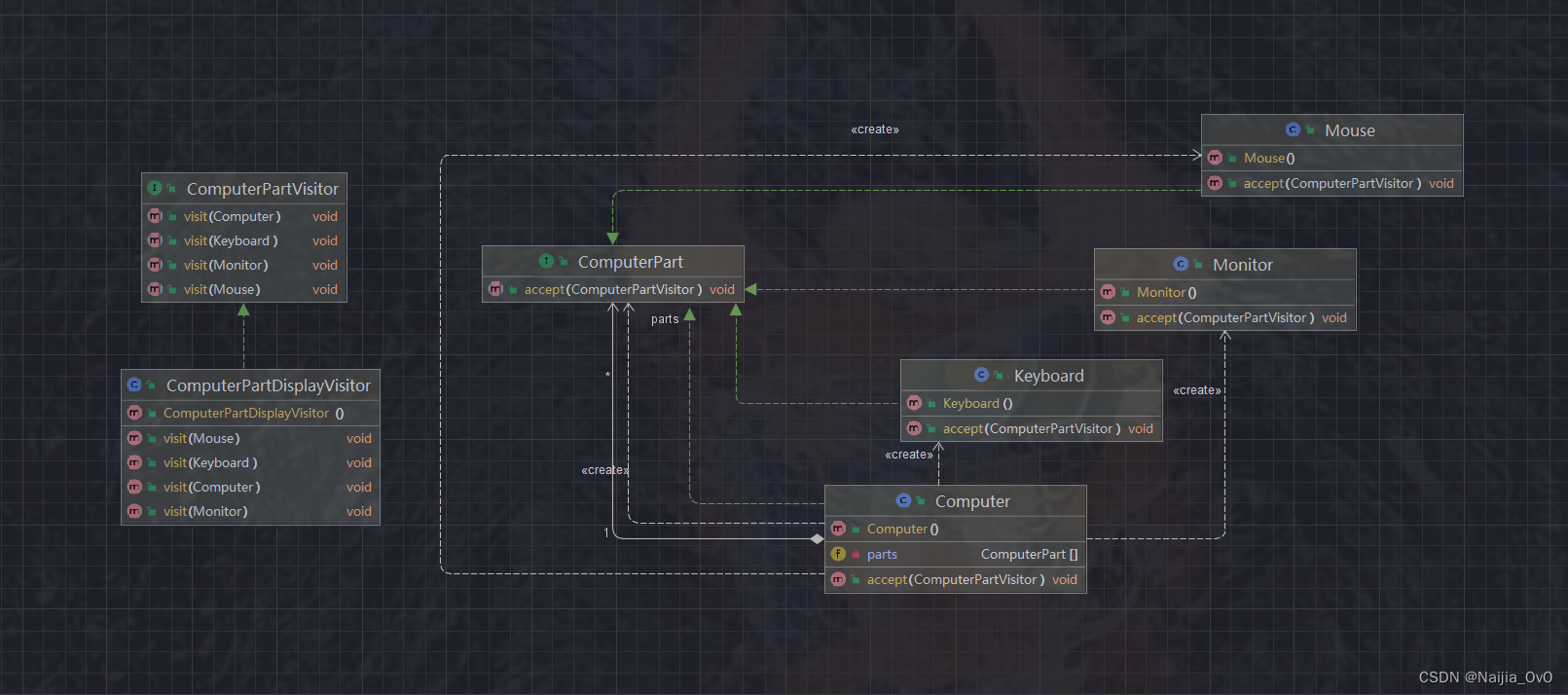
一、访问者模式 概述 在访问者模式(Visitor Pattern)中,我们使用了一个访问者类,它改变了元素类的执行算法。通过这种方式,元素的执行算法可以随着访问者改变而改变。这种类型的设计模式属于行为型模式。根据模式&…...

【教师资格证考试综合素质——法律专项】未成年人保护法笔记以及练习题
《中华人民共和国未成年人保护法》 目录 第一章 总 则 第二章 家庭保护 第三章 学校保护 第四章 社会保护 第五章 网络保护 第六章 政府保护 第七章 司法保护 第八章 法律责任 第九章 附 则 介一.首次颁布:第一部《中华人民共和国未成年人保护法…...

6.19作业
TCP服务器 #include <stdio.h> #include <sys/types.h> #include <sys/socket.h> #include <unistd.h> #include <arpa/inet.h> #include <netinet/in.h> #include <string.h>#define PORT 8888 #define IP "192.168.124.39&q…...
java 线程之间通信-volatile 和 synchronized
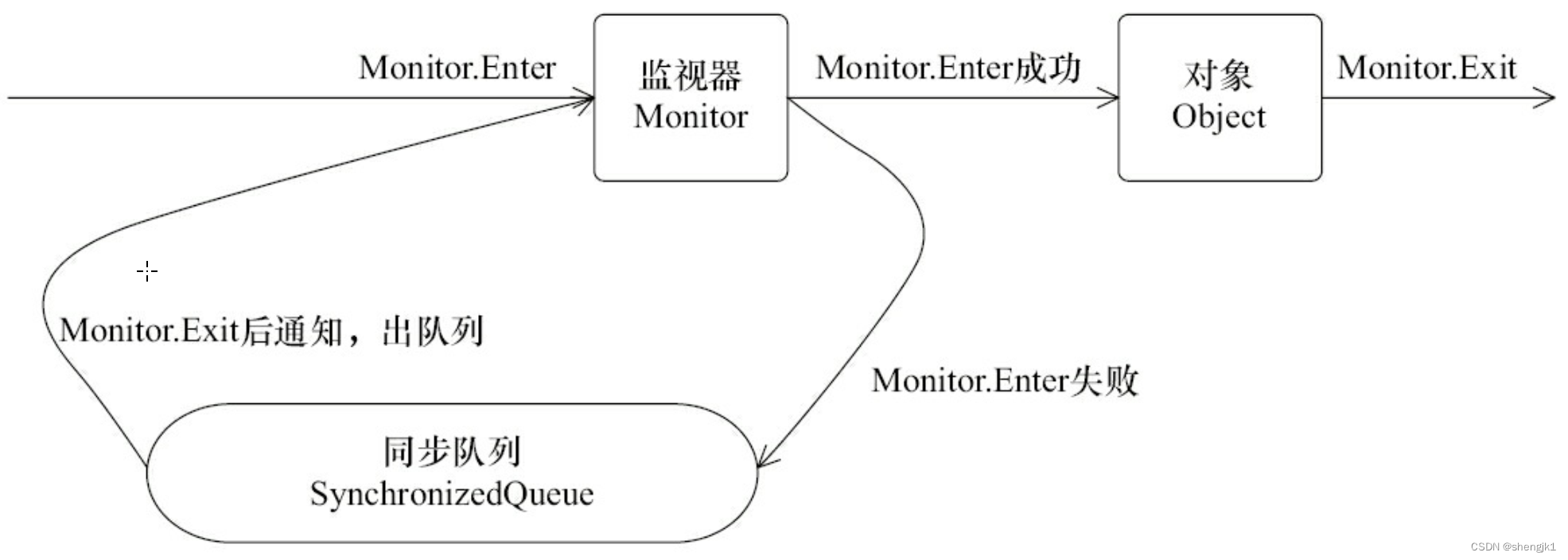
你好,我是 shengjk1,多年大厂经验,努力构建 通俗易懂的、好玩的编程语言教程。 欢迎关注!你会有如下收益: 了解大厂经验拥有和大厂相匹配的技术等 希望看什么,评论或者私信告诉我! 文章目录 一…...

资源宝库网站!人人必备的神器!
面对网络中海量的内容,一个高效、便捷的网络导航工具,可以帮助我们快速查找使用网络资源。无论是职场精英还是学生党,使用导航网站都可以帮助我们提升效率。下面小编就来和大家分享一款资源宝库网站-办公人导航-实用的办公生活导航网站&#…...
Redis实战—优惠卷秒杀(锁/事务/代理对象的应用)
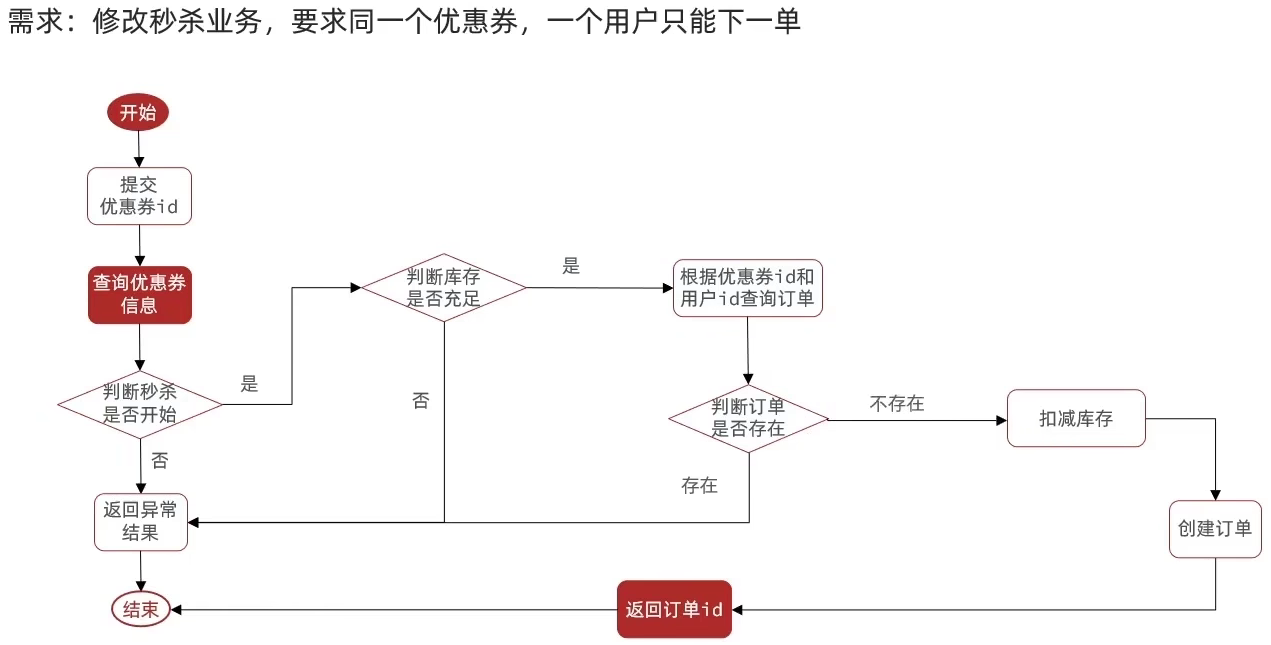
本博客为个人学习笔记,学习网站与详细见:黑马程序员Redis入门到实战 P50 - P54 目录 优惠卷秒杀下单功能实现 超卖问题 悲观锁与乐观锁 实现CAS法乐观锁 一人一单功能实现 代码优化 代码细节分析 优惠卷秒杀下单功能实现 Controller层…...

HTML星空特效
目录 写在前面 完整代码 代码分析 运行效果 系列文章 写在后面 写在前面 100行代码实现HTML星空特效。 完整代码 全部代码如下。 <!DOCTYPE html PUBLIC "-//W3C//DTD HTML 4.01 Transitional//EN" "http://www.w3.org/TR/html4/loose.dtd"&g…...
银行数仓项目实战(四)--了解银行业务(存款)
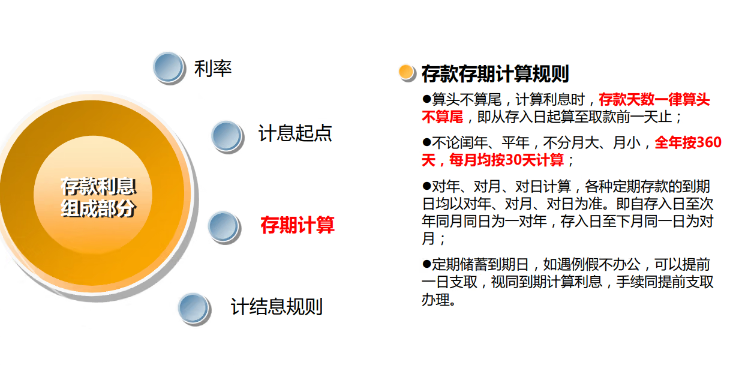
文章目录 项目准备存款活期定期整存整取零存整取存本取息教育储蓄定活两便通知存款 对公存款对公账户协议存款 利率 项目准备 (贴源层不必写到项目文档,因为没啥操作没啥技术,只是数据。) 可以看到,银行的贴源层并不紧…...
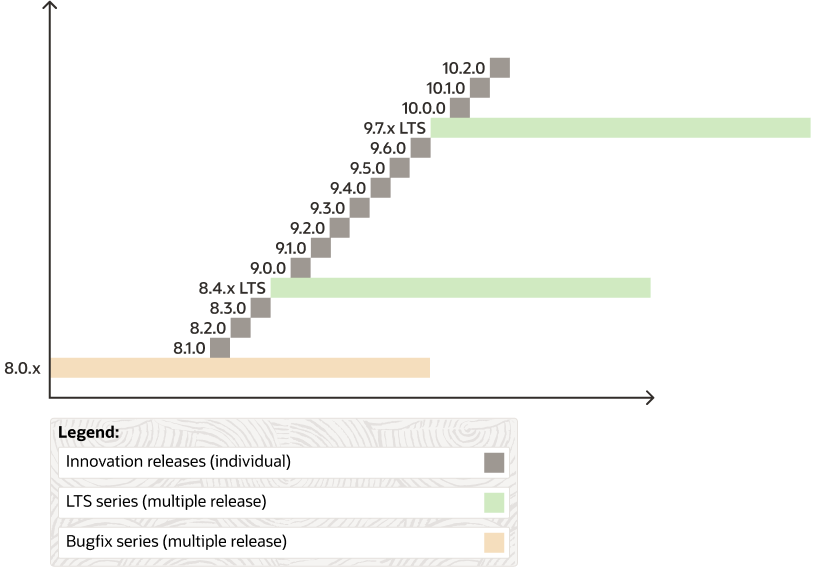
MySQL版本发布模型
MySQL 8.0 之后使用了新的版本控制和发布模型,分为两个主线:长期支持版(LTS)以及创新版。这两种版本都包含了缺陷修复和安全修复,都可以用于生产环境。 下图是 MySQL 的版本发布计划: 长期支持版 MySQL…...

java: 不兼容的类型: org.apache.xmlbeans.XmlObject无法转换为x2006.main.CTRow
我使用的xmlbeans版本是5.0,使用xmlbeans包做转换时,报错,正如标题显示得那样 解决办法 额外再引入下面的jar包 <dependency><groupId>org.apache.xmlbeans</groupId><artifactId>xmlbeans</artifactId><…...

内容时代:品牌如何利用社交平台精准触达用户
还记得学生时代老师教写作文的时候常说的一句话就是“开头质量决定了阅卷老师想不想花精力去读,而内容质量决定了她愿不愿意给你判高分”这个世界仿若一个巨大的圆,同样的逻辑放在任何地方好像都能适用。在品牌营销中,内容已成为品牌与消费者…...

推荐4款PC端黑科技工具,快来看看,建议收藏
Thunderbird Thunderbird 是由 Mozilla 基金会开发的一款免费且开源的电子邮件客户端,支持 Windows、macOS、Linux 等多种操作系统。它不仅可以用于发送和接收电子邮件,还可以作为新闻阅读器、聊天工具以及日历应用。 Thunderbird 提供了丰富的功能&…...
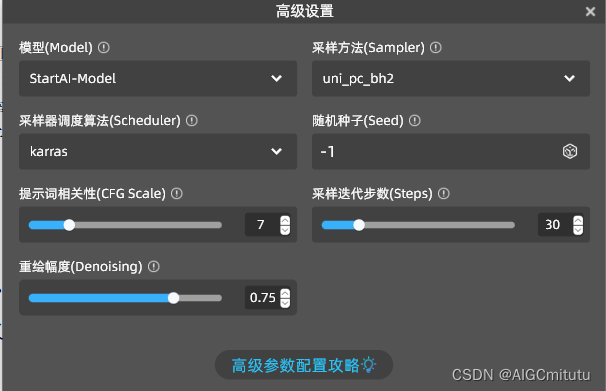
汉化版PSAI全面测评,探索国产AI绘画软件的创新力量
引言 随着AI技术的飞速发展,图像处理和绘画领域迎来了新的变革。作为一名AIGC测评博主,今天我们测评的是一款国产AI绘画软件——StartAI,一句话总结:它不仅在技术上毫不逊色于国际大牌,更在用户体验和本地化服务上做到…...

LeetCode | 709.转换成小写字母
这道题可以用api也可以自己实现,都不难,大小字母之前相差了32,检查到大写字母时加上32即可 class Solution(object):def toLowerCase(self, s):""":type s: str:rtype: str"""return s.lower()class Solution…...

洗地机哪个品牌比较好?四款好用靠谱的优质洗地机推荐
随着现代生活节奏的加快,家庭清洁成了一项耗时且繁琐的任务。洗地机凭借其智能化和高效的清洁能力,越来越受到大家的青睐。然而,市场上各种品牌和型号琳琅满目,让人眼花缭乱。为了帮助大家在众多选择中找到心仪的产品,…...
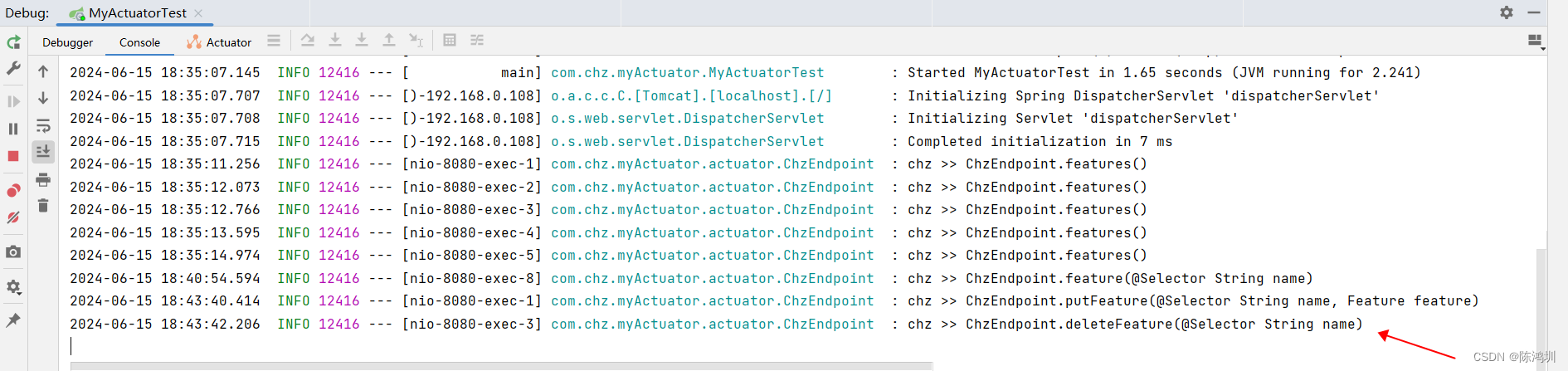
java:spring actuator添加自定义endpoint
# 项目代码资源: 可能还在审核中,请等待。。。 https://download.csdn.net/download/chenhz2284/89437274 # 项目代码 【pom.xml】 <dependencies><dependency><groupId>org.springframework.boot</groupId><artifactId&…...

LeetCode88-删除有序数组中的重复项
题目 给你一个有序数组 nums ,请你 原地 删除重复出现的元素,使得出现次数超过两次的元素只出现两次 ,返回删除后数组的新长度。 不要使用额外的数组空间,你必须在 原地 修改输入数组 并在使用 O(1) 额外空间的条件下完成。 代…...
+ RequestBodyAdvice和ResponseBodyAdvice原理)
SpringBoot Starter 通用接口加密组件(防篡改)+ RequestBodyAdvice和ResponseBodyAdvice原理
防篡改: 如何保证接口安全,做到防篡改防重放?_接口防止串改-CSDN博客 接口安全设计之防篡改和防重放_接口防篡改机制-CSDN博客 参考博客: RequestBodyAdvice和ResponseBodyAdvice原理详解-CSDN博客 SpringBoot Starter 通用接口…...

delphi 如何使用TEdgeBrowser组件以及打包环境在其他主机上运行
不管开发环境还是第三方环境先安装运行时库:Microsoft Edge WebView2 | Microsoft Edge Developer 开发环境可以直接通过: delphi IDE安装 安装完毕后进入到指定路径,复制里面的WebView2Loader.dll到你要开发的程序根目录: 大致路…...

OpenClaw自动化测试:Qwen3.5-9B执行Python脚本与结果校验
OpenClaw自动化测试:Qwen3.5-9B执行Python脚本与结果校验 1. 为什么选择OpenClaw做自动化测试? 去年接手一个数据清洗工具链项目时,我遇到了一个典型痛点:每次代码更新后,都需要手动执行十几个测试用例,比…...

别再手动算内存了!用STM32CubeIDE的Build Analyzer,5分钟摸清你的H743芯片还剩多少FLASH和RAM
深度解析STM32CubeIDE内存分析:从Build Analyzer到高效内存管理实战 在嵌入式开发的世界里,内存就像是一块珍贵的画布——有限且昂贵。想象一下,当你精心设计的STM32H743程序在关键时刻崩溃,而问题可能仅仅是因为某个全局变量悄悄…...
)
泰克TBS2000示波器保存功能全攻略:从U盘插入到图片导出(附最佳格式选择)
泰克TBS2000示波器高效保存指南:从硬件操作到专业文档整合 在电子工程实验室的日常工作中,波形数据的保存与共享是每个工程师都会遇到的高频需求。传统用手机拍摄屏幕的方式不仅画质堪忧,还常常因为反光、角度偏差导致关键参数无法辨识。泰克…...

Arduino轻量级哈希表UnorderedMap实战指南
1. 项目概述UnorderedMap是一款专为 Arduino 平台设计的轻量级哈希表(Hash Table)实现,其核心目标是在资源极度受限的微控制器环境中提供高效、可靠、内存可控的键值对(Key-Value Pair)存储能力。它并非 C STLstd::uno…...

Nimbus:一个统一的具身合成数据生成框架
Zeyu He, Yuchang Zhang, Yuanzhen Zhou, Miao Tao, Hengjie Li,∗, Hui Wang, Yang Tian, Jia Zeng, Tai Wang, Wenzhe Cai, Yilun Chen, Ning Gao, Jiangmiao Pang摘要扩大数据规模和多样性对于泛化具身智能至关重要。虽然合成数据生成为昂贵的物理数据采集提供了可扩展的替代…...

百川2-13B-4bits量化版对比测试:OpenClaw日常任务执行效率报告
百川2-13B-4bits量化版对比测试:OpenClaw日常任务执行效率报告 1. 测试背景与动机 最近在折腾OpenClaw自动化工作流时,发现一个棘手问题:当任务链条较长时,本地部署的大模型显存占用会飙升到16GB以上,导致我的RTX 30…...

C语言回调函数在TCP客户端中的实现与应用
C语言回调函数在TCP客户端中的实现与应用1. 回调函数基础概念回调函数是一种通过函数指针实现的编程机制,允许将一个函数作为参数传递给另一个函数。在C语言中,回调函数的实现完全依赖于函数指针,这与C、Python等现代语言中可能使用仿函数或匿…...

PlayCover终极指南:三步在Mac上畅玩iOS游戏与应用
PlayCover终极指南:三步在Mac上畅玩iOS游戏与应用 【免费下载链接】PlayCover Community fork of PlayCover 项目地址: https://gitcode.com/gh_mirrors/pl/PlayCover 还在为心爱的iOS游戏无法在Mac上体验而烦恼吗?PlayCover为你打开了一扇全新的…...

终极指南:从NumPy到Pydantic的Claude-Code-Usage-Monitor依赖管理完整解析
终极指南:从NumPy到Pydantic的Claude-Code-Usage-Monitor依赖管理完整解析 【免费下载链接】Claude-Code-Usage-Monitor Real-time Claude Code usage monitor with predictions and warnings 项目地址: https://gitcode.com/gh_mirrors/cl/Claude-Code-Usage-Mon…...

抖音音乐下载终极指南:3步解决批量音频提取难题
抖音音乐下载终极指南:3步解决批量音频提取难题 【免费下载链接】douyin-downloader 项目地址: https://gitcode.com/GitHub_Trending/do/douyin-downloader 你是否曾在抖音上听到令人心动的背景音乐,却苦于无法单独保存?或是需要收集…...