
android 彩虹进度条自定义view实现

实现一个彩虹色进度条功能,不说明具体用途大家应该能猜到。想找别人造的轮子,但是没有合适的,所以决定自己实现一个。
相关知识
android 自定义view
LinearGradient 线性渐变
实现步骤
自定义view
自定义一个TmcView类继承View
重写两个构造方法。构造方法一共有4个,这里边重写两个
重写ongSizeChanged方法,用来获取控件宽、高,来计算内部组件尺寸。
重写onDraw方法,里边要描画背景drawBackground,分段数据drawSection,和seekbar图片drawImage。
import android.content.Context;
import android.graphics.Canvas;
import android.util.AttributeSet;
import android.view.View;import androidx.annotation.Nullable;import java.util.List;public class TmcView extends View {public TmcView(Context context) {super(context);}public TmcView(Context context, @Nullable AttributeSet attrs) {super(context, attrs);}@Overrideprotected void onSizeChanged(int w, int h, int oldw, int oldh) {super.onSizeChanged(w, h, oldw, oldh);}@Overrideprotected void onDraw(Canvas canvas) {super.onDraw(canvas);drawBackground(canvas);drawSection(canvas);drawImage(canvas);}/*** 画背景* @param canvas 画布*/private void drawBackground(Canvas canvas) {}/*** 画分段数据* @param canvas 画布*/private void drawSection(Canvas canvas) {}/*** 画图片* @param canvas 画布*/private void drawImage(Canvas canvas) {}/*** 更新view* @param total 总长度* @param rest 剩余长度* @param sections 分段数据*/public void updateView(int total, int rest, List<SectionData> sections){}
实现几个重构方法
标注:
整体宽度为图片宽度44px
背景条宽度30px,外边距7px,圆角15px
带颜色的条宽度20xp,外边距5px,圆角15px
自定义view的坐标轴是以view的左上角位置为原点,向右为x轴正方向,向下为y轴正方向
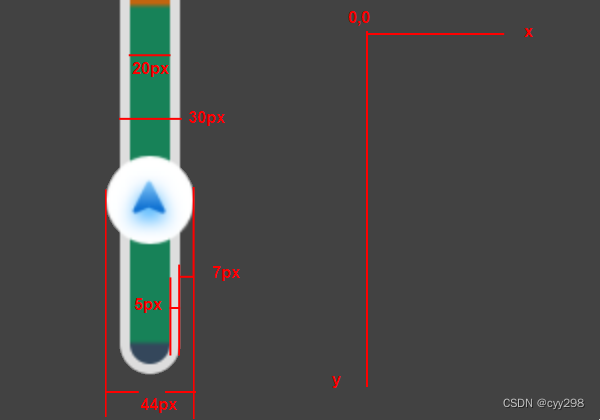
在视图中用RectF创建背景,和颜色条,并在onSizeChanged中设置尺寸
public class TmcView extends View {private final RectF backgroundRectF = new RectF();private final RectF colorRectF = new RectF();public TmcView(Context context) {super(context);}public TmcView(Context context, @Nullable AttributeSet attrs) {super(context, attrs);}@Overrideprotected void onSizeChanged(int w, int h, int oldw, int oldh) {super.onSizeChanged(w, h, oldw, oldh);//设置矩形 left top right bottom 左上右下点的值  按照标注计算得出backgroundRectF.set(7, 0, 37, h);colorRectF.set(12, 5, 32, h-5);}...
}
绘制背景条

实现drawBackground方法,画背景需要一根画笔Paint 为了避免重复创建,声明为成员变量
public class TmcView extends View {/*背景画笔*/private final Paint backPaint = new Paint(Paint.ANTI_ALIAS_FLAG);private final RectF backgroundRectF = new RectF();private final RectF colorRectF = new RectF();public TmcView(Context context) {super(context);}public TmcView(Context context, @Nullable AttributeSet attrs) {super(context, attrs);}@Overrideprotected void onSizeChanged(int w, int h, int oldw, int oldh) {super.onSizeChanged(w, h, oldw, oldh);//设置矩形 left top right bottom 左上右下点的值  按照标注计算得出backgroundRectF.set(7, 0, 37, h);colorRectF.set(12, 5, 32, h-5);}@Overrideprotected void onDraw(Canvas canvas) {super.onDraw(canvas);drawBackground(canvas);drawSection(canvas);drawImage(canvas);}/*** 画背景* @param canvas 画布*/private void drawBackground(Canvas canvas) {backPaint.setStyle(Paint.Style.FILL);backPaint.setAntiAlias(true); //抗锯齿backPaint.setColor(Color.parseColor("#FFFFFF"));//画圆角矩形,15为圆角的角度canvas.drawRoundRect(backgroundRectF, 15, 15, backPaint);}
...
}
布局中加入TmcView
<com.bigxuan.tesapp.view.TmcViewandroid:id="@+id/tmc"android:layout_width="44px"android:layout_height="690px"android:layout_marginEnd="1230px"android:layout_marginBottom="100px"app:layout_constraintBottom_toBottomOf="parent"app:layout_constraintEnd_toEndOf="parent"/>绘制颜色条

实现drawSection方法,这里要用到线性渐变LinearGradient
LinearGradient 简单说,指定每一段的颜色和位置百分比,就能实现每一段显示不同颜色。
但它默认是渐变色,要想不变就在每一段的开始和结束位置都设置相同的颜色。
再创建一个画笔 Paint,画颜色条
public class TmcView extends View {private final Paint backPaint = new Paint(Paint.ANTI_ALIAS_FLAG);private final Paint colorPaint = new Paint(Paint.ANTI_ALIAS_FLAG);private final RectF backgroundRectF = new RectF();private final RectF colorRectF = new RectF();public TmcView(Context context) {super(context);}public TmcView(Context context, @Nullable AttributeSet attrs) {super(context, attrs);}@Overrideprotected void onSizeChanged(int w, int h, int oldw, int oldh) {super.onSizeChanged(w, h, oldw, oldh);//设置矩形 left top right bottom 左上右下点的值  按照标注计算得出backgroundRectF.set(7, 0, 37, h);colorRectF.set(12, 5, 32, h-5);}@Overrideprotected void onDraw(Canvas canvas) {super.onDraw(canvas);drawBackground(canvas);drawSection(canvas);drawImage(canvas);}/*** 画背景* @param canvas 画布*/private void drawBackground(Canvas canvas) {backPaint.setStyle(Paint.Style.FILL);backPaint.setAntiAlias(true); //抗锯齿backPaint.setColor(Color.parseColor("#FFFFFF"));//画圆角矩形,15为圆角的角度canvas.drawRoundRect(backgroundRectF, 15, 15, backPaint);}/*** 画分段数据* @param canvas 画布*/private void drawSection(Canvas canvas) {int[] colorArray = {Color.parseColor("#FF0000"), Color.parseColor("#FF0000"),Color.parseColor("#00FF00"), Color.parseColor("#00FF00"),Color.parseColor("#0000FF"), Color.parseColor("#0000FF")};float[] positionArray = {0f, 0.2f,0.2f, 0.6f,0.6f, 1f};colorPaint.setStyle(Paint.Style.FILL);colorPaint.setAntiAlias(true);//指定渐变色方向x轴方向不变,沿y方向渐变,渐变范围为 颜色条高度colorPaint.setShader(new LinearGradient(0, 0, 0, colorRectF.bottom, colorArray, positionArray, Shader.TileMode.REPEAT));canvas.drawRoundRect(colorRectF,15, 15, colorPaint);}...
}
绘制进度图片
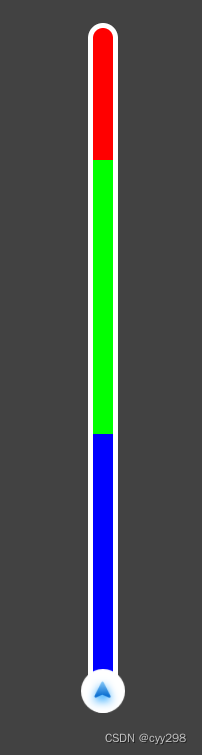
app加入图片资源,根据资源id获取bitmap对象,绘制。
需要注意的是,坐标轴的顶点在左上角,绘制图片时也是以图片左上顶点位置做定位,图片位置是view的高度减掉图片的高度,才能显示在正确位置。
public class TmcView extends View {private Context context;private final Paint backPaint = new Paint(Paint.ANTI_ALIAS_FLAG);private final Paint colorPaint = new Paint(Paint.ANTI_ALIAS_FLAG);private final RectF backgroundRectF = new RectF();private final RectF colorRectF = new RectF();/*图片资源id*/private int imgResId;/*图片位置*/private int imgPos;public TmcView(Context context) {super(context);}public TmcView(Context context, @Nullable AttributeSet attrs) {super(context, attrs);this.context = context;this.imgResId = R.drawable.icon_seekbar_day;}@Overrideprotected void onSizeChanged(int w, int h, int oldw, int oldh) {super.onSizeChanged(w, h, oldw, oldh);//设置矩形 left top right bottom 左上右下点的值  按照标注计算得出backgroundRectF.set(7, 0, 37, h);colorRectF.set(12, 5, 32, h-5);imgPos = h - 44; // 设置一个初始位置}@Overrideprotected void onDraw(Canvas canvas) {super.onDraw(canvas);drawBackground(canvas);drawSection(canvas);drawImage(canvas);}/*** 画背景* @param canvas 画布*/private void drawBackground(Canvas canvas) {backPaint.setStyle(Paint.Style.FILL);backPaint.setAntiAlias(true); //抗锯齿backPaint.setColor(Color.parseColor("#FFFFFF"));//画圆角矩形,15为圆角的角度canvas.drawRoundRect(backgroundRectF, 15, 15, backPaint);}/*** 画分段数据* @param canvas 画布*/private void drawSection(Canvas canvas) {int[] colorArray = {Color.parseColor("#FF0000"), Color.parseColor("#FF0000"),Color.parseColor("#00FF00"), Color.parseColor("#00FF00"),Color.parseColor("#0000FF"), Color.parseColor("#0000FF")};float[] positionArray = {0f, 0.2f,0.2f, 0.6f,0.6f, 1f};colorPaint.setStyle(Paint.Style.FILL);colorPaint.setAntiAlias(true);//指定渐变色方向x轴方向不变,沿y方向渐变,渐变范围为 颜色条高度colorPaint.setShader(new LinearGradient(0, 0, 0, colorRectF.bottom, colorArray, positionArray, Shader.TileMode.REPEAT));canvas.drawRoundRect(colorRectF,15, 15, colorPaint);}/*** 画图片* @param canvas 画布*/private void drawImage(Canvas canvas) {Bitmap bitmap = initBitmap(imgResId);canvas.save();canvas.translate(0, 0);canvas.drawBitmap(bitmap, 0, imgPos, null);canvas.restore();}/*** 通过资源id 创建bitmap* @param resId 资源id* @return*/private Bitmap initBitmap(int resId) {Bitmap originalBmp = BitmapFactory.decodeResource(context.getResources(), resId);return Bitmap.createScaledBitmap(originalBmp, 44, 44, true);}
...
}
公共方法
暴露方法用来更新进度updateView
定义一个图片有效的运动距离为view高度减掉图片高度,函数参数为总距离和剩余距离,计算百分比后乘以有效运动距离得出图片描画位置。最后调用invalidate方法刷新view
import android.content.Context;
import android.graphics.Bitmap;
import android.graphics.BitmapFactory;
import android.graphics.Canvas;
import android.graphics.Color;
import android.graphics.LinearGradient;
import android.graphics.Paint;
import android.graphics.RectF;
import android.graphics.Shader;
import android.util.AttributeSet;
import android.view.View;import androidx.annotation.Nullable;import com.navinfo.tesapp.R;import java.util.List;public class TmcView extends View {private Context context;private final Paint backPaint = new Paint(Paint.ANTI_ALIAS_FLAG);private final Paint colorPaint = new Paint(Paint.ANTI_ALIAS_FLAG);private final RectF backgroundRectF = new RectF();private final RectF colorRectF = new RectF();/*图片资源id*/private int imgResId;/*图片位置*/private int imgPos;/*图片有效的运动距离*/private int imgValidHeight;public TmcView(Context context) {super(context);}public TmcView(Context context, @Nullable AttributeSet attrs) {super(context, attrs);this.context = context;this.imgResId = R.drawable.icon_seekbar_day;}@Overrideprotected void onSizeChanged(int w, int h, int oldw, int oldh) {super.onSizeChanged(w, h, oldw, oldh);//设置矩形 left top right bottom 左上右下点的值  按照标注计算得出backgroundRectF.set(7, 0, 37, h);colorRectF.set(12, 5, 32, h-5);imgValidHeight = h - 44;imgPos = h - 44; // 设置一个初始位置}@Overrideprotected void onDraw(Canvas canvas) {super.onDraw(canvas);drawBackground(canvas);drawSection(canvas);drawImage(canvas);}/*** 画背景* @param canvas 画布*/private void drawBackground(Canvas canvas) {backPaint.setStyle(Paint.Style.FILL);backPaint.setAntiAlias(true); //抗锯齿backPaint.setColor(Color.parseColor("#FFFFFF"));//画圆角矩形,15为圆角的角度canvas.drawRoundRect(backgroundRectF, 15, 15, backPaint);}/*** 画分段数据* @param canvas 画布*/private void drawSection(Canvas canvas) {int[] colorArray = {Color.parseColor("#FF0000"), Color.parseColor("#FF0000"),Color.parseColor("#00FF00"), Color.parseColor("#00FF00"),Color.parseColor("#0000FF"), Color.parseColor("#0000FF")};float[] positionArray = {0f, 0.2f,0.2f, 0.6f,0.6f, 1f};colorPaint.setStyle(Paint.Style.FILL);colorPaint.setAntiAlias(true);//指定渐变色方向x轴方向不变,沿y方向渐变,渐变范围为 颜色条高度colorPaint.setShader(new LinearGradient(0, 0, 0, colorRectF.bottom, colorArray, positionArray, Shader.TileMode.REPEAT));canvas.drawRoundRect(colorRectF,15, 15, colorPaint);}/*** 画图片* @param canvas 画布*/private void drawImage(Canvas canvas) {Bitmap bitmap = initBitmap(imgResId);canvas.save();canvas.translate(0, 0);canvas.drawBitmap(bitmap, 0, imgPos, null);canvas.restore();}/**** @param resId* @return*/private Bitmap initBitmap(int resId) {Bitmap originalBmp = BitmapFactory.decodeResource(context.getResources(), resId);return Bitmap.createScaledBitmap(originalBmp, 44, 44, true);}/*** 更新view* @param total 总长度* @param rest 剩余长度* @param sections 分段数据*/public void updateView(int total, int rest, List<SectionData> sections){float percent = (1f * rest) / total;//防止溢出if(percent < 0){return;}imgPos = (int)(percent * imgValidHeight);invalidate();}
}
updateView方法还有第三个参数,是用来传出颜色条不同段的颜色和百分比数据的。根据此数据来更新颜色条。这里需要根据业务不同自己实现,我这里就不写了。
总结
大家可能看出来了,这个视图是用来展示导航中不同路段交通情况和当前车辆进度用的。自定义view中可以在构造方法中获取一些自定义属性,像背景条和颜色条的边距、圆角这些都可以定义到xml中,因为只适配一种屏幕尺寸所以也没有做多尺寸适配。以前也没有做过,这次记录下来。
相关文章:
android 彩虹进度条自定义view实现
实现一个彩虹色进度条功能,不说明具体用途大家应该能猜到。想找别人造的轮子,但是没有合适的,所以决定自己实现一个。 相关知识 android 自定义view LinearGradient 线性渐变 实现步骤 自定义view 自定义一个TmcView类继承View 重写两…...
免费一年SSL证书申请——建议收藏
免费一年SSL证书申请——建议收藏 获取免费一年期SSL证书其实挺简单的 准备你的网站: 确保你的网站已经有了域名,而且这个域名已经指向你的服务器。还要检查你的服务器支持HTTPS,也就是443端口要打开,这是HTTPS默认用的。 验证域…...
【docker1】指令,docker-compose,Dockerfile
文章目录 1.pull/image,run/ps(进程),exec/commit2.save/load:docker save 镜像id,不是容器id3.docker-compose:多容器:宿主机(eth0网卡)安装docker会生成一…...

Flutter中的异步和多进程
Flutter 是一个用于创建高性能、高保真度移动应用的框架,它使用 Dart 编程语言。 在 Flutter 中,异步和多进程是两种不同的概念,用于解决不同的问题。 异步 (Asynchronous) 异步编程是一种编程范式,允许代码在等待操作完成(如网络请求、文件 I/O)时继续执行其他任务,而不…...

学习C++第二天
1.缺省参数 缺省参数的概念: 缺省参数是声明或定义函数时为函数的参数指定一个缺省值。在调用该函数时,如果没有指定实参则采用该形参的缺省值,否则使用指定的实参。 void show(int a 10) {cout << a << endl; }int main() {sho…...

解析Java中1000个常用类:AbstractSet类,你学会了吗?
推荐一个我自己写的小报童专栏导航网站: http://xbt100.top 收录了生财有术项目精选、AI海外赚钱、纯银的产品分析等专栏,陆续会收录更多的专栏,欢迎体验~复制URL可直达。 以下是正文。 在 Java 集合框架中,AbstractSet 是一个重要的抽象类,为实现自定义的集合(Set)提…...

Nginx基础概念和常用操作
文章目录 1. 安装、启动、连接2. 快速尝试部署网站3. 配置文件1. nginx.conf全局配置事件模块HTTP 模块性能优化建议 2. default.confserver 块基本设置日志设置根路径设置 4. 反向代理1. 模拟3个Web2. 链接 5. 负载均衡1. 加权轮询,Weighted Round Robin2. 最少连接…...

圈复杂度是什么?go语言调整圈复杂度举例
圈复杂度(也称为循环复杂度或McCabe复杂度)是衡量程序复杂性的一个指标,它通常与代码中的控制流结构(如条件语句、循环和函数调用)的数量相关。在Go语言中,你可以通过重构代码来降低圈复杂度,从…...
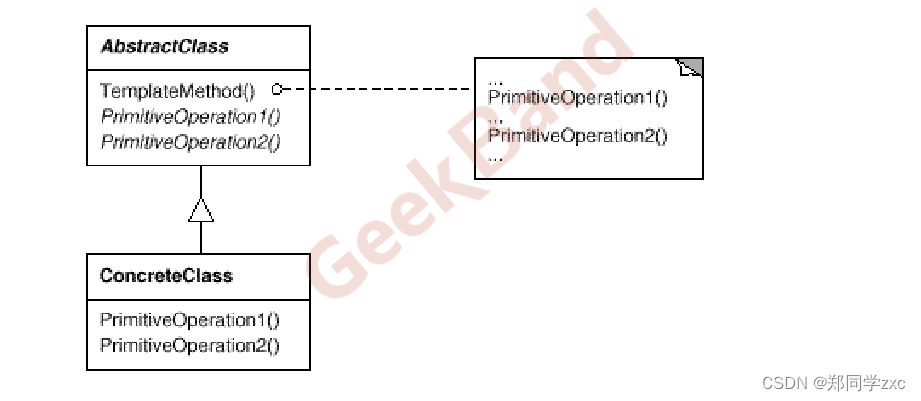
设计模式4-模版方法
设计模式 重构获得模式重构的关键技法1. 静态转动态2. 早绑定转晚绑定3. 继承转组合4. 编译时依赖转运行时依赖5. 紧耦合转松耦合 组件协助动机模式定义结构 要点总结。 例子示例解释: 重构获得模式 设计模式的目的是应对变化,提高复用 设计模式的要点…...
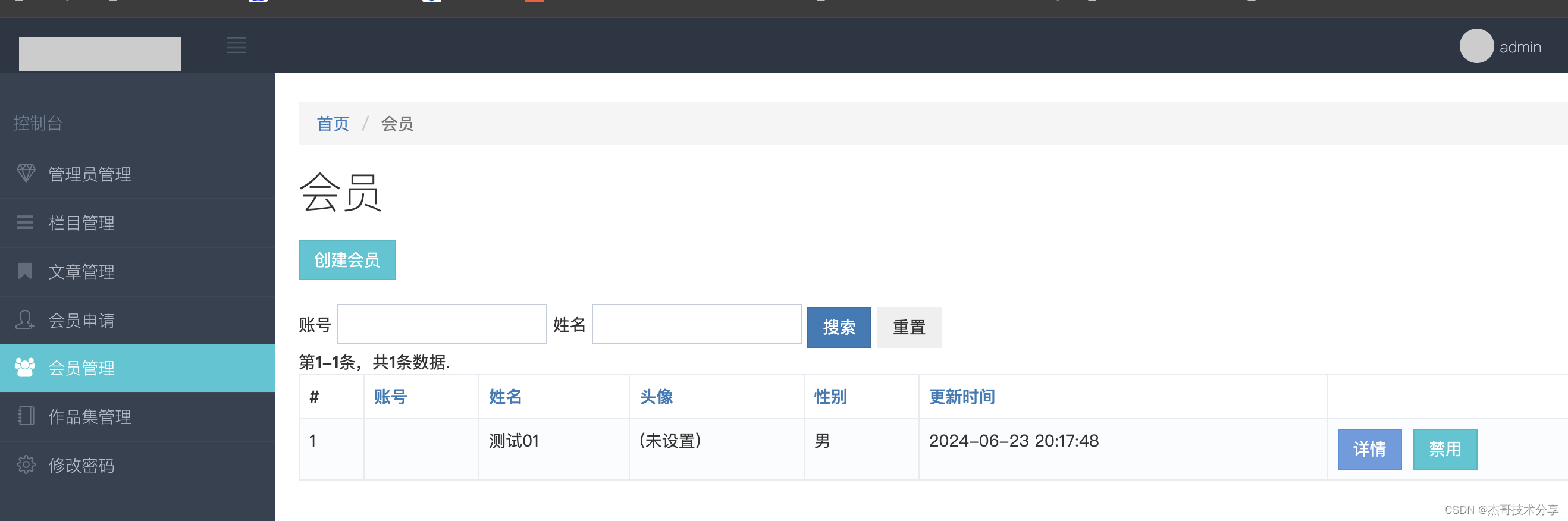
yii2 ActiveForm使用技巧
持续更新: 1、搜索输入框:form-inline <?php $form ActiveForm::begin([action > [index],method > get,options > [class > form-inline] (增加此行代码) ]); ?>...

【面试】基本数据类型的包装类缓存
目录 1. 说明2. Integer类分析2.1 代码块2.2 字节码2.3 分析2.4 valueOf方法 1. 说明 1.在java中,基本数据类型的包装类(Integer、Byte、Character、Short、Long、Boolean)的某些值会被缓存。2.以提高性能并减少内存使用。3.这种缓存机制是自…...
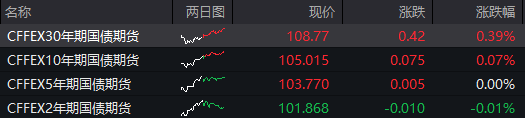
6月20日(周四)A股行情总结:A股险守3000点,恒生科技指数跌1.6%
A股三大股指走弱,科创板逆势上扬,半导体板块走强,多股20CM涨停。中芯国际港股涨超1%。恒生科技指数跌超1%。离岸人民币对美元汇率小幅走低,20日盘中最低跌至7.2874,创下2023年11月中旬以来的新低,随后收复部…...
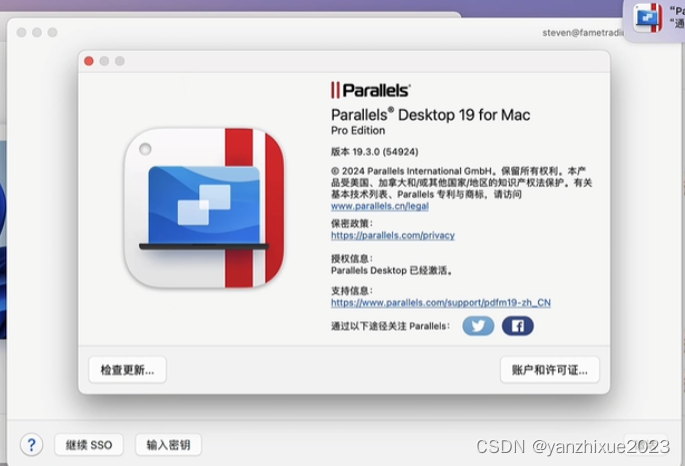
Parallels Desktop 19 for mac破解版安装激活使用指南
Parallels Desktop 19 for Mac 乃是一款适配于 Mac 的虚拟化软件。它能让您在 Mac 计算机上同时运行多个操作系统。您可借此创建虚拟机,并于其中装设不同的操作系统,如 Windows、Linux 或 macOS。使用 Parallels Desktop 19 mac 版时,您可在 …...

JExcel API使用笔记
JExcel API使用笔记 JExcel是一个开源的支持excel的java类库,广泛利用其api来生成excel报表 API基本使用 1.创建excel文件 workbook Workbook.createWorkbook(file);//传入file文件2.创建sheet页 WritableSheet sheet workbook.createSheet("记录表&quo…...
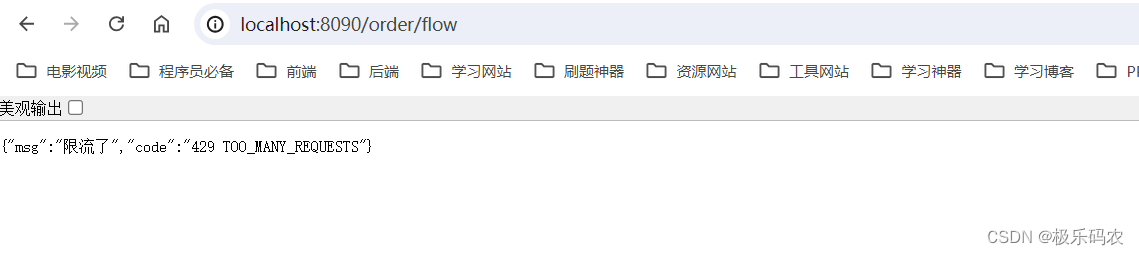
springCloudAlibaba之分布式网关组件---gateway
gateway-网关 网关spring cloud gatewaygateway初体验gateway整合nacos简写方式 内置路由断言工厂内置断言工厂 自定义路由断言工厂自定义路由工厂 内置/自定义过滤器典型内置过滤器自定义过滤器 全局过滤器自定义全局过滤器 请求日志记录&跨域处理Gateway跨域配置…...

Springboot项目jar加密
部署的程序进行加密,防止第三方非法拷贝走项目进行二次开发或部署。我们知道java代码编译后生成的以.class结尾的字节码文件或者.jar/.war结尾的可执行文件都是可以反编译生成.java文件的,虽然反编译后生成的.java文件和原本的.java文件有些微差别&#…...

【React】高阶组件
概述 高阶组件并非一个组件,而是增强组件功能的一个函数。 高阶组件的作用是对多个组件公共逻辑进行横向抽离。 高阶组件 – React (reactjs.org) 示例 ChildCom1.jsx import React from react;function ChildCom1(props) {return (<div>这是子组件1<d…...

全面理解-Flutter(万字长文,深度解析)
1、Web 性能差,跟原生 App 存在肉眼可见的差距; 2、React Native 跟 Web 相比,支持的能力非常有限,特定长场景问题,需要三端团队一个一个处理; 3、Web 浏览器的安卓碎片化严重(感谢 X5&#x…...

RabbitMQ实战宝典:从新手到专家的全面探索
前言 在当今分布式系统架构中,消息队列已成为不可或缺的一部分,而RabbitMQ作为其中的佼佼者,凭借其强大的功能和灵活性,广泛应用于各种规模的应用场景中。本文将带你从基础概念出发,深入探讨RabbitMQ的核心特性&#…...
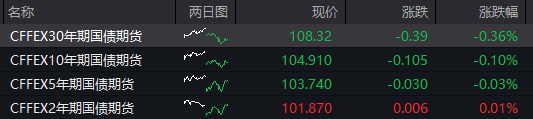
6月21日(周五)AH股总结:沪指失守3000点,恒生科技指数跌近2%,多只沪深300ETF午后量能显著放大
内容提要 沪指全天围绕3000点关口来回拉锯,收盘跌破3000点。白酒及光刻机概念集体走低,中芯国际港股跌超2%。CRO医药概念及水利股逆势走强。 A股低开低走 沪指全天围绕3000点关口来回拉锯,收盘跌破3000点,跌0.24%。深成指跌0.04…...

HttpOnly Cookie 深度解析
一、什么是 HttpOnly Cookie HttpOnly 是一个可以附加在 Set-Cookie 响应头上的标志位(flag)。当一个 Cookie 被标记为 HttpOnly 后,客户端脚本(如 JavaScript)将无法通过 document.cookie 等 API 访问该 Cookie&…...

开源监控面板OpenClaw:从架构设计到生产部署实战指南
1. 项目概述:一个开源监控面板的诞生 在运维和开发的世界里,监控面板就像是驾驶舱里的仪表盘。没有它,你就是在盲飞。今天要聊的这个项目 xingrz/openclaw-dashboard ,就是一个由社区驱动的开源监控面板解决方案。它的名字很有意…...

从myplaces.shp到专题地图:手把手教你用QGIS C++ API实现点要素分级渲染
从myplaces.shp到专题地图:QGIS C API实现点要素分级渲染实战指南 当我们需要在桌面GIS应用中直观展示气象站降雨量、城市人口密度或商业网点销售额等连续型空间数据时,分级色彩渲染是最有效的可视化手段之一。本文将深入探讨如何利用QGIS强大的C API&am…...

终极指南:如何使用Autoclick实现Mac自动点击900次/秒
终极指南:如何使用Autoclick实现Mac自动点击900次/秒 【免费下载链接】Autoclick A simple Mac app that simulates mouse clicks 项目地址: https://gitcode.com/gh_mirrors/au/Autoclick 你是否厌倦了重复性的鼠标点击工作?无论是游戏中的重复操…...

VHD2VL终极指南:5分钟快速将VHDL转换为Verilog的免费工具
VHD2VL终极指南:5分钟快速将VHDL转换为Verilog的免费工具 【免费下载链接】vhd2vl 项目地址: https://gitcode.com/gh_mirrors/vh/vhd2vl 在FPGA和ASIC设计领域,VHDL转Verilog是许多工程师面临的共同挑战。手动转换不仅耗时费力,还容…...

UEFITool解析指南:三步骤掌握固件逆向分析的核心技术
UEFITool解析指南:三步骤掌握固件逆向分析的核心技术 【免费下载链接】UEFITool UEFI firmware image viewer and editor 项目地址: https://gitcode.com/gh_mirrors/ue/UEFITool UEFITool是一款功能强大的UEFI固件分析工具,能够帮助你深入探索计…...

Cursor-Tap插件:一键AI代码重构与文档生成实战指南
1. 项目概述:一个为 Cursor 编辑器注入灵魂的插件如果你和我一样,日常重度依赖 Cursor 这款 AI 驱动的代码编辑器,那你一定体会过那种“就差一点”的微妙感受。Cursor 的 AI 能力确实强大,但它的交互方式有时会让人感觉像是在和一…...

PAC技术演进与核心趋势:从多域控制到边缘智能的工业自动化平台
1. 项目概述:为什么今天还要聊PAC?如果你在工业自动化、楼宇控制或者任何涉及逻辑控制的领域工作,那么“PAC”这个词对你来说应该不陌生。但很多时候,它就像一个熟悉的陌生人——大家好像都知道它,但真要细说它现在发展…...

从零构建Next.js全栈应用:实战解析服务端渲染与API路由
1. 项目概述与核心价值最近在社区里看到不少朋友在讨论一个叫“panaverse/learn-nextjs”的项目,作为一个在Web开发领域摸爬滚打了十多年的老码农,我立刻来了兴趣。这个项目名直译过来就是“Panaverse的Next.js学习项目”,听起来像是一个学习…...

基于声明式Web自动化框架Hydra的电商数据监控实战
1. 项目概述:一个被低估的自动化利器 如果你经常需要处理一些重复性的、基于Web界面的操作,比如批量下载某个网站的资源、定时填写表单、或者监控网页内容的变化,那么你很可能已经厌倦了手动点击和等待。传统的脚本编写,尤其是涉及…...