
安装maven与nexus
安装maven与nexus
Maven官网下载地址:http://maven.apache.org
cd /data/software/wget https://mirrors.tuna.tsinghua.edu.cn/apache/maven/maven-3/3.8.1/binaries/apache-maven-3.8.8-bin.tar.gz# 解压
tar xf apache-maven-3.8.1-bin.tar.gz  -C /opt/[root@hcss-ecs-37c0 opt]# tar xf apache-maven-3.8.8-bin.tar.gz  -C /opt/
[root@hcss-ecs-37c0 opt]# ll
总用量 8120
drwxr-xr-x 9 aerospike aerospike    4096 3月  19 22:38 aerospike
drwxr-xr-x 4 root      root         4096 3月  19 22:44 amc
drwxr-xr-x 6 root      root         4096 6月  14 01:49 apache-maven-3.8.8
-rw-r--r-- 1 root      root      8296049 6月  14 01:48 apache-maven-3.8.8-bin.tar.gz
drwx--x--x 4 root      root         4096 3月  10 01:43 containerdcd /opt/# 创建软连接[root@hcss-ecs-37c0 opt]# ln -s apache-maven-3.8.8/ maven
[root@hcss-ecs-37c0 opt]# ll
总用量 8120
drwxr-xr-x 9 aerospike aerospike    4096 3月  19 22:38 aerospike
drwxr-xr-x 4 root      root         4096 3月  19 22:44 amc
drwxr-xr-x 6 root      root         4096 6月  14 01:49 apache-maven-3.8.8
-rw-r--r-- 1 root      root      8296049 6月  14 01:48 apache-maven-3.8.8-bin.tar.gz
drwx--x--x 4 root      root         4096 3月  10 01:43 containerd
lrwxrwxrwx 1 root      root           19 6月  14 01:50 maven -> apache-maven-3.8.8/
[root@hcss-ecs-37c0 opt]# vim /etc/profile.d/maven.sh# maven.sh文件中输入 export PATH=/opt/maven/bin:$PATH
[root@hcss-ecs-37c0 opt]# source  /etc/profile.d/maven.sh
[root@hcss-ecs-37c0 opt]# mvn -version
Apache Maven 3.8.8 (4c87b05d9aedce574290d1acc98575ed5eb6cd39)
Maven home: /opt/maven
Java version: 1.8.0_401, vendor: Oracle Corporation, runtime: /usr/local/jdk1.8.0_401/jre
Default locale: zh_CN, platform encoding: UTF-8
OS name: "linux", version: "3.10.0-1160.92.1.el7.x86_64", arch: "amd64", family: "unix"
[root@hcss-ecs-37c0 opt]#
nexus下载地址: https://help.sonatype.com/repomanager3/download/
# 1.官网下载安装包,上传nexus安装包
[root@hcss-ecs-37c0 opt]# ll
总用量 232400
drwxr-xr-x 9 aerospike aerospike      4096 3月  19 22:38 aerospike
drwxr-xr-x 4 root      root           4096 3月  19 22:44 amc
drwxr-xr-x 6 root      root           4096 6月  14 01:49 apache-maven-3.8.8
-rw-r--r-- 1 root      root        8296049 6月  14 01:48 apache-maven-3.8.8-bin.tar.gz
drwx--x--x 4 root      root           4096 3月  10 01:43 containerd
lrwxrwxrwx 1 root      root             19 6月  14 01:50 maven -> apache-maven-3.8.8/
-rw-r--r-- 1 root      root      229661398 6月  14 02:08 nexus-3.69.0-02-java8-unix.tar.gz
[root@hcss-ecs-37c0 opt]# tar xf nexus-3.69.0-02-java8-unix.tar.gz  -C /opt/
# 4.创建软连接
[root@hcss-ecs-37c0 opt]# ln -s nexus-3.69.0-02 nexus
[root@hcss-ecs-37c0 opt]# ll
总用量 232408
drwxr-xr-x  9 aerospike aerospike      4096 3月  19 22:38 aerospike
drwxr-xr-x  4 root      root           4096 3月  19 22:44 amc
drwxr-xr-x  6 root      root           4096 6月  14 01:49 apache-maven-3.8.8
-rw-r--r--  1 root      root        8296049 6月  14 01:48 apache-maven-3.8.8-bin.tar.gz
drwx--x--x  4 root      root           4096 3月  10 01:43 containerd
lrwxrwxrwx  1 root      root             19 6月  14 01:50 maven -> apache-maven-3.8.8/
lrwxrwxrwx  1 root      root             15 6月  14 02:11 nexus -> nexus-3.69.0-02
drwxr-xr-x 10 root      root           4096 6月  14 02:10 nexus-3.69.0-02
-rw-r--r--  1 root      root      229661398 6月  14 02:08 nexus-3.69.0-02-java8-unix.tar.gz
drwxr-xr-x  3 root      root           4096 6月  14 02:10 sonatype-work
[root@hcss-ecs-37c0 opt]#
# 5.配置环境变量
[root@hcss-ecs-37c0 opt]# vim /etc/profile.d/nexus.sh
export PATH=/opt/nexus/bin:$PATH
# 6.刷新环境变量
[root@hcss-ecs-37c0 opt]# source  /etc/profile.d/nexus.sh
[root@hcss-ecs-37c0 opt]#
# 7.nexus默认是不能用root用户启动的,修改启动用户
[root@hcss-ecs-37c0 opt]# cd /opt/nexus/bin/
[root@hcss-ecs-37c0 bin]# vim nexus.rc
run_as_user="root"# 8.修改jdka安装目录
[root@hcss-ecs-37c0 bin]# vim nexus
INSTALL4J_JAVA_HOME_OVERRIDE=/usr/local/jdk1.8.0_401# 9.修改nexus端口
[root@hcss-ecs-37c0 bin]# cd /opt/nexus/etc/
[root@hcss-ecs-37c0 etc]# vim nexus-default.properties
application-port=8085# 10.启动nexus
[root@hcss-ecs-37c0 etc]# cd /opt/nexus/bin/
[root@hcss-ecs-37c0 bin]# ./nexus start
WARNING: ************************************************************
WARNING: Detected execution as "root" user.  This is NOT recommended!
WARNING: ************************************************************
Starting nexus
配置nexus
访问:http://ip:port/nexus,这里为:http://192.168.1.18:524/nexus
# 查看密码
[root@hcss-ecs-37c0 nexus-data]# cat /opt/sonatype-work/nexus3/admin.password
743c780d-1a03-4716-a4cc-822f7c11fd43[root@hcss-ecs-37c0 nexus-data]#
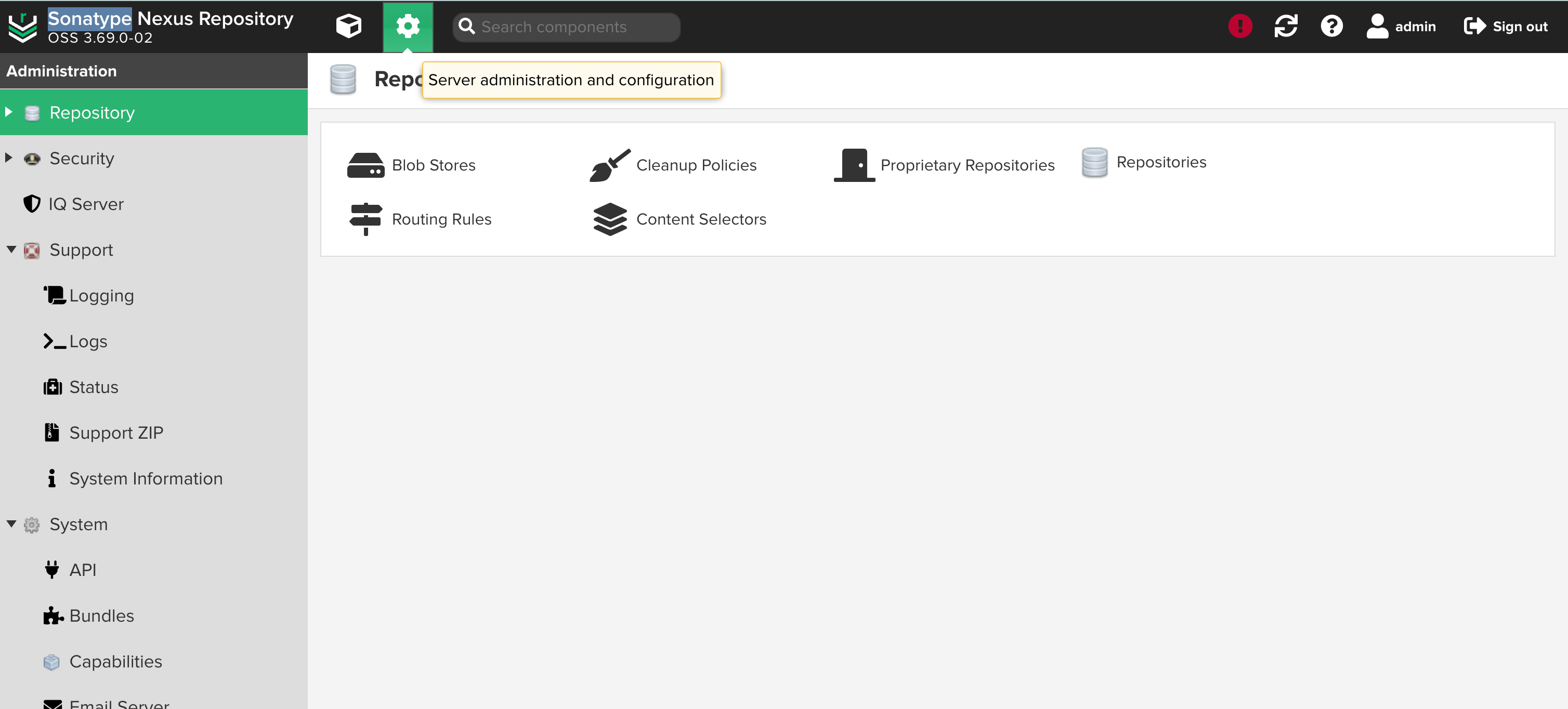
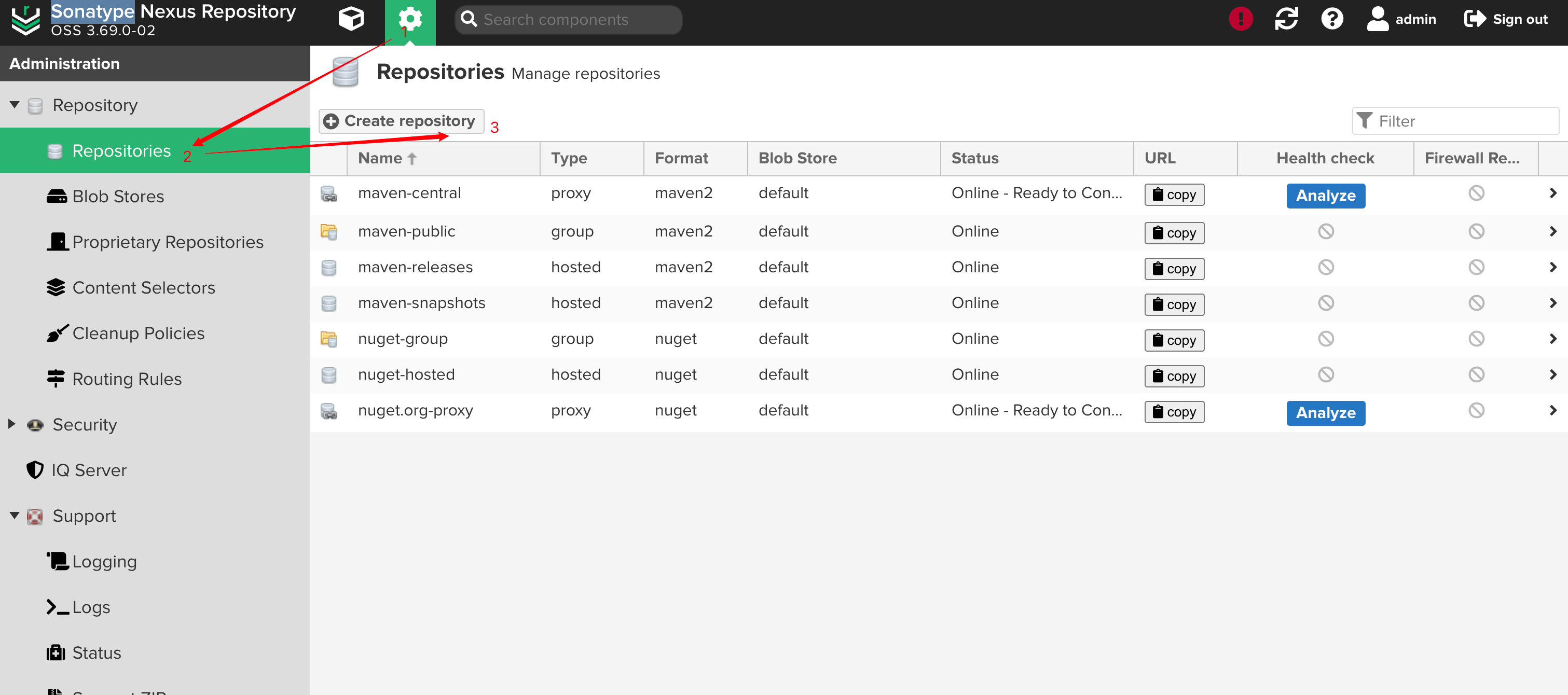
管理nexus
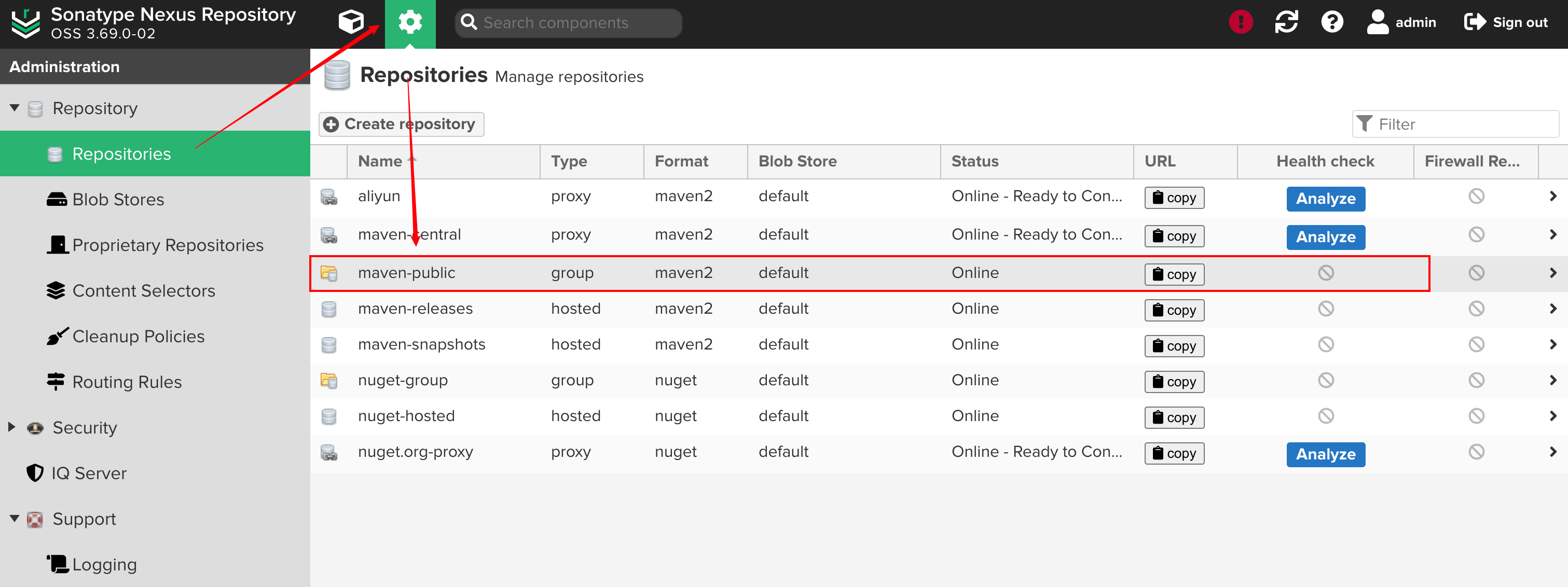
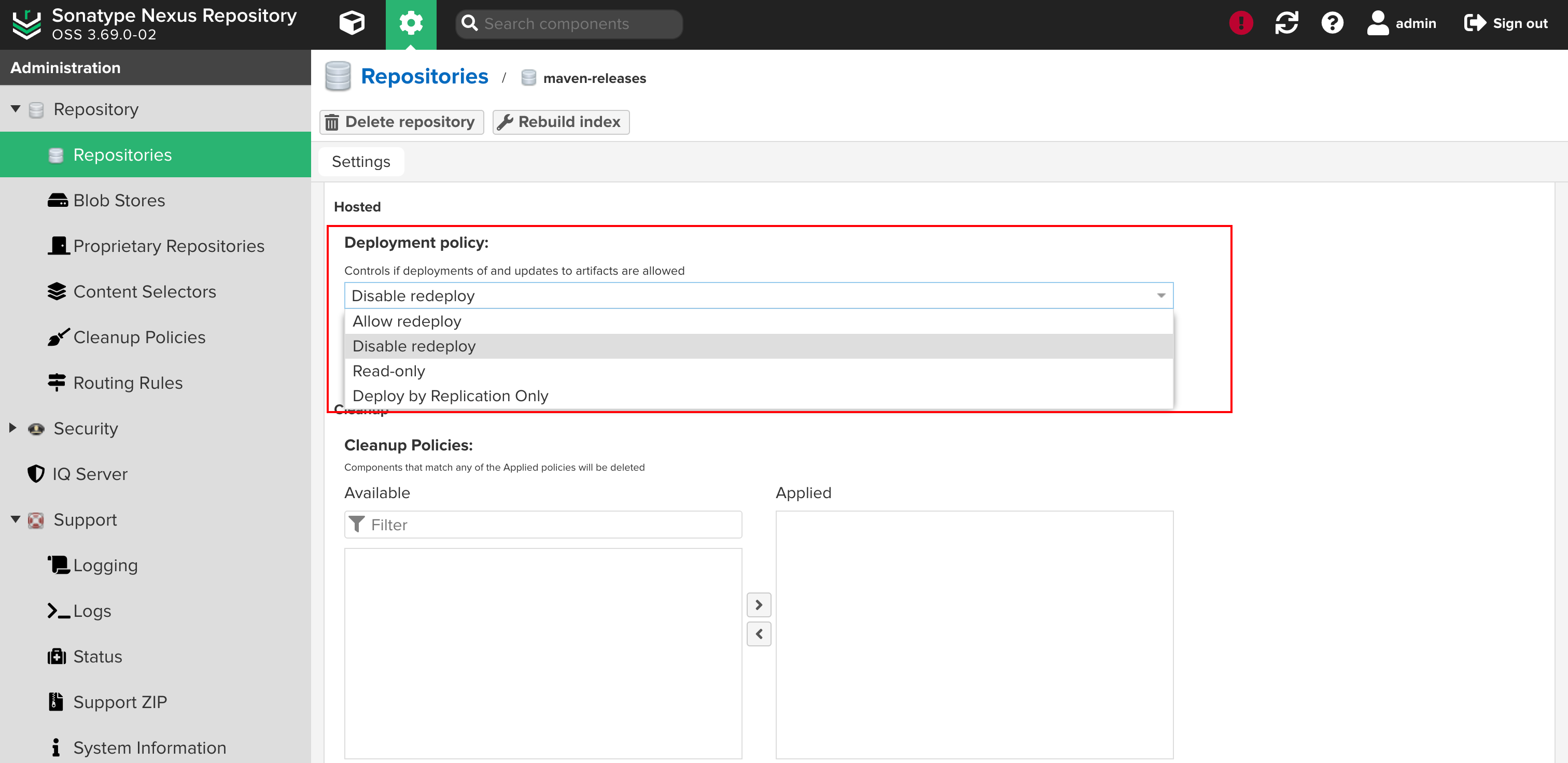
Browse可以查看当前有多少仓库,搭建好的Nexus,默认会带有一些maven仓库,一般使用这些仓库就足够了:默认仓库说明 maven-central:maven中央库,默认从https://repo1.maven.org/maven2/拉取jarmaven-releases:私库发行版jar,初次安装请将Deployment policy设置为Allow redeploymaven-snapshots:私库快照(调试版本)jarmaven-public:仓库分组,把上面三个仓库组合在一起对外提供服务,在本地maven基础配置settings.xml或项目pom.xml中使用仓库类型 Group:这是一个仓库聚合的概念,用户仓库地址选择Group的地址,即可访问Group中配置的,用于方便开发人员自己设定的仓库。maven-public就是一个Group类型的仓库,内部设置了多个仓库,访问顺序取决于配置顺序,3.x默认Releases,Snapshots,Central,当然你也可以自己设置。Hosted:私有仓库,内部项目的发布仓库,专门用来存储我们自己生成的jar文件3rd party:未发布到公网的第三方jar (3.x去除�?Snapshots:本地项目的快照仓库Releases:本地项目发布的正式版Proxy:代理类型,从远程中央仓库中寻找数据的仓库(可以点击对应的仓库的Configuration页签下Remote Storage属性的值即被代理的远程仓库的路径),如可配置阿里云maven仓库Central:中央仓库Apache Snapshots:Apache专用快照仓库(3.x去除)
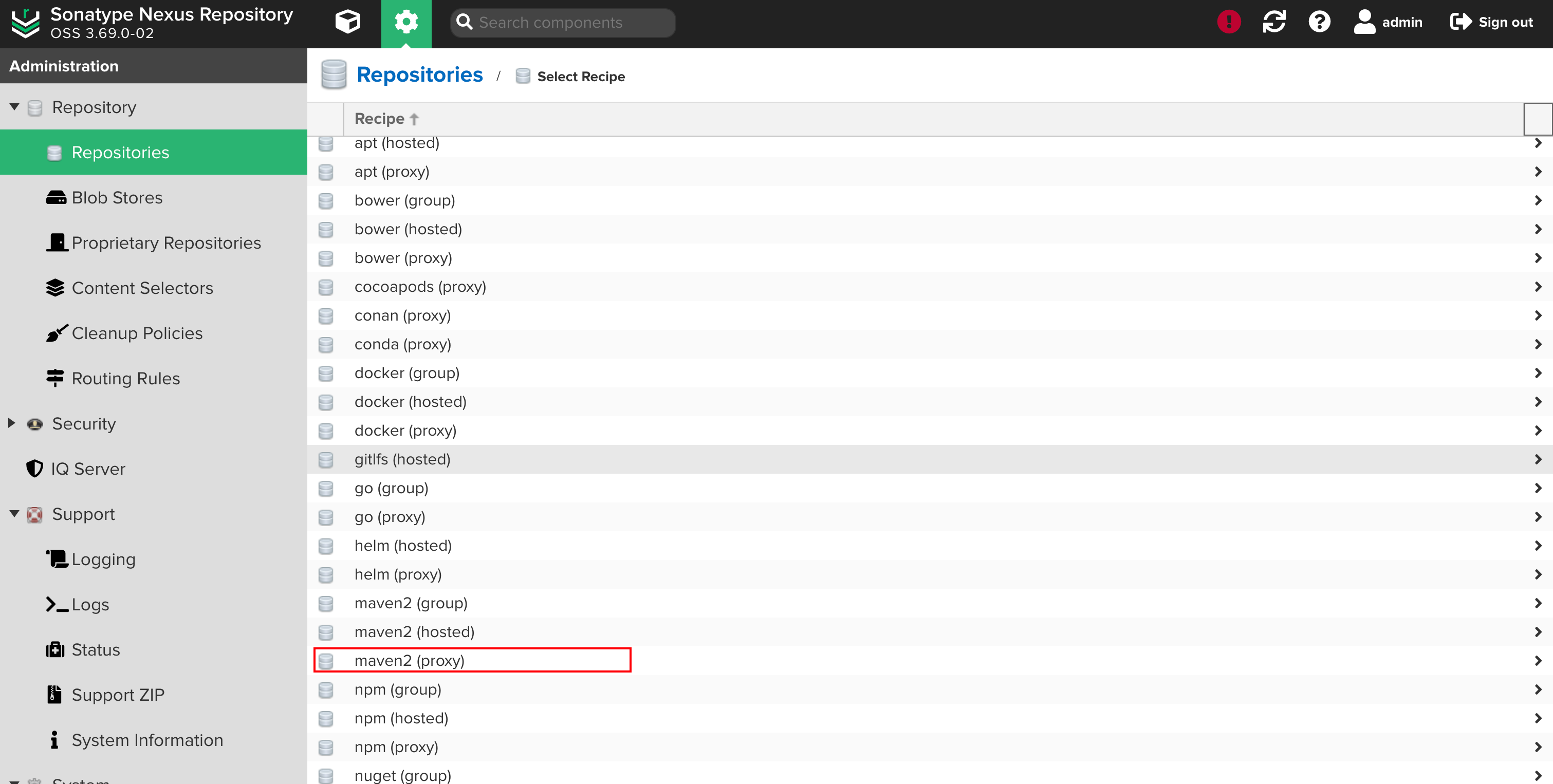
增加新的代理源
选择添加maven2的代理
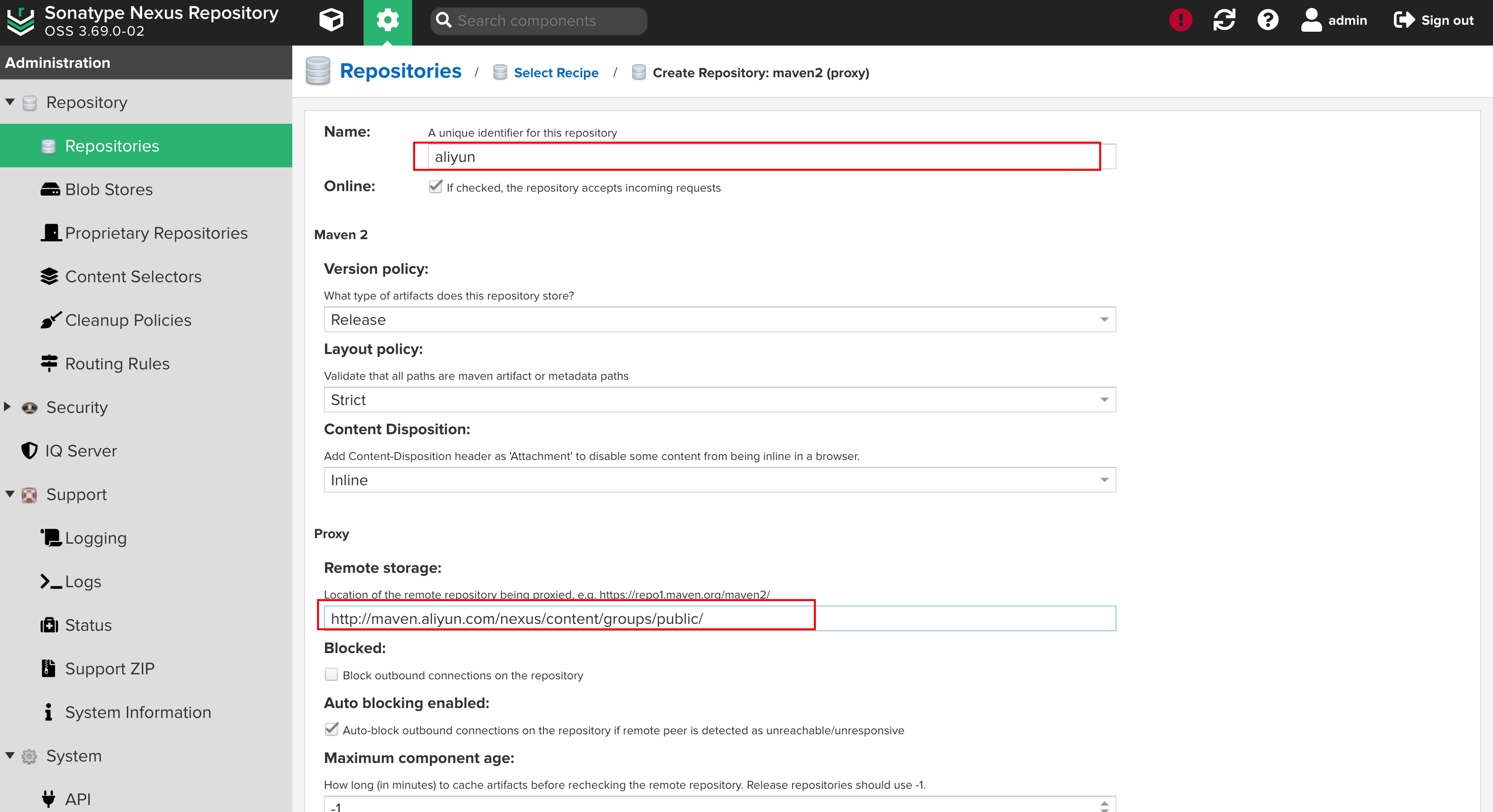
添加代理(Cache统一设置为:288000)
Name 填写 aliyun, URL输入:http://maven.aliyun.com/nexus/content/groups/public/,其他值默认:
# 4.增加常用代理
1. aliyun
http://maven.aliyun.com/nexus/content/groups/public
2. apache_snapshot
https://repository.apache.org/content/repositories/snapshots/
3. apache_release
https://repository.apache.org/content/repositories/releases/
4. atlassian
https://maven.atlassian.com/content/repositories/atlassian-public/
5. central.maven.org
http://central.maven.org/maven2/
6. datanucleus
http://www.datanucleus.org/downloads/maven2
7. maven-central (安装后自带,仅需设置Cache有效期即可)
https://repo1.maven.org/maven2/
8. nexus.axiomalaska.com
http://nexus.axiomalaska.com/nexus/content/repositories/public
9. oss.sonatype.org
https://oss.sonatype.org/content/repositories/snapshots
10.pentaho
https://public.nexus.pentaho.org/content/groups/omni/# 5.选择Configuration > Repository, 双击 maven-public, 在Group区域将常用代理移到右侧Members, 上移到maven-central的上面的maven库放到最底下,点击save。

设置私用仓库可重复发布
Nexus安装后自带maven-releases,maven-snapshots两个仓库,用于将生成的jar包发布在这两个仓库中,在实际开发中需要将maven-releases设置为可以重复发布
Maven配置使用Nexus
# 1.进入本地的maven安装目录
[root@staging maven]# cd /opt/maven/conf/
[root@staging conf]# ll
total 28
drwxr-xr-x 2 root root    37 Nov  7  2019 logging
-rw-r--r-- 1 root root 10796 Jun 24 18:20 settings.xml
-rw-r--r-- 1 root root 10741 Jun 24 18:19 settings.xml.bak
-rw-r--r-- 1 root root  3747 Nov  7  2019 toolchains.xml# 2.备份配置文件
[root@staging conf]# cp settings.xml settings.xml.bak02# 3.配置maven配置文件
[root@staging conf]# vim settings.xml
<?xml version="1.0" encoding="UTF-8"?>
<!--
Licensed to the Apache Software Foundation (ASF) under one
or more contributor license agreements.  See the NOTICE file
distributed with this work for additional information
regarding copyright ownership.  The ASF licenses this file
to you under the Apache License, Version 2.0 (the
"License"); you may not use this file except in compliance
with the License.  You may obtain a copy of the License athttp://www.apache.org/licenses/LICENSE-2.0Unless required by applicable law or agreed to in writing,
software distributed under the License is distributed on an
"AS IS" BASIS, WITHOUT WARRANTIES OR CONDITIONS OF ANY
KIND, either express or implied.  See the License for the
specific language governing permissions and limitations
under the License.
--><!--| This is the configuration file for Maven. It can be specified at two levels:||  1. User Level. This settings.xml file provides configuration for a single user,|                 and is normally provided in ${user.home}/.m2/settings.xml.||                 NOTE: This location can be overridden with the CLI option:||                 -s /path/to/user/settings.xml||  2. Global Level. This settings.xml file provides configuration for all Maven|                 users on a machine (assuming they're all using the same Maven|                 installation). It's normally provided in|                 ${maven.conf}/settings.xml.||                 NOTE: This location can be overridden with the CLI option:||                 -gs /path/to/global/settings.xml|| The sections in this sample file are intended to give you a running start at| getting the most out of your Maven installation. Where appropriate, the default| values (values used when the setting is not specified) are provided.||-->
<settings xmlns="http://maven.apache.org/SETTINGS/1.0.0"xmlns:xsi="http://www.w3.org/2001/XMLSchema-instance"xsi:schemaLocation="http://maven.apache.org/SETTINGS/1.0.0 http://maven.apache.org/xsd/settings-1.0.0.xsd"><!-- localRepository| The path to the local repository maven will use to store artifacts.|| Default: ${user.home}/.m2/repository--><localRepository>/data/software/repository</localRepository><!-- interactiveMode| This will determine whether maven prompts you when it needs input. If set to false,| maven will use a sensible default value, perhaps based on some other setting, for| the parameter in question.|| Default: true<interactiveMode>true</interactiveMode>--><!-- offline| Determines whether maven should attempt to connect to the network when executing a build.| This will have an effect on artifact downloads, artifact deployment, and others.|| Default: false<offline>false</offline>--><!-- pluginGroups| This is a list of additional group identifiers that will be searched when resolving plugins by their prefix, i.e.| when invoking a command line like "mvn prefix:goal". Maven will automatically add the group identifiers| "org.apache.maven.plugins" and "org.codehaus.mojo" if these are not already contained in the list.|--><pluginGroups><!-- pluginGroup| Specifies a further group identifier to use for plugin lookup.<pluginGroup>com.your.plugins</pluginGroup>--></pluginGroups><!-- proxies| This is a list of proxies which can be used on this machine to connect to the network.| Unless otherwise specified (by system property or command-line switch), the first proxy| specification in this list marked as active will be used.|--><proxies><!-- proxy| Specification for one proxy, to be used in connecting to the network.|<proxy><id>optional</id><active>true</active><protocol>http</protocol><username>proxyuser</username><password>proxypass</password><host>proxy.host.net</host><port>80</port><nonProxyHosts>local.net|some.host.com</nonProxyHosts></proxy>--></proxies><!-- servers| This is a list of authentication profiles, keyed by the server-id used within the system.| Authentication profiles can be used whenever maven must make a connection to a remote server.|--><servers><!-- server| Specifies the authentication information to use when connecting to a particular server, identified by| a unique name within the system (referred to by the 'id' attribute below).|| NOTE: You should either specify username/password OR privateKey/passphrase, since these pairings are|       used together.|--><server><id>releases</id><username>admin</username><password>Jinhuino1</password></server><server><id>snapshots</id><username>admin</username><password>Jinhuino1</password></server><!-- Another sample, using keys to authenticate.<server><id>siteServer</id><privateKey>/path/to/private/key</privateKey><passphrase>optional; leave empty if not used.</passphrase></server>--></servers><!-- mirrors| This is a list of mirrors to be used in downloading artifacts from remote repositories.|| It works like this: a POM may declare a repository to use in resolving certain artifacts.| However, this repository may have problems with heavy traffic at times, so people have mirrored| it to several places.|| That repository definition will have a unique id, so we can create a mirror reference for that| repository, to be used as an alternate download site. The mirror site will be the preferred| server for that repository.|--><mirrors><!-- mirror| Specifies a repository mirror site to use instead of a given repository. The repository that| this mirror serves has an ID that matches the mirrorOf element of this mirror. IDs are used| for inheritance and direct lookup purposes, and must be unique across the set of mirrors.|--><mirror><id>releases</id><mirrorOf>*</mirrorOf><name>HolliPark Repository Mirror</name><url>http://localhost:524/nexus/repository/maven-public/</url></mirror></mirrors><!-- profiles| This is a list of profiles which can be activated in a variety of ways, and which can modify| the build process. Profiles provided in the settings.xml are intended to provide local machine-| specific paths and repository locations which allow the build to work in the local environment.|| For example, if you have an integration testing plugin - like cactus - that needs to know where| your Tomcat instance is installed, you can provide a variable here such that the variable is| dereferenced during the build process to configure the cactus plugin.|| As noted above, profiles can be activated in a variety of ways. One way - the activeProfiles| section of this document (settings.xml) - will be discussed later. Another way essentially| relies on the detection of a system property, either matching a particular value for the property,| or merely testing its existence. Profiles can also be activated by JDK version prefix, where a| value of '1.4' might activate a profile when the build is executed on a JDK version of '1.4.2_07'.| Finally, the list of active profiles can be specified directly from the command line.|| NOTE: For profiles defined in the settings.xml, you are restricted to specifying only artifact|       repositories, plugin repositories, and free-form properties to be used as configuration|       variables for plugins in the POM.||--><profiles><profile><id>HolliPark</id><repositories><repository><id>nexus</id><name>Public Repositories</name><url>http://localhost:524/nexus/repository/maven-public/</url><releases><enabled>true</enabled></releases></repository><repository><id>central</id><name>Central Repositories</name><url>http://localhost:524/nexus/repository/maven-central/</url><releases><enabled>true</enabled></releases><snapshots><enabled>false</enabled></snapshots></repository><repository><id>release</id><name>Release Repositories</name><url>http://localhost:524/nexus/repository/maven-releases/</url><releases><enabled>true</enabled></releases><snapshots><enabled>false</enabled></snapshots></repository><repository><id>snapshots</id><name>Snapshot Repositories</name><url>http://localhost:524/nexus/repository/maven-snapshots/</url><releases><enabled>true</enabled></releases><snapshots><enabled>true</enabled></snapshots></repository></repositories><pluginRepositories><pluginRepository><id>plugins</id><name>Plugin Repositories</name><url>http://localhost:524/nexus/repository/maven-public/</url></pluginRepository></pluginRepositories></profile><!-- profile| Specifies a set of introductions to the build process, to be activated using one or more of the| mechanisms described above. For inheritance purposes, and to activate profiles via <activatedProfiles/>| or the command line, profiles have to have an ID that is unique.|| An encouraged best practice for profile identification is to use a consistent naming convention| for profiles, such as 'env-dev', 'env-test', 'env-production', 'user-jdcasey', 'user-brett', etc.| This will make it more intuitive to understand what the set of introduced profiles is attempting| to accomplish, particularly when you only have a list of profile id's for debug.|| This profile example uses the JDK version to trigger activation, and provides a JDK-specific repo.<profile><id>jdk-1.4</id><activation><jdk>1.4</jdk></activation><repositories><repository><id>jdk14</id><name>Repository for JDK 1.4 builds</name><url>http://www.myhost.com/maven/jdk14</url><layout>default</layout><snapshotPolicy>always</snapshotPolicy></repository></repositories></profile>--><!--| Here is another profile, activated by the system property 'target-env' with a value of 'dev',| which provides a specific path to the Tomcat instance. To use this, your plugin configuration| might hypothetically look like:|| ...| <plugin>|   <groupId>org.myco.myplugins</groupId>|   <artifactId>myplugin</artifactId>||   <configuration>|     <tomcatLocation>${tomcatPath}</tomcatLocation>|   </configuration>| </plugin>| ...|| NOTE: If you just wanted to inject this configuration whenever someone set 'target-env' to|       anything, you could just leave off the <value/> inside the activation-property.|<profile><id>env-dev</id><activation><property><name>target-env</name><value>dev</value></property></activation><properties><tomcatPath>/path/to/tomcat/instance</tomcatPath></properties></profile>--></profiles><!-- activeProfiles| List of profiles that are active for all builds.|<activeProfiles><activeProfile>alwaysActiveProfile</activeProfile><activeProfile>anotherAlwaysActiveProfile</activeProfile></activeProfiles>--><activeProfiles><activeProfile>HolliPark</activeProfile></activeProfiles></settings>
创建私有公库
1、创建普通的maven项目
2.修改项目的pom.xml
在pom文件中加入distributionManagement节点,注意:pom.xml中repository里的id需要和.m2中setting.xml里的server id名称保持一致
<distributionManagement><repository><id>releases</id><name>Nexus Release Repository</name><url>http://192.168.1.18:524/nexus/repository/maven-releases/</url></repository><snapshotRepository><id>snapshots</id><name>Nexus Snapshot Repository</name><url>http://192.168.1.18:524/nexus/repository/maven-snapshots/</url></snapshotRepository>
</distributionManagement>
3\发布私有公库
# 1.执行部署命令即可发布:
mvn deploy
# 2.登录Nexus,查看对应的仓库已经有相关的依赖包了
ps:
若项目版本号末尾带有 -SNAPSHOT,则会发布到snapshots快照版本仓库
若项目版本号末尾带有 -RELEASES 或什么都不带,则会发布到releases正式版本仓库
参考:https://www.cnblogs.com/jhno1/p/15134092.html
相关文章:
安装maven与nexus
安装maven与nexus Maven官网下载地址:http://maven.apache.org cd /data/software/wget https://mirrors.tuna.tsinghua.edu.cn/apache/maven/maven-3/3.8.1/binaries/apache-maven-3.8.8-bin.tar.gz# 解压 tar xf apache-maven-3.8.1-bin.tar.gz -C /opt/[rooth…...
如何用DCA1000持续采集雷达数据
摘要:本文介绍一下如何通过mmwave studio软件,搭配DCA1000数据采集卡,对AWR1843BOOST进行不间断的数据采集。本文要求读者已经掌握了有关基础知识。 本文开放获取,无需关注。 到SensorConfig页面下,一步步操作…...

怎么用JavaScript写爬虫
随着互联网技术的不断发展,爬虫(web crawler)已经成为当前最热门的爬取信息方式之一。通过爬虫技术,我们可以轻松地获取互联网上的数据,并用于数据分析、挖掘、建模等多个领域。而javascript语言则因其强大的前端开发工…...

Leetcode 3203. Find Minimum Diameter After Merging Two Trees
Leetcode 3203. Find Minimum Diameter After Merging Two Trees 1. 解题思路2. 代码实现 题目链接:3203. Find Minimum Diameter After Merging Two Trees 1. 解题思路 这一题的话算是一个拓扑树的题目?总之就是从树的叶子节点不断向上遍历ÿ…...
:循环群的两道例题)
【抽代复习笔记】24-群(十八):循环群的两道例题
例1:证明: (1)三次交错群A3是循环群,它与(Z3,)同构,其中Z3 {[0],[1],[2]}; (2)G {1,i,-1,-i},G上的代数运算是数的乘法,则G是一个循环群&…...

Linux常见操作问题
1、登录刚创建的用户,无法操作。 注:etc/passwd文件是Linux操作系统中存储用户账户信息的文本文件,包含了系统中所有用户的基本信息,比如用户名、用户ID、用户组ID、用户家目录路径。 注:etc: 这个目录存放所有的系统…...

鲁工小装载机-前后桥传动轴油封更换记录
鲁工装载机 因前后桥大量漏齿轮油,故拆开查看、更换油封 一: 如图圈起来的地方是螺丝和钢板相别,用200的焊接电流用电焊机点开一个豁口后拆除螺丝。 转轴是拆除传动轴后的样子。 这就是拆下来的样子,这玩意插上边那图&…...

商城自动化测试实战 —— 登录+滑块验证
hello大家好,我是你们的小编! 本商城测试项目采取PO模型和数据分离式架构,采用pytestseleniumjenkins结合的方式进行脚本编写与运行,项目架构如下: 1、创建项目名称:code_shopping,创建所需项目…...

8.计算机视觉—增广和迁移
目录 1.数据增广数据增强数据增强的操作代码实现2.微调 迁移学习 Transfer learning(重要的技术)网络结构微调:当目标数据集比源数据集小得多时,微调有助于提高模型的泛化能力。训练固定一些层总结代码实现1.数据增广 CES上的真实故事 有一家做智能售货机的公司,发现他们…...

【Matlab】-- BP反向传播算法
文章目录 文章目录 00 写在前面01 BP算法介绍02 基于Matlab的BP算法03 代码解释 00 写在前面 BP算法可以结合鲸鱼算法、飞蛾扑火算法、粒子群算法、灰狼算法、蝙蝠算法等等各种优化算法一起,进行回归预测或者分类预测。 01 BP算法介绍 BP(Backpropag…...

【Python】 数据分析中的常见统计量:众数
那年夏天我和你躲在 这一大片宁静的海 直到后来我们都还在 对这个世界充满期待 今年冬天你已经不在 我的心空出了一块 很高兴遇见你 让我终究明白 回忆比真实精彩 🎵 王心凌《那年夏天宁静的海》 众数(Mode)是统计学中另…...

Karabiner-Elements 设置mac键盘
软件下载地址: Karabiner-Elements 修改键盘位置,但是重启后,就消失了。 {"description": "New Rule (change left_shiftcaps_lock to page_down, right_shiftcaps_lock to left_commandmission_control)","manip…...

Mybatis实现流程
一,UserDAO 接口定义 首先,定义 UserDAO接口,包含 getList()方法,定义类型为List<User>: package dao;import model.User; import java.util.List;public interface UserDAO {List<User> getList(); }二,…...
)
简单的springboot整合activiti5-serviceImpl部分(1)
简单的springboot整合activiti5.22.0-serviceImpl部分(1) 原来的流程serviceImpl部分代码过多,所以此处单独记录一下,此处记录的是serviceImpl第一部分代码 package cn.git.workflow.service.impl;import cn.git.cache.api.BaseCacheApi; import cn.gi…...

snat、dnat和firewalld
目录 概述 SNAT源地址转换 DANT目的地址转换 抓包 firewalld 端口管理 概述 snat :源地址转换 内网——外网 内网ip转换成可以访问外网的ip 也就是内网的多个主机可以只有一个有效的公网ip地址访问外部网络 DNAT:目的地址转发 外部用户&#…...

[数据集][目标检测]鸡蛋缺陷检测数据集VOC+YOLO格式2918张2类别
数据集格式:Pascal VOC格式YOLO格式(不包含分割路径的txt文件,仅仅包含jpg图片以及对应的VOC格式xml文件和yolo格式txt文件) 图片数量(jpg文件个数):2918 标注数量(xml文件个数):2918 标注数量(txt文件个数):2918 标注…...

前后端防重复提交
数据重复提交是一个大忌,会带来无效数据,应该在前端和后端都建议检测防范。 前端一般是按钮按下触发数据提交,如果用户鼠标操作习惯不好,或者鼠标或系统设置问题会导致鼠标连击,如果前端不做相关处理,可能会…...
JVM专题八:JVM如何判断可回收对象
在JVM专题七:JVM垃圾回收机制中提到JVM的垃圾回收机制是一个自动化的后台进程,它通过周期性地检查和回收不可达的对象(垃圾),帮助管理内存资源,确保应用程序的高效运行。今天就让我们来看看JVM到底是怎么定…...

binary_cross_entropy_with_logits函数的参数设定
binary_cross_entropy_with_logits 该函数参数: logits (Tensor) - 输入预测值。其数据类型为float16或float32。 label (Tensor) - 输入目标值,shape与 logits 相同。数据类型为float16或float32。 weight (Tensor,可选) - 指定每个批次二…...

Python 面试【★★★★★】
欢迎莅临我的博客 💝💝💝,很高兴能够在这里和您见面!希望您在这里可以感受到一份轻松愉快的氛围,不仅可以获得有趣的内容和知识,也可以畅所欲言、分享您的想法和见解。 推荐:「stormsha的主页」…...

Spring Data Redis入门指南:5分钟快速搭建你的第一个Redis应用
Spring Data Redis入门指南:5分钟快速搭建你的第一个Redis应用 【免费下载链接】spring-data-redis Provides support to increase developer productivity in Java when using Redis, a key-value store. Uses familiar Spring concepts such as a template classe…...

通达信缠论插件ChanlunX:3分钟实现专业缠论分析的完整解决方案
通达信缠论插件ChanlunX:3分钟实现专业缠论分析的完整解决方案 【免费下载链接】ChanlunX 缠中说禅炒股缠论可视化插件 项目地址: https://gitcode.com/gh_mirrors/ch/ChanlunX 你是否曾经面对复杂的K线图感到无从下手?是否因为缠论的手工绘制耗时…...

告别手动切号!全栈实战:用AI辅助编写一个「多平台海量私信秒回」系统
最近在研究全网营销和客资管理系统,看到这样两张产品宣传图,直击痛点:一个工作台,快速处理海量私信/评论(告别多个聊天窗口来回切换)。7x24小时在线,AI秒回客户(告别响应时间长、客户…...

如何快速上手专业3D点云标注工具:完整入门指南
如何快速上手专业3D点云标注工具:完整入门指南 【免费下载链接】labelCloud A lightweight tool for labeling 3D bounding boxes in point clouds. 项目地址: https://gitcode.com/gh_mirrors/la/labelCloud 在自动驾驶、机器人视觉和三维重建等领域&#x…...

C++ 如何在VS中“强制”链接?
如何在VS中“强制”链接? 打开你的game_mobile项目,按下图设置。 方法一:强制链接(最直接) 这是彻底忽略LNK1169及其引发的所有LNK2005错误,强制生成可执行文件的方法。 打开项目的“属性页”。导航到“配置…...

免费开源工业通信调试工具:ModbusTool终极指南,5分钟快速上手
免费开源工业通信调试工具:ModbusTool终极指南,5分钟快速上手 【免费下载链接】ModbusTool A modbus master and slave test tool with import and export functionality, supports TCP, UDP and RTU. 项目地址: https://gitcode.com/gh_mirrors/mo/Mo…...
的模板化部署)
统信UOS系统管理员必看:一招搞定用户配置文件(.config/autostart)的模板化部署
统信UOS系统配置模板化实战:从屏保设置到全局用户环境部署 在大型企业或教育机构的桌面环境管理中,统信UOS作为国产操作系统的代表,其标准化部署能力直接影响运维效率。当我们在模板用户中精心配置了各项参数——从屏幕保护时间到电源管理策略…...

3D结构光相机 | 抓取/焊接/测量全搞定,高反光黑色物体重建精度高,工业场景全覆盖,户外无惧强光
一 产品介绍苏州三迪斯维出品的3D相机采用主动结构光技术,拍摄速度快、成像精细、方案成熟稳定,针对不同应用场景物体可输出高质量点云数据图,精度高、速度快、环境自适应性强,不用系列适用场景不同,分别如下ÿ…...

告别Socket编程烦恼:用libhv的UdpServer类5分钟搞定一个C++回显服务
告别Socket编程烦恼:用libhv的UdpServer类5分钟搞定一个C回显服务 在C网络编程领域,原生Socket API的复杂性一直是开发者面临的痛点。从繁琐的地址结构体处理到易错的IO多路复用机制,传统方法往往需要数百行代码才能实现一个基础功能。而libh…...

Live Server 5分钟快速上手:打造高效前端实时预览环境
Live Server 5分钟快速上手:打造高效前端实时预览环境 【免费下载链接】vscode-live-server Launch a development local Server with live reload feature for static & dynamic pages. 项目地址: https://gitcode.com/gh_mirrors/vs/vscode-live-server …...