
HarmonyOS APP应用开发项目- MCA助手(Day02持续更新中~)
简言:
gitee地址:https://gitee.com/whltaoin_admin/money-controller-app.git
端云一体化开发在线文档:
https://developer.huawei.com/consumer/cn/doc/harmonyos-guides-V5/agc-harmonyos-clouddev-view-0000001700053733-V5
注:此App参照此教程进行二次修改:https://www.bilibili.com/video/BV1q5411v7o7
项目构建静态页面
钱包页面
- 效果图
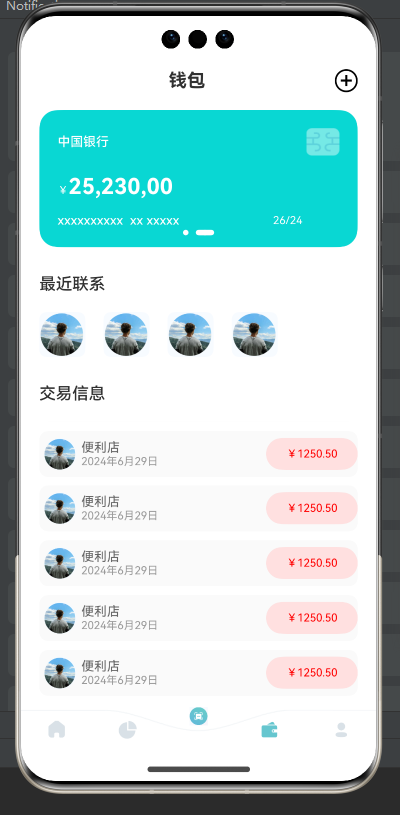
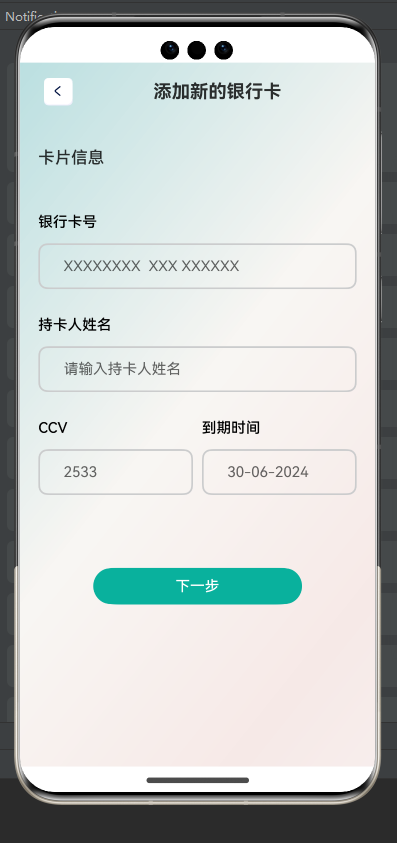
- 结构:
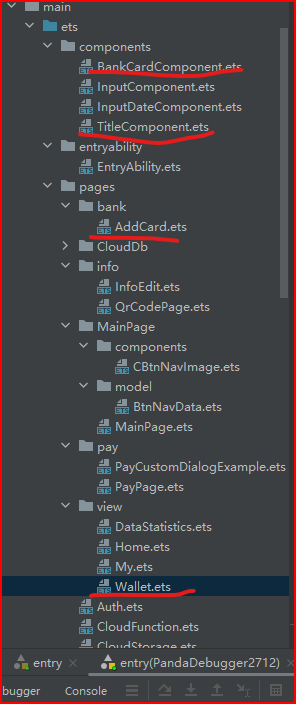
主页面:Wallet.ets
子页面:addCard.ets
组件:
BankCardComponent 银行卡片
TitleComponent  顶部标题
- 编写思路:
// 钱包页面和主页页面效果类似,复制其修改部分既可。- 代码
// 页面三:钱包 Wallet
import { BankCardComponent } from '../../components/BankCardComponent'
import TitleComponent from '../../components/TitleComponent'@Component
export  default struct Wallet {build() {Column(){TitleComponent({title:"钱包",is_addIcon:true})Column(){// Text("您好,").width("100%").fontWeight(500)// Text("欢迎回来!").width("100%").fontWeight(500).fontSize(18).margin({top:5,bottom:15})// cardSwiper(){BankCardComponent()BankCardComponent()}.loop(true).autoPlay(true).indicator(Indicator.dot().color(Color.White).selectedColor(Color.White).selectedItemWidth(20)).borderRadius(20)// 功能分类Text("最近联系").width("100%").fontWeight(500).fontSize(18).margin({top:5,bottom:15}).margin({top:30,bottom:20})Row({space:20}){Image($r("app.media.avatar_icon")).width(50).borderRadius(8)Image($r("app.media.avatar_icon")).width(50).borderRadius(8)Image($r("app.media.avatar_icon")).width(50).borderRadius(8)Image($r("app.media.avatar_icon")).width(50).borderRadius(8)}.width("100%")// 功能分类Text("交易信息").width("100%").fontWeight(500).fontSize(18).margin({top:5,bottom:15}).margin({top:30,bottom:20})Column(){List(){ForEach((Array.from({length:10})),()=>{ListItem(){Row(){Image($r("app.media.avatar_icon")).width(36).borderRadius(18).margin({left:5,right:5})Column(){Text("便利店").width("100%").fontSize(14).fontColor("#666")Text("2024年6月29日").width("100%").fontSize(12).fontColor("#999")}.layoutWeight(1)Text("¥1250.50").backgroundColor("#ffffe0e0").borderRadius(20).width(100).height(35).textAlign(TextAlign.Center).fontSize(12).fontColor("#f00")}.width("100%").height(50).backgroundColor("#fffafafa").borderRadius(10).margin({bottom:10})}})}}.width("100%").layoutWeight(1)}.width("100%").layoutWeight(1).padding({left:20,right:20})}.width("100%").height("100%").backgroundColor("#ffffffff")}
}
// 添加银行卡 子页面:AddCard
import InputComponent from '../../components/InputComponent';
import TitleComponent from '../../components/TitleComponent';
@Extend(Text)
function  titleTextStyle(){.width("100%").fontWeight(500).fontSize(18).margin({top:30,bottom:20})
}
@Entry
@Component
struct AddCard {@State message: string = 'Hello World';build() {Column(){// titileTitleComponent({title:"添加新的银行卡",routerUrl:'',is_icon:true})// contentColumn({space:30}){Text("卡片信息").titleTextStyle()InputComponent({title:'银行卡号',placeholder:'XXXXXXXX  XXX XXXXXX',isInputIcon:false})InputComponent({title:'持卡人姓名',placeholder:'请输入持卡人姓名',isInputIcon:false})Row({space:10}){InputComponent({title:'CCV',placeholder:'2533',isInputIcon:false}).layoutWeight(1)InputComponent({title:'到期时间',placeholder:'30-06-2024',isInputIcon:false}).layoutWeight(1)}Button("下一步").width(228).backgroundColor("#ff09b19d").margin({top:50})}.width("100%").height("100%").padding({left:20,right:20})}.width("100%").height("100%").backgroundImage($r("app.media.pageBg"))}
}
// 银行卡片组件:BankCardComponent
@Component
export   struct BankCardComponent {build() {Column(){Row(){Text("中国银行").layoutWeight(1).fontColor(Color.White).fontSize(14).fontWeight(500)Image($r("app.media.card_icon")).width(36)}Text(){Span("¥").fontSize(12)Span("25,230,00").fontSize(24).fontWeight(700)}.width("100%").fontColor(Color.White).margin({top:20})Row(){Text("xxxxxxxxxx  xx xxxxx ").layoutWeight(1).fontColor(Color.White).fontSize(14).fontWeight(500)Text("26/24").fontColor(Color.White).fontSize(12).padding({right:40})}.margin({top:15})}.width("100%").height(150).backgroundColor("#ff09d7d3").padding(20)}
}
// 页面标题组件: TitleComponent
import text from '@ohos.graphics.text'
import router from '@ohos.router'@Component
export  default struct TitleComponent {@Prop title :string@Prop is_icon:boolean@Prop is_addIcon:boolean@Prop routerUrl:string@Prop titleColor:stringbuild() {Row(){if(this.is_icon){Image($r("app.media.Button_left")).width("44").height(30).objectFit(ImageFit.ScaleDown).borderRadius(5).onClick(()=>{router.back()})}Text(this.title).fontColor(this.titleColor).fontWeight(700).fontSize(20).height(40).layoutWeight(1).textAlign(TextAlign.Center)if(this.is_addIcon){Text("+").fontColor(Color.White).fontSize(25).fontWeight(500).border({width:2}).borderRadius(30).width(25).height(25).fontColor(Color.Black).lineHeight(25).textAlign(TextAlign.Center).onClick(()=>{router.pushUrl({url:'pages/bank/AddCard'})})}}.width("100%").justifyContent(FlexAlign.SpaceBetween).padding({left:20,right:20,top:12,bottom:12})}
}
个人页面
- 效果图
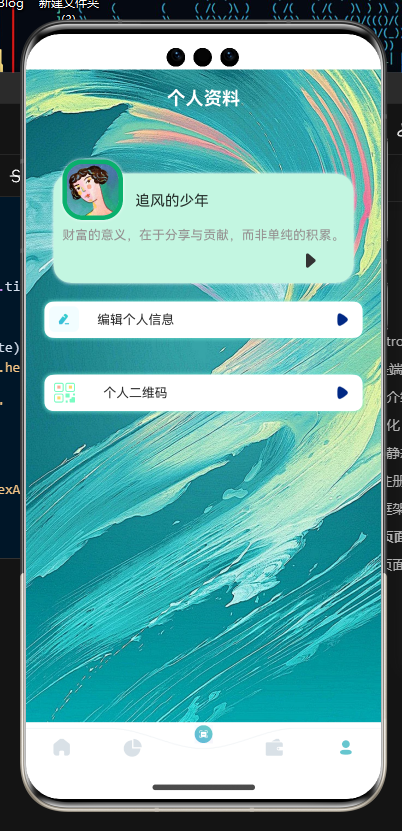
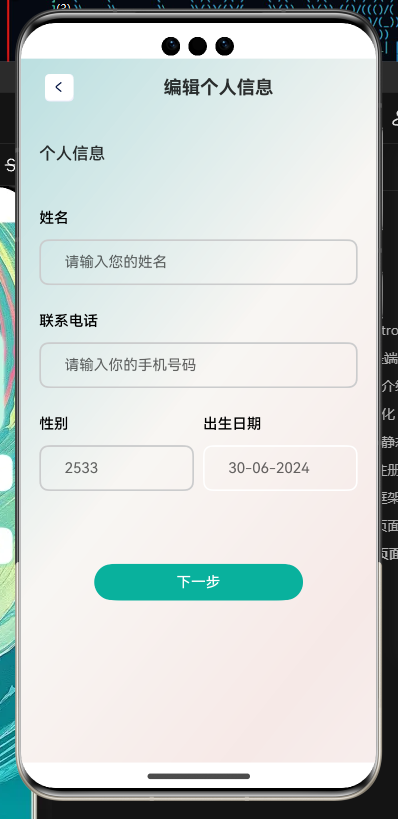
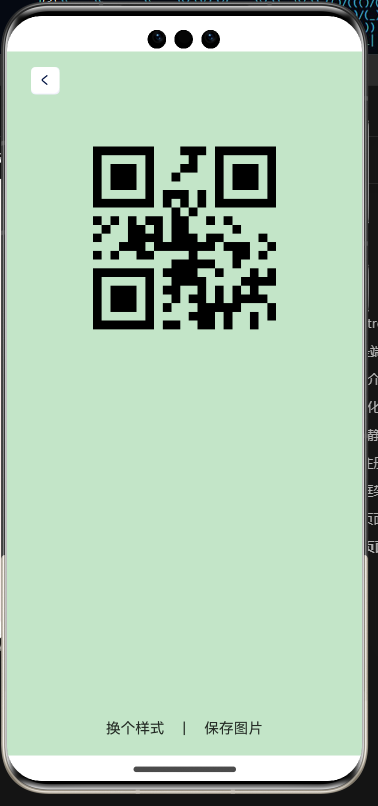
- 结构
组件:
BankCardComponent 银行卡片
TitleComponent  顶部标题
InputDateComponent 选择日期弹框
InputComponent 普通表单输入框
页面:My 个人主页InfoEdit 个人信息修改页QrCodePage 个人信息二维码生成页工具类:tools- 代码
// 页面四:个人信息页
import TitleComponent from '../../components/TitleComponent'
import router from '@ohos.router'
import { Router } from '@kit.ArkUI'@Component
export  default struct My {build() {Column(){TitleComponent({title:"个人资料",titleColor:"#ffff"})Stack({alignContent:Alignment.Start}){Column().width("100%").height(120).backgroundColor("#ffc3f6e1").margin({top:50}).borderRadius(20).shadow({radius:10,color:"#fff"})Column(){Image($r("app.media.user")).width(66).height(66).borderRadius(22).border({width:5,color:'#ff09b06d',style:BorderStyle.Solid}).shadow({radius:10,color:"#fff"})Text("追风的少年").offset({x:80,y:-30}).width("100%")Text("财富的意义,在于分享与贡献,而非单纯的积累。").fontSize(14).fontColor("#ff969191").margin({top:10}).offset({y:-10}).margin({right:10})}.width("100%").alignItems(HorizontalAlign.Start).margin({left:10})Image($r("app.media.right_i")).height(20).offset({y:60,x:270})}.width("100%").padding({left:30,right:30})Row(){Image($r("app.media.edit_icon")).height(30).margin({right:20})Text("编辑个人信息").layoutWeight(1).fontSize(14)Image($r("app.media.right_icon")).height(25)}.height(40).padding({left:5,right:10}).backgroundColor("#fff").margin(20).borderRadius(10).shadow({radius:20,color:"#ff70e7d5"}).onClick(()=>{router.pushUrl({url:"pages/info/InfoEdit"})})Row(){Image($r("app.media.qrcode_icon_external")).height(25).margin({left:5,right:30})Text("个人二维码").layoutWeight(1).fontSize(14)Image($r("app.media.right_icon")).height(25)}.height(40).padding({left:5,right:10}).backgroundColor("#fff").margin(20).borderRadius(10).shadow({radius:20,color:"#ff70e7d5"}).onClick(()=>{router.pushUrl({url :'pages/info/QrCodePage'})})}.width("100%").height("100%").backgroundImage($r("app.media.myPageBg")).backgroundImageSize({width:"100%",height:"100%"})}
}
// 个人信息修改页
import InputComponent from '../../components/InputComponent';
import InputDateComponent from '../../components/InputDateComponent';
import TitleComponent from '../../components/TitleComponent';
@Extend(Text)
function  titleTextStyle(){.width("100%").fontWeight(500).fontSize(18).margin({top:30,bottom:20})
}
@Entry
@Component
struct InfoEdit {@State message: string = 'Hello World';selectedDate: Date = new Date("2010-1-1")build() {Column(){// titileTitleComponent({title:"编辑个人信息",routerUrl:'',is_icon:true})// contentColumn({space:30}){Text("个人信息").titleTextStyle()InputComponent({title:'姓名',placeholder:'请输入您的姓名',isInputIcon:false})InputComponent({title:'联系电话',placeholder:'请输入你的手机号码',isInputIcon:false})Row({space:10}){InputComponent({title:'性别',placeholder:'2533',isInputIcon:false}).layoutWeight(1)InputDateComponent ({title:'出生日期',placeholder:'30-06-2024',isInputIcon:false}).layoutWeight(1)}Button("下一步").width(228).backgroundColor("#ff09b19d").margin({top:50})}.width("100%").height("100%").padding({left:20,right:20})}.width("100%").height("100%").backgroundImage($r("app.media.pageBg"))}
}
// 个人信息二维码生成页import TitleComponent from '../../components/TitleComponent';
import { randomColor } from '../../util/tools';@Entry
@Component
struct QrCodePage {@State message: string = 'Hello World';@State BgColor :string = "#ffc2f17d"build() {Column() {// titileTitleComponent({title:"",routerUrl:'',is_icon:true})QRCode("1").margin({top:40}).height(200).aspectRatio(1).backgroundColor(Color.Transparent)Blank()Row({space:20}){Text("换个样式").onClick(()=>{this.BgColor = randomColor()})Text("|")Text("保存图片")}.width("100%").justifyContent(FlexAlign.Center).margin({bottom:20})}.height('100%').backgroundColor(this.BgColor).width('100%')}
}
// 日期选择框
@Component
export  default struct InputDateComponent {@Prop title:string@Prop inputIcon:Resource@Prop placeholder:string@Prop  inputType:InputType=InputType.Normal@State changeStatus:boolean =false@Prop isInputIcon:boolean = trueselectedDate: Date = new Date()build() {Column(){Text(this.title).width("100%").textAlign(TextAlign.Start).fontWeight(500).fontSize(16).fontColor(Color.Black).margin({bottom:14})Row(){if (this.isInputIcon) {Image(this.inputIcon).width(40).aspectRatio(1)}TextInput({placeholder:this.placeholder}).onClick(()=>{DatePickerDialog.show({start: new Date("1970-1-1"),end: new Date("2100-12-31"),selected: this.selectedDate,showTime:true,useMilitaryTime:false,// disappearTextStyle: {color: Color.Pink, font: {size: '22fp', weight: FontWeight.Bold}},// textStyle: {color: '#ff00ff00', font: {size: '18fp', weight: FontWeight.Normal}},// selectedTextStyle: {color: '#ff182431', font: {size: '14fp', weight: FontWeight.Regular}},onDateAccept: (value: Date) => {// 通过Date的setFullYear方法设置按下确定按钮时的日期,这样当弹窗再次弹出时显示选中的是上一次确定的日期this.selectedDate = valueconsole.info("DatePickerDialog:onDateAccept()" + value.toString())},onCancel: () => {console.info("DatePickerDialog:onCancel()")},onDateChange: (value: Date) => {console.info("DatePickerDialog:onDateChange()" + value.toString())}})}).onFocus(()=>{// 聚焦this.changeStatus=trueconsole.log("result>>>",this.changeStatus)}).onBlur(()=>{// 失去this.changeStatus=falseconsole.log("result>>>",this.changeStatus)}).layoutWeight(1).backgroundColor(Color.Transparent).type(this.inputType)}.width("100%").height(50).padding({left:10,right:10}).borderRadius(10).border({width:2,color:this.changeStatus?"#002884":Color.White})}}
}
// 普通输入框
@Component
export  default struct InputComponent {@Prop title:string@Prop inputIcon:Resource@Prop placeholder:string@Prop  inputType:InputType=InputType.Normal@State changeStatus:boolean =false@Prop isInputIcon:boolean = truebuild() {Column(){Text(this.title).width("100%").textAlign(TextAlign.Start).fontWeight(500).fontSize(16).fontColor(Color.Black).margin({bottom:14})Row(){if (this.isInputIcon) {Image(this.inputIcon).width(40).aspectRatio(1)}TextInput({placeholder:this.placeholder}).onFocus(()=>{// 聚焦this.changeStatus=trueconsole.log("result>>>",this.changeStatus)}).onBlur(()=>{// 失去this.changeStatus=falseconsole.log("result>>>",this.changeStatus)}).layoutWeight(1).backgroundColor(Color.Transparent).type(this.inputType)}.width("100%").height(50).padding({left:10,right:10}).borderRadius(10).border({width:2,color:this.changeStatus?"#002884":"#ffcbcccd"})}}
}
// 随机颜色生成方法
// 十六进制的随机颜色
export  function randomColor():string{let color:string = "#"let colors:string[] = ["a","b", "c","d", "e","f","0", "1", "2", "3", "4", "5", "6", "7", "8", "9"]for (let i = 0; i <8 ; i++) {color+=colors[Math.floor(Math.random()*15)]}return color
}
支付页面
- 效果图
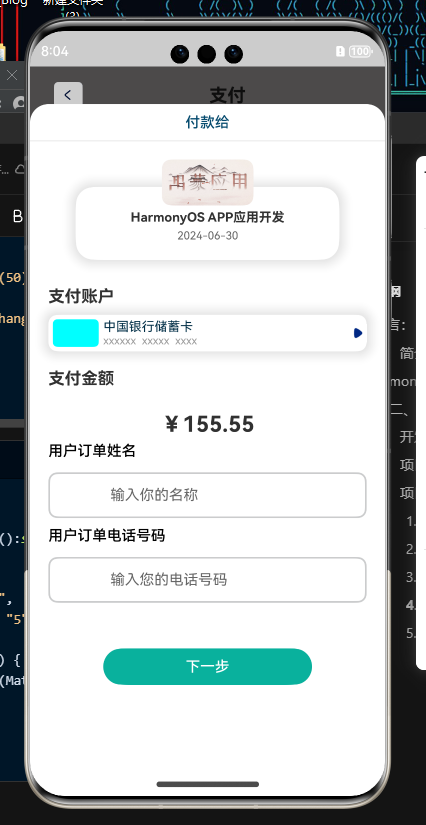
- 结构
页面:PayPage
自定义弹框组件:PayCustomDialogExample
- 代码
// 付款页import TitleComponent from '../../components/TitleComponent';
import PayCustomDialogExample from './PayCustomDialogExample';@Entry
@Component
struct PayPage {dialogController: CustomDialogController = new CustomDialogController({builder: PayCustomDialogExample(),alignment:DialogAlignment.Bottom,customStyle:true})onPageShow(): void {this.dialogController.open()}@State message: string = 'Hello World';build() {Column() {TitleComponent({title:"支付",is_icon:true})}.height('100%').width('100%').backgroundColor("#ff5f5d5d")}
}
// 付款弹框组件import InputComponent from '../../components/InputComponent'
@CustomDialog
export  default struct PayCustomDialogExample {controller: CustomDialogController = new CustomDialogController({builder: PayCustomDialogExample({}),})build() {Column() {Text("付款给").border({width:{bottom:1},color:'#ffe2e2e2'}).width("100%").lineHeight(20).textAlign(TextAlign.Center).padding({top:10,bottom:10}).fontWeight(500).fontColor("#ff044a6e")Stack({alignContent:Alignment.Top}){Column().width("100%").height(80).shadow({radius:60,color:"#ffcfcfcf"}).borderRadius(20).margin({top:50})Column({space:5}){Image($r("app.media.HOS")).height(50).borderRadius(10).aspectRatio(2).margin({top:20})Text("HarmonyOS APP应用开发").fontSize(14).fontWeight(700)Text("2024-06-30").fontSize(12).fontColor("#666")}}.width("100%").padding({right:50,left:50,bottom:20})Text("支付账户").fontWeight(700).fontSize(18).height(40).width("100%").padding({left:20})Row(){Column().width(50).backgroundColor("#0ff").height(30).margin(5).borderRadius(5)Column(){Text("中国银行储蓄卡").fontColor("#ff033048").fontSize(14).width("100%")Text("xxxxxx  xxxxx  xxxx ").fontColor("#999").fontSize(12).width("100%")}.layoutWeight(1)Image($r("app.media.right_icon")).width(20)}.height(40).margin({left:20,right:20}).shadow({radius:60,color:"#ffcfcfcf"}).borderRadius(10)Text("支付金额").fontWeight(700).fontSize(18).height(40).width("100%").padding({left:20}).margin({top:10,bottom:10})Text("¥155.55").fontWeight(700).fontSize(24).height(40)Column({space:10}){InputComponent({title:'用户订单姓名',placeholder:'输入你的名称'})InputComponent({title:'用户订单电话号码',placeholder:'输入您的电话号码'})}.width("100%").padding({left:20,right:20})Button("下一步").width(228).backgroundColor("#ff09b19d").margin({top:50})}.height("100%").width("100%").margin({top:80}).borderRadius({topLeft:20,topRight:20}).backgroundColor(Color.White)}
}
day02 项目结构基本搭建完成,静态页面基本编写完成
相关文章:
HarmonyOS APP应用开发项目- MCA助手(Day02持续更新中~)
简言: gitee地址:https://gitee.com/whltaoin_admin/money-controller-app.git端云一体化开发在线文档:https://developer.huawei.com/consumer/cn/doc/harmonyos-guides-V5/agc-harmonyos-clouddev-view-0000001700053733-V5注:…...

华为交换机 LACP协议
华为交换机支持的LACP协议,即链路聚合控制协议,是一种基于IEEE 802.3ad标准的动态链路聚合与解聚合的协议。它允许设备根据自身配置自动形成聚合链路并启动聚合链路收发数据。 在LACP模式下,链路聚合组能够自动调整链路聚合,维护…...

node 下载文件到网络共享目录
1、登录网络共享计算器 2、登录进入后复制要存储文件的目录路径 例如: \\WIN-desktop\aa\bb\cc 3、node 下载后写入网络共享目录 注意(重要):在使用UNC路径时,请确保你正确转义了反斜杠(使用两个反斜杠来表示一个&…...

STM32基础知识
一.STM32概述 第一款STM32单片机发布的时间为2007年6月11日。由意法半导体(ST)公司推出,是STM32系列中的首款产品,具体型号为STM32F1,它是一款基于Cortex-M内核的32位微控制器(MCU)。 STM32F1…...

安装docker版rabbitmq 3.12
本文介绍在Ubuntu22中安装docker版rabbitmq 3.12。 一、拉取镜像 docker pull rabbitmq:3.12.14-management二、创建数据目录和docker-compose文件 创建目录: cd /root mkdir rabbitmq-docker cd rabbitmq-docker mkdir data chmod 777 data创建docker-compose配…...

c++重定向输出和输出(竞赛讲解)
1.命令行重定向 在命令行中指定输出文件 指令 .\重定向学习.exe > 1.txt 效果 命令行输入和输出 指令 .\重定向学习.exe < 2.txt > 1.txt 效果 代码 #include<bits/stdc++.h> using namespace std; int n; int main(){cin>>n;for(int i=0;i<n;i…...

实在智能对话钉钉:宜搭+实在Agent,AI时代的工作方式
比起一个需求需要等产品、技术排期,越来越多的人开始追求把自己武装成「全能战士」,通过低代码工具一搭,一个高效的工作平台便产生了。 宜搭是钉钉自研的低代码应用构建平台,无论是专业开发者还是没有代码基础的业务人员…...

MySQL的Docker部署方式
说明:Docker部署MySQL主要是简单快速,不会对电脑系统造成污染。假如你的本地没有Docker,或者你不会使用Docker,则使用PyCharm去启动MySQL,或者直接在本机安装MySQL都是可以的。最重要的是,你要有一个MySQL环境…...

光伏电站数据采集方案(基于工业路由器部署)
一、方案概述 本方案采用星创易联SR500工业路由器作为核心网关设备,实现对光伏电站现场数据的实时采集、安全传输和远程监控。SR500具备多接口、多功能、高可靠性等特点,能够满足光伏电站数据采集的各种需求。(key-iot.com/iotlist/sr500…...

一文让你彻底搞懂什么是CDN
一、引言 在当今互联网时代,网站的加载速度和稳定性是用户体验的关键因素之一。而CDN(Content Delivery Network,内容分发网络)作为提升网站性能的重要技术手段,受到了广泛的关注和应用。本篇博客将深入探讨CDN的工作…...

1023记录
米哈游二面 自动化测试中自动化驱动的能力? pytest的驱动能力: 1,自动发现测试用例:以"test_"开头的Python文件、以"Test"开头的类和以"test_"开头的函数,将它们识别为测试用例 2&…...

【并发编程JUC】AQS详解
定义理解 AQS,全称为AbstractQueuedSynchronizer,是Java并发包(java.util.concurrent)中的一个框架级别的工具类,用于构建锁和同步器。它是许多同步类的基础,如ReentrantLock、Semaphore、CountDownLatch等…...
如何找BMS算法、BMS软件的实习
之前一直忙,好久没有更新了,今天就来写一篇文章来介绍如何找BMS方向的实习,以及需要具备哪些条件,我的实习经历都是在读研阶段找的,读研期间两段的实习经历再加上最高影响因子9.4分的论文,我的秋招可以说是…...
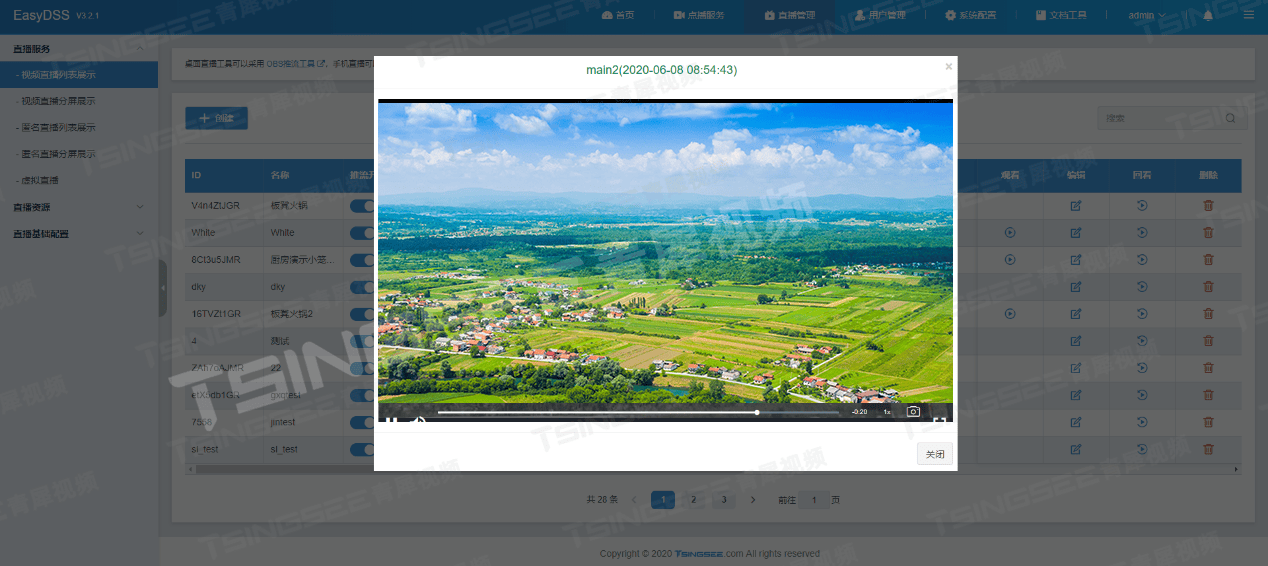
AR视频技术与EasyDSS流媒体视频管理平台:打造沉浸式视频体验
随着增强现实(AR)技术的飞速发展,其在各个领域的应用日益广泛。这项技术通过实时计算摄影机影像的位置及角度,将虚拟信息叠加到真实世界中,为用户带来超越现实的感官体验。AR视频技术不仅极大地丰富了我们的视觉体验&a…...
- 逻辑回归)
每天一个数据分析题(三百九十九)- 逻辑回归
逻辑回归中,若选0.5作为阈值区分正负样本,其决策平面是( ) A. wxb= 0 B. wxb= 1 C. wxb= -1 D. wxb= 2 数据分析认证考试介绍:点击进入 题目来源于CDA模拟题库 点…...

【ARMv8/v9 GIC 系列 5.2 -- GIC 分组介绍:Group 0 |Group 1| Non-Secure Group 1】
请阅读【ARM GICv3/v4 实战学习 】 文章目录 GIC Interrupt grouping中断分组配置寄存器GIC 中断分组介绍Group 0(安全组0)Group 1(安全组1)Non-Secure Group 1(非安全组1)总结及例子GIC Interrupt grouping ARM GICv3 通过中断分组机制,与ARMv8异常模型和安全模型进行…...

前端代码规范 - 日志打印规范
在前端开发中,随着项目迭代升级,日志打印逐渐风格不一,合理的日志输出是监控应用状态、调试代码和跟踪用户行为的重要手段。一个好的日志系统能够帮助开发者快速定位问题,提高开发效率。本文将介绍如何在前端项目中制定日志输出规…...
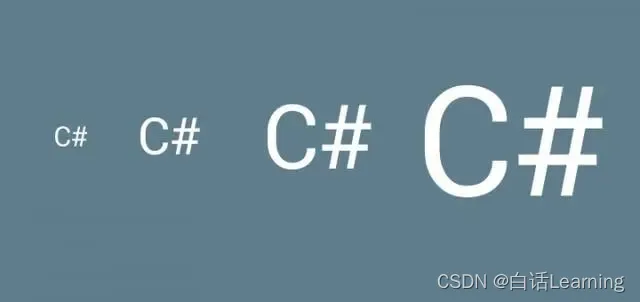
C# 类型转换之显式和隐式
文章目录 1、显式类型转换2. 隐式类型转换3. 示例4. 类型转换的注意事项5. 类型转换的应用示例总结 在C#编程中,类型转换是一个核心概念,它允许我们在程序中处理不同类型的数据。类型转换可以分为两大类:显式类型转换(Explicit Ca…...
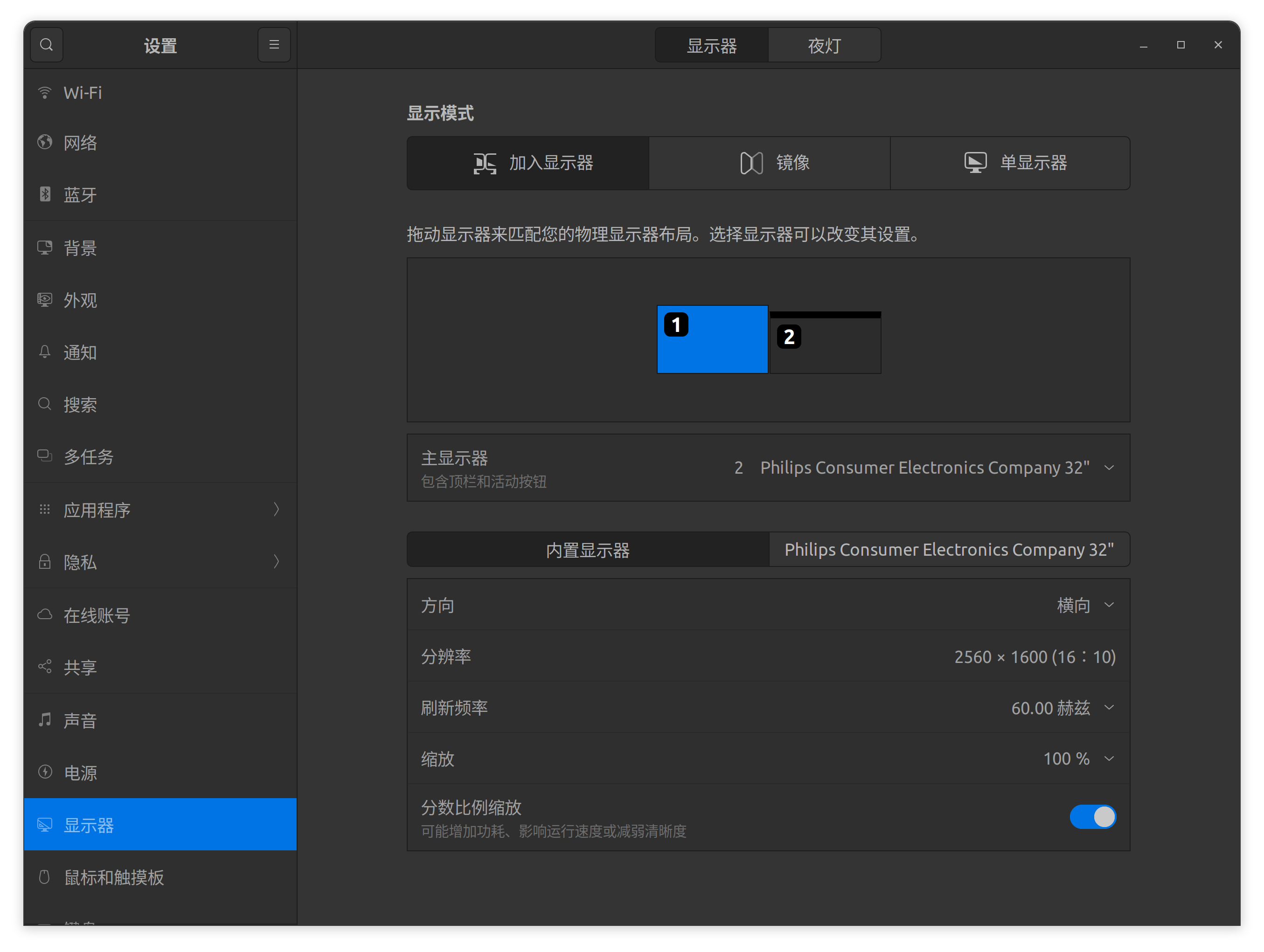
Ubuntu多显示器设置不同缩放比例
Ubuntu多显示器设置不同缩放比例 设备问题解决方案 设备 笔记本屏幕分辨率为2560 \times 1600,外接显示器的分辨率为3840 \times 2160。 问题 Ubuntu默认的显示器设置中,缩放仅能选择100%,200%,300%,400%。假…...

以太网协议介绍——UDP
注:需要先了解一些以太网的背景知识,方便更好理解UDP协议、 以太网基础知识一 以太网基础知识二 UDP协议 UDP即用户数据报协议,是一种面向无连接的传输层协议,属于 TCP/IP 协议簇的一种。UDP具有消耗资源少、通信效率高等优点&a…...

ThinkPad开机嘀嘀响或报2100/2110错误?可能是硬盘松了!自己动手检测与修复指南
ThinkPad开机嘀嘀响或报2100/2110错误?三步排查硬盘接触不良问题ThinkPad用户对那个标志性的开机"嘀嘀"声再熟悉不过——正常情况下它意味着系统自检通过。但当这个声音变成急促的报警音,伴随屏幕上出现"2100 Detection error"或&qu…...

用STM32CubeMX和HAL库快速上手WS2812B:告别手动计算延时,一键生成驱动框架
基于STM32CubeMX的WS2812B智能灯光控制:从零构建现代化驱动方案在智能硬件和物联网设备快速发展的今天,WS2812B可编程LED灯带因其丰富的色彩表现和简单的单线控制方式,成为创客和工程师们最喜爱的显示组件之一。然而,传统的寄存器…...

D3KeyHelper:暗黑3玩家的智能按键助手,告别重复操作疲劳
D3KeyHelper:暗黑3玩家的智能按键助手,告别重复操作疲劳 【免费下载链接】D3keyHelper D3KeyHelper是一个有图形界面,可自定义配置的暗黑3鼠标宏工具。 项目地址: https://gitcode.com/gh_mirrors/d3/D3keyHelper 你是否曾在《暗黑破坏…...
:这份内部测试SOP已被3家头部科技公司紧急采购)
DeepSeek-R1补全能力封测倒计时(仅剩72小时开放API灰度权限):这份内部测试SOP已被3家头部科技公司紧急采购
更多请点击: https://intelliparadigm.com 第一章:DeepSeek-R1代码补全能力封测全景概览 DeepSeek-R1 是深度求索(DeepSeek)推出的高性能开源推理模型,在代码补全场景中展现出显著的上下文理解力与多语言泛化能力。本…...

基于ESP32的AIS转WiFi转换器:实现NMEA 0183数据无线传输
1. 项目概述:从VHF-AIS接收器到iPad的无线桥梁作为一名经常在海上折腾电子设备的航海爱好者,我最近遇到了一个挺实际的需求:我的主力导航设备是iPad上的iSailor应用,它功能强大、界面友好,但有个“硬伤”——它需要通过…...

Windows Cleaner深度解析:5大核心模块彻底解决系统空间不足问题
Windows Cleaner深度解析:5大核心模块彻底解决系统空间不足问题 【免费下载链接】WindowsCleaner Windows Cleaner——专治C盘爆红及各种不服! 项目地址: https://gitcode.com/gh_mirrors/wi/WindowsCleaner Windows Cleaner是一款完全免费开源的…...

PvZ Toolkit终极指南:三步掌握植物大战僵尸最强修改器
PvZ Toolkit终极指南:三步掌握植物大战僵尸最强修改器 【免费下载链接】pvztoolkit 植物大战僵尸 PC 版综合修改器 项目地址: https://gitcode.com/gh_mirrors/pv/pvztoolkit PvZ Toolkit是一款专为植物大战僵尸PC版设计的综合修改器工具,能够让你…...

对比按量计费与Token Plan套餐的实际成本差异
🚀 告别海外账号与网络限制!稳定直连全球优质大模型,限时半价接入中。 👉 点击领取海量免费额度 对比按量计费与Token Plan套餐的实际成本差异 在构建和运营基于大模型的应用时,成本控制是一个核心的工程考量。Taotok…...

通过TaotokenCLI工具一键配置开发环境接入参数
🚀 告别海外账号与网络限制!稳定直连全球优质大模型,限时半价接入中。 👉 点击领取海量免费额度 通过Taotoken CLI工具一键配置开发环境接入参数 对于需要接入多个大模型服务的开发者而言,手动配置每个项目的API密钥、…...

Jetson Orin上TVA模型DLA精准卸载配置
重磅预告:本专栏将独家连载系列丛书《智能体视觉技术与应用》部分精华内容,该书是世界首套系统阐述“因式智能体”视觉理论与实践的专著,特邀美国 TypeOne 公司首席科学家、斯坦福大学博士 Bohan 担任技术顾问。Bohan先生师从美国三院院士、“…...