
spring-boot2.x整合Kafka步骤
1.pom依赖添加
<properties><java.version>1.8</java.version><project.build.sourceEncoding>UTF-8</project.build.sourceEncoding><maven.compiler.source>1.8</maven.compiler.source><maven.compiler.target>1.8</maven.compiler.target></properties><parent><groupId>org.springframework.boot</groupId><artifactId>spring-boot-starter-parent</artifactId><version>2.7.18</version><relativePath /> <!-- lookup parent from repository --></parent><dependencies><!-- https://mvnrepository.com/artifact/org.springframework.boot/spring-boot-starter-web --><dependency><groupId>org.springframework.boot</groupId><artifactId>spring-boot-starter-web</artifactId><exclusions><exclusion><groupId>ch.qos.logback</groupId><artifactId>logback-core</artifactId></exclusion><exclusion><groupId>ch.qos.logback</groupId><artifactId>logback-classic</artifactId></exclusion></exclusions></dependency><!-- https://mvnrepository.com/artifact/org.springframework.boot/spring-boot --><dependency><groupId>org.springframework.boot</groupId><artifactId>spring-boot</artifactId></dependency><dependency><groupId>org.springframework</groupId><artifactId>spring-context-support</artifactId></dependency><dependency><groupId>org.slf4j</groupId><artifactId>slf4j-log4j12</artifactId></dependency><!-- https://mvnrepository.com/artifact/org.springframework.boot/spring-boot-autoconfigure --><dependency><groupId>org.springframework.boot</groupId><artifactId>spring-boot-autoconfigure</artifactId></dependency><!-- https://mvnrepository.com/artifact/org.springframework.kafka/spring-kafka --><dependency><groupId>org.springframework.kafka</groupId><artifactId>spring-kafka</artifactId></dependency></dependencies>2. 配置文件添加配置:
server:port: 8080spring:application:name: application-kafkakafka:bootstrap-servers: 192.168.190.100:9092,192.168.190.101:9092 #这个是kafka的地址,对应你server.properties中配置的producer:batch-size: 16384 #批量大小acks: 1 #应答级别:多少个分区副本备份完成时向生产者发送ack确认(可选0、1、all/-1)retries: 10 # 消息发送重试次数#transaction-id-prefix: transactionbuffer-memory: 33554432key-serializer: org.apache.kafka.common.serialization.StringSerializervalue-serializer: org.apache.kafka.common.serialization.StringSerializerproperties:linger:ms: 2000 #提交延迟#partitioner: #指定分区器#class: com.test.config.CustomerPartitionHandlerconsumer:group-id: testGroup,testg2 #默认的消费组IDenable-auto-commit: true #是否自动提交offsetauto-commit-interval: 2000 #提交offset延时# 当kafka中没有初始offset或offset超出范围时将自动重置offset# earliest:重置为分区中最小的offset;# latest:重置为分区中最新的offset(消费分区中新产生的数据);# none:只要有一个分区不存在已提交的offset,就抛出异常;auto-offset-reset: latestmax-poll-records: 500 #单次拉取消息的最大条数key-deserializer: org.apache.kafka.common.serialization.StringDeserializervalue-deserializer: org.apache.kafka.common.serialization.StringDeserializerproperties:session:timeout:ms: 120000 # 消费会话超时时间(超过这个时间 consumer 没有发送心跳,就会触发 rebalance 操作)request:timeout:ms: 18000 # 消费请求的超时时间listener:missing-topics-fatal: false # consumer listener topics 不存在时,启动项目就会报错
#      type: batchlogging:config: classpath:log4j2.xml
3. 日志配置
<?xml version="1.0" encoding="UTF-8"?>
<Configuration status="INFO"><!--全局参数--><Properties><Property name="pattern">%d{yyyy-MM-dd HH:mm:ss,SSS} %5p %c{1}:%L - %m%n</Property>
<!--         <Property name="logDir">/data/logs/logViewer</Property> --><Property name="logDir">logs</Property></Properties><Appenders><!-- 定义输出到控制台 --><Console name="console" target="SYSTEM_OUT" follow="true"><!--控制台只输出level及以上级别的信息-->
<!--             <ThresholdFilter level="debug" onMatch="ACCEPT" onMismatch="DENY"/> --><PatternLayout><Pattern>${pattern}</Pattern></PatternLayout></Console><!-- 同一来源的Appender可以定义多个RollingFile,定义按天存储日志 --><RollingFile name="rolling_file"fileName="${logDir}/logViewer.log"filePattern="${logDir}/logViewer_%d{yyyy-MM-dd}.log"><ThresholdFilter level="INFO" onMatch="ACCEPT" onMismatch="DENY"/><PatternLayout><Pattern>${pattern}</Pattern></PatternLayout><Policies><TimeBasedTriggeringPolicy interval="1"/></Policies><!-- 日志保留策略,配置只保留七天 --><DefaultRolloverStrategy><Delete basePath="${logDir}/" maxDepth="1"><IfFileName glob="logViewer_*.log" /><IfLastModified age="7d" /></Delete></DefaultRolloverStrategy></RollingFile></Appenders><Loggers><Root level="INFO"><AppenderRef ref="console"/><AppenderRef ref="rolling_file"/></Root></Loggers>
</Configuration>
4. controller入口类,其它应用通过该接口直接将数据写入kafka
@RequestMapping(value="/kafka")
@Controller
public class ProducerController {@Autowiredprivate KafkaTemplate kafkaTemplate;//    模拟发送消息@RequestMapping(value = "/send",method = RequestMethod.GET)public String sendMessage(@PathParam(value = "msg") String msg) {System.out.println("收到get请求。。。");kafkaTemplate.send("test",msg);return "成功";}
5. kafka回调方法(需要回调通知时使用该方式):
@GetMapping("/kafka/callbackTwo/{message}")public void sendCallbackTwoMessage(@PathVariable("message") String message) {kafkaTemplate.send("test", message).addCallback(new ListenableFutureCallback<SendResult<String, Object>>() {@Overridepublic void onFailure(Throwable throwable) {System.out.println("发送消息失败2:"+throwable.getMessage());}@Overridepublic void onSuccess(SendResult<String, Object> result) {System.out.println("发送消息成功2:" + result.getRecordMetadata().topic() + "-"+ result.getRecordMetadata().partition() + "-" + result.getRecordMetadata().offset());}});}6.kafka消费者注册
@Component
public class KafkaMessageListener {private static final Logger LOGGER = LoggerFactory.getLogger(KafkaMessageListener.class);/*** containerFactory* 消息过滤器消息过滤器可以在消息抵达consumer之前被拦截,在实际应用中,我们可以根据自己的业务逻辑,筛选出需要的信息再交由KafkaListener处理,不需要的消息则过滤掉。配置消息过滤只需要为 监听器工厂 配置一个RecordFilterStrategy(消息过滤策略),返回true的时候消息将会被抛弃,返回false时,消息能正常抵达监听容器。* @param record*/@KafkaListener(topics = {"test","test2"},groupId = "testGroup")public void listenTestStatus(ConsumerRecord<?, ?> record) {LOGGER.info("接收到消息:开始业务处理。。。。。");if (null == record || null == record.value()) {LOGGER.info("接收到空数据,跳过");}else {LOGGER.info("test-topics -->kafka监听到的值为: {}", record.value().toString());}}@KafkaListener(topics = {"test"},groupId = "testg2")public void listenTest2(ConsumerRecord<?, ?> record) {LOGGER.info("###listenTest2接收到消息:开始业务处理。。。。。");if (null == record || null == record.value()) {LOGGER.info("接收到空数据,跳过");}else {LOGGER.info("test-topics -->kafka监听到的值为: {}", record.value().toString());}}/*** id:消费者IDgroupId:消费组IDtopics:监听的topic,可监听多个topicPartitions:可配置更加详细的监听信息,可指定topic、parition、offset监听,手动分区* @param records*///批量消费@KafkaListener(id = "consumer2", topics = {"test"}, groupId = "testGroup",errorHandler = "consumerAwareErrorHandler")public void onBatchMessage(List<ConsumerRecord<String, Object>> records) {System.out.println(">>> 批量消费一次,recoreds.size()=" + records.size());for (ConsumerRecord<String, Object> record : records) {System.out.println(record.value());}}
7.非spring-boot环境下使用java原生API手写kafka生产消息:
 public static void main(String[] args) throws ExecutionException, InterruptedException {//PART1:设置发送者相关属性Properties props = new Properties();// 此处配置的是kafka的端口props.put(ProducerConfig.BOOTSTRAP_SERVERS_CONFIG, BOOTSTRAP_SERVERS);
//        props.put(ProducerConfig.INTERCEPTOR_CLASSES_CONFIG,"com.roy.kfk.basic.MyInterceptor");// 配置key的序列化类props.put(ProducerConfig.KEY_SERIALIZER_CLASS_CONFIG,"org.apache.kafka.common.serialization.StringSerializer");// 配置value的序列化类props.put(ProducerConfig.VALUE_SERIALIZER_CLASS_CONFIG,"org.apache.kafka.common.serialization.StringSerializer");Producer<String,String> producer = new KafkaProducer<>(props);for(int i = 0; i < 5; i++) {//Part2:构建消息ProducerRecord<String, String> record = new ProducerRecord<>("test", Integer.toString(i), "MyProducer" + i);//Part3:发送消息//单向发送:不关心服务端的应答。producer.send(record);System.out.println("message "+i+" sended");}//消息处理完才停止发送者。producer.close();}
8.非spring-boot环境下使用java原生API手写java手写kafka消费者:
 public static void main(String[] args) {//PART1:设置发送者相关属性Properties props = new Properties();//kafka地址props.put(ConsumerConfig.BOOTSTRAP_SERVERS_CONFIG, MyProducerTest.BOOTSTRAP_SERVERS);//每个消费者要指定一个groupprops.put(ConsumerConfig.GROUP_ID_CONFIG, "test");//key序列化类props.put(ConsumerConfig.KEY_DESERIALIZER_CLASS_CONFIG, "org.apache.kafka.common.serialization.StringDeserializer");//value序列化类props.put(ConsumerConfig.VALUE_DESERIALIZER_CLASS_CONFIG, "org.apache.kafka.common.serialization.StringDeserializer");Consumer<String, String> consumer = new KafkaConsumer<>(props);consumer.subscribe(Arrays.asList("test"));while (true) {//PART2:拉取消息// 100毫秒超时时间ConsumerRecords<String, String> records = consumer.poll(Duration.ofSeconds(1));//PART3:处理消息for (ConsumerRecord<String, String> record : records) {System.out.println("partition = "+record.partition()+"offset = " + record.offset() + ";key = " + record.key() + "; value= " + record.value());}//提交offset,消息就不会重复推送。consumer.commitSync(); //同步提交,表示必须等到offset提交完毕,再去消费下一批数据。
//            consumer.commitAsync(); //异步提交,表示发送完提交offset请求后,就开始消费下一批数据了。不用等到Broker的确认。}
9.非spring-boot环境下使用java原生API手写异步发送kafka:
public static void main(String[] args) throws ExecutionException, InterruptedException {//PART1:设置发送者相关属性Properties props = new Properties();// 此处配置的是kafka的端口props.put(ProducerConfig.BOOTSTRAP_SERVERS_CONFIG, MyProducerTest.BOOTSTRAP_SERVERS);// 配置key的序列化类props.put(ProducerConfig.KEY_SERIALIZER_CLASS_CONFIG,"org.apache.kafka.common.serialization.StringSerializer");// 配置value的序列化类props.put(ProducerConfig.VALUE_SERIALIZER_CLASS_CONFIG,"org.apache.kafka.common.serialization.StringSerializer");Producer<String,String> producer = new KafkaProducer<>(props);CountDownLatch latch = new CountDownLatch(5);for(int i = 0; i < 5; i++) {//Part2:构建消息ProducerRecord<String, String> record = new ProducerRecord<>("test", Integer.toString(i), "MyProducer" + i);//Part3:发送消息//异步发送:消息发送后不阻塞,服务端有应答后会触发回调函数producer.send(record, new Callback() {@Overridepublic void onCompletion(RecordMetadata recordMetadata, Exception e) {if(null != e){System.out.println("消息发送失败,"+e.getMessage());e.printStackTrace();}else{String topic = recordMetadata.topic();long offset = recordMetadata.offset();String message = recordMetadata.toString();System.out.println("message:["+ message+"] sended with topic:"+topic+";offset:"+offset);}latch.countDown();}});}//消息处理完才停止发送者。latch.await();//消息处理完才停止发送者。producer.close();}相关文章:

spring-boot2.x整合Kafka步骤
1.pom依赖添加 <properties><java.version>1.8</java.version><project.build.sourceEncoding>UTF-8</project.build.sourceEncoding><maven.compiler.source>1.8</maven.compiler.source><maven.compiler.target>1.8</ma…...

信创学习笔记(四),信创之数据库DB思维导图
创作不易 只因热爱!! 热衷分享,一起成长! “你的鼓励就是我努力付出的动力” 一. 信创学习回顾 1.信创内容 信创内容思维导图 2.信创之CPU芯片架构 信创之CPU芯片架构思维导图 3.信创之操作系统OS 信创之操作系统OS思维导图 二. 信创之国产数据库DB思维导图 …...

SCP 使用教程
SCP(Secure Copy Protocol)是一种通过加密的方式在本地主机和远程主机之间安全地传输文件的协议。它是基于SSH协议的扩展,允许用户在不同主机之间进行文件复制和传输,是Linux和Unix系统中常用的工具之一。本教程将详细介绍SCP的基…...

python自动化之用flask校验接口token(把token作为参数)
用到的库:flask 实现效果: 写一个接口,需要token正确才能登录 代码: # 导包 from flask import Flask,request,jsonify,json # 创建一个服务 appFlask(__name__) # post请求,路径:/query app.route(/query, met…...
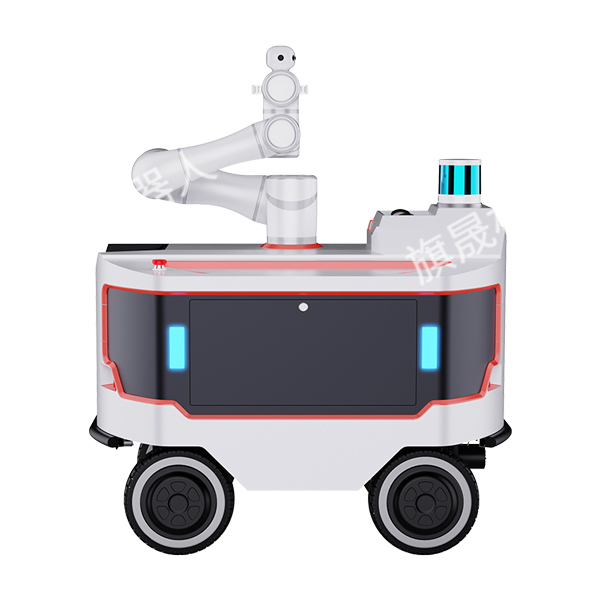
旗晟巡检机器人的应用场景有哪些?
巡检机器人作为现代科技的杰出成果,已广泛应用于各个关键场景。从危险的工业现场到至关重要的基础设施,它们的身影无处不在。它们以精准、高效、不知疲倦的特性,担当起保障生产、守护安全的重任,为行业发展注入新的活力。那么&…...

vue2迁移到vue3注意点
vue2迁移到vue3注意点 1、插槽的修改 使用 #default , 以及加上template 模板 2、 类型的定义,以及路由,vue相关资源(ref, reactive,watch)的引入等 3、类装饰器 1)vue-class-component是vue官方库,作…...

使用windows批量解压和布局ImageNet ISLVRC2012数据集
使用的系统是windows,找到的解压命令很多都linux系统中的,为了能在windows系统下使用,因此下载Git这个软件,在其中的Git Bash中使用以下命令,因为Git Bash集成了很多linux的命令,方便我们的使用。 ImageNe…...

css实现每个小盒子占32%,超出就换行
代码 <div class"visitors"><visitor class"item" v-for"(user,index) in userArr" :key"user.id" :user"user" :index"index"></visitor></div><style lang"scss" scoped&…...

C++的链接指示extern “C“
目录 链接指示extern "C"A.What(概念)B.Why(extern "C"的作用)C.How (如何使用链接指示extern "C") 链接指示extern “C” A.What(概念) extern&quo…...

私域运营 组织架构
**揭秘私域社群运营的神秘面纱:角色与职能一网打尽!** 在私域社群运营的大舞台上,每个角色都扮演着不可或缺的重要角色。今天,就让我们一起揭开这个神秘世界的面纱,看看这些角色们是如何协同作战,共同创造…...

Netty HTTP
Netty 是一个高性能的异步事件驱动的网络应用程序框架,支持快速开发可维护的高性能协议服务器和客户端。它广泛应用于开发网络应用程序,如服务器和客户端协议的实现。Netty 提供了对多种传输类型的抽象,如 TCP/IP 和 UDP/IP 等,使…...

什么是边缘计算技术和边缘计算平台?
随着物联网、5G技术和人工智能的不断发展,数据的规模和种类也在快速增加。在这种背景下,传统的云计算模式面临着一些问题,例如延迟高、网络拥塞等,这些问题限制了数据的处理速度和效率,降低了用户的使用体验。为了解决…...
自然语言处理(NLP)——法国工程师IMT联盟 期末考试题
1. 问题1 (法语)En langue arabe lcrasante majorit des mots sont forms par des combinaisons de racines et de schmes. Dans ce mcanisme... (英语)In Arabic language the vast majority(十之八九) of…...

Linux内核编译安装 - Deepin,Debian系
为什么要自己编译内核 优点 定制化:你可以根据自己的硬件和需求配置内核,去掉不必要的模块,优化性能。性能优化:移除不需要的驱动程序和特性,减小内核体积,提高系统性能。最新特性和修复:获取…...

安全防御,防火墙配置NAT转换智能选举综合实验
目录: 一、实验拓扑图 二、实验需求 三、实验大致思路 四、实验步骤 1、防火墙的相关配置 2、ISP的配置 2.1 接口ip地址配置: 3、新增设备地址配置 4、多对多的NAT策略配置,但是要保存一个公网ip不能用来转换,使得办公区的…...

追溯源码观察HashMap底层原理
引言(Map的重要性) 从事Java的小伙伴,在面试的时候几乎都会被问到Map,Map都被盘包浆了。Map是键值集合,使用的场景有很多比如缓存、数据索引、数据去重等场景,在算法中也经常出现,因为在Map中获…...

为什么渲染农场渲染的是帧,而不是视频?
在3D动画产业的壮阔画卷中,渲染农场作为幕后英雄,以其庞大的计算能力支撑起无数视觉奇观的诞生。这些由高性能计算机集群构成的系统,通过独特的逐帧渲染策略,解锁了单机难以企及的创作自由与效率。本文将深入剖析这一策略背后的逻…...

windows镜像下载网站
一个专注于提供精校、完整、极致的Windows系统下载服务的仓储站,网站托管于Github。 网站:https://hellowindows.cn/ 下载方式:ED2k,BT,百度网盘 MSDN - 山己几子木,提供Windows 11、Windows 10等不同版本…...

ollama + fastgpt 搭建免费本地知识库
目录 1、ollama ollama的一些操作命令: 使用的方式: 2、fastgpt 快速部署: 修改配置: config.json: docker-compose.yml: 运行fastgpt: 访问OneApi: 添加令牌和渠道: 登陆fastgpt,创建知识库和应用 3、总结: 附录: 1. 11434是ollama的端口: 2. m3e 测…...

pytorch中一些最基本函数和类
1.Tensor操作 Tensor是PyTorch中最基本的数据结构,类似于NumPy的数组,但可以在GPU上运行加速计算。 示例:创建和操作Tensor import torch# 创建一个零填充的Tensor x torch.zeros(3, 3) print(x)# 加法操作 y torch.ones(3, 3) z x y pr…...

ARM裸机开发:从异常处理到协作式调度器的实战指南
1. 项目概述:从“异常”切入,理解ARM裸机开发的本质如果你刚开始接触ARM嵌入式开发,可能会觉得“异常”这个词有点吓人,听起来像是程序出了什么大问题。但恰恰相反,在ARM裸机开发的世界里,“异常”是系统与…...

论文排版不求人:手把手教你用Word样式搞定独立目录、分栏与页眉页脚
论文排版不求人:Word样式驱动的全流程排版解决方案 在学术写作中,内容质量与格式规范同等重要。一篇结构清晰、排版专业的论文不仅能提升阅读体验,更能体现研究者的严谨态度。然而,许多学者和学生在面对Word复杂的排版功能时常常陷…...

香橙派Lite全解析:从硬件到应用,玩转ARM开发板与物联网项目
1. 香橙派Lite:一张能装进口袋的“万能主板”如果你对树莓派(Raspberry Pi)这类单板电脑有所耳闻,但又觉得它价格偏高或者想尝试更多选择,那么来自中国的香橙派(Orange Pi)系列绝对值得你深入了…...

在Node.js后端服务中集成Taotoken实现多模型异步调用的教程
🚀 告别海外账号与网络限制!稳定直连全球优质大模型,限时半价接入中。 👉 点击领取海量免费额度 在Node.js后端服务中集成Taotoken实现多模型异步调用的教程 对于需要在后端服务中调用大语言模型的Node.js开发者而言,…...

哪家网卡公司靠谱必看5大关键清单 企业采购专属版
选网卡公司的3个常见决策误区很多企业采购网卡时踩坑,往往是陷入了三个常见的决策误区。第一个误区是唯价格论,过度压低采购预算,优先选择报价较低的供应商,忽略了产品的授权资质和正品保障,后续容易买到翻新、贴牌的不…...

无人机避障新思路:拆解EGO-Planner如何用B样条和“斥力点”省掉ESDF
无人机避障新思路:拆解EGO-Planner如何用B样条和“斥力点”省掉ESDF 当四旋翼无人机在复杂环境中穿行时,传统的避障算法往往需要构建完整的欧几里得符号距离场(ESDF),这就像要求无人机在飞行前必须绘制整个城市的等高线…...
)
【会议征稿通知 | E3S出版 | EI 、Scopus稳定检索】第十二届能源材料与环境工程国际学术会议(ICEMEE 2026)
第十二届能源材料与环境工程国际学术会议(ICEMEE 2026) 2026 12th International Conference on Energy Materials and Environment Engineering 2026年6月12-14日 | 线上会议 大会官网:www.icemee.net 截稿时间:见官网&#x…...

Tina Linux syslog实战指南:从架构解析到嵌入式日志管理优化
1. 项目概述:为什么你需要关注Tina Linux的syslog在嵌入式Linux开发,尤其是基于全志Tina Linux这类高度定制化的平台上,日志系统是开发者定位问题、监控系统状态的“眼睛”。很多刚接触Tina Linux的朋友,可能会觉得系统日志&#…...

Webhook测试工具终极对决:开源自建与云端托管的决策指南
Webhook测试工具终极对决:开源自建与云端托管的决策指南 【免费下载链接】webhook.site ⚓️ Easily test HTTP webhooks with this handy tool that displays requests instantly. 项目地址: https://gitcode.com/gh_mirrors/we/webhook.site 在当今API驱动…...

如何在3分钟内搭建Excel MCP Server:无需安装Microsoft Excel的终极指南
如何在3分钟内搭建Excel MCP Server:无需安装Microsoft Excel的终极指南 【免费下载链接】excel-mcp-server A Model Context Protocol server for Excel file manipulation 项目地址: https://gitcode.com/gh_mirrors/ex/excel-mcp-server 还在为没有Micros…...