
2024-07-19 Unity插件 Odin Inspector10 —— Misc Attributes
文章目录
- 1 说明
- 2 其他特性
- 2.1 CustomContextMenu
- 2.2 DisableContextMenu
- 2.3 DrawWithUnity
- 2.4 HideDuplicateReferenceBox
- 2.5 Indent
- 2.6 InfoBox
- 2.7 InlineProperty
- 2.8 LabelText
- 2.9 LabelWidth
- 2.10 OnCollectionChanged
- 2.11 OnInspectorDispose
- 2.12 OnInspectorGUI
- 2.13 OnInspectorInit
- 2.14 OnStateUpdate
- 2.15 OnValueChanged
- 2.16 TypeSelectorSettings
- 2.17 TypeRegistryItem
- 2.18 PropertyTooltip
- 2.19 SuffixLabel
1 说明
本文介绍 Odin Inspector 插件中其他特性的使用方法。
2 其他特性
2.1 CustomContextMenu
为对象的上下文菜单(右键该对象展开)添加自定义选项,当前不支持静态方法。
string menuItem菜单栏(“/ ”分隔子菜单)。
string action单击上下文菜单时要采取的操作方法名。
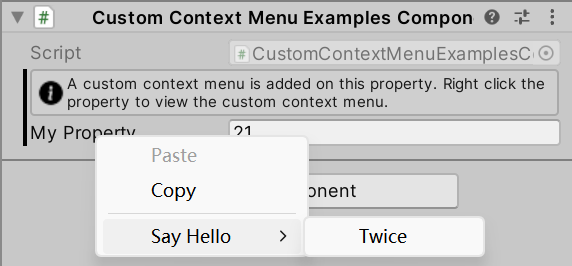
// CustomContextMenuExamplesComponent.csusing Sirenix.OdinInspector;
using UnityEngine;public class CustomContextMenuExamplesComponent : MonoBehaviour
{[InfoBox("A custom context menu is added on this property. Right click the property to view the custom context menu.")][CustomContextMenu("Say Hello/Twice", "SayHello")]public int MyProperty;private void SayHello() {Debug.Log("Hello Twice");}
}
2.2 DisableContextMenu
禁用 Odin 提供的所有右键单击上下文菜单,不会禁用 Unity 的上下文菜单。
bool disableForMember = true是否禁用成员本身的上下文菜单。
bool disableCollectionElements = false是否同时禁用集合元素的上下文菜单。
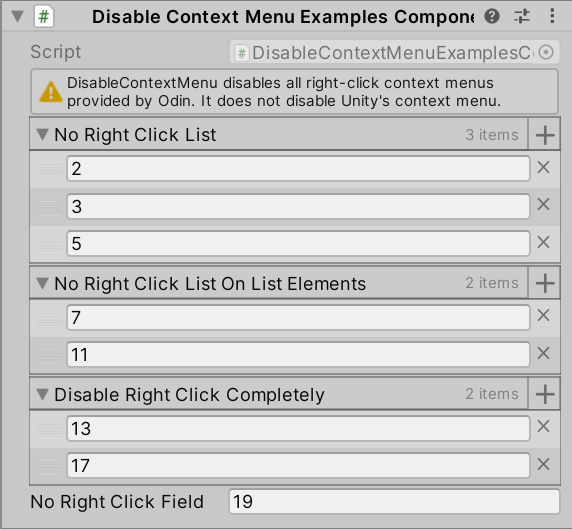
// DisableContextMenuExamplesComponent.csusing Sirenix.OdinInspector;
using UnityEngine;public class DisableContextMenuExamplesComponent : MonoBehaviour
{[InfoBox("DisableContextMenu disables all right-click context menus provided by Odin. It does not disable Unity's context menu.", InfoMessageType.Warning)][DisableContextMenu]public int[] NoRightClickList = new int[] { 2, 3, 5 };[DisableContextMenu(disableForMember: false, disableCollectionElements: true)]public int[] NoRightClickListOnListElements = new int[] { 7, 11 };[DisableContextMenu(disableForMember: true, disableCollectionElements: true)]public int[] DisableRightClickCompletely = new int[] { 13, 17 };[DisableContextMenu]public int NoRightClickField = 19;
}
2.3 DrawWithUnity
禁用特定成员的 Odin 绘图,而使用 Unity 的旧绘图系统进行绘制。
注意:
- 此特性并不意味着“完全禁用对象的 Odin”;本质上只是调用 Unity 的旧属性绘图系统,Odin 仍然最终负责安排对象的绘制。
- 其他特性的优先级高于此特性。
- 如果存在另一个特性来覆盖此特性,则不能保证会调用 Unity 绘制属性。
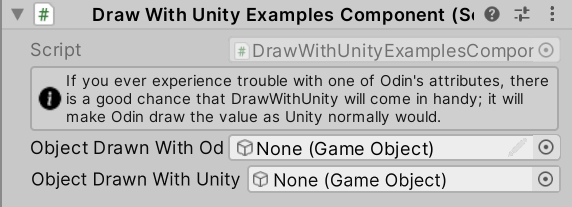
// DrawWithUnityExamplesComponent.csusing Sirenix.OdinInspector;
using UnityEngine;public class DrawWithUnityExamplesComponent : MonoBehaviour
{[InfoBox("If you ever experience trouble with one of Odin's attributes, there is a good chance that DrawWithUnity will come in handy; it will make Odin draw the value as Unity normally would.")]public GameObject ObjectDrawnWithOdin;[DrawWithUnity]public GameObject ObjectDrawnWithUnity;
}
2.4 HideDuplicateReferenceBox
如果由于遇到重复的引用值,而使此属性以其他方式绘制为对另一个属性的引用,则 Odin 将隐藏引用框。
注意:如果该值递归引用自身,则无论在所有递归绘制调用中是否使用此属性,都会绘制引用框。
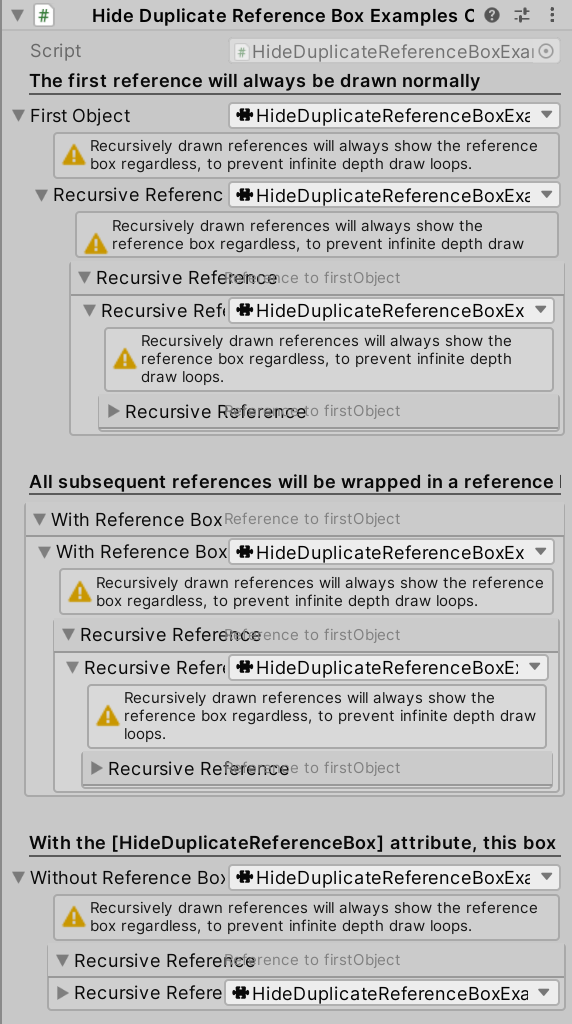
// HideDuplicateReferenceBoxExamplesComponent.csusing Sirenix.OdinInspector;
using UnityEngine;#if UNITY_EDITOR // Editor namespaces can only be used in the editor.
using Sirenix.Utilities.Editor;
#endifpublic class HideDuplicateReferenceBoxExamplesComponent : SerializedMonoBehaviour
{[PropertyOrder(1)]public ReferenceTypeClass firstObject;[PropertyOrder(3)]public ReferenceTypeClass withReferenceBox;[PropertyOrder(5)][HideDuplicateReferenceBox]public ReferenceTypeClass withoutReferenceBox;[OnInspectorInit]public void CreateData() {this.firstObject                    = new ReferenceTypeClass();this.withReferenceBox               = this.firstObject;this.withoutReferenceBox            = this.firstObject;this.firstObject.recursiveReference = this.firstObject;}public class ReferenceTypeClass{[HideDuplicateReferenceBox]public ReferenceTypeClass recursiveReference;#if UNITY_EDITOR // Editor-related code must be excluded from builds[OnInspectorGUI, PropertyOrder(-1)]private void MessageBox() {SirenixEditorGUI.WarningMessageBox("Recursively drawn references will always show the reference box regardless, to prevent infinite depth draw loops.");}
#endif}#if UNITY_EDITOR // Editor-related code must be excluded from builds[OnInspectorGUI, PropertyOrder(0)]private void MessageBox1() {SirenixEditorGUI.Title("The first reference will always be drawn normally", null, TextAlignment.Left, true);}[OnInspectorGUI, PropertyOrder(2)]private void MessageBox2() {GUILayout.Space(20);SirenixEditorGUI.Title("All subsequent references will be wrapped in a reference box", null, TextAlignment.Left, true);}[OnInspectorGUI, PropertyOrder(4)]private void MessageBox3() {GUILayout.Space(20);SirenixEditorGUI.Title("With the [HideDuplicateReferenceBox] attribute, this box is hidden", null, TextAlignment.Left, true);}
#endif
}
2.5 Indent
将对象标签向右缩进。
int indentLevel = 1缩进大小。
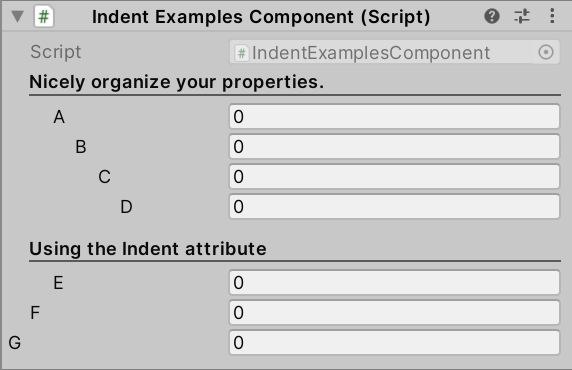
// IndentExamplesComponent.csusing Sirenix.OdinInspector;
using UnityEngine;public class IndentExamplesComponent : MonoBehaviour
{[Title("Nicely organize your properties.")][Indent]public int A;[Indent(2)]public int B;[Indent(3)]public int C;[Indent(4)]public int D;[Title("Using the Indent attribute")][Indent]public int E;[Indent(0)]public int F;[Indent(-1)]public int G;
}
2.6 InfoBox
在对象上方显示文本框以注释或警告。
string message消息内容。
SdfIconType icon图标。
string visibleIfMemberName = null用于显示或隐藏消息框的 bool 成员名称。
InfoMessageType infoMessageType = InfoMessageType.Info消息类型。
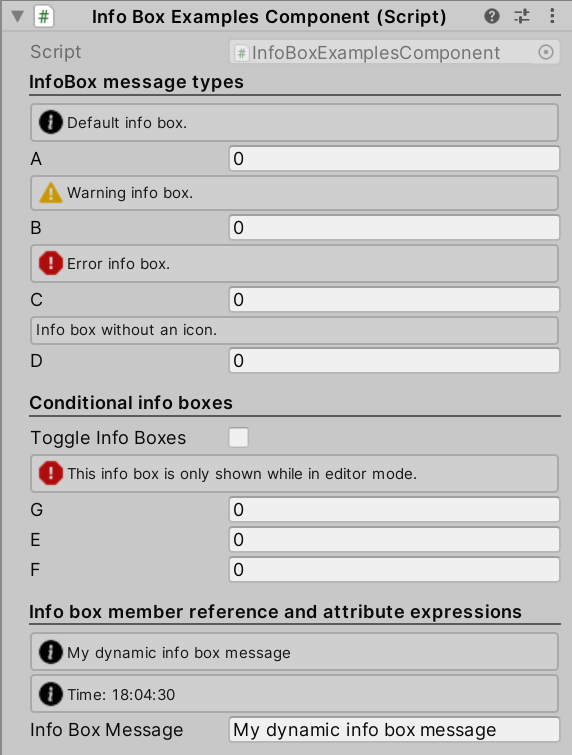
// InfoBoxExamplesComponent.csusing Sirenix.OdinInspector;
using UnityEngine;public class InfoBoxExamplesComponent : MonoBehaviour
{[Title("InfoBox message types")][InfoBox("Default info box.")]public int A;[InfoBox("Warning info box.", InfoMessageType.Warning)]public int B;[InfoBox("Error info box.", InfoMessageType.Error)]public int C;[InfoBox("Info box without an icon.", InfoMessageType.None)]public int D;[Title("Conditional info boxes")]public bool ToggleInfoBoxes;[InfoBox("This info box is only shown while in editor mode.", InfoMessageType.Error, "IsInEditMode")]public float G;[InfoBox("This info box is hideable by a static field.", "ToggleInfoBoxes")]public float E;[InfoBox("This info box is hideable by a static field.", "ToggleInfoBoxes")]public float F;[Title("Info box member reference and attribute expressions")][InfoBox("$InfoBoxMessage")][InfoBox("@\"Time: \" + DateTime.Now.ToString(\"HH:mm:ss\")")]public string InfoBoxMessage = "My dynamic info box message";private static bool IsInEditMode() {return !Application.isPlaying;}
}
2.7 InlineProperty
将类型的内容显示在标签旁,而不是以折叠方式呈现。
int LabelWidth为所有子属性指定标签宽度。
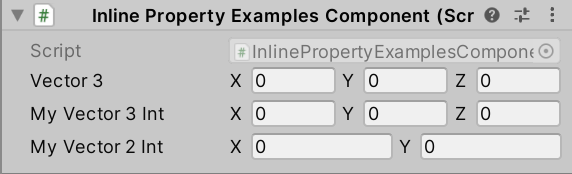
// InlinePropertyExamplesComponent.csusing Sirenix.OdinInspector;
using System;
using UnityEngine;public class InlinePropertyExamplesComponent : MonoBehaviour
{public Vector3 Vector3;public Vector3Int MyVector3Int;[InlineProperty(LabelWidth = 13)]public Vector2Int MyVector2Int;[Serializable][InlineProperty(LabelWidth = 13)]public struct Vector3Int{[HorizontalGroup]public int X;[HorizontalGroup]public int Y;[HorizontalGroup]public int Z;}[Serializable]public struct Vector2Int{[HorizontalGroup]public int X;[HorizontalGroup]public int Y;}
}
2.8 LabelText
更改对象在 Inspector 窗口中显示的标签内容。
string text标签内容。
SdfIconType icon图标。
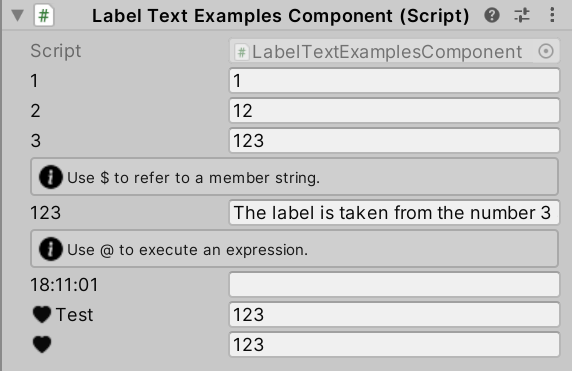
// LabelTextExamplesComponent.csusing Sirenix.OdinInspector;
using UnityEngine;public class LabelTextExamplesComponent : MonoBehaviour
{[LabelText("1")]public int MyInt1 = 1;[LabelText("2")]public int MyInt2 = 12;[LabelText("3")]public int MyInt3 = 123;[InfoBox("Use $ to refer to a member string.")][LabelText("$MyInt3")]public string LabelText = "The label is taken from the number 3 above";[InfoBox("Use @ to execute an expression.")][LabelText("@DateTime.Now.ToString(\"HH:mm:ss\")")]public string DateTimeLabel;[LabelText("Test", SdfIconType.HeartFill)]public int LabelIcon1 = 123;[LabelText("", SdfIconType.HeartFill)]public int LabelIcon2 = 123;
}
2.9 LabelWidth
指定标签绘制的宽度。
float width宽度。
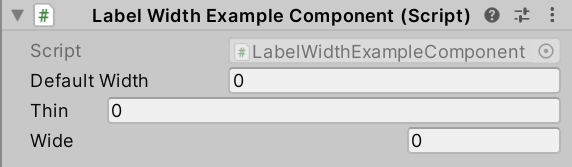
// LabelWidthExampleComponent.csusing Sirenix.OdinInspector;
using UnityEngine;public class LabelWidthExampleComponent : MonoBehaviour
{public int DefaultWidth;[LabelWidth(50)]public int Thin;[LabelWidth(250)]public int Wide;
}
2.10 OnCollectionChanged
通过 Inspector 窗口更改集合时,触发指定事件回调。
适用于具有集合解析器的集合,包括数组、列表、字典、哈希集、堆栈和链表。
注意:此特性仅在编辑器中有效!由脚本更改的集合不会触发回调事件!
string before/after更改前 / 后触发的事件回调。
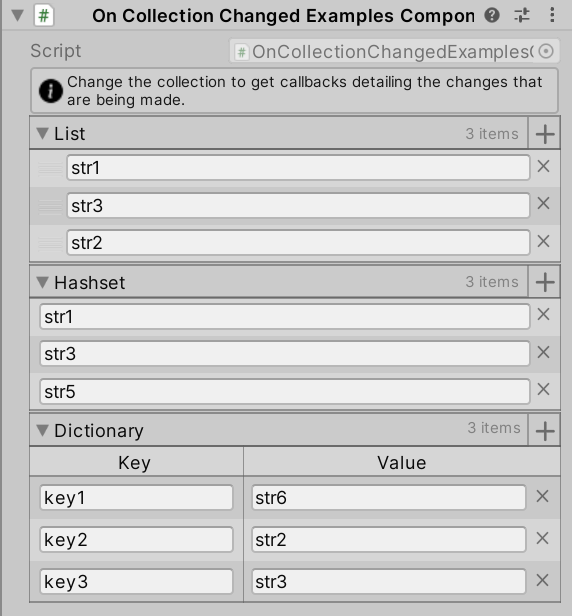
// OnCollectionChangedExamplesComponent.csusing Sirenix.OdinInspector;
using System.Collections.Generic;
using UnityEngine;#if UNITY_EDITOR // Editor namespaces can only be used in the editor.
using Sirenix.OdinInspector.Editor;
#endifpublic class OnCollectionChangedExamplesComponent : SerializedMonoBehaviour
{[InfoBox("Change the collection to get callbacks detailing the changes that are being made.")][OnCollectionChanged("Before", "After")]public List<string> list = new List<string>() { "str1", "str2", "str3" };[OnCollectionChanged("Before", "After")]public HashSet<string> hashset = new HashSet<string>() { "str1", "str2", "str3" };[OnCollectionChanged("Before", "After")]public Dictionary<string, string> dictionary = new Dictionary<string, string>() { { "key1", "str1" }, { "key2", "str2" }, { "key3", "str3" } };#if UNITY_EDITOR // Editor-related code must be excluded from buildspublic void Before(CollectionChangeInfo info, object value) {Debug.Log("Received callback BEFORE CHANGE with the following info: " + info + ", and the following collection instance: " + value);}public void After(CollectionChangeInfo info, object value) {Debug.Log("Received callback AFTER CHANGE with the following info: " + info + ", and the following collection instance: " + value);}
#endif
}
2.11 OnInspectorDispose
对象在 Inspector 窗口中被释放时(更改对象或 Inspector 窗口被隐藏 / 关闭)执行回调。
string action要调用的方法名称,或要执行的表达式。
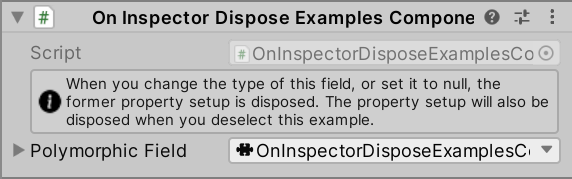
// OnInspectorDisposeExamplesComponent.csusing Sirenix.OdinInspector;
using UnityEngine;public class OnInspectorDisposeExamplesComponent : MonoBehaviour
{[OnInspectorDispose("@UnityEngine.Debug.Log(\"Dispose event invoked!\")")][ShowInInspector, InfoBox("When you change the type of this field, or set it to null, the former property setup is disposed. The property setup will also be disposed when you deselect this example."), DisplayAsString]public BaseClass PolymorphicField;public abstract class BaseClass { public override string ToString() { return this.GetType().Name; } }public class A : BaseClass { }public class B : BaseClass { }public class C : BaseClass { }
}
2.12 OnInspectorGUI
在 Inpsector 代码运行时调用指定方法。使用此选项为对象添加自定义 Inspector GUI。
string action添加的绘制方法。
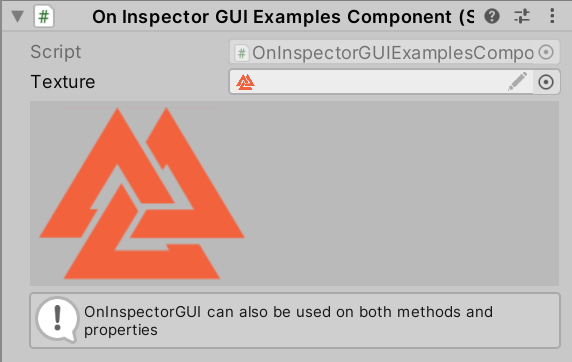
// OnInspectorGUIExamplesComponent.csusing Sirenix.OdinInspector;
using UnityEngine;public class OnInspectorGUIExamplesComponent : MonoBehaviour
{[OnInspectorInit("@Texture = Sirenix.Utilities.Editor.EditorIcons.OdinInspectorLogo")][OnInspectorGUI("DrawPreview", append: true)]public Texture2D Texture;private void DrawPreview() {if (this.Texture == null) return;GUILayout.BeginVertical(GUI.skin.box);GUILayout.Label(this.Texture);GUILayout.EndVertical();}#if UNITY_EDITOR // Editor-related code must be excluded from builds[OnInspectorGUI]private void OnInspectorGUI() {UnityEditor.EditorGUILayout.HelpBox("OnInspectorGUI can also be used on both methods and properties", UnityEditor.MessageType.Info);}
#endif
}
2.13 OnInspectorInit
对象在 Inspector 窗口中被初始化时(打开 / 显示 Inspector 窗口)执行回调。
string action要调用的方法名称,或要执行的表达式。
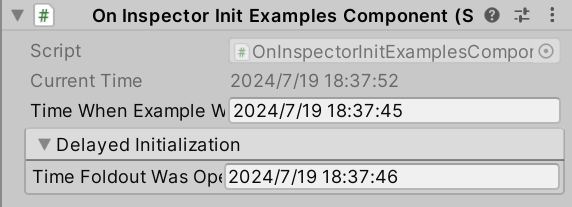
// OnInspectorInitExamplesComponent.csusing Sirenix.OdinInspector;
using System;
using UnityEngine;#if UNITY_EDITOR // Editor namespaces can only be used in the editor.
using Sirenix.Utilities.Editor;
#endifpublic class OnInspectorInitExamplesComponent : MonoBehaviour
{// Display current time for reference.[ShowInInspector, DisplayAsString, PropertyOrder(-1)]public string CurrentTime {get {
#if UNITY_EDITOR // Editor-related code must be excluded from buildsGUIHelper.RequestRepaint();
#endifreturn DateTime.Now.ToString();}}// OnInspectorInit executes the first time this string is about to be drawn in the inspector.// It will execute again when the example is reselected.[OnInspectorInit("@TimeWhenExampleWasOpened = DateTime.Now.ToString()")]public string TimeWhenExampleWasOpened;// OnInspectorInit will not execute before the property is actually "resolved" in the inspector.// Remember, Odin's property system is lazily evaluated, and so a property does not actually exist// and is not initialized before something is actually asking for it.// // Therefore, this OnInspectorInit attribute won't execute until the foldout is expanded.[FoldoutGroup("Delayed Initialization", Expanded = false, HideWhenChildrenAreInvisible = false)][OnInspectorInit("@TimeFoldoutWasOpened = DateTime.Now.ToString()")]public string TimeFoldoutWasOpened;
}
2.14 OnStateUpdate
在 Inspector 窗口中每帧监听对象的状态。
通常每帧至少发生一次监听,即使对象不可见时也会。
string action监听执行的方法。
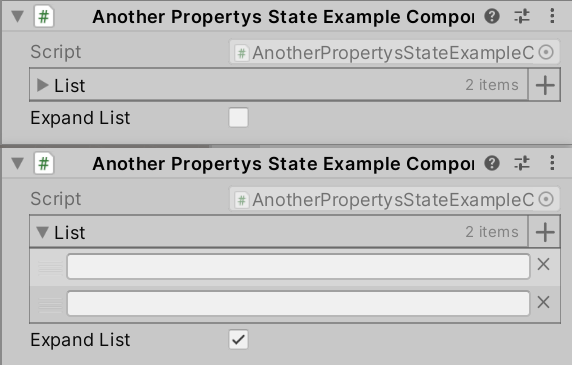
// AnotherPropertysStateExampleComponent.csusing Sirenix.OdinInspector;
using System.Collections.Generic;
using UnityEngine;public class AnotherPropertysStateExampleComponent : MonoBehaviour
{public List<string> list;[OnStateUpdate("@#(list).State.Expanded = $value")]public bool ExpandList;
}
2.15 OnValueChanged
适用于属性和字段,每当通过 Inspector 窗口更改对象时,都会调用指定的函数。
注意:此特性仅在编辑器中有效!通过脚本更改的属性不会调用该函数。
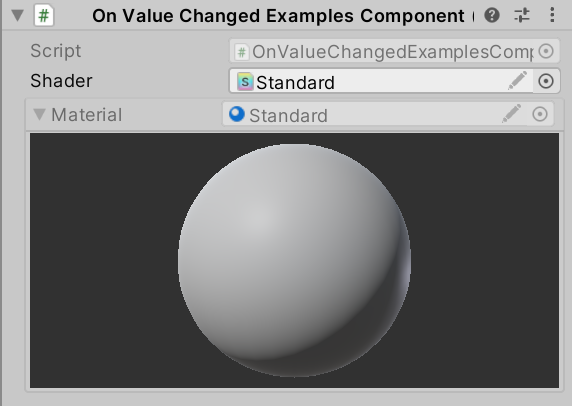
// OnValueChangedExamplesComponent.csusing Sirenix.OdinInspector;
using UnityEngine;public class OnValueChangedExamplesComponent : MonoBehaviour
{[OnValueChanged("CreateMaterial")]public Shader Shader;[ReadOnly, InlineEditor(InlineEditorModes.LargePreview)]public Material Material;private void CreateMaterial() {if (this.Material != null) {Material.DestroyImmediate(this.Material);}if (this.Shader != null) {this.Material = new Material(this.Shader);}}
}
2.16 TypeSelectorSettings
提供 Type 类型的绘制选择器。
bool ShowCategories下拉选择 Type 时是否分类显示可选项。
bool PreferNamespaces是否依据命名空间显示分类。默认依据程序集名称分类。
bool ShowNoneItem是否显示 “None”。
string FilterTypesFunction用于过滤类型选择器中显示的类型的函数。
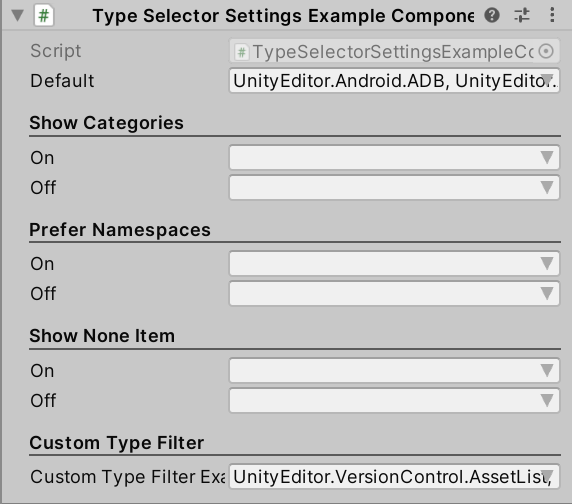
// TypeSelectorSettingsExampleComponent.csusing System;
using System.Collections.Generic;
using System.Linq;
using Sirenix.OdinInspector;
using UnityEngine;public class TypeSelectorSettingsExampleComponent : MonoBehaviour
{[ShowInInspector]public Type Default;[Title("Show Categories"), ShowInInspector, LabelText("On")][TypeSelectorSettings(ShowCategories = true)]public Type ShowCategories_On;[ShowInInspector, LabelText("Off")][TypeSelectorSettings(ShowCategories = false)]public Type ShowCategories_Off;[Title("Prefer Namespaces"), ShowInInspector, LabelText("On")][TypeSelectorSettings(PreferNamespaces = true, ShowCategories = true)]public Type PreferNamespaces_On;[ShowInInspector, LabelText("Off")][TypeSelectorSettings(PreferNamespaces = false, ShowCategories = true)]public Type PreferNamespaces_Off;[Title("Show None Item"), ShowInInspector, LabelText("On")][TypeSelectorSettings(ShowNoneItem = true)]public Type ShowNoneItem_On;[ShowInInspector, LabelText("Off")][TypeSelectorSettings(ShowNoneItem = false)]public Type ShowNoneItem_Off;[Title("Custom Type Filter"), ShowInInspector][TypeSelectorSettings(FilterTypesFunction = nameof(TypeFilter), ShowCategories = false)]public Type CustomTypeFilterExample;private bool TypeFilter(Type type) {return type.GetInterfaces().Any(i => i.IsGenericType && i.GetGenericTypeDefinition() == typeof(IEnumerable<>));}
}
2.17 TypeRegistryItem
为类型注册 Inspector 窗口的显示器。
string Name = null显示名称。
string CategoryPath = null分类路径。
SdfIconType Icon = SdfIconType.None左侧图标。
float lightIconColorR/G/B/A = 0.0f在浅色模式下图标颜色的 RGBA 分量。
float darkIconColorR/G/B/A = 0.0f在深色模式下图标颜色的 RGBA 分量。
int Priority = 0显示优先级。
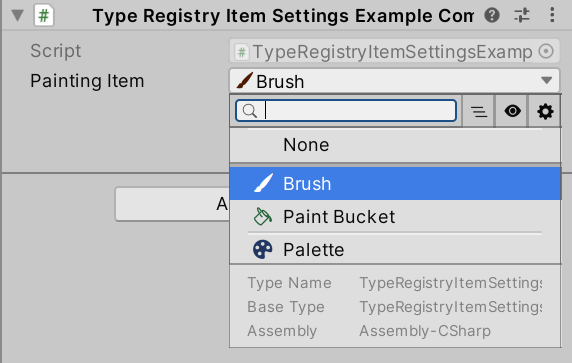
// TypeRegistryItemSettingsExampleComponent.csusing System;
using Sirenix.OdinInspector;
using UnityEngine;public class TypeRegistryItemSettingsExampleComponent : MonoBehaviour
{private const string CATEGORY_PATH  = "Sirenix.TypeSelector.Demo";private const string BASE_ITEM_NAME = "Painting Tools";private const string PATH           = CATEGORY_PATH + "/" + BASE_ITEM_NAME;[TypeRegistryItem(Name = BASE_ITEM_NAME, Icon = SdfIconType.Tools, CategoryPath = CATEGORY_PATH, Priority = Int32.MinValue)]public abstract class Base{ }[TypeRegistryItem(darkIconColorR: 0.8f, darkIconColorG: 0.3f,lightIconColorR: 0.3f, lightIconColorG: 0.1f,Name = "Brush", CategoryPath = PATH, Icon = SdfIconType.BrushFill, Priority = Int32.MinValue)]public class InheritorA : Base{public Color Color          = Color.red;public float PaintRemaining = 0.4f;}[TypeRegistryItem(darkIconColorG: 0.8f, darkIconColorB: 0.3f,lightIconColorG: 0.3f, lightIconColorB: 0.1f,Name = "Paint Bucket", CategoryPath = PATH, Icon = SdfIconType.PaintBucket, Priority = Int32.MinValue)]public class InheritorB : Base{public Color Color          = Color.green;public float PaintRemaining = 0.8f;}[TypeRegistryItem(darkIconColorB: 0.8f, darkIconColorG: 0.3f,lightIconColorB: 0.3f, lightIconColorG: 0.1f,Name = "Palette", CategoryPath = PATH, Icon = SdfIconType.PaletteFill, Priority = Int32.MinValue)]public class InheritorC : Base{public ColorPaletteItem[] Colors = {new ColorPaletteItem(Color.blue, 0.8f),new ColorPaletteItem(Color.red, 0.5f),new ColorPaletteItem(Color.green, 1.0f),new ColorPaletteItem(Color.white, 0.6f),};}[ShowInInspector][PolymorphicDrawerSettings(ShowBaseType = false)][InlineProperty]public Base PaintingItem;public struct ColorPaletteItem{public Color Color;public float Remaining;public ColorPaletteItem(Color color, float remaining) {this.Color     = color;this.Remaining = remaining;}}
}
2.18 PropertyTooltip
在 Inspector 窗口中鼠标悬停在对象上时创建工具提示。
注意:类似于 Unity 的 TooltipAttribute,但可以应用于属性。
string tooltip悬停提示。
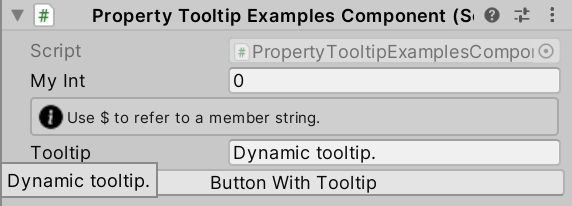
// PropertyTooltipExamplesComponent.csusing Sirenix.OdinInspector;
using UnityEngine;public class PropertyTooltipExamplesComponent : MonoBehaviour
{[PropertyTooltip("This is tooltip on an int property.")]public int MyInt;[InfoBox("Use $ to refer to a member string.")][PropertyTooltip("$Tooltip")]public string Tooltip = "Dynamic tooltip.";[Button, PropertyTooltip("Button Tooltip")]private void ButtonWithTooltip() {// ...}
}
2.19 SuffixLabel
在对象末尾绘制后缀标签,用于传达对象的数值含义。
string label后缀标签名。
SdfIconType icon图标。
bool overlay = false后缀标签将绘制在对象值的内部,而不是外面。
string IconColor图标颜色。
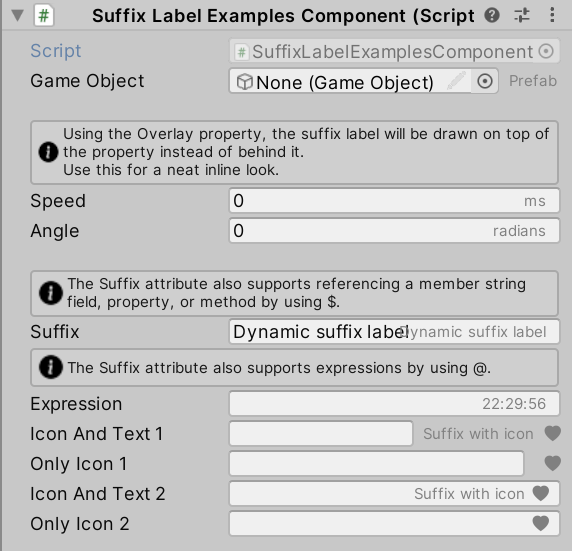
// SuffixLabelExamplesComponent.csusing Sirenix.OdinInspector;
using UnityEngine;public class SuffixLabelExamplesComponent : MonoBehaviour
{[SuffixLabel("Prefab")]public GameObject GameObject;[Space(15)][InfoBox("Using the Overlay property, the suffix label will be drawn on top of the property instead of behind it.\n" +"Use this for a neat inline look.")][SuffixLabel("ms", Overlay = true)]public float Speed;[SuffixLabel("radians", Overlay = true)]public float Angle;[Space(15)][InfoBox("The Suffix attribute also supports referencing a member string field, property, or method by using $.")][SuffixLabel("$Suffix", Overlay = true)]public string Suffix = "Dynamic suffix label";[InfoBox("The Suffix attribute also supports expressions by using @.")][SuffixLabel("@DateTime.Now.ToString(\"HH:mm:ss\")", true)]public string Expression;[SuffixLabel("Suffix with icon", SdfIconType.HeartFill)]public string IconAndText1;[SuffixLabel(SdfIconType.HeartFill)]public string OnlyIcon1;[SuffixLabel("Suffix with icon", SdfIconType.HeartFill, Overlay = true)]public string IconAndText2;[SuffixLabel(SdfIconType.HeartFill, Overlay = true)]public string OnlyIcon2;
}
相关文章:
2024-07-19 Unity插件 Odin Inspector10 —— Misc Attributes
文章目录 1 说明2 其他特性2.1 CustomContextMenu2.2 DisableContextMenu2.3 DrawWithUnity2.4 HideDuplicateReferenceBox2.5 Indent2.6 InfoBox2.7 InlineProperty2.8 LabelText2.9 LabelWidth2.10 OnCollectionChanged2.11 OnInspectorDispose2.12 OnInspectorGUI2.13 OnIns…...

Go操作Redis详解
文章目录 Go操作Redis详解来源介绍Redis支持的数据结构Redis应用场景Redis与Memcached比较准备Redis环境go-redis库 安装连接普通连接连接Redis哨兵模式连接Redis集群基本使用set/get示例zset示例Pipeline事务WatchGo操作Redis详解 来源 https://www.liwenzhou.com/posts/Go/…...

钡铼Modbus TCP耦合器BL200实现现场设备与SCADA无缝对接
前言 深圳钡铼技术推出的Modbus TCP耦合器为SCADA系统与现场设备之间的连接提供了强大而灵活的解决方案,它不仅简化了设备接入的过程,还提升了数据传输的效率和可靠性,是工业自动化项目中不可或缺的关键设备。本文将从Modbus TC、SCADA的简要…...
数据分析入门:用Python和Numpy探索音乐流行趋势
一、引言 音乐是文化的重要组成部分,而音乐流行趋势则反映了社会文化的变迁和人们审美的变化。通过分析音乐榜单,我们可以了解哪些歌曲或歌手正在受到大众的欢迎,甚至预测未来的流行趋势。Python作为一种强大的编程语言,结合其丰…...

数仓工具—Hive语法之替换函数和示例
Hive 替换函数和示例 默认情况下,并没有可用的 Hive 替换函数。如果在处理字符串时需要替换特定值,例如垃圾值,字符串操作函数替换是非常需要的。在本文中,我们将检查 Hive 替换函数 的替代方法,以便在需要时使用。 如前所述,Apache Hive 不提供替换函数的支持。但是,…...

[SUCTF 2019]EasySQL1
这是一个简单的SQL注入题,但是因为我的SQL基础约等于0,所以做起来很难。 首先试试引号是否被过滤 可以看到单引号、双引号都被过滤了,试试其他的盲注都不行,基本上可以确定不能用这种方法。 在测试的过程中发现,输入…...
elasticsearch, kibana, 6.8.18 版本下的创建索引,指定timestamp,java CRUD,maven版本等
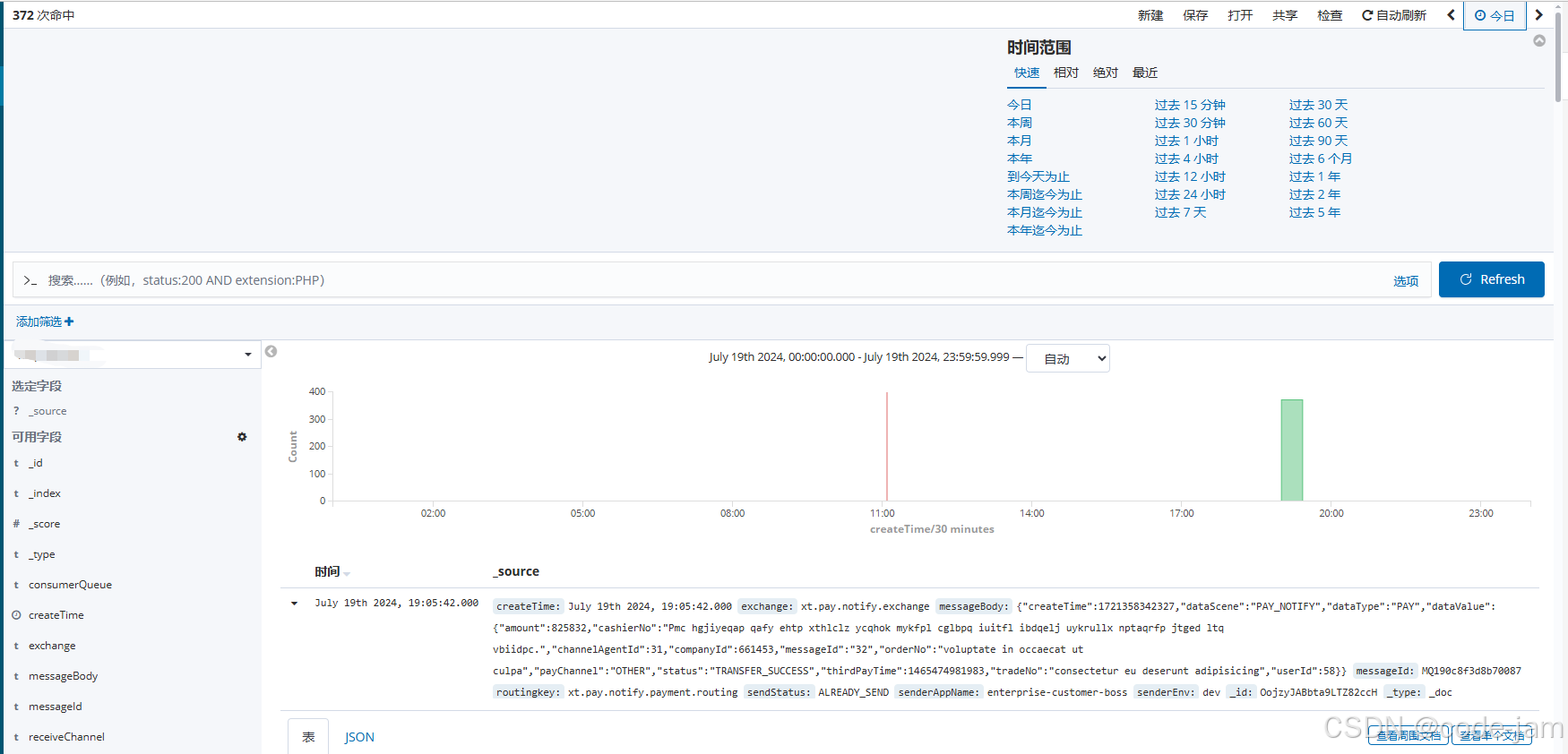
ELK 这一套的版本更迭很快, 而且es常有不兼容的东西出现, 经常是搜一篇文章,看似能用,拿到我这边就不能用了。 很是烦恼。 我这边的ELK版本目前是 6.8.18,这次的操作记录一下。 (涉密内容略有删改…...
无人机侦察:二维机扫雷达探测设备技术详解
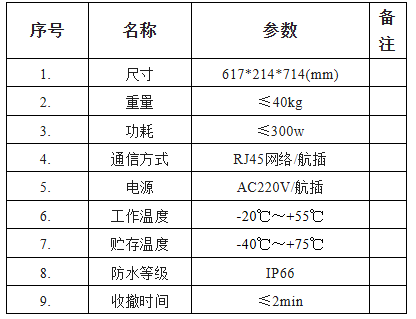
二维机扫雷达探测设备采用机械扫描方式,通过天线在水平方向和垂直方向上的转动,实现对目标空域的全方位扫描。雷达发射机发射电磁波信号,遇到目标后产生反射,反射信号被雷达接收机接收并处理,进而得到目标的位置、速度…...

未来互联网的新篇章:深度解析Web3技术
随着技术的飞速发展,Web3作为新一代互联网技术范式,正在重新定义我们对互联网的认知和使用方式。本文将深入探讨Web3技术的核心概念、关键特征以及其在未来互联网发展中的潜力和影响,为读者打开Web3时代的大门。 Web3技术的核心概念和特征 1…...

vst 算法R语言手工实现 | Seurat4 筛选高变基因的算法
1. vst算法描述 (1)为什么需要矫正 image source: https://ouyanglab.com/singlecell/basic.html In this panel, we observe that there is a very strong positive relationship between a gene’s average expression and its observed variance. I…...

阿里通义千问大模型Qwen2-72B-Instruct通用能力登顶国内第一!
前言: 中国互联网协会副秘书长裴玮近日在2024中国互联网大会上发布《中国互联网发展报告(2024)》。《报告》指出, 在人工智能领域,2023年我国人工智能产业应用进程持续推进,核心产业规模达到5784亿元。 截至2024年3月ÿ…...

CH04_依赖项属性
第4章:依赖项属性 本章目标 理解依赖项属性理解属性验证 依赖项属性 属性与事件是.NET抽象模型的核心部分。WPF使用了更高级的依赖项属性(Dependency Property)功能来替换原来.NET的属性,实现了更高效率的保存机制…...

CentOS 7开启SSH连接
1. 安装openssh-server 1.1 检查是否安装openssh-server服务 yum list installed | grep openssh-server如果有显示内容,则已安装跳过安装步骤,否则进行第2步 1.2 安装openssh-server yum install openssh-server2. 开启SSH 22监听端口 2.1 打开ssh…...

代理伺服器分類詳解
代理伺服器的主要分類 代理伺服器可以根據不同的標準進行分類。以下是幾種常見的分類方式: 按協議分類按匿名性分類按使用場景分類 1. 按協議分類 根據支持的協議類型,代理伺服器可以分為以下幾類: HTTP代理:專門用於處理HTT…...

计数,桶与基数排序
目录 一. 计数排序 概念 步骤思路如下 实现代码如下 时间复杂度与空间复杂度 1. 时间复杂度 2. 空间复杂度 计数排序的特点 二. 桶排序 概念 步骤思路如下 实现代码如下 时间复杂度与空间复杂度 1. 时间复杂度 2. 空间复杂度 桶排序的特点 三. 基数排序 概念 步…...

unity渲染人物模型透明度问题
问题1:有独立的手和衣服的模型,但最终只渲染出来半透明衣服 问题2:透明度贴图是正确的但显示却不正确 这上面两个模型的问题都是因为人物模型是一个完整的,为啥有些地方可以正常显示,有些地方透明度却有问题。 其中…...
CH03_布局
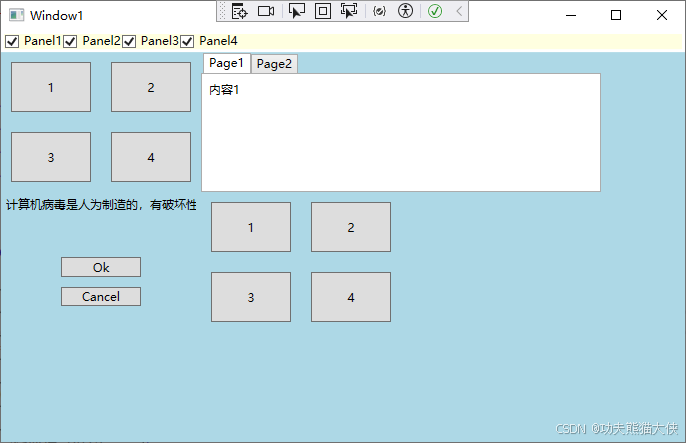
第3章:布局 本章目标 理解布局的原则理解布局的过程理解布局的容器掌握各类布局容器的运用 理解 WPF 中的布局 WPF 布局原则 WPF 窗口只能包含单个元素。为在WPF 窗口中放置多个元素并创建更贴近实用的用户男面,需要在窗口上放置一个容器&#x…...

【Oracle】Oracle中的merge into
目录 解释使用场景语法示例案例一案例二 MERGE INTO的优缺点优点:缺点: 注意事项附:Oracle中的MERGE INTO实现的效果,如果改为用MySQL应该怎么实现注意 解释 在Oracle数据库中,MERGE INTO是一种用于对表进行合并&…...
【论文阅读笔记】In Search of an Understandable Consensus Algorithm (Extended Version)
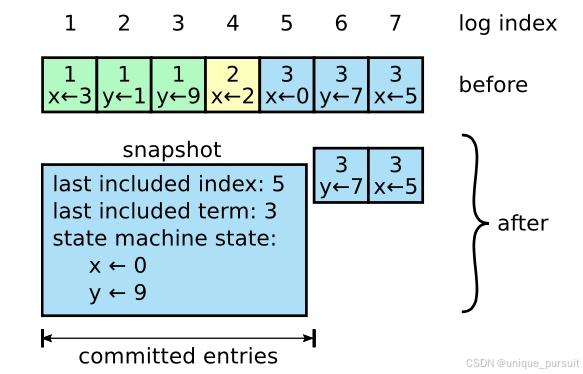
1 介绍 分布式一致性共识算法指的是在分布式系统中,使得所有节点对同一份数据的认知能够达成共识的算法。且算法允许所有节点像一个整体一样工作,即使其中一些节点出现故障也能够继续工作。之前的大部分一致性算法实现都是基于Paxos,但Paxos…...
CentOS 7 网络配置
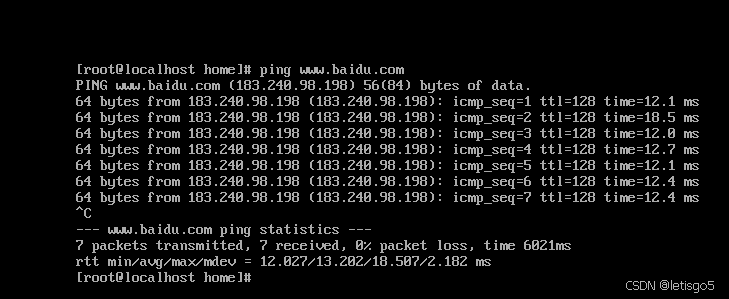
如想了解请查看 虚拟机安装CentOS7 第一步:查看虚拟机网络编辑器、查看NAT设置 (子网ID,网关IP) 第二步:配置VMnet8 IP与DNS 注意事项:子网掩码与默认网关与 第一步 保持一致 第三步:网络配置…...

LLM API安全攻防实战:从提示词注入到自动化测试方案
1. 项目概述:被忽视的LLM API安全前线最近在帮几个团队做上线前的安全审计,发现一个挺有意思的现象:大家对于传统API的鉴权、限流、SQL注入这些常规检查已经形成了肌肉记忆,但一旦涉及到LLM(大语言模型)的A…...

ZjDroid命令大全:从DEX内存dump到Lua脚本注入的完整教程
ZjDroid命令大全:从DEX内存dump到Lua脚本注入的完整教程 【免费下载链接】ZjDroid Android app dynamic reverse tool based on Xposed framework. 项目地址: https://gitcode.com/gh_mirrors/zj/ZjDroid ZjDroid是一款基于Xposed框架的Android应用动态逆向分…...
)
保姆级教程:在ArcGIS Pro插件中集成你的自定义工具箱(以‘消除重复要素’为例)
从脚本到按钮:ArcGIS Pro插件开发实战指南 在GIS日常工作中,我们常常会遇到一些重复性的数据处理任务。比如数据质检环节的"消除重复要素"操作,虽然可以通过Python脚本实现,但每次都需要打开IDE或Python窗口执行代码&am…...

从‘文件夹’到对象列表:手把手教你用MinIO Java Client实现灵活的文件查询与过滤
从‘文件夹’到对象列表:手把手教你用MinIO Java Client实现灵活的文件查询与过滤在当今数据驱动的时代,对象存储已成为现代应用架构中不可或缺的一部分。MinIO作为高性能、兼容S3协议的开源对象存储解决方案,凭借其轻量级和易用性赢得了众多…...

Hirschmann RS20-0800M4M4SDAE工业以太网交换机
Hirschmann RS20-0800M4M4SDAE 工业以太网交换机产品特点:端口配置:共8个端口,含6个RJ45电口和2个ST光纤接口。端口速率:所有端口均为100Mbps快速以太网。光纤类型:2个光纤端口为多模、ST接头。管理类型:二…...

基于ESP32的智能电池充电器设计:多化学体系支持与模块化架构
1. 项目概述:打造一台全能的“电池医生”手头攒了一堆不同化学体系的电池,从航模用的4S锂聚合物电池,到应急灯里的12V铅酸电池,再到各种工具里的镍氢、锂离子电池,每次充电都得翻出好几个不同的充电器,桌面…...

通过Taotoken实现Hermes Agent自定义模型供应商接入
🚀 告别海外账号与网络限制!稳定直连全球优质大模型,限时半价接入中。 👉 点击领取海量免费额度 通过Taotoken实现Hermes Agent自定义模型供应商接入 Hermes Agent是一个流行的AI智能体开发框架,它支持通过配置自定义…...

别让依赖毁了你的实验:记一次Vision Mamba复现中causal_conv1d与mamba-ssm的版本“打架”事件
Vision Mamba复现实战:破解依赖冲突的工程化解决方案在深度学习项目的复现过程中,依赖管理往往是最容易被忽视却又最常导致问题的环节。最近在复现Vision Mamba模型时,我遭遇了一场典型的Python依赖"战争"——causal_conv1d与mamba…...

TII投稿避坑指南:LaTeX模板编译报错‘xxx-eps-converted-to.pdf not found’的终极解决方案
TII投稿LaTeX避坑实战:从编译报错到完美PDF生成的终极指南 凌晨三点的实验室,屏幕上闪烁的xxx-eps-converted-to.pdf not found错误提示仿佛在嘲笑你连续八小时的徒劳尝试。这不是科幻场景,而是每位用LaTeX撰写TII论文的研究者都可能遭遇的真…...

如何用嘎嘎降AI处理金融学论文:金融学毕业论文降AI4.8元完整操作教程
如何用嘎嘎降AI处理金融学论文:金融学毕业论文降AI4.8元完整操作教程 第一次用降AI工具有很多不确定——传什么格式、选哪个模式、怎么验收。 这篇教程把金融学论文降AI教程的常见问题都覆盖了,主要基于嘎嘎降AI(www.aigcleaner.com&#x…...