
Unity客户端接入原生Google支付
Unity客户端接入原生Google支付
- 1. Google后台配置
- 2. 开始接入
- Java部分
- C#部分
- Lua部分
- 3. 导出工程打包测试
- 参考
- 踩坑注意
1. Google后台配置
-
找到内部测试(这个测试轨道过审最快),打包上传,这个包不需要接入支付,如果已经有上传过包了那就跳过这一步

-
在许可测试里添加测试人员,勾选测试人员列表,并且设置许可相应为LICENSED,这样才可以使用测试卡测试支付

-
确认已经添加了付款方式,以及开放地区有香港,否则可能需要挂VPN才能进行支付流程测试


-
流程图

2. 开始接入
确保Unity Plugins/Android里有com.android.billingclient.billing,并且是v3版本以上,这里用的5.0.0版本

Java部分
java文件,也放到Plugins/Android下,开头package需要根据项目而定
GoogleBillingManager.java
package com.xxx.xxx;import android.app.Activity;
import android.content.Context;
import android.util.Log;import com.android.billingclient.api.BillingClient;
import com.android.billingclient.api.BillingClientStateListener;
import com.android.billingclient.api.BillingResult;
import com.android.billingclient.api.Purchase;
import com.android.billingclient.api.PurchasesUpdatedListener;
import com.unity3d.player.UnityPlayer;import java.util.List;public class GoogleBillingManager {private static GoogleBillingManager instance;private static BillingClient billingClient;private static GoogleBillingListener billingListener;public static boolean isConnection = false;private GoogleBillingManager() {instance = this;createClient(UnityPlayer.currentActivity);}public static GoogleBillingManager getInstance() {if (instance == null) {synchronized (GoogleBillingManager.class) {if (instance == null) {instance = new GoogleBillingManager();}}}return instance;}/*** 创建支付客户端*/public static void createClient(Activity activity) {if (isReady()) {return;}if (null == activity) {Log.e("TAG","谷歌支付CreateClient, activity = null");return;}billingClient = BillingClient.newBuilder(activity).enablePendingPurchases().setListener(new PurchasesUpdatedListener() {@Overridepublic void onPurchasesUpdated(BillingResult billingResult, List<Purchase> purchases) {if (null != billingListener) {billingListener.onPurchasesUpdated(billingResult, purchases);}}}).build();//启动支付连接startConn();}public BillingClient getBillingClient() {return billingClient;}/*** 添加监听事件*/public void setBillingListener(GoogleBillingListener listener) {billingListener = listener;}/*** 是否准备好了** @return*/public static boolean isReady() {return !(null == billingClient || !billingClient.isReady());}/*** 启动连接*/private static void startConn() {if (isReady()) {return;}billingClient.startConnection(new BillingClientStateListener() {@Overridepublic void onBillingSetupFinished(BillingResult billingResult) {if (billingResult.getResponseCode() == BillingClient.BillingResponseCode.OK) {isConnection = true;Log.e("TAG", "连接成功,可以开始操作了~~~");}}@Overridepublic void onBillingServiceDisconnected() {isConnection = false;//连接失败。 可以尝试调用 startConnection 重新建立连接Log.e("TAG", "连接失败");}});}/*** 结束连接*/public void endConn() {if (null != billingClient) {billingClient.endConnection();isConnection = false;}}
}
GoogleBillHelper.java
package com.xxx.xxx;import android.app.Activity;
import android.util.Log;import com.android.billingclient.api.BillingClient;
import com.android.billingclient.api.BillingFlowParams;
import com.android.billingclient.api.BillingResult;
import com.android.billingclient.api.ConsumeParams;
import com.android.billingclient.api.ConsumeResponseListener;
import com.android.billingclient.api.ProductDetails;
import com.android.billingclient.api.Purchase;
import com.android.billingclient.api.PurchasesResponseListener;
import com.android.billingclient.api.QueryProductDetailsParams;
import com.android.billingclient.api.QueryPurchasesParams;
import com.unity3d.player.UnityPlayer;import java.util.ArrayList;
import java.util.List;import io.reactivex.annotations.NonNull;/*** Desc:支付的具体操作* 1.查询* 2.购买* 3.消费*/
public class GoogleBillHelper {public static final String TAG = GoogleBillHelper.class.getSimpleName();/*** 查询商品详情** @param billingListener : 接口监听* @param productIds      :商品id 。对应Google 后台的* @param productType     :取值*                        BillingClient.ProductType.INAPP(一次性商品)*                        BillingClient.ProductType.SUBS(订阅)*/public static void onQuerySkuDetailsAsync(GoogleBillingListener billingListener, String productType, String productIds, String orderId) {if (null == productIds){return;}String[] productList = productIds.split(",");Log.e("TAG", "onQuerySkuDetailsAsync: " + productIds + "   ----->" + productList[0]);if (productList.length == 0 || !GoogleBillingManager.getInstance().isReady()) {Log.e("TAG", "productList.length:" + productList.length + ",client:" + GoogleBillingManager.getInstance().isReady());return;}List<QueryProductDetailsParams.Product> skuList = new ArrayList<>();for (String productId : productList) {QueryProductDetailsParams.Product product = QueryProductDetailsParams.Product.newBuilder().setProductId(productId).setProductType(productType).build();//添加对应的 产品id 去查询详情skuList.add(product);}QueryProductDetailsParams params = QueryProductDetailsParams.newBuilder().setProductList(skuList).build();GoogleBillingManager.getInstance().getBillingClient().queryProductDetailsAsync(params, (billingResult, list) -> {if (null != billingListener) {billingListener.onProductDetailsSus(billingResult, list, orderId);}});}/*** 打开支付面板** @param billingListener* @param activity* @param details*/public static void onOpenGooglePlay(GoogleBillingListener billingListener, Activity activity, ProductDetails details, String orderId) {if (null == details) {return;}List<BillingFlowParams.ProductDetailsParams> params = new ArrayList<>();//添加购买数据BillingFlowParams.ProductDetailsParams productDetailsParams = BillingFlowParams.ProductDetailsParams.newBuilder().setProductDetails(details).build();params.add(productDetailsParams);BillingFlowParams billingFlowParams = BillingFlowParams.newBuilder().setProductDetailsParamsList(params).setObfuscatedAccountId(orderId).build();//添加购买监听GoogleBillingManager.getInstance().setBillingListener(billingListener);//响应code 码GoogleBillingManager.getInstance().getBillingClient().launchBillingFlow(activity, billingFlowParams).getResponseCode();}/*** 消费商品* 对于购买类型的商品需要手动调用一次消费方法 (目的:用户可以再次购买此商品)** @param billingListener* @param purchase*/public static void onConsumeAsync(GoogleBillingListener billingListener, Purchase purchase) {if (!GoogleBillingManager.getInstance().isReady()) {return;}ConsumeParams consumeParams =ConsumeParams.newBuilder().setPurchaseToken(purchase.getPurchaseToken()).build();ConsumeResponseListener listener = (billingResult, purchaseToken) -> {if (billingResult.getResponseCode() == BillingClient.BillingResponseCode.OK) {String result = "消费code : " + billingResult.getResponseCode() + " message : " + billingResult.getDebugMessage();if (null == billingListener) {Log.e(TAG, result);}billingListener.onConsumeSus(billingResult.getResponseCode(), result, purchaseToken, purchase);}};GoogleBillingManager.getInstance().getBillingClient().consumeAsync(consumeParams, listener);}/*** 检查补单** @param billingListener* @param productType*/public static void queryPurchases(String productType, GoogleBillingListener billingListener){PurchasesResponseListener mPurchasesResponseListener = new PurchasesResponseListener() {@Overridepublic void onQueryPurchasesResponse(@NonNull BillingResult billingResult, @NonNull List<Purchase> purchasesResult) {if(billingResult.getResponseCode() != BillingClient.BillingResponseCode.OK || purchasesResult == null){return;}for (Purchase purchase : purchasesResult) {if(purchase == null || purchase.getPurchaseState() != Purchase.PurchaseState.PURCHASED){continue;}billingListener.onQueryPurchases(purchase.getAccountIdentifiers().getObfuscatedAccountId());onConsumeAsync(billingListener, purchase);
//                    这里处理已经支付过的订单,通知服务器去验证}}};QueryPurchasesParams params =QueryPurchasesParams.newBuilder().setProductType(productType).build();GoogleBillingManager.getInstance().getBillingClient().queryPurchasesAsync(params, mPurchasesResponseListener);}
}
GoogleBillingListener.java
package com.xxx.xxx;import android.util.Log;import com.android.billingclient.api.AccountIdentifiers;
import com.android.billingclient.api.BillingClient;
import com.android.billingclient.api.BillingResult;
import com.android.billingclient.api.ProductDetails;
import com.android.billingclient.api.Purchase;
import com.android.billingclient.api.PurchasesUpdatedListener;
import com.unity3d.player.UnityPlayer;import java.util.List;public class GoogleBillingListener implements PurchasesUpdatedListener {public final String objectName;public final String paySuccessMethodName;public final String detailsSusMethodName;public final String payFailMethodName;public final String payEndMethodName;public final String queryPurchasesMethodName;public final String detailsFailMethodName;public ProductDetails.OneTimePurchaseOfferDetails productDetails;public GoogleBillingListener(String objectName, String successMethodName, String processingMethodName,String failMethodName, String payEndMethodName, String queryPurchasesMethodName, String detailsFailMethodName) {this.objectName = objectName;this.paySuccessMethodName = successMethodName;this.detailsSusMethodName = processingMethodName;this.payFailMethodName = failMethodName;this.payEndMethodName = payEndMethodName;this.queryPurchasesMethodName = queryPurchasesMethodName;this.detailsFailMethodName = detailsFailMethodName;}/*** 购买监听** @param result* @param purchases*/@Overridepublic void onPurchasesUpdated(BillingResult result, List<Purchase> purchases) {Log.e("TAG", result.toString());if (null == purchases || purchases.size() == 0) {Log.e("TAG", "not purchases");UnityPlayer.UnitySendMessage(this.objectName, this.payEndMethodName, "not purchases;BillingResult:" + result.toString());return;}for (Purchase purchase : purchases) {AccountIdentifiers accountIdentifiers = purchase.getAccountIdentifiers();String resultStr = accountIdentifiers.getObfuscatedAccountId() + "," + purchase.getPurchaseToken() + "," + purchase.getPurchaseState();UnityPlayer.UnitySendMessage(this.objectName, this.payEndMethodName, resultStr);if (purchase.getPurchaseState() == Purchase.PurchaseState.PURCHASED){GoogleBillHelper.onConsumeAsync(this, purchase);}}}/*** 查询商品详情成功** @param list*/public void onProductDetailsSus(BillingResult result, List<ProductDetails> list, String orderId) {if (result.getResponseCode() != BillingClient.BillingResponseCode.OK){String msg = "Get Details Fails, code:" + result.getResponseCode() + ",msg:" + result.getDebugMessage();UnityPlayer.UnitySendMessage(this.objectName, this.detailsFailMethodName, msg);return;}if (null == list || list.size() <= 0) {Log.e("TAG", "没有查询到相关产品~~~~");UnityPlayer.UnitySendMessage(this.objectName, this.detailsFailMethodName, "Not Search Product, Please check ProductID!");return;}if (orderId != null && orderId.length() > 0){GoogleBillHelper.onOpenGooglePlay(this, UnityPlayer.currentActivity, list.get(0), orderId);productDetails = list.get(0).getOneTimePurchaseOfferDetails();}String infoList = "";for (ProductDetails details: list) {ProductDetails.OneTimePurchaseOfferDetails oneTimePurchaseOfferDetails = details.getOneTimePurchaseOfferDetails();//注意:如果手机语言是法语,获取的商品价格是以 , 作为分隔符String info = details.getProductId() + "|-|" + oneTimePurchaseOfferDetails.getFormattedPrice() + "|-|" +oneTimePurchaseOfferDetails.getPriceCurrencyCode() + "|-|" + oneTimePurchaseOfferDetails.getPriceAmountMicros();if (infoList.isEmpty()){infoList = info;}else{infoList = infoList + ";" + info;}}UnityPlayer.UnitySendMessage(this.objectName, this.detailsSusMethodName, infoList);}/*** 商品消费成功** @param code* @param purchaseToken*/public void onConsumeSus(int code, String result, String purchaseToken, Purchase purchase) {AccountIdentifiers accountIdentifiers = purchase.getAccountIdentifiers();String itemId = purchase.getProducts().get(0);String msg = code + "," + result + "," + purchaseToken + "," + accountIdentifiers.getObfuscatedAccountId() + "," + itemId;if (productDetails != null){msg = msg + "," + productDetails.getPriceCurrencyCode() + "," + productDetails.getPriceAmountMicros();}if (code == BillingClient.BillingResponseCode.OK) {UnityPlayer.UnitySendMessage(this.objectName, this.paySuccessMethodName, msg);}else{UnityPlayer.UnitySendMessage(this.objectName, this.payFailMethodName, msg);}}public void onQueryPurchases(String txnid){UnityPlayer.UnitySendMessage(this.objectName, this.queryPurchasesMethodName, txnid);}
}
C#部分
IAPMangaer.cs
namespace根据自己项目决定要不要写
using System;
using System.Collections;
using System.Collections.Generic;
using UnityEngine;namespace xxx.Sdk
{public enum BillingResponseCode{SERVICE_TIMEOUT = -3,FEATURE_NOT_SUPPORTED = -2,SERVICE_DISCONNECTED = -1,OK = 0,USER_CANCELED = 1,SERVICE_UNAVAILABLE = 2,BILLING_UNAVAILABLE = 3,ITEM_UNAVAILABLE = 4,DEVELOPER_ERROR = 5,ERROR = 6,ITEM_ALREADY_OWNED = 7,ITEM_NOT_OWNED = 8,}public class IAPManager{private bool initialize;
#if UNITY_ANDROIDprivate AndroidJavaClass billingManager;private AndroidJavaClass billingHelper;
#endifpublic event Action<bool, string> OnPayEndResult;public event Action<bool, string> OnPayResult;public event Action<bool, string> OnDetailsSus;public event Action<bool, string> OnQueryPurchasesResult;public void Initialize(){if (initialize){return;}#if UNITY_ANDROIDif (billingManager == null){billingManager = new AndroidJavaClass("com.dorocat.bombman.GoogleBillingManager");}if (billingHelper == null){billingHelper = new AndroidJavaClass("com.dorocat.bombman.GoogleBillHelper");}if (SdkMgr.currentActivity == null) return;SdkMgr.currentActivity.Call("runOnUiThread", new AndroidJavaRunnable(() =>{billingManager.CallStatic("createClient", SdkMgr.currentActivity);}));
#endifinitialize = true;}public void StartConnection(){
#if UNITY_ANDROIDif (SdkMgr.currentActivity == null) return;SdkMgr.currentActivity.Call("runOnUiThread", new AndroidJavaRunnable(() =>{billingManager.CallStatic("startConn");}));
#endif}public void endConnection(){
#if UNITY_ANDROIDif (billingManager != null){if (SdkMgr.currentActivity == null) return;SdkMgr.currentActivity.Call("runOnUiThread", new AndroidJavaRunnable(() =>{billingManager.CallStatic("endConn");}));}
#endif}public void pay(string itemId, string productType, string orderId){
#if UNITY_ANDROIDif (SdkMgr.currentActivity == null) return;SdkMgr.currentActivity.Call("runOnUiThread", new AndroidJavaRunnable(() =>{var listener = new AndroidJavaObject("com.dorocat.bombman.GoogleBillingListener",SdkMgr.GameObjectName,"OnPaySuccess","OnProductDetailsSus","OnPayFail","OnPayEnd","OnQueryPurchases","OnProductDetailsSusFail");billingHelper.CallStatic("onQuerySkuDetailsAsync", listener, productType, itemId, orderId);}));
#endif}public void getProductsDetail(string itemId, string productType){
#if UNITY_ANDROIDif (SdkMgr.currentActivity == null) return;SdkMgr.currentActivity.Call("runOnUiThread", new AndroidJavaRunnable(() =>{var listener = new AndroidJavaObject("com.dorocat.bombman.GoogleBillingListener",SdkMgr.GameObjectName,"OnPaySuccess","OnProductDetailsSus","OnPayFail","OnPayEnd","OnQueryPurchases","OnProductDetailsSusFail");billingHelper.CallStatic("onQuerySkuDetailsAsync", listener, productType, itemId, "");}));
#endif}public void queryPurchases(string productType){
#if UNITY_ANDROIDif (SdkMgr.currentActivity == null) return;SdkMgr.currentActivity.Call("runOnUiThread", new AndroidJavaRunnable(() =>{var listener = new AndroidJavaObject("com.dorocat.bombman.GoogleBillingListener",SdkMgr.GameObjectName,"OnPaySuccess","OnProductDetailsSus","OnPayFail","OnPayEnd","OnQueryPurchases","OnProductDetailsSusFail");billingHelper.CallStatic("queryPurchases", productType, listener);}));
#endif}public void onPaySuccess(string msg){OnPayResult?.Invoke(true, msg);}public void onPayFail(string msg){OnPayResult?.Invoke(false, msg);}public void onProductDetailsSus(string msg){OnDetailsSus?.Invoke(true, msg);}public void onPayEnd(string msg){OnPayEndResult?.Invoke(true, msg);}public void onQueryPurchases(string msg){OnQueryPurchasesResult?.Invoke(true, msg);}public void onDeatilSusFail(string msg){OnDetailsSus?.Invoke(false, msg);}public bool getConnectionState(){
#if UNITY_ANDROIDreturn billingManager.GetStatic<bool>("isConnection");
#elsereturn false;
#endif}}
}
自行定义一个SdkManager.cs,在这里面初始化,包括在java层定义的回调函数名也要在这里实现
public static IAPManager billingManager = null;
public static IAPManager CreateBillingClient()
{billingManager = new IAPManager();billingManager.Initialize();return billingManager;
}public void OnPaySuccess(string result)
{if (billingManager != null){billingManager.onPaySuccess(result);}else{current?.auth.OnPaySuccess(result);}
}public void OnPayFail(string message)
{if (billingManager != null){billingManager.onPayFail(message);}else{current?.auth.OnPayFail(message);}
}public void OnPayEnd(string result)
{if (billingManager != null){billingManager.onPayEnd(result);}
}public void OnProductDetailsSus(string result)
{if (billingManager != null){billingManager.onProductDetailsSus(result);}
}public void OnProductDetailsSusFail(string result)
{if (billingManager != null){billingManager.onDeatilSusFail(result);}
}public void OnQueryPurchases(string result)
{if (billingManager != null){billingManager.onQueryPurchases(result);}
}
Lua部分
初始化支付SDK
---@type xxx.Sdk.IAPManager
App.billingSdk = CS.BombMan.Sdk.SdkMgr.CreateBillingClient()
调用支付
local billingProductType =
{INAPP = "inapp",SUBS = "subs",
}---sdk支付---
function ShopMgr:pay(itemId, payCallBack, addInfo)if LuaClass.Application.isMobilePlatform thenlocal callbackcallback = function(result,str)App.billingSdk:OnPayResult("-", callback)print("onPayResult",result,str)if payCallBack thenpayCallBack(result,str)endendif not App.billingSdk:getConnectionState() then--如果没有连上Google支付服务器,开始连接App.billingSdk:StartConnection()returnendlocal payEndpayEnd = function(result, msg)App.billingSdk:OnPayEndResult("-", payEnd)print("payEnd", msg)self.starPay = falselocal infoList = string.split(msg, ",")self:requestPayEnd(infoList[1], infoList[2], tonumber(infoList[3]), self.priceStrGoogle and self.priceStrGoogle[itemId][2] or nil, self.priceStrGoogle and tonumber(self.priceStrGoogle[itemId][3]) or nil, infoList[4], itemId, payCallBack)endlocal detailFaildetailFail = function(result, msg)print("detailFail", result, msg)if not result thenApp.billingSdk:OnPayEndResult("-", payEnd)endself.starPay = falseApp.billingSdk:OnDetailsSus("-", detailFail)endself:requestPayStart(itemId, addInfo, function ()App.billingSdk:OnPayEndResult("+", payEnd)App.billingSdk:OnDetailsSus("+", detailFail)App.billingSdk:pay(itemId, billingProductType.INAPP, StringUtil.obfuscate(App.playerMgr.data.id, "pay"))self.starPay = falseend)end
end
检查补单
function ShopMgr:queryPurchases()if not self.isQuery thenlocal addCallBack = function(result, str)print("onQueryPurchases", str)local infoList = string.split(str, ",")local price = self.priceStrGoogle and infoList[5] and self.priceStrGoogle[infoList[5]]self:requestPayEnd(infoList[1], infoList[3], tonumber(infoList[4]),price and price[2] or nil, price and tonumber(price[3]) or nil, infoList[2], infoList[5])endApp.billingSdk:OnQueryPurchasesResult("+", addCallBack)endApp.billingSdk:queryPurchases(billingProductType.INAPP)self.isQuery = true
end
获取谷歌商店内价格
function ShopMgr:getProductsByGoogle()if LuaClass.Application.platform == LuaClass.RuntimePlatform.IPhonePlayer ornot isValid(App.billingSdk) thenreturnendif self.priceStrGoogle == nil thenself.priceStrGoogle = {}local templates = LuaClass.DirectpurchaseDatatable:getAll()local idstr = ""for i = 1,#templates doidstr = idstr..templates[i].ID..","endif idstr thenlocal callbackcallback = function(result,str)print("getProductsByGoogle:",result,str)App.billingSdk:OnDetailsSus("-", callback)if result thenlocal strSP = string.split(str,";")for i = 1, #strSP dolocal productInfo = string.split(strSP[i], "|-|")self.priceStrGoogle[productInfo[1]] = {--格式化后的价格 如:HK$8.00[1] = productInfo[2],--货币代码,如HKD[2] = productInfo[3],--微单位价格,1,000,000 微单位等于 1 货币单位[3] = productInfo[4],}endprint("productInfo", self.priceStrGoogle)self:queryPurchases()endendApp.billingSdk:OnDetailsSus("+", callback)App.billingSdk:pay(idstr, billingProductType.INAPP, "")endend
end
3. 导出工程打包测试
注意要导apk,并且要带有调试标签(直连手机Build即可),包名和版本号要和Google Play后台上传的包一致,确保测试机只登陆了一个谷歌测试账号

参考
https://blog.51cto.com/kenkao/5989952
https://www.cnblogs.com/fnlingnzb-learner/p/16385685.html
踩坑注意
1.手机语言是法语的话价格会用逗号代替小数点,注意自己使用的分隔符,例如 $1234,56
2.关闭订单这一步操作最好由后端处理,以防客户端因为网络等原因关闭订单后无法通知后端发货
3.在拉起支付时如果需要设置ObfuscatedAccountId的话,请确保每次传输的值都是一样的,否则会出现用户支付遭拒的情况

相关文章:
Unity客户端接入原生Google支付
Unity客户端接入原生Google支付 1. Google后台配置2. 开始接入Java部分C#部分Lua部分 3. 导出工程打包测试参考踩坑注意 1. Google后台配置 找到内部测试(这个测试轨道过审最快),打包上传,这个包不需要接入支付,如果已…...

Spring Cloud之五大组件
Spring Cloud 是一系列框架的有序集合,为开发者提供了快速构建分布式系统的工具。这些组件可以帮助开发者做服务发现,配置管理,负载均衡,断路器,智能路由,微代理,控制总线等。以下是 Spring Cl…...
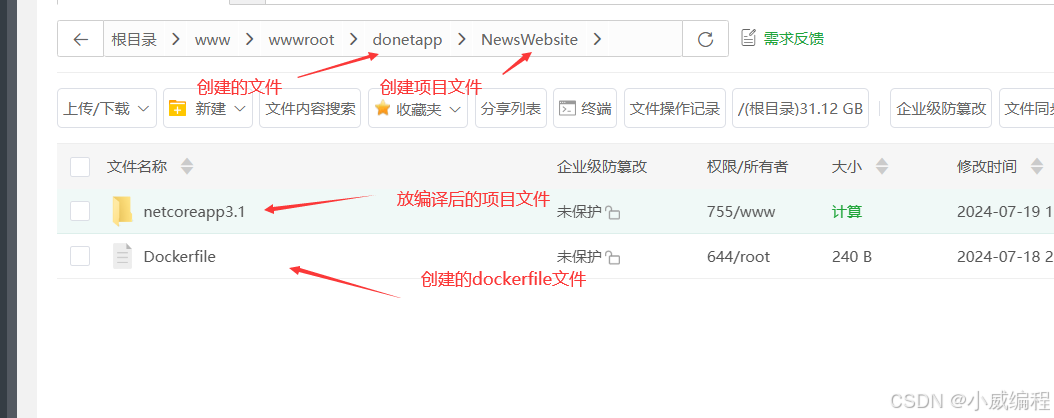
在 CentOS 7 上安装 Docker 并安装和部署 .NET Core 3.1
1. 安装 Docker 步骤 1.1:更新包索引并安装依赖包 先安装yum的扩展,yum-utils提供了一些额外的工具,这些工具可以执行比基本yum命令更复杂的任务 sudo yum install -y yum-utils sudo yum update -y #更新系统上已安装的所有软件包到最新…...

redis的学习(一):下载安装启动连接
简介 redis的下载,安装,启动,连接使用 nosql nosql,即非关系型数据库,和传统的关系型数据库的对比: sqlnosql数据结构结构化非结构化数据关联关联的非关联的查询方式sql查询非sql查询事务特性acidbase存…...

前端设计模式面试题汇总
面试题 1. 简述对网站重构的理解? 参考回答: 网站重构:在不改变外部行为的前提下,简化结构、添加可读性,而在网站前端保持一致的行为。也就是说是在不改变UI的情况下,对网站进行优化, 在扩展的…...
安装python3.12.2环境)
linux(CentOS、Ubuntu)安装python3.12.2环境
1.下载官网Python安装包 wget https://www.python.org/ftp/python/3.12.2/Python-3.12.2.tar.xz 1.1解压 tar -xf Python-3.12.2.tar.xz 解压完后切换到Python-3.12.2文件夹(这里根据自己解压的文件夹路径) cd /usr/packages/Python-3.12.2/ 1.2升级软件包管理器 CentOS系…...

CSS 中border-radius 属性
border-radius 属性在 CSS 中用于创建圆角边框。它可以接受一到四个值,这些值可以是长度值(如像素 px、em 等)或百分比(%)。当提供四个值时,它们分别对应于边框的左上角、右上角、右下角和左下角的圆角半径…...

【大数据专题】数据仓库
1. 简述数据仓库架构 ? 数据仓库的核心功能从源系统抽取数据,通过清洗、转换、标准化,将数据加载到BI平台,进而满足业 务用户的数据分析和决策支持。 数据仓库架构包含三个部分:数据架构、应用程序架构、底层设施 1&…...

go关于string与[]byte再学深一点
目标:充分理解string与[]bytes零拷贝转换的实现 先回顾下string与[]byte的基本知识 1. string与[]byte的数据结构 reflect包中关于字符串的数据结构 // StringHeader is the runtime representation of a string.type StringHeader struct {Data uintptrLen int} …...
元对象系统 | 7.4、属性系统:深度解析与应用)
Qt 实战(7)元对象系统 | 7.4、属性系统:深度解析与应用
文章目录 一、属性系统:深度解析与应用1、定义属性2、属性系统的作用3、属性系统工作原理(1)Q_PROPERTY宏(2)moc 的作用(3)属性在元对象中的注册 4、获取与设置属性4.1、QObject::property()与Q…...

Docker核心技术:容器技术要解决哪些问题
云原生学习路线导航页(持续更新中) 本文是 Docker核心技术 系列文章:容器技术要解决哪些问题,其他文章快捷链接如下: 应用架构演进容器技术要解决哪些问题(本文)Docker的基本使用Docker是如何实…...

sklearn中的增量学习:特征提取的艺术
sklearn中的增量学习:特征提取的艺术 在机器学习领域,特征提取是构建有效模型的关键步骤。然而,并非所有数据集都适合一次性加载到内存中进行处理,尤其是在处理大规模数据集时。Scikit-learn(sklearn)提供…...

PostgreSQL 中如何处理数据的唯一性约束?
🍅关注博主🎗️ 带你畅游技术世界,不错过每一次成长机会!📚领书:PostgreSQL 入门到精通.pdf 文章目录 PostgreSQL 中如何处理数据的唯一性约束?一、什么是唯一性约束二、为什么要设置唯一性约束…...

VAE论文阅读
在网上看到的VAE解释,发现有两种版本: 按照原来论文中的公式纯数学推导,一般都是了解生成问题的人写的,对小白很不友好。按照实操版本的,非常简单易懂,比如苏神的。但是却忽略了论文中的公式推导ÿ…...
【数据分享】2013-2022年我国省市县三级的逐月SO2数据(excel\shp格式\免费获取)
空气质量数据是在我们日常研究中经常使用的数据!之前我们给大家分享了2000——2022年的省市县三级的逐月PM2.5数据和2013-2022年的省市县三级的逐月CO数据(均可查看之前的文章获悉详情)! 本次我们分享的是我国2013——2022年的省…...
【Jmeter】记录一次Jmeter实战测试
Jmeter实战 1、需求2、实现2.1、新建线程组2.2、导入参数2.3、新建HTTP请求2.4、添加监听器2.5、结果 1、需求 查询某个接口在高并发场景下的响应时间(loadtime),需求需要响应在50ms以内,接下来用Jmeter测试一下 Jmeter安装见文章《Jemeter安装教程&am…...

volatile,最轻量的同步机制
目录 一、volatile 二、如何使用? 三、volatile关键字能代替synchronized关键字吗? 四、总结: 还是老样子,先来看一段代码: 我们先由我们自己的常规思路分析一下代码:子线程中,一直循环&…...
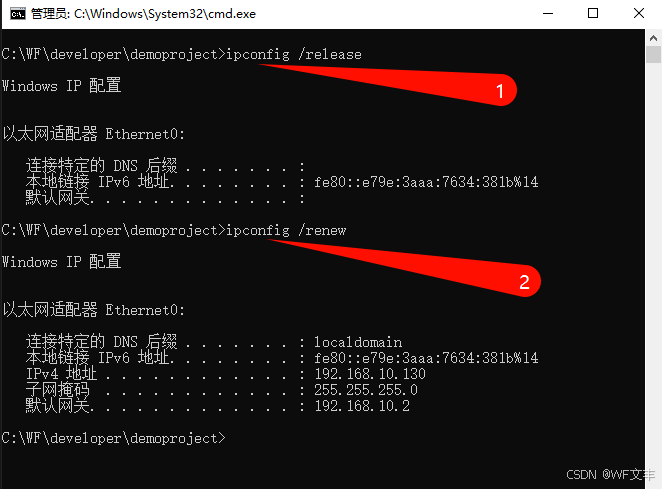
在Linux、Windows和macOS上释放IP地址并重新获取新IP地址的方法
文章目录 LinuxWindowsmacOS 在Linux、Windows和macOS上释放IP地址并重新获取新IP地址的方法各有不同。以下是针对每种操作系统的详细步骤: Linux 使用DHCP客户端:大多数Linux发行版都使用DHCP(动态主机配置协议)来自动获取IP地址…...

Mamba-yolo|结合Mamba注意力机制的视觉检测
一、本文介绍 PDF地址:https://arxiv.org/pdf/2405.16605v1 代码地址:GitHub - LeapLabTHU/MLLA: Official repository of MLLA Demystify Mamba in Vision: A Linear AttentionPerspective一文中引入Baseline Mamba,指明Mamba在处理各种高…...
:自动标识中文多音字)
语音识别标记语言(SSML):自动标识中文多音字
好的,以下是完整的实现代码,包括导入库、分词、获取拼音和生成 SSML 标记的全过程: import thulac from pypinyin import pinyin, Style# 初始化 THULAC thu1 thulac.thulac(seg_onlyTrue)# 测试文本 text "银行行长正在走行。"…...

Nginx + FFmpeg 核心配置
Nginx FFmpeg 核心配置(2 种最实用方案)我给你最简、能直接用的配置,不用你自己改半天,分两种场景:Nginx 接收 FFmpeg 推流(直播)Nginx 调用 FFmpeg 自动转码(高清 / 标清ÿ…...

5步精通Trilium中文版:构建高效个人知识管理系统
5步精通Trilium中文版:构建高效个人知识管理系统 【免费下载链接】trilium-translation Translation for Trilium Notes. Trilium Notes 中文适配, 体验优化 项目地址: https://gitcode.com/gh_mirrors/tr/trilium-translation 认识Trilium:重新定…...

Unity 实现Slot Machine两种动态停止效果的实战解析
1. 老虎机效果设计核心思路 老虎机作为经典游戏机制,其动态停止效果直接影响玩家的游戏体验。在Unity中实现这类效果时,我们需要考虑两个关键因素:物理真实感和心理预期管理。缓慢减速效果通过逐渐降低转速营造紧张氛围,而惯性回弹…...

A3:高级文本分析能力
A3:高级文本分析能力 【免费下载链接】Neosgenesis https://dev.to/answeryt/the-demo-spell-and-production-dilemma-of-ai-agents-how-i-built-a-self-learning-agent-system-4okk 项目地址: https://gitcode.com/gh_mirrors/ne/Neosgenesis 适配问题类型&…...

COMSOL实现煤层注气THM耦合的甲烷开采效果模拟与可视化分析
一、COMSOL实现煤层注气热力流THM耦合下增强甲烷开采 本案例采用热力流三场耦合,分析煤层注入CO2增强甲烷开采效果,涉及热-流-固数学模型、多气相介质作用,全部为PDE模块 二、可以出煤层温度、瓦斯含量、渗透率等许多云图及数据,仅…...

如何用Win11Debloat让你的Windows系统速度提升70%:终极优化指南
如何用Win11Debloat让你的Windows系统速度提升70%:终极优化指南 【免费下载链接】Win11Debloat A simple, lightweight PowerShell script that allows you to remove pre-installed apps, disable telemetry, as well as perform various other changes to declutt…...

Apache Spark 第 11 章:Delta Lake 与 Lakehouse
第十一章深入拆解 Delta Lake 与 Lakehouse 架构,这是现代数据工程的核心组件。从传统数据湖的痛点出发,逐层剖析 Delta Lake 的实现原理。 第一张:为什么需要 Delta Lake。三大痛点和 Delta Lake 的解法一目了然。接下来看最核心的实现机制—…...

Arctic数据压缩与序列化:LZ4压缩如何提升性能10倍的终极指南
Arctic数据压缩与序列化:LZ4压缩如何提升性能10倍的终极指南 【免费下载链接】arctic High performance datastore for time series and tick data 项目地址: https://gitcode.com/gh_mirrors/ar/arctic Arctic是一个专为时间序列和tick数据设计的高性能数据…...

OneMore插件终极指南:160+功能让你的OneNote效率提升3倍
OneMore插件终极指南:160功能让你的OneNote效率提升3倍 【免费下载链接】OneMore A OneNote add-in with simple, yet powerful and useful features 项目地址: https://gitcode.com/gh_mirrors/on/OneMore OneMore是一款免费开源的OneNote增强插件ÿ…...

从游戏机到影音中心:用wiliwili解锁Switch的隐藏娱乐潜能
从游戏机到影音中心:用wiliwili解锁Switch的隐藏娱乐潜能 【免费下载链接】wiliwili 专为手柄控制设计的第三方跨平台B站客户端,目前可以运行在PC全平台、PSVita、PS4 和 Nintendo Switch上 项目地址: https://gitcode.com/GitHub_Trending/wi/wiliwil…...