
elasticsearch集成springboot详细使用
1.es下载&配置
配置JVM

配置跨域

配置https和密码

2.es启动
.\elasticsearch.bat
或 后台启动:
nohup ./bin/elasticsearch&
浏览器访问:https://localhost:9200
输入账户:elastic / 123456

3.重置es密码
.\elasticsearch-reset-password.bat -u elastic -i

4.安装图形化插件:elasticsearch-head插件,完成图形化界面的效果,完成索引数据的查看
-
es核心概念
面向文档
可以对文档(而非成行成列的数据)进行索引、搜索、排序、过滤
Elasticsearch对比传统[关系型数据库]如下:
Relational DB ‐> Databases ‐> Tables ‐> Rows ‐> Columns
Elasticsearch ‐> Index ‐> Types ‐> Documents ‐> Fields
集群cluster:一个集群就是由一个或多个节点组织在一起,它们共同持有整个的数据,并一起提供索引和搜索功能。一个集群由 一个唯一的名字标识,这个名字默认就是“elasticsearch”。这个名字是重要的,因为一个节点只能通过指定某个集 群的名字,来加入这个集群。
节点node:一个节点是集群中的一个服务器,作为集群的一部分,它存储数据,参与集群的索引和搜索功能;一个节点可以通过配置集群名称的方式来加入一个指定的集群。默认情况下,每个节点都会被安排加入到一个叫 做“elasticsearch”的集群中
分片和复制 shards&replicas:一个索引可以存储超出单个结点硬件限制的大量数据
ElasticSearch客户端操作:
- 使用elasticsearch-head插件
- 使用elasticsearch提供的Restful接口直接访问
- 使用elasticsearch提供的API进行访问
Elasticsearch的接口语法:


查询文档document有三种方式:
- 根据id查询;
- 根据关键词查询
- 根据输入的内容先分词,再查询
<dependency><groupId>org.springframework.boot</groupId><artifactId>spring-boot-starter-data-elasticsearch</artifactId></dependency><dependency><groupId>junit</groupId><artifactId>junit</artifactId><version>4.13.2</version><scope>test</scope></dependency>
1.创建实体import lombok.Data;
import org.apache.catalina.Store;
import org.springframework.data.annotation.Id;
import org.springframework.data.elasticsearch.annotations.Document;
import org.springframework.data.elasticsearch.annotations.Field;
import org.springframework.data.elasticsearch.annotations.FieldType;@Document(indexName = "article")
@Data
public class Article {@Id@Field(index = false,type = FieldType.Integer)private Integer id;/*** index:是否设置分词  默认为true* analyzer:储存时使用的分词器* searchAnalyze:搜索时使用的分词器* store:是否存储  默认为false* type:数据类型  默认值是FieldType.Auto**/@Field(analyzer = "ik_smart",searchAnalyzer = "ik_smart",store = true,type = FieldType.Text)private String title;@Field(analyzer = "ik_smart",searchAnalyzer = "ik_smart",store = true,type = FieldType.Text)private String context;@Field(store = true,type =FieldType.Integer)private  Integer hits;
}2.创建CRUD操作类
import com.cloud.entities.Article;
import org.springframework.data.domain.Pageable;
import org.springframework.data.elasticsearch.repository.ElasticsearchRepository;
import org.springframework.stereotype.Component;import java.util.List;/***  自定义接口需要继承ElasticsearchRepository<实体类型,主键类型>  基本的crud 分页*/
@Component
public interface ArticalRepository extends ElasticsearchRepository<Article,Integer> {List<Article> findByTitle(String title);List<Article> findArticleByTitleOrContext(String title,String context);/*** 根据标题或内存查询(含分页)* @param title* @param context* @param pageable0* @return*/List<Article> findByTitleOrContext(String title, String context, Pageable pageable0);}3.创建启动入口类
@SpringBootApplication
@MapperScan("com.cloud.mapper")  //import tk.mybatis.spring.annotation.MapperScan
public class Main8001 {public static void main(String[] args) {SpringApplication.run(Main8001.class,args);}}
4.配置springboot配置esspring:elasticsearch:uris: http://localhost:9200connection-timeout: 5s#username: elastic#password: 1234565.创建单元测试类
import com.cloud.Main8001;
import com.cloud.entities.Article;
import com.cloud.repository.ArticalRepository;
import jakarta.annotation.Resource;
import org.elasticsearch.client.RestClient;
import org.junit.jupiter.api.Test;
import org.junit.runner.RunWith;
import org.springframework.beans.factory.annotation.Autowired;
import org.springframework.boot.test.context.SpringBootTest;
import org.springframework.data.elasticsearch.client.elc.ElasticsearchTemplate;
import org.springframework.data.elasticsearch.core.ElasticsearchOperations;
import org.springframework.data.elasticsearch.core.document.Document;
import org.springframework.data.elasticsearch.core.query.UpdateQuery;
import org.springframework.test.context.junit4.SpringRunner;import java.util.Arrays;
import java.util.Map;@RunWith(SpringRunner.class)
@SpringBootTest(classes = Main8001.class)
public class ArticleTest {@Resourceprivate RestClient restClient;@Resourceprivate ElasticsearchTemplate elasticsearchTemplate;@Resourceprivate ArticalRepository articalRepository;/**1.* 使用ElasticsearchTemplate*/@Testvoid insert(){Article article=new Article();article.setTitle("男乒乓");article.setId(1);article.setContext("中国赢了");article.setHits(100);elasticsearchTemplate.save(article);}/*** 2.* 使用Repository*/@Testvoid insert2(){Article article=new Article();article.setTitle("男乒乓2");article.setId(2);article.setContext("中国赢了2");article.setHits(120);articalRepository.save(article);}/*** 批量保存*/@Testvoid insert3(){Article article=new Article();article.setTitle("男乒乓3");article.setId(3);article.setContext("中国赢了2");article.setHits(130);articalRepository.saveAll(Arrays.asList(article));}@Testvoid update(){Article article= articalRepository.findById(2).get();article.setTitle("篮球");articalRepository.save(article);}@Testvoid update2(){Article article=new Article();article.setId(2);article.setTitle("网球");elasticsearchTemplate.update(article);}/*** 查询全部数据*/@Testvoid findAll(){Iterable<Article> articles=articalRepository.findAll();articles.forEach(System.out::println);}/*** 根据id删除*/@Testvoid deleteById(){articalRepository.deleteById(3);}/*** 删除:传入实体类删*/@Testvoid delete(){Article article=new Article();article.setId(3);articalRepository.delete(article);}/*** 删除索引里面所有数据*/@Testvoid deleteAll(){articalRepository.deleteAll();}}-
测试工具:postman
-
es 参考资料:
https://cloud.tencent.com/developer/article/2249187
https://www.hadoopdoc.com/elasticsearch/elasticsearch-begin-tutorial
相关文章:
elasticsearch集成springboot详细使用
1.es下载&配置 配置JVM 配置跨域 配置https和密码 2.es启动 .\elasticsearch.bat 或 后台启动: nohup ./bin/elasticsearch& 浏览器访问:https://localhost:9200 输入账户:elastic / 123456 3.重置es密码 .\elasticsearch-r…...

html+css网页制作 化妆品电商4个页面
htmlcss网页制作 化妆品电商4个页面 网页作品代码简单,可使用任意HTML编辑软件(如:Dreamweaver、HBuilder、Vscode 、Sublime 、Webstorm、Text 、Notepad 等任意html编辑软件进行运行及修改编辑等操作)。 获取源码 1ÿ…...

微调LLama 3.1——七月论文审稿GPT第5.5版:拿早期paper-review数据集微调LLama 3.1
前言 对于llama3,我们之前已经做了针对llama3 早7数据微调后的测评 去pk llama2的早7数据微调后,推理测试集中的早期paper:出来7方面review去pk gpt4推理测试集中的早期paper:7方面reviewground truth是早期paper的7方面人工rev…...

rust 编译时报错:type annotations needed for Box
如下图所示: 解决方法: 升级time的版本: cargo update -p time...
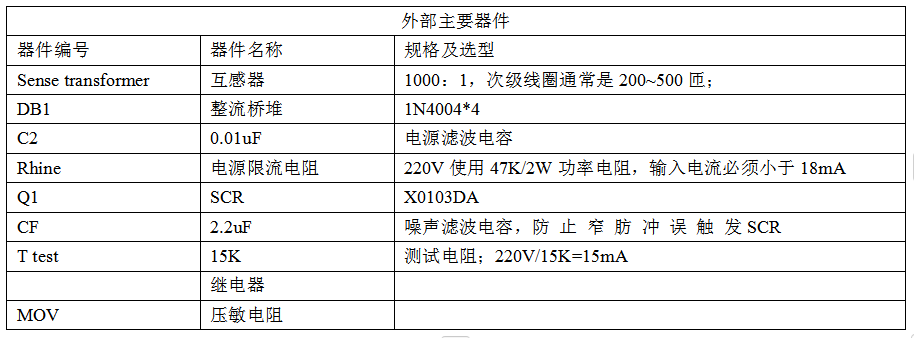
应用方案 | 低功耗接地故障控制器D4145
一、概述 D4145 是一个接地故障断路器。它能够检测到不良的接地条件,譬如装置接触到水时,它会在有害或致命的电击发生之前将电路断开。 D4145能检测并保护从火线到地线,从零线到地线的故障.这种简单而传统的电路设计能够确保其应用自如和长时间的可靠性。…...

第一次彩色pcb打样记录
感受和总结 看到彩色电路板和绿油板放在一起,感触还是挺大的。而且彩色板还直接给沉金,感觉焊上器件不要外壳都很好看了。后面一定记录一下这个板子实现的功能。 板子功能暂时分配 五个触摸盘,为了通过触摸控制不同功能,例如&a…...

通过 MediatR 实现了请求的分发和处理器的解耦
1. 前端请求发起 假设前端通过 HTTP GET 请求访问 GetTemplateSettings 端点,URL 中包含了 SubjectUuid 和 SubjectType 作为查询参数。 2. 进入 Controller 方法 请求到达后,会进入 MinBcController 类中的 GetTemplateSettings 方法,该方…...

Naive UI+vue一些组件的注意事项
NSpace(间距 Space) 默认给出space内的组件加一个div间隔,只能批量修改space内的元素样式,不能单独修改自组件样式,一般用于横向布局,若垂直布局若需要flex布局,慎用space组件NDataTable(数据表格 Data Table) :flex-h…...

sgetrf M N is 103040 时报错,这是个bug么 lapack and Openblas the same,修复备忘
号外: $ clang-format -style"{BasedOnStyle: llvm, IndentWidth: 4}" -i hello.cpp $ clang-format -style"{BasedOnStyle: llvm, IndentWidth: 4}" -i hello.cpp IndentWidth:4不错,默认2太下了 1,现象 MN103040时&…...

[后端代码审计] PHP 数组知识汇总
文章目录 前言1. 数组基础1.1 数组概念1.2 索引数组1.3 关联数组1.4 多维数组 2. 数组函数2.1 count()2.2 array_merge()2.3 array_keys()2.4 array_values()2.5 in_array() 3. 数组遍历3.1 for循环遍历3.2 foreach遍历3.3 遍历索引数组3.4 遍历关联数组 4. 数组排序4.1 sort()…...

单点Redis中面临哪些问题
我的后端学习大纲 我的Redis学习大纲 1.面试:请说下在单点Redis中面临哪些问题: 1.1.单点Redis的问题: 1.数据丢失问题:Redis是内存存储,服务重启可能会丢失数据 2.并发能力问题:单节点Redis并发能力虽然…...

数学建模--蒙特卡洛算法之电子管更换刀片寿命问题
目录 1.电子管问题重述 2.电子管问题分析 3.电子管问题求解 4.刀片问题重述 5.刀片问题分析 6.刀片问题求解 1.电子管问题重述 某设备上安装有4只型号规格完全相同的电子管,已知电子管寿命服从100~200h之间的均匀分布. 只要有一个电子管…...

如何解码Linux下事件响应工具evtest的时间戳
evtest介绍 这里放一下原文链接evtest工具介绍及安装 在开发input子系统驱动时,常常会使用evtest工具进行测试。evtest是打印evdev内核事件的工具,它直接从内核设备读取并打印设备描述的带有值和符号名的事件,可以用来调试鼠标、键盘、触摸…...

基于STM32开发的智能门禁系统
目录 引言环境准备工作 硬件准备软件安装与配置系统设计 系统架构硬件连接代码实现 初始化代码控制代码应用场景 小区门禁管理企业办公门禁系统常见问题及解决方案 常见问题解决方案结论 1. 引言 智能门禁系统通过整合多种身份识别技术,如密码输入、RFID刷卡、指…...

EasyExcel-高性能的 Java Excel 处理库
EasyExcel 是阿里巴巴开发的一个高性能的 Java Excel 处理库,主要用于处理大规模的 Excel 文件。它特别注重性能,优化了内存消耗,适合处理大数据量的 Excel 文件,避免了传统 Excel 库在处理大文件时的性能瓶颈。 主要功能 高性能…...

精益生产培训秘籍:六步策略,助力企业降本增效——张驰咨询
在当今竞争激烈的市场环境中,企业为了提高生产效率、降低成本、增强市场竞争力,纷纷引入精益生产理念。精益生产作为一种以客户需求为导向,通过持续消除浪费、优化流程、提升质量的生产方式,已成为众多企业转型升级的利器。张驰咨…...

【第19章】Spring Cloud之Gateway自定义Logback配置
文章目录 前言一、内置配置1. 关联依赖2. 内置配置 二、自定义配置1. 日志级别2. 彩色日志3. 自定义配置4. 增加打印语句5. 效果展示 总结 前言 网关层作为我们程序的主入口,有着至关重要的作用,下面我们通过自定义Logback配置增强网关层的日志输出&…...

Java流式编程
一、流的基础概念 流(Stream): 定义:流是一种可以在数据集合上进行操作的抽象化序列,它没有存储数据的能力,而是通过一系列的操作来处理数据。特性: 无存储:流不存储数据,…...

高可用集群keepalived从部署到实战一篇解决
目录 一.高可用集群 1.1 集群类型 1.2 系统可用性 1.3 系统故障 1.4 实现高可用 1.5.VRRP: 1.5.1 VRRP 相关术语 1.5.2 VRRP 相关技术 二.Keepalived 部署 2.1 keepalived 简介 2.2keepalived架构 2.3 Keepalived 环境准备 2.4 Keepalived 相关文件 2.…...

22222222222
222222222222222222...
)
告别语法冲突!用SLR分析法搞定编译原理中的移进/归约难题(附FOLLOW集实战)
告别语法冲突!用SLR分析法搞定编译原理中的移进/归约难题(附FOLLOW集实战) 当你第一次尝试构建LR(0)分析表时,是否遇到过这样的报错:"状态I2存在移进/归约冲突"?这种既想移进又想归约的矛盾&…...

精通SDR++软件定义无线电的3个实战秘籍:从入门到精通的系统指南
精通SDR软件定义无线电的3个实战秘籍:从入门到精通的系统指南 【免费下载链接】SDRPlusPlus Cross-Platform SDR Software 项目地址: https://gitcode.com/GitHub_Trending/sd/SDRPlusPlus SDR作为一款跨平台、开源的软件定义无线电应用,以其简洁…...
)
ESP32-CAM上传图片总失败?排查HTTP POST到巴法云的5个常见坑(WiFi、电源、引脚)
ESP32-CAM图片上传失败排查指南:从硬件到平台的5大关键点 当你满怀期待地将ESP32-CAM对准拍摄对象,却发现图片始终无法上传到巴法云时,那种挫败感我深有体会。这不是一个简单的"复制粘贴代码就能运行"的项目,而是一个需…...

如果写好AI提示词:这份 Prompt 调试速查表帮你事半功倍
有句话说得好:"好的工程师和差的工程师的区别,不在于他们多聪明,而在于他们有没有一份好的排障清单。"这句话对 Prompt 工程也完全适用。最近三个月,我在 Claude 社区的 Discord 里帮人调试 Prompt。最常见的情况是什么…...

HTTP自适应流媒体技术解析:从HLS/DASH原理到实战部署
1. 流媒体技术演进:从“下载后播放”到“自适应缓冲”每天我们打开手机或电脑,点开一个视频,看到那个旋转的加载圈,心里总会咯噔一下。这个被称为“缓冲”的现象,早已成为数字生活的一部分。但你是否想过,为…...

LDO噪声特性分析与测量优化指南
1. LDO噪声特性与测量基础低噪声线性稳压器(LDO)作为电源管理系统的核心器件,其噪声特性直接影响着精密模拟电路、射频系统和传感器等关键模块的性能表现。与开关电源不同,LDO通过线性调节方式工作,避免了高频开关噪声…...

留学生避坑指南:我实测了4种方法,成功将英文论文AI率从97%降到8%
大家最近都在为英文降aigc率发愁吧,作为研三党,我太懂这种痛了,之前我自己写英文初稿,写完直接拿去查重,结果turnitin检测ai率飙到了89%,当时看着报告整个人都懵了。 怎么给英文降ai?对于非母语…...

ANSYS Maxwell 静电仿真避坑指南:模型设置、求解失败与结果解读的5个常见问题
ANSYS Maxwell 静电仿真避坑指南:模型设置、求解失败与结果解读的5个常见问题 当你第一次成功运行ANSYS Maxwell的静电仿真时,那种成就感是真实的。但很快你会发现,能跑通仿真和得到可信结果之间,隔着无数个深夜调试的坑。这篇文章…...

copaw1.1:非侵入式调试与性能分析工具实战指南
1. 项目概述与核心价值最近在折腾一个挺有意思的开源项目,叫copaw1.1,是mattchentj-debug这个仓库下的一个工具。别看它名字有点抽象,其实它是一个专门用来辅助调试和性能分析的“瑞士军刀”。简单来说,它能在你运行程序的时候&am…...

CANN/ops-nn三维平均池化反向传播算子
AvgPool3DGrad 【免费下载链接】ops-nn 本项目是CANN提供的神经网络类计算算子库,实现网络在NPU上加速计算。 项目地址: https://gitcode.com/cann/ops-nn 产品支持情况 产品是否支持Ascend 950PR/Ascend 950DT√Atlas A3 训练系列产品/Atlas A3 推理系列产…...