
K8S - Volume - NFS 卷的简介和使用

在之前的文章里已经介绍了 K8S 中两个简单卷类型 hostpath 和 emptydir
k8s - Volume 简介和HostPath的使用
K8S - Emptydir - 取代ELK 使用fluentd 构建logging saidcar
但是这两种卷都有同1个限制, 就是依赖于 k8s nodes的空间
如果某个service pod中需要的volumn 空间很大, 这时我们就需要考虑网络磁盘方案, 其中NAS 类型的Volume 是常用且简单的选择之一
找1个VM安装NFS服务
先找个vm
首先我们需要1个NAS 服务 provider
gateman@MoreFine-S500:~$ gcloud compute ssh tf-vpc0-subnet0-main-server
WARNING: This command is using service account impersonation. All API calls will be executed as [terraform@jason-hsbc.iam.gserviceaccount.com].
WARNING: This command is using service account impersonation. All API calls will be executed as [terraform@jason-hsbc.iam.gserviceaccount.com].
No zone specified. Using zone [europe-west2-c] for instance: [tf-vpc0-subnet0-main-server].
Linux tf-vpc0-subnet0-main-server 5.10.0-32-cloud-amd64 #1 SMP Debian 5.10.223-1 (2024-08-10) x86_64The programs included with the Debian GNU/Linux system are free software;
the exact distribution terms for each program are described in the
individual files in /usr/share/doc/*/copyright.Debian GNU/Linux comes with ABSOLUTELY NO WARRANTY, to the extent
permitted by applicable law.
Last login: Sat Sep  7 15:27:35 2024 from 112.94.250.239
gateman@tf-vpc0-subnet0-main-server:~$ df -h
Filesystem      Size  Used Avail Use% Mounted on
udev            7.9G     0  7.9G   0% /dev
tmpfs           1.6G  1.2M  1.6G   1% /run
/dev/sda1        59G   23G   34G  41% /
tmpfs           7.9G     0  7.9G   0% /dev/shm
tmpfs           5.0M     0  5.0M   0% /run/lock
/dev/sda15      124M   11M  114M   9% /boot/efi
tmpfs           1.6G     0  1.6G   0% /run/user/1000
gateman@tf-vpc0-subnet0-main-server:~$
还有30GB 空间, 应该还行
创建 共享文件夹
gateman@tf-vpc0-subnet0-main-server:~$ sudo su -
root@tf-vpc0-subnet0-main-server:~# mkdir -p /nfs/k8s-share
root@tf-vpc0-subnet0-main-server:~#
安装nfs
root@tf-vpc0-subnet0-main-server:~# apt-get install nfs-kernel-server
修改配置
root@tf-vpc0-subnet0-main-server:~# cat /etc/exports
# /etc/exports: the access control list for filesystems which may be exported
#		to NFS clients.  See exports(5).
#
# Example for NFSv2 and NFSv3:
# /srv/homes       hostname1(rw,sync,no_subtree_check) hostname2(ro,sync,no_subtree_check)
#
# Example for NFSv4:
# /srv/nfs4        gss/krb5i(rw,sync,fsid=0,crossmnt,no_subtree_check)
# /srv/nfs4/homes  gss/krb5i(rw,sync,no_subtree_check)
#/nfs/k8s-share 192.168.0.0/16(rw,sync,no_subtree_check,no_root_squash)
只允许同1个局域网的vm访问
注意rw,sync,no_subtree_check,no_root_squash 这里之间不能有空格, 否则会有bad option list error.
重启nfs 服务
root@tf-vpc0-subnet0-main-server:~# vi /etc/exports
root@tf-vpc0-subnet0-main-server:~# systemctl restart nfs-server
root@tf-vpc0-subnet0-main-server:~# systemctl status nfs-server
● nfs-server.service - NFS server and servicesLoaded: loaded (/lib/systemd/system/nfs-server.service; enabled; vendor preset: enabled)Active: active (exited) since Fri 2024-09-13 19:29:44 UTC; 2s agoProcess: 158390 ExecStartPre=/usr/sbin/exportfs -r (code=exited, status=0/SUCCESS)Process: 158391 ExecStart=/usr/sbin/rpc.nfsd $RPCNFSDARGS (code=exited, status=0/SUCCESS)Main PID: 158391 (code=exited, status=0/SUCCESS)CPU: 17msSep 13 19:29:43 tf-vpc0-subnet0-main-server systemd[1]: Starting NFS server and services...
Sep 13 19:29:44 tf-vpc0-subnet0-main-server systemd[1]: Finished NFS server and services.
找另1台测试 mount 这个nfs drive
首先等录另一台, 需要先安装nfs client (nfs-common)
否则mount 不上
root@tf-vpc0-subnet0-mysql0:~# apt install nfs-common
然后 可以用showmount 看一下主机有什么shared 的drive 可以mount
root@tf-vpc0-subnet0-mysql0:~# showmount -e 192.168.0.35
创建1个mount point
root@tf-vpc0-subnet0-mysql0:~# mkdir -p /mnt/nfs-test
挂载主机NAS drive 到本机 mountpoint
root@tf-vpc0-subnet0-mysql0:~# mount -t nfs 192.168.0.35:/nfs/k8s-share /mnt/nfs-test
在K8S 测试 case 1
编写deployment yaml
apiVersion: apps/v1
kind: Deployment
metadata:labels: # label of this deploymentapp: cloud-order # custom definedauthor: nvd11name: deployment-cloud-order # name of this deploymentnamespace: default
spec:replicas: 3            # desired replica count, Please note that the replica Pods in a Deployment are typically distributed across multiple nodes.revisionHistoryLimit: 10 # The number of old ReplicaSets to retain to allow rollbackselector: # label of the Pod that the Deployment is managing,, it's mandatory, without it , we will get this error # error: error validating data: ValidationError(Deployment.spec.selector): missing required field "matchLabels" in io.k8s.apimachinery.pkg.apis.meta.v1.LabelSelector ..matchLabels:app: cloud-orderstrategy: # Strategy of upodatetype: RollingUpdate # RollingUpdate or RecreaterollingUpdate:maxSurge: 25% # The maximum number of Pods that can be created over the desired number of Pods during the updatemaxUnavailable: 25% # The maximum number of Pods that can be unavailable during the updatetemplate: # Pod templatemetadata:labels:app: cloud-order # label of the Pod that the Deployment is managing. must match the selector, otherwise, will get the error Invalid value: map[string]string{"app":"bq-api-xxx"}: `selector` does not match template `labels`spec: # specification of the Podcontainers:- image: europe-west2-docker.pkg.dev/jason-hsbc/my-docker-repo/cloud-order:1.1.0 # image of the containerimagePullPolicy: Alwaysname: container-cloud-ordercommand: ["bash"]args: - "-c"- |java -jar -Dserver.port=8080 app.jar --spring.profiles.active=$APP_ENVIRONMENT --logging.file.name=/app/logs/app.logenv: # set env varaibles- name: APP_ENVIRONMENT # name of the environment variablevalue: prod # value of the environment variablevolumeMounts: # write log here- name: volume-nfs-logmountPath: /app/logs/readOnly: false # read only is set to falseports:- containerPort: 8080name: cloud-ordervolumes:- name: volume-nfs-lognfs:server: 192.168.0.35path: /nfs/k8s-share # nfs share pathreadOnly: falserestartPolicy: Always # Restart policy for all containers within the PodterminationGracePeriodSeconds: 10 # The period of time in seconds given to the Pod to terminate gracefully
这里我定义了1个 nfs 的volumes
volumes:
- name: volume-nfs-log
nfs:
server: 192.168.0.35
path: /nfs/k8s-share # nfs share path
readOnly: false
并在容器里挂载在/app/logs/
启动容器
这时容器启动失败
gateman@MoreFine-S500:nfs$ kubectl apply -f deployment-cloud-order-fluentd-nfs-case1.yaml
deployment.apps/deployment-cloud-order created
gateman@MoreFine-S500:nfs$ kubectl get pods
NAME                                         READY   STATUS              RESTARTS        AGE
deployment-bq-api-service-6f6ffc7866-58drw   1/1     Running             5 (5d1h ago)    10d
deployment-bq-api-service-6f6ffc7866-8djx9   1/1     Running             6 (5d1h ago)    30d
deployment-bq-api-service-6f6ffc7866-mxwcq   1/1     Running             16 (5d1h ago)   74d
deployment-bq-api-service-6f6ffc7866-x8pl6   1/1     Running             3 (5d1h ago)    10d
deployment-cloud-order-5f45f44fbc-8vzx5      0/1     Terminating         0               5m19s
deployment-cloud-order-5f45f44fbc-b2p5r      0/1     Terminating         0               5m19s
deployment-cloud-order-5f45f44fbc-xnnr7      0/1     Terminating         0               5m19s
deployment-cloud-order-5f46d97659-8nsln      0/1     ContainerCreating   0               8s
deployment-cloud-order-5f46d97659-9pvsb      0/1     ContainerCreating   0               8s
deployment-cloud-order-5f46d97659-jsmsm      0/1     ContainerCreating   0               8s
deployment-fluentd-test-56bd589c6-dptxl      1/1     Running             1 (5d1h ago)    5d1h
dns-test                                     0/1     Completed           0               28d
gateman@MoreFine-S500:nfs$ kubectl describe po deployment-cloud-order-5f46d97659-jsmsm | tail -n 20Path:      /nfs/k8s-shareReadOnly:  falsekube-api-access-d54rh:Type:                    Projected (a volume that contains injected data from multiple sources)TokenExpirationSeconds:  3607ConfigMapName:           kube-root-ca.crtConfigMapOptional:       <nil>DownwardAPI:             true
QoS Class:                   BestEffort
Node-Selectors:              <none>
Tolerations:                 node.kubernetes.io/not-ready:NoExecute op=Exists for 300snode.kubernetes.io/unreachable:NoExecute op=Exists for 300s
Events:Type     Reason       Age                From               Message----     ------       ----               ----               -------Normal   Scheduled    30s                default-scheduler  Successfully assigned default/deployment-cloud-order-5f46d97659-jsmsm to k8s-node0Warning  FailedMount  14s (x6 over 29s)  kubelet            MountVolume.SetUp failed for volume "volume-nfs-log" : mount failed: exit status 32
Mounting command: mount
Mounting arguments: -t nfs 192.168.0.35:/nfs/k8s-share /var/lib/kubelet/pods/00850c02-3766-4481-93bc-089f19c1547b/volumes/kubernetes.io~nfs/volume-nfs-log
Output: mount: /var/lib/kubelet/pods/00850c02-3766-4481-93bc-089f19c1547b/volumes/kubernetes.io~nfs/volume-nfs-log: bad option; for several filesystems (e.g. nfs, cifs) you might need a /sbin/mount.<type> helper program.
Output: mount: /var/lib/kubelet/pods/00850c02-3766-4481-93bc-089f19c1547b/volumes/kubernetes.io~nfs/volume-nfs-log: bad option; for several filesystems (e.g. nfs, cifs) you might need a /sbin/mount. helper program.
难道要在k8s nodes 里安装nfs-common?
在K8S 测试 case 2 - 只在k8s-node0 1个node 安装nfs-common
gateman@MoreFine-S500:nfs$ kubectl get po -o wide
NAME                                         READY   STATUS              RESTARTS        AGE    IP             NODE        NOMINATED NODE   READINESS GATES
deployment-bq-api-service-6f6ffc7866-58drw   1/1     Running             5 (5d1h ago)    10d    10.244.2.235   k8s-node0   <none>           <none>
deployment-bq-api-service-6f6ffc7866-8djx9   1/1     Running             6 (5d1h ago)    30d    10.244.1.149   k8s-node1   <none>           <none>
deployment-bq-api-service-6f6ffc7866-mxwcq   1/1     Running             16 (5d1h ago)   74d    10.244.2.234   k8s-node0   <none>           <none>
deployment-bq-api-service-6f6ffc7866-x8pl6   1/1     Running             3 (5d1h ago)    10d    10.244.1.150   k8s-node1   <none>           <none>
deployment-cloud-order-5f46d97659-drpqk      0/1     ContainerCreating   0               43s    <none>         k8s-node3   <none>           <none>
deployment-cloud-order-5f46d97659-g65zz      0/1     ContainerCreating   0               43s    <none>         k8s-node1   <none>           <none>
deployment-cloud-order-5f46d97659-jmld7      1/1     Running             0               43s    10.244.2.237   k8s-node0   <none>           <none>
deployment-fluentd-test-56bd589c6-dptxl      1/1     Running             1 (5d1h ago)    5d2h   10.244.3.169   k8s-node3   <none>           <none>
dns-test                                     0/1     Completed           0               28d    10.244.1.92    k8s-node1   <none>           <none>
gateman@MoreFine-S500:nfs$ kubectl describe po deployment-cloud-order-5f46d97659-g65zz | tail -n 20ReadOnly:  falsekube-api-access-nq7d9:Type:                    Projected (a volume that contains injected data from multiple sources)TokenExpirationSeconds:  3607ConfigMapName:           kube-root-ca.crtConfigMapOptional:       <nil>DownwardAPI:             true
QoS Class:                   BestEffort
Node-Selectors:              <none>
Tolerations:                 node.kubernetes.io/not-ready:NoExecute op=Exists for 300snode.kubernetes.io/unreachable:NoExecute op=Exists for 300s
Events:Type     Reason       Age                 From               Message----     ------       ----                ----               -------Normal   Scheduled    2m12s               default-scheduler  Successfully assigned default/deployment-cloud-order-5f46d97659-g65zz to k8s-node1Warning  FailedMount  9s                  kubelet            Unable to attach or mount volumes: unmounted volumes=[volume-nfs-log], unattached volumes=[volume-nfs-log kube-api-access-nq7d9]: timed out waiting for the conditionWarning  FailedMount  4s (x9 over 2m11s)  kubelet            MountVolume.SetUp failed for volume "volume-nfs-log" : mount failed: exit status 32
Mounting command: mount
Mounting arguments: -t nfs 192.168.0.35:/nfs/k8s-share /var/lib/kubelet/pods/020d15ee-8ee5-4846-9d66-afd658a9073b/volumes/kubernetes.io~nfs/volume-nfs-log
Output: mount: /var/lib/kubelet/pods/020d15ee-8ee5-4846-9d66-afd658a9073b/volumes/kubernetes.io~nfs/volume-nfs-log: bad option; for several filesystems (e.g. nfs, cifs) you might need a /sbin/mount.<type> helper program.
果然只有k8s-node0 里的pod 启动成功
在K8S 测试 case 3 - 在其他nodes 里也安装nfs-common
gateman@MoreFine-S500:nfs$ kubectl get po -o wide
NAME                                         READY   STATUS      RESTARTS        AGE    IP             NODE        NOMINATED NODE   READINESS GATES
deployment-bq-api-service-6f6ffc7866-58drw   1/1     Running     5 (5d1h ago)    10d    10.244.2.235   k8s-node0   <none>           <none>
deployment-bq-api-service-6f6ffc7866-8djx9   1/1     Running     6 (5d1h ago)    30d    10.244.1.149   k8s-node1   <none>           <none>
deployment-bq-api-service-6f6ffc7866-mxwcq   1/1     Running     16 (5d1h ago)   74d    10.244.2.234   k8s-node0   <none>           <none>
deployment-bq-api-service-6f6ffc7866-x8pl6   1/1     Running     3 (5d1h ago)    10d    10.244.1.150   k8s-node1   <none>           <none>
deployment-cloud-order-5f46d97659-2d7nk      1/1     Running     0               8s     10.244.3.170   k8s-node3   <none>           <none>
deployment-cloud-order-5f46d97659-j7dj8      1/1     Running     0               8s     10.244.1.154   k8s-node1   <none>           <none>
deployment-cloud-order-5f46d97659-w7xlf      1/1     Running     0               8s     10.244.2.238   k8s-node0   <none>           <none>
这次所有的pod 都是running了
检查日志文件
root@tf-vpc0-subnet0-main-server:/nfs/k8s-share# pwd
/nfs/k8s-share
root@tf-vpc0-subnet0-main-server:/nfs/k8s-share# ls -l
total 52
-rw-r--r-- 1 root root 49107 Sep 13 20:56 app.log
-rw-r--r-- 1 root root     5 Sep 13 20:01 test1.txt
app.log 生成,而且相信3个pod 都会往同1个文件写日志
检查node 的mount point
gateman@k8s-node3:~$ ls /app
ls: cannot access '/app': No such file or directory
gateman@k8s-node3:~$
可以见node server里并没有mountpoint 生成
nfs drive 被直接挂载到容器内
这也是我们expected的!
相关文章:
K8S - Volume - NFS 卷的简介和使用
在之前的文章里已经介绍了 K8S 中两个简单卷类型 hostpath 和 emptydir k8s - Volume 简介和HostPath的使用 K8S - Emptydir - 取代ELK 使用fluentd 构建logging saidcar 但是这两种卷都有同1个限制, 就是依赖于 k8s nodes的空间 如果某个service pod中需要的vol…...

IO模型---BIO、NIO、IO多路复用、AIO详解
本篇将想给详细解释一下什么是BIO、NIO、IO多路复用以及AIO~ 同步的阻塞(BIO)和非阻塞(NIO)的区别 BIO:线程发来IO请求后,一直阻塞着IO线程,需要缓冲区这边数据准备好之后,才会进行下一步的操作。 举个🌰࿱…...

蓝桥杯真题——约翰的牛奶
输入样例: 8 9 10 输出样例: 1 2 8 9 10 本题是宽搜的模版题,不论怎么倒牛奶,A,B,C 桶里的牛奶可以看做一个三元点集 我们只要找到A桶是空的,B,C桶中的状态即可 #include <iostream> #include <cstring…...

单机docker-compose部署minio
单机多副本docker-compose部署minio 简单介绍 如果服务器有限可以单机挂载多硬盘实现多副本容错(生产不推荐) 部署好的文件状态 有两个重要文件 docker-compose.yaml和nginx.conf docker-compose.yaml是docker部署容器的配置信息包括4个minio和1个ng…...

Winform实现弹出定时框功能
1、程序 private void TimeDialogInitialize(){for(int i1; i<30;i){cbbTimeDialog.Items.Add(i);}}private void cbbTimeDialog_SelectedIndexChanged(object sender, EventArgs e){foreach(int i in cbbTimeDialog.Items){if(cbbTimeDialog.SelectedItem!null &&…...

【机器学习(四)】分类和回归任务-梯度提升决策树(GBDT)-Sentosa_DSML社区版
文章目录 一、算法概念一、算法原理(一) GBDT 及负梯度拟合原理(二) GBDT 回归和分类1、GBDT回归1、GBDT分类二元分类多元分类 (三)损失函数1、回归问题的损失函数2. 分类问题的损失函数: 三、G…...

Mini-Omni 语言模型在流式传输中边思考边听说应用
引入简介 Mini-Omni 是一个开源的多模态大语言模型,能够在思考的同时进行听觉和语言交流。它具有实时端到端语音输入和流媒体音频输出的对话能力。 语言模型的最新进展取得了显著突破。GPT-4o 作为一个新的里程碑,实现了与人类的实时对话,展示了接近人类的自然流畅度。为了…...

vue devtools的使用
vue devtools的使用 Vue Devtools 是一个强大的浏览器扩展,旨在帮助你调试和开发 Vue.js 应用。它支持 Chrome 和 Firefox 浏览器,并提供了一些工具和功能,可以让你更轻松地查看和调试 Vue 应用的状态和行为。以下是如何安装和使用 Vue Devtools 的详细指南。 安装 Vue De…...
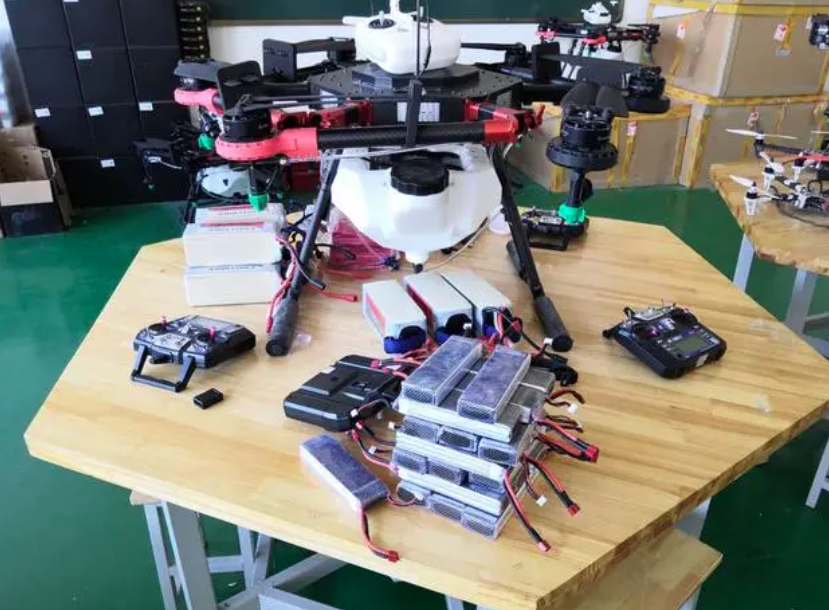
无人机培训:无人机维护保养技术详解
随着无人机技术的飞速发展,其在航拍、农业、救援、环境监测等领域的应用日益广泛。然而,要确保无人机安全、高效地执行任务,定期的维护保养至关重要。本文将深入解析无人机维护保养的核心技术,涵盖基础构造理解、清洁与防尘、电机…...

Mac 创建 Python 虚拟环境
在 macOS 上,您可以使用以下步骤使用 virtualenv 创建虚拟环境: 首先,确保您已经安装了 Python 和 virtualenv。您可以在终端中运行以下命令来检查它们是否已安装: python --version virtualenv --version如果这些命令没有找到&am…...

安卓玩机工具-----无需root权限 卸载 禁用 删除当前机型app应用 ADB玩机工具
ADB玩机工具 ADB AppControl是很实用的安卓手机应用管理工具,无需root权限,通过usb连接电脑后,可以很方便的进行应用程序安装与卸载,还支持提取手机应用apk文件到电脑上,此外还有手机系统垃圾清理、上传文件等…...

中国科技统计年鉴1991-2020年
(数据收集)中国科技统计年鉴1991-2020年.Excel格式资源-CSDN文库https://download.csdn.net/download/2401_84585615/89475658 《中国科技统计年鉴》是由国家统计局社会科技和文化产业统计司与科学技术部战略规划司共同编辑的官方统计资料书,…...

OpenAI / GPT-4o:Python 返回结构化 / JSON 输出
在调用 OpenAI(比如:GPT-4o)接口时,希望返回的结果是能够在后续任务中自动化处理的结构化 / JSON 输出。GPT 版本:gpt-4o-2024-08-06,提供了这样的功能。 目标:从非结构化输入到结构化数据&…...

通信工程学习:什么是EDFA掺铒光纤放大器
EDFA:掺铒光纤放大器 EDFA,即掺铒光纤放大器(Erbium-Doped Fiber Amplifier),是一种在光纤通信中广泛使用的光放大器件。以下是对EDFA的详细解释: 一、定义与基本原理 EDFA是在石英光纤中掺入少量的稀土元…...

机器学习与深度学习的区别
随着人工智能技术的迅猛发展,机器学习(Machine Learning, ML)和深度学习(Deep Learning, DL)这两个术语越来越频繁地出现在人们的视野中。尽管它们之间有着紧密的联系,但实际上二者存在显著的区别。本文旨在…...

标准库标头 <barrier>(C++20)学习
此头文件是线程支持库的一部分。 类模板 std::barrier 提供一种线程协调机制,阻塞已知大小的线程组直至该组中的所有线程到达该屏障。不同于 std::latch,屏障是可重用的:一旦到达的线程组被解除阻塞,即可重用同一屏障。与 std::l…...

如何测量一个(传输网络)系统的容量
Little 定律就能反算系统容量,但我这篇文章要正着算。 假想一个理发店场景。李大爷拥有一家占地 50 平米的理发店,经理到店里理发如果已经有经理在理发,就要拿个券等待,请问李大爷需要印多少等待券? 这是个系统容量问…...

【MySQL】MySQL和Workbench版本兼容问题
1、安装MySQL WorkBench 最新版本下载:https://dev.mysql.com/downloads/workbench/ 历史版本下载:https://downloads.mysql.com/archives/workbench/ 2、问题描述 本人在Windows下安装了一个旧版本的MySQL(5.1),同…...
---后台搜索Cache优化)
项目实战 ---- 商用落地视频搜索系统(10)---后台搜索Cache优化
目录 背景 技术实现策略 视频预处理阶段的cache技术 视频搜索阶段的cache技术 技术实现 预处理阶段cache策略实现 逻辑 代码 运行结果 问题及注意点 搜索阶段cache策略实现 系统配置层面 逻辑 低版本 GPU CPU 本项目的配置 高版本 描述 go ahead 策略 cac…...
)
客户端(服务器下载文件)
一、客户端代码 客户端代码 //实现TCP客户端通信 #include<stdio.h> #include<unistd.h> #include<sys/stat.h> #include<sys/types.h> #include<sys/socket.h> #include<string.h> #include<netinet/ip.h> #include<netinet/in…...

iPXE脚本编程实战:自动化部署、故障诊断和定制化菜单终极指南
iPXE脚本编程实战:自动化部署、故障诊断和定制化菜单终极指南 【免费下载链接】ipxe iPXE network bootloader 项目地址: https://gitcode.com/gh_mirrors/ip/ipxe iPXE作为领先的开源网络启动引导程序,提供了强大的脚本编程功能,让网…...

数控编程软件|PowerMill 2026全流程下载安装教程
相信大家不会感到陌生,PowerMill是一款功能强大且专业的计算机辅助制造(CAM)软件工具,专注于复杂零件的数控(CNC)加工编程,尤其适用于模具、航空航天、汽车制造等高精度、高复杂度…...

深入解析Umi-OCR:开源离线OCR工具的技术架构与实践应用
深入解析Umi-OCR:开源离线OCR工具的技术架构与实践应用 【免费下载链接】Umi-OCR OCR software, free and offline. 开源、免费的离线OCR软件。支持截屏/批量导入图片,PDF文档识别,排除水印/页眉页脚,扫描/生成二维码。内置多国语…...

不用登录!3 步把 Excel 进度表变成甘特图
很多团队并不是缺项目管理工具,而是缺时间:领导下午要进度图,表格还在同事电脑里,甘特图只能熬夜手画。PJMan 提供了一条「先出图、再决策」的轻路径:免登录 Excel 一键可视化。 为什么值得试? 零注册门槛&…...

深度学习立体匹配:从MC-CNN架构解析到工程实践优化
1. 项目概述:从传统到深度,立体匹配的范式革新在计算机视觉领域,立体匹配是一个经典且核心的问题,它的目标是从一对经过校正的左右图像中,为每个像素找到其在另一幅图像中的对应点,从而计算出场景的深度信息…...

基于STM32的物联网健康监测平台:硬件设计、驱动开发与系统整合
1. 项目概述:一个面向物联网健康监测的STM32开发平台最近在整理手头的项目资料,翻出来一块几年前自己设计并打样的STM32开发板。这块板子当初的定位很明确,就是做一个功能集成度高的“物联网健康监测终端”原型平台。它不是那种追求极致性能的…...

智能体编排框架实战:构建可控可观测的多AI协同工作流
1. 项目概述与核心价值最近在折腾AI应用开发,特别是想把多个大语言模型(LLM)和工具(Tools)组合起来,搞点自动化流程。市面上现成的框架不少,但要么太重,要么太“黑盒”,想…...

晶晨T972嵌入式主板开发指南:从硬件选型到量产部署
1. 项目概述:一颗“芯”引发的性价比革命 最近在嵌入式开发圈和智能硬件圈里,一个消息传得挺火:亮钻推出了一款基于晶晨T972平台的高性价比主板。对于很多正在寻找稳定、高性能且成本可控的解决方案的开发者、产品经理和创客来说,…...
)
【计算机网络硬核指南】子网划分终极篇:定长+VLSM+超网三合一实战(3道大厂真题逐字节演算)
【计算机网络硬核指南】子网划分终极篇:定长VLSM超网三合一实战(3道大厂真题逐字节演算) 前言 在上一篇文章中,我们系统学习了IP地址基础和子网划分的核心方法,逐题演算了9道经典真题。很多读者反馈说,看…...

告别混合写法!详解Nginx 1.25.1中独立的http2指令配置与性能影响
Nginx 1.25.1 HTTP/2配置革新:架构演进与性能实践指南 当Nginx 1.25.1的更新日志中出现"http2指令独立"这一行文字时,许多资深运维工程师的配置管理哲学正在被悄然改写。这不仅仅是语法糖的调整,而是反映了Web服务器架构设计从&quo…...