
Django 5 增删改查 小练习


1. 用命令创建目录和框架
django-admin startproject myapp
cd myapp
py manage.py startapp app
md templates
md static
md media
2. Ai 生成代码
一、app/models.py
from django.db import modelsclass Product(models.Model):name = models.CharField(max_length=255, verbose_name="商品名称")description = models.TextField( verbose_name="商品描述")quantity = models.PositiveIntegerField( verbose_name="商品数量")price = models.DecimalField(max_digits=10, decimal_places=2 , verbose_name="商品价格")class Meta:verbose_name = "商品"verbose_name_plural = verbose_namedef __str__(self):return self.nameclass Sale(models.Model):product = models.ForeignKey(Product, on_delete=models.CASCADE , verbose_name="商品")quantity_sold = models.PositiveIntegerField( verbose_name="销售数量")sale_date = models.DateTimeField(auto_now_add=True , verbose_name="销售日期")class Meta:verbose_name = "销售"verbose_name_plural = verbose_nameclass Purchase(models.Model):product = models.ForeignKey(Product, on_delete=models.CASCADE , verbose_name="商品")quantity_purchased = models.PositiveIntegerField( verbose_name="购买数量")purchase_date = models.DateTimeField(auto_now_add=True , verbose_name="购买日期")class Meta:verbose_name = "购买"verbose_name_plural = verbose_name二、myapp/settings.py
ALLOWED_HOSTS = ['*']INSTALLED_APPS = ['django.contrib.admin','django.contrib.auth','django.contrib.contenttypes','django.contrib.sessions','django.contrib.messages','django.contrib.staticfiles','app',
]TEMPLATES = [{'BACKEND': 'django.template.backends.django.DjangoTemplates','DIRS': [ BASE_DIR / 'templates'],'APP_DIRS': True,LANGUAGE_CODE = 'zh-hans'TIME_ZONE = 'Asia/Shanghai'STATIC_URL = 'static/'
# STATIC_ROOT = os.path.join(BASE_DIR, 'static')
STATICFILES_DIRS = [os.path.join(BASE_DIR, 'static'),
]
MEDIA_URL = '/media/'
MEDIA_ROOT = os.path.join(BASE_DIR, 'media')
三、命令创建数据库
python manage.py makemigrations
python manage.py migrate
四、app/admin.py
from django.contrib import admin
from.models import Product, Sale, Purchaseadmin.site.register(Product)
admin.site.register(Sale)
admin.site.register(Purchase)
python manage.py createsuperuser # 创建后台用户 admin test@qq.com 123456 y
五、app/views.py
from django.shortcuts import render, redirect
from.models import Productdef product_list(request):products = Product.objects.all()total_quantity = sum(product.quantity for product in products)total_price = sum(product.price * product.quantity for product in products)return render(request, 'product_list.html', {'products': products, 'total_quantity': total_quantity, 'total_price': total_price})def add_product(request):if request.method == 'POST':name = request.POST['name']description = request.POST['description']quantity = int(request.POST['quantity'])price = float(request.POST['price'])product = Product(name=name, description=description, quantity=quantity, price=price)product.save()return redirect('product_list')return render(request, 'add_product.html')def update_product(request, product_id):product = Product.objects.get(pk=product_id)if request.method == 'POST':product.name = request.POST['name']product.description = request.POST['description']product.quantity = int(request.POST['quantity'])product.price = float(request.POST['price'])product.save()return redirect('product_list')return render(request, 'update_product.html', {'product': product})def delete_product(request, product_id):product = Product.objects.get(pk=product_id)if request.method == 'POST':product.delete()return redirect('product_list')return render(request, 'delete_product.html', {'product': product})
六、app/urls.py
from django.urls import path
from.views import product_list, add_product, update_product, delete_producturlpatterns = [path('products/', product_list, name='product_list'),path('products/add/', add_product, name='add_product'),path('products/update/<int:product_id>/', update_product, name='update_product'),path('products/delete/<int:product_id>/', delete_product, name='delete_product'),
]
七、myapp/urls.py
from django.contrib import admin
from django.urls import include, pathfrom app.views import product_list # 导入的视图函数 urlpatterns = [path('admin/', admin.site.urls),path('', product_list, name='home'), # 将根路径映射到 product_list 视图函数path('app/', include('app.urls')), # 将 app 应用中的 URL 映射到 app.urls 模块
]
八、myapp/templates 和 myapp/static
在 static 目录下载 layui (Layui - 极简模块化前端 UI 组件库(官方文档)) 解压到目录

在 templates 创建 product_list.html、add_product.html、delete_product.html、update_product.html

product_list.html
<!DOCTYPE html>
<html>{% load static %}
<head><title>Product List</title><link rel="stylesheet" type="text/css" href="{% static 'layui/css/layui.css' %}">
</head><body><div class="layui-container"><h1>Product List 商品列表</h1><table class="layui-table" lay-skin="line" lay-even><thead><tr><th>Name商品名称</th><th>Description 商品描述</th><th>Quantity 数量</th><th>Price 单价</th><th>Actions </th></tr></thead><tbody>{% for product in products %}<tr><td>{{ product.name }}</td><td>{{ product.description }}</td><td>{{ product.quantity }}</td><td>{{ product.price }}</td><td><a href="{% url 'update_product' product.id %}" class="layui-btn layui-btn-sm layui-btn-normal">Update 修改</a><a href="{% url 'delete_product' product.id %}" class="layui-btn layui-btn-sm layui-btn-danger">Delete 删除</a></td></tr>{% endfor %}</tbody></table><h2>Total Quantity 数量: {{ total_quantity }}</h2><h2>Total Price 总价: {{ total_price }}</h2><a href="{% url 'add_product' %}" class="layui-btn layui-btn-primary">Add Product 增加</a></div>
</body></html>
add_product.html
<!DOCTYPE html>
<html>
{% load static %}
<head><title>Add Product</title><link rel="stylesheet" type="text/css" href="{% static 'layui/css/layui.css' %}">
</head><body><div class="layui-container"><h1>Add Product</h1><form method="post">{% csrf_token %}<label for="name">Name:</label><input type="text" id="name" name="name" required class="layui-input"><br><label for="description">Description:</label><textarea id="description" name="description" class="layui-textarea"></textarea><br><label for="quantity">Quantity:</label><input type="number" id="quantity" name="quantity" required class="layui-input"><br><label for="price">Price:</label><input type="number" step="0.01" id="price" name="price" required class="layui-input"><br><input type="submit" value="Add Product" class="layui-btn"></form>
</div>
</body></html>
delete_product.html
<!DOCTYPE html>
<html>{% load static %}
<head><title>Delete Product</title><link rel="stylesheet" type="text/css" href="{% static 'layui/css/layui.css' %}">
</head><body><div class="layui-container"><h1>Confirm Deletion </h1><p>Are you sure you want to delete 是否要删除 "{{ product.name }}"?</p><form method="post" class="layui-form" >{% csrf_token %}<input type="submit" value="Yes, Delete 删除" class="layui-btn layui-btn-danger"><a href="{% url 'product_list' %}" class="layui-btn layui-btn-primary">Cancel 取消</a></form>
</div>
</body></html>
update_product.html
<!DOCTYPE html>
<html>{% load static %}
<head><title>Update Product</title><link rel="stylesheet" type="text/css" href="{% static 'layui/css/layui.css' %}">
</head><body><div class="layui-container"><h1>Update Product</h1><form method="post">{% csrf_token %}<label for="name">Name:</label><input type="text" id="name" name="name" value="{{ product.name }}" required class="layui-input"><br><label for="description">Description:</label><textarea id="description" name="description" class="layui-textarea" required>{{ product.description }}</textarea><br><label for="quantity">Quantity:</label><input type="number" id="quantity" name="quantity" value="{{ product.quantity }}" required class="layui-input"><br><label for="price">Price:</label><input type="number" step="0.01" id="price" name="price" value="{{ product.price }}" required class="layui-input"><br><input type="submit" value="Update Product" class="layui-btn"></form></div>
</body></html>
八、 运行
python manage.py runserver
3. 用TKinter 查看数据表 与出数据

pip install openpyxl
pip install reportlab
myapp/viewSQL.py
import sqlite3
import tkinter as tk
from tkinter import ttk
import openpyxl
from tkinter import messagebox
from reportlab.lib.pagesizes import letter
from reportlab.pdfgen import canvas
import osdef get_table_names():conn = sqlite3.connect('db.sqlite3')cursor = conn.cursor()cursor.execute("SELECT name FROM sqlite_master WHERE type='table';")table_names = [row[0] for row in cursor.fetchall()]conn.close()return table_namesdef fetch_data(table_name):conn = sqlite3.connect('db.sqlite3')cursor = conn.cursor()cursor.execute(f'SELECT * FROM {table_name}')data = cursor.fetchall()conn.close()return datadef display_table_names():names = get_table_names()for item in tree.get_children():tree.delete(item)for name in names:tree.insert('', 'end', values=(name,))def display_data_for_selected_table(event):selected_item = tree.focus()if selected_item:table_name = tree.item(selected_item)['values'][0]data = fetch_data(table_name)for item in data_tree.get_children():data_tree.delete(item)for row in data:data_tree.insert('', 'end', values=row)def export_to_excel():selected_item = tree.focus()if selected_item:table_name = tree.item(selected_item)['values'][0]data = fetch_data(table_name)wb = openpyxl.Workbook()ws = wb.activews.append([f'Column {i + 1}' for i in range(len(data[0]))])for row in data:ws.append(row)filename = f'{table_name}.xlsx'wb.save(filename)messagebox.showinfo("Export Success", f"Data exported to {filename}")def print_to_pdf():selected_item = tree.focus()if selected_item:table_name = tree.item(selected_item)['values'][0]data = fetch_data(table_name)pdf_filename = f'{table_name}_pdf_export.pdf'c = canvas.Canvas(pdf_filename, pagesize=letter)y = 750c.setFont("Helvetica", 12)c.drawString(50, y, f"Table Name: {table_name}")y -= 20for row in data:row_str = ", ".join(str(item) for item in row)c.drawString(50, y, row_str)y -= 15c.save()messagebox.showinfo("PDF Export Success", f"Data printed to {pdf_filename}")def print_to_markdown():selected_item = tree.focus()if selected_item:table_name = tree.item(selected_item)['values'][0]data = fetch_data(table_name)markdown_filename = f'{table_name}_markdown_export.md'with open(markdown_filename, 'w') as f:f.write(f'# {table_name}\n')for row in data:row_str = " | ".join(str(item) for item in row)f.write(f'| {row_str} |\n')messagebox.showinfo("Markdown Export Success", f"Data printed to {markdown_filename}")root = tk.Tk()
root.title("SQLite3 Table Viewer and Exporter 查看器与导出器")# Treeview for table names
tree = ttk.Treeview(root, columns=("Table Name",), show="headings")
tree.heading("Table Name", text="Table Name")
tree.column("Table Name", width=400)
tree.pack(padx=10, pady=10)# Treeview for table data
data_tree = ttk.Treeview(root, columns=("column1", "column2", "column3", "column4", "column5", "..."), show="headings")
for col in ("column1", "column2", "column3", "column4", "column5", "..."):data_tree.heading(col, text=col)data_tree.column(col, width=100)
data_tree.pack(padx=10, pady=10)button_fetch = tk.Button(root, text="Fetch Table Names 查看表名", command=display_table_names)
button_fetch.pack(pady=10)export_button = tk.Button(root, text="Export to Excel 导出为Excel", command=export_to_excel)
export_button.pack(pady=10)print_pdf_button = tk.Button(root, text="Print to PDF 打印为PDF", command=print_to_pdf)
print_pdf_button.pack(pady=10)print_markdown_button = tk.Button(root, text="Print to Markdown 打印为Markdown", command=print_to_markdown)
print_markdown_button.pack(pady=10)tree.bind("<Double-1>", display_data_for_selected_table)root.mainloop()
4. 一键生成 代码
/app.py
import subprocess
import osdef replace_content_in_file(file_path, keyword, new_content):try:with open(file_path, 'r', encoding='utf-8') as file:lines = file.readlines()with open(file_path, 'w', encoding='utf-8') as file:for line in lines:if keyword in line:line = line.replace(keyword, new_content)file.write(line)print(f"成功在文件中找到'{keyword}'并进行了替换。")except FileNotFoundError:print(f"文件 {file_path} 不存在。")# 使用示例
# file_path = 'myapp/settings.py'
# keyword = 'ALLOWED_HOSTS = []'
# new_content = "ALLOWED_HOSTS = ['*']"
# replace_content_in_file(file_path, keyword, new_content)def add_content_after_keyword(file_path, keyword, new_content):try:with open(file_path, 'r', encoding='utf-8') as file:lines = file.readlines()with open(file_path, 'w', encoding='utf-8') as file:for line in lines:if keyword in line:line = line.rstrip() + new_content + '\n'file.write(line)print(f"成功在文件中找到'{keyword}'并添加了内容。")except FileNotFoundError:print(f"文件 {file_path} 不存在。")# 使用示例
# file_path = 'myapp/settings.py'
# keyword = "'django.contrib.staticfiles',"
# new_content = "\n\t'app',"def create_django_project_and_app(project_name, app_name):try:# 创建 Django 项目subprocess.run(["django-admin", "startproject", project_name], check=True)# 切换到项目目录os.chdir(project_name)# 创建应用subprocess.run(["python", "manage.py", "startapp", app_name], check=True)# 创建templates目录os.makedirs('templates', exist_ok=True)# 创建 static 目录os.makedirs('static', exist_ok=True)# 创建media目录os.makedirs('media', exist_ok=True)file_path = project_name +'/settings.py'keyword = "'django.contrib.staticfiles',"new_content = "\n\t"+"'"+app_name+"'"+","add_content_after_keyword(file_path, keyword, new_content)file_path = project_name +'/settings.py'keyword = 'ALLOWED_HOSTS = []'new_content = "ALLOWED_HOSTS = ['*']"replace_content_in_file(file_path, keyword, new_content)file_path = project_name +'/settings.py'keyword = "'DIRS': [],"new_content = "'DIRS': [ BASE_DIR / 'templates'],"replace_content_in_file(file_path, keyword, new_content)file_path = project_name +'/settings.py'keyword = "LANGUAGE_CODE = 'en-us'"new_content = "LANGUAGE_CODE = 'zh-hans'"replace_content_in_file(file_path, keyword, new_content)file_path = project_name +'/settings.py'keyword = "TIME_ZONE = 'UTC'"new_content = "TIME_ZONE = 'Asia/Shanghai'"replace_content_in_file(file_path, keyword, new_content)file_path = project_name +'/settings.py'keyword = "from pathlib import Path"new_content = "from pathlib import Path\nimport os"replace_content_in_file(file_path, keyword, new_content)file_path = project_name +'/settings.py'keyword = "STATIC_URL = 'static/'"new_content = "STATIC_URL = 'static/'\nSTATICFILES_DIRS = [os.path.join(BASE_DIR, 'static'),]\nMEDIA_URL = '/media/'\nMEDIA_ROOT = os.path.join(BASE_DIR, 'media')"replace_content_in_file(file_path, keyword, new_content)# 执行 makemigrations 命令subprocess.run(["python", "manage.py", "makemigrations"], check=True)# 执行 migrate 命令subprocess.run(["python", "manage.py", "migrate"], check=True)# 创建超级用户os.system("python manage.py createsuperuser")# 运行开发服务器subprocess.run(["python", "manage.py", "runserver"], check=True)print(f"成功创建 Django 项目:{project_name},并创建应用:{app_name}")except subprocess.CalledProcessError as e:print(f"创建过程中出现错误:{e}")# 使用示例
# project_name = "myapp"
# app_name = "app"
project_name = input("请输入 Django 项目名称:")
app_name = input("请输入应用名称:")
create_django_project_and_app(project_name, app_name)
相关文章:
Django 5 增删改查 小练习
1. 用命令创建目录和框架 django-admin startproject myapp cd myapp py manage.py startapp app md templates md static md media 2. Ai 生成代码 一、app/models.py from django.db import modelsclass Product(models.Model):name models.CharField(max_length255, verb…...

【STM32 Blue Pill编程实例】-I2C主从机通信(中断、DMA)
I2C主从机通信(中断、DMA) 文章目录 I2C主从机通信(中断、DMA)1、STM32的I2C介绍2、I2C模式3、STM32 I2C 数据包错误检查4、STM32 I2C 错误情况5、STM32 I2C中断6、STM32 I2C 主发送和接收(Tx 和 RX)6.1 I2C 轮询模式6.2 I2C 中断模式6.3 I2C DMA 模式6.4 STM32 I2C 设备…...
基于SSM+小程序的旅游社交登录管理系统(旅游4)
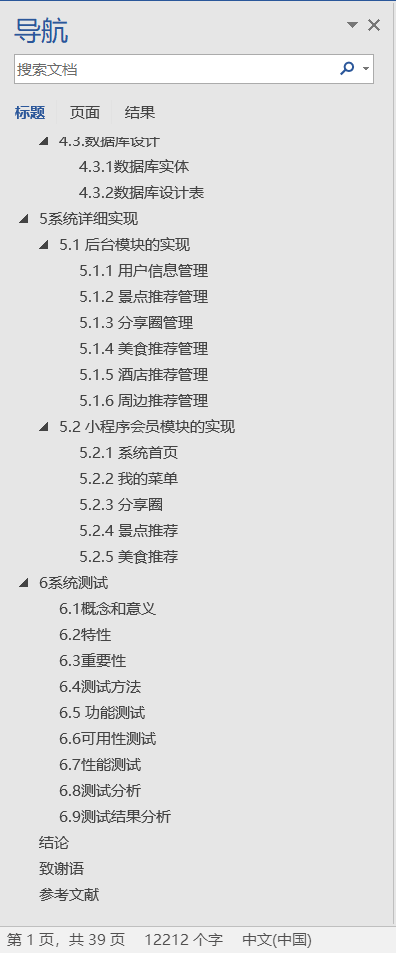
👉文末查看项目功能视频演示获取源码sql脚本视频导入教程视频 1、项目介绍 本旅游社交小程序功能有管理员和用户。管理员有个人中心,用户管理,每日签到管理,景点推荐管理,景点分类管理,防疫查询管理&a…...

高级java每日一道面试题-2024年10月24日-JVM篇-说一下JVM有哪些垃圾回收器?
如果有遗漏,评论区告诉我进行补充 面试官: 说一下JVM有哪些垃圾回收器? 我回答: 1. Serial收集器 特点:Serial收集器是最古老、最稳定的收集器,它使用单个线程进行垃圾收集工作。在进行垃圾回收时,它会暂停所有用户线程,即St…...

Java-内部类
个人主页 学习内部类(Inner Class)是Java编程中一项重要且强大的特性,它允许你在一个类的内部定义另一个类。内部类提供了一种将逻辑上相关的类组织在一起的方式,增加了代码的封装性和可读性。接下来带领大家进入內部类的学习。 …...

flutter集成极光推送
一、简述 极光推送,英文简称 JPush,免费的第三方消息推送服务,官方也推出众多平台的SDK以及插件。 参考链接 名称地址客户端集成插件客户端集成插件 - 极光文档 二、操作步骤 2.1 添加插件 flutter项目中集成官方提供的 极光推送flutte…...

D. Skipping 【 Codeforces Round 980 (Div. 2)】
D. Skipping 思路: 注意到最佳策略是先往右跳转到某处,然后按顺序从右往左把没有遇到过的题目全部提交。 将从 i i i跳转到 b [ i ] b[i] b[i]视为通过边权(代价)为 a [ i ] a[i] a[i]的路径,而向左的路径边权都是 0 0 0;目的是找到到从出发…...

【golang】学习文档整理
Binding | Echo 传值时注意零值和传空的区别 需要validate require 和 设置指针配合使用 保证不同值的返回不同 不能客户端传0值被判断为空 测试时要空值零值去测试字段是否正确返回 返回错误是否符合预期...

动态规划-子序列问题——1218.最长定差子序列
1.题目解析 题目来源:1218.最长定差子序列——力扣 测试用例 2.算法原理 1.状态表示 本题可以看作是寻找一个等差序列,并且公差给出,这里并不是普通的使用一个dp表,而是将arr与dp表同时存储于一个哈希表,arr[i]映射dp…...

双子塔楼宇可视化系统:提升建筑管理与运营效率
利用图扑可视化技术对双子塔楼宇的各项功能进行实时监控和管理。通过数据分析优化资源配置,提高能源效率,增强楼宇安全性,实现智能化运营。...
32位的ARMlinux的4字节变量原子访问问题
在32位的ARM Linux内核中,4字节整型变量通常被认为是原子操作。 这主要是因为: 对齐要求:在ARM架构中,4字节整型变量通常是按4字节对齐存储的,这样可以确保在读取和写入时,CPU能够以单个指令完成操作。 …...

用哪种建站程序做谷歌SEO更容易?
做网站很容易,但做一个能带来流量和订单的网站就没那么简单了。尤其是在谷歌SEO优化方面,不同的建站程序对SEO的支持程度也不同。在这方面,WordPress和Shopify无疑是最佳选择。 WordPress作为一个内容管理系统(CMS)&am…...
IPsec简单介绍
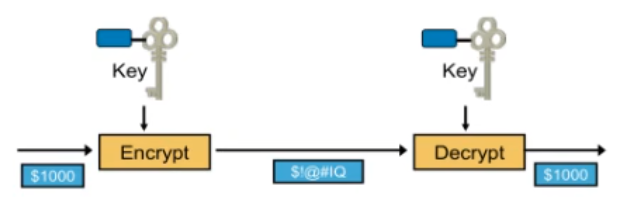
VPN相关介绍 VPN:虚拟私有网络 例如:像这种不加密的 PPTPL2TP ------- 一般用在windows server 服务端(但是大多数企业不用这个) 假如总公司内部的PC1要去访问分公司内部的PC2(一般用在公司服务器有内网的服务&#…...
颠覆级AI:10秒生成超清视频
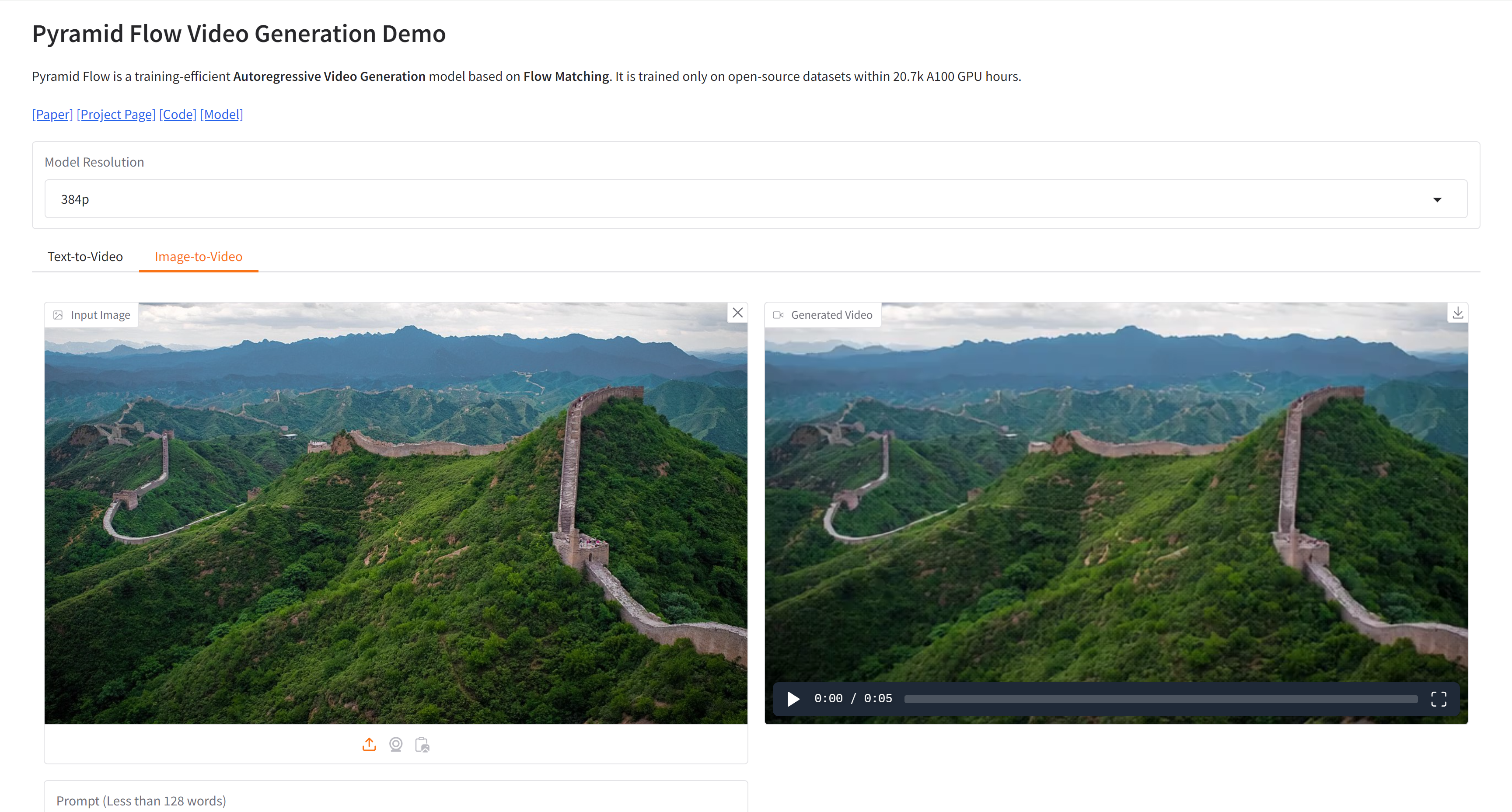
颠覆级AI:10秒生成超清视频 Pyramid-Flow 是一款开源 AI 视频生成神器💻,只需文字或图片即可极速生成高清视频🎥!高效、高清、资源需求低,适合创作广告、教学视频等多种用途🚀,快来…...

《西安科技大学学报》
《西安科技大学学报》主要刊载安全科学与工程、矿业工程、建筑与土木工程、地质与环境工程、测绘工程、材料科学与工程、化学与化工、机械工程、电气工程及自动化、通信与信息工程、计算机科学与工程、矿业经济管理等专业领域内具有创新性的学术论文和科研成果。 来稿必须符合以…...

redis详细教程(2.List教程)
List是一种可以存储多个有序字符串的数据类型,其中的元素按照顺序排列(可以重复出现),可以通过数字索引来访问列表中的元素,索引可以从左到右或者从右到左。 Redis 列表可以通过两种方式实现:压缩列表&…...

电子电气架构 --- 电气系统工程
我是穿拖鞋的汉子,魔都中坚持长期主义的汽车电子工程师。 老规矩,分享一段喜欢的文字,避免自己成为高知识低文化的工程师: 屏蔽力是信息过载时代一个人的特殊竞争力,任何消耗你的人和事,多看一眼都是你的不对。非必要不费力证明自己,无利益不试图说服别人,是精神上的节…...

15-4连续子串和的整除问题
问题描述 小M是一个五年级的小学生,今天他学习了整除的知识,想通过一些练习来巩固自己的理解。他写下了一个长度为 n 的正整数序列 a_0, a_1, ..., a_{n-1},然后想知道有多少个连续子序列的和能够被一个给定的正整数 b 整除。你能帮小M解决这…...

Spring源码:Bean创建、Bean获取
Bean是怎么被创建,如何获取Bean,基于Spring 5.3.24版本,Spring Boot 可用 2.7.6 结论: 创建:非懒加载的单实例bean在容器创建的时候创建,通过beanFactory的doGetBean方法,利用反射进行创建&…...

MetaArena推出《Final Glory》:引领Web3游戏技术新风向
随着区块链技术的日益成熟,Web3游戏成为了游戏产业探索的新方向,将去中心化经济与虚拟世界结合在一起,形成了一个全新的生态体系。然而,尽管Web3游戏展示了令人兴奋的可能性,但其背后的技术障碍依旧严峻,特…...

QKeyMapper:重新定义Windows输入控制的终极解决方案
QKeyMapper:重新定义Windows输入控制的终极解决方案 【免费下载链接】QKeyMapper [按键映射工具] QKeyMapper,Qt开发Win10&Win11可用,不修改注册表、不需重新启动系统,可立即生效和停止。支持游戏手柄映射到键鼠,手…...

Brushes项目部署教程:从源码编译到App Store发布完整指南 [特殊字符]
Brushes项目部署教程:从源码编译到App Store发布完整指南 🎨 【免费下载链接】Brushes Painting app for the iPhone and iPad. 项目地址: https://gitcode.com/gh_mirrors/br/Brushes Brushes是一款专为iPhone和iPad设计的开源绘画应用ÿ…...

全面实战指南:如何高效部署ChatTTS-ui语音合成系统
全面实战指南:如何高效部署ChatTTS-ui语音合成系统 【免费下载链接】ChatTTS-ui 一个简单的本地网页界面,使用ChatTTS将文字合成为语音,同时支持对外提供API接口。A simple native web interface that uses ChatTTS to synthesize text into …...

为Claude Code配置Taotoken作为稳定后备API解决封号与Token不足痛点
🚀 告别海外账号与网络限制!稳定直连全球优质大模型,限时半价接入中。 👉 点击领取海量免费额度 为Claude Code配置Taotoken作为稳定后备API解决封号与Token不足痛点 对于频繁使用Claude Code进行编程辅助的开发者而言࿰…...

CANN/asc-devkit RTC运行时编译指南
RTC 【免费下载链接】asc-devkit 本项目是CANN 推出的昇腾AI处理器专用的算子程序开发语言,原生支持C和C标准规范,主要由类库和语言扩展层构成,提供多层级API,满足多维场景算子开发诉求。 项目地址: https://gitcode.com/cann/a…...

Azure机器学习实战:汽车价格预测模型端到端部署
1. 项目概述:在 Azure 上构建一个真正能落地的汽车价格预测模型你有没有试过想买一辆二手车,却在几个平台之间反复比价、查配置、翻论坛,最后还是拿不准这台车到底值不值这个价?或者作为数据新人,手头有份汽车数据集&a…...

激光器物理理论模型:从经典到量子,工程师如何选择?
1. 激光器物理理论模型全景概览激光,这束高度相干、单色、定向的光,其诞生与运作背后,是一套极其精密的物理法则。对于从事光电子、激光技术研发,乃至物理研究的工程师和学者而言,理解这些法则的不同描述层次ÿ…...
)
告别Keil!用CLion+STM32CubeMX+OpenOCD打造你的现代化STM32开发环境(保姆级配置流程)
从Keil到CLion:STM32开发环境现代化升级实战指南 嵌入式开发领域正在经历一场工具链的革新浪潮。对于长期使用Keil这类传统IDE的开发者来说,CLion带来的现代化开发体验堪称降维打击——智能代码补全、精准跳转、安全重构,这些在通用软件开发中…...

NebulaGraph Console终极指南:简单快速掌握图数据库命令行工具
NebulaGraph Console终极指南:简单快速掌握图数据库命令行工具 【免费下载链接】nebula-console Command line interface for the Nebula Graph service 项目地址: https://gitcode.com/gh_mirrors/ne/nebula-console NebulaGraph Console是NebulaGraph图数据…...

Wedding-website图片库与相册功能:展示精美婚礼照片的最佳实践
Wedding-website图片库与相册功能:展示精美婚礼照片的最佳实践 【免费下载链接】wedding-website Our Wedding Website 👫 项目地址: https://gitcode.com/gh_mirrors/we/wedding-website 婚礼是人生中最珍贵的时刻之一,而如何将这些美…...