
HarmonyOS 沉浸式状态实现的多种方式
1. HarmonyOS 沉浸式状态实现的多种方式
HarmonyOS 沉浸式状态实现的多种方式
1.1. 方法一
1.1.1. 实现讲解
(1)首先设置setWindowLayoutFullScreen(true)(设置全屏布局)。
布局将从屏幕最顶部开始到最底部结束,此时状态栏和底部规避区域还在,且与页面重叠,所以还需要设置页面根容器顶部内边距为状态栏高度,底部内边距为规避区域高度,这样页面就不会重叠。
(2)页面隐藏(或销毁)周期函数内恢复非全屏布局设置setWindowLayoutFullScreen(false)
全屏布局设置是全局生效的,一旦设置跳转到其他页面同样生效,对于其他页面不需要沉浸式状态栏需要恢复原样。
全屏布局非全屏显示,区别在于状态栏、规避区域还在,页面布局从屏幕最顶端开始
1.1.2. 代码实现
ImmersePage .ets(页面)
import { window } from '@kit.ArkUI'
import { AppHelper, StatusBarBean } from 'zzslib';
import { AppUtil } from 'zzslib/src/main/ets/util/AppUtil';
@Entry
@Component
struct ImmersePage {@State statusHeight: number = 0 //状态栏高度@State bottomAvoidAreaHeight: number = 0 //手机底部规避区域高度@State windowClass: window.Window | null = null //窗口管理器appHelper = new AppHelper();aboutToAppear() {this.setStatusBar('#00007AFF')this.init()}onPageShow(): void {//设置全屏布局this.windowClass?.setWindowLayoutFullScreen(true)}onPageHide(): void {//取消全屏布局this.windowClass?.setWindowLayoutFullScreen(false)this.setStatusBar('#007AFF')}//初始化init() {window.getLastWindow(getContext(this), (err, windowClass) => {if (!err.code) {//保存窗口管理器this.windowClass = windowClass//获取状态栏高度this.statusHeight = px2vp(windowClass.getWindowAvoidArea(window.AvoidAreaType.TYPE_SYSTEM).topRect.height)//获取手机底部规避区域高度this.bottomAvoidAreaHeight =px2vp(windowClass.getWindowAvoidArea(window.AvoidAreaType.TYPE_NAVIGATION_INDICATOR).bottomRect.height)windowClass.setWindowLayoutFullScreen(true)}})}setStatusBar(statusBarBgColor: string) {let that = thislet statusBarBean = new StatusBarBean()statusBarBean.isFullScreen = falsestatusBarBean.statusBarBgColor = statusBarBgColorstatusBarBean.statusBarTitleColor = '#ffffff'that.appHelper.setStatusBar(statusBarBean)AppUtil.setStatusBar(true, true)}build() {Column() {//页面区域Column() {Text('沉浸式状态栏').fontColor('#fff')}.height('100%').width('100%').border({width: 1,color: 'red'})}.height('100%').width('100%').backgroundImage( $r('app.media.img_bg_page')).backgroundImageSize({ height: '100%', width: '100%' }).padding({ top: this.statusHeight, bottom: this.bottomAvoidAreaHeight })}
}
1.1.3
. 运行效果:
1.1.3. 全局缓存窗口管理器
当项目内多个页面需要设置全屏布局时,每个页面要重新获取窗口管理器、状态栏高度、底部规避区域高度就比较麻烦,可以在entryabili内获取到上述属性值(对象)并存储在全局对象globalThis上
EntryAbility.ets
import { AbilityConstant, UIAbility, Want } from '@kit.AbilityKit';
import { window } from '@kit.ArkUI';export default class EntryAbility extends UIAbility {onCreate(want: Want, launchParam: AbilityConstant.LaunchParam): void {}onWindowStageCreate(windowStage: window.WindowStage): void {//添加如下代码windowStage.getMainWindow((err, data) => {if (!err.code) {//全局变量添加窗口对象globalThis.windowClass = data;//全局变量添加状态栏高度单位vpglobalThis.statusHeight = px2vp(data.getWindowAvoidArea(window.AvoidAreaType.TYPE_SYSTEM).topRect.height)//全局添加底部规避区域高度单位vpglobalThis.bottomAvoidAreaHeight = px2vp(data.getWindowAvoidArea(window.AvoidAreaType.TYPE_NAVIGATION_INDICATOR).bottomRect.height)}})//windowStage.loadContent('pages/Index', (err) => {if (err.code) {return;}});}}
Index.ets(页面)
import { window } from '@kit.ArkUI'@Entry
@Component
struct Index {onPageShow(): void {//设置全屏布局globalThis.windowClass.setWindowLayoutFullScreen(true)}onPageHide(): void {//取消全屏布局globalThis.windowClass.setWindowLayoutFullScreen(false)}build() {Column() {//页面区域Column() {Text('沉浸式状态栏').fontColor('#fff')}.height('100%').width('100%').border({width: 1,color: 'red'})}.height('100%').width('100%').backgroundImage( $r('app.media.img_bg_page')).backgroundImageSize({ height: '100%', width: '100%' }).padding({ top: globalThis.statusHeight, bottom: globalThis.bottomAvoidAreaHeight })}
}
1.2. 方法二
1.2.1. 实现讲解
通过NavDestination作为页面根容器,并隐藏标题栏即可快速实现沉浸式状态,NavDestination从api 11开始默认支持安全区避让特性,所以关于页面重叠问题就不需要解决
1.2.2. 代码实现
Index.ets(页面)
@Entry
@Component
struct Index{build() {NavDestination(){//页面区域Column(){Text('沉浸式状态栏').fontColor('#fff')}.width('100%').height('100%').border({width:1,color:'red'})}.hideTitleBar(true).backgroundImage( $r('app.media.img_bg_page')).backgroundImageSize({height:'100%',width:'100%'})}
}
1.2.3. 运行效果:

1.3. 方法三
1.3.1. 实现讲解
通过expandSafeArea属性支持组件不改变布局情况下扩展其绘制区域至安全区外
1.3.2. 代码实现
@Entry
@Component
struct Index {build() {Stack() {Image($r('app.media.img_bg_page')).height('100%').width('100%').expandSafeArea()//页面区域Column() {Text('沉浸式状态栏').fontColor('#fff')}.height('100%').width('100%').border({width: 1,color: 'red'})}.height('100%').width('100%')}
}
如果只需要头部区域沉浸

实现代码:
@Entry
@Component
struct Index {build() {Column() {Column() {Text('沉浸式状态栏').fontColor('#fff')}.height(100).width('100%').backgroundColor('#0A7EE6').expandSafeArea([SafeAreaType.SYSTEM], [SafeAreaEdge.TOP])}.height('100%').width('100%')}
}
如果想修改状态栏文字颜色可通过:setWindowSystemBarProperties实现
window.getLastWindow(getContext(this), (err, windowClass) => {if (!err.code) {windowClass.setWindowSystemBarProperties({statusBarContentColor:"#ffffff"})}})

1.4.封装
1.4.1. 封装状态栏管理类
我们在common目录中创建StatusBarManager.ts文件,完整的代码如下:
import window from '@ohos.window';
import HashMap from '@ohos.util.HashMap';
import { Log } from './Log';/*** 状态栏管理器*/
export class StatusBarManager {private readonly TAG = 'StatusBarManager';private readonly CONFIG_SYSTEM_BAR_HEIGHT = 'systemBarHeight';private static mInstance: StatusBarManager;private mWindowStage: window.WindowStage;private mConfig = new HashMap<string, any>();private constructor() {}public static get(): StatusBarManager {if (!this.mInstance) {this.mInstance = new StatusBarManager();}return this.mInstance;}/*** 存储windowStage实例* @param windowStage*/public storeWindowStage(windowStage: window.WindowStage) {this.mWindowStage = windowStage;}/*** 获取windowStage实例* @returns*/public getWindowStage(): window.WindowStage {return this.mWindowStage;}/*** 设置沉浸式状态栏* @param windowStage* @returns*/public setImmersiveStatusBar(windowStage: window.WindowStage): Promise<void> {let resolveFn, rejectFn;let promise = new Promise<void>((resolve, reject) => {resolveFn = resolve;rejectFn = reject;});// 1.获取应用主窗口。try {let windowClass = windowStage.getMainWindowSync();Log.info(this.TAG, 'Succeeded in obtaining the main window. Data: ' + JSON.stringify(windowClass));// 2.实现沉浸式效果:设置窗口可以全屏绘制。// 将UI内容顶入状态栏下方windowClass.setWindowLayoutFullScreen(true).then(() => {//3、设置状态栏 可见windowClass.setWindowSystemBarEnable(['status']).then(() => {//4、设置状态栏透明背景const systemBarProperties: window.SystemBarProperties = {statusBarColor: '#00000000'};//设置窗口内导航栏、状态栏的属性windowClass.setWindowSystemBarProperties(systemBarProperties).then(() => {Log.info(this.TAG, 'Succeeded in setting the system bar properties.');}).catch((err) => {Log.error(this.TAG, 'Failed to set the system bar properties. Cause: ' + JSON.stringify(err));});})//5、存储状态栏高度this.storeStatusBarHeight(windowClass);resolveFn();});} catch (err) {Log.error(this.TAG, 'Failed to obtain the main window. Cause: ' + JSON.stringify(err));rejectFn();}return promise;}/*** 关闭沉浸式状态栏* @param windowStage* @returns*/public hideImmersiveStatusBar(windowStage: window.WindowStage): Promise<void> {let resolveFn, rejectFn;let promise = new Promise<void>((resolve, reject) => {resolveFn = resolve;rejectFn = reject;});// 1.获取应用主窗口。try {let windowClass = windowStage.getMainWindowSync();Log.info(this.TAG, 'Succeeded in obtaining the main window. Data: ' + JSON.stringify(windowClass));windowClass.setWindowLayoutFullScreen(false).then(() => {//存储状态栏高度this.mConfig.set(this.CONFIG_SYSTEM_BAR_HEIGHT, 0);resolveFn();});} catch (err) {Log.error(this.TAG, 'Failed to obtain the main window. Cause: ' + JSON.stringify(err));rejectFn(err);}return promise;}/*** 获取状态栏高度进行保存* @param windowClass* @returns*/private storeStatusBarHeight(windowClass: window.Window) {try {const avoidArea = windowClass.getWindowAvoidArea(window.AvoidAreaType.TYPE_SYSTEM);// 保存高度信息this.mConfig.set(this.CONFIG_SYSTEM_BAR_HEIGHT, avoidArea.topRect.height);Log.info(this.TAG, 'Succeeded in obtaining the area. Data:' + JSON.stringify(avoidArea));} catch (err) {Log.error(this.TAG, 'Failed to obtain the area. Cause:' + JSON.stringify(err));}}/*** 未开启沉浸式状态栏,偏移量为0,开启, 偏移量为状态栏高度* @returns*/public getSystemBarOffset(): number {let height = 0;if (this.mConfig.hasKey(this.CONFIG_SYSTEM_BAR_HEIGHT)) {height = this.mConfig.get(this.CONFIG_SYSTEM_BAR_HEIGHT) as number;}return height;}/*** 是否开启沉浸式状态栏* @returns*/public isOpenImmersiveStatusBar(): boolean {return this.getSystemBarOffset() > 0;}
}
1.4.2.StatusBarManager 管理类主要提供以下常用的方法:
(1)get- 获取管理类单例实例
(2)storeWindowStage- 存储windowStage实例
(3)该方法在UIAbility中进行调用。
(4)getWindowStage- 获取windowStage实例
(5)setImmersiveStatusBar- 设置沉浸式状态栏
(6)hideImmersiveStatusBar- 关闭沉浸式状态栏
(7)storeStatusBarHeight- (内部私有方法)获取状态栏高度进行保存
(8)getSystemBarOffset- 获取状态栏高度(沉浸式状态栏下需要调整的标题偏移量)
(9)isOpenImmersiveStatusBar- 是否开启沉浸式状态栏
下面我们主要讲解下setImmersiveStatusBar方法,设置沉浸式状态栏,这个过程主要分为五个步骤:
(1)获取应用主窗口
let windowClass = windowStage.getMainWindowSync();
我们通过传入的windowStage,同步获取一个主窗口实例。
(2)设置窗口可以全屏绘制
windowClass.setWindowLayoutFullScreen(true)
我们将窗口设置为全屏模式。
(3)设置状态栏可见
windowClass.setWindowSystemBarEnable(['status'])
在设置全屏后,状态栏不可见,我们需要的不是全屏效果,而是状态栏沉浸式效果,因此需要将状态栏设置为可见。
这里入参是一个数组,可以设置状态栏、也可以设置底部导航栏。
(4)设置窗口内状态栏背景为透明
const systemBarProperties: window.SystemBarProperties = {statusBarColor: '#00000000'
};
windowClass.setWindowSystemBarProperties(systemBarProperties).then(() => {Log.info(this.TAG, 'Succeeded in setting the system bar properties.');}).catch((err) => {Log.error(this.TAG, 'Failed to set the system bar properties. Cause: ' + JSON.stringify(err));});
状态栏设置为显示状态后,我们给状态栏的背景色设置为透明,这里才能达到沉浸式的效果。
(5)存储状态栏高度
const avoidArea = windowClass.getWindowAvoidArea(window.AvoidAreaType.TYPE_SYSTEM);
// 保存高度信息
this.mConfig.set(this.CONFIG_SYSTEM_BAR_HEIGHT, avoidArea.topRect.height);
我们通过上述代码可以获取系统状态栏的高度,并将其保存起来,后续页面通过该高度来判断是否是开启了沉浸式状态栏。
这样我们的状态栏管理类就封装完毕,下面我们来写下页面UI实现沉浸式页面状态栏效果。
1.4.3.完整代码
import { StatusBarManager } from '../../../utils/StatusBarManager';@Entry
@Component
struct Immerse3Page {@State showImmersiveStatusBar: boolean = false;@State titleBarPadding: number = 0;build() {Column() {Column() {Column() {Text('这是标题').fontSize(20).fontColor(Color.White)}.height(50).justifyContent(FlexAlign.Center)}.padding({ top: `${this.titleBarPadding}px` }).width('100%').backgroundColor('#ff007dfe')Column() {Text('点击开启沉浸式状态栏').fontSize(16)Button(this.showImmersiveStatusBar ? '关闭' : '开启').fontSize(16).margin({ top: 20 }).padding({ left: 50, right: 50 }).onClick(() => {if (this.showImmersiveStatusBar) {this.close();} else {this.open();}this.showImmersiveStatusBar = !this.showImmersiveStatusBar;})}.width('100%').height('100%').justifyContent(FlexAlign.Center)}.height('100%')}private open() {let windowStage = StatusBarManager.get().getWindowStage();if (windowStage) {StatusBarManager.get().setImmersiveStatusBar(windowStage).then(() => {this.titleBarPadding = StatusBarManager.get().getSystemBarOffset();});}}private close() {let windowStage = StatusBarManager.get().getWindowStage();if (windowStage) {StatusBarManager.get().hideImmersiveStatusBar(windowStage).then(() => {this.titleBarPadding = 0;})}}
}
相关文章:
HarmonyOS 沉浸式状态实现的多种方式
1. HarmonyOS 沉浸式状态实现的多种方式 HarmonyOS 沉浸式状态实现的多种方式 1.1. 方法一 1.1.1. 实现讲解 (1)首先设置setWindowLayoutFullScreen(true)(设置全屏布局)。 布局将从屏幕最顶部开始到最底部结束,…...

Python3.11.9下载和安装
Python3.11.9下载和安装 1、下载 下载地址:https://www.python.org/downloads/windows/ 选择版本下载,例如:Python 3.11.9 - April 2, 2024 2、安装 双击exe安装 3、配置环境变量 pathD:\Program Files\python3.11.9...
简简单单的UDP
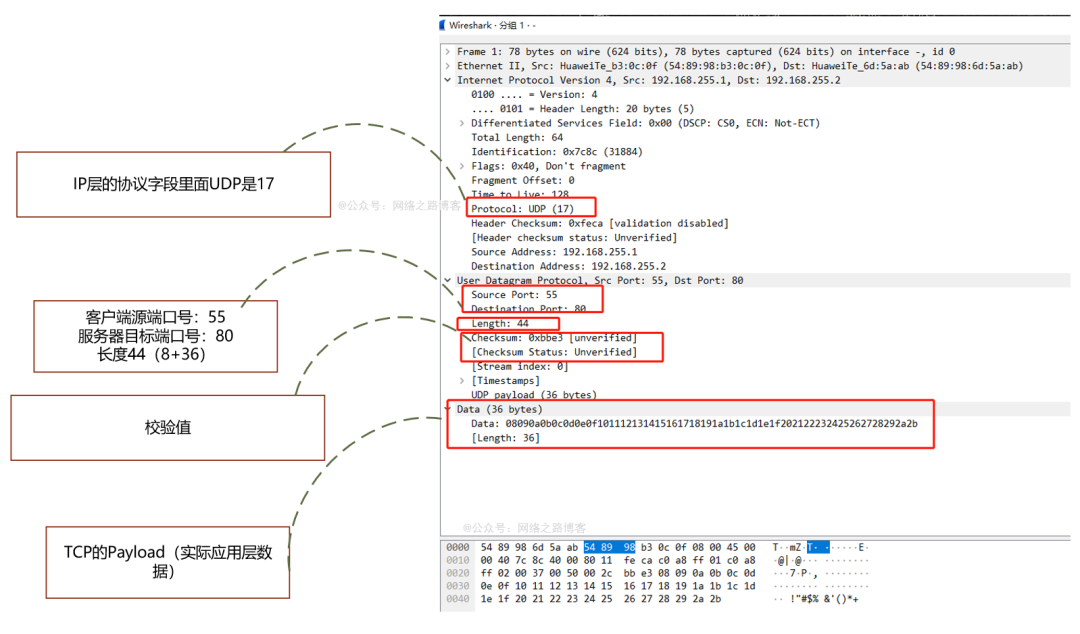
前言 上一篇了解了TCP的三次握手过程,目的、以及如何保证可靠性、序列号与ACK的作用,最后离开的时候四次挥手的内容,这还只是TCP内容中的冰山一角,是不是觉得TCP这个协议非常复杂,这一篇我们来了解下传输层另外一个协…...

减少 try...catch,定义全局统一异常处理器!
前言 软件开发springboot项目过程中,不可避免的需要处理各种异常,spring mvc 架构中各层会出现大量的try {...} catch {...} finally {...}代码块,不仅有大量的冗余代码,而且还影响代码的可读性。这样就需要定义个全局统一异常处理器&#x…...

多点支撑:滚珠导轨的均匀分布优势!
滚珠导轨的滚珠稳定性可以有效保持滚珠导轨的稳定运行,减少滚珠脱落的风险,确保设备的长期稳定性和可靠性。事实上,滚珠导轨的滚珠稳定性主要依赖于以下几个方面: 1、精密的制造工艺:滚珠导轨的导轨和滑块通常采用高精…...

电气火灾探测器在商场火灾隐患监测和火灾预防中的应用
徐悦 安科瑞电气股份有限公司 近年来,全国火灾事故频发,尤其是在大型商场等公共场所,火灾造成了巨大的人员伤亡和财产损失。以南京金盛百货中央门店火灾为例,该起事故暴露了商场在电气安全、消防管理方面的重大隐患,…...

速盾:如何有效防止服务器遭受攻击?
服务器攻击是网络安全中常见的问题,但我们可以采取一系列的措施来有效防止服务器的遭受攻击。以下是一些常见的防御措施: 更新和维护服务器软件:及时更新操作系统、应用程序以及安全补丁,以确保最新版本的软件没有已知的漏洞。同时…...

【今日更新】使用Python辅助处理WebGIS
Linux发行版本: Debian GNU/Linux 12 (bookworm)操作系统内核: Linux-6.1.0-18-amd64-x86_64-with-glibc2.36Python版本: 3.11.2 1.使用Python处理MapServer配置文件Mapfile 创建、分析、修改和格式化的python库 MapServer Mapfiles。 Python 2和3 兼容 纯Python-无MapServer依…...

Linux 消息队列
在Linux中,线程间消息队列可以通过使用System V消息队列或POSIX消息队列来实现。 使用System V消息队列: System V消息队列是一种基于IPC(Inter-process Communication,进程间通信)的通信机制,可以用于进程…...

十大经典排序算法-冒泡算法详解介绍
1、十大经典排序算法 排序算法是《数据结构与算法》中最基本的算法之一。 排序算法可以分为内部排序和外部排序,内部排序是数据记录在内存中进行排序,而外部排序是因排序的数据很大,一次不能容纳全部的排序记录,在排序过程中需要…...

delphi 编译多语言工程 error RC2104 : undefined keyword or key name:
Delphi 10.3中建立多语言工程,编译时出现错误:error RC2104 : undefined keyword or key name: 出现错误的的文件是.rc文件,出现错误的位置是 System_JSONConsts_SInvalidJavascriptQuote, L"Invalid JavaScript string quote character…...

[python] 如何debug python脚本中C++后端的core dump
文章目录 Debug过程Reference Debug过程 另外:对于core dump: gdb版本是>7,gdb从版本7开始支持对Python的debug。确保你的系统中安装了 GDB 调试器和对应版本的 Python 调试信息包(例如 python-dbg 或 python-debuginfo)。 #…...
标准)
Ecmascript(ES)标准
Ecmascript(ES)标准 ECMAScript(通常简称为 ES)是一种标准化的脚本语言,由 Ecma International 通过 ECMA-262 标准定义。ECMAScript 是 JavaScript 的规范版本,几乎所有的现代浏览器和许多服务器端环境&a…...

易泊车牌识别相机:4S 店的智能之选
在当今数字化时代,科技的进步不断为各个行业带来更高效、便捷的解决方案。对于 4S 店来说,易泊车牌识别相机的出现,无疑为其运营管理带来了全新的变革。 一、易泊车牌识别相机的强大功能 易泊车牌识别相机以其卓越的性能和精准的识别能力&…...

Webpack 深度解析与实战指南
文章目录 前言一、安装于基本配置安装Webpack 和 Webpack CLI创建基本配置文件 二、加载器常见的加载器配置加载器 三、插件(Plugins)常用的插件配置插件 四、性能优化缓存代码分割Tree Shaking压缩 五、开发服务器安装服务器配置服务器启动服务器生产环…...

【RabbitMQ】06-消费者的可靠性
1. 消费者确认机制 没有ack,mq就会一直保留消息。 spring:rabbitmq:listener:simple:acknowledge-mode: auto # 自动ack2. 失败重试机制 当消费者出现异常后,消息会不断requeue(重入队)到队列,再重新发送给消费者。…...

【K8S系列】如何监控集群CPU使用率并设置告警的分析与详细解决方案
监控 Kubernetes 集群的 CPU 使用率并设置告警是确保集群健康和性能的关键。以下是几种常见的方案,每种方案的具体步骤都进行了详细说明。 方案 1: 使用 Prometheus 和 Grafana 1. 安装 Prometheus 和 Grafana 1.1 使用 Helm 安装 Prometheus 添加 Helm 仓库: hel…...

解线性方程组(二)
实验类型:●验证性实验 ○综合性实验 ○设计性实验 实验目的:进一步熟练掌握用Jacobi迭代法和Gauss-Seidel法解线性方程组的算法,提高编程能力和解算线性方程组问题的实践技能。 实验内容: 1)取初值性x(0)(0,0,0,0)T, 精度要求ε…...
HarmonyOS Next 实战卡片开发 02
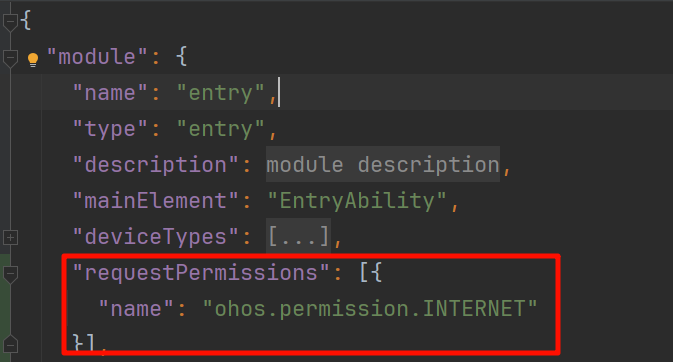
HarmonyOS Next 实战卡片开发 02 卡片开发中,还有一个难点是显示图片。其中分为显示本地图片和显示网络图片 显示本地图片 卡片可以显示本地图片,如存放在应用临时目录下的图片。路径比如 /data/app/el2/100/base/你的项目boundleName/temp/123.png 以…...

FastDDS服务发现之PDP的收发
目录 PDP发送PDP接收EDP更新 EntityID 通过FastDDS服务发现之PDP和EDP的创建这一节内容,可以了解服务发现的概念,机制和PDP/EDP中各类对象的创建,本文详细介绍Simple PDP发送数据,接收数据和处理报文的流程。 PDP发送 通过在RTP…...

Clawforce:开源AI智能体团队基础设施,实现持久化与安全协作
1. 项目概述:Clawforce,一个为持久化AI智能体团队构建的基础设施最近在AI智能体领域,一个词被反复提及:“Agentic AI”,即智能体驱动的AI。这不再是让单个AI模型回答一个问题那么简单,而是构建一个能够自主…...

利用Google可编程搜索引擎API实现免费高效的Python搜索自动化
1. 项目概述:一个被低估的搜索利器 如果你经常需要从Google上批量、自动化地获取搜索结果,并且对搜索结果的质量、速度和稳定性有要求,那你一定遇到过官方API的种种限制,或者对第三方付费服务望而却步。今天要聊的这个项目 chhan…...

Qdrant 如何配置 API Key 认证
Qdrant 如何配置 API Key 认证 Qdrant 是当下最流行的向量数据库之一,广泛应用于 RAG(检索增强生成)、相似度搜索、AI 应用等场景。生产环境中,API Key 认证是保障数据安全的基本手段。本文详细介绍 Qdrant 的 API Key 配置方法&a…...

终极指南:如何一键下载国家智慧教育平台电子课本PDF
终极指南:如何一键下载国家智慧教育平台电子课本PDF 【免费下载链接】tchMaterial-parser 国家中小学智慧教育平台 电子课本下载工具,帮助您从智慧教育平台中获取电子课本的 PDF 文件网址并进行下载,让您更方便地获取课本内容。 项目地址: …...

WP Pinch:通过MCP协议为WordPress站点集成AI助手管理能力
1. 项目概述:当你的WordPress站点“长出”AI的爪子 如果你和我一样,每天大部分时间都泡在Slack、Telegram或者WhatsApp里,和团队沟通、处理信息,那么你肯定也烦透了那种“这个内容不错,等我回到电脑前再发到网站上”的…...

RedwoodJS熔断器:构建高可用应用的熔断机制与故障隔离终极指南 [特殊字符]
RedwoodJS熔断器:构建高可用应用的熔断机制与故障隔离终极指南 🔧 【免费下载链接】redwood RedwoodGraphQL 项目地址: https://gitcode.com/gh_mirrors/re/redwood 在当今微服务架构盛行的时代,应用的高可用性成为了开发者的首要关注…...

中小项目如何通过按token计费模式灵活启动AI功能
🚀 告别海外账号与网络限制!稳定直连全球优质大模型,限时半价接入中。 👉 点击领取海量免费额度 中小项目如何通过按token计费模式灵活启动AI功能 对于预算有限的中小项目团队而言,在探索产品方向、验证市场需求的早期…...

从零到一:基于C#与ArcGIS二次开发构建迎风面指数计算插件实战
1. 环境准备与工具搭建 第一次接触ArcGIS二次开发时,我被官方文档里密密麻麻的API吓得不轻。后来发现只要配好环境,开发插件比想象中简单得多。你需要准备三样东西:Visual Studio(建议2019或2022社区版)、ArcGIS Desk…...

5步掌握OpenCore Configurator:黑苹果配置终极可视化指南
5步掌握OpenCore Configurator:黑苹果配置终极可视化指南 【免费下载链接】OpenCore-Configurator A configurator for the OpenCore Bootloader 项目地址: https://gitcode.com/gh_mirrors/op/OpenCore-Configurator 如果你正在为黑苹果系统的复杂配置而烦恼…...

终极指南:MobileAgent如何用AI智能体彻底改变跨平台自动化体验
终极指南:MobileAgent如何用AI智能体彻底改变跨平台自动化体验 【免费下载链接】MobileAgent Mobile-Agent: The Powerful GUI Agent Family 项目地址: https://gitcode.com/GitHub_Trending/mo/mobileagent 你是否曾经想过,如果有一个AI助手能够…...