
[免费]SpringBoot+Vue新能源汽车充电桩管理系统【论文+源码+SQL脚本】
大家好,我是java1234_小锋老师,看到一个不错的SpringBoot+Vue新能源汽车充电桩管理系统,分享下哈。
项目视频演示
【免费】SpringBoot+Vue新能源汽车充电桩管理系统 Java毕业设计_哔哩哔哩_bilibili
项目介绍
随着信息化时代的到来,管理系统都趋向于智能化、系统化,车辆充电桩管理系统也不例外,但目前国内仍都使用人工管理,市场规模越来越大,同时信息量也越来越庞大,人工管理显然已无法应对时代的变化,而车辆充电桩管理系统能很好地解决这一问题,轻松应对车辆充电桩平时的工作,既能提高人力物力财力,又能加快工作的效率,取代人工管理是必然趋势。
本车辆充电桩管理系统以springboot作为框架,b/s模式以及MySql作为后台运行的数据库,同时使用Tomcat用为系统的服务器。本系统主要包括首页、个人中心、维修员管理、用户管理、电桩类别管理、充电桩管理、充电桩报修管理、维修回复管理、系统管理等功能,通过这些功能的实现基本能够满足日常车辆充电桩管理的操作。
本文着重阐述了车辆充电桩管理系统的分析、设计与实现,首先介绍开发系统和环境配置、数据库的设计,接着说明功能模块的详细实现,最后进行了总结。
系统展示


部分代码
package com.controller;import java.util.Arrays;
import java.util.Calendar;
import java.util.Date;
import java.util.Map;import javax.servlet.http.HttpServletRequest;import org.springframework.beans.factory.annotation.Autowired;
import org.springframework.stereotype.Controller;
import org.springframework.web.bind.annotation.GetMapping;
import org.springframework.web.bind.annotation.PathVariable;
import org.springframework.web.bind.annotation.PostMapping;
import org.springframework.web.bind.annotation.RequestBody;
import org.springframework.web.bind.annotation.RequestMapping;
import org.springframework.web.bind.annotation.RequestParam;
import org.springframework.web.bind.annotation.ResponseBody;
import org.springframework.web.bind.annotation.RestController;import com.annotation.IgnoreAuth;
import com.baomidou.mybatisplus.mapper.EntityWrapper;
import com.entity.TokenEntity;
import com.entity.UserEntity;
import com.service.TokenService;
import com.service.UserService;
import com.utils.CommonUtil;
import com.utils.MPUtil;
import com.utils.PageUtils;
import com.utils.R;
import com.utils.ValidatorUtils;/*** 登录相关*/
@RequestMapping("users")
@RestController
public class UserController{@Autowiredprivate UserService userService;@Autowiredprivate TokenService tokenService;/*** 登录*/@IgnoreAuth@PostMapping(value = "/login")public R login(String username, String password, String captcha, HttpServletRequest request) {UserEntity user = userService.selectOne(new EntityWrapper<UserEntity>().eq("username", username));if(user==null || !user.getPassword().equals(password)) {return R.error("账号或密码不正确");}String token = tokenService.generateToken(user.getId(),username, "users", user.getRole());return R.ok().put("token", token);}/*** 注册*/@IgnoreAuth@PostMapping(value = "/register")public R register(@RequestBody UserEntity user){
//    	ValidatorUtils.validateEntity(user);if(userService.selectOne(new EntityWrapper<UserEntity>().eq("username", user.getUsername())) !=null) {return R.error("用户已存在");}userService.insert(user);return R.ok();}/*** 退出*/@GetMapping(value = "logout")public R logout(HttpServletRequest request) {request.getSession().invalidate();return R.ok("退出成功");}/*** 密码重置*/@IgnoreAuth@RequestMapping(value = "/resetPass")public R resetPass(String username, HttpServletRequest request){UserEntity user = userService.selectOne(new EntityWrapper<UserEntity>().eq("username", username));if(user==null) {return R.error("账号不存在");}user.setPassword("123456");userService.update(user,null);return R.ok("密码已重置为:123456");}/*** 列表*/@RequestMapping("/page")public R page(@RequestParam Map<String, Object> params,UserEntity user){EntityWrapper<UserEntity> ew = new EntityWrapper<UserEntity>();PageUtils page = userService.queryPage(params, MPUtil.sort(MPUtil.between(MPUtil.allLike(ew, user), params), params));return R.ok().put("data", page);}/*** 列表*/@RequestMapping("/list")public R list( UserEntity user){EntityWrapper<UserEntity> ew = new EntityWrapper<UserEntity>();ew.allEq(MPUtil.allEQMapPre( user, "user")); return R.ok().put("data", userService.selectListView(ew));}/*** 信息*/@RequestMapping("/info/{id}")public R info(@PathVariable("id") String id){UserEntity user = userService.selectById(id);return R.ok().put("data", user);}/*** 获取用户的session用户信息*/@RequestMapping("/session")public R getCurrUser(HttpServletRequest request){Long id = (Long)request.getSession().getAttribute("userId");UserEntity user = userService.selectById(id);return R.ok().put("data", user);}/*** 保存*/@PostMapping("/save")public R save(@RequestBody UserEntity user){
//    	ValidatorUtils.validateEntity(user);if(userService.selectOne(new EntityWrapper<UserEntity>().eq("username", user.getUsername())) !=null) {return R.error("用户已存在");}userService.insert(user);return R.ok();}/*** 修改*/@RequestMapping("/update")public R update(@RequestBody UserEntity user){
//        ValidatorUtils.validateEntity(user);UserEntity u = userService.selectOne(new EntityWrapper<UserEntity>().eq("username", user.getUsername()));if(u!=null && u.getId()!=user.getId() && u.getUsername().equals(user.getUsername())) {return R.error("用户名已存在。");}userService.updateById(user);//全部更新return R.ok();}/*** 删除*/@RequestMapping("/delete")public R delete(@RequestBody Long[] ids){userService.deleteBatchIds(Arrays.asList(ids));return R.ok();}
}
<template><div><canvas id="canvas"  style="background:#336699"></canvas><div class="container loginIn"><div :class="3 == 1 ? 'left' : 3 == 2 ? 'left center' : 'left right'"><el-form class="login-form" label-position="left" :label-width="1 == 3 || 1 == 2 ? '30px': '0px'"><div class="title-container"><h3 class="title">车辆充电桩登录</h3></div><el-form-item :style='{"padding":"0","boxShadow":"0 0 6px rgba(0,0,0,0)","margin":"0 auto 15px","borderColor":"rgba(0,0,0,0)","backgroundColor":"rgba(255, 255, 255, 1)","borderRadius":"8px","borderWidth":"0","width":"60%","borderStyle":"solid","height":"auto"}' :label="1 == 3 ? '用户名' : ''" :class="'style'+1"><span v-if="1 != 3" class="svg-container" style="color:rgba(130, 130, 130, 1);line-height:30px;font-size:14px;width:30px;padding:0;margin:0;radius:0;border-width:0;border-style:solid;border-color:rgba(0,0,0,0);background-color:rgba(0,0,0,0);box-shadow:0 0 6px rgba(0,0,0,0);}"><svg-icon icon-class="user" /></span><el-input placeholder="请输入用户名" name="username" type="text" v-model="rulesForm.username" /></el-form-item><el-form-item :style='{"padding":"0","boxShadow":"0 0 6px rgba(0,0,0,0)","margin":"0 auto 15px","borderColor":"rgba(0,0,0,0)","backgroundColor":"rgba(255, 255, 255, 1)","borderRadius":"8px","borderWidth":"0","width":"60%","borderStyle":"solid","height":"auto"}' :label="1 == 3 ? '密码' : ''" :class="'style'+1"><span v-if="1 != 3" class="svg-container" style="color:rgba(130, 130, 130, 1);line-height:30px;font-size:14px;width:30px;padding:0;margin:0;radius:0;border-width:0;border-style:solid;border-color:rgba(0,0,0,0);background-color:rgba(0,0,0,0);box-shadow:0 0 6px rgba(0,0,0,0);"><svg-icon icon-class="password" /></span><el-input placeholder="请输入密码" name="password" type="password" v-model="rulesForm.password" /></el-form-item><el-form-item label="角色" prop="loginInRole" class="role" style="display: flex;align-items: center;"><el-radiov-for="item in menus"v-if="item.hasBackLogin=='是'"v-bind:key="item.roleName"v-model="rulesForm.role":label="item.roleName">{{item.roleName}}</el-radio></el-form-item><el-button type="primary" @click="login()" class="loginInBt">{{'1' == '1' ? '登录' : 'login'}}</el-button><el-form-item class="setting"><!-- <div style="color:${template2.back.login.loginInSettingFontColor}" class="reset">修改密码</div> --></el-form-item></el-form></div></div></div>
</template>
<script>import menu from "@/utils/menu";
import canvasBg from "@/assets/js/canvas-bg-2.js";
import "@/assets/css/canvas-bg-2.css"export default {data() {return {rulesForm: {username: "",password: "",role: "",code: '',},menus: [],tableName: "",codes: [{num: 1,color: '#000',rotate: '10deg',size: '16px'},{num: 2,color: '#000',rotate: '10deg',size: '16px'},{num: 3,color: '#000',rotate: '10deg',size: '16px'},{num: 4,color: '#000',rotate: '10deg',size: '16px'}],};},mounted() {let menus = menu.list();this.menus = menus;this.$nextTick(() => {canvasBg()})},created() {this.getRandCode()},methods: {register(tableName){this.$storage.set("loginTable", tableName);this.$router.push({path:'/register'})},// 登陆login() {if (!this.rulesForm.username) {this.$message.error("请输入用户名");return;}if (!this.rulesForm.password) {this.$message.error("请输入密码");return;}if (!this.rulesForm.role) {this.$message.error("请选择角色");return;}let menus = this.menus;for (let i = 0; i < menus.length; i++) {if (menus[i].roleName == this.rulesForm.role) {this.tableName = menus[i].tableName;}}this.$http({url: `${this.tableName}/login?username=${this.rulesForm.username}&password=${this.rulesForm.password}`,method: "post"}).then(({ data }) => {if (data && data.code === 0) {this.$storage.set("Token", data.token);this.$storage.set("role", this.rulesForm.role);this.$storage.set("sessionTable", this.tableName);this.$storage.set("adminName", this.rulesForm.username);this.$router.replace({ path: "/index/" });} else {this.$message.error(data.msg);}});},getRandCode(len = 4){this.randomString(len)},randomString(len = 4) {let chars = ["a", "b", "c", "d", "e", "f", "g", "h", "i", "j", "k","l", "m", "n", "o", "p", "q", "r", "s", "t", "u", "v","w", "x", "y", "z", "A", "B", "C", "D", "E", "F", "G","H", "I", "J", "K", "L", "M", "N", "O", "P", "Q", "R","S", "T", "U", "V", "W", "X", "Y", "Z", "0", "1", "2","3", "4", "5", "6", "7", "8", "9"]let colors = ["0", "1", "2","3", "4", "5", "6", "7", "8", "9", "a", "b", "c", "d", "e", "f"]let sizes = ['14', '15', '16', '17', '18']let output = [];for (let i = 0; i < len; i++) {// 随机验证码let key = Math.floor(Math.random()*chars.length)this.codes[i].num = chars[key]// 随机验证码颜色let code = '#'for (let j = 0; j < 6; j++) {let key = Math.floor(Math.random()*colors.length)code += colors[key]}this.codes[i].color = code// 随机验证码方向let rotate = Math.floor(Math.random()*60)let plus = Math.floor(Math.random()*2)if(plus == 1) rotate = '-'+rotatethis.codes[i].rotate = 'rotate('+rotate+'deg)'// 随机验证码字体大小let size = Math.floor(Math.random()*sizes.length)this.codes[i].size = sizes[size]+'px'}},}
};
</script>
<style lang="scss" scoped>
.loginIn {min-height: 100vh;position: relative;background-repeat: no-repeat;background-position: center center;background-size: cover;.loginInBt {width: 600px;height: 150px;line-height: 150px;margin: 20px 0 0 -42px;padding: 0;color: rgba(112, 111, 67, 1);font-size: 40px;border-radius: 160px 0 0 160px;border-width: 0;border-style: solid;border-color: rgba(112, 111, 67, 1);background-color: rgba(255, 255, 255, 1);box-shadow: 0px 0px 0px 30px #706f43 inset;}.register {width: 330px;height: 24px;line-height: 24px;margin: -190px 0 0 0;padding: 0;color: rgba(24, 24, 24, 1);font-size: 12px;border-radius: 0;border-width: 0;border-style: solid;border-color: rgba(64, 158, 255, 1);background-color: rgba(112, 111, 67, 0);box-shadow: 0 0 6px rgba(255,0,0,0);cursor: pointer;}.reset {width: auto;height: 24px;line-height: 24px;margin: 0;padding: 0;color: rgba(214, 214, 214, 1);font-size: 12px;border-radius: 0;border-width: 0;border-style: solid;border-color: rgba(64, 158, 255, 1);background-color: rgba(255, 255, 255, 0);box-shadow: 0 0 6px rgba(255,0,0,0);}.left {position: absolute;left: 0;top: 0;box-sizing: border-box;width: 600px;height: 500px;margin: 200px 150px 0 0;padding: 0 12px;border-radius: 160px 0 0 30px;border-width: 30px 30px 0 30px;border-style: solid;border-color: rgba(112, 111, 67, 1);background-color: rgba(255, 255, 255, 0.59);box-shadow: 0 0 0px rgba(30, 144, 255, .8);.login-form {background-color: transparent;width: 100%;right: inherit;padding: 0;box-sizing: border-box;display: flex;position: initial;justify-content: center;flex-direction: column;}.title-container {text-align: center;font-size: 24px;.title {width: 80%;line-height: auto;margin: 150px auto 20px;padding: 15px;color: rgba(255, 255, 255, 1);font-size: 24px;border-radius: 100px;border-width: 0;border-style: solid;border-color: rgba(72, 54, 42, 1);background-color: rgba(112, 111, 67, 1);box-shadow: 0 0 6px rgba(0,0,0,0);}}.el-form-item {position: relative;& /deep/ .el-form-item__content {line-height: initial;}& /deep/ .el-radio__label {width: auto;height: 14px;line-height: 14px;margin: 0;padding: 0 0 0 10px;color: rgba(0, 0, 0, 1);font-size: 14px;border-radius: 0;border-width: 0;border-style: solid;border-color: rgba(255, 255, 255, 0);background-color: rgba(255, 255, 255, 0);box-shadow: 0 0 6px rgba(255,0,0,0);text-align: left;}& /deep/ .el-radio.is-checked .el-radio__label {width: auto;height: 14px;line-height: 14px;margin: 0;padding: 0 0 0 10px;color: rgba(112, 111, 67, 1);font-size: 14px;border-radius: 0;border-width: 0;border-style: solid;border-color: rgba(255, 255, 255, 0);background-color: rgba(255, 255, 255, 0);box-shadow: 0 0 6px rgba(255,0,0,0);text-align: left;}& /deep/ .el-radio__inner {width: 14px;height: 14px;margin: 0;padding: 0;border-radius: 100%;border-width: 1px;border-style: solid;border-color: rgba(72, 54, 42, 1);background-color: rgba(255, 255, 255, 1);box-shadow: 0 0 6px rgba(255,0,0,0);}& /deep/ .el-radio.is-checked .el-radio__inner {width: 14px;height: 14px;margin: 0;padding: 0;border-radius: 100%;border-width: 1px;border-style: solid;border-color: rgba(112, 111, 67, 1);background-color: rgba(112, 111, 67, 1);box-shadow: 0 0 6px rgba(255,0,0,0);}.svg-container {padding: 6px 5px 6px 15px;color: #889aa4;vertical-align: middle;display: inline-block;position: absolute;left: 0;top: 0;z-index: 1;padding: 0;line-height: 40px;width: 30px;text-align: center;}.el-input {display: inline-block;// height: 40px;width: 100%;& /deep/ input {background: transparent;border: 0px;-webkit-appearance: none;padding: 0 15px 0 30px;color: #fff;height: 40px;width: 100%;height: 30px;line-height: 30px;margin: 0;padding: 0 30px;color: rgba(0, 0, 0, 1);font-size: 16px;border-radius: 0;border-width: 0;border-style: solid;border-color: rgba(0,0,0,0);background-color: rgba(0,0,0,0);box-shadow: 0 0 6px rgba(255,0,0,0);}}}}.center {position: absolute;left: 50%;top: 50%;transform: translate3d(-50%,-50%,0);}.right {position: absolute;left: inherit;right: 0;top: 0;}.code {.el-form-item__content {position: relative;.getCodeBt {position: absolute;right: 0;top: 50%;transform: translate3d(0, -50%, 0);line-height: 40px;width: 100px;background-color: rgba(51,51,51,0.4);color: #fff;text-align: center;border-radius: 0 4px 4px 0;height: 40px;overflow: hidden;padding: 0;margin: 0;width: 100px;height: 30px;line-height: 30px;border-radius: 0;border-width: 0;border-style: solid;border-color: rgba(64, 158, 255, 1);background-color: rgba(51, 51, 51, 0.4);box-shadow: 0 0 6px rgba(255,0,0,0);span {padding: 0 5px;display: inline-block;font-size: 16px;font-weight: 600;}}.el-input {& /deep/ input {padding: 0 130px 0 30px;}}}}.setting {& /deep/ .el-form-item__content {// padding: 0 15px;box-sizing: border-box;line-height: 32px;height: 32px;font-size: 14px;color: #999;margin: 0 !important;display: flex;.register {// float: left;// width: 50%;text-align: center;}.reset {float: right;width: 50%;text-align: right;}}}.style2 {padding-left: 30px;.svg-container {left: -30px !important;}.el-input {& /deep/ input {padding: 0 15px !important;}}}.code.style2, .code.style3 {.el-input {& /deep/ input {padding: 0 115px 0 15px;}}}.style3 {& /deep/ .el-form-item__label {padding-right: 6px;height: 30px;line-height: 30px;}.el-input {& /deep/ input {padding: 0 15px !important;}}}& /deep/ .el-form-item__label {width: 30px;height: 30px;line-height: 30px;margin: 0;padding: 0;color: rgba(130, 130, 130, 1);font-size: 14px;border-radius: 0;border-width: 0;border-style: solid;border-color: rgba(0,0,0,0);background-color: rgba(0,0,0,0);box-shadow: 0 0 6px rgba(0,0,0,0);}.role {& /deep/ .el-form-item__label {width: 56px !important;height: 38px;line-height: 38px;margin: 0 0 0 20%;padding: 0;color: rgba(72, 54, 42, 1);font-size: 14px;border-radius: 0;border-width: 0;border-style: solid;border-color: rgba(64, 158, 255, 1);background-color: rgba(255, 255, 255, 0);box-shadow: 0 0 6px rgba(255,0,0,0);text-align: left;}& /deep/ .el-radio {margin-right: 12px;}}
}
</style>
源码代码
链接:https://pan.baidu.com/s/17UhBzcogjV_RZW6MH9ZNVg
提取码:1234
相关文章:
[免费]SpringBoot+Vue新能源汽车充电桩管理系统【论文+源码+SQL脚本】
大家好,我是java1234_小锋老师,看到一个不错的SpringBootVue新能源汽车充电桩管理系统,分享下哈。 项目视频演示 【免费】SpringBootVue新能源汽车充电桩管理系统 Java毕业设计_哔哩哔哩_bilibili 项目介绍 随着信息化时代的到来࿰…...

【已解决】【记录】2AI大模型web UI使用tips 本地
docker desktop使用 互动 如果需要发送网页链接,就在链接上加上【#】号 如果要上传文件就点击这个➕号 中文回复 命令它只用中文回复,在右上角打开【对话高级设置】 输入提示词(提示词使用英文会更好) Must reply to the us…...

44.ComboBox的数据绑定 C#例子 WPF例子
固定最简步骤,包括 XAML: 题头里引入命名空间 标题下面引入类 combobox绑定资源属性和选择属性,block则绑定和combobox一样的选择属性 C#: 通知的类,及对应固定的任务 引入字段 引入属性 其中资源是只读的 选…...

物联网之传感器技术
引言 在数字化浪潮席卷全球的今天,物联网(IoT)已成为推动各行各业变革的重要力量。而物联网传感器,作为物联网感知层的核心技术,更是扮演着不可或缺的角色。它们如同人类的五官,能够感知物理世界中的各种信…...

QTreeWidget QTreeWidgetItem
QTreeWidgetItem 是 Qt 框架中用于在 QTreeWidget 中表示树形结构中每个节点的类。它是 QTreeWidget 的一部分,允许您创建和管理层次结构的数据展示。 QTreeWidgetItem 用于表示树形结构中的单个节点。 添加子节点: 可以通过 addChild() 方法向节点添加…...

torch.einsum计算张量的外积
torch.einsum 是一种强大的张量操作工具,可以通过爱因斯坦求和约定(Einstein summation convention)来简洁地表示复杂的张量运算。通过它,我们可以高效地计算矩阵乘法、转置、点积、外积等操作。 以下是关于如何使用 torch.einsum 计算两个四维张量在第三维度上的外积的解…...

PostgreSQL 超级管理员详解
1. 什么是 PostgreSQL 超级管理员 PostgreSQL 超级管理员(superuser)是拥有数据库系统最高权限的用户。他们可以执行任何数据库操作,包括但不限于创建和删除数据库、用户、表空间、模式等。超级管理员权限是 PostgreSQL 中权限的最高级别。 …...

RabbitMQ 工作模式使用案例之(发布订阅模式、路由模式、通配符模式)
Hi~!这里是奋斗的明志,很荣幸您能阅读我的文章,诚请评论指点,欢迎欢迎 ~~ 🌱🌱个人主页:奋斗的明志 🌱🌱所属专栏:RabbitMQ 📚本系列文章为个人学…...
【2024年华为OD机试】(C卷,100分)- 机场航班调度程序 (Java JS PythonC/C++)
一、问题描述 题目描述 XX市机场停放了多架飞机,每架飞机都有自己的航班号,如CA3385,CZ6678,SC6508等,航班号的前2个大写字母(或数字)代表航空公司的缩写,后面4个数字代表航班信息…...

Vue.js组件开发-使用地图绘制轨迹
在Vue.js中开发一个组件来展示地图并绘制轨迹,可以使用诸如Leaflet.js、Mapbox GL JS或百度地图等地图库。这些库提供了丰富的API来创建和定制地图,以及绘制路径、标记和其他地图元素。 示例: 1. 安装Leaflet.js 首先,需要安装…...
vue 与 vue-json-viewer 实现 JSON 数据可视化
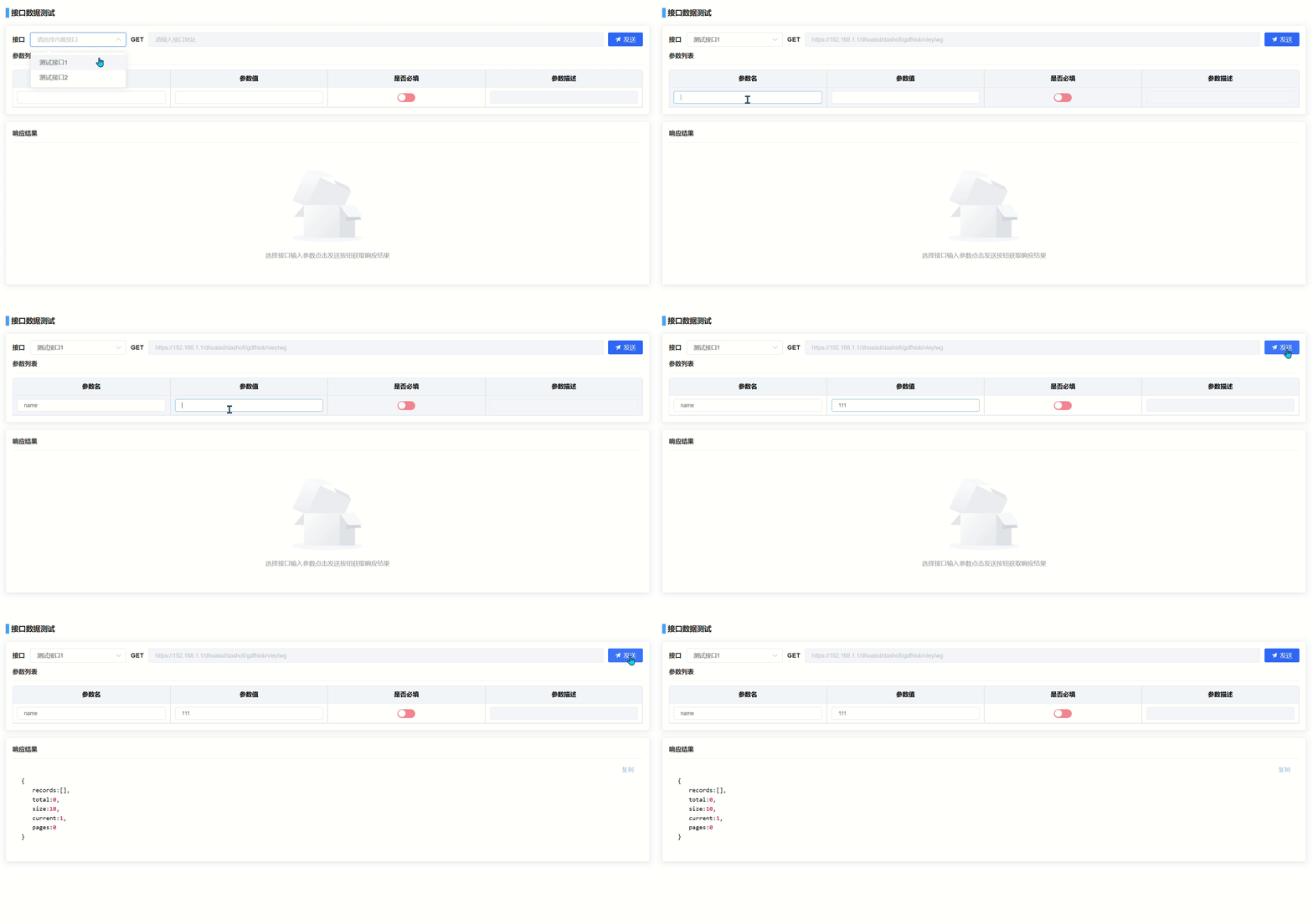
前言 接口的调试和测试是确保系统稳定性的重要步骤。为了让开发人员和测试人员能够直观地查看接口返回的 JSON 数据,使用合适的工具至关重要。vue-json-viewer 插件为 vue 开发者提供了一个简单而强大的解决方案。本文将详细介绍如何在 vue 项目中使用该插件&#x…...

ubuntu Android : adb logcat 过滤多个log
指定字符串的log,可以用下面的形式,注意加-E和单引号: adb shell " logcat | grep -E strings1|strings2 " 参考:Android : adb logcat 过滤多个log 用adb shell “ logcat | grep -E ‘strings1| strings2 ‘ “ 形…...
kubeneters-循序渐进Cilium网络(三)
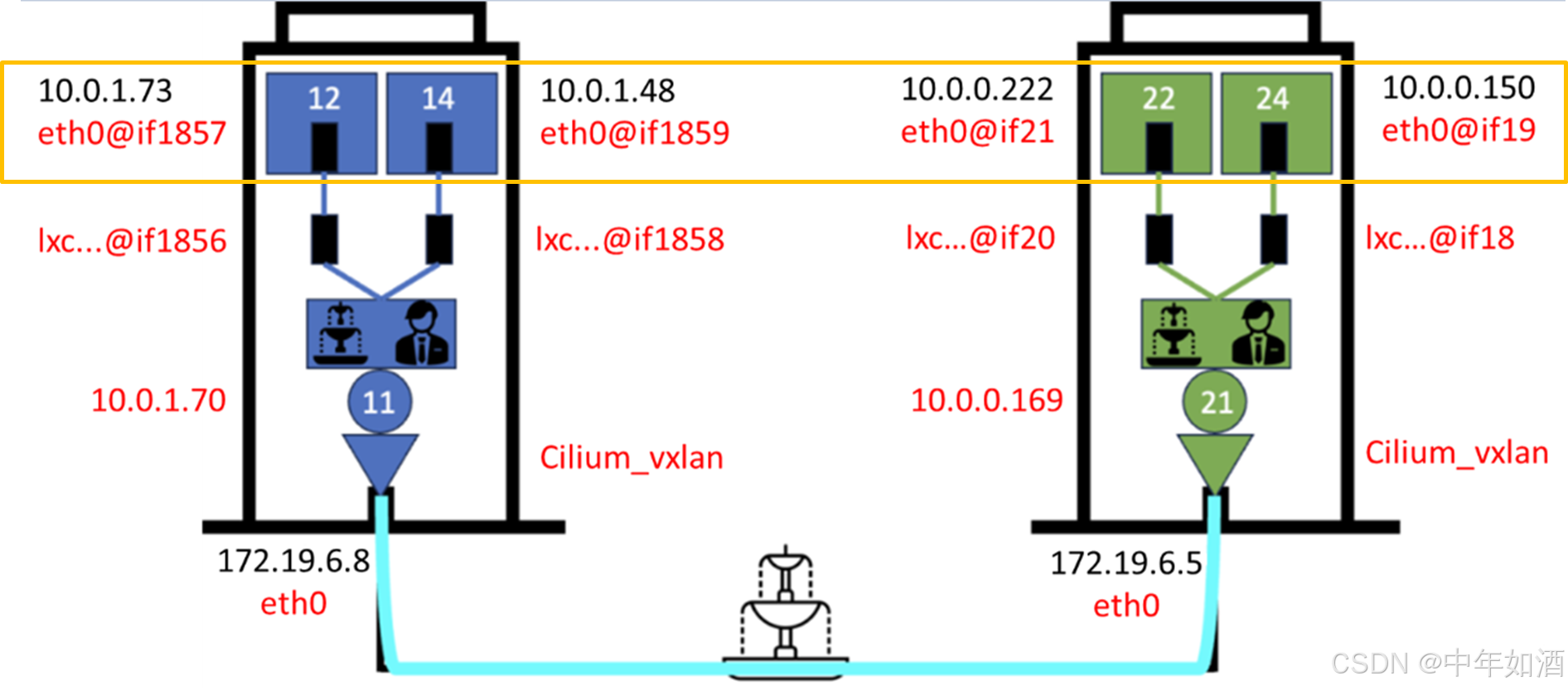
文章目录 概要命名空间之间的路由同一节点上的 Pod 到 Pod 路由跨节点的 Pod 间路由总结 概要 在前一篇讨论网络接口的内容中,详细分析了如何识别所有参与 Pod 间路由的接口。同时,以简明的非技术语言阐述了 Cilium 在 Kubernetes 集群中的路由机制。接…...

编译与汇编
本文来自《程序员的自我修养》 编译过程是把预处理完的文件进行一系列词法分析,语法分析,语义分析以及优化后生成相应的汇编文件代码。 现在版本的GCC把预编译和编译两个步骤合并为一个步骤。 gcc -S HelloWorld.c HelloWorld.sint main() {//test/* …...
)
对MySQL滴MVCC理解(超详细)
学习目标 什么是MVCC?MVCC的核心概念MVCC 的工作原理MVCC 的优势MVCC 的劣势 什么是MySQL中InnoDB下滴快照读和当前读?一、快照读(Snapshot Read)二、当前读(Current Read)三、快照读和当前读的区别四、当前…...

Mac玩Steam游戏秘籍!
Mac玩Steam游戏秘籍! 大家好!最近有不少朋友在用MacBook玩Steam游戏时遇到不支持mac的问题。别担心,我来教你如何用第三方工具Crossover来畅玩这些不支持的游戏,简单又实用! 第一步:下载Crossover 首先&…...

matlab实现了一个优化的遗传算法,用于求解注汽站最优位置的问题
function [best_chromosome, best_fitness] optimized_genetic_algorithm()%% 遗传算法参数初始化% 定义井信息,包括坐标、管道长度、流量、压力等wells defineWells(); % 返回井的结构体数组N length(wells); % 注汽井数量% 遗传算法相关参数L_chromosome 20; …...
)
电商项目-基于ElasticSearch实现商品搜索功能(三)
本系列文章主要介绍基于 Spring Data Elasticsearch 实现商品搜索的后端代码,介绍代码逻辑和代码实现。 主要实现功能:根据搜索关键字查询、条件筛选、规格过滤、价格区间搜索、搜索查询分页、搜索查询排序、高亮查询。 主要应用技术:canal,…...
)
【Vim Masterclass 笔记12】S06L26 + L27:Vim 文本的搜索、查找及替换同步练习(含点评课)
文章目录 S06L26 Exercise 07 - Search, Find, and Replace1 训练目标2 操作指令2.1. 打开 search-practice.txt 文件2.2. 同一行内的搜索练习2.3. 当前文件内的搜索练习2.4. 单词搜索练习2.5. 全局替换练习 3 退出 Vim S06L27 同步练习点评课 写在前面 Vim 的文本检索、查找与…...

Jsoup实现实时爬取
文章目录 1.作用2.使用pom文件引入示例代码(来自官网) 3.测试代码4.上线代码控制层业务层 1.作用 获取Html文档,然后解析出需要的字段 2.使用 pom文件引入 <!-- https://mvnrepository.com/artifact/org.springframework.boot/spring-boot-starter-data-redi…...

用Python和MNE库玩转BCI Competition IV 2a脑电数据集:从数据加载到可视化全流程
用Python和MNE库玩转BCI Competition IV 2a脑电数据集:从数据加载到可视化全流程当你第一次接触脑电信号处理时,面对原始数据文件可能会感到无从下手。BCI Competition IV 2a数据集作为脑机接口领域的经典基准数据,包含了9名受试者四种运动想…...

AI写的论文双率如何压到20%以下?这几款工具实测有效
毕业季、投稿季用AI写论文已经成为不少人的高效选择,但查重率飘红、AIGC疑似率超标两大问题,让很多人犯了难。2026年学术检测标准持续收紧,知网、维普及主流AIGC检测系统同步上线双检规则,两项指标均控制在20%以下才符合基本提交要…...

Unity UI交互进阶:手把手教你打造一个支持单击、双击、长按的万能按钮组件
Unity UI交互进阶:手把手教你打造一个支持单击、双击、长按的万能按钮组件在游戏开发中,UI交互的流畅性和多样性直接影响玩家的游戏体验。想象一下,当你在开发一个RPG游戏的背包系统时,需要实现道具的单击查看详情、双击快速使用、…...

随机森林算法在儿童出行方式预测中的实战应用与优化
1. 项目概述:用随机森林预测孩子怎么上学做城市交通规划或者做家长接送方案的时候,你肯定想过一个问题:孩子们到底是怎么上学的?是走路、骑车、坐公交还是家长开车送?这个问题看似简单,背后却牵扯到城市规划…...

【DeepSeek灰度发布黄金法则】:20年SRE亲授7步零故障上线实战框架
更多请点击: https://intelliparadigm.com 第一章:DeepSeek灰度发布策略全景图 DeepSeek模型服务的灰度发布并非简单的流量切分,而是一套融合可观测性、渐进式验证与多维熔断机制的工程化闭环体系。其核心目标是在保障线上推理稳定性的同时&…...

HiveWE终极指南:快速掌握魔兽争霸III现代化地图编辑器
HiveWE终极指南:快速掌握魔兽争霸III现代化地图编辑器 【免费下载链接】HiveWE A Warcraft III world editor. 项目地址: https://gitcode.com/gh_mirrors/hi/HiveWE 还在为传统魔兽争霸III地图编辑器缓慢的加载速度和复杂的操作界面而烦恼吗?Hiv…...

基于树莓派打造万能遥控器:从硬件选型到Web控制界面全解析
1. 项目概述:打造一个能“学习”的万能遥控器家里遥控器越来越多,电视、空调、风扇、灯带……每个设备都配一个,找起来麻烦,用起来也乱。市面上所谓的“万能遥控器”其实并不万能,它内置的码库有限,很多小众…...
)
从数据到模型:手把手教你预处理MPIIFaceGaze和EyeDiap数据集(Python实战)
从数据到模型:手把手教你预处理MPIIFaceGaze和EyeDiap数据集(Python实战)当你第一次打开MPIIFaceGaze或EyeDiap数据集的压缩包时,那种面对杂乱文件夹和神秘.mat文件的迷茫感,我太熟悉了。作为计算机视觉工程师…...

为什么你的Midjourney雾效总像“水汽”而非“山岚”?——资深CG总监拆解大气散射物理模型在--v 6.1中的3层映射偏差
更多请点击: https://kaifayun.com 第一章:为什么你的Midjourney雾效总像“水汽”而非“山岚”? Midjourney 生成的雾气常呈现为均匀、半透明、边界模糊的“水汽感”——厚重、潮湿、缺乏层次与呼吸感。这并非模型能力不足,而是提…...

计算机视觉的实战项目:从0到1搭建属于自己的图像识别系统
作为软件测试从业者,我们每天都在和各类功能验证、兼容性测试、自动化测试框架打交道,对AI领域的实战项目往往觉得“门槛高”“和日常工作不沾边”。但随着AI技术在互联网产品中的落地越来越深入,图像识别功能已经成为很多APP、智能硬件的核心…...