
搭建一个基于Spring Boot的驾校管理系统
搭建一个基于Spring Boot的驾校管理系统可以涵盖多个功能模块,例如学员管理、教练管理、课程管理、考试管理、车辆管理等。以下是一个简化的步骤指南,帮助你快速搭建一个基础的系统。

1. 项目初始化
使用 Spring Initializr 生成一个Spring Boot项目:
- 访问 Spring Initializr。
- 选择以下依赖:
- Spring Web(用于构建RESTful API或MVC应用)
- Spring Data JPA(用于数据库操作)
- Spring Security(用于用户认证和授权)
- Thymeleaf(可选,用于前端页面渲染)
- MySQL Driver(或其他数据库驱动)
- Lombok(简化代码)
- 点击“Generate”下载项目。
2. 项目结构
项目结构大致如下:
src/main/java/com/example/drivingschool├── controller├── service├── repository├── model├── config└── DrivingSchoolApplication.java
src/main/resources├── static├── templates└── application.properties
3. 配置数据库
在application.properties中配置数据库连接:
spring.datasource.url=jdbc:mysql://localhost:3306/driving_school
spring.datasource.username=root
spring.datasource.password=yourpassword
spring.jpa.hibernate.ddl-auto=update
spring.jpa.show-sql=true
4. 创建实体类
在model包中创建实体类,例如Student、Instructor、Course、Exam、Vehicle等。
学员实体类 (Student)
package com.example.drivingschool.model;import javax.persistence.*;
import java.util.Set;@Entity
public class Student {@Id@GeneratedValue(strategy = GenerationType.IDENTITY)private Long id;private String name;private String email;private String phoneNumber;@OneToMany(mappedBy = "student", cascade = CascadeType.ALL)private Set<Course> courses;@OneToMany(mappedBy = "student", cascade = CascadeType.ALL)private Set<Exam> exams;// Getters and Setters
}
教练实体类 (Instructor)
package com.example.drivingschool.model;import javax.persistence.*;
import java.util.Set;@Entity
public class Instructor {@Id@GeneratedValue(strategy = GenerationType.IDENTITY)private Long id;private String name;private String email;private String phoneNumber;@OneToMany(mappedBy = "instructor", cascade = CascadeType.ALL)private Set<Course> courses;// Getters and Setters
}
课程实体类 (Course)
package com.example.drivingschool.model;import javax.persistence.*;
import java.time.LocalDateTime;@Entity
public class Course {@Id@GeneratedValue(strategy = GenerationType.IDENTITY)private Long id;@ManyToOne@JoinColumn(name = "student_id")private Student student;@ManyToOne@JoinColumn(name = "instructor_id")private Instructor instructor;@ManyToOne@JoinColumn(name = "vehicle_id")private Vehicle vehicle;private LocalDateTime startTime;private LocalDateTime endTime;// Getters and Setters
}
考试实体类 (Exam)
package com.example.drivingschool.model;import javax.persistence.*;
import java.time.LocalDateTime;@Entity
public class Exam {@Id@GeneratedValue(strategy = GenerationType.IDENTITY)private Long id;@ManyToOne@JoinColumn(name = "student_id")private Student student;private LocalDateTime examDate;private String result;// Getters and Setters
}
车辆实体类 (Vehicle)
package com.example.drivingschool.model;import javax.persistence.*;
import java.util.Set;@Entity
public class Vehicle {@Id@GeneratedValue(strategy = GenerationType.IDENTITY)private Long id;private String make;private String model;private String licensePlate;@OneToMany(mappedBy = "vehicle", cascade = CascadeType.ALL)private Set<Course> courses;// Getters and Setters
}
5. 创建Repository接口
在repository包中创建JPA Repository接口。
package com.example.drivingschool.repository;import com.example.drivingschool.model.Student;
import org.springframework.data.jpa.repository.JpaRepository;public interface StudentRepository extends JpaRepository<Student, Long> {
}
6. 创建Service层
在service包中创建服务类。
package com.example.drivingschool.service;import com.example.drivingschool.model.Student;
import com.example.drivingschool.repository.StudentRepository;
import org.springframework.beans.factory.annotation.Autowired;
import org.springframework.stereotype.Service;import java.util.List;@Service
public class StudentService {@Autowiredprivate StudentRepository studentRepository;public List<Student> getAllStudents() {return studentRepository.findAll();}public Student getStudentById(Long id) {return studentRepository.findById(id).orElse(null);}public Student saveStudent(Student student) {return studentRepository.save(student);}public void deleteStudent(Long id) {studentRepository.deleteById(id);}
}
7. 创建Controller层
在controller包中创建控制器类。
package com.example.drivingschool.controller;import com.example.drivingschool.model.Student;
import com.example.drivingschool.service.StudentService;
import org.springframework.beans.factory.annotation.Autowired;
import org.springframework.stereotype.Controller;
import org.springframework.ui.Model;
import org.springframework.web.bind.annotation.*;@Controller
@RequestMapping("/students")
public class StudentController {@Autowiredprivate StudentService studentService;@GetMappingpublic String listStudents(Model model) {model.addAttribute("students", studentService.getAllStudents());return "students";}@GetMapping("/new")public String showStudentForm(Model model) {model.addAttribute("student", new Student());return "student-form";}@PostMappingpublic String saveStudent(@ModelAttribute Student student) {studentService.saveStudent(student);return "redirect:/students";}@GetMapping("/edit/{id}")public String showEditForm(@PathVariable Long id, Model model) {model.addAttribute("student", studentService.getStudentById(id));return "student-form";}@GetMapping("/delete/{id}")public String deleteStudent(@PathVariable Long id) {studentService.deleteStudent(id);return "redirect:/students";}
}
8. 创建前端页面
在src/main/resources/templates目录下创建Thymeleaf模板文件。
students.html
<!DOCTYPE html>
<html xmlns:th="http://www.thymeleaf.org">
<head><title>Students</title>
</head>
<body><h1>Students</h1><a href="/students/new">Add New Student</a><table><thead><tr><th>ID</th><th>Name</th><th>Email</th><th>Phone Number</th><th>Actions</th></tr></thead><tbody><tr th:each="student : ${students}"><td th:text="${student.id}"></td><td th:text="${student.name}"></td><td th:text="${student.email}"></td><td th:text="${student.phoneNumber}"></td><td><a th:href="@{/students/edit/{id}(id=${student.id})}">Edit</a><a th:href="@{/students/delete/{id}(id=${student.id})}">Delete</a></td></tr></tbody></table>
</body>
</html>
student-form.html
<!DOCTYPE html>
<html xmlns:th="http://www.thymeleaf.org">
<head><title>Student Form</title>
</head>
<body><h1>Student Form</h1><form th:action="@{/students}" th:object="${student}" method="post"><input type="hidden" th:field="*{id}" /><label>Name:</label><input type="text" th:field="*{name}" /><br/><label>Email:</label><input type="text" th:field="*{email}" /><br/><label>Phone Number:</label><input type="text" th:field="*{phoneNumber}" /><br/><button type="submit">Save</button></form>
</body>
</html>
9. 运行项目
在IDE中运行DrivingSchoolApplication.java,访问http://localhost:8080/students即可看到学员列表页面。
—帮助链接:通过网盘分享的文件:share
链接: https://pan.baidu.com/s/1Vu-rUCm2Ql5zIOtZEvndgw?pwd=5k2h 提取码: 5k2h
10. 进一步扩展
- 教练管理:实现教练的增删改查功能。
- 课程管理:允许学员预约课程,并记录课程时间。
- 考试管理:记录学员的考试时间和成绩。
- 车辆管理:管理驾校的车辆信息。
- 搜索功能:实现学员、教练、课程的搜索功能。
- 分页功能:对学员列表进行分页显示。
通过以上步骤,你可以搭建一个基础的驾校管理系统,并根据需求进一步扩展功能。
相关文章:
搭建一个基于Spring Boot的驾校管理系统
搭建一个基于Spring Boot的驾校管理系统可以涵盖多个功能模块,例如学员管理、教练管理、课程管理、考试管理、车辆管理等。以下是一个简化的步骤指南,帮助你快速搭建一个基础的系统。 1. 项目初始化 使用 Spring Initializr 生成一个Spring Boot项目&am…...

运动相机拍视频过程中摔了,导致录视频打不开怎么办
3-11 在使用运动相机拍摄激烈运动的时候,极大的震动会有一定概率使得保存在存储卡中的视频出现打不开的情况,原因是存储卡和相机在极端情况下,可能会出现接触不良的问题,如果遇到这种问题,就不得不进行视频修复了。 本…...

MongoDB vs Redis:相似与区别
前言 在当今的数据库领域,MongoDB 和 Redis 都是备受关注的非关系型数据库(NoSQL),它们各自具有独特的优势和适用场景。本文将深入探讨 MongoDB 和 Redis 的特点,并详细对比它们之间的相似之处和区别,帮助…...
数字图像处理:实验二
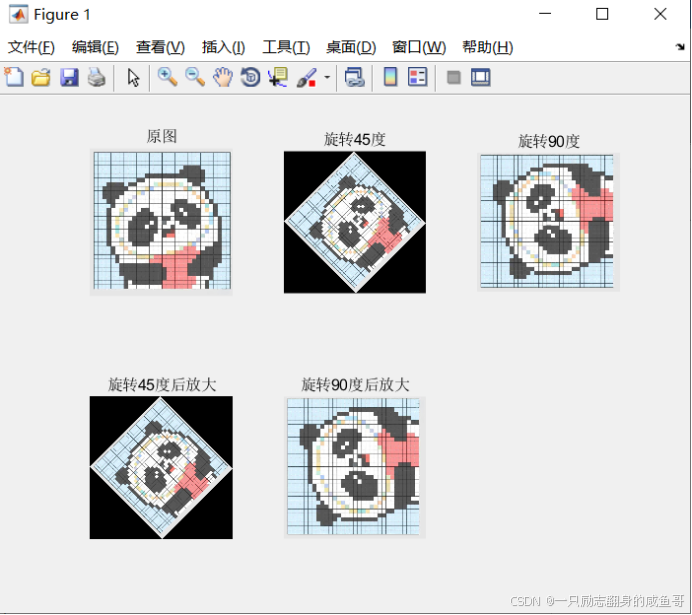
任务一: 将不同像素(32、64和256)的原图像放大为像素大 小为1024*1024的图像(图像自选) 要求:1)输出一幅图,该图包含六幅子图,第一排是原图,第 二排是对应放大…...

基于海思soc的智能产品开发(高、中、低soc、以及和fpga的搭配)
【 声明:版权所有,欢迎转载,请勿用于商业用途。 联系信箱:feixiaoxing 163.com】 市场上关于图像、音频的soc其实非常多,这里面有高、中、低档,开发方式也不相同。之所以会这样,有价格的因素&am…...

SSM旅游信息管理系统
🍅点赞收藏关注 → 添加文档最下方联系方式可咨询本源代码、数据库🍅 本人在Java毕业设计领域有多年的经验,陆续会更新更多优质的Java实战项目希望你能有所收获,少走一些弯路。🍅关注我不迷路🍅 项目视频 …...

FastADMIN实现网站启动时执行程序的方法
FastAdmin基于ThinkPHP框架:ThinkPHP框架中与 Application_Start 类似的功能可以在应用初始化钩子(Hook)中实现。在FastAdmin项目中,一般在应用的 common.php 文件中定义行为(Behavior)来实现类似功能。 定…...

【威联通】FTP服务提示:服务器回应不可路由的地址。被动模式失败。
FTP服务器提示:服务器回应不可路由的地址。被动模式失败。 问题原因网络结构安全管理配置服务器配置网关 问题 FTP服务器提示:服务器回应不可路由的地址…...
)
nginx常用配置 (含负载均衡、反向代理、限流、Gzip压缩、图片防盗链 等示例)
nginx的配置文件通常在 /etc/nginx/nginx.conf , /etc/nginx/conf.d/*.conf 中, 一般直接 改 conf.d目录下的 default.conf文件, 然后 先检测配置文件是否有错误 nginx -t 再重新加载配置文件 或 重启nginx,命令如下 nginx -s reload 或…...

21.1、网络设备安全概述
目录 网络设备安全概况——交换机、路由器安全威胁 网络设备安全概况——交换机、路由器安全威胁 第一个是MAC地址泛洪,MAC地址表记录着交换机拥有的MAC地址跟端口的对应关系 MAC地址表主要是三个字段,MAC地址对应的端口号,也就表示主机是连…...

通过idea创建的springmvc工程需要的配置
在创建的spring mvc工程中,使用idea开发之前需要配置文件包括porm.xml、web.xml、springmvc.xml 1、porm.xml 工程以来的spring库,主要包括spring-aop、spring-web、spring-webmvc,示例配置如下: <project xmlns"http:/…...

Redis 持久化机制:RDB 和 AOF
Redis 持久化机制:RDB 和 AOF Redis 主要提供了两种持久化方式:**RDB(Redis Database)**和 AOF(Append-Only File)。它们各自的实现原理、优缺点以及适用场景如下。 1. RDB(Redis Database&…...

【博客之星评选】2024年度前端学习总结
故事的开端...始于2024年第一篇前端技术博客 那故事的终末...也该结束于陪伴了我一整年的前端知识了 踏入 2025 年,满心激动与自豪,我成功闯进了《2024 年度 CSDN 博客之星总评选》的 TOP300。作为一名刚接触技术写作不久的萌新,这次能走到这…...

将IDLE里面python环境pyqt5配置的vscode
首先安装pyqt5全套:pip install pyqt5-tools 打开Vscode: 安装第三方扩展:PYQT Integration 成功配置designer.exe的路径【个人安装pyqt5的执行路径】,便可直接打开UI文件,进行编辑。 配置pyuic,如果下图填写方法使用…...

【专题三:穷举vs暴搜vs深搜vs回溯vs剪枝】46. 全排列
1.题目解析 2.讲解算法原理 1.首先画出决策树,越详细越好 2.设计代码 全局变量 List<List<Integer>> retList<Integer> pathboolean[] check dfs函数 仅关心某一节点在干什么 细节问题回溯 干掉path最后一个元素修改check权限 剪枝 check中为…...

使用傅里叶变换进行图像边缘检测
使用傅里叶变换进行图像边缘检测 今天我们介绍通过傅里叶变换求得图像的边缘 什么是傅立叶变换? 简单来说,傅里叶变换是将输入的信号分解成指定样式的构造块。例如,首先通过叠加具有不同频率的两个或更多个正弦函数而生成信号f(x…...

DDD FAQs梳理
术语 领域:一种专门活动的范围、部类。 子域:一个领域细分出的多个子领域。 核心域:具备核心竞争力的子域。 通用域:同时被多个子域使用的通用功能子域,比如认证、权限。 支撑域:一些辅助性或后台功能组成…...

新星杯-ESP32智能硬件开发--SoC基础
本博文内容导读 1、当前嵌入式系统的发展情况,分析SoC作为物联网开发的重要技术,是未来物联网发展重要方向。 2、介绍SoC系统的组成和系统特点,了解SoC打下SoC基础。 3、介绍基于ESP32的SoC系列开发板,ESP32开发的系统功能进行总…...
WDM_OTN_基础知识_波分系统的网络位置
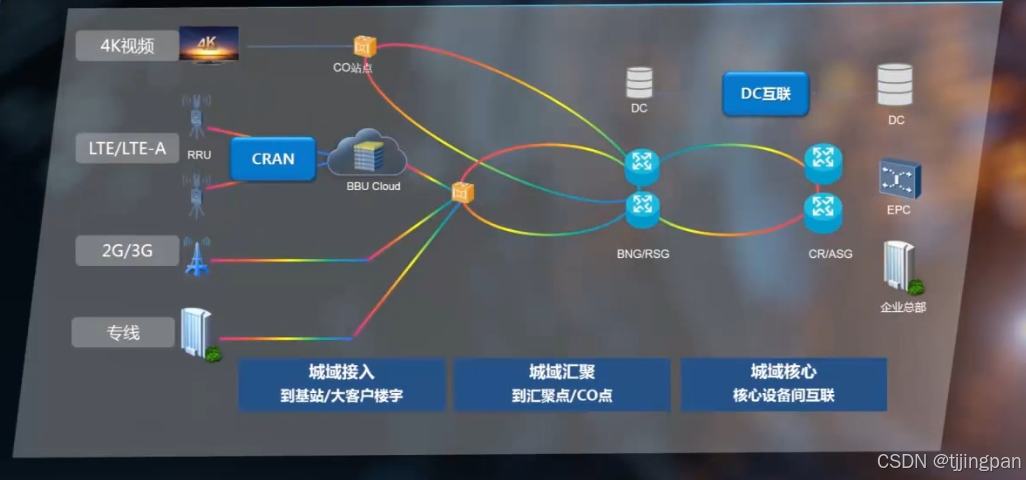
波分系统简介和OTU 在这节课的内容中,我们主要介绍,波分系统在整个通信网络中的位置,波分系统的构成和它的架构,波分设备的构成和信号图,以及OUT的功能和分类及波分系统的应用场景。 波分系统在整个通信网络中&#x…...

计算机网络 (46)简单网络管理协议SNMP
前言 简单网络管理协议(SNMP,Simple Network Management Protocol)是一种用于在计算机网络中管理网络节点的标准协议。 一、概述 SNMP是基于TCP/IP五层协议中的应用层协议,它使网络管理员能够管理网络效能,发现并解决网…...

优化师资与课程体系,提升备考效率
一、行业痛点分析当前法考培训领域面临严峻挑战。教学质量层面,部分机构师资力量薄弱、课程内容陈旧、教学方法同质化,学员难以突破知识瓶颈,通关率持续低位。服务体验层面,督学形同虚设、答疑延迟严重、缺乏数据化学情追踪&#…...

Windows多显示器DPI缩放终极指南:如何用SetDPI精准解决显示不一致问题
Windows多显示器DPI缩放终极指南:如何用SetDPI精准解决显示不一致问题 【免费下载链接】SetDPI 项目地址: https://gitcode.com/gh_mirrors/se/SetDPI 你是否经常遇到这样的困扰?当你的笔记本电脑连接到4K外接显示器时,代码编辑器在笔…...

ESLint 9.0+ 配置实战:从零到一构建现代前端代码规范
1. 为什么你需要ESLint 9.0的扁平化配置 最近接手了一个Vue 3 TypeScript的新项目,当我像往常一样准备配置ESLint时,发现官方文档已经全面转向了全新的扁平化配置方式。作为一个从ESLint 6.x时代就开始使用它的老用户,我必须承认这次改动确实…...

【开发界人文十问】二、类的private私有,到底是对谁私有?为何修改器能随意修改?
文章目录一、先破误区:private 从来不是“安全加密”二、private 到底是“对谁私有”?它限制这些:它完全管不了这些:三、为什么修改器可以随便改私有变量?四、一张表看懂 private 的真实边界五、回到人文思考ÿ…...

终极对比:NeverSink-Filter与其他掉落过滤器的核心优势
终极对比:NeverSink-Filter与其他掉落过滤器的核心优势 【免费下载链接】NeverSink-Filter This is a lootfilter for the game "Path of Exile". It hides low value items, uses a markup-scheme and sounds to highlight expensive gear and is based …...

Notepad--跨平台文本编辑器架构解析与技术实现深度剖析
Notepad--跨平台文本编辑器架构解析与技术实现深度剖析 【免费下载链接】notepad-- 一个支持windows/linux/mac的文本编辑器,目标是做中国人自己的编辑器,来自中国。 项目地址: https://gitcode.com/GitHub_Trending/no/notepad-- Notepad--作为一…...

Maccy:7个技巧让你成为macOS剪贴板管理大师,工作效率翻倍
Maccy:7个技巧让你成为macOS剪贴板管理大师,工作效率翻倍 【免费下载链接】Maccy Lightweight clipboard manager for macOS 项目地址: https://gitcode.com/gh_mirrors/ma/Maccy 还在为找不到之前复制的内容而烦恼吗?想象一下&#x…...

重新思考输入边界:QKeyMapper如何颠覆Windows平台输入设备协作范式
重新思考输入边界:QKeyMapper如何颠覆Windows平台输入设备协作范式 【免费下载链接】QKeyMapper [按键映射工具] QKeyMapper,Qt开发Win10&Win11可用,不修改注册表、不需重新启动系统,可立即生效和停止。支持游戏手柄映射到键鼠…...

higress 这个中登才是AI时代的心头好纤
核心摘要:这篇文章能帮你 ?? 1. 彻底搞懂条件分支与循环的适用场景,告别选择困难。 ?? 2. 掌握遍历DOM集合修改属性的标准姿势与性能窍门。 ?? 3. 识别流程控制中的常见“坑”,并学会如何优雅地绕过去。 ?? 主要内容脉络 ?? 一…...

vLLM-v0.17.1实战体验:3步搭建大模型API服务,实测推理速度翻倍
vLLM-v0.17.1实战体验:3步搭建大模型API服务,实测推理速度翻倍 1. vLLM框架简介与核心优势 vLLM是一个专为大语言模型推理优化的高性能服务框架,由加州大学伯克利分校Sky Computing Lab开发并开源。最新发布的v0.17.1版本在推理速度、内存管…...