
[Unity角色控制专题] (借助ai)详细解析官方第三人称控制器
首先模板链接在这里,你可以直接下载并导入unity即可查看官方为开发者写好一套控制器
本文的ai工具用到了豆包,其灵活程度很高,总结能力也强过我太多 因此大量使用,不喜勿喷
Starter Assets - ThirdPerson | Updates in new CharacterController package | 必备工具 | Unity Asset Store

目录
一.前提准备
虚拟相机
角色控制器
新输入系统
动画状态机
二.玩家输入处理类
先看代码
变量/方法图解释
类图
三 .第三人称控制类
整体代码
类图编辑
分步解析
1.初始化
2.交互处理
3.移动方法
4.跳跃和重力处理
5.着地检测
6.相机旋转处理
7..动画处理
四.角色推动刚体类
一.前提准备
虚拟相机

位置
角色控制器

新输入系统


动画状态机

Idel walk run blend

二.玩家输入处理类
先看代码
其实这个脚本没什么好说的,仅仅是用新输入系统处理了输入的逻辑 还没有将其应用于角色实际的运动,相当于地基 因此我将其放在了本文章的最开始的部分
注意InputValue 是新输入系统的一个重要的结构体,其内部使用一种灵活的数据存储方式,可以根据不同的输入类型存储相应的数据,当调用
Get<T>()方法时,它会尝试将存储的数据转换为指定的类型,如果转换成功,则返回转换后的值;如果转换失败,可能会抛出异常或者返回默认值,具体取决于输入系统的实现
using UnityEngine;
#if ENABLE_INPUT_SYSTEM
using UnityEngine.InputSystem;
#endifnamespace StarterAssets
{// 该类用于处理角色的输入逻辑public class StarterAssetsInputs : MonoBehaviour{[Header("角色输入值")]// 角色的移动输入向量,包含水平和垂直方向public Vector2 move;// 相机的视角输入向量,包含水平和垂直方向public Vector2 look;public bool jump;public bool sprint;[Header("移动设置")]// 是否使用模拟输入进行移动public bool analogMovement;[Header("鼠标光标设置")]// 是否锁定鼠标光标public bool cursorLocked = true;// 是否使用鼠标光标输入来控制视角public bool cursorInputForLook = true;#if ENABLE_INPUT_SYSTEMpublic void OnMove(InputValue value){MoveInput(value.Get<Vector2>());}// 处理视角输入事件public void OnLook(InputValue value){// 仅当允许使用鼠标光标输入控制视角时才处理if (cursorInputForLook){// 将输入的视角向量传递给 LookInput 方法LookInput(value.Get<Vector2>());}}// 处理跳跃输入事件public void OnJump(InputValue value){// 将跳跃键的按下状态传递给 JumpInput 方法JumpInput(value.isPressed);}// 处理冲刺输入事件public void OnSprint(InputValue value){// 将冲刺键的按下状态传递给 SprintInput 方法SprintInput(value.isPressed);}
#endifpublic void MoveInput(Vector2 newMoveDirection){move = newMoveDirection;}// 设置相机的视角输入向量public void LookInput(Vector2 newLookDirection){look = newLookDirection;}public void JumpInput(bool newJumpState){jump = newJumpState;}public void SprintInput(bool newSprintState){sprint = newSprintState;}// 当应用程序获得或失去焦点时调用private void OnApplicationFocus(bool hasFocus){SetCursorState(cursorLocked);}// 设置鼠标光标的锁定状态private void SetCursorState(bool newState){// 如果 newState 为 true,则锁定鼠标光标;否则解锁Cursor.lockState = newState ? CursorLockMode.Locked : CursorLockMode.None;}}
}
变量/方法图解释
| 变量名 | 类型 | 说明 |
|---|---|---|
move | Vector2 | 角色的移动输入向量,包含水平和垂直方向 |
look | Vector2 | 相机的视角输入向量,包含水平和垂直方向 |
jump | bool | 跳跃输入状态,true 表示按下跳跃键 |
sprint | bool | 冲刺输入状态,true 表示按下冲刺键 |
analogMovement | bool | 是否使用模拟输入进行移动 |
cursorLocked | bool | 是否锁定鼠标光标,默认为 true |
cursorInputForLook | bool | 是否使用鼠标光标输入来控制视角,默认为 true |
| 方法名 | 访问修饰符 | 返回类型 | 说明 |
|---|---|---|---|
OnMove(InputValue value) | public | void | 处理移动输入事件,调用 MoveInput 方法 |
OnLook(InputValue value) | public | void | 处理视角输入事件,仅当 cursorInputForLook 为 true 时调用 LookInput 方法 |
OnJump(InputValue value) | public | void | 处理跳跃输入事件,调用 JumpInput 方法 |
OnSprint(InputValue value) | public | void | 处理冲刺输入事件,调用 SprintInput 方法 |
MoveInput(Vector2 newMoveDirection) | public | void | 设置 move 变量的值 |
LookInput(Vector2 newLookDirection) | public | void | 设置 look 变量的值 |
JumpInput(bool newJumpState) | public | void | 设置 jump 变量的值 |
SprintInput(bool newSprintState) | public | void | 设置 sprint 变量的值 |
OnApplicationFocus(bool hasFocus) | private | void | 当应用程序获得或失去焦点时调用,调用 SetCursorState 方法 |
SetCursorState(bool newState) | private | void | 设置鼠标光标的锁定状态 |
类图

三 .第三人称控制类
整体代码
using UnityEngine;
#if ENABLE_INPUT_SYSTEM
using UnityEngine.InputSystem;
#endif/* 注意:角色和胶囊体的动画通过控制器调用,并使用动画器空值检查*/namespace StarterAssets
{[RequireComponent(typeof(CharacterController))]
#if ENABLE_INPUT_SYSTEM [RequireComponent(typeof(PlayerInput))]
#endifpublic class ThirdPersonController : MonoBehaviour{[Header("玩家")][Tooltip("角色的移动速度,单位:米/秒")]public float MoveSpeed = 2.0f;[Tooltip("角色的冲刺速度,单位:米/秒")]public float SprintSpeed = 5.335f;[Tooltip("角色转向移动方向的速度")][Range(0.0f, 0.3f)]public float RotationSmoothTime = 0.12f;[Tooltip("加速和减速的速率")]public float SpeedChangeRate = 10.0f;public AudioClip LandingAudioClip;public AudioClip[] FootstepAudioClips;[Range(0, 1)] public float FootstepAudioVolume = 0.5f;[Space(10)][Tooltip("玩家能够跳跃的高度")]public float JumpHeight = 1.2f;[Tooltip("角色使用自定义的重力值,引擎默认值为 -9.81f")]public float Gravity = -15.0f;[Space(10)][Tooltip("再次跳跃所需的间隔时间,设置为 0f 可立即再次跳跃")]public float JumpTimeout = 0.50f;[Tooltip("进入下落状态前所需的时间,适用于下楼梯等情况")]public float FallTimeout = 0.15f;[Header("玩家是否着地")][Tooltip("角色是否着地,此判断并非基于 CharacterController 内置的着地检查")]public bool Grounded = true;[Tooltip("适用于不平整地面的偏移量")]public float GroundedOffset = -0.14f;[Tooltip("着地检查的半径,应与 CharacterController 的半径一致")]public float GroundedRadius = 0.28f;[Tooltip("角色判定为地面的图层")]public LayerMask GroundLayers;[Header("Cinemachine 相机")][Tooltip("Cinemachine 虚拟相机所跟随的目标对象")]public GameObject CinemachineCameraTarget;[Tooltip("相机向上移动的最大角度(单位:度)")]public float TopClamp = 70.0f;[Tooltip("相机向下移动的最大角度(单位:度)")]public float BottomClamp = -30.0f;[Tooltip("用于覆盖相机角度的额外度数,在锁定相机位置时可用于微调相机位置")]public float CameraAngleOverride = 0.0f;[Tooltip("是否锁定相机在所有轴上的位置")]public bool LockCameraPosition = false;// Cinemachine 相机相关private float _cinemachineTargetYaw;private float _cinemachineTargetPitch;// 玩家相关private float _speed;private float _animationBlend;private float _targetRotation = 0.0f;private float _rotationVelocity;private float _verticalVelocity;private float _terminalVelocity = 53.0f;// 超时计时器private float _jumpTimeoutDelta;private float _fallTimeoutDelta;// 动画 IDprivate int _animIDSpeed;private int _animIDGrounded;private int _animIDJump;private int _animIDFreeFall;private int _animIDMotionSpeed;#if ENABLE_INPUT_SYSTEM private PlayerInput _playerInput;
#endifprivate Animator _animator;private CharacterController _controller;private StarterAssetsInputs _input;private GameObject _mainCamera;private const float _threshold = 0.01f;private bool _hasAnimator;// 判断当前输入设备是否为鼠标private bool IsCurrentDeviceMouse{get{
#if ENABLE_INPUT_SYSTEMreturn _playerInput.currentControlScheme == "KeyboardMouse";
#elsereturn false;
#endif}}private void Awake(){// 获取主相机的引用if (_mainCamera == null){_mainCamera = GameObject.FindGameObjectWithTag("MainCamera");}}private void Start(){// 初始化 Cinemachine 相机目标的偏航角_cinemachineTargetYaw = CinemachineCameraTarget.transform.rotation.eulerAngles.y;// 尝试获取动画器组件_hasAnimator = TryGetComponent(out _animator);// 获取角色控制器组件_controller = GetComponent<CharacterController>();// 获取输入组件_input = GetComponent<StarterAssetsInputs>();
#if ENABLE_INPUT_SYSTEM // 获取玩家输入组件_playerInput = GetComponent<PlayerInput>();
#elseDebug.LogError( "Starter Assets 包缺少依赖项,请使用 Tools/Starter Assets/Reinstall Dependencies 进行修复");
#endif// 分配动画 IDAssignAnimationIDs();// 初始化跳跃和下落超时计时器_jumpTimeoutDelta = JumpTimeout;_fallTimeoutDelta = FallTimeout;}private void Update(){// 尝试获取动画器组件_hasAnimator = TryGetComponent(out _animator);// 处理跳跃和重力逻辑JumpAndGravity();// 检查角色是否着地GroundedCheck();// 处理角色移动逻辑Move();}private void LateUpdate(){// 处理相机旋转逻辑CameraRotation();}// 分配动画参数的哈希 IDprivate void AssignAnimationIDs(){_animIDSpeed = Animator.StringToHash("Speed");_animIDGrounded = Animator.StringToHash("Grounded");_animIDJump = Animator.StringToHash("Jump");_animIDFreeFall = Animator.StringToHash("FreeFall");_animIDMotionSpeed = Animator.StringToHash("MotionSpeed");}// 检查角色是否着地private void GroundedCheck(){// 设置球体位置并添加偏移量Vector3 spherePosition = new Vector3(transform.position.x, transform.position.y - GroundedOffset,transform.position.z);// 检测球体范围内是否与地面图层发生碰撞Grounded = Physics.CheckSphere(spherePosition, GroundedRadius, GroundLayers,QueryTriggerInteraction.Ignore);// 如果有动画器组件,更新动画参数if (_hasAnimator){_animator.SetBool(_animIDGrounded, Grounded);}}// 处理相机旋转逻辑private void CameraRotation(){// 如果有鼠标或其他输入,并且相机位置未锁定if (_input.look.sqrMagnitude >= _threshold && !LockCameraPosition){// 根据当前输入设备确定时间乘数float deltaTimeMultiplier = IsCurrentDeviceMouse ? 1.0f : Time.deltaTime;// 更新相机的偏航角和俯仰角_cinemachineTargetYaw += _input.look.x * deltaTimeMultiplier;_cinemachineTargetPitch += _input.look.y * deltaTimeMultiplier;}// 限制相机的旋转角度在 360 度范围内_cinemachineTargetYaw = ClampAngle(_cinemachineTargetYaw, float.MinValue, float.MaxValue);_cinemachineTargetPitch = ClampAngle(_cinemachineTargetPitch, BottomClamp, TopClamp);// 设置 Cinemachine 相机目标的旋转角度CinemachineCameraTarget.transform.rotation = Quaternion.Euler(_cinemachineTargetPitch + CameraAngleOverride,_cinemachineTargetYaw, 0.0f);}// 处理角色移动逻辑private void Move(){// 根据是否按下冲刺键,设置目标速度float targetSpeed = _input.sprint ? SprintSpeed : MoveSpeed;// 简单的加速和减速逻辑,便于修改或扩展// 注意:Vector2 的 == 运算符使用近似值,不会出现浮点误差,且比计算向量长度更高效// 如果没有输入,将目标速度设为 0if (_input.move == Vector2.zero) targetSpeed = 0.0f;// 获取玩家当前的水平速度float currentHorizontalSpeed = new Vector3(_controller.velocity.x, 0.0f, _controller.velocity.z).magnitude;float speedOffset = 0.1f;// 根据是否为模拟输入,确定输入的幅度float inputMagnitude = _input.analogMovement ? _input.move.magnitude : 1f;// 加速或减速到目标速度if (currentHorizontalSpeed < targetSpeed - speedOffset ||currentHorizontalSpeed > targetSpeed + speedOffset){// 使用插值计算速度,使速度变化更自然_speed = Mathf.Lerp(currentHorizontalSpeed, targetSpeed * inputMagnitude,Time.deltaTime * SpeedChangeRate);// 将速度值保留三位小数_speed = Mathf.Round(_speed * 1000f) / 1000f;}else{_speed = targetSpeed;}// 插值计算动画混合值_animationBlend = Mathf.Lerp(_animationBlend, targetSpeed, Time.deltaTime * SpeedChangeRate);if (_animationBlend < 0.01f) _animationBlend = 0f;// 归一化输入方向Vector3 inputDirection = new Vector3(_input.move.x, 0.0f, _input.move.y).normalized;// 注意:Vector2 的 != 运算符使用近似值,不会出现浮点误差,且比计算向量长度更高效// 如果有移动输入,并且角色正在移动,则旋转角色if (_input.move != Vector2.zero){// 计算目标旋转角度_targetRotation = Mathf.Atan2(inputDirection.x, inputDirection.z) * Mathf.Rad2Deg +_mainCamera.transform.eulerAngles.y;// 平滑旋转角色float rotation = Mathf.SmoothDampAngle(transform.eulerAngles.y, _targetRotation, ref _rotationVelocity,RotationSmoothTime);// 旋转角色以面向输入方向(相对于相机位置)transform.rotation = Quaternion.Euler(0.0f, rotation, 0.0f);}// 计算目标移动方向Vector3 targetDirection = Quaternion.Euler(0.0f, _targetRotation, 0.0f) * Vector3.forward;// 移动角色_controller.Move(targetDirection.normalized * (_speed * Time.deltaTime) +new Vector3(0.0f, _verticalVelocity, 0.0f) * Time.deltaTime);// 如果有动画器组件,更新动画参数if (_hasAnimator){_animator.SetFloat(_animIDSpeed, _animationBlend);_animator.SetFloat(_animIDMotionSpeed, inputMagnitude);}}// 处理跳跃和重力逻辑private void JumpAndGravity(){if (Grounded){// 重置下落超时计时器_fallTimeoutDelta = FallTimeout;// 如果有动画器组件,更新动画参数if (_hasAnimator){_animator.SetBool(_animIDJump, false);_animator.SetBool(_animIDFreeFall, false);}// 当角色着地时,避免垂直速度无限下降if (_verticalVelocity < 0.0f){_verticalVelocity = -2f;}// 处理跳跃逻辑if (_input.jump && _jumpTimeoutDelta <= 0.0f){// 根据跳跃高度和重力计算所需的垂直速度_verticalVelocity = Mathf.Sqrt(JumpHeight * -2f * Gravity);// 如果有动画器组件,更新动画参数if (_hasAnimator){_animator.SetBool(_animIDJump, true);}}// 处理跳跃超时逻辑if (_jumpTimeoutDelta >= 0.0f){_jumpTimeoutDelta -= Time.deltaTime;}}else{// 重置跳跃超时计时器_jumpTimeoutDelta = JumpTimeout;// 处理下落超时逻辑if (_fallTimeoutDelta >= 0.0f){_fallTimeoutDelta -= Time.deltaTime;}else{// 如果有动画器组件,更新动画参数if (_hasAnimator){_animator.SetBool(_animIDFreeFall, true);}}// 角色未着地时,禁止跳跃_input.jump = false;}// 应用重力,当垂直速度未达到终端速度时,逐渐增加垂直速度if (_verticalVelocity < _terminalVelocity){_verticalVelocity += Gravity * Time.deltaTime;}}// 限制角度范围private static float ClampAngle(float lfAngle, float lfMin, float lfMax){if (lfAngle < -360f) lfAngle += 360f;if (lfAngle > 360f) lfAngle -= 360f;return Mathf.Clamp(lfAngle, lfMin, lfMax);}// 当对象在场景视图中被选中时,绘制调试辅助线private void OnDrawGizmosSelected(){Color transparentGreen = new Color(0.0f, 1.0f, 0.0f, 0.35f);Color transparentRed = new Color(1.0f, 0.0f, 0.0f, 0.35f);// 根据角色是否着地设置调试线颜色if (Grounded) Gizmos.color = transparentGreen;else Gizmos.color = transparentRed;// 绘制着地检测球体的调试线Gizmos.DrawSphere(new Vector3(transform.position.x, transform.position.y - GroundedOffset, transform.position.z),GroundedRadius);}// 脚步声事件处理private void OnFootstep(AnimationEvent animationEvent){if (animationEvent.animatorClipInfo.weight > 0.5f){if (FootstepAudioClips.Length > 0){// 随机选择一个脚步声音频剪辑var index = Random.Range(0, FootstepAudioClips.Length);// 在角色中心位置播放脚步声音频AudioSource.PlayClipAtPoint(FootstepAudioClips[index], transform.TransformPoint(_controller.center), FootstepAudioVolume);}}}// 着陆事件处理private void OnLand(AnimationEvent animationEvent){if (animationEvent.animatorClipInfo.weight > 0.5f){// 在角色中心位置播放着陆音频AudioSource.PlayClipAtPoint(LandingAudioClip, transform.TransformPoint(_controller.center), FootstepAudioVolume);}}}
}
类图
分步解析
1.初始化
private void Awake()
{// 获取主相机的引用if (_mainCamera == null){_mainCamera = GameObject.FindGameObjectWithTag("MainCamera");}
}private void Start()
{// 初始化 Cinemachine 相机目标的偏航角_cinemachineTargetYaw = CinemachineCameraTarget.transform.rotation.eulerAngles.y;// 尝试获取动画器组件_hasAnimator = TryGetComponent(out _animator);// 获取角色控制器组件_controller = GetComponent<CharacterController>();// 获取输入组件_input = GetComponent<StarterAssetsInputs>();
#if ENABLE_INPUT_SYSTEM // 获取玩家输入组件_playerInput = GetComponent<PlayerInput>();
#elseDebug.LogError( "Starter Assets 包缺少依赖项,请使用 Tools/Starter Assets/Reinstall Dependencies 进行修复");
#endif// 分配动画 IDAssignAnimationIDs();// 初始化跳跃和下落超时计时器_jumpTimeoutDelta = JumpTimeout;_fallTimeoutDelta = FallTimeout;
}private void AssignAnimationIDs()
{_animIDSpeed = Animator.StringToHash("Speed");_animIDGrounded = Animator.StringToHash("Grounded");_animIDJump = Animator.StringToHash("Jump");_animIDFreeFall = Animator.StringToHash("FreeFall");_animIDMotionSpeed = Animator.StringToHash("MotionSpeed");
}Awake方法在对象实例化时调用,用于获取主相机的引用。Start方法在对象启用后调用,进行一系列的初始化操作:- 初始化 Cinemachine 相机的偏航角
- 获取所需的组件,如
Animator、CharacterController、StarterAssetsInputs和PlayerInput - 调用
AssignAnimationIDs方法分配动画参数的哈希 ID - 初始化跳跃和下落超时计时器
2.交互处理
private StarterAssetsInputs _input;// 在 Move 方法中使用输入
private void Move()
{float targetSpeed = _input.sprint ? SprintSpeed : MoveSpeed;if (_input.move == Vector2.zero) targetSpeed = 0.0f;Vector3 inputDirection = new Vector3(_input.move.x, 0.0f, _input.move.y).normalized;// ...
}// 在 JumpAndGravity 方法中使用输入
private void JumpAndGravity()
{if (Grounded && _input.jump && _jumpTimeoutDelta <= 0.0f){_verticalVelocity = Mathf.Sqrt(JumpHeight * -2f * Gravity);if (_hasAnimator){_animator.SetBool(_animIDJump, true);}}// ...
}// 在 CameraRotation 方法中使用输入
private void CameraRotation()
{if (_input.look.sqrMagnitude >= _threshold && !LockCameraPosition){float deltaTimeMultiplier = IsCurrentDeviceMouse ? 1.0f : Time.deltaTime;_cinemachineTargetYaw += _input.look.x * deltaTimeMultiplier;_cinemachineTargetPitch += _input.look.y * deltaTimeMultiplier;}// ...
}_input是StarterAssetsInputs类的实例,用于获取玩家的移动、冲刺、跳跃和视角输入。- 在
Move方法中,根据_input.sprint判断是否冲刺,根据_input.move确定移动方向和目标速度。 - 在
JumpAndGravity方法中,根据_input.jump判断是否触发跳跃。 - 在
CameraRotation方法中,根据_input.look控制相机的旋转
3.移动方法
private void Move()
{// 根据是否按下冲刺键,设置目标速度float targetSpeed = _input.sprint ? SprintSpeed : MoveSpeed;// 如果没有输入,将目标速度设为 0if (_input.move == Vector2.zero) targetSpeed = 0.0f;// 获取玩家当前的水平速度float currentHorizontalSpeed = new Vector3(_controller.velocity.x, 0.0f, _controller.velocity.z).magnitude;float speedOffset = 0.1f;// 根据是否为模拟输入,确定输入的幅度float inputMagnitude = _input.analogMovement ? _input.move.magnitude : 1f;// 加速或减速到目标速度if (currentHorizontalSpeed < targetSpeed - speedOffset ||currentHorizontalSpeed > targetSpeed + speedOffset){_speed = Mathf.Lerp(currentHorizontalSpeed, targetSpeed * inputMagnitude,Time.deltaTime * SpeedChangeRate);_speed = Mathf.Round(_speed * 1000f) / 1000f;}else{_speed = targetSpeed;}// 插值计算动画混合值_animationBlend = Mathf.Lerp(_animationBlend, targetSpeed, Time.deltaTime * SpeedChangeRate);if (_animationBlend < 0.01f) _animationBlend = 0f;// 归一化输入方向Vector3 inputDirection = new Vector3(_input.move.x, 0.0f, _input.move.y).normalized;// 如果有移动输入,并且角色正在移动,则旋转角色if (_input.move != Vector2.zero){_targetRotation = Mathf.Atan2(inputDirection.x, inputDirection.z) * Mathf.Rad2Deg +_mainCamera.transform.eulerAngles.y;float rotation = Mathf.SmoothDampAngle(transform.eulerAngles.y, _targetRotation, ref _rotationVelocity,RotationSmoothTime);transform.rotation = Quaternion.Euler(0.0f, rotation, 0.0f);}// 计算目标移动方向Vector3 targetDirection = Quaternion.Euler(0.0f, _targetRotation, 0.0f) * Vector3.forward;// 移动角色_controller.Move(targetDirection.normalized * (_speed * Time.deltaTime) +new Vector3(0.0f, _verticalVelocity, 0.0f) * Time.deltaTime);// 如果有动画器组件,更新动画参数if (_hasAnimator){_animator.SetFloat(_animIDSpeed, _animationBlend);_animator.SetFloat(_animIDMotionSpeed, inputMagnitude);}
}- 根据玩家的冲刺输入设置目标速度,如果没有移动输入则将目标速度设为 0
- 计算当前水平速度,并根据当前速度和目标速度的差异,使用
Mathf.Lerp进行平滑加速或减速。 - 计算动画混合值,用于控制动画的过渡
- 根据玩家的移动输入计算目标旋转角度,并使用
Mathf.SmoothDampAngle进行平滑旋转 - 计算目标移动方向,并使用
CharacterController.Move方法移动角色 - 如果有动画器组件,更新动画参数
_animIDSpeed和_animIDMotionSpeed
4.跳跃和重力处理
private void JumpAndGravity()
{if (Grounded){// 重置下落超时计时器_fallTimeoutDelta = FallTimeout;// 如果有动画器组件,更新动画参数if (_hasAnimator){_animator.SetBool(_animIDJump, false);_animator.SetBool(_animIDFreeFall, false);}// 当角色着地时,避免垂直速度无限下降if (_verticalVelocity < 0.0f){_verticalVelocity = -2f;}// 处理跳跃逻辑if (_input.jump && _jumpTimeoutDelta <= 0.0f){_verticalVelocity = Mathf.Sqrt(JumpHeight * -2f * Gravity);if (_hasAnimator){_animator.SetBool(_animIDJump, true);}}// 处理跳跃超时逻辑if (_jumpTimeoutDelta >= 0.0f){_jumpTimeoutDelta -= Time.deltaTime;}}else{// 重置跳跃超时计时器_jumpTimeoutDelta = JumpTimeout;// 处理下落超时逻辑if (_fallTimeoutDelta >= 0.0f){_fallTimeoutDelta -= Time.deltaTime;}else{if (_hasAnimator){_animator.SetBool(_animIDFreeFall, true);}}// 角色未着地时,禁止跳跃_input.jump = false;}// 应用重力,当垂直速度未达到终端速度时,逐渐增加垂直速度if (_verticalVelocity < _terminalVelocity){_verticalVelocity += Gravity * Time.deltaTime;}
}- 如果角色着地:
- 重置下落超时计时器。
- 更新动画参数,将跳跃和自由落体状态设为
false。 - 确保垂直速度不会无限下降。
- 如果玩家按下跳跃键且跳跃超时计时器已过,则根据跳跃高度和重力计算垂直速度,并更新动画参数。
- 递减跳跃超时计时器。
- 如果角色未着地:
- 重置跳跃超时计时器。
- 递减下落超时计时器,如果超时则更新动画参数为自由落体状态。
- 禁止跳跃输入。
- 应用重力,使垂直速度逐渐增加,直到达到终端速度
5.着地检测
private void GroundedCheck()
{// 设置球体位置并添加偏移量Vector3 spherePosition = new Vector3(transform.position.x, transform.position.y - GroundedOffset,transform.position.z);// 检测球体范围内是否与地面图层发生碰撞Grounded = Physics.CheckSphere(spherePosition, GroundedRadius, GroundLayers,QueryTriggerInteraction.Ignore);// 如果有动画器组件,更新动画参数if (_hasAnimator){_animator.SetBool(_animIDGrounded, Grounded);}
}- 在角色位置下方设置一个球体,使用
Physics.CheckSphere方法检测球体是否与指定的地面图层发生碰撞。 - 根据检测结果更新
Grounded变量。 - 如果有动画器组件,更新动画参数
_animIDGrounded。
6.相机旋转处理
private void CameraRotation()
{// 如果有鼠标或其他输入,并且相机位置未锁定if (_input.look.sqrMagnitude >= _threshold && !LockCameraPosition){// 根据当前输入设备确定时间乘数float deltaTimeMultiplier = IsCurrentDeviceMouse ? 1.0f : Time.deltaTime;// 更新相机的偏航角和俯仰角_cinemachineTargetYaw += _input.look.x * deltaTimeMultiplier;_cinemachineTargetPitch += _input.look.y * deltaTimeMultiplier;}// 限制相机的旋转角度在 360 度范围内_cinemachineTargetYaw = ClampAngle(_cinemachineTargetYaw, float.MinValue, float.MaxValue);_cinemachineTargetPitch = ClampAngle(_cinemachineTargetPitch, BottomClamp, TopClamp);// 设置 Cinemachine 相机目标的旋转角度CinemachineCameraTarget.transform.rotation = Quaternion.Euler(_cinemachineTargetPitch + CameraAngleOverride,_cinemachineTargetYaw, 0.0f);
}private static float ClampAngle(float lfAngle, float lfMin, float lfMax)
{if (lfAngle < -360f) lfAngle += 360f;if (lfAngle > 360f) lfAngle -= 360f;return Mathf.Clamp(lfAngle, lfMin, lfMax);
}- 如果有视角输入且相机位置未锁定,根据输入更新相机的偏航角和俯仰角,同时根据输入设备确定时间乘数。
- 使用
ClampAngle方法限制相机的旋转角度在指定范围内。 - 设置 Cinemachine 相机目标的旋转角度。
7..动画处理
// 在 Move 方法中更新动画参数
if (_hasAnimator)
{_animator.SetFloat(_animIDSpeed, _animationBlend);_animator.SetFloat(_animIDMotionSpeed, inputMagnitude);
}// 在 GroundedCheck 方法中更新动画参数
if (_hasAnimator)
{_animator.SetBool(_animIDGrounded, Grounded);
}// 在 JumpAndGravity 方法中更新动画参数
if (_hasAnimator)
{_animator.Set
四.角色推动刚体类
这个类是一个单独挂载于player的类 已经详细标明了注释 还请自行查看
using UnityEngine;// 该类用于实现角色推动刚体的功能
public class BasicRigidBodyPush : MonoBehaviour
{// 可推动刚体所在的图层遮罩,只有这些图层的刚体才能被推动public LayerMask pushLayers;// 是否允许推动刚体的开关,若为 false 则不会触发推动逻辑public bool canPush;// 推动刚体的力量强度,取值范围在 0.5f 到 5f 之间,默认值为 1.1f[Range(0.5f, 5f)] public float strength = 1.1f;// 当角色控制器与其他碰撞体发生碰撞时调用此方法private void OnControllerColliderHit(ControllerColliderHit hit){// 只有当 canPush 为 true 时,才调用 PushRigidBodies 方法来处理推动逻辑if (canPush) PushRigidBodies(hit);}// 处理推动刚体的具体逻辑private void PushRigidBodies(ControllerColliderHit hit){// 参考文档:https://docs.unity3d.com/ScriptReference/CharacterController.OnControllerColliderHit.html// 获取碰撞体所附着的刚体组件Rigidbody body = hit.collider.attachedRigidbody;// 如果没有刚体或者刚体是运动学刚体(即不受物理模拟影响),则不进行推动操作,直接返回if (body == null || body.isKinematic) return;// 获取刚体所在游戏对象的图层对应的图层遮罩var bodyLayerMask = 1 << body.gameObject.layer;// 检查刚体所在的图层是否在可推动的图层范围内,如果不在则不进行推动操作,直接返回if ((bodyLayerMask & pushLayers.value) == 0) return;// 如果角色的移动方向主要是向下(y 轴分量小于 -0.3f),则不进行推动操作,直接返回// 这是为了避免角色在向下移动时推动下方的物体if (hit.moveDirection.y < -0.3f) return;// 计算推动方向,只考虑水平方向的移动,忽略垂直方向Vector3 pushDir = new Vector3(hit.moveDirection.x, 0.0f, hit.moveDirection.z);// 对刚体施加力,力的大小为推动方向乘以推动强度,力的模式为冲量模式// 冲量模式会瞬间改变刚体的动量body.AddForce(pushDir * strength, ForceMode.Impulse);}
}
相关文章:
[Unity角色控制专题] (借助ai)详细解析官方第三人称控制器
首先模板链接在这里,你可以直接下载并导入unity即可查看官方为开发者写好一套控制器 本文的ai工具用到了豆包,其灵活程度很高,总结能力也强过我太多 因此大量使用,不喜勿喷 Starter Assets - ThirdPerson | Updates in new Charac…...

【数据结构基础_链表】
1、链表的定义 链表与数组的区分: 数组是一块连续的内存空间,有了这块内存空间的首地址,就能直接通过索引计算出任意位置的元素地址。 数组最大的优势是支持通过索引快速访问元素,而链表就不支持。链表不一样,一条链…...

Java 实现 Redis中的GEO数据结构
Java 实现 Redis中的GEO数据结构 LBS (基于位置信息服务(Location-Based Service,LBS))应用访问的数据是和人 或物关联的一组经纬度信息,而且要能查询相邻的经纬度范围,GEO 就非常适合应用在 …...

PostgreSQL如何关闭自动commit
PostgreSQL如何关闭自动commit 在 PostgreSQL 中,默认情况下,每个 SQL 语句都会自动提交(即 AUTOCOMMIT 是开启的)。如果希望关闭自动提交,以便手动控制事务的提交和回滚,可以通过以下方法实现。 1 使用 …...

1、云原生写在前面
云原生技术是什么(包含哪些组件)?每个组件是负责什么?学习这些组件技术能解决什问题?哪些类企业需要用到? 这是标准系列的问题,通过 deepseek 的深度思考就能得到我们想要的易于理解的人话式的…...

Redis离线安装
Linux系统Centos安装部署Redis缓存插件 参考:Redis中文网: https://www.redis.net.cn/ 参考:RPM软件包下载地址: https://rpmfind.net/linux/RPM/index.html http://rpm.pbone.net/ https://mirrors.aliyun.com/centos/7/os…...

网络安全-攻击流程-应用层
应用层攻击针对OSI模型的第七层(应用层),主要利用协议漏洞、业务逻辑缺陷或用户交互弱点,直接威胁Web应用、API、数据库等服务。以下是常见应用层攻击类型及其流程,以及防御措施: 1. SQL注入(SQ…...

java八股文-spring
目录 1. spring基础 1.1 什么是Spring? 1.2 Spring有哪些优点? 1.3 Spring主要模块 1.4 Spring常用注解 1.5 Spring中Bean的作用域 1.6 Spring自动装配的方式 1.7 SpringBean的生命周期 1.8 多级缓存 1.9 循环依赖? 1 .8.1 原因 1.8…...

Jvascript网页设计案例:通过js实现一款密码强度检测,适用于等保测评整改
本文目录 前言功能预览样式特点总结:1. 整体视觉风格2. 密码输入框设计3. 强度指示条4. 结果文本与原因说明 功能特点总结:1. 密码强度检测2. 实时反馈机制3. 详细原因说明4. 视觉提示5. 交互体验优化 密码强度检测逻辑Html代码Javascript代码 前言 能满…...

【Scrapy】Scrapy教程2——工作原理
文章目录 数据流组件引擎Engine调度器Scheduler下载器Downloader爬虫Spiders项目管道Item Pipeline下载器中间件Downloader Middlewares爬虫中间件Spider Middlewares 在学习Scrapy前,我们需要先了解其架构和工作原理,这样才能很好的去使用Scrapy。 Scra…...

探索 DeepSeek:AI 领域的璀璨新星
在人工智能飞速发展的当下,DeepSeek 作为行业内的重要参与者,正以独特的技术和广泛的应用备受瞩目。 DeepSeek 是一家专注于实现 AGI(通用人工智能)的中国人工智能公司。它拥有自主研发的深度学习框架,能高效处理海量…...

宏基传奇swift edge偶尔开机BIOS重置
电脑是acer swift edge, SFA16-41,出厂是Win11系统, BIOS版本出厂1.04,更新到了目前最新1.10。 问题是 会偶尔开机ACER图标变小跑到屏幕左上方,下次开机BIOS就会被重置,开机等待很长时间。 因为是偶尔现象的…...

自动驾驶---如何打造一款属于自己的自动驾驶系统
在笔者的专栏《自动驾驶Planning决策规划》中,主要讲解了行车的相关知识,从Routing,到Behavior Planning,再到Motion Planning,以及最后的Control,笔者都做了相关介绍,其中主要包括算法在量产上…...

【C语言】第一期——数据类型变量常量
目录 1 字面量 2 整数类型 2.1 整数类型的取值范围 2.1.1 sizeof 运算符 2.2 GB、MB、KB、B之间的关系 2.3 定义整数类型的变量并打印 2.4 整数类型代码演示 3 浮点类型 3.1 浮点类型的取值范围 3.2 定义浮点类型变量并打印 3.3 保留2位小数点 4 char字符型 4.1…...
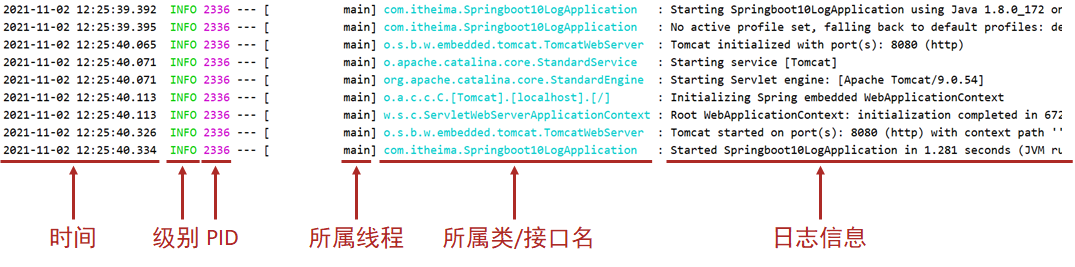
04运维实用篇(D4_日志)
目录 一、简介 二、代码中使用日志工具记录日志 1. 操作步骤 步骤1:添加日志记录操作 步骤2:设置日志输出级别 步骤3:设置日志组 2. 知识小结 三、优化日志对象创建代码 1. 实例 2. 总结 四、日志输出格式控制 1. 实例 2. 总结 …...

centos部署open-webui
提示:本文将简要介绍一下在linux下open-webui的安装过程,安装中未使用虚拟环境。 文章目录 一、open-webui是什么?二、安装流程1.openssl升级2.Python3.11安装3.sqlite安装升级4.pip 下载安装open-webui 总结 一、open-webui是什么? Open W…...

UE求职Demo开发日志#32 优化#1 交互逻辑实现接口、提取Bag和Warehouse的父类
1 定义并实现交互接口 接口定义: // Fill out your copyright notice in the Description page of Project Settings.#pragma once#include "CoreMinimal.h" #include "UObject/Interface.h" #include "MyInterActInterface.generated.h…...

Visonpro 检测是否有缺齿
一、效果展示 二、上面是原展开工具CogPolarUnwrapTool; 第二种方法: 用Blob 和 CogCopyRegionTool 三、 用预处理工具 加减常数,让图片变得更亮点 四、圆展开工具 五、模板匹配 六、代码分解 1.创建集合和文子显示工具 CogGraphicCollec…...

第1章大型互联网公司的基础架构——1.6 RPC服务
你可能在1.1节的引言中注意到业务服务层包括HTTP服务和RPC服务,两者的定位不一样。一般来说,一个业务场景的核心逻辑都是在RPC服务中实现的,强调的是服务于后台系统内部,所谓的“微服务”主要指的就是RPC服务;而HTTP服…...
)
今日AI和商界事件(2025-02-15)
根据2025年2月15日的科技动态,以下是今日AI领域的重要事件及相关进展总结: 1. DeepSeek日活突破3000万,开源生态加速AI普惠 里程碑意义:开源大模型DeepSeek宣布日活跃用户数突破3000万,其R1模型凭借开源策略和低成本优…...

如何在Windows上无缝运行安卓应用:APK Installer的技术解密与实践指南
如何在Windows上无缝运行安卓应用:APK Installer的技术解密与实践指南 【免费下载链接】APK-Installer An Android Application Installer for Windows 项目地址: https://gitcode.com/GitHub_Trending/ap/APK-Installer 你是否想过,在Windows系统…...

PiliPlus实战手册:解锁纯净跨平台B站观影体验
PiliPlus实战手册:解锁纯净跨平台B站观影体验 【免费下载链接】PiliPlus PiliPlus 项目地址: https://gitcode.com/gh_mirrors/pi/PiliPlus 在广告泛滥、体验割裂的官方客户端之外,一个基于Flutter开发的跨平台B站客户端PiliPlus正悄然改变你的观…...
对PHHs功能维持的影响)
原代人肝细胞长期培养模型研究:全人源三培养体系(TCS)对PHHs功能维持的影响
摘要: 原代人肝细胞(Primary Human Hepatocytes,PHHs)是药物代谢、药理学及毒理学研究中的核心模型,但传统培养体系难以长期维持其形态与代谢功能。本文基于全人源三培养体系(TCS)的公开研究资料…...

轻量级服务器控制面板ClawPanel:可视化Nginx与SSL证书管理实践
1. 项目概述:一个为开发者而生的轻量级控制面板最近在折腾自己的服务器时,总感觉传统的Web服务器管理方式有点“重”。无论是Nginx的配置文件,还是各种服务的状态监控,都得靠命令行敲来敲去,对于需要快速部署和演示的场…...

避坑指南:Nebula Graph分布式集群部署后,如何解决‘Host not enough’和监控Dashboard连接失败?
Nebula Graph分布式集群部署实战:从"Host not enough"到监控Dashboard的深度排错手册 第一次在Nebula Graph集群上执行空间创建命令时,那个鲜红的"Host not enough"错误提示让整个团队陷入了短暂的沉默。作为一款性能卓越的分布式图…...

电路板逆向工程瓶颈?OpenBoardView跨平台解析实战指南
电路板逆向工程瓶颈?OpenBoardView跨平台解析实战指南 【免费下载链接】OpenBoardView View .brd files 项目地址: https://gitcode.com/gh_mirrors/op/OpenBoardView 当你在MacBook Pro主板维修时,面对那个神秘的.brd文件格式,传统工…...
)
2026 .NET 面试八股文:高频题 + 答案 + 原理(高级核心篇)
2026 .NET 面试八股文:高频题 答案 原理(高级核心篇) 前言 2026年.NET生态持续升温,.NET 10正式普及、Native AOT成为企业选型核心、AI集成与云原生落地加速,面试考察重点也从基础语法转向「原理 实战 性能」三维…...
)
告别虚拟机!用Docker Compose一键部署MobSF移动安全测试环境(附动态分析替代方案)
告别虚拟机!用Docker Compose一键部署MobSF移动安全测试环境(附动态分析替代方案) 在移动应用安全测试领域,快速搭建可靠且可复用的测试环境一直是开发者和安全工程师的痛点。传统虚拟机部署方式不仅占用大量系统资源,…...

GlassesOpenClaw:基于开源硬件与计算机视觉的智能抓取机器人实践
1. 项目概述与核心价值最近在GitHub上看到一个挺有意思的项目,叫“GlassesOpenClaw”。光看名字,你可能会有点摸不着头脑——“眼镜”和“开源爪”有什么关系?这其实是一个典型的“硬件软件AI”的跨界项目,它本质上是一个基于开源…...
)
Multisim 14.0 保姆级教程:从零搭建一个LED闪烁电路(附完整仿真流程)
Multisim 14.0 实战入门:手把手教你构建LED呼吸灯电路 第一次打开Multisim时,满屏的元器件和仪器图标可能让人望而生畏。但别担心,我们今天要做的LED呼吸灯项目,正是打开电子仿真世界大门的最佳钥匙。这个经典的小电路不仅能让你快…...