
javacv将mp4视频切分为m3u8视频并播放
学习链接
ffmpeg-demo 当前对应的 gitee代码
Spring boot视频播放(解决MP4大文件无法播放),整合ffmpeg,用m3u8切片播放。
springboot 通过javaCV 实现mp4转m3u8 上传oss
如何保护会员或付费视频?优酷是怎么做的? - HLS 流媒体加密
ffmpeg视频转切片m3u8并加密&videojs播放&hls.js播放&dplayer播放(弹幕效果)
video标签学习 & xgplayer视频播放器分段播放mp4
SpringBoot&FFmpeg实现上传视频到本地,使用M3U8切片转码后,下方使用hls.js播放(支持mp4&avi),SpringBoot + FFmpeg实现一个简单的M3U8切片转码系统
文章目录
- 学习链接
- 简介
- 效果图
- 代码
- pom.xml
- application.yml
- WebConfig
- TestController
- FFmpegProcessor
- App
- nginx配置
- player.html
- 测试
简介
将上传的视频文件,使用javacv拆分成m3u8文件和ts文件,m3u8文件和ts文件通过nginx访问,而key文件则通过web服务来获取。使用dplayer播放视频。
也可以使用ffmpeg命令来做,可以参考上面链接。
(当前能把mp4这样处理,但是不能处理avi,处理avi会报错;处理avi的可以参考springboot-ffmpeg-m3u8-convertor - gitee代码,或者这个springboot-ffmpeg-demo - gitee代码)
效果图
m3u8文件和ts文件通过nginx访问,而key文件则通过web服务来获取


拿不到key文件是无法播放的

代码
pom.xml
<?xml version="1.0" encoding="UTF-8"?>
<project xmlns="http://maven.apache.org/POM/4.0.0"xmlns:xsi="http://www.w3.org/2001/XMLSchema-instance"xsi:schemaLocation="http://maven.apache.org/POM/4.0.0 http://maven.apache.org/xsd/maven-4.0.0.xsd"><parent><groupId>org.springframework.boot</groupId><artifactId>spring-boot-starter-parent</artifactId><version>2.3.4.RELEASE</version><relativePath/> <!-- lookup parent from repository --></parent><modelVersion>4.0.0</modelVersion><groupId>org.example</groupId><artifactId>ffmpeg-demo</artifactId><version>1.0-SNAPSHOT</version><properties><java.version>1.8</java.version><javacv.version>1.5.4</javacv.version><ffmpeg.version>4.3.1-1.5.4</ffmpeg.version></properties><dependencies><!--web 模块 --><dependency><groupId>org.springframework.boot</groupId><artifactId>spring-boot-starter-web</artifactId><exclusions><!--排除tomcat依赖 --><exclusion><artifactId>spring-boot-starter-tomcat</artifactId><groupId>org.springframework.boot</groupId></exclusion></exclusions></dependency><!--undertow容器 --><dependency><groupId>org.springframework.boot</groupId><artifactId>spring-boot-starter-undertow</artifactId></dependency><dependency><groupId>org.springframework.boot</groupId><artifactId>spring-boot-starter-test</artifactId><scope>test</scope></dependency><!--      javacv 和 ffmpeg的依赖包      --><dependency><groupId>org.bytedeco</groupId><artifactId>javacv</artifactId><version>${javacv.version}</version><exclusions><exclusion><groupId>org.bytedeco</groupId><artifactId>*</artifactId></exclusion></exclusions></dependency><dependency><groupId>org.bytedeco</groupId><artifactId>ffmpeg-platform</artifactId><version>${ffmpeg.version}</version></dependency><dependency><groupId>cn.hutool</groupId><artifactId>hutool-all</artifactId><version>5.6.5</version></dependency></dependencies><build><plugins><plugin><groupId>org.springframework.boot</groupId><artifactId>spring-boot-maven-plugin</artifactId></plugin></plugins></build></project>
application.yml
server:port: 8080
spring:servlet:multipart:max-file-size: 500MBmax-request-size: 500MB
WebConfig
@Configuration
public class WebConfig implements WebMvcConfigurer {@Overridepublic void addResourceHandlers(ResourceHandlerRegistry registry) {registry.addResourceHandler("/test/**").addResourceLocations("file:" + System.getProperty("user.dir") + "/test/");registry.addResourceHandler("/tmp/**").addResourceLocations("file:" + System.getProperty("user.dir") + "/tmp/");}@Overridepublic void addCorsMappings(CorsRegistry registry) {registry.addMapping("/**").maxAge(3600).allowCredentials(true).allowedOrigins("*").allowedMethods("*").allowedHeaders("*").exposedHeaders("token","Authorization");}
}
TestController
import cn.hutool.core.io.IoUtil;
import cn.hutool.core.io.file.FileReader;
import cn.hutool.core.io.file.FileWriter;
import com.zzhua.processor.FFmpegProcessor;
import org.springframework.web.bind.annotation.*;
import org.springframework.web.multipart.MultipartFile;import javax.servlet.ServletInputStream;
import javax.servlet.http.HttpServletRequest;
import javax.servlet.http.HttpServletResponse;
import java.io.FileInputStream;
import java.io.IOException;@RestController
public class TestController {/*** 目录路径,这个路径需要包含test.info文件,test.key文件和test.mp4文件*/private static final String PATH = "D:\\Projects\\practice\\ffmpeg-demo\\test\\";@RequestMapping("uploadToM3u8")public void uploadToM3u8() throws Exception {FileInputStream inputStream = new FileInputStream(PATH + "test.mp4");/* 这里原来的逻辑是1、m3u8Url是将生成的m3u8文件流写入的位置,可以填写接收该请求的接口路径2、infoUrl是获取keyinfo文件的路径,可以是接口路径3、上面2个都可以是本地路径*/// String m3u8Url = "http://localhost:8080/upload/test.m3u8";// String infoUrl = "http://localhost:8080/preview/test.keyinfo";String m3u8Url = "D:\\Projects\\practice\\ffmpeg-demo\\test\\test.m3u8";String infoUrl = "D:\\Projects\\practice\\ffmpeg-demo\\test\\test.keyinfo";String segmentPattern = "http://localhost:8080/upload/test-%d.ts";FFmpegProcessor.convertMediaToM3u8ByHttp(inputStream, m3u8Url, infoUrl, segmentPattern);}@RequestMapping("convertToM3u8")public void convertToM3u8(MultipartFile mfile) {FFmpegProcessor.convertMediaToM3u8(mfile);}@PostMapping("upload/{fileName}")public void upload(HttpServletRequest request, @PathVariable("fileName") String fileName) throws IOException {ServletInputStream inputStream = request.getInputStream();FileWriter writer = new FileWriter(PATH + fileName);writer.writeFromStream(inputStream);IoUtil.close(inputStream);}/*** 预览加密文件*/@PostMapping("preview/{fileName}")public void preview(@PathVariable("fileName") String fileName, HttpServletResponse response) throws IOException {FileReader fileReader = new FileReader(PATH + fileName);fileReader.writeToStream(response.getOutputStream());}/*** 预览加密文件*/@GetMapping("download/{fileName}")public void download(@PathVariable("fileName") String fileName, HttpServletResponse response) throws IOException {FileReader fileReader = new FileReader(PATH + fileName);fileReader.writeToStream(response.getOutputStream());}}
FFmpegProcessor
import org.bytedeco.ffmpeg.avcodec.AVPacket;
import org.bytedeco.ffmpeg.global.avcodec;
import org.bytedeco.ffmpeg.global.avutil;
import org.bytedeco.javacv.*;
import org.springframework.web.multipart.MultipartFile;import java.io.*;
import java.nio.file.Files;
import java.nio.file.Path;
import java.nio.file.Paths;public class FFmpegProcessor {/*** 这个方法的url地址都必须是一样的类型 同为post*/public static void convertMediaToM3u8ByHttp(InputStream inputStream, String m3u8Url, String infoUrl, String segmentPattern) throws IOException {avutil.av_log_set_level(avutil.AV_LOG_INFO);FFmpegLogCallback.set();FFmpegFrameGrabber grabber = new FFmpegFrameGrabber(inputStream);grabber.start();FFmpegFrameRecorder recorder = new FFmpegFrameRecorder(m3u8Url, grabber.getImageWidth(), grabber.getImageHeight(), grabber.getAudioChannels());recorder.setFormat("hls");// 拆分时间片段长度recorder.setOption("hls_time", "60");recorder.setOption("hls_list_size", "0");recorder.setOption("hls_flags", "delete_segments");recorder.setOption("hls_delete_threshold", "1");recorder.setOption("hls_segment_type", "mpegts");/* 这里指定生成的ts文件保存位置,可以写接口路径, 该接口用于接收ts文件流*/// recorder.setOption("hls_segment_filename", "http://localhost:8080/upload/test-%d.ts");recorder.setOption("hls_segment_filename", segmentPattern);recorder.setOption("hls_key_info_file", infoUrl);// http属性recorder.setOption("method", "POST");recorder.setFrameRate(25);recorder.setGopSize(2 * 25);recorder.setVideoQuality(1.0);recorder.setVideoBitrate(10 * 1024);recorder.setVideoCodec(avcodec.AV_CODEC_ID_H264);recorder.setAudioCodec(avcodec.AV_CODEC_ID_AAC);/*// 只保存图像,而不保存声音recorder.start();Frame frame;while ((frame = grabber.grabImage()) != null) {try {recorder.record(frame);} catch (FrameRecorder.Exception e) {e.printStackTrace();}}recorder.setTimestamp(grabber.getTimestamp());recorder.close();grabber.close();*//* 图像 + 声音 */recorder.start(grabber.getFormatContext());AVPacket packet;while ((packet = grabber.grabPacket()) != null) {try {recorder.recordPacket(packet);} catch (FrameRecorder.Exception e) {e.printStackTrace();}}recorder.setTimestamp(grabber.getTimestamp());recorder.stop();recorder.release();grabber.stop();grabber.release();}private static final String BASE_PATH = System.getProperty("user.dir") + "\\tmp\\";public static void convertMediaToM3u8(MultipartFile mfile) {String origFileName = mfile.getOriginalFilename();String fileName = origFileName.substring(0, origFileName.lastIndexOf("."));String dirName = fileName;String fileDir = BASE_PATH + fileName;File dirFile = new File(fileDir);if (!dirFile.exists()) {dirFile.mkdirs();}try {File rawFile = new File(dirFile, origFileName);// 保存文件mfile.transferTo(rawFile);// 生成密钥文件String commonFileName = fileDir + "\\" + fileName;generateKeyFile(commonFileName + ".key");// 生成keyInfo文件generateKeyInfoFile(dirName, commonFileName + ".key", commonFileName + ".keyinfo");convertMediaToM3u8ByHttp(new FileInputStream(rawFile),commonFileName + ".m3u8",commonFileName + ".keyinfo",commonFileName + "-%d.ts");} catch (Exception e) {e.printStackTrace(System.err);}}/*** 生成keyInfo文件** @param keyFilePath     密钥文件路径* @param keyInfoFilePath keyInfo文件路径*/private static void generateKeyInfoFile(String dirName, String keyFilePath, String keyInfoFilePath) {try {// 生成IVProcessBuilder ivProcessBuilder = new ProcessBuilder("openssl", "rand", "-hex", "16");Process ivProcess = ivProcessBuilder.start();BufferedReader ivReader = new BufferedReader(new InputStreamReader(ivProcess.getInputStream()));String iv = ivReader.readLine();// 写入keyInfo文件String keyInfoContent ="http://127.0.0.1:8080/tmp/" + dirName + "/" + new File(keyFilePath).getName() + "\n"+ keyFilePath + "\n"+ iv;Files.write(Paths.get(keyInfoFilePath), keyInfoContent.getBytes());System.out.println("keyInfo文件已生成: " + keyInfoFilePath);} catch (IOException e) {e.printStackTrace();}}/*** 生成密钥文件** @param keyFilePath 密钥文件路径*/private static void generateKeyFile(String keyFilePath) {try {ProcessBuilder processBuilder = new ProcessBuilder("openssl", "rand", "16");processBuilder.redirectOutput(new File(keyFilePath));Process process = processBuilder.start();process.waitFor();System.out.println("密钥文件已生成: " + keyFilePath);} catch (IOException | InterruptedException e) {e.printStackTrace();}}
}
App
@SpringBootApplication
public class App {public static void main(String[] args) {SpringApplication.run(App.class, args);}}
nginx配置
#user  nobody;
worker_processes  1;#error_log  logs/error.log;
#error_log  logs/error.log  notice;
#error_log  logs/error.log  info;#pid        logs/nginx.pid;events {worker_connections  1024;
}http {include       mime.types;default_type  application/octet-stream;server {listen 80;server_name localhost;add_header 'Access-Control-Allow-Origin' $http_origin always;add_header 'Access-Control-Allow-Methods' 'GET, POST, PUT, DELETE, OPTIONS';add_header 'Access-Control-Allow-Headers' 'Content-Type, Authorization, X-Requested-With, token';add_header 'Access-Control-Allow-Credentials' 'true';location / {if ($request_method = 'OPTIONS') {return 204;}root D:/Projects/practice/ffmpeg-demo/tmp;}}}
player.html
<!DOCTYPE html>
<html lang="en"><head><meta charset="UTF-8"><meta name="viewport" content="width=device-width, initial-scale=1.0"><title>Document</title><style>body {margin: 0;}.dplayer-container {width: 800px;height: 500px;display: flex;align-items: center;justify-content: center;}#dplayer {width: 100%;height: 100%;object-fit: cover;}</style><script src="https://cdn.jsdelivr.net/npm/hls.js@latest"></script><script src="https://cdn.jsdelivr.net/npm/dplayer@1.27.1/dist/DPlayer.min.js"></script>
</head><body><div class="dplayer-container"><div id="dplayer"></div></div><hr /><script>// 另一种方式,使用 customTypeconst dp = new DPlayer({container: document.getElementById('dplayer'),autoplay: false, // 自动播放video: {url: 'http://127.0.0.1/zzhua/zzhua.m3u8',type: 'customHls',customType: {customHls: function (video, player) {const hls = new Hls();hls.loadSource(video.src);hls.attachMedia(video);},},},});Window.dp = dp;</script>
</body></html>
测试
上传1个301M的视频,耗时15s,

共188个文件,其中184个ts文件

播放效果

相关文章:
javacv将mp4视频切分为m3u8视频并播放
学习链接 ffmpeg-demo 当前对应的 gitee代码 Spring boot视频播放(解决MP4大文件无法播放),整合ffmpeg,用m3u8切片播放。 springboot 通过javaCV 实现mp4转m3u8 上传oss 如何保护会员或付费视频?优酷是怎么做的? - HLS 流媒体加密 ffmpe…...

Golang学习笔记_33——桥接模式
Golang学习笔记_30——建造者模式 Golang学习笔记_31——原型模式 Golang学习笔记_32——适配器模式 文章目录 桥接模式详解一、桥接模式核心概念1. 定义2. 解决的问题3. 核心角色4. 类图 二、桥接模式的特点三、适用场景1. 多维度变化2. 跨平台开发3. 动态切换实现 四、与其他…...

蜂鸟视图发布AI智能导购产品:用生成式AI重构空间服务新范式
在人工智能技术飞速发展的今天,北京蜂鸟视图正式宣布推出基于深度求索(DeepSeek)等大模型的《AI智能导购产品》,通过生成式AI与室内三维地图的深度融合,重新定义空间场景的智能服务体验。 这一创新产品将率先应用于购物…...

AI服务器散热黑科技:让芯片“冷静”提速
AI 服务器为何需要散热黑科技 在人工智能飞速发展的当下,AI 服务器作为核心支撑,作用重大。从互联网智能推荐,到医疗疾病诊断辅助,从金融风险预测,到教育个性化学习,AI 服务器广泛应用,为各类复…...

数据结构-栈、队列、哈希表
1栈 1.栈的概念 1.1栈:在表尾插入和删除操作受限的线性表 1.2栈逻辑结构: 线性结构(一对一) 1.3栈的存储结构:顺序存储(顺序栈)、链表存储(链栈) 1.4栈的特点: 先进后出(fisrt in last out FILO表),后进先出 //创建栈 Stacklist create_stack() {Stacklist lis…...

安装海康威视相机SDK后,catkin_make其他项目时,出现“libusb_set_option”错误的解决方法
硬件:雷神MIX G139H047LD 工控机 系统:ubuntu20.04 之前运行某项目时,处于正常状态。后来由于要使用海康威视工业相机(型号:MV-CA013-21UC),便下载了并安装了该相机的SDK,之后运行…...
【鸿蒙】ArkUI-X跨平台问题集锦
系列文章目录 【鸿蒙】ArkUI-X跨平台问题集锦 文章目录 系列文章目录前言问题集锦1、HSP,HAR模块中 无法引入import bridge from arkui-x.bridge;2、CustomDialog 自定义弹窗中的点击事件在Android 中无任何响应;3、调用 buildRouterMode() 路由跳转页面前…...

大模型驱动的业务自动化
大模型输出token的速度太低且为统计输出,所以目前大模型主要应用在toP(人)的相关领域;但其智能方面的优势又是如此的强大,自然就需要尝试如何将其应用到更加广泛的toM(物理系统、生产系统)领域中…...

ocr智能票据识别系统|自动化票据识别集成方案
在企业日常运营中,对大量票据实现数字化管理是一项耗时且容易出错的任务。随着技术的进步,OCR(光学字符识别)智能票据识别系统的出现为企业提供了一个高效、准确的解决方案,不仅简化了财务流程,还大幅提升了…...

[数据结构]红黑树,详细图解插入
目录 一、红黑树的概念 二、红黑树的性质 三、红黑树节点的定义 四、红黑树的插入(步骤) 1.为什么新插入的节点必须给红色? 2、插入红色节点后,判定红黑树性质是否被破坏 五、插入出现连续红节点情况分析图解(看…...

【机器学习】超参数调优指南:交叉验证,网格搜索,混淆矩阵——基于鸢尾花与数字识别案例的深度解析
一、前言:为何要学交叉验证与网格搜索? 大家好!在机器学习的道路上,我们经常面临一个难题:模型调参。比如在 KNN 算法中,选择多少个邻居(n_neighbors)直接影响预测效果。 • 蛮力猜…...

Burp Suite基本使用(web安全)
工具介绍 在网络安全的领域,你是否听说过抓包,挖掘漏洞等一系列的词汇,这篇文章将带你了解漏洞挖掘的热门工具——Burp Suite的使用。 Burp Suite是一款由PortSwigger Web Security公司开发的集成化Web应用安全检测工具,它主要用于…...
React实现自定义图表(线状+柱状)
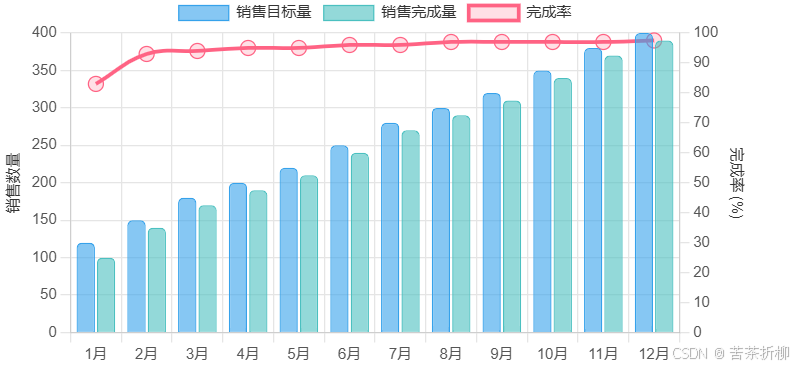
要使用 React 绘制一个结合线状图和柱状图的图表,你可以使用 react-chartjs-2 库,它是基于 Chart.js 的 React 封装。以下是一个示例代码,展示如何实现这个需求: 1. 安装依赖 首先,你需要安装 react-chartjs-2 和 ch…...
从低清到4K的魔法:FlashVideo突破高分辨率视频生成计算瓶颈(港大港中文字节)
论文链接:https://arxiv.org/pdf/2502.05179 项目链接:https://github.com/FoundationVision/FlashVideo 亮点直击 提出了 FlashVideo,一种将视频生成解耦为两个目标的方法:提示匹配度和视觉质量。通过在两个阶段分别调整模型规模…...

Qt的QTabWidget的使用
在PyQt5中,QTabWidget 是一个用于管理多个选项卡页面的容器控件。以下是其使用方法的详细说明和示例: 1. 基本用法 import sys from PyQt5.QtWidgets import QApplication, QMainWindow, QTabWidget, QWidget, QLabel, QVBoxLayoutclass MainWindow(QMa…...

Next.js【详解】获取数据(访问接口)
Next.js 中分为 服务端组件 和 客户端组件,内置的获取数据各不相同 服务端组件 方式1 – 使用 fetch export default async function Page() {const data await fetch(https://api.vercel.app/blog)const posts await data.json()return (<ul>{posts.map((…...

反向代理模块kd
1 概念 1.1 反向代理概念 反向代理是指以代理服务器来接收客户端的请求,然后将请求转发给内部网络上的服务器,将从服务器上得到的结果返回给客户端,此时代理服务器对外表现为一个反向代理服务器。 对于客户端来说,反向代理就相当于…...

leaflet前端初始化项目
1、通过npm安装leaflet包,或者直接在项目中引入leaflet.js库文件。 npm 安装:npm i leaflet 如果在index.html中引入leaflet.js,在项目中可以直接使用变量L. 注意:尽量要么使用npm包,要么使用leaflet.js库,两者一起使用容易发生…...
)
CMS DTcms 靶场(弱口令、文件上传、tasklist提权、开启远程桌面3389、gotohttp远程登录控制)
环境说明 攻击机kali:192.168.111.128 信息收集 主机发现 ┌──(root㉿kali-plus)-[~/Desktop] └─# nmap -sP 192.168.111.0/24 Starting Nmap 7.94SVN ( https://nmap.org ) at 2024-11-23 14:57 CST Nmap scan report for 192.168.111.1 Host is up (0.00039s latenc…...

Docker 入门与实战:从安装到容器管理的完整指南
🚀 Docker 入门与实战:从安装到容器管理的完整指南 🌟 📖 简介 在现代软件开发中,容器化技术已经成为不可或缺的一部分。而 Docker 作为容器化领域的领头羊,以其轻量级、高效和跨平台的特性,深…...

深度解析分布式任务编排:从舰队模型到OpenClaw Fleet实战
1. 项目概述:从开源舰队到分布式任务编排最近在开源社区里,一个名为vibewrk/openclaw-fleet的项目引起了我的注意。乍一看这个标题,你可能会联想到“舰队”或“集群”管理,但深入探究后,我发现它远不止于此。OpenClaw …...

DPCRN vs. Conv-TasNet:语音增强两大流派实战对比,选哪个更合适?
DPCRN与Conv-TasNet:语音增强技术选型实战指南 在实时通信和音频处理领域,语音增强技术正成为提升用户体验的关键组件。无论是远程会议中的环境噪声抑制,还是录音设备中的语音清晰度优化,选择合适的技术路线直接影响最终产品的表现…...

孤能子视角:“记忆“不是存储,是关系网的呼吸
(在以下的与AI互动中,在EIS理论约束下,DeepSeek叫信兄,Kimi叫酷兄,我呢叫水兄。主要是观察关系场中AI角色的持续把握)(这是多次迭代的结果。给它弄得老长。姑且当科幻小说看)(最后附上百度文心分析点评)孤能子视角:记忆…...

Windows效率神器QuickLook:除了空格预览,这5个插件让你的文件管理效率翻倍
Windows效率神器QuickLook:除了空格预览,这5个插件让你的文件管理效率翻倍 在Windows平台上寻找高效文件管理工具的用户,往往会被macOS的Quick Look功能所吸引。如今,QuickLook这款开源工具完美复刻了这一体验,但它的潜…...

百能云板6层埋铜块PCB:高功率场景下的热管理与载流性能标杆方案
在新能源汽车、工业IGBT、高算力服务器等高功率密度应用场景中,PCB的热管理能力、载流性能与长期可靠性,直接决定了系统的稳定性与使用寿命。百能云板推出的6层埋铜块PCB,依托一体化埋铜工艺、高阶HDI结构及高稳定性基材,构建了集…...

Unity高性能割草游戏方案:用P3D Survivors Engine 打造爆款“类吸血鬼幸存者”游戏
一、插件简介 在近几年独立游戏市场中,以 Vampire Survivors 为代表的“幸存者类(Survivors-like)”游戏迅速爆火。这类游戏凭借爽快的割草体验、简单操作与高度可复玩性,成为移动端与PC端的热门赛道。 而 P3D: Survivors Engine …...

Qwen3-4B-Thinking-Gemini-Distill实际效果:多轮追问中上下文保持与推理一致性验证
Qwen3-4B-Thinking-Gemini-Distill实际效果:多轮追问中上下文保持与推理一致性验证 1. 模型概述 Qwen3-4B-Thinking-2507-Gemini-Distill是基于Qwen3-4B-Thinking-2507的社区蒸馏版本,由TeichAI使用Gemini 2.5 Flash生成的5440万tokens监督微调而成。该…...

BepInEx 6.0.0版本在Unity游戏中的稳定性问题如何解决?深度技术解析
BepInEx 6.0.0版本在Unity游戏中的稳定性问题如何解决?深度技术解析 【免费下载链接】BepInEx Unity / XNA game patcher and plugin framework 项目地址: https://gitcode.com/GitHub_Trending/be/BepInEx BepInEx作为Unity游戏开发中广泛使用的插件框架和游…...

ChatGPT 图像2.0发布:开发者最该关注的5个变化与上手清单
先说结论 如果你只记一件事:这次不是“画得更好看”这么简单,而是“更能按指令把图做对”。 对开发者最直接的价值是:做封面图、流程图、UI 草图、运营图时,返工次数会明显下降。一、ChatGPT 图像 2.0 到底是什么 根据 OpenAI 202…...

【PHP 8.9 GC革命性突破】:内存泄漏率下降73%、循环引用回收提速4.8倍,你还在用PHP 8.1的旧回收器?
更多请点击: https://intelliparadigm.com 第一章:PHP 8.9垃圾回收机制的演进全景 PHP 8.9尚未正式发布(截至2024年,PHP最新稳定版为8.3),但作为社区广泛讨论的前瞻性演进方向,“PHP 8.9”在此…...