
JavaScript系列(44)--微服务架构实现详解
JavaScript微服务架构实现详解 🏗️
今天,让我们来学习如何在JavaScript中实现微服务架构。微服务架构是一种将应用程序构建为一组小型服务的方法,每个服务运行在自己的进程中,并通过轻量级机制通信。
微服务基础概念 🌟
💡 小知识:微服务架构的核心是将大型应用拆分成多个独立的服务,每个服务都可以独立部署、扩展和维护。
基础架构实现 📊
// 1. 基础服务类
class MicroService {constructor(name, port) {this.name = name;this.port = port;this.express = require('express');this.app = this.express();this.routes = new Map();}// 配置中间件setupMiddleware() {this.app.use(this.express.json());this.app.use(this.express.urlencoded({ extended: true }));}// 注册路由registerRoute(method, path, handler) {this.routes.set(`${method}:${path}`, handler);this.app[method.toLowerCase()](path, handler);}// 启动服务async start() {return new Promise((resolve) => {this.server = this.app.listen(this.port, () => {console.log(`Service ${this.name} started on port ${this.port}`);resolve();});});}// 停止服务async stop() {return new Promise((resolve) => {this.server.close(() => {console.log(`Service ${this.name} stopped`);resolve();});});}
}// 2. 服务注册中心
class ServiceRegistry {constructor() {this.services = new Map();this.healthChecks = new Map();}// 注册服务register(name, host, port) {const serviceId = `${name}-${host}:${port}`;this.services.set(serviceId, {name,host,port,status: 'healthy',lastHeartbeat: Date.now()});return serviceId;}// 注销服务unregister(serviceId) {this.services.delete(serviceId);this.healthChecks.delete(serviceId);}// 获取服务实例getService(name) {const services = Array.from(this.services.values()).filter(s => s.name === name && s.status === 'healthy');if (services.length === 0) {throw new Error(`No healthy instances of service ${name} found`);}// 简单的负载均衡:随机选择一个实例return services[Math.floor(Math.random() * services.length)];}// 健康检查startHealthCheck(serviceId, interval = 30000) {const check = setInterval(() => {const service = this.services.get(serviceId);if (!service) {clearInterval(check);return;}if (Date.now() - service.lastHeartbeat > interval) {service.status = 'unhealthy';}}, interval);this.healthChecks.set(serviceId, check);}
}
服务通信实现 🔄
// 1. HTTP通信适配器
class HttpCommunicator {constructor() {this.axios = require('axios');}async request(service, method, path, data) {const url = `http://${service.host}:${service.port}${path}`;try {const response = await this.axios({method,url,data});return response.data;} catch (error) {throw new Error(`Service communication failed: ${error.message}`);}}
}// 2. 消息队列通信
class MessageQueueCommunicator {constructor() {this.amqp = require('amqplib');this.connection = null;this.channel = null;}async connect(url) {this.connection = await this.amqp.connect(url);this.channel = await this.connection.createChannel();}async publish(queue, message) {await this.channel.assertQueue(queue);return this.channel.sendToQueue(queue, Buffer.from(JSON.stringify(message)));}async subscribe(queue, callback) {await this.channel.assertQueue(queue);return this.channel.consume(queue, (msg) => {if (msg) {const content = JSON.parse(msg.content.toString());callback(content);this.channel.ack(msg);}});}
}// 3. 事件总线
class EventBus {constructor() {this.events = new Map();}publish(event, data) {if (!this.events.has(event)) {return;}const handlers = this.events.get(event);handlers.forEach(handler => handler(data));}subscribe(event, handler) {if (!this.events.has(event)) {this.events.set(event, new Set());}this.events.get(event).add(handler);}unsubscribe(event, handler) {if (!this.events.has(event)) {return;}this.events.get(event).delete(handler);}
}
服务发现与负载均衡 ⚖️
// 1. 服务发现客户端
class ServiceDiscoveryClient {constructor(registry) {this.registry = registry;this.cache = new Map();this.cacheTimeout = 60000; // 1分钟缓存}async getService(name) {const now = Date.now();const cached = this.cache.get(name);if (cached && now - cached.timestamp < this.cacheTimeout) {return cached.service;}const service = this.registry.getService(name);this.cache.set(name, {service,timestamp: now});return service;}
}// 2. 负载均衡器
class LoadBalancer {constructor() {this.algorithms = new Map();this.setupAlgorithms();}setupAlgorithms() {// 轮询算法this.algorithms.set('round-robin', {counter: new Map(),select: (services, serviceName) => {const count = this.algorithms.get('round-robin').counter;const current = count.get(serviceName) || 0;count.set(serviceName, (current + 1) % services.length);return services[current];}});// 随机算法this.algorithms.set('random', {select: (services) => {return services[Math.floor(Math.random() * services.length)];}});// 最少连接算法this.algorithms.set('least-connections', {connections: new Map(),select: (services) => {const conns = this.algorithms.get('least-connections').connections;return services.reduce((min, service) => {const serviceConns = conns.get(service.id) || 0;const minConns = conns.get(min.id) || 0;return serviceConns < minConns ? service : min;});}});}select(algorithm, services, serviceName) {if (!this.algorithms.has(algorithm)) {throw new Error(`Unknown load balancing algorithm: ${algorithm}`);}return this.algorithms.get(algorithm).select(services, serviceName);}
}
容错与熔断机制 🔌
// 1. 断路器
class CircuitBreaker {constructor(options = {}) {this.failureThreshold = options.failureThreshold || 5;this.resetTimeout = options.resetTimeout || 60000;this.failures = 0;this.state = 'CLOSED';this.lastFailure = null;}async execute(fn) {if (this.state === 'OPEN') {if (Date.now() - this.lastFailure >= this.resetTimeout) {this.state = 'HALF-OPEN';} else {throw new Error('Circuit breaker is OPEN');}}try {const result = await fn();this.onSuccess();return result;} catch (error) {this.onFailure();throw error;}}onSuccess() {this.failures = 0;this.state = 'CLOSED';}onFailure() {this.failures++;this.lastFailure = Date.now();if (this.failures >= this.failureThreshold) {this.state = 'OPEN';}}
}// 2. 重试机制
class RetryMechanism {constructor(options = {}) {this.maxRetries = options.maxRetries || 3;this.delay = options.delay || 1000;this.backoffFactor = options.backoffFactor || 2;}async execute(fn) {let retries = 0;let delay = this.delay;while (true) {try {return await fn();} catch (error) {retries++;if (retries >= this.maxRetries) {throw error;}await new Promise(resolve => setTimeout(resolve, delay));delay *= this.backoffFactor;}}}
}// 3. 超时控制
class TimeoutController {async execute(fn, timeout) {const timeoutPromise = new Promise((_, reject) => {setTimeout(() => reject(new Error('Operation timed out')), timeout);});return Promise.race([fn(), timeoutPromise]);}
}
监控与日志 📊
// 1. 性能监控
class PerformanceMonitor {constructor() {this.metrics = new Map();this.startTime = Date.now();}recordMetric(name, value) {if (!this.metrics.has(name)) {this.metrics.set(name, []);}this.metrics.get(name).push({timestamp: Date.now(),value});}getMetrics(name, timeRange) {const metrics = this.metrics.get(name) || [];const now = Date.now();return metrics.filter(m => now - m.timestamp <= timeRange);}calculateStatistics(name, timeRange) {const metrics = this.getMetrics(name, timeRange);const values = metrics.map(m => m.value);return {count: values.length,average: values.reduce((a, b) => a + b, 0) / values.length,min: Math.min(...values),max: Math.max(...values)};}
}// 2. 分布式日志
class DistributedLogger {constructor(options = {}) {this.serviceName = options.serviceName;this.logLevel = options.logLevel || 'info';this.transport = options.transport || 'console';}log(level, message, metadata = {}) {const logEntry = {timestamp: new Date().toISOString(),level,service: this.serviceName,message,metadata,correlationId: metadata.correlationId || this.generateCorrelationId()};this.send(logEntry);}send(logEntry) {switch (this.transport) {case 'console':console.log(JSON.stringify(logEntry));break;case 'elasticsearch':// 实现Elasticsearch传输break;case 'fluentd':// 实现Fluentd传输break;}}generateCorrelationId() {return `${Date.now()}-${Math.random().toString(36).substr(2, 9)}`;}
}
实际应用示例 💼
// 1. 用户服务
class UserService extends MicroService {constructor() {super('user-service', 3000);this.setupRoutes();}setupRoutes() {this.registerRoute('GET', '/users', this.getUsers.bind(this));this.registerRoute('GET', '/users/:id', this.getUserById.bind(this));this.registerRoute('POST', '/users', this.createUser.bind(this));}async getUsers(req, res) {// 实现获取用户列表}async getUserById(req, res) {// 实现获取单个用户}async createUser(req, res) {// 实现创建用户}
}// 2. 订单服务
class OrderService extends MicroService {constructor() {super('order-service', 3001);this.setupRoutes();this.userServiceClient = new ServiceDiscoveryClient(registry);}setupRoutes() {this.registerRoute('POST', '/orders', this.createOrder.bind(this));this.registerRoute('GET', '/orders/:id', this.getOrderById.bind(this));}async createOrder(req, res) {const { userId, items } = req.body;// 使用断路器调用用户服务const circuitBreaker = new CircuitBreaker();const user = await circuitBreaker.execute(async () => {const userService = await this.userServiceClient.getService('user-service');const communicator = new HttpCommunicator();return communicator.request(userService, 'GET', `/users/${userId}`);});// 创建订单逻辑}
}// 3. API网关
class ApiGateway extends MicroService {constructor() {super('api-gateway', 8080);this.setupRoutes();this.loadBalancer = new LoadBalancer();this.registry = new ServiceRegistry();}setupRoutes() {this.app.use(this.routeRequest.bind(this));}async routeRequest(req, res) {const service = this.determineTargetService(req.path);const instances = await this.registry.getServiceInstances(service);if (instances.length === 0) {return res.status(503).json({ error: 'Service Unavailable' });}const target = this.loadBalancer.select('round-robin', instances, service);const communicator = new HttpCommunicator();try {const result = await communicator.request(target, req.method, req.path, req.body);res.json(result);} catch (error) {res.status(500).json({ error: error.message });}}
}
最佳实践建议 💡
-
服务设计原则
- 保持服务的单一职责
- 定义清晰的服务边界
- 使用异步通信减少耦合
- 实现适当的服务粒度
-
可靠性保障
- 实现健康检查
- 使用断路器模式
- 实现优雅降级
- 添加重试机制
-
监控与可观测性
- 实现分布式追踪
- 收集关键指标
- 集中式日志管理
- 设置适当的告警
-
安全性考虑
- 服务间认证
- API安全
- 数据加密
- 访问控制
结语 📝
微服务架构为构建大规模分布式系统提供了强大的解决方案。通过本文,我们学习了:
- 微服务的基础架构实现
- 服务通信和发现机制
- 负载均衡和容错处理
- 监控和日志系统
- 实际应用示例和最佳实践
💡 学习建议:在实施微服务架构时,要注意平衡系统的复杂性和业务需求。不是所有应用都需要微服务架构,要根据实际情况选择合适的架构方案。
如果你觉得这篇文章有帮助,欢迎点赞收藏,也期待在评论区看到你的想法和建议!👇
终身学习,共同成长。
咱们下一期见
💻
相关文章:
--微服务架构实现详解)
JavaScript系列(44)--微服务架构实现详解
JavaScript微服务架构实现详解 🏗️ 今天,让我们来学习如何在JavaScript中实现微服务架构。微服务架构是一种将应用程序构建为一组小型服务的方法,每个服务运行在自己的进程中,并通过轻量级机制通信。 微服务基础概念 …...

Vue组件开发-使用 html2canvas 和 jspdf 库实现PDF文件导出 设置页面大小及方向
在 Vue 项目中实现导出 PDF 文件、调整文件页面大小和页面方向的功能,使用 html2canvas 将 HTML 内容转换为图片,再使用 jspdf 把图片添加到 PDF 文件中。以下是详细的实现步骤和代码示例: 步骤 1:安装依赖 首先,在项…...

Java-并发编程-特性-可见性-synchronized如何保证可见性?
synchronized 能保证可见性吗? 在Java并发编程中,synchronized 关键字不仅用于实现互斥访问,还能够保证内存可见性。理解这一点需要了解Java内存模型(Java Memory Model,JMM)以及happens-before࿰…...
iOS 权限管理:同时请求相机和麦克风权限的最佳实践
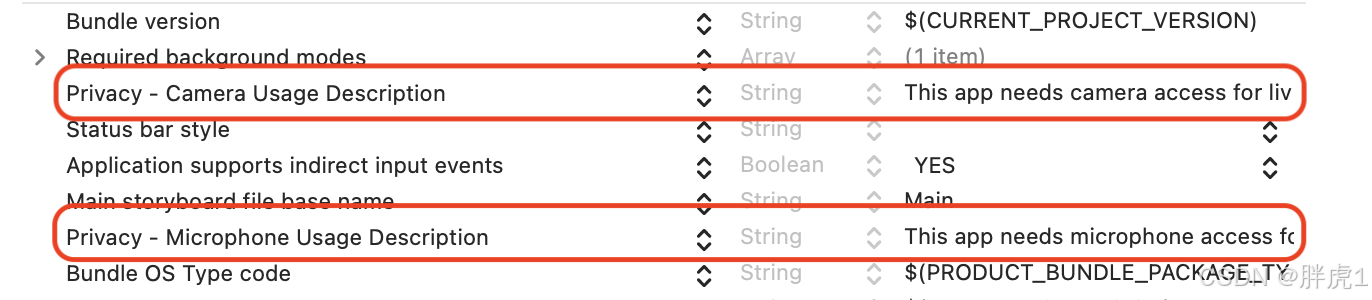
引言 在开发视频类应用时,我们常常会遇到需要同时请求相机和麦克风权限的场景。比如,在用户发布视频动态时,相机用于捕捉画面,麦克风用于录制声音;又或者在直播功能中,只有获得这两项权限,用户…...
【深入理解FFMPEG】命令行阅读笔记
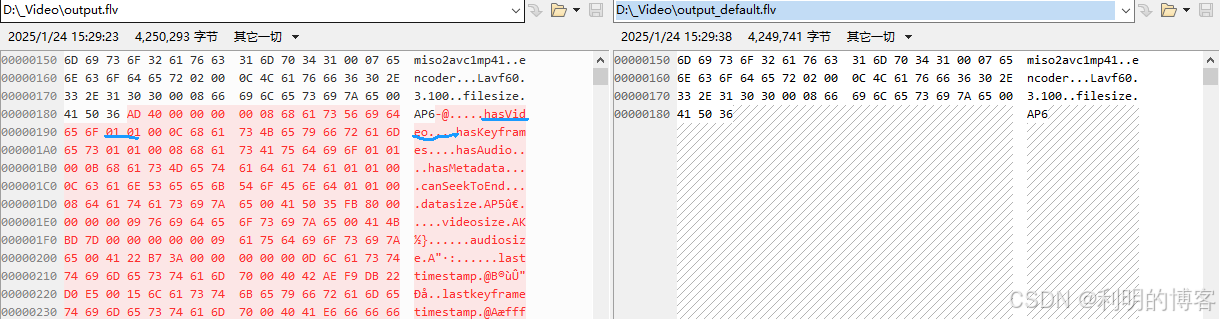
这里写自定义目录标题 第三章 FFmpeg工具使用基础3.1 ffmpeg常用命令3.1.13.1.3 转码流程 3.2 ffprobe 常用命令3.2.1 ffprobe常用参数3.2.2 ffprobe 使用示例 3.3 ffplay常用命令3.3.1 ffplay常用参数3.3.2 ffplay高级参数3.3.4 ffplay快捷键 第4章 封装与解封装4.1 视频文件转…...

数据结构:二叉树—面试题(二)
1、二叉树的最近公共祖先 习题链接https://leetcode.cn/problems/lowest-common-ancestor-of-a-binary-tree/description/ 描述: 给定一个二叉树, 找到该树中两个指定节点的最近公共祖先。 百度百科中最近公共祖先的定义为:“对于有根树 T 的两个节点…...

【C++高并发服务器WebServer】-6:信号
本文目录 信号的概念1.1 core文件1.2 kill命令1.3 alarm函数1.4 setitimer调用1.5 signal捕捉信号1.6 信号集1.7 内核实现信号捕捉的过程1.8 sigaction1.9 sigchld 信号的概念 信号是 Linux 进程间通信的最古老的方式之一,是事件发生时对进程的通知机制,…...

《探秘人工智能:从基础到未来变革》
在当今科技飞速发展的时代,人工智能(AI)无疑是最具影响力和变革性的技术之一。从手机里智能语音助手到自动驾驶汽车,从智能医疗诊断到智能金融服务,人工智能已经渗透到我们生活和工作的方方面面,悄然改变着…...

【数据分享】1929-2024年全球站点的逐月平均能见度(Shp\Excel\免费获取)
气象数据是在各项研究中都经常使用的数据,气象指标包括气温、风速、降水、湿度等指标!说到气象数据,最详细的气象数据是具体到气象监测站点的数据! 有关气象指标的监测站点数据,之前我们分享过1929-2024年全球气象站点…...

【PyTorch】3.张量类型转换
个人主页:Icomi 在深度学习蓬勃发展的当下,PyTorch 是不可或缺的工具。它作为强大的深度学习框架,为构建和训练神经网络提供了高效且灵活的平台。神经网络作为人工智能的核心技术,能够处理复杂的数据模式。通过 PyTorch࿰…...

不解释快上车
聊一聊 最近有小伙伴问我有小红书图片和短视频下载的软件吗,我心想,下载那上面的图片和视频做什么?也许是自己没有这方面的需求,不了解。 不过话又说回来,有些很多下载器可能作者没有持续的维护,所以可能…...

C++红黑树详解
文章目录 红黑树概念规则为什么最长路径不超过最短路径的二倍?红黑树的时间复杂度红黑树的结构插入叔叔节点情况的讨论只变色(叔叔存在且为红)抽象的情况变色单旋(叔叔不存在或叔叔存在且为黑)变色双旋(叔叔不存在或叔叔存在且为黑…...

csapp2.4节——浮点数
目录 二进制小数 十进制小数转二进制小数 IEEE浮点表示 规格化表示 非规格化表示 特殊值 舍入 浮点运算 二进制小数 类比十进制中的小数,可定义出二进制小数 例如1010.0101 小数点后的权重从-1开始递减。 十进制小数转二进制小数 整数部分使用辗转相除…...
神经网络|(一)加权平均法,感知机和神经元
【1】引言 从这篇文章开始,将记述对神经网络知识的探索。相关文章都是学习过程中的感悟和理解,如有雷同或者南辕北辙的表述,请大家多多包涵。 【2】加权平均法 在数学课本和数理统计课本中,我们总会遇到求一组数据平均值的做法…...
Spring 框架:配置缓存管理器、注解参数与过期时间
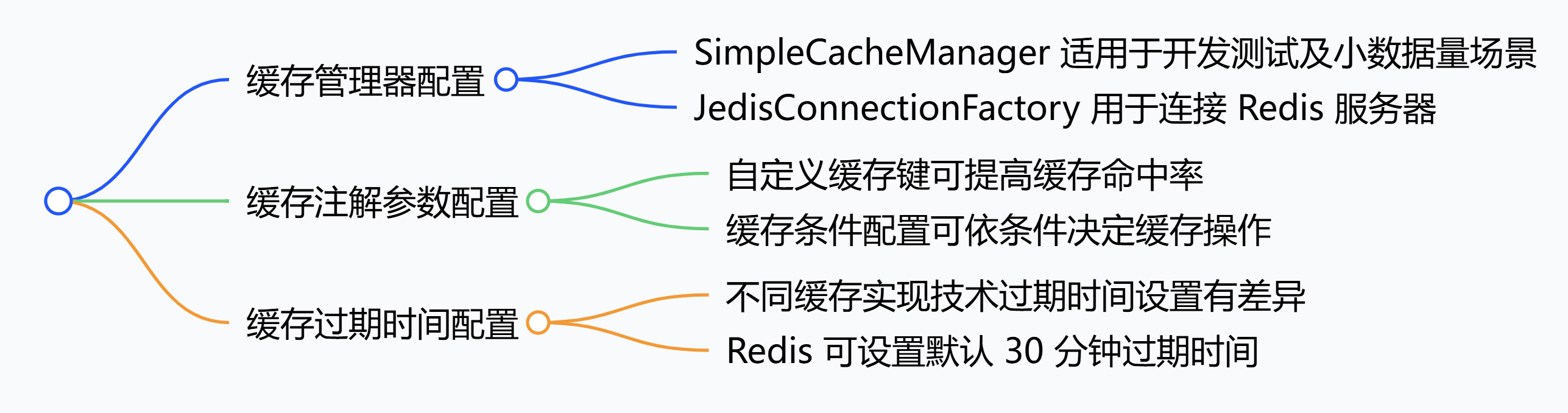
在 Spring 框架中,可通过多种方式配置缓存具体行为,常见配置方法如下。 1. 缓存管理器(CacheManager)配置 基于内存的缓存管理器配置(以SimpleCacheManager为例) SimpleCacheManager 是 Spring 提供的简单…...

FPGA实现任意角度视频旋转(完结)视频任意角度旋转实现
本文主要介绍如何基于FPGA实现视频的任意角度旋转,关于视频180度实时旋转、90/270度视频无裁剪旋转,请见本专栏前面的文章,旋转效果示意图如下: 为了实时对比旋转效果,采用分屏显示进行处理,左边代表旋转…...

openlayer getLayerById 根据id获取layer图层
背景: 在项目中使用getLayerById获取图层,这个getLayerById()方法不是openlayer官方文档自带的,而是自己封装的一个方法,这个封装的方法的思路是:遍历所有的layer,根据唯一标识【可能是id,也可能…...

【Jave全栈】Java与JavaScript比较
文章目录 前言一、Java1、 历史与背景2、语言特点3、应用场景4、生态系统 二、JavaScript1、历史与背景2、语言特点3、应用场景4、 生态系统 三、相同点四、不同点1、语言类型2、用途3、语法和结构4、性能5、生态系统6、开发模式 前言 Java和JavaScript是两种不同的编程语言&a…...

设计模式-建造者模式、原型模式
目录 建造者模式 定义 类图 优缺点 角色 建造者模式和工厂模式比较 使用案例 原型模式 定义 类图 优缺点 应用场景 应用类型 浅克隆 深克隆 建造者模式 定义 将一个复杂的对象的构造与它的表示分离,使同样的构建过程可以创建不同的表示,…...

PTMD2.0-疾病相关的翻译后修饰数据库
翻译后修饰(PTMs,post-translational modifications)通过调节蛋白质功能参与了几乎所有的生物学过程,而 PTMs 的异常状态常常与人类疾病相关。在此,PTMD 2.0展示与疾病相关的 PTMs 综合数据库,其中包含 93 …...

【Git版本控制器--3】Git的远程操作
目录 理解分布式版本控制系统 创建远程仓库 仓库被创建后的配置信息 克隆远程仓库 https克隆仓库 ssh克隆仓库 向远程仓库推送 拉取远程仓库 忽略特殊文件 为什么要忽略特殊文件? 如何配置忽略特殊文件? 配置命令别名 标签管理 理…...

批量创建ES索引
7.x from elasticsearch import Elasticsearch# 配置 Elasticsearch 连接 # 替换为你的 Elasticsearch 地址、端口、用户名和密码 es Elasticsearch([http://10.10.x.x:43885],basic_auth(admin, XN272G9THEAPYD5N5QORX3PB1TSQELLB) )# # 测试连接 # try: # # 尝试获取集…...

模块初阶学习
当我们在过去想要实现一个功能时,例如Swap交换函数时,我们需要不断考虑参数的正确与否。如果是在c语言,我们还需要不断更改函数名字,以防止函数名重复。在c我们可以通过函数名重载解决这个问题,但还是有一些小问题&…...

rust学习-rust中的保留字
rust学习-rust中的保留字 已使用的保留字未来可能使用的保留字 保留字是语言中预定义的标识符,不能用作变量名、函数名或其他自定义标识符,Rust的保留字大致可以分为两类:已使用的保留字和未来可能使用的保留字 已使用的保留字 as࿱…...

MySQL中的读锁与写锁:概念与作用深度剖析
MySQL中的读锁与写锁:概念与作用深度剖析 在MySQL数据库的并发控制机制中,读锁和写锁起着至关重要的作用。它们是确保数据在多用户环境下能够正确、安全地被访问和修改的关键工具。 一、读锁(共享锁)概念 读锁,也称为…...

专利申请的价值
独占市场 一种产品只要授权专利权,等于在市场上拥有独占权。 政策奖励 各地方政府均出台响应文件, 对专利申请者进行奖励或者补助。 申报项目 申报高新技术企业、创新基金等 各类计划、项目的必要前提条件 专利申请 技术保护 防止新的技术与产品被他人 抄…...

使用 OpenCV 和 Python 轻松实现人脸检测
目录 一、准备工作 二、加载人脸检测模型 三、读取图像并进行人脸检测 四、处理视频中的人脸检测 五、优化人脸检测效果 六、总结 在人工智能和计算机视觉领域,人脸检测是一项非常基础且重要的技术。通过人脸检测,我们可以在图像或视频中识别并定位人脸,进而进行后续的…...

自然语言处理——从原理、经典模型到应用
1. 概述 自然语言处理(Natural Language Processing,NLP)是一门借助计算机技术研究人类语言的科学,是人工智能领域的一个分支,旨在让计算机理解、生成和处理人类语言。其核心任务是将非结构化的自然语言转换为机器可以…...

kotlin内联函数——runCatching
1.runCatching作用 代替try{}catch{}异常处理,用于捕获异常。 2.runCatching函数介绍 参数:上下文引用对象为参数返回值:lamda表达式结果 调用runCatching函数,如果调用成功则返回其封装的结果,并可回调onSuccess函…...

2025年新开局!谁在引领汽车AI风潮?
汽车AI革命已来。 在2025年伊始开幕的CES展上,AI汽车、AI座舱无疑成为了今年汽车行业的最大热点。其中不少车企在2025年CES上展示了其新一代AI座舱,为下一代智能汽车的人机交互、场景创新率先打样。 其中,东软集团也携带AI驱动、大数据支撑…...