
springboot 启动原理
目标:
- @SpringBootApplication注解认识
- 了解SpringBoot的启动流程
- 了解SpringFactoriesLoader对META-INF/spring.factories的反射加载
- 认识AutoConfigurationImportSelector这个ImportSelector
- starter的认识和使用
目录
- SpringBoot 启动原理
- @SpringBootApplication 注解分析
- @EnableAutoConfiguration注解
- AutoConfigurationImportSelector类
- eg:AutoConfigurationImportSelector扫描出mybatis-spring-starter的spring.factories配置
- new SpringApplication类
- 附:SpringFactoriesLoader
- 附:spring-boot的spring.factories内容
- SpringApplication类的run方法流程
- prepareEnvironment
- printBanner
- createApplicationContext
- prepareContext
- refreshContext
- ImportSelector 的 selectImports 方法
- 再次说明starter
- SpringBoot starter机制
- 自定义一个starter并引用
SpringBoot 启动原理
springboot项目启动主类如下
@SpringBootApplication
@ComponentScan("com.example")
@EnableScheduling
public class DemoApiApplication {public static void main(String[] args) {SpringApplication.run(DemoApiApplication.class, args);}
}
主要就是@SpringBootApplication这个注解
@SpringBootApplication 注解分析
- @SpringBootApplication
@Target(ElementType.TYPE)
@Retention(RetentionPolicy.RUNTIME)
@Documented
@Inherited
@SpringBootConfiguration
@EnableAutoConfiguration
@ComponentScan(excludeFilters = {@Filter(type = FilterType.CUSTOM, classes = TypeExcludeFilter.class),@Filter(type = FilterType.CUSTOM, classes = AutoConfigurationExcludeFilter.class) })
public @interface SpringBootApplication {
- @SpringBootConfiguration
@Target(ElementType.TYPE)
@Retention(RetentionPolicy.RUNTIME)
@Documented
@Configuration
public @interface SpringBootConfiguration {}
可以看到全注解类的@Configuration注解
- @EnableAutoConfiguration
@Target(ElementType.TYPE)
@Retention(RetentionPolicy.RUNTIME)
@Documented
@Inherited
@AutoConfigurationPackage
@Import(AutoConfigurationImportSelector.class)
public @interface EnableAutoConfiguration {
@EnableAutoConfiguration注解
EnableAutoConfiguration是一个组合注解,用@Import把AutoConfigurationImportSelector导入容器中,SpringBoot启动的时候会加载所有的selector并执行selectImports方法,这个方法会加载META-INF/spring.factories中配置的EnableAutoConfiguration,从而实现加载自动配置
而mybatis-spring-boot-starter、spring-boot-starter-web等组件的META-INF文件下均含有spring.factories文件,自动配置模块中,SpringFactoriesLoader收集到文件中的类全名并返回一个类全名的数组,返回的类全名通过反射被实例化,就形成了具体的工厂实例,工厂实例来生成组件具体需要的bean。

AutoConfigurationImportSelector类
public class AutoConfigurationImportSelectorimplements DeferredImportSelector, BeanClassLoaderAware, ResourceLoaderAware,BeanFactoryAware, EnvironmentAware, Ordered {

AutoConfigurationImportSelector实现了ImportSelector(选择器)和BeanClassLoaderAware(bean类加载器中间件)
关于ImportSelector在https://blog.csdn.net/qq_26437925/article/details/144865082 这篇文章中有分析到,即在使用@Import注解来注册bean的时候(Import注解的值可以是ImportSelector或者DeferredImportSelector的实现类)spring容器会实例化这个实现类,并执行其selectImports方法;
具体是在 spring refresh 12 个方法中的invokeBeanFactoryPostProcessors(beanFactory);会执行ConfigurationClassPostProcessor的processConfigBeanDefinitions方法中
eg:AutoConfigurationImportSelector扫描出mybatis-spring-starter的spring.factories配置

debug Springboot启动过程

new SpringApplication类
/*** Create a new {@link SpringApplication} instance. The application context will load* beans from the specified primary sources (see {@link SpringApplication class-level}* documentation for details. The instance can be customized before calling* {@link #run(String...)}.* @param resourceLoader the resource loader to use* @param primarySources the primary bean sources* @see #run(Class, String[])* @see #setSources(Set)*/@SuppressWarnings({ "unchecked", "rawtypes" })public SpringApplication(ResourceLoader resourceLoader, Class<?>... primarySources) {this.resourceLoader = resourceLoader;Assert.notNull(primarySources, "PrimarySources must not be null");this.primarySources = new LinkedHashSet<>(Arrays.asList(primarySources));this.webApplicationType = WebApplicationType.deduceFromClasspath();// 通过SpringFactoriesLoader,获取到所有META-INF/spring.factories中的ApplicationContextInitializer,并实例化setInitializers((Collection) getSpringFactoriesInstances(ApplicationContextInitializer.class));// 通过SpringFactoriesLoader,获取到所有META-INF/spring.factories中的ApplicationListener,并实例化setListeners((Collection) getSpringFactoriesInstances(ApplicationListener.class));// 获取执行当前main方法的类,也就是启动类this.mainApplicationClass = deduceMainApplicationClass();}
- 判断应用类型为
WebApplicationType.SERVLET
- 利用SpringFactoriesLoader加载所有META-INF/spring.factories中的ApplicationContextInitializer
- SpringFactoriesLoader加载所有META-INF/spring.factories中的ApplicationListener
附:SpringFactoriesLoader
其原理AI回答如下:


附:spring-boot的spring.factories内容

# PropertySource Loaders
org.springframework.boot.env.PropertySourceLoader=\
org.springframework.boot.env.PropertiesPropertySourceLoader,\
org.springframework.boot.env.YamlPropertySourceLoader# Run Listeners
org.springframework.boot.SpringApplicationRunListener=\
org.springframework.boot.context.event.EventPublishingRunListener# Error Reporters
org.springframework.boot.SpringBootExceptionReporter=\
org.springframework.boot.diagnostics.FailureAnalyzers# Application Context Initializers
org.springframework.context.ApplicationContextInitializer=\
org.springframework.boot.context.ConfigurationWarningsApplicationContextInitializer,\
org.springframework.boot.context.ContextIdApplicationContextInitializer,\
org.springframework.boot.context.config.DelegatingApplicationContextInitializer,\
org.springframework.boot.web.context.ServerPortInfoApplicationContextInitializer# Application Listeners
org.springframework.context.ApplicationListener=\
org.springframework.boot.ClearCachesApplicationListener,\
org.springframework.boot.builder.ParentContextCloserApplicationListener,\
org.springframework.boot.context.FileEncodingApplicationListener,\
org.springframework.boot.context.config.AnsiOutputApplicationListener,\
org.springframework.boot.context.config.ConfigFileApplicationListener,\
org.springframework.boot.context.config.DelegatingApplicationListener,\
org.springframework.boot.context.logging.ClasspathLoggingApplicationListener,\
org.springframework.boot.context.logging.LoggingApplicationListener,\
org.springframework.boot.liquibase.LiquibaseServiceLocatorApplicationListener# Environment Post Processors
org.springframework.boot.env.EnvironmentPostProcessor=\
org.springframework.boot.cloud.CloudFoundryVcapEnvironmentPostProcessor,\
org.springframework.boot.env.SpringApplicationJsonEnvironmentPostProcessor,\
org.springframework.boot.env.SystemEnvironmentPropertySourceEnvironmentPostProcessor# Failure Analyzers
org.springframework.boot.diagnostics.FailureAnalyzer=\
org.springframework.boot.diagnostics.analyzer.BeanCurrentlyInCreationFailureAnalyzer,\
org.springframework.boot.diagnostics.analyzer.BeanDefinitionOverrideFailureAnalyzer,\
org.springframework.boot.diagnostics.analyzer.BeanNotOfRequiredTypeFailureAnalyzer,\
org.springframework.boot.diagnostics.analyzer.BindFailureAnalyzer,\
org.springframework.boot.diagnostics.analyzer.BindValidationFailureAnalyzer,\
org.springframework.boot.diagnostics.analyzer.UnboundConfigurationPropertyFailureAnalyzer,\
org.springframework.boot.diagnostics.analyzer.ConnectorStartFailureAnalyzer,\
org.springframework.boot.diagnostics.analyzer.NoSuchMethodFailureAnalyzer,\
org.springframework.boot.diagnostics.analyzer.NoUniqueBeanDefinitionFailureAnalyzer,\
org.springframework.boot.diagnostics.analyzer.PortInUseFailureAnalyzer,\
org.springframework.boot.diagnostics.analyzer.ValidationExceptionFailureAnalyzer,\
org.springframework.boot.diagnostics.analyzer.InvalidConfigurationPropertyNameFailureAnalyzer,\
org.springframework.boot.diagnostics.analyzer.InvalidConfigurationPropertyValueFailureAnalyzer# FailureAnalysisReporters
org.springframework.boot.diagnostics.FailureAnalysisReporter=\
org.springframework.boot.diagnostics.LoggingFailureAnalysisReporter
SpringApplication类的run方法流程
使用的spring-boot-starter版本如下
<parent><groupId>org.springframework.boot</groupId><artifactId>spring-boot-starter-parent</artifactId><version>2.1.4.RELEASE</version></parent>
- org.springframework.boot.SpringApplication#run(java.lang.String…)
/*** Run the Spring application, creating and refreshing a new* {@link ApplicationContext}.* @param args the application arguments (usually passed from a Java main method)* @return a running {@link ApplicationContext}*/public ConfigurableApplicationContext run(String... args) {StopWatch stopWatch = new StopWatch();stopWatch.start();ConfigurableApplicationContext context = null;Collection<SpringBootExceptionReporter> exceptionReporters = new ArrayList<>();configureHeadlessProperty();SpringApplicationRunListeners listeners = getRunListeners(args);listeners.starting();try {ApplicationArguments applicationArguments = new DefaultApplicationArguments(args);ConfigurableEnvironment environment = prepareEnvironment(listeners,applicationArguments);configureIgnoreBeanInfo(environment);Banner printedBanner = printBanner(environment);context = createApplicationContext();exceptionReporters = getSpringFactoriesInstances(SpringBootExceptionReporter.class,new Class[] { ConfigurableApplicationContext.class }, context);prepareContext(context, environment, listeners, applicationArguments,printedBanner);refreshContext(context);afterRefresh(context, applicationArguments);stopWatch.stop();if (this.logStartupInfo) {new StartupInfoLogger(this.mainApplicationClass).logStarted(getApplicationLog(), stopWatch);}listeners.started(context);callRunners(context, applicationArguments);}catch (Throwable ex) {handleRunFailure(context, ex, exceptionReporters, listeners);throw new IllegalStateException(ex);}try {listeners.running(context);}catch (Throwable ex) {handleRunFailure(context, ex, exceptionReporters, null);throw new IllegalStateException(ex);}return context;}
-
首先遍历执行所有通过SpringFactoriesLoader,在当前classpath下的META-INF/spring.factories中查找所有可用的
SpringApplicationRunListeners并实例化。调用它们的starting()方法,通知这些监听器SpringBoot应用启动。 -
创建并配置当前SpringBoot应用将要使用的Environment,包括当前有效的PropertySource以及Profile。
-
遍历调用所有的SpringApplicationRunListeners的environmentPrepared()的方法,通知这些监听器SpringBoot应用的Environment已经完成初始化。
-
打印SpringBoot应用的banner,SpringApplication的showBanner属性为true时,如果classpath下存在banner.txt文件,则打印其内容,否则打印默认banner。
-
根据启动时设置的applicationContextClass和在initialize方法设置的webEnvironment,创建对应的applicationContext。
-
创建异常解析器,用在启动中发生异常的时候进行异常处理(包括记录日志、释放资源等)。
-
设置SpringBoot的Environment,注册Spring Bean名称的序列化器BeanNameGenerator,并设置资源加载器ResourceLoader,通过SpringFactoriesLoader加载ApplicationContextInitializer初始化器,调用initialize方法,对创建的ApplicationContext进一步初始化。
-
调用所有的SpringApplicationRunListeners的contextPrepared方法,通知这些Listener当前ApplicationContext已经创建完毕。
-
最核心的一步,将之前通过@EnableAutoConfiguration获取的所有配置以及其他形式的IoC容器配置加载到已经准备完毕的ApplicationContext。
-
调用所有的SpringApplicationRunListener的contextLoaded方法,加载准备完毕的ApplicationContext。
-
调用refreshContext(即spring容器refresh方法),并注册一个关闭Spring容器的钩子ShutdownHook,当程序在停止的时候释放资源(包括:销毁Bean,关闭SpringBean的创建工厂等)
注: 钩子可以在以下几种场景中被调用:
1)程序正常退出
2)使用System.exit()
3)终端使用Ctrl+C触发的中断
4)系统关闭
5)使用Kill pid命令杀死进程
获取当前所有ApplicationRunner和CommandLineRunner接口的实现类,执行其run方法
遍历所有的SpringApplicationRunListener的finished()方法,完成SpringBoot的启动。
prepareEnvironment
环境准备的时候会new ApplicationEnvironmentPreparedEvent()并广播这个事件
而ConfigFileApplicationListener是Spring Boot中的一个监听器,主要负责配置文件的加载和处理。它通过监听特定的应用事件,来加载和解析配置文件,并将解析后的配置信息添加到Spring的环境中。会监听到
如下:

加载application.properties文件,具体使用的是spring-boot的spring.factories中配置的org.springframework.boot.env.PropertiesPropertySourceLoader
org.springframework.boot.env.PropertySourceLoader=\
org.springframework.boot.env.PropertiesPropertySourceLoader,\
org.springframework.boot.env.YamlPropertySourceLoader
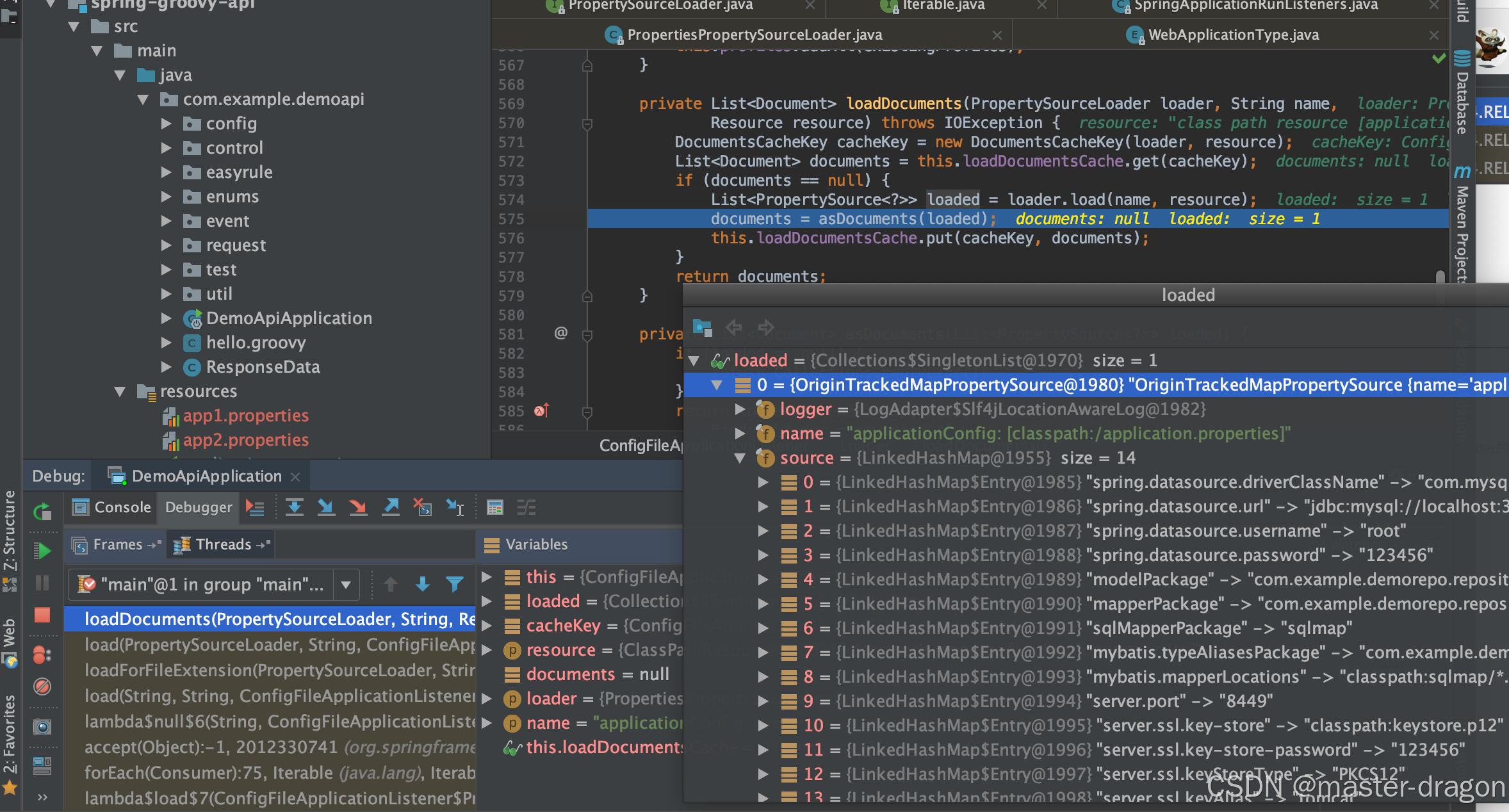
PropertiesPropertySourceLoader怎么实例化出来的?
- 事件监听触发后,使用EnvironmentPostProcessor后处理加载配置,后处理通过SpringFactoriesLoader加载获得到

- 然后添加配置new Loader()
/*** Add config file property sources to the specified environment.* @param environment the environment to add source to* @param resourceLoader the resource loader* @see #addPostProcessors(ConfigurableApplicationContext)*/
protected void addPropertySources(ConfigurableEnvironment environment,ResourceLoader resourceLoader) {RandomValuePropertySource.addToEnvironment(environment);new Loader(environment, resourceLoader).load();
}
Loader构造函数:
Loader(ConfigurableEnvironment environment, ResourceLoader resourceLoader) {this.environment = environment;this.placeholdersResolver = new PropertySourcesPlaceholdersResolver(this.environment);this.resourceLoader = (resourceLoader != null) ? resourceLoader: new DefaultResourceLoader();this.propertySourceLoaders = SpringFactoriesLoader.loadFactories(PropertySourceLoader.class, getClass().getClassLoader());
}
- PropertySourcesPlaceholdersResolver通过SpringFactoriesLoader load出来
this.propertySourceLoaders = SpringFactoriesLoader.loadFactories(PropertySourceLoader.class, getClass().getClassLoader());
printBanner

createApplicationContext
根据webApplicationType创建ConfigurableApplicationContext,具体为:
org.springframework.boot.web.servlet.context.AnnotationConfigServletWebServerApplicationContext
prepareContext
- profile信息设置并打印,否则使用默认的default
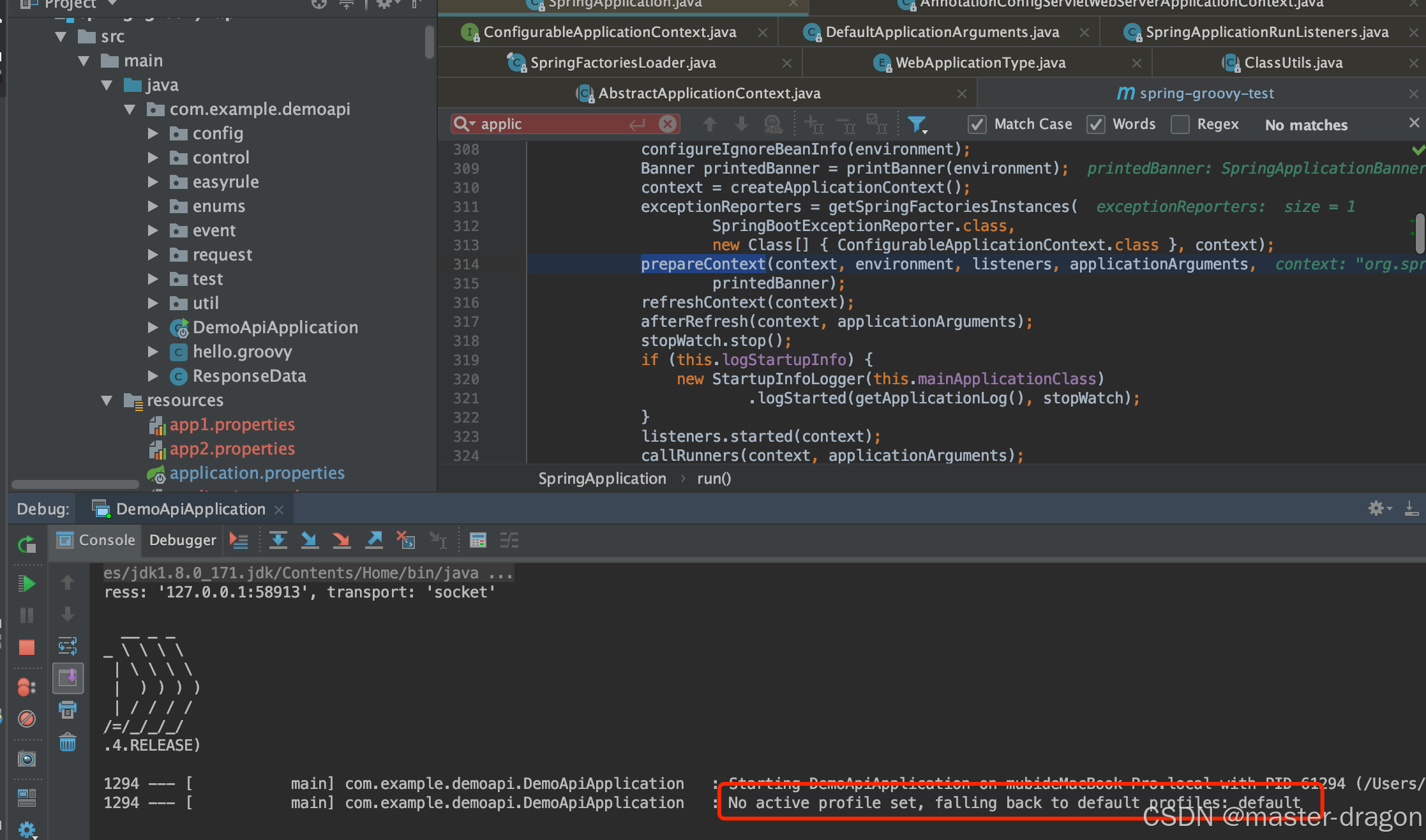
- 加载启动类

refreshContext
private void refreshContext(ConfigurableApplicationContext context) {refresh(context);if (this.registerShutdownHook) {try {context.registerShutdownHook();}catch (AccessControlException ex) {// Not allowed in some environments.}}
}
如下图走到spring容器的refresh方法:

ImportSelector 的 selectImports 方法

其中List<String> configurations = this.getCandidateConfigurations(annotationMetadata, attributes);一句如下
/*** Return the auto-configuration class names that should be considered. By default* this method will load candidates using {@link SpringFactoriesLoader} with* {@link #getSpringFactoriesLoaderFactoryClass()}.* @param metadata the source metadata* @param attributes the {@link #getAttributes(AnnotationMetadata) annotation* attributes}* @return a list of candidate configurations*/
protected List<String> getCandidateConfigurations(AnnotationMetadata metadata,AnnotationAttributes attributes) {List<String> configurations = SpringFactoriesLoader.loadFactoryNames(getSpringFactoriesLoaderFactoryClass(), getBeanClassLoader());Assert.notEmpty(configurations,"No auto configuration classes found in META-INF/spring.factories. If you "+ "are using a custom packaging, make sure that file is correct.");return configurations;
}
使用SpringFactoryLoader,读取META-INF/spring.factories文件里所配置的EnableAutoConfiguration。经过exclude和filter等操作,最终确定要装配的类
Spring的SpringFactoriesLoader工厂的加载机制类似java提供的SPI机制一样,是Spring提供的一种加载方式。只需要在classpath路径下新建一个文件META-INF/spring.factories,并在里面按照properties格式填写好接口和实现类即可通过SpringFactoriesLoader来实例化相应的Bean。其中key可以是接口、注解、或者抽象类的全名。value为相应的实现类,当存在多个实现类时,用","进行分割。

loadFactoryNames方法如下:
/*** Load the fully qualified class names of factory implementations of the* given type from {@value #FACTORIES_RESOURCE_LOCATION}, using the given* class loader.* @param factoryClass the interface or abstract class representing the factory* @param classLoader the ClassLoader to use for loading resources; can be* {@code null} to use the default* @see #loadFactories* @throws IllegalArgumentException if an error occurs while loading factory names*/
public static List<String> loadFactoryNames(Class<?> factoryClass, @Nullable ClassLoader classLoader) {String factoryClassName = factoryClass.getName();return loadSpringFactories(classLoader).getOrDefault(factoryClassName, Collections.emptyList());
}private static Map<String, List<String>> loadSpringFactories(@Nullable ClassLoader classLoader) {MultiValueMap<String, String> result = cache.get(classLoader);if (result != null) {return result;}try {Enumeration<URL> urls = (classLoader != null ?classLoader.getResources(FACTORIES_RESOURCE_LOCATION) :ClassLoader.getSystemResources(FACTORIES_RESOURCE_LOCATION));result = new LinkedMultiValueMap<>();while (urls.hasMoreElements()) {URL url = urls.nextElement();UrlResource resource = new UrlResource(url);Properties properties = PropertiesLoaderUtils.loadProperties(resource);for (Map.Entry<?, ?> entry : properties.entrySet()) {List<String> factoryClassNames = Arrays.asList(StringUtils.commaDelimitedListToStringArray((String) entry.getValue()));result.addAll((String) entry.getKey(), factoryClassNames);}}cache.put(classLoader, result);return result;}catch (IOException ex) {throw new IllegalArgumentException("Unable to load factories from location [" +FACTORIES_RESOURCE_LOCATION + "]", ex);}
}


后续就能完成bean的自动注入了
再次说明starter
SpringBoot将所有的常见开发功能,分成了一个个场景启动器(starter),这样我们需要开发什么功能,就导入什么场景启动器依赖即可

SpringBoot starter机制
SpringBoot中的starter能够抛弃以前繁杂的配置,将其统一集成进starter,应用者只需要在maven中引入starter依赖,SpringBoot就能自动扫描到要加载的信息并启动相应的默认配置。starter让我们摆脱了各种依赖库的处理,需要配置各种信息的困扰。SpringBoot会自动通过classpath路径下的类发现需要的Bean,并注册进IOC容器。SpringBoot提供了针对日常企业应用研发各种场景的spring-boot-starter依赖模块。所有这些依赖模块都遵循着约定成俗的默认配置,并允许我们调整这些配置,即遵循"约定大于配置"的理念。
自定义一个starter并引用

- 其/META-INF/spring.factories的内容
#-------starter自动装配---------
org.springframework.boot.autoconfigure.EnableAutoConfiguration=com.demo.starter.config.DemoConfig
- DemoConfig类如下
//
// Source code recreated from a .class file by IntelliJ IDEA
// (powered by Fernflower decompiler)
//package com.demo.starter.config;import com.demo.starter.properties.DemoProperties;
import com.demo.starter.service.DemoService;
import org.springframework.beans.factory.annotation.Autowired;
import org.springframework.boot.autoconfigure.condition.ConditionalOnProperty;
import org.springframework.boot.context.properties.EnableConfigurationProperties;
import org.springframework.context.annotation.Bean;
import org.springframework.context.annotation.Configuration;@Configuration
@EnableConfigurationProperties({DemoProperties.class})
@ConditionalOnProperty(prefix = "demo",name = {"isopen"},havingValue = "true"
)
public class DemoConfig {@Autowiredprivate DemoProperties demoProperties;public DemoConfig() {}@Bean(name = {"demo"})public DemoService demoService() {return new DemoService(this.demoProperties.getSayWhat(), this.demoProperties.getToWho());}
}
- 引用并测试
// 引入自定义的startercompile files('src/libs/demo-spring-boot-starter-0.0.1-RELEASE.jar')
- 使用&测试
@RestController
public class DemoControl {@Resource(name = "demo")private DemoService demoService;@GetMapping("/say")public String sayWhat() {return demoService.say();}}

相关文章:
springboot 启动原理
目标: SpringBootApplication注解认识了解SpringBoot的启动流程 了解SpringFactoriesLoader对META-INF/spring.factories的反射加载认识AutoConfigurationImportSelector这个ImportSelector starter的认识和使用 目录 SpringBoot 启动原理SpringBootApplication 注…...

llama.cpp GGUF 模型格式
llama.cpp GGUF 模型格式 1. Specification1.1. GGUF Naming Convention (命名规则)1.1.1. Validating Above Naming Convention 1.2. File Structure 2. Standardized key-value pairs2.1. General2.1.1. Required2.1.2. General metadata2.1.3. Source metadata 2.2. LLM2.2.…...

使用Pytorch训练一个图像分类器
一、准备数据集 一般来说,当你不得不与图像、文本或者视频资料打交道时,会选择使用python的标准库将原始数据加载转化成numpy数组,甚至可以继续转换成torch.*Tensor。 对图片而言,可以使用Pillow库和OpenCV库对视频而言…...

PythonStyle MVC 开发框架
在 Python 中,MVC(Model - View - Controller,模型 - 视图 - 控制器)是一种常见的软件设计模式,它将应用程序分为三个主要部分,各自承担不同的职责,以提高代码的可维护性、可扩展性和可测试性。…...

HTTP协议的无状态和无连接
无连接 ①无连接的含义 这里所说的无连接并不是指不连接,客户与服务器之间的HTTP连接是一种一次性连接,它限制每次连接只处理一个请求,当服务器返回本次请求的应答后便立即关闭连接,下次请求再重新建立连接。这种一次性连接主要考…...

毫秒级响应的VoIP中的系统组合推荐
在高并发、低延迟、毫秒级响应的 VoIP 场景中,选择合适的操作系统组合至关重要。以下是针对 Ubuntu linux-lowlatency、CentOS Stream kernel-rt 和 Debian 自定义 PREEMPT_RT 的详细对比及推荐: 1. 系统组合对比 特性Ubuntu linux-lowlatencyCentO…...

PWN--格式化字符串
简介 格式化字符串是指在编程过程中,通过特殊的占位符将相关对应的信息整合或提取的规则字符串。格式化字符串包括格式化输入和格式化输出,其本质是程序员调用相关格式化字符串的操作协议规定。错误的或不当的信息配置可能导致程序运行失效或产生未…...
使用记录2-基于tf.keras.layers创建层)
tf.Keras (tf-1.15)使用记录2-基于tf.keras.layers创建层
tf.keras.layers是keras的主要网络创建方法,里面已经有成熟的网络层,也可以通过继承的方式自定义神经网络层。 在keras的model定义中,为了保证所有对数据的操作都是可追溯、可保存、可反向传播,需要保证对数据的任何操作都是基于t…...

面试经典150题——栈
文章目录 1、有效的括号1.1 题目链接1.2 题目描述1.3 解题代码1.4 解题思路 2、2.1 题目链接2.2 题目描述2.3 解题代码2.4 解题思路 3、最小栈3.1 题目链接3.2 题目描述3.3 解题代码3.4 解题思路 4、逆波兰表达式求值4.1 题目链接4.2 题目描述4.3 解题代码4.4 解题思路 5、基本…...

FBX SDK的使用:读取Mesh
读取顶点数据 要将一个Mesh渲染出来,必须要有顶点的位置,法线,UV等顶点属性,和三角面的顶点索引数组。在提取这些数据之前,先理解FBX SDK里面的几个概念: Control Point 顶点的位置,就是x,y,z…...

EtherCAT主站IGH-- 49 -- 搭建xenomai系统及自己的IGH主站
EtherCAT主站IGH-- 49 -- 搭建xenomai系统及自己的IGH主站 0 Ubuntu18.04系统IGH博客、视频欣赏链接一 移植xenomai系统1,下载安装工具包2,下载linux内核及xenomai2.1,下载linux内核2.2,下载xenomai2.3,下载补丁ipipe2.4,解压缩包3,打补丁4,配置内核5,编译内核6,安装编译好的内…...

Java控制台登录系统示例代码
实现一个简单的登录系统需要包括用户输入用户名和密码、验证用户信息等功能。以下是一个简单的Java控制台登录系统示例代码。这个系统使用一个简单的用户信息存储方式(如数组或哈希表),并提供基本的登录验证功能。 示例代码 import java.ut…...
S4 HANA明确税金汇差科目(OBYY)
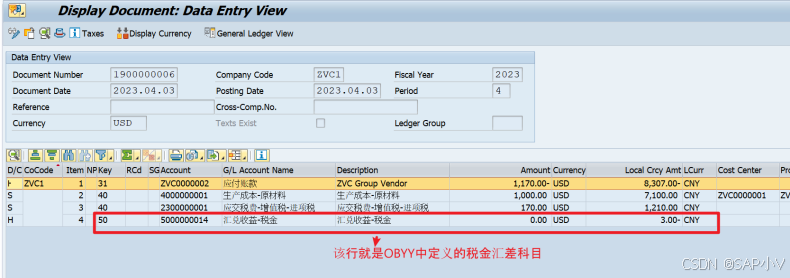
本文主要介绍在S4 HANA OP中明确税金汇差科目(OBYY)相关设置。具体请参照如下内容: 1. 明确税金汇差科目(OBYY) 以上配置点定义了在外币挂账时,当凭证抬头汇率和税金行项目汇率不一致时,造成的差异金额进入哪个科目。此类情况只发生在FB60/F…...
基础教程)
Web-3.0(Solidity)基础教程
Solidity 是 以太坊智能合约编程语言,用于编写 去中心化应用(DApp)。如果你想开发 Web3.0 应用,Solidity 是必学的。 Remix - Ethereum IDE(在线编写 Solidity) 特性Remix IDEHardhat适用场景适合 初学者 …...

深入理解linux中的文件(上)
1.前置知识: (1)文章 内容 属性 (2)访问文件之前,都必须打开它(打开文件,等价于把文件加载到内存中) 如果不打开文件,文件就在磁盘中 (3&am…...

背包问题和单调栈
背包问题(动态规划) 动态五步曲 dp数组及下标索引的含义递推公式dp数组如何初始化遍历顺序打印dp数组 01背包:n种物品,有一个,二维数组遍历顺序可以颠倒,(滚动数组)一维数组遍历顺序不可颠倒…...

Airflow:深入理解Apache Airflow Task
Apache Airflow是一个开源工作流管理平台,支持以编程方式编写、调度和监控工作流。由于其灵活性、可扩展性和强大的社区支持,它已迅速成为编排复杂数据管道的首选工具。在这篇博文中,我们将深入研究Apache Airflow 中的任务概念,探…...

WebSocket——环境搭建与多环境配置
一、前言:为什么要使用多环境配置? 在开发过程中,我们通常会遇到多个不同的环境,比如开发环境(Dev)、测试环境(Test)、生产环境(Prod)等。每个环境的配置和需…...

93,【1】buuctf web [网鼎杯 2020 朱雀组]phpweb
进入靶场 页面一直在刷新 在 PHP 中,date() 函数是一个非常常用的处理日期和时间的函数,所以应该用到了 再看看警告的那句话 Warning: date(): It is not safe to rely on the systems timezone settings. You are *required* to use the date.timez…...

ChatGPT怎么回事?
纯属发现,调侃一下~ 这段时间deepseek不是特别火吗,尤其是它的推理功能,突发奇想,想用deepseek回答一些问题,回答一个问题之后就回复服务器繁忙(估计还在被攻击吧~_~) 然后就转向了GPT…...

机器学习day7
自定义数据集 使用pytorch框架实现逻辑回归并保存模型,然后保存模型后再加载模型进行预测,对预测结果计算精确度和召回率及F1分数 代码 import numpy as np import torch import torch.nn as nn import torch.optim as optimizer import matplotlib.pyp…...

本地部署DeepSeek教程(Mac版本)
第一步、下载 Ollama 官网地址:Ollama 点击 Download 下载 我这里是 macOS 环境 以 macOS 环境为主 下载完成后是一个压缩包,双击解压之后移到应用程序: 打开后会提示你到命令行中运行一下命令,附上截图: 若遇…...

2月3日星期一今日早报简报微语报早读
2月3日星期一,农历正月初六,早报#微语早读。 1、多个景区发布公告:售票数量已达上限,请游客合理安排行程; 2、2025春节档总票房破70亿,《哪吒之魔童闹海》破31亿; 3、美宣布对中国商品加征10…...
本周回顾)
202周日复盘(159)本周回顾
1、当日总结。 定价相关内容,学习与思考。 第一性原理,分析游戏成本的构成。 ------------- 2、周总结 大思路,细节设计都有进展,每天都挖坑与加工。 a 学习游戏思想 任天堂游戏研发四大标准,创新,直…...

Linux基础 ——tmux vim 以及基本的shell语法
Linux 基础 ACWING y总的Linux基础课,看讲义作作笔记。 tmux tmux 可以干嘛? tmux可以分屏多开窗口,可以进行多个任务,断线,不会自动杀掉正在进行的进程。 tmux – session(会话,多个) – window(多个…...

error: RPC failed; curl 56 OpenSSL SSL_read: SSL_ERROR_SYSCALL, errno 10054
Descriptions: Solutions:...

WPF进阶 | WPF 动画特效揭秘:实现炫酷的界面交互效果
WPF进阶 | WPF 动画特效揭秘:实现炫酷的界面交互效果 前言一、WPF 动画基础概念1.1 什么是 WPF 动画1.2 动画的基本类型1.3 动画的核心元素 二、线性动画详解2.1 DoubleAnimation 的使用2.2 ColorAnimation 实现颜色渐变 三、关键帧动画深入3.1 DoubleAnimationUsin…...

DeepSeek 遭 DDoS 攻击背后:DDoS 攻击的 “千层套路” 与安全防御 “金钟罩”
当算力博弈升级为网络战争:拆解DDoS攻击背后的技术攻防战——从DeepSeek遇袭看全球网络安全新趋势 在数字化浪潮席卷全球的当下,网络已然成为人类社会运转的关键基础设施,深刻融入经济、生活、政务等各个领域。从金融交易的实时清算…...

本地部署DeepSeek-R1模型(新手保姆教程)
背景 最近deepseek太火了,无数的媒体都在报道,很多人争相着想本地部署试验一下。本文就简单教学一下,怎么本地部署。 首先大家要知道,使用deepseek有三种方式: 1.网页端或者是手机app直接使用 2.使用代码调用API …...

Scratch 《像素战场》系列综合游戏:像素战场游戏Ⅰ~Ⅲ 介绍
资源下载 Scratch《像素战场》系列综合游戏合集:像素战场游戏Ⅰ~Ⅲ压缩包 https://download.csdn.net/download/leyang0910/90332765 游戏操作介绍 Scratch 《像素战场Ⅰ》操作规则: 这是一款与朋友一起玩的 1v1 游戏。先赢得6轮胜利! WA…...