
18.Python实战:实现年会抽奖系统

目录结构
python/
├── sql/
│    └── table.sql          # 创建数据库及数据表
├── config/
│   └── __init__.py         # 数据库和Flask配置
├── static/
│   ├── style.css           # 样式文件
│   └── script.js           # JavaScript脚本
├── templates/
│   └── index.html          # 主页面模板
└── lucky_draw.py           # 主应用程序
1.table.sql
table.sql
CREATE DATABASE lucky_draw;
USE lucky_draw;CREATE TABLE participants (id INT AUTO_INCREMENT PRIMARY KEY,name VARCHAR(50) NOT NULL,department VARCHAR(50),employee_id VARCHAR(20),join_time DATETIME DEFAULT CURRENT_TIMESTAMP
);CREATE TABLE winners (id INT AUTO_INCREMENT PRIMARY KEY,participant_id INT,draw_time DATETIME DEFAULT CURRENT_TIMESTAMP,FOREIGN KEY (participant_id) REFERENCES participants(id)
);
2.__init__.py
DB_CONFIG = {'host': 'localhost','user': 'your_username','password': 'your_password','database': 'lucky_draw'
}
3.style.css
body {font-family: 'Segoe UI', Tahoma, Geneva, Verdana, sans-serif;margin: 0;padding: 20px;background: linear-gradient(135deg, #f5f7fa 0%, #c3cfe2 100%);min-height: 100vh;
}.container {max-width: 1000px;margin: 0 auto;padding: 30px;background-color: white;border-radius: 15px;box-shadow: 0 5px 20px rgba(0,0,0,0.1);
}header {text-align: center;margin-bottom: 40px;
}h1 {color: #2c3e50;font-size: 2.5em;margin-bottom: 10px;
}.subtitle {color: #7f8c8d;font-size: 1.2em;margin: 0;
}h2 {color: #34495e;font-size: 1.5em;margin-bottom: 20px;
}.section {margin: 30px 0;padding: 25px;border-radius: 10px;background-color: #f8f9fa;box-shadow: 0 2px 10px rgba(0,0,0,0.05);
}.draw-section {background: linear-gradient(to right, #fff5f5, #fff0f0);
}.form-inline {display: flex;justify-content: center;
}.input-group {display: flex;align-items: center;gap: 10px;
}.input-group input {padding: 12px;border: 2px solid #e0e0e0;border-radius: 8px;font-size: 1em;transition: all 0.3s ease;
}.input-group input:focus {border-color: #3498db;outline: none;box-shadow: 0 0 5px rgba(52,152,219,0.3);
}.draw-controls {display: flex;flex-wrap: wrap;gap: 20px;align-items: center;justify-content: center;
}.checkbox-group {display: flex;align-items: center;gap: 5px;
}.btn {padding: 12px 24px;border: none;border-radius: 8px;cursor: pointer;font-size: 1em;transition: all 0.3s ease;display: flex;align-items: center;gap: 8px;
}.btn-primary {background-color: #3498db;color: white;
}.btn-primary:hover {background-color: #2980b9;transform: translateY(-2px);
}.btn-danger {background-color: #e74c3c;color: white;
}.btn-danger:hover {background-color: #c0392b;
}.reset-form {text-align: center;margin-top: 20px;
}.dashboard {display: grid;grid-template-columns: 1fr;gap: 30px;margin-top: 40px;
}.name-list {display: flex;flex-wrap: wrap;gap: 12px;padding: 15px;background-color: white;border-radius: 8px;min-height: 50px;
}.name-tag {padding: 8px 16px;background-color: #f0f2f5;border-radius: 20px;font-size: 0.9em;display: flex;align-items: center;gap: 8px;transition: all 0.3s ease;
}.name-tag:hover {transform: translateY(-2px);
}.winner {background: linear-gradient(45deg, #ffd700, #ffa500);color: #000;box-shadow: 0 2px 5px rgba(0,0,0,0.1);
}.alert {padding: 15px 20px;margin: 20px 0;border-radius: 8px;background-color: #d4edda;color: #155724;text-align: center;display: flex;align-items: center;justify-content: center;gap: 10px;animation: slideIn 0.5s ease;
}.count {font-size: 0.8em;color: #666;font-weight: normal;
}footer {text-align: center;margin-top: 40px;color: #7f8c8d;
}@keyframes slideIn {from {transform: translateY(-20px);opacity: 0;}to {transform: translateY(0);opacity: 1;}
}@media (max-width: 768px) {.container {padding: 20px;}.draw-controls {flex-direction: column;}.input-group {width: 100%;}
}/* 深色模式 */
[data-theme="dark"] {background: linear-gradient(135deg, #2c3e50 0%, #3498db 100%);
}[data-theme="dark"] .container {background-color: #2c3e50;color: #ecf0f1;
}[data-theme="dark"] .section {background-color: #34495e;
}[data-theme="dark"] .draw-section {background: linear-gradient(to right, #2c3e50, #34495e);
}[data-theme="dark"] h1,
[data-theme="dark"] h2 {color: #ecf0f1;
}[data-theme="dark"] .name-tag {background-color: #465c74;color: #ecf0f1;
}/* 主题切换开关 */
.theme-switch {position: fixed;top: 20px;right: 20px;display: flex;align-items: center;gap: 10px;
}.switch {position: relative;display: inline-block;width: 60px;height: 34px;
}.switch input {opacity: 0;width: 0;height: 0;
}.slider {position: absolute;cursor: pointer;top: 0;left: 0;right: 0;bottom: 0;background-color: #ccc;transition: .4s;
}.slider:before {position: absolute;content: "";height: 26px;width: 26px;left: 4px;bottom: 4px;background-color: white;transition: .4s;
}input:checked + .slider {background-color: #2196F3;
}input:checked + .slider:before {transform: translateX(26px);
}.slider.round {border-radius: 34px;
}.slider.round:before {border-radius: 50%;
}/* 抽奖动画 */
.lottery-animation {margin: 20px 0;padding: 20px;text-align: center;
}.lottery-box {position: relative;overflow: hidden;display: inline-block;padding: 30px 60px;background: linear-gradient(45deg, #f1c40f, #f39c12);border-radius: 15px;box-shadow: 0 4px 15px rgba(0,0,0,0.2);animation: pulse 1.5s infinite;
}.rolling-name-text {font-size: 2.5em;color: #fff;text-shadow: 2px 2px 4px rgba(0,0,0,0.3);margin-bottom: 10px;
}.rolling-dept-text {font-size: 1.2em;color: rgba(255, 255, 255, 0.9);text-shadow: 1px 1px 2px rgba(0,0,0,0.2);
}@keyframes pulse {0% {transform: scale(1);box-shadow: 0 4px 15px rgba(0,0,0,0.2);}50% {transform: scale(1.05);box-shadow: 0 8px 25px rgba(0,0,0,0.3);}100% {transform: scale(1);box-shadow: 0 4px 15px rgba(0,0,0,0.2);}
}/* 优化中奖名单样式 */
.winners-section .name-tag {font-size: 1.2em;padding: 10px 20px;background: linear-gradient(45deg, #ffd700, #ffa500);box-shadow: 0 2px 8px rgba(0,0,0,0.1);transition: all 0.3s ease;
}.winners-section .name-tag:hover {transform: translateY(-3px) rotate(3deg);box-shadow: 0 4px 12px rgba(0,0,0,0.15);
}/* 统计图表 */
.charts-container {display: flex;justify-content: center;margin-top: 20px;
}.chart-wrapper {width: 300px;height: 300px;
}/* 响应式调整 */
@media (max-width: 768px) {.chart-wrapper {width: 100%;height: auto;}
}/* 中奖高亮效果 */
.winner-highlight {animation: winner-glow 1s ease-in-out infinite alternate;transform: scale(1.1);transition: all 0.3s ease;
}@keyframes winner-glow {from {box-shadow: 0 0 10px #fff, 0 0 20px #fff, 0 0 30px #e60073, 0 0 40px #e60073;}to {box-shadow: 0 0 20px #fff, 0 0 30px #ff4da6, 0 0 40px #ff4da6, 0 0 50px #ff4da6;}
}/* 庆祝效果 */
.celebration {position: absolute;top: 0;left: 0;right: 0;bottom: 0;display: flex;justify-content: center;align-items: center;background: rgba(0, 0, 0, 0.8);animation: fadeIn 0.3s ease-out;border-radius: 15px;
}.celebration-content {text-align: center;animation: popIn 0.5s cubic-bezier(0.68, -0.55, 0.265, 1.55);
}.celebration-icon {font-size: 4em;margin-bottom: 10px;animation: bounce 1s infinite;
}.winner-name {font-size: 2.5em;color: #fff;text-shadow: 2px 2px 4px rgba(0,0,0,0.5);margin-bottom: 5px;
}.winner-dept {font-size: 1.2em;color: rgba(255, 255, 255, 0.9);
}@keyframes fadeIn {from { opacity: 0; }to { opacity: 1; }
}@keyframes popIn {0% {transform: scale(0.3);opacity: 0;}100% {transform: scale(1);opacity: 1;}
}@keyframes bounce {0%, 100% {transform: translateY(0);}50% {transform: translateY(-20px);}
}
4.script.js
// 主题切换
const themeToggle = document.getElementById('theme-toggle');
const html = document.documentElement;themeToggle.addEventListener('change', () => {if (themeToggle.checked) {html.setAttribute('data-theme', 'dark');localStorage.setItem('theme', 'dark');} else {html.setAttribute('data-theme', 'light');localStorage.setItem('theme', 'light');}
});// 加载保存的主题
const savedTheme = localStorage.getItem('theme') || 'light';
html.setAttribute('data-theme', savedTheme);
themeToggle.checked = savedTheme === 'dark';// 抽奖动画
const startDrawBtn = document.getElementById('start-draw');
const drawForm = document.getElementById('draw-form');
const rollingName = document.getElementById('rolling-name');
const rollingSound = document.getElementById('rolling-sound');
const winnerSound = document.getElementById('winner-sound');let isRolling = false;function getAvailableParticipants() {const excludeWinners = document.querySelector('input[name="exclude_winners"]').checked;if (excludeWinners) {return participants.filter(p => !p.is_winner);}return participants;
}function showParticipant(participant) {rollingName.innerHTML = `<div class="rolling-name-text">${participant.name}</div><div class="rolling-dept-text">${participant.department}</div>`;
}function getRandomParticipant(available) {const randomIndex = Math.floor(Math.random() * available.length);return available[randomIndex];
}// 随机抽取指定数量的参与者
function getRandomWinners(available, count) {const shuffled = [...available].sort(() => 0.5 - Math.random());return shuffled.slice(0, Math.min(count, available.length));
}startDrawBtn.addEventListener('click', async () => {if (isRolling) return;const available = getAvailableParticipants();if (available.length === 0) {alert('没有合适的抽奖人选!');return;}isRolling = true;startDrawBtn.disabled = true;rollingSound.currentTime = 0;rollingSound.play();// 先决定中奖者const numWinners = parseInt(document.querySelector('input[name="num_winners"]').value);const winners = getRandomWinners(available, numWinners);const finalWinner = winners[0]; // 显示第一个中奖者的动画// 开始动画let duration = 3000; // 总持续时间let interval = 50; // 初始间隔时间let startTime = Date.now();function roll() {let currentTime = Date.now();let elapsed = currentTime - startTime;// 逐渐减慢滚动速度interval = Math.min(500, 50 + (elapsed / duration) * 450);// 最后一次显示实际中奖者if (elapsed >= duration - interval) {// 显示最终中奖者showParticipant(finalWinner);// 添加中奖效果rollingName.classList.add('winner-highlight');// 停止动画rollingSound.pause();winnerSound.play();// 显示庆祝效果showCelebration(finalWinner);// 将中奖者ID添加到表单const winnerIdsInput = document.createElement('input');winnerIdsInput.type = 'hidden';winnerIdsInput.name = 'winner_ids';winnerIdsInput.value = winners.map(w => w.id).join(',');drawForm.appendChild(winnerIdsInput);// 延迟提交表单setTimeout(() => {rollingName.classList.remove('winner-highlight');drawForm.submit();}, 2000);return;}// 随机显示参与者showParticipant(getRandomParticipant(available));if (elapsed < duration) {setTimeout(roll, interval);}}roll();
});// 显示庆祝效果
function showCelebration(winner) {// 创建庆祝动画容器const celebration = document.createElement('div');celebration.className = 'celebration';// 添加中奖信息celebration.innerHTML = `<div class="celebration-content"><div class="celebration-icon">🎉</div><div class="winner-name">${winner.name}</div><div class="winner-dept">${winner.department}</div></div>`;// 添加到页面document.querySelector('.lottery-animation').appendChild(celebration);// 2秒后移除庆祝效果setTimeout(() => {celebration.remove();}, 2000);
}// 数据可视化
const ctx = document.getElementById('winnersPieChart').getContext('2d');
new Chart(ctx, {type: 'pie',data: {labels: ['已中奖', '未中奖'],datasets: [{data: [winners.length, participants.length - winners.length],backgroundColor: ['rgba(255, 206, 86, 0.8)','rgba(75, 192, 192, 0.8)']}]},options: {responsive: true,plugins: {legend: {position: 'bottom'},title: {display: true,text: '中奖情况统计'}}}
});// 添加动画效果
document.querySelectorAll('.name-tag').forEach(tag => {tag.addEventListener('mouseover', () => {tag.style.transform = 'scale(1.1) rotate(5deg)';});tag.addEventListener('mouseout', () => {tag.style.transform = 'translateY(-2px)';});
});
5.index.html
<!DOCTYPE html>
<html data-theme="light">
<head><!-- 设置网页标题 --><title>年会抽奖系统</title><!-- 引入自定义的 CSS 样式文件,使用 Flask 的 url_for 函数生成静态文件的 URL --><link rel="stylesheet" href="{{ url_for('static', filename='style.css') }}"><!-- 引入 Font Awesome 图标库,用于显示各种图标 --><link href="https://cdnjs.cloudflare.com/ajax/libs/font-awesome/6.0.0/css/all.min.css" rel="stylesheet"><!-- 引入 Chart.js 库,用于绘制图表 --><script src="https://cdn.jsdelivr.net/npm/chart.js"></script>
</head>
<body><!-- 主题切换区域 --><div class="theme-switch"><!-- 显示月亮图标,代表暗色模式 --><i class="fas fa-moon"></i><!-- 切换开关 --><label class="switch"><!-- 复选框,用于切换主题 --><input type="checkbox" id="theme-toggle"><!-- 开关滑块 --><span class="slider round"></span></label><!-- 显示太阳图标,代表亮色模式 --><i class="fas fa-sun"></i></div><div class="container"><header><h1><i class="fas fa-gift"></i> 年会抽奖系统</h1><p class="subtitle">让我们看看谁是今天的幸运儿!</p></header><!-- 获取并显示 Flask 闪现消息 -->{% with messages = get_flashed_messages() %}<!-- 如果有闪现消息 -->{% if messages %}<!-- 遍历每条消息 -->{% for message in messages %}<!-- 显示消息的提示框 --><div class="alert"><!-- 显示铃铛图标 --><i class="fas fa-bell"></i><!-- 显示消息内容 -->{{ message }}</div>{% endfor %}{% endif %}{% endwith %}<div class="section"><h2><i class="fas fa-user-plus"></i> 添加参与者</h2><form method="POST" action="{{ url_for('add_participant') }}" class="form-inline"><div class="input-group"><input type="text" name="name" placeholder="姓名" required><input type="text" name="department" placeholder="部门" required><input type="text" name="employee_id" placeholder="工号" required><button type="submit" class="btn"><i class="fas fa-plus"></i> 添加</button></div></form></div><div class="section draw-section"><h2><i class="fas fa-random"></i> 抽奖</h2><div id="lottery-animation" class="lottery-animation"><div class="lottery-box"><div class="lottery-name" id="rolling-name">准备开始</div></div></div><form id="draw-form" method="POST" action="{{ url_for('draw') }}" class="form-inline"><div class="draw-controls"><div class="input-group"><label>抽取人数:</label><input type="number" name="num_winners" value="1" min="1" required></div><div class="checkbox-group"><label><input type="checkbox" name="exclude_winners" value="true" checked><span>排除已中奖者</span></label></div><button type="button" class="btn btn-primary" id="start-draw"><i class="fas fa-dice"></i> 开始抽奖</button></div></form><form method="POST" action="{{ url_for('reset') }}" class="reset-form"><button type="submit" class="btn btn-danger"><i class="fas fa-redo"></i> 重置中奖记录</button></form></div><div class="dashboard"><div class="section participants-section"><h2><i class="fas fa-users"></i>参与者名单<span class="count">({{ participants|length }}人)</span></h2>{% for dept, members in participants|groupby('department') %}<div class="department-group"><h3>{{ dept }} ({{ members|length }}人)</h3><div class="name-list">{% for p in members %}<span class="name-tag {% if p.is_winner %}winner{% endif %}"><i class="fas fa-user"></i>{{ p.name }}<small>{{ p.employee_id }}</small></span>{% endfor %}</div></div>{% endfor %}</div><div class="section winners-section"><h2><i class="fas fa-crown"></i>中奖名单<span class="count">({{ winners|length }}人)</span></h2><div class="name-list">{% for winner in winners %}<span class="name-tag winner"><i class="fas fa-star"></i>{{ winner.name }}</span>{% endfor %}</div></div><div class="section stats-section"><h2><i class="fas fa-chart-pie"></i> 数据统计</h2><div class="charts-container"><div class="chart-wrapper"><canvas id="winnersPieChart"></canvas></div><div class="chart-wrapper"><canvas id="departmentChart"></canvas></div></div></div></div></div><footer><p>祝大家好运!</p></footer><audio id="rolling-sound" preload="auto"></audio><audio id="winner-sound" preload="auto"></audio><script>// 传递Python数据到JavaScriptconst participants = {{ participants|tojson|safe }};const winners = {{ winners|tojson|safe }};</script><script src="{{ url_for('static', filename='script.js') }}"></script>
</body>
</html>
5.lucky_draw.py
# 从 flask 模块导入必要的类和函数
from flask import Flask, render_template, request, jsonify, redirect, url_for, flash
# 导入 mysql.connector 模块用于连接和操作 MySQL 数据库
import mysql.connector
# 导入 random 模块用于生成随机数,用于抽奖功能
import random
# 从 config 模块导入 DB_CONFIG,DB_CONFIG 存储了数据库连接信息
from config import DB_CONFIG  # 创建配置文件存储数据库连接信息# 创建 Flask 应用实例
app = Flask(__name__)
# 设置应用的密钥,用于会话管理和闪现消息
app.secret_key = 'your_secret_key'# 定义 Database 类,用于管理数据库连接
class Database:def __init__(self):# 初始化数据库连接对象self.conn = None# 调用 connect 方法建立数据库连接self.connect()def connect(self):try:# 使用 DB_CONFIG 中的配置信息建立数据库连接self.conn = mysql.connector.connect(**DB_CONFIG)except Exception as e:# 若连接失败,打印错误信息print(f"数据库连接错误:{str(e)}")def get_connection(self):try:# 检查数据库连接是否正常,若不正常则尝试重连,最多尝试 3 次,每次间隔 5 秒self.conn.ping(reconnect=True, attempts=3, delay=5)except:# 若重连失败,重新调用 connect 方法建立连接self.connect()# 返回数据库连接对象return self.conn# 定义 LuckyDraw 类,封装抽奖系统的主要功能
class LuckyDraw:def __init__(self):# 创建 Database 类的实例,用于管理数据库连接self.db = Database()def get_all_participants(self):"""获取所有参与者"""# 获取数据库连接对象conn = self.db.get_connection()# 创建游标对象,设置返回结果为字典形式cursor = conn.cursor(dictionary=True)try:# 执行 SQL 查询,获取所有参与者信息,并标记是否为中奖者cursor.execute("""SELECT p.*, CASE WHEN w.id IS NOT NULL THEN 1 ELSE 0 END as is_winner FROM participants p LEFT JOIN winners w ON p.id = w.participant_idORDER BY p.department, p.name""")# 获取查询结果return cursor.fetchall()except Exception as e:# 若查询失败,打印错误信息print(f"获取参与者失败:{str(e)}")# 返回空列表return []finally:# 关闭游标cursor.close()def get_winners(self):"""获取所有中奖者"""# 获取数据库连接对象conn = self.db.get_connection()# 创建游标对象,设置返回结果为字典形式cursor = conn.cursor(dictionary=True)try:# 执行 SQL 查询,获取所有中奖者信息,并按抽奖时间降序排列cursor.execute("""SELECT p.*, w.draw_time FROM winners w JOIN participants p ON w.participant_id = p.id ORDER BY w.draw_time DESC""")# 获取查询结果return cursor.fetchall()except Exception as e:# 若查询失败,打印错误信息print(f"获取中奖者失败:{str(e)}")# 返回空列表return []finally:# 关闭游标cursor.close()def add_participant(self, name, department, employee_id):"""添加参与者"""# 获取数据库连接对象conn = self.db.get_connection()# 创建游标对象cursor = conn.cursor()try:# 执行 SQL 插入语句,将参与者信息插入到 participants 表中cursor.execute("""INSERT INTO participants (name, department, employee_id) VALUES (%s, %s, %s)""", (name, department, employee_id))# 提交数据库事务conn.commit()# 返回添加成功标志return Trueexcept Exception as e:# 若插入失败,打印错误信息print(f"添加参与者失败:{str(e)}")# 回滚数据库事务conn.rollback()# 返回添加失败标志return Falsefinally:# 关闭游标cursor.close()def draw(self, num_winners=1, exclude_winners=True):"""抽奖"""# 获取数据库连接对象conn = self.db.get_connection()# 创建游标对象,设置返回结果为字典形式cursor = conn.cursor(dictionary=True)try:# 获取可抽奖的参与者if exclude_winners:# 若排除已中奖者,执行 SQL 查询,获取未中奖的参与者cursor.execute("""SELECT p.* FROM participants p LEFT JOIN winners w ON p.id = w.participant_id WHERE w.id IS NULL""")else:# 若不排除已中奖者,执行 SQL 查询,获取所有参与者cursor.execute("SELECT * FROM participants")# 获取查询结果available = cursor.fetchall()if not available:# 若没有可抽奖的参与者,返回空列表return []# 随机抽取# 从可抽奖的参与者中随机抽取指定数量的中奖者winners = random.sample(available, min(num_winners, len(available)))# 记录中奖者for winner in winners:# 执行 SQL 插入语句,将中奖者信息插入到 winners 表中cursor.execute("""INSERT INTO winners (participant_id) VALUES (%s)""", (winner['id'],))# 提交数据库事务conn.commit()# 返回中奖者列表return winnersexcept Exception as e:# 若抽奖失败,打印错误信息print(f"抽奖失败:{str(e)}")# 回滚数据库事务conn.rollback()# 返回空列表return []finally:# 关闭游标cursor.close()def reset_winners(self):"""重置中奖记录"""# 获取数据库连接对象conn = self.db.get_connection()# 创建游标对象cursor = conn.cursor()try:# 执行 SQL 语句,清空 winners 表中的数据cursor.execute("TRUNCATE TABLE winners")# 提交数据库事务conn.commit()# 返回重置成功标志return Trueexcept Exception as e:# 若重置失败,打印错误信息print(f"重置中奖记录失败:{str(e)}")# 回滚数据库事务conn.rollback()# 返回重置失败标志return Falsefinally:# 关闭游标cursor.close()# 创建抽奖系统实例
lucky_draw = LuckyDraw()# 定义首页路由
@app.route('/')
def index():"""首页"""# 获取所有参与者信息participants = lucky_draw.get_all_participants()# 获取所有中奖者信息winners = lucky_draw.get_winners()# 按部门统计数据department_stats = {}for p in participants:# 获取参与者所在部门dept = p['department']if dept not in department_stats:# 若部门不在统计字典中,初始化该部门的统计信息department_stats[dept] = {'total': 0, 'winners': 0}# 该部门总人数加 1department_stats[dept]['total'] += 1if p['is_winner']:# 若参与者为中奖者,该部门中奖人数加 1department_stats[dept]['winners'] += 1# 渲染 index.html 模板,并传递参与者、中奖者和部门统计信息return render_template('index.html',participants=participants,winners=winners,department_stats=department_stats)# 定义添加参与者的路由,只接受 POST 请求
@app.route('/add_participant', methods=['POST'])
def add_participant():"""添加参与者"""# 获取表单提交的姓名,并去除前后空格name = request.form.get('name', '').strip()# 获取表单提交的部门,并去除前后空格department = request.form.get('department', '').strip()# 获取表单提交的员工编号,并去除前后空格employee_id = request.form.get('employee_id', '').strip()if name and department and employee_id:# 若姓名、部门和员工编号都不为空if lucky_draw.add_participant(name, department, employee_id):# 若添加参与者成功,闪现成功消息flash(f'成功添加参与者:{name}')else:# 若添加参与者失败,闪现失败消息flash('添加参与者失败')else:# 若信息不完整,闪现提示消息flash('请填写完整信息')# 重定向到首页return redirect(url_for('index'))# 定义抽奖的路由,只接受 POST 请求
@app.route('/draw', methods=['POST'])
def draw():"""进行抽奖"""# 获取表单提交的中奖人数,默认为 1num_winners = int(request.form.get('num_winners', 1))# 获取表单提交的是否排除已中奖者的标志,默认为 trueexclude_winners = request.form.get('exclude_winners', 'true') == 'true'# 获取表单提交的中奖者 ID 列表,以逗号分隔winner_ids = request.form.get('winner_ids', '').split(',')if winner_ids and winner_ids[0]:# 若中奖者 ID 列表不为空# 获取数据库连接对象conn = lucky_draw.db.get_connection()# 创建游标对象cursor = conn.cursor()try:# 记录中奖者for winner_id in winner_ids:# 执行 SQL 插入语句,将中奖者信息插入到 winners 表中cursor.execute("""INSERT INTO winners (participant_id) VALUES (%s)""", (int(winner_id),))# 提交数据库事务conn.commit()# 获取中奖者信息cursor.execute("""SELECT name FROM participants WHERE id IN (%s)""" % ','.join(['%s'] * len(winner_ids)), tuple(map(int, winner_ids)))# 获取中奖者姓名列表winner_names = [row[0] for row in cursor.fetchall()]# 闪现中奖消息flash(f'恭喜中奖者:{", ".join(winner_names)}')except Exception as e:# 若记录中奖失败,打印错误信息print(f"记录中奖失败:{str(e)}")# 回滚数据库事务conn.rollback()# 闪现错误消息flash('抽奖过程出现错误')finally:# 关闭游标cursor.close()else:# 若没有合适的抽奖人选,闪现提示消息flash('没有合适的抽奖人选')# 重定向到首页return redirect(url_for('index'))# 定义重置中奖记录的路由,只接受 POST 请求
@app.route('/reset', methods=['POST'])
def reset():"""重置中奖记录"""if lucky_draw.reset_winners():# 若重置中奖记录成功,闪现成功消息flash('已重置所有中奖记录')else:# 若重置中奖记录失败,闪现失败消息flash('重置失败')# 重定向到首页return redirect(url_for('index'))# 若该脚本作为主程序运行
if __name__ == '__main__':# 启动 Flask 应用,开启调试模式app.run(debug=True)
相关文章:
18.Python实战:实现年会抽奖系统
目录结构 python/ ├── sql/ │ └── table.sql # 创建数据库及数据表 ├── config/ │ └── __init__.py # 数据库和Flask配置 ├── static/ │ ├── style.css # 样式文件 │ └── script.js # JavaScript脚本…...

145,【5】 buuctf web [GWCTF 2019]mypassword
进入靶场 修改了url后才到了注册页面 注测后再登录 查看源码 都点进去看看 有个反馈页面 再查看源码 又有收获 // 检查$feedback是否为数组 if (is_array($feedback)) {// 如果是数组,弹出提示框提示反馈不合法echo "<script>alert(反馈不合法);<…...

19.4.9 数据库方式操作Excel
版权声明:本文为博主原创文章,转载请在显著位置标明本文出处以及作者网名,未经作者允许不得用于商业目的。 本节所说的操作Excel操作是讲如何把Excel作为数据库来操作。 通过COM来操作Excel操作,请参看第21.2节 在第19.3.4节【…...

什么是AI Agent的身份安全问题
什么是AI Agent的身份安全问题 AI发展背景与趋势 DeepSeek大模型R1成果引发关注,同时AI Agent元年到来,其应用将呈指数级上升,但也带来安全问题,如身份冒用风险。OpenAI创始人强调人工智能规模定律持续有效,AI Agent发展引发广泛关注,不过AI教母李飞飞指出其应定位为工…...

3.2 企业级AI Agent数据科学实战:从数据清洗到模型服务的全链路工业级方案
企业级AI Agent数据科学实战:从数据清洗到模型服务的全链路工业级方案 引言:数据科学家的Agent开发革命 IDC报告显示,优秀的数据处理流程可使大模型效果提升37%,模型推理成本降低58%。本文将揭示企业级Agent开发中数据科学家的核心方法论,通过GitHub Sentinel等案例,展…...

CAS单点登录(第7版)7.授权
如有疑问,请看视频:CAS单点登录(第7版) 授权 概述 授权和访问管理 可以使用以下策略实施授权策略以保护 CAS 中的应用程序和依赖方。 服务访问策略 服务访问策略允许您定义授权和访问策略,以控制对向 CAS 注册的…...

C语言中的对象、左值、右值、序列点、副作用的概念
对象 赋值表达式的目的就是把数据存储到内存位置上,用于存储值的数据区域统称数据对象 左值 左值是C语言中的术语,用于标识特定数据对象的名字。因此,对象指的是实际的数据存储,而左值是用于标识或定位存储位置的标签。 右值 …...

java集合框架之Map系列
前言 首先从最常用的HashMap开始。HashMap是基于哈希表实现的,使用数组和链表(或红黑树)的结构。在Java 8之后,当链表长度超过阈值时会转换为红黑树,以提高查询效率。哈希冲突通过链地址法解决。需要明确的是ÿ…...

【MediaTek】 T750 openwrt-23.05编 cannot find dependency libexpat for libmesode
MediaTek T750 T750 采用先进的 7nm 制程,高度集成 5G 调制解调器和四核 Arm CPU,提供较强的功能和配置,设备制造商得以打造精巧的高性能 CPE 产品,如固定无线接入(FWA)路由器和移动热点。 MediaTek T750 平台是一款综合的芯片组,集成了 5G SoC MT6890、12nm 制程…...

EasyX学习笔记1:线条
目录 一、线条颜色1. setlinecolor - 设置当前线条颜色2. getlinecolor - 获取当前线条颜色 二、线条样式1. setlinestyle - 设置线条样式(宽度、类型等) 三、绘制线条1. line - 绘制两点间直线2. lineto - 从当前位置画线到指定点3. linerel - 相对当前…...

HTML、Vue和PHP文件的区别与联系
一、核心区别 类型性质执行环境功能特点.html静态标记语言浏览器直接解析定义页面结构和内容,无逻辑处理能力.vue前端框架组件文件浏览器/构建工具整合HTML模板+JS逻辑+CSS样式,支持动态数据绑定和组件化开发.php服务器端脚本语言文件Web服务器执行动态生成HTML内容,支持数据…...

C#windows窗体人脸识别
一、创建一个数据库,名为TestFaceDB 里面有一张表就OK了,表名Users,表里面有几个字段我说明一下: id--------------------bigint----------------------编号 name--------------varchar(50)-----------------用户名 phone--------------v…...
53倍性能提升!TiDB 全局索引如何优化分区表查询?
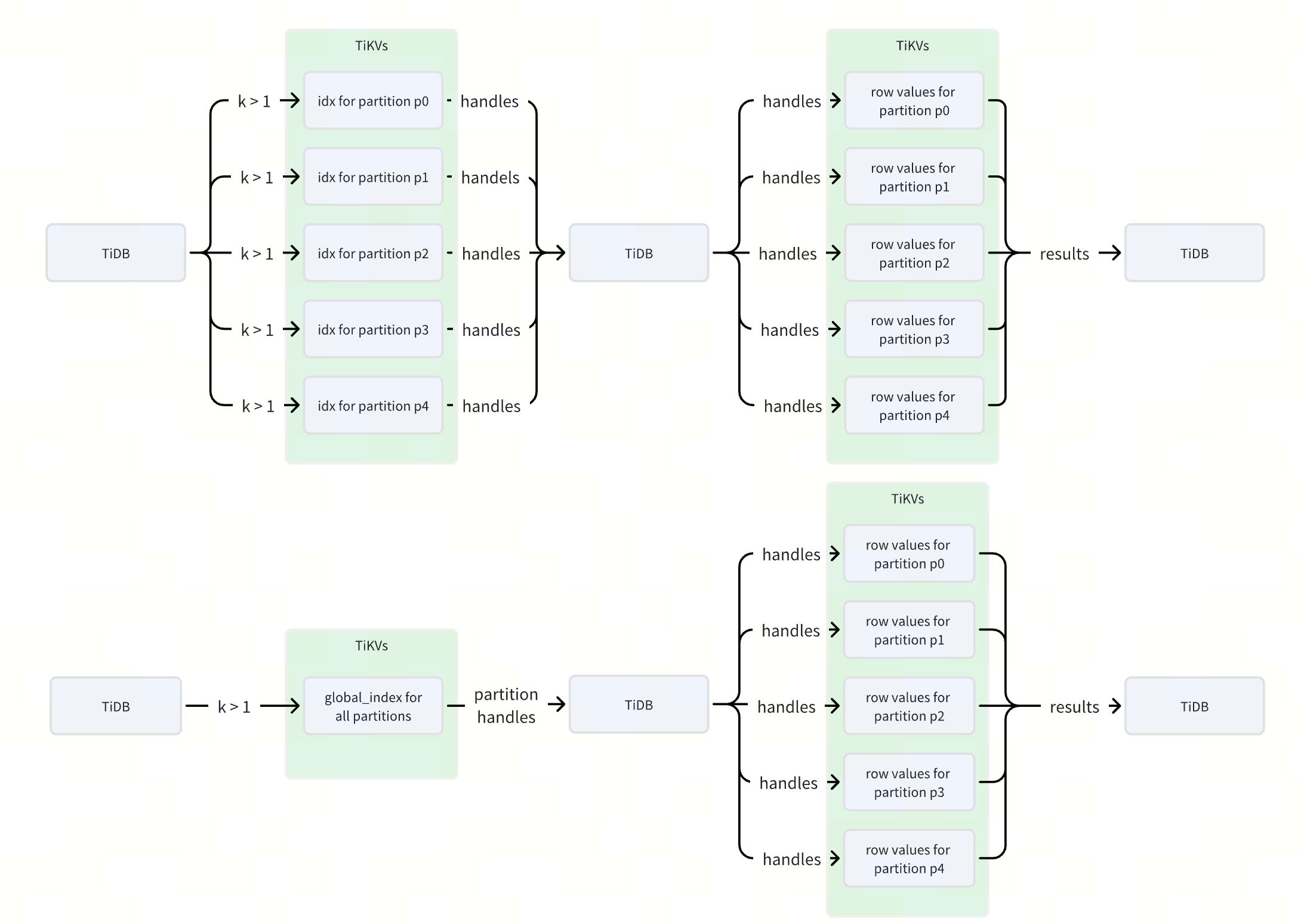
作者: Defined2014 原文来源: https://tidb.net/blog/7077577f 什么是 TiDB 全局索引 在 TiDB 中,全局索引是一种定义在分区表上的索引类型,它允许索引分区与表分区之间建立一对多的映射关系,即一个索引分区可以对…...

vue字符串的常用方法,截取字符串,获取字符串长度,检索字符串
1.使用substr方法截取字符串 let str "12345"; let part str.substr(0, 3); // 截取从索引0开始到索引3的子字符串 console.log(part); // "123" 2.获取字符串长度 JavaScript中的字符串有一个 length属性,该属性可以用在VUE获取字符串的长度…...

Neo4j集群学习
文章目录 官方指导文档Neo4j因果集群核心服务器只读副本因果一致性 Neo4j集群搭建Neo4j企业版下载集群简介虚拟机准备jdk安装实施搭建访问neo4j Web服务 集群添加Core节点 官方指导文档 Neo4j 5 ClusterNeo4j 5 Basic Cluster Neo4j因果集群 集群是Neo4企业版中所提供的功能…...

【人工智能】深度学习中的梯度检查:原理详解与Python实现
《Python OpenCV从菜鸟到高手》带你进入图像处理与计算机视觉的大门! 解锁Python编程的无限可能:《奇妙的Python》带你漫游代码世界 梯度检查是深度学习模型开发中至关重要的一步,它能够验证反向传播的梯度计算是否正确,从而确保模型训练的稳定性和准确性。在本文中,我们…...
接口)
Kotlin 2.1.0 入门教程(十七)接口
接口 接口可以包含抽象方法的声明,也可以包含方法的实现。 接口与抽象类的不同之处在于,接口无法存储状态。接口可以拥有属性,但这些属性要么必须是抽象的,要么就得提供访问器的实现。 接口使用 interface 关键字来定义&#x…...
)
了解i2c_check_functionality()
i2c_check_functionality()用来检查设备适配器支持的标志是否要求。 打开“include/linux/i2c.h” /* Return the functionality mask */ static inline u32 i2c_get_functionality(struct i2c_adapter *adap) { return adap->algo->functionality(adap); //返回该…...

Retrieval-Augmented Generation for LargeLanguage Models: A Survey
标题:Retrieval-Augmented Generation for Large Language Models: A Survey 作者:Yunfan Gaoa , Yun Xiongb , Xinyu Gaob , Kangxiang Jiab , Jinliu Panb , Yuxi Bic , Yi Daia , Jiawei Suna , Meng Wangc , and Haofen Wang 1. By referencing ext…...

C#多线程异步连接MySQL与SQLserver数据库
C#多线程异步连接MySQL与SQLserver数据库 一、前言二、多线程异步连接数据库代码2.1代码块2.2代码说明 参考文档 一、前言 当编写代码连接多台设备上的数据库时,如果采用同步逐个连接的方式,在网络畅通的情况下连接速度尚可,但当其中一台设备…...

try learning-git-branching
文章目录 mergerebase分离 HEAD相对引用利用父节点branch -f 撤销变更cherry-pick交互式 rebase只取一个提交记录提交的技巧rebase 在上一次提交上amendcherry-pick 在上一次提交上 amend tag多分支 rebase两个parent节点纠缠不清的分支偏离的提交历史锁定的Main learning git …...

代码随想录算法【Day46】
Day46 647. 回文子串 class Solution { public:int countSubstrings(string s) {vector<vector<bool>> dp(s.size(), vector<bool>(s.size(), false));int result 0;for (int i s.size() - 1; i > 0; i--) { // 注意遍历顺序for (int j i; j < s…...

flutter本地推送 flutter_local_notifications的使用记录
flutter_local_notifications 效果 安卓配置(AndroidManifest.xml) <uses-permission android:name"com.android.alarm.permission.SET_ALARM"/> <uses-permission android:name"android.permission.SCHEDULE_EXACT_ALARM" /> <us…...
Springboot 中如何使用Sentinel
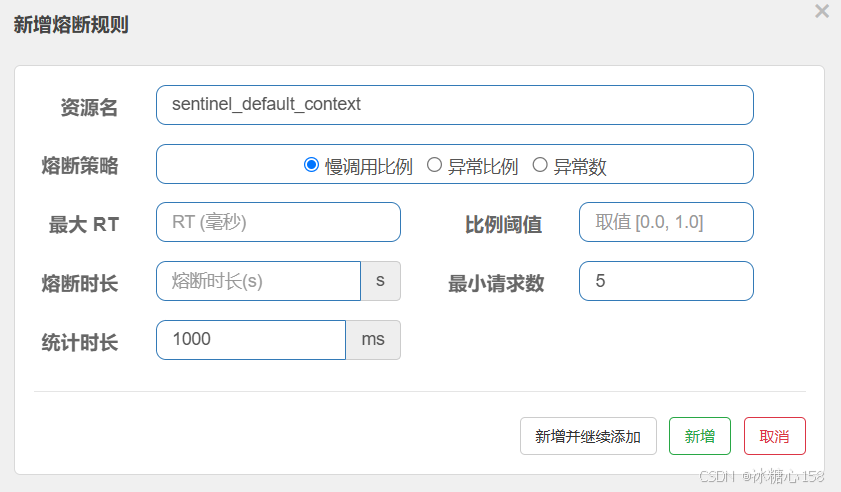
在 Spring Boot 中使用 Sentinel 非常方便,Spring Cloud Alibaba 提供了 spring-cloud-starter-alibaba-sentinel 组件,可以快速将 Sentinel 集成到你的 Spring Boot 应用中,并利用其强大的流量控制和容错能力。 下面是一个详细的步骤指南 …...

AI Agent 有哪些痛点问题
AI Agent 有哪些痛点问题 目录 AI Agent 有哪些痛点问题身份安全问题数据安全问题模型安全问题可靠性问题伦理和合规问题身份安全问题 身份界定模糊:AI代理既非完全意义上的人类,也不同于传统的机器,现有的身份管理工具难以准确对其进行定位和管理,导致在权限分配、责任追溯…...

一个让Stable Diffusion更稳定、更易用的Github开源项目
2023除了ChatGPT大火,Stable Diffusion同样也是非常火热,Stable Diffusion是一个Github开源项目,很多爱好者都会本地安装,但面对一些初学者来说,在安装、配置和使用过程中还是会经常出现很多问题,特别不了解…...
Docker+Jenkins自动化部署SpringBoot项目【详解git,jdk,maven,ssh配置等各种配置,附有示例+代码】
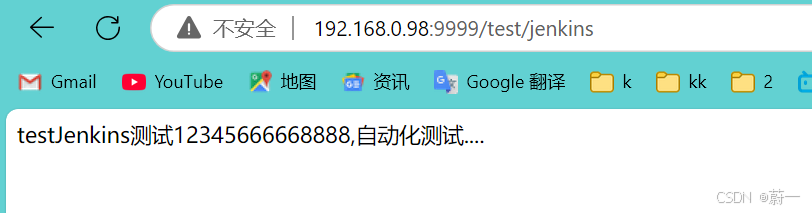
文章目录 DockerJenkins部署SpringBoot项目一.准备工作1.1安装jdk111.2安装Maven 二.Docker安装Jenkins2.1安装Docker2.2 安装Jenkins2.3进入jenkins 三.Jenkins设置3.1安装jenkins插件3.2全局工具配置全局配置jdk全局配置maven全局配置git 3.3 系统配置安装 Publish Over SSH …...

.NET SixLabors.ImageSharp v1.0 图像实用程序控制台示例
使用 C# 控制台应用程序示例在 Windows、Linux 和 MacOS 机器上处理图像,包括创建散点图和直方图,以及根据需要旋转图像以便正确显示。 这个小型实用程序库需要将 NuGet SixLabors.ImageSharp包(版本 1.0.4)添加到.NET Core 3.1/ …...

【机器学习】线性回归与一元线性回归
线性回归与一元线性回归 V1.1线性回归问题线性方程的最优解一元线性回归一元线性回归的方程一元线性回归距离衡量方法一元线性回归的最优化求解一元线性回归的最小二乘法解法 V1.1 线性回归问题 线性回归问题就是找一条线或超平面,并使用线或超平面来描述数据分布…...

soular基础教程-使用指南
soular是TikLab DevOps工具链的统一帐号中心,今天来介绍如何使用 soular 配置你的组织、工作台,快速入门上手。  1. 账号管理 可以对账号信息进行多方面管理,包括分配不同的部门、用户组等,从而确保账号权限和职责…...