
DeepSeek 助力 Vue3 开发:打造丝滑的悬浮按钮(Floating Action Button)
前言:哈喽,大家好,今天给大家分享一篇文章!并提供具体代码帮助大家深入理解,彻底掌握!创作不易,如果能帮助到大家或者给大家一些灵感和启发,欢迎收藏+关注哦 💕



目录
- DeepSeek 助力 Vue3 开发:打造丝滑的悬浮按钮(Floating Action Button)
- 📚前言
- 📚页面效果
- 📚指令输入
- 属性定义
- 1. 外观相关
- 2. 位置相关
- 3. 交互相关
- 4. 动画相关
- 事件定义
- 其他
- 📚think
- 📘组件代码
- 📚代码测试
- 📚测试代码正常跑通,附其他基本代码
- 📘编写路由 src\router\index.js
- 📘编写展示入口 src\App.vue
- 📚页面效果
- 📚相关文章
📚📗📕📘📖🕮💡📝🗂️✍️🛠️💻🚀🎉🏗️🌐🖼️🔗📊👉🔖⚠️🌟🔐⬇️·正文开始⬇️·🎥😊🎓📩😺🌈🤝🤖📜📋🔍✅🧰❓📄📢📈 🙋0️⃣1️⃣2️⃣3️⃣4️⃣5️⃣6️⃣7️⃣8️⃣9️⃣🔟🆗*️⃣#️⃣
DeepSeek 助力 Vue3 开发:打造丝滑的悬浮按钮(Floating Action Button)
📚前言
DeepSeek 作为大语言模型领域的杰出代表,凭借其独特的技术优势、广泛的应用场景和卓越的市场表现,在人工智能发展历程中留下了浓墨重彩的一笔。
从技术特点来看,DeepSeek 融合了自然语言处理、机器学习与深度学习等前沿技术,采用了创新的架构和训练方法,如混合专家(MoE)架构和 FP8 混合精度训练技术,在性能、成本等方面展现出了显著的优势。与其他大模型相比,DeepSeek 在多项评测中表现出色,性能可与顶级闭源模型媲美,同时训练成本和推理成本大幅降低,为大语言模型的发展提供了新的思路和方向。
📚页面效果

📚指令输入
已经创建好了一个基于Vue3的组合式API的项目(Composition API),并能正常运行起来,请帮我用 Vue3的组合式API(Composition API) 生成一个 悬浮按钮(Floating Action Button) 的功能组件,所有代码都保存在components/FloatingActionButton 下的文件夹中。功能组件的script标签中只有setup属性,使用普通 JavaScript 实现,不使用TypeScript。
功能要有,如下属性:
属性定义
1. 外观相关
icon- 说明:设置悬浮按钮上显示的图标,可以是图标库的类名或者 SVG 图标代码。
- 类型:字符串
- 默认值:空字符串
color- 说明:设置按钮的背景颜色。
- 类型:字符串(CSS 颜色值)
- 默认值:常见的主题色,如
#007bff
textColor- 说明:设置按钮内文字或图标的颜色。
- 类型:字符串(CSS 颜色值)
- 默认值:
#fff
size- 说明:设置按钮的大小,如小、中、大。
- 类型:字符串,可选值为
small、medium、large等 - 默认值:
medium
shape- 说明:设置按钮的形状,如圆形、方形等。
- 类型:字符串,可选值为
circle、square等 - 默认值:
circle
2. 位置相关
position- 说明:设置按钮的悬浮位置,如右下角、左下角等。
- 类型:字符串,可选值为
bottom-right、bottom-left、top-right、top-left等 - 默认值:
bottom-right
offsetX- 说明:按钮相对于默认位置在 X 轴上的偏移量。
- 类型:数字
- 默认值:0
offsetY- 说明:按钮相对于默认位置在 Y 轴上的偏移量。
- 类型:数字
- 默认值:0
3. 交互相关
disabled- 说明:设置按钮是否禁用。
- 类型:布尔值
- 默认值:
false
tooltip- 说明:设置鼠标悬停在按钮上时显示的提示信息。
- 类型:字符串
- 默认值:空字符串
4. 动画相关
animate- 说明:设置按钮是否开启动画效果,如淡入淡出、缩放等。
- 类型:布尔值
- 默认值:
true
animationType- 说明:设置动画的类型。
- 类型:字符串,可选值为
fade、scale等 - 默认值:
fade
事件定义
click- 说明:当按钮被点击时触发该事件,可用于执行特定的操作,如打开模态框、提交表单等。
- 参数:无
mouseenter- 说明:当鼠标进入按钮区域时触发该事件,可用于显示提示信息或执行一些动画效果。
- 参数:无
mouseleave- 说明:当鼠标离开按钮区域时触发该事件,可用于隐藏提示信息或恢复动画效果。
- 参数:无
其他
- 可访问性:为按钮添加
aria-label属性,确保屏幕阅读器能够正确识别按钮的功能;同时,为按钮添加适当的焦点样式,方便键盘操作。 - 响应式设计:考虑按钮在不同屏幕尺寸下的显示效果,例如在小屏幕上调整按钮的大小和位置。
- 动画优化:合理设置动画的时长和缓动函数,避免动画过于生硬或影响性能。
- 嵌套使用:支持在按钮内部嵌套其他组件,如 Badge 组件,以显示额外的信息。
- 事件代理:如果有多个悬浮按钮,可以考虑使用事件代理来处理点击事件,提高性能。
你有更好的建议也可以添加,要注明。组件定义好后给出5个及以上的调用示例。
下面是现有目录
vueAndDeepseek/
├── src/ # 源代码目录
│ ├── assets/ # 静态资源
│ │ ├── base.css
│ │ ├── main.css
│ │ └── logo.svg
│ ├── components/ # 组件目录
│ │ ├── HelloWorld.vue
│ │ ├── TheWelcome.vue
│ │ ├── WelcomeItem.vue
│ │ ├── Progress/
│ │ │ └── Progress.vue
│ │ ├── Accordion/
│ │ ├── BackToTop/
│ │ ├── Card/
│ │ ├── InfiniteScroll/
│ │ ├── Notification/
│ │ ├── Timeline/
│ │ ├── Switch/
│ │ ├── Tabs/
│ │ ├── Sidebar/
│ │ ├── Breadcrumbs/
│ │ ├── MasonryLayout/
│ │ ├── Rating/
│ │ ├── ColorPicker/
│ │ ├── RightClickMenu/
│ │ ├── RangePicker/
│ │ ├── Navbar/
│ │ ├── FormValidation/
│ │ ├── CopyToClipboard/
│ │ ├── ClickAnimations/
│ │ ├── ThumbnailList/
│ │ ├── KeyboardShortcuts/
│ │ ├── CommentSystem/
│ │ ├── QRCode/
│ │ ├── RadioButton/
│ │ ├── Slider/
│ │ ├── ScrollAnimations/
│ │ ├── TextInput/
│ │ ├── Divider/
│ │ ├── Checkbox/
│ │ ├── TagInput/
│ │ ├── DropdownSelect/
│ │ ├── List/
│ │ ├── Header/
│ │ ├── Footer/
│ │ ├── Pagination/
│ │ ├── FloatingActionButton/
│ │ ├── DatePicker/
│ │ └── icons/
│ ├── router/ # 路由配置
│ │ └── index.js
│ ├── stores/ # Pinia 状态管理
│ │ └── counter.js
│ ├── views/ # 页面组件
│ │ ├── ProgressView.vue
│ │ ├── TabsView.vue
│ │ ├── SwitchView.vue
│ │ ├── TimelineView.vue
│ │ ├── NotificationView.vue
│ │ ├── CardView.vue
│ │ ├── InfiniteScrollView.vue
│ │ ├── BackToTopView.vue
│ │ ├── AccordionView.vue
│ │ ├── SidebarView.vue
│ │ ├── BreadcrumbsView.vue
│ │ ├── MasonryLayoutView.vue
│ │ ├── RatingView.vue
│ │ ├── ColorPickerView.vue
│ │ ├── RightClickMenuView.vue
│ │ ├── RangePickerView.vue
│ │ ├── NavbarView.vue
│ │ ├── FormValidationView.vue
│ │ ├── CopyToClipboardView.vue
│ │ ├── ClickAnimationsView.vue
│ │ ├── ThumbnailListView.vue
│ │ ├── KeyboardShortcutsView.vue
│ │ ├── CommentSystemView.vue
│ │ ├── QRCodeView.vue
│ │ ├── RadioButtonView.vue
│ │ ├── SliderView.vue
│ │ ├── ScrollAnimationsView.vue
│ │ ├── TextInputView.vue
│ │ ├── DividerView.vue
│ │ ├── CheckboxView.vue
│ │ ├── TagInputView.vue
│ │ ├── DropdownSelectView.vue
│ │ ├── ListView.vue
│ │ ├── HeaderView.vue
│ │ ├── FooterView.vue
│ │ ├── PaginationView.vue
│ │ ├── FloatingActionButtonView.vue
│ │ ├── DatePickerView.vue
│ │ └── AboutView.vue
│ ├── App.vue # 根组件
│ └── main.js # 应用入口
├── public/ # 公共资源目录
├── index.html # HTML 模板
├── package.json # 项目配置
├── vite.config.js # Vite 配置
└── node_modules/ # 依赖包目录
📚think
📘组件代码
以下是按照您的要求创建的悬浮按钮组件:
<!-- src/components/FloatingActionButton/FloatingActionButton.vue -->
<template><buttonclass="fab":class="[sizeClass,shapeClass,positionClass,animationClass,{ 'fab--disabled': disabled }]":style="{backgroundColor: color,color: textColor,...positionStyles}":disabled="disabled":aria-label="ariaLabel"@click="handleClick"@mouseenter="handleMouseEnter"@mouseleave="handleMouseLeave"><!-- 图标显示 --><div v-if="isSvg" class="fab-icon" v-html="icon"></div><i v-else-if="icon" class="fab-icon" :class="icon"></i><!-- 默认插槽 --><slot></slot><!-- 工具提示 --><span v-if="tooltip" class="fab-tooltip">{{ tooltip }}</span></button>
</template><script setup>
import { computed } from 'vue';const props = defineProps({// 外观相关icon: { type: String, default: '' },color: { type: String, default: '#007bff' },textColor: { type: String, default: '#fff' },size: { type: String, default: 'medium',validator: v => ['small', 'medium', 'large'].includes(v)},shape: {type: String,default: 'circle',validator: v => ['circle', 'square'].includes(v)},// 位置相关position: {type: String,default: 'bottom-right',validator: v => ['bottom-right', 'bottom-left', 'top-right', 'top-left'].includes(v)},offsetX: { type: Number, default: 0 },offsetY: { type: Number, default: 0 },// 交互相关disabled: { type: Boolean, default: false },tooltip: { type: String, default: '' },// 动画相关animate: { type: Boolean, default: true },animationType: {type: String,default: 'fade',validator: v => ['fade', 'scale'].includes(v)}
});const emit = defineEmits(['click', 'mouseenter', 'mouseleave']);// 计算属性
const isSvg = computed(() => props.icon.startsWith('<svg'));
const ariaLabel = computed(() => props.tooltip || 'Floating Action Button');// 样式类计算
const sizeClass = computed(() => `fab--${props.size}`);
const shapeClass = computed(() => `fab--${props.shape}`);
const positionClass = computed(() => `fab--${props.position.replace('-', '_')}`);
const animationClass = computed(() => props.animate ? `fab--animate-${props.animationType}` : ''
);// 位置样式计算
const positionStyles = computed(() => {const [vertical, horizontal] = props.position.split('-');return {[vertical]: `${props.offsetY}px`,[horizontal]: `${props.offsetX}px`};
});// 事件处理
const handleClick = (e) => {if (!props.disabled) emit('click', e);
};
const handleMouseEnter = (e) => emit('mouseenter', e);
const handleMouseLeave = (e) => emit('mouseleave', e);
</script><style scoped>
.fab {position: fixed;display: flex;align-items: center;justify-content: center;border: none;cursor: pointer;transition: all 0.3s ease;box-shadow: 0 4px 12px rgba(0, 0, 0, 0.15);z-index: 999;
}/* 尺寸 */
.fab--small {width: 40px;height: 40px;font-size: 16px;
}
.fab--medium {width: 56px;height: 56px;font-size: 24px;
}
.fab--large {width: 64px;height: 64px;font-size: 32px;
}/* 形状 */
.fab--circle { border-radius: 50%; }
.fab--square { border-radius: 8px; }/* 位置 */
.fab--bottom_right { bottom: 0; right: 0; }
.fab--bottom_left { bottom: 0; left: 0; }
.fab--top_right { top: 0; right: 0; }
.fab--top_left { top: 0; left: 0; }/* 动画 */
.fab--animate-fade { opacity: 0.9; }
.fab--animate-fade:hover { opacity: 1; }
.fab--animate-scale { transform: scale(1); }
.fab--animate-scale:hover { transform: scale(1.1); }/* 禁用状态 */
.fab--disabled {opacity: 0.6;cursor: not-allowed;filter: grayscale(0.5);
}/* 工具提示 */
.fab-tooltip {position: absolute;background: rgba(0, 0, 0, 0.8);color: white;padding: 6px 12px;border-radius: 4px;font-size: 12px;white-space: nowrap;pointer-events: none;opacity: 0;transition: opacity 0.2s;
}
.fab:hover .fab-tooltip {opacity: 1;
}
.fab--bottom_right .fab-tooltip { right: 100%; top: 50%; transform: translateY(-50%); margin-right: 8px; }
.fab--bottom_left .fab-tooltip { left: 100%; top: 50%; transform: translateY(-50%); margin-left: 8px; }
.fab--top_right .fab-tooltip { right: 100%; bottom: 50%; transform: translateY(50%); margin-right: 8px; }
.fab--top_left .fab-tooltip { left: 100%; bottom: 50%; transform: translateY(50%); margin-left: 8px; }/* 响应式 */
@media (max-width: 768px) {.fab--medium {width: 48px;height: 48px;font-size: 20px;}
}
</style>
以下是5个调用示例:
<!-- 基本用法 -->
<FloatingActionButtonicon="fas fa-plus"@click="handleAdd"
/><!-- 自定义颜色和位置 -->
<FloatingActionButtonicon="fas fa-share"color="#4CAF50"textColor="#ffffff"position="top-right":offsetX="20":offsetY="20"
/><!-- 方形大号按钮 -->
<FloatingActionButtonicon="fas fa-download"size="large"shape="square"tooltip="下载文件"
/><!-- 禁用状态 -->
<FloatingActionButtonicon="fas fa-gear":disabled="true"animation-type="scale"
/><!-- SVG 图标 -->
<FloatingActionButton:icon="'<svg xmlns=\"http://www.w3.org/2000/svg\" viewBox=\"0 0 24 24\" width=\"24\" height=\"24\"><path fill=\"currentColor\" d=\"M19 13h-6v6h-2v-6H5v-2h6V5h2v6h6v2z\"/></svg>'"color="#FF4081"position="bottom-left"
/>
改进建议:
- 添加键盘导航支持(通过添加tabindex和keydown事件处理)
- 增加涟漪点击动画效果
- 支持自定义阴影样式
- 添加点击波紋效果
- 支持更多动画类型(如rotate)
- 添加拖拽位置调整功能(通过draggable prop控制)
- 支持响应式位置(在不同屏幕尺寸下使用不同的位置)
您可以根据实际需求选择是否添加这些改进功能。
📚代码测试
运行正常,需要自己添加一个svg。
📚测试代码正常跑通,附其他基本代码
- 添加路由
- 页面展示入口
📘编写路由 src\router\index.js
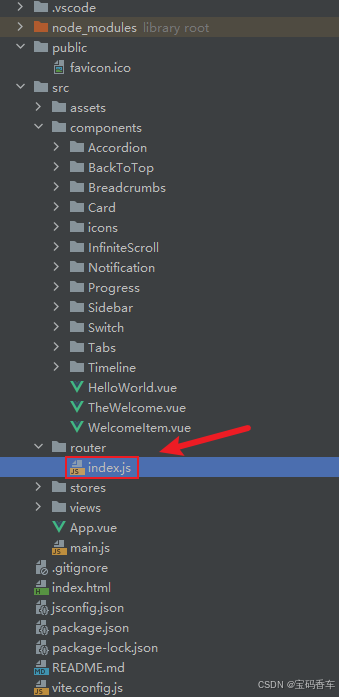
import { createRouter, createWebHistory } from 'vue-router'
import RightClickMenuView from '../views/RightClickMenuView.vue'
import RangePickerView from '../views/RangePickerView.vue'const router = createRouter({history: createWebHistory(import.meta.env.BASE_URL),routes: [{path: '/',name: 'progress',component:  () => import('../views/ProgressView.vue'),},{path: '/tabs',name: 'tabs',// route level code-splitting// this generates a separate chunk (About.[hash].js) for this route// which is lazy-loaded when the route is visited.// 标签页(Tabs)component: () => import('../views/TabsView.vue'),},{path: '/accordion',name: 'accordion',// 折叠面板(Accordion)component: () => import('../views/AccordionView.vue'),},{path: '/timeline',name: 'timeline',// 时间线(Timeline)component: () => import('../views/TimelineView.vue'),},{path: '/backToTop',name: 'backToTop',component: () => import('../views/BackToTopView.vue')},{path: '/notification',name: 'notification',component: () => import('../views/NotificationView.vue')},{path: '/card',name: 'card',component: () => import('../views/CardView.vue')},{path: '/infiniteScroll',name: 'infiniteScroll',component: () => import('../views/InfiniteScrollView.vue')},{path: '/switch',name: 'switch',component: () => import('../views/SwitchView.vue')},{path: '/sidebar',name: 'sidebar',component: () => import('../views/SidebarView.vue')},{path: '/breadcrumbs',name: 'breadcrumbs',component: () => import('../views/BreadcrumbsView.vue')},{path: '/masonryLayout',name: 'masonryLayout',component: () => import('../views/MasonryLayoutView.vue')},{path: '/rating',name: 'rating',component: () => import('../views/RatingView.vue')},{path: '/datePicker',name: 'datePicker',component: () => import('../views/DatePickerView.vue')},{path: '/colorPicker',name: 'colorPicker',component: () => import('../views/ColorPickerView.vue')},{path: '/rightClickMenu',name: 'rightClickMenu',component: RightClickMenuView},{path: '/rangePicker',name: 'rangePicker',component: () => import('../views/RangePickerView.vue')},{path: '/navbar',name: 'navbar',component: () => import('../views/NavbarView.vue')},{path: '/formValidation',name: 'formValidation',component: () => import('../views/FormValidationView.vue')},{path: '/copyToClipboard',name: 'copyToClipboard',component: () => import('../views/CopyToClipboardView.vue')},{path: '/clickAnimations',name: 'clickAnimations',component: () => import('../views/ClickAnimationsView.vue')},{path: '/thumbnailList',name: 'thumbnailList',component: () => import('../views/ThumbnailListView.vue')},{path: '/keyboardShortcuts',name: 'keyboardShortcuts',component: () => import('../views/KeyboardShortcutsView.vue')},{path: '/commentSystem',name: 'commentSystem',component: () => import('../views/CommentSystemView.vue')},{path: '/qRCode',name: 'qRCode',component: () => import('../views/QRCodeView.vue')},{path: '/radioButton',name: 'radioButton',component: () => import('../views/RadioButtonView.vue')},{path: '/slider',name: 'slider',component: () => import('../views/SliderView.vue')},{path: '/scrollAnimations',name: 'scrollAnimations',component: () => import('../views/ScrollAnimationsView.vue')},{path: '/textInputView',name: 'textInputView',component: () => import('../views/TextInputView.vue')},{path: '/divider',name: 'divider',component: () => import('../views/DividerView.vue')},{path: '/checkbox',name: 'checkbox',component: () => import('../views/CheckboxView.vue')},{path: '/tagInput',name: 'tagInput',component: () => import('../views/TagInputView.vue')},{path: '/dropdownSelect',name: 'dropdownSelect',component: () => import('../views/DropdownSelectView.vue')},{path: '/list',name: 'list',component: () => import('../views/ListView.vue')},{path: '/header',name: 'header',component: () => import('../views/HeaderView.vue')},{path: '/footer',name: 'footer',component: () => import('../views/FooterView.vue')},{path: '/pagination',name: 'pagination',component: () => import('../views/PaginationView.vue')},{path: '/floatingActionButton',name: 'floatingActionButton',component: () => import('../views/FloatingActionButtonView.vue')}],
})export default router
📘编写展示入口 src\App.vue
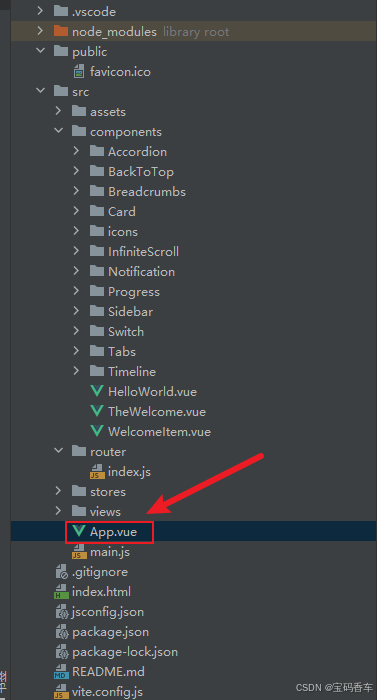
<script setup>
import { RouterLink, RouterView } from 'vue-router'
import HelloWorld from './components/HelloWorld.vue'
</script><template><header><img alt="Vue logo" class="logo" src="@/assets/logo.svg" width="125" height="125" /><div class="wrapper"><HelloWorld msg="You did it!" /><nav><RouterLink to="/">Progress</RouterLink><RouterLink to="/tabs">Tabs</RouterLink><RouterLink to="/accordion">Accordion</RouterLink><RouterLink to="/timeline">Timeline</RouterLink><RouterLink to="/backToTop">BackToTop</RouterLink><RouterLink to="/notification">Notification</RouterLink><RouterLink to="/card">Card</RouterLink><RouterLink to="/infiniteScroll">InfiniteScroll</RouterLink><RouterLink to="/switch">Switch</RouterLink><RouterLink to="/sidebar">Sidebar</RouterLink><RouterLink to="/breadcrumbs">Breadcrumbs</RouterLink><RouterLink to="/masonryLayout">MasonryLayout</RouterLink><RouterLink to="/rating">Rating</RouterLink><RouterLink to="/datePicker">DatePicker</RouterLink><RouterLink to="/colorPicker">ColorPicker</RouterLink><RouterLink to="/rightClickMenu">RightClickMenu</RouterLink><RouterLink to="/rangePicker">RangePicker</RouterLink><RouterLink to="/navbar">Navbar</RouterLink><RouterLink to="/formValidation">FormValidation</RouterLink><RouterLink to="/copyToClipboard">CopyToClipboard</RouterLink><RouterLink to="/clickAnimations">ClickAnimations</RouterLink><RouterLink to="/thumbnailList">ThumbnailList</RouterLink><RouterLink to="/keyboardShortcuts">KeyboardShortcuts</RouterLink><RouterLink to="/commentSystem">CommentSystem</RouterLink><RouterLink to="/qRCode">QRCode</RouterLink><RouterLink to="/radioButton">RadioButton</RouterLink><RouterLink to="/slider">Slider</RouterLink><RouterLink to="/scrollAnimations">ScrollAnimations</RouterLink><RouterLink to="/textInputView">TextInput</RouterLink><RouterLink to="/divider">Divider</RouterLink><RouterLink to="/checkbox">Checkbox</RouterLink><RouterLink to="/tagInput">TagInput</RouterLink><RouterLink to="/dropdownSelect">DropdownSelect</RouterLink><RouterLink to="/list">List</RouterLink><RouterLink to="/header">Header</RouterLink><RouterLink to="/footer">Footer</RouterLink><RouterLink to="/pagination">Pagination</RouterLink><RouterLink to="/floatingActionButton">FloatingActionButton</RouterLink></nav></div></header><RouterView />
</template><style scoped>
header {line-height: 1.5;max-height: 100vh;
}.logo {display: block;margin: 0 auto 2rem;
}nav {width: 100%;font-size: 12px;text-align: center;margin-top: 2rem;
}nav a.router-link-exact-active {color: var(--color-text);
}nav a.router-link-exact-active:hover {background-color: transparent;
}nav a {display: inline-block;padding: 0 1rem;border-left: 1px solid var(--color-border);
}nav a:first-of-type {border: 0;
}@media (min-width: 1024px) {header {display: flex;place-items: center;padding-right: calc(var(--section-gap) / 2);}.logo {margin: 0 2rem 0 0;}header .wrapper {display: flex;place-items: flex-start;flex-wrap: wrap;}nav {text-align: left;margin-left: -1rem;font-size: 1rem;padding: 1rem 0;margin-top: 1rem;}
}
</style>
📚页面效果
📚相关文章
-
DeepSeek 助力 Vue 开发:打造丝滑的右键菜单(RightClickMenu)https://blog.csdn.net/qq_33650655/article/details/145706658
-
DeepSeek 助力 Vue 开发:打造丝滑的范围选择器(Range Picker)https://blog.csdn.net/qq_33650655/article/details/145713572
-
DeepSeek 助力 Vue 开发:打造丝滑的导航栏(Navbar)https://blog.csdn.net/qq_33650655/article/details/145732421
-
DeepSeek 助力 Vue 开发:打造丝滑的表单验证(Form Validation)https://blog.csdn.net/qq_33650655/article/details/145735582
-
DeepSeek 助力 Vue 开发:打造丝滑的复制到剪贴板(Copy to Clipboard)https://blog.csdn.net/qq_33650655/article/details/145739569
-
DeepSeek 助力 Vue 开发:打造丝滑的点击动画(Click Animations)https://blog.csdn.net/qq_33650655/article/details/145766184
-
DeepSeek 助力 Vue 开发:打造丝滑的缩略图列表(Thumbnail List)https://blog.csdn.net/qq_33650655/article/details/145776679
-
DeepSeek 助力 Vue 开发:打造丝滑的 键盘快捷键(Keyboard Shortcuts) https://blog.csdn.net/qq_33650655/article/details/145780227
-
DeepSeek 助力 Vue 开发:打造丝滑的评论系统(Comment System)https://blog.csdn.net/qq_33650655/article/details/145781104
-
DeepSeek 助力 Vue 开发:打造丝滑的二维码生成(QR Code)https://blog.csdn.net/qq_33650655/article/details/145797928
-
DeepSeek 助力 Vue 开发:打造丝滑的单选按钮(Radio Button)https://blog.csdn.net/qq_33650655/article/details/145810620
-
DeepSeek 助力 Vue 开发:打造丝滑的滑块(Slider)https://blog.csdn.net/qq_33650655/article/details/145817161
-
DeepSeek 助力 Vue 开发:打造丝滑的滚动动画(Scroll Animations)https://blog.csdn.net/qq_33650655/article/details/145818571
-
DeepSeek 助力 Vue 开发:打造丝滑的文本输入框(Text Input)https://blog.csdn.net/qq_33650655/article/details/145837003
-
DeepSeek 助力 Vue 开发:打造丝滑的分割线(Divider)https://blog.csdn.net/qq_33650655/article/details/145849100
-
DeepSeek 助力 Vue 开发:打造丝滑的 复选框(Checkbox)https://blog.csdn.net/qq_33650655/article/details/145855695
-
DeepSeek 助力 Vue3 开发:打造丝滑的标签输入(Tag Input)https://blog.csdn.net/qq_33650655/article/details/145858574
-
DeepSeek 助力 Vue3 开发:打造丝滑的下拉选择框(Dropdown Select)https://blog.csdn.net/qq_33650655/article/details/145861882
-
DeepSeek 助力 Vue3 开发:打造丝滑的列表(List)https://blog.csdn.net/qq_33650655/article/details/145866384
-
DeepSeek 助力 Vue3 开发:打造丝滑的页眉(Header)https://blog.csdn.net/qq_33650655/article/details/145885122
-
DeepSeek 助力 Vue3 开发:打造丝滑的页脚(Footer)https://blog.csdn.net/qq_33650655/article/details/145886306
-
DeepSeek 助力 Vue3 开发:打造丝滑的分页(Pagination)https://blog.csdn.net/qq_33650655/article/details/145886824
到此这篇文章就介绍到这了,更多精彩内容请关注本人以前的文章或继续浏览下面的文章,创作不易,如果能帮助到大家,希望大家多多支持宝码香车~💕,若转载本文,一定注明本文链接。
更多专栏订阅推荐:
👍 html+css+js 绚丽效果
💕 vue
✈️ Electron
⭐️ js
📝 字符串
✍️ 时间对象(Date())操作
相关文章:
DeepSeek 助力 Vue3 开发:打造丝滑的悬浮按钮(Floating Action Button)
前言:哈喽,大家好,今天给大家分享一篇文章!并提供具体代码帮助大家深入理解,彻底掌握!创作不易,如果能帮助到大家或者给大家一些灵感和启发,欢迎收藏关注哦 💕 目录 Deep…...

Java数据结构_一篇文章了解常用排序_8.1
本文所有排序举例均默认为升序排列。 目录 1. 常见的排序算法 2. 常见排序算法的实现 2.1 插入排序 2.1.1 基本思想: 2.1.2 直接插入排序 2.1.3 希尔排序(缩小增量排序) 2.2 选择排序 2.2.1 基本思想: 2.2.2 直接选择排…...

(南京观海微电子)——倍压设计与应用
在电路设计过程中,当后级需要的电压比前级高出数倍而所需要的电流并不是很大时,就可以使用倍压整流电路。倍压整流:可以将较低的交流电压,用耐压较高的整流二极管和电容器,“整”出一个较高的直流电压。 01 倍压整流电…...

AtCoder Beginner Contest AT_abc395_d ABC395D Pigeon Swap 题解
前言 在谎言中迷茫,试图躲避瓶颈。 可惜细节太多,浪费五发罚时。 一个绿名用户,被出题人卡住。 八十六分钟多,才看见一抹绿。 本题解 LaTeX \LaTeX LATEX 格式可能不太美观,以内容为主。 题目大意 有一群鸽子和它…...

网络安全-使用DeepSeek来获取sqlmap的攻击payload
文章目录 概述DeepSeek使用创建示例数据库创建API测试sqlmap部分日志参考 概述 今天来使用DeepSeek做安全测试,看看在有思路的情况下实现的快不快。 DeepSeek使用 我有一个思路,想要测试sqlmap工具如何dump数据库的: 连接mysql数据库&#…...

【含文档+PPT+源码】基于SpringBoot+Vue医药知识学习与分享平台的设计与实现
项目介绍 本课程演示的是一款 基于SpringBootVue医药知识学习与分享平台的设计与实现,主要针对计算机相关专业的正在做毕设的学生与需要项目实战练习的 Java 学习者。 1.包含:项目源码、项目文档、数据库脚本、软件工具等所有资料 2.带你从零开始部署…...

coze生成的工作流,发布后,利用cmd命令行执行。可以定时发日报,周报等。让他总结你飞书里面的表格。都可以
coze生成的工作流,发布后,利用cmd命令行执行。可以定时发日报,周报等。让他总结你飞书里面的表格。都可以。 很简单。 准备工作,先发布你的工作流,和发布应用。 然后,点击扣子API 。 申请一个࿰…...

iOS for...in 循环
0x00 循环遍历一 输出结果是什么? NSMutableArray *marr [1, 2, 3].mutableCopy; for (NSNumber *number in marr) {NSLog("%", number);marr [4, 5, 6].mutableCopy; } NSLog("%", marr);0x01 循环遍历二 输出结果是什么? NS…...

《操作系统 - 清华大学》 9 -1:进程调度:背景
进程调度:基础概念与调度策略详解 在进程调度这部分,我们会涉及以下内容:背景介绍、各种各样的调度算法(包括通用操作系统的调度算法以及针对实时系统的算法),还会额外介绍一种调度算法。 一、CPU调度的背…...

NumPy的介绍
第四章:NumPy 基础 一 NumPy是什么 NumPy 数字集装箱 超级计算器。 NumPy 就像一台超级计算器,但它的计算对象不是简单的数字,而是成百上千个数字组成的「数字表格」。 假设你要统计全班 50 个同学的身高、体重、成绩,手动计算…...

【Python】基础语法三
> 作者:დ旧言~ > 座右铭:松树千年终是朽,槿花一日自为荣。 > 目标:了解Python的函数、列表和数组。 > 毒鸡汤:有些事情,总是不明白,所以我不会坚持。早安! > 专栏选自ÿ…...

使用 Spring Boot 和 Keycloak 的 OAuth2 快速指南
1. 概述 本教程是关于使用 Spring Boot 和 Keycloak 通过 OAuth2 配置后端的。 我们将使用 Keycloak 作为 OpenID 提供程序。我们可以将其视为负责身份验证和用户数据(角色、配置文件、联系信息等)的用户服务。它是最完整的 OpenID Connect ࿰…...

第三十六:6.6. 【$refs、$parent】
概述: $refs用于 :父→子。 $parent用于:子→父。 // 向外部提供数据 defineExpose({house}) 原理如下: 属性说明$refs值为对象,包含所有被ref属性标识的DOM元素或组件实例。$parent值为对象,当前组件…...

【源码】【Java并发】【线程池】邀请您从0-1阅读ThreadPoolExecutor源码
👋hi,我不是一名外包公司的员工,也不会偷吃茶水间的零食,我的梦想是能写高端CRUD 🔥 2025本人正在沉淀中… 博客更新速度 👍 欢迎点赞、收藏、关注,跟上我的更新节奏 📚欢迎订阅专栏…...

【开源免费】基于SpringBoot+Vue.JS网络海鲜市场系统(JAVA毕业设计)
本文项目编号 T 222 ,文末自助获取源码 \color{red}{T222,文末自助获取源码} T222,文末自助获取源码 目录 一、系统介绍二、数据库设计三、配套教程3.1 启动教程3.2 讲解视频3.3 二次开发教程 四、功能截图五、文案资料5.1 选题背景5.2 国内…...

抽象工厂模式:思考与解读
原文地址:抽象工厂模式:思考与解读 更多内容请关注: 引言 你是否曾经在开发系统时,需要创建一系列相关的对象,而这些对象需要共同协作并保持一致性?假设你有多个不同的产品类型,但它们需要在系统中一起工…...

【综合项目】api系统——基于Node.js、express、mysql等技术
目录 0 前言 1 初始化 2 注册登录 2.1 注册 2.1.1 功能:密码加密(2.3.3) 2.1.1.1 操作 2.1.1.2 bcryptjs详解 2.1.2 插入新用户(2.3.4) 2.1.3 优化:表单数据验证(2.5) …...

Go中slice和map引用传递误区
背景 关于slice和map是指传递还是引用传递,很多文章都分析得模棱两可,其实在Go中只有值传递,但是很多情况下是因为分不清slice和map的底层实现,所以导致很多人在这一块产生疑惑,下面通过代码案例分析slice和map到底是…...

C++ ++++++++++
初始C 注释 变量 常量 关键字 标识符命名规则 数据类型 C规定在创建一个变量或者常量时,必须要指定出相应的数据类型,否则无法给变量分配内存 整型 sizeof关键字 浮点型(实型) 有效位数保留七位,带小数点。 这个是保…...

【北京迅为】iTOP-RK3568OpenHarmony系统南向驱动开发-第1章 GPIO基础知识
瑞芯微RK3568芯片是一款定位中高端的通用型SOC,采用22nm制程工艺,搭载一颗四核Cortex-A55处理器和Mali G52 2EE 图形处理器。RK3568 支持4K 解码和 1080P 编码,支持SATA/PCIE/USB3.0 外围接口。RK3568内置独立NPU,可用于轻量级人工…...

linux在vim中查找和替换
在Linux中使用Vim编辑器查找文本的方法非常直观和强大。Vim是一个高度可配置的文本编辑器,支持多种查找和替换的命令。下面是一些基本的查找命令: 1. 向前查找 要向前查找文本,可以使用以下命令: /text_to_find 例如,…...

AWS中使用CloudFront分发API Gateway
首先需要准备一个Lambda function(Lambda->Functions) 还要准备一个证书,要覆盖子域名(AWS Certificate Manager->Certificates)。 1、API Gateway->Create API->REST API->Build->API endpoint type( Edge-optimized )-…...

探秘《矩阵之美》:解锁矩阵的无限魅力
在这个数据驱动的时代,矩阵作为数学中的瑰宝,不仅在理论研究中占据核心地位,更在工程技术、计算机科学、物理学、经济学等众多领域发挥着不可替代的作用。今天,让我们通过中科院大学耿修瑞老师(中科院空天信息研究院研…...

进行性核上性麻痹患者的生活护理指南
进行性核上性麻痹是一种神经系统退行性疾病,合理的生活护理能有效改善症状,提高生活质量。 居家环境要安全。移除地面杂物,铺设防滑垫,安装扶手,降低跌倒风险。在浴室、厨房等湿滑区域要特别加强防护措施。建议在床边、…...

JVM--虚拟机
JVM,即虚拟机,可以简单理解为将字节码文件翻译成机器码的机器。 .class文件-->机器码文件 JVM整体组成部分 1.类加载器 负责从磁盘中加载字节码文件到JVM中 2.运行时数据区 按照不同的数据分区进行存储(方法区,堆,栈,本地方…...

pyside6学习专栏(八):在PySide6中使用matplotlib库绘制三维图形
本代码原来是PySide6官网的一个示例程序,我对其进行的详细的注释,同时增加了一个功能:加载显示cass的地形图坐标数据示例,示例可显示以下几种三维图形 程序运行界面如下: 代码如下: # -*- coding: utf-8 -…...

松灵机器人地盘 安装 ros 驱动 并且 发布ros 指令进行控制
安装驱动 $ cd ~/catkin_ws/src $ git clone https://github.com/agilexrobotics/ugv_sdk.git $ git clone https://github.com/agilexrobotics/scout_ros.git $ cd .. $ catkin_make安装 ● 使能 gs_usb 内核模块 ● 设置 500k 波特率和使能 can-to-usb 适配器 sudo modp…...

Highcharts 配置语法详解
Highcharts 配置语法详解 引言 Highcharts 是一个功能强大的图表库,广泛应用于数据可视化领域。本文将详细介绍 Highcharts 的配置语法,帮助您快速上手并制作出精美、实用的图表。 高级配置结构 Highcharts 的配置对象通常包含以下几部分:…...

python力扣2:两数相加
给你两个 非空 的链表,表示两个非负的整数。它们每位数字都是按照 逆序 的方式存储的,并且每个节点只能存储 一位 数字。 请你将两个数相加,并以相同形式返回一个表示和的链表。 你可以假设除了数字 0 之外,这两个数都不会以 0 开…...
服务器间迁移conda环境
注意:可使用迁移miniconda文件 or 迁移yaml文件两种方式,推荐前者,基本无bug! 一、迁移miniconda文件: 拷贝旧机器的miniconda文件文件到新机器: 内网拷贝:scp -r mazhf192.168.1.233:~/miniconda3 ~/ 外…...