
【无标题】FrmImport
文章目录
- 前言
- 一、问题描述
- 二、解决方案
- 三、软件开发(源码)
- 四、项目展示
- 五、资源链接
前言
我能抽象出整个世界,但是我不能抽象你。 想让你成为私有常量,这样外部函数就无法访问你。 又想让你成为全局常量,这样在我的整个生命周期都可以调用你。 可惜世上没有这样的常量,我也无法定义你,因为你在我心中是那么的具体。
哈喽大家好,本专栏为【项目实战】,有别于【底层库】专栏,我们可以发现增加 了『问题描述』、『项目展示』章节,十分贴合项目开发流程,让读者更加清楚本文能够解决的问题、以及产品能够达到的效果。本专栏收纳项目开发过程中的解决方案,是我项目开发相对成熟、可靠方法的总结,在不涉及职务作品、保密协议 的前提下,我将问题的解决方案重新梳理,撰写本文分享给大家,大家遇到类似问题,可按本文方案处理。
本专栏会持续更新,不断完善,专栏文章关联性较弱(文章之间依赖性较弱,没有阅读顺序)。大家有任何问题,可以私信我。如果您对本专栏感兴趣,欢迎关注吧,我将带你用最简洁的代码,实现复杂的功能。
·提示:本专栏为项目实战篇,未接触项目开发的同学可能理解困难,不推荐阅读。

一、问题描述
本文以通用功能开发Excel导入功能,【底层库】专栏也有类似文章,与之不同的是,本解决方案,可视化效果最佳。
二、解决方案
三、软件开发(源码)
创建类FrmImport.cs,复制以下代码。
using App.Mes.Core.Helper.Plan;
using App.Mes.Winforms.Plan.Core.Import;
using DevExpress.Spreadsheet;
using DevExpress.XtraEditors.Controls;
using DevExpress.XtraEditors.Repository;
using DevExpress.XtraSpreadsheet;
using GlueNet.Dtos;
using GlueNet.Extensions;
using GlueNet.Localization;
using GlueNet.Winforms;
using System;
using System.Collections.Generic;
using System.Data;
using System.Drawing;
using System.Linq;
using System.Windows.Forms;namespace App.Mes.Winforms.Plan.Core
{public partial class FrmImport : GlueForm{private SpreadsheetControl spreadsheetControl;private IImportDataHelper ImportDataHelper;private bool DownloadAddress { get; set; }private string ImportType { get; set; }public List<ImportDataDto> ListProperty { get; set; } = new List<ImportDataDto>();public Func<ValueDisplayItem, ImportDataDto, ComaprareLevel> CustomCompare { get; set; }= ((vauleDisplayIem, importDataItem)=>{vauleDisplayIem.DisplayName = string.IsNullOrEmpty(vauleDisplayIem.DisplayName) ? "" : vauleDisplayIem.DisplayName;if (string.IsNullOrWhiteSpace(importDataItem.Attribute.Description)){return ComaprareLevel.NotMatched();}if (vauleDisplayIem.DisplayName == importDataItem.Attribute.Description){return ComaprareLevel.Matched(1);}else if (vauleDisplayIem.DisplayName.Contains(importDataItem.Attribute.Description)){return ComaprareLevel.Matched(2);}else if (importDataItem.Attribute.Description.Contains(vauleDisplayIem.DisplayName)){return ComaprareLevel.Matched(3);}return ComaprareLevel.NotMatched();});public FrmImport(IImportDataHelper helper, bool downloadAddress = true, string importType = "1"){InitializeComponent();this.DownloadAddress = downloadAddress;this.page1.AllowNext = false;this.ImportType = importType;this.radioGroup1.EditValue = helper.IsDataConver;ImportDataHelper = helper;ListProperty.Clear();ListProperty.AddRange(ImportDataHelper.GetProperty());spreadsheetControl = new SpreadsheetControl();}public FrmImport(IImportDataHelper helper, Func<ValueDisplayItem, ImportDataDto, ComaprareLevel> customCompare) : this(helper){CustomCompare = customCompare;}protected override void OnLoad(EventArgs e){base.OnLoad(e);}private Worksheet Worksheet{get{return spreadsheetControl.Document.Worksheets[cboSheet.EditValue.ToString()];}}private void buttonEdit1_Click(object sender, EventArgs e){var res = openFileDialog1.ShowDialog();if (res != DialogResult.OK){return;}using (var wait = new WaitDialog(LM.L("正在加载数据..."))){cboSheet.Properties.Items.Clear();this.buttonEdit1.Text = openFileDialog1.FileName;spreadsheetControl.LoadDocument(openFileDialog1.FileName);foreach (var sheet in spreadsheetControl.Document.Worksheets){cboSheet.Properties.Items.Add(sheet.Name);}cboSheet.SelectedIndex = 0;}this.page1.AllowNext = true;}private void ToPage2(){var sheet = Worksheet;var colCOunt = sheet.GetUsedRange().ColumnCount;var columns = new List<GlueNet.Dtos.ValueDisplayItem>();for (int i = 0; i < colCOunt; i++){var col = sheet[(int)(this.spinTitleRow.Value - 1), i].Value.TextValue;columns.Add(new GlueNet.Dtos.ValueDisplayItem{DisplayName = col,Value = i.ToString(),Tag = i});if (ImportDataHelper.IsDataTable){var importdatadto = new ImportDataDto();importdatadto.Attribute = new ImportDataAttribute(col);importdatadto.ColumnIndex = i;importdatadto.IsRequired = false;importdatadto.Attribute.Required = false;ListProperty.Add(importdatadto); //ListProperty目标数据列}}foreach (var item in ListProperty){var query = (from x in columnslet matchedItem = CustomCompare(x, item)where matchedItem.CanMatch == trueorderby matchedItem.Levelselect x);item.ColumnIndex = (int?)query.FirstOrDefault()?.Tag;}this.SourceColumnIndex.ColumnEdit = GetComboBox(columns);this.bindingSource1.DataSource = ListProperty;this.gridView1.BestFitColumns();}public RepositoryItemImageComboBox GetComboBox(List<ValueDisplayItem> columns){var items = columns.Select(x => new ImageComboBoxItem(x.DisplayName, x.Tag)).ToArray();var repo = new RepositoryItemImageComboBox();repo.Items.AddRange(items);repo.Items.Insert(0, new ImageComboBoxItem(string.Empty, string.Empty));return repo;}private void wizardControl_NextClick(object sender, DevExpress.XtraWizard.WizardCommandButtonClickEventArgs e){if (e.Page == this.page1){this.ToPage2();}else if (e.Page == this.page2){if (MsgBox.ShowYesNo("确认导入?") == DialogResult.Yes){this.ToPage3();}else{this.wizardControl.SelectedPageIndex = 1;}}else if (e.Page == this.page3){}}private void ToPage3(){this.lblCurrent.Text = $"0/0";var sheet = Worksheet;// 开始行var startRow = (int)this.spinFirstRow.Value;var count = sheet.Rows.LastUsedIndex - (startRow - 1) + 1;this.progressBarControl1.Properties.Maximum = count;this.progressBarControl1.Properties.Step = 1;System.Threading.Tasks.Task.Factory.StartNew(new Action(() =>{using (var table = new DataTable()){foreach (var item in this.ListProperty){if (ImportDataHelper.IsDataTable){if (item.Attribute.Description == null){continue;}if (table.Columns.Contains(item.Attribute.Description)){int i = 1;while (!table.Columns.Contains(item.Attribute.Description + i.ToString())){i++;}table.Columns.Add(item.Attribute.Description + i.ToString());}elsetable.Columns.Add(item.Attribute.Description);}elsetable.Columns.Add(item.PropertyInfo.Name);}var count1 = sheet.Rows.LastUsedIndex - (startRow - 1) + 1;for (int i = startRow - 1; i <= sheet.Rows.LastUsedIndex; i++){ImportDataHelper.FillTable(Worksheet.Rows[i], table, this.ListProperty);this.Invoke(new Action(() =>{this.lblCurrent.Text = $"{(i - (startRow - 1) + 1)}/{count1}";this.progressBarControl1.PerformStep();}));}this.Invoke(new Action(() =>{this.richEditControl1.Text += "\r\n正在保存数据...";}));var formatter = GlueNet.Serialization.GlueFormattersManager.GetFirstJsonFormatter();var str = formatter.SerializeToJson(table);if (ImportDataHelper.IsDataTable){ str = table.ToJsonString(true); }try{ImportDataHelper.Finish((bool)this.radioGroup1.EditValue, str);this.Invoke(new Action(() =>{this.richEditControl1.Text += "\r\n完成导入。";}));}catch (Exception ex){this.Invoke(new Action(() =>{this.richEditControl1.Text += $"\r\n导入发生错误:{ex.Message}。";}));}}}));}private void simpleButton1_Click(object sender, EventArgs e){var workSheet = spreadsheetControl.ActiveWorksheet;var col = 0;var row = 0;foreach (var item in ListProperty){var cell = workSheet[row, col];cell.Alignment.WrapText = true;cell.SetValue(item.Attribute.Description);col++;if (string.IsNullOrEmpty(item.Attribute.Remark) == false){Comment comment = workSheet.Comments.Add(cell, "", $"{item.Attribute.Remark}");CommentRunCollection runs = comment.Runs;runs.Insert(0, "备注" + ": \r\n");runs[0].Font.Bold = true;runs[1].Font.Color = Color.Red;runs[1].Font.Name = $"Tahoma";runs[1].Font.Size = 10;runs[1].Font.Italic = true;}}var columns = workSheet.Columns;for (int i = 0; i < ListProperty.Count; i++){columns[i].NumberFormat = "@";}var file = "";if (DownloadAddress == false){SaveFileDialog sfd = new SaveFileDialog();sfd.Filter = "EXCEL文件(*.xlsx)|*.xlsx";sfd.FileName = "importData.xlsx";sfd.DefaultExt = "xlsx";sfd.AddExtension = true;if (sfd.ShowDialog() == DialogResult.OK){file = sfd.FileName.ToString();}else{return;}}else{file = Environment.GetFolderPath(Environment.SpecialFolder.Desktop) + "\\ImportData.xlsx";spreadsheetControl.SaveDocument(file, DocumentFormat.Xlsx);}this.buttonEdit1.Text = file;System.Diagnostics.Process.Start(file);}private void simpleButton2_Click(object sender, EventArgs e){spreadsheetControl.LoadDocument(this.buttonEdit1.Text);cboSheet.Properties.Items.Clear();foreach (var sheet in spreadsheetControl.Document.Worksheets){cboSheet.Properties.Items.Add(sheet.Name);}cboSheet.SelectedIndex = 0;this.page1.AllowNext = true;}private void buttonEdit1_ButtonClick(object sender, ButtonPressedEventArgs e){if (e.Button.Caption == "Opern"){buttonEdit1_Click(null, null);}if (e.Button.Caption == "Save"){simpleButton1_Click(null, null);}if (e.Button.Caption == "Update"){simpleButton2_Click(null, null);}}private void FrmImport_FormClosing(object sender, FormClosingEventArgs e){if (spreadsheetControl != null){spreadsheetControl.Dispose();}}}
}
FrmImport.designer.cs
namespace App.Mes.Winforms.Plan.Core
{partial class FrmImport{/// <summary>/// Required designer variable./// </summary>private System.ComponentModel.IContainer components = null;/// <summary>/// Clean up any resources being used./// </summary>/// <param name="disposing">true if managed resources should be disposed; otherwise, false.</param>protected override void Dispose(bool disposing){if (disposing && (components != null)){components.Dispose();}base.Dispose(disposing);}#region Windows Form Designer generated code/// <summary>/// Required method for Designer support - do not modify/// the contents of this method with the code editor./// </summary>private void InitializeComponent(){this.components = new System.ComponentModel.Container();DevExpress.XtraEditors.Controls.EditorButtonImageOptions editorButtonImageOptions1 = new DevExpress.XtraEditors.Controls.EditorButtonImageOptions();System.ComponentModel.ComponentResourceManager resources = new System.ComponentModel.ComponentResourceManager(typeof(FrmImport));DevExpress.Utils.SerializableAppearanceObject serializableAppearanceObject1 = new DevExpress.Utils.SerializableAppearanceObject();DevExpress.Utils.SerializableAppearanceObject serializableAppearanceObject2 = new DevExpress.Utils.SerializableAppearanceObject();DevExpress.Utils.SerializableAppearanceObject serializableAppearanceObject3 = new DevExpress.Utils.SerializableAppearanceObject();DevExpress.Utils.SerializableAppearanceObject serializableAppearanceObject4 = new DevExpress.Utils.SerializableAppearanceObject();DevExpress.XtraEditors.Controls.EditorButtonImageOptions editorButtonImageOptions2 = new DevExpress.XtraEditors.Controls.EditorButtonImageOptions();DevExpress.Utils.SerializableAppearanceObject serializableAppearanceObject5 = new DevExpress.Utils.SerializableAppearanceObject();DevExpress.Utils.SerializableAppearanceObject serializableAppearanceObject6 = new DevExpress.Utils.SerializableAppearanceObject();DevExpress.Utils.SerializableAppearanceObject serializableAppearanceObject7 = new DevExpress.Utils.SerializableAppearanceObject();DevExpress.Utils.SerializableAppearanceObject serializableAppearanceObject8 = new DevExpress.Utils.SerializableAppearanceObject();DevExpress.XtraEditors.Controls.EditorButtonImageOptions editorButtonImageOptions3 = new DevExpress.XtraEditors.Controls.EditorButtonImageOptions();DevExpress.Utils.SerializableAppearanceObject serializableAppearanceObject9 = new DevExpress.Utils.SerializableAppearanceObject();DevExpress.Utils.SerializableAppearanceObject serializableAppearanceObject10 = new DevExpress.Utils.SerializableAppearanceObject();DevExpress.Utils.SerializableAppearanceObject serializableAppearanceObject11 = new DevExpress.Utils.SerializableAppearanceObject();DevExpress.Utils.SerializableAppearanceObject serializableAppearanceObject12 = new DevExpress.Utils.SerializableAppearanceObject();DevExpress.XtraGrid.GridFormatRule gridFormatRule1 = new DevExpress.XtraGrid.GridFormatRule();DevExpress.XtraEditors.FormatConditionRuleValue formatConditionRuleValue1 = new DevExpress.XtraEditors.FormatConditionRuleValue();this.gridColumn1 = new DevExpress.XtraGrid.Columns.GridColumn();this.wizardControl = new DevExpress.XtraWizard.WizardControl();this.page1 = new DevExpress.XtraWizard.WelcomeWizardPage();this.layoutControl1 = new DevExpress.XtraLayout.LayoutControl();this.radioGroup1 = new DevExpress.XtraEditors.RadioGroup();this.buttonEdit1 = new DevExpress.XtraEditors.ButtonEdit();this.spinLastRow = new DevExpress.XtraEditors.SpinEdit();this.cboSheet = new DevExpress.XtraEditors.ComboBoxEdit();this.spinFirstRow = new DevExpress.XtraEditors.SpinEdit();this.spinTitleRow = new DevExpress.XtraEditors.SpinEdit();this.layoutControlGroup1 = new DevExpress.XtraLayout.LayoutControlGroup();this.EXCEL上传 = new DevExpress.XtraLayout.LayoutControlItem();this.选择页签 = new DevExpress.XtraLayout.LayoutControlItem();this.标题行 = new DevExpress.XtraLayout.LayoutControlItem();this.起始数据行 = new DevExpress.XtraLayout.LayoutControlItem();this.最后数据行 = new DevExpress.XtraLayout.LayoutControlItem();this.操作方式 = new DevExpress.XtraLayout.LayoutControlItem();this.emptySpaceItem1 = new DevExpress.XtraLayout.EmptySpaceItem();this.page2 = new DevExpress.XtraWizard.WizardPage();this.gridControl1 = new DevExpress.XtraGrid.GridControl();this.bindingSource1 = new System.Windows.Forms.BindingSource(this.components);this.gridView1 = new DevExpress.XtraGrid.Views.Grid.GridView();this.SourceColumnIndex = new DevExpress.XtraGrid.Columns.GridColumn();this.TargetColumnIndex = new DevExpress.XtraGrid.Columns.GridColumn();this.repCbxSource = new DevExpress.XtraEditors.Repository.RepositoryItemImageComboBox();this.repCbxTarget = new DevExpress.XtraEditors.Repository.RepositoryItemImageComboBox();this.page3 = new DevExpress.XtraWizard.CompletionWizardPage();this.richEditControl1 = new DevExpress.XtraRichEdit.RichEditControl();this.panelControl1 = new DevExpress.XtraEditors.PanelControl();this.labelControl8 = new DevExpress.XtraEditors.LabelControl();this.lblCurrent = new DevExpress.XtraEditors.LabelControl();this.progressBarControl1 = new DevExpress.XtraEditors.ProgressBarControl();this.openFileDialog1 = new System.Windows.Forms.OpenFileDialog();((System.ComponentModel.ISupportInitialize)(this.imageList)).BeginInit();((System.ComponentModel.ISupportInitialize)(this.wizardControl)).BeginInit();this.wizardControl.SuspendLayout();this.page1.SuspendLayout();((System.ComponentModel.ISupportInitialize)(this.layoutControl1)).BeginInit();this.layoutControl1.SuspendLayout();((System.ComponentModel.ISupportInitialize)(this.radioGroup1.Properties)).BeginInit();((System.ComponentModel.ISupportInitialize)(this.buttonEdit1.Properties)).BeginInit();((System.ComponentModel.ISupportInitialize)(this.spinLastRow.Properties)).BeginInit();((System.ComponentModel.ISupportInitialize)(this.cboSheet.Properties)).BeginInit();((System.ComponentModel.ISupportInitialize)(this.spinFirstRow.Properties)).BeginInit();((System.ComponentModel.ISupportInitialize)(this.spinTitleRow.Properties)).BeginInit();((System.ComponentModel.ISupportInitialize)(this.layoutControlGroup1)).BeginInit();((System.ComponentModel.ISupportInitialize)(this.EXCEL上传)).BeginInit();((System.ComponentModel.ISupportInitialize)(this.选择页签)).BeginInit();((System.ComponentModel.ISupportInitialize)(this.标题行)).BeginInit();((System.ComponentModel.ISupportInitialize)(this.起始数据行)).BeginInit();((System.ComponentModel.ISupportInitialize)(this.最后数据行)).BeginInit();((System.ComponentModel.ISupportInitialize)(this.操作方式)).BeginInit();((System.ComponentModel.ISupportInitialize)(this.emptySpaceItem1)).BeginInit();this.page2.SuspendLayout();((System.ComponentModel.ISupportInitialize)(this.gridControl1)).BeginInit();((System.ComponentModel.ISupportInitialize)(this.bindingSource1)).BeginInit();((System.ComponentModel.ISupportInitialize)(this.gridView1)).BeginInit();((System.ComponentModel.ISupportInitialize)(this.repCbxSource)).BeginInit();((System.ComponentModel.ISupportInitialize)(this.repCbxTarget)).BeginInit();this.page3.SuspendLayout();((System.ComponentModel.ISupportInitialize)(this.panelControl1)).BeginInit();this.panelControl1.SuspendLayout();((System.ComponentModel.ISupportInitialize)(this.progressBarControl1.Properties)).BeginInit();this.SuspendLayout();// // gridColumn1// this.gridColumn1.Caption = "非空验证";this.gridColumn1.FieldName = "Required";this.gridColumn1.MinWidth = 16;this.gridColumn1.Name = "gridColumn1";this.gridColumn1.Visible = true;this.gridColumn1.VisibleIndex = 2;this.gridColumn1.Width = 169;// // wizardControl// this.wizardControl.Controls.Add(this.page1);this.wizardControl.Controls.Add(this.page2);this.wizardControl.Controls.Add(this.page3);this.wizardControl.Dock = System.Windows.Forms.DockStyle.Fill;this.wizardControl.Location = new System.Drawing.Point(0, 0);this.wizardControl.Margin = new System.Windows.Forms.Padding(3, 4, 3, 4);this.wizardControl.MinimumSize = new System.Drawing.Size(134, 151);this.wizardControl.Name = "wizardControl";this.wizardControl.Pages.AddRange(new DevExpress.XtraWizard.BaseWizardPage[] {this.page1,this.page2,this.page3});this.wizardControl.Size = new System.Drawing.Size(664, 551);this.wizardControl.Text = "";this.wizardControl.WizardStyle = DevExpress.XtraWizard.WizardStyle.WizardAero;this.wizardControl.NextClick += new DevExpress.XtraWizard.WizardCommandButtonClickEventHandler(this.wizardControl_NextClick);// // page1// this.page1.Controls.Add(this.layoutControl1);this.page1.Margin = new System.Windows.Forms.Padding(3, 4, 3, 4);this.page1.Name = "page1";this.page1.Size = new System.Drawing.Size(604, 365);this.page1.Text = "第1步 上传EXCEL";// // layoutControl1// this.layoutControl1.Controls.Add(this.radioGroup1);this.layoutControl1.Controls.Add(this.buttonEdit1);this.layoutControl1.Controls.Add(this.spinLastRow);this.layoutControl1.Controls.Add(this.cboSheet);this.layoutControl1.Controls.Add(this.spinFirstRow);this.layoutControl1.Controls.Add(this.spinTitleRow);this.layoutControl1.Dock = System.Windows.Forms.DockStyle.Fill;this.layoutControl1.Location = new System.Drawing.Point(0, 0);this.layoutControl1.Margin = new System.Windows.Forms.Padding(3, 4, 3, 4);this.layoutControl1.Name = "layoutControl1";this.layoutControl1.Root = this.layoutControlGroup1;this.layoutControl1.Size = new System.Drawing.Size(604, 365);this.layoutControl1.TabIndex = 15;this.layoutControl1.Text = "layoutControl1";// // radioGroup1// this.radioGroup1.EditValue = true;this.radioGroup1.Location = new System.Drawing.Point(87, 160);this.radioGroup1.Margin = new System.Windows.Forms.Padding(3, 4, 3, 4);this.radioGroup1.Name = "radioGroup1";this.radioGroup1.Properties.Items.AddRange(new DevExpress.XtraEditors.Controls.RadioGroupItem[] {new DevExpress.XtraEditors.Controls.RadioGroupItem(true, "覆盖"),new DevExpress.XtraEditors.Controls.RadioGroupItem(false, "追加")});this.radioGroup1.Properties.ItemsLayout = DevExpress.XtraEditors.RadioGroupItemsLayout.Flow;this.radioGroup1.Size = new System.Drawing.Size(507, 51);this.radioGroup1.StyleController = this.layoutControl1;this.radioGroup1.TabIndex = 14;// // buttonEdit1// this.buttonEdit1.Location = new System.Drawing.Point(87, 10);this.buttonEdit1.Margin = new System.Windows.Forms.Padding(3, 4, 3, 4);this.buttonEdit1.Name = "buttonEdit1";this.buttonEdit1.Properties.BorderStyle = DevExpress.XtraEditors.Controls.BorderStyles.Flat;editorButtonImageOptions1.Image = ((System.Drawing.Image)(resources.GetObject("editorButtonImageOptions1.Image")));editorButtonImageOptions2.Image = ((System.Drawing.Image)(resources.GetObject("editorButtonImageOptions2.Image")));editorButtonImageOptions3.Image = ((System.Drawing.Image)(resources.GetObject("editorButtonImageOptions3.Image")));this.buttonEdit1.Properties.Buttons.AddRange(new DevExpress.XtraEditors.Controls.EditorButton[] {new DevExpress.XtraEditors.Controls.EditorButton(DevExpress.XtraEditors.Controls.ButtonPredefines.Glyph, "Opern", -1, true, true, false, editorButtonImageOptions1, new DevExpress.Utils.KeyShortcut(System.Windows.Forms.Keys.None), serializableAppearanceObject1, serializableAppearanceObject2, serializableAppearanceObject3, serializableAppearanceObject4, "", null, null, DevExpress.Utils.ToolTipAnchor.Default),new DevExpress.XtraEditors.Controls.EditorButton(DevExpress.XtraEditors.Controls.ButtonPredefines.Glyph, "Save", -1, true, true, false, editorButtonImageOptions2, new DevExpress.Utils.KeyShortcut(System.Windows.Forms.Keys.None), serializableAppearanceObject5, serializableAppearanceObject6, serializableAppearanceObject7, serializableAppearanceObject8, "", null, null, DevExpress.Utils.ToolTipAnchor.Default),new DevExpress.XtraEditors.Controls.EditorButton(DevExpress.XtraEditors.Controls.ButtonPredefines.Glyph, "Update", -1, true, true, false, editorButtonImageOptions3, new DevExpress.Utils.KeyShortcut(System.Windows.Forms.Keys.None), serializableAppearanceObject9, serializableAppearanceObject10, serializableAppearanceObject11, serializableAppearanceObject12, "", null, null, DevExpress.Utils.ToolTipAnchor.Default)});this.buttonEdit1.Size = new System.Drawing.Size(507, 26);this.buttonEdit1.StyleController = this.layoutControl1;this.buttonEdit1.TabIndex = 3;this.buttonEdit1.ButtonClick += new DevExpress.XtraEditors.Controls.ButtonPressedEventHandler(this.buttonEdit1_ButtonClick);// // spinLastRow// this.spinLastRow.EditValue = new decimal(new int[] {0,0,0,0});this.spinLastRow.Location = new System.Drawing.Point(87, 130);this.spinLastRow.Margin = new System.Windows.Forms.Padding(3, 4, 3, 4);this.spinLastRow.Name = "spinLastRow";this.spinLastRow.Properties.BorderStyle = DevExpress.XtraEditors.Controls.BorderStyles.Flat;this.spinLastRow.Properties.Buttons.AddRange(new DevExpress.XtraEditors.Controls.EditorButton[] {new DevExpress.XtraEditors.Controls.EditorButton(DevExpress.XtraEditors.Controls.ButtonPredefines.Combo)});this.spinLastRow.Properties.IsFloatValue = false;this.spinLastRow.Properties.Mask.EditMask = "N00";this.spinLastRow.Size = new System.Drawing.Size(507, 26);this.spinLastRow.StyleController = this.layoutControl1;this.spinLastRow.TabIndex = 12;// // cboSheet// this.cboSheet.Location = new System.Drawing.Point(87, 40);this.cboSheet.Margin = new System.Windows.Forms.Padding(3, 4, 3, 4);this.cboSheet.Name = "cboSheet";this.cboSheet.Properties.BorderStyle = DevExpress.XtraEditors.Controls.BorderStyles.Flat;this.cboSheet.Properties.Buttons.AddRange(new DevExpress.XtraEditors.Controls.EditorButton[] {new DevExpress.XtraEditors.Controls.EditorButton(DevExpress.XtraEditors.Controls.ButtonPredefines.Combo)});this.cboSheet.Properties.TextEditStyle = DevExpress.XtraEditors.Controls.TextEditStyles.DisableTextEditor;this.cboSheet.Size = new System.Drawing.Size(507, 26);this.cboSheet.StyleController = this.layoutControl1;this.cboSheet.TabIndex = 6;// // spinFirstRow// this.spinFirstRow.EditValue = new decimal(new int[] {2,0,0,0});this.spinFirstRow.Location = new System.Drawing.Point(87, 100);this.spinFirstRow.Margin = new System.Windows.Forms.Padding(3, 4, 3, 4);this.spinFirstRow.Name = "spinFirstRow";this.spinFirstRow.Properties.BorderStyle = DevExpress.XtraEditors.Controls.BorderStyles.Flat;this.spinFirstRow.Properties.Buttons.AddRange(new DevExpress.XtraEditors.Controls.EditorButton[] {new DevExpress.XtraEditors.Controls.EditorButton(DevExpress.XtraEditors.Controls.ButtonPredefines.Combo)});this.spinFirstRow.Size = new System.Drawing.Size(507, 26);this.spinFirstRow.StyleController = this.layoutControl1;this.spinFirstRow.TabIndex = 10;// // spinTitleRow// this.spinTitleRow.EditValue = new decimal(new int[] {1,0,0,0});this.spinTitleRow.Location = new System.Drawing.Point(87, 70);this.spinTitleRow.Margin = new System.Windows.Forms.Padding(3, 4, 3, 4);this.spinTitleRow.Name = "spinTitleRow";this.spinTitleRow.Properties.BorderStyle = DevExpress.XtraEditors.Controls.BorderStyles.Flat;this.spinTitleRow.Properties.Buttons.AddRange(new DevExpress.XtraEditors.Controls.EditorButton[] {new DevExpress.XtraEditors.Controls.EditorButton(DevExpress.XtraEditors.Controls.ButtonPredefines.Combo)});this.spinTitleRow.Size = new System.Drawing.Size(507, 26);this.spinTitleRow.StyleController = this.layoutControl1;this.spinTitleRow.TabIndex = 8;// // layoutControlGroup1// this.layoutControlGroup1.EnableIndentsWithoutBorders = DevExpress.Utils.DefaultBoolean.True;this.layoutControlGroup1.GroupBordersVisible = false;this.layoutControlGroup1.Items.AddRange(new DevExpress.XtraLayout.BaseLayoutItem[] {this.EXCEL上传,this.选择页签,this.标题行,this.起始数据行,this.最后数据行,this.操作方式,this.emptySpaceItem1});this.layoutControlGroup1.Name = "layoutControlGroup1";this.layoutControlGroup1.Size = new System.Drawing.Size(604, 365);this.layoutControlGroup1.TextVisible = false;// // EXCEL上传// this.EXCEL上传.Control = this.buttonEdit1;this.EXCEL上传.Location = new System.Drawing.Point(0, 0);this.EXCEL上传.Name = "EXCEL上传";this.EXCEL上传.Size = new System.Drawing.Size(588, 30);this.EXCEL上传.Text = "EXCEL";this.EXCEL上传.TextSize = new System.Drawing.Size(75, 18);// // 选择页签// this.选择页签.Control = this.cboSheet;this.选择页签.Location = new System.Drawing.Point(0, 30);this.选择页签.Name = "选择页签";this.选择页签.Size = new System.Drawing.Size(588, 30);this.选择页签.TextSize = new System.Drawing.Size(75, 18);// // 标题行// this.标题行.Control = this.spinTitleRow;this.标题行.Location = new System.Drawing.Point(0, 60);this.标题行.Name = "标题行";this.标题行.Size = new System.Drawing.Size(588, 30);this.标题行.TextSize = new System.Drawing.Size(75, 18);// // 起始数据行// this.起始数据行.Control = this.spinFirstRow;this.起始数据行.Location = new System.Drawing.Point(0, 90);this.起始数据行.Name = "起始数据行";this.起始数据行.Size = new System.Drawing.Size(588, 30);this.起始数据行.TextSize = new System.Drawing.Size(75, 18);// // 最后数据行// this.最后数据行.Control = this.spinLastRow;this.最后数据行.Location = new System.Drawing.Point(0, 120);this.最后数据行.Name = "最后数据行";this.最后数据行.Size = new System.Drawing.Size(588, 30);this.最后数据行.TextSize = new System.Drawing.Size(75, 18);// // 操作方式// this.操作方式.Control = this.radioGroup1;this.操作方式.Location = new System.Drawing.Point(0, 150);this.操作方式.Name = "操作方式";this.操作方式.Size = new System.Drawing.Size(588, 55);this.操作方式.TextSize = new System.Drawing.Size(75, 18);// // emptySpaceItem1// this.emptySpaceItem1.AllowHotTrack = false;this.emptySpaceItem1.Location = new System.Drawing.Point(0, 205);this.emptySpaceItem1.Name = "emptySpaceItem1";this.emptySpaceItem1.Size = new System.Drawing.Size(588, 144);this.emptySpaceItem1.TextSize = new System.Drawing.Size(0, 0);// // page2// this.page2.Controls.Add(this.gridControl1);this.page2.Margin = new System.Windows.Forms.Padding(3, 4, 3, 4);this.page2.Name = "page2";this.page2.Size = new System.Drawing.Size(604, 365);this.page2.Text = "第2步 设置Excel列与目标数据对应关系";// // gridControl1// this.gridControl1.DataSource = this.bindingSource1;this.gridControl1.Dock = System.Windows.Forms.DockStyle.Fill;this.gridControl1.EmbeddedNavigator.Margin = new System.Windows.Forms.Padding(3, 4, 3, 4);this.gridControl1.Location = new System.Drawing.Point(0, 0);this.gridControl1.MainView = this.gridView1;this.gridControl1.Margin = new System.Windows.Forms.Padding(3, 4, 3, 4);this.gridControl1.Name = "gridControl1";this.gridControl1.RepositoryItems.AddRange(new DevExpress.XtraEditors.Repository.RepositoryItem[] {this.repCbxSource,this.repCbxTarget});this.gridControl1.Size = new System.Drawing.Size(604, 365);this.gridControl1.TabIndex = 1;this.gridControl1.ViewCollection.AddRange(new DevExpress.XtraGrid.Views.Base.BaseView[] {this.gridView1});// // gridView1// this.gridView1.ColumnPanelRowHeight = 20;this.gridView1.Columns.AddRange(new DevExpress.XtraGrid.Columns.GridColumn[] {this.SourceColumnIndex,this.TargetColumnIndex,this.gridColumn1});this.gridView1.DetailHeight = 286;gridFormatRule1.ApplyToRow = true;gridFormatRule1.Column = this.gridColumn1;gridFormatRule1.Name = "Format0";formatConditionRuleValue1.Appearance.BackColor = System.Drawing.Color.Red;formatConditionRuleValue1.Appearance.Options.UseBackColor = true;formatConditionRuleValue1.Condition = DevExpress.XtraEditors.FormatCondition.Equal;formatConditionRuleValue1.PredefinedName = "Red Bold Text";formatConditionRuleValue1.Value1 = true;gridFormatRule1.Rule = formatConditionRuleValue1;this.gridView1.FormatRules.Add(gridFormatRule1);this.gridView1.GridControl = this.gridControl1;this.gridView1.Name = "gridView1";this.gridView1.OptionsView.ShowGroupPanel = false;// // SourceColumnIndex// this.SourceColumnIndex.Caption = "Excel列";this.SourceColumnIndex.FieldName = "ColumnIndex";this.SourceColumnIndex.MinWidth = 16;this.SourceColumnIndex.Name = "SourceColumnIndex";this.SourceColumnIndex.Visible = true;this.SourceColumnIndex.VisibleIndex = 0;this.SourceColumnIndex.Width = 83;// // TargetColumnIndex// this.TargetColumnIndex.Caption = "目标数据列";this.TargetColumnIndex.FieldName = "Attribute.Description";this.TargetColumnIndex.MinWidth = 16;this.TargetColumnIndex.Name = "TargetColumnIndex";this.TargetColumnIndex.Visible = true;this.TargetColumnIndex.VisibleIndex = 1;this.TargetColumnIndex.Width = 108;// // repCbxSource// this.repCbxSource.AutoHeight = false;this.repCbxSource.Buttons.AddRange(new DevExpress.XtraEditors.Controls.EditorButton[] {new DevExpress.XtraEditors.Controls.EditorButton(DevExpress.XtraEditors.Controls.ButtonPredefines.Combo)});this.repCbxSource.Name = "repCbxSource";// // repCbxTarget// this.repCbxTarget.AutoHeight = false;this.repCbxTarget.Buttons.AddRange(new DevExpress.XtraEditors.Controls.EditorButton[] {new DevExpress.XtraEditors.Controls.EditorButton(DevExpress.XtraEditors.Controls.ButtonPredefines.Combo)});this.repCbxTarget.Name = "repCbxTarget";// // page3// this.page3.Controls.Add(this.richEditControl1);this.page3.Controls.Add(this.panelControl1);this.page3.Controls.Add(this.progressBarControl1);this.page3.Margin = new System.Windows.Forms.Padding(3, 4, 3, 4);this.page3.Name = "page3";this.page3.Size = new System.Drawing.Size(604, 365);this.page3.Text = "第3步 数据处理及保存";// // richEditControl1// this.richEditControl1.ActiveViewType = DevExpress.XtraRichEdit.RichEditViewType.Simple;this.richEditControl1.BorderStyle = DevExpress.XtraEditors.Controls.BorderStyles.NoBorder;this.richEditControl1.Dock = System.Windows.Forms.DockStyle.Fill;this.richEditControl1.LayoutUnit = DevExpress.XtraRichEdit.DocumentLayoutUnit.Pixel;this.richEditControl1.Location = new System.Drawing.Point(0, 60);this.richEditControl1.Margin = new System.Windows.Forms.Padding(3, 4, 3, 4);this.richEditControl1.Name = "richEditControl1";this.richEditControl1.Options.HorizontalScrollbar.Visibility = DevExpress.XtraRichEdit.RichEditScrollbarVisibility.Hidden;this.richEditControl1.Options.VerticalScrollbar.Visibility = DevExpress.XtraRichEdit.RichEditScrollbarVisibility.Hidden;this.richEditControl1.Padding = new System.Windows.Forms.Padding(0, 65, 0, 0);this.richEditControl1.ReadOnly = true;this.richEditControl1.Size = new System.Drawing.Size(604, 305);this.richEditControl1.TabIndex = 3;this.richEditControl1.Text = "正在处理数据...";// // panelControl1// this.panelControl1.Controls.Add(this.labelControl8);this.panelControl1.Controls.Add(this.lblCurrent);this.panelControl1.Dock = System.Windows.Forms.DockStyle.Top;this.panelControl1.Location = new System.Drawing.Point(0, 29);this.panelControl1.Margin = new System.Windows.Forms.Padding(3, 4, 3, 4);this.panelControl1.Name = "panelControl1";this.panelControl1.Size = new System.Drawing.Size(604, 31);this.panelControl1.TabIndex = 4;this.panelControl1.Visible = false;// // labelControl8// this.labelControl8.Location = new System.Drawing.Point(315, 7);this.labelControl8.Margin = new System.Windows.Forms.Padding(3, 4, 3, 4);this.labelControl8.Name = "labelControl8";this.labelControl8.Size = new System.Drawing.Size(90, 18);this.labelControl8.TabIndex = 2;this.labelControl8.Text = "数据处理进度";// // lblCurrent// this.lblCurrent.Location = new System.Drawing.Point(427, 7);this.lblCurrent.Margin = new System.Windows.Forms.Padding(3, 4, 3, 4);this.lblCurrent.Name = "lblCurrent";this.lblCurrent.Size = new System.Drawing.Size(102, 18);this.lblCurrent.TabIndex = 1;this.lblCurrent.Text = "100000/100000";// // progressBarControl1// this.progressBarControl1.Dock = System.Windows.Forms.DockStyle.Top;this.progressBarControl1.Location = new System.Drawing.Point(0, 0);this.progressBarControl1.Margin = new System.Windows.Forms.Padding(3, 4, 3, 4);this.progressBarControl1.Name = "progressBarControl1";this.progressBarControl1.Properties.ShowTitle = true;this.progressBarControl1.Size = new System.Drawing.Size(604, 29);this.progressBarControl1.TabIndex = 0;// // openFileDialog1// this.openFileDialog1.FileName = "openFileDialog1";// // FrmImport// this.AutoScaleDimensions = new System.Drawing.SizeF(8F, 18F);this.AutoScaleMode = System.Windows.Forms.AutoScaleMode.Font;this.ClientSize = new System.Drawing.Size(664, 551);this.Controls.Add(this.wizardControl);this.Margin = new System.Windows.Forms.Padding(3, 5, 3, 5);this.Name = "FrmImport";this.ShowIcon = false;this.Text = "Excel数据导入向导";this.FormClosing += new System.Windows.Forms.FormClosingEventHandler(this.FrmImport_FormClosing);((System.ComponentModel.ISupportInitialize)(this.imageList)).EndInit();((System.ComponentModel.ISupportInitialize)(this.wizardControl)).EndInit();this.wizardControl.ResumeLayout(false);this.page1.ResumeLayout(false);((System.ComponentModel.ISupportInitialize)(this.layoutControl1)).EndInit();this.layoutControl1.ResumeLayout(false);((System.ComponentModel.ISupportInitialize)(this.radioGroup1.Properties)).EndInit();((System.ComponentModel.ISupportInitialize)(this.buttonEdit1.Properties)).EndInit();((System.ComponentModel.ISupportInitialize)(this.spinLastRow.Properties)).EndInit();((System.ComponentModel.ISupportInitialize)(this.cboSheet.Properties)).EndInit();((System.ComponentModel.ISupportInitialize)(this.spinFirstRow.Properties)).EndInit();((System.ComponentModel.ISupportInitialize)(this.spinTitleRow.Properties)).EndInit();((System.ComponentModel.ISupportInitialize)(this.layoutControlGroup1)).EndInit();((System.ComponentModel.ISupportInitialize)(this.EXCEL上传)).EndInit();((System.ComponentModel.ISupportInitialize)(this.选择页签)).EndInit();((System.ComponentModel.ISupportInitialize)(this.标题行)).EndInit();((System.ComponentModel.ISupportInitialize)(this.起始数据行)).EndInit();((System.ComponentModel.ISupportInitialize)(this.最后数据行)).EndInit();((System.ComponentModel.ISupportInitialize)(this.操作方式)).EndInit();((System.ComponentModel.ISupportInitialize)(this.emptySpaceItem1)).EndInit();this.page2.ResumeLayout(false);((System.ComponentModel.ISupportInitialize)(this.gridControl1)).EndInit();((System.ComponentModel.ISupportInitialize)(this.bindingSource1)).EndInit();((System.ComponentModel.ISupportInitialize)(this.gridView1)).EndInit();((System.ComponentModel.ISupportInitialize)(this.repCbxSource)).EndInit();((System.ComponentModel.ISupportInitialize)(this.repCbxTarget)).EndInit();this.page3.ResumeLayout(false);((System.ComponentModel.ISupportInitialize)(this.panelControl1)).EndInit();this.panelControl1.ResumeLayout(false);this.panelControl1.PerformLayout();((System.ComponentModel.ISupportInitialize)(this.progressBarControl1.Properties)).EndInit();this.ResumeLayout(false);}#endregionprivate DevExpress.XtraWizard.WizardControl wizardControl;private DevExpress.XtraWizard.WelcomeWizardPage page1;private DevExpress.XtraWizard.WizardPage page2;private DevExpress.XtraWizard.CompletionWizardPage page3;private DevExpress.XtraGrid.GridControl gridControl1;private DevExpress.XtraGrid.Views.Grid.GridView gridView1;private DevExpress.XtraGrid.Columns.GridColumn SourceColumnIndex;private DevExpress.XtraGrid.Columns.GridColumn TargetColumnIndex;private DevExpress.XtraGrid.Columns.GridColumn gridColumn1;private DevExpress.XtraEditors.Repository.RepositoryItemImageComboBox repCbxSource;private DevExpress.XtraEditors.Repository.RepositoryItemImageComboBox repCbxTarget;private System.Windows.Forms.OpenFileDialog openFileDialog1;private System.Windows.Forms.BindingSource bindingSource1;private DevExpress.XtraEditors.ProgressBarControl progressBarControl1;private DevExpress.XtraEditors.LabelControl labelControl8;private DevExpress.XtraEditors.LabelControl lblCurrent;private DevExpress.XtraEditors.PanelControl panelControl1;private DevExpress.XtraRichEdit.RichEditControl richEditControl1;private DevExpress.XtraLayout.LayoutControl layoutControl1;private DevExpress.XtraEditors.RadioGroup radioGroup1;private DevExpress.XtraEditors.ButtonEdit buttonEdit1;private DevExpress.XtraEditors.SpinEdit spinLastRow;private DevExpress.XtraEditors.ComboBoxEdit cboSheet;private DevExpress.XtraEditors.SpinEdit spinFirstRow;private DevExpress.XtraEditors.SpinEdit spinTitleRow;private DevExpress.XtraLayout.LayoutControlGroup layoutControlGroup1;private DevExpress.XtraLayout.EmptySpaceItem emptySpaceItem1;private DevExpress.XtraLayout.LayoutControlItem EXCEL上传;private DevExpress.XtraLayout.LayoutControlItem 选择页签;private DevExpress.XtraLayout.LayoutControlItem 标题行;private DevExpress.XtraLayout.LayoutControlItem 起始数据行;private DevExpress.XtraLayout.LayoutControlItem 最后数据行;private DevExpress.XtraLayout.LayoutControlItem 操作方式;}
}
四、项目展示


五、资源链接
相关文章:
【无标题】FrmImport
文章目录 前言一、问题描述二、解决方案三、软件开发(源码)四、项目展示五、资源链接 前言 我能抽象出整个世界,但是我不能抽象你。 想让你成为私有常量,这样外部函数就无法访问你。 又想让你成为全局常量,这样在我的…...

高并发场景下的数据库优化
在高并发系统中,数据库通常是性能瓶颈。面对高并发请求,我们需要采用合适的优化策略,以保证数据库的稳定性和高效性。本文将介绍数据库高并发问题的成因,并结合 Mybatis-Plus,探讨 乐观锁、悲观锁、高并发优化及数据库…...

IP-Guard软件设置P2P升级功能
日常使用IP-Guard软件遇到客户端升级,需要从服务器下载升级包,为了让快速升级,可以配置参数,具体设置见下图: 控制台—策略—定制配置—新增 关键字:obt_dislble_p2p2 内容:2...

【Mac】git使用再学习
目录 前言 如何使用github建立自己的代码库 第一步:建立本地git与远程github的联系 生成密钥 将密钥加入github 第二步:创建github仓库并clone到本地 第三步:上传文件 常见的git命令 git commit git branch git merge/git rebase …...
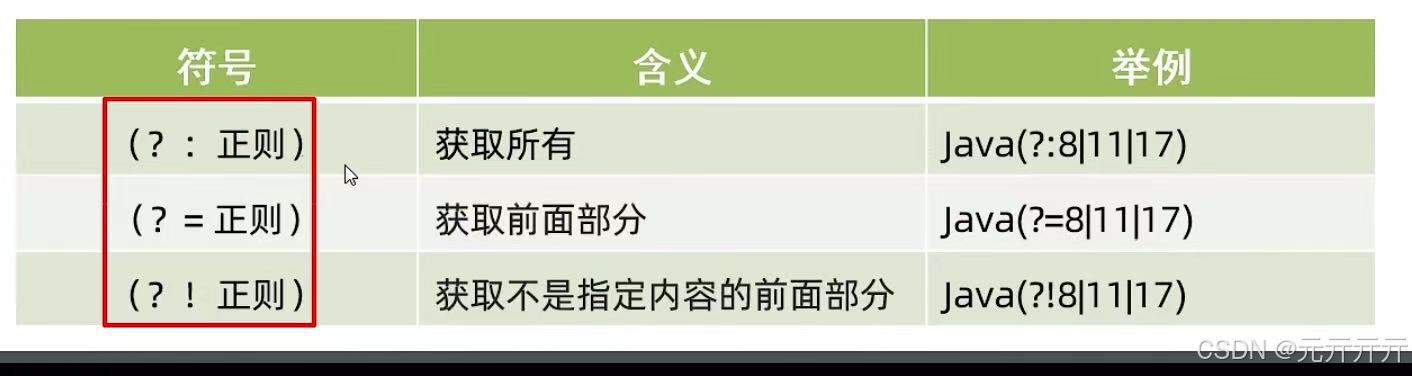
java后端开发day27--常用API(二)正则表达式爬虫
(以下内容全部来自上述课程) 1.正则表达式(regex) 可以校验字符串是否满足一定的规则,并用来校验数据格式的合法性。 1.作用 校验字符串是否满足规则在一段文本中查找满足要求的内容 2.内容定义 ps:一…...

Git安装与配置
安装部分: Windows:下载官网安装包,双击安装,路径选择(注意是否修改),安装选项(是否勾选某些选项,如提到安装时更换编辑器为Nano)。Linux:通过包管…...

数据库的char字段类型
MYSQL 一、char和varchar的区别 char是固定长度的,而varchar会根据具体的长度来使用存储空间,另外varchar需要用额外的1-2个字节存储字符串长度。 1). 当字符串长度小于255时,用额外的1个字节来记录长度 2). 当字符串长度大于255时ÿ…...

【TCP/IP协议栈】【传输层】端口号、套接字、多路复用/分解、网络字节序
参考资料: 前言: 总结: 【计算机网络】套接字(应用层和传输层之间的接口) 套接字是一个通用的通信接口抽象不仅限于TCP/IP协议族作为应用层和传输层之间的桥梁支持多种通信方式和协议族 套接字定义 在 TCP 或者 UDP…...

Spring Boot 常用注解全解析:从核心到进阶的实践指南
目录 引言:为什么注解是Spring Boot开发者的“战略武器”? 一、核心启动注解 1.1 应用启动三剑客 二、Web开发注解 2.1 控制器层注解 三、依赖注入注解 3.1 依赖管理矩阵 四、数据访问注解 4.1 JPA核心注解 五、配置管理注解 5.1 配置绑定注解…...
【漫话机器学习系列】120.参数化建模(Parametric Modeling)
参数化建模(Parametric Modeling)详解 1. 引言 在数据建模和机器学习中,参数化建模(Parametric Modeling)是一种广泛应用的建模方法。它通过假设一个函数形式来表达变量之间的关系,并估算该函数的参数&am…...

Web3 的未来:去中心化如何重塑互联网
Web3 的未来:去中心化如何重塑互联网 在这个信息爆炸的时代,我们正站在一个新的技术革命的门槛上——Web3。Web3 不仅仅是一个技术术语,它代表了一种全新的互联网理念,即去中心化。这种理念正在逐步改变我们对互联网的使用方式和…...

DApp开发从入门到精通:以太坊/Solana公链生态实战解析
在区块链技术的推动下,去中心化应用(DApp)逐渐摆脱传统中心化后台的依赖,转向以智能合约为核心的全合约化开发模式。这种模式通过区块链网络的分布式特性,实现了数据存储、业务逻辑与用户交互的完全去中心化。 一、全合…...
开展)
道可云人工智能每日资讯|《奇遇三星堆》VR沉浸探索展(淮安站)开展
道可云元宇宙每日简报(2025年3月5日)讯,今日元宇宙新鲜事有: 《奇遇三星堆》VR沉浸探索展(淮安站)开展 近日,《奇遇三星堆》VR沉浸探索展(淮安站)开展。该展将三星堆文…...

PHP Error处理指南
PHP Error处理指南 引言 在PHP开发过程中,错误处理是一个至关重要的环节。正确的错误处理不仅能够提高代码的健壮性,还能提升用户体验。本文将详细介绍PHP中常见的错误类型、错误处理机制以及最佳实践,帮助开发者更好地应对和处理PHP错误。 PHP错误类型 在PHP中,错误主…...

内核编程七:Linux 内核日志的级别
Linux 内核日志(Kernel Log)有 8 个不同的级别(Severity Levels),用于表示消息的严重性。它们的定义在 include/linux/kern_levels.h 头文件中,并且可以用于 printk() 进行日志打印。 内核日志级别 级别数…...

【计算机网络入门】TCP拥塞控制
目录 1. TCP拥塞控制和TCP流量控制的区别 2. 检测到拥塞该怎么办 2.1 如何判断网络拥塞? 3. 慢开始算法 拥塞避免算法 4.快重传事件->快恢复算法 5. 总结 1. TCP拥塞控制和TCP流量控制的区别 TCP流量控制是控制端对端的数据发送量。是局部的概念。 TCP拥…...

es如何进行refresh?
在 Elasticsearch 中,refresh 操作的作用是让最近写入的数据可以被搜索到。以下为你介绍几种常见的执行 refresh 操作的方式: 1. 使用 RESTful API 手动刷新 你可以通过向 Elasticsearch 发送 HTTP 请求来手动触发 refresh 操作。可以针对单个索引、多个索引或者所有索引进…...

学习日记-250305
阅读论文:Leveraging Pedagogical Theories to Understand Student Learning Process with Graph-based Reasonable Knowledge Tracing ps:代码逻辑最后一点还没理顺,明天继续 4.2 Knowledge Memory & Knowledge Tracing 代码研究: 一般…...

【Maven】入门介绍 与 安装、配置
文章目录 一、Maven简介1. Maven介绍2. Maven软件工作原理模型图 二、Maven安装和配置1. Maven安装2. Maven环境配置3. Maven功能配置4. IDEA配置本地Maven软件 一、Maven简介 1. Maven介绍 https://maven.apache.org/what-is-maven.html Maven 是一款为 Java 项目管理构建、…...

springbootWeb入门--创建springbootweb项目
步骤: 1.建立空工程 2.选择项目的jdk版本 3.在工程中建立模块,选择“spring initilazer”,类型勾选“maven” 4.勾选“spring web”之后,就无需再自行写dependcy了。 5.等待联网下载 6.生成的工程文件,如下绿色框中文件&…...
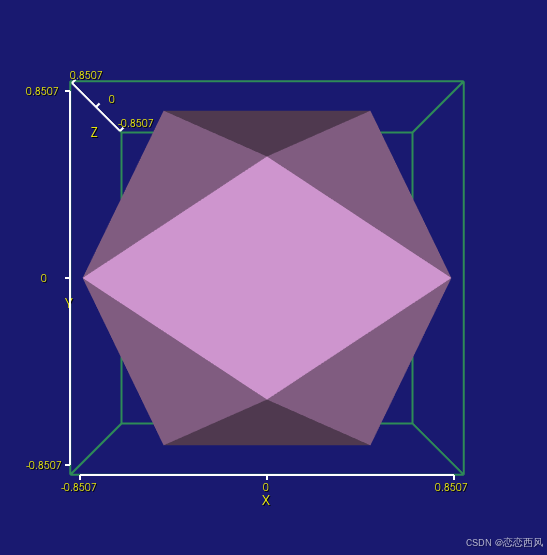
vtk 3D坐标标尺应用 3D 刻度尺
2d刻度尺 : vtk 2D 刻度尺 2D 比例尺-CSDN博客 简介: 3D 刻度尺,也是常用功能,功能强大 3D 刻度尺 CubeAxesActor vtkCubeAxes调整坐标轴的刻度、原点和显示效果,包括关闭小标尺、固定坐标轴原点,以及设置FlyMode模…...
)
爬虫(持续更新ing)
爬虫(持续更新ing) # 网络请求 # url统一资源定位符(如:https://www.baidu.com) # 请求过程:客户端的web浏览器向服务器发起请求 # 请求又分为四部分:请求网址,请求方法(…...
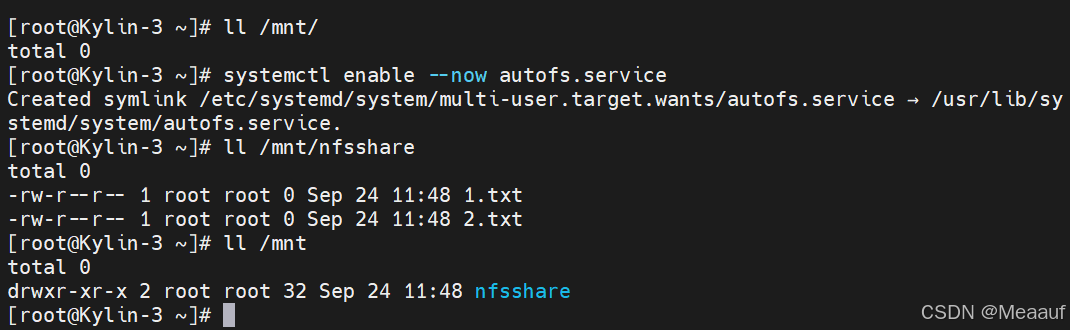
Kylin麒麟操作系统服务部署 | NFS服务部署
以下所使用的环境为: 虚拟化软件:VMware Workstation 17 Pro 麒麟系统版本:Kylin-Server-V10-SP3-2403-Release-20240426-x86_64 一、 NFS服务概述 NFS(Network File System),即网络文件系统。是一种使用于…...

如何配置虚拟机IP?
以下是在虚拟机中配置IP地址的一般步骤,以常见的Linux虚拟机为例: 查看当前网络配置 使用命令 ifconfig 或 ip addr show 查看当前虚拟机的网络接口及相关配置信息,确定要配置IP的网络接口名称,如 eth0 或 ens33 等。 编辑网…...

十一、Spring Boot:使用JWT实现用户认证深度解析
Spring Boot JWT(JSON Web Token):无状态认证 在现代 Web 开发中,无状态认证是一种重要的安全机制,它允许服务器在不存储会话信息的情况下验证用户身份。JSON Web Token(JWT)是一种常用的无状态…...

涨薪技术|持续集成Git使用详解
Git介绍 Git 是一个开源的分布式版本控制系统,用以有效、高速的处理从很小到非常大的项目版本管理。 Git 的特点: 分支更快、更容易。 支持离线工作;本地提交可以稍后提交到服务器上。 Git 提交都是原子的,且是整个项目范围的,…...

批量对 Word 优化与压缩,减少 Word 文件大小
在编辑 Word 文档的时候,我们通常会插入一些图片或者一些样式,这可能会导致 Word 文档的体积变得非常的庞大,不利于我们对 Word 文档进行分享、传输或者存档等操作,因此我们通常会碰到需要优化或者压缩 Word 文档的需求。那如何才…...

CSS定位详解上
1. 相对定位 1.1 如何设置相对定位? 给元素设置 position:relative 即可实现相对定位。 可以使用 left 、 right 、 top 、 bottom 四个属性调整位置。 1.2 相对定位的参考点在哪里? 相对自己原来的位置 1.3 相对定位的特点࿱…...

DeepSeek、Grok 和 ChatGPT 对比分析:从技术与应用场景的角度深入探讨
文章目录 一、DeepSeek:知识图谱与高效信息检索1. 核心技术2. 主要特点3. 应用场景4. 实际案例 二、Grok:通用人工智能框架1. 核心技术2. 主要特点3. 应用场景4. 实际案例 三、ChatGPT:聊天机器人与通用对话系统1. 核心技术2. 主要特点3. 应用…...

Unix Domain Socket和eventfd
在Linux开发中,Unix Domain Socket和eventfd是两种不同的通信机制,它们的设计目标和适用场景有显著差异。以下分点解释并配合示例说明: 一、Unix Domain Socket(UDS) 1. 是什么? 一种**本地进程间通信&am…...