
Java课程设计(双人对战游戏)持续更新......
少废话,当然借助了ai,就这么个实力,后续会逐渐完善......
考虑添加以下功能:
选将,选图,技能,天赋,道具,防反,反重力,物理反弹,击落,计分,粒子效果,打击感加强,陷阱,逃杀......
package game;import javax.swing.*;
import java.awt.*;
import java.awt.event.*;
import java.util.ArrayList;
import java.util.List;public class GameFrame extends JFrame {public GameFrame() {setTitle("平台射击对战");setSize(800, 600);setDefaultCloseOperation(JFrame.EXIT_ON_CLOSE);setLocationRelativeTo(null);add(new GamePanel());setVisible(true);}public static void main(String[] args) {SwingUtilities.invokeLater(() -> new GameFrame());}
}class GamePanel extends JPanel implements KeyListener, ActionListener {private Player p1, p2;private Timer timer;private boolean[] keys = new boolean[256];private boolean gameOver = false;private boolean gameStarted = false;private JButton startButton, restartButton, exitButton;private List<Platform> platforms = new ArrayList<>();private List<Bullet> bullets = new ArrayList<>();public GamePanel() {setLayout(null);setFocusable(true);addKeyListener(this);// 对称平台布局platforms.add(new Platform(150, 350, 200, 20));  // 左平台platforms.add(new Platform(300, 250, 200, 20));  // 中央平台platforms.add(new Platform(450, 350, 200, 20));  // 右平台startButton = createButton("开始游戏", 300, 250);restartButton = createButton("重新开始", 300, 300);exitButton = createButton("退出游戏", 300, 350);restartButton.setVisible(false);exitButton.setVisible(false);add(startButton);add(restartButton);add(exitButton);startButton.addActionListener(e -> startGame());restartButton.addActionListener(e -> restartGame());exitButton.addActionListener(e -> System.exit(0));}private JButton createButton(String text, int x, int y) {JButton button = new JButton(text);button.setBounds(x, y, 200, 40);button.setFocusable(false);button.setFont(new Font("微软雅黑", Font.BOLD, 18));button.setBackground(new Color(200, 200, 200));return button;}private void startGame() {gameStarted = true;gameOver = false;bullets.clear();startButton.setVisible(false);restartButton.setVisible(false);exitButton.setVisible(false);p1 = new Player(100, 400, Color.BLUE, KeyEvent.VK_A, KeyEvent.VK_D, KeyEvent.VK_W, KeyEvent.VK_F);p2 = new Player(600, 400, Color.RED, KeyEvent.VK_LEFT, KeyEvent.VK_RIGHT, KeyEvent.VK_UP, KeyEvent.VK_M);if (timer != null && timer.isRunning()) {timer.stop();}timer = new Timer(16, this);timer.start();requestFocusInWindow();}private void restartGame() {gameOver = false;gameStarted = false;startGame();}@Overrideprotected void paintComponent(Graphics g) {super.paintComponent(g);if (!gameStarted) {g.setColor(new Color(30, 30, 30));g.fillRect(0, 0, getWidth(), getHeight());g.setColor(Color.WHITE);g.setFont(new Font("微软雅黑", Font.BOLD, 48));g.drawString("平台射击对战", 250, 150);return;}Graphics2D g2d = (Graphics2D) g;g2d.setPaint(new GradientPaint(0, 0, new Color(30, 30, 50), 0, 600, new Color(10, 10, 20)));g2d.fillRect(0, 0, getWidth(), getHeight());g.setColor(new Color(80, 50, 30));g.fillRect(0, 450, getWidth(), 150);g.setColor(new Color(110, 70, 40));for(int i=0; i<getWidth(); i+=30){g.fillRect(i, 450, 15, 10);g.fillRect(i+15, 460, 15, 10);}for (Platform platform : platforms) {platform.draw(g);}p1.draw(g);p2.draw(g);for (Bullet bullet : bullets) {bullet.draw(g);}drawHealthBar(g, p1, 20, 20);drawHealthBar(g, p2, getWidth() - 220, 20);if (gameOver) {g.setColor(new Color(255, 255, 255, 200));g.fillRect(0, 0, getWidth(), getHeight());g.setColor(Color.BLACK);g.setFont(new Font("微软雅黑", Font.BOLD, 48));String winner = p1.getHealth() <= 0 ? "红方胜利!" : "蓝方胜利!";g.drawString(winner, getWidth()/2 - 120, getHeight()/2);restartButton.setVisible(true);exitButton.setVisible(true);}}private void drawHealthBar(Graphics g, Player p, int x, int y) {g.setColor(Color.BLACK);g.fillRect(x, y, 200, 25);g.setColor(p.getColor());g.fillRect(x + 2, y + 2, (int)(196 * (p.getHealth() / 100.0)), 21);}@Overridepublic void actionPerformed(ActionEvent e) {if (!gameOver && gameStarted) {handleInput();updatePlayers();updateBullets();checkCollisions();checkGameOver();}repaint();}private void handleInput() {p1.setMovingLeft(keys[p1.getLeftKey()]);p1.setMovingRight(keys[p1.getRightKey()]);if (keys[p1.getJumpKey()] && p1.isOnGround()) {p1.jump();}if (keys[p1.getAttackKey()] && p1.canAttack()) {bullets.add(p1.shoot());}p2.setMovingLeft(keys[p2.getLeftKey()]);p2.setMovingRight(keys[p2.getRightKey()]);if (keys[p2.getJumpKey()] && p2.isOnGround()) {p2.jump();}if (keys[p2.getAttackKey()] && p2.canAttack()) {bullets.add(p2.shoot());}}private void updatePlayers() {p1.update(getWidth(), platforms);p2.update(getWidth(), platforms);}private void updateBullets() {List<Bullet> toRemove = new ArrayList<>();for (Bullet bullet : bullets) {bullet.update();if (bullet.x < -10 || bullet.x > getWidth() + 10) {toRemove.add(bullet);}}bullets.removeAll(toRemove);}private void checkCollisions() {List<Bullet> toRemove = new ArrayList<>();for (Bullet bullet : bullets) {for (Platform platform : platforms) {if (bullet.hitsPlatform(platform)) {toRemove.add(bullet);break;}}Player target = bullet.shooter == p1 ? p2 : p1;if (bullet.hitsPlayer(target)) {target.takeDamage(10);toRemove.add(bullet);}}bullets.removeAll(toRemove);}private void checkGameOver() {if (p1.getHealth() <= 0 || p2.getHealth() <= 0) {gameOver = true;timer.stop();}}@Overridepublic void keyPressed(KeyEvent e) {if (e.getKeyCode() < keys.length) {keys[e.getKeyCode()] = true;}}@Overridepublic void keyReleased(KeyEvent e) {if (e.getKeyCode() < keys.length) {keys[e.getKeyCode()] = false;}}@Overridepublic void keyTyped(KeyEvent e) {}
}class Player {private static final int GRAVITY = 1;private static final int JUMP_FORCE = -15;private static final int ATTACK_COOLDOWN = 30;private static final int SPEED = 5;private static final int BULLET_SPEED = 10;private int x, y;private int width = 40, height = 80;private int dx, dy;private int health = 100;private Color color;private boolean onGround = false;private int attackTimer = 0;private boolean movingLeft = false;private boolean movingRight = false;private boolean facingRight = true;private int leftKey, rightKey, jumpKey, attackKey;public Player(int x, int y, Color color, int leftKey, int rightKey, int jumpKey, int attackKey) {this.x = x;this.y = y;this.color = color;this.leftKey = leftKey;this.rightKey = rightKey;this.jumpKey = jumpKey;this.attackKey = attackKey;}public void update(int screenWidth, List<Platform> platforms) {// 处理水平移动dx = 0;if (movingLeft) {dx -= SPEED;facingRight = false;}if (movingRight) {dx += SPEED;facingRight = true;}// 保存移动前的坐标int xPrev = x;x += dx;x = Math.max(0, Math.min(screenWidth - width, x));// 水平碰撞检测Rectangle playerRect = getCollisionBounds();for (Platform platform : platforms) {Rectangle platformRect = platform.getBounds();if (playerRect.intersects(platformRect)) {if (dx > 0) { // 向右移动碰撞x = platformRect.x - width;} else if (dx < 0) { // 向左移动碰撞x = platformRect.x + platformRect.width;}break;}}// 处理垂直移动dy += GRAVITY;int yPrev = y;y += dy;// 垂直碰撞检测boolean isFalling = dy > 0;onGround = false;if (isFalling) {// 下落碰撞检测int playerBottomAfter = y + height;int playerBottomBefore = yPrev + height;Platform landingPlatform = null;int highestPlatformY = Integer.MIN_VALUE;for (Platform platform : platforms) {Rectangle platformRect = platform.getBounds();int platformTop = platformRect.y;int platformBottom = platformTop + platformRect.height;boolean xOverlap = (x < platformRect.x + platformRect.width) &&(x + width > platformRect.x);if (xOverlap &&playerBottomBefore <= platformTop &&playerBottomAfter >= platformTop) {if (platformTop > highestPlatformY) {highestPlatformY = platformTop;landingPlatform = platform;}}}if (landingPlatform != null) {y = landingPlatform.getY() - height;dy = 0;onGround = true;} else {// 检查地面碰撞if (playerBottomAfter >= 450) {y = 450 - height;dy = 0;onGround = true;}}} else if (dy < 0) {// 上升碰撞检测(头部碰撞)int playerTopAfter = y;int playerTopBefore = yPrev;Platform headPlatform = null;int lowestPlatformBottom = Integer.MAX_VALUE;for (Platform platform : platforms) {Rectangle platformRect = platform.getBounds();int platformBottom = platformRect.y + platformRect.height;boolean xOverlap = (x < platformRect.x + platformRect.width) &&(x + width > platformRect.x);if (xOverlap &&playerTopBefore >= platformBottom &&playerTopAfter <= platformBottom) {if (platformBottom < lowestPlatformBottom) {lowestPlatformBottom = platformBottom;headPlatform = platform;}}}if (headPlatform != null) {y = headPlatform.getY() + headPlatform.getHeight();dy = 0;}}// 更新攻击计时器if (attackTimer > 0) {attackTimer--;}}public Bullet shoot() {attackTimer = ATTACK_COOLDOWN;int bulletX = facingRight ? x + width : x - 10;int bulletY = y + height/2 - Bullet.SIZE/2;return new Bullet(bulletX, bulletY, facingRight ? BULLET_SPEED : -BULLET_SPEED, this);}public void jump() {if (onGround) {dy = JUMP_FORCE;onGround = false;}}public void takeDamage(int damage) {health = Math.max(0, health - damage);}public void draw(Graphics g) {g.setColor(color);g.fillRect(x, y, width, height);}public Rectangle getCollisionBounds() {return new Rectangle(x + 5, y + 10, width - 10, height - 20);}public int getX() { return x; }public int getY() { return y; }public int getHealth() { return health; }public Color getColor() { return color; }public boolean isOnGround() { return onGround; }public void setMovingLeft(boolean moving) { movingLeft = moving; }public void setMovingRight(boolean moving) { movingRight = moving; }public boolean canAttack() { return attackTimer <= 0; }public int getLeftKey() { return leftKey; }public int getRightKey() { return rightKey; }public int getJumpKey() { return jumpKey; }public int getAttackKey() { return attackKey; }
}class Bullet {int x, y;int speed;Player shooter;static final int SIZE = 10;public Bullet(int x, int y, int speed, Player shooter) {this.x = x;this.y = y;this.speed = speed;this.shooter = shooter;}public void update() {x += speed;}public void draw(Graphics g) {g.setColor(Color.YELLOW);g.fillOval(x, y, SIZE, SIZE);}public boolean hitsPlayer(Player player) {Rectangle bulletRect = new Rectangle(x, y, SIZE, SIZE);return bulletRect.intersects(player.getCollisionBounds());}public boolean hitsPlatform(Platform platform) {Rectangle bulletRect = new Rectangle(x, y, SIZE, SIZE);return bulletRect.intersects(platform.getBounds());}
}class Platform {private int x, y, width, height;public Platform(int x, int y, int width, int height) {this.x = x;this.y = y;this.width = width;this.height = height;}public void draw(Graphics g) {g.setColor(new Color(100, 100, 100));g.fillRect(x, y, width, height);g.setColor(new Color(120, 120, 120));g.fillRect(x, y, width, 3);g.fillRect(x, y + height - 3, width, 3);}public Rectangle getBounds() {return new Rectangle(x, y, width, height);}public int getY() { return y; }public int getHeight() { return height; }
}
相关文章:
持续更新......)
Java课程设计(双人对战游戏)持续更新......
少废话,当然借助了ai,就这么个实力,后续会逐渐完善...... 考虑添加以下功能: 选将,选图,技能,天赋,道具,防反,反重力,物理反弹,击落…...

Windows 安装多用户和其它一些问题 VMware Onedrive打不开
以下以win10家庭版为例,win11、专业版类似。 Onedrive相关问题参看我的其他文章: Windows如何同时登录两个OneDrive个人版账号_onedrive登录两个账号-CSDN博客 win10 win11 设置文件权限以解决Onedrive不能同步问题_onedrive没有同步权限-CSDN博客 O…...

深入解析:MySQL 中 NULL 值是否占用 1 bit 存储空间?
在 MySQL 的存储机制中,关于 NULL 值是否占用 1 bit 的存储空间,存在一个常见的理解误区。许多人认为“每个 NULL 值占用 1 bit”,但这并不完全准确。本文将通过 InnoDB 引擎的存储原理,详细解释 NULL 值的实际存储开销,并澄清这一误解。 一、核心结论 允许为 NULL 的列会…...

java基础自用笔记:异常、泛型、集合框架(List、Set、Map)、Stream流
异常 异常体系 编译时异常代表程序觉得你可能会出错。 运行时异常代表已经出错 异常基本处理 异常的作用 可以在可能出现的异常的地方用返回异常来代替return,这样提醒程序出现异常简洁清晰 自定义异常 最好用运行时异常,不会像编译时异常那样烦人&a…...

深度学习中常见的专业术语汇总
本硕博都是搞机械的匠人,当然也想做一下交叉学科的东西,蹭一下人工智能的热点。虽然世界是个草台班子,但是来都来了,咱也要把这场戏演好。 记得之前网上爆料有位大学生发了很多水文,对,是交叉学科的&#x…...

Python Cookbook-4.14 反转字典
任务 给定一个字典,此字典将不同的键映射到不同的值。而你想创建一个反转的字典,将各个值反映射到键。 解决方案 可以创建一个函数,此函数传递一个列表推导作为dict的参数以创建需要的字典。 def invert_dict(d):return dict([(v,k) for …...

第六届 蓝桥杯 嵌入式 省赛
参考 第六届蓝桥杯嵌入式省赛程序设计题解析(基于HAL库)_蓝桥杯嵌入式第六届真题-CSDN博客 一、分析功能 RTC 定时 1)时间初始化 2)定时上报电压时间 ADC测量 采集电位器的输出电压信号。 串行功能 1)传送要设置…...

爱普生FC-135晶振5G手机的极端温度性能守护者
在5G时代,智能手机不仅需要高速率与低延迟,更需在严寒、酷暑、振动等复杂环境中保持稳定运行。作为 5G 手机的核心时钟源,爱普生32.768kHz晶振FC-135凭借其宽温适应性、高精度稳定性与微型化设计,成为5G手机核心时钟源的理想选择&…...

C# StreamReader/StreamWriter 使用详解
总目录 前言 在 C# 开发中,StreamReader 和 StreamWriter 是处理文本文件的核心类,属于 System.IO 命名空间。它们基于流(Stream)操作文本数据,支持读写、编码设置、异步操作等,适用于日志记录、配置文件处…...

如何备份你的 Postman 所有 Collection?
团队合作需要、备份,还是迁移到其他平台,我们都需要在 Postman 中将这些珍贵的集合数据导出。 如何从 Postman 中导出所有集合(Collection)教程...
 窗口函数)
SQL IF(xxx, 1, 0) 窗口函数
IF(xxx, 1, 0)是SQL中的条件表达式函数,它的工作原理如下: 功能:如果条件xxx为真(TRUE),则返回1;如果条件xxx为假(FALSE),则返回0 参数: 第一个参数(xxx):要评估的条件表达式 第二…...

【Qt】三种操作sqlite3的方式及其三种多表连接
一、sqlite3与MySQL数据库区别: 1. 数据库类型 SQLite3:是嵌入式数据库,它将整个数据库存储在单个文件中,不需要独立的服务器进程。这意味着它可以很方便地集成到各种应用程序中,如移动应用、桌面应用等。MySQL&…...

MinGW下编译ffmpeg源码时生成compile_commands.json
在前面的博文MinGW下编译nginx源码中,有介绍到使用compiledb工具在MinGW环境中生成compile_commands.json,以为compiledb是捕获的make时的输出,而nginx生成时控制台是有输出编译时的命令行信息的,笔者之前编译过ffmpeg的源码&…...

【数据结构】树与森林
目录 树的存储方法 双亲表示法 孩子表示法 孩子兄弟表示法 树、森林与二叉树的转换 树转换成二叉树 森林转换成二叉树 二叉树转换成森林 树与森林的遍历 树的遍历 森林的遍历 树的存储方法 双亲表示法 这种存储结构采用一组连续空间来存储每个结点,同时…...

跟着StatQuest学知识08-RNN与LSTM
一、RNN (一)简介 整个过程权重和偏置共享。 (二)梯度爆炸问题 在这个例子中w2大于1,会出现梯度爆炸问题。 当我们循环的次数越来越多的时候,这个巨大的数字会进入某些梯度,步长就会大幅增加&…...

【SpringCloud】Eureka的使用
3. Eureka 3.1 Eureka 介绍 Eureka主要分为两个部分: EurekaServer: 作为注册中心Server端,向微服务应用程序提供服务注册,发现,健康检查等能力。 EurekaClient: 服务提供者,服务启动时,会向 EurekaS…...

nuxt3 seo优化
在 Nuxt3 中,通过 nuxtjs/seo、nuxtjs/sitemap 和 nuxtjs/robots 模块可以生成包含动态链接的站点地图(sitemap.xml),但具体是“实时生成”还是“部署时生成”,取决于你的配置方式和数据更新频率。以下是具体分析&…...

初识MySQL · 数据类型
目录 前言: 数值类型 文本、二进制数据类型 时间类型 String类型 前言: 对于MySQL来说,是一门编程语言,可能定义不是那么的严格,但是对于MySQL来说也是拥有自己的数据类型的,比如tinyint,…...

【Go】数组
数组Array 重点: 数组是值类型 注意点: 1. 数组:是同一种数据类型的固定长度的序列。2. 数组定义:var a [len]int,比如:var a [5]int,数组长度必须是常量,且是类型的组成部分。一旦定义&…...

QT图片轮播器(QT实操学习2)
1.项目架构 1.UI界面 2.widget.h #ifndef WIDGET_H #define WIDGET_H#include <QWidget>#define TIMEOUT 1 * 1000 QT_BEGIN_NAMESPACE namespace Ui { class Widget; } QT_END_NAMESPACEclass Widget : public QWidget {Q_OBJECTpublic:Widget(QWidget *parent n…...

深度解析衡石科技HENGSHI SENSE嵌入式分析能力:如何实现3天快速集成
嵌入式分析成为现代SaaS的核心竞争力 在当今SaaS市场竞争中,数据分析能力已成为产品差异化的关键因素。根据Bessemer Venture Partners的最新调研,拥有深度嵌入式分析功能的SaaS产品,其客户留存率比行业平均水平高出23%,ARR增长速…...
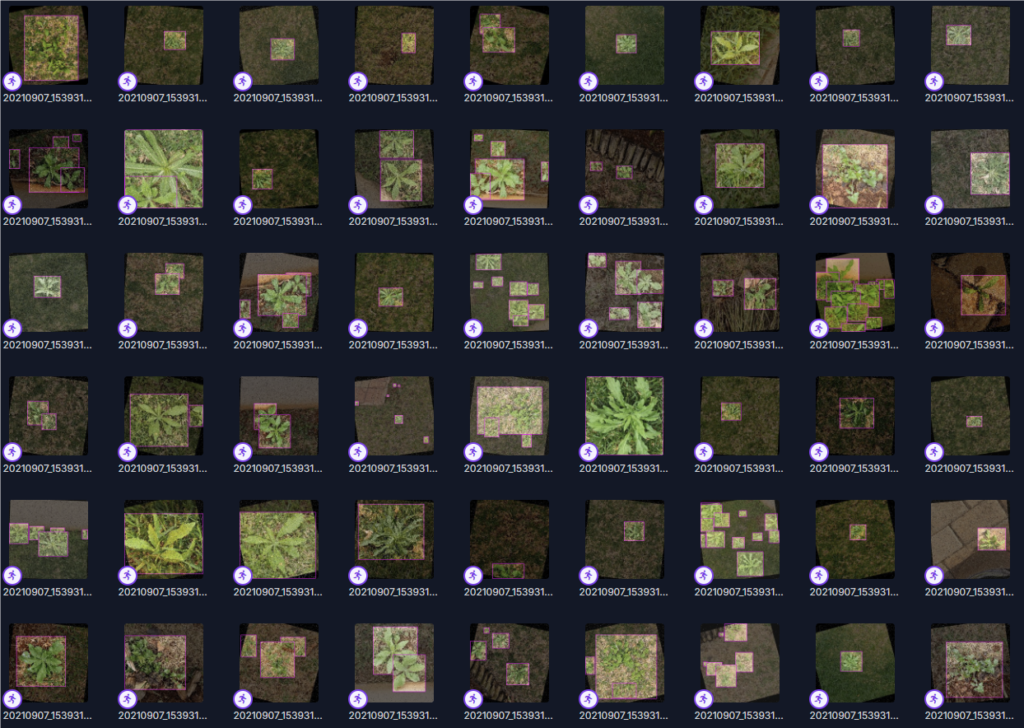
杂草YOLO系列数据集4000张
一份开源数据集——杂草YOLO数据集,该数据集适用于农业智能化、植物识别等计算机视觉应用场景。 数据集详情 训练集:3,664张高清标注图像测试集:180张多样性场景样本验证集:359张严格筛选数据 下载链接 杂草YOLO数据集分…...

Mybatis_Plus中常用的IService方法
查询 方法名 查询记录总数 /*** 查询总记录数** see Wrappers#emptyWrapper()*/default long count() {return count(Wrappers.emptyWrapper());} 方法实现 Testpublic void testGetCount(){long count userService.count();System.out.println("总记录数:&…...

Flink/Kafka在python中的用处
一、基础概念 1. Apache Kafka 是什么? 核心功能:Kafka 是一个分布式流处理平台,主要用于构建实时数据管道和流式应用程序。核心概念: 生产者(Producer):向 Kafka 发送数据的程序。…...

Vue 2 探秘:visible 和 append-to-body 是谁的小秘密?
🚀 Vue 2 探秘:visible 和 append-to-body 是谁的小秘密?🤔 父组件:identify-list.vue子组件:fake-clue-list.vue 嘿,各位前端探险家!👋 今天我们要在 Vue 2 的代码丛林…...

机器学习的一百个概念(1)单位归一化
前言 本文隶属于专栏《机器学习的一百个概念》,该专栏为笔者原创,引用请注明来源,不足和错误之处请在评论区帮忙指出,谢谢! 本专栏目录结构和参考文献请见[《机器学习的一百个概念》 ima 知识库 知识库广场搜索&…...

SpringCould微服务架构之Docker(5)
Docker的基本操作: 镜像相关命令: 1.镜像名称一般分两部分组成:[repository]:[tag]。 2. 在没有指定tag时,默认是latest,代表着最新版本的镜像。 镜像命令的案例: 镜像操作常用的命令: dock…...

JVM 如何打破双亲委派模型?
虽然双亲委派模型是 Java 类加载机制的推荐实现方式,但在某些情况下,为了实现特定的功能,可能需要打破双亲委派模型。以下是一些常见的打破双亲委派模型的方法和场景: 1. 重写 loadClass 方法 (不推荐): 原理: java.l…...

DeepSeek结合MCP Server与Cursor,实现服务器资源的自动化管理
MCP Server是最近AI圈子中又一个新的热门话题。很多用户都通过结合大语言模型、MCP Server,实现了一些工具流的自动化,例如,你只需要给出文字指令,就可以让Blender自动化完成建模的工作。你有没有想过,利用MCP来让AI A…...

SpringAI与JBoltAI深度对比:从工具集到企业级AI开发范式的跃迁
一、Java生态下大模型开发的困境与需求 技术公司的能力断层 多数企业缺乏将Java与大模型结合的标准开发范式,停留在碎片化工具使用阶段。 大模型应用需要全生命周期管理能力,而不仅仅是API调用。 工具集的局限性 SpringAI作为工具集的定位࿱…...