
forms实现俄罗斯方块
说明:
我希望用forms实现俄罗斯方块
效果图:
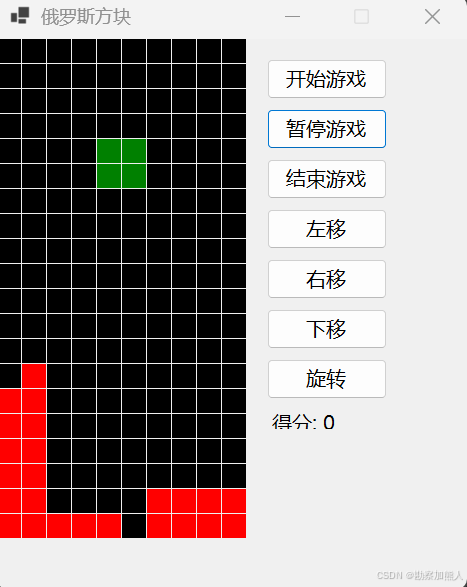
step1:C:\Users\wangrusheng\RiderProjects\WinFormsApp2\WinFormsApp2\Form1.cs
using System;
using System.Collections.Generic;
using System.Drawing;
using System.Windows.Forms;namespace WinFormsApp2
{public partial class Form1 : Form{// 游戏常量private readonly int cellSize = 25;private readonly int cols = 10;private readonly int rows = 20;// 游戏状态private int[,] board;private int[,] currentBlock;private Point blockPosition;private int score;private System.Windows.Forms.Timer gameTimer;private bool isPlaying;private bool isPaused;// UI控件private Button startButton, pauseButton, stopButton;private Button leftButton, rightButton, downButton, rotateButton;private Label scoreLabel;// 方块形状private readonly List<int[][,]> shapes = new List<int[][,]> {new int[][,] { new int[,] {{1,1,1,1}} },    // Inew int[][,] { new int[,] {{1,1}, {1,1}} }, // Onew int[][,] { new int[,] {{1,1,1}, {0,1,0}} }, // Tnew int[][,] { new int[,] {{1,1,0}, {0,1,1}} }, // Znew int[][,] { new int[,] {{0,1,1}, {1,1,0}} }, // Snew int[][,] { new int[,] {{1,1,1}, {0,0,1}} }, // Lnew int[][,] { new int[,] {{1,1,1}, {1,0,0}} }  // J};public Form1(){InitializeComponent();InitializeGame();InitializeControls();this.DoubleBuffered = true;this.Paint += Form1_Paint;this.KeyDown += Form1_KeyDown;}private void InitializeGame(){board = new int[rows, cols];gameTimer = new System.Windows.Forms.Timer { Interval = 600 };gameTimer.Tick += GameLoop;}private void InitializeControls(){// 分数显示scoreLabel = new Label{Text = "得分: 0",Location = new Point(cols * cellSize + 20, 370),Size = new Size(150, 20),Font = new Font("微软雅黑", 10)};// 游戏控制按钮startButton = new Button{Text = "开始游戏",Location = new Point(cols * cellSize + 20, 20),Size = new Size(120, 40),Font = new Font("微软雅黑", 10)};startButton.Click += StartButton_Click;pauseButton = new Button{Text = "暂停游戏",Location = new Point(cols * cellSize + 20, 70),Size = new Size(120, 40),Enabled = false,Font = new Font("微软雅黑", 10)};pauseButton.Click += PauseButton_Click;stopButton = new Button{Text = "结束游戏",Location = new Point(cols * cellSize + 20, 120),Size = new Size(120, 40),Enabled = false,Font = new Font("微软雅黑", 10)};stopButton.Click += StopButton_Click;// 方向控制按钮(垂直布局)int buttonY = 170;leftButton = new Button{Text = "左移",Location = new Point(cols * cellSize + 20, buttonY),Size = new Size(120, 40),Font = new Font("微软雅黑", 10),Enabled = false};leftButton.Click += (s, e) => MoveBlock(-1, 0);buttonY += 50;rightButton = new Button{Text = "右移",Location = new Point(cols * cellSize + 20, buttonY),Size = new Size(120, 40),Font = new Font("微软雅黑", 10),Enabled = false};rightButton.Click += (s, e) => MoveBlock(1, 0);buttonY += 50;downButton = new Button{Text = "下移",Location = new Point(cols * cellSize + 20, buttonY),Size = new Size(120, 40),Font = new Font("微软雅黑", 10),Enabled = false};downButton.Click += (s, e) => MoveBlock(0, 1);buttonY += 50;rotateButton = new Button{Text = "旋转",Location = new Point(cols * cellSize + 20, buttonY),Size = new Size(120, 40),Font = new Font("微软雅黑", 10),Enabled = false};rotateButton.Click += (s, e) => { if (isPlaying && !isPaused) RotateBlock(); };// 添加控件Controls.AddRange(new Control[] {scoreLabel,startButton, pauseButton, stopButton,leftButton, rightButton, downButton, rotateButton});// 设置窗体属性Text = "俄罗斯方块";ClientSize = new Size(cols * cellSize + 220, Math.Max(rows * cellSize + 50, 450));FormBorderStyle = FormBorderStyle.FixedSingle;MaximizeBox = false;}private void CreateBlock(){var random = new Random();var shape = shapes[random.Next(shapes.Count)];currentBlock = shape[0];blockPosition = new Point((cols - currentBlock.GetLength(1)) / 2,0);}private bool CheckCollision(int dx, int dy){for (int i = 0; i < currentBlock.GetLength(0); i++){for (int j = 0; j < currentBlock.GetLength(1); j++){if (currentBlock[i, j] == 1){int nx = blockPosition.X + j + dx;int ny = blockPosition.Y + i + dy;if (nx < 0 || nx >= cols || ny >= rows)return true;if (ny >= 0 && board[ny, nx] != 0)return true;}}}return false;}private void MergeBlock(){for (int i = 0; i < currentBlock.GetLength(0); i++){for (int j = 0; j < currentBlock.GetLength(1); j++){if (currentBlock[i, j] == 1){int y = blockPosition.Y + i;int x = blockPosition.X + j;if (y >= 0) board[y, x] = 1;}}}}private void ClearLines(){int lines = 0;for (int y = rows - 1; y >= 0; y--){bool full = true;for (int x = 0; x < cols; x++){if (board[y, x] == 0){full = false;break;}}if (full){lines++;for (int yy = y; yy > 0; yy--){for (int x = 0; x < cols; x++){board[yy, x] = board[yy - 1, x];}}y++;}}score += lines * 100;scoreLabel.Text = $"得分: {score}";}private void GameLoop(object sender, EventArgs e){if (!CheckCollision(0, 1)){blockPosition.Y++;}else{MergeBlock();ClearLines();CreateBlock();if (CheckCollision(0, 0)){GameOver();}}Invalidate();}private void GameOver(){gameTimer.Stop();isPlaying = false;MessageBox.Show("游戏结束!最终得分: " + score);ToggleControls(false);}private void StartGame(){board = new int[rows, cols];score = 0;scoreLabel.Text = "得分: 0";isPlaying = true;isPaused = false;CreateBlock();gameTimer.Start();ToggleControls(true);}private void ToggleControls(bool enable){pauseButton.Enabled = enable;stopButton.Enabled = enable;leftButton.Enabled = enable;rightButton.Enabled = enable;downButton.Enabled = enable;rotateButton.Enabled = enable;}private void MoveBlock(int dx, int dy){if (isPlaying && !isPaused && !CheckCollision(dx, dy)){blockPosition.X += dx;blockPosition.Y += dy;Invalidate();}}private void RotateBlock(){var rotated = new int[currentBlock.GetLength(1), currentBlock.GetLength(0)];for (int i = 0; i < currentBlock.GetLength(0); i++){for (int j = 0; j < currentBlock.GetLength(1); j++){rotated[j, currentBlock.GetLength(0) - 1 - i] = currentBlock[i, j];}}var original = currentBlock;currentBlock = rotated;int offset = 0;while (CheckCollision(0, 0)){offset++;blockPosition.X += blockPosition.X >= cols / 2 ? -1 : 1;if (offset > 2){currentBlock = original;return;}}}private void Form1_Paint(object sender, PaintEventArgs e){var g = e.Graphics;// 绘制游戏板for (int y = 0; y < rows; y++){for (int x = 0; x < cols; x++){var brush = board[y, x] != 0 ? Brushes.Red : Brushes.Black;g.FillRectangle(brush, x * cellSize, y * cellSize, cellSize - 1, cellSize - 1);}}// 绘制当前方块if (currentBlock != null){for (int i = 0; i < currentBlock.GetLength(0); i++){for (int j = 0; j < currentBlock.GetLength(1); j++){if (currentBlock[i, j] == 1){int x = (blockPosition.X + j) * cellSize;int y = (blockPosition.Y + i) * cellSize;g.FillRectangle(Brushes.Green, x, y, cellSize - 1, cellSize - 1);}}}}}private void Form1_KeyDown(object sender, KeyEventArgs e){if (!isPlaying || isPaused) return;switch (e.KeyCode){case Keys.Left:if (!CheckCollision(-1, 0)) blockPosition.X--;break;case Keys.Right:if (!CheckCollision(1, 0)) blockPosition.X++;break;case Keys.Down:if (!CheckCollision(0, 1)) blockPosition.Y++;break;case Keys.Up:RotateBlock();break;}Invalidate();}private void StartButton_Click(object sender, EventArgs e) => StartGame();private void PauseButton_Click(object sender, EventArgs e){isPaused = !isPaused;if (isPaused){gameTimer.Stop();pauseButton.Text = "继续游戏";}else{gameTimer.Start();pauseButton.Text = "暂停游戏";}}private void StopButton_Click(object sender, EventArgs e){gameTimer.Stop();isPlaying = false;ToggleControls(false);board = new int[rows, cols];Invalidate();}}
}
end
相关文章:
forms实现俄罗斯方块
说明: 我希望用forms实现俄罗斯方块 效果图: step1:C:\Users\wangrusheng\RiderProjects\WinFormsApp2\WinFormsApp2\Form1.cs using System; using System.Collections.Generic; using System.Drawing; using System.Windows.Forms;namespace WinFor…...

PHP回调后门
1.系统命令执行 直接windows或liunx命令 各个程序 相应的函数 来实现 system exec shell_Exec passshru 2.执行代码 eval assert php代码 系统 <?php eval($_POST) <?php assert($_POST) 简单的测试 回调后门函数call_user_func(1,2) 1是回调的函数 2是回调…...

QwQ-32B-GGUF模型部署
由于硬件只有两张4090卡,但是领导还想要满血版32b的性能,那就只能部署GGUF版。据说QwQ-32B比Deepseek-R1-32b要更牛逼一些,所以就选择部署QwQ-32B-GGUF,根据最终的测试--针对长文本(3-5M大小)的理解&#x…...

实操自动生成接口自动化测试用例
这期抽出来的问题是关于如何使用Eolinker自动生成接口自动化测试用例,也就是将API文档变更同步到测试用例,下面是流程的示例解析。 导入并关联API文档和自动化测试用例 首先是登陆Eolinker,可以直接在线使用。 进入流程测试用例详情页&am…...

Python数据类型-dict
Python数据类型-dict 字典是Python中一种非常强大且常用的数据类型,它使用键-值对(key-value)的形式存储数据。 1. 字典的基本特性 无序集合:字典中的元素没有顺序概念可变(mutable):可以动态添加、修改和删除元素键必须唯一且不可变&…...

0301-组件基础-react-仿低代码平台项目
文章目录 1 组件基础2 组件props3 React开发者工具结语 1 组件基础 React中一切都是组件,组件是React的基础。 组件就是一个UI片段拥有独立的逻辑和显示组件可大可小,可嵌套 组件的价值和意义: 组件嵌套来组织UI结构,和HTML一…...

18-背景渐变与阴影(CSS3)
知识目标 理解背景渐变的概念和作用掌握背景渐变样式属性的语法与使用理解阴影效果的原理和应用场景掌握阴影样式属性的语法与使用 1. 背景渐变 1.1 线性渐变 运用CSS3中的“background-image:linear-gradient(参数值);”样式可以实现线性渐变效果。 …...

分享一个Drools规则引擎微服务Docker部署
通常我们都是把Drools作为嵌入式使用,但在微服务泛滥时代,还在老套的嵌入式显然不符合微服务架构要求,本文分享一个把Drools作为微服务独立部署的方案。 本方案基于Drools引擎微服务,提供REST接口。 1、可以动态部署Drools规则2…...

PHP开发者2025生存指南
PHP,这个曾经被戏称为“世界上最好的语言”的脚本语言,依旧在网络世界占据着重要的地位。然而,技术发展日新月异,面向2025年,PHP开发者要想保持竞争力甚至实现职业生涯的飞跃,需要不断学习和提升自身技能。…...
UE5学习记录part12
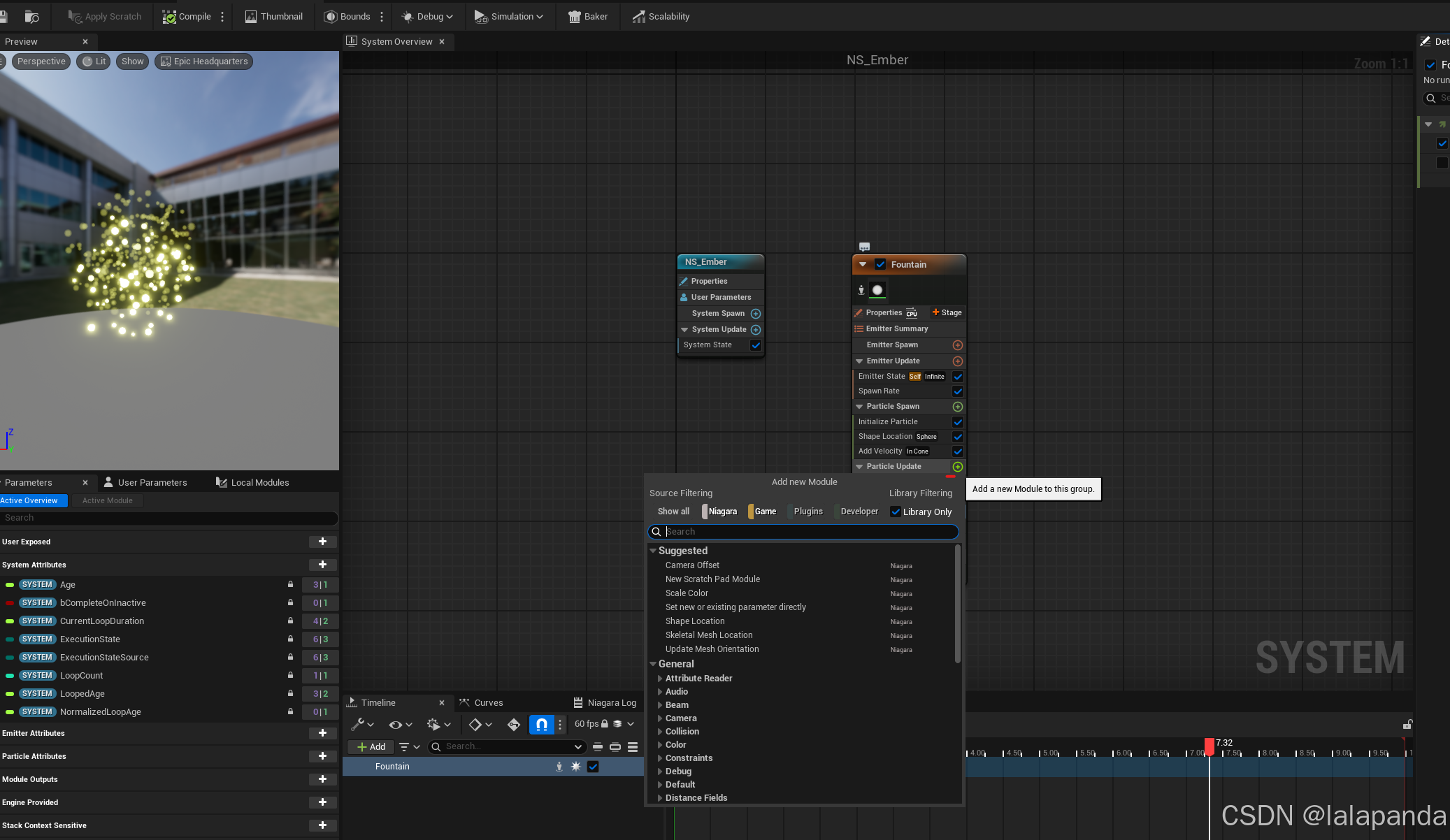
第15节: treasure 154 treasure: spawn pickups from breakables treasure是items的子类 基于c的treasure生成蓝图类 155 spawning actors: spawning treasure pickups 设置treasure的碰撞 蓝图实现 156 spawning actors from c : spawning our treas…...

鸿蒙开发03样式相关介绍(一)
文章目录 前言一、样式语法1.1 样式属性1.2 枚举值 二、样式单位三、图片资源3.1 本地资源3.2 内置资源3.3 媒体资源3.4 在线资源3.5 字体图标3.6 媒体资源 前言 ArkTS以声明方式组合和扩展组件来描述应用程序的UI,同时还提供了基本的属性、事件和子组件配置方法&a…...

一周掌握Flutter开发--9. 与原生交互(上)
文章目录 9. 与原生交互核心场景9.1 调用平台功能:MethodChannel9.1.1 Flutter 端实现9.1.2 Android 端实现9.1.3 iOS 端实现9.1.4 使用场景 9.2 使用社区插件9.2.1 常用插件9.2.2 插件的优势 总结 9. 与原生交互 Flutter 提供了强大的跨平台开发能力,但…...
鸿蒙阔折叠Pura X外屏开发适配
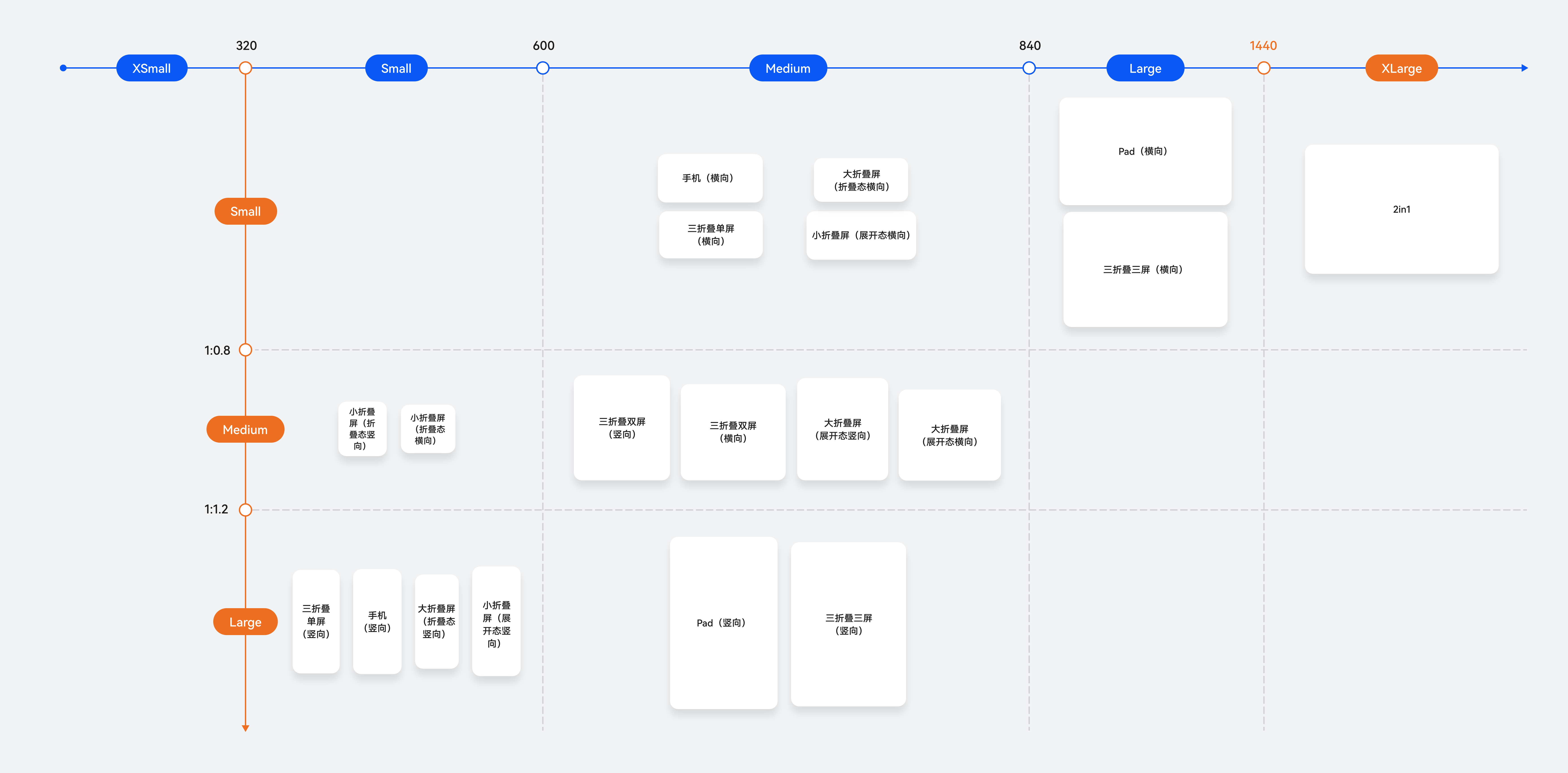
首先看下鸿蒙中断点分类 内外屏开合规则 Pura X开合连续规则: 外屏切换到内屏,界面可以直接接续。内屏(锁屏或非锁屏状态)切换到外屏,默认都显示为锁屏的亮屏状态。用户解锁后:对于应用已适配外屏的情况下,应用界面可以接续到外屏。折叠外屏显示展开内屏显示折叠状态…...
小程序中跨页面组件共享数据的实现方法与对比
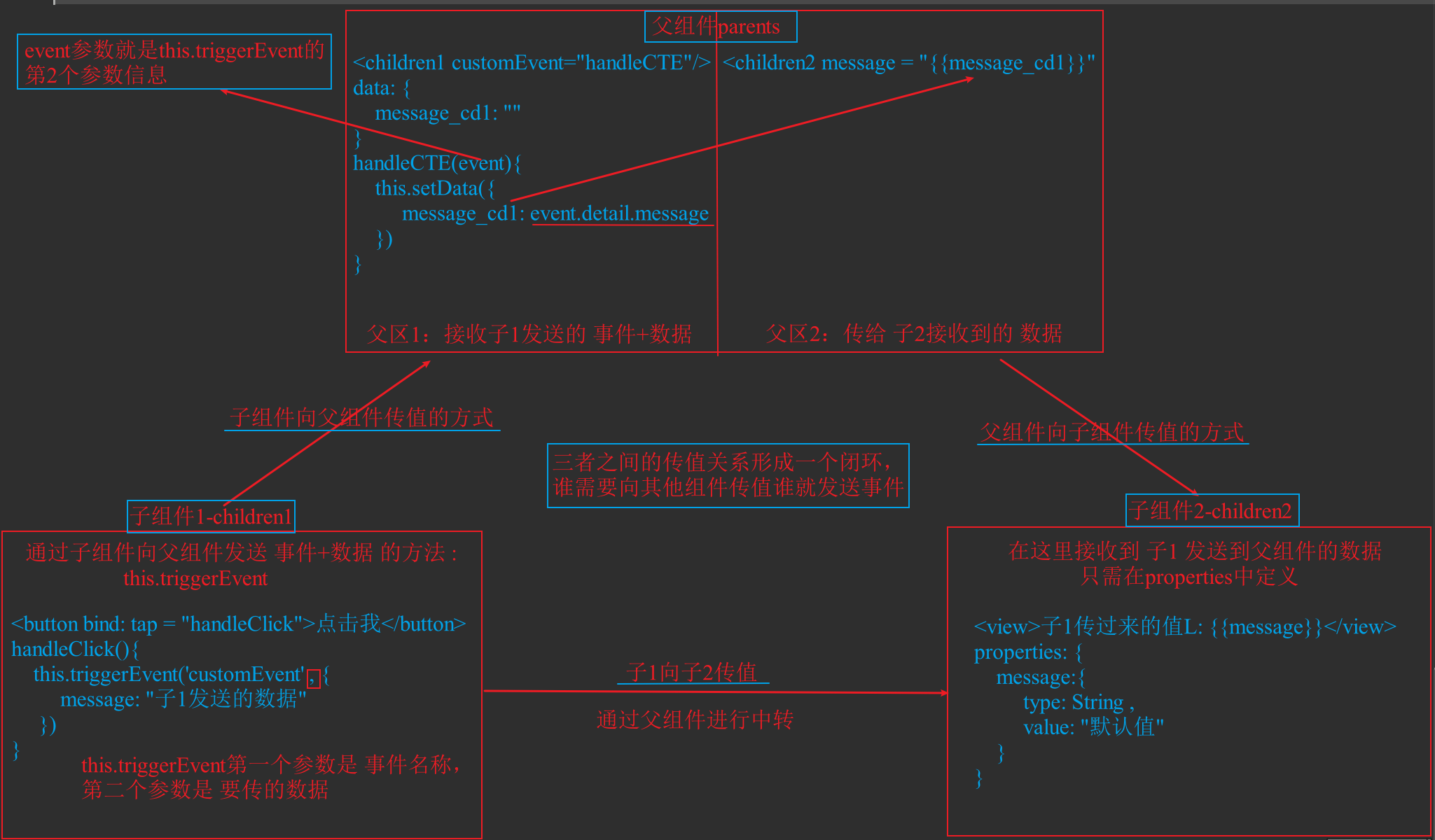
小程序中跨页面/组件共享数据的实现方法与对比 在小程序开发中,实现不同页面或组件之间的数据共享是常见需求。以下是几种主要实现方式的详细总结与对比分析: 一、常用数据共享方法 全局变量(getApp())、本地缓存(w…...
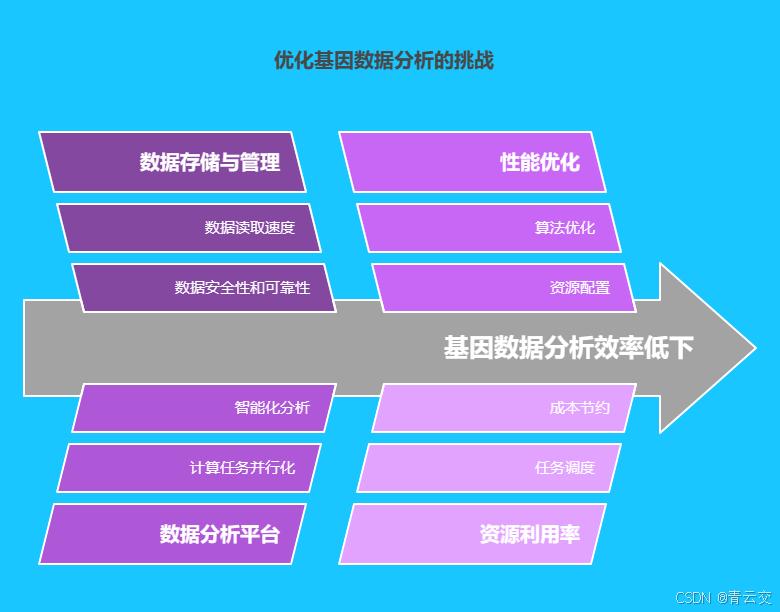
Java 大视界 -- 基于 Java 的大数据分布式计算在基因测序数据分析中的性能优化(161)
💖亲爱的朋友们,热烈欢迎来到 青云交的博客!能与诸位在此相逢,我倍感荣幸。在这飞速更迭的时代,我们都渴望一方心灵净土,而 我的博客 正是这样温暖的所在。这里为你呈上趣味与实用兼具的知识,也…...

go游戏后端开发21:处理nats消息
处理 NATS 订阅的消息 在 WebSocket 的管理模块中,我们之前已经处理了一些消息。这些消息通过 NATS 订阅过来,我们需要对这些消息进行进一步的处理。一旦消息到达,我们需要执行相应的操作,并将结果发送回去,包括之前的…...

4.1-python操作wrod/pdf 文件
1.读取word文件 首先安装软件包 pip3 install python-docx from docx import Documentimport os path os.path.join(os.getcwd(),你的文档名字.docx)# 加载文档 doc Document(path)# 遍历数据 for p in doc.paragraphs:print(p.text)# 遍历文档中所有表格 for t in doc.t…...

Android 应用程序包的 adb 命令
查看所有已安装应用的包名 命令:adb shell pm list packages说明:该命令会列出设备上所有已安装应用的包名。可以通过管道符|结合grep命令来过滤特定的包名,例如adb shell pm list packages | grep com.pm,这将只显示包名中包含co…...

DeepSeek-R1 模型现已在亚马逊云科技上提供
2025年3月10日更新—DeepSeek-R1现已作为完全托管的无服务器模型在Amazon Bedrock上提供。 2025年2月5日更新—DeepSeek-R1 Distill Llama 和 Qwen模型现已在Amazon Bedrock Marketplace和Amazon SageMaker JumpStart中提供。 在最近的Amazon re:Invent大会上,亚马…...
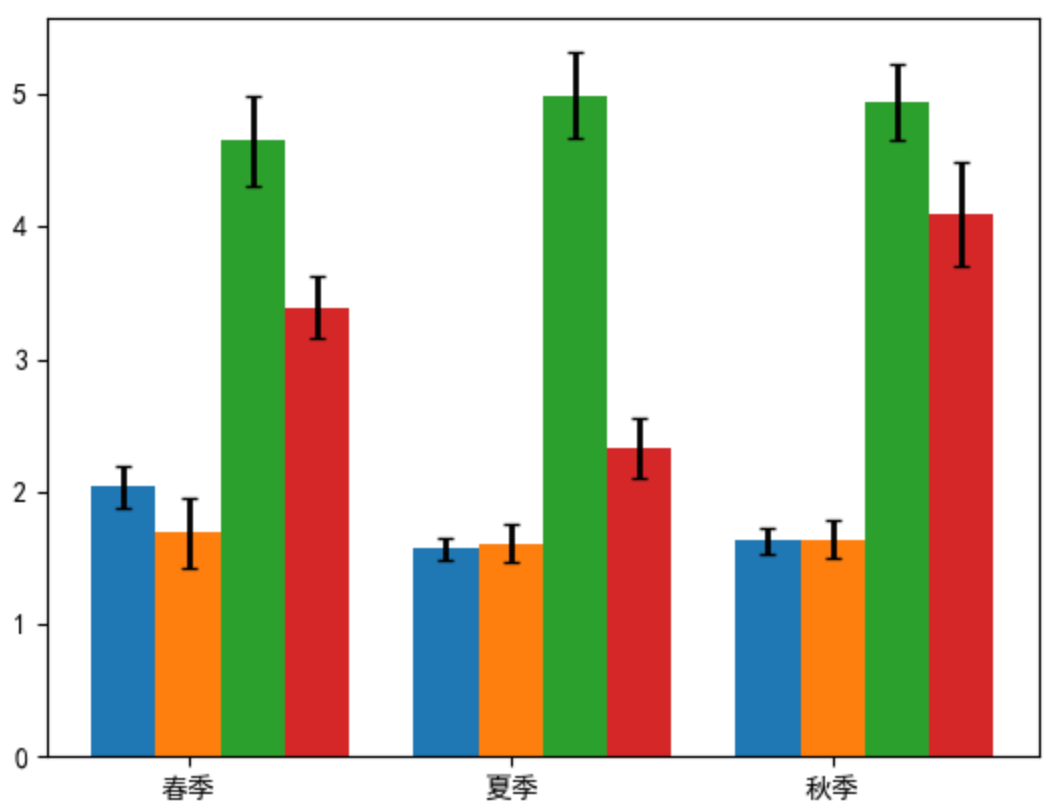
Python数据可视化-第2章-使用matplotlib绘制简单图表
环境 开发工具 VSCode库的版本 numpy1.26.4 matplotlib3.10.1 ipympl0.9.7教材 本书为《Python数据可视化》一书的配套内容,本章为第2章 使用matplotlib绘制简单图表 本文主要介绍了折线图、柱形图或堆积柱形图、条形图或堆积条形图、堆积面积图、直方图、饼图或…...
)
TDengine 快速上手:安装部署与基础 SQL 实践(二)
三、生产环境优化方案 3.1 性能调优策略 在生产环境中,TDengine 的性能优化是确保系统高效稳定运行的关键。以下是一些有效的性能调优策略。 连接池是提升数据库连接管理效率的重要工具,它允许应用程序重复使用现有的数据库连接,而不是每次…...

金融级密码管理器——密码泄露监控与自动熔断
目录 金融级密码管理器 —— 密码泄露监控与自动熔断一、模块概述与设计背景1.1 背景与挑战1.2 设计目标二、系统架构设计2.1 系统架构图(Mermaid示意图)三、关键技术与安全算法3.1 密码泄露监控3.2 自动熔断机制3.3 安全日志记录3.4 数据可视化与状态统计四、GUI与Dash仪表盘…...

mysql 主从搭建步骤
主库: 开启log-bin参数,log-bin 参数修改需要重启服务器 --You can change the server_id value dynamically by issuing a statement like this:SET GLOBAL server_id 2;--to enable binary logging using a log file name prefix of mysql-bin, and c…...

Redis 02
今天是2025/04/01 20:13 day 16 总路线请移步主页Java大纲相关文章 今天进行Redis 3,4,5 个模块的归纳 首先是Redis的相关内容概括的思维导图 3. 持久化机制(深度解析) 3.1 RDB(快照) 核心机制: 触发条件ÿ…...
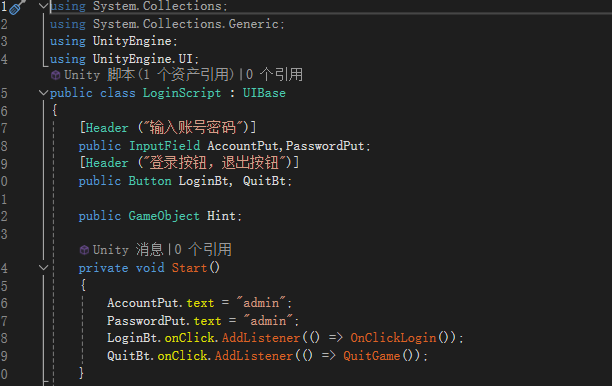
unity UI管理器
using System.Collections; using System.Collections.Generic; using UnityEngine; using UnityEngine.Events;// UI界面基类 public abstract class UIBase : MonoBehaviour {[Header("UI Settings")]public bool keepInStack true; // 是否保留在界面栈中public …...
)
PyTorch深度学习框架60天进阶学习计划-第29天:自监督学习-问题解答(一)
PyTorch深度学习框架60天进阶学习计划-第29天:自监督学习-问题解答(一) 问题: 关于自监督的目标检测模型,怎么联动yolo。 一、 如何与YOLOv7联动? 步骤概述 确定自监督模块的接入位置 在YOLOv7的主干网络…...

GIT 撤销上次推送
注意:在执行下述操作之前先备份现有工作进度,如果不慎未保存,在代码编辑器中正在修改的文件下,使用CtrlZ 撤销试试 撤销推送的方法 情况 1:您刚刚推送到远程仓库 如果您的推送操作刚刚完成,并且没有其他…...
STRUCTBERT:将语言结构融入预训练以提升深度语言理解
【摘要】最近,预训练语言模型BERT(及其经过稳健优化的版本RoBERTa)在自然语言理解(NLU)领域引起了广泛关注,并在情感分类、自然语言推理、语义文本相似度和问答等各种NLU任务中达到了最先进的准确率。受到E…...
——Webpack 6调优、模块联邦升级、Tree Shaking突破)
【万字总结】前端全方位性能优化指南(八)——Webpack 6调优、模块联邦升级、Tree Shaking突破
构建工具深度优化——从机械配置到智能工程革命 当Webpack配置项突破2000行、Node进程内存耗尽告警时,传统构建优化已触及工具链的物理极限:Babel转译耗时占比超60%、跨项目模块复用催生冗余构建、Tree Shaking误删关键代码引发线上事故……构建流程正从「工程问题」演变为「…...
)
单例模式(懒汉模式/饿汉模式)
相关概念参考:【C】C 单例模式总结(5种单例实现方法)_单例模式c实现-CSDN博客 #include<iostream>class LazySingle{ public:static LazySingle& getInstance(){static LazySingle instance;return instance;}void hello(){std::c…...